charging TOYOTA RAV4 EV 2013 1.G Repair Manual
[x] Cancel search | Manufacturer: TOYOTA, Model Year: 2013, Model line: RAV4 EV, Model: TOYOTA RAV4 EV 2013 1.GPages: 520, PDF Size: 7.4 MB
Page 204 of 520
204 2-1. Driving procedures
■If the EV system does not start
●The immobilizer system may not have been deactivated. ( P. 149)
Contact your Toyota dealer.
● The charging cable may be connected to the vehicle. ( P. 82)
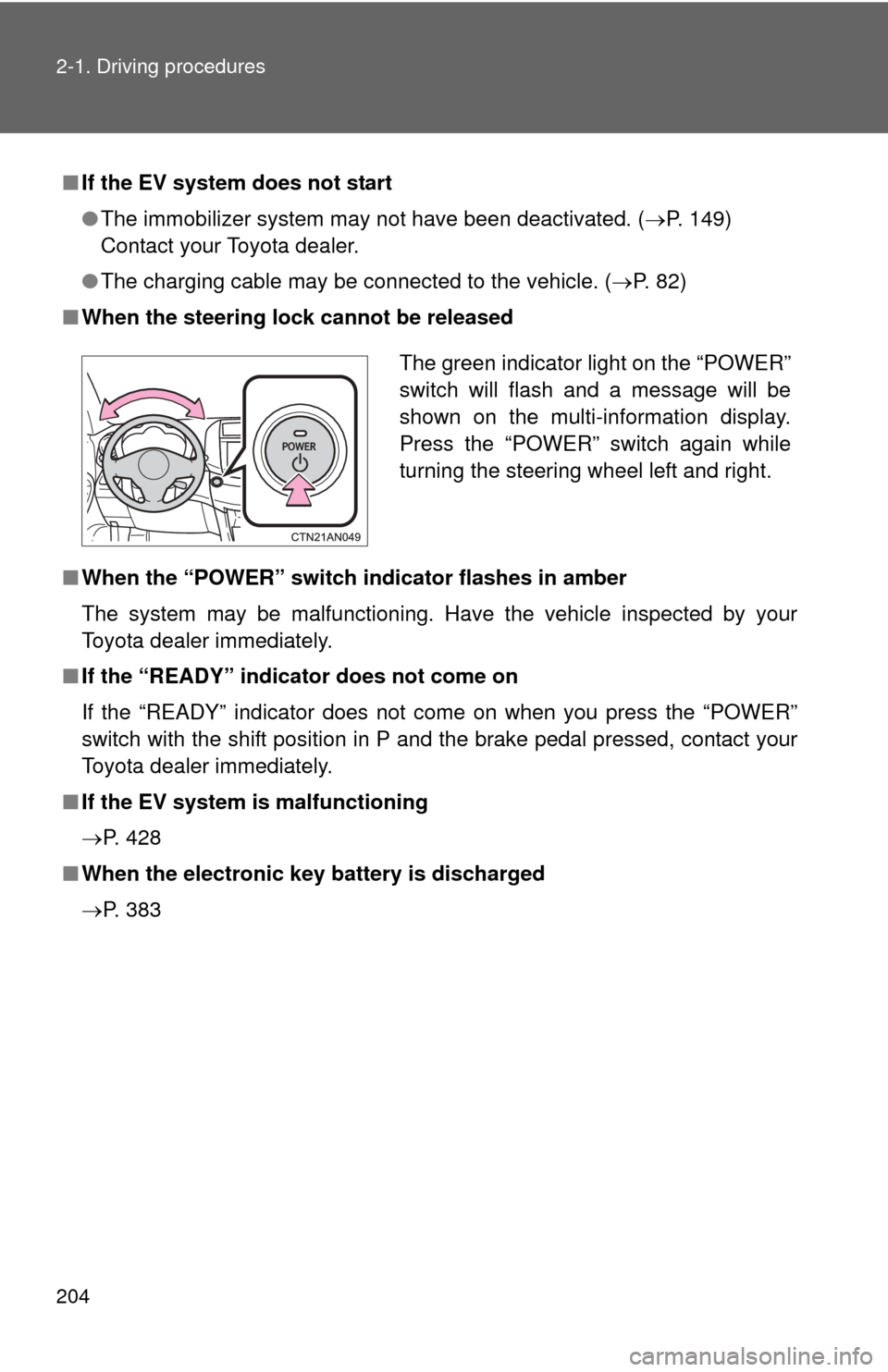
■ When the steering lock cannot be released
■ When the “POWER” switch in dicator flashes in amber
The system may be malfunctioning. Have the vehicle inspected by your
Toyota dealer immediately.
■ If the “READY” indicator does not come on
If the “READY” indicator does not come on when you press the “POWER”
switch with the shift position in P and the brake pedal pressed, contact your
Toyota dealer immediately.
■ If the EV system is malfunctioning
P. 428
■ When the electronic key battery is discharged
P. 383
The green indicator light on the “POWER”
switch will flash and a message will be
shown on the multi-information display.
Press the “POWER” switch again while
turning the steering wheel left and right.
Page 210 of 520

210 2-1. Driving procedures
■For the shift positions
●When the “POWER” switch is off, the shift position cannot be changed.
● When the “POWER” switch is in ON mode (the EV system is not operat-
ing), the shift position can only be changed to N. The shift position will be
changed to N even if the shift lever is shifted to D or R and held in that
position.
● When the “READY” indicator is on, the shift position can be changed
from P to D, N or R.
● When the “READY” indicator is flashing, the shift position cannot be
changed from P to another position even if the shift lever is operated.
Wait until the “READY” indicator changes from a flashing to a solid light,
and then operate the shift lever again.
● The shift position can only be changed to B directly from D.
In addition, if the shift position is changed in any of the following situations,
the buzzer will sound and the shifting operation will be disabled or the shift
position will automatically change to N. When this happens, select an appro-
priate shift position.
● Situations where the shifting operation will be disabled:
• When the shift position is changed from P to another position while the
charging cable is connected to the vehicle.
• When the shift position is changed from P to another position without depressing the brake pedal.
• When the shift position is changed from P or N to B.
● Situations where the shift position will automatically change to N:
• When the P position switch is pressed while the vehicle is running.
*1
• When shift position R is selected when the vehicle is moving forward.*2
• When shift position D is selected when the vehicle is moving in
reverse.
*3
• When the shift position is changed from R to B.
*1: Shift position may be changed to P when driving at extremely lowspeeds.
*2: Shift position may be changed to R when driving at low speeds.
*3: Shift position may be changed to D when driving at low speeds.
Page 213 of 520

213
2-1. Driving procedures
2
When driving
*: Follow the warning message displayed.
AlarmSituationCorrection procedure
Interior alarm sounds once The driver attempts to shift
to the B position while in
the P or N position.
The transmission will
not move out of the P or
N position. Select the
appropriate position.
The driver attempts to shift
from P position to another
position during charging. The transmission will
not move out of the P
position. Disconnect
the charging cable,
start the EV system,
and shift again.
Interior alarm beep sounds and warning message
*
If the driver’s door is
opened while the transmis-
sion is in N, D or B. Push the P position
switch.
Page 221 of 520
221
2-2. Instrument cluster
2
When driving
■
The meters and display illuminate when
The “POWER” switch is in ON mode.
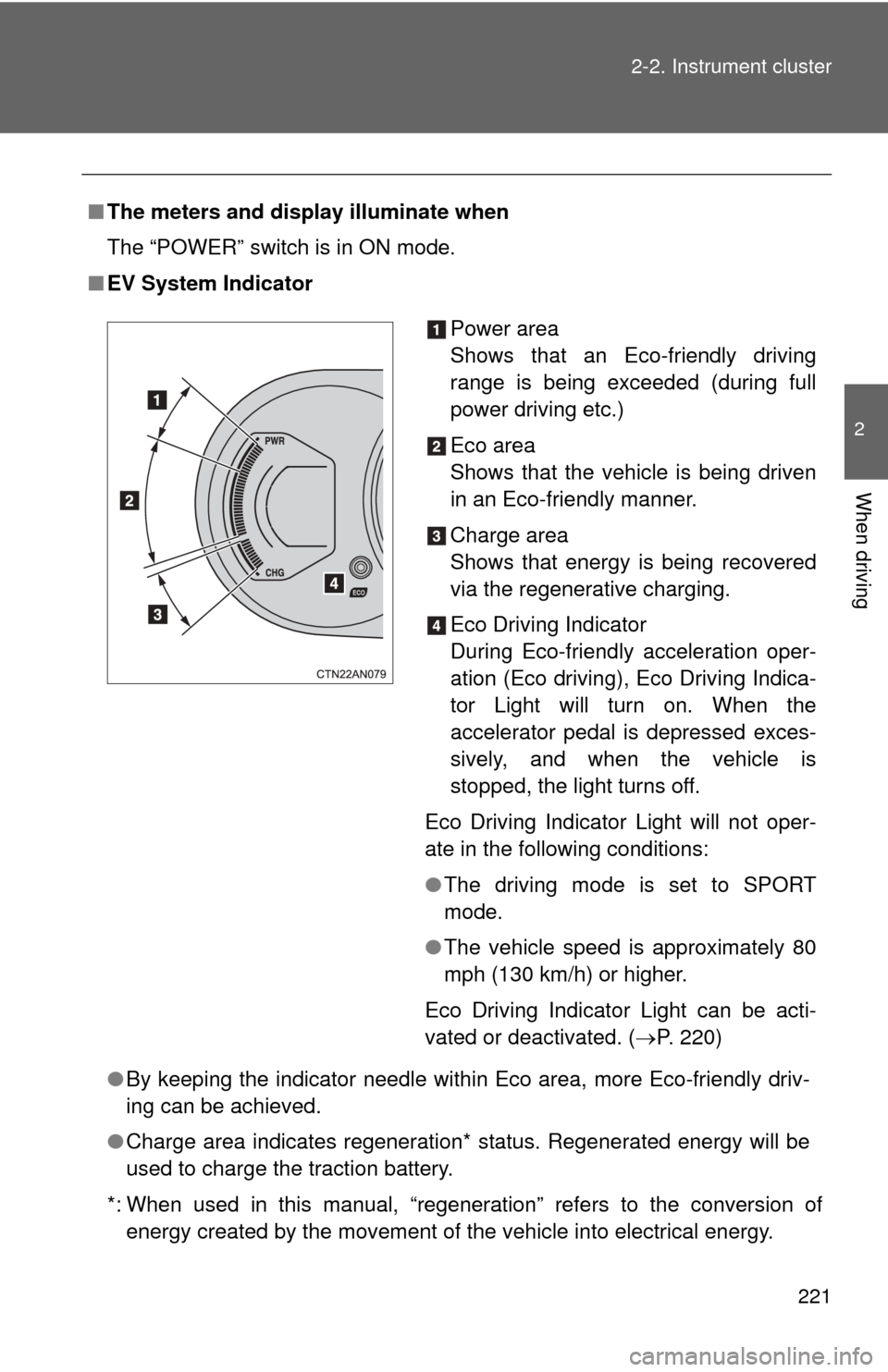
■ EV System Indicator
●By keeping the indicator needle within Eco area, more Eco-friendly driv-
ing can be achieved.
● Charge area indicates regeneration* status. Regenerated energy will be
used to charge the traction battery.
*: When used in this manual, “regeneration” refers to the conversion of energy created by the movement of the vehicle into electrical energy.
Power area
Shows that an Eco-friendly driving
range is being exceeded (during full
power driving etc.)
Eco area
Shows that the vehicle is being driven
in an Eco-friendly manner.
Charge area
Shows that energy is being recovered
via the regenerative charging.
Eco Driving Indicator
During Eco-friendly acceleration oper-
ation (Eco driving), Eco Driving Indica-
tor Light will turn on. When the
accelerator pedal is depressed exces-
sively, and when the vehicle is
stopped, the light turns off.
Eco Driving Indicator Light will not oper-
ate in the following conditions:
● The driving mode is set to SPORT
mode.
● The vehicle speed is approximately 80
mph (130 km/h) or higher.
Eco Driving Indicator Light can be acti-
vated or deactivated. ( P. 220)
Page 225 of 520
225
2-2. Instrument cluster
2
When driving
■
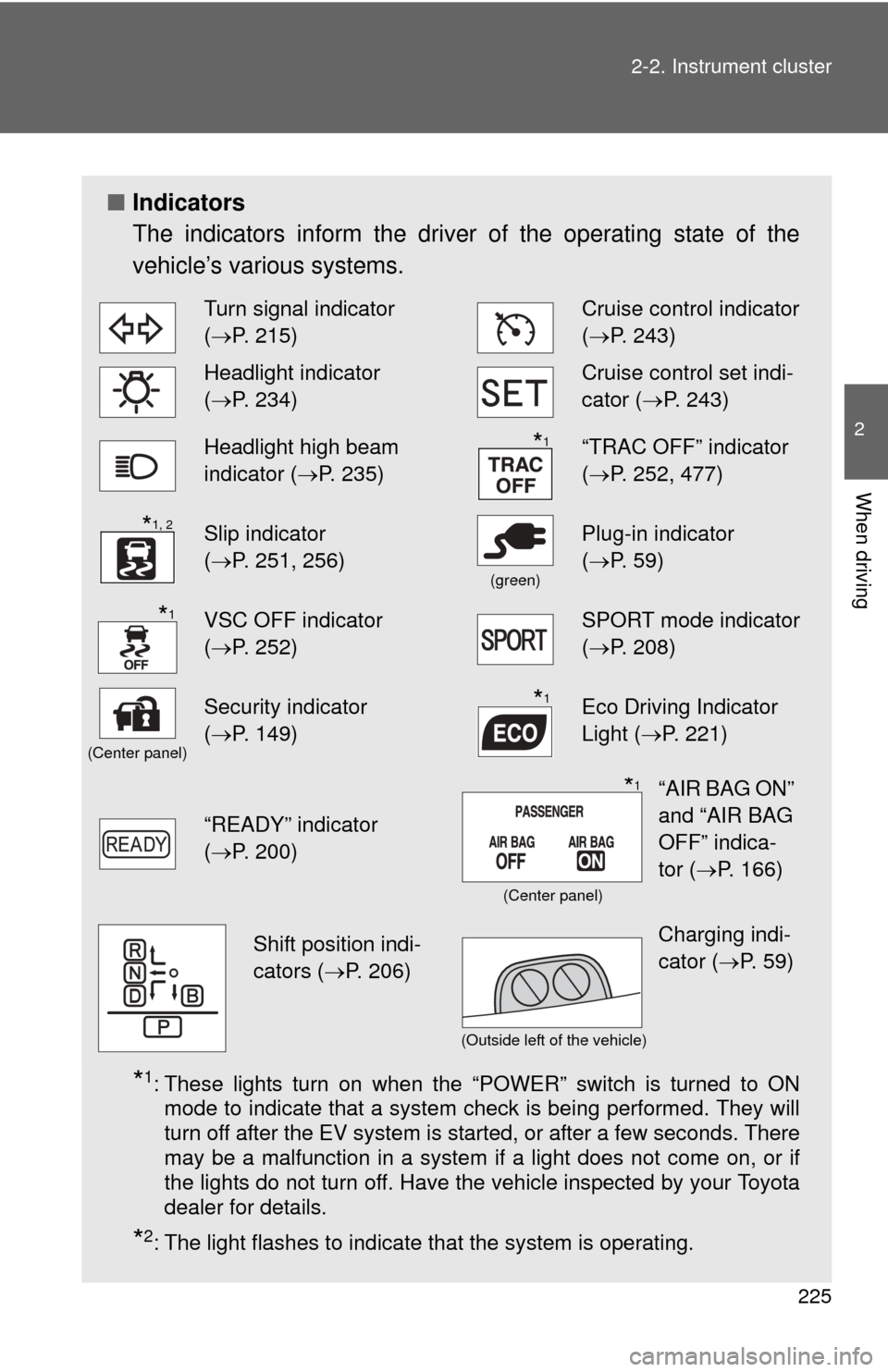
Indicators
The indicators inform the driver of the operating state of the
vehicle’s various systems.
*1: These lights turn on when the “POWER” switch is turned to ON
mode to indicate that a system check is being performed. They will
turn off after the EV system is started, or after a few seconds. There
may be a malfunction in a system if a light does not come on, or if
the lights do not turn off. Have the vehicle inspected by your Toyota
dealer for details.
*2: The light flashes to indicate that the system is operating.
Turn signal indicator
(P. 215)Cruise control indicator
( P. 243)
Headlight indicator
(P. 234)Cruise control set indi-
cator (P. 243)
Headlight high beam
indicator ( P. 235)“TRAC OFF” indicator
(P. 252, 477)
Slip indicator
(P. 251, 256)
(green)
Plug-in indicator
( P. 59)
VSC OFF indicator
(P. 252)SPORT mode indicator
( P. 208)
(Center panel)
Security indicator
(P. 149)Eco Driving Indicator
Light ( P. 221)
“READY” indicator
(P. 200)
*1
*1, 2
*1
*1
“AIR BAG ON”
and “AIR BAG
OFF” indica-
tor ( P. 166)*1
(Center panel)
Shift position indi-
cators ( P. 206)Charging indi-
cator (P. 59)
(Outside left of the vehicle)
Page 229 of 520
229
2-2. Instrument cluster
2
When driving
Trip information
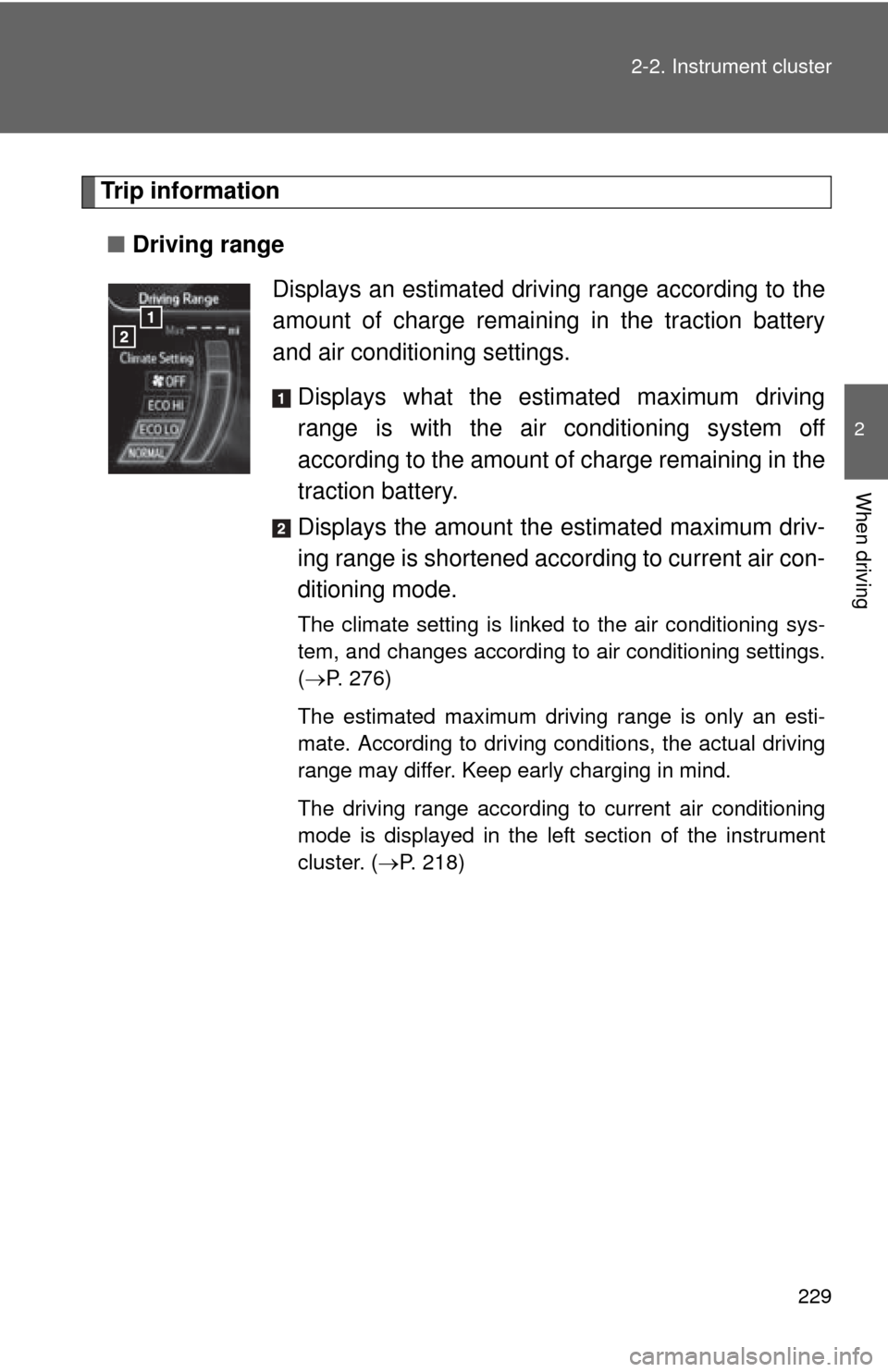
■ Driving range
Displays an estimated driving range according to the
amount of charge remaining in the traction battery
and air conditioning settings.Displays what the estimated maximum driving
range is with the air conditioning system off
according to the amount of charge remaining in the
traction battery.
Displays the amount the estimated maximum driv-
ing range is shortened acco rding to current air con-
ditioning mode.
The climate setting is linked to the air conditioning sys-
tem, and changes according to air conditioning settings.
( P. 276)
The estimated maximum driving range is only an esti-
mate. According to driving conditions, the actual driving
range may differ. Keep early charging in mind.
The driving range according to current air conditioning
mode is displayed in the left section of the instrument
cluster. ( P. 218)
Page 231 of 520
231
2-2. Instrument cluster
2
When driving
■
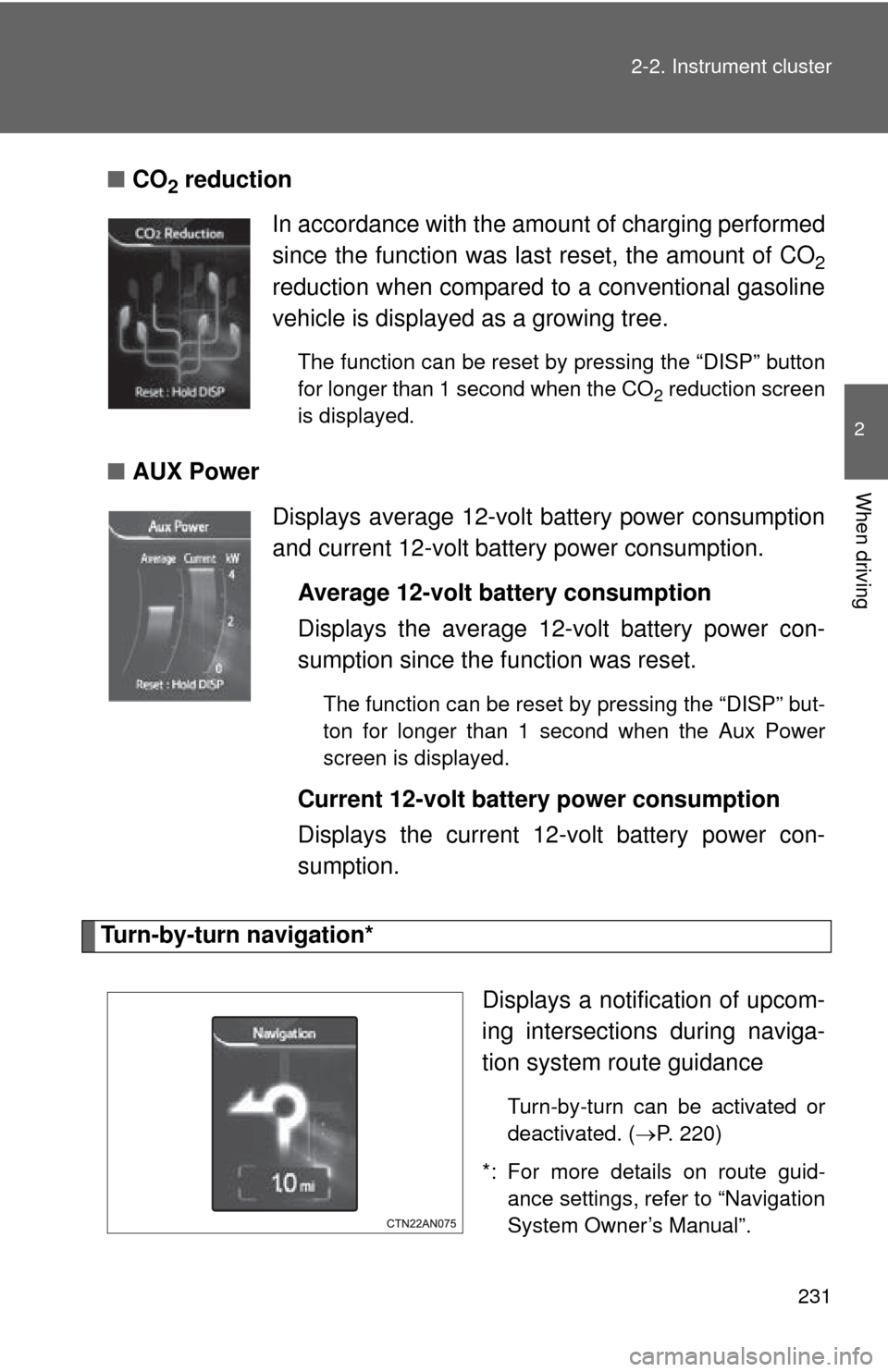
CO2 reduction
■ AUX Power
Turn-by-turn navigation*
Displays a notification of upcom-
ing intersections during naviga-
tion system route guidance
Turn-by-turn can be activated or
deactivated. (P. 220)
*: For more details on route guid- ance settings, refer to “Navigation
System Owner’s Manual”.
In accordance with the amount of charging performed
since the function was last reset, the amount of CO
2
reduction when compared to a conventional gasoline
vehicle is displayed as a growing tree.
The function can be reset by pressing the “DISP” button
for longer than 1 second when the CO
2 reduction screen
is displayed.
Displays average 12-volt battery power consumption
and current 12-volt battery power consumption.
Average 12-volt battery consumption
Displays the average 12-volt battery power con-
sumption since the function was reset.
The function can be reset by pressing the “DISP” but-
ton for longer than 1 second when the Aux Power
screen is displayed.
Current 12-volt battery power consumption
Displays the current 12-volt battery power con-
sumption.
Page 268 of 520
268
2-5. Driving information
Winter driving tips
Carry out the necessary preparations and inspections before driving
the vehicle in winter. Always drive the vehicle in a manner appropri-
ate to the prevailing weather conditions.
■ Pre-winter preparations
●Use fluids that are appropriate to the prevailing outside tem-
peratures.
• Motor coolant
• Heater coolant
• Traction battery coolant
• Washer fluid
● Have a service technician inspec t the condition of the 12-volt
battery.
● Have the vehicle fitted with four snow tires or purchase a set
of tire chains for the front tires.
Ensure that all tires are the same size and brand, and that chains
match the size of the tires.
■Before driving the vehicle
Perform the following according to the driving conditions:
●Do not try to forcibly open a window or move a wiper that is
frozen. Pour warm water over the frozen area to melt the ice.
Wipe away the water immediately to prevent it from freezing.
● Do not try to forcibly open the charging port cap if it is frozen.
Melt the ice using a hair dryer, immediately and thoroughly
wiping away any moisture.
● To ensure proper operation of th e climate control system fan,
remove any snow that has accumulated on the air inlet vents
in front of the windshield.
● Check for and remove any excess ice or snow that may have
accumulated on the exterior li ghts, vehicle's roof, chassis,
around the tires or on the brakes.
Page 334 of 520
334
4-1. Maintenance and care
Cleaning and protecting the vehicle exterior
■Before washing the vehicle
Check that the charging port cap and charging port door on your vehicle are
closed properly.
■ Automatic car washes
●Fold the mirrors and remove the antenna before washing the vehicle.
Start washing from the front of the vehicle. Make sure to re-install the
antenna and extend the mirrors before driving.
● Brushes used in automatic car washes may scratch the vehicle surface
and harm your vehicle’s paint.
● In certain automatic car washes, the rear spoiler may interfere with
machine operation. This may prevent the vehicle from being cleaned
properly or result in damage to the rear spoiler.
■ High pressure car washes
Do not allow the nozzles of the car wash to come within close proximity \
of
the windows.
Perform the following to protect the vehicle and maintain it in prime
condition:
● Working from top to bottom, liber ally apply water to the vehicle
body and wheel wells of the vehicle to remove any dirt and
dust.
● Wash the vehicle body using a sponge or soft cloth, such as a
chamois.
● For hard-to-remove marks, use car wash soap and rinse thor-
oughly with water.
● Wipe away any water.
● Wax the vehicle when the waterproof coating deteriorates.
If water does not bead on a clean surface, apply wax when the vehicle
body is cool.
Page 335 of 520

335
4-1. Maintenance and care
4
Maintenance and care
■
Aluminum wheels
●Remove any dirt immediately by using a neutral detergent. Do not use
hard brushes or abrasive cleaners. Do not use strong or harsh chemical
cleaners. Use the same mild detergent and wax as used on the paint.
● Do not use detergent on the wheels when they are hot, for example after
driving for long distance in the hot weather.
● Wash detergent from the wheels immediately after use.
■ Bumpers
Do not scrub with abrasive cleaners.
CAUTION
■While charging
Do not wash the vehicle.
Doing so may cause the electrical components to malfunction or catch fire
and also you may get an electric shock that may result in death or serious
injury.
■ When washing the vehicle
●Do not apply water to the inside of the motor compartment. Doing so may
cause the electrical components etc. to malfunction or catch fire.
● Do not wash the underbody using a high-pressure washer. Doing so may
cause the traction battery to malfunction or catch fire.