navigation TOYOTA RAV4 EV 2014 1.G User Guide
[x] Cancel search | Manufacturer: TOYOTA, Model Year: 2014, Model line: RAV4 EV, Model: TOYOTA RAV4 EV 2014 1.GPages: 521, PDF Size: 7.44 MB
Page 45 of 521
45
1-2. Navigation system screen operations
1
Before driving
■
Navigation system screen operations
In the following conditions, operations may not be performed despite touch-
ing the screen. Also, take care because they may cause incorrect opera-
tions.
●When wearing gloves
● When operations are performed with your fingernails
● When operations are performed while foreign matter is stuck to the
screen
● When operations are performed using 2 fingers or more
● When operations are performed with a wet finger
NOTICE
■When using the navigation system screen
The screen is designed to be touched softly. Do not press the screen with
sharp objects such as fingernails, the ends of ballpoint pens and pins. Doing
so may damage the screen.
Page 48 of 521
48 1-3. Charging
Safety functionsThe CCID (Charging Circuit Interrupting Device) has the following
safety features.
■ Electrical leakage detection function
If an electrical leakage is de tected during charging, the power
source will be automatically interr upted, thus preventing fires or
electrical shocks caused by electrical leakage.
If the power source is interrupted, the error warning indicator will illumi-
nate.
If the power source is interrupted: P. 9 1
■ Electrical leakage test function
The electrical leakage detection function can be tested prior to
charging to confirm that it is operating correctly.
When the test button is pressed while the plug is connected to an exter-
nal power source, the error warning indicator should illuminate. ( P. 59)
■Conditions for supplying current to the vehicle
The CCID (Charging Circuit Interrupting Device) is designed to
prevent electrical current from being supplied to the charging con-
nector when it is not connected to the vehicle, even if the plug is
inserted into an electrical receptacle.
■ Charging method
●The charging cable included with the vehicle is designed to be connected
only to an AC 120 V power source.
● Toyota strongly recommends that the vehicle be charged using a 240 V
charging station that is compliant with SAE J1772. This offers a faster
charge time than 120 V (level 1) charging. If you would like more informa-
tion on obtaining 240 V (level 2) charging in your home, please consult the
Toyota dealer from whom you purchased your RAV4 EV, any other dealer-
ship authorized to sell the RAV4 EV or visit http://toyota.leviton.com/.
For
more information regarding public charging stations, please refer to the
“Navigation System Owner's Manual ” regarding Charging Station POI or
Apps.
Page 50 of 521
50
1-3. Charging
Power sources that can be used
A charging solution that fulfills the following criteria is necessary for
charging this vehicle. Confirm that the criteria is met before charg-
ing.
■ Power sources
●Connect the charging plug cable to an AC 120 V electrical
receptacle (NEMA 5-15R or NEMA 5-20R) with a Ground-
Fault Circuit-Interrupter (GFCI) and with an over current cir-
cuit breaker in the service panel.
● Toyota recommends use of a dedi cated receptacle with a sin-
gle socket. If the receptacle has two sockets, do not plug any
other items into the other socket.
● This vehicle is expected to charge at public charging stations
that are compliant with SAE J1772. The navigation system
can show you a list of nearby public charging stations. Please
refer to the “Navigation System Owner's Manual” regarding
Charging Station POI or Apps for more information.
● When charging outdoors, make sure to connect to a raintight
electrical receptacle type that is appropriate for outdoor use.
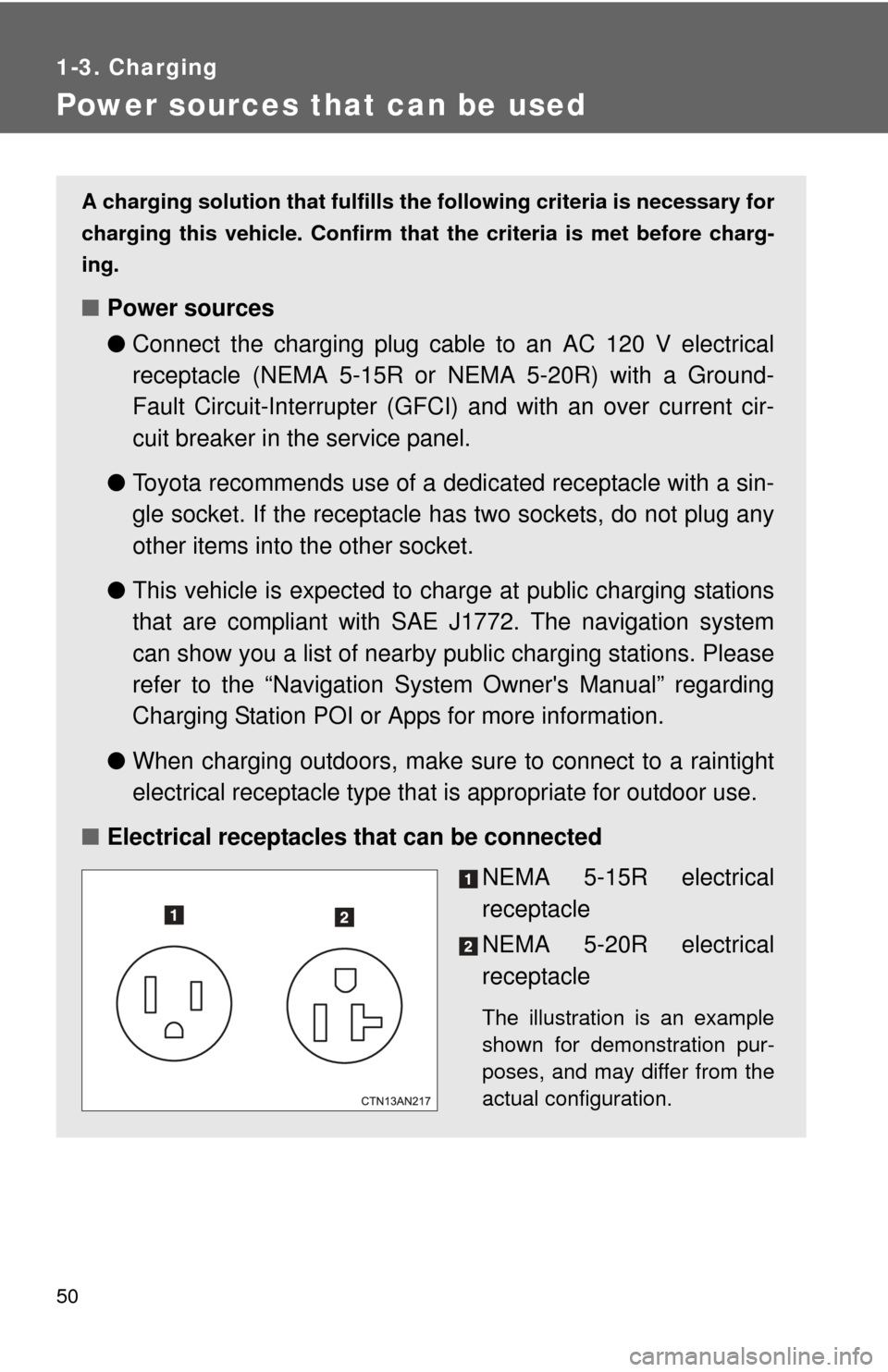
■ Electrical receptacles that can be connected
NEMA 5-15R electrical
receptacle
NEMA 5-20R electrical
receptacle
The illustration is an example
shown for demonstration pur-
poses, and may differ from the
actual configuration.
Page 53 of 521
53
1
1-3. Charging
Before driving
Charging and pre-climate (Remote Climate Control) procedures
On the RAV4 EV, setting the charge and pre-climate (Remote Climate
Control) schedule is performed on the navigation system's screen. A
variety of settings are available including charging and pre-climate
operations according to departure ti me. After thoroughly reading the
following instructions, make sure to correctly follow the procedures
when charging your vehicle.
■ Charging and pre-climate (Remote Climate Control)
Depending on the settings of the following functions, this vehicle
does not start charging by simply just plugging in the charging
cable.
Set any of the following functions before or after charging.
SystemDetails
Charging
Charge immediately function
Regardless of the charging schedule settings,
starts charging immediately. ( P. 64)
However, when this function is used, pre-cli-
mate schedule operations cannot be per-
formed simultaneously.
Scheduled charging function
The time when charging is to be completed by
can be set for each day of the week. ( P. 6 6 )
Even when the schedule is set, the charge
immediately function can be selected if the EV
system is off. ( P. 64)
After the immediate charge is complete, the
schedule will be returned to.
If the schedule is not set for any days of the
week, the charge immediately function will be
automatically selected.
Page 63 of 521
63
1-3. Charging
1
Before driving
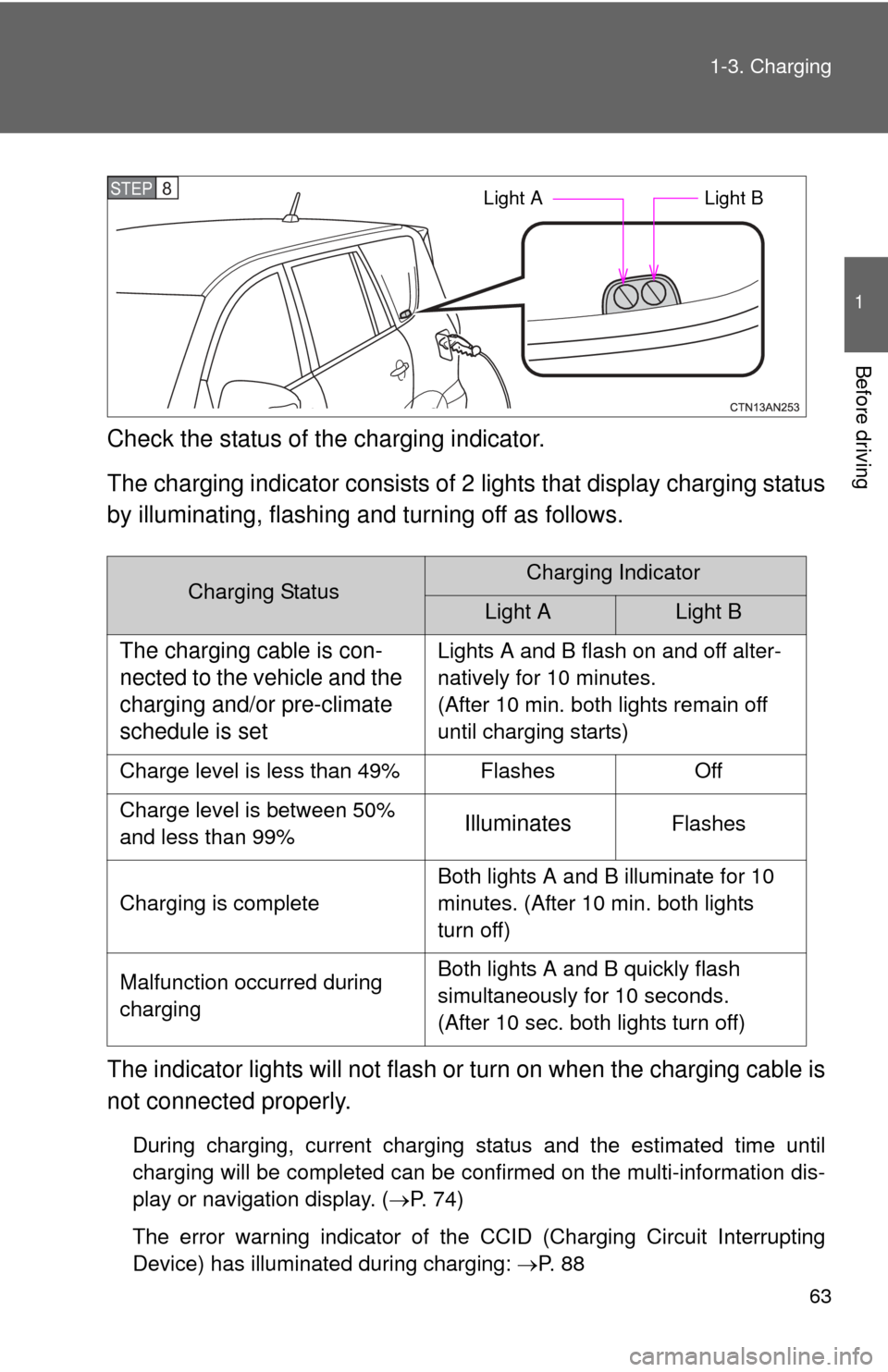
Check the status of the charging indicator.
The charging indicator consists of
2 lights that display charging status
by illuminating, flashing a nd turning off as follows.
The indicator lights will not flash or turn on when the charging cable is
not connected properly.
During charging, current charging status and the estimated time until
charging will be completed can be confirmed on the multi-information dis-
play or navigation display. ( P. 74)
The error warning indicator of the CCID (Charging Circuit Interrupting
Device) has illuminated during charging: P. 8 8
Charging StatusCharging Indicator
Light ALight B
The charging cable is con-
nected to the vehicle and the
charging and/or pre-climate
schedule is setLights A and B flash on and off alter-
natively for 10 minutes.
(After 10 min. both lights remain off
until charging starts)
Charge level is less than 49% Flashes Off
Charge level is between 50%
and less than 99%
IlluminatesFlashes
Charging is complete Both lights A and B illuminate for 10
minutes. (After 10 min. both lights
turn off)
Malfunction occurred during
charging Both lights A and B quickly flash
simultaneously for 10 seconds.
(After 10 sec. both lights turn off)
STEP 8 Light A
Light B
Page 81 of 521
81
1-3. Charging
1
Before driving
■
When not using the vehicle for an extended period of time
In order to preserve the traction battery, Toyota recommends plugging in the
vehicle whenever it is not in use.
Pre-climate operations will occur while the amount of charge remaining in
the traction battery is more than 50% at the time pre-climate operations
begin. If the schedule is left set, pre-climate operations will continue to func-
tion up to the maximum of 15 minutes even if the vehicle is not used for
extended periods of time. Because this uses energy from the traction bat-
tery, temporarily suspend the pre-climate schedule (smart phone exclusive
setting P. 58) or delete the pre-climate schedule, if the vehicle is not being
regularly used.
When using navigation screen operations, only canceling the schedule is
available. Because the schedule will need to be set once again when it is
used next time, Toyota recommends using a smart phone and temporarily
suspending the schedule.
■ If the amount of charge remaining in the traction battery becomes low
while driving
The driving power restriction output control warning light illuminates and
driving range is extended by automatically restricting driving power and air
conditioning system operations. Using the navigation system, promptly
search for the closest charging station and charge the vehicle. If the traction
battery fully discharges, driving will not be possible.
For information on how to search for a charging station, refer to the “Naviga-
tion System Owner's Manual”.
■ Charging schedule confirmation disp lay after switching the EV system
off
The current charging schedule will be displayed for a while after the EV sys-
tem is turned off. To change the charging schedule, set the schedule using
the navigation system’s screen. ( P. 64, 70)
■ If the charging port door is frozen
P. 268
Page 219 of 521
219
2-2. Instrument cluster
2
When driving
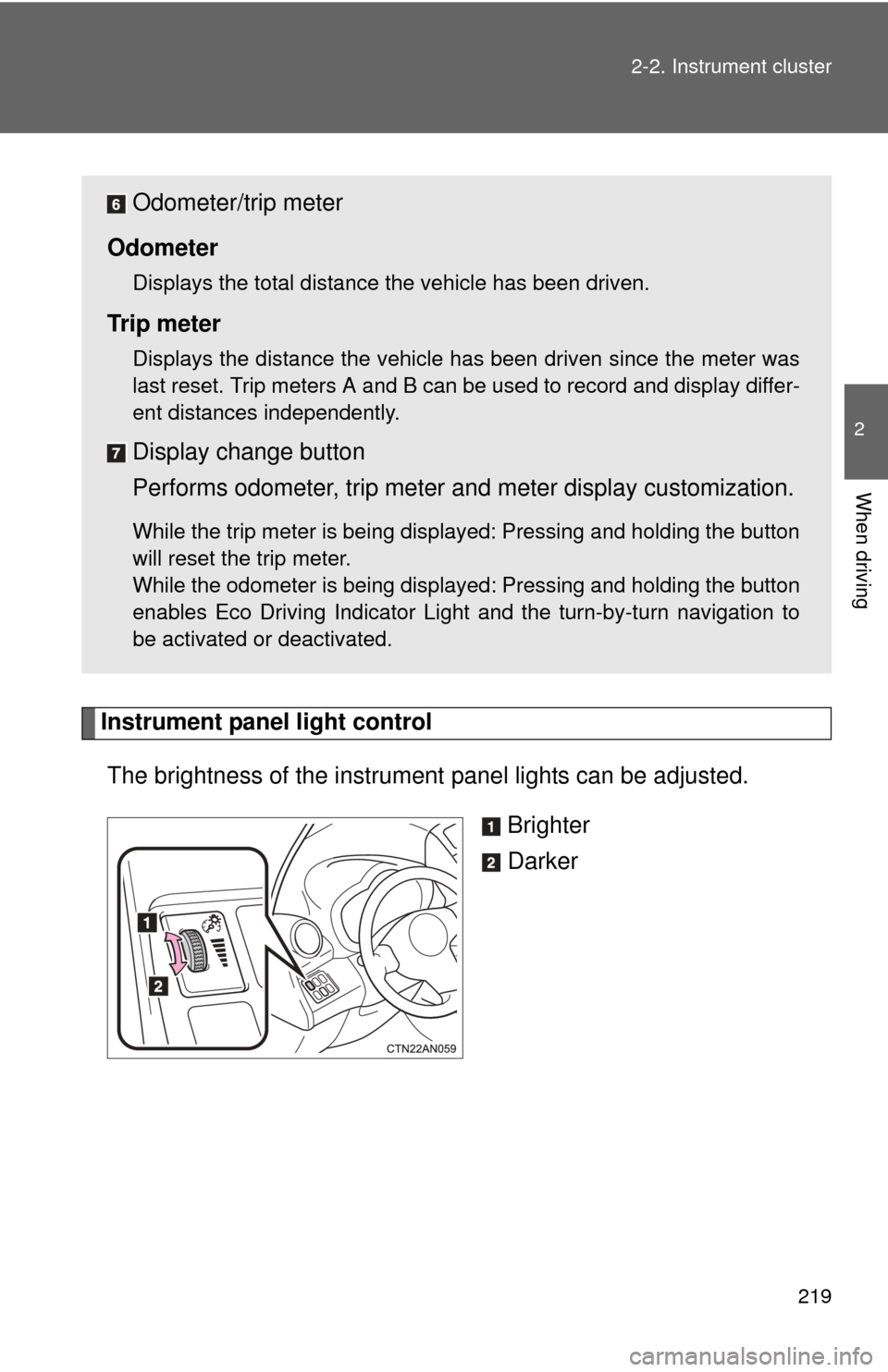
Instrument panel light control
The brightness of the instrument panel lights can be adjusted.
Brighter
Darker
Odometer/trip meter
Odometer
Displays the total distance the vehicle has been driven.
Tr i p m e t e r
Displays the distance the vehicle has been driven since the meter was
last reset. Trip meters A and B can be used to record and display differ-
ent distances independently.
Display change button
Performs odometer, trip meter and meter display customization.
While the trip meter is being displayed: Pressing and holding the button
will reset the trip meter.
While the odometer is being displayed: Pressing and holding the button
enables Eco Driving Indicator Light and the turn-by-turn navigation to
be activated or deactivated.
Page 220 of 521
220 2-2. Instrument cluster
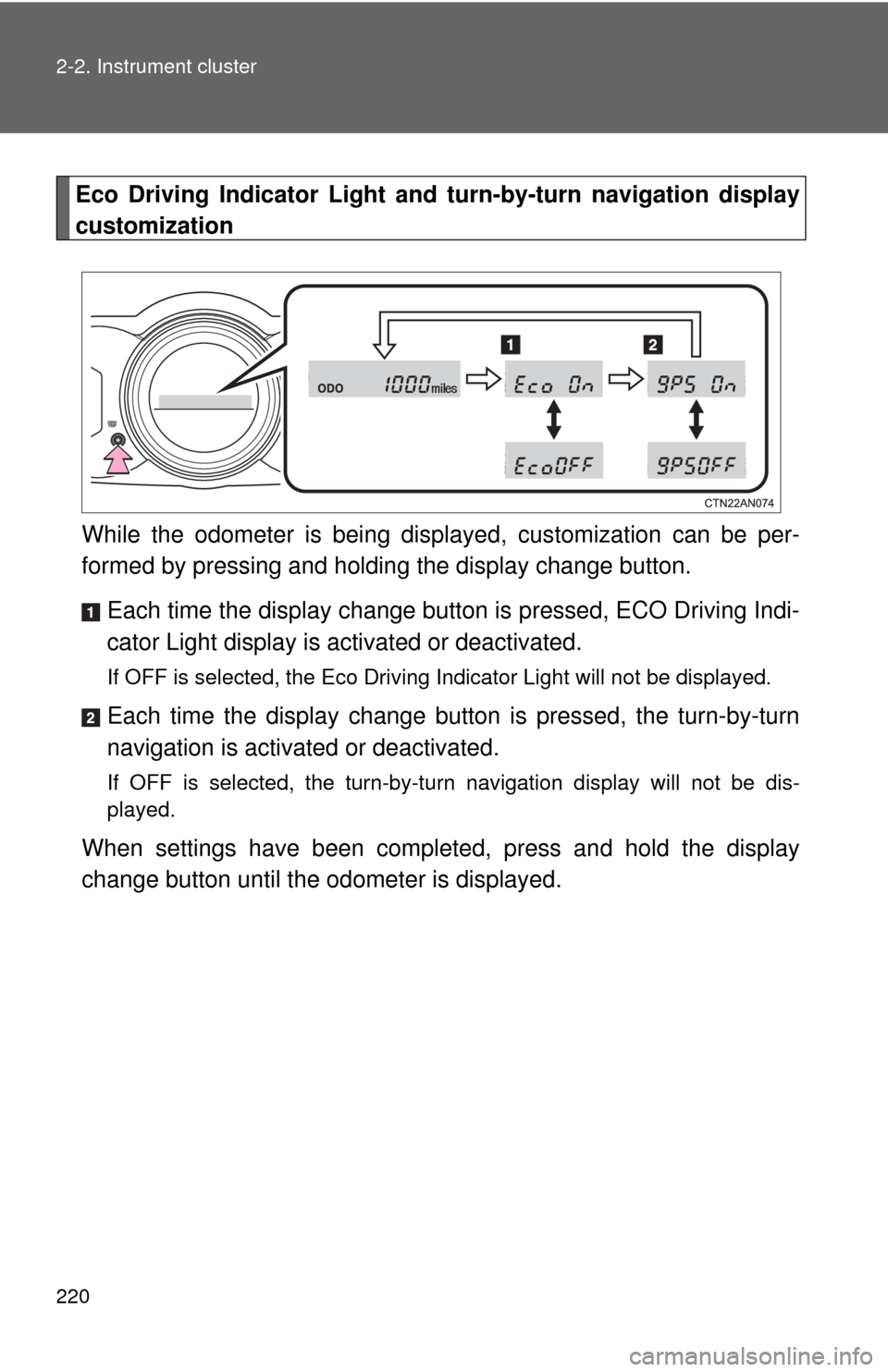
Eco Driving Indicator Light and turn-by-turn navigation display
customization
While the odometer is being displa yed, customization can be per-
formed by pressing and holding the display change button.
Each time the display change button is pressed, ECO Driving Indi-
cator Light display is activated or deactivated.
If OFF is selected, the Eco Driving Indicator Light will not be displayed.
Each time the display change button is pressed, the turn-by-turn
navigation is activa ted or deactivated.
If OFF is selected, the turn-by-turn navigation display will not be dis-
played.
When settings have been completed, press and hold the display
change button until the odometer is displayed.
Page 228 of 521
228 2-2. Instrument cluster
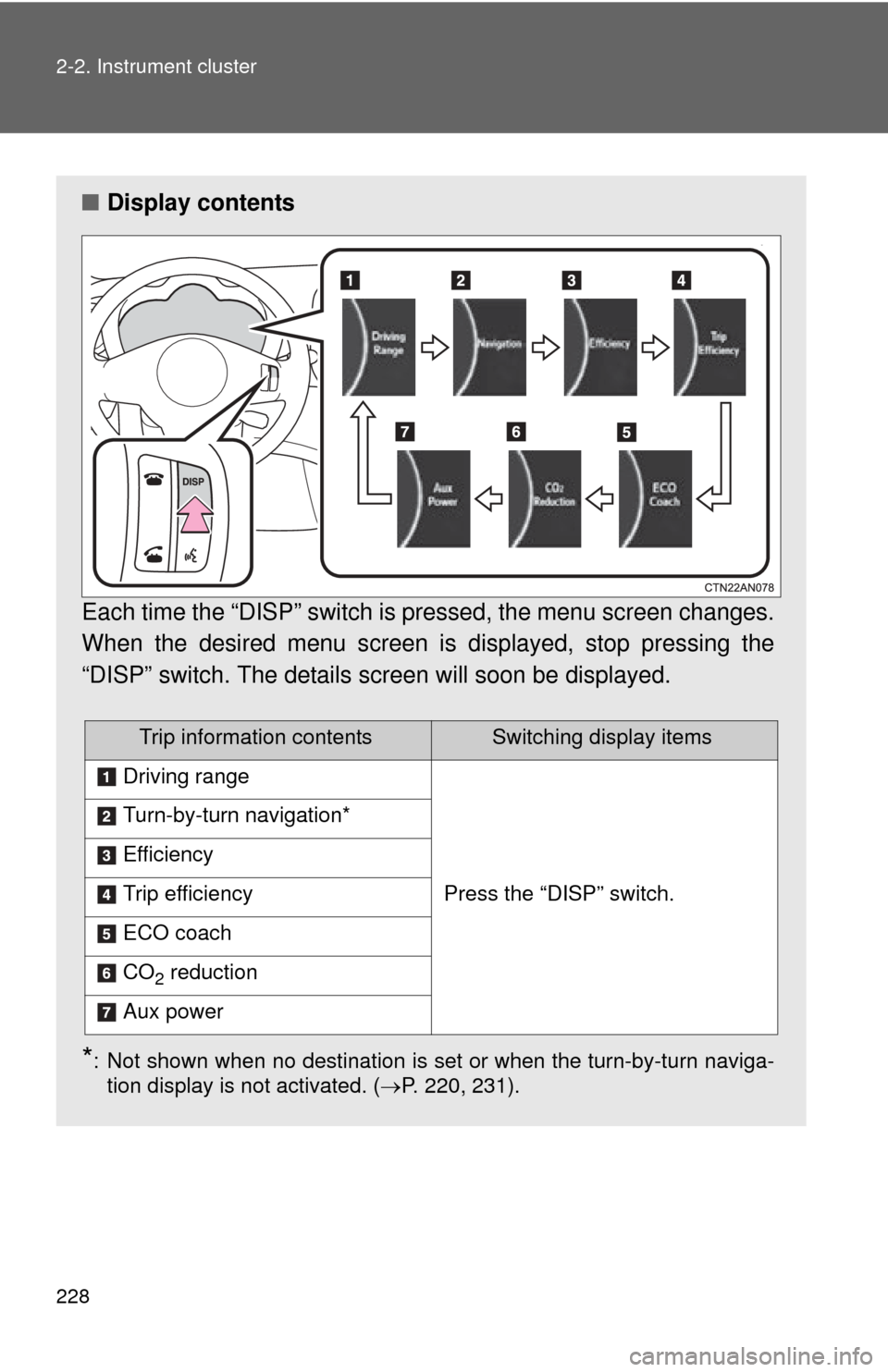
■Display contents
Each time the “DISP” switch is pressed, the menu screen changes.
When the desired menu screen is displayed, stop pressing the
“DISP” switch. The details screen will soon be displayed.
*: Not shown when no destination is set or when the turn-by-turn naviga- tion display is not activated. ( P. 220, 231).
Trip information contentsSwitching display items
Driving range
Press the “DISP” switch.
Turn-by-turn navigation*
Efficiency
Trip efficiency
ECO coach
CO2 reduction
Aux power
Page 231 of 521
231
2-2. Instrument cluster
2
When driving
■
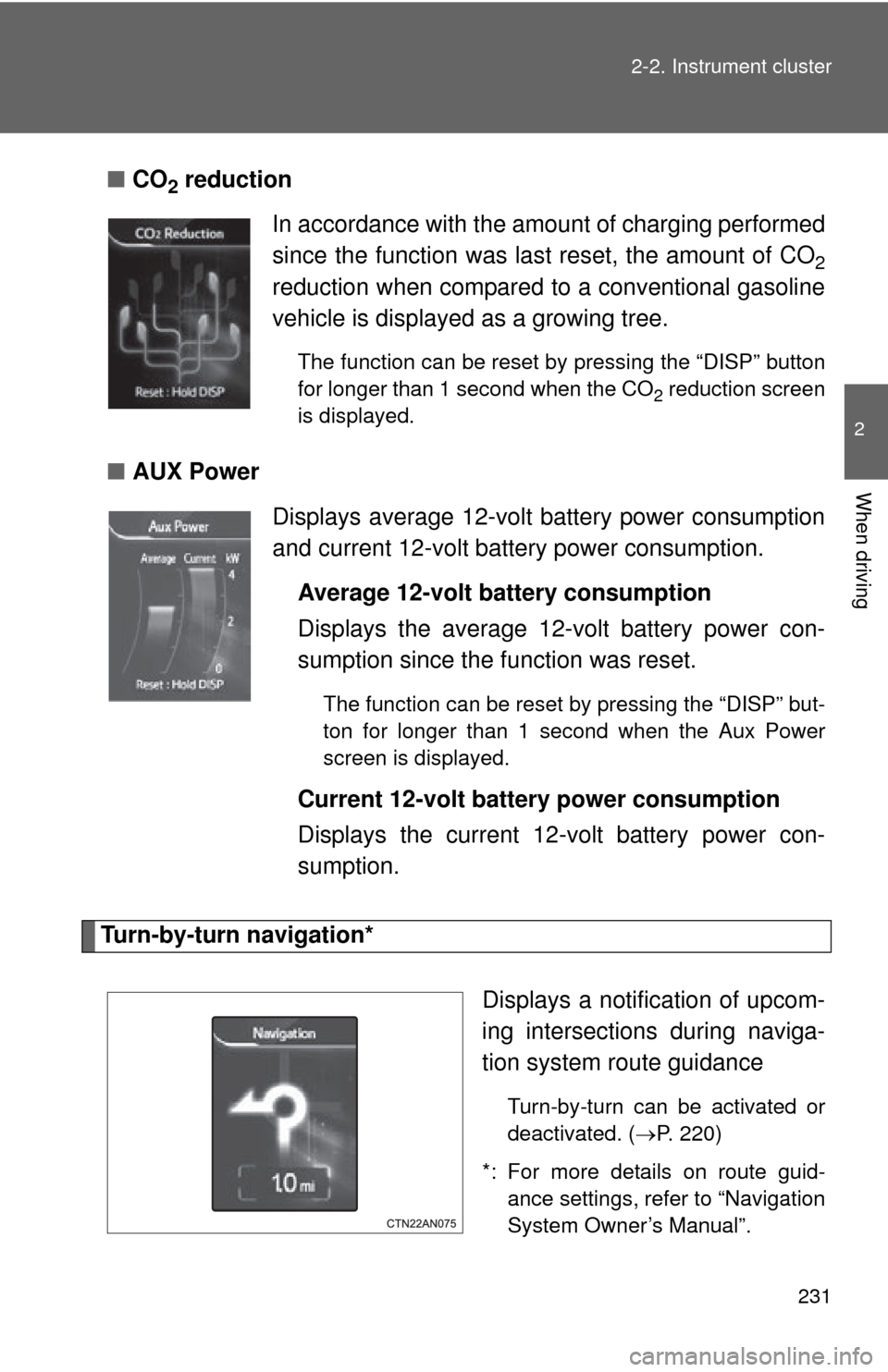
CO2 reduction
■ AUX Power
Turn-by-turn navigation*
Displays a notification of upcom-
ing intersections during naviga-
tion system route guidance
Turn-by-turn can be activated or
deactivated. (P. 220)
*: For more details on route guid- ance settings, refer to “Navigation
System Owner’s Manual”.
In accordance with the amount of charging performed
since the function was last reset, the amount of CO
2
reduction when compared to a conventional gasoline
vehicle is displayed as a growing tree.
The function can be reset by pressing the “DISP” button
for longer than 1 second when the CO
2 reduction screen
is displayed.
Displays average 12-volt battery power consumption
and current 12-volt battery power consumption.
Average 12-volt battery consumption
Displays the average 12-volt battery power con-
sumption since the function was reset.
The function can be reset by pressing the “DISP” but-
ton for longer than 1 second when the Aux Power
screen is displayed.
Current 12-volt battery power consumption
Displays the current 12-volt battery power con-
sumption.