charging TOYOTA RAV4 EV 2014 1.G Quick Reference Guide
[x] Cancel search | Manufacturer: TOYOTA, Model Year: 2014, Model line: RAV4 EV, Model: TOYOTA RAV4 EV 2014 1.GPages: 52, PDF Size: 1.69 MB
Page 31 of 52
OVERVIEW ELECTRIC VEHICLE SYSTEMFEATURES/OPERATIONS
SAFETY AND EMERGENCY FEATURES
29
In the unlikely event that the electrical leakage detection function is not
operating properly, contact your Toyota dealer as soon as possible.
Check that it is operating properly by following the procedure below.
Step 1 Insert the charging cable into the electrical receptacle of the external
power source.
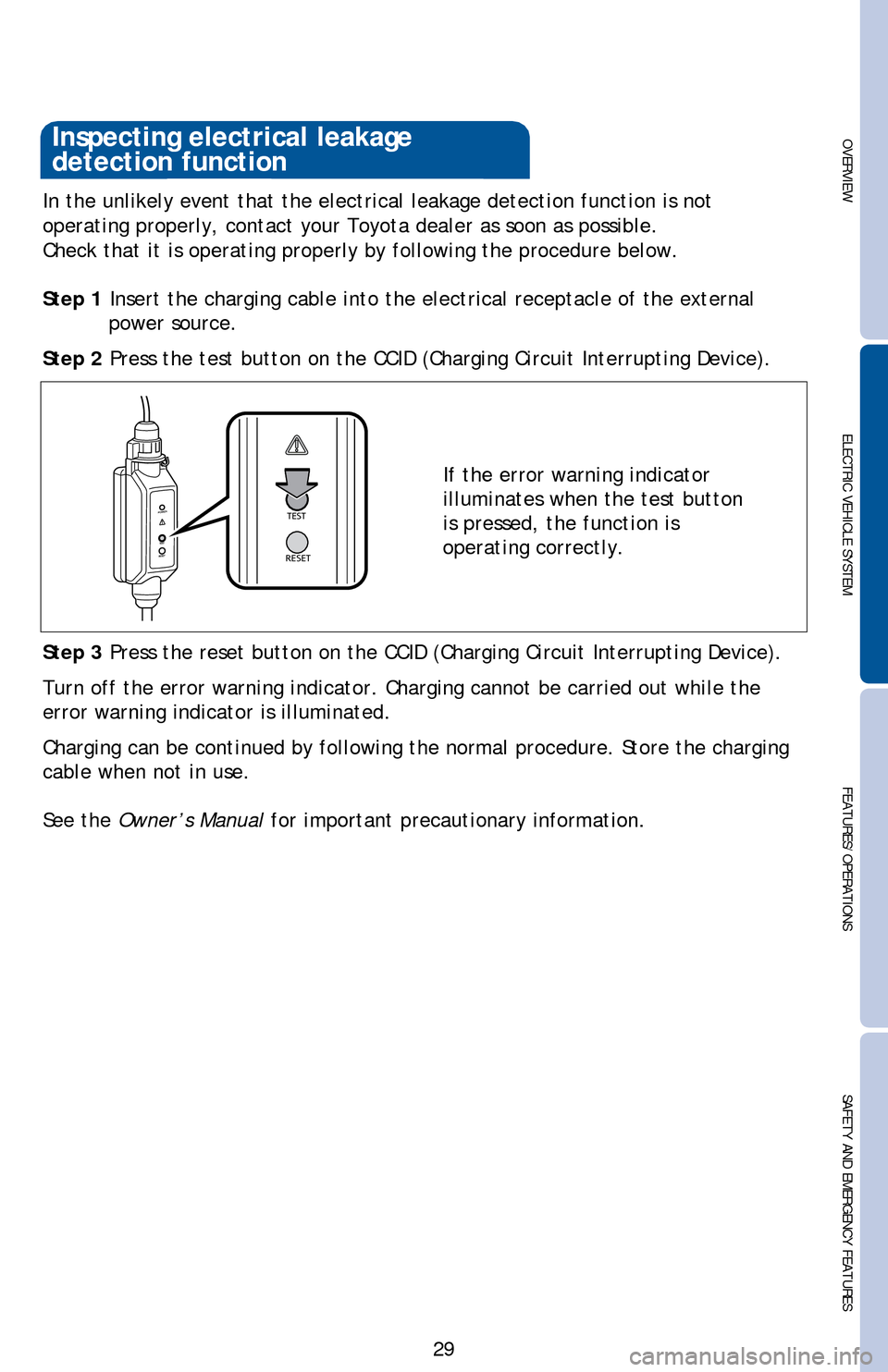
Step 2 Press the test button on the CCID (Charging Circuit Interrupting Device).
If the error warning indicator
illuminates when the test button
is pressed, the function is
operating correctly.
Step 3 Press the reset button on the CCID (Charging Circuit Interrupting Device).
Turn off the error warning indicator. Charging cannot be carried out while the
error warning indicator is illuminated.
Charging can be continued by following the normal procedure. Store the charging
cable when not in use.
See the Owner’s Manual for important precautionary information.
Inspecting electrical leakage
detection function
Page 41 of 52
OVERVIEW ELECTRIC VEHICLE SYSTEMFEATURES/OPERATIONS
SAFETY AND EMERGENCY FEATURES
39
Functions
Refer to the Navigation System Owner’s Manual for instructions and more
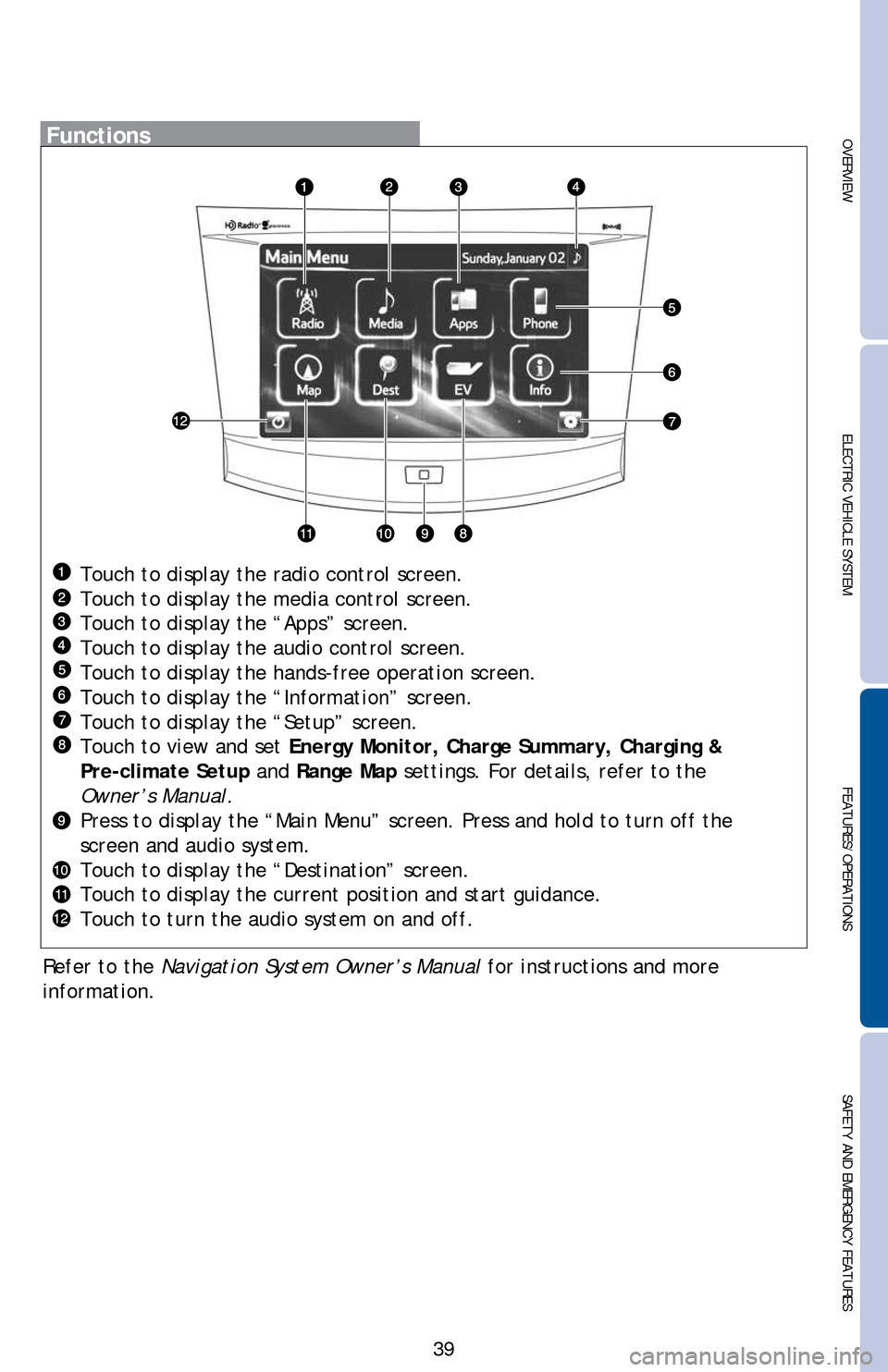
information.Touch to display the radio control screen.
Touch to display the media control screen.
Touch to display the “Apps” screen.
Touch to display the audio control screen.
Touch to display the hands-free operation screen.
Touch to display the “Information” screen.
Touch to display the “Setup” screen.
Touch to view and set Energy Monitor, Charge Summary, Charging &
Pre-climate Setup and Range Map settings. For details, refer to the
Owner’s Manual.
Press to display the “Main Menu” screen. Press and hold to turn off the
screen and audio system.
Touch to display the “Destination” screen.
Touch to display the current position and start guidance.
Touch to turn the audio system on and off.
Page 51 of 52

OVERVIEWELECTRIC VEHICLE SYSTEM FEATURES/OPERATIONS
SAFETY AND EMERGENCY FEATURES
49
NOTES
2014Rav4EV_v3.indd 499/8/13 2:38 AM
This Quick Reference Guide is a summary of basic vehicle operations.
It contains brief descriptions of fundamental operations so you can
locate and use the vehicle’s main equipment quickly and easily.
The Quick Reference Guide is not intended as a substitute for the
Owner’s Manual located in the vehicle’s glove box. We strongly
encourage you to review the Owner’s Manual and supplementary
manuals so you will have a better understanding of the vehicle’s
capabilities and limitations.
Your dealership and the entire staff of Toyota Motor Sales, U.S.A.,
Inc. wish you many years of satisfied driving in your new RAV4 EV.
A word about safe vehicle operations
This Quick Reference Guide is not a full description of RAV4 EV
operations. Every RAV4 EV owner should review the Owner’s
Manual that accompanies this vehicle.
Pay special attention to the boxed information highlighted in
color throughout the Owner’s Manual. Each box contains safe
operating instructions to help you avoid injury or equipment
malfunction.
All information in this Quick Reference Guide is current at the
time of printing. Toyota reserves the right to make changes at
any time without notice.
2014
RAV4 EVINDEX
* Visit your Toyota dealer for information on customizing this feature.
OVERVIEW
Charge port 8
Hood release 8
Indicator symbols 4-5
Instrument cluster 4
Instrument panel 2-3
Keyless entry* 6
Motor maintenance 9
Smart Key system* 7
Charging 19-24
Charging cable-Plugging in 14-17
Charging cable-Unplugging 18
Charging equipment 12
Charging-Power sources 13
Confirming charge settings 28
Electric Vehicle System 10
Extended charge mode 25-26
Inspecting electrical leakage
detection function
Multi-Information
Display-Charging information
Range Map screen 11
ELECTRIC VEHICLE SYSTEM
2014Rav4EV_v3.indd 29/8/13 2:29 AM13-TCS-06958_VehChargeOpQRG_RAV4EV_1_0F_lm.indd 29/8/13 3:49 AM