phone TOYOTA RAV4 HYBRID 2016 XA40 / 4.G Service Manual
[x] Cancel search | Manufacturer: TOYOTA, Model Year: 2016, Model line: RAV4 HYBRID, Model: TOYOTA RAV4 HYBRID 2016 XA40 / 4.GPages: 660, PDF Size: 12.38 MB
Page 387 of 660
RAV4-HV_OM_OM42A56U_(U)
3875-9. Bluetooth® Phone
5
Audio system
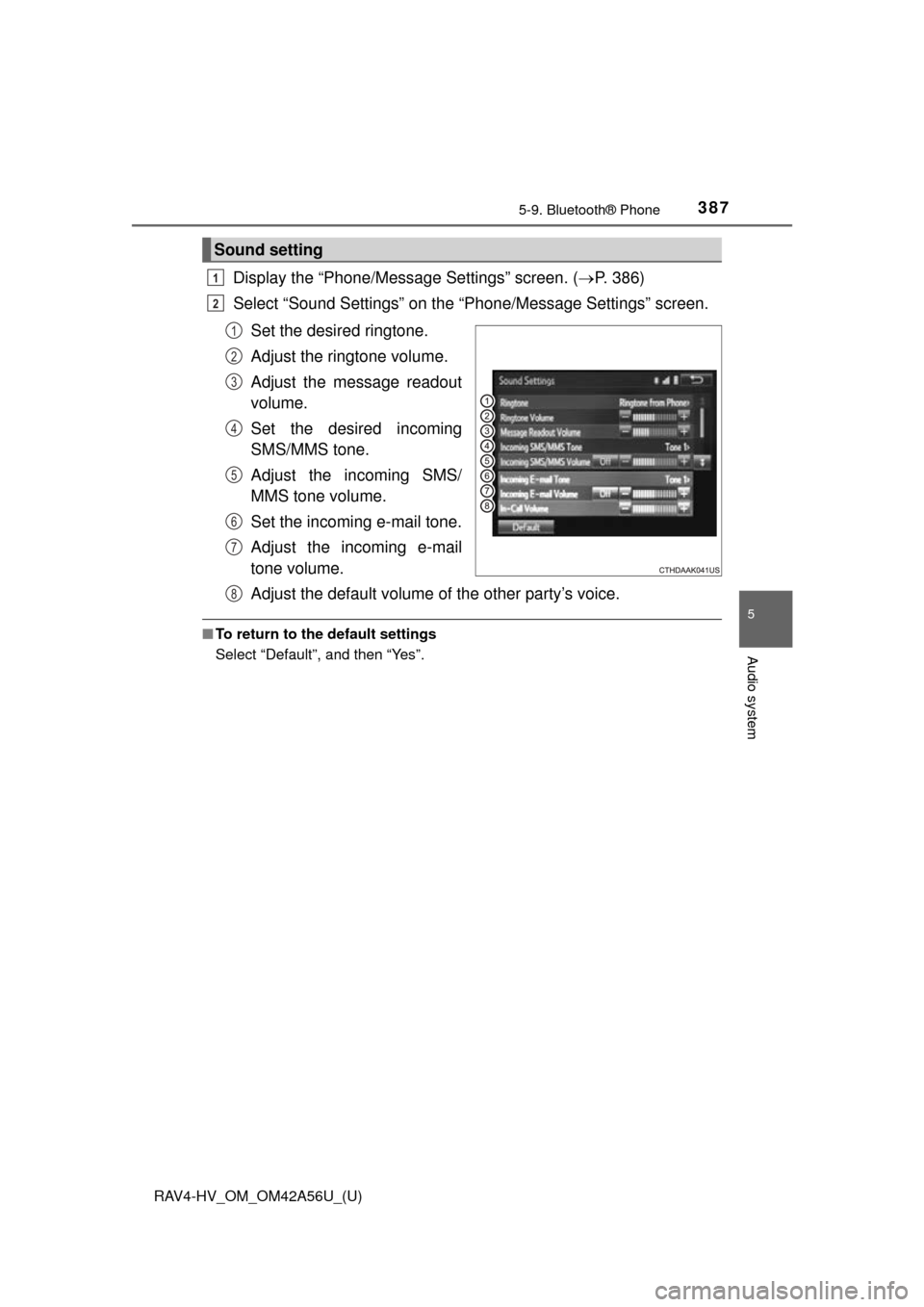
Display the “Phone/Message Settings” screen. (P. 386)
Select “Sound Settings” on the “Phone/Message Settings” screen.
Set the desired ringtone.
Adjust the ringtone volume.
Adjust the message readout
volume.
Set the desired incoming
SMS/MMS tone.
Adjust the incoming SMS/
MMS tone volume.
Set the incoming e-mail tone.
Adjust the incoming e-mail
tone volume.
Adjust the default volume of the other party’s voice.
■To return to the default settings
Select “Default”, and then “Yes”.
Sound setting
1
2
1
2
3
4
5
6
7
8
Page 388 of 660
388
RAV4-HV_OM_OM42A56U_(U)
5-10. Phonebook
Contact/Call Histor y Settings
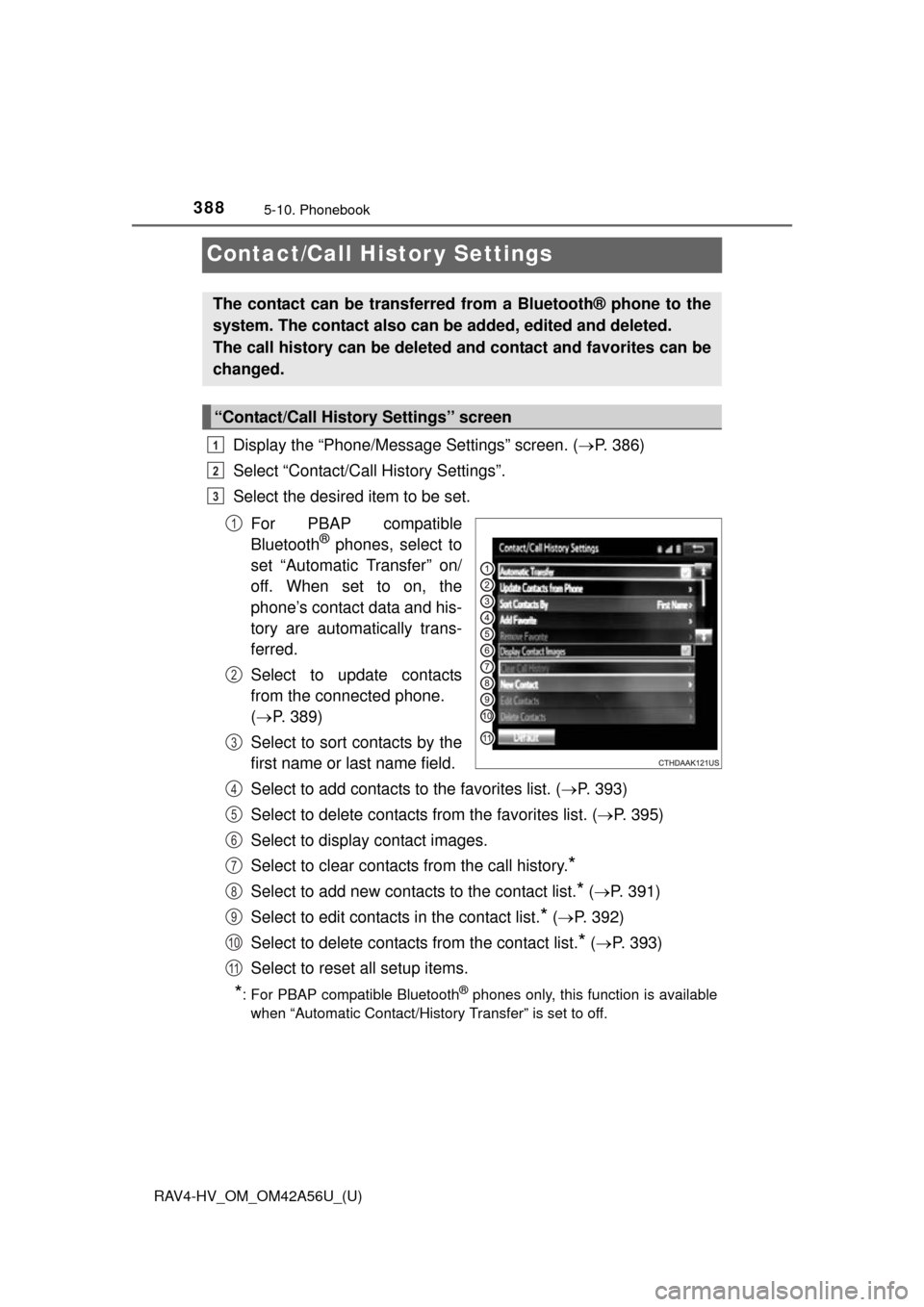
Display the “Phone/Message Settings” screen. (P. 386)
Select “Contact/Call History Settings”.
Select the desired item to be set.
For PBAP compatible
Bluetooth
® phones, select to
set “Automatic Transfer” on/
off. When set to on, the
phone’s contact data and his-
tory are automatically trans-
ferred.
Select to update contacts
from the connected phone.
( P. 389)
Select to sort contacts by the
first name or last name field.
Select to add contacts to the favorites list. ( P. 393)
Select to delete contacts from the favorites list. ( P. 395)
Select to display contact images.
Select to clear contacts from the call history.
*
Select to add new contacts to the contact list.* ( P. 391)
Select to edit contacts in the contact list.
* ( P. 392)
Select to delete contacts from the contact list.
* ( P. 393)
Select to reset all setup items.
*: For PBAP compatible Bluetooth® phones only, this function is available
when “Automatic Contact/History Transfer” is set to off.
The contact can be transferred from a Bluetooth® phone to the
system. The contact also can be added, edited and deleted.
The call history can be deleted and contact and favorites can be
changed.
“Contact/Call History Settings” screen
1
2
3
1
2
3
4
5
6
7
8
9
10
11
Page 389 of 660
RAV4-HV_OM_OM42A56U_(U)
3895-10. Phonebook
5
Audio system
Operation methods differ between PBAP compatible and PBAP
incompatible but OPP compatible Bluetooth® phones.
If your cellular phone is neither PBAP nor OPP compatible, the con-
tacts cannot be transferred.
■For PBAP compatible Bluetooth® Phones
Select “Update Contacts from Phone”.
Check that a confirmation scr een is displayed when the opera-
tion is complete.
This operation may be unnecessary depending on the type of cellular
phone.
Depending on the type of cellular phone, OBEX authentication may be
required when transferring contact data. Enter “1234” into the
Bluetooth
® phone.
If another Bluetooth
® device is connected when transferring contact
data, depending on the phone, the connected Bluetooth® device may
need to be disconnected.
Depending on the type of Bluetooth
® phone being connected, it may be
necessary to perform additional steps on the phone.
Update contacts from phone
1
2
Page 390 of 660
390
RAV4-HV_OM_OM42A56U_(U)
5-10. Phonebook
■For PBAP incompatible but OPP compatible Bluetooth®
PhonesSelect “Update Contacts from Phone”.
Transfer the contact data to the system using a Bluetooth
®
phone.
This operation may be unnecessary depending on the type of cellular
phone.
Depending on the type of cellular phone, OBEX authentication may be
required when transferring contact data. Enter “1234” into the
Bluetooth
® phone.
To cancel this function, select “Cancel”.
Check that a confirmation scr een is displayed when the opera-
tion is complete.
■Updating the contacts in a different way (From the “Call His-
tory” screen)
For PBAP compatible Bluetooth
® phones, this function is available
when “Automatic Contact/Histor y Transfer” is set to off. (P. 388)
Display the phone screen. ( P. 371)
Select the “Call History” tab and select a contact not yet regis-
tered in the contact list.
Select “Update Contact”.
Select the desired contact.
Select a phone type for the phone number.
1
2
3
1
2
3
4
5
Page 391 of 660
RAV4-HV_OM_OM42A56U_(U)
3915-10. Phonebook
5
Audio system
New contact data can be registered. Up to 4 numbers per person can
be registered. For PBAP compatible Bluetooth® phones, this function
is available when “Automatic Contact/History Transfer” is set to off.
( P. 388)
Select “New Contact”.
Enter the name and select “OK”.
Enter the phone number and select “OK”.
Select the phone type for the phone number.
To add another number to this contact, select “Yes”.
■Registering a new contact in a different way (From the “Call
History” screen) Display the phone screen. ( P. 371)
Select the “Call History” tab and select a contact not yet regis-
tered in the contact list.
Select “Add to Contacts”.
Follow the steps in “Registering a new contact to the contacts
list” from .
Registering a new contact to the contact list
1
2
3
4
5
1
2
3
4
3
Page 392 of 660
392
RAV4-HV_OM_OM42A56U_(U)
5-10. Phonebook
For PBAP compatible Bluetooth® phones, this function is available
when “Automatic Contact/Histor y Transfer” is set to off. (P. 388)
Select “Edit Contact”.
Select the desired contact.
Select corresponding to the desired name or number.
For editing the name
Follow the steps in “Registering a new contact to the contacts list”
from . ( P. 391)
For editing the number
Follow the steps in “Registering a new contact to the contacts list”
from . ( P. 391)
■Editing the contacts in a different way (From the “Contact
Details” screen)
Display the phone screen. ( P. 371)
Select the “Contacts”, “Call History” tab or the “Favorites” tab and
select the desired contact.
Select “Edit Contact”.
“E-mail Addresses”: Select to display all registered e-mail addresses for
the contact.
Follow the steps in “Editing the contact data” from .
Editing the contact data
1
2
3
4
2
4
3
1
2
3
44
Page 393 of 660
RAV4-HV_OM_OM42A56U_(U)
3935-10. Phonebook
5
Audio system
For PBAP compatible Bluetooth® phones, this function is available
when “Automatic Contact/Histor y Transfer” is set to off. (P. 388)
Select “Delete Contacts”.
Select the desired contact and select “Delete”.
Select “Yes” when the confirmation screen appears.
■Deleting the contact in a different way (From the “Contact
Details” screen) Display the phone screen. ( P. 371)
Select the “Contacts”, “Call history” tab or the “Favorites” tab and
select the desired contact.
Select “Edit Contact”.
Select “Yes” when the confirmation screen appears.
Up to 15 contacts (maximum of 4 numbers per contact) can be regis-
tered in the favorites list.
■Registering the contacts in the favorites list
Select “Add Favorite”.
Select the desired contact to add to the favorites list.
Dimmed contacts are already stored as a favorite.
Check that a confirmation scr een is displayed when the opera-
tion is complete.
Deleting the contact data
Favorites list setting
1
2
3
1
2
3
4
1
2
3
Page 394 of 660
394
RAV4-HV_OM_OM42A56U_(U)
5-10. Phonebook
When 15 contacts have already been registered to the favorites
list
When 15 contacts have already been registered to the favorites
list, a registered contact needs to be replaced.
Select “Yes” when the confirmation screen appears to replace a
contact.
Select the contact to be replaced.
Check that a confirmation scr een is displayed when the opera-
tion is complete.
Registering contacts in the favori tes list in a different way (from
the “Contacts” screen)
Display the phone screen. ( P. 371)
Select the “Contacts” tab.
Select at the beginning of the desired contact list name to be
registered in the favorites list.
When selected, is changed to , and the contact is registered in
the favorites list.
Registering contacts in the favori tes list in a different way (from
the “Contact Details” screen)
Display the phone screen. ( P. 371)
Select the “Contacts” tab or the “Call History” tab and select the
desired contact.
Select “Add Favorite”.
Check that a confirmation scr een is displayed when the opera-
tion is complete.
1
2
3
1
2
3
1
2
3
4
Page 395 of 660
RAV4-HV_OM_OM42A56U_(U)
3955-10. Phonebook
5
Audio system
■Deleting the contacts in the favorites listSelect “Remove Favorite”.
Select the desired contacts and select “Remove”.
Select “Yes” when the confirmation screen appears.
Check that a confirmation scr een is displayed when the opera-
tion is complete.
Deleting contacts in the favorites list in a different way (from the
“Contacts” screen)
Display the phone screen. ( P. 371)
Select the “Contacts” tab.
Select at the beginning of the contact list name to be deleted
from the favorites. list.
When selected, is changed to , and the data is deleted from the
list.
Deleting contacts in the favorites list in a different way (from the
“Contact Details” screen)
Display the phone screen. ( P. 371)
Select the “Contacts”, “Call History” tab or the “Favorites” tab and
select the desired contact to delete.
Select “Remove Favorite”.
Select “Yes” when the confirmation screen appears.
Check that a confirmation scr een is displayed when the opera-
tion is complete.
1
2
3
4
1
2
3
1
2
3
4
5
Page 396 of 660
396
RAV4-HV_OM_OM42A56U_(U)
5-10. Phonebook
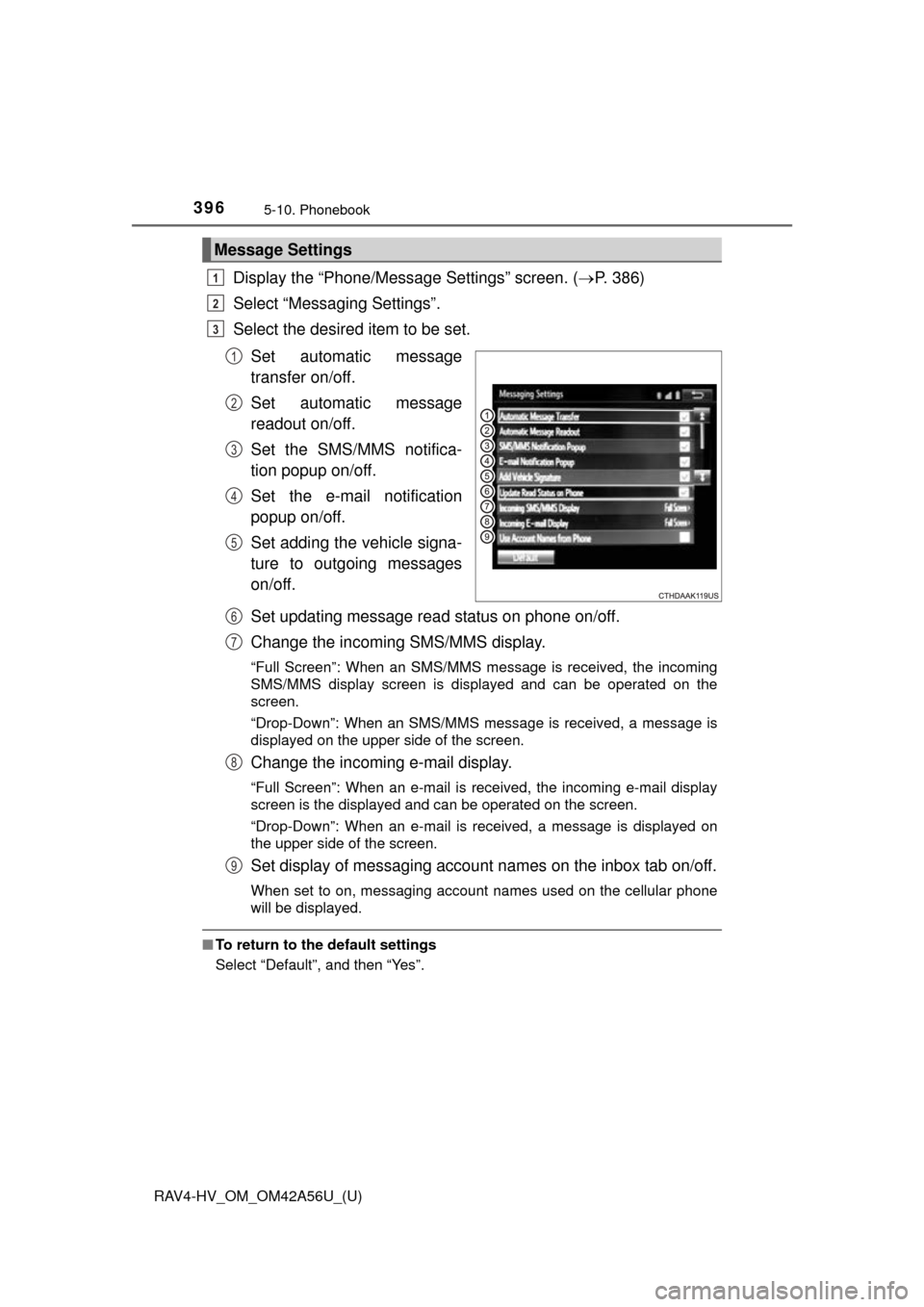
Display the “Phone/Message Settings” screen. (P. 386)
Select “Messaging Settings”.
Select the desired item to be set.
Set automatic message
transfer on/off.
Set automatic message
readout on/off.
Set the SMS/MMS notifica-
tion popup on/off.
Set the e-mail notification
popup on/off.
Set adding the vehicle signa-
ture to outgoing messages
on/off.
Set updating message read status on phone on/off.
Change the incoming SMS/MMS display.
“Full Screen”: When an SMS/MMS message is received, the incoming
SMS/MMS display screen is displayed and can be operated on the
screen.
“Drop-Down”: When an SMS/MMS message is received, a message is
displayed on the upper side of the screen.
Change the incoming e-mail display.
“Full Screen”: When an e-mail is received, the incoming e-mail display
screen is the displayed and can be operated on the screen.
“Drop-Down”: When an e-mail is received, a message is displayed on
the upper side of the screen.
Set display of messaging account names on the inbox tab on/off.
When set to on, messaging account names used on the cellular phone
will be displayed.
■To return to the default settings
Select “Default”, and then “Yes”.
Message Settings
1
2
3
1
2
3
4
5
6
7
8
9