wheel TOYOTA RAV4 HYBRID 2017 XA40 / 4.G Workshop Manual
[x] Cancel search | Manufacturer: TOYOTA, Model Year: 2017, Model line: RAV4 HYBRID, Model: TOYOTA RAV4 HYBRID 2017 XA40 / 4.GPages: 676, PDF Size: 18.91 MB
Page 309 of 676
RAV4-HV_OM_OM42B03U_(U)
3094-5. Using the driving support systems
4
Driving
◆E-Four (Electronic On-Demand AWD system)
Automatically switches from front wheel drive to four-wheel drive (AWD)
according to the driving conditions, helping to ensure reliable handling and
stability. Examples of conditions where the system will switch to AWD are
when cornering, going uphill, starting off or accelerating, and when the
road surface is slippery due to snow, rain, etc.
◆Trailer Sway Control
Helps the driver to control trailer sway by selectively applying brake pres-
sure for individual wheels and reducing engine torque when trailer sway is
detected.
Trailer Sway Control is part of the VSC system and will not operate if VSC
turned off or experiences a malfunction.
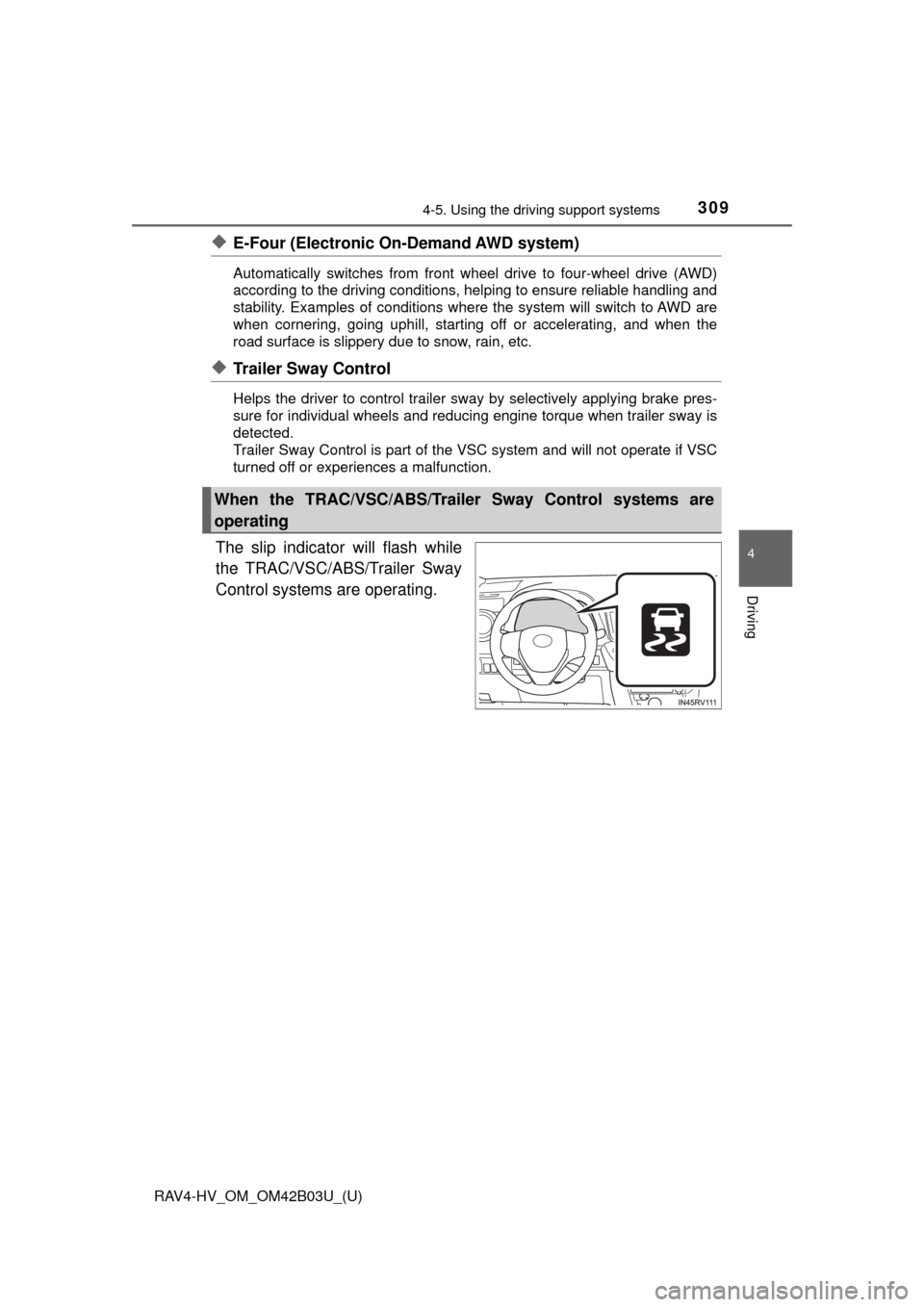
The slip indicator will flash while
the TRAC/VSC/ABS/Trailer Sway
Control systems are operating.
When the TRAC/VSC/ABS/Trailer Sway Control systems are
operating
Page 310 of 676
310
RAV4-HV_OM_OM42B03U_(U)
4-5. Using the driving support systems
If the vehicle gets stuck in mud, di rt or snow, the TRAC system may
reduce power from the hybrid syst em to the wheels. Pressing to
turn the system off may make it eas ier for you to rock the vehicle in
order to free it.
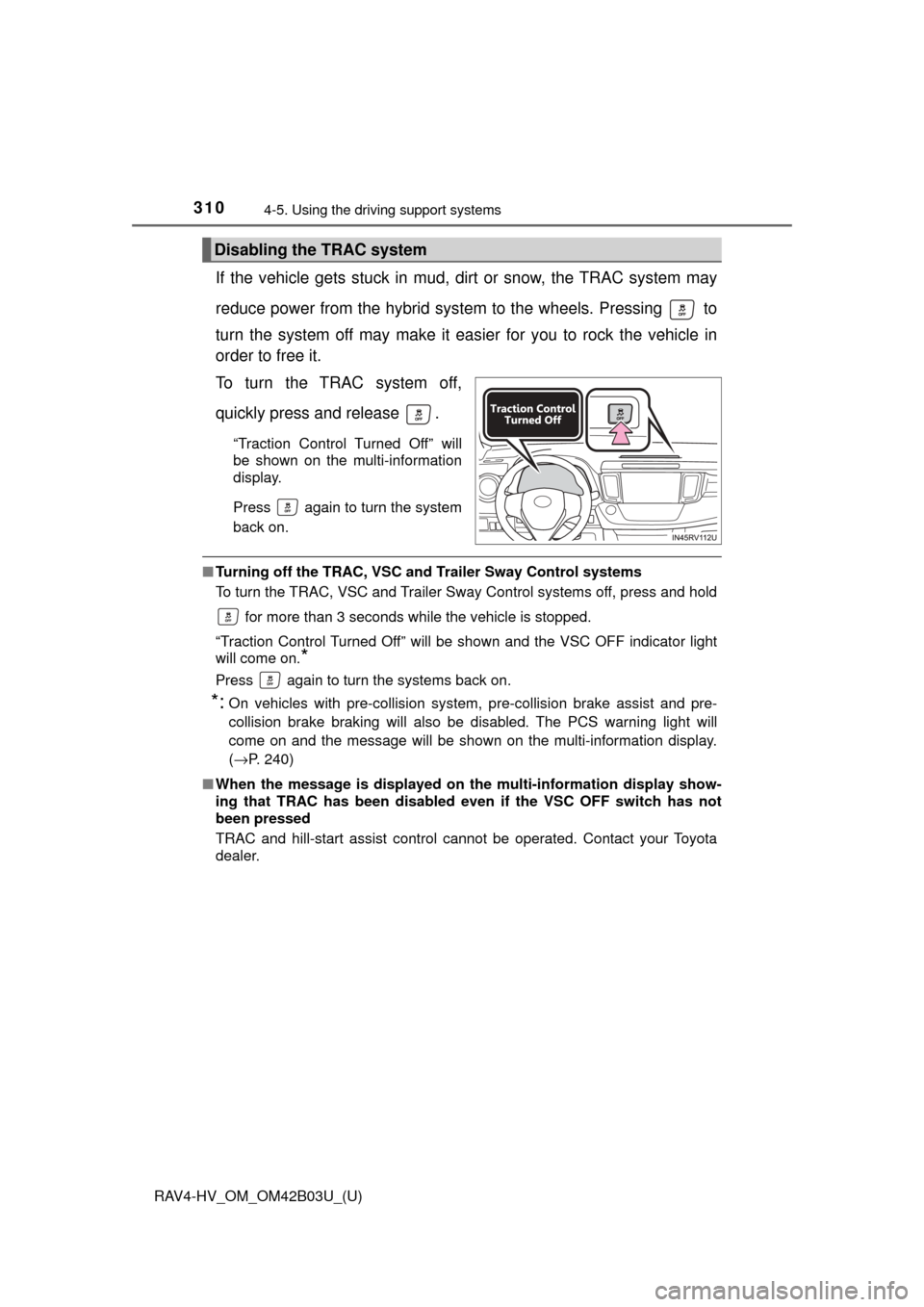
To turn the TRAC system off,
quickly press and release .
“Traction Control Turned Off” will
be shown on the multi-information
display.
Press again to turn the system
back on.
■ Turning off the TRAC, VSC an d Trailer Sway Control systems
To turn the TRAC, VSC and Trailer Sway Control systems off, press and hold
for more than 3 seconds while the vehicle is stopped.
“Traction Control Turned Off” will be shown and the VSC OFF indicator light
will come on.
*
Press again to turn the systems back on.
*:On vehicles with pre-collision system, pre-collision brake assist and pre-
collision brake braking will also be disabled. The PCS warning light will
come on and the message will be shown on the multi-information display.
( →P. 240)
■ When the message is displayed on th e multi-information display show-
ing that TRAC has been disabled even if the VSC OFF switch has not
been pressed
TRAC and hill-start assist control cannot be operated. Contact your Toyota
dealer.
Disabling the TRAC system
Page 311 of 676

RAV4-HV_OM_OM42B03U_(U)
3114-5. Using the driving support systems
4
Driving
■Sounds and vibrations cau sed by the ABS, brake assist, VSC, Trailer
Sway Control, TRAC and the hill-start assist control systems
Any of the following conditions may occur when the above systems are oper-
ating. None of these indicates that a malfunction has occurred.
● Vibrations may be felt through the vehicle body and steering.
● A motor sound may be heard after the vehicle comes to a stop.
● The brake pedal may pulsate slightly after the ABS is activated.
● The brake pedal may move down slightly after the ABS is activated.
■ ECB operating sound
ECB operating sound may be heard in the following cases, but it does not
indicate that a malfunction has occurred.
●Operating sound heard from the engine compartment when the brake pedal
is operated.
● Motor sound of the brake system heard from the front part of the vehicle
when the driver’s door is opened.
● Operating sound heard from the engine compartment when 1 or 2 minutes
passed after the stop of the hybrid system.
■ EPS operation sound
When the steering wheel is operated, a motor sound (whirring sound) may be
heard. This does not indicate a malfunction.
■ Automatic reactivation of TRAC, VS C and Trailer Sway Control systems
After turning the TRAC, VSC and Trailer Sway Control systems off, the sys-
tems will be automatically re-enabled in the following situations:
● When the power switch is turned off.
● If only the TRAC system is turned off, the TRAC will turn on when vehicle
speed increases
If the TRAC, VSC and Trailer Sway Control systems are turned off, auto-
matic re-enabling will not occur when vehicle speed increases.
■ Reduced effectiveness of the EPS system
The effectiveness of the EPS system is reduced to prevent the system from
overheating when there is frequent steering input over an extended period of
time. The steering wheel may feel heavy as a result. Should this occur, refrain
from excessive steering input or stop the vehicle and turn the hybrid system
off. The EPS system should return to normal within 10 minutes.
■ Operating conditions of hill-start assist control
When the following four conditions are met, the hill-start assist control will
operate:
● The shift lever is in a position other than P or N (when starting off forward/
backward on an upward incline).
● The vehicle is stopped.
● The accelerator pedal is not depressed.
● The parking brake is not engaged.
Page 313 of 676

RAV4-HV_OM_OM42B03U_(U)
3134-5. Using the driving support systems
4
Driving
WARNING
■Replacing tires
Make sure that all tires are of the specified size, brand, tread pattern and
total load capacity. In addition, make sure that the tires are inflated to the
recommended tire inflation pressure level.
The ABS, TRAC, VSC and Trailer Sway Control systems will not function
correctly if different tires are installed on the vehicle.
Contact your Toyota dealer for further information when replacing tires or
wheels.
■ Handling of tires and the suspension
Using tires with any kind of problem or modifying the suspension will affect
the driving assist systems, and may cause a system to malfunction.
■ Trailer Sway Control precaution
The Trailer Sway Control system is not able to reduce trailer sway in all situ-
ations. Depending on many factors such as the conditions of the vehicle,
trailer, road surface, and driving environment, the Trailer Sway Control sys-
tem may not be effective. Refer to your trailer owner’s manual for informa-
tion on how to tow your trailer properly.
■ If trailer sway occurs
Observe the following precautions.
Failing to do so may cause death or serious injury.
● Firmly grip the steering wheel. Steer straight ahead.
Do not try to control trailer swaying by turning the steering wheel.
● Begin releasing the accelerator pedal immediately but very gradually to
reduce speed.
Do not increase speed. Do not apply vehicle brakes.
If you make no extreme correction with the steering or brakes, your vehicle
and trailer should stabilize. (→P. 194)
Page 318 of 676
318
RAV4-HV_OM_OM42B03U_(U)
4-6. Driving tips
Accelerate the vehicle slowly, keep a safe distance between you and
the vehicle ahead, and drive at a reduced speed suitable to road con-
ditions.
●Park the vehicle and move the shift lever to P without setting the
parking brake. The parking brake may freeze up, preventing it from
being released. If the vehicle is parked without setting the parking
brake, make sure to block the wheels.
Failure to do so may be dangerous because it may cause the vehi-
cle to move unexpectedly, pos sibly leading to an accident.
● If the vehicle is parked without se tting the parking brake, confirm
that the shift lever ca nnot be moved out of P
*.
*: The shift lever will be locked if it is attempted to be shifted from P to any
other position without depressing the brake pedal. If the shift lever can be
shifted from P, there may be a problem with the shift lock system. Have the
vehicle inspected by your Toyota dealer immediately.
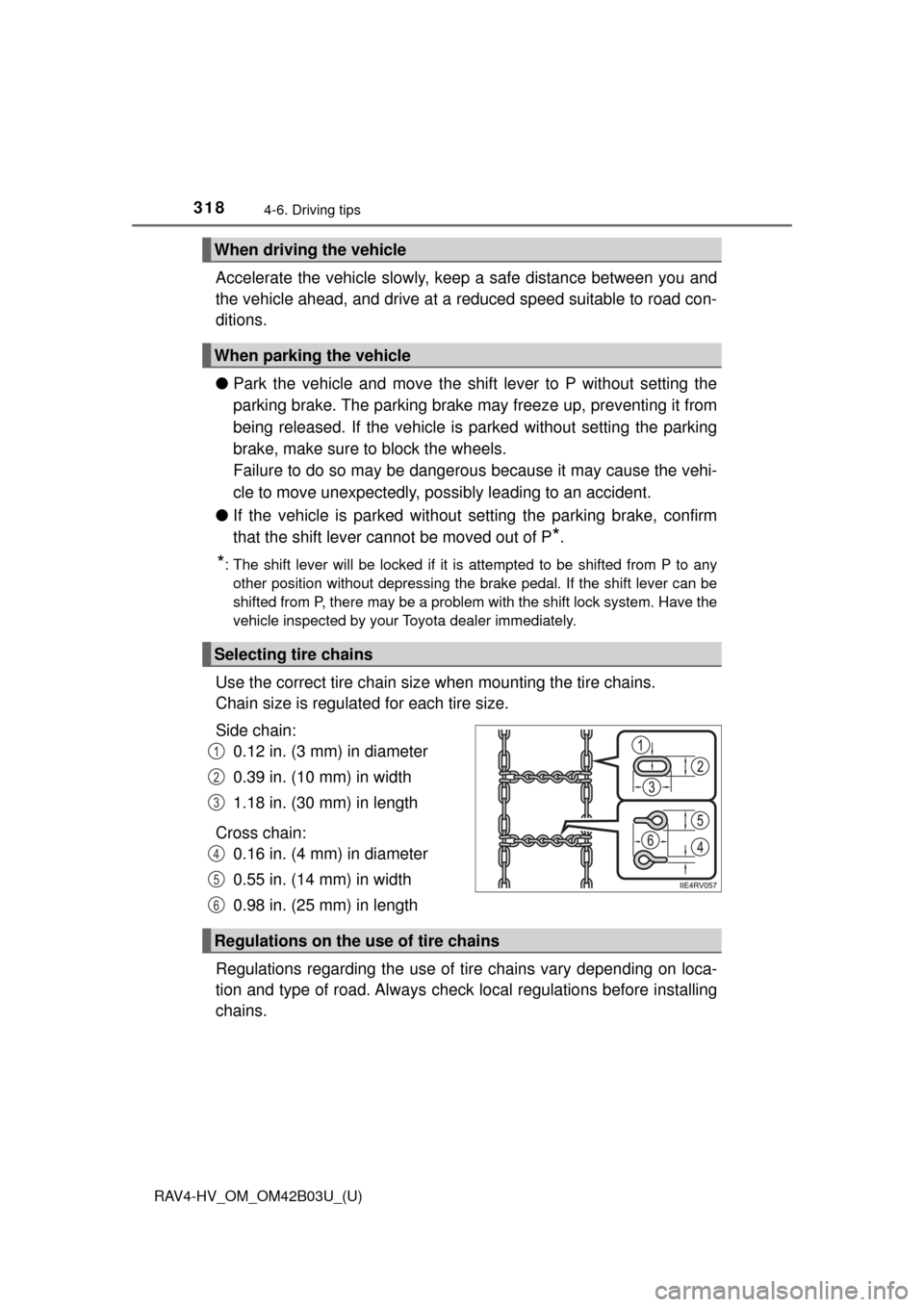
Use the correct tire chain size when mounting the tire chains.
Chain size is regulated for each tire size.
Side chain: 0.12 in. (3 mm) in diameter
0.39 in. (10 mm) in width
1.18 in. (30 mm) in length
Cross chain: 0.16 in. (4 mm) in diameter
0.55 in. (14 mm) in width
0.98 in. (25 mm) in length
Regulations regarding the use of tire chains vary depending on loca-
tion and type of road. Al ways check local regulations before installing
chains.
When driving the vehicle
When parking the vehicle
Selecting tire chains
1
2
3
4
5
6
Regulations on the use of tire chains
Page 319 of 676
RAV4-HV_OM_OM42B03U_(U)
3194-6. Driving tips
4
Driving
■Tire chain installation
Observe the following precautions when installing and removing chains:
●Install and remove tire chains in a safe location.
● Install tire chains on the front tires only. Do not install tire chains on the rear
tires.
● Install tire chains on front tires as tightly as possible. Retighten chains after
driving 1/4 ⎯ 1/2 mile (0.5 ⎯ 1.0 km).
● Install tire chains following the instructions provided with the tire ch\
ains.
WARNING
■ Driving with snow tires
Observe the following precautions to reduce the risk of accidents.
Failure to do so may result in a loss of vehicle control and cause death or
serious injury.
● Use tires of the specified size.
● Maintain the recommended level of air pressure.
● Do not drive in excess of 75 mph (120 km/h), regardless of the type of
snow tires being used.
● Use snow tires on all, not just some wheels.
■ Driving with tire chains
Observe the following precautions to reduce the risk of accidents.
Failure to do so may result in the vehicle being unable to be driven safely,
and may cause death or serious injury.
● Do not drive in excess of the speed limit specified for the tire chains being
used, or 30 mph (50 km/h), whichever is lower.
● Avoid driving on bumpy road surfaces or over potholes.
● Avoid sudden acceleration, abrupt steering, sudden braking and shifting
operations that cause sudden engine braking.
● Slow down sufficiently before entering a curve to ensure that vehicle con-
trol is maintained.
● Do not use LDA (Lane Departure Alert with steering control) system (if
equipped).
Page 323 of 676

RAV4-HV_OM_OM42B03U_(U)
3234-6. Driving tips
4
Driving
WARNING
■Off-road driving precautions
Always observe the following precautions to minimize the risk of death, seri-
ous injury or damage to your vehicle:
● Drive carefully when off the road. Do not take unnecessary risks by driving
in dangerous places.
● Do not grip the steering wheel spokes when driving off-road. A bad bump
could jerk the wheel and injure your hands. Keep both hands and espe-
cially your thumbs on the outside of the rim.
● Always check your brakes for effectiveness immediately after driving in
sand, mud, water or snow.
● After driving through tall grass, mud, rock, sand, rivers, etc., check that
there is no grass, bush, paper, rags, stone, sand, etc. adhering or trapped
on the underbody. Clear off any such matter from the underbody. If the
vehicle is used with these materials trapped or adhering to the underbody,
a breakdown or fire could occur.
● When driving off-road or in rugged terrain, do not drive at excessive
speeds, jump, make sharp turns, strike objects, etc. This may cause loss
of control or vehicle rollover causing death or serious injury. You are also
risking expensive damage to your vehicle’s suspension and chassis.
Page 324 of 676
324
RAV4-HV_OM_OM42B03U_(U)
4-6. Driving tips
NOTICE
■To prevent the water damage
Take all necessary safety measures to ensure that water damage to the
hybrid battery (traction battery), hybrid system or other components does
not occur.
● Water entering the engine compartment may cause severe damage to the
hybrid system. Water entering the interior may cause the hybrid battery
(traction battery) stowed under the rear seats to short circuit.
● Water entering the hybrid transmission will cause deterioration in transmis-
sion quality. The malfunction indicator may come on, and the vehicle may
not be drivable.
● Water can wash the grease from wheel bearings, causing rusting and pre-
mature failure, and may also enter the hybrid transaxle case, reducing the
gear oil’s lubricating qualities.
■ When you drive through water
If driving through water, such as when crossing shallow streams, first check
the depth of the water and the bottom of the riverbed for firmness. Drive
slowly and avoid deep water.
■ Inspection after off-road driving
● Sand and mud that has accumulated around brake drums and around
brake discs may affect braking efficiency and may damage brake system
components.
● Always perform a maintenance inspection after each day of off-road driv-
ing that has taken you through rough terrain, sand, mud, or water. For
scheduled maintenance information, refer to the “Scheduled Maintenance
Guide” or “Owner’s Manual Supplement”.
Page 326 of 676

326
RAV4-HV_OM_OM42B03U_(U)
5-1. Basic OperationsAudio system types ........... 328
Audio system .................... 329
Steering wheel audio switches .......................... 333
AUX port/USB port ............ 334
Basic audio operations...... 335
5-2. Setup Setup menu....................... 337
General settings ................ 338
Audio settings ................... 341
Display settings ................. 342
Voice settings.................... 344
5-3. Using the audio system Selecting the audio source ............................. 345
List screen operation......... 346
Optimal use of the audio system ............................ 348
5-4. Using the radio Radio operation................. 349
5-5. Playing an audio CD and MP3/WMA/AAC discs
CD player operation .......... 351
CD player and disc information ...................... 352
5Audio system
Page 327 of 676

327
RAV4-HV_OM_OM42B03U_(U)
5Audio system
5-6. Using an external deviceiPod player operation ........ 358
USB memory device player operation .............. 363
Using the AUX port ........... 368
5-7. Connecting Bluetooth
®
Preparations to use wireless
communication ................ 369
Registering a Bluetooth
®
audio player for the
first time .......................... 372
Registering a Bluetooth
®
phone for the
first time .......................... 373
Registering a Bluetooth
®
device.............................. 374
Connecting a Bluetooth
®
device.............................. 376
Displaying a Bluetooth
®
device details .................. 378
Detailed Bluetooth
®
settings............................ 379
5-8. Bluetooth
® Audio
Listening to Bluetooth®
Audio ............................... 381 5-9. Bluetooth
® Phone
Using a Bluetooth®
Phone ............................. 383
Making a call ..................... 385
Receiving a call ................. 388
Speaking on the phone ..... 389
Bluetooth
® phone
message function ............ 392
Using the steering wheel switches ................ 397
Bluetooth
® phone
settings ........................... 398
5-10. Phonebook Contact/Call History Settings ........................... 400
5-11. Bluetooth
®
What to do if... (Troubleshooting) ............ 410
Bluetooth
®......................... 414
5-12. Other function Voice command system ............................ 420