light TOYOTA RAV4 HYBRID 2021 Service Manual
[x] Cancel search | Manufacturer: TOYOTA, Model Year: 2021, Model line: RAV4 HYBRID, Model: TOYOTA RAV4 HYBRID 2021Pages: 752, PDF Size: 31.25 MB
Page 112 of 752
1122-1. Instrument cluster
and lower side of the drive informa-
tion screen from three items, aver-
age speed, distance and total time.
“Trip Summary”
Select to set the i tems displayed
when the power switch is turned off.
“Pop-Up Display”
Select to enable/d isable the follow-
ing pop-up displays, which may
appear in some situations.
• Intersection guidance display of the navigation system-linked sys-
tem (if equipped)
• Incoming call di splay of the
hands-free phone system (if
equipped)
• Audio operation (if equipped)
• Volume operation (if equipped)
• Voice control (if equipped)
“MID OFF”
A blank screen is displayed.
“Default Settings”
Select to reset the meter display
settings.
■Suspension of the settings dis-
play
●In the following si tuations, opera-
tion of the setting s display will be
temporarily suspended.
• When a warning message
appears on the multi-information
display
• When the vehicle begins to move
●Settings for functions not
equipped to the vehicle are not
displayed.
●When a function is turned off, the
related settings for that function
are not selectable.
Select to display warning mes-
sages and measures to be
taken if a malfunction is
detected. ( P.654)
Displays suggestions to the
driver in the following situations.
To select a response to a dis-
played suggestion, use the
meter control switches.
■Suggestion to turn on the
headlights
If the headlight switch is in other
than or , and the vehicle
speed is 3 mph (5 km/h) or
higher for a certain amount of
time when the surroundings are
WARNING
■Cautions during setting up
the display
As the hybrid system needs to be
operating during setting up the
display, ensure that the vehicle is
parked in a place with adequate
ventilation. In a closed area such
as a garage, exhaust gases
including harmful carbon monox-
ide (CO) may collect and enter
the vehicle. This may lead to
death or a serious health hazard.
NOTICE
■During setting up the display
To prevent 12-vo lt battery dis-
charge, ensure that the hybrid
system is operating while setting
up the display features.
Warning message display
Suggestion function
Page 113 of 752
1132-1. Instrument cluster
2
Vehicle status information and indicators
dark, a suggestion message will
be displayed.
■Suggestion to turn off the
headlights
If the headlights are left on for a
certain amount of time after the
power switch has been turned
off, a suggestion message will
be displayed.
When the headlight switch is in
the AUTO position: The mes-
sage asking if you wish to turn
the headlights off is displayed.
To turn the headlights off, select
“Yes”.
If the driver’s door is opened after
the power switch is turned off, this
suggestion message will not be dis-
played.
■Customization
The suggestion function can be
turned on/off. (Customizable fea-
tures: P.708)
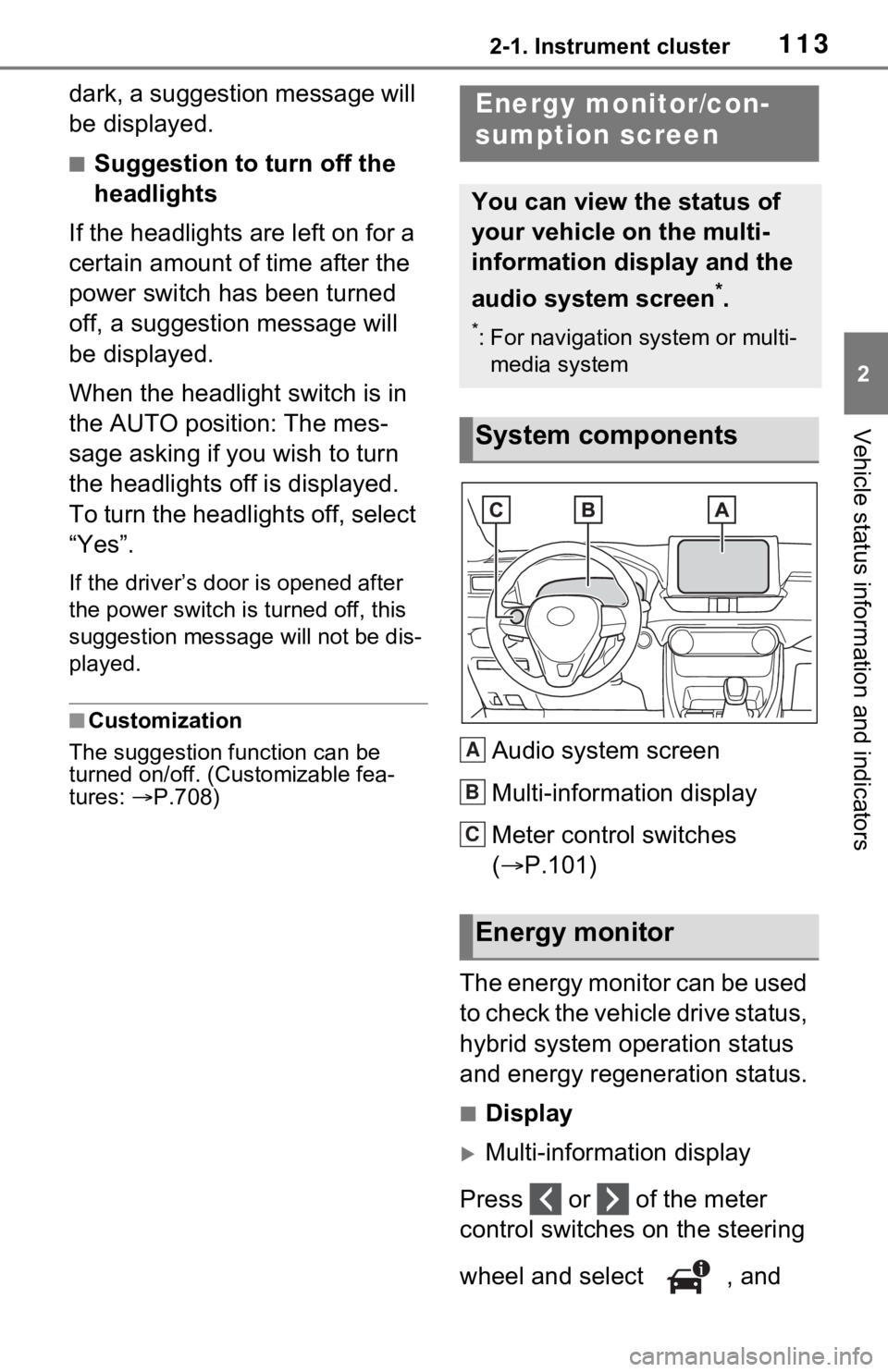
Audio system screen
Multi-information display
Meter control switches
( P.101)
The energy monitor can be used
to check the vehicle drive status,
hybrid system operation status
and energy regeneration status.
■Display
Multi-information display
Press or of the meter
control switches on the steering
wheel and select , and
Energy monitor/con-
sumption screen
You can view the status of
your vehicle on the multi-
information display and the
audio system screen
*.
*: For navigation system or multi- media system
System components
Energy monitor
A
B
C
Page 115 of 752
1152-1. Instrument cluster
2
Vehicle status information and indicators
Rear electric motor (traction
motor)
Front tire
Rear tire
*
*: For FF vehicles, the arrows to
are not displayed.
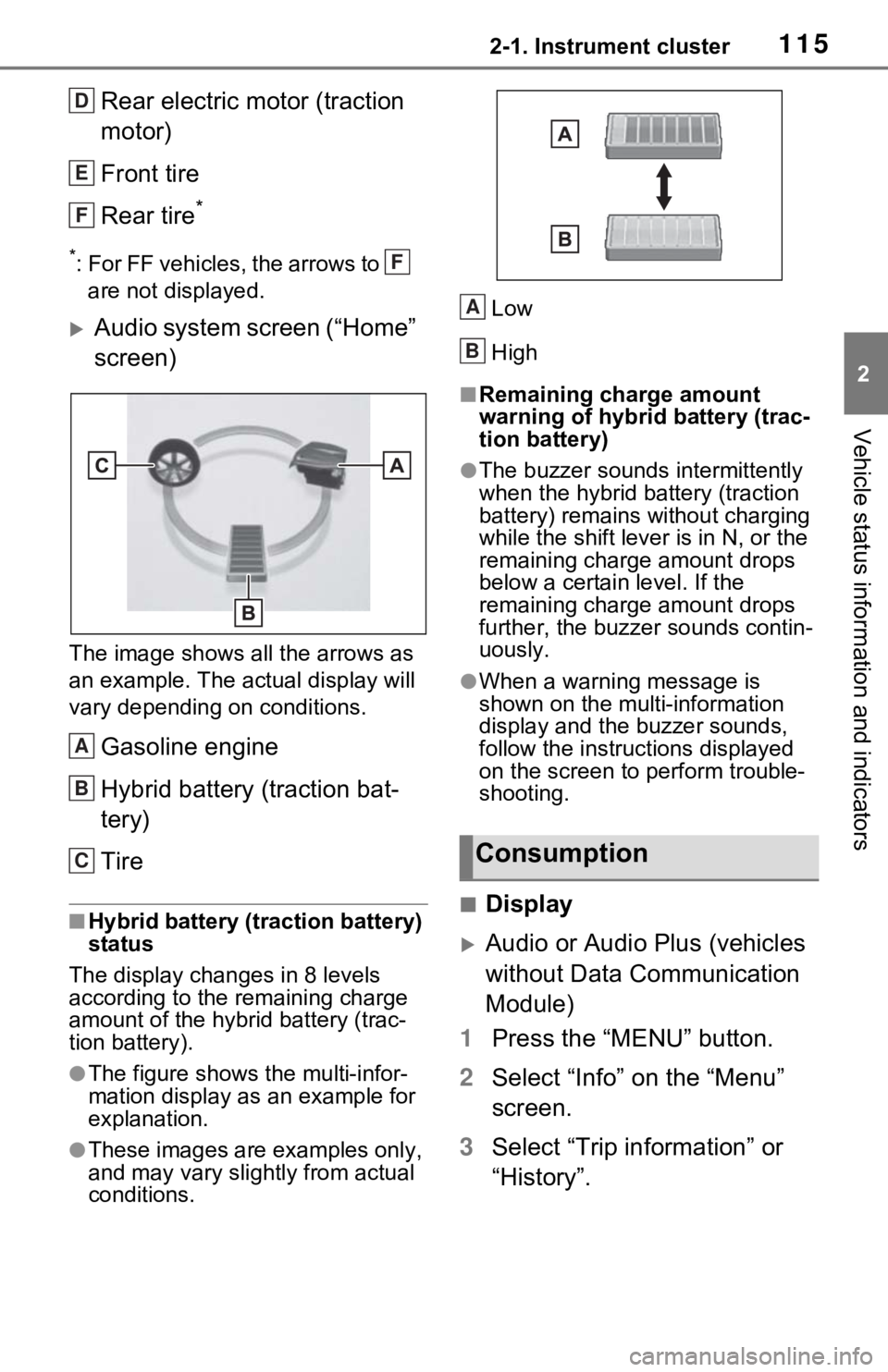
Audio system screen (“Home”
screen)
The image shows all the arrows as
an example. The actual display will
vary depending on conditions.
Gasoline engine
Hybrid battery (traction bat-
tery)
Tire
■Hybrid battery (traction battery)
status
The display changes in 8 levels
according to the remaining charge
amount of the hybrid battery (trac-
tion battery).
●The figure shows the multi-infor-
mation display as an example for
explanation.
●These images are examples only,
and may vary slight ly from actual
conditions. Low
High
■Remaining charge amount
warning of hybri
d battery (trac-
tion battery)
●The buzzer sounds intermittently
when the hybrid battery (traction
battery) remains without charging
while the shift lever is in N, or the
remaining charge amount drops
below a certain level. If the
remaining charge amount drops
further, the buzz er sounds contin-
uously.
●When a warning message is
shown on the multi-information
display and the buzzer sounds,
follow the instruct ions displayed
on the screen to perform trouble-
shooting.
■Display
Audio or Audio Plus (vehicles
without Data Communication
Module)
1 Press the “MENU” button.
2 Select “Info” on the “Menu”
screen.
3 Select “Trip information” or
“History”.
D
E
F
F
A
B
CConsumption
A
B
Page 116 of 752
1162-1. Instrument cluster
Audio or Audio Plus (vehicles
with Data Communication
Module)/Premium Audio
1 Press the “MENU” button.
2 Select “Info” on the “Menu”
screen.
3 Select “ECO” on the “Infor-
mation” screen.
4 Select “Trip information” or
“History”.
■Trip information
If a screen other than “Trip infor-
mation” is displayed, select “Trip
information”.
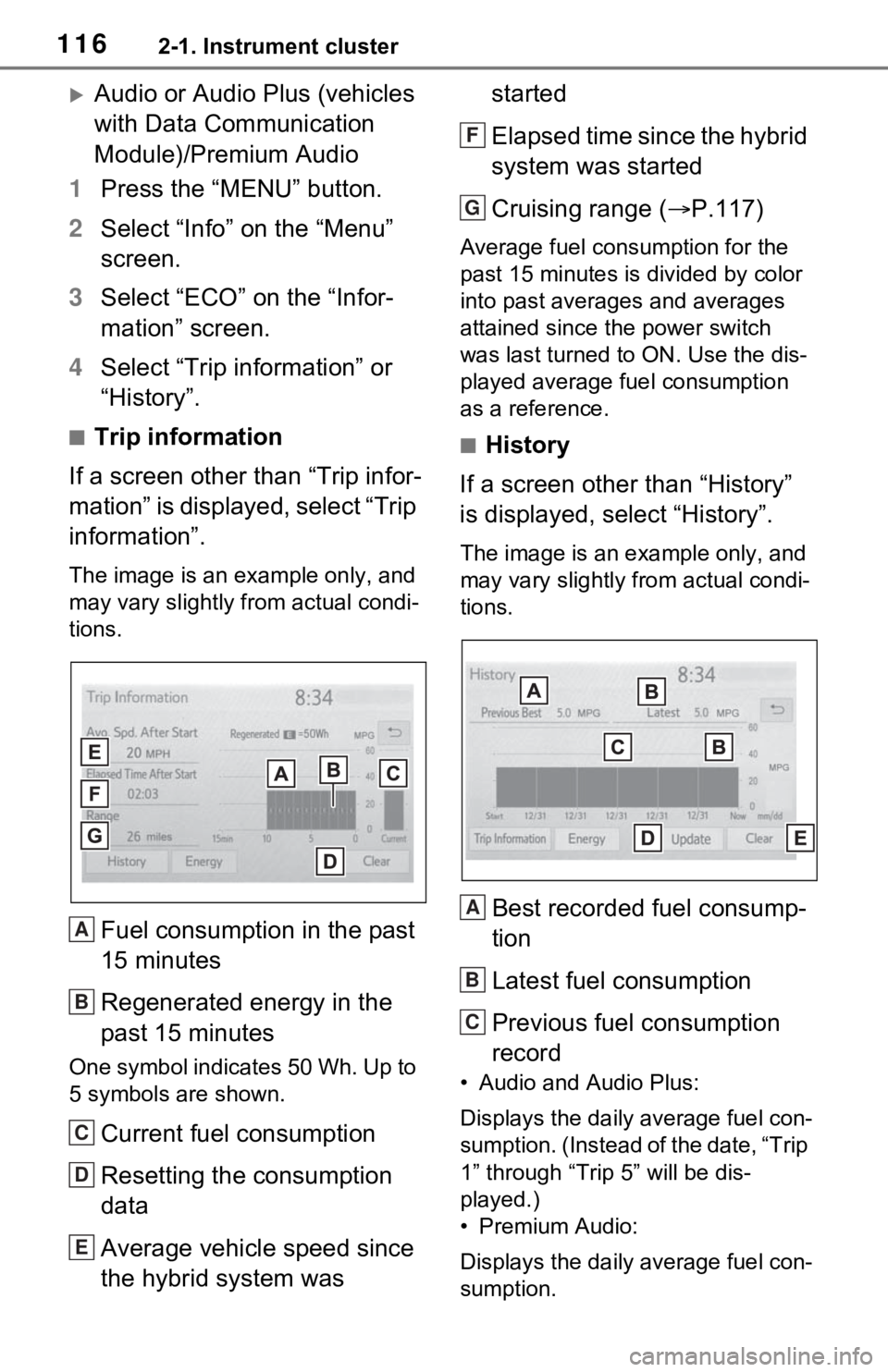
The image is an example only, and
may vary slightly f rom actual condi-
tions.
Fuel consumption in the past
15 minutes
Regenerated energy in the
past 15 minutes
One symbol indicates 50 Wh. Up to
5 symbols are shown.
Current fuel consumption
Resetting the consumption
data
Average vehicle speed since
the hybrid system was started
Elapsed time since the hybrid
system was started
Cruising range (
P.117)
Average fuel consumption for the
past 15 minutes is divided by color
into past averages and averages
attained since t he power switch
was last turned to ON. Use the dis-
played average fuel consumption
as a reference.
■History
If a screen other than “History”
is displayed, select “History”.
The image is an example only, and
may vary slightly from actual condi-
tions.
Best recorded fuel consump-
tion
Latest fuel consumption
Previous fuel consumption
record
• Audio and Audio Plus:
Displays the daily average fuel con-
sumption. (Instead of the date, “Trip
1” through “Trip 5” will be dis-
played.)
• Premium Audio:
Displays the daily average fuel con-
sumption.
A
B
C
D
E
F
G
A
B
C
Page 123 of 752
1233-1. Key information
3
Before driving
Opens and closes the power
back door
*2 ( P.137)
Sounds the alarm ( P.123)
*1: These settings must be custom-
ized at your Toyota dealer.
*2: If equipped
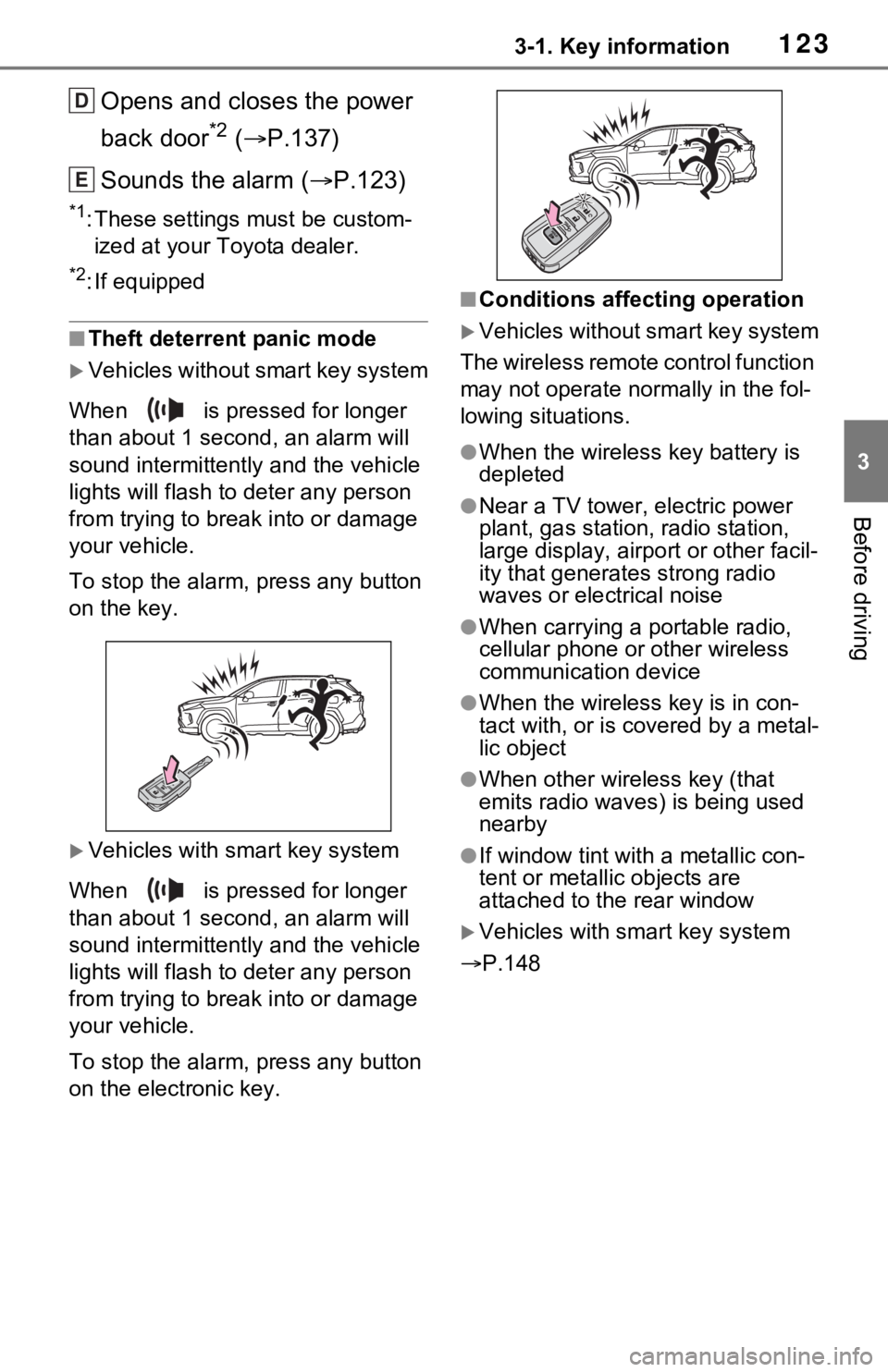
■Theft deterrent panic mode
Vehicles without smart key system
When is pressed for longer
than about 1 seco nd, an alarm will
sound intermittentl y and the vehicle
lights will flash to deter any person
from trying to break into or damage
your vehicle.
To stop the alarm, press any button
on the key.
Vehicles with smart key system
When is pressed for longer
than about 1 seco nd, an alarm will
sound intermittentl y and the vehicle
lights will flash to deter any person
from trying to break into or damage
your vehicle.
To stop the alarm, press any button
on the electronic key.
■Conditions affecting operation
Vehicles without smart key system
The wireless remote control function
may not operate normally in the fol-
lowing situations.
●When the wireles s key battery is
depleted
●Near a TV tower, electric power
plant, gas station, radio station,
large display, airpo rt or other facil-
ity that generates strong radio
waves or electrical noise
●When carrying a portable radio,
cellular phone or other wireless
communication device
●When the wireless key is in con-
tact with, or is c overed by a metal-
lic object
●When other wireless key (that
emits radio waves) is being used
nearby
●If window tint wit h a metallic con-
tent or metallic objects are
attached to the rear window
Vehicles with smart key system
P.148
D
E
Page 128 of 752
1283-2. Opening, closing and locking the doors
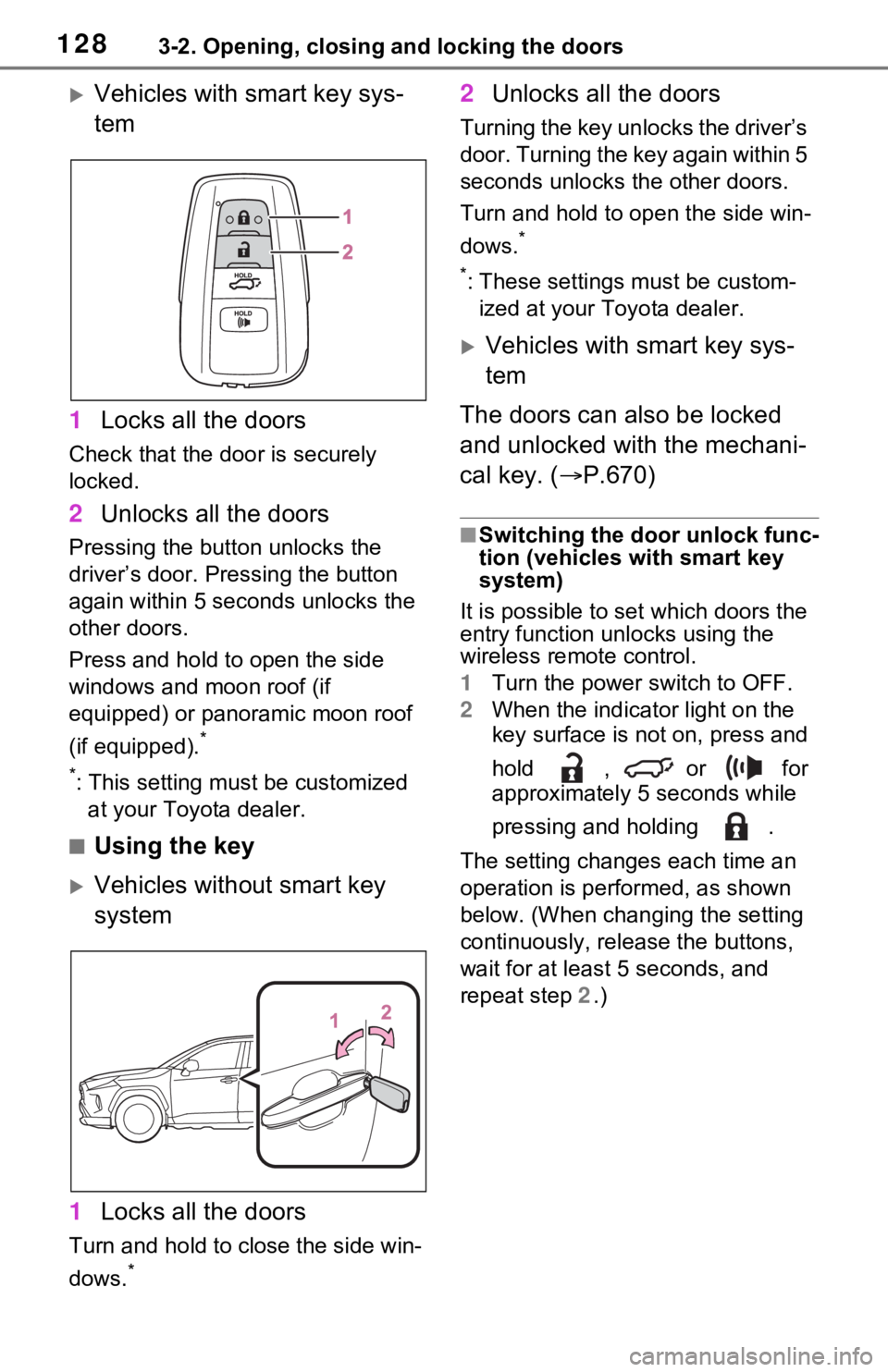
Vehicles with smart key sys-
tem
1 Locks all the doors
Check that the door is securely
locked.
2Unlocks all the doors
Pressing the button unlocks the
driver’s door. Pressing the button
again within 5 seconds unlocks the
other doors.
Press and hold to open the side
windows and moon roof (if
equipped) or panoramic moon roof
(if equipped).
*
*
: This setting must be customized at your Toyota dealer.
■Using the key
Vehicles without smart key
system
1 Locks all the doors
Turn and hold to close the side win-
dows.
*
2Unlocks all the doors
Turning the key unlocks the driver’s
door. Turning the key again within 5
seconds unlocks th e other doors.
Turn and hold to open the side win-
dows.
*
*
: These settings must be custom- ized at your Toyota dealer.
Vehicles with smart key sys-
tem
The doors can also be locked
and unlocked with the mechani-
cal key. ( P.670)
■Switching the door unlock func-
tion (vehicles with smart key
system)
It is possible to set which doors the
entry function unlocks using the
wireless remote control.
1 Turn the power switch to OFF.
2 When the indicator light on the
key surface is not on, press and
hold , or for
approximately 5 seconds while
pressing and holding .
The setting changes each time an
operation is per formed, as shown
below. (When changing the setting
continuously, release the buttons,
wait for at least 5 seconds, and
repeat step 2 .)
Page 134 of 752
1343-2. Opening, closing and locking the doors
■Using the entry function
(vehicles with smart key
system)
Carry the electronic key to
enable this function.
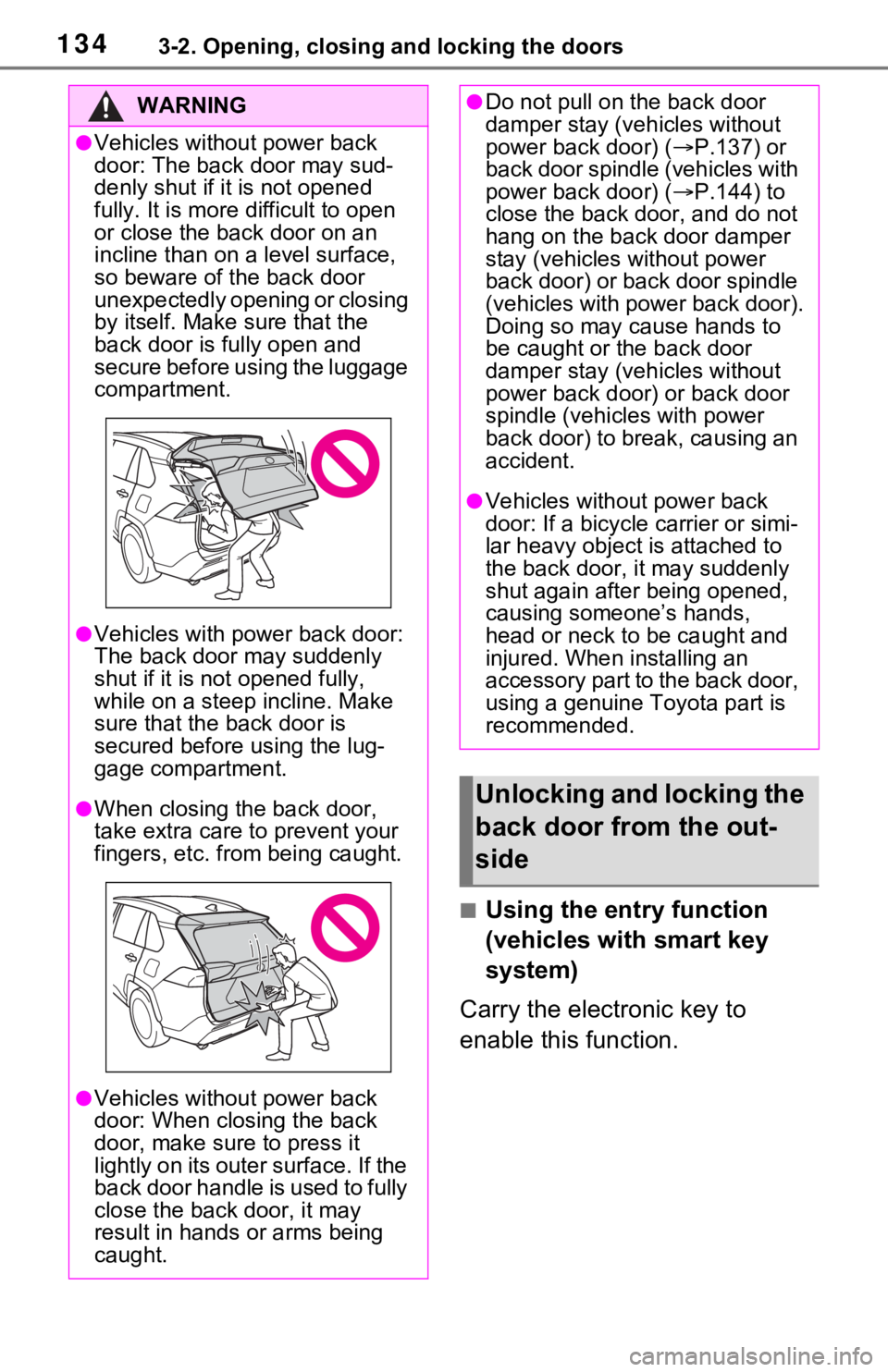
WARNING
●Vehicles without power back
door: The back door may sud-
denly shut if it is not opened
fully. It is more difficult to open
or close the ba ck door on an
incline than on a level surface,
so beware of the back door
unexpectedly opening or closing
by itself. Make sure that the
back door is fully open and
secure before using the luggage
compartment.
●Vehicles with power back door:
The back door may suddenly
shut if it is not opened fully,
while on a steep incline. Make
sure that the back door is
secured before using the lug-
gage compartment.
●When closing the back door,
take extra care to prevent your
fingers, etc. from being caught.
●Vehicles without power back
door: When closing the back
door, make sure to press it
lightly on its outer surface. If the
back door handle is used to fully
close the back door, it may
result in hands or arms being
caught.
●Do not pull on the back door
damper stay (vehicles without
power back door) ( P.137) or
back door spindle (vehicles with
power back door) ( P.144) to
close the back door, and do not
hang on the back door damper
stay (vehicles without power
back door) or back door spindle
(vehicles with power back door).
Doing so may cause hands to
be caught or the back door
damper stay (vehicles without
power back door) or back door
spindle (vehicles with power
back door) to break, causing an
accident.
●Vehicles without power back
door: If a bicycle carrier or simi-
lar heavy object is attached to
the back door, it may suddenly
shut again after being opened,
causing someone’s hands,
head or neck to be caught and
injured. When installing an
accessory part to the back door,
using a genuine Toyota part is
recommended.
Unlocking and locking the
back door from the out-
side
Page 136 of 752
1363-2. Opening, closing and locking the doors
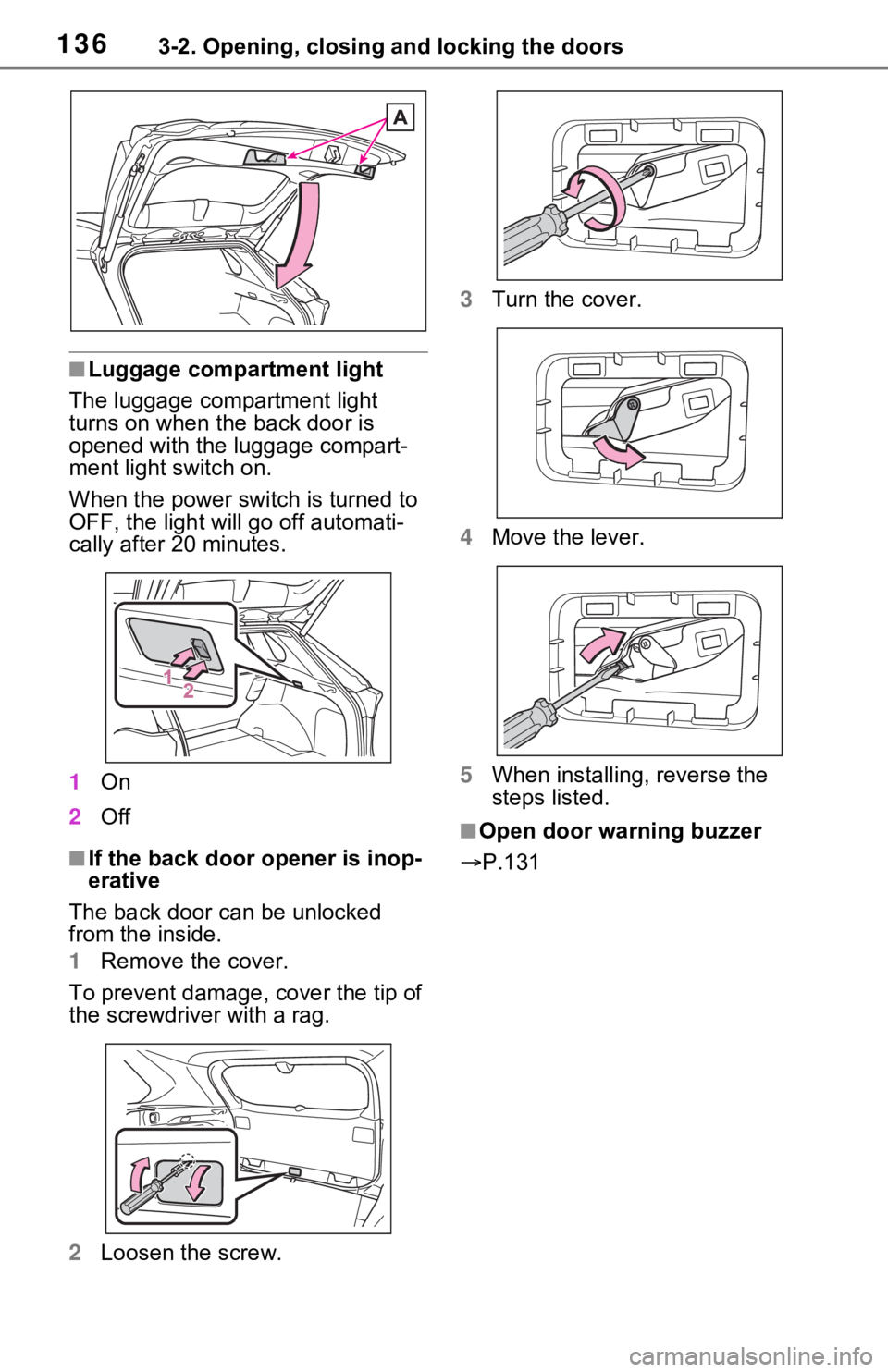
■Luggage compartment light
The luggage compartment light
turns on when the back door is
opened with the luggage compart-
ment light switch on.
When the power switch is turned to
OFF, the light will go off automati-
cally after 20 minutes.
1 On
2 Off
■If the back door opener is inop-
erative
The back door can be unlocked
from the inside.
1 Remove the cover.
To prevent damage, cover the tip of
the screwdriver with a rag.
2 Loosen the screw. 3
Turn the cover.
4 Move the lever.
5 When installing, reverse the
steps listed.
■Open door warning buzzer
P.131
Page 139 of 752
1393-2. Opening, closing and locking the doors
3
Before driving
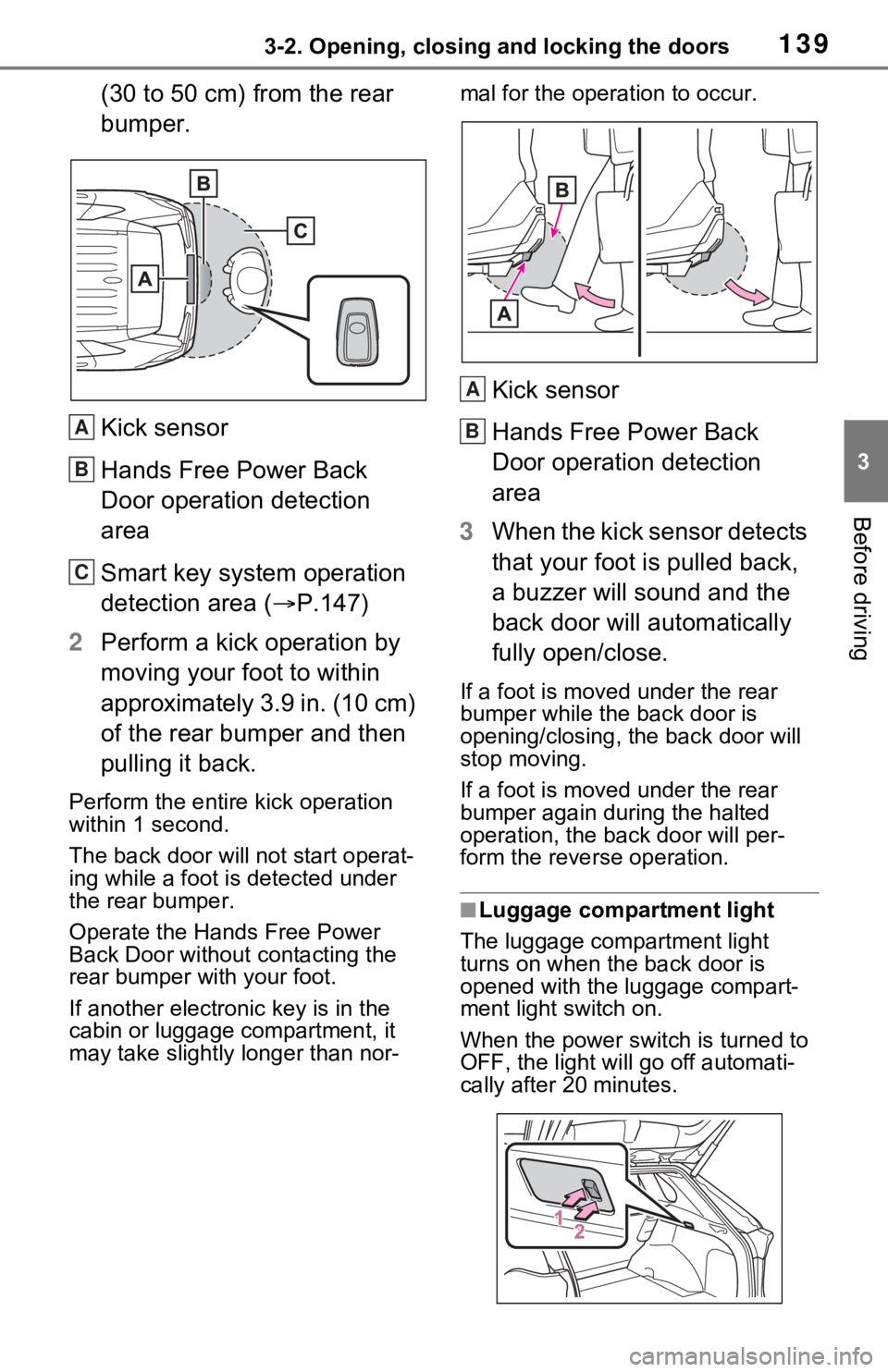
(30 to 50 cm) from the rear
bumper.
Kick sensor
Hands Free Power Back
Door operation detection
area
Smart key system operation
detection area (P.147)
2 Perform a kick operation by
moving your foot to within
approximately 3.9 in. (10 cm)
of the rear bumper and then
pulling it back.
Perform the entire kick operation
within 1 second.
The back door will not start operat-
ing while a foot is detected under
the rear bumper.
Operate the Hands Free Power
Back Door without contacting the
rear bumper with your foot.
If another electronic key is in the
cabin or luggage compartment, it
may take slightly longer than nor- mal for the operation to occur.
Kick sensor
Hands Free Power Back
Door operation detection
area
3 When the kick sensor detects
that your foot is pulled back,
a buzzer will sound and the
back door will automatically
fully open/close.
If a foot is moved under the rear
bumper while the back door is
opening/closing, the back door will
stop moving.
If a foot is moved under the rear
bumper again during the halted
operation, the ba ck door will per-
form the rever se operation.
■Luggage compartment light
The luggage compartment light
turns on when the back door is
opened with the luggage compart-
ment light switch on.
When the power switch is turned to
OFF, the light will go off automati-
cally after 20 minutes.
A
B
C
A
B
Page 140 of 752
1403-2. Opening, closing and locking the doors
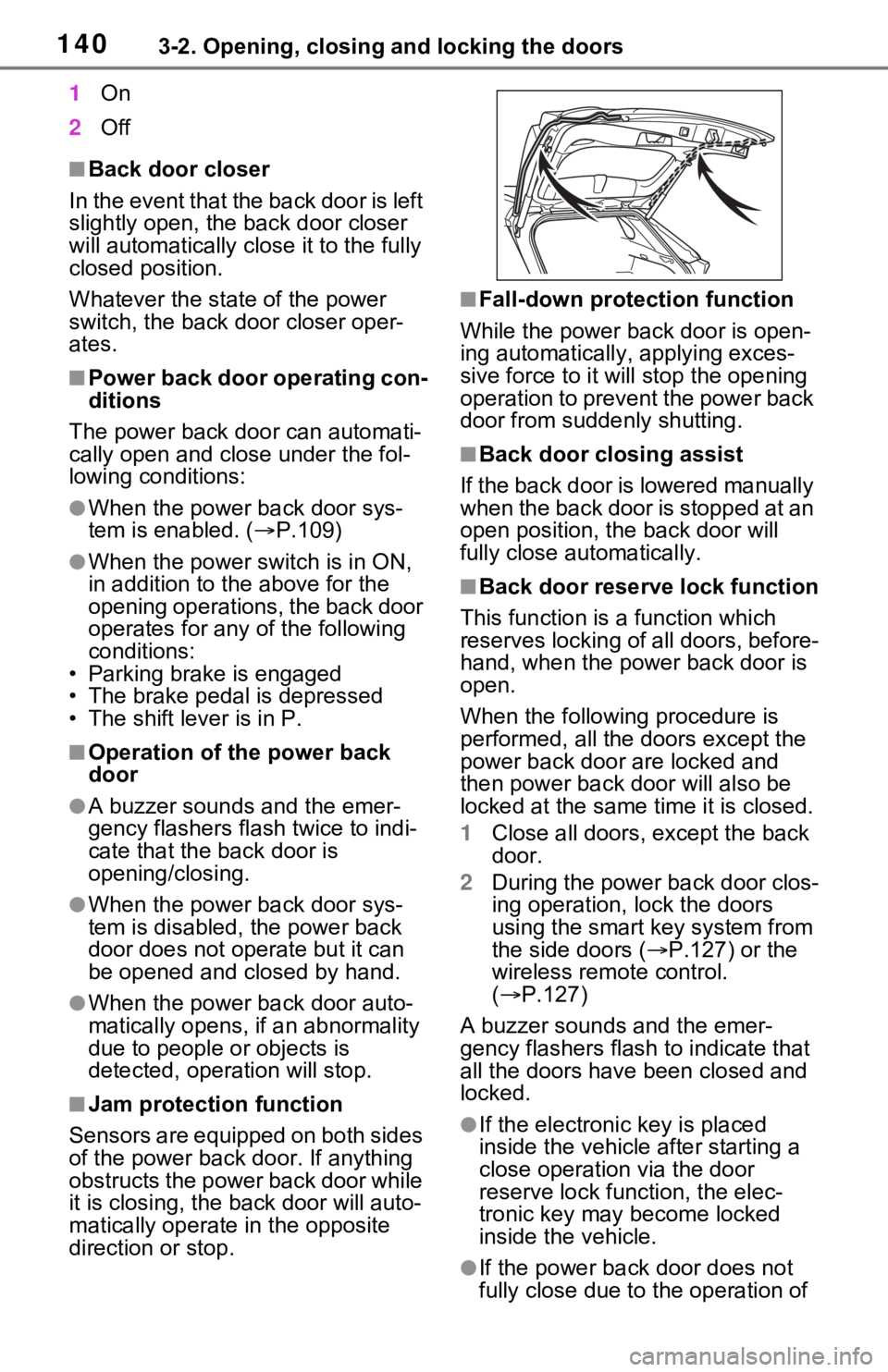
1On
2 Off
■Back door closer
In the event that the back door is left
slightly open, the back door closer
will automatically close it to the fully
closed position.
Whatever the state of the power
switch, the back door closer oper-
ates.
■Power back door operating con-
ditions
The power back door can automati-
cally open and close under the fol-
lowing conditions:
●When the power back door sys-
tem is enabled. ( P.109)
●When the power switch is in ON,
in addition to the above for the
opening operations, the back door
operates for any of the following
conditions:
• Parking brake is engaged
• The brake pedal is depressed
• The shift lever is in P.
■Operation of the power back
door
●A buzzer sounds and the emer-
gency flashers flash twice to indi-
cate that the back door is
opening/closing.
●When the power back door sys-
tem is disabled, the power back
door does not ope rate but it can
be opened and closed by hand.
●When the power back door auto-
matically opens, if an abnormality
due to people or objects is
detected, oper ation will stop.
■Jam protection function
Sensors are equipped on both sides
of the power back door. If anything
obstructs the power back door while
it is closing, the b ack door will auto-
matically operate in the opposite
direction or stop.
■Fall-down protection function
While the power back door is open-
ing automatically, applying exces-
sive force to it will stop the opening
operation to prevent the power back
door from suddenly shutting.
■Back door closing assist
If the back door is lowered manually
when the back door is stopped at an
open position, the back door will
fully close automatically.
■Back door reserve lock function
This function is a function which
reserves locking of all doors, before-
hand, when the power back door is
open.
When the following procedure is
performed, all the doors except the
power back door are locked and
then power back door will also be
locked at the same time it is closed.
1 Close all doors, except the back
door.
2 During the power back door clos-
ing operation, lock the doors
using the smart key system from
the side doors ( P.127) or the
wireless remote control.
( P.127)
A buzzer sounds and the emer-
gency flashers flash to indicate that
all the doors have been closed and
locked.
●If the electronic key is placed
inside the vehicle after starting a
close operation via the door
reserve lock function, the elec-
tronic key may become locked
inside the vehicle.
●If the power back door does not
fully close due to the operation of