ECO mode TOYOTA RAV4 HYBRID 2021 Repair Manual
[x] Cancel search | Manufacturer: TOYOTA, Model Year: 2021, Model line: RAV4 HYBRID, Model: TOYOTA RAV4 HYBRID 2021Pages: 752, PDF Size: 31.25 MB
Page 663 of 752
6638-2. Steps to take in an emergency
8
When trouble arises
wheel ( ).
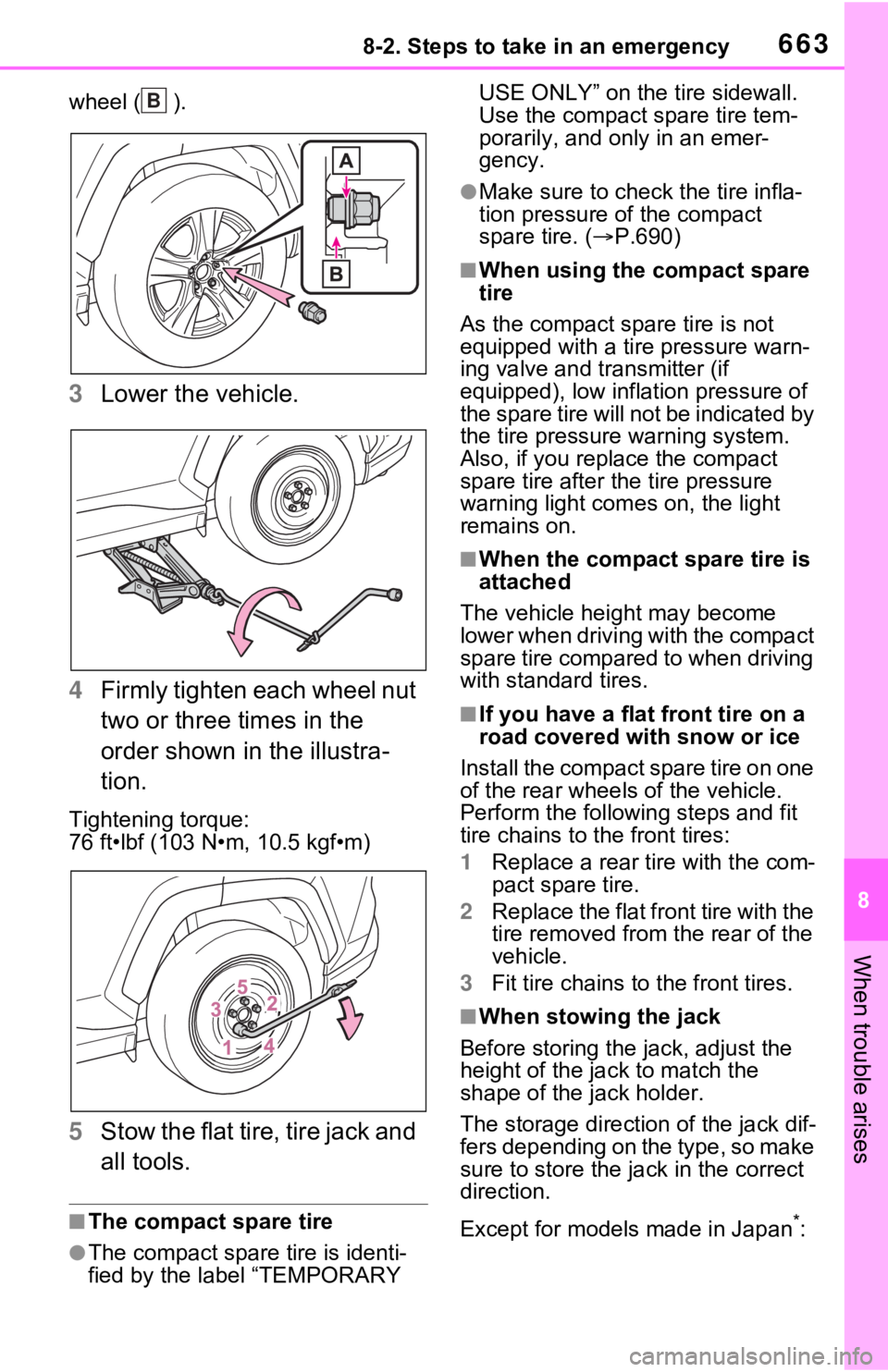
3Lower the vehicle.
4 Firmly tighten each wheel nut
two or three times in the
order shown in the illustra-
tion.
Tightening torque:
76 ft•lbf (103 N•m, 10.5 kgf•m)
5Stow the flat tire, tire jack and
all tools.
■The compact spare tire
●The compact spare tire is identi-
fied by the label “TEMPORARY USE ONLY” on the tire sidewall.
Use the compact spare tire tem-
porarily, and only in an emer-
gency.
●Make sure to check the tire infla-
tion pressure of the compact
spare tire. (
P.690)
■When using the compact spare
tire
As the compact spare tire is not
equipped with a tire pressure warn-
ing valve and transmitter (if
equipped), low inflation pressure of
the spare tire will not be indicated by
the tire pressure warning system.
Also, if you replace the compact
spare tire after the tire pressure
warning light com es on, the light
remains on.
■When the compact spare tire is
attached
The vehicle height may become
lower when driving with the compact
spare tire compared to when driving
with standard tires.
■If you have a flat front tire on a
road covered with snow or ice
Install the compact spare tire on one
of the rear wheels of the vehicle.
Perform the following steps and fit
tire chains to the front tires:
1 Replace a rear tire with the com-
pact spare tire.
2 Replace the flat front tire with the
tire removed from the rear of the
vehicle.
3 Fit tire chains to the front tires.
■When stowing the jack
Before storing the jack, adjust the
height of the ja ck to match the
shape of the jack holder.
The storage direction of the jack dif-
fers depending on the type, so make
sure to store the ja ck in the correct
direction.
Except for models made in Japan
*:
B
Page 669 of 752
6698-2. Steps to take in an emergency
8
When trouble arises
■When the electronic key does
not work properly
●Make sure that the smart key sys-
tem has not been deactivated in
the customization setting. If it is
off, turn the function on.
(Customizable features: P.710)
●Check if battery-saving mode is
set. If it is set, cancel the function.
( P.148)
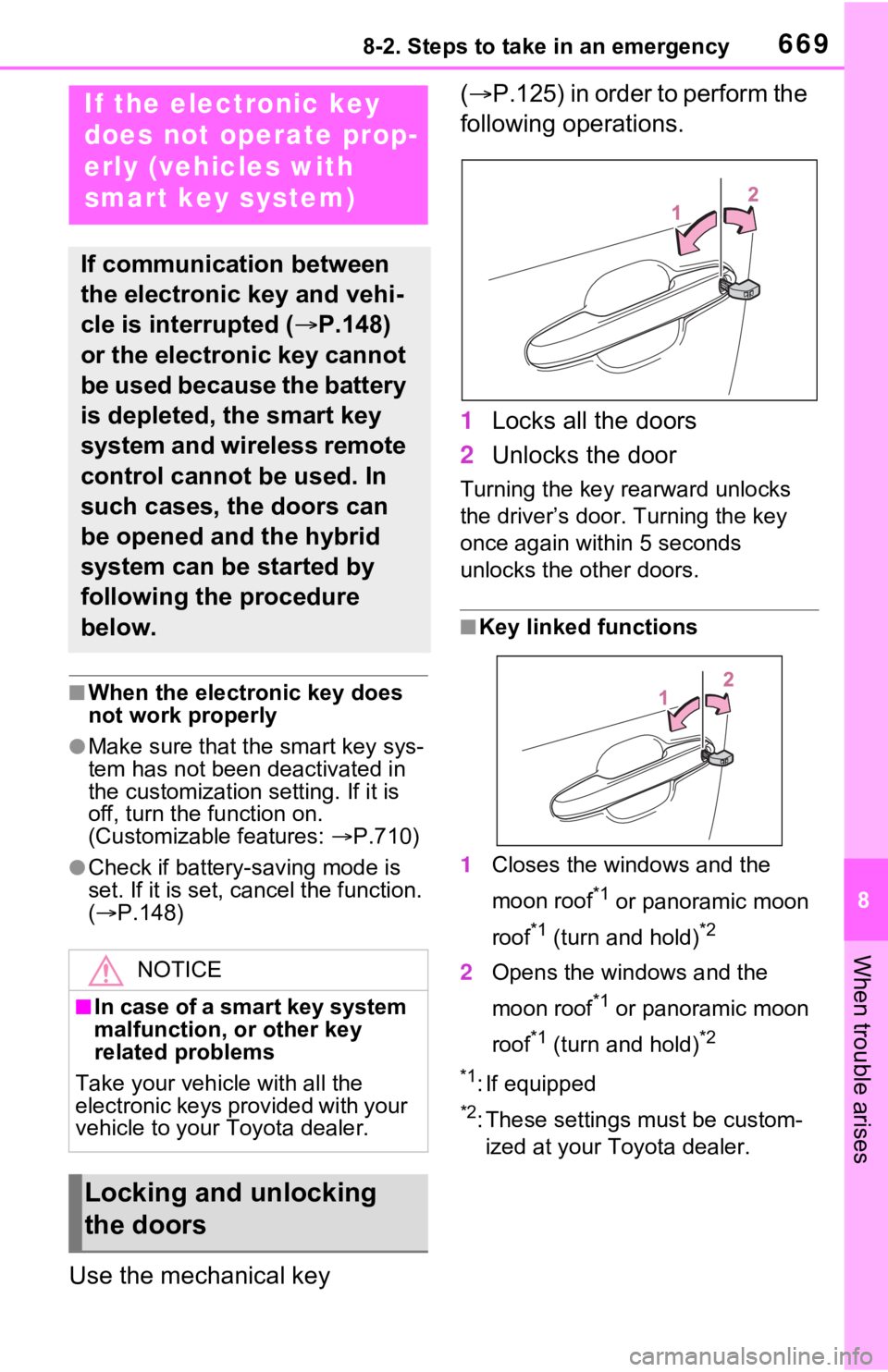
Use the mechanical key (
P.125) in order to perform the
following operations.
1 Locks all the doors
2 Unlocks the door
Turning the key rearward unlocks
the driver’s door. Turning the key
once again within 5 seconds
unlocks the other doors.
■Key linked functions
1 Closes the windows and the
moon roof
*1 or panoramic moon
roof
*1 (turn and hold)*2
2 Opens the windows and the
moon roof
*1 or panoramic moon
roof
*1 (turn and hold)*2
*1
: If equipped
*2: These settings must be custom- ized at your Toyota dealer.
If the electronic key
does not op erate prop-
erly (vehicles with
smart key system)
If communication between
the electronic key and vehi-
cle is interrupted ( P.148)
or the electronic key cannot
be used because the battery
is depleted, the smart key
system and wireless remote
control cannot be used. In
such cases, the doors can
be opened and the hybrid
system can be started by
following the procedure
below.
NOTICE
■In case of a smart key system
malfunction, or other key
related problems
Take your vehicl e with all the
electronic keys provided with your
vehicle to your Toyota dealer.
Locking and unlocking
the doors
Page 670 of 752
6708-2. Steps to take in an emergency
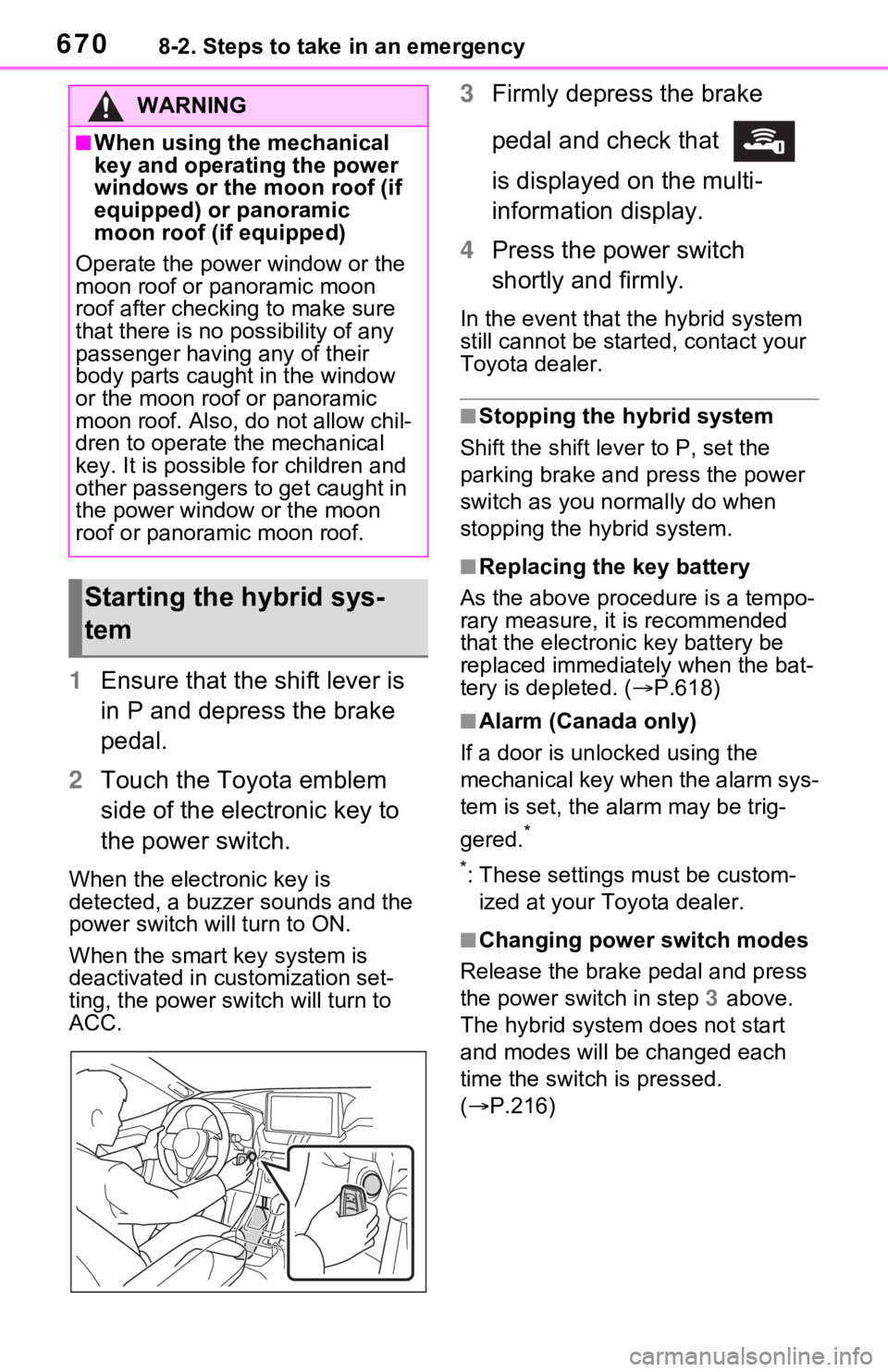
1Ensure that the shift lever is
in P and depress the brake
pedal.
2 Touch the Toyota emblem
side of the electronic key to
the power switch.
When the electronic key is
detected, a buzzer sounds and the
power switch will turn to ON.
When the smart key system is
deactivated in customization set-
ting, the power switch will turn to
ACC.
3Firmly depress the brake
pedal and check that
is displayed on the multi-
information display.
4 Press the power switch
shortly and firmly.
In the event that t he hybrid system
still cannot be star ted, contact your
Toyota dealer.
■Stopping the hybrid system
Shift the shift lever to P, set the
parking brake and press the power
switch as you normally do when
stopping the hybrid system.
■Replacing the key battery
As the above proce dure is a tempo-
rary measure, it is recommended
that the electronic key battery be
replaced immediatel y when the bat-
tery is depleted. ( P.618)
■Alarm (Canada only)
If a door is unl ocked using the
mechanical key when the alarm sys-
tem is set, the alarm may be trig-
gered.
*
*
: These settings must be custom- ized at your Toyota dealer.
■Changing power switch modes
Release the brake pedal and press
the power switch in step 3 above.
The hybrid system does not start
and modes will be changed each
time the switch is pressed.
( P.216)
WARNING
■When using the mechanical
key and operating the power
windows or the moon roof (if
equipped) or panoramic
moon roof (if equipped)
Operate the power window or the
moon roof or panoramic moon
roof after checking to make sure
that there is no possibility of any
passenger having any of their
body parts caught in the window
or the moon roof or panoramic
moon roof. Also, do not allow chil-
dren to operate the mechanical
key. It is possible for children and
other passengers to get caught in
the power window or the moon
roof or panoramic moon roof.
Starting the hybrid sys-
tem
Page 673 of 752
6738-2. Steps to take in an emergency
8
When trouble arises
possible.
■Starting the hybrid system
when the 12-volt battery is dis-
charged
The hybrid system cannot be
started by push-starting.
■To prevent 12-vol t battery dis-
charge
●Turn off the headlights and the
audio system while the hybrid sys-
tem is off.
●Turn off any unnec essary electri-
cal components when the vehicle
is running at a low speed for an
extended period, such as in heavy
traffic.
■When the 12-volt battery is
removed or discharged
●Information stor ed in the ECU is
cleared. When the 12-volt battery
is depleted, have the vehicle
inspected at your Toyota dealer.
●Some systems may require initial-
ization. ( P.718)
■When removing the 12-volt bat-
tery terminals
When the 12-volt battery terminals
are removed, the information stored
in the ECU is cleared. Before
removing the 12-volt battery termi-
nals, contact your Toyota dealer.
■Charging the 1 2-volt battery
The electricity stor ed in the 12-volt
battery will discharge gradually even
when the vehicle is not in use, due
to natural discharge and the drain-
ing effects of certa in electrical appli-
ances. If the vehicle is left for a long
time, the 12-volt battery may dis-
charge, and the hybrid system may
be unable to start. (The 12-volt bat-
tery recharges aut omatically while
the hybrid system is operating.)
■When recharging or replacing
the 12-volt battery (vehicles
without smart key system)
The hybrid system may not start on the first attempt after the 12-volt bat-
tery has recharged but will start nor-
mally after the second attempt. This
is not a malfunction.
■When recharging or replacing
the 12-volt battery (vehicles
with smart key system)
●In some cases, it may not be pos-
sible to unlock the doors using the
smart key system when the 12-
volt battery is discharged. Use the
wireless remote c
ontrol or the
mechanical key to lock or unlock
the doors.
●The hybrid syste m may not start
on the first attempt after the 12-
volt battery has recharged but will
start normally after the second
attempt. This is n ot a malfunction.
●The power switch mode is memo-
rized by the vehicle. When the 12-
volt battery is reconnected, the
system will return to the mode it
was in before the 12-volt battery
was discharged. Before discon-
necting the 12-volt battery, turn
the power switch to OFF.
If you are unsure what mode the
power switch was in before the
12-volt battery discharged, be
especially careful when recon-
necting the 12-volt battery.
●Some systems may require initial-
ization. (P.718)
■When replacing t he 12-volt bat-
tery
●Use a 12-volt battery that con-
forms to European regulations.
●Type A:
Use a battery that the case size is
same as the previous one (LN1), 20
hours rate capacity (20HR) is equiv-
alent (45Ah) or greater, and perfor-
mance rating (CCA) is equivalent
(285A) or greater.
Type B:
Use a battery that the case size is
same as the previous one (LN1), 20
hours rate capacity (20HR) is equiv-
Page 703 of 752
7039-1. Specifications
9
Vehicle specifications
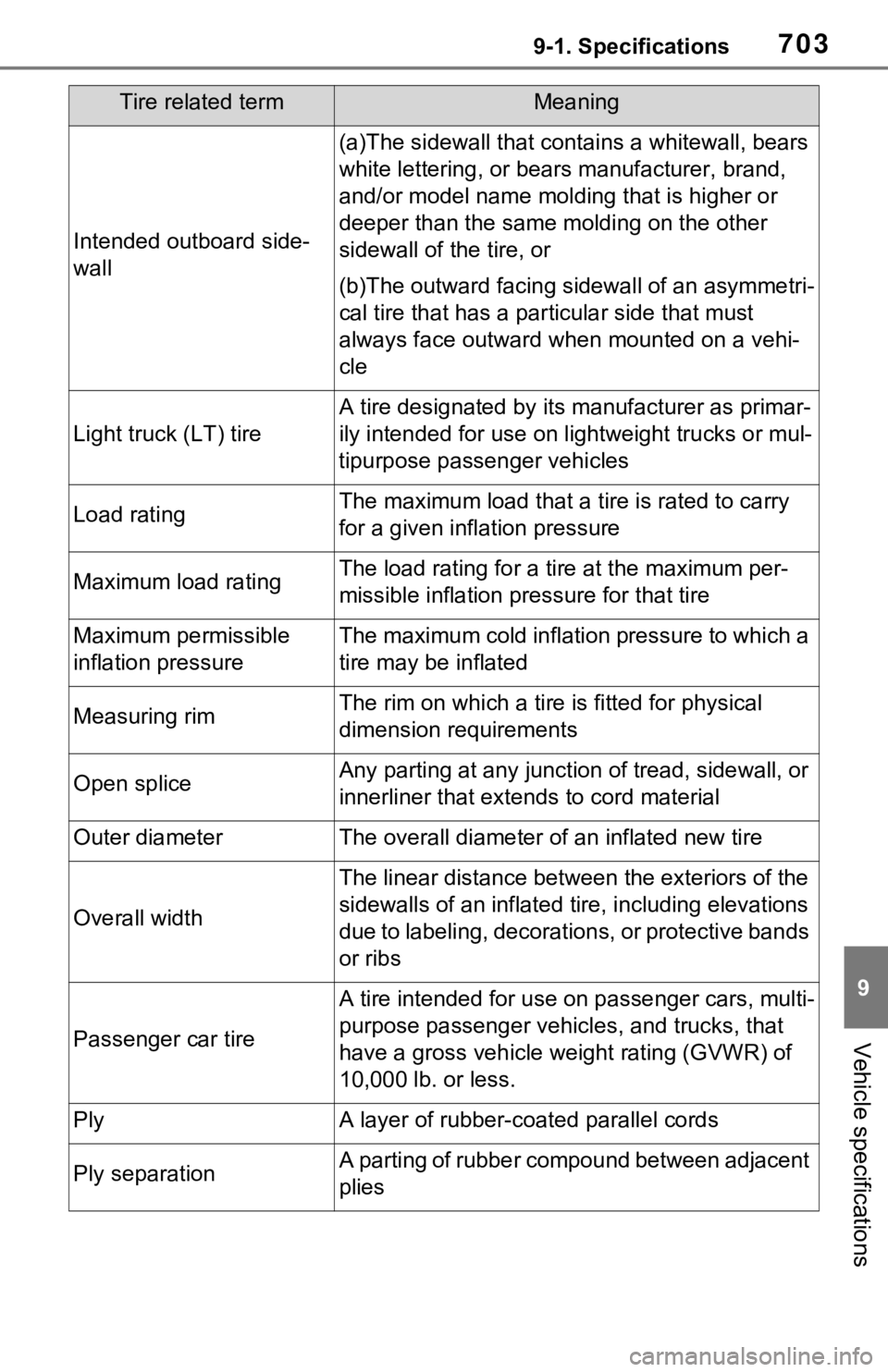
Intended outboard side-
wall
(a)The sidewall that contains a whitewall, bears
white lettering, or bear s manufacturer, brand,
and/or model name molding that is higher or
deeper than the same molding on the other
sidewall of the tire, or
(b)The outward facing sidewall of an asymmetri-
cal tire that has a par ticular side that must
always face outward whe n mounted on a vehi-
cle
Light truck (LT) tire
A tire designated by its manufacturer as primar-
ily intended for use on lightweight trucks or mul-
tipurpose passenger vehicles
Load ratingThe maximum load that a tire is rated to carry
for a given inflation pressure
Maximum load ratingThe load rating for a tire at the maximum per-
missible inflation pressure for that tire
Maximum permissible
inflation pressureThe maximum cold inflation pressure to which a
tire may be inflated
Measuring rimThe rim on which a tire is fitted for physical
dimension requirements
Open spliceAny parting at any junction of tread, sidewall, or
innerliner that extends to cord material
Outer diameterThe overall diameter o f an inflated new tire
Overall width
The linear distance between the exteriors of the
sidewalls of an inflated ti re, including elevations
due to labeling, decorations, or protective bands
or ribs
Passenger car tire
A tire intended for use on passenger cars, multi-
purpose passenger vehicles, and trucks, that
have a gross vehicle weight rating (GVWR) of
10,000 lb. or less.
PlyA layer of rubber-coated parallel cords
Ply separationA parting of rubber compound between adjacent
plies
Tire related termMeaning
Page 710 of 752
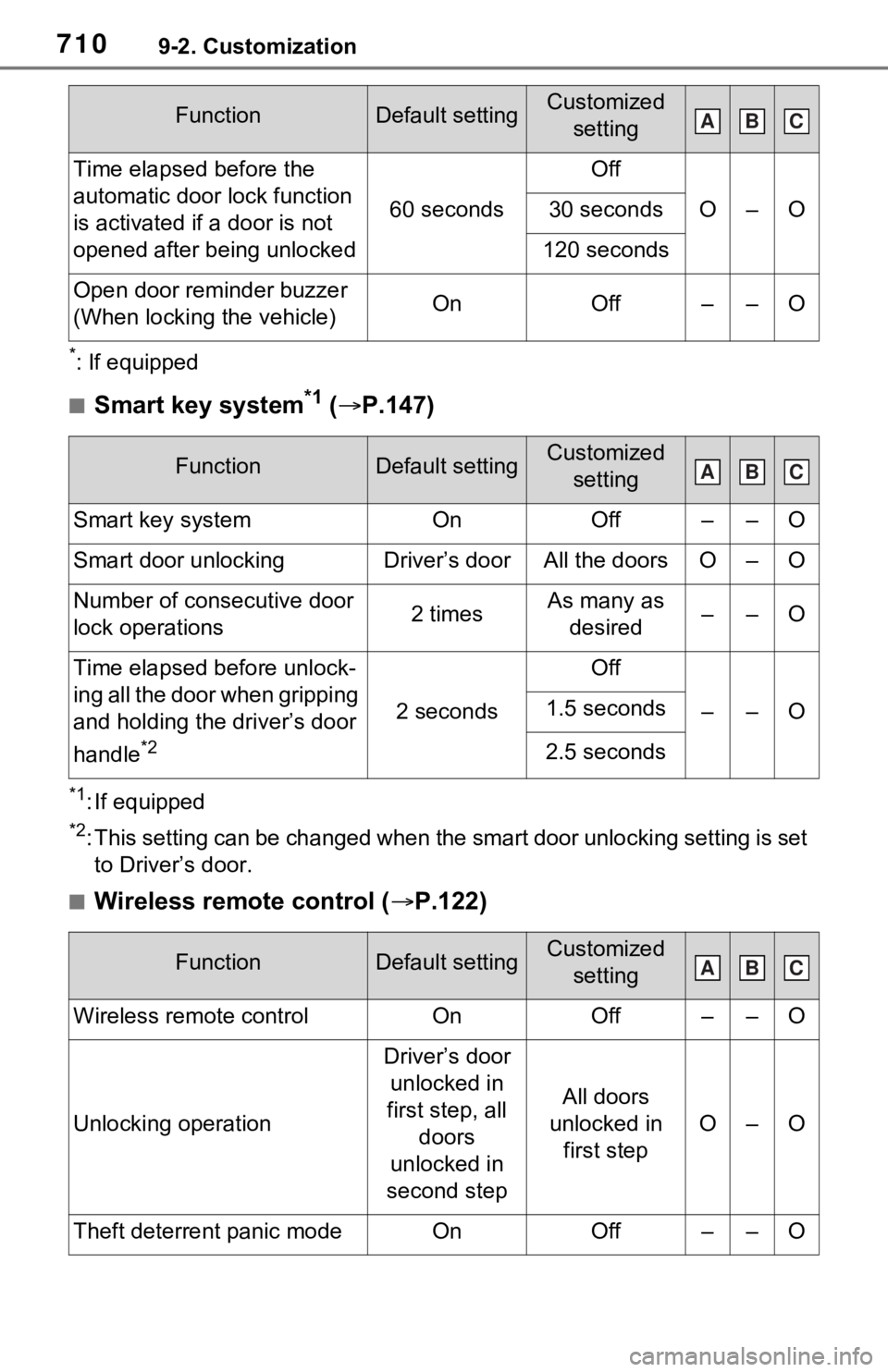
7109-2. Customization
*: If equipped
■Smart key system*1 ( P.147)
*1: If equipped
*2: This setting can be changed when the smart door unlocking sett ing is set
to Driver’s door.
■Wireless remote control ( P.122)
Time elapsed before the
automatic door lock function
is activated if a door is not
opened after being unlocked
60 seconds
Off
O–O30 seconds
120 seconds
Open door reminder buzzer
(When locking the vehicle)OnOff––O
FunctionDefault settingCustomized
setting
Smart key systemOnOff––O
Smart door unlockingDriver’s doorAll the doorsO–O
Number of consecutive door
lock operations2 timesAs many as desired––O
Time elapsed before unlock-
ing all the door when gripping
and holding the driver’s door
handle
*2
2 seconds
Off
––O1.5 seconds
2.5 seconds
FunctionDefault settingCustomized setting
Wireless remote controlOnOff––O
Unlocking operation
Driver’s door unlocked in
first step, all doors
unlocked in
second step
All doors
unlocked in first step
O–O
Theft deterrent panic modeOnOff––O
FunctionDefault settingCustomized settingABC
ABC
ABC
Page 713 of 752
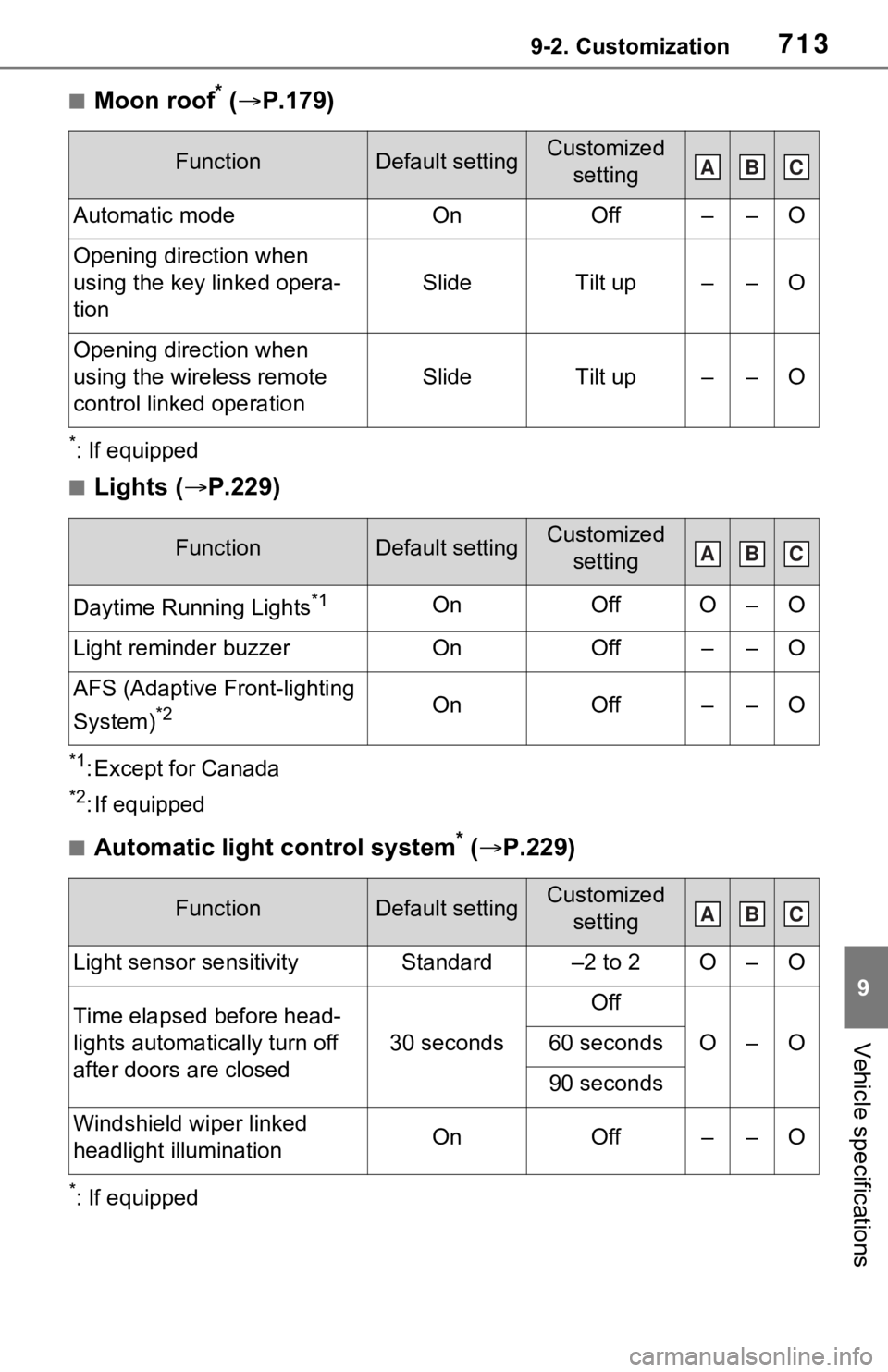
7139-2. Customization
9
Vehicle specifications
■Moon roof* ( P.179)
*: If equipped
■Lights ( P.229)
*1: Except for Canada
*2: If equipped
■Automatic light control system* ( P.229)
*: If equipped
FunctionDefault settingCustomized
setting
Automatic modeOnOff––O
Opening direction when
using the key linked opera-
tion
SlideTilt up––O
Opening direction when
using the wireless remote
control linked operation
SlideTilt up––O
FunctionDefault settingCustomized setting
Daytime Running Lights*1OnOffO–O
Light reminder buzzerOnOff––O
AFS (Adaptive Front-lighting
System)
*2OnOff––O
FunctionDefault settingCustomized setting
Light sensor sensitivityStandard–2 to 2O–O
Time elapsed before head-
lights automatically turn off
after doors are closed
30 seconds
Off
O–O60 seconds
90 seconds
Windshield wiper linked
headlight illuminationOnOff––O
ABC
ABC
ABC
Page 716 of 752
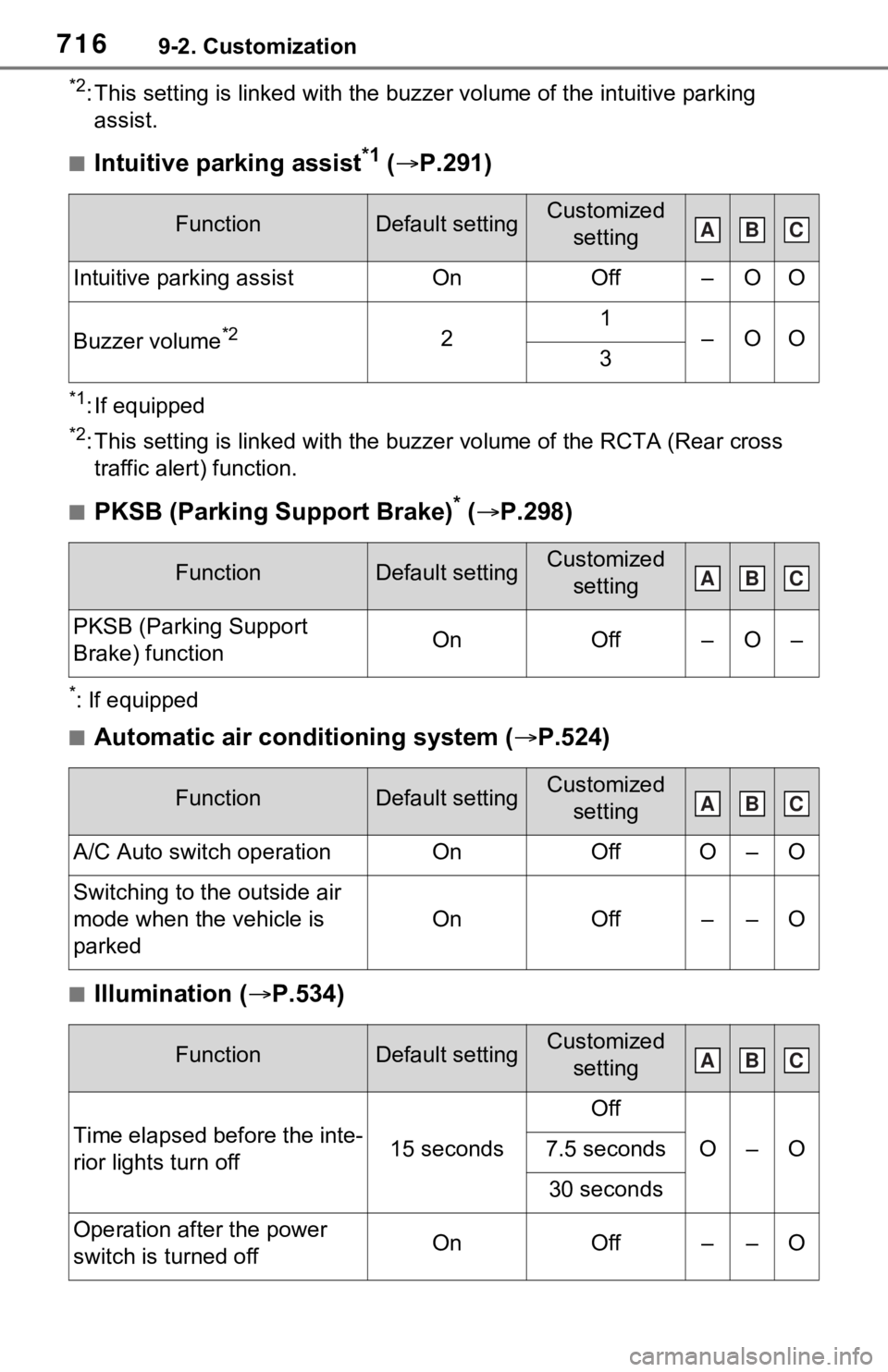
7169-2. Customization
*2: This setting is linked with the buzzer volume of the intuitive parking
assist.
■Intuitive parking assist*1 ( P.291)
*1: If equipped
*2: This setting is linked with the buzzer volume of the RCTA (Rear cross
traffic alert) function.
■PKSB (Parking Support Brake)* ( P.298)
*: If equipped
■Automatic air conditioning system ( P.524)
■Illumination ( P.534)
FunctionDefault settingCustomized
setting
Intuitive parking assistOnOff–OO
Buzzer volume*221–OO3
FunctionDefault settingCustomized setting
PKSB (Parking Support
Brake) functionOnOff–O–
FunctionDefault settingCustomized setting
A/C Auto switch operationOnOffO–O
Switching to t he outside air
mode when the vehicle is
parked
OnOff––O
FunctionDefault settingCustomized setting
Time elapsed before the inte-
rior lights turn off15 seconds
Off
O–O7.5 seconds
30 seconds
Operation after the power
switch is turned offOnOff––O
ABC
ABC
ABC
ABC
Page 735 of 752

735Alphabetical Index
Alphabetical Index
A
A/C ........................................... 524Air conditioning filter ............. 609
Automatic air conditioning sys-tem ..................................... 524
Eco air conditioning mode .... 525
Front seat concentrated airflow mode (S-FLOW) ................. 528
ABS (Anti-lock Brake System) ............................................... 369Function ............................... 369
Warning light ........................ 644
ACA (Active Cornering Assist) ............................................... 369
Active Cornering Assist (ACA) ............................................... 369
Adaptive Front-lighting System (AFS)...................................... 232
AFS (Adaptive Front-lighting System) ................................. 232
Airbags ...................................... 35 Airbag operating conditions.... 37
Airbag precautions for your child............................................. 40
Airbag warning light.............. 644
Correct driving posture ........... 29
Curtain shield airbag operating conditions ............................. 38
Curtain shield airbag precautions ............................................. 40
Front passenger occupant clas- sification system ................... 45
General airbag precautions .... 40
Locations of airbags ............... 35
Modification and disposal of air- bags ..................................... 44
Seat cushion airbag ............... 35
Side airbag operating conditions ............................................. 38
Side airbag precautions ......... 40
Side and curtain shield airbags operating conditions .............38
Side and curtain shield airbags precautions ...........................40
SRS airbags ...........................35
SRS warning light .................644
Air conditioning filter .............609
Air conditioning system.........524 Air conditioning filter .............609
Automatic air conditioning sys-tem .....................................524
Eco air conditioning mode ....525
Front seat concent rated airflow
mode (S-FLOW) .................528
Alarm .........................................84 Alarm ......................................84
Warning buzzer .. ..................642
AM/FM/SiriusXM (SXM) radio Refer to the tabl e below to iden-
tify the problem and take the
suggested corrective action 442
AM ............................................437
Anchor brackets ... ..............54, 63
Android Auto...........419, 422, 449
Android Auto button (Menu screen) ...................................389
Antenna (Smart key system) .147
Anti-lock brake system (ABS)369 Function................................369
Warning light ........................644
Apple CarPlay .........................446
Apple CarPlay
®/Android Auto
.......................................419, 422
Apple CarPlay button (Menu screen) ...................................389
Approach warning ..................278
Apps button (Menu screen) ...389
Armrest ......... ......................... ..556
Assist grips .............................556
Audio .......................................432 Operating information ...........458
Some basics .........................433
Turning the system on and off
Page 736 of 752

736Alphabetical Index
........................................... 433
Audio button (Menu screen).. 389
Audio button (Setup screen) ....................................... 392, 456
AUDIO button.......................... 387
Audio buttons overview......... 387
Audio settings ........................ 456
Automatic air conditioning sys- tem ......................................... 524Air conditioning filter ............. 609
Eco air conditioning mode .... 525
Automatic headlight leveling system ................................... 231
Automatic High Beam ............ 232
Automatic light control system ............................................... 230
Auxiliary boxes ....................... 539
Average fuel consumption .... 115
Average fuel economy ........... 105
Average vehicle speed .. 108, 115
B
Back door ................................ 133 Hands Free Power Back Door........................................... 138
Power back door .................. 137
Wireless remote control ....... 137
Back-up lights Replacing light bulbs ............ 624
Wattage ................................ 692
Battery (12-volt battery) ......... 588 If the 12-volt battery is dis-charged .............................. 672
Preparing and c hecking before
winter.................................. 378
Replacing ............................. 674
Warning light ........................ 642
Battery (traction battery) ......... 76
Blind Spot Monitor (BSM) ...... 282 Blind Spot Monitor function .. 286
Rear Cross Traffic Alert function........................................... 288 Bluetooth
® button (Setup
screen) ...................................392
Bluetooth
® details settings ...406
Bluetooth
® setup screen.......407
Connecting a Bluetooth
® device
...........................................407
Deleting a Bluetooth
® device409
Detailed settings screen .......411
Displaying the Bluetooth
® setup
screen.................................406
Editing the Bluetooth
® device
information..........................410
Registering a Bluetooth
® device
...........................................409
Bluetooth
® device information
...............................................410
Bluetooth
® hands-free system
...............................................479
Bluetooth
® phone message func-
tion .........................................490 Calling the message sender .493
Checking received messages ...........................................491
Displaying the message screen ...........................................490
Receiving a mess age ...........491
Replying to a message (dictation reply) ..................................492
Replying to a message (quick reply) ..................................493
Bottle holders .........................539
Brake Brake Hold ............................227
Fluid......................................586
Parking brake .......................224
Regenerative braking .............73
Warning light ........................642
Brake assist ............................369
Brake Hold...............................227
Break-in tips ............................190