ECO mode TOYOTA RAV4 HYBRID 2021 Owner's Manual
[x] Cancel search | Manufacturer: TOYOTA, Model Year: 2021, Model line: RAV4 HYBRID, Model: TOYOTA RAV4 HYBRID 2021Pages: 752, PDF Size: 31.25 MB
Page 211 of 752
2114-2. Driving procedures
4
Driving
for starting the vehicle, contact your
Toyota dealer immediately.
■When “Check Fuel Cap” is dis-
played on the multi-information
display
P.243
■If the hybrid system is malfunc-
tioning
P.80
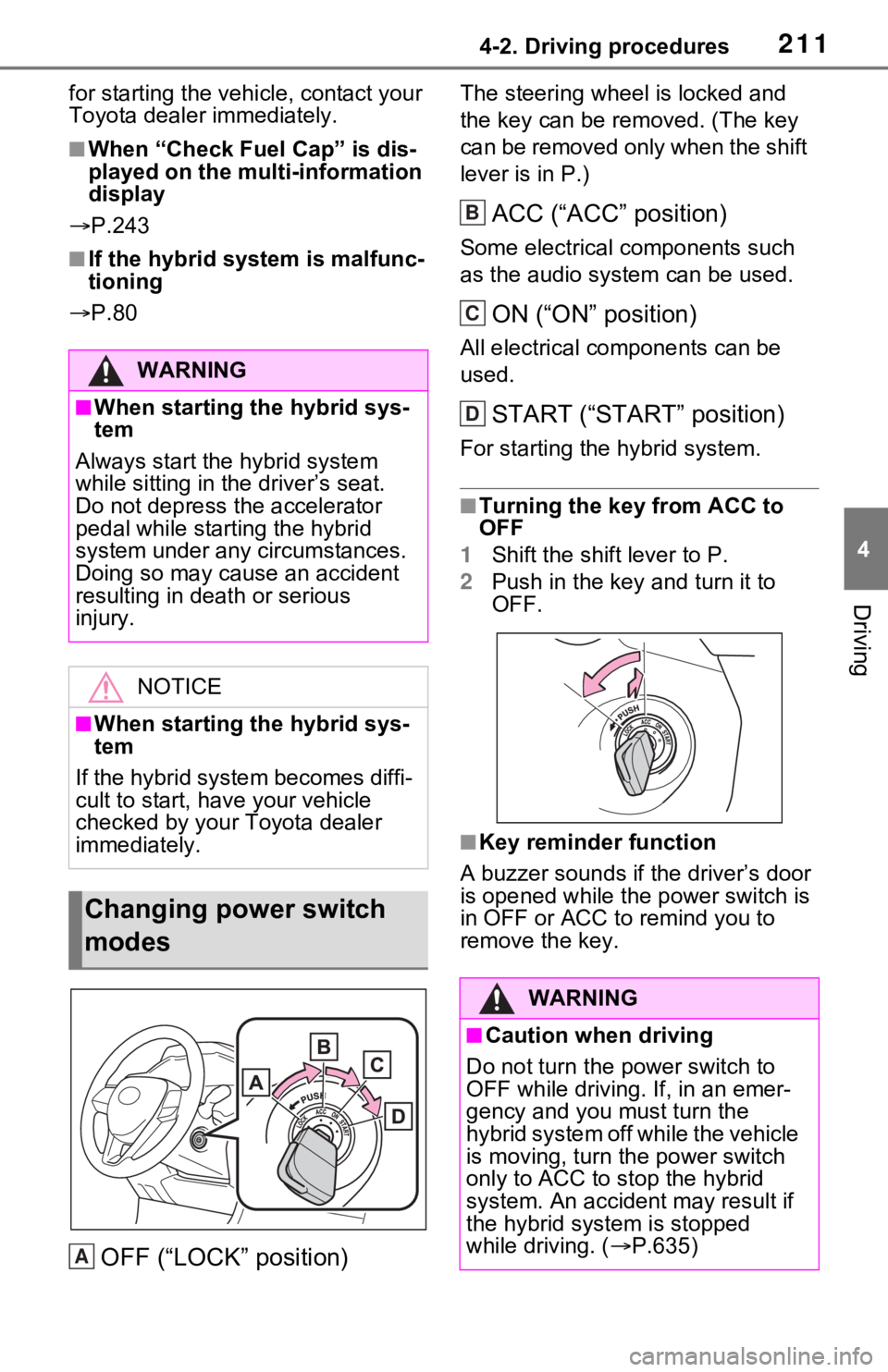
OFF (“LOCK” position)
The steering wheel is locked and
the key can be re moved. (The key
can be removed only when the shift
lever is in P.)
ACC (“ACC” position)
Some electrical components such
as the audio sys tem can be used.
ON (“ON” position)
All electrical components can be
used.
START (“START” position)
For starting the hybrid system.
■Turning the key from ACC to
OFF
1 Shift the shift lever to P.
2 Push in the key and turn it to
OFF.
■Key reminder function
A buzzer sounds if the driver’s door
is opened while the power switch is
in OFF or ACC to remind you to
remove the key.
WARNING
■When starting the hybrid sys-
tem
Always start the hybrid system
while sitting in the driver’s seat.
Do not depress the accelerator
pedal while starting the hybrid
system under any circumstances.
Doing so may cause an accident
resulting in dea th or serious
injury.
NOTICE
■When starting the hybrid sys-
tem
If the hybrid system becomes diffi-
cult to start, have your vehicle
checked by your Toyota dealer
immediately.
Changing power switch
modes
A
:$51,1*
■Caution when driving
Do not turn the power switch to
OFF while driving. If, in an emer-
gency and you must turn the
hybrid system off while the vehicle
is moving, turn the power switch
only to ACC to stop the hybrid
system. An accident may result if
the hybrid system is stopped
while driving. ( P.635)
B
C
D
Page 213 of 752
2134-2. Driving procedures
4
Driving
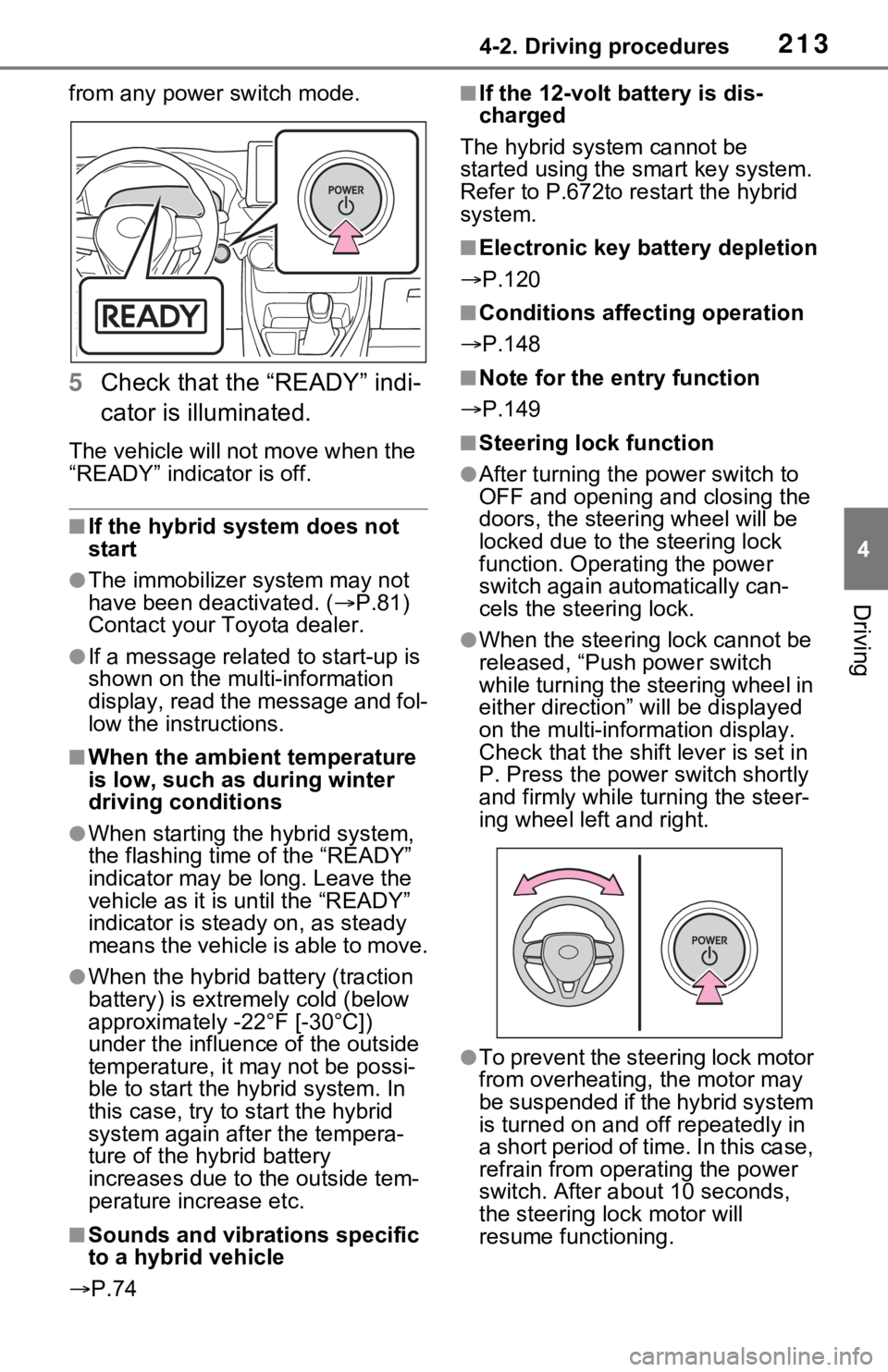
from any power switch mode.
5Check that the “READY” indi-
cator is illuminated.
The vehicle will not move when the
“READY” indicator is off.
■If the hybrid system does not
start
●The immobilizer system may not
have been deactivated. ( P.81)
Contact your Toyota dealer.
●If a message related to start-up is
shown on the multi-information
display, read the message and fol-
low the instructions.
■When the ambient temperature
is low, such as during winter
driving conditions
●When starting the hybrid system,
the flashing time of the “READY”
indicator may be long. Leave the
vehicle as it is until the “READY”
indicator is steady on, as steady
means the vehicle is able to move.
●When the hybrid battery (traction
battery) is extremely cold (below
approximately -22°F [-30°C])
under the influence of the outside
temperature, it may not be possi-
ble to start the h ybrid system. In
this case, try to start the hybrid
system again after the tempera-
ture of the hybrid battery
increases due to the outside tem-
perature increase etc.
■Sounds and vibrations specific
to a hybrid vehicle
P.74
■If the 12-volt b attery is dis-
charged
The hybrid system cannot be
started using the smart key system.
Refer to P.672to r estart the hybrid
system.
■Electronic key battery depletion
P.120
■Conditions affecting operation
P.148
■Note for the entry function
P.149
■Steering lock function
●After turning the power switch to
OFF and opening and closing the
doors, the steeri ng wheel will be
locked due to the steering lock
function. Operating the power
switch again automatically can-
cels the steering lock.
●When the steering lock cannot be
released, “Push power switch
while turning the steering wheel in
either direction” will be displayed
on the multi-information display.
Check that the shift lever is set in
P. Press the power switch shortly
and firmly while turning the steer-
ing wheel left and right.
●To prevent the steering lock motor
from overheating , the motor may
be suspended if the hybrid system
is turned on and off repeatedly in
a short period of ti me. In this case,
refrain from operating the power
switch. After about 10 seconds,
the steering lo ck motor will
resume functioning.
Page 214 of 752
2144-2. Driving procedures
■If there is a malfunction in the
smart key system
If “Smart Key Syst em Malfunction”
is displayed on the multi-information
display, the syst em may be mal-
functioning. Have the vehicle
inspected by your Toyota dealer
immediately.
■If the “READY” indicator does
not come on
In the event that the “READY” indi-
cator does not come on even after
performing the proper procedures
for starting the vehicle, contact your
Toyota dealer immediately.
■When “Check Fuel Cap” is dis-
played on the multi-information
display
P.243
■If the hybrid system is malfunc-
tioning
P.80
■Electronic key battery
P.618
■Operation of the power switch
●If the switch is not pressed shortly
and firmly, the power switch mode
may not change or the hybrid sys-
tem may not start.
●If attempting to re start the hybrid
system immediately after turning
the power switch to OFF, the
hybrid system ma y not start in
some cases. After turning the
power switch to OFF, please wait
a few seconds before restarting
the hybrid system.
■Customization
If the smart key system has been
deactivated in a customized setting,
refer to P.671.
1 Stop the vehicle completely.
2 If the parking brake is in man-
ual mode, set the parking
brake. ( P.224)
WARNING
■When starting the hybrid sys-
tem
Always start the hybrid system
while sitting in the driver’s seat.
Do not depress t he accelerator
pedal while starting the hybrid
system under any circumstances.
Doing so may cause an accident
resulting in dea th or serious
injury.
■Caution while driving
If hybrid system failure occurs
while the vehicle is moving, do not
lock or open the doors until the
vehicle reaches a safe and com-
plete stop. Activation of the steer-
ing lock in this c ircumstance may
lead to an accident, resulting in
death or serious injury.
NOTICE
■When starting the hybrid sys-
tem
If the hybrid system becomes diffi-
cult to start, have your vehicle
checked by your T oyota dealer
immediately.
■Symptoms indicating a mal-
function with the power
switch
If the power switch seems to be
operating somewhat differently
than usual, such as the switch
sticking slightly, there may be a
malfunction. Contact your Toyota
dealer immediately.
Stopping the hybrid sys-
tem
Page 218 of 752

2184-2. Driving procedures
■Situations in which EV drive
mode cannot be turned on
It may not be po ssible to turn EV
drive mode on in t he following situa-
tions. If it cannot be turned on, a
buzzer will sound and a message
will be shown on the multi-informa-
tion display.
●The temperature of the hybrid sys-
tem is high.
The vehicle has been left in the
sun, driven on a hill, driven at high
speeds, etc.
●The temperature of the hybrid sys-
tem is low.
The vehicle has been left in tem-
peratures lower than about 32°F
(0°C) for a long period of time etc.
●The gasoline engine is warming
up.
●The hybrid battery (traction bat-
tery) is low.
The remaining batt ery level indi-
cated in the Energy monitor dis-
play is low. ( P.113)
●Vehicle speed is high.
●The accelerator pedal is
depressed firmly or the vehicle is
on a hill etc.
●The windshield defogger is in use.
Use the EV drive mode when it
becomes available.
■Switching to EV drive mode
when the gasoline engine is
cold
If the hybrid system is started while
the gasoline engine is cold, the gas-
oline engine will star t automatically
after a short peri od of time in order
to warm up.
In this case, you will become unable
t o s w i t c h t o E V d r i v e m o d e . A f t e r t h e
hybrid system has started and the
“READY” indicator has illuminated,
press the EV drive mode switch
before the gasoline engine starts to
switch to EV drive mode.
■Automatic cancelation of EV
drive mode
When driving in EV drive mode, the
gasoline engine may automatically
restart in the follo wing situations.
When EV drive mode is canceled, a
buzzer will sound, the EV drive
mode indicator will flash and go off
and a message will be shown on the
multi-informat ion display.
●The hybrid battery (traction bat-
tery) becomes low.
The remaining batt ery level indi-
cated in the Ener gy monitor dis-
play is low. ( P.113)
●Vehicle speed is high.
●The accelerator pedal is
depressed firmly or the vehicle is
on a hill etc.
Drive the vehicle for a while before
attempting to turn on the EV drive
mode again.
■Possible driving distance when
driving in EV drive mode
EV drive mode’s possible driving
distance ranges from a few hundred
meters to approximately 0.6 mile (1
km). However, depending on vehi-
cle conditions, there are situations
when EV drive mode cannot be
used.
(The distance tha t is possible
depends on the hybrid battery [trac-
tion battery] level a nd driving condi-
tions.)
■Fuel economy
The hybrid system is designed to
achieve the best possible fuel econ-
omy during normal driving (using
the gasoline engine and electric
motor [traction motor]). Driving in
EV drive mode more than neces-
sary may lower fuel economy.
Page 226 of 752

2264-2. Driving procedures
on as described below:
ON: Comes on until the parking
brake is released.
Not in ON: Stays on for approxi-
mately 15 seconds.
●When the power switch is turned
off with the parking brake set, the
parking brake indicator light will
stay on for about 15 seconds. This
does not indicate a malfunction.
■When the parking brake switch
malfunctions
Automatic mode (automatic brake
setting and releas ing) will be turned
on automatically.
■Parking the vehicle
P.189
■Parking brake engaged warning
buzzer
A buzzer will sound if the vehicle is
driven with the parking brake
engaged. “Parking Brake ON” is dis-
played on the multi-information dis-
play (with the v ehicle reaching a
speed of 5 km/h [3 mph]).
■If the brake system warning
light comes on
P.642
■Usage in winter time
P.379
WARNING
■When parking the vehicle
Do not leave a child in the vehicle
alone. The parking brake may be
released unintentionally by a child
and there is the danger of the
vehicle moving that may lead to
an accident resulting in death or
serious injury.
■Parking brake switch
Do not set any o bjects near the
parking brake switch. Objects
may interfere with the switch and
may lead the parking brake to
unexpectedly operate.
NOTICE
■When parking the vehicle
Before you leave the vehicle, shift
the shift lever to P, set the parking
brake and make s ure that the
vehicle does not move.
■When the system malfunc-
tions
Stop the vehicle in a safe place
and check the warning messages.
■When the parking brake can-
not be released due to a mal-
function
Driving the vehicle with the park-
ing brake set will lead to brake
components overheating, which
may affect braking performance
and increase brak e wear. Have
the vehicle insp ected by your
Toyota dealer immediately if this
occurs.
Page 230 of 752
2304-3. Operating the lights and wipers
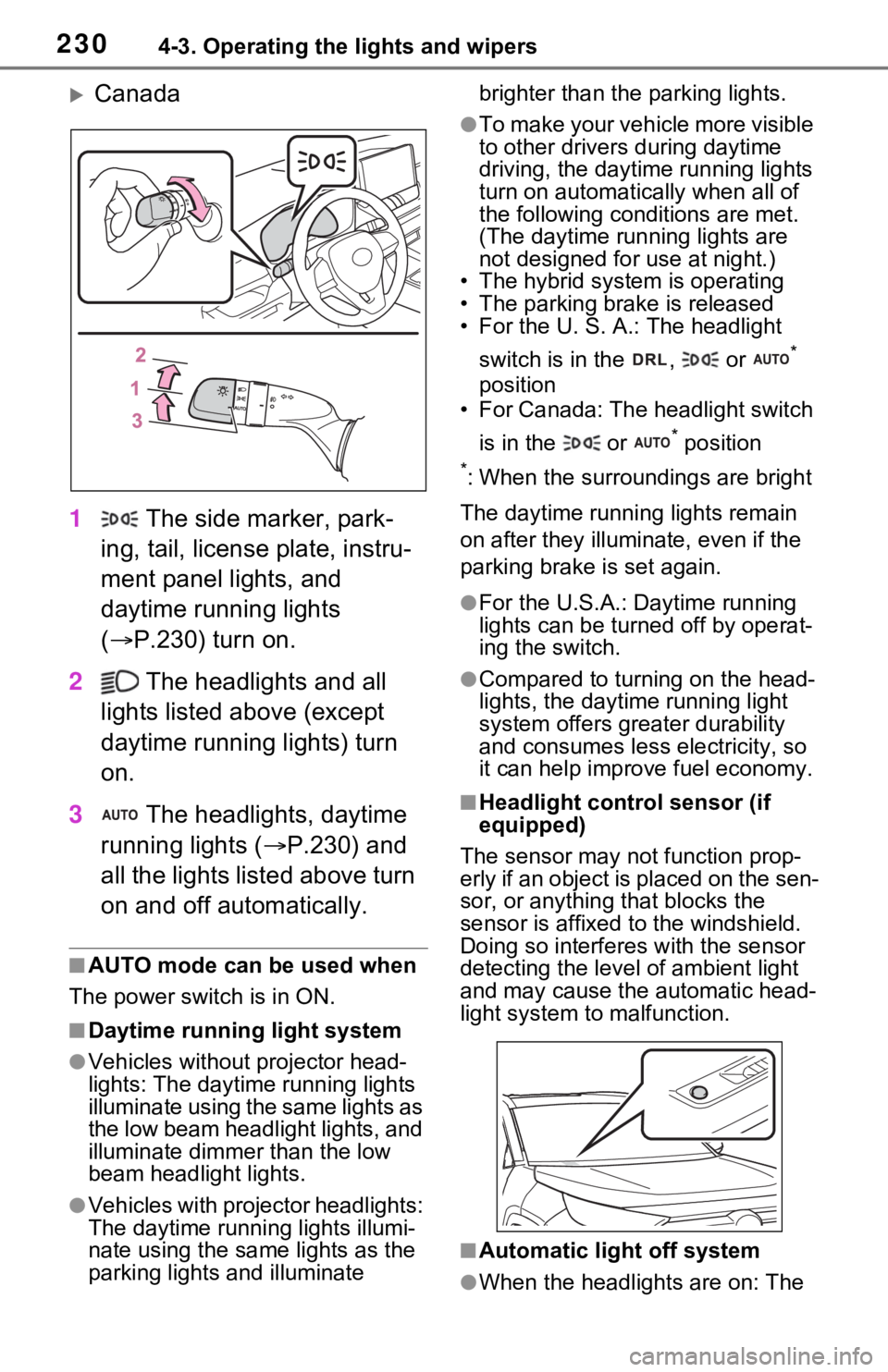
Canada
1 The side marker, park-
ing, tail, license plate, instru-
ment panel lights, and
daytime running lights
( P.230) turn on.
2 The headlights and all
lights listed above (except
daytime running lights) turn
on.
3 The headlights, daytime
running lights ( P.230) and
all the lights listed above turn
on and off automatically.
■AUTO mode can be used when
The power swit ch is in ON.
■Daytime running light system
●Vehicles without projector head-
lights: The daytime running lights
illuminate using the same lights as
the low beam headlight lights, and
illuminate dimme r than the low
beam headlight lights.
●Vehicles with projector headlights:
The daytime running lights illumi-
nate using the same lights as the
parking lights and illuminate brighter than the parking lights.
●To make your vehicle more visible
to other drivers
during daytime
driving, the daytime running lights
turn on automatically when all of
the following conditions are met.
(The daytime running lights are
not designed for use at night.)
• The hybrid system is operating
• The parking brake is released
• For the U. S. A.: The headlight
switch is in the , or
*
position
• For Canada: The headlight switch
is in the or
* position
*: When the surroundings are bright
The daytime running lights remain
on after they illumi nate, even if the
parking brake is set again.
●For the U.S.A.: Daytime running
lights can be turned off by operat-
ing the switch.
●Compared to turning on the head-
lights, the daytime running light
system offers greater durability
and consumes less electricity, so
it can help improve fuel economy.
■Headlight control sensor (if
equipped)
The sensor may not function prop-
erly if an object is placed on the sen-
sor, or anything that blocks the
sensor is affixed to the windshield.
Doing so interferes with the sensor
detecting the level of ambient light
and may cause t he automatic head-
light system to malfunction.
■Automatic light off system
●When the headlights are on: The
Page 238 of 752
2384-3. Operating the lights and wipers
will not switch.)
Vehicles with rain-sensing wind-
shield wipers
With low speed windshield wiper
operation selected, wiper operation
will be switched from low speed to
intermittent wiper operation when
the vehicle is stationary. (However,
when the sensor s ensitivity is
adjusted to the highest level, the
mode will not switch.)
■Raindrop sensor (vehicles with
rain-sensing windshield wipers)
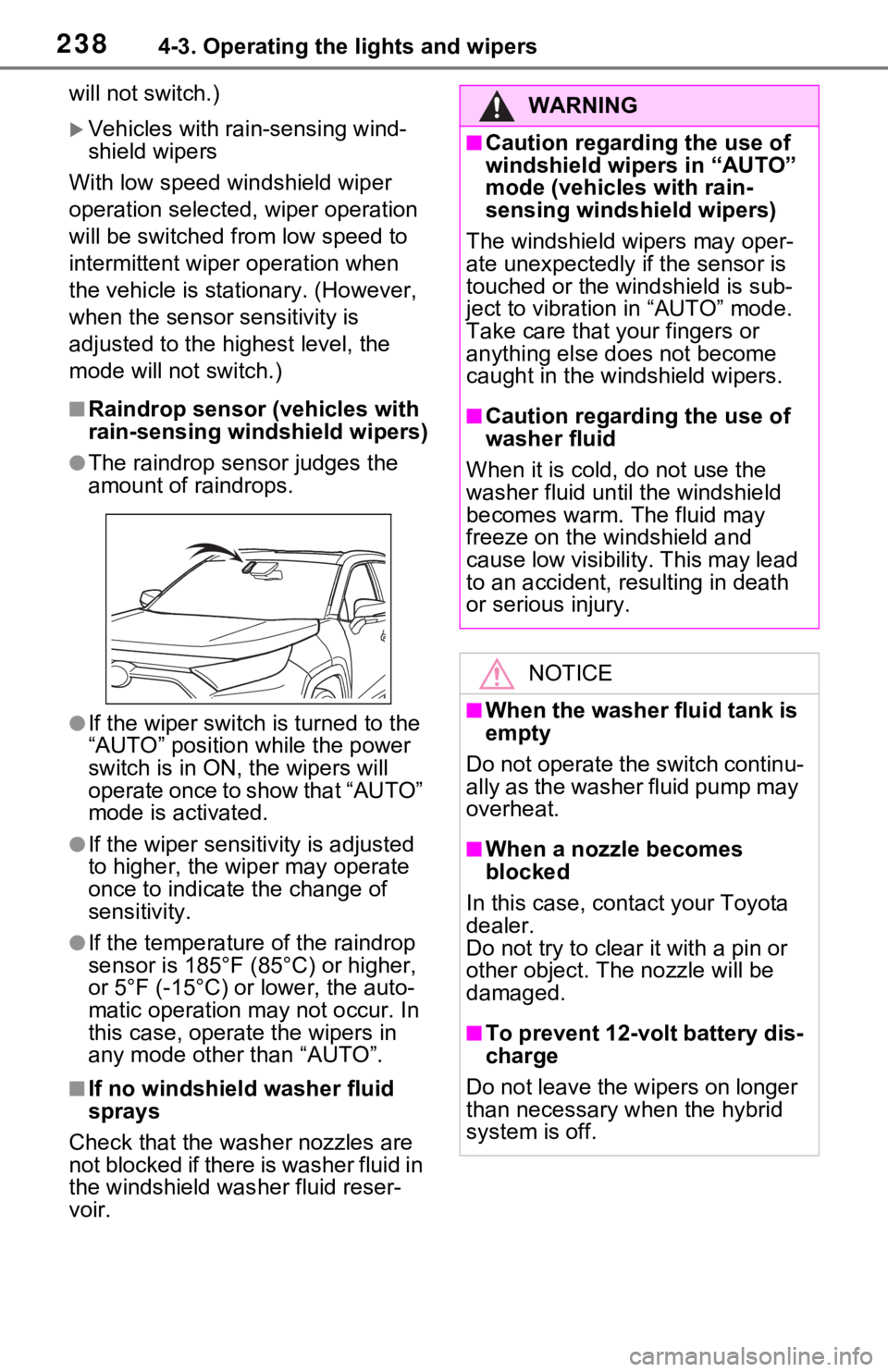
●The raindrop sensor judges the
amount of raindrops.
●If the wiper switch is turned to the
“AUTO” position while the power
switch is in ON, the wipers will
operate once to show that “AUTO”
mode is activated.
●If the wiper sensitivity is adjusted
to higher, the wip er may operate
once to indicate the change of
sensitivity.
●If the temperature of the raindrop
sensor is 185°F (85°C) or higher,
or 5°F (-15°C) or lower, the auto-
matic operation m ay not occur. In
this case, operate the wipers in
any mode other than “AUTO”.
■If no windshield washer fluid
sprays
Check that the wash er nozzles are
not blocked if there is washer fluid in
the windshield was her fluid reser-
voir.
WARNING
■Caution regarding the use of
windshield wipe rs in “AUTO”
mode (vehicles with rain-
sensing windshield wipers)
The windshield wipers may oper-
ate unexpectedly if the sensor is
touched or the windshield is sub-
ject to vibration in “AUTO” mode.
Take care that your fingers or
anything else does not become
caught in the windshield wipers.
■Caution regarding the use of
washer fluid
When it is cold, do not use the
washer fluid unt il the windshield
becomes warm. The fluid may
freeze on the windshield and
cause low visibility. This may lead
to an accident, resulting in death
or serious injury.
NOTICE
■When the washer fluid tank is
empty
Do not operate the switch continu-
ally as the washer fluid pump may
overheat.
■When a nozzle becomes
blocked
In this case, contact your Toyota
dealer.
Do not try to clear it with a pin or
other object. The nozzle will be
damaged.
■To prevent 12-volt battery dis-
charge
Do not leave the wipers on longer
than necessary when the hybrid
system is off.
Page 266 of 752

2664-5. Using the driving support systems
This function operates when all of
the following cond itions are met.
• Setting for “Sway Warning” in the
screen of the mu lti-information
display is set to “ON”. ( P.103)
• Vehicle speed is approximately 32 mph (50 km/h) or more.
• Width of traffic lane is approxi-
mately 9.8 ft. ( 3 m) or more.
• No system malfunctions are detected. ( P.267)
●Lane centering function
This function oper ates when all of
the following cond itions are met.
• LTA is turned on.
• Setting for “Steering Assist” and
“Lane Center” in the screen of
the multi-information display are
set to “ON”. ( P.103)
• This function recognizes white (yellow) lane lines or the position
of a preceding vehicle (except
when the preceding vehicle is
small, such as a motorcycle).
• The dynamic radar cruise control with full-speed range is operating
in vehicle-to-vehic le distance con-
trol mode.
• Width of traffic lane is approxi- mately 10 to 13 ft. (3 to 4 m).
• Turn signal lever is not operated.
• Vehicle is not being driven around a sharp curve.
• No system malfunctions are detected. ( P.267)
• Vehicle does not accelerate or
decelerate by a fixed amount or
more.
• Steering wheel is not operated
with a steering force level suitable
for changing lanes.
• ABS, VSC, TRAC and PCS are
not operating.
• TRAC or VSC is not turned off.
• Hands off steering wheel warning is not displayed. ( P.267)
• The vehicle is being driven in the center of a lane.
• Steering assist function is not operating.
■Temporary cancelation of func-
tions
●When operation conditions are no
longer met, a function may be
temporarily canceled. However,
when the operation conditions are
met again, operation of the func-
tion is automatically restored.
( P.265)
●If the operation conditions
( P.265) are no longer met while
the lane centering function is
operating, the buzzer may sound
to indicate that the function has
been temporarily canceled.
■Steering assist function/lane
centering function
●Depending on the vehicle speed,
lane departure situation, road con-
ditions, etc., the driver may not
feel the function is operating or
the function may not operate at
all.
●The steering control of the func-
tion is overridden by the driver’s
steering wheel operation.
●Do not attempt to test the opera-
tion of the steering assist function.
■Lane departure alert function
●The warning buzzer may be diffi-
cult to hear due to external noise,
audio playback, etc.
●If the edge of the course* is not
clear or straight, the lane depar-
ture alert function may not oper-
ate.
●Vehicles with BSM: It may not be
possible for the system to deter-
mine if there is a danger of a colli-
sion with a vehicl e in an adjacent
lane.
●Do not attempt to test the opera-
tion of the lane departure alert
function.
*: Boundary between asphalt and
the side of the road, such as
grass, soil, or a curb
Page 274 of 752
2744-5. Using the driving support systems
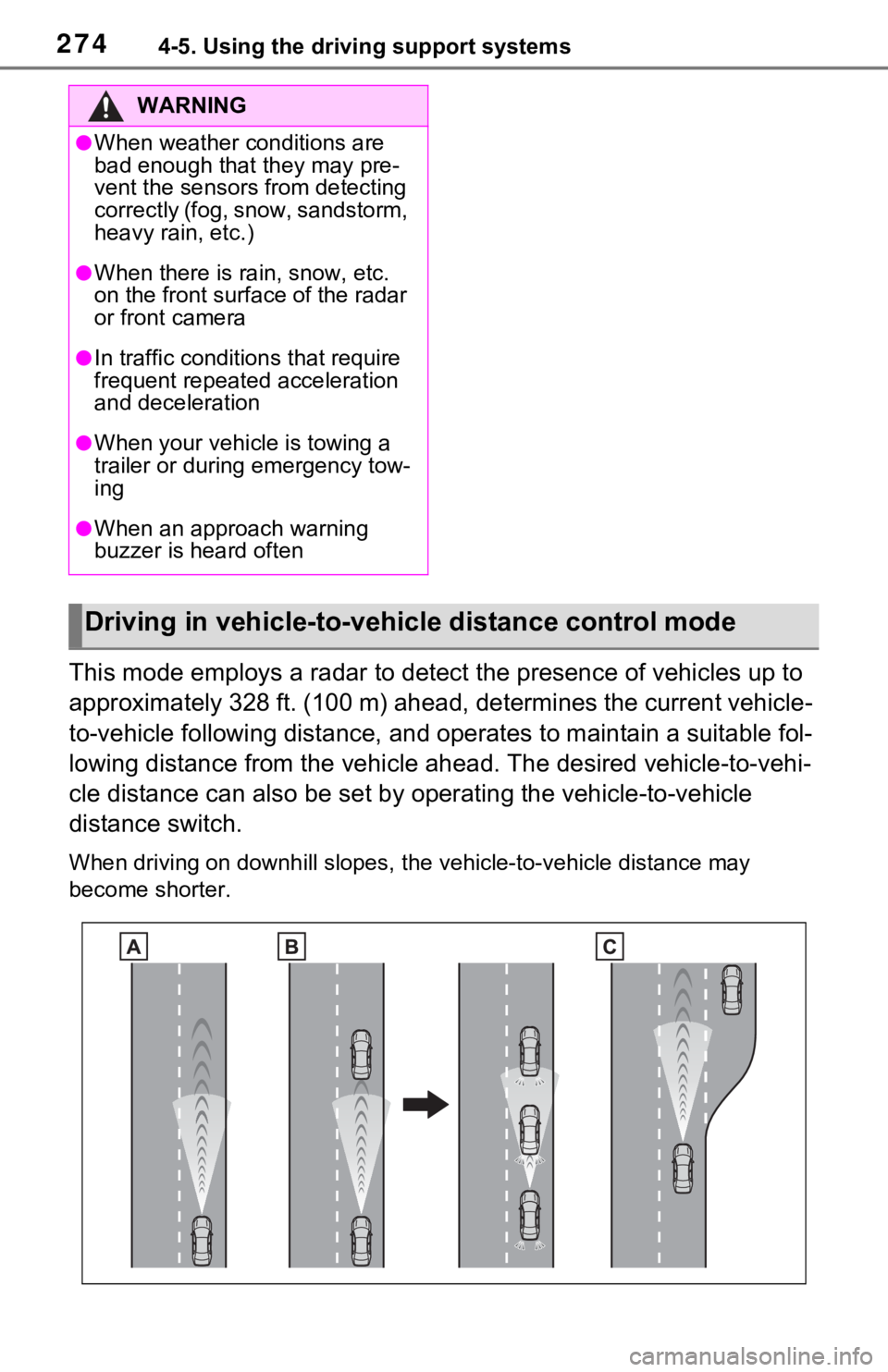
This mode employs a radar to detect the presence of vehicles up to
approximately 328 ft. (100 m) ahead, determines the current vehicle-
to-vehicle following distance, and operates to maintain a suitable fol-
lowing distance from the vehicle ahead. The desired vehicle-to- vehi-
cle distance can also be set by operating the vehicle-to-vehicl e
distance switch.
When driving on downhill slopes, t he vehicle-to-vehicle distance may
become shorter.
WARNING
●When weather conditions are
bad enough that they may pre-
vent the sensors from detecting
correctly (fog, snow, sandstorm,
heavy rain, etc.)
●When there is rain, snow, etc.
on the front surface of the radar
or front camera
●In traffic conditions that require
frequent repeated acceleration
and deceleration
●When your vehicle is towing a
trailer or during emergency tow-
ing
●When an approach warning
buzzer is heard often
Driving in vehicle-to-vehicle distance control mode
Page 276 of 752
2764-5. Using the driving support systems
again to deactivate the cruise con-
trol.
If the cruise control main switch is
pressed and held for 1.5 seconds
or more, the syste m turns on in
constant speed control mode.
( P.279)
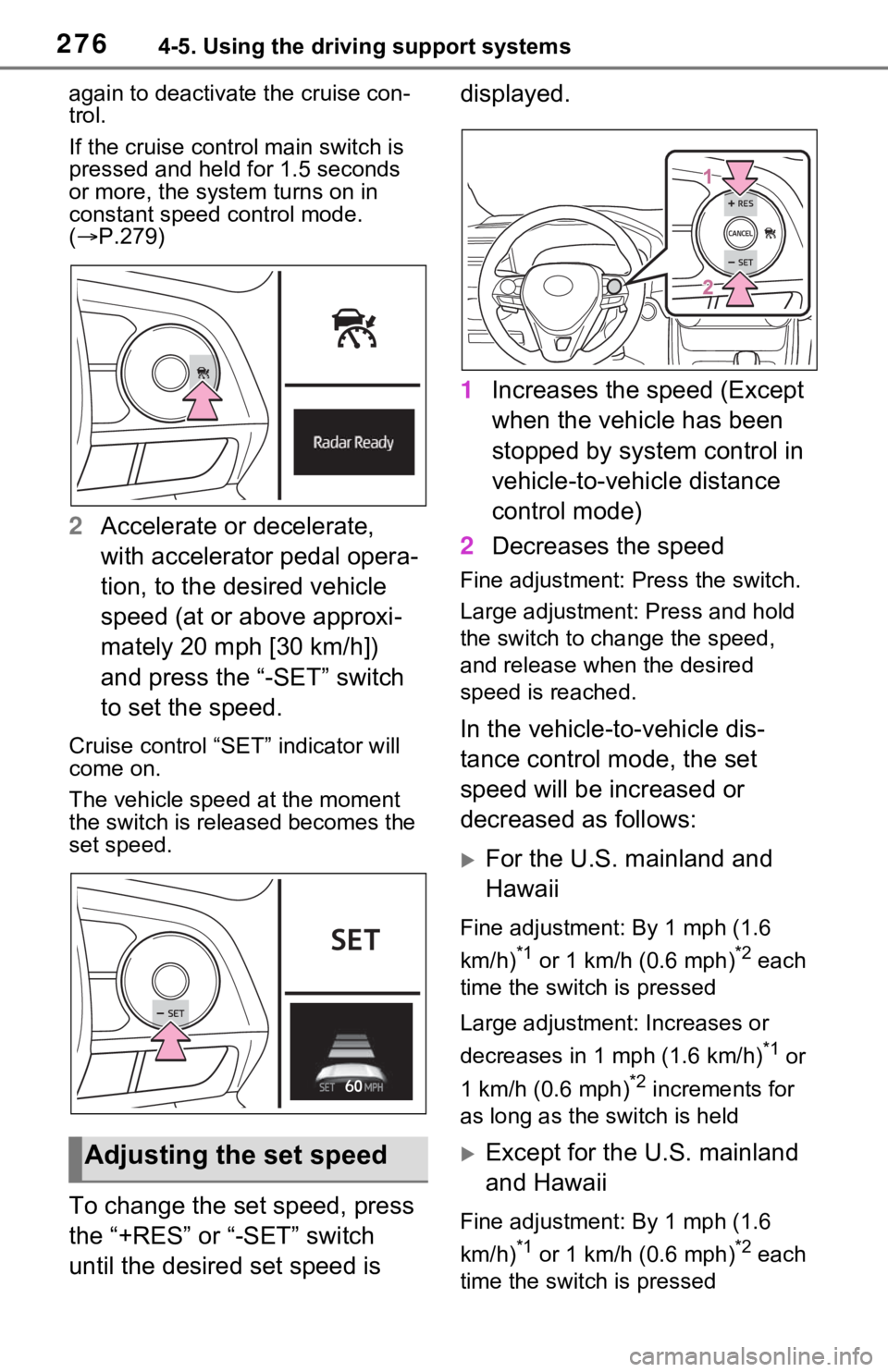
2 Accelerate or decelerate,
with accelerator pedal opera-
tion, to the desired vehicle
speed (at or above approxi-
mately 20 mph [30 km/h])
and press the “-SET” switch
to set the speed.
Cruise control “SET” indicator will
come on.
The vehicle speed at the moment
the switch is released becomes the
set speed.
To change the set speed, press
the “+RES” or “-SET” switch
until the desired set speed is displayed.
1
Increases the speed (Except
when the vehicle has been
stopped by system control in
vehicle-to-vehicle distance
control mode)
2 Decreases the speed
Fine adjustment: Press the switch.
Large adjustment: Press and hold
the switch to cha nge the speed,
and release when the desired
speed is reached.
In the vehicle-to-vehicle dis-
tance control mode, the set
speed will be increased or
decreased as follows:
For the U.S. mainland and
Hawaii
Fine adjustment: By 1 mph (1.6
km/h)
*1 or 1 km/h (0.6 mph)*2 each
time the switch is pressed
Large adjustment: Increases or
decreases in 1 mph (1.6 km/h)
*1 or
1 km/h (0.6 mph)
*2 increments for
as long as the switch is held
Except for the U.S. mainland
and Hawaii
Fine adjustment: By 1 mph (1.6
km/h)
*1 or 1 km/h (0.6 mph)*2 each
time the switch is pressed
Adjusting the set speed