roof TOYOTA RAV4 HYBRID 2022 Service Manual
[x] Cancel search | Manufacturer: TOYOTA, Model Year: 2022, Model line: RAV4 HYBRID, Model: TOYOTA RAV4 HYBRID 2022Pages: 752, PDF Size: 23.11 MB
Page 652 of 752
6528-2. Steps to take in an emergency
■When the electronic key does
not work properly
●Make sure that the smart key sys-
tem has not been deactivated in
the customization setting. If it is
off, turn the function on.
(Customizable features: P.691)
●Check if battery-saving mode is
set. If it is set, cancel the function.
( P.144)
●The electronic key function may
have stopped. ( P.144)
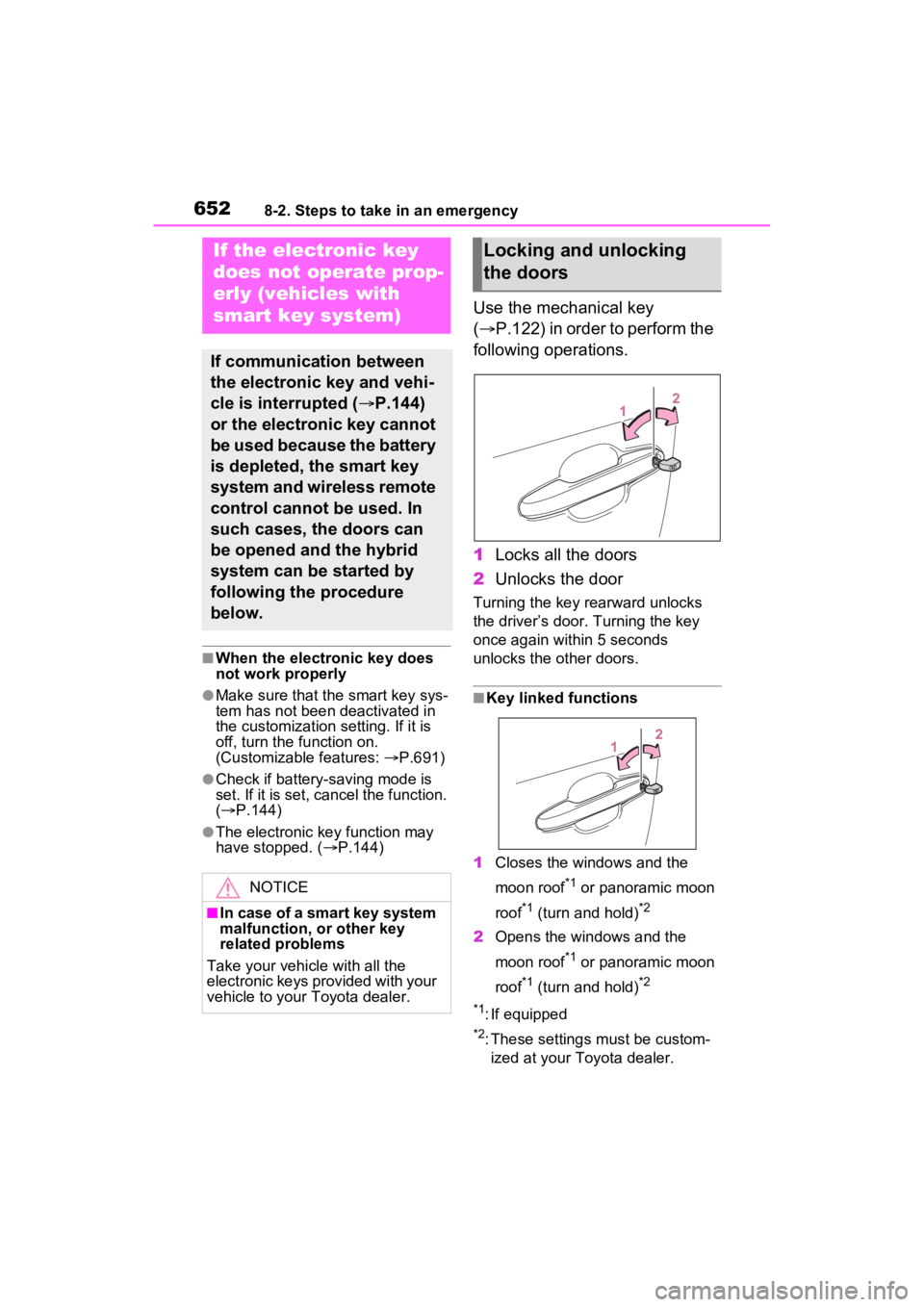
Use the mechanical key
( P.122) in order to perform the
following operations.
1 Locks all the doors
2 Unlocks the door
Turning the key rearward unlocks
the driver’s door. Turning the key
once again within 5 seconds
unlocks the other doors.
■Key linked functions
1 Closes the windows and the
moon roof
*1 or panoramic moon
roof
*1 (turn and hold)*2
2 Opens the windows and the
moon roof
*1 or panoramic moon
roof
*1 (turn and hold)*2
*1
: If equipped
*2: These settings must be custom- ized at your Toyota dealer.
If the electronic key
does not op erate prop-
erly (vehicles with
smart key system)
If communication between
the electronic key and vehi-
cle is interrupted ( P.144)
or the electronic key cannot
be used because the battery
is depleted, the smart key
system and wireless remote
control cannot be used. In
such cases, the doors can
be opened and the hybrid
system can be started by
following the procedure
below.
NOTICE
■In case of a smart key system
malfunction, or other key
related problems
Take your vehicle with all the
electronic keys provided with your
vehicle to your Toyota dealer.
Locking and unlocking
the doors
Page 653 of 752
6538-2. Steps to take in an emergency
8
When trouble arises
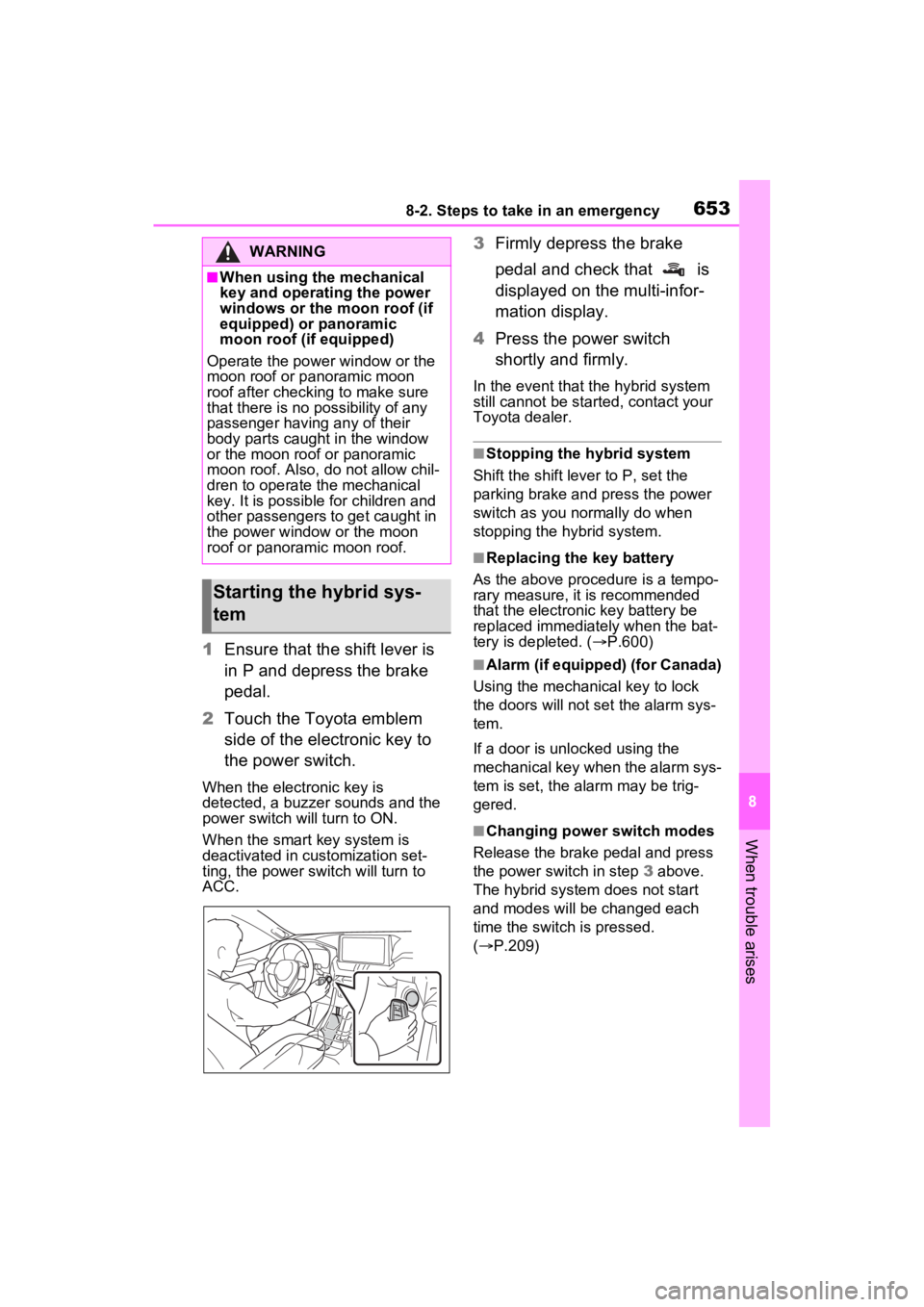
1Ensure that the shift lever is
in P and depress the brake
pedal.
2 Touch the Toyota emblem
side of the electronic key to
the power switch.
When the electronic key is
detected, a buzzer sounds and the
power switch will turn to ON.
When the smart key system is
deactivated in customization set-
ting, the power switch will turn to
ACC.
3Firmly depress the brake
pedal and check that is
displayed on the multi-infor-
mation display.
4 Press the power switch
shortly and firmly.
In the event that t he hybrid system
still cannot be started, contact your
Toyota dealer.
■Stopping the hybrid system
Shift the shift lever to P, set the
parking brake and press the power
switch as you normally do when
stopping the hybrid system.
■Replacing the key battery
As the above proce dure is a tempo-
rary measure, it is recommended
that the electronic key battery be
replaced immediately when the bat-
tery is depleted. ( P.600)
■Alarm (if equipped) (for Canada)
Using the mechanical key to lock
the doors will not set the alarm sys-
tem.
If a door is unl ocked using the
mechanical key when the alarm sys-
tem is set, the alarm may be trig-
gered.
■Changing power switch modes
Release the brake pedal and press
the power switch in step 3 above.
The hybrid system does not start
and modes will be changed each
time the switch is pressed.
( P.209)
WARNING
■When using the mechanical
key and operating the power
windows or the moon roof (if
equipped) or panoramic
moon roof (if equipped)
Operate the power window or the
moon roof or panoramic moon
roof after checking to make sure
that there is no possibility of any
passenger having any of their
body parts caught in the window
or the moon roof or panoramic
moon roof. Also, do not allow chil-
dren to operate the mechanical
key. It is possible for children and
other passengers to get caught in
the power window or the moon
roof or panoramic moon roof.
Starting the hybrid sys-
tem
Page 682 of 752
6829-1. Specifications
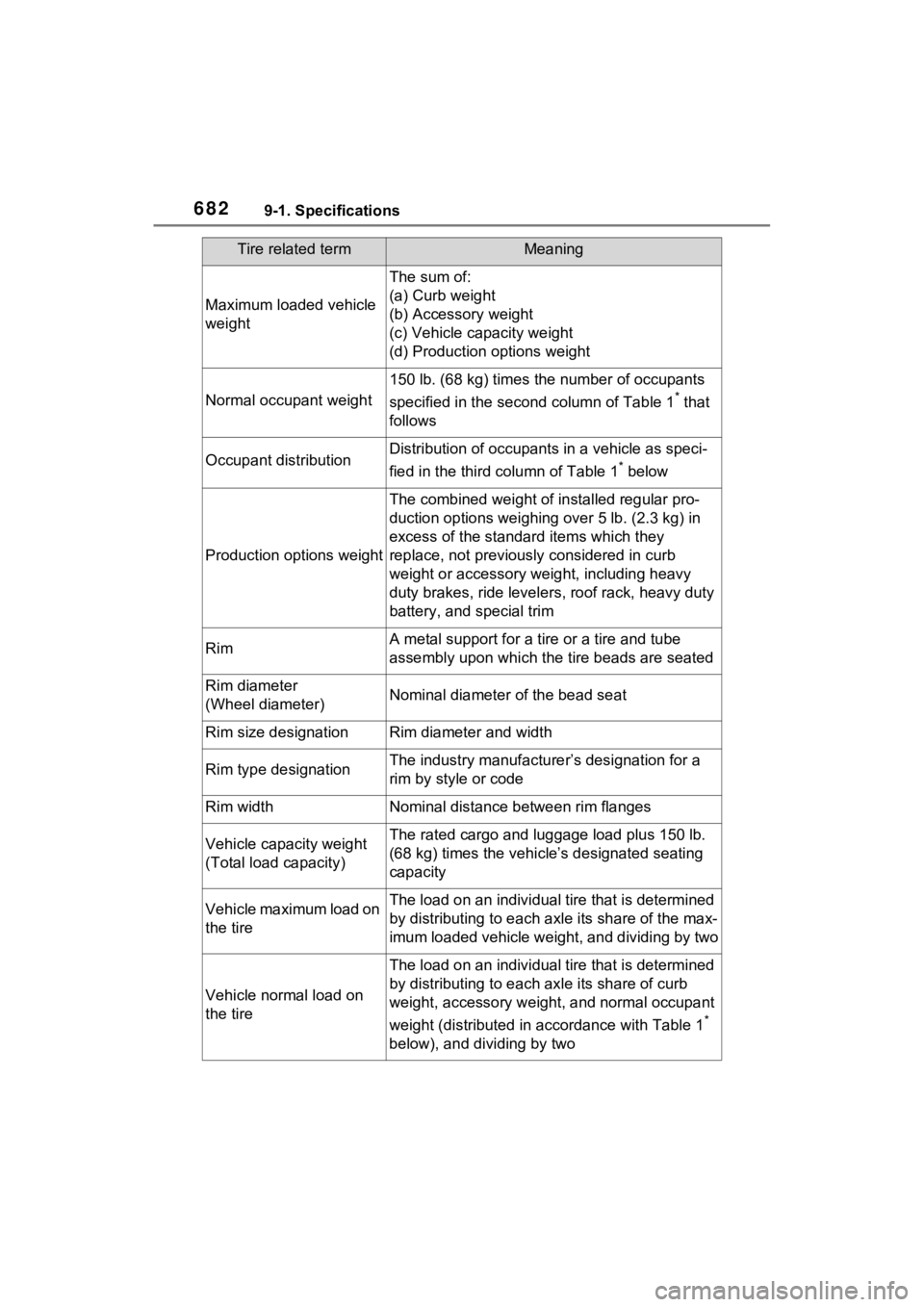
Maximum loaded vehicle
weight
The sum of:
(a) Curb weight
(b) Accessory weight
(c) Vehicle capacity weight
(d) Production options weight
Normal occupant weight
150 lb. (68 kg) times the number of occupants
specified in the second column of Table 1
* that
follows
Occupant distributionDistribution of occupant s in a vehicle as speci-
fied in the third column of Table 1
* below
Production options weight
The combined weight of installed regular pro-
duction options weighing over 5 lb. (2.3 kg) in
excess of the standard items which they
replace, not previously considered in curb
weight or accessory weight, including heavy
duty brakes, ride leveler s, roof rack, heavy duty
battery, and special trim
RimA metal support for a ti re or a tire and tube
assembly upon which the tire beads are seated
Rim diameter
(Wheel diameter)Nominal diameter o f the bead seat
Rim size designationRim diameter and width
Rim type designationThe industry manufacture r’s designation for a
rim by style or code
Rim widthNominal distance between rim flanges
Vehicle capacity weight
(Total load capacity)The rated cargo and luggage load plus 150 lb.
(68 kg) times the vehicl e’s designated seating
capacity
Vehicle maximum load on
the tireThe load on an individual tire that is determined
by distributing to each ax le its share of the max-
imum loaded vehicle weight, and dividing by two
Vehicle normal load on
the tire
The load on an individual tire that is determined
by distributing to each axle its share of curb
weight, accessory weight, and normal occupant
weight (distributed in accordance with Table 1
*
below), and dividing by two
Tire related termMeaning
Page 693 of 752
6939-2. Customization
9
Vehicle specifications
*1: If equipped
*2: The operation buzzer that sounds when the back door begins to operate
cannot be turned off.
*3: The open position is set by the power back door switch. ( P.142)
*4: When the towing hitch is installe d, Hands Free Power Back Door does
not work.
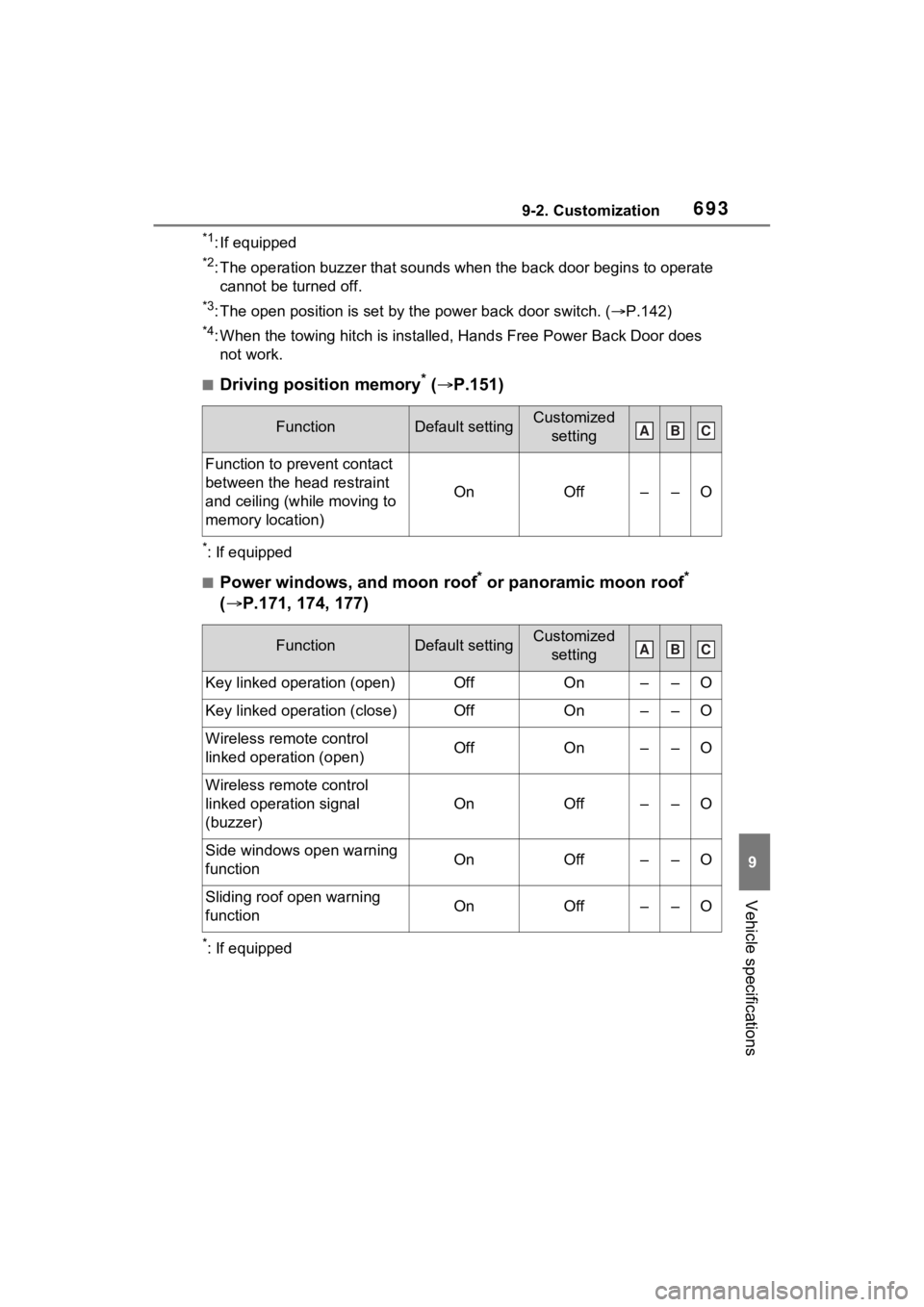
■Driving position memory* ( P.151)
*: If equipped
■Power windows, and moon roof* or panoramic moon roof*
( P.171, 174, 177)
*: If equipped
FunctionDefault settingCustomized
setting
Function to prevent contact
between the head restraint
and ceiling (while moving to
memory location)
OnOff––O
FunctionDefault settingCustomized setting
Key linked operation (open)OffOn––O
Key linked operation (close)OffOn––O
Wireless remote control
linked operation (open)OffOn––O
Wireless remote control
linked operation signal
(buzzer)
OnOff––O
Side windows open warning
functionOnOff––O
Sliding roof open warning
functionOnOff––O
ABC
ABC
Page 694 of 752
6949-2. Customization
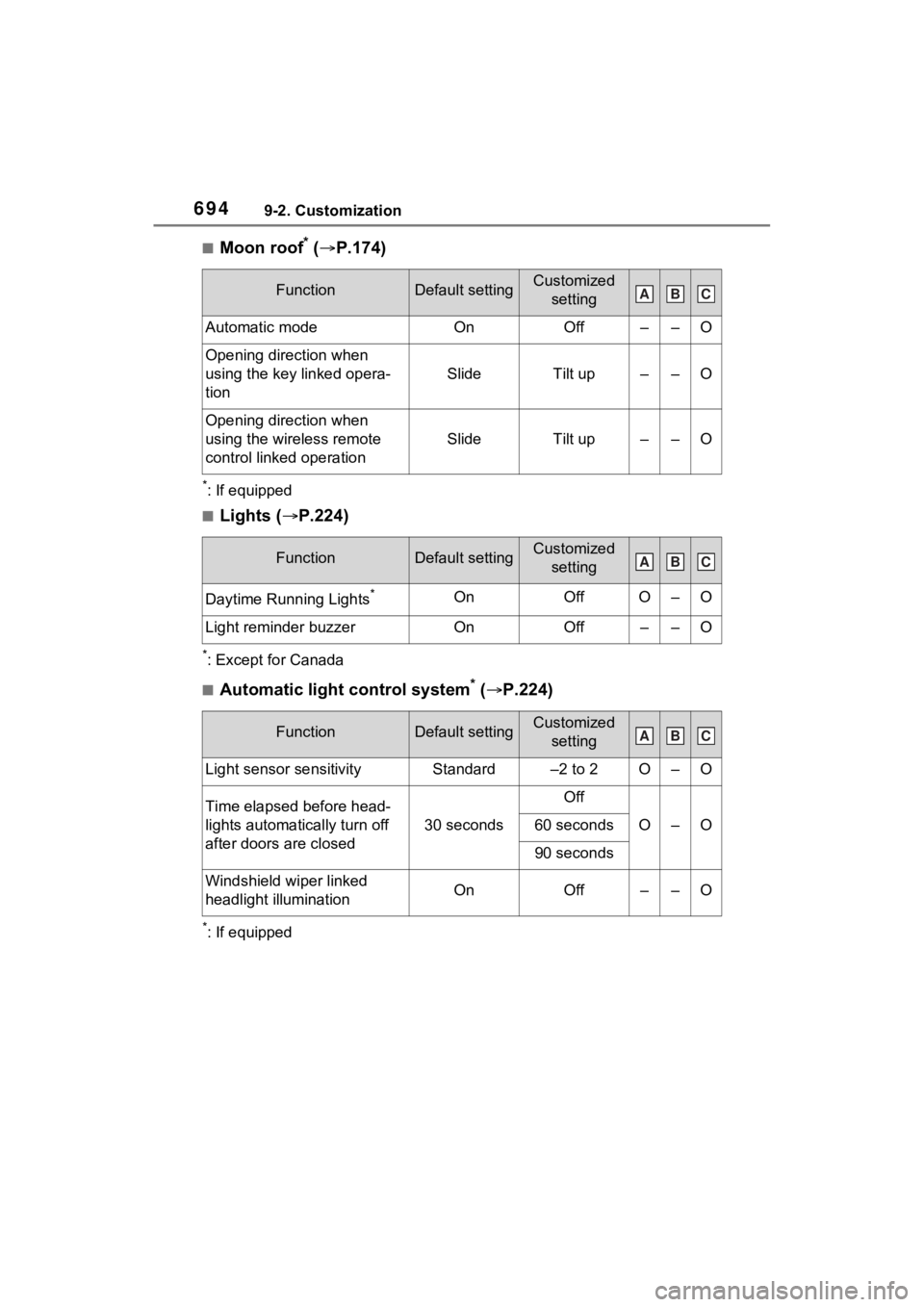
■Moon roof* ( P.174)
*: If equipped
■Lights ( P.224)
*: Except for Canada
■Automatic light control system* ( P.224)
*: If equipped
FunctionDefault settingCustomized
setting
Automatic modeOnOff––O
Opening direction when
using the key linked opera-
tion
SlideTilt up––O
Opening direction when
using the wireless remote
control linked operation
SlideTilt up––O
FunctionDefault settingCustomized setting
Daytime Running Lights*OnOffO–O
Light reminder buzzerOnOff––O
FunctionDefault settingCustomized setting
Light sensor sensitivityStandard–2 to 2O–O
Time elapsed before head-
lights automatically turn off
after doors are closed
30 seconds
Off
O–O60 seconds
90 seconds
Windshield wiper linked
headlight illuminationOnOff––O
ABC
ABC
ABC
Page 699 of 752
6999-3. Initialization
9
Vehicle specifications
9-3.Initialization
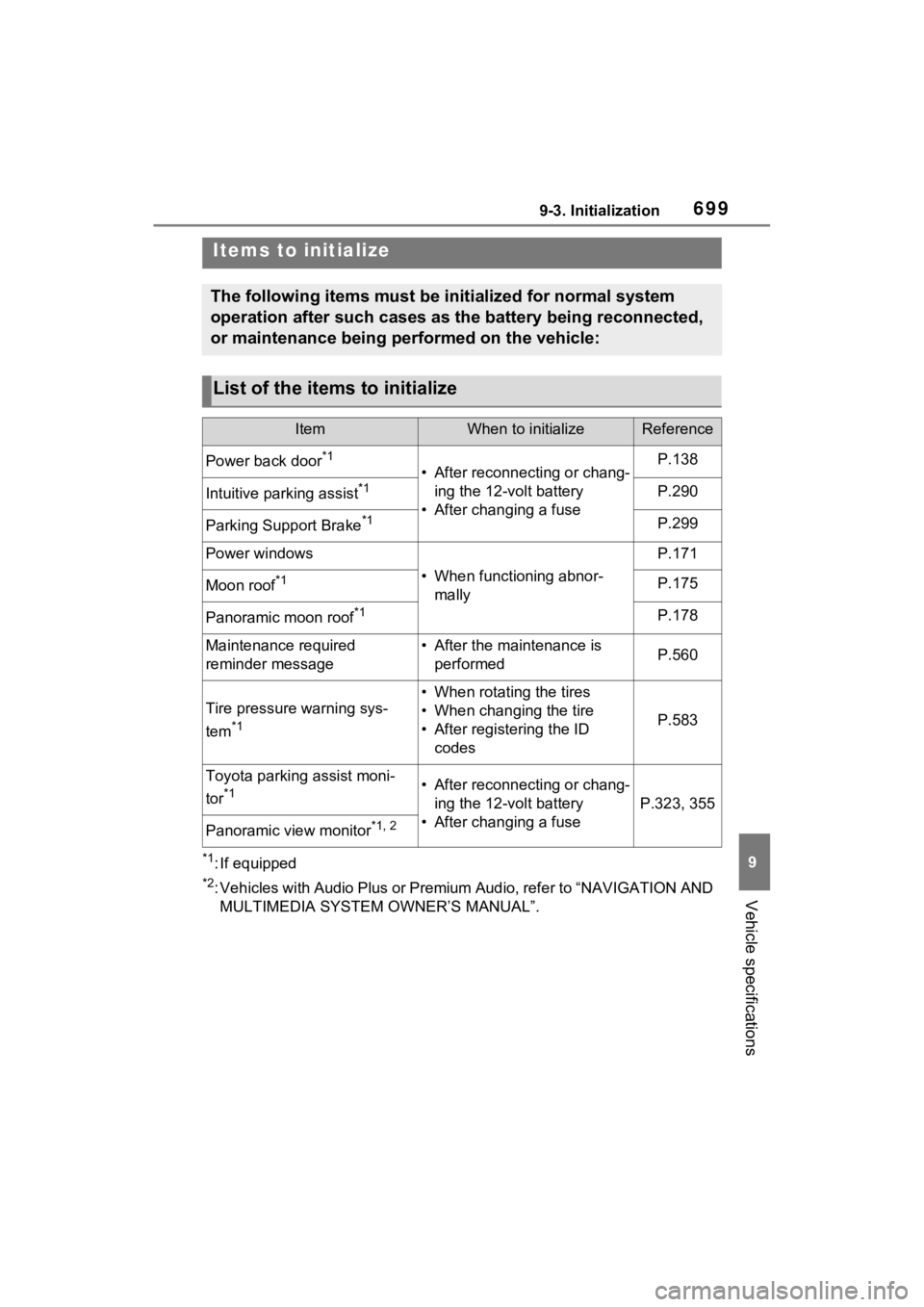
*1: If equipped
*2: Vehicles with Audio Plus or Premium Audio, refer to “NAVIGATION AND
MULTIMEDIA SYSTEM OWNER’S MANUAL”.
Items to initialize
The following items must be initialized for normal system
operation after such cases as the battery being reconnected,
or maintenance being performed on the vehicle:
List of the items to initialize
ItemWhen to initializeReference
Power back door*1
• After reconnecting or chang- ing the 12-volt battery
• After changing a fuseP.138
Intuitive parking assist*1P.290
Parking Support Brake*1P.299
Power windows
• When functioning abnor- mally
P.171
Moon roof*1P.175
Panoramic moon roof*1P.178
Maintenance required
reminder message• After the maintenance is performedP.560
Tire pressure warning sys-
tem
*1
• When rotating the tires
• When changing the tire
• After registering the ID codes
P.583
Toyota parking assist moni-
tor
*1• After reconnecting or chang-ing the 12-volt battery
• After changing a fuse
P.323, 355
Panoramic view monitor*1, 2
Page 721 of 752

Alphabetical Index721
Instrument panel light control94, 100
BSM (Blind Spot Monitor) ...... 276 Blind Spot Monitor function .. 280
Rear Cross Traffic Alert function........................................... 283
C
Care Aluminum wheels ................. 554
Exterior ................................. 554
Interior .................................. 557
Seat belts ............................. 557
Cargo capacity ............... 190, 193
Cargo hooks ........................... 531
Chains ..................................... 371
Child-protectors ..................... 128
Child restraint s ystem ............. 52
Fixed with a LATCH system ... 61
Fixed with a seat belt ............. 56
Front passenger occupant clas- sification system ................... 45
Points to remember ................ 52
Riding with children ................ 51
Types of child restraint system installation met hod ............... 54
Using an anchor bracket ........ 63
Child safety ............................... 51 12-volt battery precautions . 576, 658
Airbag precautions ................. 40
Back door precautions ......... 129
Child restraint system............. 54
Heated steering wheel and seat
heater precautions ............. 521
How your child should wear the seat belt................................ 32
Moon roof precau tions ......... 175
Panoramic moon roof precau- tions.................................... 179
Power window lock switch.... 173
Power window precautions .. 172 Rear door child-protectors ....128
Removed key battery precau-
tions ....................................602
Seat belt extender precautions .............................................32
Seat belt precautions..............31
Seat heater precautions .......521
Cleaning ..........................554, 557 Aluminum wheels .................554
Exterior .................................554
Interior ..................................557
Radar sensor ........................240
Seat belts .............................557
Clock ..................................95, 100
Coat hooks ..............................545
Command list ..........................463
Condenser ............. ..................573
Connected Service s ...............499
Console box ............................528
Consumption screen ..............111
Convenience Services (Sugges- tion function).........................110
Coolant Checking ..............................572
Preparing and checking before winter ..................................369
Warning light ........................625
Cooling system .......................572 Hybrid system overheating ...659
Cruise control Dynamic radar cruise control with full-speed range ..........265
Cup holders.............................528
Current fuel consumption......113
Current fuel economy ............103
Curtain shield airbags ..............35
Customizable featu res ...........687
D
Daytime running light system225
Replacing light bulbs ............607
DCM .................500, 502, 503, 506
Page 725 of 752
Alphabetical Index725
HooksCargo hooks ......................... 531
Coat hooks ........................... 545
Retaining hooks (floor mat) .... 28
Horn ......................................... 157
Hybrid battery (tr action battery)
Location.................................. 76
Specification ......................... 668
Hybrid battery air vent ............. 79
Hybrid system .......................... 72 ACC.............................. 205, 209
Emergency shut off system .... 80
Energy monitor/consumption screen ................................ 111
EV drive mode...................... 211
High voltage components....... 76
How to start the hybrid system ................................... 204, 206
Hybrid Electric Vehicle driving tips...................................... 367
Hybrid System Indicator ... 92, 96
Hybrid system precautions ..... 76
If the hybrid sy stem will not start
........................................... 649
If your vehicle has to be stopped in an emergency................. 617
Ignition switch (power switch) ................................... 204, 206
Overheating.......................... 659
Power (ignition) switch . 204, 206
Regenerative braking ............. 73
Starting the hybrid system.. 204, 206
Hybrid System Indicator .... 92, 96
Hybrid transmission .............. 213 S mode ................................. 215
I
I/M test ..................................... 564
IdentificationEngine .................................. 667
Vehicle ................................. 666 Ignition switch (power switch)
.......................................204, 206Auto power off fun ction.........210
Changing the power switch modes.........................205, 209
If your vehicle has to be stopped in an emergency .................617
Starting the hybrid system ..204, 206
Immobilizer system ..................81
Indicators ..................................86
Info button (Menu screen) .....379
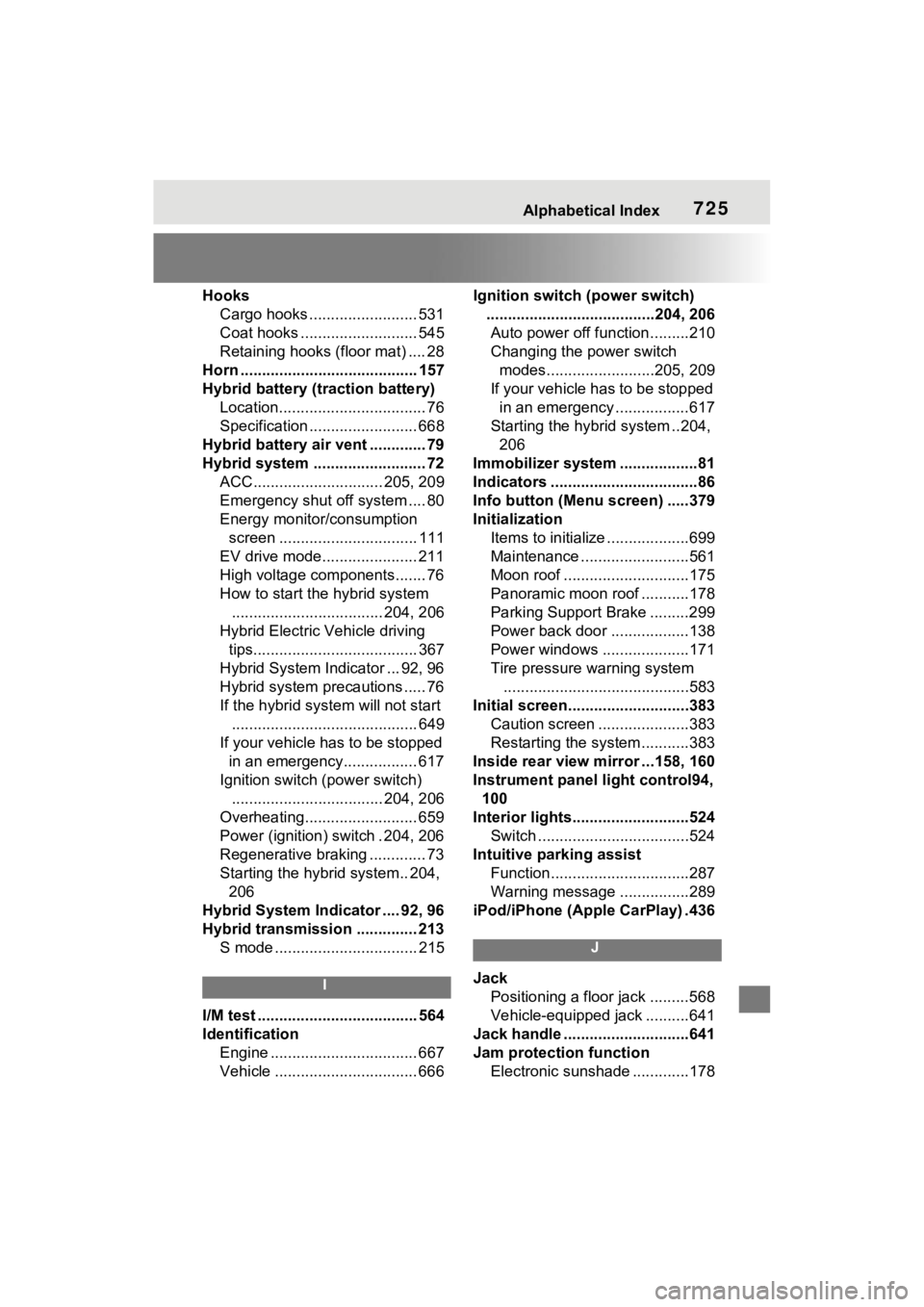
Initialization Items to initialize ...................699
Maintenance .........................561
Moon roof .............................175
Panoramic moon r oof ...........178
Parking Support Brake .........299
Power back door ..................138
Power windows ....................171
Tire pressure warning system ...........................................583
Initial screen............................383 Caution screen .....................383
Restarting the system ...........383
Inside rear view m irror ...158, 160
Instrument panel light control94, 100
Interior lights...........................524 Switch ...................................524
Intuitive parking assist Function................................287
Warning message . ...............289
iPod/iPhone (Apple CarPlay) .436
J
Jack Positioning a floor jack .........568
Vehicle-equipped jack ..........641
Jack handle .............................641
Jam protection function Electronic sunshade .............178
Page 726 of 752
726Alphabetical Index
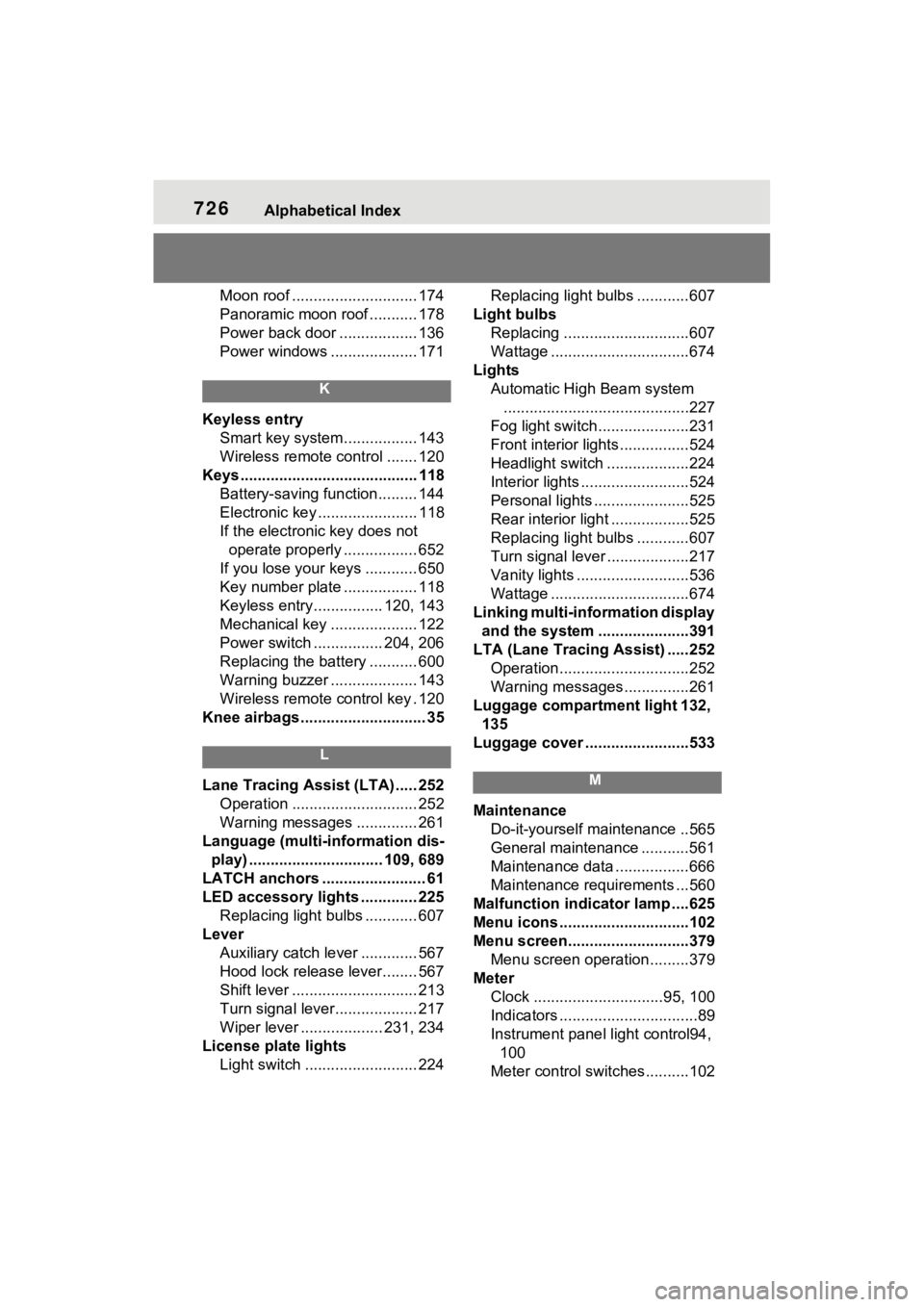
Moon roof ............................. 174
Panoramic moon roof ........... 178
Power back door .................. 136
Power windows .................... 171
K
Keyless entrySmart key system................. 143
Wireless remote control ....... 120
Keys ......................................... 118 Battery-saving function......... 144
Electronic key ....................... 118
If the electronic key does not operate properly ................. 652
If you lose your keys ............ 650
Key number plate ................. 118
Keyless entry................ 120, 143
Mechanical key .................... 122
Power switch ................ 204, 206
Replacing the battery ........... 600
Warning buzzer .................... 143
Wireless remote control key . 120
Knee airbags ............................. 35
L
Lane Tracing Assist (LTA) ..... 252 Operation ............................. 252
Warning messages .............. 261
Language (multi-information dis- play) ............................... 109, 689
LATCH anchors ........................ 61
LED accessory lights ............. 225 Replacing light bulbs ............ 607
Lever Auxiliary catch lever ............. 567
Hood lock release lever........ 567
Shift lever ............................. 213
Turn signal lever................... 217
Wiper lever ................... 231, 234
License plate lights Light switch .......................... 224 Replacing light bulbs ............607
Light bulbs Replacing .............................607
Wattage ................................674
Lights Automatic High Beam system...........................................227
Fog light switch .....................231
Front interior lights................524
Headlight switch ...................224
Interior lights .........................524
Personal lights ......................525
Rear interior light ..................525
Replacing light bulbs ............607
Turn signal lever . ..................217
Vanity lights ..........................536
Wattage ................................674
Linking multi-information display and the system .....................391
LTA (Lane Tracing Assist) .....252 Operation..............................252
Warning messages ...............261
Luggage compartment light 132, 135
Luggage cover ........................533M
Maintenance Do-it-yourself maintenance ..565
General maintenance ...........561
Maintenance data .................666
Maintenance requirements ...560
Malfunction indicator lamp ....625
Menu icons ..............................102
Menu screen............................379 Menu screen operation.........379
Meter Clock ..............................95, 100
Indicators ................................89
Instrument panel light control94, 100
Meter control switches..........102
Page 727 of 752
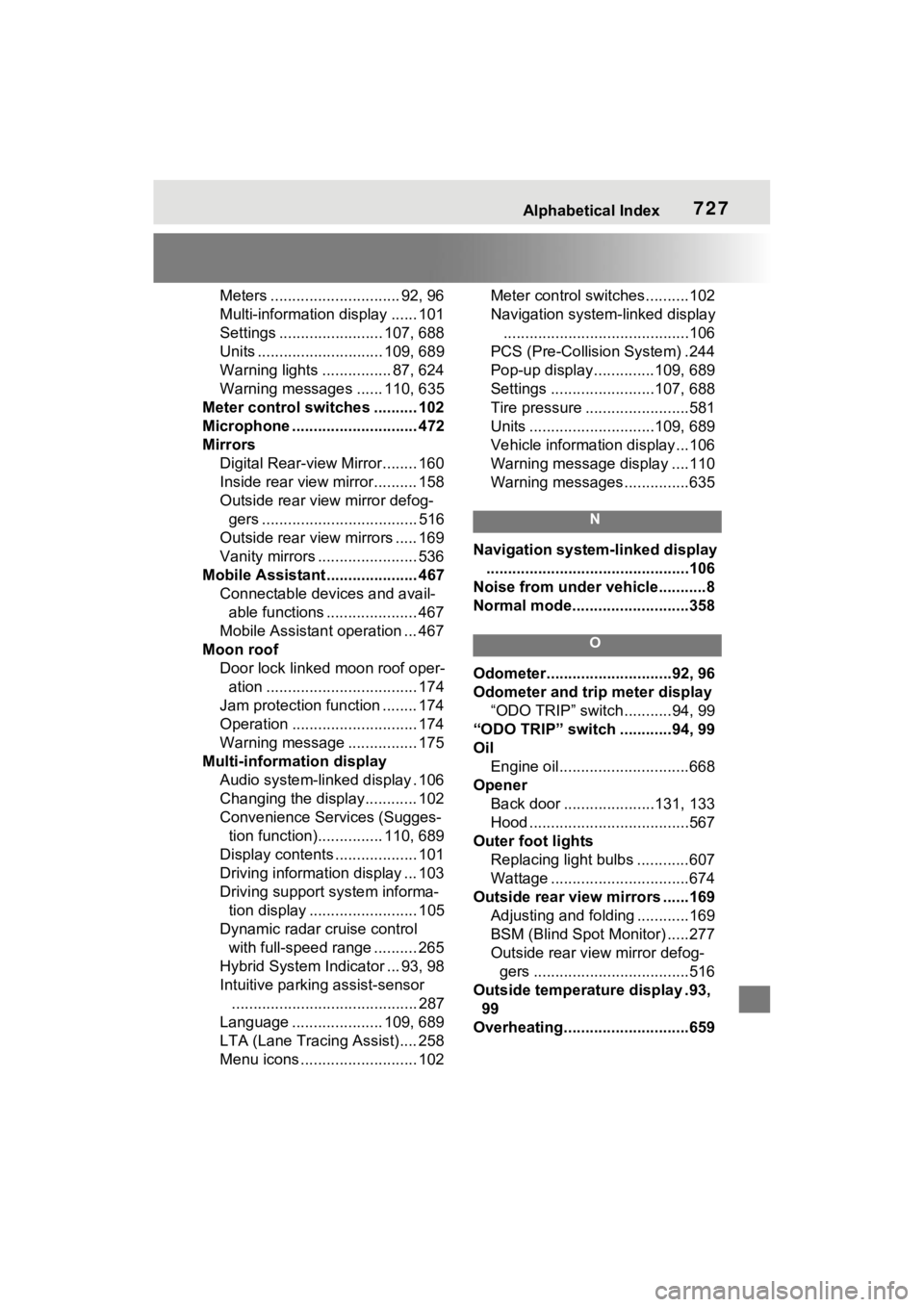
Alphabetical Index727
Meters .............................. 92, 96
Multi-information display ...... 101
Settings ........................ 107, 688
Units ............................. 109, 689
Warning lights ................ 87, 624
Warning messages ...... 110, 635
Meter control switches .......... 102
Microphone ............................. 472
Mirrors Digital Rear-view Mirror........ 160
Inside rear view mirror.......... 158
Outside rear view mirror defog-gers .................................... 516
Outside rear view mirrors ..... 169
Vanity mirrors ....................... 536
Mobile Assistant .. ................... 467
Connectable devices and avail- able functions ..................... 467
Mobile Assistant operation ... 467
Moon roof Door lock linked moon roof oper-ation ................................... 174
Jam protection function ........ 174
Operation ............................. 174
Warning message ................ 175
Multi-information display Audio system-linked display . 106
Changing the display............ 102
Convenience Services (Sugges-tion function)............... 110, 689
Display contents ................... 101
Driving information display ... 103
Driving support system informa- tion display ......................... 105
Dynamic radar cruise control with full-speed range .......... 265
Hybrid System Indicator ... 93, 98
Intuitive parking assist-sensor ........................................... 287
Language ..................... 109, 689
LTA (Lane Tracing Assist).... 258
Menu icons ........................... 102 Meter control switches..........102
Navigation system-linked display
...........................................106
PCS (Pre-Collisio n System) .244
Pop-up display..............109, 689
Settings ........................107, 688
Tire pressure ...... ..................581
Units .............................109, 689
Vehicle information display...106
Warning message display ....110
Warning messages ...............635
N
Navigation system-linked display
...............................................106
Noise from under ve hicle...........8
Normal mode...........................358
O
Odometer.............................92, 96
Odometer and trip meter display “ODO TRIP” switch ...........94, 99
“ODO TRIP” switch ............94, 99
Oil Engine oil..............................668
Opener Back door .....................131, 133
Hood .....................................567
Outer foot lights Replacing light bulbs ............607
Wattage ................................674
Outside rear view mirrors ......169 Adjusting and folding ............169
BSM (Blind Spot M onitor) .....277
Outside rear view mirror defog- gers ....................................516
Outside temperature display .93, 99
Overheating.............................659