suspension TOYOTA RAV4 HYBRID 2022 Owners Manual
[x] Cancel search | Manufacturer: TOYOTA, Model Year: 2022, Model line: RAV4 HYBRID, Model: TOYOTA RAV4 HYBRID 2022Pages: 752, PDF Size: 23.11 MB
Page 44 of 752
441-1. For safe use
WARNING
■Modification and disposal of
SRS airbag system compo-
nents
Do not dispose of your vehicle or
perform any of the following modi-
fications without consulting your
Toyota dealer. The SRS airbags
may malfunction or deploy
(inflate) accidentally, causing
death or serious injury.
●Installation, removal, disassem-
bly and repair of the SRS air-
bags
●Repairs, modifications, removal
or replacement of the steering
wheel, instrument panel, dash-
board, seats or seat upholstery,
front, side and rear pillars, roof
side rails, front door panels,
front door trims or front door
speakers
●Modifications to the front door
panel (such as making a hole in
it)
●Repairs or modifications of the
front fender, front bumper, or
side of the occ upant compart-
ment
●Installation of a grille guard (bull
bars, kangaroo bar, etc.), snow
plows, winches or roof luggage
carrier
●Modifications to the vehicle’s
suspension system
●Installation of electronic devices
such as mobile two-way radios
and CD players
●Modifications to your vehicle for
a person with a physical disabil-
ity
Page 110 of 752
1102-1. Instrument cluster
and lower side of the drive informa-
tion screen from three items, aver-
age speed, distance and total time.
“Trip Summary”
Select to set the items displayed
when the power switch is turned off.
“Pop-Up Display”
Select to enable/d isable the follow-
ing pop-up displays, which may
appear in some situations.
• Intersection guidance display of the navigation system-linked sys-
tem (if equipped)
• Incoming call display of the hands-free phone system (if
equipped)
• Audio operation (if equipped)
• Volume operation (if equipped)
• Voice control (if equipped)
“MID OFF”
A blank screen is displayed.
“Default Settings”
Select to reset the meter display
settings.
■Suspension of the settings dis-
play
●In the following si tuations, opera-
tion of the setting s display will be
temporarily suspended.
• When a warning message appears on the multi-information
display
• When the vehicle begins to move
●Settings for functions not
equipped to the vehicle are not
displayed.
●When a function is turned off, the
related settings for that function
are not selectable.
Select to display warning mes-
sages and measures to be
taken if a malfunction is
detected. ( P.635)
Displays suggestions to the
driver in the following situations.
To select a response to a dis-
played suggestion, use the
meter control switches.
■Suggestion to turn on the
headlights
If the headlight switch is in other
than or , and the vehicle
speed is 3 mph (5 km/h) or
higher for a certain amount of
WARNING
■Cautions during setting up
the display
As the hybrid system needs to be
operating during setting up the
display, ensure that the vehicle is
parked in a place with adequate
ventilation. In a closed area such
as a garage, exhaust gases
including harmful carbon monox-
ide (CO) may collect and enter
the vehicle. This may lead to
death or a serious health hazard.
NOTICE
■During setting up the display
To prevent 12-vo lt battery dis-
charge, ensure that the hybrid
system is operating while setting
up the display features.
Warning message display
Convenience Services
(Suggestion function)
Page 189 of 752
1894-1. Before driving
4
Driving
When the following unusual
operation is performed with the
accelerator pedal depressed,
the hybrid system output may be
restrained.
• When the shift lever is shifted to R
*.
• When the shift lever is shifted from P or R to forward drive
shift position such as D
*.
When the system op erates, a mes-
sage appears on the multi-informa-
tion display. Read the message
and follow the instruction.
*: Depending on the situation, the shift position may not be
changed.
■Drive-Start Control (DSC)
●When the TRAC is turned off
(
P.362), sudden start restraint
control also does not operate. If
your vehicle have trouble escap-
ing from the mud or fresh snow
due to sudden star t restraint con-
trol operation, deactivate
TRAC( P.362) so that the vehi-
cle may become able to escape
from the mud o r fresh snow.
Also, sudden start restraint control
will not operate in the following con-
ditions:
• When Trail Mode is turned on
NOTICE
In the event that you drive on a
flooded road and the vehicle is
flooded, be sure to have your
Toyota dealer c heck the following:
●Brake function
●Changes in quantity and quality
of oil and fluid used for the
engine, hybrid transaxle (front
and rear), etc.
●Lubricant condition for the bear-
ings and suspension joints
(where possible), and the func-
tion of all joints, bearings, etc.
■When parking the vehicle
Always set the parking brake, and
shift the shift lever to P. Failure to
do so may cause the vehicle to
move or the vehi cle may acceler-
ate suddenly if the accelerator
pedal is accidentally depressed.
Sudden start restraint
control (Drive-Start Con-
trol [DSC])
Page 194 of 752
1944-1. Before driving
■Before towing
Check that the fo llowing conditions
are met:
●Ensure that your vehicle’s tires
are properly inflated. ( P.672)
●Trailer tires are inflated according
to the trailer manufacturer’s rec-
ommendation.
●All trailer lights work as required
by law.
●All lights work each time you con-
nect them.
●The trailer ball is set at the proper
height for the coupler on the
trailer.
●The trailer is level when it is
hitched.
Do not drive if th e trailer is not
level, and check for improper
tongue weight, overloading, worn
suspension, or other possible
causes.
●The trailer cargo is securely
loaded.
●The rear view mirr ors conform to
all applicable fede ral, state/provin-
cial or local regulations. If they do
not, install rear view mirrors
appropriate for towing purposes.
Trailer towing
Your vehicle is designed
primarily as a passenger-
and-load-carrying vehicle.
Towing a trailer can have an
adverse impact on handling,
performance, braking, dura-
bility, and fuel consump-
tion. For your safety and the
safety of others, you must
not overload your vehicle or
trailer. You must also
ensure that you are using
appropriate towing equip-
ment, that the towing equip-
ment has been installed
correctly and used properly,
and that you employ the
requisite driving habits.
Vehicle-trailer stability and
braking performance are
affected by trailer stability,
brake performance and set-
ting, trailer brakes, the hitch
and hitch systems (if
equipped).
To tow a trailer safely, use
extreme care and drive the
vehicle in accordance with
your trailer’s characteris-
tics and operating condi-
tions.
Toyota warranties do not
apply to damage or mal-
function caused by towing a
trailer for commercial pur-
poses.
Contact your Toyota dealer for
further information about addi-
tional requirements such as a
towing kit, etc.
Page 253 of 752
2534-5. Using the driving support systems
4
Driving
WARNING
●Vehicle is driven in a construc-
tion zone.
●A spare tire, tire chains, etc. are
equipped.
●When the tires have been
excessively worn, or when the
tire inflation pressure is low.
●When your vehicle is towing a
trailer or during emergency tow-
ing
■Preventing LTA system mal-
functions and operations per-
formed by mistake
●Do not modify the headlights or
place stickers, etc. on the sur-
face of the lights.
●Do not modify the suspension
etc. If the suspension etc. needs
to be replaced, contact your
Toyota dealer.
●Do not install or place anything
on the hood or grille. Also, do
not install a grille guard (bull
bars, kangaroo bar, etc.).
●If your windshield needs
repairs, contact your Toyota
dealer.
■Conditions in which functions
may not operate properly
In the following situations, the
functions may not operate prop-
erly and the vehicle may depart
from its lane. Drive safely by
always paying careful attention to
your surroundings and operate
the steering wheel to correct the
path of the vehicle without relying
solely on the functions.
●When the follow-up cruising dis-
play is displayed ( P.258) and
the preceding vehicle changes
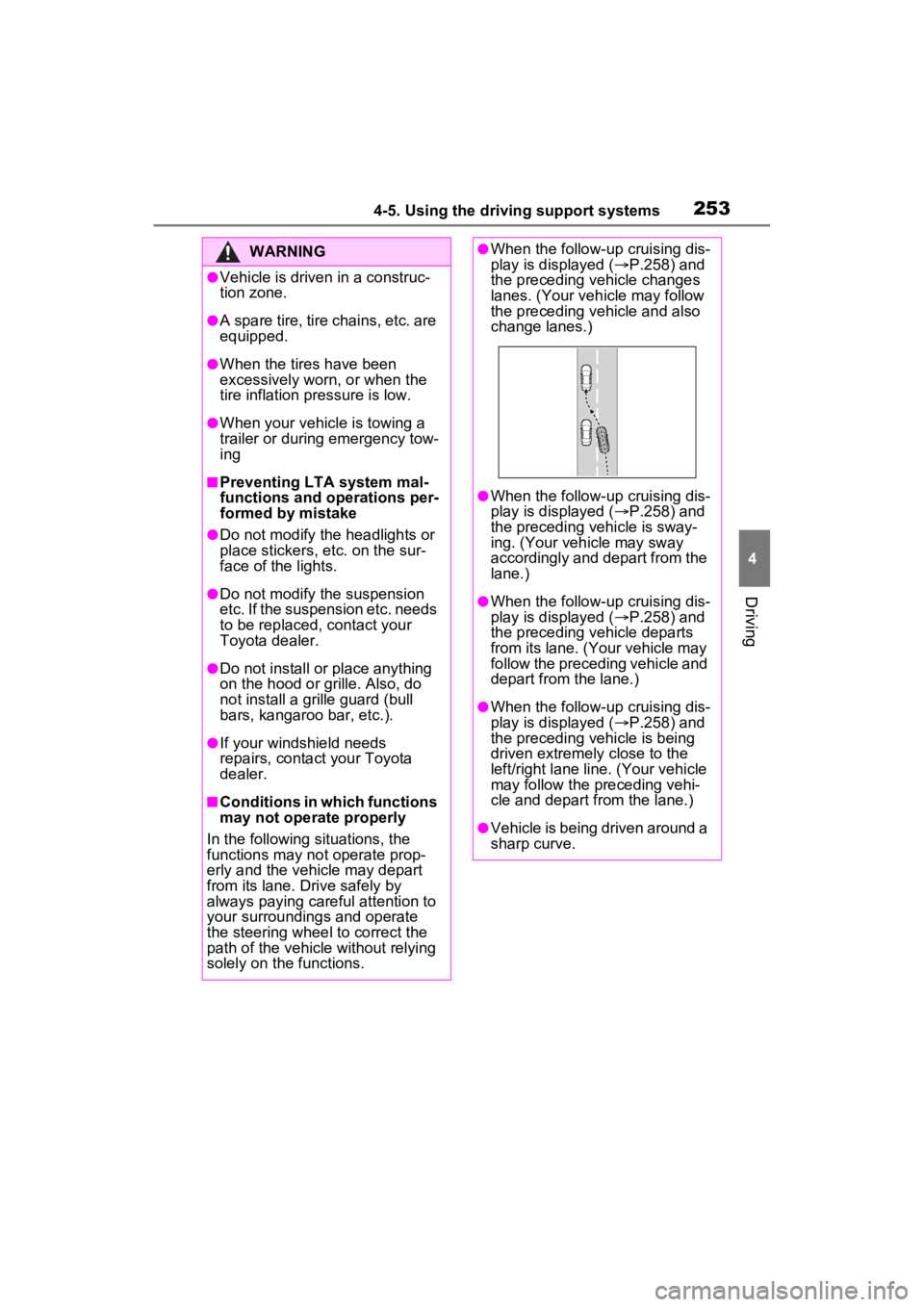
lanes. (Your veh icle may follow
the preceding vehicle and also
change lanes.)
●When the follow-up cruising dis-
play is displayed ( P.258) and
the preceding vehicle is sway-
ing. (Your vehicle may sway
accordingly and depart from the
lane.)
●When the follow-up cruising dis-
play is displayed ( P.258) and
the preceding vehicle departs
from its lane. (Your vehicle may
follow the preceding vehicle and
depart from the lane.)
●When the follow-up cruising dis-
play is displayed ( P.258) and
the preceding vehicle is being
driven extremely close to the
left/right lane line. (Your vehicle
may follow the preceding vehi-
cle and depart from the lane.)
●Vehicle is being driven around a
sharp curve.
Page 285 of 752
2854-5. Using the driving support systems
4
Driving
cle*
●The distance between the sensor
and approaching vehicle gets too
close
*: Depending on conditions, detec-tion of a vehicle and/or object may
occur.
■Situations in which the system
may not operate properly
The RCTA function may not detect
vehicles correctly in the following
situations:
●When the sensor is misaligned
due to a strong impact to the sen-
sor or its surrounding area.
●When mud, snow, ice, a sticker,
etc., is covering the sensor or sur-
rounding area on the rear bumper.
●When driving on a road surface
that is wet with standing water
during bad weather, such as
heavy rain, snow, or fog.
●When multiple vehicles are
approaching with only a small gap
between each vehicle.
●When a vehicle is approaching at
high speed.
●When equipment that may
obstruct a sensor is installed, such
as a towing eyelet, bumper pro-
tector (an additi onal trim strip,
etc.), bicycle carrier, or snow
plow.
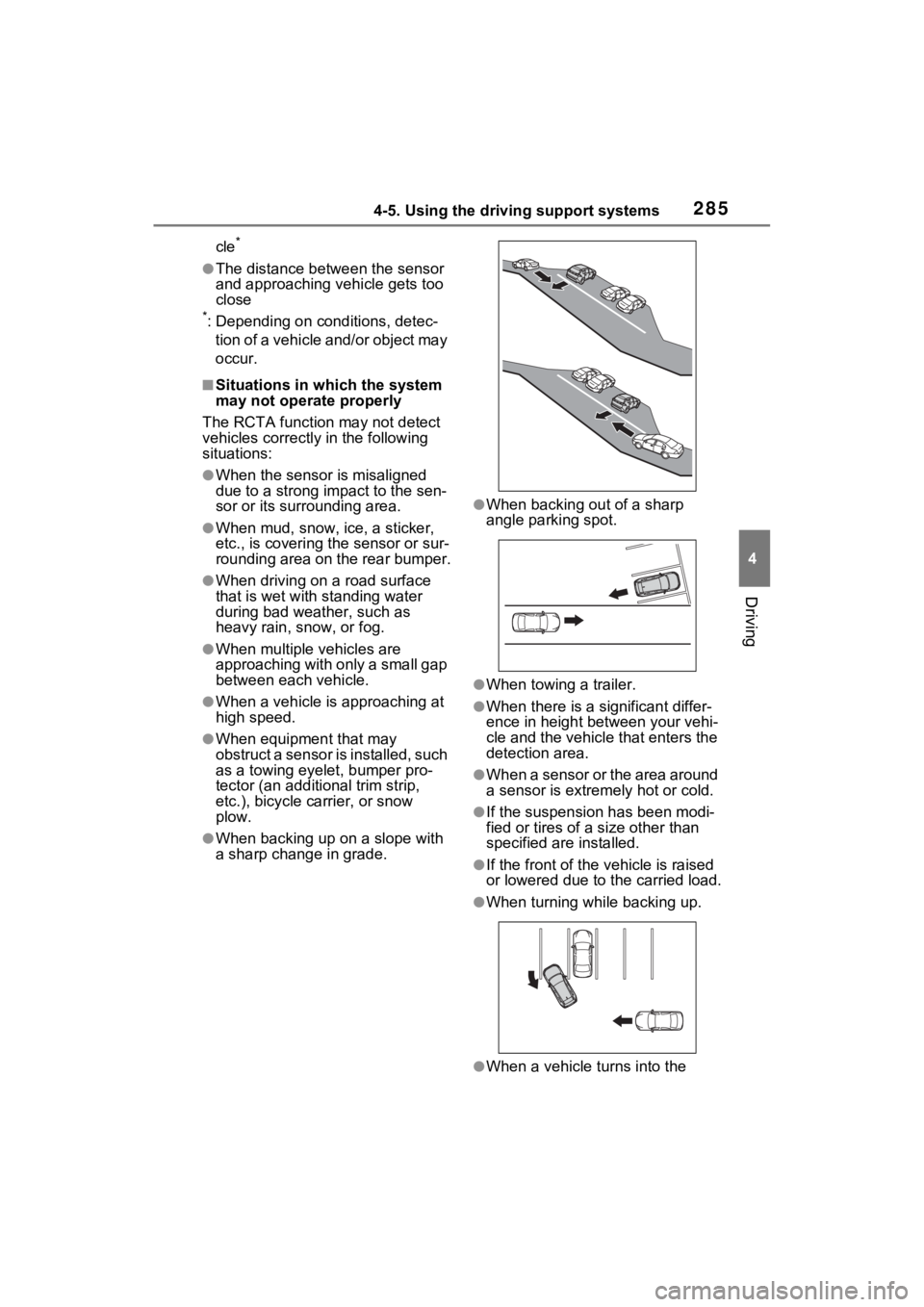
●When backing up on a slope with
a sharp change in grade.
●When backing out of a sharp
angle parking spot.
●When towing a trailer.
●When there is a significant differ-
ence in height between your vehi-
cle and the vehicle that enters the
detection area.
●When a sensor or the area around
a sensor is extremely hot or cold.
●If the suspension has been modi-
fied or tires of a size other than
specified are installed.
●If the front of the v ehicle is raised
or lowered due to the carried load.
●When turning while backing up.
●When a vehicle tu rns into the
Page 286 of 752
2864-5. Using the driving support systems
detection area.
■Situations in which the system
may operate even if there is no
possibility of a collision
Instances of the RCTA function
unnecessarily detec ting a vehicle
and/or object may increase in the
following situations:
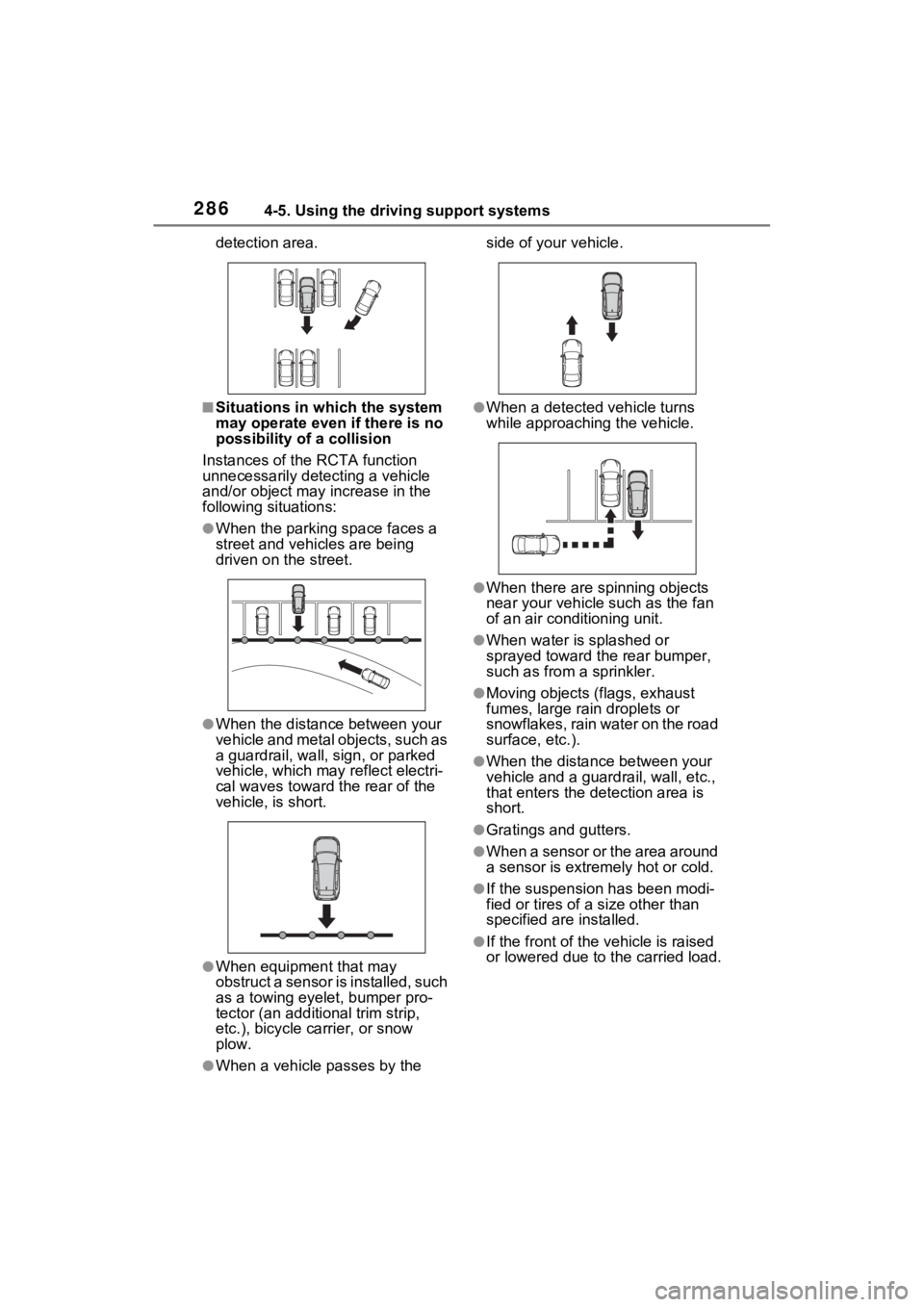
●When the parking space faces a
street and vehicles are being
driven on the street.
●When the distanc e between your
vehicle and metal objects, such as
a guardrail, wall, sign, or parked
vehicle, which may reflect electri-
cal waves toward the rear of the
vehicle, is short.
●When equipment that may
obstruct a sensor is installed, such
as a towing eyelet, bumper pro-
tector (an additi onal trim strip,
etc.), bicycle carrier, or snow
plow.
●When a vehicle passes by the side of your vehicle.
●When a detected vehicle turns
while approaching
the vehicle.
●When there are spinning objects
near your vehicle such as the fan
of an air conditioning unit.
●When water is splashed or
sprayed toward the rear bumper,
such as from a sprinkler.
●Moving objects (flags, exhaust
fumes, large rain droplets or
snowflakes, rain water on the road
surface, etc.).
●When the distance between your
vehicle and a guardrail, wall, etc.,
that enters the detection area is
short.
●Gratings and gutters.
●When a sensor or the area around
a sensor is extremely hot or cold.
●If the suspension has been modi-
fied or tires of a size other than
specified are installed.
●If the front of the v ehicle is raised
or lowered due to the carried load.
Page 289 of 752
2894-5. Using the driving support systems
4
Driving
■The system can be operated
when
●The power switch is in ON.
●Intuitive parking assist function is
on.
●The vehicle speed is less than
about 6 mph (10 km/h).
●The shift lever is in a position
other than P.
■If “Parking Assist Unavailable
Clean Parking Assist Sensor” is
displayed on the multi-informa-
tion display
A sensor may be co vered with ice,
snow, dirt, etc. Remove the ice,
snow, dirt, etc., from the sensor to
return the system to normal.
Also, due to ice forming on a sensor
at low temperatures, a warning
message may be displayed or the
sensor may not be able to detect an
object. Once the ice melts, the sys-
tem will return to normal.
If a warning message is displayed
even if the sensor i s clean, there
may be a sensor malfunction. Have
the vehicle insp ected by your
Toyota dealer.
■If “Parking Assist Unavailable”
is displayed on the multi-infor-
mation display
●Water may be continuously flow-
ing over the sensor surface, such
as in a heavy rain. When the sys-
tem determines that it is normal,
the system will retu rn to normal.
WARNING
●Do not damage the sensors,
and always keep them clean.
●Do not attach a sticker or install
an electronic component, such
as a backlit license plate (espe-
cially fluorescent type), fog
lights, fender pole or wireless
antenna near a radar sensor.
●Do not subject the surrounding
area of the sensor to a strong
impact. If subjected to an
impact, have the vehicle
inspected by your Toyota
dealer. If the front or rear
bumper needs to be
removed/installed or replaced,
contact your Toyota dealer.
●Do not modify, disassemble or
paint the sensors.
●Do not attach a license plate
cover.
●Keep your tires properly
inflated.
■When to disable the function
In the following situations, disable
the function as it may operate
even though there is no possibility
of a collision.
●Failing to observe the warnings
above.
●A non-genuine Toyota suspen-
sion (lowered suspension, etc.)
is installed.
■Notes when washing the vehi-
cle
Do not apply intensive bursts of
water or steam to the sensor
area.
Doing so may result in the sensor
malfunctioning.
●When using a high pressure
washer to wash the vehicle, do
not spray the sensors directly,
as doing so may cause a sensor
to malfunction.
●When using steam to clean the
vehicle, do not direct steam too
close to the sensors as doing so
may cause a sensor to malfunc-
tion.
Page 296 of 752
2964-5. Using the driving support systems
The Parking Support Brake can
be enabled/disabled on the
screen of the multi-information
display. All of the Parking Sup-
port Brake functions (static
objects and rear-crossing vehi-
cles) are enabled/disabled
simultaneously. (P.107)
When the Parking Support Brake is
disabled, the PKSB OFF indicator
( P.89) illuminates on the multi-
information display.
To re-enable the system, select
on the multi-information display,
select and turn it on.
If the system is disabled, it will
remain off even if the power switch
is turned to ON after the power
switch has been turned off.
WARNING
●When inspecting the vehicle
using a chassis roller, chassis
dynamo or free roller.
●When loading the vehicle onto a
boat, truck or other transport
vessel.
●If the suspension has been
modified or tires of a size other
than specified are installed.
●If the front of the vehicle is
raised or lowered due to the
carried load.
●When equipment that may
obstruct a sensor is installed,
such as a towing eyelet, bumper
protector (an additional trim
strip, etc.), bicycle carrier, or
snow plow.
●When using automatic car
washing devices.
●If the vehicle cannot be driven in
a stable manner, such as when
the vehicle has been in an acci-
dent or is malfunctioning.
●When the vehicle is driven in a
sporty manner or off-road.
●When the tires are not properly
inflated.
●When the tires are very worn.
●When tire chains, a compact
spare tire or an emergency tire
puncture repair kit are used.
NOTICE
■If “PKSB Unavailable” is dis-
played on the multi-informa-
tion display and the PKSB
OFF indicator is flashing
If this message is displayed
immediately after the power
switch is changed to ON, operate
the vehicle carefully, paying atten-
tion to your surroundings. It may
be necessary to drive the vehicle
for a certain amount of time
before the system returns to nor-
mal. (If the system does not return
to normal after dr iving for a while,
clean the sensors and their sur-
rounding area on the bumpers.)
Enabling/Disabling the
Parking Support Brake
Page 313 of 752
3134-5. Using the driving support systems
4
Driving
*: If equipped
●The screen illustrations used in
this text are intended as exam-
ples, and may differ from the
image that is actually displayed on
the screen.
The parking assist monitor is a
supplemental device intended to
assist the driver when backing
up. When backing up, be sure to
visually check all around the
vehicle both directly and using
the mirrors before proceeding. If
you do not, you may hit another
vehicle, and could possibly
cause an accident.
Pay attention to the following
precautions when using the
parking assist monitor.
Toyota parking assist
monitor*
The parking assist monitor
assists the driver by dis-
playing an image of the view
behind the vehicle while
backing up, for example
while parking.
When the display is
changed to the wide rear
view mode, a wider lateral
view behind the vehicle will
be displayed.
Driving precautions
WARNING
●Never depend on the parking
assist monitor entirely when
backing up. The image and the
position of the guide lines dis-
played on the screen may differ
from the actual state.
Use caution, just as you would
when backing up any vehicle.
●Be sure to back up slowly,
depressing the brake pedal to
control vehicle speed.
●If you seem likely to hit nearby
vehicles, obstacles, people or
mount the shoulder, depress
the brake pedal to stop the vehi-
cle.
●The instructions given are only
guidelines. When and how
much to turn the steering wheel
will vary according to traffic con-
ditions, road surface condi-
tions, vehicle condition, etc.
when parking. It is necessary to
be fully aware o f this before
using the parking assist system.
●When parking, be sure to check
that the parking space will
accommodate your vehicle
before maneuvering into it.
●Do not use the parking assist
monitor in the f ollowing cases:
• On icy or slick road surfaces, or in snow
• When using tire chains or emer- gency tires
• When the back door is not closed completely
• On roads that are not flat or straight, such as curves or
slopes
• If the suspension has been modified or tires of a size other
than specified are installed