driver TOYOTA RAV4 PRIME 2021 Owners Manual (in English)
[x] Cancel search | Manufacturer: TOYOTA, Model Year: 2021, Model line: RAV4 PRIME, Model: TOYOTA RAV4 PRIME 2021Pages: 616, PDF Size: 34.66 MB
Page 524 of 616

5248-2. Steps to take in an emergency
a safe place and, if the fuel level is
low, refuel the vehicle.
• “Hybrid System Stopped”
• “Engine Stopped”
●If “Maintenance required for
DCDC converter cooling parts
See Owner’s Manual” is shown,
the filter may be clogged, the air
intake vent may be blocked, or
there may be a gap in the duct.
Therefore, perform the following
correction procedure.
• If the air intake vent or filter of the DC/DC converter are dirty, per-
form the procedures on P.486 to
clean them.
• If the warning message is shown when the air intake vent and filter
of the DC/DC converter are not
dirty, have the vehicle inspected
at your Toyota dealer.
●If “12-Volt Battery Charging Sys-
tem Malfunction Stop in a Safe
Place See Owner’s Manual” is
shown
Indicates a malfunction in the vehi-
cle’s charging system. Pull over and
stop the vehicle as soon as it is safe
to do so.
While the message is displayed, the
functions of the air conditioning, etc.
may be partially lim ited in order to
reduce the power consumption of
the 12-volt battery.
■If “Hybrid System Overheated
Output Power Reduced” is
shown
The message may be shown when
driving under severe operating con-
ditions. (For example, when driving
up a long steep hill or driving up a
steep hill in reverse.)
Coping method: P.544
■If “Traction Battery Needs to be
Protected Refrain from the Use
of N Position” is shown
This message may be displayed
when the shift lever is in N. As the hybrid battery (traction bat-
tery) cannot be charged when the
shift lever is in N, shift the shift lever
to P when the vehicle is stopped.
■If “Traction Battery Needs to be
Protected Shift into P to
Restart” is shown
This message is displayed when the
hybrid battery (traction battery)
charge has becom e extremely low
because the shift lever has been left
in N for a certain amount of time.
When operating the vehicle, shift to
P and restart the hybrid system.
■If “Shift to P when Parked” is
shown
Message is displayed when the
driver’s door is opened without turn-
ing the power switch to OFF with the
shift lever in any p osition other than
P.
Shift the shift lever to P.
■If “Shift is in N Release Acceler-
ator Before Shifting” is shown
Message is displayed when the
accelerator pedal has been
depressed and the shift lever is in N.
Release the accelerator pedal and
shift the shift lever to D or R.
■If “Press Brake when Vehicle is
Stopped Hybrid System may
Overheat” is shown
Message is displayed when the
accelerator pedal is depressed to
maintain the vehicl e position when
stopped on a upward slope, etc.
If this continues, the hybrid system
may overheat.
Release the accelerator pedal and
depress the brake pedal.
■If “Auto Power OFF to Conserve
Battery” is shown
Power was turned off due to the
automatic power off function.
Next time when starting the hybrid
system, operate the hybrid system
for approximately 5 minutes to
Page 536 of 616
5368-2. Steps to take in an emergency
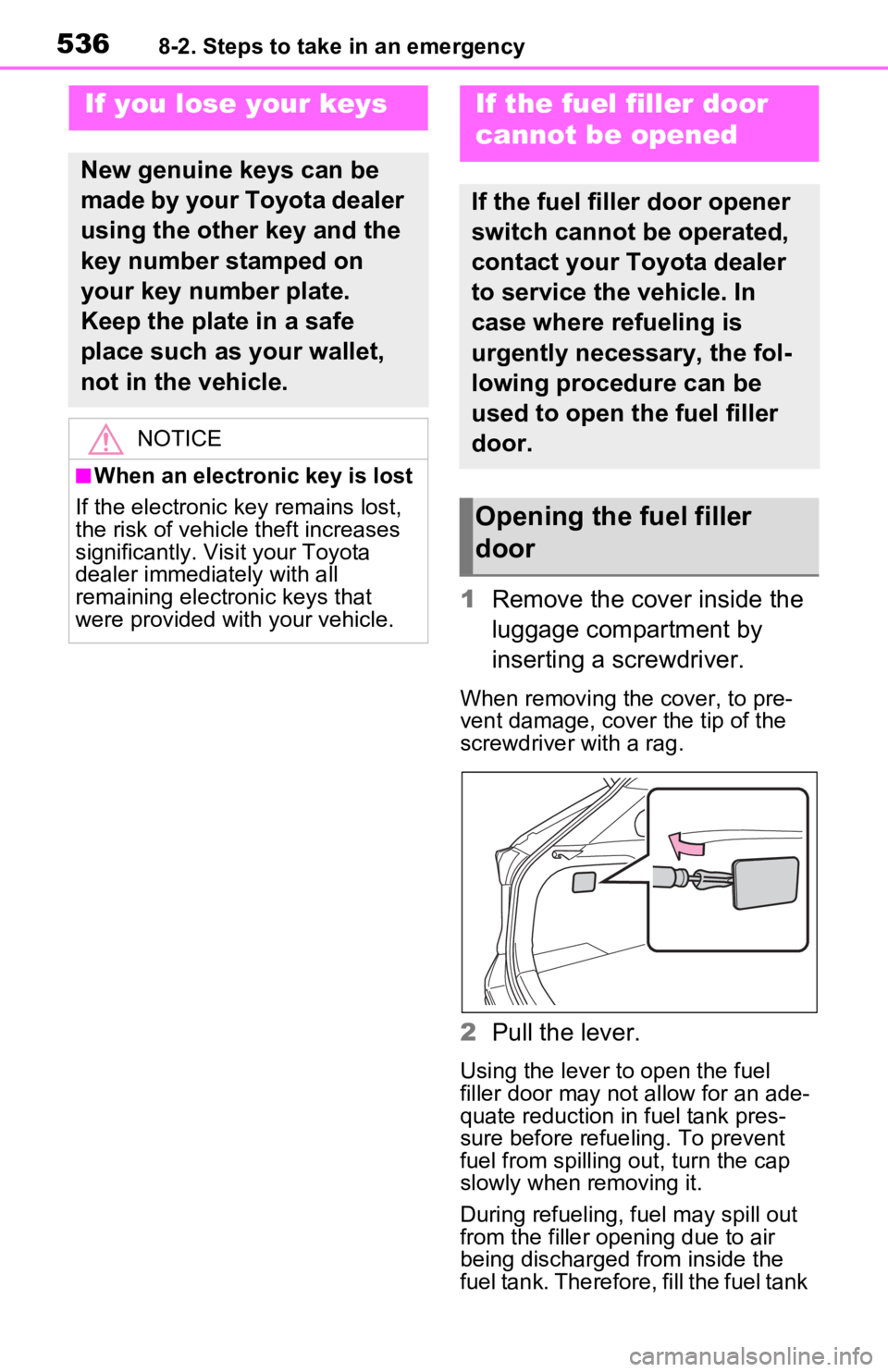
1Remove the cover inside the
luggage compartment by
inserting a screwdriver.
When removing the cover, to pre-
vent damage, cover the tip of the
screwdriver with a rag.
2Pull the lever.
Using the lever to open the fuel
filler door may no t allow for an ade-
quate reduction in fuel tank pres-
sure before refueling. To prevent
fuel from spilling out, turn the cap
slowly when removing it.
During refueling, fuel may spill out
from the filler opening due to air
being discharged from inside the
fuel tank. Therefore, fill the fuel tank
If you lose your keys
New genuine keys can be
made by your Toyota dealer
using the other key and the
key number stamped on
your key number plate.
Keep the plate in a safe
place such as your wallet,
not in the vehicle.
NOTICE
■When an electronic key is lost
If the electronic key remains lost,
the risk of vehicle theft increases
significantly. Visit your Toyota
dealer immediately with all
remaining electronic keys that
were provided wit h your vehicle.
If the fuel filler door
cannot be opened
If the fuel filler door opener
switch cannot be operated,
contact your Toyota dealer
to service the vehicle. In
case where refueling is
urgently necessary, the fol-
lowing procedure can be
used to open the fuel filler
door.
Opening the fuel filler
door
Page 538 of 616

5388-2. Steps to take in an emergency
following operations.
1Locks all the doors
2 Unlocks the door
Turning the key rearward unlocks
the driver’s door. Turning the key
once again within 5 seconds
unlocks the other doors.
■Key linked functions
1 Closes the windows and the
moon roof
*1 or panoramic moon
roof
*1 (turn and hold)*2
2 Opens the windows and the
moon roof
*1 or panoramic moon
roof
*1 (turn and hold)*2
*1
: If equipped
*2: These settings must be custom- ized at your Toyota dealer.
1 Ensure that the shift lever is
in P and depress the brake
pedal.
2 Touch the area behind the
buttons on the electronic key
to the power switch.
When the electronic key is
detected, a buzzer sounds and the
power switch will turn to ON.
When the smart key system is
deactivated in customization set-
ting, the power switch will turn to
ACC.
WARNING
■When using the mechanical
key and operating the power
windows or the moon roof (if
equipped) or panoramic
moon roof (if equipped)
Operate the power window or the
moon roof or panoramic moon
roof after checking to make sure
that there is no p ossibility of any
passenger having any of their
body parts caught in the window
or the moon roof or panoramic
moon roof. Also, do not allow chil-
dren to operate t he mechanical
key. It is possible for children and
other passengers to get caught in
the power window or the moon
roof or panoramic moon roof.
Starting the hybrid sys-
tem
Page 573 of 616
5739-2. Customization
9
Vehicle specifications
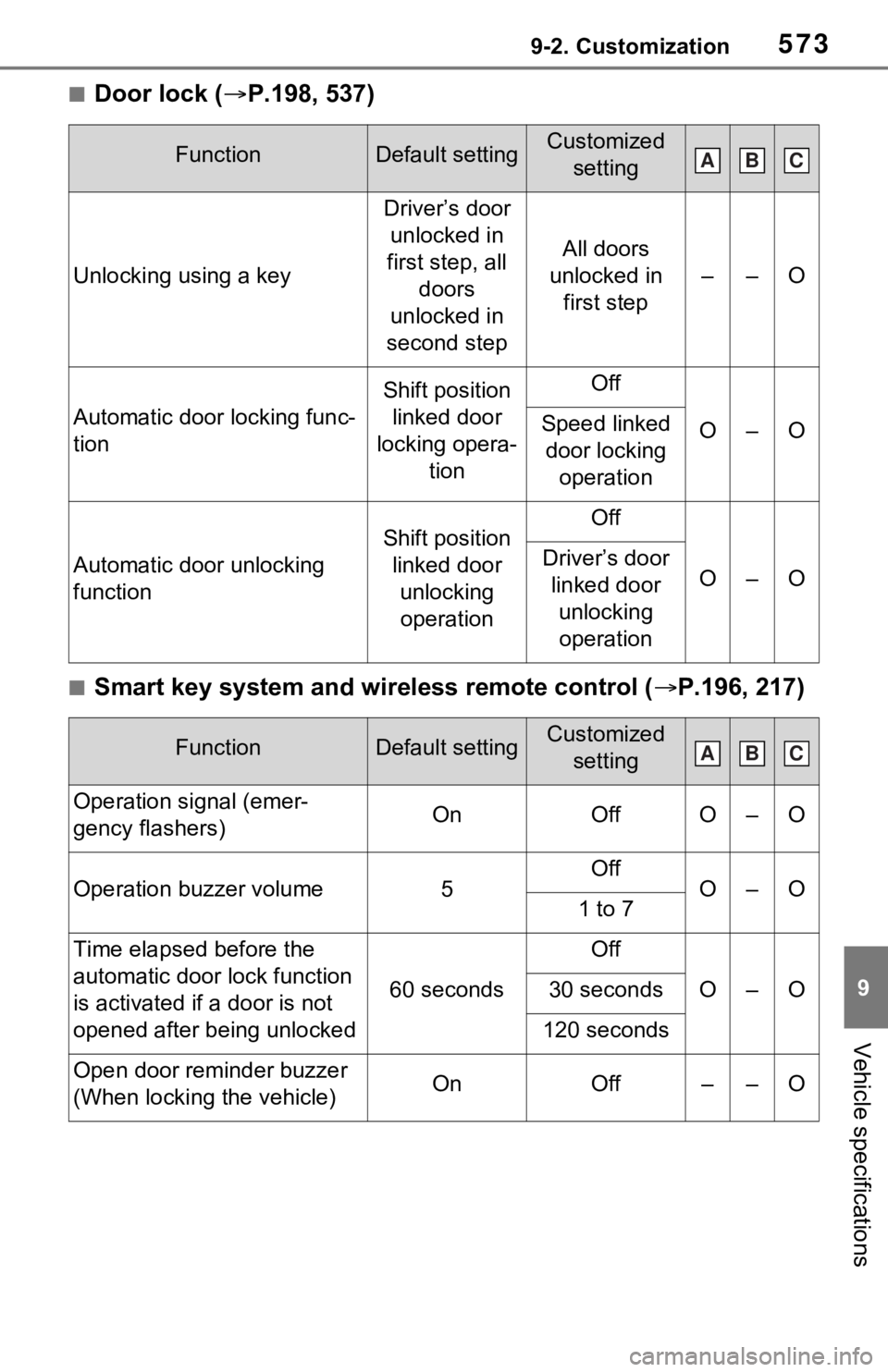
■Door lock (P.198, 537)
■Smart key system and wireless remote control ( P.196, 217)
FunctionDefault settingCustomized
setting
Unlocking using a key
Driver’s door unlocked in
first step, all doors
unlocked in
second step
All doors
unlocked in first step
––O
Automatic door locking func-
tion
Shift position linked door
locking opera- tionOff
O–OSpeed linked door locking operation
Automatic door unlocking
function
Shift position linked door unlocking operationOff
O–ODriver’s door linked door unlocking operation
FunctionDefault settingCustomized setting
Operation signal (emer-
gency flashers)OnOffO–O
Operation buzzer volume5OffO–O1 to 7
Time elapsed before the
automatic door lock function
is activated if a door is not
opened after being unlocked
60 seconds
Off
O–O30 seconds
120 seconds
Open door reminder buzzer
(When locking the vehicle)OnOff––O
ABC
ABC
Page 574 of 616
5749-2. Customization
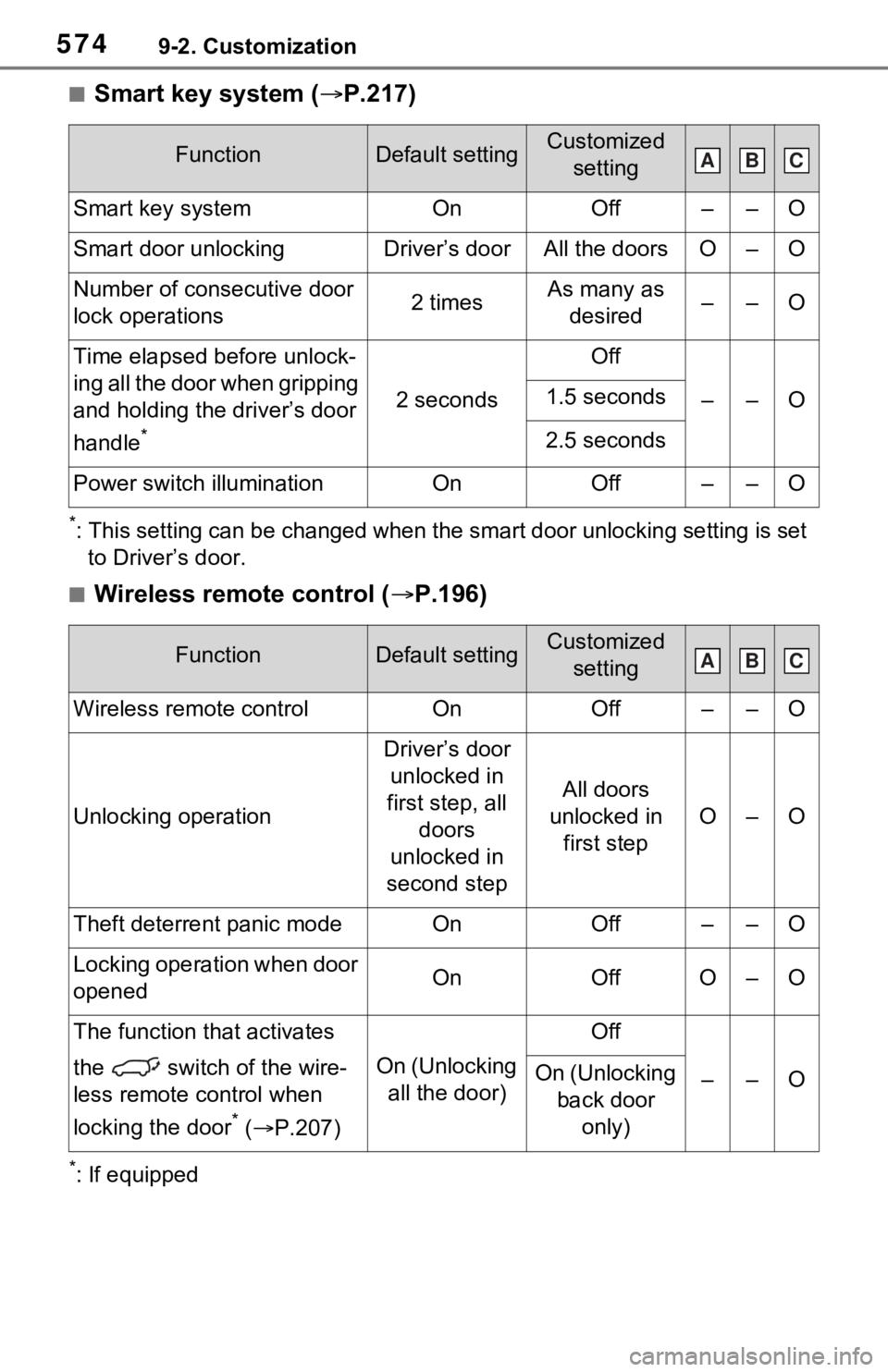
■Smart key system (P.217)
*: This setting can be changed when the smart door unlocking sett ing is set
to Driver’s door.
■Wireless remote control ( P.196)
*: If equipped
FunctionDefault settingCustomized
setting
Smart key systemOnOff––O
Smart door unlockingDriver’s doorAll the doorsO–O
Number of consecutive door
lock operations2 timesAs many as desired––O
Time elapsed before unlock-
ing all the door when gripping
and holding the driver’s door
handle
*
2 seconds
Off
––O1.5 seconds
2.5 seconds
Power switch illuminationOnOff––O
FunctionDefault settingCustomized setting
Wireless remote controlOnOff––O
Unlocking operation
Driver’s door unlocked in
first step, all doors
unlocked in
second step
All doors
unlocked in first step
O–O
Theft deterrent panic modeOnOff––O
Locking operation when door
openedOnOffO–O
The function that activates
the switch of the wire-
less remote control when
locking the door
* ( P.207)
On (Unlocking
all the door)
Off
––OOn (Unlocking back door only)
ABC
ABC
Page 576 of 616
5769-2. Customization
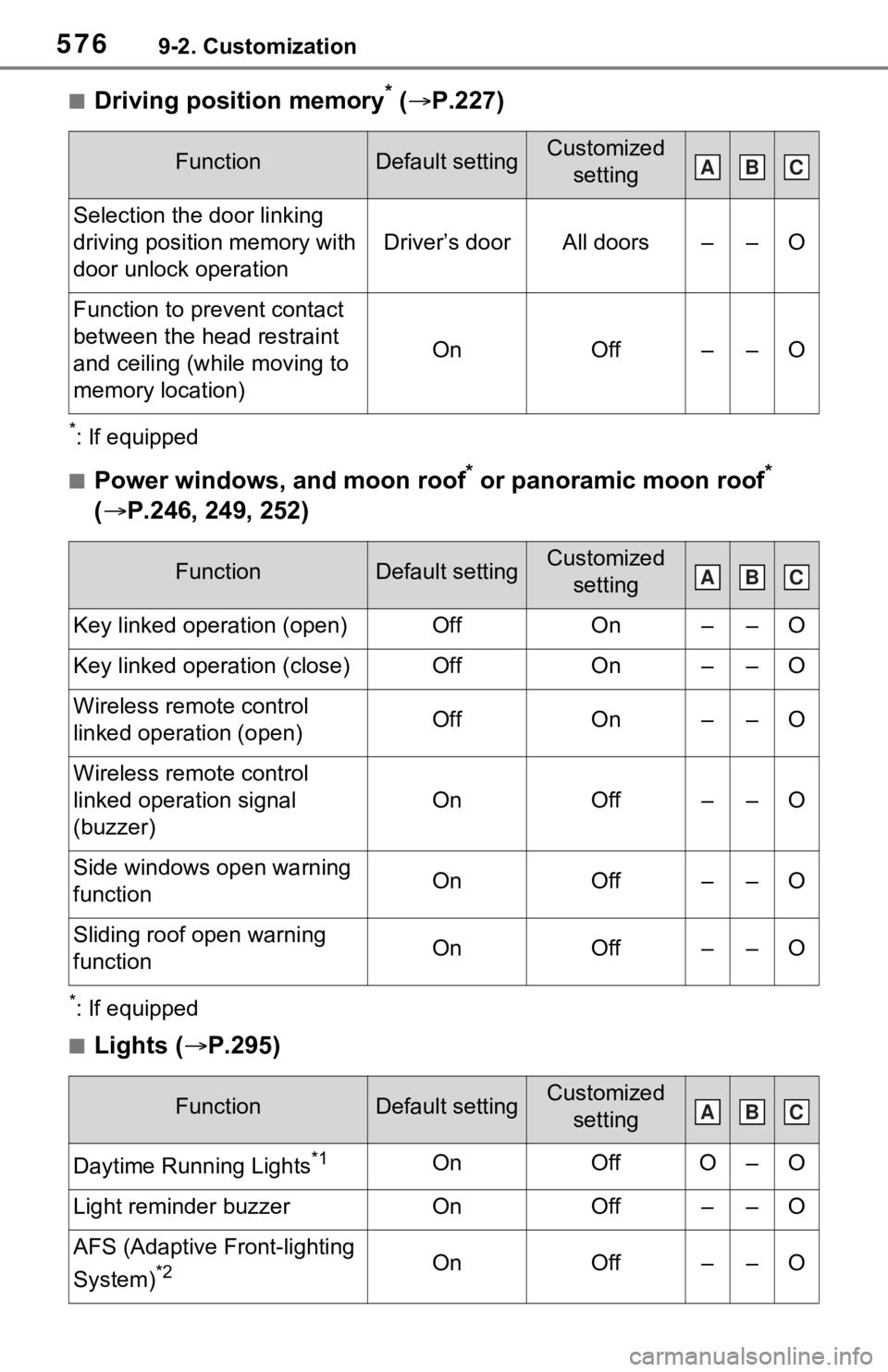
■Driving position memory* ( P.227)
*: If equipped
■Power windows, and moon roof* or panoramic moon roof*
( P.246, 249, 252)
*: If equipped
■Lights ( P.295)
FunctionDefault settingCustomized
setting
Selection the door linking
driving position memory with
door unlock operation
Driver’s doorAll doors––O
Function to prevent contact
between the head restraint
and ceiling (while moving to
memory location)
OnOff––O
FunctionDefault settingCustomized setting
Key linked operation (open)OffOn––O
Key linked operation (close)OffOn––O
Wireless remote control
linked operation (open)OffOn––O
Wireless remote control
linked operation signal
(buzzer)
OnOff––O
Side windows open warning
functionOnOff––O
Sliding roof open warning
function OnOff––O
FunctionDefault settingCustomized setting
Daytime Running Lights*1OnOffO–O
Light reminder buzzerOnOff––O
AFS (Adaptive Front-lighting
System)
*2OnOff––O
ABC
ABC
ABC
Page 597 of 616
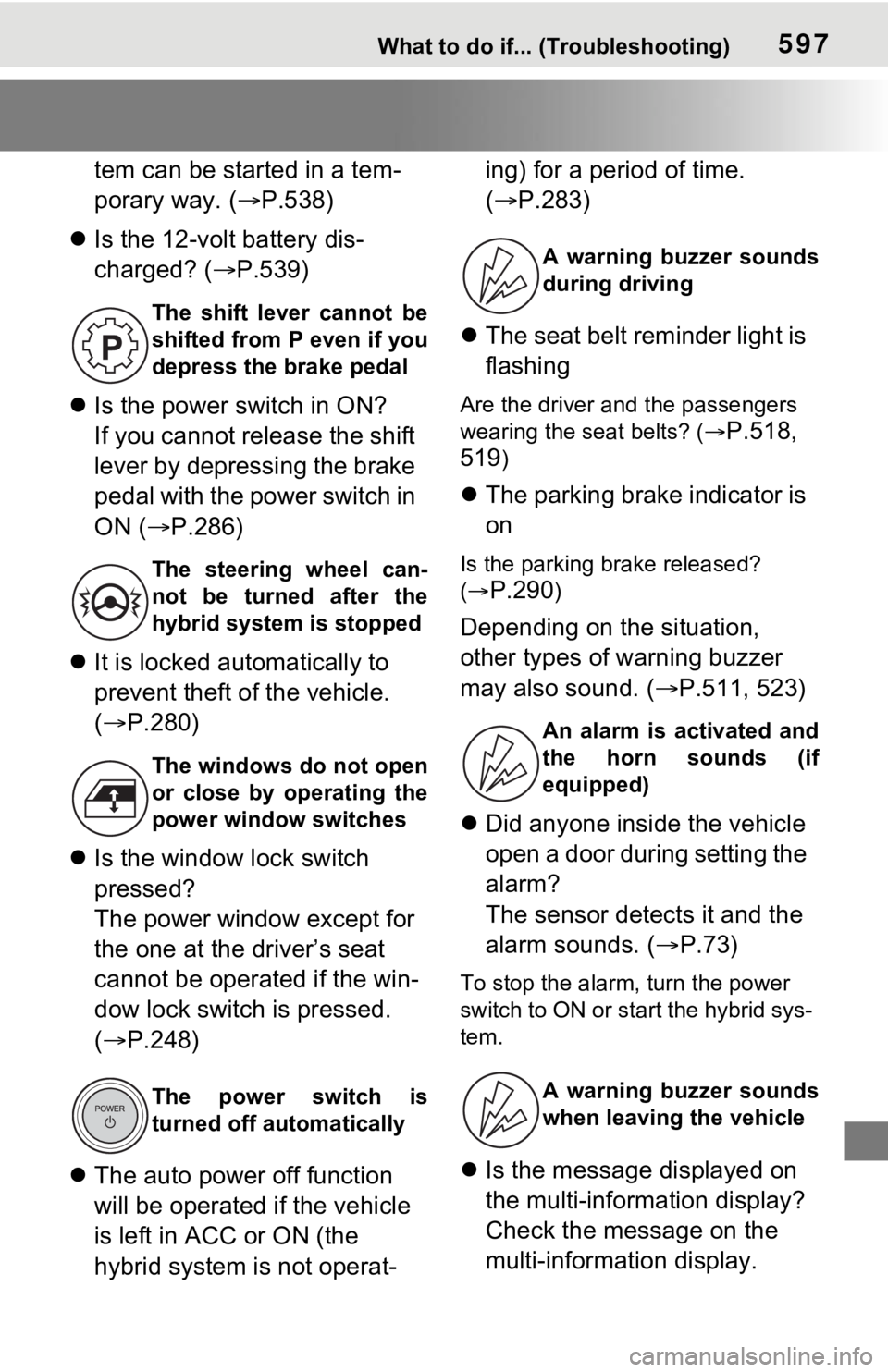
597What to do if... (Troubleshooting)
tem can be started in a tem-
porary way. (P.538)
Is the 12-volt battery dis-
charged? ( P.539)
Is the power switch in ON?
If you cannot release the shift
lever by depressing the brake
pedal with the power switch in
ON ( P.286)
It is locked automatically to
prevent theft of the vehicle.
( P.280)
Is the window lock switch
pressed?
The power window except for
the one at the driver’s seat
cannot be operated if the win-
dow lock switch is pressed.
( P.248)
The auto power off function
will be operated if the vehicle
is left in ACC or ON (the
hybrid system is not operat- ing) for a period of time.
(
P.283)
The seat belt reminder light is
flashing
Are the driver and the passengers
wearing the seat belts? (
P.518,
519
)
The parking brake indicator is
on
Is the parking br ake released?
(
P.290)
Depending on the situation,
other types of warning buzzer
may also sound. ( P.511, 523)
Did anyone inside the vehicle
open a door during setting the
alarm?
The sensor detects it and the
alarm sounds. ( P.73)
To stop the alarm, turn the power
switch to ON or start the hybrid sys-
tem.
Is the message displayed on
the multi-information display?
Check the message on the
multi-information display.
The shift lever cannot be
shifted from P even if you
depress the brake pedal
The steering wheel can-
not be turned after the
hybrid system is stopped
The windows do not open
or close by operating the
power window switches
The power switch is
turned off automatically
A warning buzzer sounds
during driving
An alarm is activated and
the horn sounds (if
equipped)
A warning buzzer sounds
when leaving the vehicle
Page 602 of 616

602Alphabetical Index
Current fuel consumption ..... 189
Current fuel economy ............ 172
Curtain shield airbags ............. 34
Customizable features ........... 569
D
Daytime running light system295Replacing light bulbs ............ 497
DC/DC converter air intake vent ................................................. 91Cleaning ............................... 486
Deck board .............................. 417
Defogger Outside rear view mirrors ..... 398
Rear window ........................ 398
Windshield............................ 398
Digital Rear-view Mirror ......... 234
Dimensions ............................. 550
Dinghy towing ........................ 278
Display BSM (Blind Spot Monitor)..... 347
Consumption screen ............ 187
Drive information .................. 176
Driving information ............... 172
Dynamic radar cruise control with full-speed range .......... 336
Energy monitor ..................... 187
Head-up display ................... 182
Intuitive parking assist .......... 356
LTA (Lane Tracing Assist).... 328
Multi-information display ...... 170
Parking Support Brake function ........................................... 365
Pre-collision warning ............ 315
RCTA ................................... 347
RSA (Road Sign Assist) ....... 333
Warning messages .............. 523
Do-it-yourself maintenance ...... ........... 451, 455
Door lock Back door ............................. 203
Side doors ............................ 198 Smart key system .................217
Wireless remote control........196
Doors Automatic door locking and unlocking system ................202
Back door .............................203
Door glasses ........................246
Door lock ..............................198
Open door warning buzzer ...202
Outside rear view mirrors .....244
Rear door child-protectors ....202
Side doors ............................198
Drive information ....................176
Driver’s seat belt reminder light ...............................................518
Driver’s seat position memory ...............................................227Driving position memory .......227
Memory recall function .........228
Drive-start control ..................259
Driving Break-in tips .........................259
Correct posture .......................27
Driving mode select switch ...377
Plug-in hybrid vehicle driving tips.............................................92
Procedures ...........................258
Winter drive tips....................387
Driving informatio n display ...172
Driving mode select switch ...377
Driving position memory .......227 Memory recall function .........228
Driving support system informa- tion display............................175
Dynamic radar cruise control with full-speed rangeFunction................................336
Warning message . ...............523
E
ECB (Electronically Controlled
Brake System).......................380
Page 613 of 616

Alphabetical Index613
Vanity mirrors ......................... 420
Vehicle data recordings ............. 7
Vehicle identification number550
Vehicle Stability Control (VSC)............................................... 381
Ventilators (seat ventilators) . 407
VSC (Vehicle Stability Control) ............................................... 381
W
Warning buzzers Approach warning ................ 343
Brake hold ............................ 517
Brake Override System ........ 517
Brake system ....................... 511
BSM OFF indicator............... 516
Charging system .................. 511
Downshifting................. 287, 288
Drive-Start Control ............... 517
Electric power steering ......... 513
High coolant temperature ..... 512
Hybrid system overheat ....... 512
Intuitive parking assist OFF indi-cator ................................... 515
Intuitive parking assist .......... 356
Low engine oil pressure ....... 512
LTA (Lane Tracing Assist).... 323
LTA indicator ........................ 514
Open door ............................ 202
Open hood ........................... 202
Open window ....................... 247
PKSB OFF indicato r ............. 515
Pre-collision warning ............ 315
Radar cruise control ............. 343
RCTA (Rear Cross Traffic Alert) ........................................... 347
RCTA OFF indicator............. 516
RSA (Road Sign Assist) ....... 333
Seat belt reminde r ........ 518, 519
Shift position................. 287, 288
Vehicle sway warning........... 327
Warning lights ABS ......................................513
Brake hold operated indicator
...........................................517
Brake Override System ........517
Brake system ........................511
BSM OFF indicator ...............516
Charging system ..................511
Driver’s seat be lt reminder light
...........................................518
Drive-Start Control ................517
Electric power steering .........513
Engine ..................................512
Front passenger’s seat belt reminder light......................518
High coolant temperature .....512
Hybrid system overheat ........512
Intuitive parking assist OFF indi- cator ...................................515
Low engine oil pressure .......512
Low fuel level........................518
LTA indicator ........................514
Malfunction indica tor lamp ....512
Parking brake indicator.........517
PCS warning light .................514
PKSB (Parking Support Brake) ...........................................515
PKSB OFF indicator .............515
RCTA OFF indicator .............516
Rear passengers’ seat belt reminder lights ....................519
Seat belt reminder light 518, 519
Slip indicator .........................516
SRS ......................................513
Tire pressure ...... ..................518
Warning messages .................523
Washer Checking ..............................465
Low washer fluid warning mes-sage............................465, 523
Preparing and checking before winter ..................................387
Switch ...........................301, 304