brake TOYOTA RAV4 PRIME 2021 (in English) User Guide
[x] Cancel search | Manufacturer: TOYOTA, Model Year: 2021, Model line: RAV4 PRIME, Model: TOYOTA RAV4 PRIME 2021Pages: 616, PDF Size: 34.66 MB
Page 96 of 616

962-1. Plug-in hybrid system
of occupants.
The distance that EV driving is
possible can be extended if the
following is performed:
■When starting off, depress
the accelerator pedal
smoothly to accelerate
As a guide, accelerate up to
approximately 12mph (20 km/h)
in the first 5 seconds.
Electrical and fuel efficiency can
be improved just by using the
ECO Accelerator Guidance dis-
played on the multi-information
display and taking care to start
off gently. ( P.173)
When the driving mode is set to
Eco drive mode, depressing the
accelerator pedal generates
smooth torque that makes it easier
to operate the accelerator gently.
At the same time, the air condition-
ing control is switched to eco air
conditioning mode ( P.397) to
reduce the strength of the air condi-
tioning operation.
■Maintain sufficient vehicle-
to-vehicle distance and do
not accelerate or decelerate
unnecessarily
Try to maintain a fixed speed
while driving. Driving at a short
vehicle-to-vehicle distance will
result in repeating wasteful
acceleration and deceleration,
which will worsen the electrical
and fuel efficiency.
■Release the accelerator
pedal early before stopping
the vehicle, such as at a
traffic light
The regenerative brake will
operate to convert the kinetic
energy of the vehicle into electri-
cal energy, which will charge the
hybrid battery (traction battery).
The regeneration status can be
checked from the Hybrid Sys-
tem Indicator. ( P.167)
When the brake pedal is
depressed lightly during decel-
eration, the regeneration
amount increases, enabling
more electrical energy to be
recovered.
If the brake pedal is depressed too
strongly, the recovered amount
indicator will reac h the maximum
level and the upper limit of the
recoverable energy will be
exceeded. Theref ore, be sure to
operate the brak e pedal early.
■Use the air conditioning
system appropriately, and
also utilize the heated steer-
ing wheel (if equipped) and
seat heaters
In EV mode, the vehicle is
cooled and heated by electrical
energy. (Except in extremely
cold temperatures of approxi-
mately 14°F (-10°C) or less.)
Preventing excessive cooling or
heating of the vehicle will reduce
power consumption and
improve electrical efficiency.
Page 121 of 616
1212-2. Charging
2
Plug-in hybrid system
the AC charging cable without
supervision. Also, keep the
AC charging cable out of
reach of infants.
When charging with a char-
ger, follow the procedures for
using each charger.
When charging using a public
charging facility, check the
setting of the charging sched-
ule function.
• When the charging schedule is
registered, temporarily turn off
the function or turn “Charge Now”
on. ( P.137, 142)
• When the charging schedule is set to on, charg ing will not start
even if the AC charging cable is
connected. Also, charging fee
may occur due to connection of
the AC charging cable.
Before charging, always check
the following items.
The parking brake is applied.
( P.290)
Lights such as the head-
lights, emergency flashers
and interior lights etc. are
turned off.
If these light switches are turned
on, then th ese features will con-
sume electricity, and charging time
will increase.
The power switch is turned to
OFF. ( P.283) Before charging, make sure that
each part of the AC charging
cable is in good condition.
(
P.106)
■During charging
●The charging starting time may
differ depending on the state of
the vehicle, but this does not indi-
cate a malfunction.
●Cooling fan sounds may be heard
from near the rear seat. ( P.91)
●During charging, sounds may be
heard from near the hybrid battery
(traction battery) in accordance
with the operation of the air condi-
tioning system or “Battery Cooler”
( P.116).
●During and after charging, the rear
seat and its surrounding area in
which the onboard traction battery
charger is installed may get warm.
●The surface of the CCID
(Charging Circuit Interrupting
Device) may become hot, but this
does not indicate a malfunction.
●Depending on radio wave condi-
tions, interference may be heard
on the radio.
●The current charging condition
and the estimated time until
charging will complete can be
checked on the mu lti-information
display.
■Capacity reduction of the
hybrid battery (traction battery)
The capacity of the hybrid battery
(traction battery) will decline gradu-
ally when the hybrid battery (traction
battery) is in use. The rate at which
it declines will diff er in accordance
with environmental conditions and
the way in which the vehicle is used.
Observing the fo llowing can help
Confirm the following
before charging
Inspecting the AC
charging cable
Page 161 of 616
1613-1. Instrument cluster
3
Vehicle status information and indicators
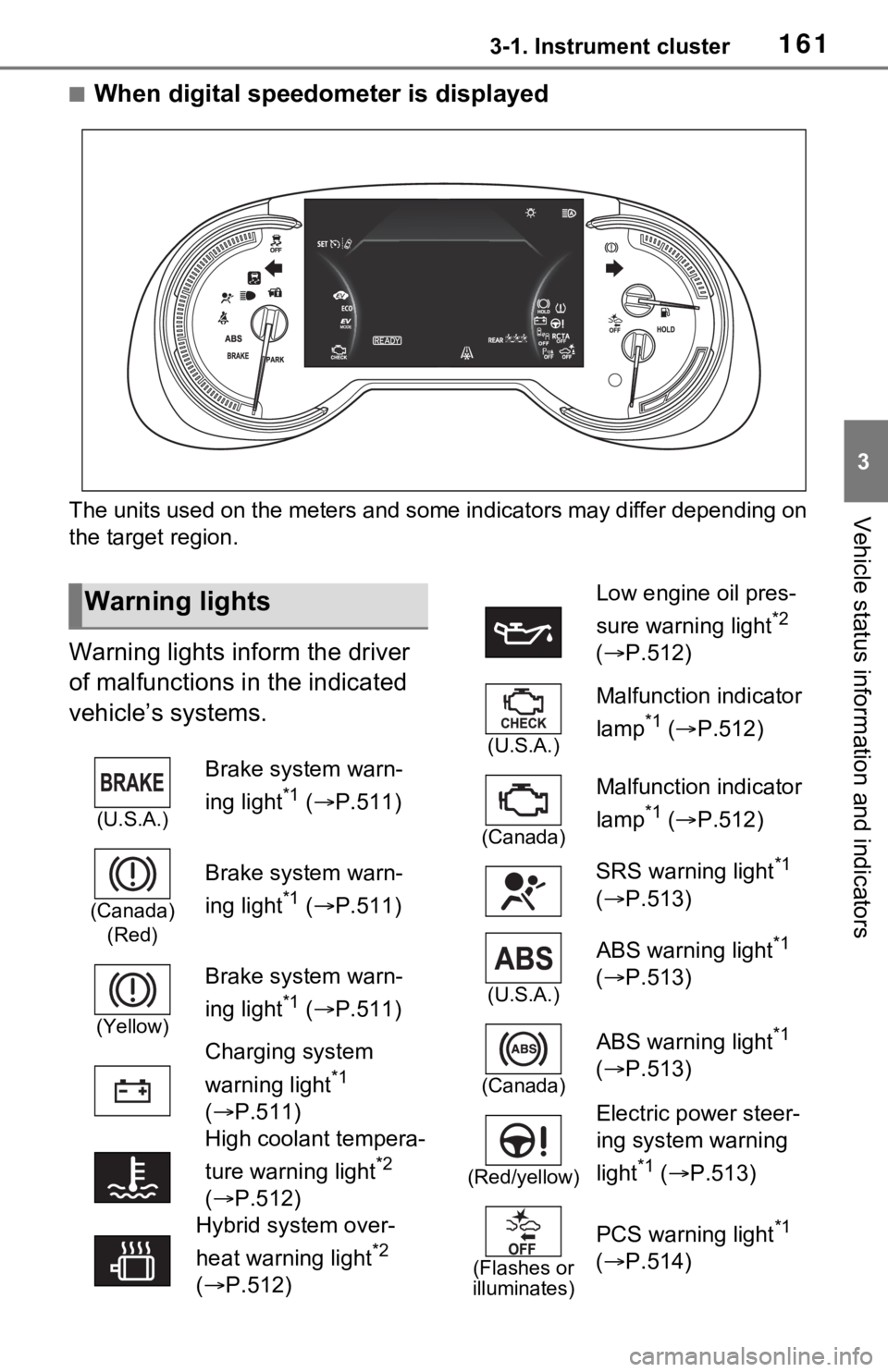
■When digital speedometer is displayed
The units used on the meters and some indicators may differ dep ending on
the target region.
Warning lights inform the driver
of malfunctions in the indicated
vehicle’s systems.
Warning lights
(U.S.A.)
Brake system warn-
ing light
*1 ( P.511)
(Canada)
(Red)
Brake system warn-
ing light
*1 ( P.511)
(Yellow)
Brake system warn-
ing light
*1 ( P.511)
Charging system
warning light
*1
( P.511)
High coolant tempera-
ture warning light
*2
( P.512)
Hybrid system over-
heat warning light
*2
( P.512)
Low engine oil pres-
sure warning light
*2
( P.512)
(U.S.A.)
Malfunction indicator
lamp
*1 ( P.512)
(Canada)
Malfunction indicator
lamp
*1 ( P.512)
SRS warning light
*1
( P.513)
(U.S.A.)
ABS warning light*1
( P.513)
(Canada)
ABS warning light*1
( P.513)
(Red/yellow)
Electric power steer-
ing system warning
light
*1 ( P.513)
(Flashes or
illuminates)
PCS warning light*1
( P.514)
Page 162 of 616
1623-1. Instrument cluster
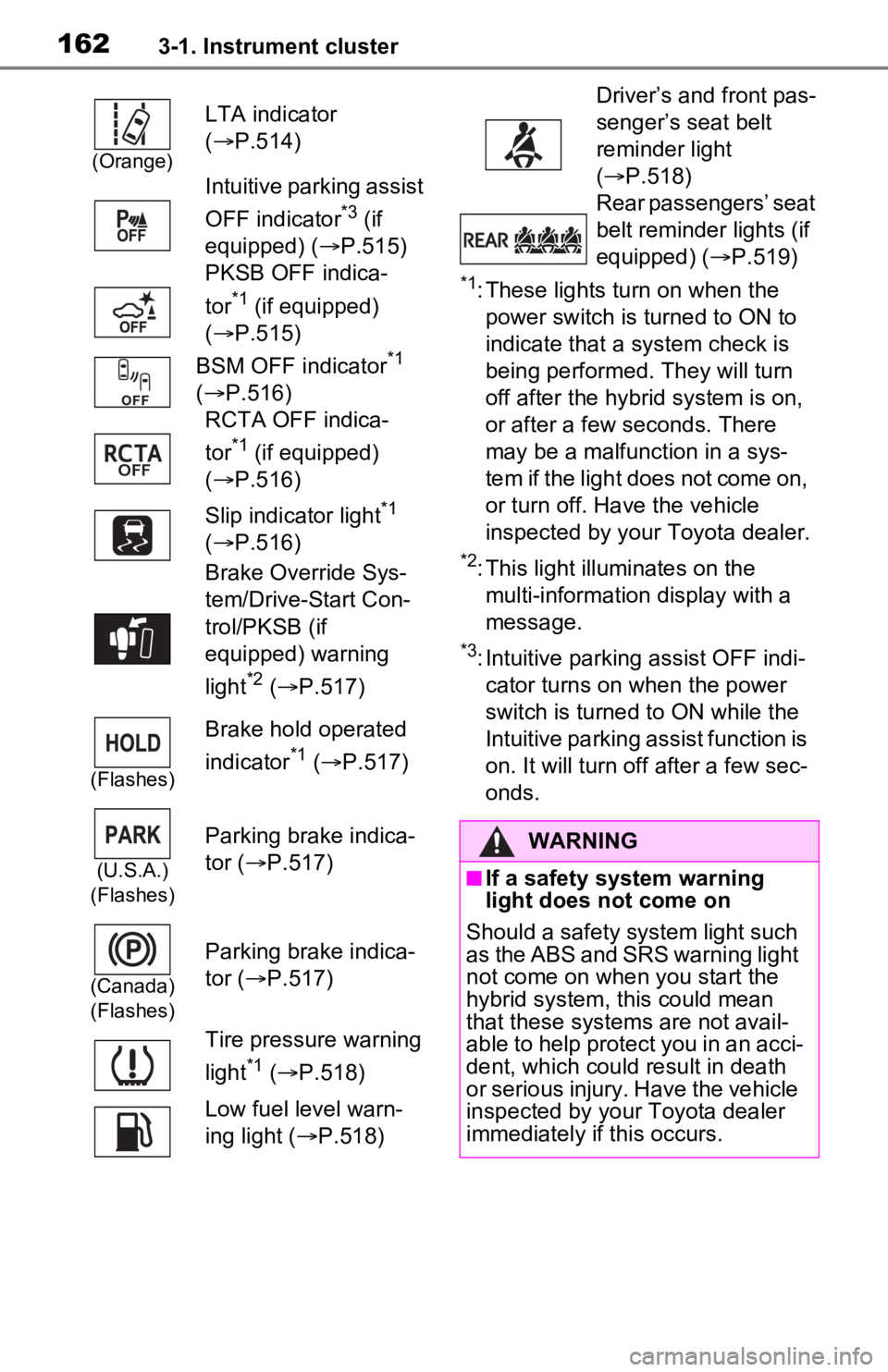
*1: These lights turn on when the
power switch is turned to ON to
indicate that a system check is
being performed. They will turn
off after the hybrid system is on,
or after a few seconds. There
may be a malfunction in a sys-
tem if the light does not come on,
or turn off. Have the vehicle
inspected by your Toyota dealer.
*2: This light illuminates on the multi-information display with a
message.
*3: Intuitive parking assist OFF indi-cator turns on wh en the power
switch is turned t o ON while the
Intuitive parking assist function is
on. It will turn off after a few sec-
onds.
(Orange)
LTA indicator
( P.514)
Intuitive parking assist
OFF indicator
*3 (if
equipped) ( P.515)
PKSB OFF indica-
tor
*1 (if equipped)
( P.515)
BSM OFF indicator
*1
( P.516)
RCTA OFF indica-
tor
*1 (if equipped)
( P.516)
Slip indicator light
*1
( P.516)
Brake Override Sys-
tem/Drive-Start Con-
trol/PKSB (if
equipped) warning
light
*2 ( P.517)
(Flashes)
Brake hold operated
indicator
*1 ( P.517)
(U.S.A.)
(Flashes)
Parking brake indica-
tor ( P.517)
(Canada)
(Flashes)
Parking brake indica-
tor ( P.517)
Tire pressure warning
light
*1 ( P.518)
Low fuel level warn-
ing light ( P.518)
Driver’s and front pas-
senger’s seat belt
reminder light
( P.518)
Rear passengers’ seat
belt reminder lights (if
equipped) ( P.519)
WARNING
■If a safety system warning
light does not come on
Should a safety system light such
as the ABS and SRS warning light
not come on when you start the
hybrid system, this could mean
that these system s are not avail-
able to help protect you in an acci-
dent, which could result in death
or serious injury. Have the vehicle
inspected by your Toyota dealer
immediately if this occurs.
Page 163 of 616
1633-1. Instrument cluster
3
Vehicle status information and indicators
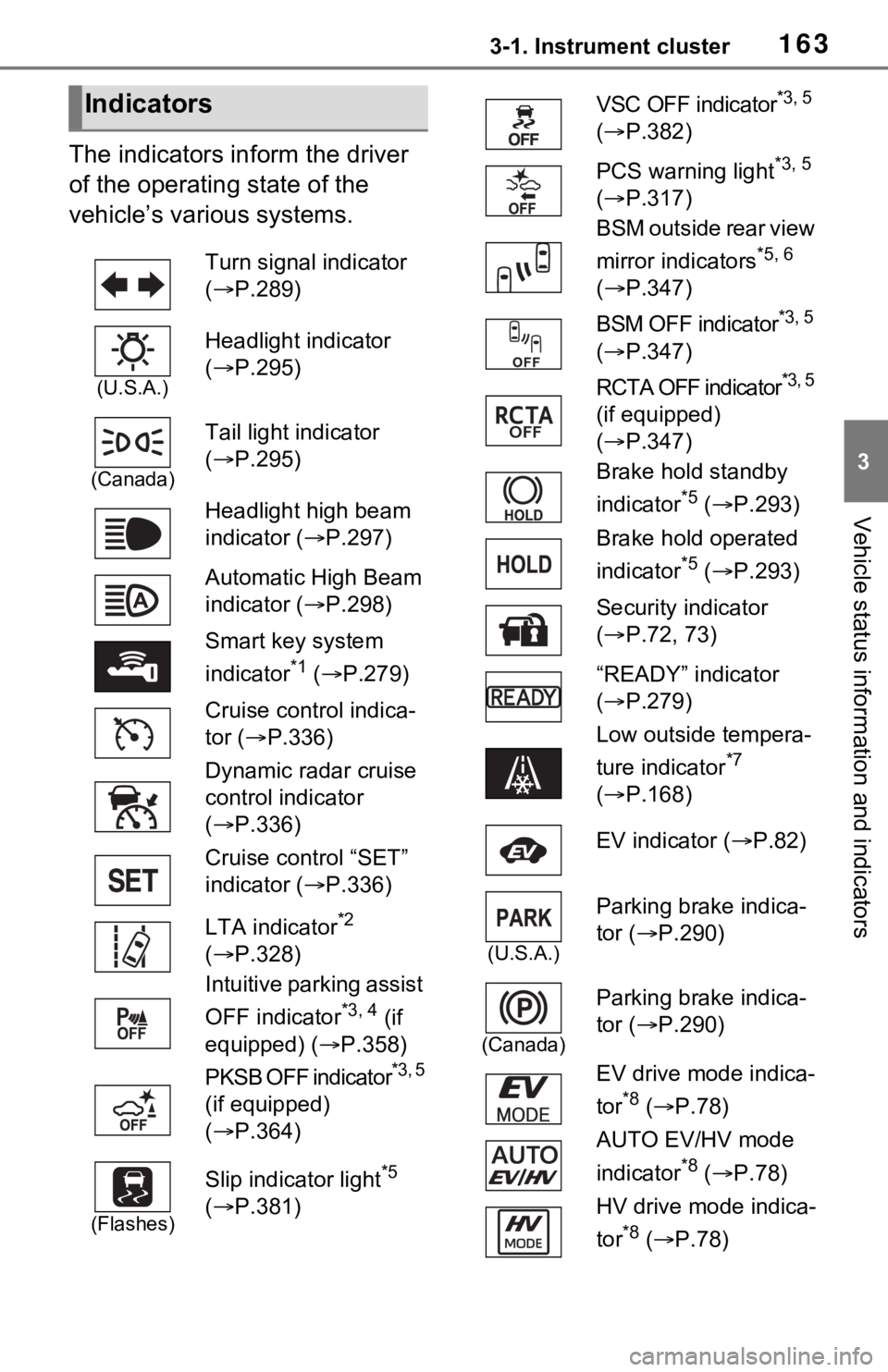
The indicators inform the driver
of the operating state of the
vehicle’s various systems.
Indicators
Turn signal indicator
( P.289)
(U.S.A.)
Headlight indicator
( P.295)
(Canada)
Tail light indicator
( P.295)
Headlight high beam
indicator ( P.297)
Automatic High Beam
indicator ( P.298)
Smart key system
indicator
*1 ( P.279)
Cruise control indica-
tor ( P.336)
Dynamic radar cruise
control indicator
( P.336)
Cruise control “SET”
indicator ( P.336)
LTA indicator
*2
( P.328)
Intuitive parking assist
OFF indicator
*3, 4 (if
equipped) ( P.358)
PKSB OFF indicator
*3, 5
(if equipped)
( P.364)
(Flashes)
Slip indicator light*5
( P.381)
VSC OFF indicator*3, 5
( P.382)
PCS warning light
*3, 5
( P.317)
BSM outside rear view
mirror indicators
*5, 6
( P.347)
BSM OFF indicator
*3, 5
( P.347)
RCTA OFF indicator
*3, 5
(if equipped)
( P.347)
Brake hold standby
indicator
*5 ( P.293)
Brake hold operated
indicator
*5 ( P.293)
Security indicator
( P.72, 73)
“READY” indicator
( P.279)
Low outside tempera-
ture indicator
*7
( P.168)
EV indicator ( P.82)
(U.S.A.)
Parking brake indica-
tor ( P.290)
(Canada)
Parking brake indica-
tor (P.290)
EV drive mode indica-
tor
*8 ( P.78)
AUTO EV/HV mode
indicator
*8 ( P.78)
HV drive mode indica-
tor
*8 ( P.78)
Page 178 of 616
1783-1. Instrument cluster
system.
“Brightness”
Select to switch the brightness of
the outside rear view mirror indica-
tors. ( P.347)
“Sensitivity”
Select to change the alert timing for
an approaching vehicle.
■ (Intuitive parking
assist) (if equipped)
( P.356)
Select to set up the following
items.
Intuitive parking assist on/off
Select to enable/disable the Intui-
tive parking assist.
“Volume”
Select to set the volume of the
buzzer which sounds when the
Intuitive parking assist is operated.
■RCTA (Rear Cross Traffic
Alert) (P.347)
RCTA (Rear Cross Traffic
Alert) on/off
Select to enable/disable the RCTA
system.
“Volume”
Select to change t he RCTA buzzer
volume.
■ PKSB (Parking Sup-
port Brake System) (if
equipped) ( P.363)
Select to enable/disable the
Parking Support Brake function.
■“HUD Main” (if equipped)
( P.182)
HUD on/off
Select to enable/disable the head-
up display.
“HUD Brightness/Position”
Select to adjust the brightness or
vertical position of the head-up dis-
play.
“HUD Driving Support”
Select to change the items dis-
played on the head-up display.
“HUD Rotation”
Select to adjus t the angle of the
head-up display.
■ RSA (Road Sign
Assist) (if equipped)
( P.333)
Select to set up the following
items.
Road Sign Assist on/off
Select to enable /disable the RSA
system.
“Notification Method”
Select to change each notification
method used to notify the driver
when the system recognizes
excess speed, no overtaking and
no-entry sign.
“Notification Level”
Select to change each notification
level used to notify the driver when
the system recognizes a speed limit
sign.
■Vehicle Settings
“Charging Settings”
Page 185 of 616
1853-1. Instrument cluster
3
Vehicle status information and indicators■Driving support system
information display
Displays the operational status
of the following systems:
LTA (Lane Tracing Assist)
( P.323)
Dynamic radar cruise control
with full-speed range
( P.336)
Displayed content is the same as
that displayed on the multi-informa-
tion display. For details, refer to the
explanations of each system.
■Navigation system-linked
display area (if equipped)
Displays the following items
which are linked to the naviga-
tion system:
Street name
Route guidance to destination
Compass
Pop-up displays for the following systems will be displayed when
necessary:
■Driving support systems
Displays a warning/sugges-
tion/advice message or the
operating state of a relevant
system.
PCS (Pre-Colli sion System)
( P.315)
Brake Override System
( P.259)
Drive-Start Control ( P.259)
Parking Support Brake func-
tion (static objects) (if
equipped) ( P.368)
Displayed content is the same as
that displayed on the multi-informa-
tion display. For details, refer to the
explanations of each system.
■ / icons
Displays the following multi-
information display linked icons:
: Master warning icon
Displayed when a warning mes-
sage is displayed on the multi-infor-
mation display.
: Information icon
Displayed when a sugges-
tion/advice pop-up display is dis-
played on the multi-information
display.
■Warning message
Some warning messages are
displayed when necessary,
according to certain conditions.
Displayed content is the same as
NOTICE
■When changing the settings
of the head-up display
To prevent 12-vo lt battery dis-
charge, ensure that the hybrid
system is operating while chang-
ing the settings of the head-up
display.
Driving support system
information/navigation
system-linked display
area (if equipped)
Pop-up display
Page 209 of 616
2094-2. Opening, closing and locking the doors
4
Before driving
Back Door without contacting the
rear bumper with your foot.
If another electronic key is in the
cabin or luggage compartment, it
may take slightly longer than nor-
mal for the operation to occur.
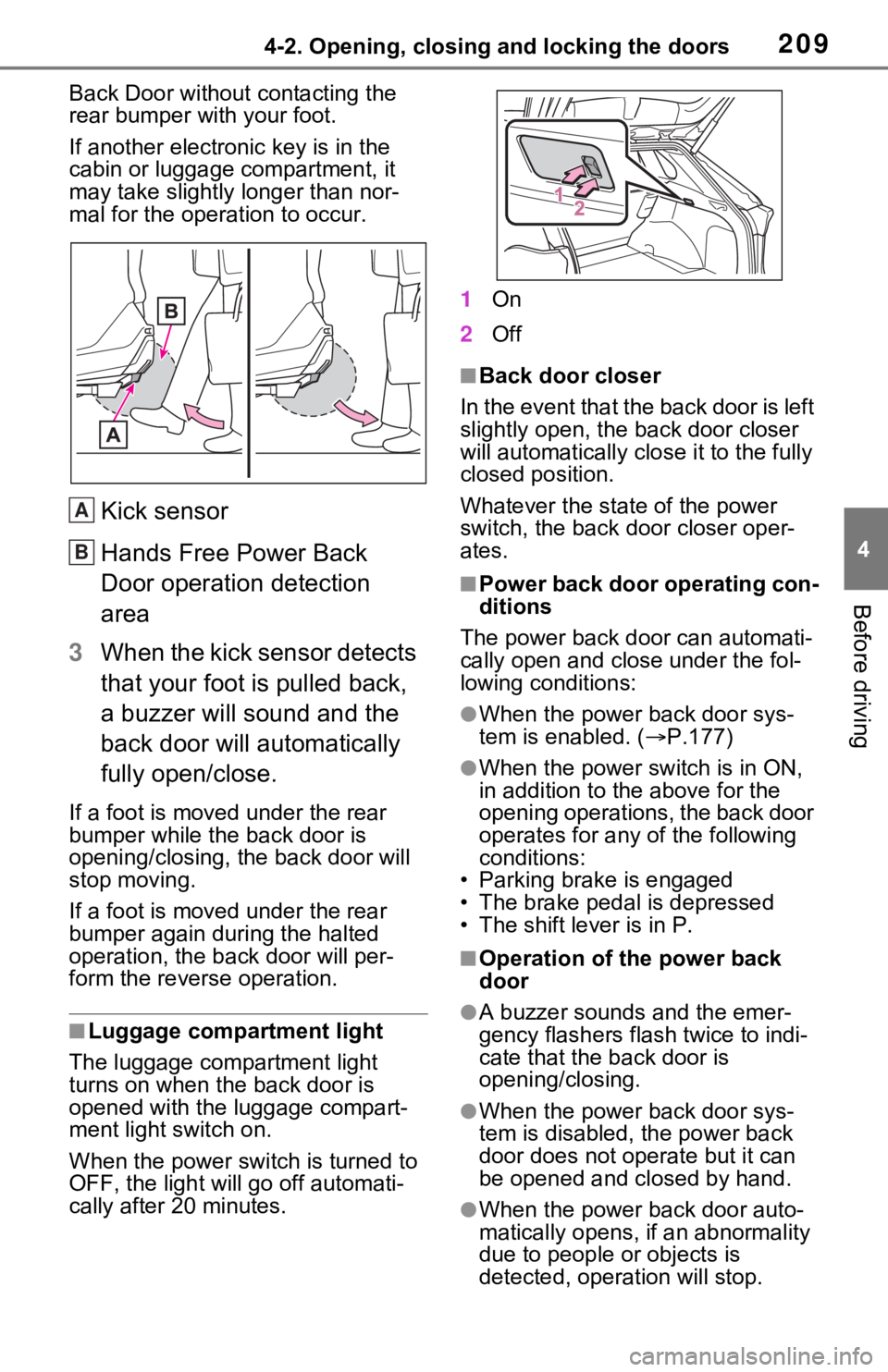
Kick sensor
Hands Free Power Back
Door operation detection
area
3 When the kick sensor detects
that your foot is pulled back,
a buzzer will sound and the
back door will automatically
fully open/close.
If a foot is moved under the rear
bumper while the back door is
opening/closing, the back door will
stop moving.
If a foot is moved under the rear
bumper again during the halted
operation, the back door will per-
form the reverse operation.
■Luggage compartment light
The luggage compartment light
turns on when the back door is
opened with the luggage compart-
ment light switch on.
When the power switch is turned to
OFF, the light will go off automati-
cally after 20 minutes. 1
On
2 Off
■Back door closer
In the event that the back door is left
slightly open, the back door closer
will automatically clo se it to the fully
closed position.
Whatever the state of the power
switch, the back door closer oper-
ates.
■Power back door operating con-
ditions
The power back doo r can automati-
cally open and close under the fol-
lowing conditions:
●When the power back door sys-
tem is enabled. ( P.177)
●When the power switch is in ON,
in addition to the above for the
opening operations, the back door
operates for any of the following
conditions:
• Parking brake is engaged
• The brake pedal is depressed
• The shift lever is in P.
■Operation of the power back
door
●A buzzer sounds and the emer-
gency flashers flash twice to indi-
cate that the back door is
opening/closing.
●When the power back door sys-
tem is disabled, t he power back
door does not operate but it can
be opened and closed by hand.
●When the power back door auto-
matically opens, if an abnormality
due to people or objects is
detected, operation will stop.
A
B
Page 226 of 616
2264-3. Adjusting the seats
■Before folding down the
seatbacks
1 Park the vehicle in a safe
place.
Apply the parking brake ( P.290)
and shift the shift lever to P.
( P.286)
2 Adjust the position of the
front seat and the angle of
the seatback. ( P.224)
Depending on the position of the
front seat, if the seatback is folded
backward, it may interfere with the
operation of the rear seat.
3 Lift up and push down the
head restraints of the rear
outboard seats, and lower
the head restraint of the rear
center seat. ( P.230)
4 Stow the armrest of the rear
seat if it is pulled out.
( P.434)
This step is not necessary when
operating the left side seat only.
■Folding down the seat-
backs
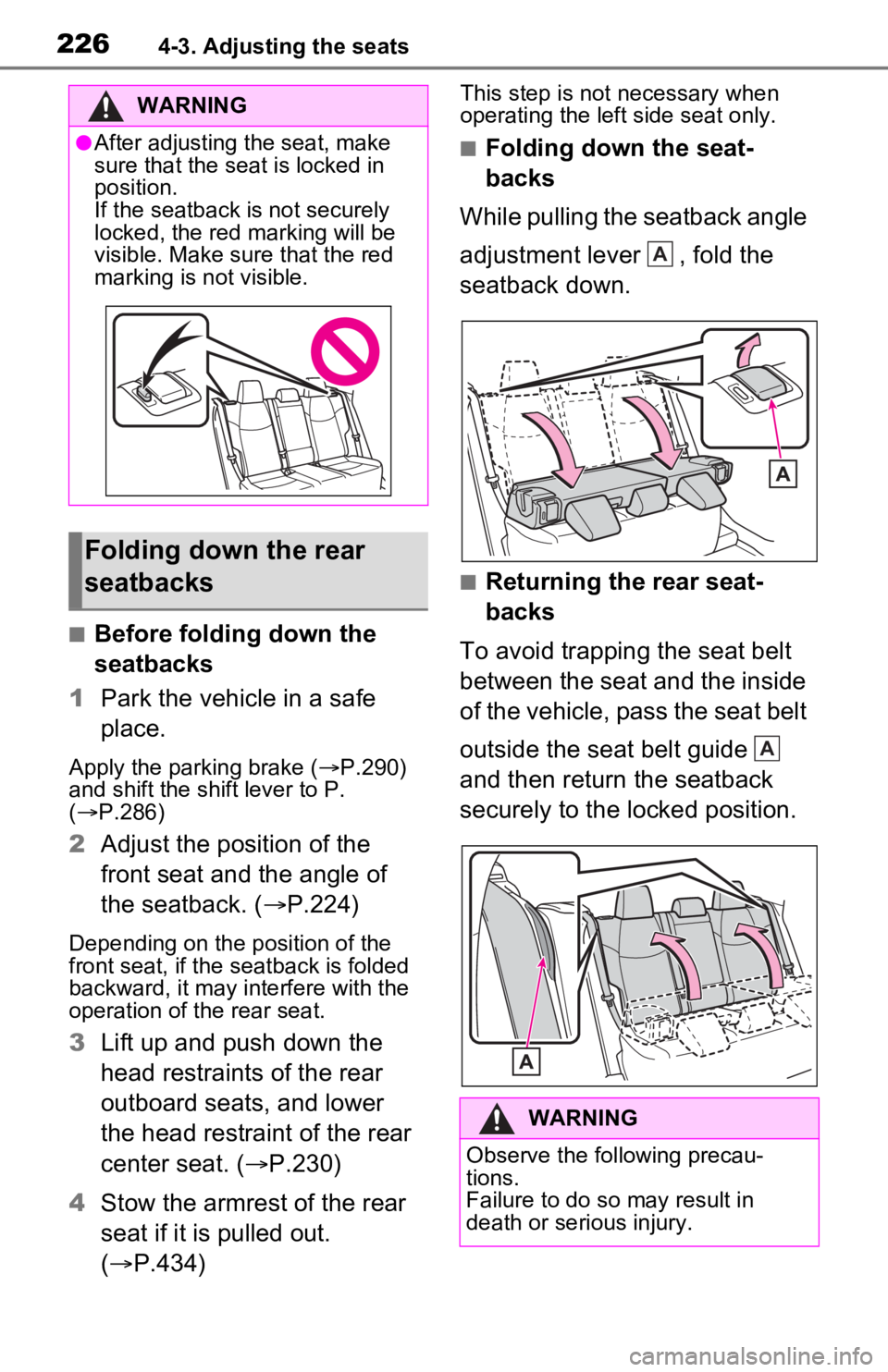
While pulling the seatback angle
adjustment lever , fold the
seatback down.
■Returning the rear seat-
backs
To avoid trapping the seat belt
between the seat and the inside
of the vehicle, pass the seat belt
outside the seat belt guide
and then return the seatback
securely to the locked position.
WARNING
●After adjusting the seat, make
sure that the seat is locked in
position.
If the seatback is not securely
locked, the red marking will be
visible. Make sure that the red
marking is not visible.
Folding down the rear
seatbacks
WARNING
Observe the following precau-
tions.
Failure to do so may result in
death or serious injury.
A
A
Page 227 of 616
2274-3. Adjusting the seats
4
Before driving
*: If equipped
■Recording procedure
1 Check that the shift lever is in
P.
2 Turn the power switch to ON.
3 Adjust the driver’s seat to the
desired positions.
4 While pressing the “SET” but-
ton, or within 3 seconds after
the “SET” button is pressed,
press button “1” or “2” until
the buzzer sounds.
If the selected button has already
been preset, the previously
recorded positio n will be overwrit-
WARNING
■When folding the rear seat-
backs down
●Do not fold the seatbacks down
while driving.
●Stop the vehicle on level
ground, set the parking brake
and shift the shift lever to P.
●Do not allow anyo ne to sit on a
folded seatback or in the lug-
gage compartment while driv-
ing.
●Do not allow child ren to enter
the luggage compartment.
●Do not operate the rear seat if it
is occupied.
●Be careful not to get feet or
hands caught in the moving
parts or joints of the seats
during operation.
●Do not allow children to operate
the seat.
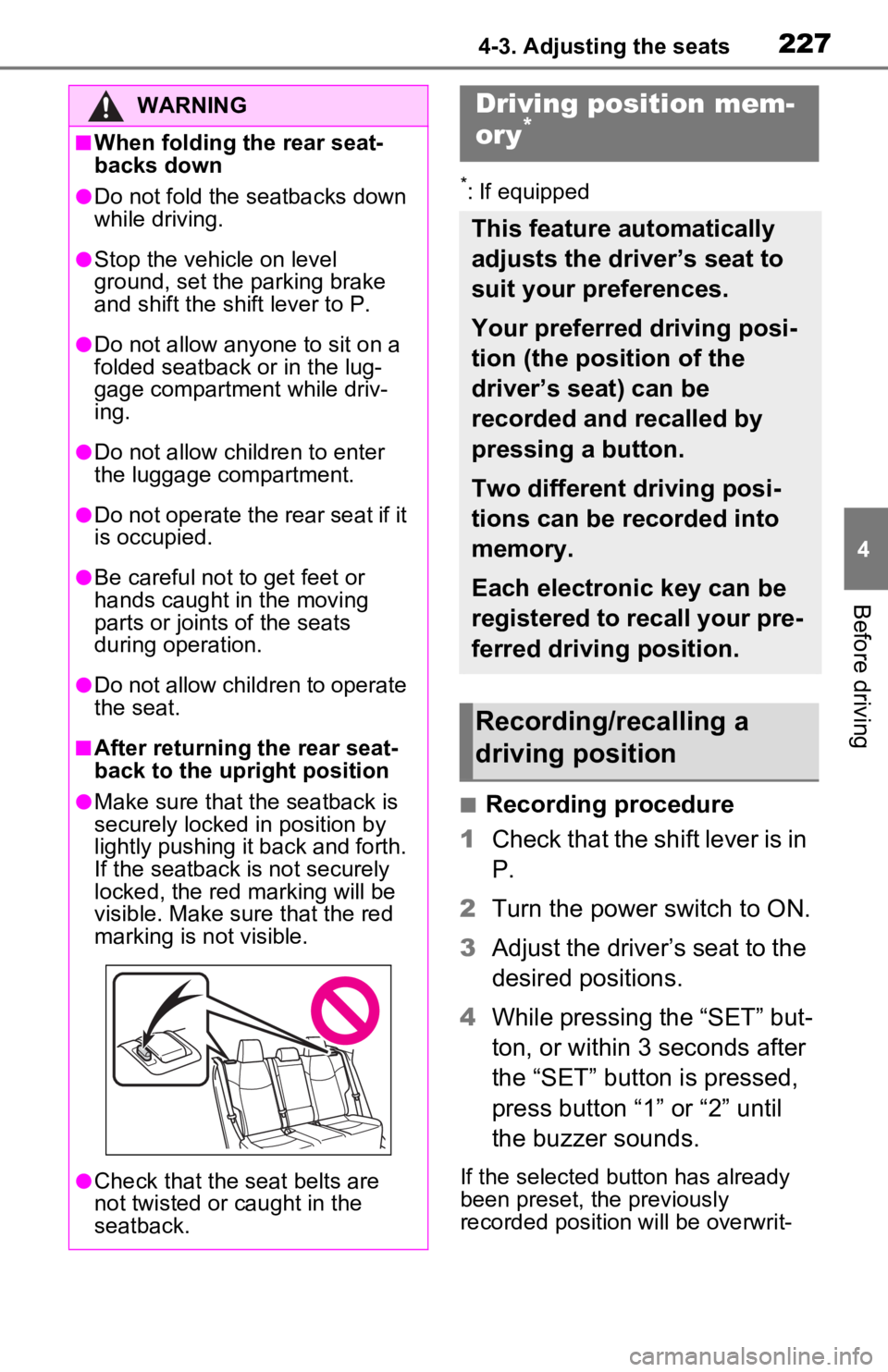
■After returning the rear seat-
back to the upright position
●Make sure that the seatback is
securely locked in position by
lightly pushing it back and forth.
If the seatback is not securely
locked, the red marking will be
visible. Make sure that the red
marking is not visible.
●Check that the seat belts are
not twisted or caught in the
seatback.
Driving position mem-
ory*
This feature automatically
adjusts the driver’s seat to
suit your preferences.
Your preferred driving posi-
tion (the position of the
driver’s seat) can be
recorded and recalled by
pressing a button.
Two different driving posi-
tions can be recorded into
memory.
Each electronic key can be
registered to recall your pre-
ferred driving position.
Recording/recalling a
driving position