remote control TOYOTA RAV4 PRIME 2021 (in English) Owner's Guide
[x] Cancel search | Manufacturer: TOYOTA, Model Year: 2021, Model line: RAV4 PRIME, Model: TOYOTA RAV4 PRIME 2021Pages: 616, PDF Size: 34.66 MB
Page 438 of 616
4386-4. Using the other interior features
Garage door opener motors
manufactured after 1995 may
be equipped with rolling code
protection. If this is the case,
you may need a stepladder or
other sturdy, safe device to
reach the “Learn” or “Smart”
button on the garage door
opener motor.
■Programming HomeLink®
Steps 2 through 4 must be per-
formed within 60 seconds, oth-
erwise the HomeLink
® indicator
light will stop flashing and pro-
gramming will not be success-
fully completed.
1 Vehicles with Digital Rear-
view Mirror: Press the
HomeLink
® button or menu
button
When the HomeLink® button is
pressed:
Homelink
® Training Tutorial will be
displayed to assist you program-
ming the HomeLink
®.
When Homelink
® Training Tutorial
is displayed, follow the instructions
displayed.
When the menu button is pressed:
Press the menu button and
select the “Set Up >”. Homelink
®
Training Tutorial will be displayed
to assist you programming the
HomeLink
®.
When Homelink
® Training Tutorial
is displayed, follow the instructions
displayed.
2 Press and release the
HomeLink
® button you want to program and check that
the HomeLink
® indicator light
flashes (orange).
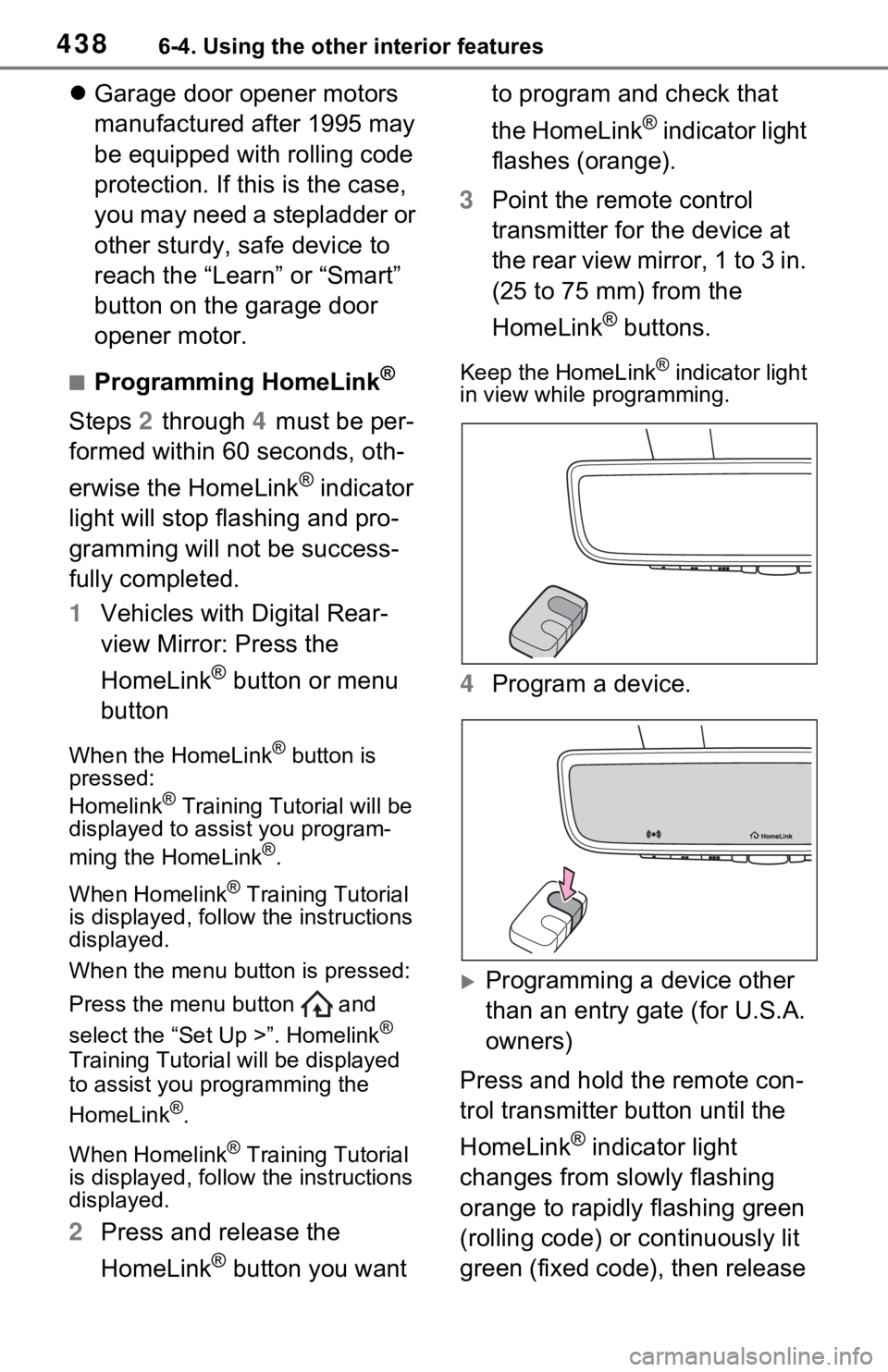
3 Point the remote control
transmitter for the device at
the rear view mirror, 1 to 3 in.
(25 to 75 mm) from the
HomeLink
® buttons.
Keep the HomeLink® indicator light
in view while programming.
4 Program a device.
Programming a device other
than an entry gate (for U.S.A.
owners)
Press and hold the remote con-
trol transmitter button until the
HomeLink
® indicator light
changes from slowly flashing
orange to rapidly flashing green
(rolling code) or continuously lit
green (fixed code), then release
Page 439 of 616
4396-4. Using the other interior features
6
Interior features
the button.
Programming an entry gate
(for U.S.A. owners)/Program-
ming a device in the Cana-
dian market
Press and release the remote
control transmitter button at 2
second intervals, repeatedly,
until the HomeLink
® indicator
light changes from slowly flash-
ing orange to rapidly flashing
(green) (rolling code) or continu-
ously lit (green) (fixed code).
5 Test the HomeLink
® opera-
tion by pressing the newly
programmed button and
observing the HomeLink
®
indicator light:
HomeLink
® indicator light illu-
minates: Programming of a
fixed code device has com-
pleted. The garage door or
other device should operate
when a HomeLink
® button is
pressed and released.
HomeLink
® indicator light
flashes rapidly: The garage
door opener or other device is
equipped with a rolling code.
To complete programming,
firmly press and hold the
HomeLink
® button for 2 sec-
onds then release it.
If the garage door or other
device does not operate, pro-
ceed to “Programming a roll-
ing code system”. 6
Repeat the steps above to
program another device for
any of the remaining
HomeLink
® buttons.
■Programming a rolling code
system
Two or more people may be
needed to complete rolling code
programming.
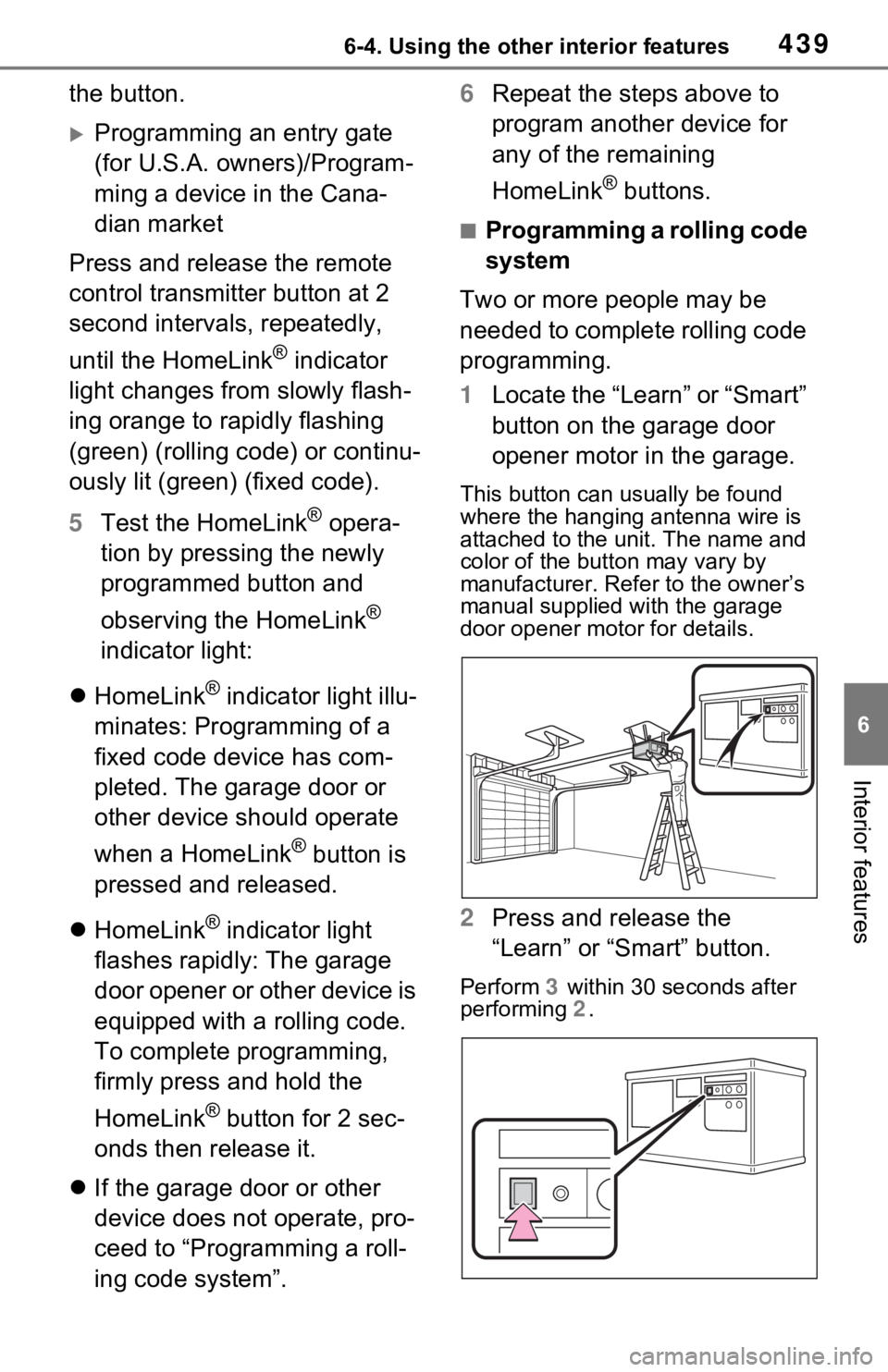
1 Locate the “Learn” or “Smart”
button on the garage door
opener motor in the garage.
This button can usually be found
where the hanging antenna wire is
attached to the unit. The name and
color of the button may vary by
manufacturer. Refer to the owner’s
manual supplied with the garage
door opener motor for details.
2 Press and release the
“Learn” or “Smart” button.
Perform 3 within 30 seconds after
performing 2 .
Page 466 of 616
4667-3. Do-it-yourself maintenance
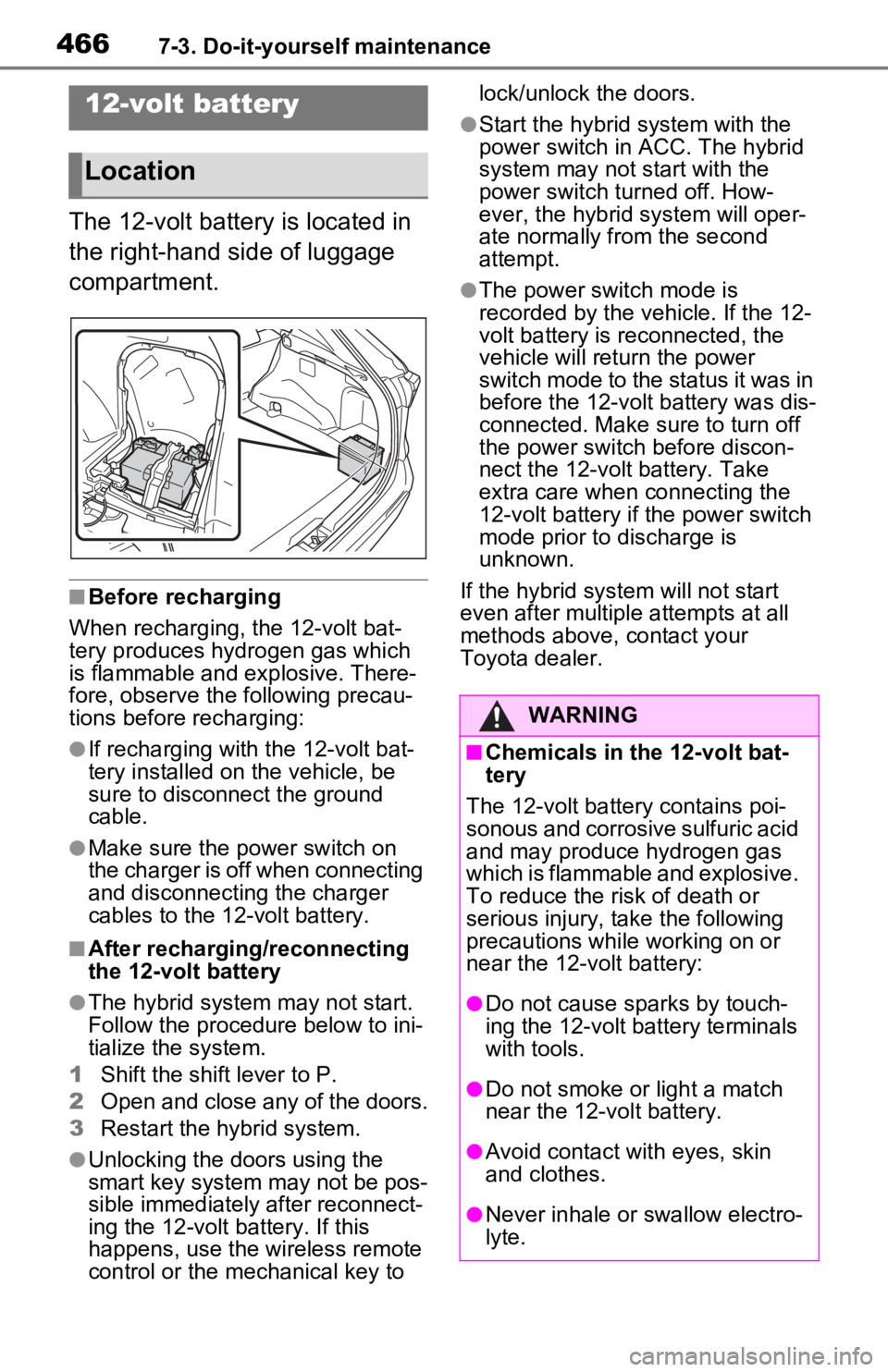
The 12-volt battery is located in
the right-hand side of luggage
compartment.
■Before recharging
When recharging, the 12-volt bat-
tery produces hydrogen gas which
is flammable and explosive. There-
fore, observe the following precau-
tions before recharging:
●If recharging with the 12-volt bat-
tery installed on the vehicle, be
sure to disconnect the ground
cable.
●Make sure the power switch on
the charger is off when connecting
and disconnecting the charger
cables to the 12-volt battery.
■After recharging/reconnecting
the 12-volt battery
●The hybrid system may not start.
Follow the procedure below to ini-
tialize the system.
1 Shift the shift lever to P.
2 Open and close any of the doors.
3 Restart the hybrid system.
●Unlocking the doors using the
smart key system may not be pos-
sible immediately after reconnect-
ing the 12-volt battery. If this
happens, use the wireless remote
control or the mechanical key to lock/unlock the doors.
●Start the hybrid system with the
power switch in ACC. The hybrid
system may not start with the
power switch turned off. How-
ever, the hybrid system will oper-
ate normally from the second
attempt.
●The power switch mode is
recorded by the vehicle. If the 12-
volt battery is reconnected, the
vehicle will return the power
switch mode to the status it was in
before the 1
2-volt battery was dis-
connected. Make sure to turn off
the power switch before discon-
nect the 12-volt battery. Take
extra care when connecting the
12-volt battery if the power switch
mode prior to discharge is
unknown.
If the hybrid system will not start
even after multiple attempts at all
methods above, contact your
Toyota dealer.
12-volt battery
Location
WARNING
■Chemicals in the 12-volt bat-
tery
The 12-volt battery contains poi-
sonous and corrosive sulfuric acid
and may produce hydrogen gas
which is flammable and explosive.
To reduce the risk of death or
serious injury, take the following
precautions while working on or
near the 12-volt battery:
●Do not cause sparks by touch-
ing the 12-volt battery terminals
with tools.
●Do not smoke or light a match
near the 12-volt battery.
●Avoid contact with eyes, skin
and clothes.
●Never inhale or swallow electro-
lyte.
Page 494 of 616
4947-3. Do-it-yourself maintenance
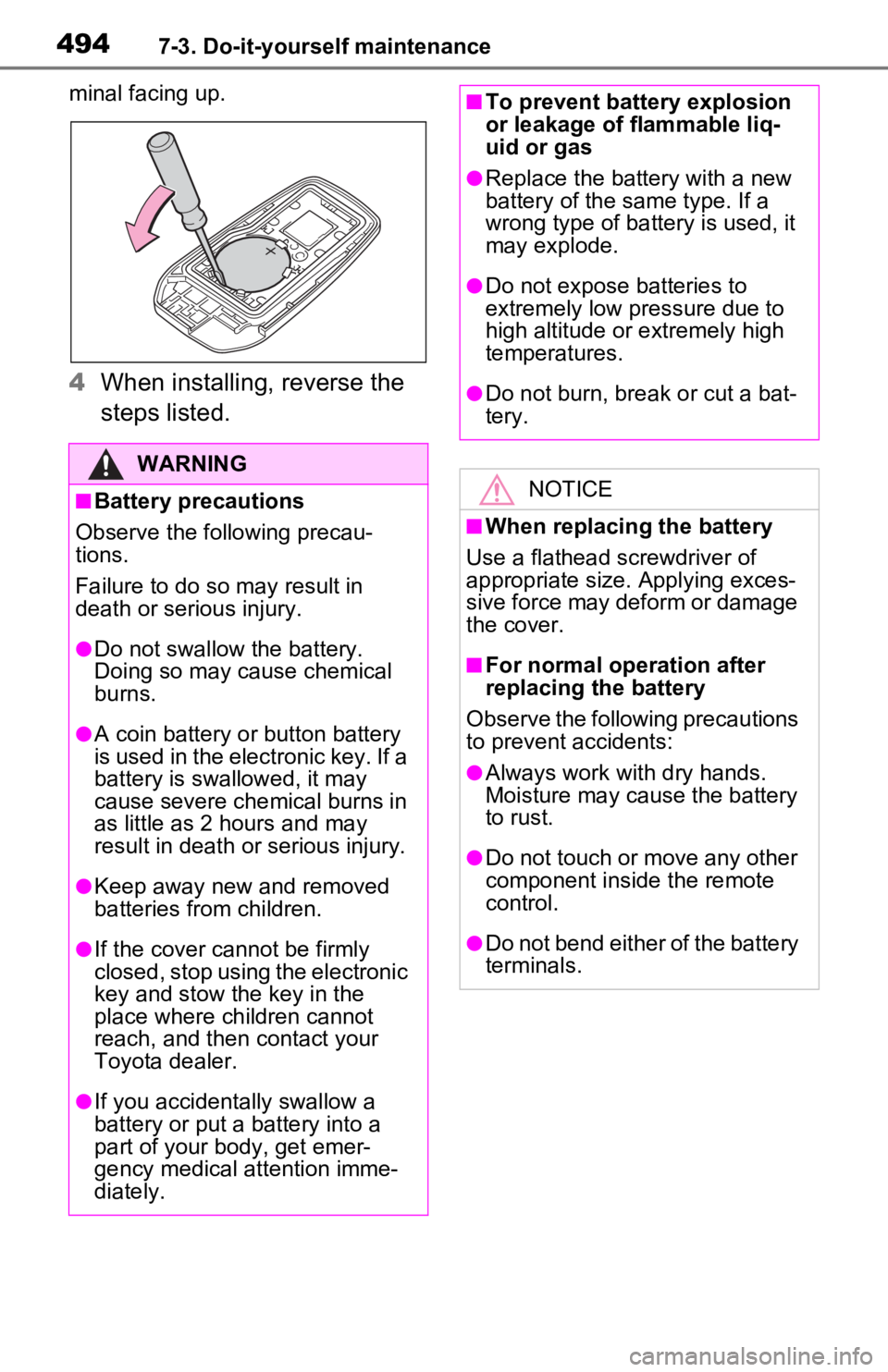
minal facing up.
4When installing, reverse the
steps listed.
WARNING
■Battery precautions
Observe the following precau-
tions.
Failure to do so m ay result in
death or serious injury.
●Do not swallow the battery.
Doing so may cause chemical
burns.
●A coin battery or button battery
is used in the electronic key. If a
battery is swallowed, it may
cause severe chemical burns in
as little as 2 hours and may
result in death or serious injury.
●Keep away new and removed
batteries from children.
●If the cover cannot be firmly
closed, stop using the electronic
key and stow the key in the
place where children cannot
reach, and then contact your
Toyota dealer.
●If you accidentally swallow a
battery or put a b attery into a
part of your body, get emer-
gency medical attention imme-
diately.
■To prevent battery explosion
or leakage of flammable liq-
uid or gas
●Replace the battery with a new
battery of the same type. If a
wrong type of battery is used, it
may explode.
●Do not expose batteries to
extremely low pr essure due to
high altitude or extremely high
temperatures.
●Do not burn, bre ak or cut a bat-
tery.
NOTICE
■When replacing the battery
Use a flathead screwdriver of
appropriate size. Applying exces-
sive force may deform or damage
the cover.
■For normal operation after
replacing the battery
Observe the following precautions
to prevent accidents:
●Always work with dry hands.
Moisture may cause the battery
to rust.
●Do not touch or move any other
component inside the remote
control.
●Do not bend either of the battery
terminals.
Page 537 of 616
5378-2. Steps to take in an emergency
8
When trouble arises
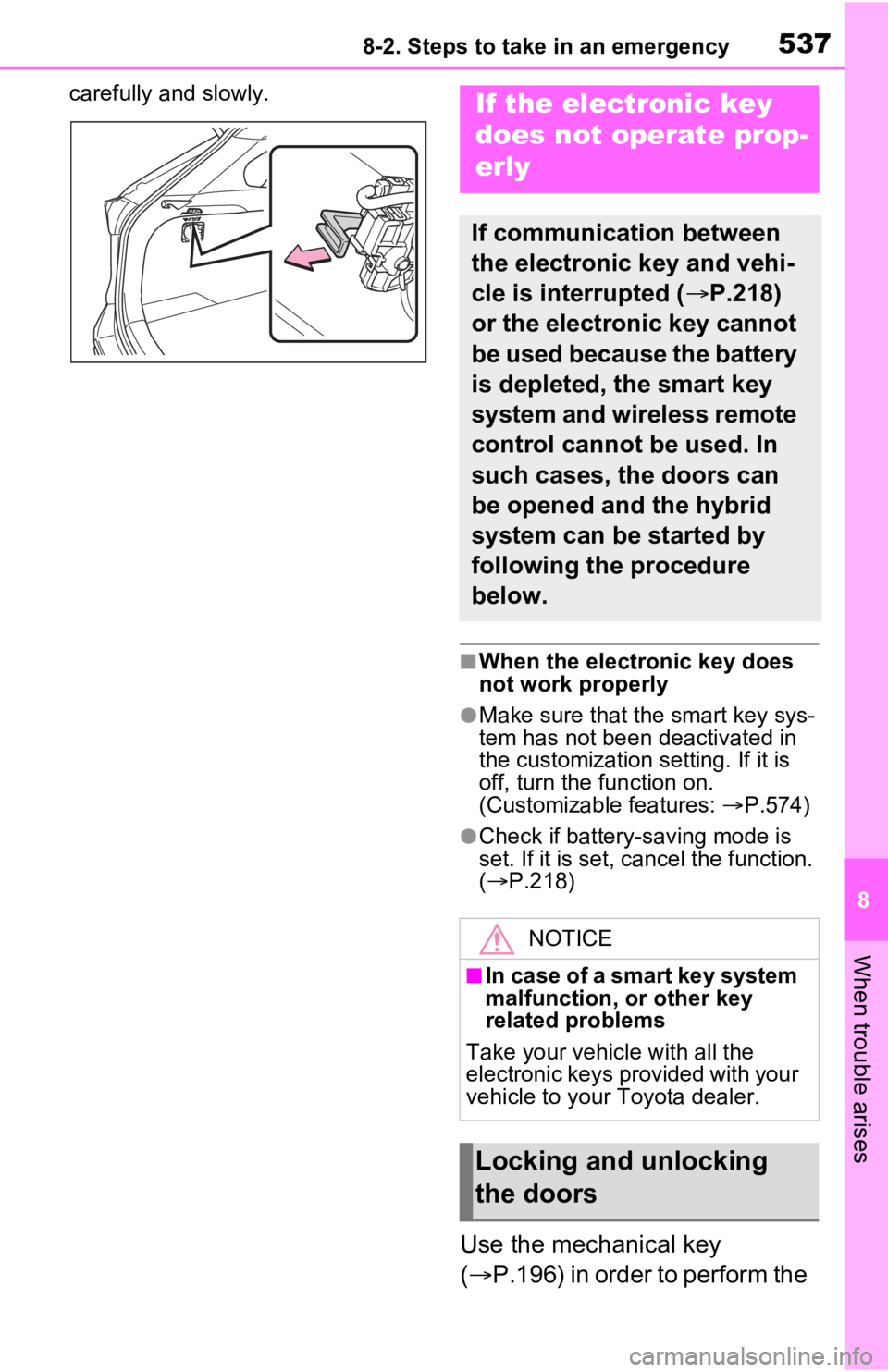
carefully and slowly.
■When the electronic key does
not work properly
●Make sure that the smart key sys-
tem has not been deactivated in
the customization setting. If it is
off, turn the function on.
(Customizable features: P.574)
●Check if battery-saving mode is
set. If it is set, cancel the function.
( P.218)
Use the mechanical key
( P.196) in order to perform the
If the electronic key
does not operate prop-
erly
If communication between
the electronic key and vehi-
cle is interrupted ( P.218)
or the electronic key cannot
be used because the battery
is depleted, the smart key
system and wireless remote
control cannot be used. In
such cases, the doors can
be opened and the hybrid
system can be started by
following the procedure
below.
NOTICE
■In case of a smart key system
malfunction, o r other key
related problems
Take your vehicle with all the
electronic keys provided with your
vehicle to your Toyota dealer.
Locking and unlocking
the doors
Page 573 of 616
5739-2. Customization
9
Vehicle specifications
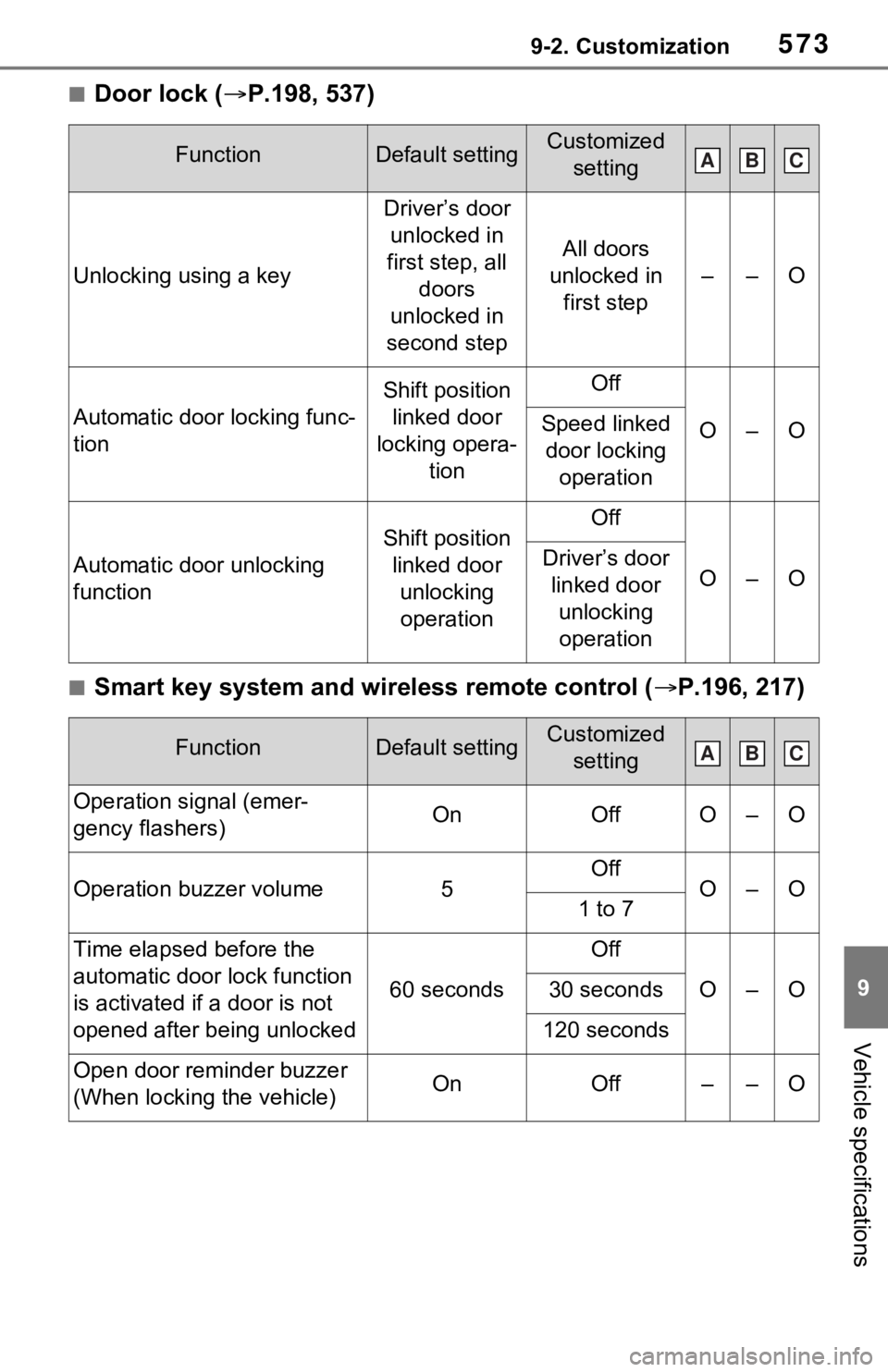
■Door lock (P.198, 537)
■Smart key system and wireless remote control ( P.196, 217)
FunctionDefault settingCustomized
setting
Unlocking using a key
Driver’s door unlocked in
first step, all doors
unlocked in
second step
All doors
unlocked in first step
––O
Automatic door locking func-
tion
Shift position linked door
locking opera- tionOff
O–OSpeed linked door locking operation
Automatic door unlocking
function
Shift position linked door unlocking operationOff
O–ODriver’s door linked door unlocking operation
FunctionDefault settingCustomized setting
Operation signal (emer-
gency flashers)OnOffO–O
Operation buzzer volume5OffO–O1 to 7
Time elapsed before the
automatic door lock function
is activated if a door is not
opened after being unlocked
60 seconds
Off
O–O30 seconds
120 seconds
Open door reminder buzzer
(When locking the vehicle)OnOff––O
ABC
ABC
Page 574 of 616
5749-2. Customization
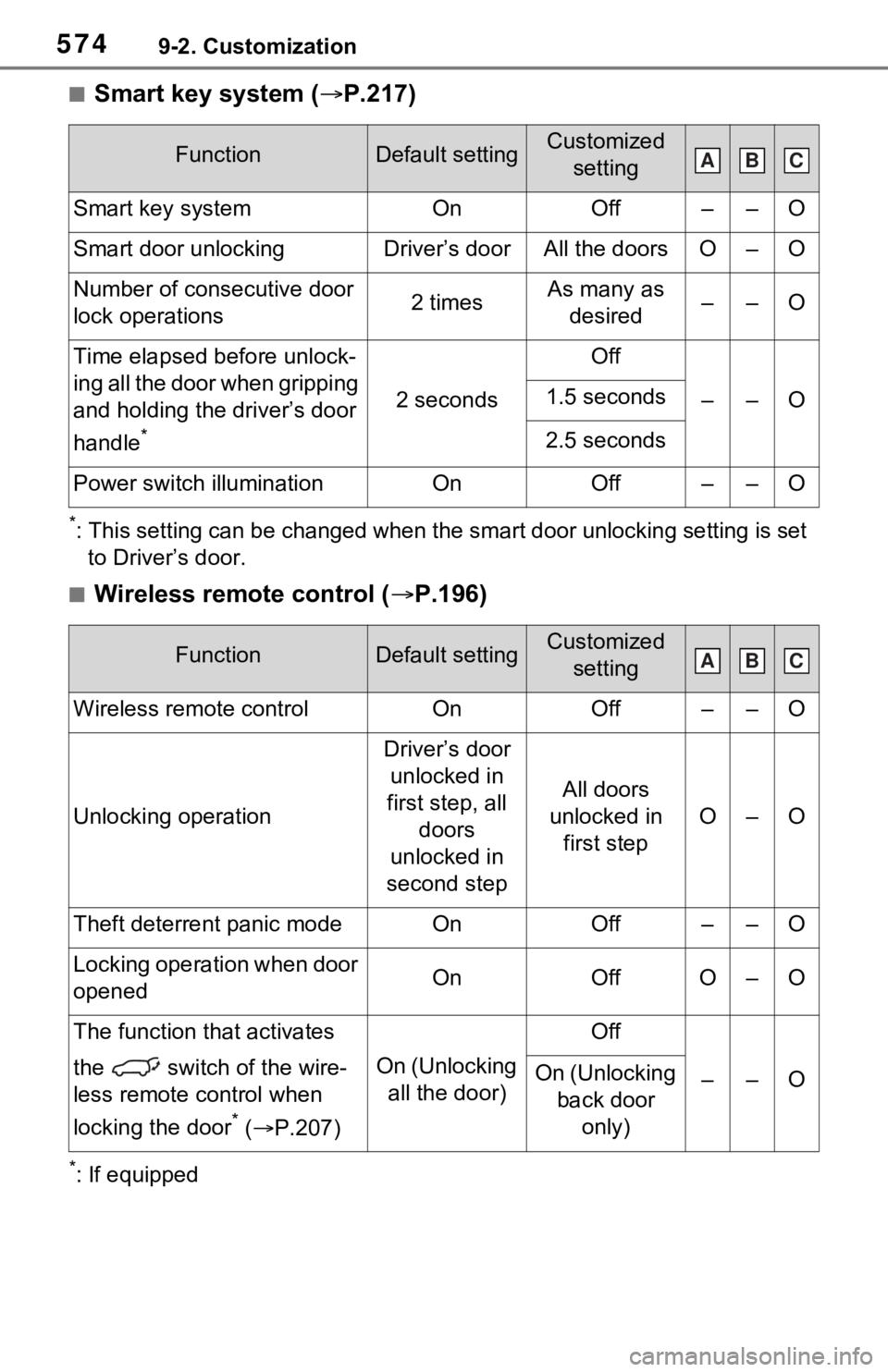
■Smart key system (P.217)
*: This setting can be changed when the smart door unlocking sett ing is set
to Driver’s door.
■Wireless remote control ( P.196)
*: If equipped
FunctionDefault settingCustomized
setting
Smart key systemOnOff––O
Smart door unlockingDriver’s doorAll the doorsO–O
Number of consecutive door
lock operations2 timesAs many as desired––O
Time elapsed before unlock-
ing all the door when gripping
and holding the driver’s door
handle
*
2 seconds
Off
––O1.5 seconds
2.5 seconds
Power switch illuminationOnOff––O
FunctionDefault settingCustomized setting
Wireless remote controlOnOff––O
Unlocking operation
Driver’s door unlocked in
first step, all doors
unlocked in
second step
All doors
unlocked in first step
O–O
Theft deterrent panic modeOnOff––O
Locking operation when door
openedOnOffO–O
The function that activates
the switch of the wire-
less remote control when
locking the door
* ( P.207)
On (Unlocking
all the door)
Off
––OOn (Unlocking back door only)
ABC
ABC
Page 575 of 616
5759-2. Customization
9
Vehicle specifications
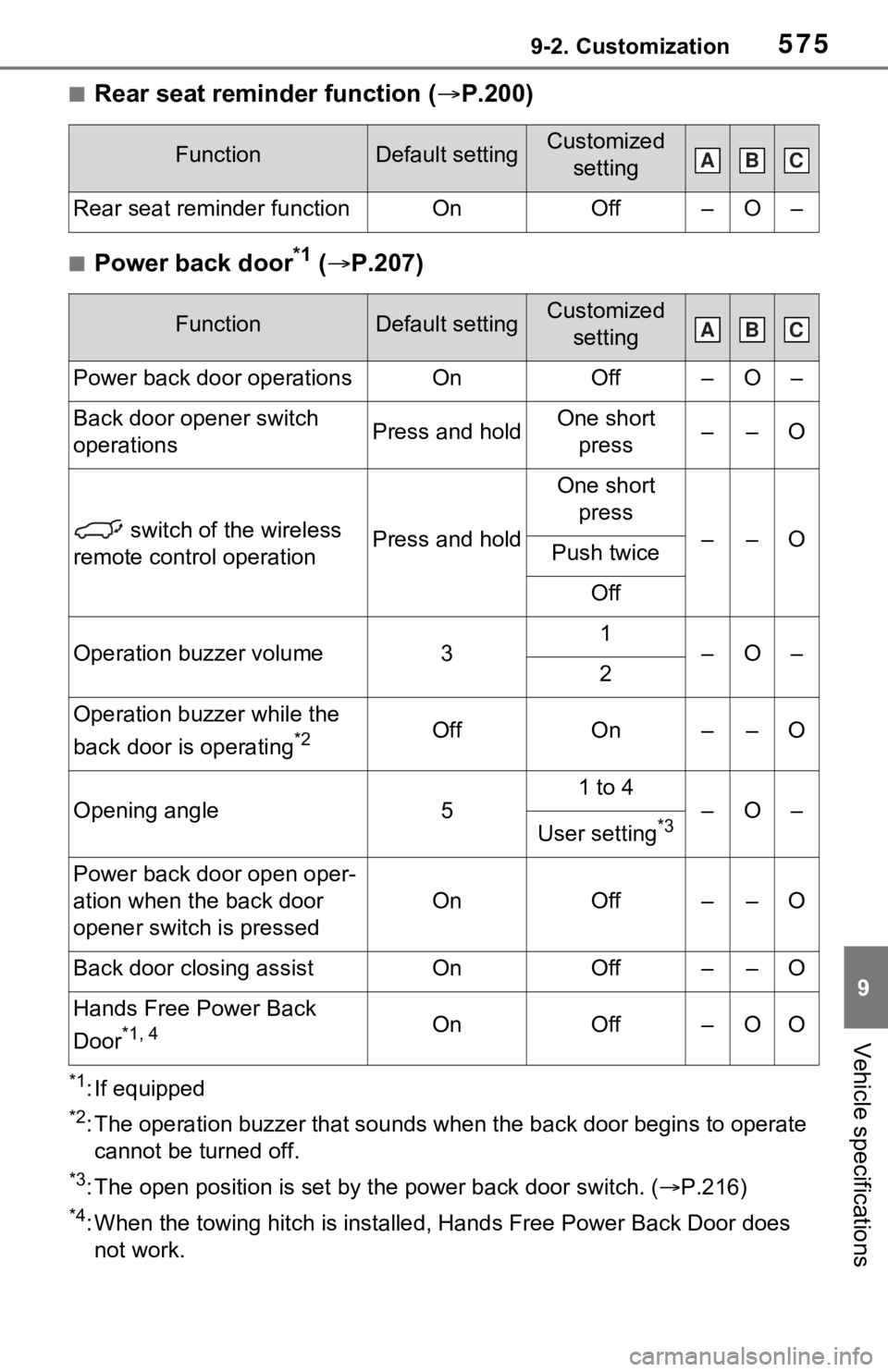
■Rear seat reminder function (P.200)
■Power back door*1 ( P.207)
*1: If equipped
*2: The operation buzzer that sounds when the back door begins to operate
cannot be turned off.
*3: The open position is set by the power back door switch. ( P.216)
*4: When the towing hitch is installe d, Hands Free Power Back Door does
not work.
FunctionDefault settingCustomized setting
Rear seat reminder functionOnOff–O–
FunctionDefault settingCustomized setting
Power back door operationsOnOff–O–
Back door opener switch
operationsPress and holdOne short press––O
switch of the wireless
remote control operationPress and hold
One short press
––OPush twice
Off
Operation buzzer volume31–O–2
Operation buzzer while the
back door is operating
*2OffOn––O
Opening angle5
1 to 4
–O–
User setting*3
Power back door open oper-
ation when the back door
opener switch is pressed
OnOff––O
Back door closing assistOnOff––O
Hands Free Power Back
Door
*1, 4OnOff–OO
ABC
ABC
Page 576 of 616
5769-2. Customization
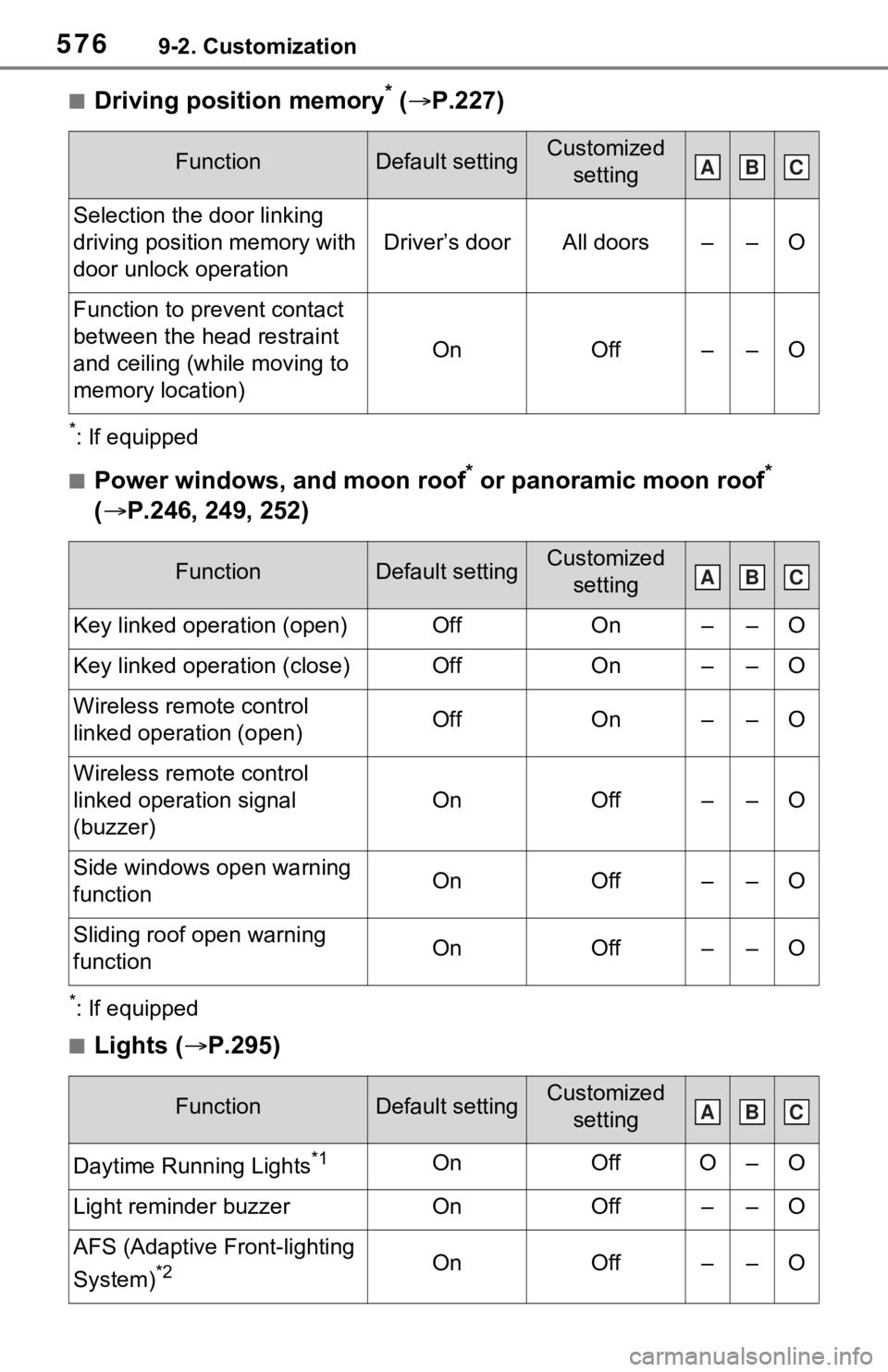
■Driving position memory* ( P.227)
*: If equipped
■Power windows, and moon roof* or panoramic moon roof*
( P.246, 249, 252)
*: If equipped
■Lights ( P.295)
FunctionDefault settingCustomized
setting
Selection the door linking
driving position memory with
door unlock operation
Driver’s doorAll doors––O
Function to prevent contact
between the head restraint
and ceiling (while moving to
memory location)
OnOff––O
FunctionDefault settingCustomized setting
Key linked operation (open)OffOn––O
Key linked operation (close)OffOn––O
Wireless remote control
linked operation (open)OffOn––O
Wireless remote control
linked operation signal
(buzzer)
OnOff––O
Side windows open warning
functionOnOff––O
Sliding roof open warning
function OnOff––O
FunctionDefault settingCustomized setting
Daytime Running Lights*1OnOffO–O
Light reminder buzzerOnOff––O
AFS (Adaptive Front-lighting
System)
*2OnOff––O
ABC
ABC
ABC
Page 580 of 616
5809-2. Customization
*: If equipped
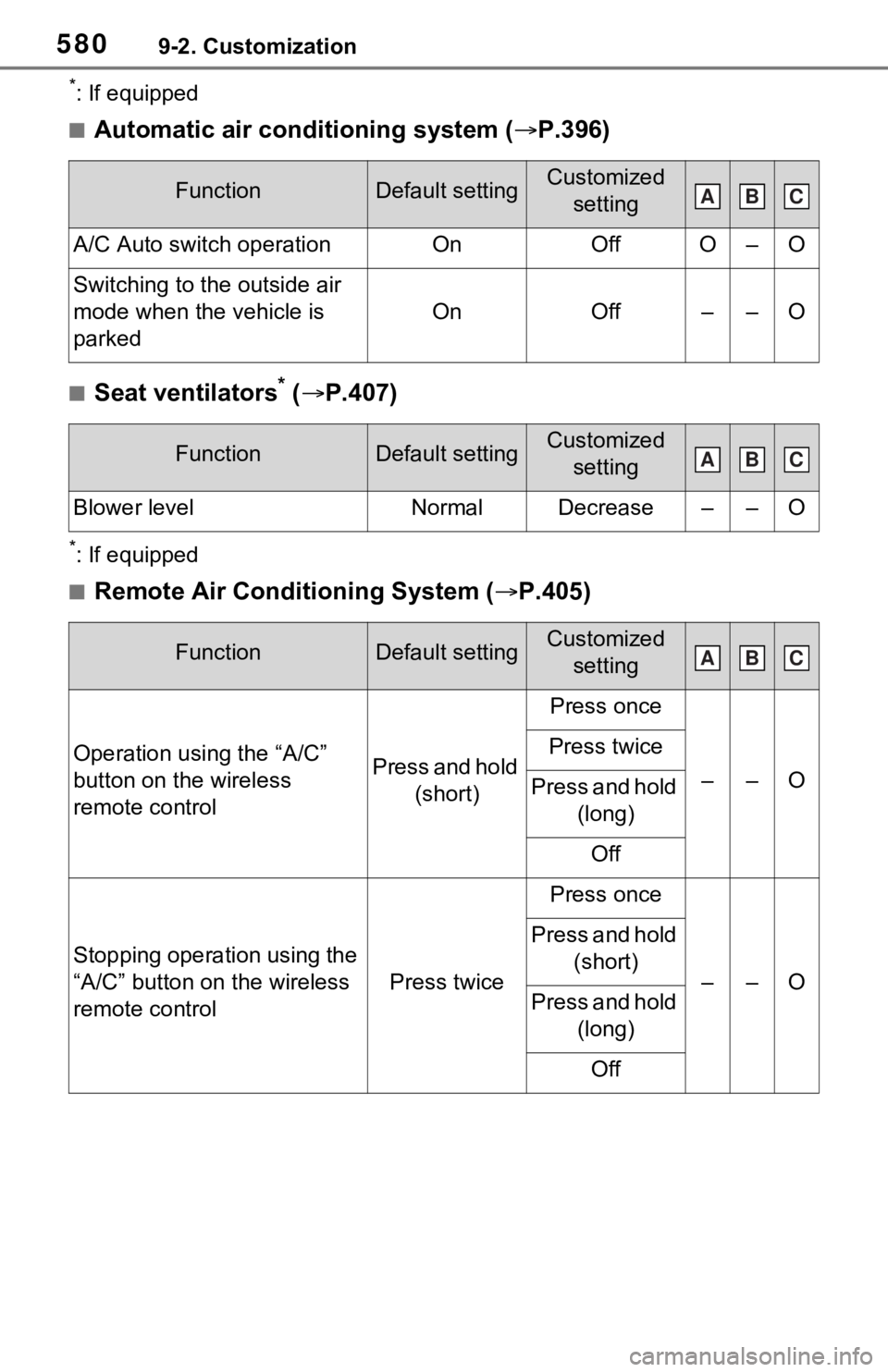
■Automatic air conditioning system (P.396)
■Seat ventilators* ( P.407)
*: If equipped
■Remote Air Conditioning System ( P.405)
FunctionDefault settingCustomized
setting
A/C Auto switch operationOnOffO–O
Switching to t he outside air
mode when the vehicle is
parked
OnOff––O
FunctionDefault settingCustomized setting
Blower levelNormalDecrease––O
FunctionDefault settingCustomized setting
Operation using the “A/C”
button on the wireless
remote controlPress and hold (short)
Press once
––O
Press twice
Press and hold (long)
Off
Stopping operation using the
“A/C” button on the wireless
remote control
Press twice
Press once
––O
Press and hold (short)
Press and hold (long)
Off
ABC
ABC
ABC