lock TOYOTA RAV4 PRIME 2021 Owner's Manual
[x] Cancel search | Manufacturer: TOYOTA, Model Year: 2021, Model line: RAV4 PRIME, Model: TOYOTA RAV4 PRIME 2021Pages: 618, PDF Size: 24.18 MB
Page 92 of 618
922-1. Plug-in hybrid system
detected by the impact sensor,
the emergency shut off system
blocks off the high voltage cur-
rent and stops the fuel pump to
minimize the risk of electrocu-
tion and fuel leakage.
If the emergency shut off system
activates, your vehicle will not
restart. To restart the hybrid sys-
tem, contact your Toyota dealer.
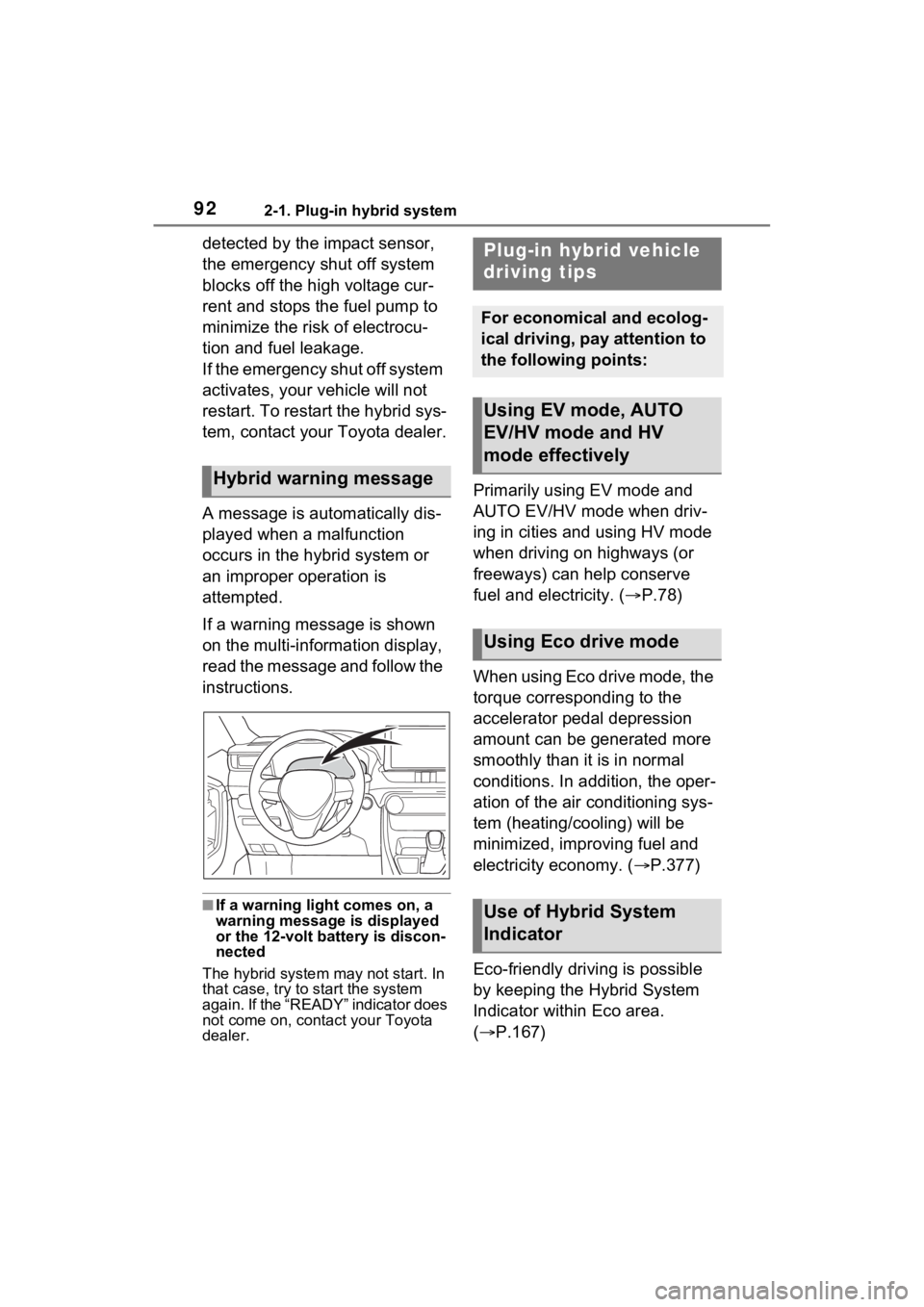
A message is automatically dis-
played when a malfunction
occurs in the hybrid system or
an improper operation is
attempted.
If a warning message is shown
on the multi-information display,
read the message and follow the
instructions.
■If a warning light comes on, a
warning message is displayed
or the 12-volt battery is discon-
nected
The hybrid system may not start. In
that case, try to start the system
again. If the “READY” indicator does
not come on, contact your Toyota
dealer.
Primarily using EV mode and
AUTO EV/HV mode when driv-
ing in cities and using HV mode
when driving on highways (or
freeways) can help conserve
fuel and electricity. ( P.78)
When using Eco drive mode, the
torque corresponding to the
accelerator pedal depression
amount can be generated more
smoothly than it is in normal
conditions. In addition, the oper-
ation of the air conditioning sys-
tem (heating/cooling) will be
minimized, improving fuel and
electricity economy. ( P.377)
Eco-friendly driving is possible
by keeping the Hybrid System
Indicator within Eco area.
( P.167)Hybrid warning message
Plug-in hybrid vehicle
driving tips
For economical and ecolog-
ical driving, pay attention to
the following points:
Using EV mode, AUTO
EV/HV mode and HV
mode effectively
Using Eco drive mode
Use of Hybrid System
Indicator
Page 100 of 618
1002-2. Charging
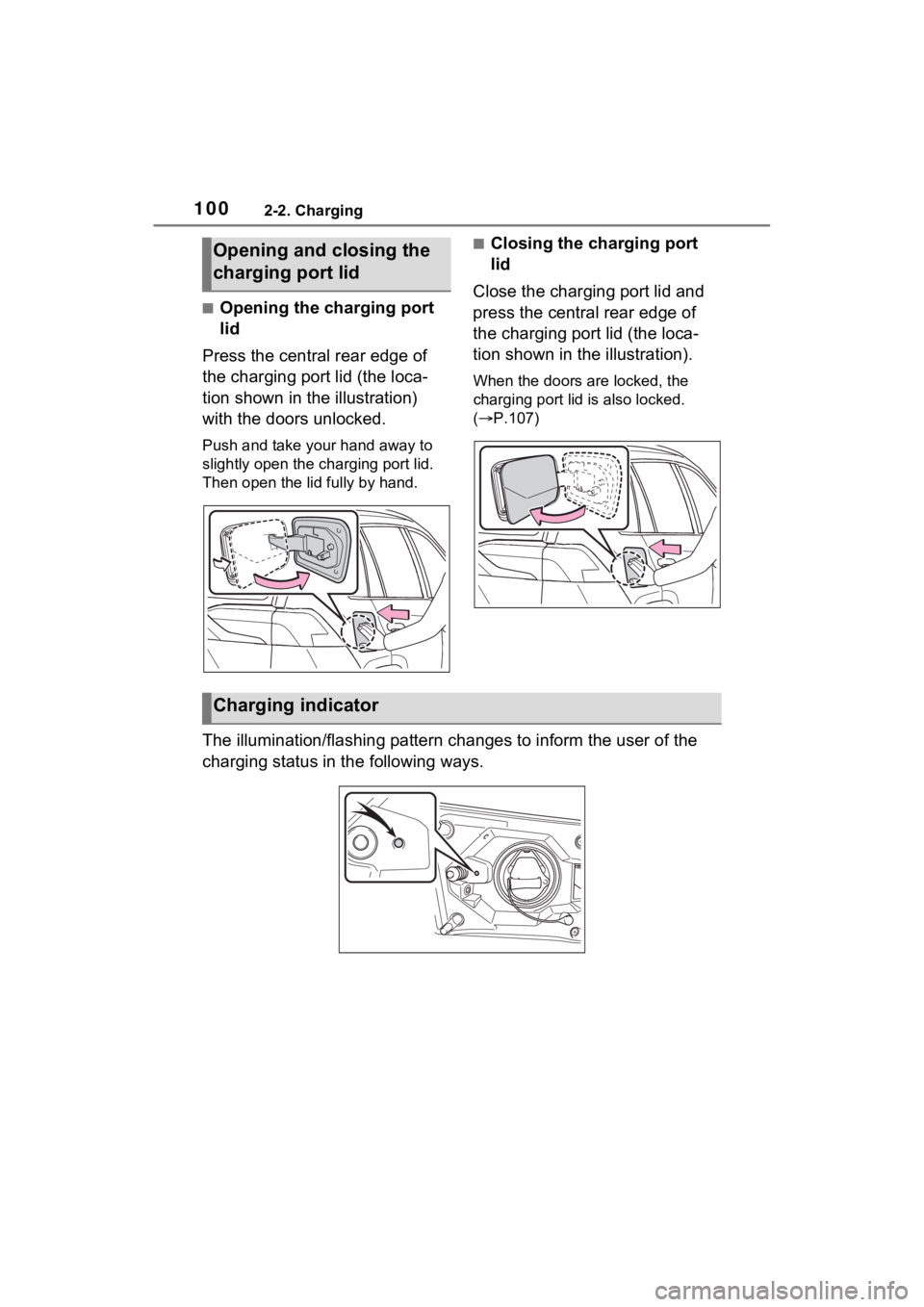
■Opening the charging port
lid
Press the central rear edge of
the charging port lid (the loca-
tion shown in the illustration)
with the doors unlocked.
Push and take your hand away to
slightly open the c harging port lid.
Then open the lid fully by hand.
■Closing the charging port
lid
Close the charging port lid and
press the central rear edge of
the charging port lid (the loca-
tion shown in the illustration).
When the doors are locked, the
charging port lid is also locked.
( P.107)
The illumination/flashing pattern changes to inform the user of the
charging status in the following ways.
Opening and closing the
charging port lid
Charging indicator
Page 102 of 618
1022-2. Charging
AC charging cable
The function, correct oper-
ating procedure, etc. of the
AC charging cable are
explained.
WARNING
■When using the AC charging
cable and CCID (Charging
Circuit Interrupting Device)
Observe the following precau-
tions.
Failure to do so may cause an
unexpected accident, resulting in
death or serious injury.
●Do not attempt to disassemble
or repair the AC charging cable,
charging connector, plug or
CCID (Charging Circuit Inter-
rupting Device).
If a problem arises with the AC
charging cable or the CCID
(Charging Circuit Interrupting
Device), stop charging immedi-
ately and contact your Toyota
dealer.
●Do not subject the AC charging
cable, charging connector, plug
or CCID (Charging Circuit Inter-
rupting Device) to strong force
or impact.
●Do not apply excessive force to
the AC charging cable by force-
fully folding, twisting, pulling or
dragging the AC charging cable.
●Do not damage the AC charging
cable with sh arp objects.
●Do not fold the charging con-
nector or plug or insert foreign
objects into them.
●Do not put the charging connec-
tor and plug into water.
●Do not bring the AC charging
cable to a high-temperature
item such as a heating device.
●Do not apply a load to the AC
charging cable and plug-cord
(such as wrapping the AC
charging cable around the CCID
(Charging Circuit Interrupting
Device) and the charging con-
nector).
●Do not use or leave the AC
charging cable in situations
where a load is applied to the
outlet and the plug (such as
when the CCID (Charging Cir-
cuit Interrupting Device) is
hanging in the air without con-
tacting the ground).
NOTICE
■Precautions when handling
AC charging cable
Make sure to observe the follow-
ing precautions. Failure to
observe these precautions may
result in damage to the AC
charging cable and AC charging
inlet.
●Insert the charging connector
straight into the AC charging
inlet.
●After inserting the charging con-
nector, do not a pply excessive
force to or twist the connector.
Also, do not lean on the connec-
tor or hang any objects from it.
●Do not step on or trip over the
AC charging cable.
●Before removing the charging
connector, make sure that it is
unlocked. (P.107)
●After removing the AC charging
cable, promptly re turn it to its
proper location.
Page 107 of 618
1072-2. Charging
2
Plug-in hybrid system
■Unlocking the charging port
lid
1 Unlock the doors using the
smart key system or wireless
remote control.
2 Press the central rear edge
of the charging port lid (the
WARNING
●The plug can be securely
inserted into the outlet.
●The plug does not get extremely
hot during use.
●The tip of the plug has not been
deformed.
●The plug is not dirtied by dust
etc.
Remove the plug from the outlet
before inspecting it. If any abnor-
malities are fo und in the AC
charging cable as a result of the
inspection, immediately stop use
and consult your Toyota dealer.
■Maintaining the AC charging
cable
When the AC charging cable is
dirty, first remove the dirt with a
hard, wringed cloth, and then
wipe the cable with a dry cloth.
However, never wash it with
water. If the AC charging cable is
washed with water , fire or electric
shock may occur during charging,
possibly resulting in death or seri-
ous injury.
■When not using the AC
charging cable for a long time
Remove the plug from the outlet.
Dust could accumulate on the
plug or in the outlet, possibly
causing overheating which could
lead to a fire.
Also, keep the ca ble in a place
free from moisture.
Locking an d unlock-
ing the charging port
lid and cha rging con-
nector
The charging port lid and
charging connector can be
locked/unlocked by the fol-
lowing procedures.
Using the smart key sys-
tem
*: P.198
Using the wireless remote
control
*: P.196
*: If the smart key system or the
wireless remote control does
not operate properly, use the
mechanical key. ( P.537)
Locking and unlocking
the charging port lid
Page 108 of 618
1082-2. Charging
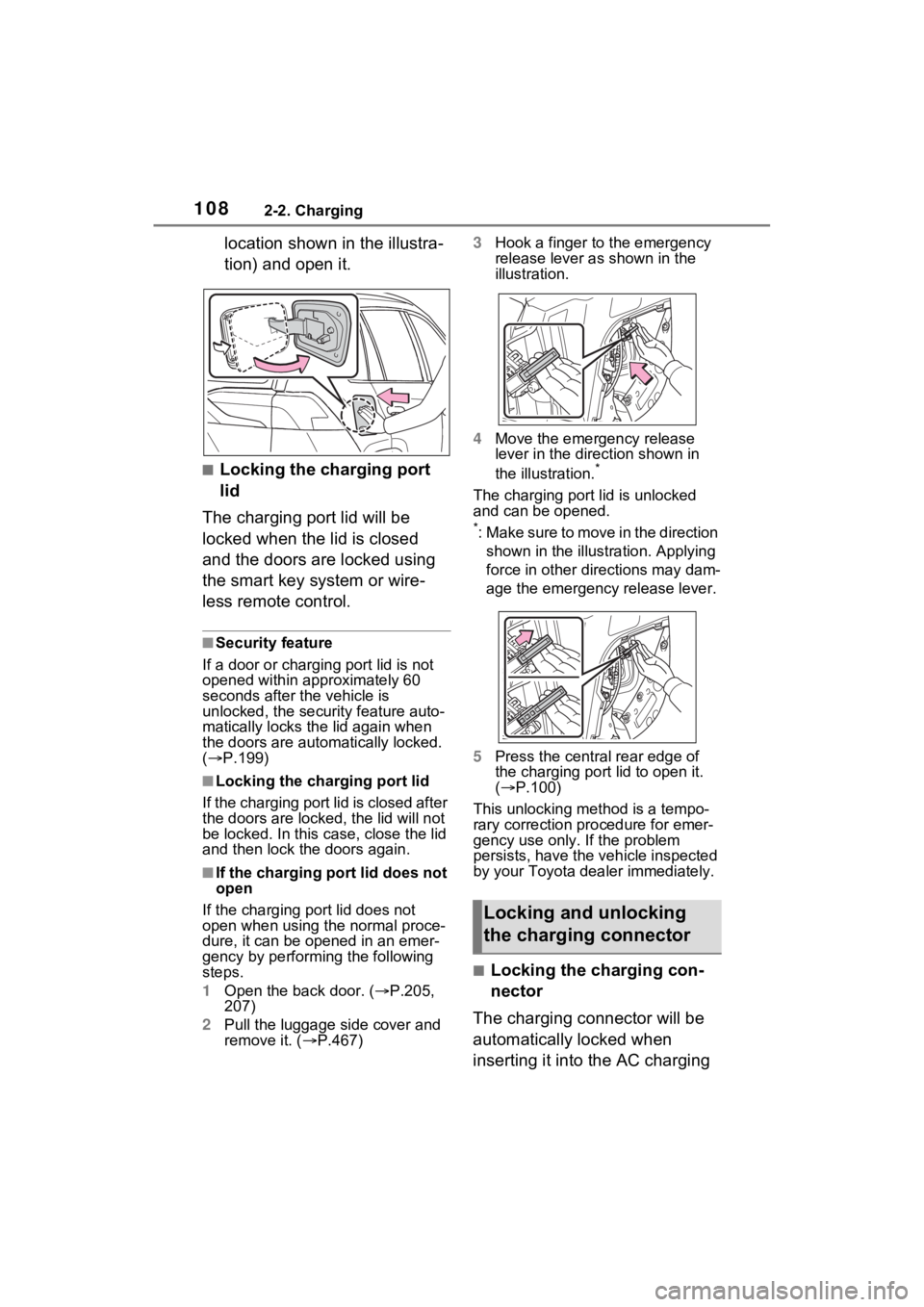
location shown in the illustra-
tion) and open it.
■Locking the charging port
lid
The charging port lid will be
locked when the lid is closed
and the doors are locked using
the smart key system or wire-
less remote control.
■Security feature
If a door or charging port lid is not
opened within approximately 60
seconds after the vehicle is
unlocked, the security feature auto-
matically locks the lid again when
the doors are autom atically locked.
( P.199)
■Locking the char ging port lid
If the charging port lid is closed after
the doors are lock ed, the lid will not
be locked. In this case, close the lid
and then lock the doors again.
■If the charging port lid does not
open
If the charging port lid does not
open when using the normal proce-
dure, it can be ope ned in an emer-
gency by performing the following
steps.
1 Open the back door. ( P.205,
207)
2 Pull the luggage side cover and
remove it. ( P.467) 3
Hook a finger to the emergency
release lever as shown in the
illustration.
4 Move the emergency release
lever in the direction shown in
the illustration.
*
The charging port lid is unlocked
and can be opened.
*: Make sure to move in the direction
shown in the illust ration. Applying
force in other directions may dam-
age the emergency release lever.
5 Press the central rear edge of
the charging port lid to open it.
( P.100)
This unlocking method is a tempo-
rary correction procedure for emer-
gency use only. If the problem
persists, have the vehicle inspected
by your Toyota dea ler immediately.
■Locking the charging con-
nector
The charging connector will be
automatically locked when
inserting it into the AC charging
Locking and unlocking
the charging connector
Page 109 of 618
1092-2. Charging
2
Plug-in hybrid system
inlet. (The setting can be
changed: P.109)
■Unlocking the charging
connector
The charging connector will be
unlocked when the doors are
unlocked using the smart key
system or wireless remote con-
trol.
■Changing the charging con-
nector lock settings
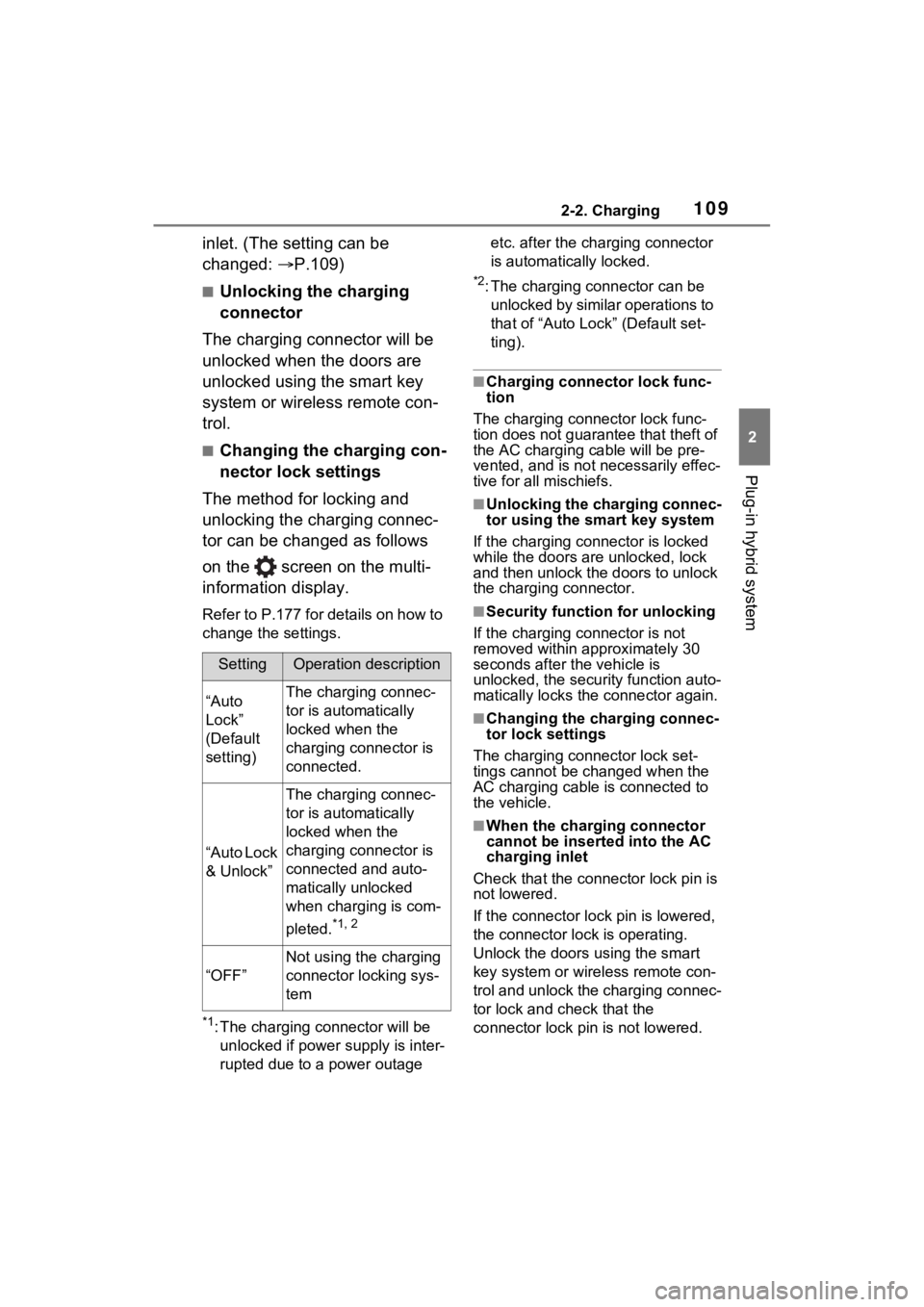
The method for locking and
unlocking the charging connec-
tor can be changed as follows
on the screen on the multi-
information display.
Refer to P.177 for details on how to
change the settings.
*1: The charging co nnector will be
unlocked if power supply is inter-
rupted due to a power outage etc. after the charging connector
is automatically locked.
*2: The charging connector can be
unlocked by similar operations to
that of “Auto Loc k” (Default set-
ting).
■Charging connector lock func-
tion
The charging connector lock func-
tion does not guarantee that theft of
the AC charging cable will be pre-
vented, and is not necessarily effec-
tive for all mischiefs.
■Unlocking the charging connec-
tor using the smart key system
If the charging connector is locked
while the doors are unlocked, lock
and then unlock the doors to unlock
the charging connector.
■Security function for unlocking
If the charging connector is not
removed within approximately 30
seconds after the vehicle is
unlocked, the security function auto-
matically locks the connector again.
■Changing the charging connec-
tor lock settings
The charging co nnector lock set-
tings cannot be changed when the
AC charging cable is connected to
the vehicle.
■When the charging connector
cannot be inserted into the AC
charging inlet
Check that the connector lock pin is
not lowered.
If the connector lock pin is lowered,
the connector lock is operating.
Unlock the doors u sing the smart
key system or wirel ess remote con-
trol and unlock the charging connec-
tor lock and check that the
connector lock pin is not lowered.
SettingOperation description
“Auto
Lock”
(Default
setting)The charging connec-
tor is automatically
locked when the
charging connector is
connected.
“Auto Lock
& Unlock”
The charging connec-
tor is automatically
locked when the
charging connector is
connected and auto-
matically unlocked
when charging is com-
pleted.
*1, 2
“OFF”
Not using the charging
connector locking sys-
tem
Page 110 of 618
1102-2. Charging
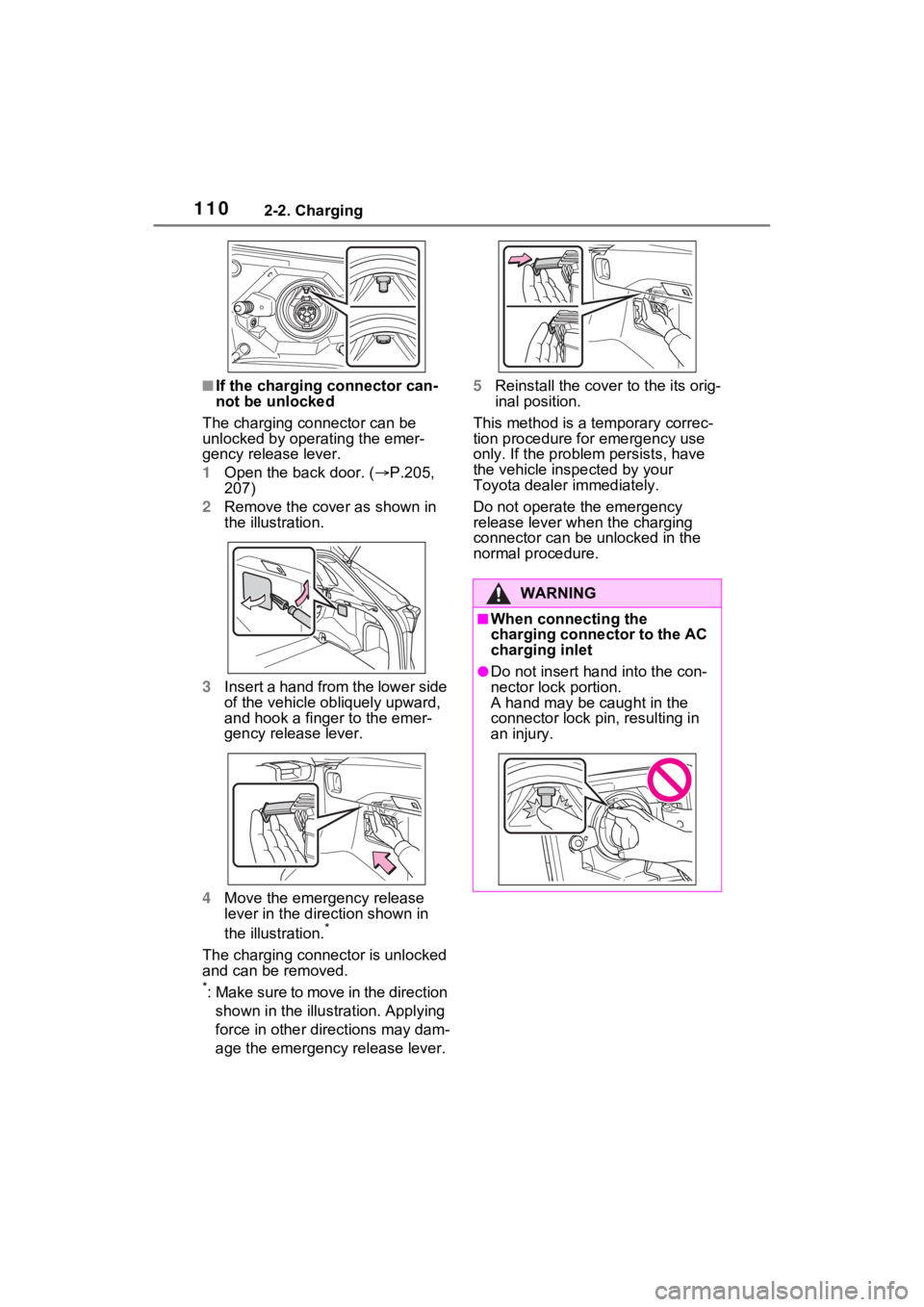
■If the charging connector can-
not be unlocked
The charging connector can be
unlocked by operating the emer-
gency release lever.
1 Open the back door. ( P.205,
207)
2 Remove the cover as shown in
the illustration.
3 Insert a hand from the lower side
of the vehicle obliquely upward,
and hook a finger to the emer-
gency release lever.
4 Move the emergency release
lever in the direction shown in
the illustration.
*
The charging connector is unlocked
and can be removed.
*: Make sure to move in the direction
shown in the illustration. Applying
force in other directions may dam-
age the emergency release lever. 5
Reinstall the cove r to the its orig-
inal position.
This method is a temporary correc-
tion procedure for emergency use
only. If the problem persists, have
the vehicle inspected by your
Toyota dealer immediately.
Do not operate the emergency
release lever when the charging
connector can be unlocked in the
normal procedure.
WARNING
■When connecting the
charging connector to the AC
charging inlet
●Do not insert h and into the con-
nector lock portion.
A hand may be caught in the
connector lock pin, resulting in
an injury.
Page 111 of 618
1112-2. Charging
2
Plug-in hybrid system
Connect to an AC 120 V out-
let (NEMA 5-15R) with a
Ground-Fault Circuit-Inter-
rupter (GFCI) and a circuit
breaker. Use of a 15A individ-
ual circuit is strongly recom-
mended to ensure AC
charging cable will operate
properly.
When charging outdoors,
make sure to connect to a
weatherproof outlet that is
certified for outdoor use.
Checking Ground-Fault Cir-
cuit-Interrupter (GFCI) opera-
tion before its use is
recommended.
WARNING
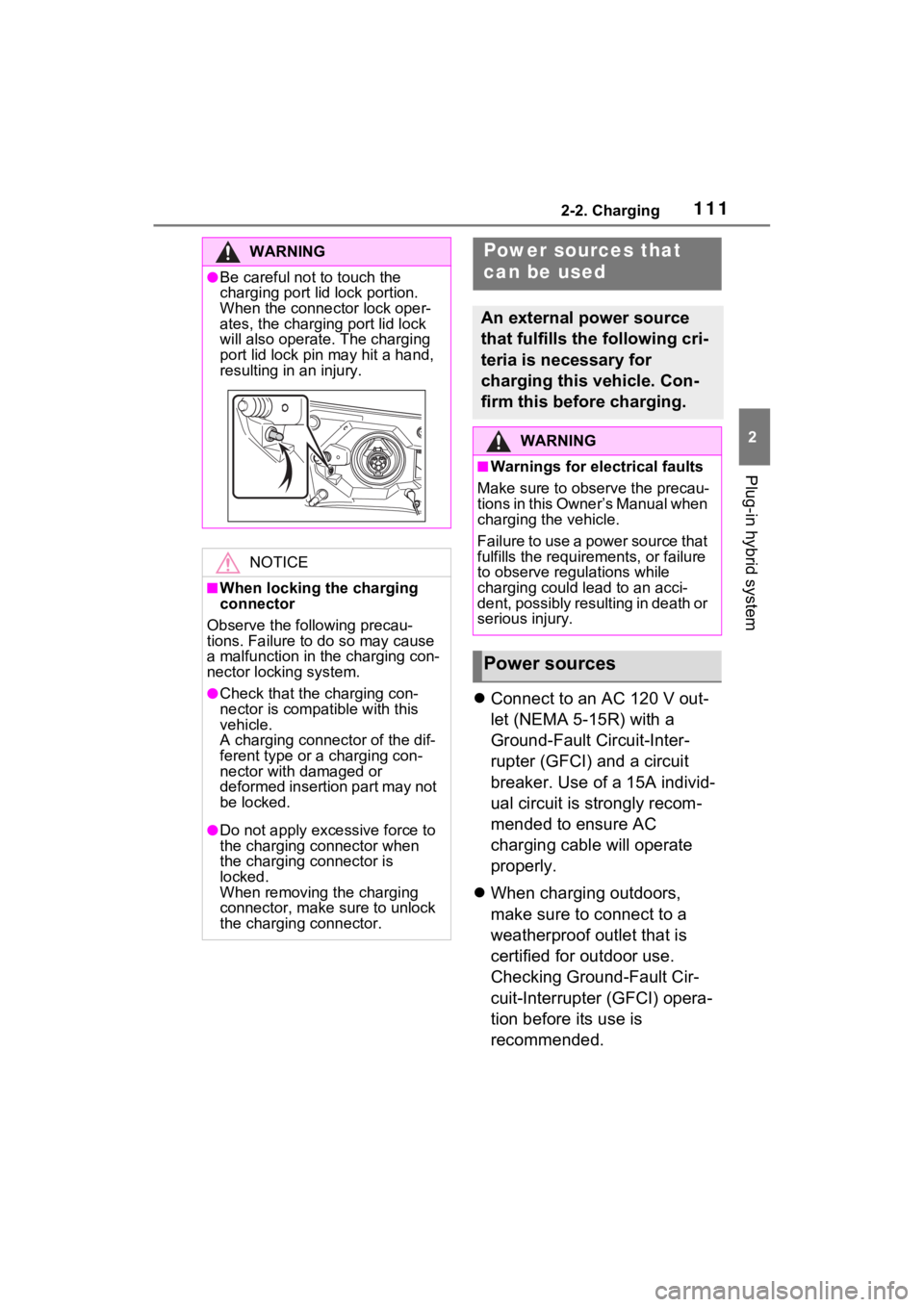
●Be careful not to touch the
charging port lid lock portion.
When the connector lock oper-
ates, the charging port lid lock
will also operate . The charging
port lid lock pin may hit a hand,
resulting in an injury.
NOTICE
■When locking the charging
connector
Observe the following precau-
tions. Failure to do so may cause
a malfunction in the charging con-
nector locking system.
●Check that the charging con-
nector is compatible with this
vehicle.
A charging connector of the dif-
ferent type or a charging con-
nector with damaged or
deformed insertion part may not
be locked.
●Do not apply excessive force to
the charging connector when
the charging connector is
locked.
When removing the charging
connector, make sure to unlock
the charging connector.
Power sources that
can be used
An external power source
that fulfills the following cri-
teria is necessary for
charging this vehicle. Con-
firm this before charging.
WARNING
■Warnings for ele ctrical faults
Make sure to observe the precau-
tions in this Owner’s Manual when
charging the vehicle.
Failure to use a power source that
fulfills the requir ements, or failure
to observe regulations while
charging could lead to an acci-
dent, possibly resulting in death or
serious injury.
Power sources
Page 113 of 618
1132-2. Charging
2
Plug-in hybrid system
WARNING
■Power sources precautions
Observe the following precau-
tions.
If you do not follow them, fire,
electrical shock or damage may
occur, possibly resulting in death
or serious injury.
●Connect to an AC 120 V outlet
(NEMA 5-15R) with a Ground-
Fault Circuit-Interrupter (GFCI)
and supplied by a circuit
breaker per your local code.
Use of a 15A individual circuit is
strongly recommended.
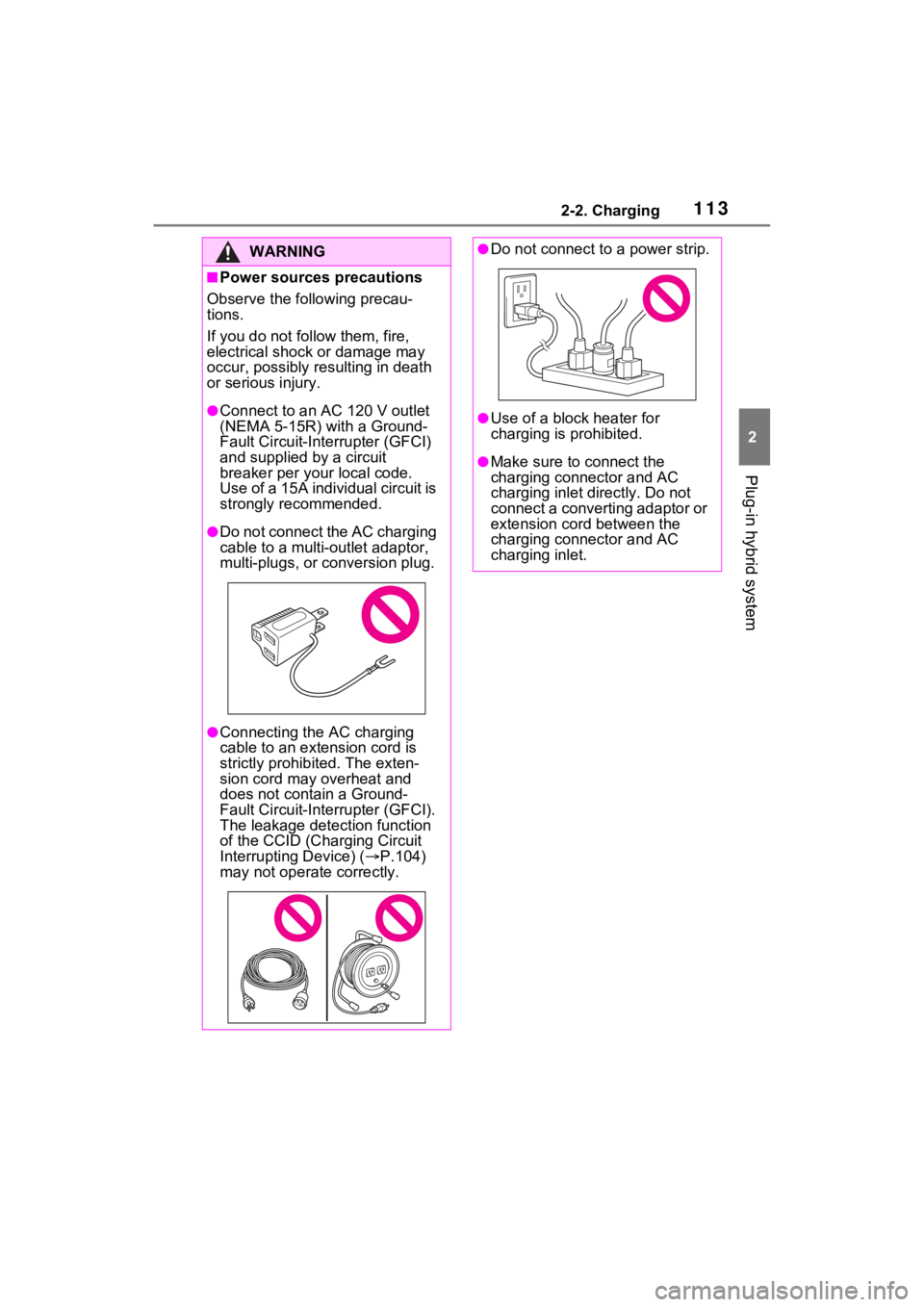
●Do not connect the AC charging
cable to a multi-outlet adaptor,
multi-plugs, or conversion plug.
●Connecting the AC charging
cable to an extension cord is
strictly prohibited. The exten-
sion cord may overheat and
does not contain a Ground-
Fault Circuit-Interrupter (GFCI).
The leakage detection function
of the CCID (Cha rging Circuit
Interrupting Device) ( P.104)
may not operate correctly.
●Do not connect to a power strip.
●Use of a block heater for
charging is prohibited.
●Make sure to connect the
charging connector and AC
charging inlet directly. Do not
connect a converting adaptor or
extension cord between the
charging connector and AC
charging inlet.
Page 123 of 618
1232-2. Charging
2
Plug-in hybrid system
P.121
1 Prepare the AC charging
cable.
2 Insert the AC charging cable
into the outlet of the external
power source.
Make sure to hold the body of the
plug and insert it f irmly into the out-
let.
Check that the power indicator on
the CCID (Chargi ng Circuit Inter-
rupting Device) is illuminated. (If it
is not illuminated, refer to P.147)
In order to reduce the load on the
outlet and plug, when inserting the
plug, use a string, etc. to hang the
CCID (Charging Cir cuit Interrupting
How to charge
This section explains the
procedure for charging the
hybrid battery (traction bat-
tery) with the equipped AC
charging cable.
When using a charging sta-
tion, make sure to check the
operation instructions on
the charging station.
When the charging schedule
is registered, make sure
“Charge Now” is turned on
before charging. (P.137,
142)
WARNING
■AC charging inlet
Do not disassemble, repair or
modify the AC charging inlet.
Doing so may lead to unforeseen
accidents or serious injury. When
the AC charging inlet needs to be
repaired, consul t your Toyota
dealer.
NOTICE
■When using the AC charging
cable and related parts
To prevent damage to the AC
charging cable and related parts,
observe the following precautions.
●When interrupting or canceling
charging, remove the charging
connector before removing the
plug.
●When removing the AC
charging cable, check that the
charging connector is unlocked.
●Do not forcefully pull the
charging connector cap and AC
charging inlet cap.
●Do not apply a vibration to the
charging connector while
charging. Charging may be
stopped.
●Do not insert anything but the
charging connector into the AC
charging inlet.
●When inserting the plug into or
removing the plu g from the out-
let, make sure to hold the body
of the plug.
●Do not damage the AC charging
inlet cap with a sharp object.
●Do not forcefully pull the AC
charging cable that is caught or
entangled. If the cable is entan-
gled, disentangle it before
using.
Charging precautions
When charging