mirror TOYOTA RAV4 PRIME 2021 Owner's Guide
[x] Cancel search | Manufacturer: TOYOTA, Model Year: 2021, Model line: RAV4 PRIME, Model: TOYOTA RAV4 PRIME 2021Pages: 618, PDF Size: 24.18 MB
Page 350 of 618
3505-5. Using the driving support systems
■Vehicles that can be
detected by the Blind Spot
Monitor
The BSM function uses radar
sensors to detect the following
vehicles traveling in adjacent
lanes and advises the driver of
the presence of such vehicles
via the indicators on the outside
rear view mirrors.
WARNING
■Handling the radar sensor
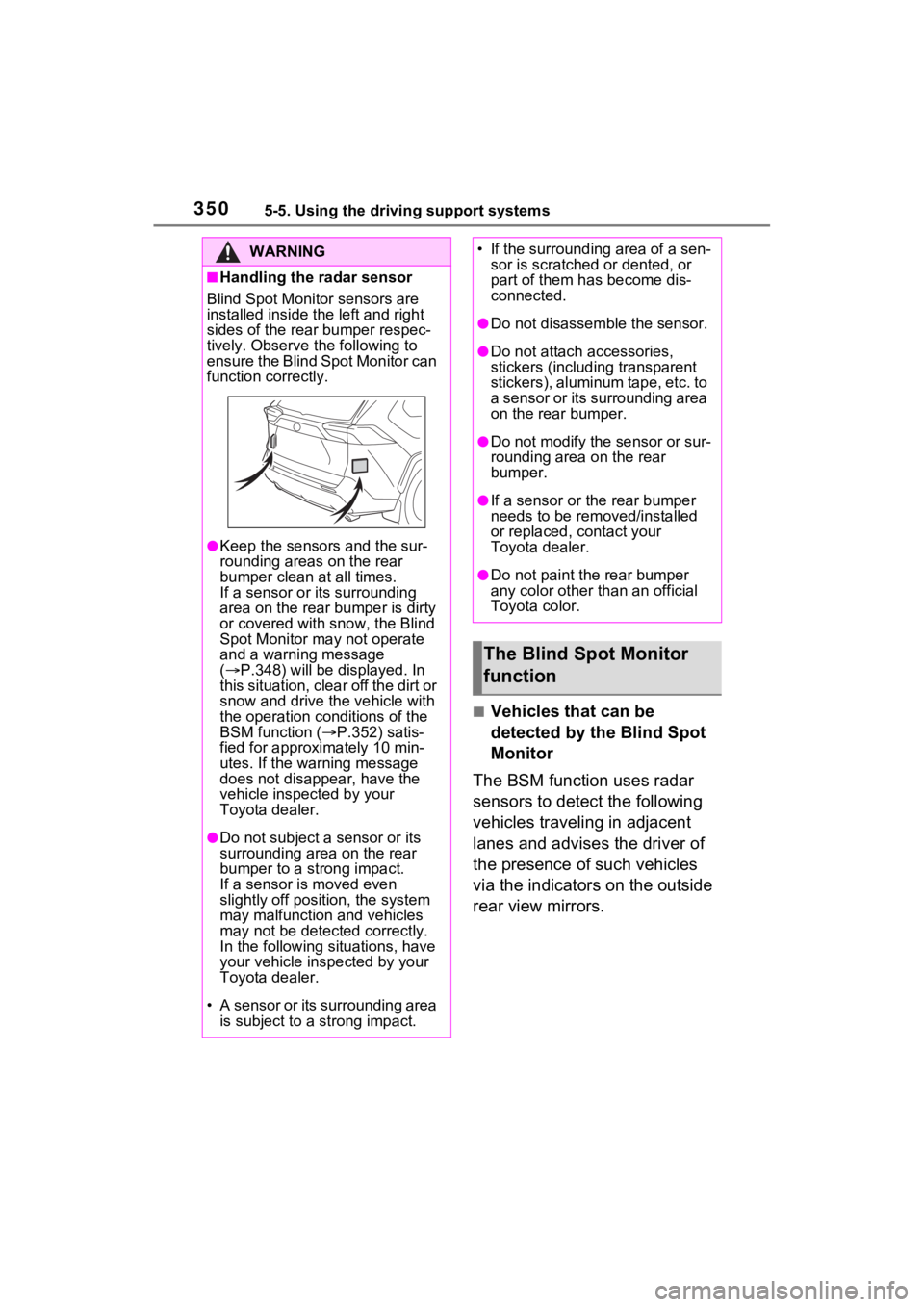
Blind Spot Monitor sensors are
installed inside t he left and right
sides of the rear bumper respec-
tively. Observe the following to
ensure the Blind Spot Monitor can
function correctly.
●Keep the sensors and the sur-
rounding areas on the rear
bumper clean at all times.
If a sensor or its surrounding
area on the rear bumper is dirty
or covered with snow, the Blind
Spot Monitor may not operate
and a warning message
( P.348) will be displayed. In
this situation, clear off the dirt or
snow and drive the vehicle with
the operation conditions of the
BSM function ( P.352) satis-
fied for approxi mately 10 min-
utes. If the warning message
does not disappear, have the
vehicle inspected by your
Toyota dealer.
●Do not subject a sensor or its
surrounding area on the rear
bumper to a strong impact.
If a sensor is moved even
slightly off position, the system
may malfunction and vehicles
may not be detected correctly.
In the following si tuations, have
your vehicle inspected by your
Toyota dealer.
• A sensor or its surrounding area is subject to a strong impact.
• If the surrounding area of a sen- sor is scratched or dented, or
part of them h as become dis-
connected.
●Do not disassemble the sensor.
●Do not attach a ccessories,
stickers (including transparent
stickers), aluminum tape, etc. to
a sensor or its surrounding area
on the rear bumper.
●Do not modify the sensor or sur-
rounding area on the rear
bumper.
●If a sensor or the rear bumper
needs to be removed/installed
or replaced, contact your
Toyota dealer.
●Do not paint the rear bumper
any color other than an official
Toyota color.
The Blind Spot Monitor
function
Page 351 of 618
3515-5. Using the driving support systems
5
Driving
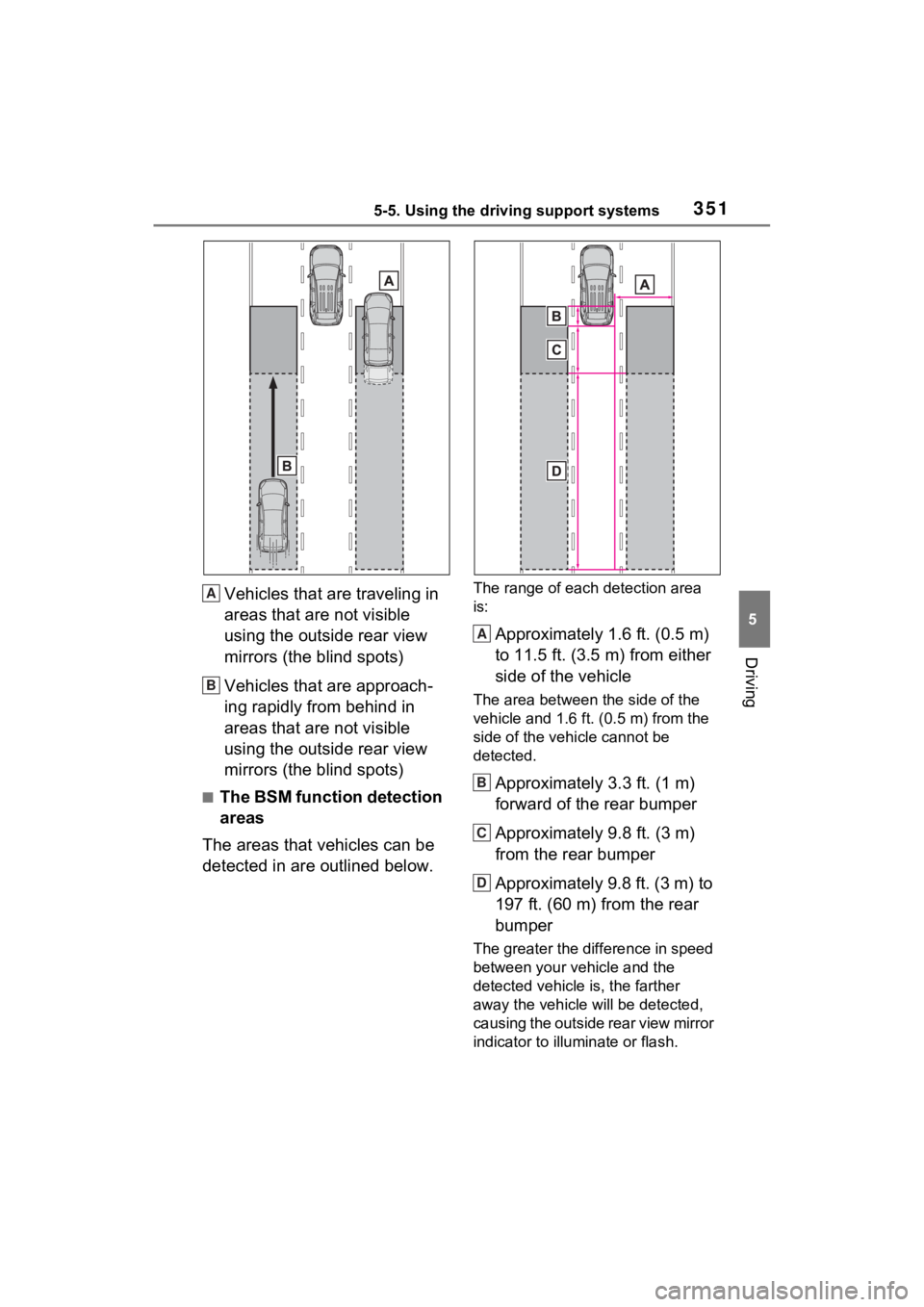
Vehicles that are traveling in
areas that are not visible
using the outside rear view
mirrors (the blind spots)
Vehicles that are approach-
ing rapidly from behind in
areas that are not visible
using the outside rear view
mirrors (the blind spots)
■The BSM function detection
areas
The areas that vehicles can be
detected in are outlined below.
The range of each detection area
is:
Approximately 1.6 ft. (0.5 m)
to 11.5 ft. (3.5 m) from either
side of the vehicle
The area between the side of the
vehicle and 1.6 ft. (0.5 m) from the
side of the vehicle cannot be
detected.
Approximately 3.3 ft. (1 m)
forward of the rear bumper
Approximately 9.8 ft. (3 m)
from the rear bumper
Approximately 9.8 ft. (3 m) to
197 ft. (60 m) from the rear
bumper
The greater the difference in speed
between your vehicle and the
detected vehicle is, the farther
away the vehicle will be detected,
causing the outside rear view mirror
indicator to illuminate or flash.
A
B
A
B
C
D
Page 353 of 618
3535-5. Using the driving support systems
5
Driving
when driving on the edge of a
lane, and the vehicle in an adja-
cent lane is far away from your
vehicle
• When an accessory (such as a bicycle carrier) is installed to the
rear of the vehicle
• When there is a significant differ- ence in height between your vehi-
cle and the vehicle that enters the
detection area
• Immediately after the BSM func-
tion/RCTA function are turned on
• When towing a trailer
●Instances of the BSM function
unnecessarily detecting a vehicle
and/or object may increase in the
following situations:
• When the sensor is misaligned
due to a strong impact to the sen-
sor or its surrounding area
• When the distanc e between your
vehicle and a guar drail, wall, etc.
that enters the detection area is
short
• When driving up and down con-
secutive steep inclines, such as
hills, dips in the road, etc.
• When vehicle lanes are narrow, or
when driving on the edge of a
lane, and a vehicle traveling in a
lane other than the adjacent lanes
enters the detection area
• When driving on roads with sharp bends, consecutive curves, or
uneven surfaces
• When the tires are slipping or spinning
• When the distanc e between your
vehicle and a following vehicle is
short
• When an accessory (such as a bicycle carrier) is installed to the
rear of the vehicle
• When the vehicle throws up water or snow behind.
■Operation of the RCTA
function
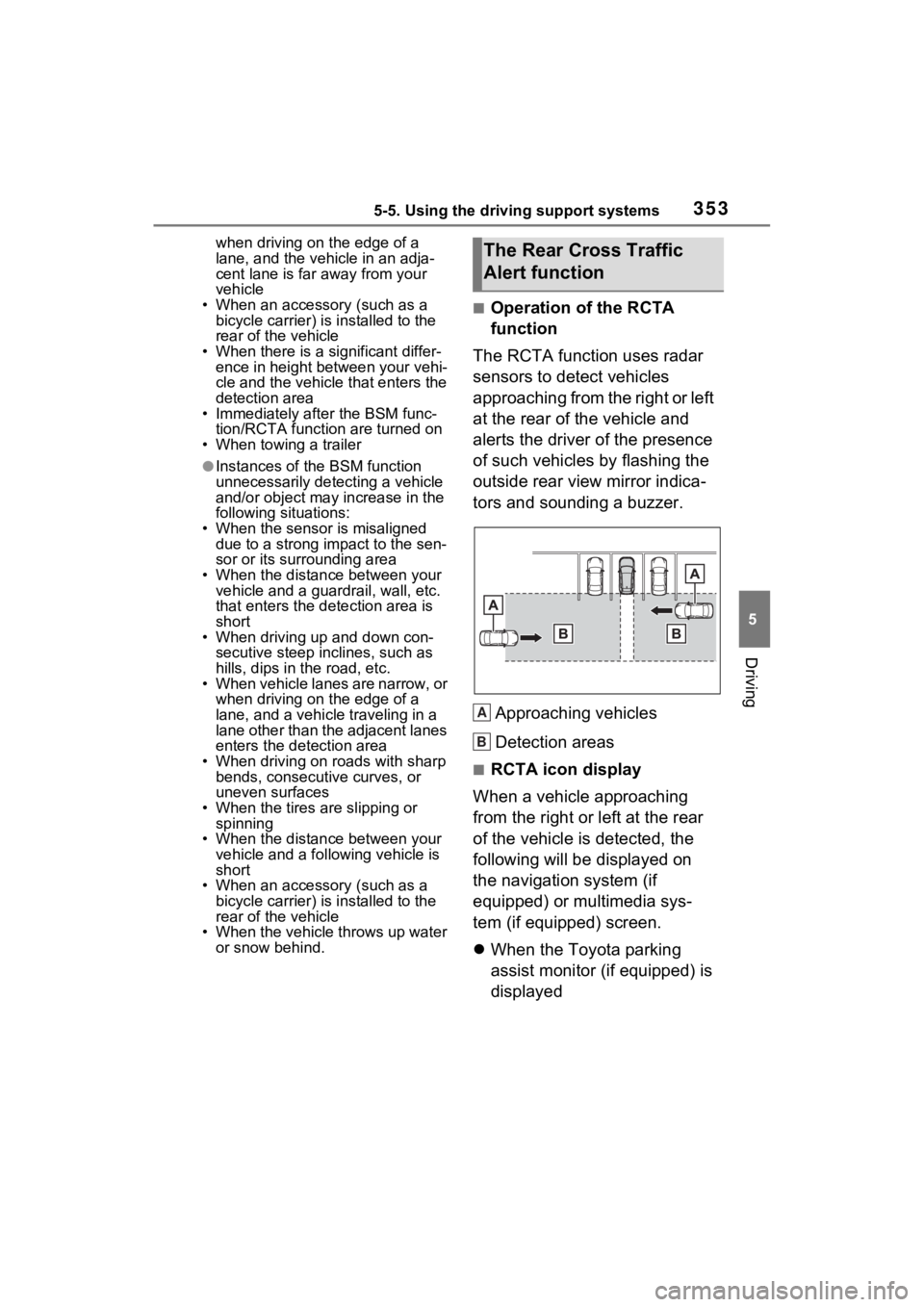
The RCTA function uses radar
sensors to detect vehicles
approaching from the right or left
at the rear of the vehicle and
alerts the driver of the presence
of such vehicles by flashing the
outside rear view mirror indica-
tors and sounding a buzzer.
Approaching vehicles
Detection areas
■RCTA icon display
When a vehicle approaching
from the right or left at the rear
of the vehicle is detected, the
following will be displayed on
the navigation system (if
equipped) or multimedia sys-
tem (if equipped) screen.
When the Toyota parking
assist monitor (if equipped) is
displayed
The Rear Cross Traffic
Alert function
A
B
Page 396 of 618
3966-1. Using the air conditioning system and defogger
6-1.Using the air conditioning system and defogger
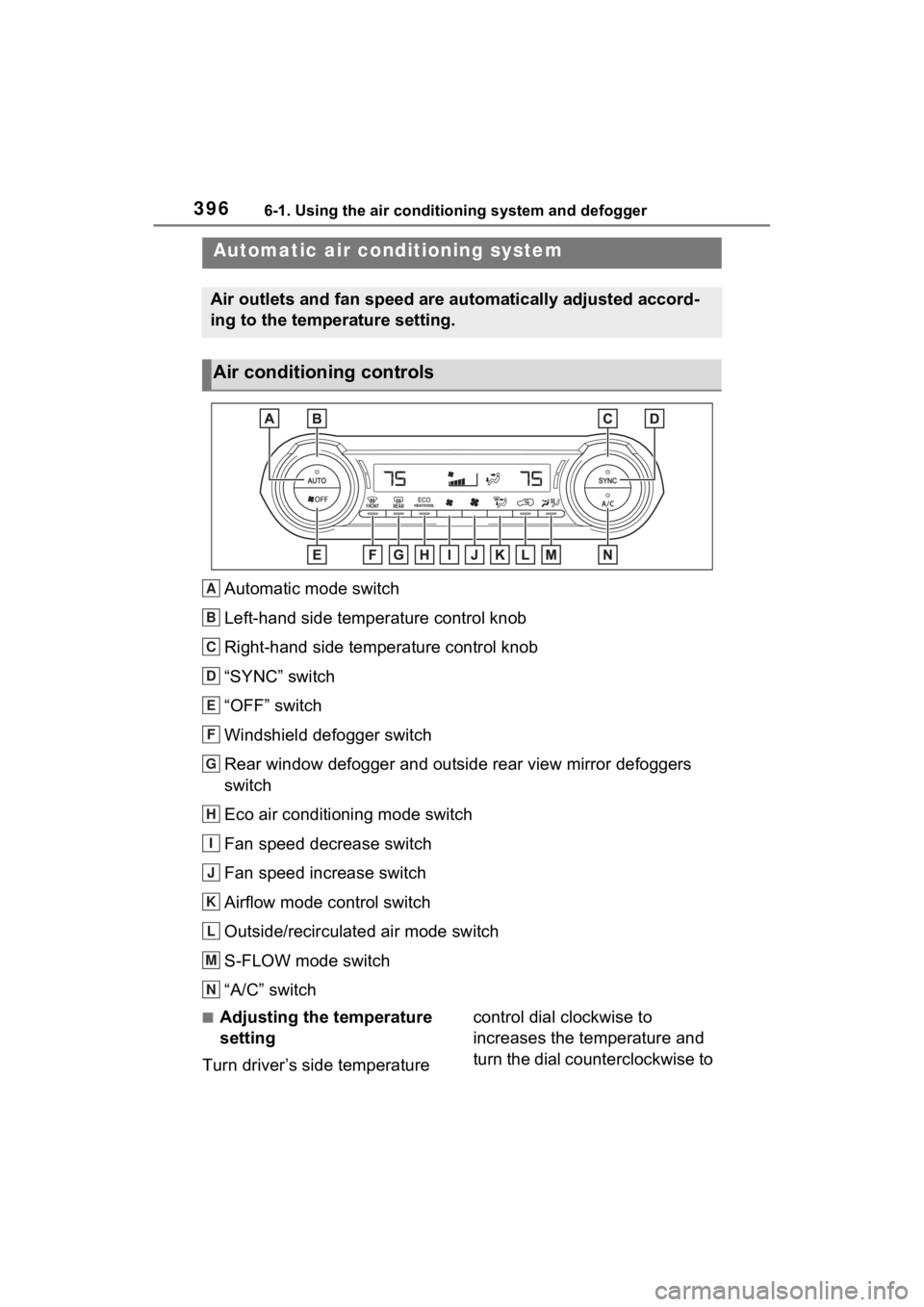
Automatic mode switch
Left-hand side temperature control knob
Right-hand side temperature control knob
“SYNC” switch
“OFF” switch
Windshield defogger switch
Rear window defogger and outside rear view mirror defoggers
switch
Eco air conditioning mode switch
Fan speed decrease switch
Fan speed increase switch
Airflow mode control switch
Outside/recirculated air mode switch
S-FLOW mode switch
“A/C” switch
■Adjusting the temperature
setting
Turn driver’s side temperature control dial clockwise to
increases the temperature and
turn the dial counterclockwise to
Automatic air co
nditioning system
Air outlets and fan speed are automatically adjusted accord-
ing to the temperature setting.
Air conditioning controls
A
B
C
D
E
F
G
H
I
J
K
L
M
N
Page 398 of 618
3986-1. Using the air conditioning system and defogger
tized such as reducing fan
speed, etc.
Press the eco air conditioning
mode switch.
When the eco air conditioning
mode is on, the indicator illumi-
nates on the eco air conditioning
mode switch.
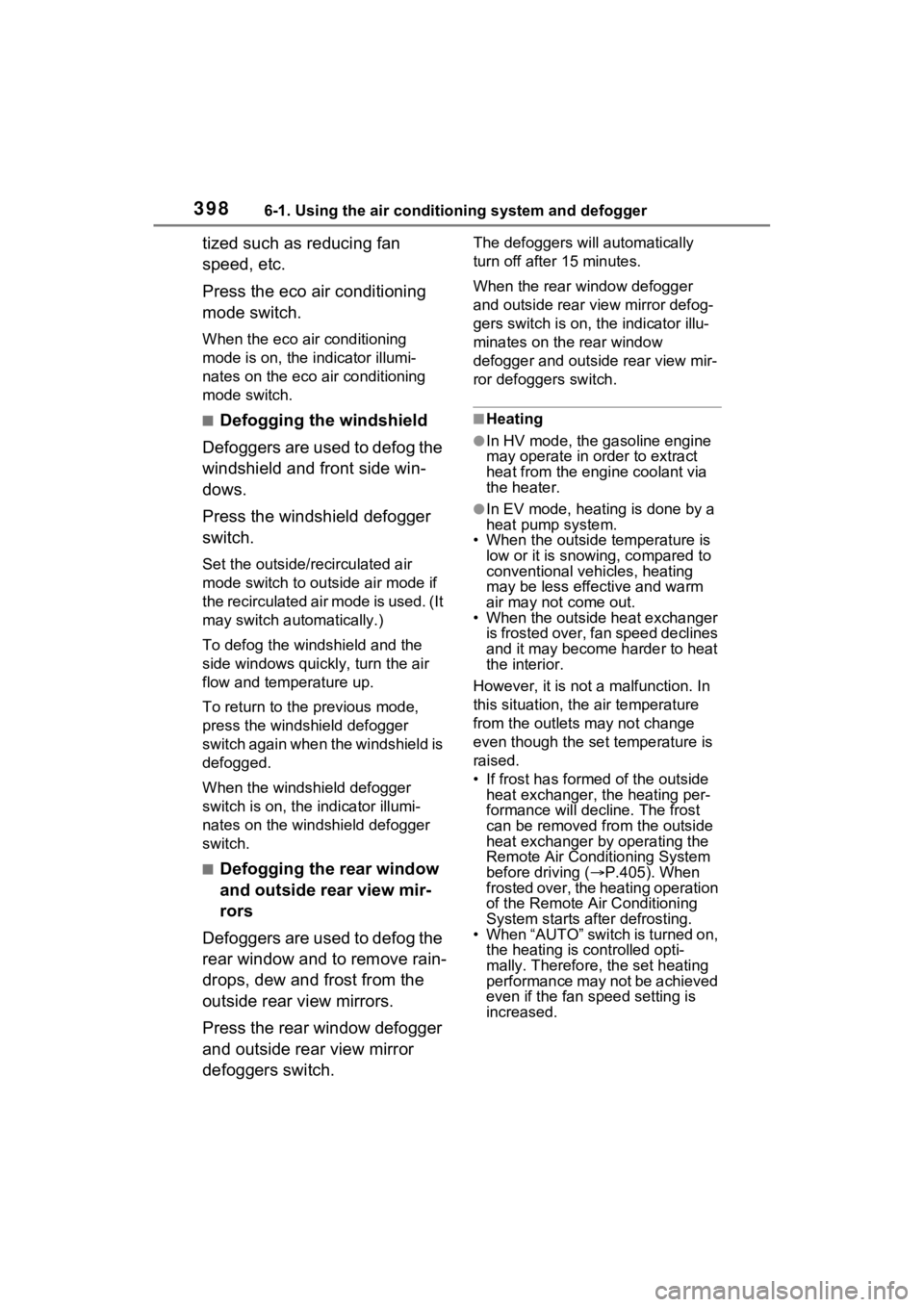
■Defogging the windshield
Defoggers are used to defog the
windshield and front side win-
dows.
Press the windshield defogger
switch.
Set the outside/recirculated air
mode switch to outside air mode if
t h e r e c i r c u l a t e d a i r m o d e i s u s e d . ( I t
may switch automatically.)
To defog the windshield and the
side windows quickly, turn the air
flow and temperature up.
To return to the previous mode,
press the windshield defogger
switch again when the windshield is
defogged.
When the windshield defogger
switch is on, the indicator illumi-
nates on the windshield defogger
switch.
■Defogging the rear window
and outside rear view mir-
rors
Defoggers are used to defog the
rear window and to remove rain-
drops, dew and frost from the
outside rear view mirrors.
Press the rear window defogger
and outside rear view mirror
defoggers switch.
The defoggers will automatically
turn off after 15 minutes.
When the rear window defogger
and outside rear view mirror defog-
gers switch is on, the indicator illu-
minates on the rear window
defogger and outside rear view mir-
ror defoggers switch.
■Heating
●In HV mode, the gasoline engine
may operate in order to extract
heat from the engine coolant via
the heater.
●In EV mode, heating is done by a
heat pump system.
• When the outside temperature is low or it is snowing, compared to
conventional vehicles, heating
may be less effective and warm
air may not come out.
• When the outside heat exchanger is frosted over, fan speed declines
and it may become harder to heat
the interior.
However, it is not a malfunction. In
this situation, the air temperature
from the outlets may not change
even though the set temperature is
raised.
• If frost has formed of the outside heat exchanger, the heating per-
formance will decline. The frost
can be removed from the outside
heat exchanger by operating the
Remote Air Conditioning System
before driving ( P.405). When
frosted over, the heating operation
of the Remote Air Conditioning
System starts after defrosting.
• When “AUTO” switch is turned on,
the heating is controlled opti-
mally. Therefore, the set heating
performance may not be achieved
even if the fan speed setting is
increased.
Page 401 of 618
4016-1. Using the air conditioning system and defogger
6
Interior features
■Noise from air conditioning sys-
tem
Approximately 90 seconds after the
power switch turned to OFF, you
may hear sound coming from air
conditioning system. This is the
sound of a air conditioning system
initialize and, it doe s not indicate a
malfunction.
■Customization
Some functions can be customized.
(Customizable features: P.580)
1 Press the “AUTO” switch.
The dehumidification function
begins to operate. Air outlets and
fan speed are automatically
adjusted according to the tempera-
ture setting and humidity.
2 Adjust the temperature set-
ting.
3 To stop the operation, press
the “OFF” switch.
If the fan speed setting or air
flow modes are operated, the
automatic mode indicator goes
off. However, automatic mode
for functions other than that
operated is maintained.
Air conditioning system
lubricant type
Requires registered
technician to service air
conditioning system
Flammable refrigerant
WARNING
■Cautions for using “My Room
Mode”
Do not leave children, people who
need assistance, or pets inside
the vehicle. The system may turn
off automatically and the interior
temperature may become high or
low, resulting in heat stroke, dehy-
dration or hypothermia. Failure to
do so may result in death or seri-
ous injury.
■To prevent the windshield
from fogging up
Do not use the windshield defog-
ger switch during cool air opera-
tion in extremely humid weather.
The difference between the tem-
perature of the outside air and
that of the windshield can cause
the outer surface of the wind-
shield to fog up, blocking your
vision.
■When the outside rear view
mirror defoggers are operat-
ing
Do not touch the rear view mirror
surfaces when the outside rear
view mirror def oggers are on.
NOTICE
■To prevent 12-volt battery dis-
charge
Do not leave the air conditioning
system on longer than necessary
when the hybrid system is off.
■When repairing/replacing
parts of the air conditioning
system
Have repair/replacement per-
formed by your To yota dealer.
When a part of the air condition-
ing system, such as the evapora-
tor, is to be repl aced, it must be
replaced with a new one.
Using automatic mode
Page 420 of 618
4206-4. Using the other interior features
6-4.Using the other interior features
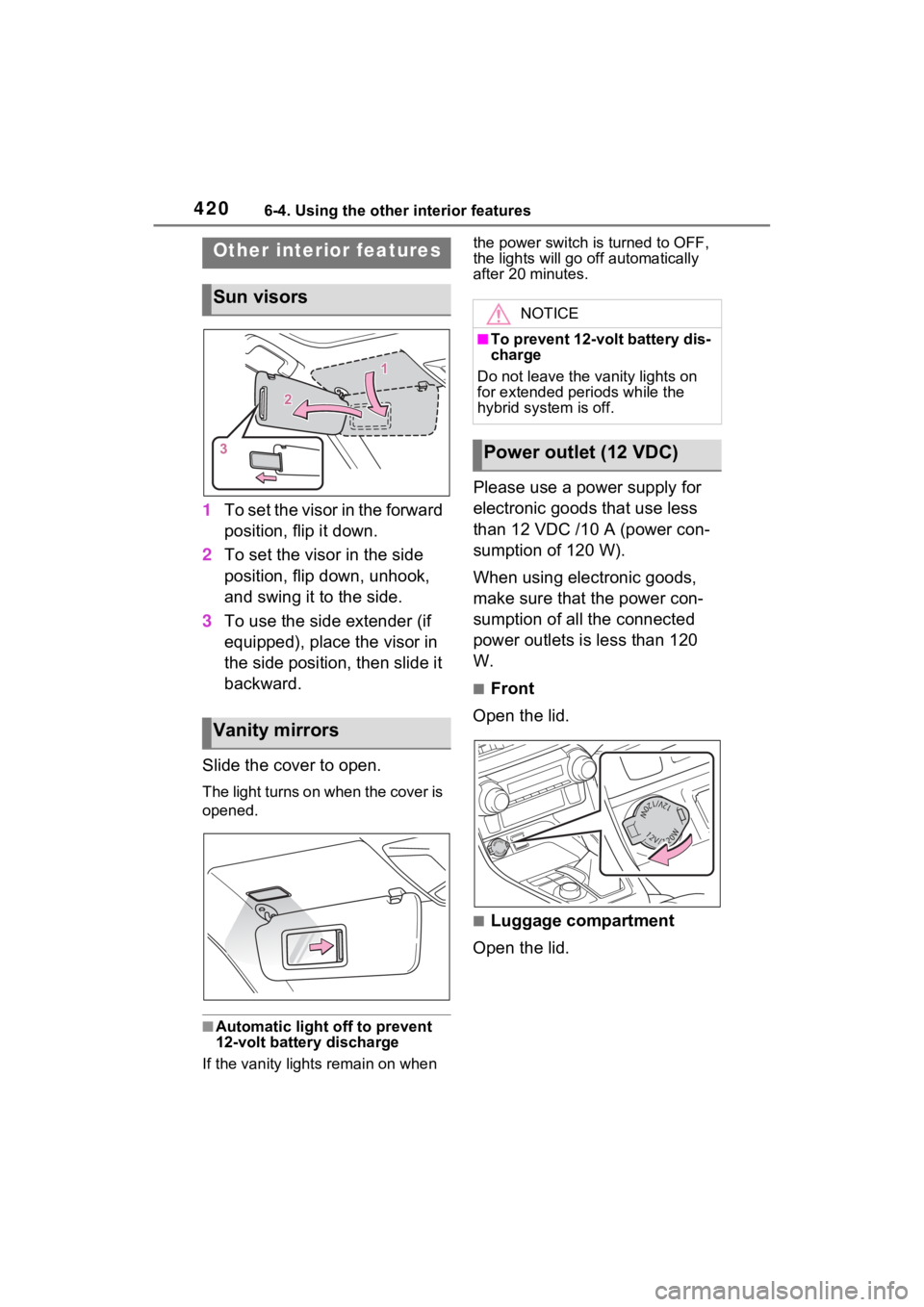
1To set the visor in the forward
position, flip it down.
2 To set the visor in the side
position, flip down, unhook,
and swing it to the side.
3 To use the side extender (if
equipped), place the visor in
the side position, then slide it
backward.
Slide the cover to open.
The light turns on when the cover is
opened.
■Automatic light off to prevent
12-volt battery discharge
If the vanity light s remain on when the power switch is turned to OFF,
the lights will go off automatically
after 20 minutes.
Please use a power supply for
electronic goods that use less
than 12 VDC /10 A (power con-
sumption of 120 W).
When using electronic goods,
make sure that the power con-
sumption of all the connected
power outlets is less than 120
W.
■Front
Open the lid.
■Luggage compartment
Open the lid.
Other interior features
Sun visors
Vanity mirrors
NOTICE
■To prevent 12-volt battery dis-
charge
Do not leave the vanity lights on
for extended periods while the
hybrid system is off.
Power outlet (12 VDC)
Page 435 of 618
4356-4. Using the other interior features
6
Interior features
The coat hooks are provided
with the rear assist grips.
*: If equipped
The HomeLink® wireless control
system in your vehicle has 3
buttons which can be pro-
grammed to operate 3 different
devices. Refer to the program-
ming methods on the following
pages to determine the method
which is appropriate for the
device.
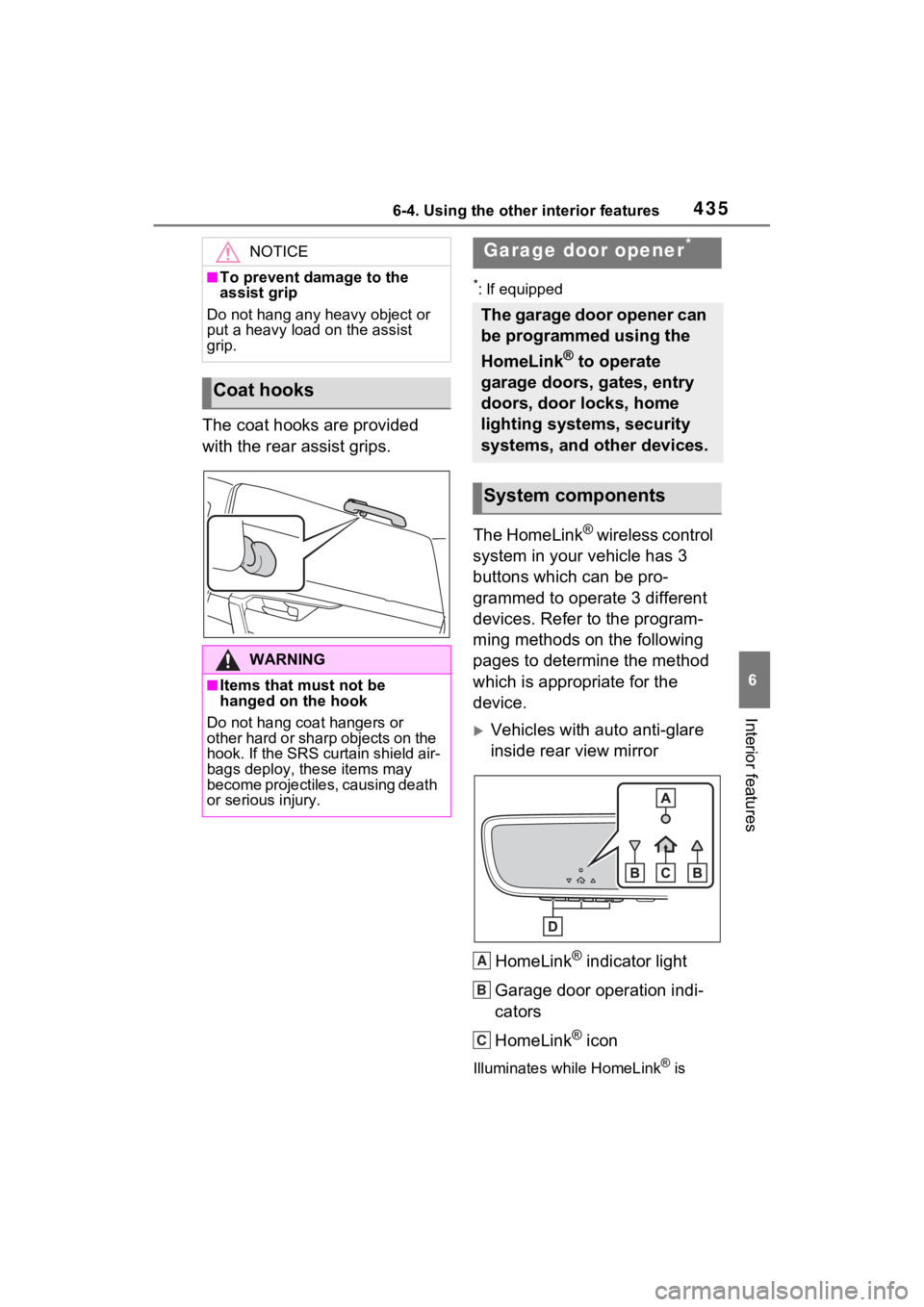
Vehicles with auto anti-glare
inside rear view mirror
HomeLink
® indicator light
Garage door operation indi-
cators
HomeLink
® icon
Illuminates while HomeLink® is
NOTICE
■To prevent damage to the
assist grip
Do not hang any heavy object or
put a heavy load on the assist
grip.
Coat hooks
WARNING
■Items that must not be
hanged on the hook
Do not hang coat hangers or
other hard or sharp objects on the
hook. If the SRS curtain shield air-
bags deploy, these items may
become projectiles, causing death
or serious injury.
Garage door opener*
The garage door opener can
be programmed using the
HomeLink
® to operate
garage doors, gates, entry
doors, door locks, home
lighting systems, security
systems, and other devices.
System components
A
B
C
Page 436 of 618
4366-4. Using the other interior features
operating.
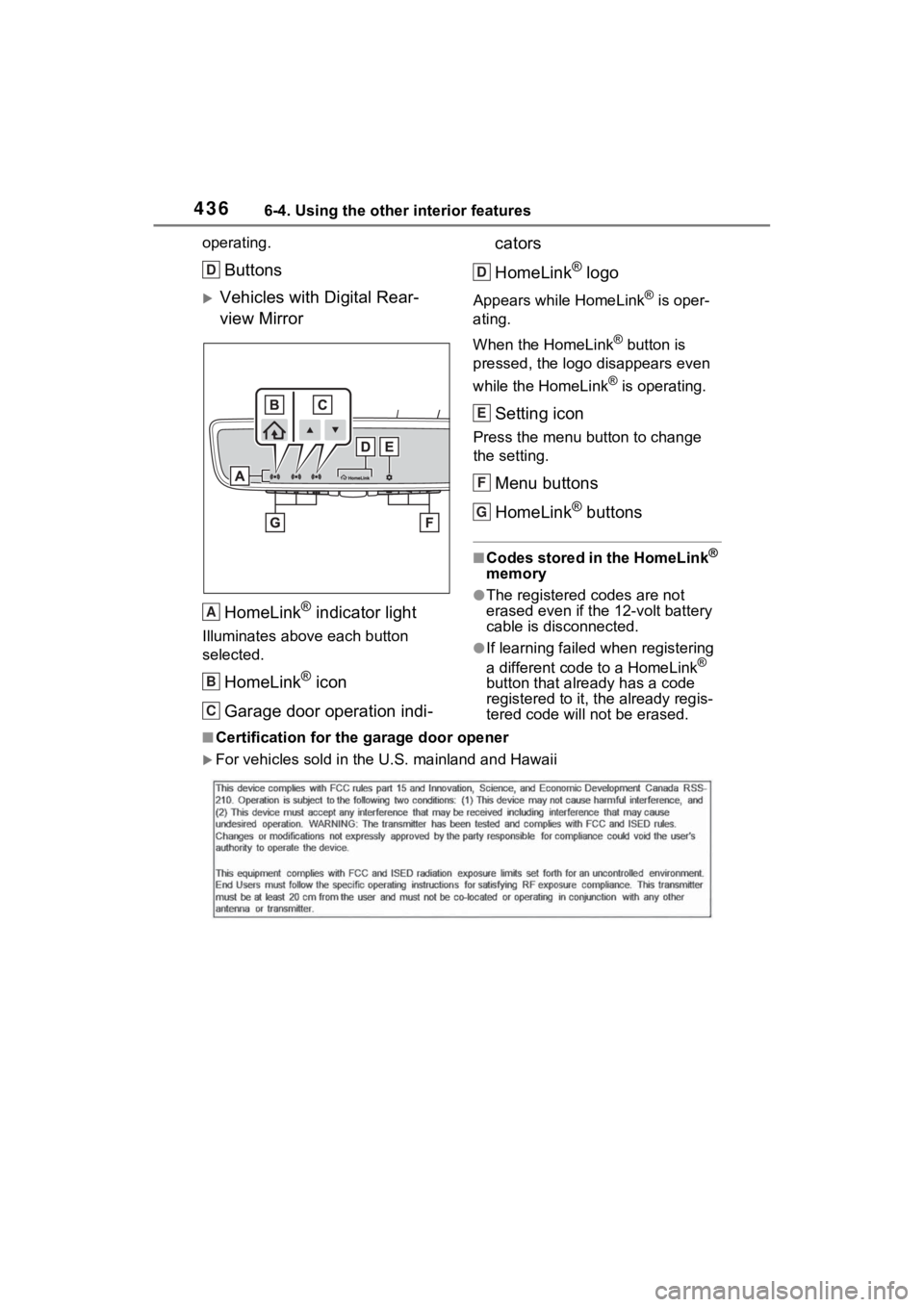
Buttons
Vehicles with Digital Rear-
view MirrorHomeLink
® indicator light
Illuminates above each button
selected.
HomeLink® icon
Garage door operation indi- cators
HomeLink
® logo
Appears while HomeLink® is oper-
ating.
When the HomeLink
® button is
pressed, the logo disappears even
while the HomeLink
® is operating.
Setting icon
Press the menu button to change
the setting.
Menu buttons
HomeLink
® buttons
■Codes stored in the HomeLink®
memory
●The registered codes are not
erased even if the 12-volt battery
cable is disconnected.
●If learning failed when registering
a different code to a HomeLink®
button that already has a code
registered to it, the already regis-
tered code will not be erased.
■Certification for the garage door opener
For vehicles sold in the U.S. mainland and Hawaii
D
A
B
C
D
E
F
G
Page 438 of 618
4386-4. Using the other interior features
Garage door opener motors
manufactured after 1995 may
be equipped with rolling code
protection. If this is the case,
you may need a stepladder or
other sturdy, safe device to
reach the “Learn” or “Smart”
button on the garage door
opener motor.
■Programming HomeLink®
Steps 2 through 4 must be per-
formed within 60 seconds, oth-
erwise the HomeLink
® indicator
light will stop flashing and pro-
gramming will not be success-
fully completed.
1 Vehicles with Digital Rear-
view Mirror: Press the
HomeLink
® button or menu
button
When the HomeLink® button is
pressed:
Homelink
® Training Tutorial will be
displayed to assist you program-
ming the HomeLink
®.
When Homelink
® Training Tutorial
is displayed, follow the instructions
displayed.
When the menu button is pressed:
Press the menu button and
select the “Set Up >”. Homelink
®
Training Tutorial will be displayed
to assist you programming the
HomeLink
®.
When Homelink
® Training Tutorial
is displayed, follow the instructions
displayed.
2 Press and release the
HomeLink
® button you want to program and check that
the HomeLink
® indicator light
flashes (orange).
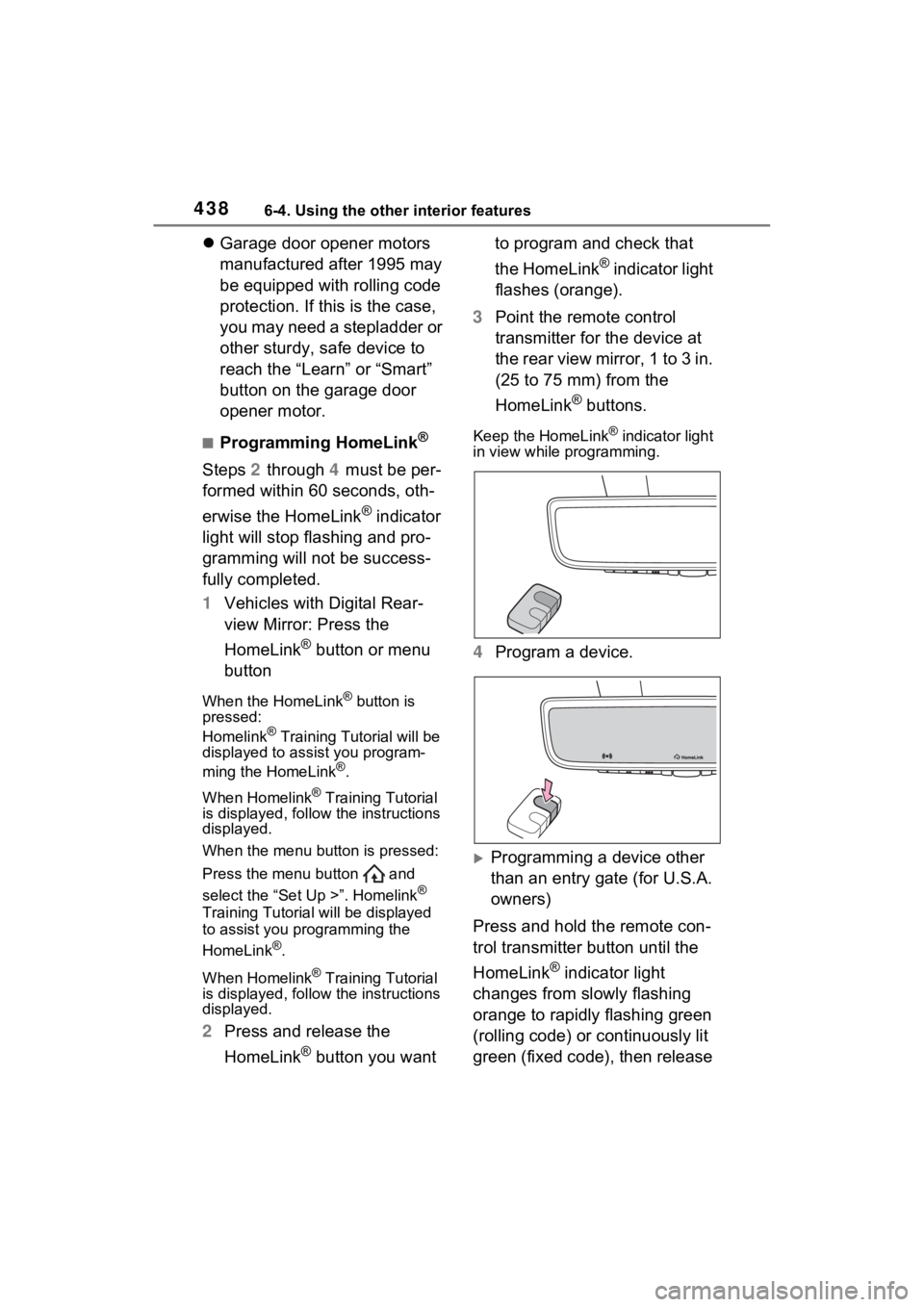
3 Point the remote control
transmitter for the device at
the rear view mirror, 1 to 3 in.
(25 to 75 mm) from the
HomeLink
® buttons.
Keep the HomeLink® indicator light
in view while programming.
4 Program a device.
Programming a device other
than an entry gate (for U.S.A.
owners)
Press and hold the remote con-
trol transmitter button until the
HomeLink
® indicator light
changes from slowly flashing
orange to rapidly flashing green
(rolling code) or continuously lit
green (fixed code), then release