charging TOYOTA RAV4 PRIME 2021 Manual Online
[x] Cancel search | Manufacturer: TOYOTA, Model Year: 2021, Model line: RAV4 PRIME, Model: TOYOTA RAV4 PRIME 2021Pages: 618, PDF Size: 24.18 MB
Page 178 of 618

1783-1. Instrument cluster
system.
“Brightness”
Select to switch the brightness of
the outside rear view mirror indica-
tors. ( P.347)
“Sensitivity”
Select to change the alert timing for
an approaching vehicle.
■ (Intuitive parking
assist) (if equipped)
( P.356)
Select to set up the following
items.
Intuitive parking assist on/off
Select to enable/disable the Intui-
tive parking assist.
“Volume”
Select to set the volume of the
buzzer which sounds when the
Intuitive parking assist is operated.
■RCTA (Rear Cross Traffic
Alert) (P.347)
RCTA (Rear Cross Traffic
Alert) on/off
Select to enable/disable the RCTA
system.
“Volume”
Select to change t he RCTA buzzer
volume.
■ PKSB (Parking Sup-
port Brake System) (if
equipped) ( P.363)
Select to enable/disable the
Parking Support Brake function.
■“HUD Main” (if equipped)
( P.182)
HUD on/off
Select to enable/disable the head-
up display.
“HUD Brightness/Position”
Select to adjust the brightness or
vertical position of the head-up dis-
play.
“HUD Driving Support”
Select to change the items dis-
played on the head-up display.
“HUD Rotation”
Select to adjus t the angle of the
head-up display.
■ RSA (Road Sign
Assist) (if equipped)
( P.333)
Select to set up the following
items.
Road Sign Assist on/off
Select to enable /disable the RSA
system.
“Notification Method”
Select to change each notification
method used to notify the driver
when the system recognizes
excess speed, no overtaking and
no-entry sign.
“Notification Level”
Select to change each notification
level used to notify the driver when
the system recognizes a speed limit
sign.
■Vehicle Settings
“Charging Settings”
Page 179 of 618
1793-1. Instrument cluster
3
Vehicle status information and indicators
Select to set up the following items.
• “Charging Schedule”
Select to register or change the
charging schedule. ( P.130)
• “Charging Current”
Select to change the charging cur-
rent. ( P.112)
• “Connector Lock”
Select to change the charging con-
nector lock settings. ( P.109)
• “Battery Heater”
Select to enable/disable the bat-
tery heater. ( P.115)
• “Battery Cooler”
Select to enable/disable the bat-
tery cooler. ( P.116)
PBD (Power Back Door)
(if equipped) ( P.207)
Select to set up the following items.
• System settings
Select to enable/disable the power
back door system.
• “Hands Free”
*
Select to enable/disable the Hands
Free Power Back Door.
• “Opening Adjustment”
Select the open position when
power back door is fully open.
•“Volume”
Select to set the volume of the
buzzer which sounds when the
power back door system operates.
*: Vehicles with Hands Free Power
Back Door
“TPWS” (Tire Pressure Warn-
ing System) ( P.471)
• “Setting Pressure”
Select to initialize the tire pressure
warning system.
• “Identify Wheel”
Select to register the ID codes of
the tire pressure se nsors to the tire
pressure warning system.
• “Setting Unit”
Select to change the units of mea-
sure displayed.
“Scheduled Maintenance”
( P.451)
Select to reset the scheduled main-
tenance information (message indi-
cating maintenance is required and
distance until the next mainte-
nance) after all ma intenance is per-
formed.
“Rear Seat Reminder”
( P.200)
Select to enable/disable the rear
seat reminder.
■ Settings
“Language”
Select to change the language on
the multi-information display.
“Units”
Select to change the units of mea-
sure displayed.
“Meter Type”
Select to change the speedometer
display.
(EV indicator) ( P.82)
Select to enable/disable the EV
indicator.
(Driving information dis-
play settings)
Page 188 of 618
1883-1. Instrument cluster
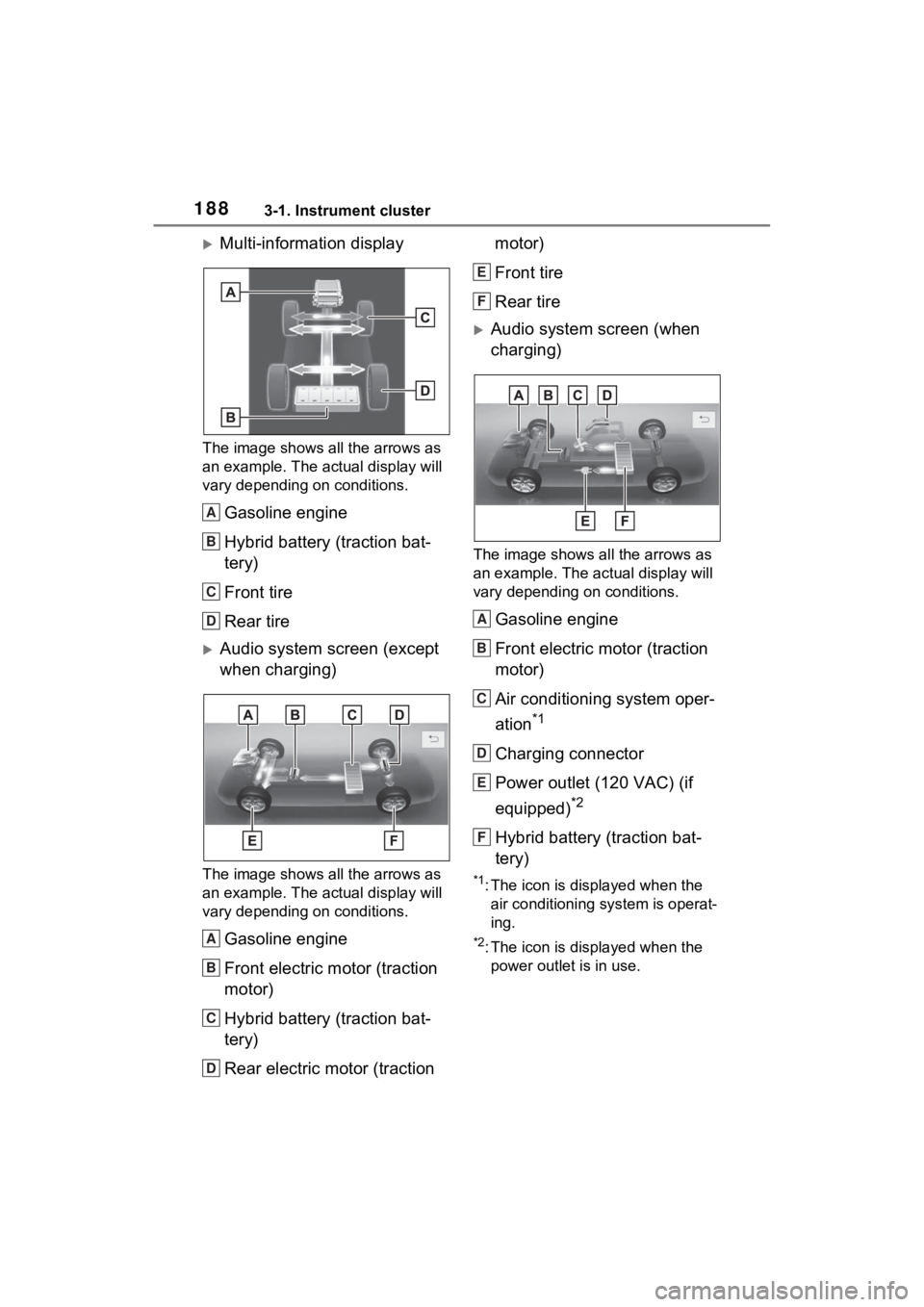
Multi-information display
The image shows all the arrows as
an example. The actual display will
vary depending on conditions.
Gasoline engine
Hybrid battery (traction bat-
tery)
Front tire
Rear tire
Audio system screen (except
when charging)
The image shows all the arrows as
an example. The actual display will
vary depending on conditions.
Gasoline engine
Front electric motor (traction
motor)
Hybrid battery (traction bat-
tery)
Rear electric motor (traction motor)
Front tire
Rear tire
Audio system screen (when
charging)
The image shows all the arrows as
an example. The ac
tual display will
vary depending on conditions.
Gasoline engine
Front electric motor (traction
motor)
Air conditioning system oper-
ation
*1
Charging connector
Power outlet (120 VAC) (if
equipped)
*2
Hybrid battery (traction bat-
tery)
*1: The icon is displayed when the air conditioning system is operat-
ing.
*2: The icon is displayed when the power outlet is in use.
A
B
C
D
A
B
C
D
E
F
A
B
C
D
E
F
Page 189 of 618
1893-1. Instrument cluster
3
Vehicle status information and indicators
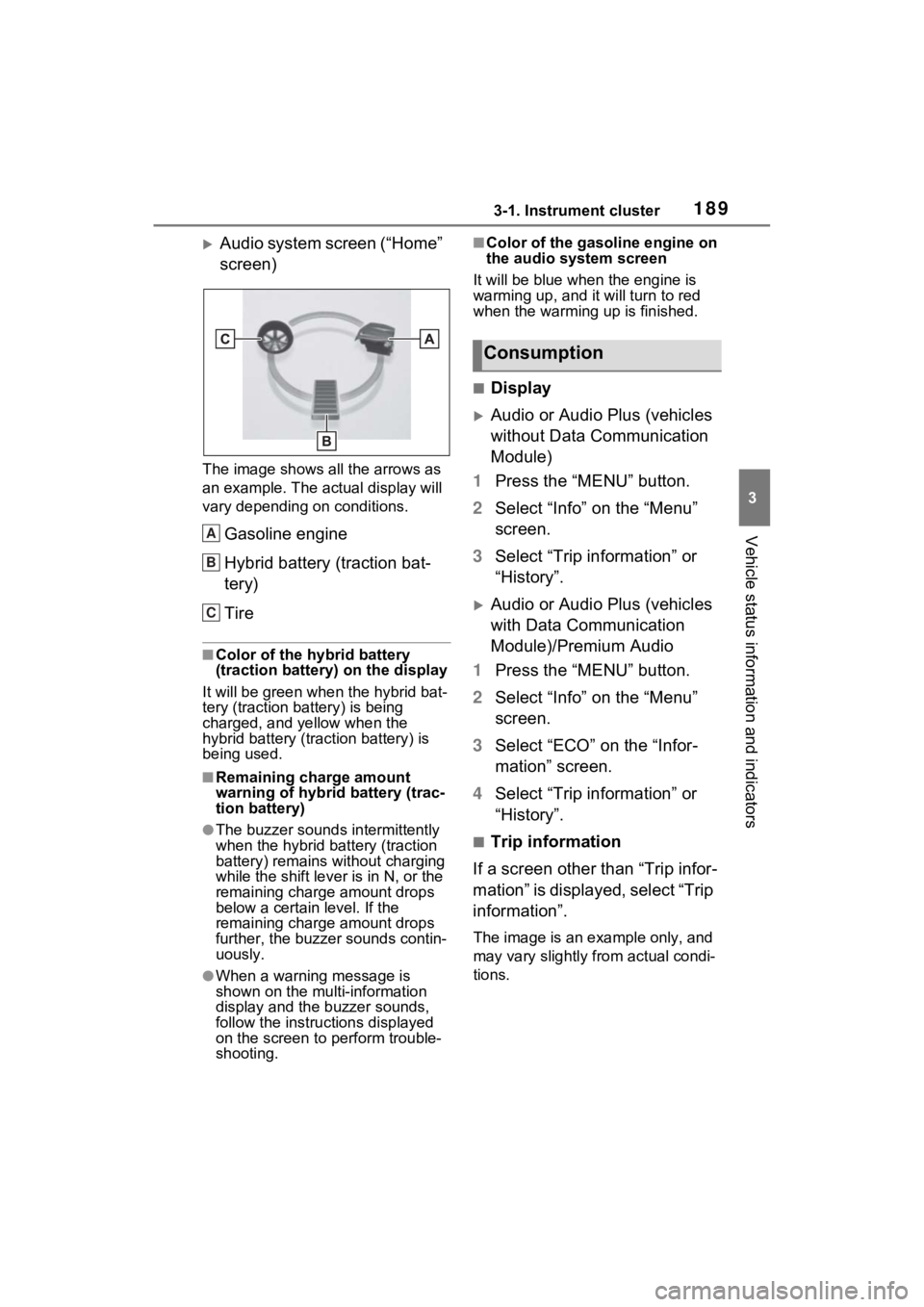
Audio system screen (“Home”
screen)
The image shows all the arrows as
an example. The actual display will
vary depending on conditions.
Gasoline engine
Hybrid battery (traction bat-
tery)
Tire
■Color of the hybrid battery
(traction battery) on the display
It will be green whe n the hybrid bat-
tery (traction battery) is being
charged, and yellow when the
hybrid battery (traction battery) is
being used.
■Remaining charge amount
warning of hybrid battery (trac-
tion battery)
●The buzzer sounds intermittently
when the hybrid battery (traction
battery) remains without charging
while the shift leve r is in N, or the
remaining charge amount drops
below a certain level. If the
remaining charge amount drops
further, the buzzer sounds contin-
uously.
●When a warning message is
shown on the multi-information
display and the buzzer sounds,
follow the instructions displayed
on the screen to p erform trouble-
shooting.
■Color of the gasoline engine on
the audio system screen
It will be blue when the engine is
warming up, and it will turn to red
when the warming up is finished.
■Display
Audio or Audio Plus (vehicles
without Data Communication
Module)
1 Press the “MENU” button.
2 Select “Info” on the “Menu”
screen.
3 Select “Trip information” or
“History”.
Audio or Audio Plus (vehicles
with Data Communication
Module)/Premium Audio
1 Press the “MENU” button.
2 Select “Info” on the “Menu”
screen.
3 Select “ECO” on the “Infor-
mation” screen.
4 Select “Trip information” or
“History”.
■Trip information
If a screen other than “Trip infor-
mation” is displayed, select “Trip
information”.
The image is an example only, and
may vary slightly from actual condi-
tions.
A
B
C
Consumption
Page 198 of 618
1984-2. Opening, closing and locking the doors
4-2.Opening, closing and locking the doors
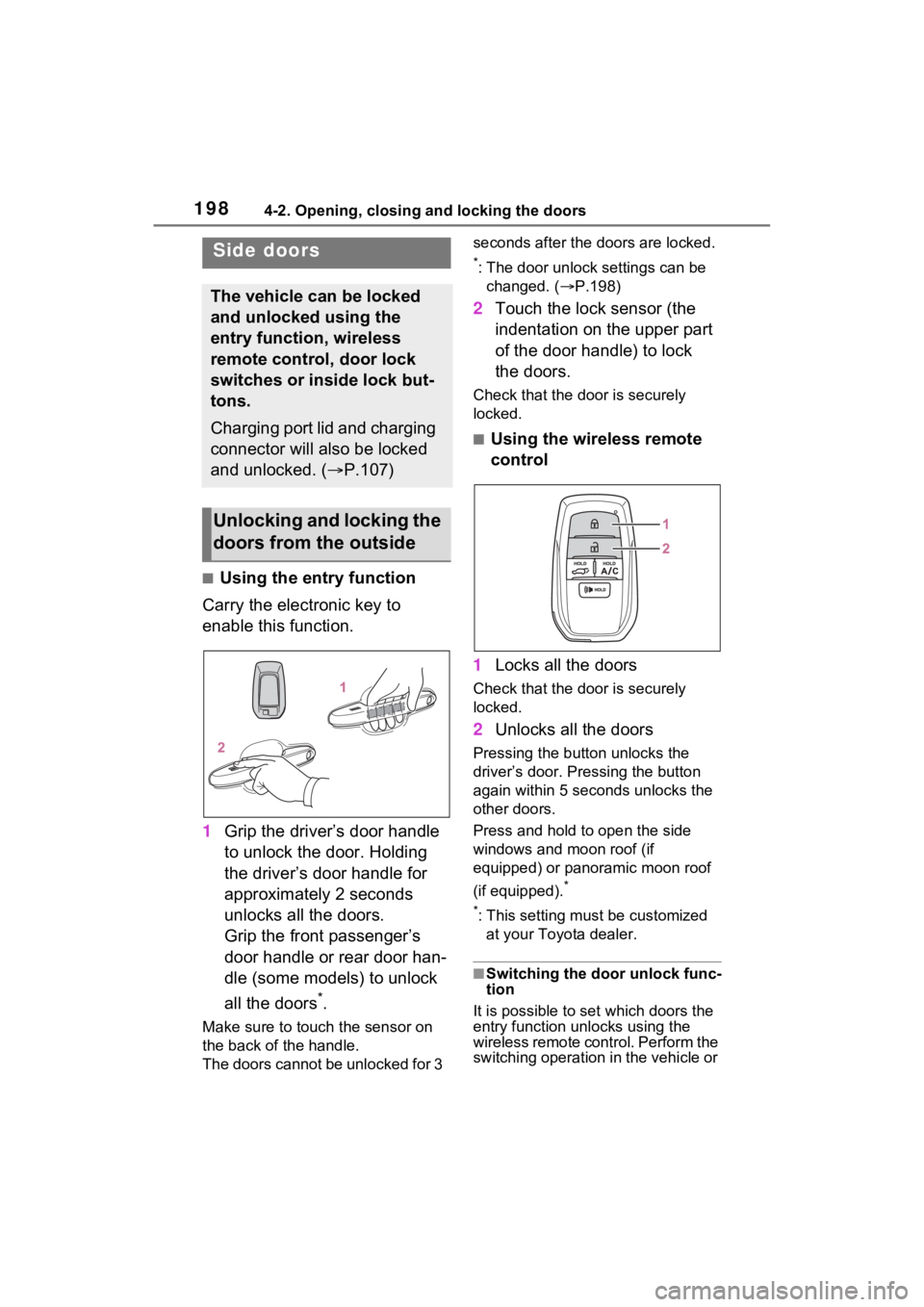
■Using the entry function
Carry the electronic key to
enable this function.
1 Grip the driver’s door handle
to unlock the door. Holding
the driver’s door handle for
approximately 2 seconds
unlocks all the doors.
Grip the front passenger’s
door handle or rear door han-
dle (some models) to unlock
all the doors
*.
Make sure to touch the sensor on
the back of the handle.
The doors cannot be unlocked for 3 seconds after the doors are locked.
*: The door unlock settings can be
changed. ( P.198)
2 Touch the lock sensor (the
indentation on the upper part
of the door handle) to lock
the doors.
Check that the d oor is securely
locked.
■Using the wireless remote
control
1 Locks all the doors
Check that the d oor is securely
locked.
2 Unlocks all the doors
Pressing the button unlocks the
driver’s door. Pressing the button
again within 5 seconds unlocks the
other doors.
Press and hold to open the side
windows and moon roof (if
equipped) or panoramic moon roof
(if equipped).
*
*
: This setting must be customized at your Toyota dealer.
■Switching the door unlock func-
tion
It is possible to set which doors the
entry function unlocks using the
wireless remote control. Perform the
switching operation in the vehicle or
Side doors
The vehicle can be locked
and unlocked using the
entry function, wireless
remote control, door lock
switches or inside lock but-
tons.
Charging port lid and charging
connector will also be locked
and unlocked. ( P.107)
Unlocking and locking the
doors from the outside
Page 203 of 618
2034-2. Opening, closing and locking the doors
4
Before driving
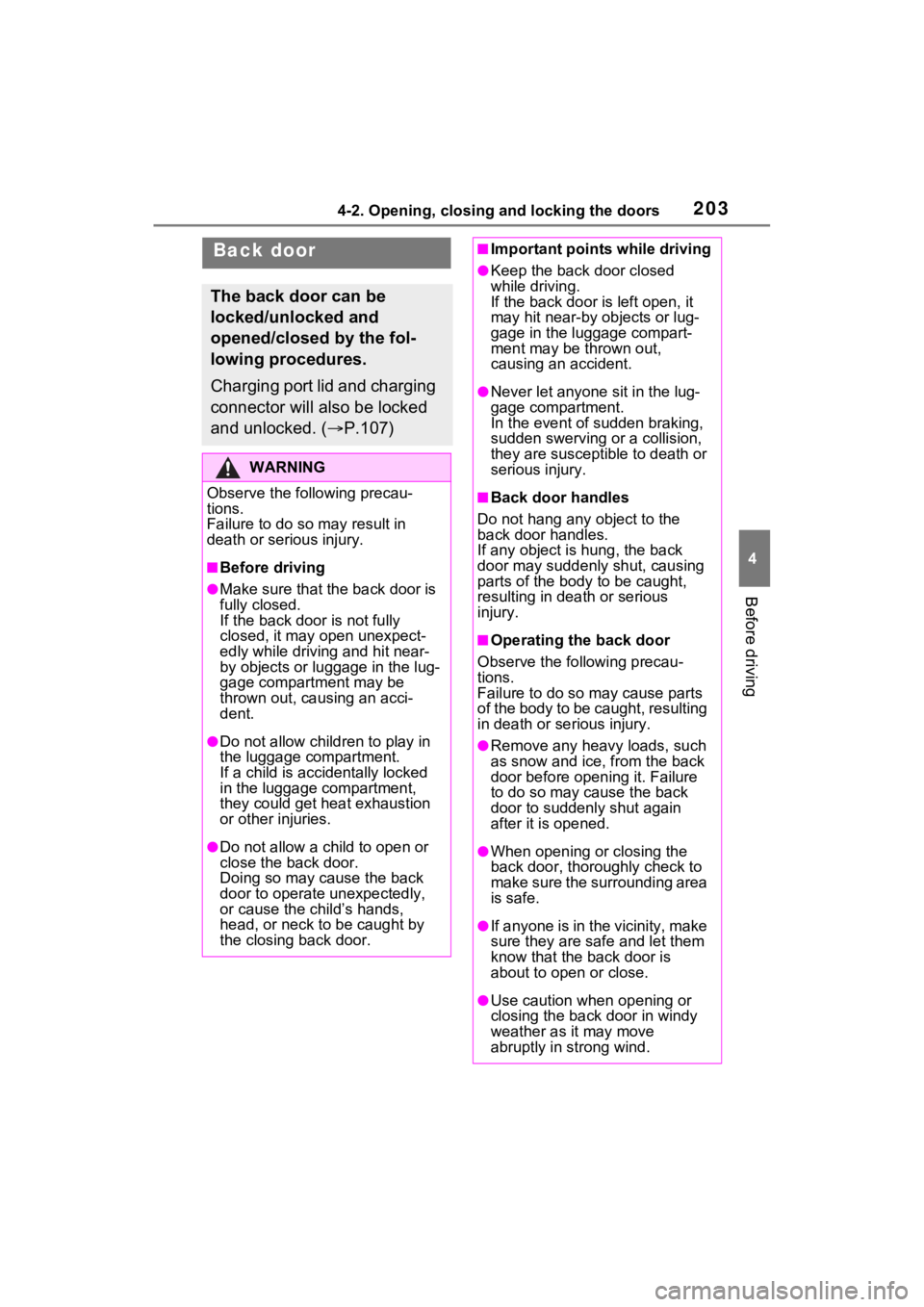
Back door
The back door can be
locked/unlocked and
opened/closed by the fol-
lowing procedures.
Charging port lid and charging
connector will also be locked
and unlocked. (P.107)
WARNING
Observe the following precau-
tions.
Failure to do so m ay result in
death or serious injury.
■Before driving
●Make sure that the back door is
fully closed.
If the back door is not fully
closed, it may open unexpect-
edly while driving and hit near-
by objects or luggage in the lug-
gage compartment may be
thrown out, causing an acci-
dent.
●Do not allow child ren to play in
the luggage compartment.
If a child is accidentally locked
in the luggage compartment,
they could get heat exhaustion
or other injuries.
●Do not allow a child to open or
close the back door.
Doing so may cause the back
door to operate unexpectedly,
or cause the child’s hands,
head, or neck to be caught by
the closing back door.
■Important points while driving
●Keep the back door closed
while driving.
If the back door is left open, it
may hit near-by objects or lug-
gage in the luggage compart-
ment may be thrown out,
causing an accident.
●Never let anyone sit in the lug-
gage compartment.
In the event of sudden braking,
sudden swerving or a collision,
they are susceptible to death or
serious injury.
■Back door handles
Do not hang any object to the
back door handles.
If any object is hung, the back
door may suddenly shut, causing
parts of the body to be caught,
resulting in dea th or serious
injury.
■Operating the back door
Observe the following precau-
tions.
Failure to do so may cause parts
of the body to be caught, resulting
in death or se rious injury.
●Remove any heavy loads, such
as snow and ice, from the back
door before opening it. Failure
to do so may cause the back
door to suddenly shut again
after it is opened.
●When opening or closing the
back door, thoroughly check to
make sure the surrounding area
is safe.
●If anyone is in the vicinity, make
sure they are safe and let them
know that the back door is
about to open or close.
●Use caution when opening or
closing the back door in windy
weather as it may move
abruptly in strong wind.
Page 211 of 618
2114-2. Opening, closing and locking the doors
4
Before driving
●If the rear bumper is strongly hit
with a foot or is touched for a while
If the rear bumper has been touched
for a while, wait for a short time
before attempting to operate the
Hands Free Power Back Door
again.
●When operated while a person is
too close to the rear bumper
●When an external radio wave
source interferes with the commu-
nication between the electronic
key and the vehicle ( P.218)
●When charging from an external
power source or connecting the
AC charging cable
●When the vehicle is parked near
an electrical noise source which
affects the sensitivity of the Hands
Free Power Back Door, such as a
pay parking spot , gas station,
electrically heated road, or fluo-
rescent light
●When the vehicle is near a TV
tower, electric power plant, radio
station, large display, airport or
other facility that generates strong
radio waves or electrical noise
●When a large amount of water is
applied to the rear bumper, such
as when the vehicle is being
washed or in heavy rain
●When mud, snow, ice, etc. is
attached to the rear bumper
●When the vehicle has been
parked for a while near objects
that may move and contact the
rear bumper, such as plants
●When an accessory is installed to
the rear bumper
If an accessory has been installed,
turn the Hands Free Power Back
Door operation setting off.
■Preventing unintentional opera-
tion of the Hands Free Power
Back Door (vehicles with Hands
Free Power Back Door)
When an electronic key is in the
operation range, the Hands Free
Power Back Door may operate unin-
tentionally, so be careful in the fol-
lowing situations.
●When a large amount of water is
applied to the rea r bumper, such
as when the vehicle is being
washed or in heavy rain
●When dirt is wip ed off the rear
bumper
●When a small animal or small
object, such as a ball, moves
under the rear bumper
●When an object is moved from
under the rear bumper
●If someone is swinging their legs
while sitting on the rear bumper
●If the legs or another part of some-
one’s body contacts the rear
bumper while passing by the vehi-
cle
●When the vehicle is parked near
an electrical noise source which
affects the sensitivity of the Hands
Free Power Back Door, such as a
pay parking spot, gas station,
electrically heated road, or fluo-
rescent light
●When the vehicle is near a TV
tower, electric po wer plant, radio
station, large display, airport or
other facility that generates strong
radio waves or electrical noise
●When the vehicle is parked in a
place where objects such as
plants are near the rear bumper
●If luggage, etc. is set near the rear
bumper
●If accessories or a vehicle cover is
installed/removed near the rear
bumper
●When the vehicle is being towed
To prevent unintentional operation,
Page 217 of 618
2174-2. Opening, closing and locking the doors
4
Before driving
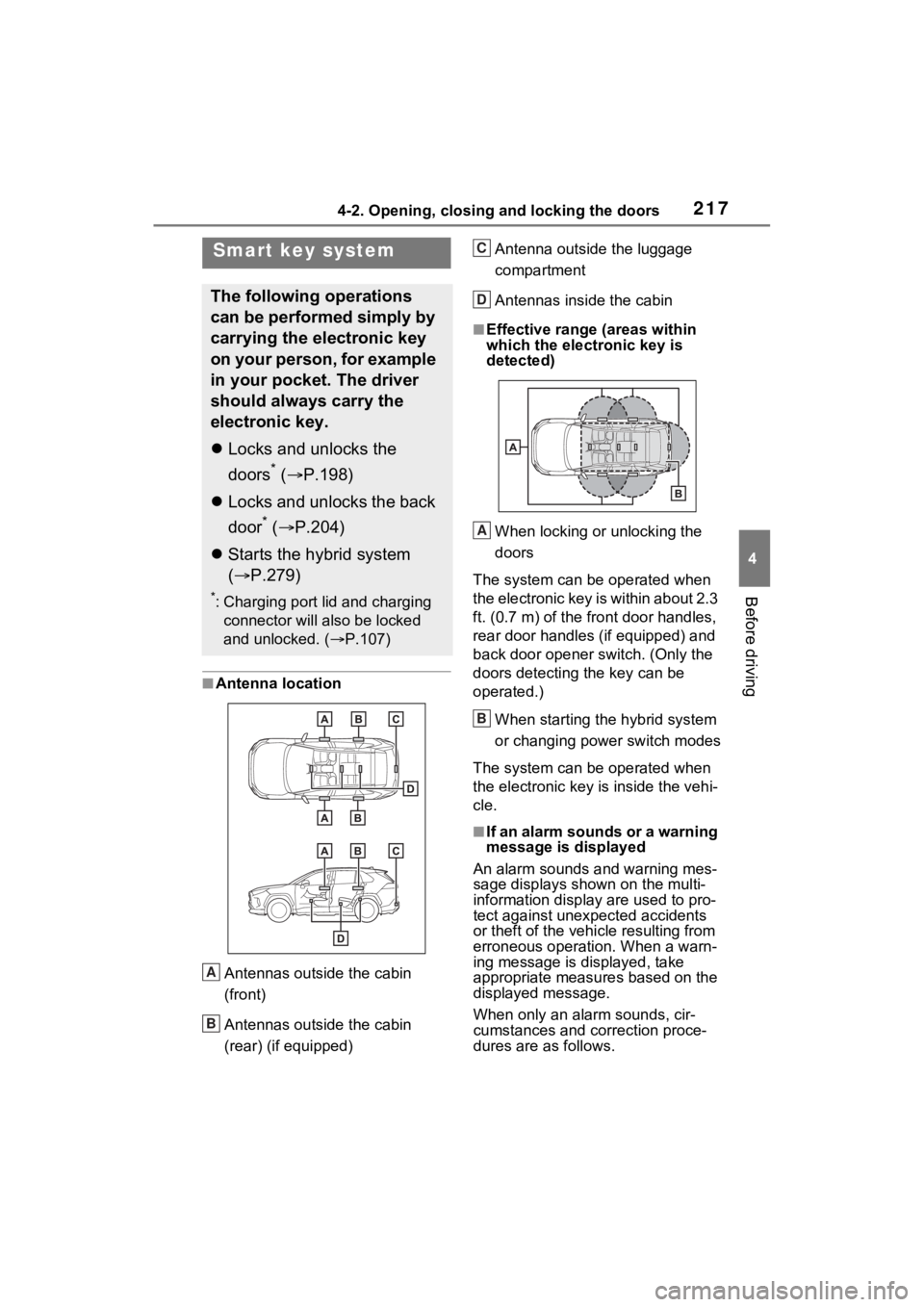
■Antenna location
Antennas outside the cabin
(front)
Antennas outside the cabin
(rear) (if equipped) Antenna outside the luggage
compartment
Antennas inside the cabin
■Effective range
(areas within
which the electronic key is
detected)
When locking or unlocking the
doors
The system can be operated when
the electronic key is within about 2.3
ft. (0.7 m) of the fro nt door handles,
rear door handles (if equipped) and
back door opener s witch. (Only the
doors detecting the key can be
operated.)
When starting the hybrid system
or changing power switch modes
The system can be operated when
the electronic key i s inside the vehi-
cle.
■If an alarm sounds or a warning
message is displayed
An alarm sounds and warning mes-
sage displays shown on the multi-
information display are used to pro-
tect against unexpected accidents
or theft of the vehicl e resulting from
erroneous operation. When a warn-
ing message is displayed, take
appropriate measures based on the
displayed message.
When only an alarm sounds, cir-
cumstances and correction proce-
dures are as follows.
Smart key system
The following operations
can be performed simply by
carrying the electronic key
on your person, for example
in your pocket. The driver
should always carry the
electronic key.
Locks and unlocks the
doors
* ( P.198)
Locks and unlocks the back
door
* ( P.204)
Starts the hybrid system
( P.279)
*: Charging port lid and charging
connector will also be locked
and unlocked. ( P.107)
A
B
C
D
A
B
Page 258 of 618
2585-1. Before driving
5-1.Before driving
■Before starting the hybrid
system
Check that the AC charging
cable is disconnected. ( P.123)
■Starting the hybrid system
P.279
■Driving
1 With the brake pedal
depressed, shift the shift
lever to D. ( P.285)
2 Release the parking brake.
( P.290)
If the parking brake is in automatic
mode, the parking brake is
released automatically when shift-
ing the shift lever to any position
other than P. ( P.290)
3 Gradually release the brake
pedal and gently depress the
accelerator pedal to acceler-
ate the vehicle.
■Stopping
1 With the shift lever in D,
depress the brake pedal.
2 If necessary, set the parking
brake. ( P.290)
If the vehicle is to be stopped for an
extended period of time, shift the
shift lever to P. ( P.285)
■Parking the vehicle
1 With the shift lever in D,
depress the brake pedal.
2 Set the parking brake
( P.290), and shift the shift
lever to P ( P.285).
3 Turn the power switch to
OFF to stop the hybrid sys-
tem.
4 Lock the door, making sure
that you have the key on your
person.
If parking on a hill, block the wheels
as needed.
■Starting off on a steep
uphill
1 With the brake pedal
depressed, shift the shift
lever to D. ( P.285)
2 Pull the parking brake switch
and parking brake is set
manually. ( P.290)
3 Release the brake pedal and
gently depress the accelera-
tor pedal to accelerate the
vehicle.
Parking brake automatic release
function ( P.291)
■When starting off on a uphill
The hill-start assist control will acti-
vate. ( P.381)
■For electricity-s aving and fuel-
efficient driving
Understand the system characteris-
tics of the vehicle to use the func-
tions of the hybrid system. Also,
keep in mind that hybrid vehicles
are similar to conventional vehicles,
and it is necessary to refrain from
Driving the vehicle
The following procedures
should be observed to
ensure safe driving:
Driving procedure
Page 279 of 618
2795-2. Driving procedures
5
Driving
5-2.Driving procedures
1Check that the AC charging
cable is disconnected.
( P.123)
2 Pull the parking brake switch
to check that the parking
brake is set. ( P.290)
The parking brake indicator will
come on.
3Check that the shift lever is
set in P.
4 Firmly depress the brake
pedal.
and a messa ge will be dis-
played on the multi-information dis-
play.
If it is not displayed, the hybrid sys-
tem cannot be started.
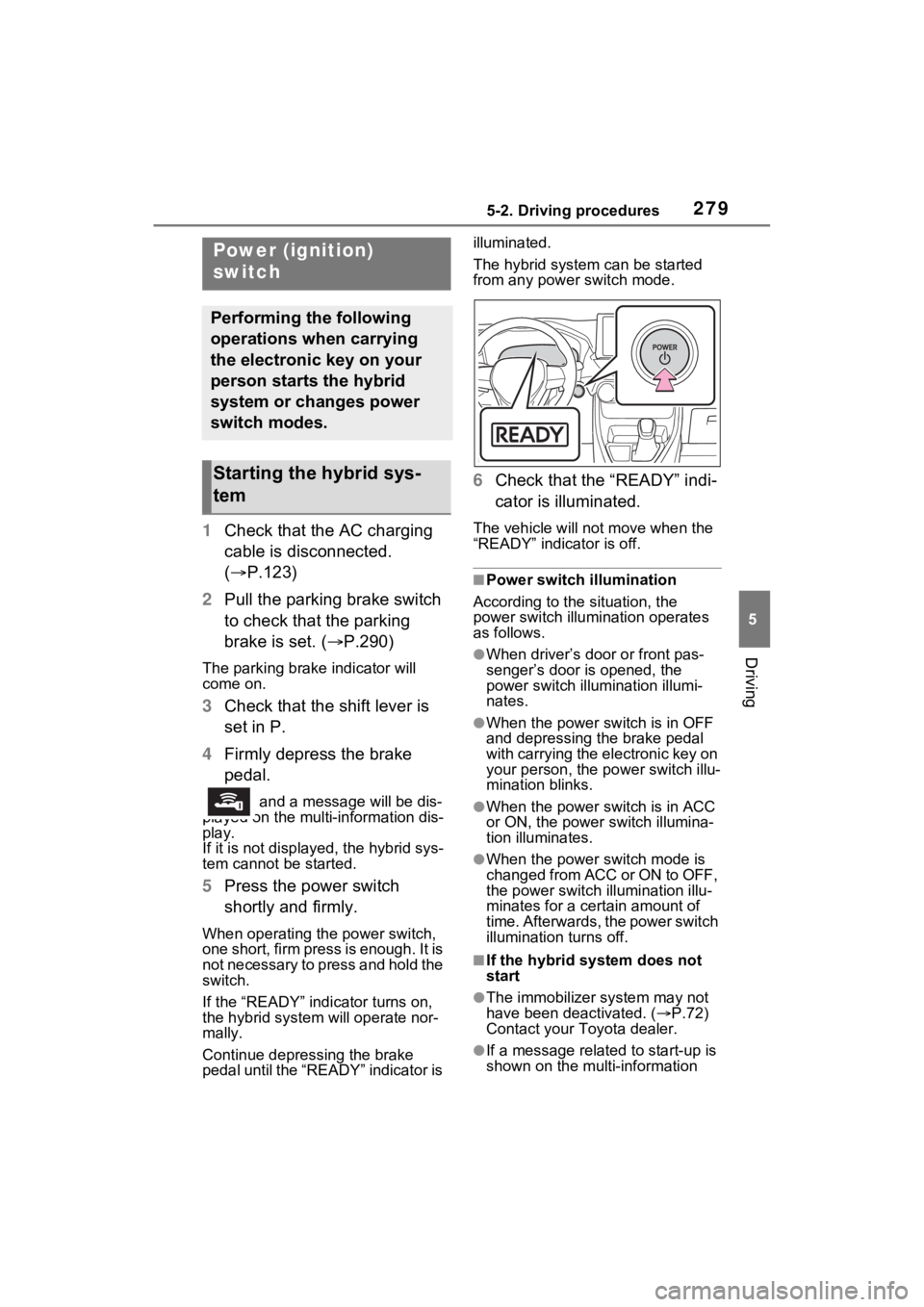
5 Press the power switch
shortly and firmly.
When operating the power switch,
one short, firm press is enough. It is
not necessary to press and hold the
switch.
If the “READY” indicator turns on,
the hybrid system will operate nor-
mally.
Continue depressing the brake
pedal until the “READY” indicator is illuminated.
The hybrid system can be started
from any power switch mode.
6
Check that the “READY” indi-
cator is illuminated.
The vehicle will not move when the
“READY” indicator is off.
■Power switch illumination
According to the situation, the
power switch illu mination operates
as follows.
●When driver’s door or front pas-
senger’s door is opened, the
power switch illu mination illumi-
nates.
●When the power switch is in OFF
and depressing t he brake pedal
with carrying the electronic key on
your person, the power switch illu-
mination blinks.
●When the power switch is in ACC
or ON, the power switch illumina-
tion illuminates.
●When the power switch mode is
changed from ACC or ON to OFF,
the power switch illumination illu-
minates for a certain amount of
time. Afterwards, the power switch
illumination turns off.
■If the hybrid system does not
start
●The immobilizer system may not
have been deactivated. ( P.72)
Contact your Toyota dealer.
●If a message related to start-up is
shown on the multi-information
Power (ignition)
switch
Performing the following
operations when carrying
the electronic key on your
person starts the hybrid
system or changes power
switch modes.
Starting the hybrid sys-
tem