parking brake TOYOTA RAV4 PRIME 2022 Owner's Manual
[x] Cancel search | Manufacturer: TOYOTA, Model Year: 2022, Model line: RAV4 PRIME, Model: TOYOTA RAV4 PRIME 2022Pages: 624, PDF Size: 24.01 MB
Page 275 of 624

2755-1. Before driving
5
Driving
4Apply the parking brake
firmly.
5 Shift into P and turn off the
hybrid system.
When restarting after parking
on a slope:
1 With the transmission in P,
start the hybrid system. Be
sure to keep the brake pedal
depressed.
2 Shift into a forward gear. If
reversing, shift into R.
3 If the parking brake is in man-
ual mode, release the park-
ing brake. ( P.287)
4 Release the brake pedal, and
slowly pull or back away from
the wheel blocks. Stop and
apply the brakes.
5 Have someone retrieve the
blocks.
■Break-in schedule
If your vehicle is new or equipped
with any new power train compo-
nents (such as an engine, transmis-
sion, differential or wheel bearing),
Toyota recommends that you do not
tow a trailer unt il the vehicle has
been driven for over 500 miles (800
km).
After the vehicle has been driven for
over 500 miles (800 km), you can
start towing. However, for the next
500 miles (800 km), drive the vehi-
cle at a speed of less than 45 mph
(72 km/h) when towing a trailer, and
avoid full throttle acceleration.
■Maintenance
●If you tow a traile r, your vehicle
will require more f requent mainte-
nance due to the additional load. (See “Scheduled Maintenance
Guide” or “Owner
’s Manual Sup-
plement”.)
●Retighten the fixing bolts of the
towing ball and bracket after
approximately 600 miles (1000
km) of tra iler towing.
■If trailer sway occurs
One or more factors (crosswinds,
passing vehicles, rough roads, etc.)
can adversely affect handling of
your vehicle and t railer, causing
instability.
●If trailer swaying occurs:
• Firmly grip the steering wheel. Steer straight ahead.
Do not try to contr ol trailer sway-
ing by turning the steering wheel.
• Begin releasing the accelerator
pedal immediately but very gradu-
ally to reduce speed.
Do not increase speed. Do not
apply vehicle brakes.
If you make no extreme correction
with the steering or brakes, your
vehicle and trailer should stabilize (if
enabled, Trailer Sway Control can
also help to stabilize the vehicle and
trailer.).
●After the trailer swaying has
stopped:
• Stop in a safe place. Get all occu-
pants out of the vehicle.
• Check the tires of the vehicle and the trailer.
• Check the load in the trailer. Make sure the load has not
shifted.
Make sure the tongue weight is
appropriate, if possible.
• Check the load in the vehicle.
Make sure the vehicle is not over-
loaded after occupants get in.
If you cannot find any problems, the
speed at which trailer swaying
occurred is beyond the limit of your
particular vehicle-trailer combina-
tion. Drive at a lower speed to pre-
vent instability. Remember that
Page 277 of 624
2775-2. Driving procedures
5
Driving
5-2.Driving procedures
1Check that the AC charging
cable is disconnected.
( P.123)
2 Pull the parking brake switch
to check that the parking
brake is set. ( P.287)
The parking brake indicator will
come on.
3Check that the shift lever is
set in P.
4 Firmly depress the brake
pedal.
and a message will be dis-
played on the multi-information dis-
play.
If it is not displayed, the hybrid sys-
tem cannot be started.
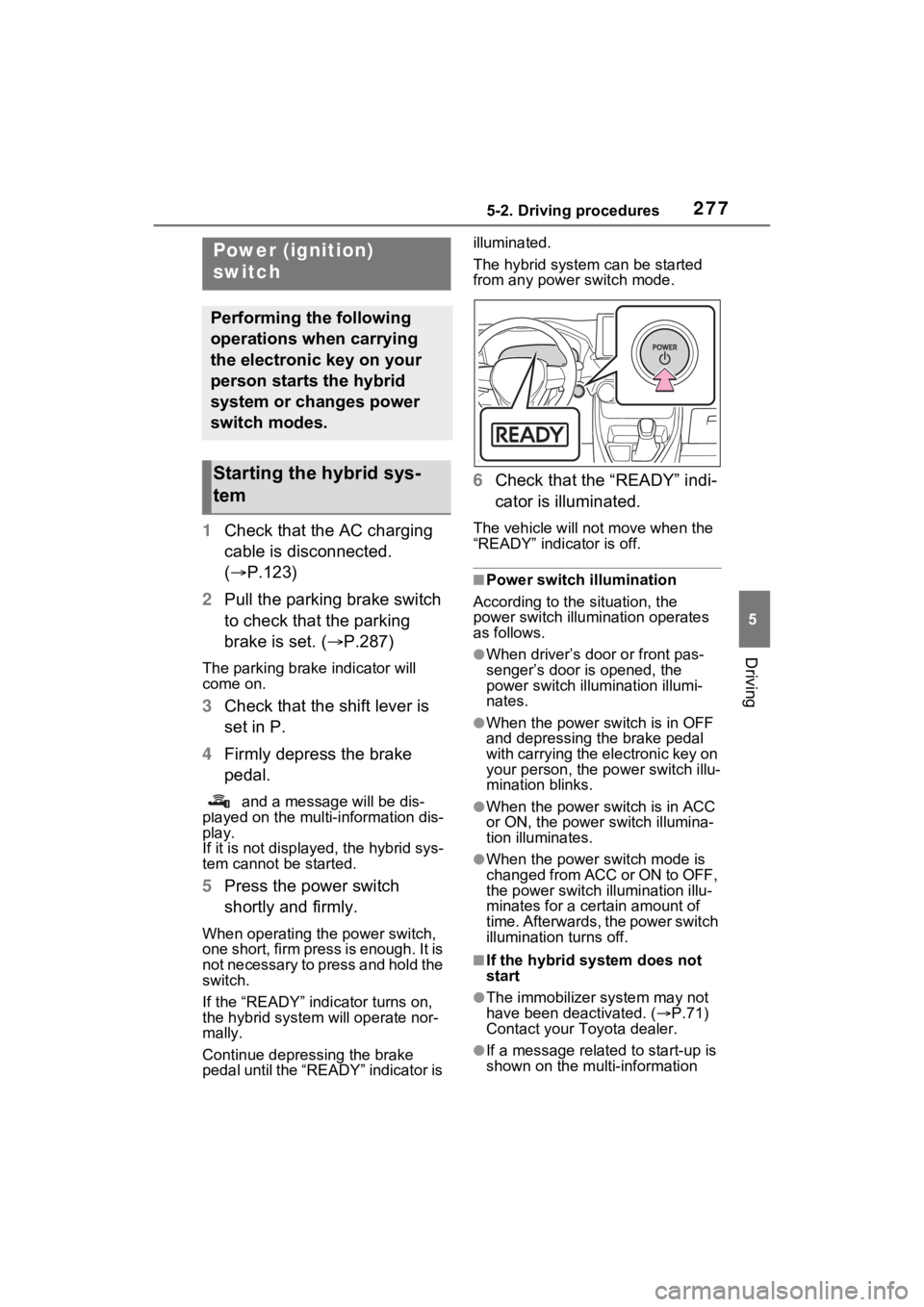
5 Press the power switch
shortly and firmly.
When operating the power switch,
one short, firm press is enough. It is
not necessary to press and hold the
switch.
If the “READY” indicator turns on,
the hybrid system will operate nor-
mally.
Continue depressing the brake
pedal until the “READY” indicator is illuminated.
The hybrid system can be started
from any power switch mode.
6
Check that the “READY” indi-
cator is illuminated.
The vehicle will not move when the
“READY” indicator is off.
■Power switch illumination
According to the situation, the
power switch illu mination operates
as follows.
●When driver’s door or front pas-
senger’s door is opened, the
power switch illu mination illumi-
nates.
●When the power switch is in OFF
and depressing t he brake pedal
with carrying the electronic key on
your person, the power switch illu-
mination blinks.
●When the power switch is in ACC
or ON, the power switch illumina-
tion illuminates.
●When the power switch mode is
changed from ACC or ON to OFF,
the power switch illumination illu-
minates for a certain amount of
time. Afterwards, the power switch
illumination turns off.
■If the hybrid system does not
start
●The immobilizer system may not
have been deactivated. ( P.71)
Contact your Toyota dealer.
●If a message related to start-up is
shown on the multi-information
Power (ignition)
switch
Performing the following
operations when carrying
the electronic key on your
person starts the hybrid
system or changes power
switch modes.
Starting the hybrid sys-
tem
Page 279 of 624
2795-2. Driving procedures
5
Driving
1Stop the vehicle completely.
2 If the parking brake is in man-
ual mode, set the parking
brake. ( P.287)
Check the parking brake indicator
is illuminated.
3 Shift the shift lever to P.
4 Press the power switch
shortly and firmly.
The hybrid system will stop, and the
meter display will be extinguished.
Release the shift lever when press-
ing the power switch.
5Release the brake pedal and
check that “ACCESSORY” or
“IGNITION ON” is not shown
on the multi-information dis-
play.
■Automatic hybrid system shut
off feature
●The vehicle is equipped with a
feature that automatically shuts off
the hybrid system when the shift
lever is in P with the hybrid system
operating for an extended period.
●The hybrid system will automati-
cally shut off after approximately 1
hour if it has been left operating
while the shift lever is in P.
●The message asking if you wish to
enable/disable t he automatic
hybrid syste m shut off feature will
sometimes be displayed on the
multi-information display.
Leaving the vehicle as is or select-
ing “Perform Auto Off” keeps the
automatic hybrid system shut off
feature enabled, or selecting
“Keep Vehicle On” disables the
automatic hybrid system shut off
feature.
●The timer for the automatic hybrid
system shut off feature will reset if
the brake pedal is depressed or if
the shift lever is in a position other
than P.
●After the vehicle is parked, if the
door is locked with the door lock
switch ( P.201) from the inside
or the mechanical key ( P.533)
from the outside , the automatic
hybrid syste m shut off feature will
be disabled. The timer for the
automatic hybrid system shut off
feature will be re-enabled if the
driver’s door is opened.
NOTICE
■When starting the hybrid sys-
tem
If the hybrid system becomes diffi-
cult to start, have your vehicle
checked by your Toyota dealer
immediately.
■Symptoms indicating a mal-
function with the power
switch
If the power switch seems to be
operating somewhat differently
than usual, such as the switch
sticking slightly, there may be a
malfunction. Contact your Toyota
dealer immediately.
Stopping the hybrid sys-
tem
Page 280 of 624
2805-2. Driving procedures
Modes can be changed by
pressing the power switch with
the brake pedal released. (The
mode changes each time the
switch is pressed.)
WARNING
■Stopping the hybrid system
in an emergency
●If you want to stop the hybrid
system in an emergency while
driving the vehicle, press and
hold the power switch for more
than 2 seconds, or press it
briefly 3 times or more in suc-
cession. (P.499)
However, do not touch the
power switch while driving
except in an emergency. Turn-
ing the hybrid system off while
driving will not cause a loss of
steering or braking control.
However, power assist for the
steering wheel may be lost mak-
ing it difficult to steer smoothly
before stopping the vehicle
depending on the remaining
charge in the 12-volt battery or
usage conditions. In this situa-
tion, you should pull over and
stop the vehicle as soon as it is
safe to do so.
●If the power switch is operated
while the vehicle is running, a
warning message will be shown
on the multi-info rmation display
and a buzzer sounds.
●When restarting the hybrid sys-
tem after an emergency shut-
down, shift the shift lever to N
and press the power switch
shortly and firmly.
■When parking
Exhaust gases include harmful
carbon monoxide (CO), which is
colorless and odorless. Observe
the following precautions.
Failure to do so may cause
exhaust gases to enter the vehicle
and may lead to an accident
caused by light-headedness, or
may lead to death or a serious
health hazard.
●If the vehicle is in a poorly venti-
lated area or a closed area,
such as a garage, stop the
hybrid system.
●Do not leave the vehicle with
the hybrid system operating for
a long time. If such a situation
cannot be avoided, park the
vehicle in an open space and
ensure that exhaust fumes do
not enter the ve hicle interior.
●Do not leave the hybrid system
operating in an area with snow
build-up, or where it is snowing.
If snowbanks build up around
the vehicle while the hybrid sys-
tem is operating, exhaust gases
may collect and enter the vehi-
cle.
Changing power switch
modes
Page 281 of 624
2815-2. Driving procedures
5
Driving
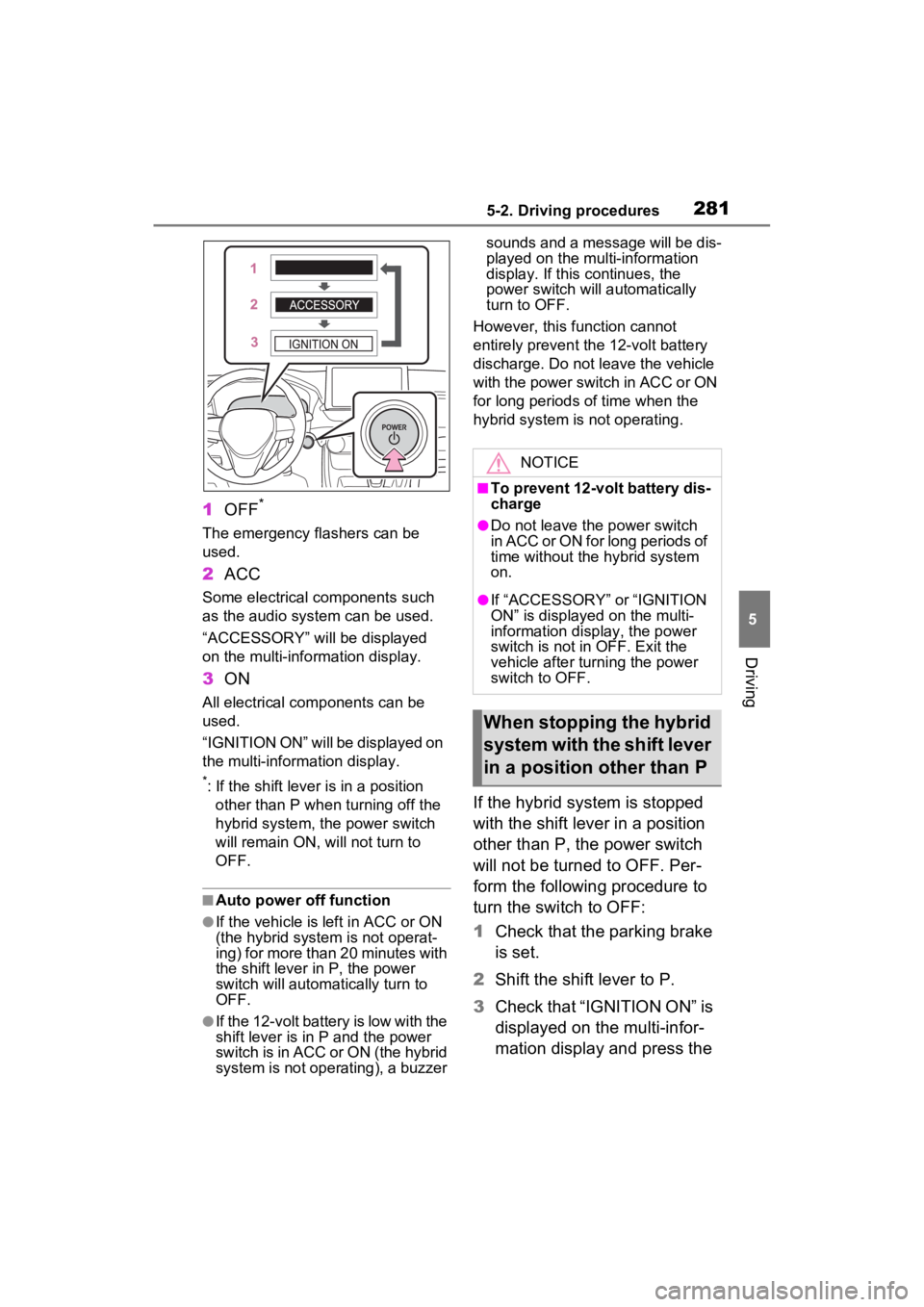
1OFF*
The emergency flashers can be
used.
2ACC
Some electrical components such
as the audio system can be used.
“ACCESSORY” will be displayed
on the multi-info rmation display.
3ON
All electrical com ponents can be
used.
“IGNITION ON” will be displayed on
the multi-inform ation display.
*: If the shift lever is in a position
other than P when turning off the
hybrid system, the power switch
will remain ON, will not turn to
OFF.
■Auto power off function
●If the vehicle is left in ACC or ON
(the hybrid system is not operat-
ing) for more than 20 minutes with
the shift lever in P, the power
switch will automatically turn to
OFF.
●If the 12-volt battery is low with the
shift lever is in P and the power
switch is in ACC or ON (the hybrid
system is not operating), a buzzer sounds and a message will be dis-
played on the multi-information
display. If this continues, the
power switch will automatically
turn to OFF.
However, this fun ction cannot
entirely prevent the 12-volt battery
discharge. Do not leave the vehicle
with the power switch in ACC or ON
for long periods of time when the
hybrid system is not operating.
If the hybrid system is stopped
with the shift lever in a position
other than P, the power switch
will not be turned to OFF. Per-
form the following procedure to
turn the switch to OFF:
1 Check that the parking brake
is set.
2 Shift the shift lever to P.
3 Check that “IGNITION ON” is
displayed on the multi-infor-
mation display and press the
NOTICE
■To prevent 12-volt battery dis-
charge
●Do not leave the power switch
in ACC or ON for long periods of
time without the hybrid system
on.
●If “ACCESSORY” or “IGNITION
ON” is displayed on the multi-
information display, the power
switch is not in OFF. Exit the
vehicle after turning the power
switch to OFF.
When stopping the hybrid
system with the shift lever
in a position other than P
Page 284 of 624
2845-2. Driving procedures
the shift release button is pushed
first, the shift lock will not be
released.
■Shift lock system
The shift lock system is a system to
prevent accidental operation of the
shift lever in starting.
The shift lever can be shifted from P
only when the pow er switch is in
ON, the brake pedal is depressed
and the shift release button is
pushed.
■If the shift lever cannot be
shifted from P
First, check whether the brake pedal
is being depressed.
If the shift lever cannot be shifted
even though the brake pedal is
depressed and the shift release but-
ton is pushed, there may be a prob-
lem with the shift lock system. Have
the vehicle insp ected by your
Toyota dealer immediately.
The following steps may be used as
an emergency measure to ensure
that the shift lev er can be shifted.
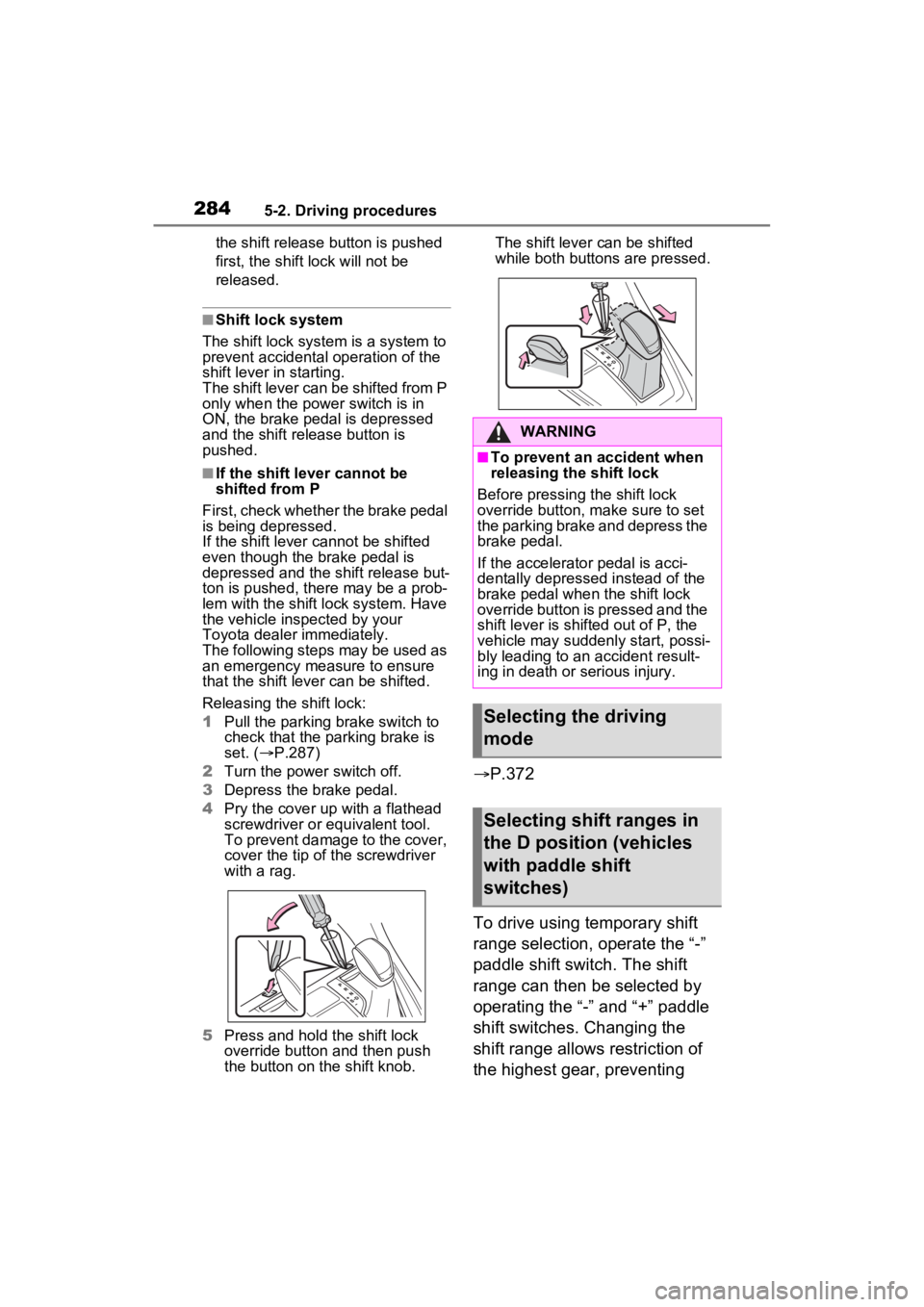
Releasing the shift lock:
1 Pull the parking brake switch to
check that the parking brake is
set. ( P.287)
2 Turn the power switch off.
3 Depress the brake pedal.
4 Pry the cover up with a flathead
screwdriver or equivalent tool.
To prevent damage to the cover,
cover the tip of the screwdriver
with a rag.
5 Press and hold the shift lock
override button and then push
the button on the shift knob. The shift lever can be shifted
while both buttons
are pressed.
P.372
To drive using temporary shift
range selection, operate the “-”
paddle shift switch. The shift
range can then be selected by
operating the “-” and “+” paddle
shift switches. Changing the
shift range allows restriction of
the highest gear, preventing
WARNING
■To prevent an accident when
releasing the shift lock
Before pressing the shift lock
override button, m ake sure to set
the parking brake and depress the
brake pedal.
If the accelerator pedal is acci-
dentally depressed instead of the
brake pedal when the shift lock
override button is pressed and the
shift lever is shifted out of P, the
vehicle may suddenly start, possi-
bly leading to an accident result-
ing in death or serious injury.
Selecting the driving
mode
Selecting shift ranges in
the D position (vehicles
with paddle shift
switches)
Page 287 of 624
2875-2. Driving procedures
5
Driving
burned out.
■If the turn signals stop flashing
before a lane change has been
performed
Operate the lever again.
■To discontinue flashing of the
turn signals during a lane
change
Operate the lever in the opposite
direction.
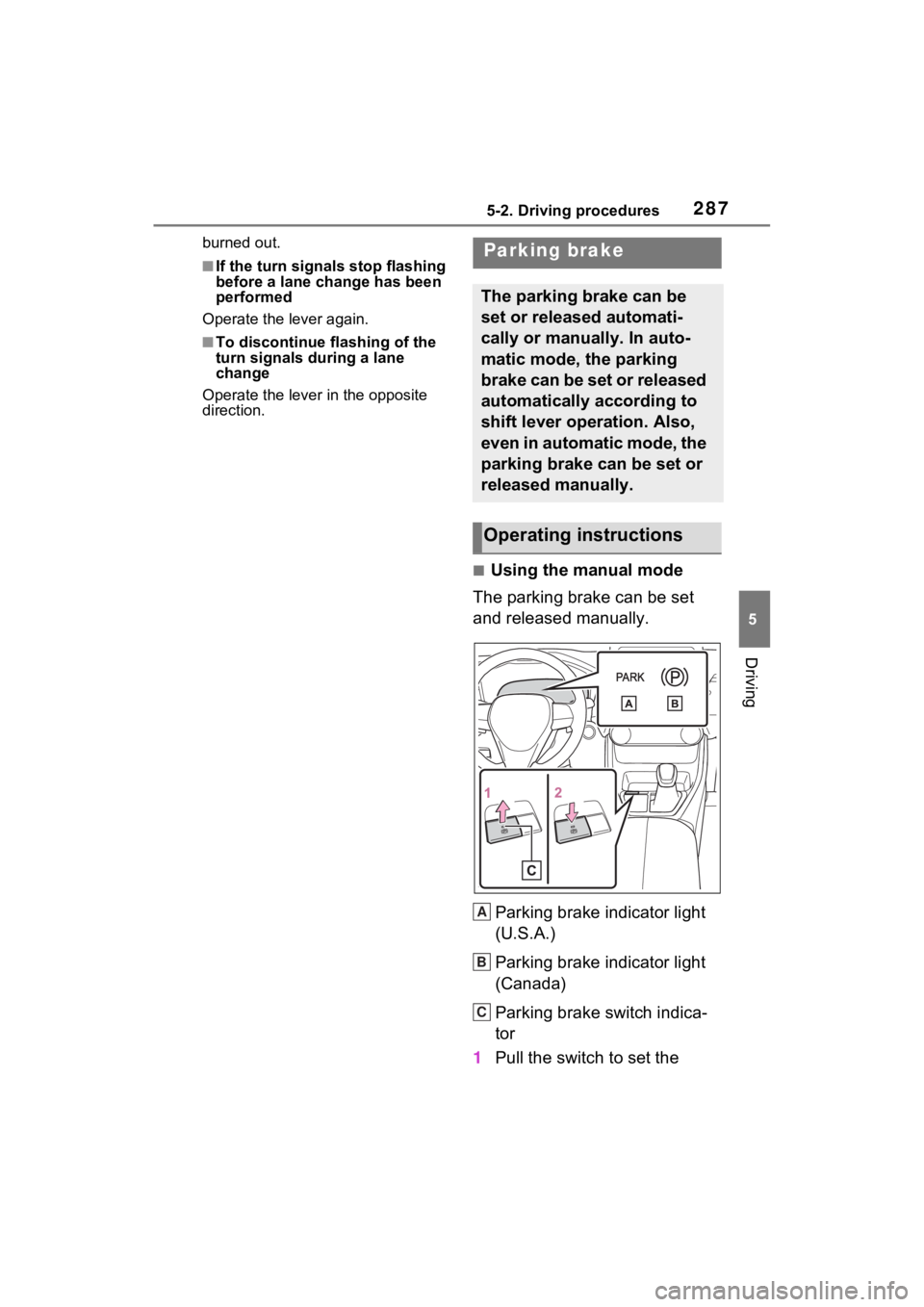
■Using the manual mode
The parking brake can be set
and released manually.
Parking brake indicator light
(U.S.A.)
Parking brake indicator light
(Canada)
Parking brake switch indica-
tor
1 Pull the switch to set the
Parking brake
The parking brake can be
set or released automati-
cally or manually. In auto-
matic mode, the parking
brake can be set or released
automatically according to
shift lever operation. Also,
even in automatic mode, the
parking brake can be set or
released manually.
Operating instructions
A
B
C
Page 288 of 624
2885-2. Driving procedures
parking brake.
The parking brake indicator light
and Parking brake switch indicator
will turn on.
Pull and hold the parking brake
switch if an emergency occurs and
it is necessary to operate the park-
ing brake while driving.
2 Push the switch to release
the parking brake.
• Operate the parking brake switch
while depressing the brake pedal.
• Parking brake automatic release function ( P.289)
Make sure that t he parking brake
indicator light and parking brake
switch indicator turn off.
If the parking brake indicator
light and parking brake switch
indicator flash, operate the
switch again. ( P.512)
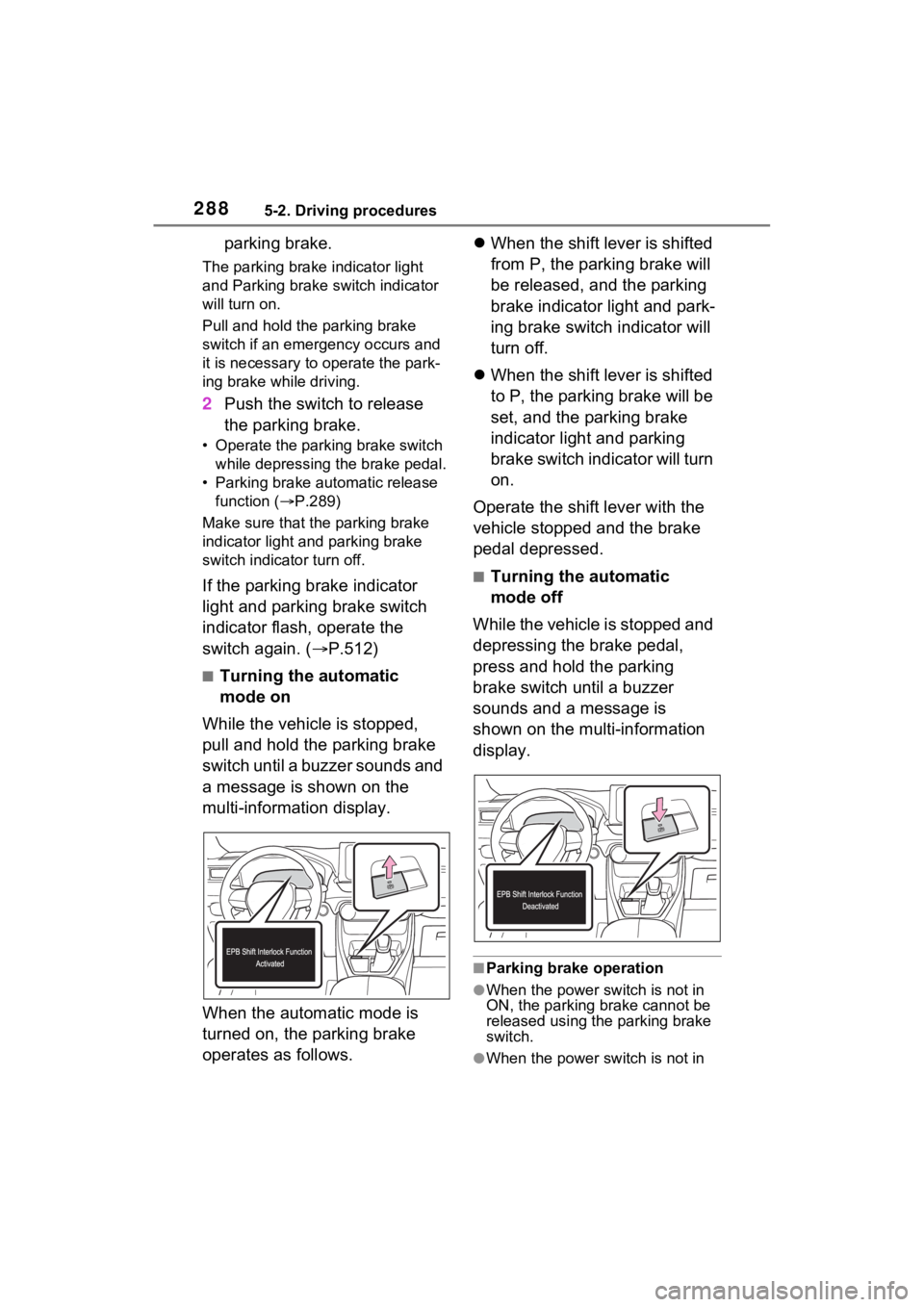
■Turning the automatic
mode on
While the vehicle is stopped,
pull and hold the parking brake
switch until a buzzer sounds and
a message is shown on the
multi-information display.
When the automatic mode is
turned on, the parking brake
operates as follows.
When the shift lever is shifted
from P, the parking brake will
be released, and the parking
brake indicator light and park-
ing brake switch indicator will
turn off.
When the shift lever is shifted
to P, the parking brake will be
set, and the parking brake
indicator light and parking
brake switch indicator will turn
on.
Operate the shift lever with the
vehicle stopped and the brake
pedal depressed.
■Turning the automatic
mode off
While the vehicle is stopped and
depressing the brake pedal,
press and hold the parking
brake switch until a buzzer
sounds and a message is
shown on the multi-information
display.
■Parking brake operation
●When the power switch is not in
ON, the parking brake cannot be
released using the parking brake
switch.
●When the power switch is not in
Page 289 of 624

2895-2. Driving procedures
5
Driving
ON, automatic mode (automatic
brake setting and releasing) is not
available.
■Parking brake automatic
release function
The parking brake will be released
automatically when the accelerator
pedal is slowly depressed under the
following conditions:
●The driver’s door is closed
●The driver is wearing the seat belt
●The shift lever is in a forward or
reverse position.
●The malfunction in dicator lamp or
brake system warning light is not
illuminated
If the automatic release function
does not operate, release the park-
ing brake manually.
■Parking brake automatic lock
function
The parking brake will be set auto-
matically under the following condi-
tions:
●The brake pedal is not depressed
●The driver’s door is open
●The driver’s seat belt is not fas-
tened
●The shift lever is in a position
other than P or N
●The malfunction indicator lamp
and brake system warning light
are not illuminated
■If “Parking Brake Temporarily
Unavailable” i s displayed on
the multi-information display
If the parking brake is operated
repeatedly over a short period of
time, the system may restrict opera-
tion to prevent overheating. If this
happens, refrain from operating the
parking brake. Nor mal operation will
return after about 1 minute.
■If “Parking Brake Unavailable”
is displayed on the multi-infor-
mation display
Operate the parking brake switch. If
the message does not disappear
after operating the switch several
times, the system may be malfunc-
tioning. Have the vehicle inspected
by your Toyo ta dealer.
■Parking brake operation sound
When the parking brake operates, a
motor sound (whirr ing sound) may
be heard. This does not indicate a
malfunction.
■Parking brake indicator light
●Depending on the power switch
mode, the parking brake indicator
light will turn on and stay on as
described below:
ON: Comes on until the parking
brake is released.
Not in ON: Stays on for approxi-
mately 15 seconds.
●When the power switch is turned
off with the parking brake set, the
parking brake i ndicator light will
stay on for about 15 seconds. This
does not indicate a malfunction.
■When the parking brake switch
malfunctions
Automatic mode (automatic brake
setting and releas ing) will be turned
on automatically.
■Parking the vehicle
P.256
■Parking brake engaged warning
buzzer
A buzzer will sound if the vehicle is
driven with the parking brake
engaged. “Parking Brake ON” is dis-
played on the multi-information dis-
play (with the vehicle reaching a
speed of 3 mph [5 km/h]).
■If the brake system warning
light comes on
P.506
Page 290 of 624
2905-2. Driving procedures
■Usage in winter time
P.383
WARNING
■When parking the vehicle
Do not leave a child in the vehicle
alone. The parking brake may be
released unintentionally by a child
and there is the danger of the
vehicle moving that may lead to
an accident resulting in death or
serious injury.
■Parking brake switch
Do not set any o bjects near the
parking brake switch. Objects
may interfere with the switch and
may lead the parking brake to
unexpectedly operate.
■Parking brake automatic lock
function
Never use the automatic parking
brake engagement function in
place of normal parking brake
operation. This function is
designed to reduc e the risk of a
collision due to the driver forget-
ting to engage the parking brake.
Over-reliance on this function to
park the vehicle safely may lead
to an accident resulting in death
or serious injury.
NOTICE
■When parking the vehicle
Before you leave the vehicle, shift
the shift lever to P, set the parking
brake and make sure that the
vehicle does not move.
■When the system malfunc-
tions
Stop the vehicle in a safe place
and check the warning messages.
■When the parking brake can-
not be released due to a mal-
function
Driving the vehicle with the park-
ing brake set will lead to brake
components overheating, which
may affect braking performance
and increase brake wear. Have
the vehicle inspected by your
Toyota dealer immediately if this
occurs.