towing TOYOTA RAV4 PRIME 2022 Owner's Manual
[x] Cancel search | Manufacturer: TOYOTA, Model Year: 2022, Model line: RAV4 PRIME, Model: TOYOTA RAV4 PRIME 2022Pages: 624, PDF Size: 24.01 MB
Page 354 of 624
3545-5. Using the driving support systems
●When towing a trailer.
●When there is a significant differ-
ence in height between your vehi-
cle and the vehicle that enters the
detection area.
●When a sensor or the area around
a sensor is extremely hot or cold.
●If the suspension has been modi-
fied or tires of a size other than
specified are installed.
●If the front of the vehicle is raised
or lowered due to the carried load.
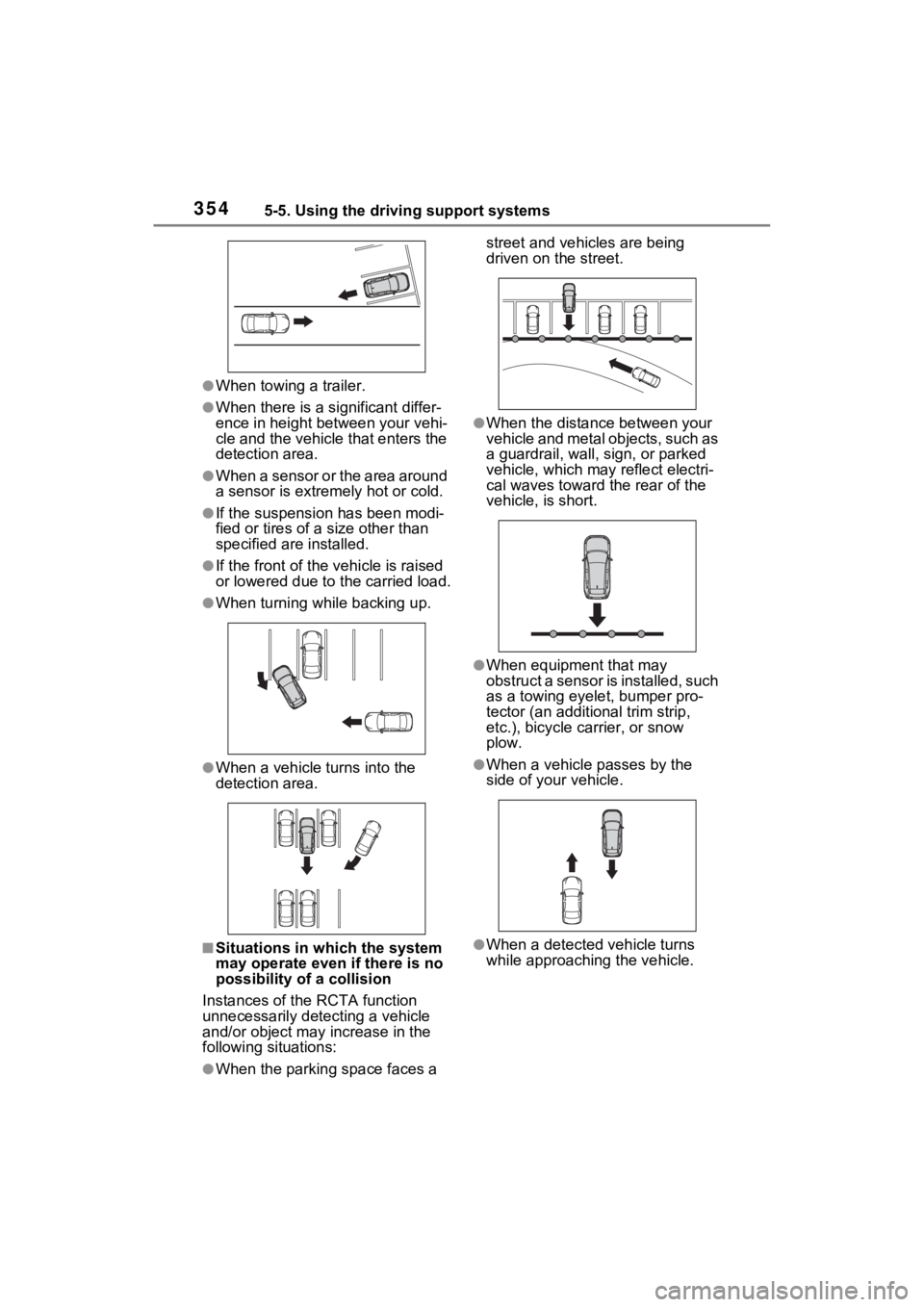
●When turning while backing up.
●When a vehicle turns into the
detection area.
■Situations in which the system
may operate even if there is no
possibility of a collision
Instances of the RCTA function
unnecessarily detec ting a vehicle
and/or object may increase in the
following situations:
●When the parking space faces a street and vehicles are being
driven on the street.
●When the distance between your
vehicle and metal objects, such as
a guardrail, wall, sign, or parked
vehicle, which may reflect electri-
cal waves toward the rear of the
vehicle, is short.
●When equipment that may
obstruct a sensor is installed, such
as a towing eyelet, bumper pro-
tector (an additional trim strip,
etc.), bicycle c
arrier, or snow
plow.
●When a vehicle passes by the
side of your vehicle.
●When a detected vehicle turns
while approaching the vehicle.
Page 359 of 624
3595-5. Using the driving support systems
5
Driving
■Situations in which the system
may not operate properly
Certain vehicle conditions and the
surrounding environment may affect
the ability of a sensor to correctly
detect objects. Particular instances
where this may occur are listed
below.
●There is dirt, snow or ice on a sen-
sor. (Cleaning the sensors will
resolve this problem.)
●A sensor is frozen. (Thawing the
area will resolve this problem.)
In especially cold weather, if a
sensor is frozen the sensor dis-
play may be displayed abnor-
mally, or objects, such as a wall,
may not be detected.
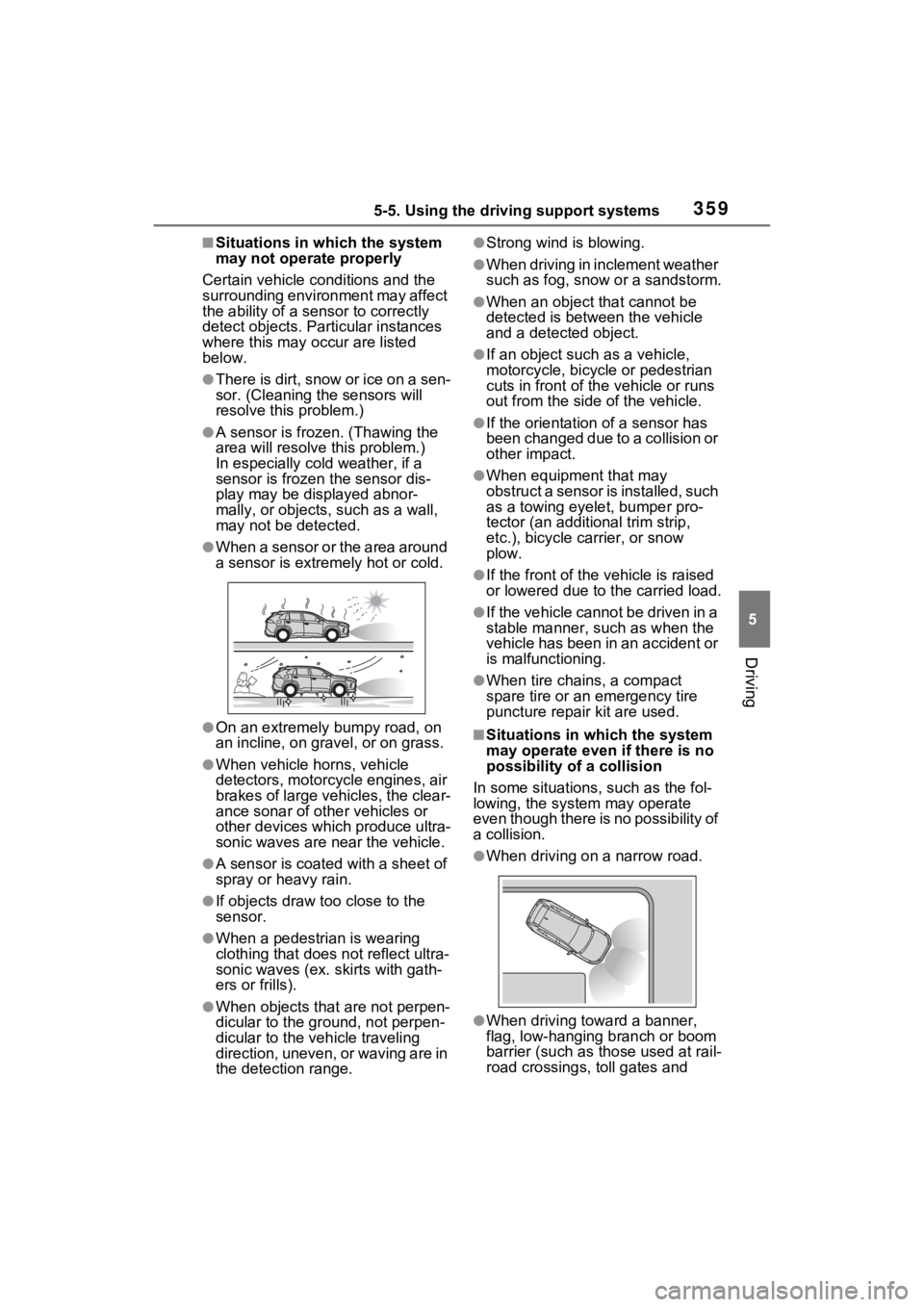
●When a sensor or the area around
a sensor is extremely hot or cold.
●On an extremely bumpy road, on
an incline, on gravel, or on grass.
●When vehicle horns, vehicle
detectors, motorcycle engines, air
brakes of large vehicles, the clear-
ance sonar of other vehicles or
other devices which produce ultra-
sonic waves are near the vehicle.
●A sensor is coated with a sheet of
spray or heavy rain.
●If objects draw too close to the
sensor.
●When a pedestrian is wearing
clothing that does not reflect ultra-
sonic waves (ex. skirts with gath-
ers or frills).
●When objects that are not perpen-
dicular to the gr ound, not perpen-
dicular to the v ehicle traveling
direction, uneven, or waving are in
the detection range.
●Strong wind is blowing.
●When driving in inclement weather
such as fog, snow or a sandstorm.
●When an object that cannot be
detected is between the vehicle
and a detected object.
●If an object such as a vehicle,
motorcycle, bicycle or pedestrian
cuts in front of the vehicle or runs
out from the side of the vehicle.
●If the orientation of a sensor has
been changed due to a collision or
other impact.
●When equipment that may
obstruct a sensor is installed, such
as a towing eyelet, bumper pro-
tector (an additional trim strip,
etc.), bicycle c arrier, or snow
plow.
●If the front of the v ehicle is raised
or lowered due to the carried load.
●If the vehicle cannot be driven in a
stable manner, such as when the
vehicle has been in an accident or
is malfunctioning.
●When tire chains, a compact
spare tire or an emergency tire
puncture repai r kit are used.
■Situations in which the system
may operate even if there is no
possibility of a collision
In some situations, such as the fol-
lowing, the system may operate
even though there is no possibility of
a collision.
●When driving on a narrow road.
●When driving towa rd a banner,
flag, low-hanging branch or boom
barrier (such as those used at rail-
road crossings, toll gates and
Page 364 of 624
3645-5. Using the driving support systems
WARNING
■Cautions regarding the use of
the system
Do not overly rely on the system,
as doing so may lead to an acci-
dent.
Always drive while checking the
safety of the surroundings of the
vehicle.
Depending on the vehicle and
road conditions, weather, etc., the
system may not operate.
The detection capa bilities of sen-
sors and radars are limited.
Always drive while checking the
safety of the surroundings of the
vehicle.
●The driver is solely responsible
for safe driving. Always drive
carefully, taking care to observe
your surroundings. The Parking
Support Brake system is
designed to provide support to
lessen the severity of collisions.
However, it may not operate in
some situations.
●The Parking Support Brake sys-
tem is not designed to stop the
vehicle completely. Addition-
ally, even if the system has
stopped the vehicle, it is neces-
sary to depress the brake pedal
immediately as brake control
will be canceled after approxi-
mately 2 seconds.
●It is extremely dangerous to
check the system operations by
intentionally driving the vehicle
into the direction of a wall, etc.
Never attempt such actions.
■When to disable the Parking
Support Brake
In the following situations, disable
the Parking Support Brake as the
system may operate even though
there is no poss ibility of a colli-
sion.
●When inspecting the vehicle
using a chassis roller, chassis
dynamo or free roller.
●When loading the vehicle onto a
boat, truck or other transport
vessel.
●If the suspension has been
modified or tires of a size other
than specified are installed.
●If the front of the vehicle is
raised or lowered due to the
carried load.
●When equipment that may
obstruct a sensor is installed,
such as a towing eyelet, bumper
protector (an additional trim
strip, etc.), bicycle carrier, or
snow plow.
●When using automatic car
washing devices.
●If the vehicle cannot be driven in
a stable manner, such as when
the vehicle has been in an acci-
dent or is malfunctioning.
●When the vehicle is driven in a
sporty manner or off-road.
●When the tires are not properly
inflated.
●When the tires are very worn.
●When tire chains, a compact
spare tire or an emergency tire
puncture repair kit are used.
Page 412 of 624
4126-3. Using the storage features
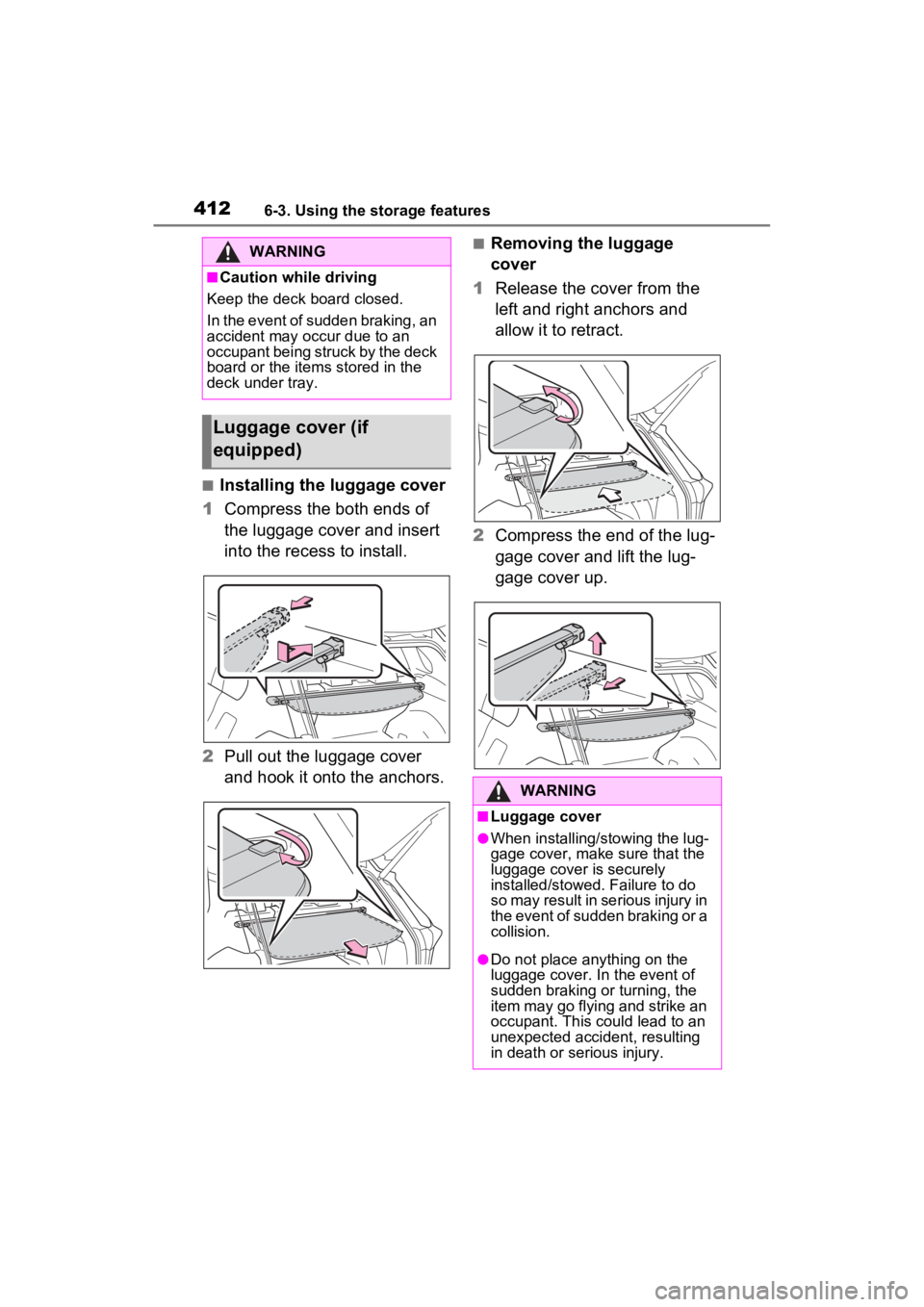
■Installing the luggage cover
1 Compress the both ends of
the luggage cover and insert
into the recess to install.
2 Pull out the luggage cover
and hook it onto the anchors.
■Removing the luggage
cover
1 Release the cover from the
left and right anchors and
allow it to retract.
2 Compress the end of the lug-
gage cover and lift the lug-
gage cover up.WARNING
■Caution while driving
Keep the deck board closed.
In the event of sudden braking, an
accident may occur due to an
occupant being struck by the deck
board or the items stored in the
deck under tray.
Luggage cover (if
equipped)
WARNING
■Luggage cover
●When installing/stowing the lug-
gage cover, make sure that the
luggage cover is securely
installed/stowed. Failure to do
so may result in serious injury in
the event of sudden braking or a
collision.
●Do not place anything on the
luggage cover. In the event of
sudden braking or turning, the
item may go flying and strike an
occupant. This could lead to an
unexpected accident, resulting
in death or serious injury.
Page 458 of 624
4587-3. Do-it-yourself maintenance
■Engine oil consumption
A certain amount of engine oil will
be consumed while driving. In the
following situatio ns, oil consump-
tion may increase, and engine oil
may need to be ref illed in between
oil maintenance intervals.
●When the engine is new, for
example directly after purchasing
the vehicle or after replacing the
engine
●If low quality oil or oil of an inap-
propriate viscosity is used
●When driving at high engine
speeds or with a heavy load,
when towing, or when driving
while accelerating o r decelerating
frequently
●When leaving the engine idling for
a long time, or wh en driving fre-
quently through heavy traffic
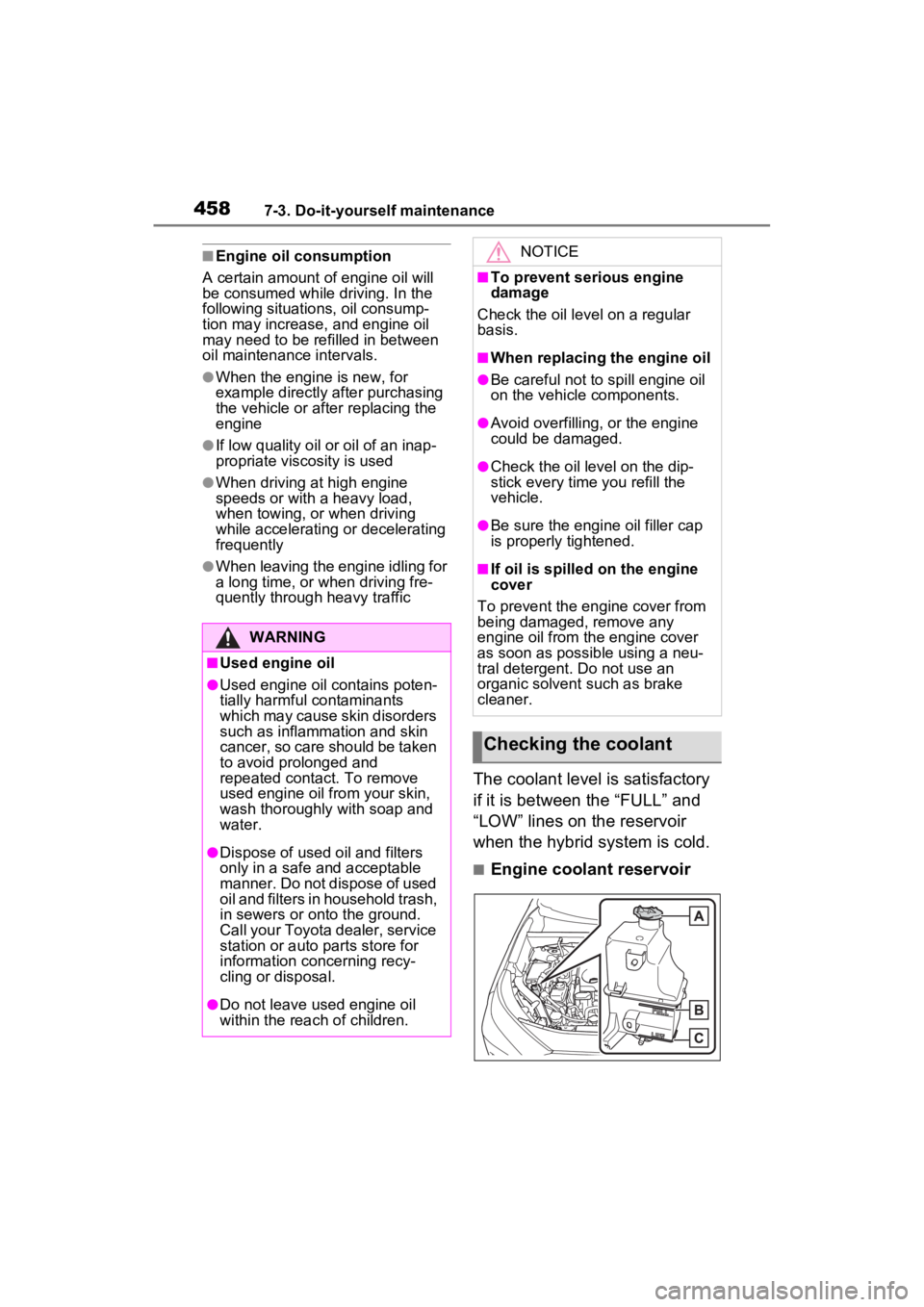
The coolant level is satisfactory
if it is between the “FULL” and
“LOW” lines on the reservoir
when the hybrid system is cold.
■Engine coolant reservoir
WARNING
■Used engine oil
●Used engine oil contains poten-
tially harmful contaminants
which may cause skin disorders
such as inflammation and skin
cancer, so care should be taken
to avoid prolonged and
repeated contact. To remove
used engine oil from your skin,
wash thoroughly with soap and
water.
●Dispose of used oil and filters
only in a safe an d acceptable
manner. Do not dispose of used
oil and filters in household trash,
in sewers or onto the ground.
Call your Toyota dealer, service
station or auto parts store for
information concerning recy-
cling or disposal.
●Do not leave used engine oil
within the rea ch of children.
NOTICE
■To prevent serious engine
damage
Check the oil le vel on a regular
basis.
■When replacing the engine oil
●Be careful not to spill engine oil
on the vehicle components.
●Avoid overfilling, or the engine
could be damaged.
●Check the oil level on the dip-
stick every time you refill the
vehicle.
●Be sure the engine oil filler cap
is properly tightened.
■If oil is spilled on the engine
cover
To prevent the engine cover from
being damaged, remove any
engine oil from the engine cover
as soon as possible using a neu-
tral detergent. Do not use an
organic solvent such as brake
cleaner.
Checking the coolant
Page 502 of 624
5028-2. Steps to take in an emergency
8-2.Steps to take in an emergency
If your vehicle needs
to be towed
If towing is necessary, we
recommend having your
vehicle towed by your
Toyota dealer or commer-
cial towing service, using a
wheel-lift type truck or flat-
bed truck.
Use a safety chain system
for all towing, and abide by
all state/provincial and local
laws.
If towing your vehicle with a
wheel-lift type truck, use a
towing dolly. (P.502, 503)
WARNING
Observe the following precau-
tions. Failure to do so may result
in death or serious injury.
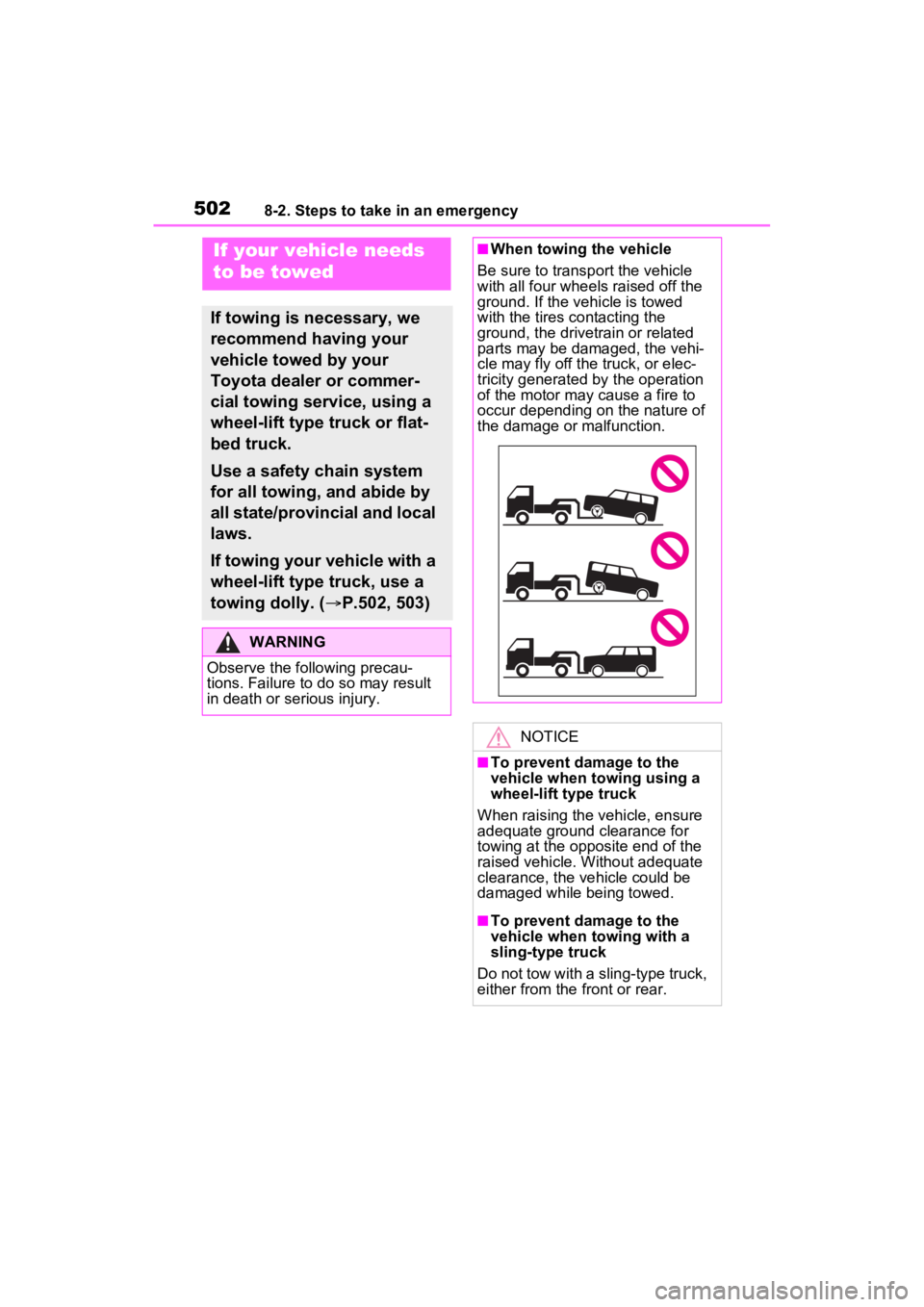
■When towing the vehicle
Be sure to transp ort the vehicle
with all four wheels raised off the
ground. If the vehicle is towed
with the tires co ntacting the
ground, the drivetrain or related
parts may be damaged, the vehi-
cle may fly off the truck, or elec-
tricity generated by the operation
of the motor may cause a fire to
occur depending o n the nature of
the damage or malfunction.
NOTICE
■To prevent damage to the
vehicle when t owing using a
wheel-lift type truck
When raising the vehicle, ensure
adequate ground clearance for
towing at the opposite end of the
raised vehicle. Without adequate
clearance, the vehicle could be
damaged while being towed.
■To prevent damage to the
vehicle when towing with a
sling-type truck
Do not tow with a sling-type truck,
either from the front or rear.
Page 503 of 624
5038-2. Steps to take in an emergency
8
When trouble arises
The following may indicate a
problem with your transmission.
Contact your Toyota dealer or
commercial towing service
before towing.
The hybrid system warning
message is shown on the
multi-information display and
the vehicle does not move.
The vehicle makes an abnor-
mal sound.
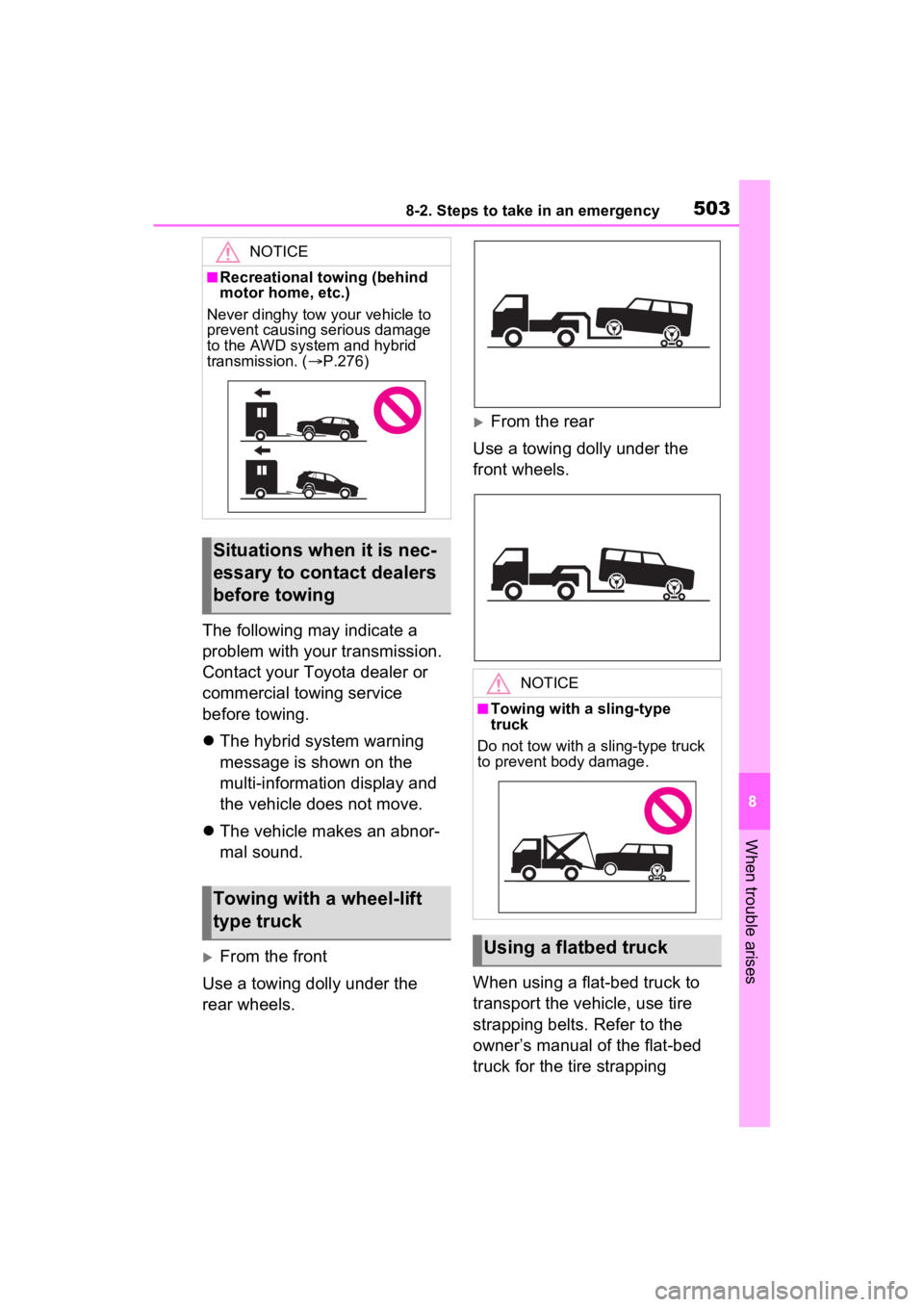
From the front
Use a towing dolly under the
rear wheels.
From the rear
Use a towing dolly under the
front wheels.
When using a flat-bed truck to
transport the vehicle, use tire
strapping belts. Refer to the
owner’s manual of the flat-bed
truck for the tire strapping
NOTICE
■Recreational towing (behind
motor home, etc.)
Never dinghy tow your vehicle to
prevent causing serious damage
to the AWD system and hybrid
transmission. ( P.276)
Situations when it is nec-
essary to contact dealers
before towing
Towing with a wheel-lift
type truck
NOTICE
■Towing with a sling-type
truck
Do not tow with a sling-type truck
to prevent body damage.
Using a flatbed truck
Page 543 of 624
5438-2. Steps to take in an emergency
8
When trouble arises
1Stop the hybrid system. Set
the parking brake and shift
the shift lever to P.
2 Remove the mud, snow or
sand from around the stuck
tire.
3 Place wood, stones or some
other material to help provide
traction under the tires.
4 Restart the hybrid system
5 Shift the shift lever to D or R
and release the parking
brake. Then, while exercising
caution, depress the acceler-
ator pedal.
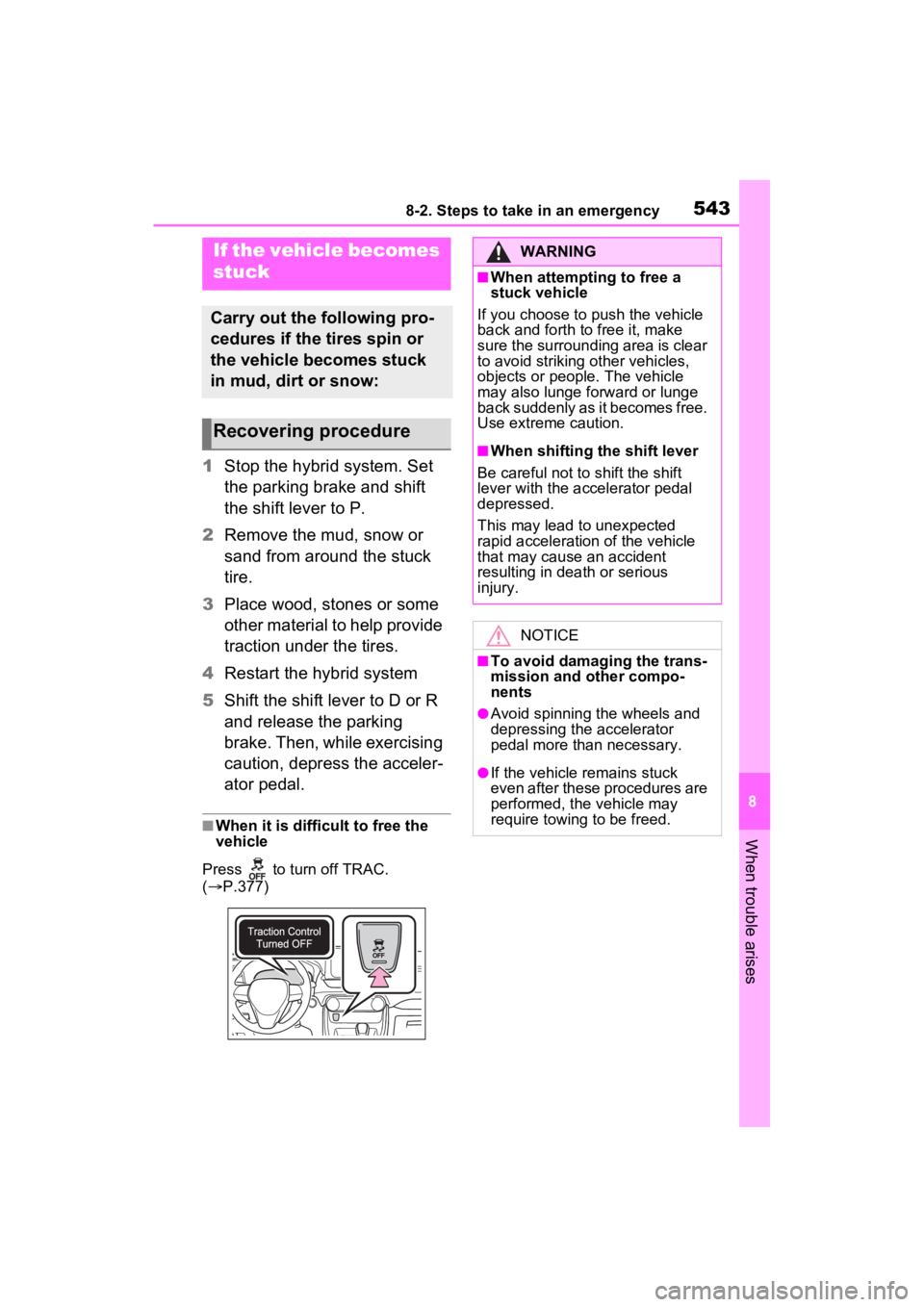
■When it is difficult to free the
vehicle
Press to turn off TRAC.
( P.377)
If the vehicle becomes
stuck
Carry out the following pro-
cedures if the tires spin or
the vehicle becomes stuck
in mud, dirt or snow:
Recovering procedure
WARNING
■When attempting to free a
stuck vehicle
If you choose to push the vehicle
back and forth to free it, make
sure the surrounding area is clear
to avoid striking other vehicles,
objects or people. The vehicle
may also lunge forward or lunge
back suddenly as it becomes free.
Use extreme caution.
■When shifting the shift lever
Be careful not to shift the shift
lever with the accelerator pedal
depressed.
This may lead to unexpected
rapid acceleration of the vehicle
that may cause an accident
resulting in dea th or serious
injury.
NOTICE
■To avoid damaging the trans-
mission and other compo-
nents
●Avoid spinning the wheels and
depressing the accelerator
pedal more than necessary.
●If the vehicle remains stuck
even after these procedures are
performed, the vehicle may
require towing to be freed.
Page 571 of 624
5719-2. Customization
9
Vehicle specifications
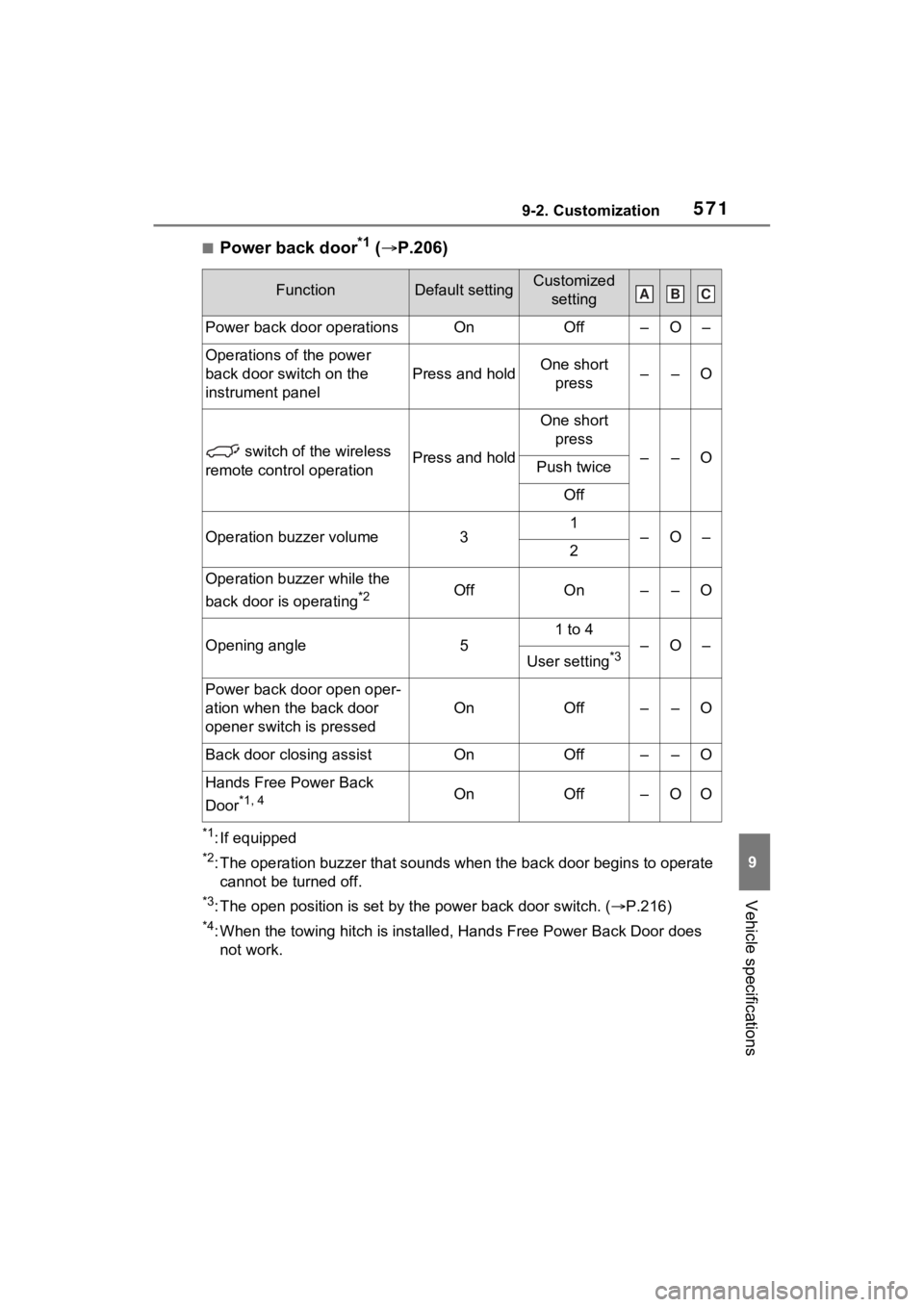
■Power back door*1 ( P.206)
*1: If equipped
*2: The operation buzzer that sounds when the back door begins to operate
cannot be turned off.
*3: The open position is set by the power back door switch. ( P.216)
*4: When the towing hitch is installe d, Hands Free Power Back Door does
not work.
FunctionDefault settingCustomized setting
Power back door operationsOnOff–O–
Operations of the power
back door switch on the
instrument panel
Press and holdOne short press––O
switch of the wireless
remote control operationPress and hold
One short press
––OPush twice
Off
Operation buzzer volume31–O–2
Operation buzzer while the
back door is operating
*2OffOn––O
Opening angle5
1 to 4
–O–
User setting*3
Power back door open oper-
ation when the back door
opener switch is pressed
OnOff––O
Back door closing assistOnOff––O
Hands Free Power Back
Door
*1, 4OnOff–OO
ABC
Page 600 of 624

600Alphabetical Index
D
Daytime running light system293Replacing light bulbs ............ 492
DC/DC converter air intake vent ................................................. 91Cleaning ............................... 480
Deck board .............................. 411
Defogger Outside rear view mirrors ..... 392
Rear window ........................ 392
Windshield............................ 392
Digital Rear-view Mirror ......... 232
Dimensions ............................. 546
Dinghy towing ........................ 276
Display BSM (Blind Spot Monitor)..... 346
Consumption screen ............ 187
Drive information .................. 176
Driving information ............... 172
Dynamic radar cruise control with full-speed range .......... 334
Energy monitor ..................... 187
Head-up display ................... 182
Intuitive parking assist .......... 355
LTA (Lane Tracing Assist).... 327
Multi-information display ...... 170
Parking Support Brake function ........................................... 365
Pre-collision warning ............ 313
RCTA ................................... 346
RSA (Road Sign Assist) ....... 332
Warning messages .............. 518
Do-it-yourself maintenance . 447, 451
Door lock Back door ............................. 203
Side doors ............................ 198
Smart key system................. 217
Wireless remote control ....... 196
Doors Automatic door locking and unlocking system ................202
Back door .............................203
Door glasses ........................244
Door lock ..............................198
Open door warning buzzer ...202
Outside rear view mirrors .....242
Rear door child-protectors ....202
Side doors ............................198
Drive information ....................176
Driver’s seat belt reminder light ...............................................513
Driver’s seat position memory ...............................................225Driving position memory .......225
Memory recall function .........226
Drive-Start Control (DSC) Sudden start restraint control262
Driving Break-in tips .........................257
Correct posture .......................27
Driving mode select switch ...372
Plug in Hybrid Electric Vehicle driving tips ............................92
Procedures ...........................256
Winter drive tips....................382
Driving informatio n display ...172
Driving mode select switch ...372
Driving position memory .......225 Memory recall function .........226
Driving support system informa- tion display............................175
DSC (Drive-Start Control) Sudden start restraint control262
Dynamic radar cruise control with full-speed rangeFunction................................334
Warning message . ...............518
E
ECB (Electronically Controlled
Brake System).......................375
Eco drive mode .......................372