ESP TOYOTA RAV4 PRIME 2022 Service Manual
[x] Cancel search | Manufacturer: TOYOTA, Model Year: 2022, Model line: RAV4 PRIME, Model: TOYOTA RAV4 PRIME 2022Pages: 624, PDF Size: 24.01 MB
Page 348 of 624
3485-5. Using the driving support systems
For vehicles sold in Canada
WARNING
■To ensure the system can
operate properly
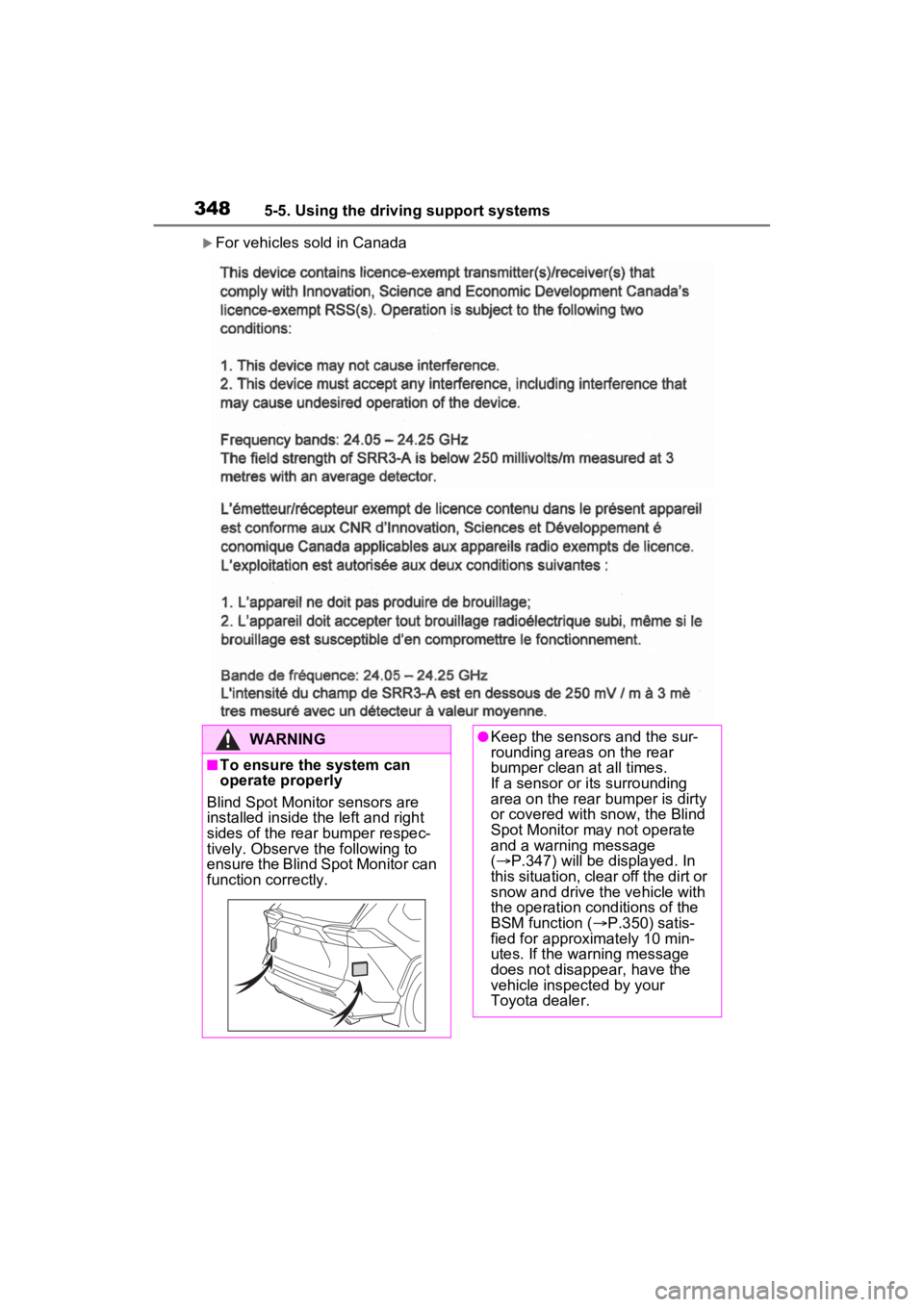
Blind Spot Monitor sensors are
installed inside the left and right
sides of the rear bumper respec-
tively. Observe the following to
ensure the Blind Spot Monitor can
function correctly.
●Keep the sensors and the sur-
rounding areas on the rear
bumper clean at all times.
If a sensor or its surrounding
area on the rear bumper is dirty
or covered with snow, the Blind
Spot Monitor may not operate
and a warning message
( P.347) will be displayed. In
this situation, clear off the dirt or
snow and drive the vehicle with
the operation conditions of the
BSM function ( P.350) satis-
fied for approximately 10 min-
utes. If the warning message
does not disappear, have the
vehicle inspected by your
Toyota dealer.
Page 357 of 624
3575-5. Using the driving support systems
5
Driving
The Intuitive parking assist can
be enabled/disabled on the
screen of the multi-information
display. (P.177)
When the intuitive parking assist
function is disabled, the intuitive
parking assist OFF indicator
( P.163) illuminate s on the multi-
information display.
To re-enable the system, select
on the multi-inform ation display,
select and turn it on.
If the system is disabled, it will
remain off even if the power switch
is turned to ON after the power
switch has been turned off.
Turning intuitive parking
assist on/off
WARNING
■Cautions regarding the use of
the system
There is a limit to the degree of
recognition accuracy and control
performance that this system can
provide, do not ov erly rely on this
system. The driver is always
responsible for paying attention to
the vehicle’s surroundings and
driving safely.
■To ensure the system can
operate properly
Observe the following precau-
tions.
Failing to do so may result in the
vehicle being unable to be driven
safely and possibly cause an acci-
dent.
●Do not damage the sensors,
and always keep them clean.
●Do not attach a sticker or install
an electronic component, such
as a backlit licen se plate (espe-
cially fluorescent type), fog
lights, fender po le or wireless
antenna near a radar sensor.
●Do not subject the surrounding
area of the sensor to a strong
impact. If subjected to an
impact, have the vehicle
inspected by your Toyota
dealer. If the front or rear
bumper needs to be
removed/installed or replaced,
contact your Toyota dealer.
●Do not modify, disassemble or
paint the sensors.
●Do not attach a license plate
cover.
●Keep your tires properly
inflated.
■When to disable the function
In the following situations, disable
the function as it may operate
even though there is no possibility
of a collision.
●Failing to observe the warnings
above.
●A non-genuine Toyota suspen-
sion (lowered suspension, etc.)
is installed.
■Notes when washing the vehi-
cle
Do not apply intensive bursts of
water or steam to the sensor
area.
Doing so may result in the sensor
malfunctioning.
●When using a high pressure
washer to wash the vehicle, do
not spray the sensors directly,
as doing so may cause a sensor
to malfunction.
Page 359 of 624
3595-5. Using the driving support systems
5
Driving
■Situations in which the system
may not operate properly
Certain vehicle conditions and the
surrounding environment may affect
the ability of a sensor to correctly
detect objects. Particular instances
where this may occur are listed
below.
●There is dirt, snow or ice on a sen-
sor. (Cleaning the sensors will
resolve this problem.)
●A sensor is frozen. (Thawing the
area will resolve this problem.)
In especially cold weather, if a
sensor is frozen the sensor dis-
play may be displayed abnor-
mally, or objects, such as a wall,
may not be detected.
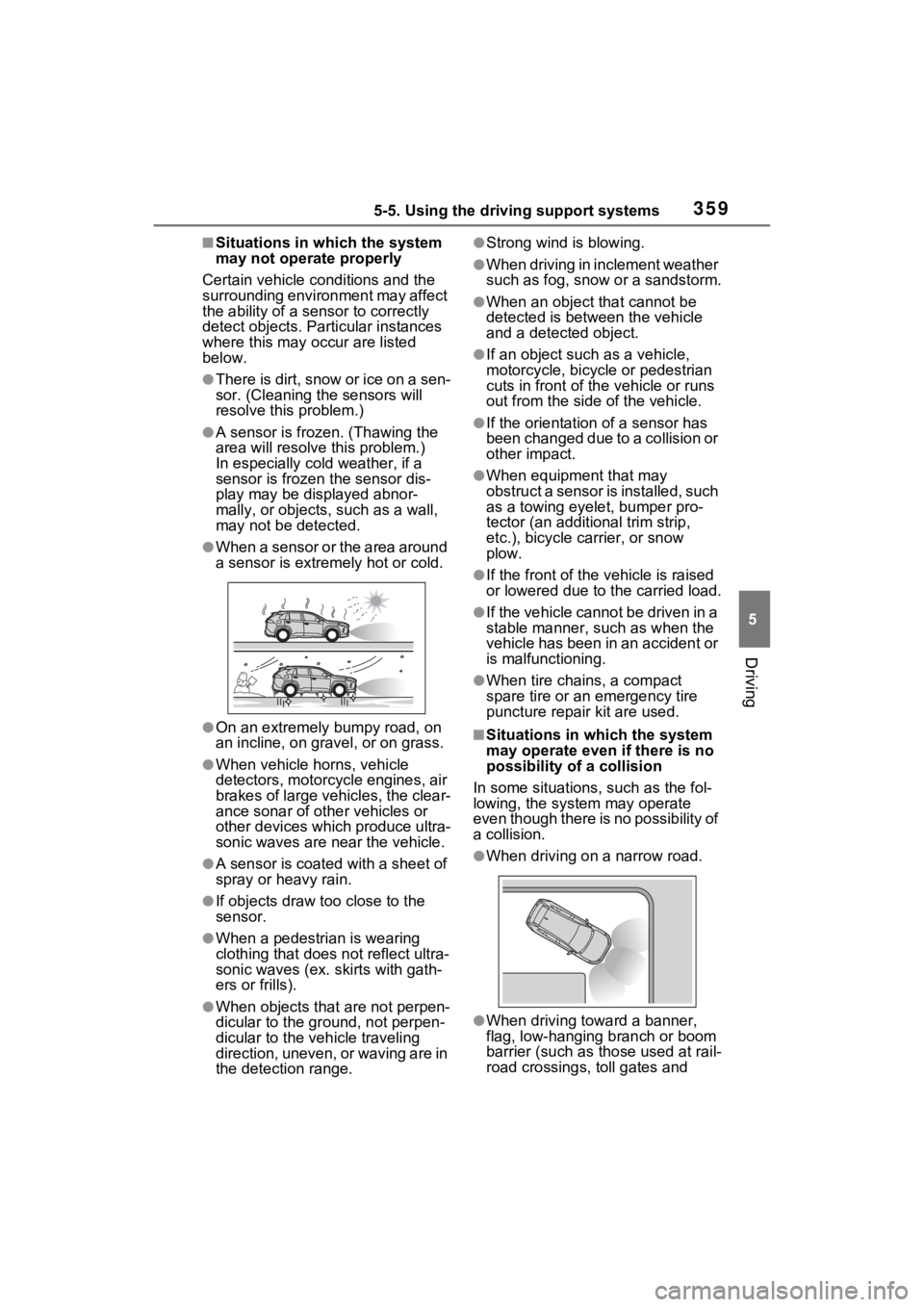
●When a sensor or the area around
a sensor is extremely hot or cold.
●On an extremely bumpy road, on
an incline, on gravel, or on grass.
●When vehicle horns, vehicle
detectors, motorcycle engines, air
brakes of large vehicles, the clear-
ance sonar of other vehicles or
other devices which produce ultra-
sonic waves are near the vehicle.
●A sensor is coated with a sheet of
spray or heavy rain.
●If objects draw too close to the
sensor.
●When a pedestrian is wearing
clothing that does not reflect ultra-
sonic waves (ex. skirts with gath-
ers or frills).
●When objects that are not perpen-
dicular to the gr ound, not perpen-
dicular to the v ehicle traveling
direction, uneven, or waving are in
the detection range.
●Strong wind is blowing.
●When driving in inclement weather
such as fog, snow or a sandstorm.
●When an object that cannot be
detected is between the vehicle
and a detected object.
●If an object such as a vehicle,
motorcycle, bicycle or pedestrian
cuts in front of the vehicle or runs
out from the side of the vehicle.
●If the orientation of a sensor has
been changed due to a collision or
other impact.
●When equipment that may
obstruct a sensor is installed, such
as a towing eyelet, bumper pro-
tector (an additional trim strip,
etc.), bicycle c arrier, or snow
plow.
●If the front of the v ehicle is raised
or lowered due to the carried load.
●If the vehicle cannot be driven in a
stable manner, such as when the
vehicle has been in an accident or
is malfunctioning.
●When tire chains, a compact
spare tire or an emergency tire
puncture repai r kit are used.
■Situations in which the system
may operate even if there is no
possibility of a collision
In some situations, such as the fol-
lowing, the system may operate
even though there is no possibility of
a collision.
●When driving on a narrow road.
●When driving towa rd a banner,
flag, low-hanging branch or boom
barrier (such as those used at rail-
road crossings, toll gates and
Page 364 of 624
3645-5. Using the driving support systems
WARNING
■Cautions regarding the use of
the system
Do not overly rely on the system,
as doing so may lead to an acci-
dent.
Always drive while checking the
safety of the surroundings of the
vehicle.
Depending on the vehicle and
road conditions, weather, etc., the
system may not operate.
The detection capa bilities of sen-
sors and radars are limited.
Always drive while checking the
safety of the surroundings of the
vehicle.
●The driver is solely responsible
for safe driving. Always drive
carefully, taking care to observe
your surroundings. The Parking
Support Brake system is
designed to provide support to
lessen the severity of collisions.
However, it may not operate in
some situations.
●The Parking Support Brake sys-
tem is not designed to stop the
vehicle completely. Addition-
ally, even if the system has
stopped the vehicle, it is neces-
sary to depress the brake pedal
immediately as brake control
will be canceled after approxi-
mately 2 seconds.
●It is extremely dangerous to
check the system operations by
intentionally driving the vehicle
into the direction of a wall, etc.
Never attempt such actions.
■When to disable the Parking
Support Brake
In the following situations, disable
the Parking Support Brake as the
system may operate even though
there is no poss ibility of a colli-
sion.
●When inspecting the vehicle
using a chassis roller, chassis
dynamo or free roller.
●When loading the vehicle onto a
boat, truck or other transport
vessel.
●If the suspension has been
modified or tires of a size other
than specified are installed.
●If the front of the vehicle is
raised or lowered due to the
carried load.
●When equipment that may
obstruct a sensor is installed,
such as a towing eyelet, bumper
protector (an additional trim
strip, etc.), bicycle carrier, or
snow plow.
●When using automatic car
washing devices.
●If the vehicle cannot be driven in
a stable manner, such as when
the vehicle has been in an acci-
dent or is malfunctioning.
●When the vehicle is driven in a
sporty manner or off-road.
●When the tires are not properly
inflated.
●When the tires are very worn.
●When tire chains, a compact
spare tire or an emergency tire
puncture repair kit are used.
Page 372 of 624
3725-5. Using the driving support systems
• The Parking Support Brake is dis-abled.
• The collision becomes avoidable
with normal brake operation.
• A vehicle is no longer approaching from the right or left at the rear of
the vehicle.
●Brake control
• The Parking Support Brake is dis- abled.
• Approximately 2 seconds have
elapsed since the vehicle was
stopped by brake control.
• The brake pedal is depressed
after the vehicle is stopped by
brake control.
• A vehicle is no longer approaching
from the right or left at the rear of
the vehicle.
■Detection area of the Parking
Support Brake function (rear-
crossing vehicles)
The detection area of the Parking
Support Brake function (rear-cross-
ing vehicles) differs from the detec-
tion area of the RCTA function
( P.352). Therefore, even if the
RCTA function detects a vehicle
and provides an alert, the Parking
Support Brake function (rear-cross-
ing vehicles) may not start operat-
ing.
■Situations in which the system
may not operate properly
P.353
■Situations in which the system
may operate even if there is no
possibility of a collision
P.354
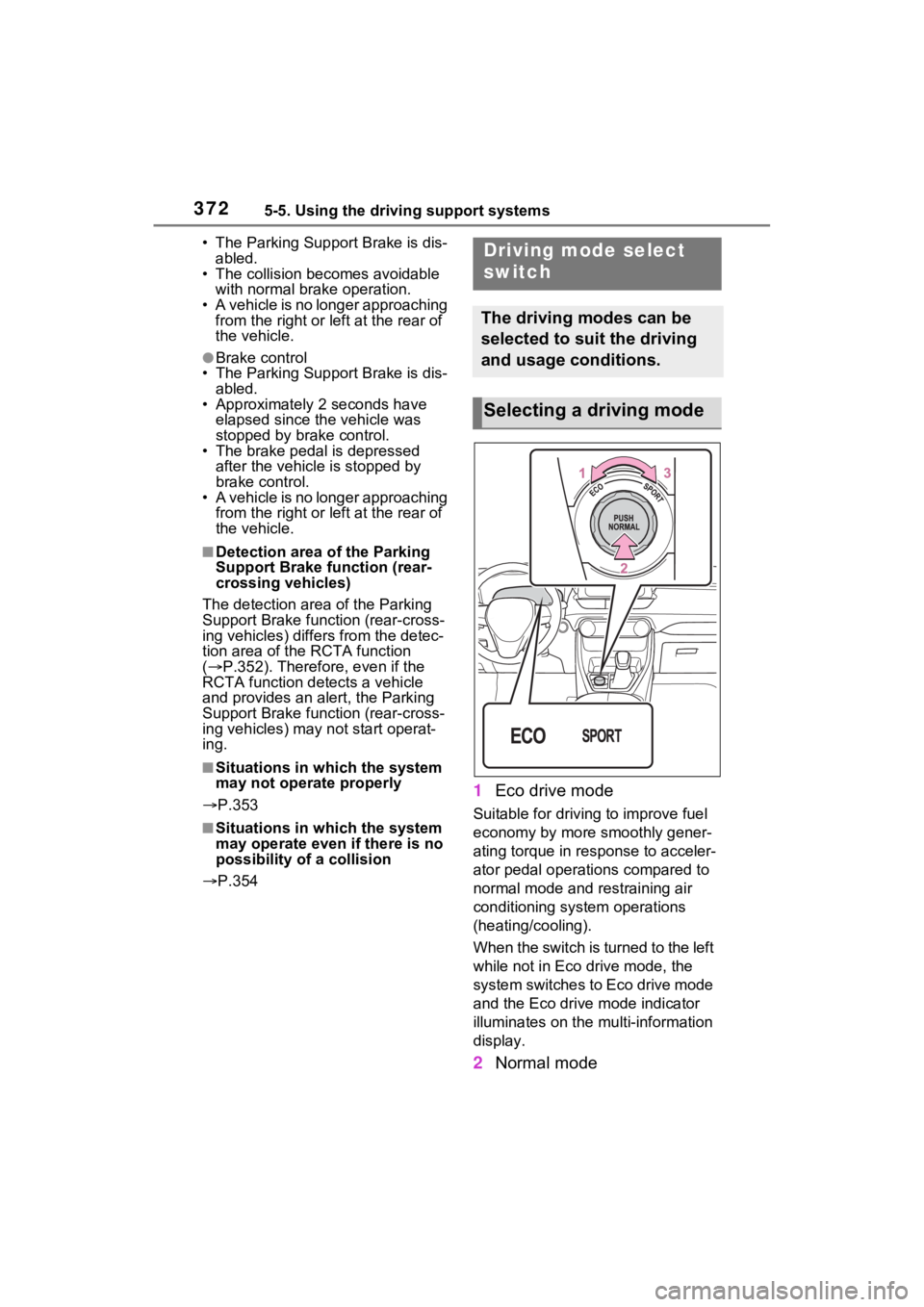
1 Eco drive mode
Suitable for drivi ng to improve fuel
economy by more smoothly gener-
ating torque in response to acceler-
ator pedal operations compared to
normal mode and restraining air
conditioning system operations
(heating/cooling).
When the switch is turned to the left
while not in Eco drive mode, the
system switches to Eco drive mode
and the Eco drive mode indicator
illuminates on the mu lti-information
display.
2 Normal mode
Driving mode select
switch
The driving modes can be
selected to suit the driving
and usage conditions.
Selecting a driving mode
Page 373 of 624

3735-5. Using the driving support systems
5
Driving
Suitable for normal driving.
The driving mode returns to normal
mode if the switch is pressed while
in Eco drive mode or sport mode.
3Sport mode
Controls the steering feeling and
hybrid system to create an acceler-
ation response tha t is suitable for
sporty driving. Suitable for when
crisp handling is desired, such as
when driving on mountainous
roads.
When the switch is turned to the
right while not in sport mode, the
system switches to sport mode and
the sport mode indicator illuminates
on the multi-info rmation display.
■When changing to a driving
mode other than normal mode
●The background color of the multi-
information display changes
according to the selected driving
mode.
●When the speedometer is set to
analog display, the speedometer
display color also changes.
●The color of the switch changes
according to the selected driving
mode. (On some models)
■Air conditioning system opera-
tion in Eco drive mode
In Eco drive mode, heating/cooling
operations and the fan speed is con-
trolled to improve fuel efficiency.
Perform the following procedures to
increase the air conditioning perfor-
mance.
●Turn eco air conditioning mode off
( P.391)
●Adjust the fan speed ( P.391)
●Cancel Eco drive mode
■Canceling a driving mode
●Sport mode is automatically can-
celed and the driving mode returns to normal mode when the
power switch is turned off.
●Normal mode and Eco drive mode
are not canceled until another
driving mode is selected. (Even if
the power switch is turned off, nor-
mal mode and Eco
drive mode will
not be automatically canceled).
Page 375 of 624
3755-5. Using the driving support systems
5
Driving
vehicle can be driven normally.
The “Traction Control Turned OFF”
on the multi-information display will
turn off after a short while and the
system will operate properly.
■When Trail Mode is canceled
In the following situations, Trail
Mode is automatically canceled
even if it is selected:
●When the driving mode is
changed. ( P.372)
●When the hybrid system is
restarted.
■Sounds and vibrations when
driving in Trail Mode
Any of the following conditions may
occur when Trail Mode is operating.
None of these indicates that a mal-
function has occurred:
●Vibrations may be felt throughout
the vehicle or steering wheel
●Sounds may be heard from the
engine compartment
■When the Trail Mode indicator
does not illuminate
When the Trail Mode indicator does
not illuminate even though the Trail
Mode switch is pressed, the system
may be malfunctioning.
Have the vehicle inspected by your
Toyota dealer immediately.
■ECB (Electronically Con-
trolled Brake System)
The electronically controlled
system generates braking force
corresponding to the brake
operation
■ABS (Anti-lock Brake Sys-
tem)
Helps to prevent wheel lock
when the brakes are applied
suddenly, or if the brakes are
applied while driving on a slip-
pery road surface
■Brake assist
Generates an increased level of
braking force after the brake
pedal is depressed when the
system detects a panic stop sit-
uation
NOTICE
■In order to ensure that Trail
Mode operates properly
Do not continuously use the Trail
Mode for a long period of time.
Depending on the driving condi-
tions, the load on related parts
increases and the system may not
operate properly.
Driving assist systems
To keep driving safety and
performance, the following
systems operate automati-
cally in response to various
driving situations. Be
aware, however, that these
systems are supplementary
and should not be relied
upon too heavily when oper-
ating the vehicle.
Summary of the driving
assist systems
Page 379 of 624
3795-5. Using the driving support systems
5
Driving
■Secondary Collision Brake
automatic cancellation
The system is automatically can-
celed in any of th e following situa-
tions.
●The vehicle speed drops to
approximately 6 mph (10 km/h)
●A certain amount of time elapses
during operation
●The accelerator pedal is
depressed a large amount
■If a message about AWD is
shown on the multi-information
display (AWD models)
Perform the following actions.
●“AWD System Overheated
Switching to 2WD Mode”
AWD system is overheated. Stop
the vehicle in a safe place with the
hybrid system operating.
*
If the message disappears after a
while, there is n o problem. If the
message remains, have the vehicle
inspected by your Toyota dealer
immediately.
●“AWD System Overheated 2WD
Mode Engaged”
AWD system has been temporarily
released and switched to front-
wheel drive due to overheating.
Stop the vehicle in a safe place with
the hybrid system operating.
*
If the message disappears after a
while, AWD system will automati-
cally recover. If the message
remains, have the vehicle inspected
by your Toyota dealer immediately.
●“AWD System Malfunction 2WD
Mode Engaged Visit Your Dealer”
A malfunction occurs in the AWD
system. Have the vehicle inspected
by your Toyota dealer immediately.
*: When stopping the vehicle, do not stop the hybrid system until the
display message has turned off.
WARNING
■The ABS does not operate
effectively when
●The limits of tire gripping perfor-
mance have been exceeded
(such as excessively worn tires
on a snow covered road).
●The vehicle hydroplanes while
driving at high speed on wet or
slick roads.
■Stopping distance when the
ABS is operating may exceed
that of normal conditions
The ABS is not designed to
shorten the vehicle’s stopping dis-
tance. Always maintain a safe dis-
tance from the veh icle in front of
you, especially in the following sit-
uations:
●When driving on dirt, gravel or
snow-covered roads
●When driving with tire chains
●When driving over bumps in the
road
●When driving over roads with
potholes or uneven surfaces
■TRAC/VSC may not operate
effectively when
Directional control and power may
not be achievable while driving on
slippery road surfaces, even if the
TRAC/VSC system is operating.
Drive the vehicle carefully in con-
ditions where stability and power
may be lost.
Page 380 of 624
3805-5. Using the driving support systems
WARNING
■Active Cornering Assist does
not operate effectively when
●Do not overly rely on Active
Cornering Assist. Active Corner-
ing Assist may not operate
effectively when accelerating
down slopes or driving on slip-
pery road surfaces.
●When Active Cornering Assist
frequently operates, Active Cor-
nering Assist may temporarily
stop operating to ensure proper
operation of the brakes, TRAC
and VSC.
■Hill-start assist control does
not operate effectively when
●Do not overly rely on hill-start
assist control. Hill-start assist
control may not operate effec-
tively on steep inclines and
roads covered with ice.
●Unlike the parking brake, hill-
start assist control is not
intended to hold the vehicle sta-
tionary for an extended period
of time. Do not attempt to use
hill-start assist control to hold
the vehicle on an incline, as
doing so may lead to an acci-
dent.
■When the
TRAC/ABS/VSC/Trailer Sway
Control is activated
The slip indicator light flashes.
Always drive carefully. Reckless
driving may cause an accident.
Exercise particular care when the
indicator light flashes.
■When the TRAC/VSC/Trailer
Sway Control systems are
turned off
Be especially careful and drive at
a speed appropriate to the road
conditions. As these are the sys-
tems to help ensure vehicle stabil-
ity and driving force, do not turn
the TRAC/VSC/Tra iler Sway Con-
trol systems off unless necessary.
Trailer Sway Control is part of the
VSC system and will not operate
if VSC is turned off or experiences
a malfunction.
■Replacing tires
Make sure that all tires are of the
specified size, brand, tread pat-
tern and total load capacity. In
addition, make sure that the tires
are inflated to the recommended
tire inflation p ressure level.
The ABS, TRAC, VSC and Trailer
Sway Control systems will not
function correctly if different tires
are installed on the vehicle.
Contact your Toyota dealer for
further information when replacing
tires or wheels.
■Handling of tires and the sus-
pension
Using tires with any kind of prob-
lem or modifying the suspension
will affect the driving assist sys-
tems, and may cause a system to
malfunction.
■Trailer Sway Control precau-
tion
The Trailer Sway Control system
is not able to red uce trailer sway
in all situations. Depending on
many factors such as the condi-
tions of the vehicle, trailer, road
surface and drivi ng environment,
the Trailer Sway Control system
may not be effective. Refer to
your trailer owner’s manual for
information on how to tow your
trailer properly.
Page 386 of 624
3865-6. Driving tips
When driving your vehicle off-road, please observe the follow-
ing precautions to ensure your
driving enjoyment and to help
prevent the closure of areas to
off-road vehicles:
Drive your vehicle only in
areas where off-road vehicles
are permitted to travel.
Respect private property. Get
owner’s permission before
entering private property.
Do not enter areas that are
closed. Honor gates, barriers
and signs that restrict travel.
Stay on established roads.
When conditions are wet,
driving techniques should be
changed or travel delayed to
prevent damage to roads.
■Additional info rmation for off-
road driving
For owners in U.S. mainland,
Hawaii and Puerto Rico:
To obtain additional information per-
taining to driving your vehicle off-
road, consult the following organiza-
tions:
WARNING
■Utility vehicle precautions
Always observe the following pre-
cautions to minimize the risk of
death, serious injury or damage to
your vehicle:
●In a rollover crash, an unbelted
person is significantly more
likely to die than a person wear-
ing a seat belt. Therefore, the
driver and all passengers
should always fasten their seat
belts.
●Avoid sharp turns or abrupt
maneuvers, if at all possible.
Failure to operate this vehicle
correctly may result in loss of
control or vehicle rollover caus-
ing death or serious injury.
●Loading cargo on the roof lug-
gage carrier (if equipped) will
make the center o f the vehicle
gravity higher. Avoid high
speeds, sudden starts, sharp
turns, sudden braking or abrupt
maneuvers, otherwise it may
result in loss of control or vehi-
cle rollover due to failure to
operate this vehicle correctly.
●Always slow down in gusty
crosswinds. Because of its pro-
file and higher ce nter of gravity,
your vehicle is more sensitive to
side winds than an ordinary
passenger car. Slowing down
will allow you to have better
control.
●Do not drive horizontally across
steep slopes. Driving straight up
or straight down is preferred.
Your vehicle (or any similar off-
road vehicle) can tip over side-
ways much more easily than
forward or backward.
Off-road driving