brake light TOYOTA RAV4 PRIME 2022 Service Manual
[x] Cancel search | Manufacturer: TOYOTA, Model Year: 2022, Model line: RAV4 PRIME, Model: TOYOTA RAV4 PRIME 2022Pages: 624, PDF Size: 24.01 MB
Page 511 of 624
5118-2. Steps to take in an emergency
8
When trouble arises
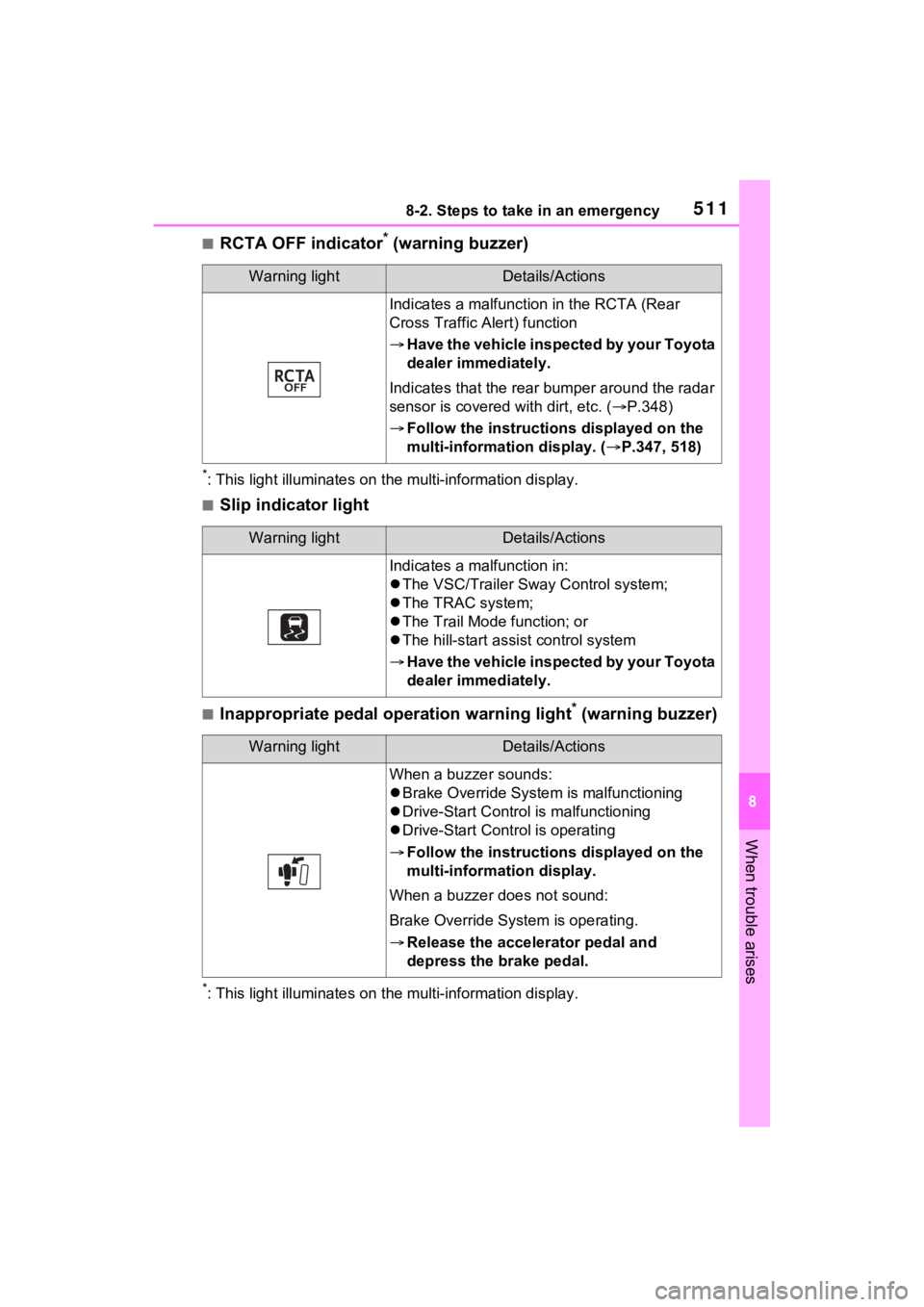
■RCTA OFF indicator* (warning buzzer)
*: This light illuminat es on the multi-information display.
■Slip indicator light
■Inappropriate pedal operation warning light* (warning buzzer)
*: This light illuminates on the multi-information display.
Warning lightDetails/Actions
Indicates a malfunctio n in the RCTA (Rear
Cross Traffic Alert) function
Have the vehicle inspected by your Toyota
dealer immediately.
Indicates that the rear bumper around the radar
sensor is covered with dirt, etc. ( P.348)
Follow the instructions displayed on the
multi-information display. ( P.347, 518)
Warning lightDetails/Actions
Indicates a malfunction in:
The VSC/Trailer Sway Control system;
The TRAC system;
The Trail Mode function; or
The hill-start assist control system
Have the vehicle inspected by your Toyota
dealer immediately.
Warning lightDetails/Actions
When a buzzer sounds:
Brake Override System is malfunctioning
Drive-Start Control is malfunctioning
Drive-Start Control is operating
Follow the instructions displayed on the
multi-information display.
When a buzzer does not sound:
Brake Override System is operating.
Release the accelerator pedal and
depress the brake pedal.
Page 512 of 624
5128-2. Steps to take in an emergency
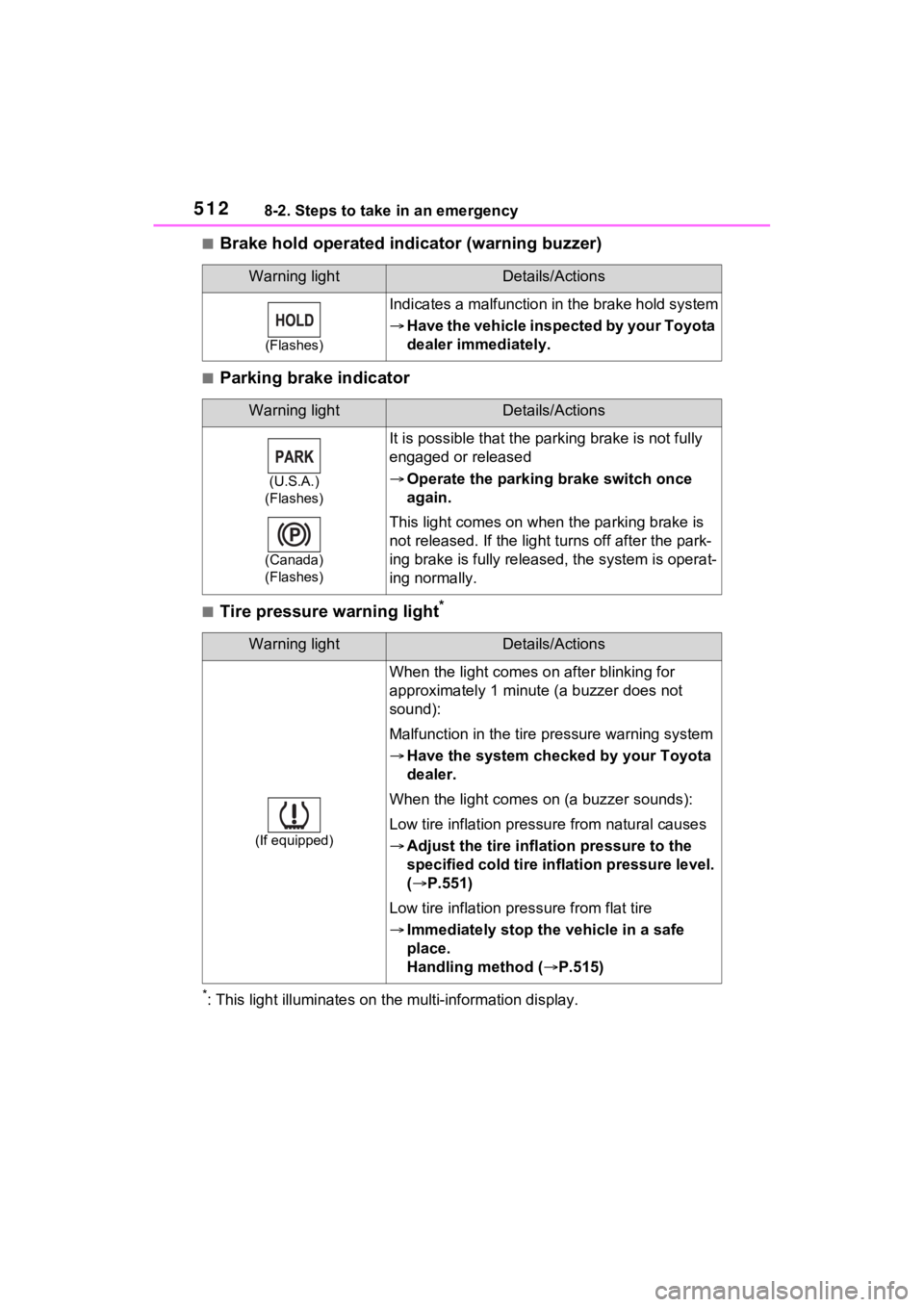
■Brake hold operated indicator (warning buzzer)
■Parking brake indicator
■Tire pressure warning light*
*: This light illuminat es on the multi-information display.
Warning lightDetails/Actions
(Flashes)
Indicates a malfunction in the brake hold system
Have the vehicle inspected by your Toyota
dealer immediately.
Warning lightDetails/Actions
(U.S.A.)
(Flashes)
(Canada)
(Flashes)
It is possible that the par king brake is not fully
engaged or released
Operate the parking brake switch once
again.
This light comes on when the parking brake is
not released. If the light t urns off after the park-
ing brake is fully released, the system is operat-
ing normally.
Warning lightDetails/Actions
(If equipped)
When the light comes on after blinking for
approximately 1 minute (a buzzer does not
sound):
Malfunction in the tire pressure warning system
Have the system checked by your Toyota
dealer.
When the light comes on (a buzzer sounds):
Low tire inflation pressu re from natural causes
Adjust the tire inflation pressure to the
specified cold tire inflation pressure level.
( P.551)
Low tire inflation pre ssure from flat tire
Immediately stop the vehicle in a safe
place.
Handling method ( P.515)
Page 516 of 624
5168-2. Steps to take in an emergency
●If the tire pressure warning light
comes on even after tire infla-
tion pressure adjustment, it is
probable that you have a flat
tire. Check the tires. If a tire is
flat, change it with the spare tire
and have the flat tire repaired by
the nearest Toyota dealer.
●Avoid abrupt maneuvering and
braking. If the vehicle tires dete-
riorate, you could lose control of
the steering wheel or the
brakes.
■If a blowout or sudden air
leakage should occur (vehi-
cles with tire pressure warn-
ing system)
The tire pressure warning system
may not activate immediately.
■Maintenance of the tires
(vehicles with tire pressure
warning system)
Each tire, including the spare (if
provided), should be checked
monthly when cold and inflated to
the inflation pressure recom-
mended by the vehicle manufac-
turer on the vehicle placard or tire
inflation pressure label (tire and
load information label). (If your
vehicle has tires of a different size
than the size indicated on the
vehicle placard or tire inflation
pressure label [tire and load infor-
mation label], you should deter-
mine the proper tire inflation
pressure for those tires.)
WARNING
As an added safety feature, your
vehicle has been equipped with a
tire pressure monitoring system
(TPMS-tire pressure warning sys-
tem) that illuminates a low tire
pressure telltale (tire pressure
warning light) w hen one or more
of your tires is s ignificantly under-
inflated. Accord ingly, when the
low tire pressure te lltale (tire pres-
sure warning light) illuminates,
you should stop and check your
tires as soon as possible, and
inflate them to the proper pres-
sure. Driving on a significantly
under-inflated tire causes the tire
to overheat and can lead to tire
failure. Under-inflation also
reduces fuel efficiency and tire
tread life, and may affect the vehi-
cle’s handling and stopping abil-
ity.
Please note that the TPMS (tire
pressure warning system) is not a
substitute for proper tire mainte-
nance, and it is the driver’s
responsibility to m aintain correct
tire pressure, even if under-infla-
tion has not reached the level to
trigger illumination of the TPMS
low tire pressure te lltale (tire pres-
sure warning light).
Page 517 of 624
5178-2. Steps to take in an emergency
8
When trouble arises
■Warning messages
The warning messages explained
below may differ from the actual
messages according to operation
conditions and vehicle specifica-
tions.
■If a message about an operation
is shown
●If a message about an operation
of the accelerator pedal or brake
Your vehicle has also been
equipped with a TPMS (tire pres-
sure warning system) malfunc-
tion indicator to indicate when the
system is not opera
ting properly.
The TPMS (tire pressure warning
system) malfunction indicator is
combined with the low tire pres-
sure telltale (tire pressure warning
light). When the system detects a
malfunction, the telltale will flash
for approximately one minute and
then remain continuously illumi-
nated. This sequence will con-
tinue upon subsequent vehicle
start-ups as long as the malfunc-
tion exists. When the malfunction
indicator is illuminated, the sys-
tem may not be able to detect or
signal low tire pressure as
intended.
TPMS (tire pressure warning sys-
tem) malfunctions may occur for a
variety of reasons, including the
installation of replacement or
alternate tires or wheels on the
vehicle that prevent the TPMS
(tire pressure warning system)
from functioning properly. Always
check the TPMS ( tire pressure
warning system) malfunction tell-
tale after replacing one or more
tires or wheels on your vehicle to
ensure that the r eplacement or
alternate tires and wheels allow
the TPMS (tire pressure warning
system) to continue to function
properly.
NOTICE
■To ensure the tire pressure
warning system operates
properly (vehicles with tire
pressure warning system)
Do not install tires with different
specifications or manufacturers
as the tire pressure warning sys-
tem may not operate properly.
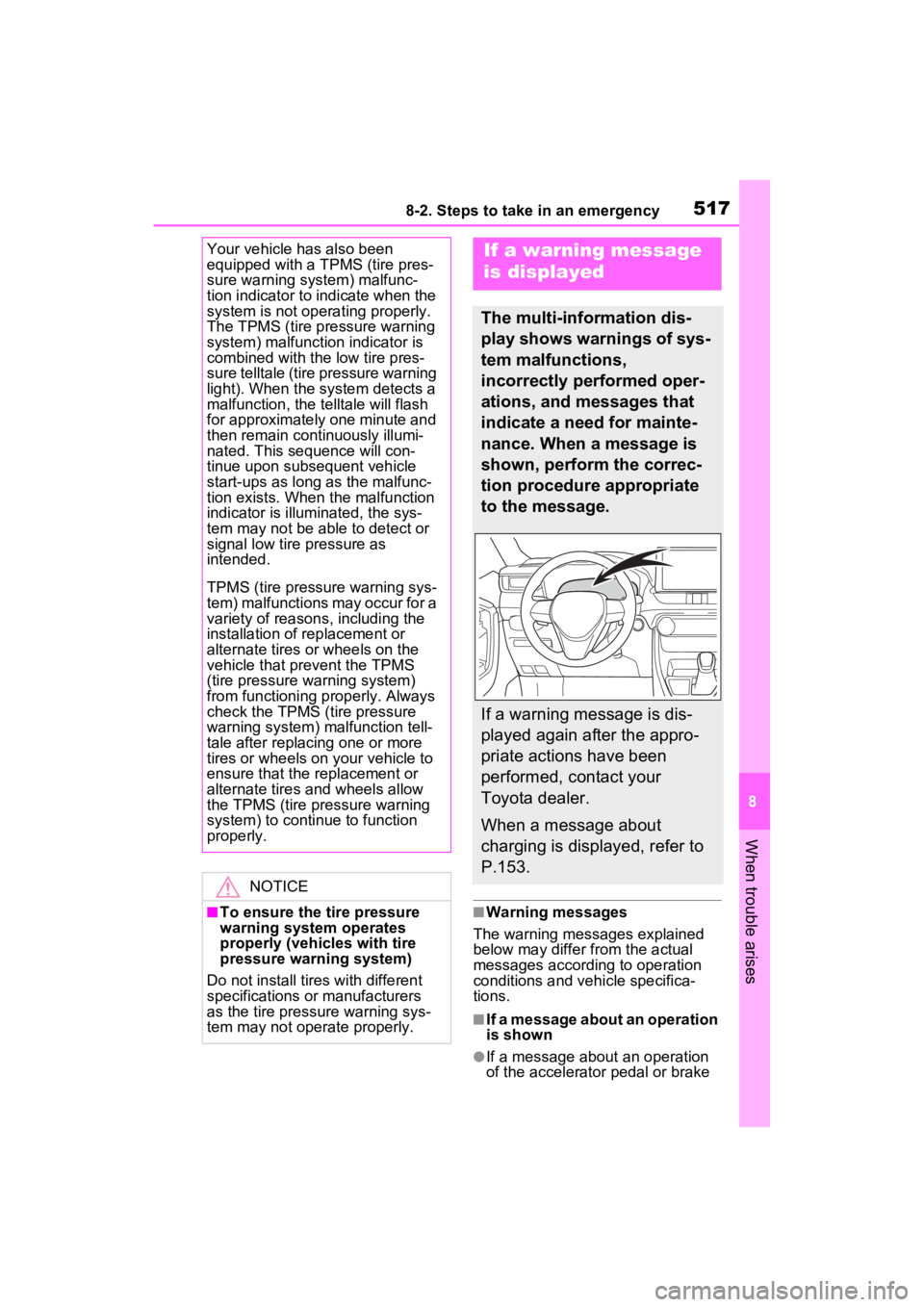
If a warning message
is displayed
The multi-information dis-
play shows warnings of sys-
tem malfunctions,
incorrectly performed oper-
ations, and messages that
indicate a need for mainte-
nance. When a message is
shown, perform the correc-
tion procedure appropriate
to the message.
If a warning message is dis-
played again after the appro-
priate actions have been
performed, contact your
Toyota dealer.
When a message about
charging is displayed, refer to
P.153.
Page 518 of 624

5188-2. Steps to take in an emergency
pedal is shown
• A warning message about an operation of the brake pedal may
be shown while the driving sup-
port systems such as PCS (Pre-
Collision system) or the dynamic
radar cruise control with full-speed
range is operati ng. If a warning
message is shown, be sure to
decelerate the vehicle or follow an
instruction show n on the multi-
information display.
• A warning message is shown when Brake Override System
operates. ( P.257)
• A warning message is shown when Drive-Start Control or Park-
ing Support Brake function (if
equipped) operates ( P.257,
363). Follow the instructions on
the multi-inform ation display.
●If a message about an operation
of the power switch is shown
An instruction for operation of the
power switch is shown when the
incorrect procedure for starting the
hybrid system is performed or the
power switch is operated incorrectly.
Follow the instructions shown on the
multi-information display to operate
the power switch again.
●If a message abou t a shift lever
operation is shown
To prevent the shift lever from being
operated incorrectly or the vehicle
from moving unexpectedly, a mes-
sage that requires shifting the shift
lever may be sho wn on the multi-
information display. In that case, fol-
low the instruction of the message
and shift the shift lever.
●If a message or image about an
open/close state of a part or
replenishment of a consumable is
shown
Confirm the part indicated by the
multi-information display or a warn-
ing light, and then perform the cop- ing method such as closing the
open door or replenishing a con-
sumable.
■If a message that indicates the
need for visiting your Toyota
dealer is displayed
The system or part shown on the
multi-information di splay is malfunc-
tioning. Have the vehicle inspected
by your Toyota dea ler immediately.
■If a message that indicates the
need for referring to Owner’s
Manual is displayed
●If the following messages are
shown, follow the instructions,
accordingly.
• “Blind Spot Monitor Unavailable” ( P.347)
• “Rear Cross Traffic Alert Unavail- able”( P.347)
• “Engine Coolant Temp High”
( P.539)
●If the following messages are
shown, there may be a malfunc-
tion.
Immediately have the vehicle
inspected by your Toyota dealer.
• “Plug-in charging system malfunc- tion”
• “Hybrid System Malfunction”
• “Charging System Malfunction”
• “Check Engine”
• “Traction battery system malfunc-
tion”
• “Accelerator System Malfunction”
• “Smart Key System Malfunction”
●If the following messages are
shown, there may be a malfunc-
tion.
Immediately stop the vehicle in a
safe place and contact your Toyota
dealer. Continuing to drive the vehi-
cle may be dangerous.
• “Oil Pressure Low”
• “Braking Power Low”
●If any of the following messages
are shown on the multi-informa-
tion display, the vehicle may have
Page 526 of 624
5268-2. Steps to take in an emergency
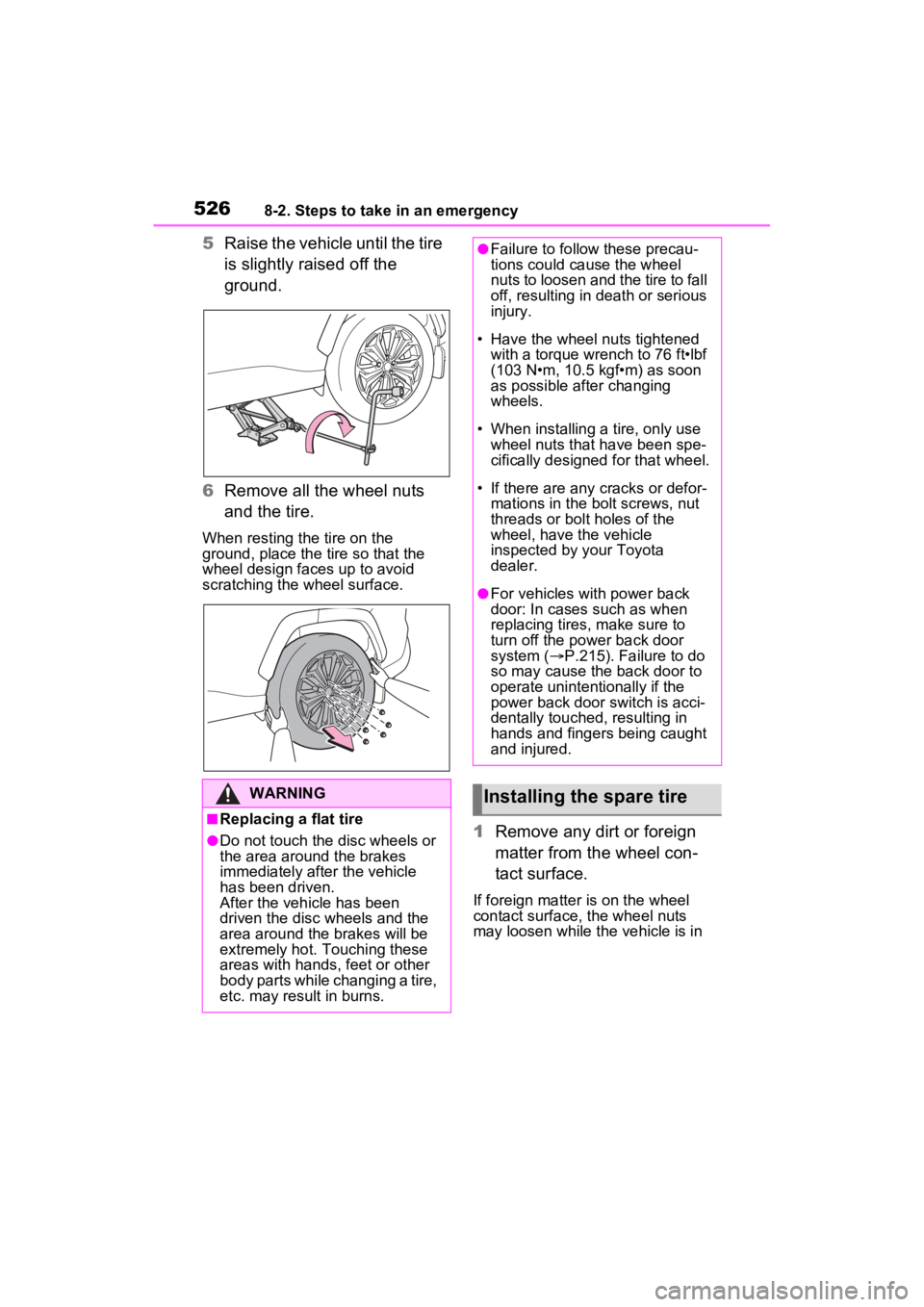
5Raise the vehicle until the tire
is slightly raised off the
ground.
6 Remove all the wheel nuts
and the tire.
When resting the tire on the
ground, place the tire so that the
wheel design faces up to avoid
scratching the wheel surface.
1 Remove any dirt or foreign
matter from the wheel con-
tact surface.
If foreign matter is on the wheel
contact surface, the wheel nuts
may loosen while the vehicle is in
WARNING
■Replacing a flat tire
●Do not touch the disc wheels or
the area around the brakes
immediately after the vehicle
has been driven.
After the vehicle has been
driven the disc wheels and the
area around the brakes will be
extremely hot. Touching these
areas with hands , feet or other
body parts while changing a tire,
etc. may result in burns.
●Failure to follow these precau-
tions could cause the wheel
nuts to loosen and the tire to fall
off, resulting in death or serious
injury.
• Have the wheel nuts tightened
with a torque wrench to 76 ft•lbf
(103 N•m, 10.5 kgf•m) as soon
as possible after changing
wheels.
• When installing a tire, only use wheel nuts that have been spe-
cifically designed for that wheel.
• If there are any cracks or defor- mations in the bolt screws, nut
threads or bolt holes of the
wheel, have the vehicle
inspected by your Toyota
dealer.
●For vehicles with power back
door: In cases such as when
replacing tires, make sure to
turn off the po wer back door
system ( P.215). Failure to do
so may cause the back door to
operate unintentionally if the
power back door switch is acci-
dentally touched , resulting in
hands and fingers being caught
and injured.
Installing the spare tire
Page 530 of 624
![TOYOTA RAV4 PRIME 2022 Service Manual 5308-2. Steps to take in an emergency
There is a possibility that the
temperature of the hybrid bat-
tery (traction battery) is
extremely low (approximately
below -22°F [-30°C]).
( P.278)](/img/14/68776/w960_68776-529.png "TOYOTA RAV4 PRIME 2022 Service Manual 5308-2. Steps to take in an emergency
There is a possibility that the
temperature of the hybrid bat-
tery (traction battery) is
extremely low (approximately
below -22°F [-30°C]).
( P.278)")
5308-2. Steps to take in an emergency
There is a possibility that the
temperature of the hybrid bat-
tery (traction battery) is
extremely low (approximately
below -22°F [-30°C]).
( P.278)
One of the following may be the
cause of the problem:
The 12-volt battery may be
discharged. ( P.534)
The 12-volt battery terminal
connections may be loose or
corroded. ( P.463)
One of the following may be the
cause of the problem:
The 12-volt battery may be
discharged. ( P.534)
One or both of the 12-volt bat-
tery terminals may be discon-
nected. ( P.463)
Contact your Toyota dealer if
the problem cannot be repaired,
or if repair procedures are
unknown. When the hybrid system does
not start, the following steps can
be used as an interim measure
to start the hybrid system if the
power switch is functioning nor-
mally.
Do not use this starting proce-
dure except in cases of emer-
gency.
1
Pull the parking brake switch
to check that the parking
brake is set. ( P.287)
Parking brake indicator will come
on.
2 Shift the shift lever to P.
3 Turn the power switch to
ACC.
4 Press and hold the power
switch for about 15 seconds
while depressing the brake
pedal firmly.
Even if the hybrid system can be
started using the above steps,
the system may be malfunction-
ing. Have the vehicle inspected
by your Toyota dealer.
The interior lights and
headlights are dim, or the
horn does not sound or
sounds at a low volume
The interior lights and
headlights do not turn on,
or the horn does not
sound
Starting the hybrid sys-
tem in an emergency
Page 595 of 624
595What to do if... (Troubleshooting)
Is the 12-volt battery dis-
charged? ( P.534)
Is the power switch in ON?
If you cannot release the shift
lever by depressing the brake
pedal with the power switch in
ON ( P.284)
Is the window lock switch
pressed?
The power window except for
the one at the driver’s seat
cannot be operated if the win-
dow lock switch is pressed.
( P.246)
The auto power off function
will be operated if the vehicle
is left in ACC or ON (the
hybrid system is not operat-
ing) for a period of time.
( P.281)
The seat belt reminder light is
flashing
Are the driver and the passengers wearing the seat belts? (
P.513,
514
)
The parking brake indicator is
on
Is the parking br ake released?
(
P.287)
Depending on the situation,
other types of warning buzzer
may also sound. ( P.506, 518)
Did anyone inside the vehicle
open a door during setting the
alarm?
The sensor detects it and the
alarm sounds. ( P.72)
To stop the alarm, turn the power
switch to ON or start the hybrid sys-
tem.
Is the message displayed on
the multi-information display?
Check the message on the
multi-information display.
( P.518)
When a warning light turns on
or a warning message is dis-
played, refer to P.506, 518.
The shift lever cannot be
shifted from P even if you
depress the brake pedal
The windows do not open
or close by operating the
power window switches
The power switch is
turned off automatically
A warning buzzer sounds
during driving
An alarm is activated and
the horn sounds (if
equipped)
A warning buzzer sounds
when leaving the vehicle
A warning light turns on
or a warning message is
displayed
Page 597 of 624

597Alphabetical Index
Alphabetical Index
A
A/C“My Room Mode” ................. 144
Air conditioning filter ............. 477
Automatic air conditioning sys-tem ..................................... 390
Eco air conditioning mode .... 391
Front seat concentrated airflow mode (S-FLOW) ................. 396
Humidity sensor ................... 398
Remote Air Conditioning System ........................................... 399
ABS (Anti-lock Brake System) ............................................... 375Function ............................... 375
Warning light ........................ 508
ACA (Active Cornering Assist) ............................................... 376
AC charging cable .................. 102 CCID (Charging Circuit Interrupt-ing Device) ......................... 103
If the charging connector cannot be unlocked ........................ 110
Indicator ............................... 104
Locking and unlocking.......... 108
Maintenance......................... 106
Safety functions.................... 104
Acoustic Vehicle Alerting Sys- tem ........................................... 85
Active Cornering Assist (ACA) ............................................... 376
Airbags ...................................... 34 Airbag operating conditions.... 36
Airbag precautions for your child............................................. 39
Airbag warning light.............. 508
Correct driving posture ........... 27
Curtain shield airbag operating conditions ............................. 37
Curtain shield airbag precautions ............................................. 39 Front passenger occupant clas-
sification system ...................44
General airbag precautions ....39
Locations of airbags ...............34
Modification and disposal of air- bags......................................42
Seat cushion airbag................34
Side airbag operating conditions .............................................37
Side airbag precautions..........39
Side and curtain shield airbags operating conditions .............37
Side and curtain shield airbags precautions ...........................39
SRS airbag instructions for Canadian owners ...............583
SRS airbags ...........................34
SRS warning light .................508
Air conditioning filter .............477
Air conditioning system “My Room Mode” ..................144
Air conditioning filter .............477
Automatic air conditioning sys-tem .....................................390
Eco air conditioning mode ....391
Front seat concent rated airflow
mode (S-FLOW) .................396
Remote Air Conditioning System ...........................................399
Air intake vent ...........................91 Cleaning ...............................480
Alarm .........................................72 Alarm ......................................72
Warning buzzer .. ..................506
Anchor brackets ... ..............53, 62
Antenna (Smart key system) .217
Anti-lock brake system (ABS)375 Function................................375
Warning light ........................508
Approach warning ..................341
Armrest ......... ......................... ..422
Assist grips .............................423
Page 598 of 624

598Alphabetical Index
AUTO EV/HV mode ................... 77
AUTO EV/HV mode switch....... 78
Automatic air conditioning sys-tem ......................................... 390“My Room Mode” ................. 144
Air conditioning filter ............. 477
Eco air conditioning mode .... 391
Front seat concentrated airflow mode (S-FLOW) ................. 396
Remote Air Conditioning System ........................................... 399
Automatic door locking and unlocking systems ............... 202
Automatic High Beam (AHB) . 296
Automatic light control system ............................................... 294
Auxiliary boxes ....................... 409
Average fuel consumption .... 189
Average fuel economy ........... 172
Average vehicle speed .. 176, 189
B
Back door ................................ 203 Hands Free Power Back Door........................................... 208
Power back door .................. 206
Wireless remote control ....... 206
Back-up lights Replacing light bulbs ............ 492
Wattage ................................ 552
Battery (12-volt battery) ......... 462 If the 12-volt battery is dis-charged .............................. 534
Preparing and c hecking before
winter.................................. 382
Replacing ............................. 537
Warning light ........................ 506
Battery (traction battery) ......... 87 Charging............................... 123
Location.................................. 87
Specification ......................... 548
Blind Spot Monitor (BSM) ...... 345 Blind Spot Monitor function ..349
Rear Cross Traffic Alert function
...........................................351
Bottle holders .........................409
Brake Brake Hold ............................291
Fluid......................................460
Parking brake .......................287
Regenerative braking .............82
Warning light ........................506
Brake assist ............................375
Brake Hold...............................291
Brake Override System ..........257
Break-in tips ............................257
Brightness control Instrument panel light control169
BSM (Blind Spot Monitor) ......345 Blind Spot Monitor function ..349
Rear Cross Traffic Alert function...........................................351
C
Care Aluminum wheels .................440
Exterior .................................440
Front camera ........................308
Interior ..................................443
Radar sensor ........................308
Seat belts .............................443
Water-repellent coating ........441
Cargo capacity ................263, 266
Cargo hooks............................411
Chains......................................384
Charging “My Room Mode” ..................144
AC charging cable ................102
Charging equipment ...............99
Charging indicator ................100
Charging messages .............153
Charging precautions ...........126
Charging procedure..............123
Charging schedule function ..130