change time TOYOTA RAV4 PRIME 2022 Workshop Manual
[x] Cancel search | Manufacturer: TOYOTA, Model Year: 2022, Model line: RAV4 PRIME, Model: TOYOTA RAV4 PRIME 2022Pages: 624, PDF Size: 24.01 MB
Page 339 of 624
3395-5. Using the driving support systems
5
Driving
again to deactivate the cruise con-
trol.
If the cruise control main switch is
pressed and held for 1.5 seconds
or more, the syste m turns on in
constant speed control mode.
( P.342)
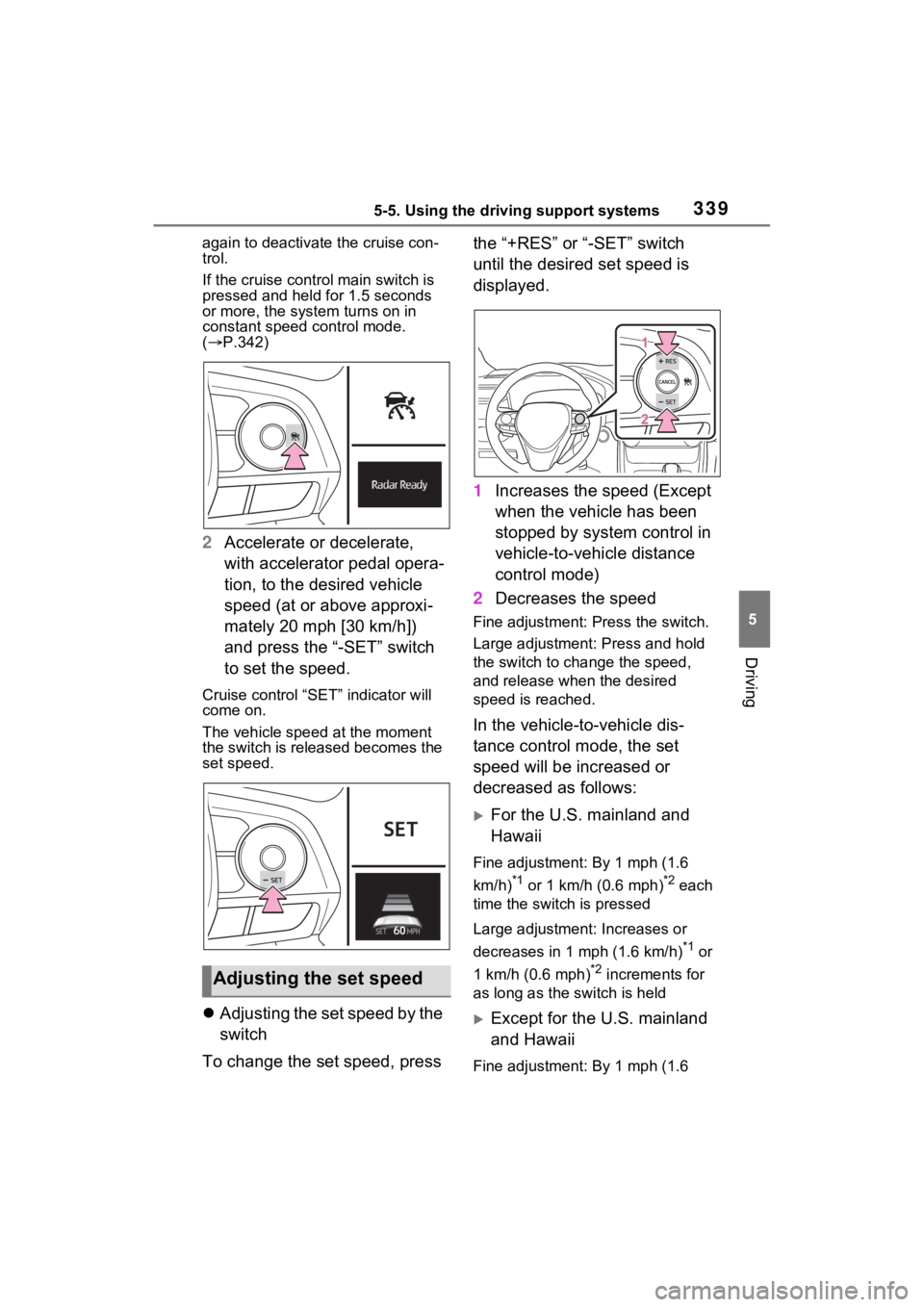
2 Accelerate or decelerate,
with accelerator pedal opera-
tion, to the desired vehicle
speed (at or above approxi-
mately 20 mph [30 km/h])
and press the “-SET” switch
to set the speed.
Cruise control “SET” indicator will
come on.
The vehicle speed at the moment
the switch is released becomes the
set speed.
Adjusting the set speed by the
switch
To change the set speed, press the “+RES” or “-SET” switch
until the desired set speed is
displayed.
1
Increases the speed (Except
when the vehicle has been
stopped by system control in
vehicle-to-vehicle distance
control mode)
2 Decreases the speed
Fine adjustment: Press the switch.
Large adjustment: Press and hold
the switch to cha nge the speed,
and release when the desired
speed is reached.
In the vehicle-to-vehicle dis-
tance control mode, the set
speed will be increased or
decreased as follows:
For the U.S. mainland and
Hawaii
Fine adjustment: By 1 mph (1.6
km/h)
*1 or 1 km/h (0.6 mph)*2 each
time the switch is pressed
Large adjustment: Increases or
decreases in 1 mph (1.6 km/h)
*1 or
1 km/h (0.6 mph)
*2 increments for
as long as the switch is held
Except for the U.S. mainland
and Hawaii
Fine adjustment: By 1 mph (1.6
Adjusting the set speed
Page 340 of 624
3405-5. Using the driving support systems
km/h)*1 or 1 km/h (0.6 mph)*2 each
time the switch is pressed
Large adjustment: Increases or
decreases in 5 mph (8 km/h)
*1 or 5
km/h (3.1 mph)
*2 increments for as
long as the switch is held
In the constant speed control
mode ( P.342), the set speed
will be increased or decreased
as follows:
Fine adjustment: By 1 mph (1.6
km/h)
*1 or 1 km/h (0.6 mph)*2 each
time the switch is pressed
Large adjustment: The speed will
continue to change while the switch
is held.
*1: When the set speed is shown in “MPH”
*2: When the set speed is shown in “km/h”
Increasing the set speed by
the accelerator pedal
1 Accelerate with accelerator
pedal operation to the
desired vehicle speed
2 Press the “-SET” switch
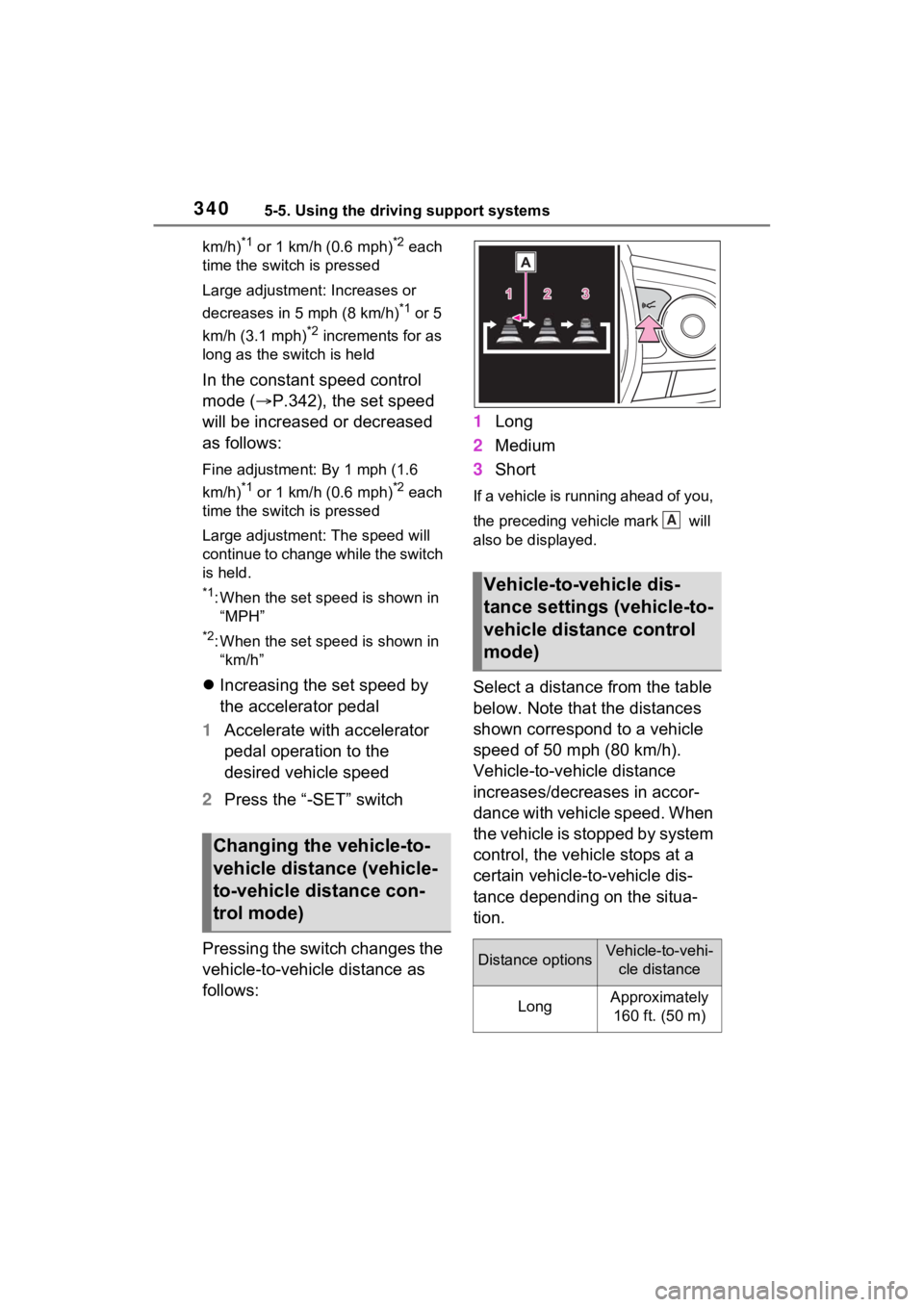
Pressing the switch changes the
vehicle-to-vehicle distance as
follows: 1
Long
2 Medium
3 Short
If a vehicle is running ahead of you,
the preceding vehicle mark will
also be displayed.
Select a distance from the table
below. Note that the distances
shown correspond to a vehicle
speed of 50 mph (80 km/h).
Vehicle-to-vehicle distance
increases/decreases in accor-
dance with vehicle speed. When
the vehicle is stopped by system
control, the vehicle stops at a
certain vehicle-to-vehicle dis-
tance depending on the situa-
tion.
Changing the vehicle-to-
vehicle distance (vehicle-
to-vehicle distance con-
trol mode)
Vehicle-to-vehicle dis-
tance settings (vehicle-to-
vehicle distance control
mode)
Distance optionsVehicle-to-vehi-
cle distance
LongApproximately 160 ft. (50 m)
A
Page 344 of 624
3445-5. Using the driving support systems
●TRAC is activated for a period of
time.
●When the VSC or TRAC system is
turned off.
●When the brake control or output
restriction control of a driving sup-
port system operates.
(For example: Pre-Collision Sys-
tem, Drive-Start Control)
●The parking brake is operated.
If constant speed control mode is
automatically canceled for any rea-
sons other than the above, there
may be a malfunction in the system.
Contact your Toyota dealer.
■Brake operation
A brake operation sound may be
heard and the brake pedal response
may change, but the se are not mal-
functions.
■Warning messages and buzzers
for dynamic radar cruise con-
trol with full-speed range
Warning messages and buzzers are
used to indicate a system malfunc-
tion or to inform the driver of the
need for caution while driving. If a
warning message is shown on the
multi-information display, read the
message and follow the instructions.
( P.311, 518)
■When the sensor may not be
correctly detecting the vehicle
ahead
In the case of the following and
depending on the conditions, oper-
ate the brake pedal when decelera-
tion of the system is insufficient or
operate the accelerator pedal when
acceleration is required.
As the sensor may not be able to
correctly detect these types of vehi-
cles, the approach warning
( P.341) may not be activated.
●Vehicles that cut in suddenly
●Vehicles traveling at low speeds
●Vehicles that are not moving in the same lane
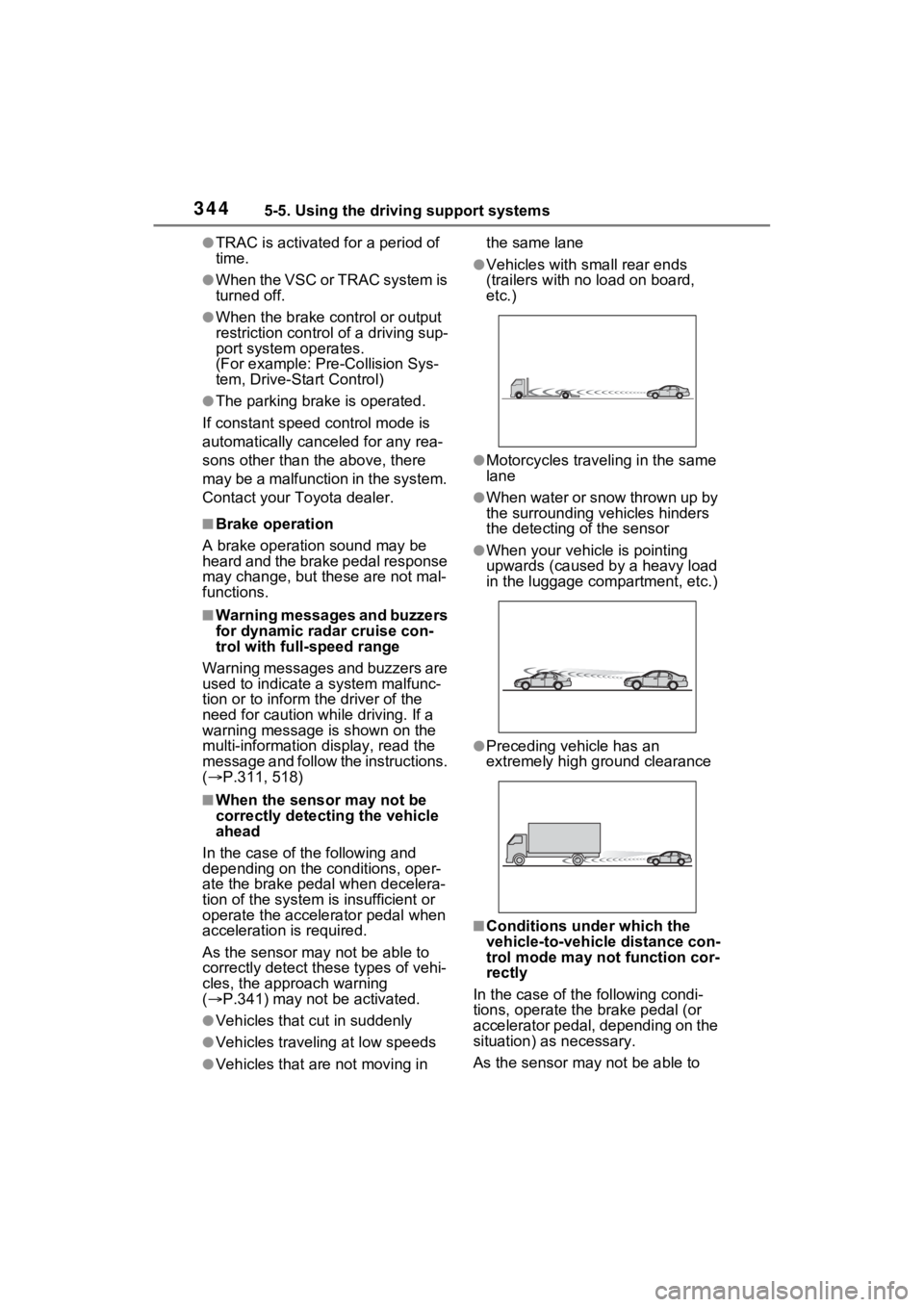
●Vehicles with small rear ends
(trailers with no load on board,
etc.)
●Motorcycles traveling in the same
lane
●When water or snow thrown up by
the surrounding vehicles hinders
the detecting of the sensor
●When your vehicle is pointing
upwards (caused by a heavy load
in the luggage compartment, etc.)
●Preceding vehicle has an
extremely high ground clearance
■Conditions under which the
vehicle-to-vehic
le distance con-
trol mode may not function cor-
rectly
In the case of the following condi-
tions, operate the brake pedal (or
accelerator pedal, depending on the
situation) as necessary.
As the sensor may not be able to
Page 361 of 624
3615-5. Using the driving support systems
5
Driving
The diagram shows the detection
range of the sensors. Note that the
sensors cannot detect objects that
are extremely close to the vehicle.The range of the sensors may
change depending on the shape of
the object, etc.
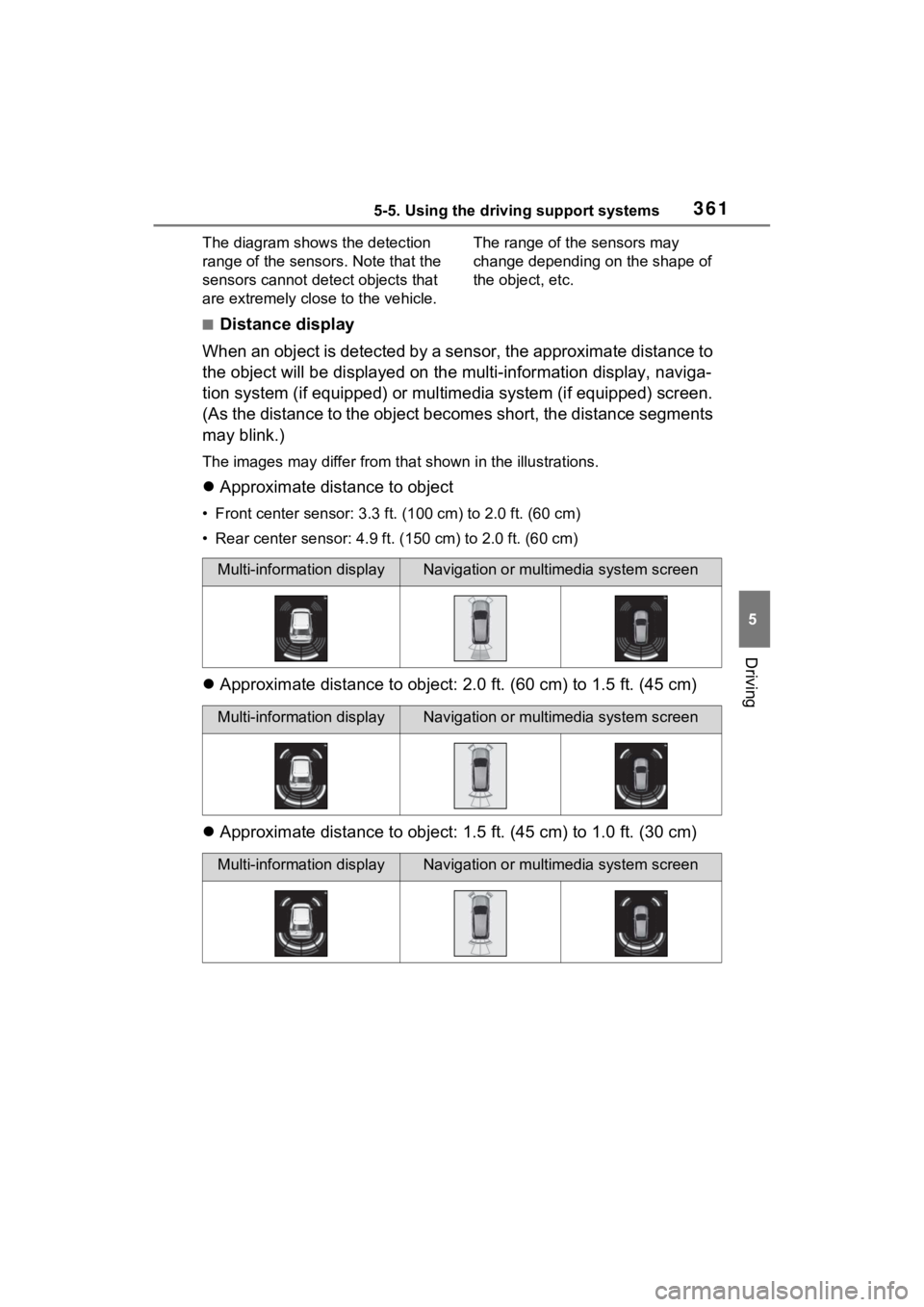
■Distance display
When an object is detected by a sensor, the approximate distance to
the object will be displayed on the multi-information display, naviga-
tion system (if equipped) or multimedia system (if equipped) sc reen.
(As the distance to the object becomes short, the distance segm ents
may blink.)
The images may differ from that shown in the illustrations.
Approximate distance to object
• Front center sensor: 3.3 ft . (100 cm) to 2.0 ft. (60 cm)
• Rear center sensor : 4.9 ft. (150 cm) to 2.0 ft. (60 cm)
Approximate distance to object: 2.0 ft. (60 cm) to 1.5 ft. (45 cm)
Approximate distance to object: 1.5 ft. (45 cm) to 1.0 ft. (30 cm)
Multi-information displayNavigation or multimedia system screen
Multi-information displayNavigation or multimedia system screen
Multi-information displayNavigation or multimedia system screen
Page 362 of 624
3625-5. Using the driving support systems
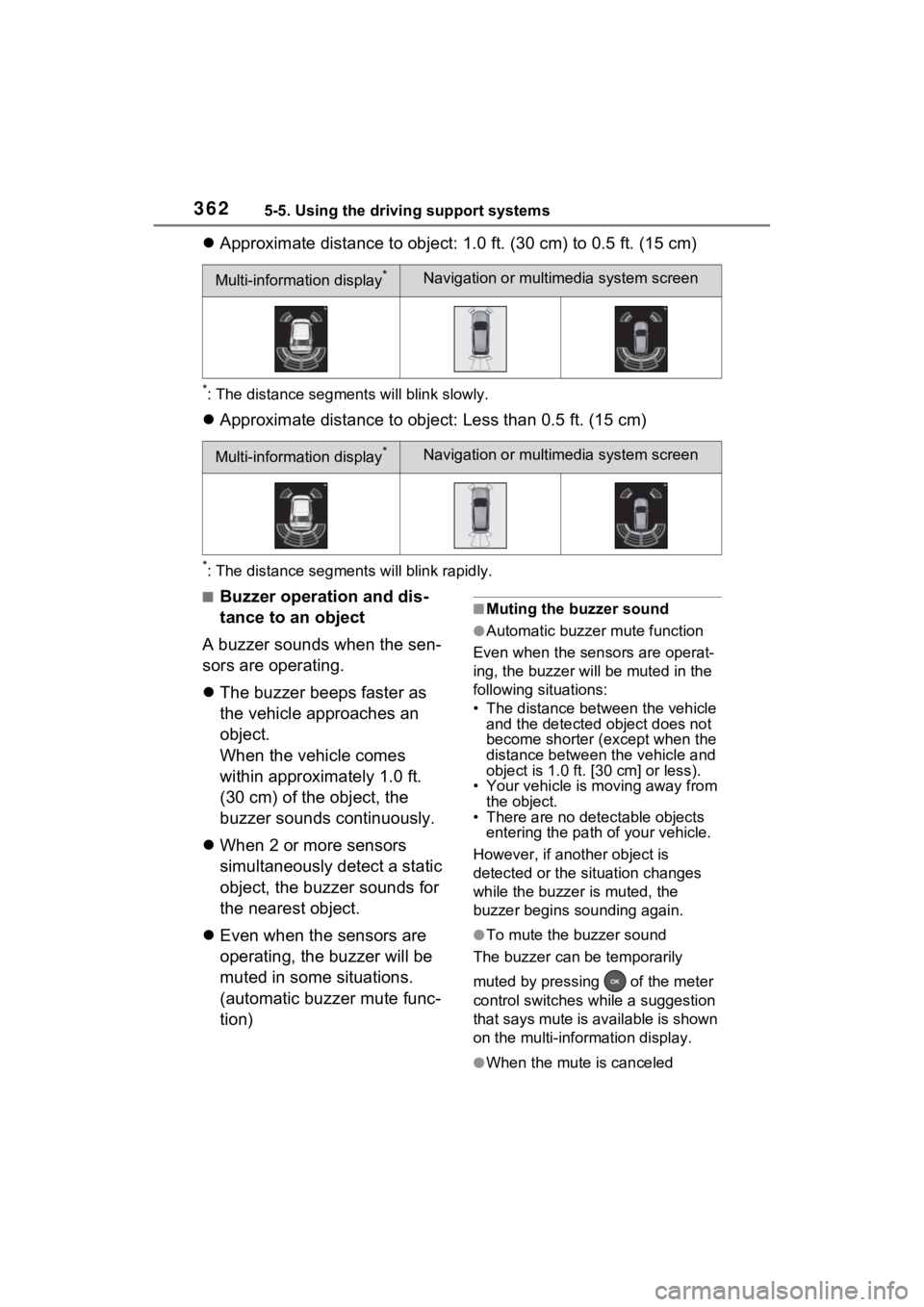
Approximate distance to object: 1.0 ft. (30 cm) to 0.5 ft. (15 cm)
*: The distance segments will blink slowly.
Approximate distance to object: Less than 0.5 ft. (15 cm)
*: The distance segments will blink rapidly.
■Buzzer operation and dis-
tance to an object
A buzzer sounds when the sen-
sors are operating.
The buzzer beeps faster as
the vehicle approaches an
object.
When the vehicle comes
within approximately 1.0 ft.
(30 cm) of the object, the
buzzer sounds continuously.
When 2 or more sensors
simultaneously detect a static
object, the buzzer sounds for
the nearest object.
Even when the sensors are
operating, the buzzer will be
muted in some situations.
(automatic buzzer mute func-
tion)■Muting the buzzer sound
●Automatic buzzer mute function
Even when the sensors are operat-
ing, the buzz er will be muted in the
following situations:
• The distance between the vehicle and the detected object does not
become shorter (except when the
distance between the vehicle and
object is 1.0 ft. [30 cm] or less).
• Your vehicle is moving away from
the object.
• There are no detectable objects entering the path o f your vehicle.
However, if another object is
detected or the situation changes
while the buzzer is muted, the
buzzer begins sounding again.
●To mute the buzzer sound
The buzzer can be temporarily
muted by pressing of the meter
control switches while a suggestion
that says mute is available is shown
on the multi-information display.
●When the mute is canceled
Multi-information display*Navigation or multimedia system screen
Multi-information display*Navigation or multimedia system screen
Page 365 of 624
3655-5. Using the driving support systems
5
Driving
The Parking Support Brake can
be enabled/disabled on the
screen of the multi-information
display. All of the Parking Sup-
port Brake functions (static
objects and rear-crossing vehi-
cles) are enabled/disabled
simultaneously. (P.177)
When the Parking Support Brake is
disabled, the PKSB OFF indicator
( P.163) illuminate s on the multi-
information display.
To re-enable the system, select
on the multi-inform ation display,
select and turn it on.
If the system is disabled, it will
remain off even if the power switch
is turned to ON after the power
switch has been turned off.
If the hybrid system output
restriction control or brake con-
trol operates, a buzzer will
sound and a message will be
displayed on the multi-informa-
tion display, head-up display (if
equipped), navigation system (if
equipped) or multimedia sys-
tem (if equipped) screen, to alert
the driver.
Depending on the situation, hybrid
system output restriction control will
operate to either limit acceleration
or restrict output as much as possi-
ble.
Hybrid system output restric-
tion control is operating
(acceleration restriction)
Acceleration greater than a certain
amount is restric ted by the system.
Multi-information display and head-
up display: “Object Detected Accel-
eration Reduced” (no warning dis-
played on the head-up display)
Navigation system or multimedia
system screen: No warning dis-
played
PKSB OFF indicator: Not illumi-
nated
Buzzer: Does not sound
Hybrid system output restric-
tion control is operating (out-
put restricted as much as
possible)
NOTICE
■If “Parking Support Brake
Unavailable” is displayed on
the multi-information display
and the PKSB OFF indicator
illuminates
If this message is displayed
immediately after the power
switch is changed to ON, operate
the vehicle carefully, paying atten-
tion to your surroundings. It may
be necessary to drive the vehicle
for a certain amount of time
before the system returns to nor-
mal. (If the system does not return
to normal after driving for a while,
clean the sensors and their sur-
rounding area on the bumpers.)
Enabling/Disabling the
Parking Support Brake
Display and buzzer for
hybrid system output
restriction control and
brake control
Page 367 of 624
3675-5. Using the driving support systems
5
Driving
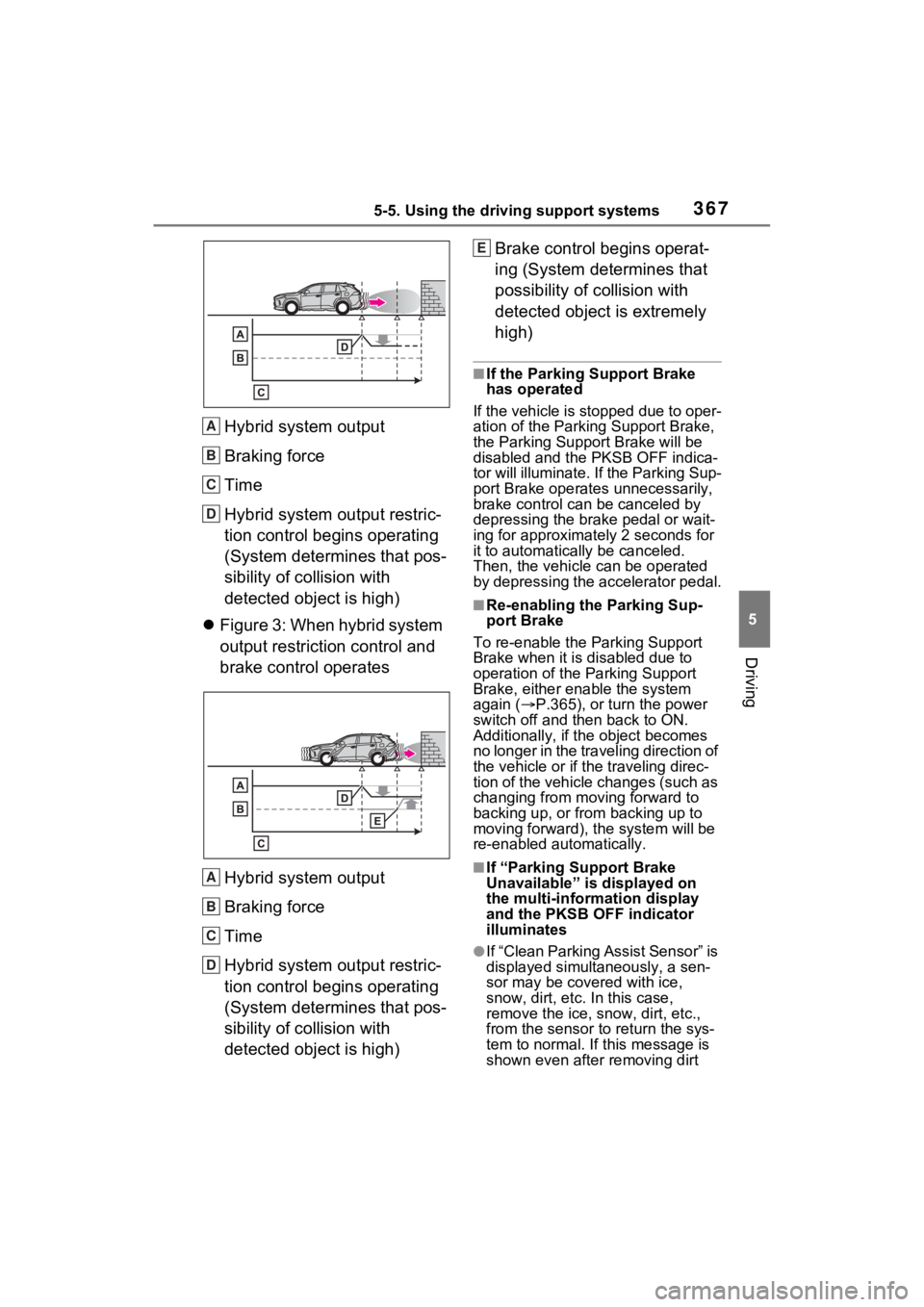
Hybrid system output
Braking force
Time
Hybrid system output restric-
tion control begins operating
(System determines that pos-
sibility of collision with
detected object is high)
Figure 3: When hybrid system
output restriction control and
brake control operates
Hybrid system output
Braking force
Time
Hybrid system output restric-
tion control begins operating
(System determines that pos-
sibility of collision with
detected object is high) Brake control begins operat-
ing (System determines that
possibility of co
llision with
detected object is extremely
high)
■If the Parking Support Brake
has operated
If the vehicle is stopped due to oper-
ation of the Parking Support Brake,
the Parking Support Brake will be
disabled and the PKSB OFF indica-
tor will illuminate. If the Parking Sup-
port Brake operates unnecessarily,
brake control can be canceled by
depressing the brake pedal or wait-
ing for approximate ly 2 seconds for
it to automatically be canceled.
Then, the vehicle can be operated
by depressing the accelerator pedal.
■Re-enabling the Parking Sup-
port Brake
To re-enable the Parking Support
Brake when it is disabled due to
operation of the Parking Support
Brake, either enable the system
again ( P.365), or turn the power
switch off and then back to ON.
Additionally, if the object becomes
no longer in the traveling direction of
the vehicle or if the traveling direc-
tion of the vehicle changes (such as
changing from moving forward to
backing up, or from backing up to
moving forward), t he system will be
re-enabled automatically.
■If “Parking Support Brake
Unavailable” is displayed on
the multi-information display
and the PKSB OFF indicator
illuminates
●If “Clean Parking Assist Sensor” is
displayed simultaneously, a sen-
sor may be covered with ice,
snow, dirt, etc. In this case,
remove the ice, snow, dirt, etc.,
from the sensor t o return the sys-
tem to normal. If this message is
shown even after removing dirt
A
B
C
D
A
B
C
D
E
Page 375 of 624
3755-5. Using the driving support systems
5
Driving
vehicle can be driven normally.
The “Traction Control Turned OFF”
on the multi-information display will
turn off after a short while and the
system will operate properly.
■When Trail Mode is canceled
In the following situations, Trail
Mode is automatically canceled
even if it is selected:
●When the driving mode is
changed. ( P.372)
●When the hybrid system is
restarted.
■Sounds and vibrations when
driving in Trail Mode
Any of the following conditions may
occur when Trail Mode is operating.
None of these indicates that a mal-
function has occurred:
●Vibrations may be felt throughout
the vehicle or steering wheel
●Sounds may be heard from the
engine compartment
■When the Trail Mode indicator
does not illuminate
When the Trail Mode indicator does
not illuminate even though the Trail
Mode switch is pressed, the system
may be malfunctioning.
Have the vehicle inspected by your
Toyota dealer immediately.
■ECB (Electronically Con-
trolled Brake System)
The electronically controlled
system generates braking force
corresponding to the brake
operation
■ABS (Anti-lock Brake Sys-
tem)
Helps to prevent wheel lock
when the brakes are applied
suddenly, or if the brakes are
applied while driving on a slip-
pery road surface
■Brake assist
Generates an increased level of
braking force after the brake
pedal is depressed when the
system detects a panic stop sit-
uation
NOTICE
■In order to ensure that Trail
Mode operates properly
Do not continuously use the Trail
Mode for a long period of time.
Depending on the driving condi-
tions, the load on related parts
increases and the system may not
operate properly.
Driving assist systems
To keep driving safety and
performance, the following
systems operate automati-
cally in response to various
driving situations. Be
aware, however, that these
systems are supplementary
and should not be relied
upon too heavily when oper-
ating the vehicle.
Summary of the driving
assist systems
Page 391 of 624
3916-1. Using the air conditioning system and defogger
6
Interior features
decreases the temperature.
The air conditioning system
switches between individual and
simultaneous modes each time the
“SYNC” switch is pressed.
Simultaneous mode (the indicator
on the “SYNC” switch is on):
The driver’s side temperature con-
trol dial can be used to adjust the
temperature for the driver’s and
passenger’s side. At this time,
operate the passenger’s side tem-
perature control dial to enter indi-
vidual mode.
Individual mode (t he indicator on
the “SYNC” switch is off):
The temperature for the driver’s
and passenger’s side can be
adjusted separately.
■Setting the fan speed
Press the fan speed increase
switch to increase the fan speed
and the fan speed decrease
switch to decrease the fan
speed.
Pressing the “OFF” switch turns off
the fan.
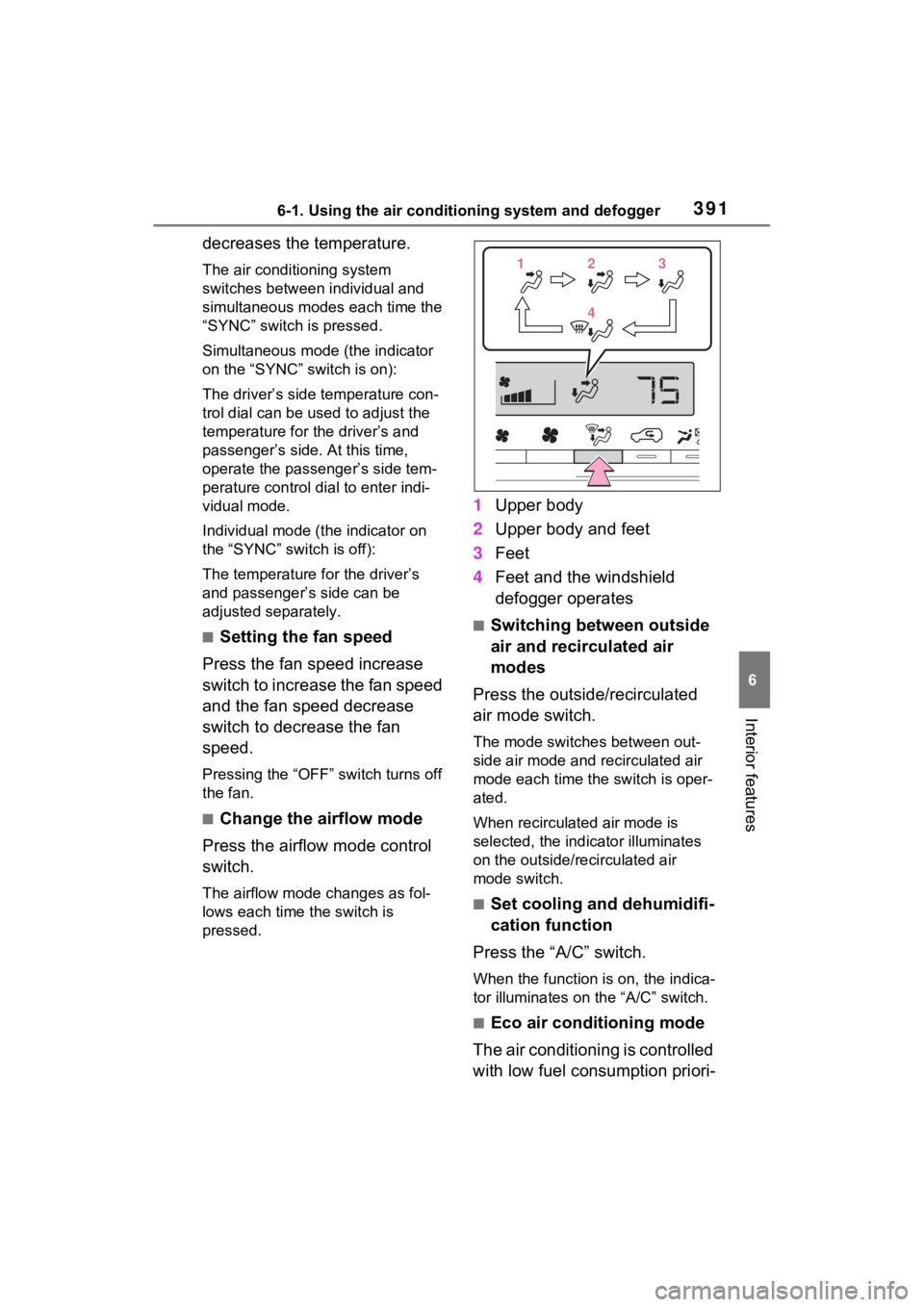
■Change the airflow mode
Press the airflow mode control
switch.
The airflow mode changes as fol-
lows each time the switch is
pressed.
1 Upper body
2 Upper body and feet
3 Feet
4 Feet and the windshield
defogger operates
■Switching between outside
air and recirculated air
modes
Press the outside/recirculated
air mode switch.
The mode switches between out-
side air mode and recirculated air
mode each time the switch is oper-
ated.
When recirculated air mode is
selected, the indicator illuminates
on the outside/recirculated air
mode switch.
■Set cooling and dehumidifi-
cation function
Press the “A/C” switch.
When the function is on, the indica-
tor illuminates on the “A/C” switch.
■Eco air conditioning mode
The air conditioning is controlled
with low fuel consumption priori-
112233
44
Page 397 of 624
3976-1. Using the air conditioning system and defogger
6
Interior features
■Operation of manual airflow
control
Even if the function is manually
switched to directing airflow to only
the front seats, whe n a rear seat is
occupied, it may automatically direct
airflow to all seats.
■To return to auto matic airflow
control
1 With the indicator off, turn the
power switch off.
2 After 60 minutes or more elapse,
turn the power switch to ON.
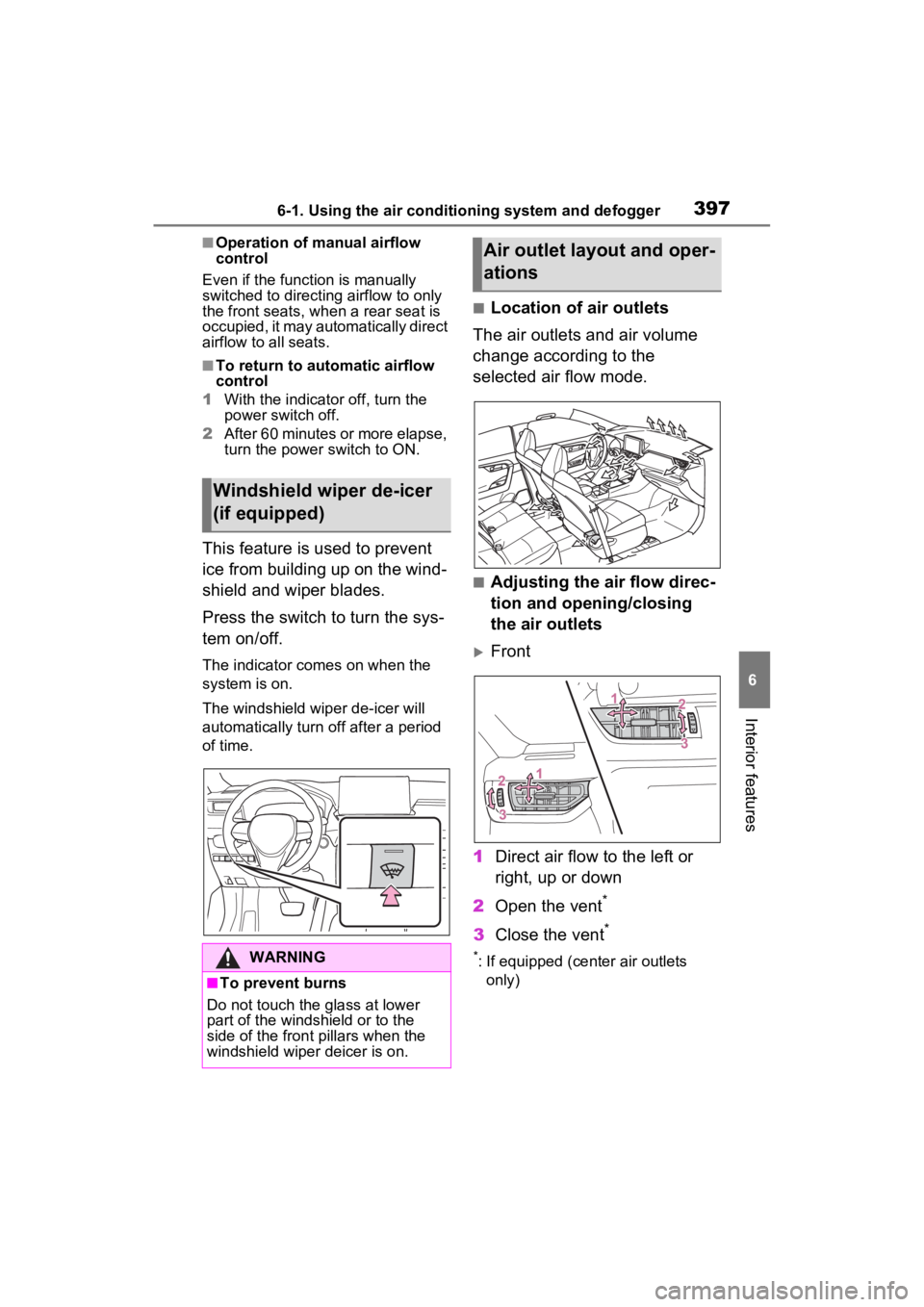
This feature is used to prevent
ice from building up on the wind-
shield and wiper blades.
Press the switch to turn the sys-
tem on/off.
The indicator comes on when the
system is on.
The windshield wiper de-icer will
automatically turn o ff after a period
of time.
■Location of air outlets
The air outlets and air volume
change according to the
selected air flow mode.
■Adjusting the air flow direc-
tion and opening/closing
the air outlets
Front
1 Direct air flow to the left or
right, up or down
2 Open the vent
*
3Close the vent*
*: If equipped (cent er air outlets
only)
Windshield wiper de-icer
(if equipped)
WARNING
■To prevent burns
Do not touch the glass at lower
part of the windshield or to the
side of the fron t pillars when the
windshield wiper deicer is on.
Air outlet layout and oper-
ations