brake light TOYOTA RAV4 PRIME 2022 Owners Manual
[x] Cancel search | Manufacturer: TOYOTA, Model Year: 2022, Model line: RAV4 PRIME, Model: TOYOTA RAV4 PRIME 2022Pages: 624, PDF Size: 24.01 MB
Page 3 of 624
3TABLE OF CONTENTS
1
2
3
4
5
6
7
8
9
10
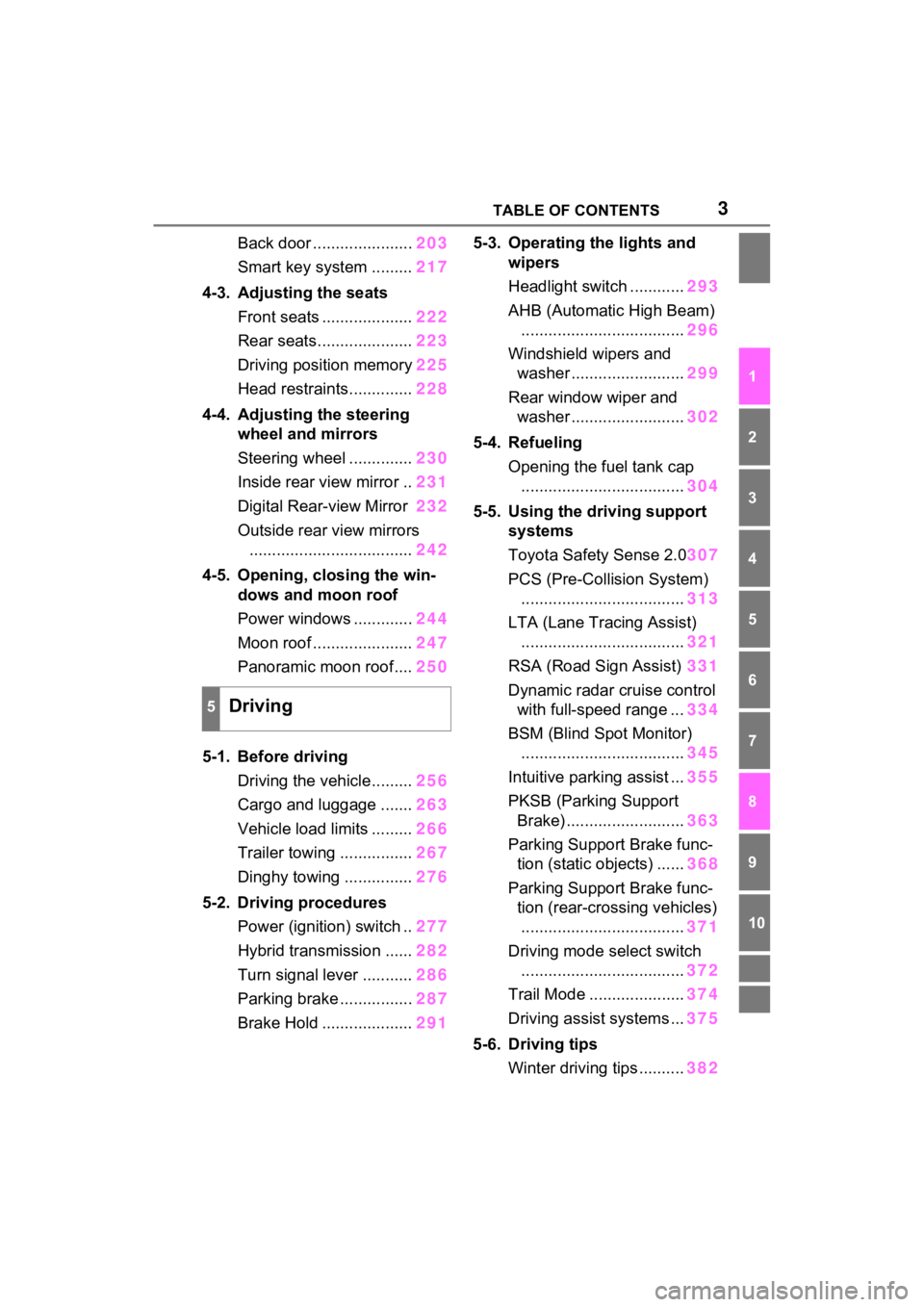
Back door ......................203
Smart key system ......... 217
4-3. Adjusting the seats Front seats .................... 222
Rear seats..................... 223
Driving position memory 225
Head restraints.............. 228
4-4. Adjusting the steering wheel and mirrors
Steering wheel .............. 230
Inside rear view mirror .. 231
Digital Rear-view Mirror 232
Outside rear view mirrors .................................... 242
4-5. Opening, closing the win- dows and moon roof
Power windows ............. 244
Moon roof ...................... 247
Panoramic moon roof.... 250
5-1. Before driving Driving the vehicle......... 256
Cargo and luggage ....... 263
Vehicle load limits ......... 266
Trailer towing ................ 267
Dinghy towing ............... 276
5-2. Driving procedures Power (ignition) switch .. 277
Hybrid transmission ...... 282
Turn signal lever ........... 286
Parking brake ................ 287
Brake Hold .................... 2915-3. Operating the lights and
wipers
Headlight switch ............ 293
AHB (Automatic High Beam) .................................... 296
Windshield wipers and washer ......................... 299
Rear window wiper and washer ......................... 302
5-4. Refueling Opening the fuel tank cap.................................... 304
5-5. Using the driving support systems
Toyota Safety Sense 2.0 307
PCS (Pre-Collision System) .................................... 313
LTA (Lane Tracing Assist) .................................... 321
RSA (Road Sign Assist) 331
Dynamic radar cruise control with full-speed range ... 334
BSM (Blind Spot Monitor) .................................... 345
Intuitive parking assist ... 355
PKSB (Parking Support Brake) .......................... 363
Parking Support Brake func- tion (static objects) ...... 368
Parking Support Brake func- tion (rear-crossing vehicles)
. ... ...
............................. 371
Driving mode s elect switch
.................................... 372
Trail Mode ..................... 374
Driving assist systems ... 375
5-6. Driving tips Winter driving tips .......... 382
5Driving
Page 36 of 624

361-1. For safe use
Driver airbag
Front passenger occupant classification sensors
Knee airbag
SRS warning light
Airbag sensor assembly
Your vehicle is equipped with ADVANCED AIRBAGS designed
based on the US motor vehicle safety standards (FMVSS208). The
airbag sensor assembly (ECU) cont rols airbag deployment based on
information obtained from the sensors etc. shown in the system
components diagram above. This in formation includes crash sever-
ity and occupant information. As the airbags deploy, a chemical
reaction in the inflators quickly fills the airbags with non-toxic gas to
help restrain the motion of the occupants.
■If the SRS airbags deploy
(inflate)
●Slight abrasions, burns, bruising
etc., may be sustained from SRS
airbags, due to the extremely high
speed deployment (inflation) by
hot gases.
●A loud noise and white powder will
be emitted.
●Parts of the airbag module (steer-
ing wheel hub, airbag cover and
inflator) as well as the front seats,
parts of the front and rear pillars,
and roof side rails, may be hot for
several minutes. T he airbag itself
may also be hot.
●The windshield may crack.
●The hybrid system will be stopped
and fuel supply to the engine will
be stopped. ( P.91)
●All of the doors will be unlocked.
( P.199)
●The brakes and st op lights will be
controlled automatically.
( P.376)
●The interior lights will turn on auto-
matically. ( P.405)
●The emergency flashers will turn
on automatically. ( P.498)
●For Safety Connect subscribers, if
any of the following situations
occur, the system is designed to
send an emergency call to the
response center, notifying them of
the vehicle’s location (without
needing to push the “SOS” button)
and an agent will attempt to speak
with the occupants to ascertain
the level of emergency and assis-
tance required. If the occupants
are unable to communicate, the
agent automatically treats the call
as an emergency and helps to dis-
patch the necessary emergency
services. ( P.65)
• An SRS airbag is deployed.
• A seat belt pretensioner is acti-
vated.
• The vehicle is involved in a severe
rear-end collision.
■SRS airbag deployment condi-
tions (SRS front airbags)
●The SRS front airbags will deploy
in the event of an impact that
exceeds the set threshold level
(the level of forc e corresponding
to an approximately 12 - 18 mph
[20 - 30 km/h] frontal collision with
a fixed wall that does not move or
deform).
However, this threshold velocity will
N
O
P
Q
R
Page 93 of 624
932-1. Plug-in hybrid system
2
Plug-in hybrid system
Shift the shift lever to D when
stopped at a traffic light, or driv-
ing in heavy traffic etc. Shift the
shift lever to P when parking.
When using the N, there is no
positive effect on fuel consump-
tion. In the N, the gasoline
engine operates but electricity
cannot be generated. Also,
when using the air conditioning
system, etc., the hybrid battery
(traction battery) power is con-
sumed.
Drive your vehicle smoothly.
Avoid abrupt acceleration and
deceleration. Gradual accel-
eration and deceleration will
make more effective use of
the electric motor (traction
motor) without having to use
gasoline engine power.
Avoid repeated acceleration.
Repeated acceleration con-
sumes hybrid battery (trac-
tion battery) power, resulting
in poor fuel consumption. Bat-
tery power can be restored by
driving with the accelerator
pedal slightly released.
Make sure to operate the brakes
gently and a timely manner. A greater amount of electrical
energy can be regenerated
when slowing down.
Repeated acceleration and
deceleration, as well as long
waits at traffic lights, will lead to
high fuel and electricity con-
sumption. Check traffic reports
before leaving and avoid delays
as much as possible. When driv-
ing in a traffic jam, gently
release the brake pedal to allow
the vehicle to move forward
slightly while avoiding overuse
of the accelerator pedal. Doing
so can help control excessive
electricity and fuel consumption.
Control and maintain the vehi-
cle at a constant speed.
Before stopping at a toll booth
or similar, allow plenty of time
to release the accelerator and
gently apply the brakes. A
greater amount of electrical
energy can be regenerated
when slowing down.
Electricity consumption will
increase significantly when
driving at high speeds in EV
mode or AUTO EV/HV mode.
If there will be a long distance
to the next external charging
point after leaving a freeway,
it is recommended to drive in
Shift lever operation
Accelerator pedal/brake
pedal operation
When braking
Delays
Highway driving
Page 96 of 624

962-1. Plug-in hybrid system
of occupants.
The distance that EV driving is
possible can be extended if the
following is performed:
■When starting off, depress
the accelerator pedal
smoothly to accelerate
As a guide, accelerate up to
approximately 12mph (20 km/h)
in the first 5 seconds.
Electrical and fuel efficiency can
be improved just by using the
ECO Accelerator Guidance dis-
played on the multi-information
display and taking care to start
off gently. ( P.173)
When the driving mode is set to
Eco drive mode, depressing the
accelerator pedal generates
smooth torque that makes it easier
to operate the accelerator gently.
At the same time, the air condition-
ing control is switched to eco air
conditioning mode ( P.391) to
reduce the strength of the air condi-
tioning operation.
■Maintain sufficient vehicle-
to-vehicle distance and do
not accelerate or decelerate
unnecessarily
Try to maintain a fixed speed
while driving. Driving at a short
vehicle-to-vehicle distance will
result in repeating wasteful
acceleration and deceleration,
which will worsen the electrical
and fuel efficiency.
■Release the accelerator
pedal early before stopping
the vehicle, such as at a
traffic light
The regenerative brake will
operate to convert the kinetic
energy of the vehicle into electri-
cal energy, which will charge the
hybrid battery (traction battery).
The regeneration status can be
checked from the Hybrid Sys-
tem Indicator. ( P.167)
When the brake pedal is
depressed lightly during decel-
eration, the regeneration
amount increases, enabling
more electrical energy to be
recovered.
If the brake pedal is depressed too
strongly, the recovered amount
indicator will reac h the maximum
level and the upper limit of the
recoverable energy will be
exceeded. Theref ore, be sure to
operate the brak e pedal early.
■Use the air conditioning
system appropriately, and
also utilize the heated steer-
ing wheel (if equipped) and
seat heaters
In EV mode, the vehicle is
cooled and heated by electrical
energy. (Except in extremely
cold temperatures of approxi-
mately 14°F (-10°C) or less.)
Preventing excessive cooling or
heating of the vehicle will reduce
power consumption and
improve electrical efficiency.
Page 121 of 624
1212-2. Charging
2
Plug-in hybrid system
the AC charging cable without
supervision. Also, keep the
AC charging cable out of
reach of infants.
When charging with a char-
ger, follow the procedures for
using each charger.
When charging using a public
charging facility, check the
setting of the charging sched-
ule function.
• When the charging schedule is
registered, temporarily turn off
the function or turn “Charge Now”
on. ( P.137, 142)
• When the charging schedule is set to on, charg ing will not start
even if the AC charging cable is
connected. Also, charging fee
may occur due to connection of
the AC charging cable.
Before charging, always check
the following items.
The parking brake is applied.
( P.287)
Lights such as the head-
lights, emergency flashers
and interior lights etc. are
turned off.
If these light switches are turned
on, then th ese features will con-
sume electricity, and charging time
will increase.
The power switch is turned to
OFF. ( P.280) Before charging, make sure that
each part of the AC charging
cable is in good condition.
(
P.106)
■During charging
●The charging starting time may
differ depending on the state of
the vehicle, but this does not indi-
cate a malfunction.
●Cooling fan sounds may be heard
from near the rear seat. ( P.91)
●During charging, sounds may be
heard from near the hybrid battery
(traction battery) in accordance
with the operation of the air condi-
tioning system or “Battery Cooler”
( P.116).
●During and after charging, the rear
seat and its surrounding area in
which the onboard traction battery
charger is installed may get warm.
●The surface of the CCID
(Charging Circuit Interrupting
Device) may become hot, but this
does not indicate a malfunction.
●Depending on radio wave condi-
tions, interference may be heard
on the radio.
●The current charging condition
and the estimated time until
charging will complete can be
checked on the mu lti-information
display.
■Capacity reduction of the
hybrid battery (traction battery)
The capacity of the hybrid battery
(traction battery) will decline gradu-
ally when the hybrid battery (traction
battery) is in use. The rate at which
it declines will diff er in accordance
with environmental conditions and
the way in which the vehicle is used.
Observing the fo llowing can help
Confirm the following
before charging
Inspecting the AC
charging cable
Page 161 of 624
1613-1. Instrument cluster
3
Vehicle status information and indicators
■When digital speedometer is displayed
The units used on the meters and some indicators may differ depending on
the target region.
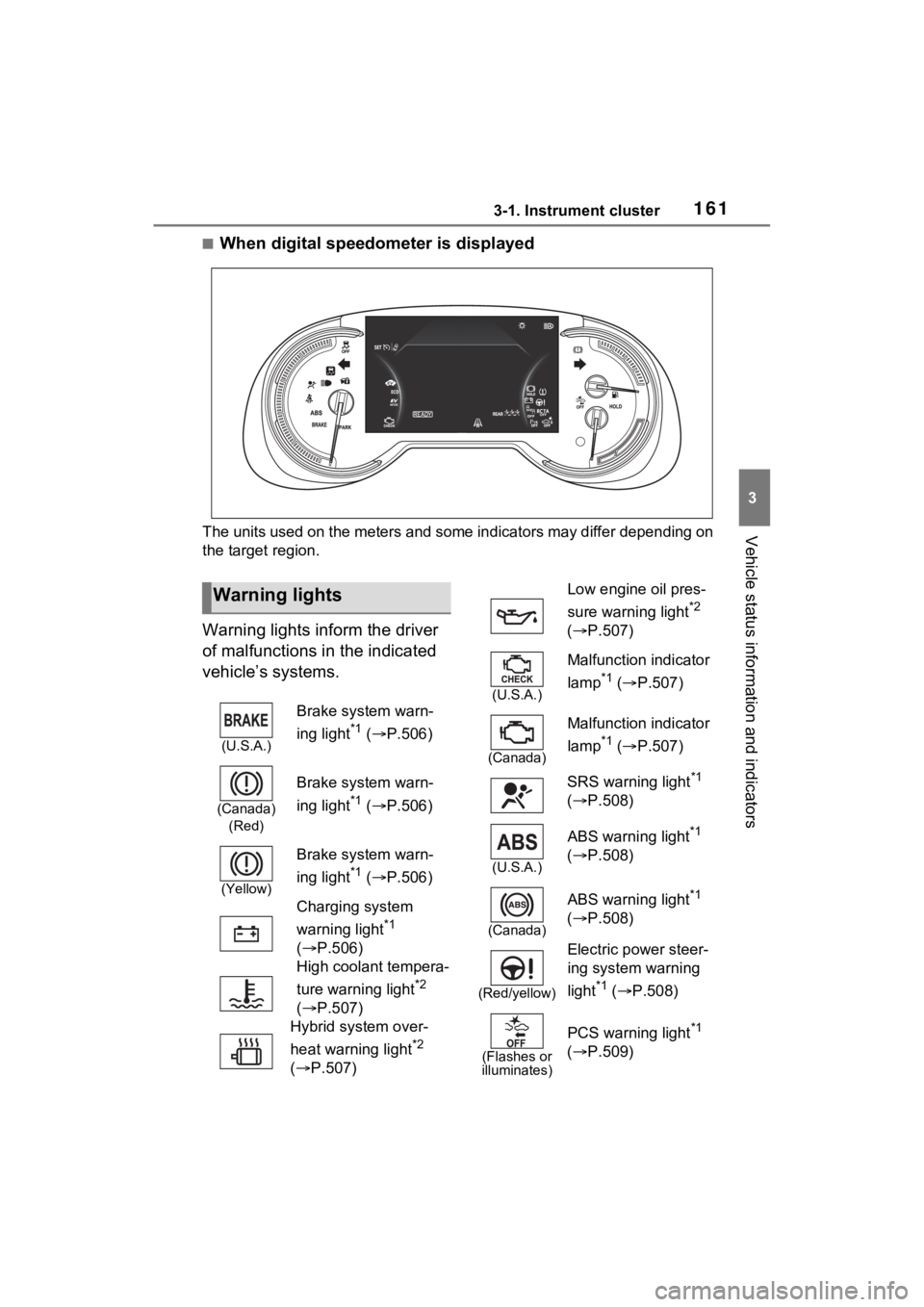
Warning lights inform the driver
of malfunctions in the indicated
vehicle’s systems.
Warning lights
(U.S.A.)
Brake system warn-
ing light
*1 ( P.506)
(Canada)
(Red)
Brake system warn-
ing light
*1 ( P.506)
(Yellow)
Brake system warn-
ing light
*1 ( P.506)
Charging system
warning light
*1
( P.506)
High coolant tempera-
ture warning light
*2
( P.507)
Hybrid system over-
heat warning light
*2
( P.507)
Low engine oil pres-
sure warning light
*2
( P.507)
(U.S.A.)
Malfunction indicator
lamp
*1 ( P.507)
(Canada)
Malfunction indicator
lamp
*1 ( P.507)
SRS warning light
*1
( P.508)
(U.S.A.)
ABS warning light*1
( P.508)
(Canada)
ABS warning light*1
( P.508)
(Red/yellow)
Electric power steer-
ing system warning
light
*1 ( P.508)
(Flashes or
illuminates)
PCS warning light*1
( P.509)
Page 162 of 624
1623-1. Instrument cluster
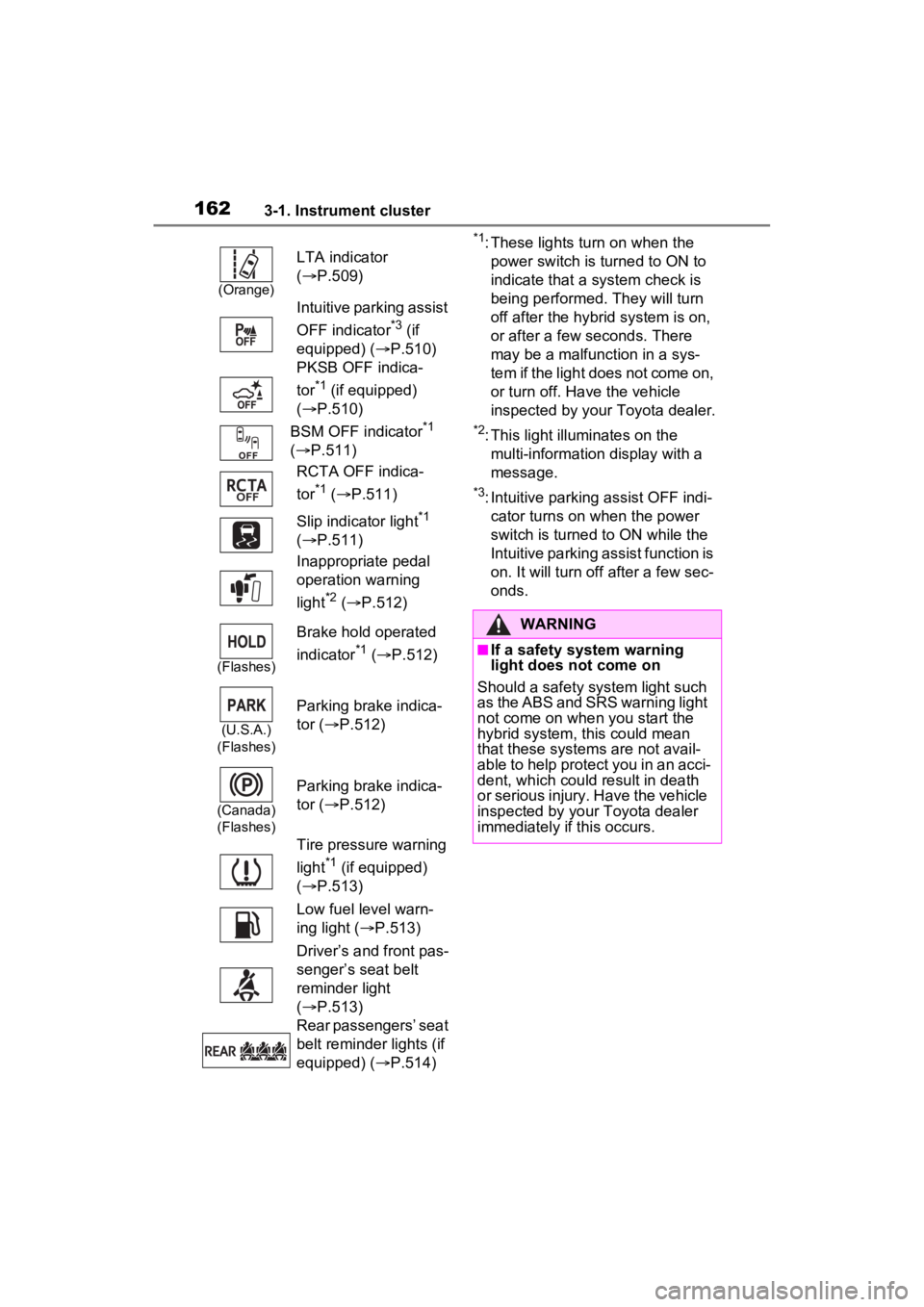
*1: These lights turn on when the
power switch is turned to ON to
indicate that a system check is
being performed. They will turn
off after the hybrid system is on,
or after a few seconds. There
may be a malfunction in a sys-
tem if the light does not come on,
or turn off. Have the vehicle
inspected by your Toyota dealer.
*2: This light illuminates on the multi-information display with a
message.
*3: Intuitive parking assist OFF indi-cator turns on wh en the power
switch is turned t o ON while the
Intuitive parking assist function is
on. It will turn off after a few sec-
onds.
(Orange)
LTA indicator
( P.509)
Intuitive parking assist
OFF indicator
*3 (if
equipped) ( P.510)
PKSB OFF indica-
tor
*1 (if equipped)
( P.510)
BSM OFF indicator
*1
( P.511)
RCTA OFF indica-
tor
*1 ( P.511)
Slip indicator light
*1
( P.511)
Inappropriate pedal
operation warning
light
*2 ( P.512)
(Flashes)
Brake hold operated
indicator
*1 ( P.512)
(U.S.A.)
(Flashes)
Parking brake indica-
tor ( P.512)
(Canada)
(Flashes)
Parking brake indica-
tor ( P.512)
Tire pressure warning
light
*1 (if equipped)
( P.513)
Low fuel level warn-
ing light ( P.513)
Driver’s and front pas-
senger’s seat belt
reminder light
( P.513)
Rear passengers’ seat
belt reminder lights (if
equipped) ( P.514)
WARNING
■If a safety system warning
light does not come on
Should a safety system light such
as the ABS and SRS warning light
not come on when you start the
hybrid system, this could mean
that these system s are not avail-
able to help protect you in an acci-
dent, which could result in death
or serious injury. Have the vehicle
inspected by your Toyota dealer
immediately if this occurs.
Page 163 of 624
1633-1. Instrument cluster
3
Vehicle status information and indicators
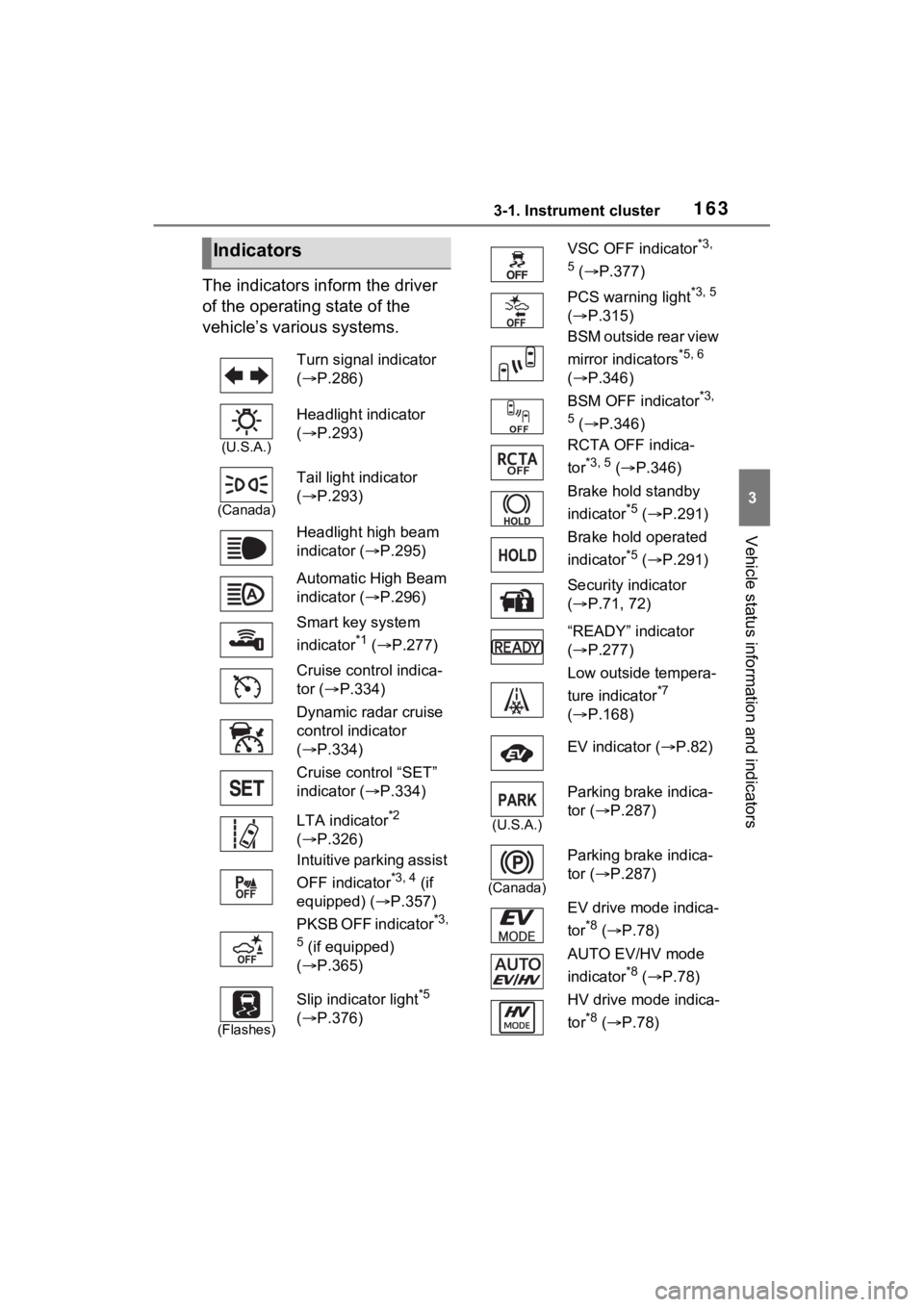
The indicators inform the driver
of the operating state of the
vehicle’s various systems.
Indicators
Turn signal indicator
( P.286)
(U.S.A.)
Headlight indicator
( P.293)
(Canada)
Tail light indicator
( P.293)
Headlight high beam
indicator ( P.295)
Automatic High Beam
indicator ( P.296)
Smart key system
indicator
*1 ( P.277)
Cruise control indica-
tor ( P.334)
Dynamic radar cruise
control indicator
( P.334)
Cruise control “SET”
indicator ( P.334)
LTA indicator
*2
( P.326)
Intuitive parking assist
OFF indicator
*3, 4 (if
equipped) ( P.357)
PKSB OFF indicator
*3,
5
(if equipped)
( P.365)
(Flashes)
Slip indicator light*5
( P.376)
VSC OFF indicator*3,
5
( P.377)
PCS warning light
*3, 5
( P.315)
BSM outside rear view
mirror indicators
*5, 6
( P.346)
BSM OFF indicator
*3,
5
( P.346)
RCTA OFF indica-
tor
*3, 5 ( P.346)
Brake hold standby
indicator
*5 ( P.291)
Brake hold operated
indicator
*5 ( P.291)
Security indicator
( P.71, 72)
“READY” indicator
( P.277)
Low outside tempera-
ture indicator
*7
( P.168)
EV indicator ( P.82)
(U.S.A.)
Parking brake indica-
tor ( P.287)
(Canada)
Parking brake indica-
tor (P.287)
EV drive mode indica-
tor
*8 ( P.78)
AUTO EV/HV mode
indicator
*8 ( P.78)
HV drive mode indica-
tor
*8 ( P.78)
Page 209 of 624
2094-2. Opening, closing and locking the doors
4
Before driving
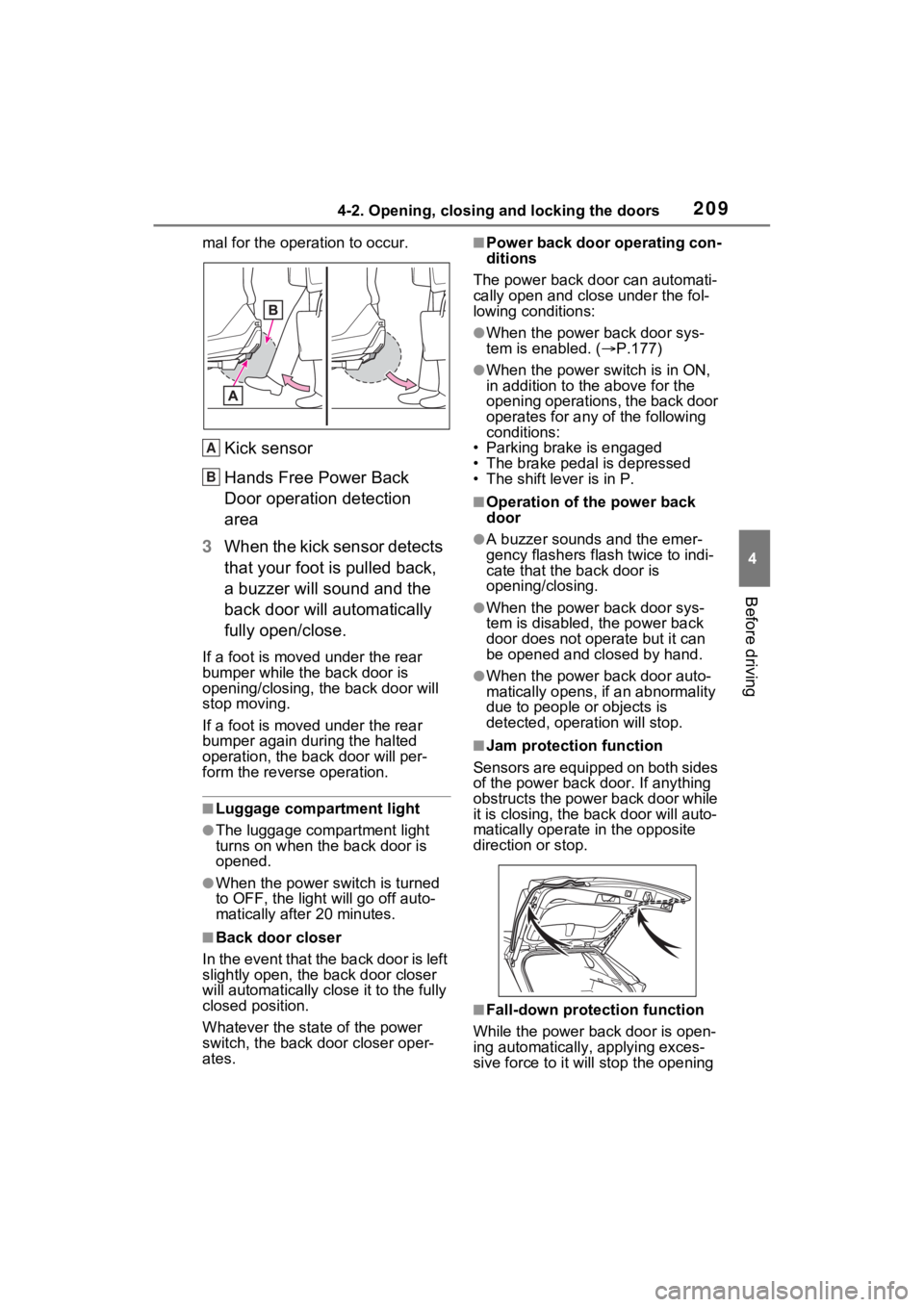
mal for the operation to occur.
Kick sensor
Hands Free Power Back
Door operation detection
area
3 When the kick sensor detects
that your foot is pulled back,
a buzzer will sound and the
back door will automatically
fully open/close.
If a foot is moved under the rear
bumper while the back door is
opening/closing, the back door will
stop moving.
If a foot is moved under the rear
bumper again during the halted
operation, the back door will per-
form the reverse operation.
■Luggage compartment light
●The luggage compartment light
turns on when the back door is
opened.
●When the power switch is turned
to OFF, the light will go off auto-
matically after 20 minutes.
■Back door closer
In the event that the back door is left
slightly open, the back door closer
will automatically close it to the fully
closed position.
Whatever the state of the power
switch, the back door closer oper-
ates.
■Power back door operating con-
ditions
The power back doo r can automati-
cally open and close under the fol-
lowing conditions:
●When the power back door sys-
tem is enabled. ( P.177)
●When the power switch is in ON,
in addition to the above for the
opening operations, the back door
operates for any of the following
conditions:
• Parking brake is engaged
• The brake pedal is depressed
• The shift lever is in P.
■Operation of the power back
door
●A buzzer sounds and the emer-
gency flashers flash twice to indi-
cate that the back door is
opening/closing.
●When the power back door sys-
tem is disabled, t he power back
door does not operate but it can
be opened and closed by hand.
●When the power back door auto-
matically opens, if an abnormality
due to people or objects is
detected, operation will stop.
■Jam protection function
Sensors are equipped on both sides
of the power back door. If anything
obstructs the power back door while
it is closing, the back door will auto-
matically operate in the opposite
direction or stop.
■Fall-down protection function
While the power back door is open-
ing automatically, applying exces-
sive force to it will stop the opening
A
B
Page 225 of 624
2254-3. Adjusting the seats
4
Before driving
*: If equipped
■Recording procedure
1 Check that the shift lever is in
P.
2 Turn the power switch to ON.
3 Adjust the driver’s seat to the
desired positions.
4 While pressing the “SET” but-
ton, or within 3 seconds after
the “SET” button is pressed,
press button “1” or “2” until
the buzzer sounds.
If the selected button has already
been preset, the previously
recorded positio n will be overwrit-
WARNING
■When folding the rear seat-
backs down
●Do not fold the seatbacks down
while driving.
●Stop the vehicle on level
ground, set the parking brake
and shift the shift lever to P.
●Do not allow anyo ne to sit on a
folded seatback or in the lug-
gage compartment while driv-
ing.
●Do not allow child ren to enter
the luggage compartment.
●Do not operate the rear seat if it
is occupied.
●Be careful not to get feet or
hands caught in the moving
parts or joints of the seats
during operation.
●Do not allow children to operate
the seat.
■After returning the rear seat-
back to the upright position
●Make sure that the seatback is
securely locked in position by
lightly pushing it back and forth.
If the seatback is not securely
locked, the red marking will be
visible. Make sure that the red
marking is not visible.
●Check that the seat belts are
not twisted or caught in the
seatback.
Driving position mem-
ory*
This feature automatically
adjusts the driver’s seat to
suit your preferences.
Your preferred driving posi-
tion (the position of the
driver’s seat) can be
recorded and recalled by
pressing a button.
Two different driving posi-
tions can be recorded into
memory.
Each electronic key can be
registered to recall your pre-
ferred driving position.
Recording/recalling a
driving position