engine TOYOTA RAV4 PRIME 2023 Owner's Manual
[x] Cancel search | Manufacturer: TOYOTA, Model Year: 2023, Model line: RAV4 PRIME, Model: TOYOTA RAV4 PRIME 2023Pages: 662, PDF Size: 25.4 MB
Page 169 of 662
1693-1. Instrument cluster
3
Vehicle status information and indicators
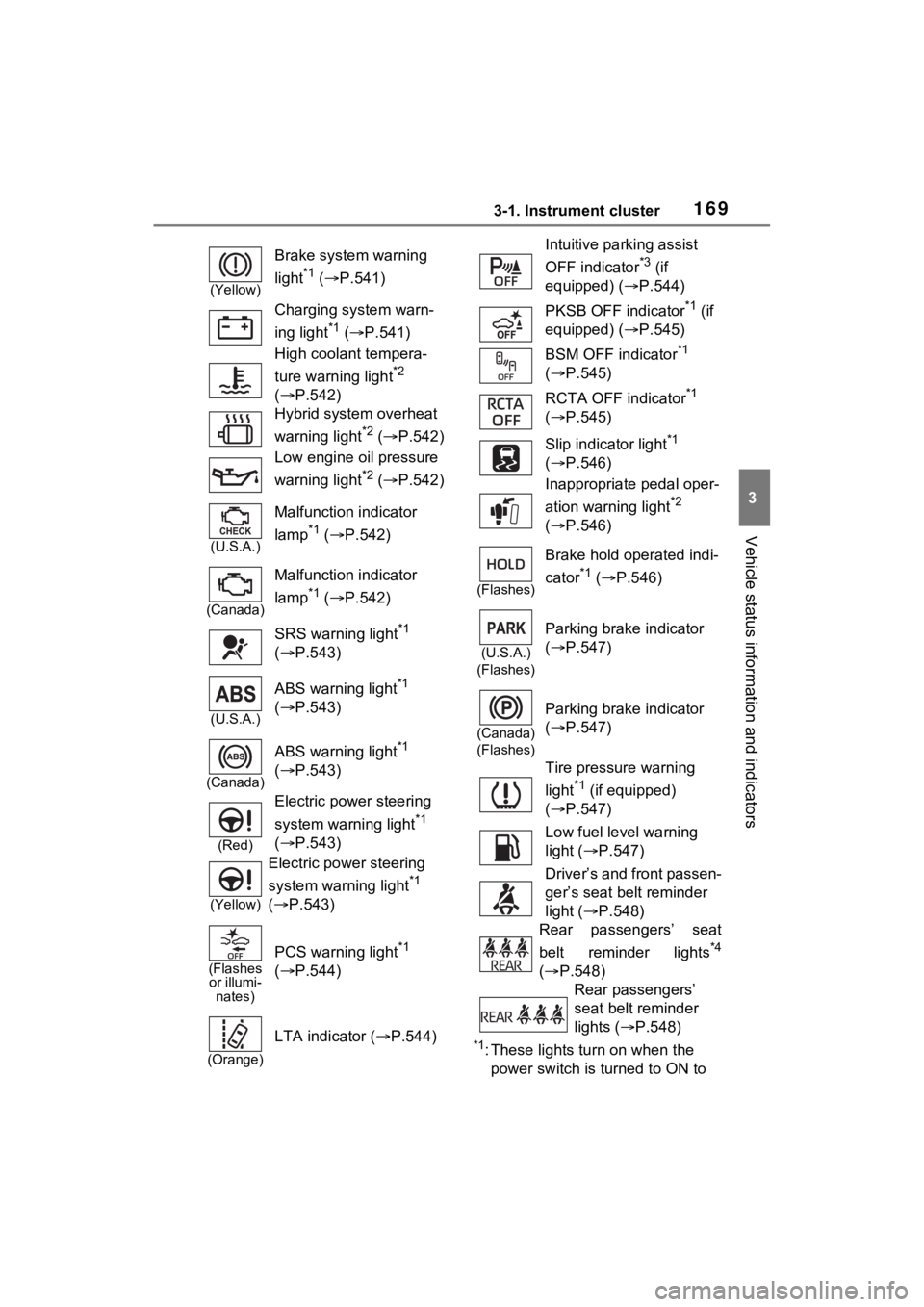
*1: These lights turn on when the
power switch is turned to ON to
(Yellow)
Brake system warning
light
*1 ( P.541)
Charging system warn-
ing light
*1 ( P.541)
High coolant tempera-
ture warning light
*2
( P.542)
Hybrid system overheat
warning light
*2 ( P.542)
Low engine oil pressure
warning light
*2 ( P.542)
(U.S.A.)
Malfunction indicator
lamp
*1 ( P.542)
(Canada)
Malfunction indicator
lamp
*1 ( P.542)
SRS warning light
*1
( P.543)
(U.S.A.)
ABS warning light*1
( P.543)
(Canada)
ABS warning light*1
( P.543)
(Red)
Electric power steering
system warning light
*1
( P.543)
(Yellow)
Electric power steering
system warning light
*1
( P.543)
(Flashes
or illumi- nates)
PCS warning light*1
( P.544)
(Orange)
LTA indicator ( P.544)
Intuitive parking assist
OFF indicator
*3 (if
equipped) ( P.544)
PKSB OFF indicator
*1 (if
equipped) ( P.545)
BSM OFF indicator
*1
( P.545)
RCTA OFF indicator
*1
( P.545)
Slip indicator light
*1
( P.546)
Inappropriate pedal oper-
ation warning light
*2
( P.546)
(Flashes)
Brake hold operated indi-
cator
*1 ( P.546)
(U.S.A.)
(Flashes)
Parking brake indicator
( P.547)
(Canada)
(Flashes)
Parking brake indicator
( P.547)
Tire pressure warning
light
*1 (if equipped)
( P.547)
Low fuel level warning
light ( P.547)
Driver’s and front passen-
ger’s seat belt reminder
light ( P.548)
Rear passengers’ seat
belt reminder lights
*4
( P.548)
Rear passengers’
seat belt reminder
lights ( P.548)
Page 176 of 662
1763-1. Instrument cluster
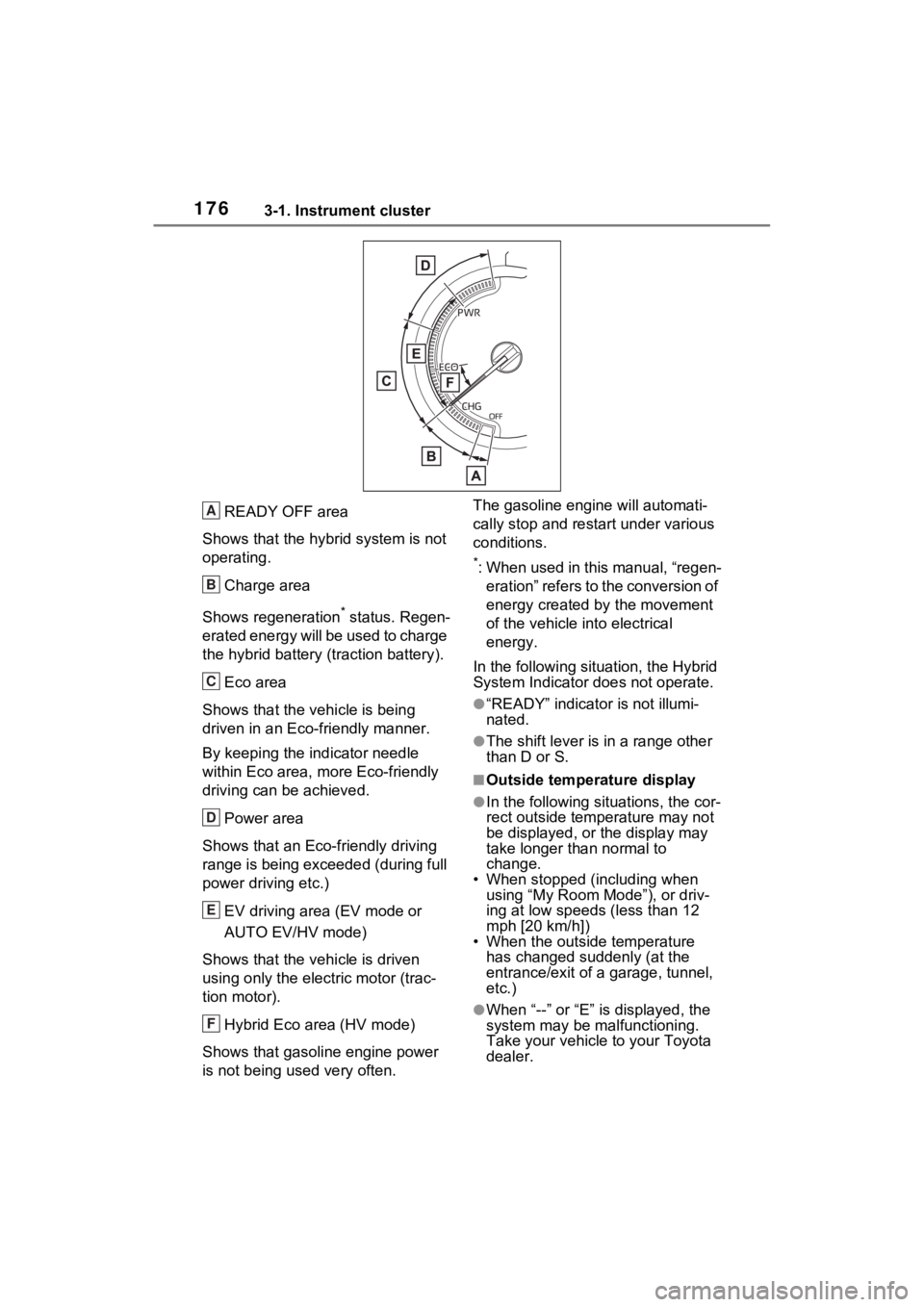
READY OFF area
Shows that the hybrid system is not
operating.
Charge area
Shows regeneration
* status. Regen-
erated energy will be used to charge
the hybrid battery (traction battery).
Eco area
Shows that the vehicle is being
driven in an Eco-friendly manner.
By keeping the indicator needle
within Eco area, m ore Eco-friendly
driving can be achieved.
Power area
Shows that an Eco-friendly driving
range is being exceeded (during full
power driving etc.)
EV driving area (EV mode or
AUTO EV/HV mode)
Shows that the vehicle is driven
using only the electric motor (trac-
tion motor).
Hybrid Eco area (HV mode)
Shows that gasoline engine power
is not being used very often. The gasoline engi
ne will automati-
cally stop and restart under various
conditions.
*: When used in this manual, “regen- eration” refers to the conversion of
energy created by the movement
of the vehicle into electrical
energy.
In the following situation, the Hybrid
System Indicator does not operate.
●“READY” indicator is not illumi-
nated.
●The shift lever is in a range other
than D or S.
■Outside temperature display
●In the following sit uations, the cor-
rect outside temperature may not
be displayed, or the display may
take longer than normal to
change.
• When stopped (including when using “My Room Mode”), or driv-
ing at low speeds (less than 12
mph [20 km/h])
• When the outside temperature
has changed suddenly (at the
entrance/exit of a garage, tunnel,
etc.)
●When “--” or “E” i s displayed, the
system may be malfunctioning.
Take your vehicle to your Toyota
dealer.
A
B
C
D
E
F
Page 177 of 662
1773-1. Instrument cluster
3
Vehicle status information and indicators
●Displays the outside temperature
within the range of -40°F (-40°C)
to 122°F (50°C).
●When the outside temperature is
approximately 37°F (3°C) or
lower, the indicator will flash
for approximately 10 seconds,
then stay on.
■Liquid crystal display
P.185
■Customization
Settings (e. g. meter display) can be
changed on the screen of the
multi-informat ion display. (P.191)
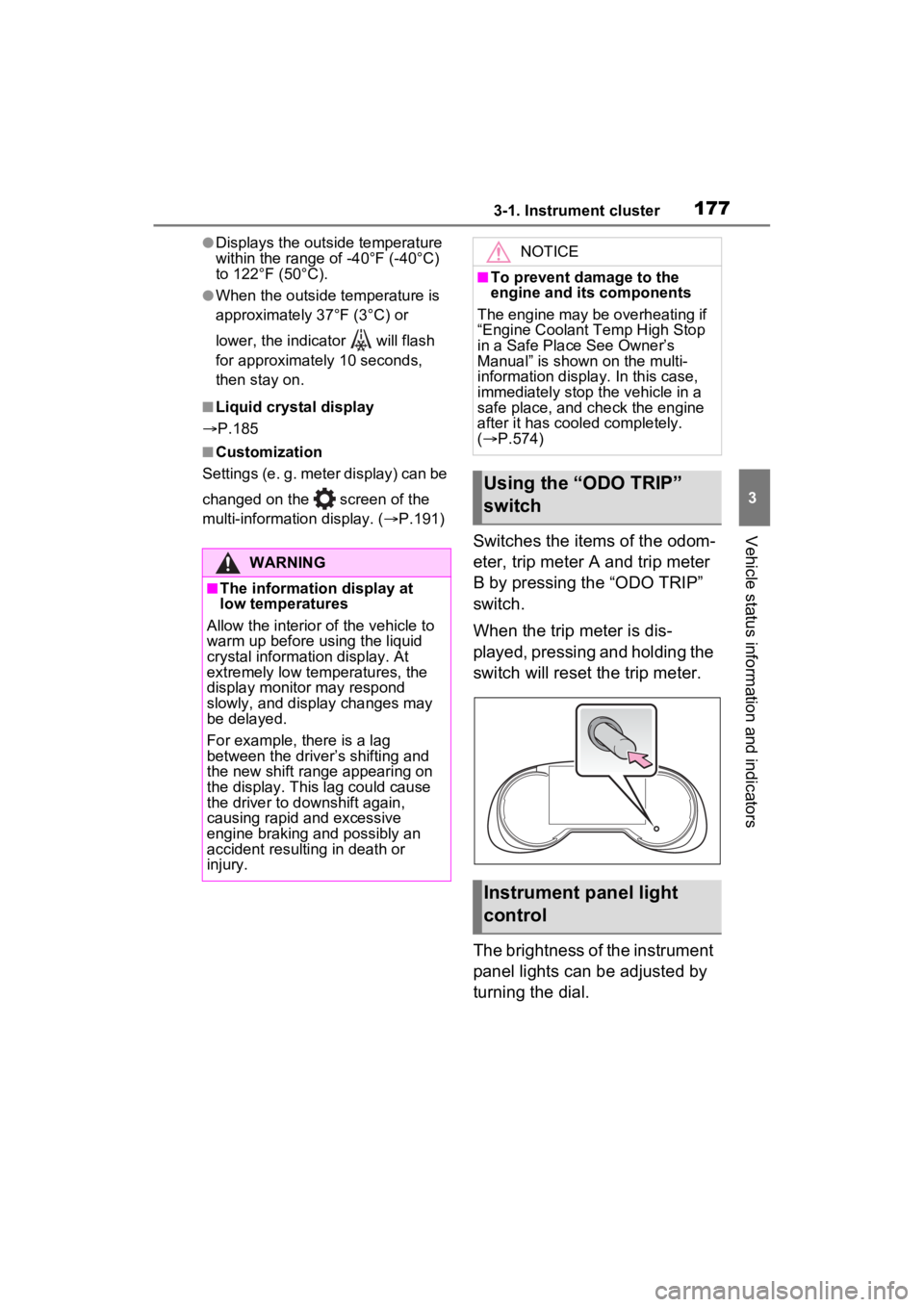
Switches the items of the odom-
eter, trip meter A and trip meter
B by pressing the “ODO TRIP”
switch.
When the trip meter is dis-
played, pressing and holding the
switch will reset the trip meter.
The brightness of the instrument
panel lights can be adjusted by
turning the dial.
WARNING
■The information display at
low temperatures
Allow the interior of the vehicle to
warm up before u sing the liquid
crystal informat ion display. At
extremely low temperatures, the
display monitor may respond
slowly, and display changes may
be delayed.
For example, there is a lag
between the driver’s shifting and
the new shift range appearing on
the display. This lag could cause
the driver to downshift again,
causing rapid and excessive
engine braking and possibly an
accident resulting in death or
injury.
NOTICE
■To prevent damage to the
engine and its components
The engine may be overheating if
“Engine Coolant Temp High Stop
in a Safe Place See Owner’s
Manual” is shown on the multi-
information displa y. In this case,
immediately stop the vehicle in a
safe place, and c heck the engine
after it has cooled completely.
( P.574)
Using the “ODO TRIP”
switch
Instrument panel light
control
Page 182 of 662
1823-1. Instrument cluster
• Fuel is added with the fuel gauge near or at “F”.
• The vehicle is stopped on an uneven surface, such as a slope.
• The vehicle is driven on a slope or around a curve.
SOC (State of Charge) gauge
Displays the amount of charge rem aining in the traction battery. ( P.182)
EV driving range
Displays the EV drivin g range with charge remaining in the hybrid battery
(traction battery).
Odometer and trip meter display ( P.311)
■The meters and display illumi-
nate when
The power swit ch is in ON.
■Engine speed
On hybrid vehicles, engine speed is
precisely controlled in order to help improve fuel efficiency and reduce
exhaust emissions etc.
There are times when the engine
speed that is disp
layed may differ
even when vehicle operation and
driving conditions are the same.
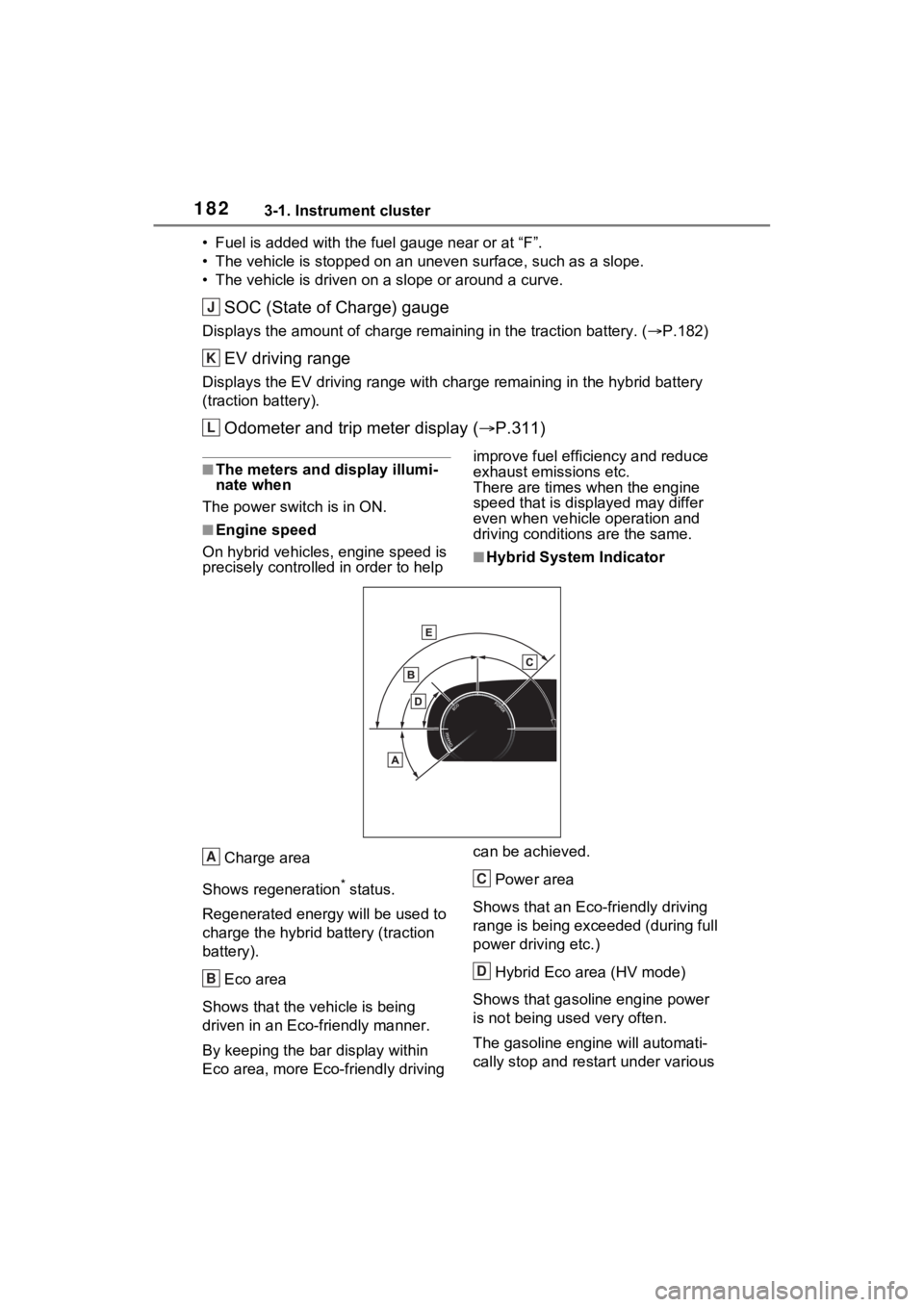
■Hybrid System Indicator
Charge area
Shows regeneration
* status.
Regenerated e nergy will be used to
charge the hybrid battery (traction
battery).
Eco area
Shows that the vehicle is being
driven in an Eco-friendly manner.
By keeping the bar display within
Eco area, more Eco-friendly driving can be achieved.
Power area
Shows that an Eco-friendly driving
range is being exceeded (during full
power driving etc.)
Hybrid Eco area (HV mode)
Shows that gasoline engine power
is not being used very often.
The gasoline engi ne will automati-
cally stop and restart under various
J
K
L
A
B
C
D
Page 183 of 662
1833-1. Instrument cluster
3
Vehicle status information and indicators
conditions.EV driving area (EV mode or
AUTO EV/HV mode)
Shows that the vehicle is driven
using only the electric motor (trac-
tion motor).
*: When used in this manual, regen- eration refers to the conversion of
energy created by the movement
of the vehicle into electrical
energy.
■Hybrid System Indicator is dis-
played when
The Hybrid System Indicator is dis-
played in the following situations:
●The shift positio n is in D or S.
●The hybrid system is started.
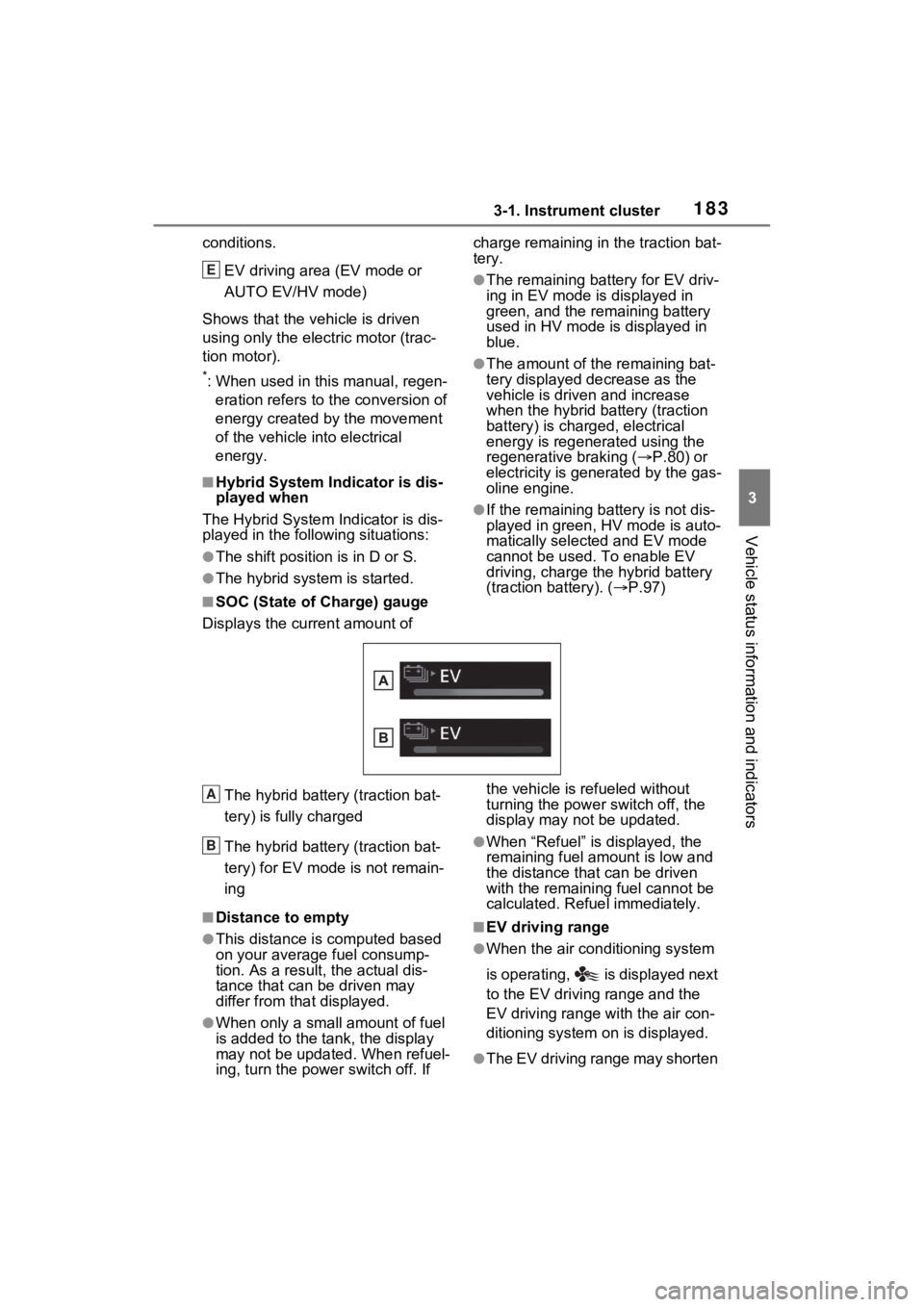
■SOC (State of Charge) gauge
Displays the current amount of charge remaining in the traction bat-
tery.
●The remaining battery for EV driv-
ing in EV mode is displayed in
green, and the remaining battery
used in HV mode is displayed in
blue.
●The amount of the remaining bat-
tery displayed decrease as the
vehicle is driven and increase
when the hybrid battery (traction
battery) is charged, electrical
energy is regenerated using the
regenerative braking (
P.80) or
electricity is gene rated by the gas-
oline engine.
●If the remaining battery is not dis-
played in green, HV mode is auto-
matically selected and EV mode
cannot be used. To enable EV
driving, charge the hybrid battery
(traction battery). ( P.97)
The hybrid battery (traction bat-
tery) is fully charged
The hybrid battery (traction bat-
tery) for EV mode is not remain-
ing
■Distance to empty
●This distance is computed based
on your averag e fuel consump-
tion. As a result, the actual dis-
tance that can be driven may
differ from tha t displayed.
●When only a small amount of fuel
is added to the tank, the display
may not be updated. When refuel-
ing, turn the power switch off. If the vehicle is refueled without
turning the power switch off, the
display may not be updated.
●When “Refuel” is displayed, the
remaining fuel amount is low and
the distance that can be driven
with the remaining fuel cannot be
calculated. Refuel immediately.
■EV driving range
●When the air conditioning system
is operating, is displayed next
to the EV driving range and the
EV driving range with the air con-
ditioning system on is displayed.
●The EV driving range may shorten
E
A
B
Page 184 of 662
1843-1. Instrument cluster
even when not driving due to
power consumption by the sys-
tem.
●For details, refer to “EV driving
range” (P.93)
■Manually updating the fuel
gauge and possible driving
range
The fuel gauge and the possible
driving range are linked. If the dis-
plays of the fuel gauge and possible
driving range do not update after
adding a small amount of fuel, the
displays can be u pdated by per-
forming the following procedure.
1 Stop the vehicle on a level sur-
face.
2 Press the “ODO TRIP” switch to
change the odometer and trip
meter display to odometer.
3 Turn the power switch off.
4 While pressing and holding the
“ODO TRIP” switch, turn the
power switch to ON.
5 Continue to hold the “ODO TRIP”
switch for approximately 5 sec-
onds, and then release it once
the odometer begins flashing.
Updating is complete once the
odometer flashes for approximately
5 seconds and th en the display
returns to normal.
■Outside temperature display
●Displays the outside temperature
within the range of -40°F (-40°C)
to 140°F (60°C).
●When the outside temperature is
approximately 37°F (3°C) or
lower, the indicator will flash
for approximately 10 seconds,
then stay on.
●In the following si tuations, the cor-
rect outside tempe rature may not
be displayed, or the display may
take longer than normal to
change:
• When stopped, or driving at low speeds (less than 12 mph [20 km/h])
• When the outside temperature has changed suddenly (at the
entrance/exit of a garage, tunnel,
etc.)
●When “--” or “E” is displayed, the
system may be malfunctioning.
Take your vehicle to your Toyota
dealer.
■Liquid crystal display
P.197
■Free/Open Source Software
Information
This product contains Free/Open
Source Software (FOSS). The
license information and/or the
source code of such FOSS can be
found at the f ollowing URL.
https://www.denso.com/global/en/
opensource/meter/toyota/
■Customization
The gauges and meters can be cus-
tomized on of the multi-informa-
tion display. ( P.203)
WARNING
■The information display at
low temperatures
Allow the interior of the vehicle to
warm up before using the liquid
crystal information display. At
extremely low temperatures, the
information disp lay monitor may
respond slowly, and display
changes may be delayed.
For example, there is a lag
between the driver’s shifting and
the new gear number appearing
on the display. This lag could
cause the driver to downshift
again, causing rapid and exces-
sive engine braking and possibly
an accident resulting in death or
injury.
Page 185 of 662
1853-1. Instrument cluster
3
Vehicle status information and indicators■Display items
Odometer
Displays the total distance the vehi-
cle has been driven.
Trip meter A/trip meter B
Displays the distan ce the vehicle
has been driven si nce the meter
was last reset. Trip meters A and B
can be used to record and display
different distances independently.
■Changing the display
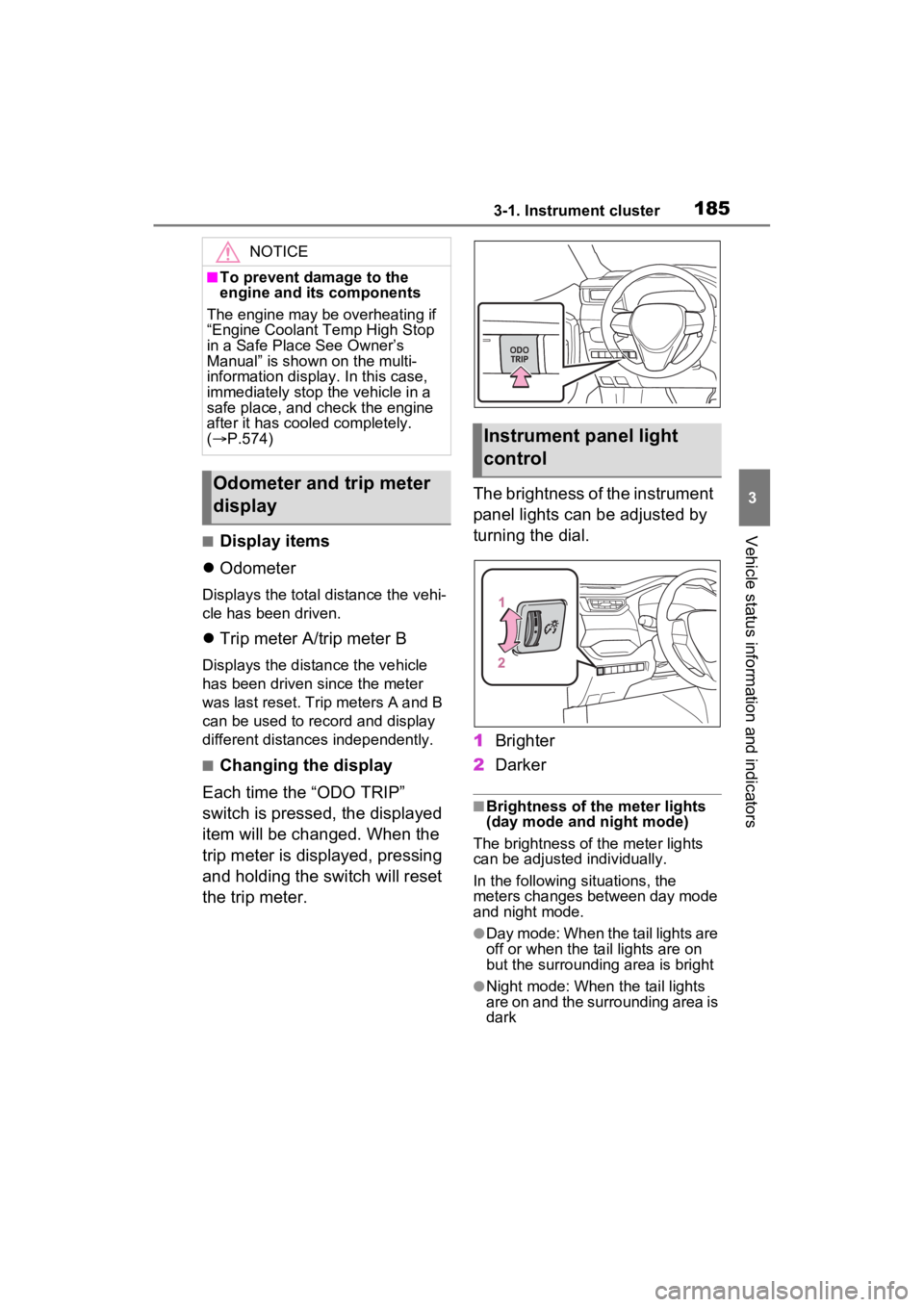
Each time the “ODO TRIP”
switch is pressed, the displayed
item will be changed. When the
trip meter is displayed, pressing
and holding the switch will reset
the trip meter. The brightness of the instrument
panel lights can be adjusted by
turning the dial.
1
Brighter
2 Darker
■Brightness of the meter lights
(day mode and night mode)
The brightness of the meter lights
can be adjusted individually.
In the following si tuations, the
meters changes between day mode
and night mode.
●Day mode: When the tail lights are
off or when the ta il lights are on
but the surrounding area is bright
●Night mode: When the tail lights
are on and the surrounding area is
dark
NOTICE
■To prevent damage to the
engine and its components
The engine may be overheating if
“Engine Coolant Temp High Stop
in a Safe Place See Owner’s
Manual” is shown on the multi-
information display. In this case,
immediately stop the vehicle in a
safe place, and check the engine
after it has cooled completely.
( P.574)
Odometer and trip meter
display
Instrument panel light
control
Page 213 of 662
2133-1. Instrument cluster
3
Vehicle status information and indicators
• When the outside temperature has changed su ddenly (at the
entrance/exit of a garage, tunnel,
etc.)
●When “--” or “E” is displayed, the
system may be malfunctioning.
Take your vehicle to your Toyota
dealer.
Display content selected by
“HUD Driving Support” on the
screen is displayed.
( P.209)
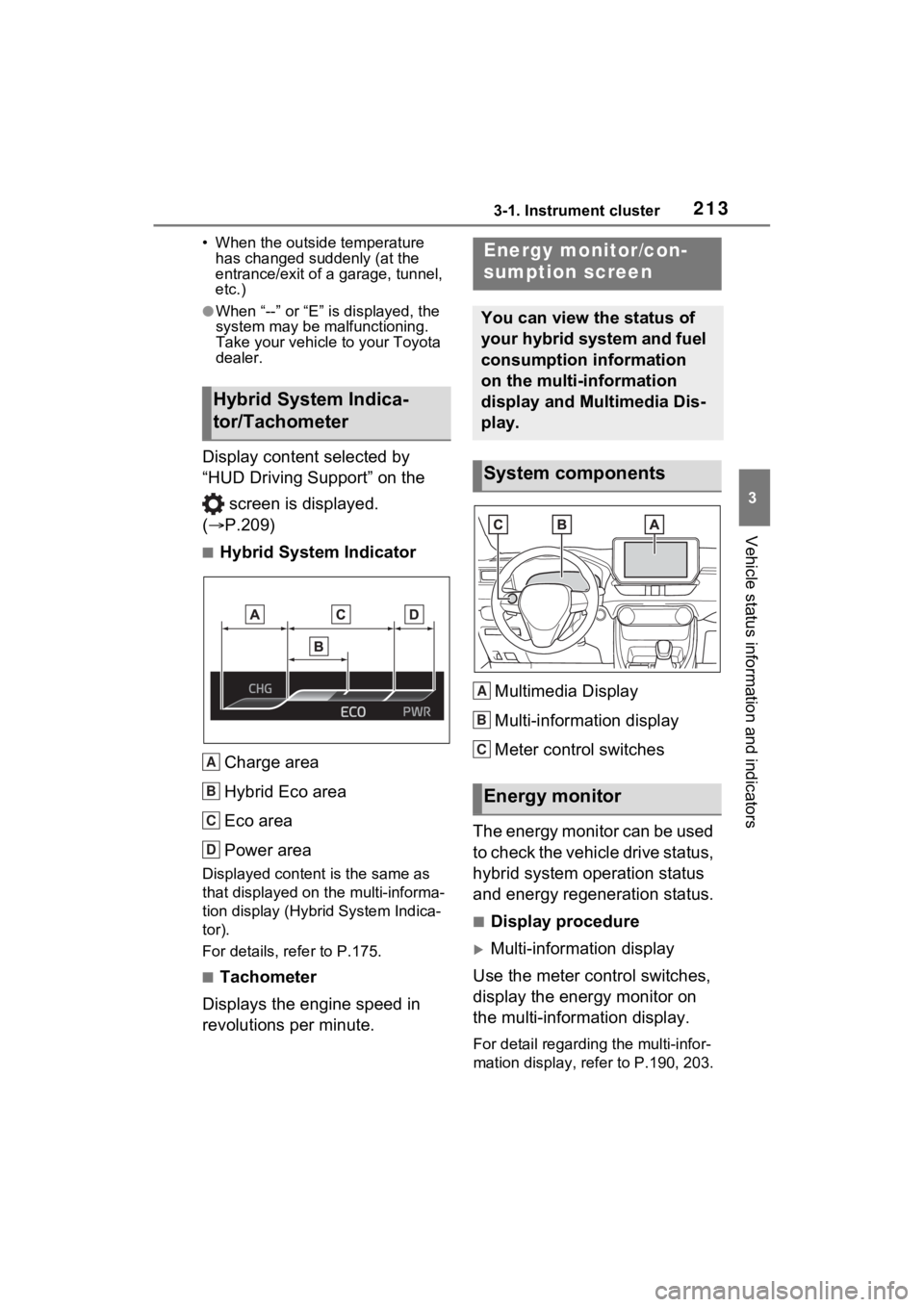
■Hybrid System Indicator
Charge area
Hybrid Eco area
Eco area
Power area
Displayed content is the same as
that displayed on the multi-informa-
tion display (Hybrid System Indica-
tor).
For details, re fer to P.175.
■Tachometer
Displays the engine speed in
revolutions per minute. Multimedia Display
Multi-information display
Meter control switches
The energy monitor can be used
to check the vehicle drive status,
hybrid system operation status
and energy regeneration status.
■Display procedure
Multi-information display
Use the meter control switches,
display the energy monitor on
the multi-information display.
For detail regardin g the multi-infor-
mation display, ref er to P.190, 203.
Hybrid System Indica-
tor/Tachometer
A
B
C
D
Energy monitor/con-
sumption screen
You can view the status of
your hybrid system and fuel
consumption information
on the multi-information
display and Multimedia Dis-
play.
System components
Energy monitor
A
B
C
Page 214 of 662
2143-1. Instrument cluster
Multimedia Display
Press from the main menu,
then press “Energy flow”.
■Reading the display
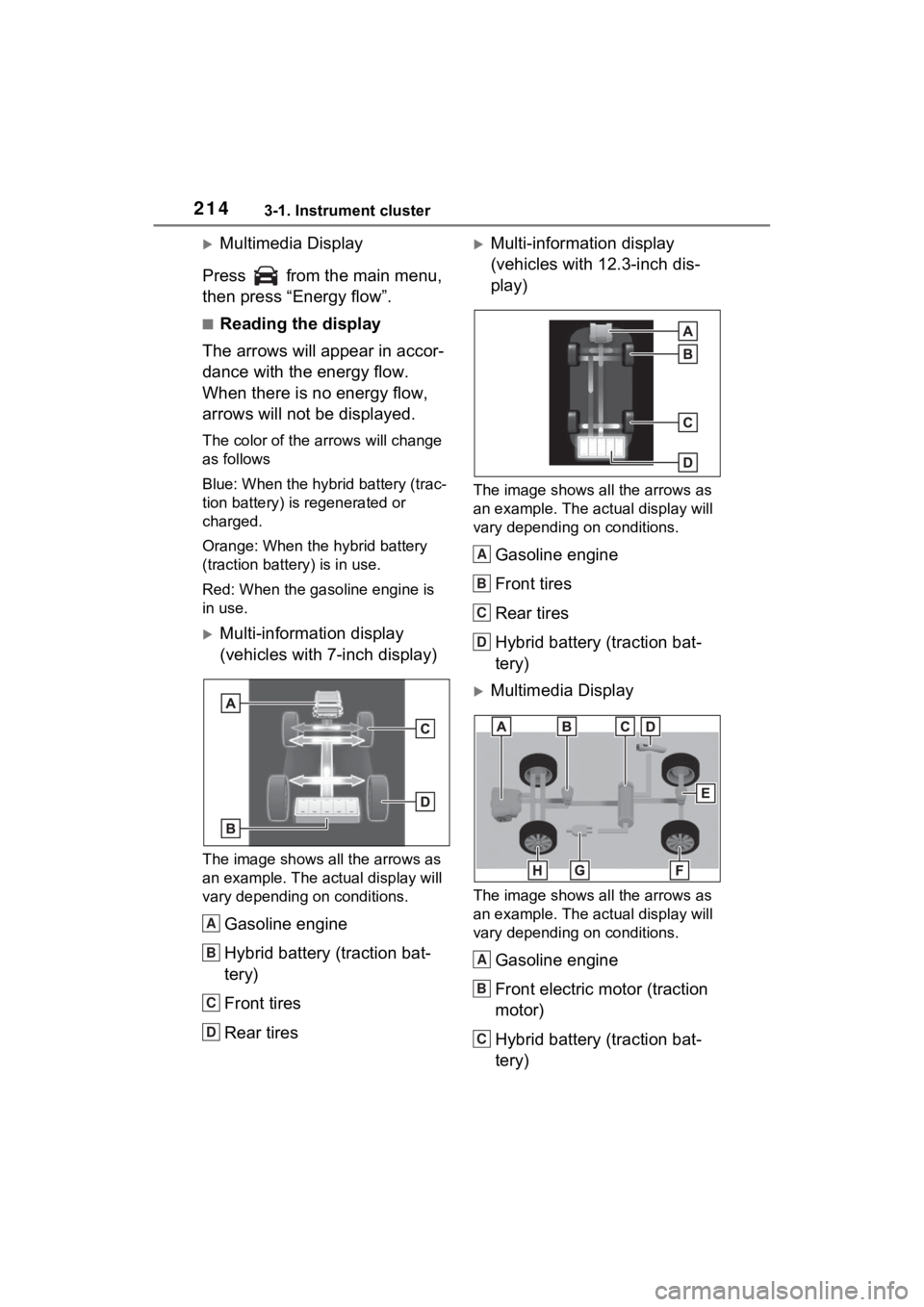
The arrows will appear in accor-
dance with the energy flow.
When there is no energy flow,
arrows will not be displayed.
The color of the arrows will change
as follows
Blue: When the hybrid battery (trac-
tion battery) is regenerated or
charged.
Orange: When the hybrid battery
(traction battery) is in use.
Red: When the gasoline engine is
in use.
Multi-information display
(vehicles with 7-inch display)
The image shows all the arrows as
an example. The actual display will
vary depending on conditions.
Gasoline engine
Hybrid battery (traction bat-
tery)
Front tires
Rear tires
Multi-information display
(vehicles with 12.3-inch dis-
play)
The image shows all the arrows as
an example. The ac tual display will
vary depending on conditions.
Gasoline engine
Front tires
Rear tires
Hybrid battery (traction bat-
tery)
Multimedia Display
The image shows all the arrows as
an example. The ac tual display will
vary depending on conditions.
Gasoline engine
Front electric motor (traction
motor)
Hybrid battery (traction bat-
tery)
A
B
C
D
A
B
C
D
A
B
C
Page 215 of 662
2153-1. Instrument cluster
3
Vehicle status information and indicators
Charging connector*1
Rear electric motor (traction
motor)
Rear tires
Power outlet
*2 (120 VAC) (if
equipped)
Front tires
*1: The energy flow is displayed while charging ( P.121).
*2: The energy flow is displayed
when the accessory power outlet
can be used.
■Color of the hybrid battery
(traction battery) on the center
display
It will be green whe n the hybrid bat-
tery (traction battery) is being
charged, and yellow when the
hybrid battery (traction battery) is
being used.
■Remaining charge amount
warning of hybrid battery (trac-
tion battery)
●The buzzer sounds intermittently
when the hybrid battery (traction
battery) remains without charging
while the shift leve r is in N, or the
remaining charge amount drops
below a certain level. If the
remaining charge amount drops
further, the buzzer sounds contin-
uously.
●When a warning message is
shown on the multi-information
display and the buzzer sounds,
follow the instructions displayed
on the screen to p erform trouble-
shooting.
■Color of the gasoline engine on
the center display
It will be blue wh en the engine is
warming up, and it will turn to red
when the warming up is finished.
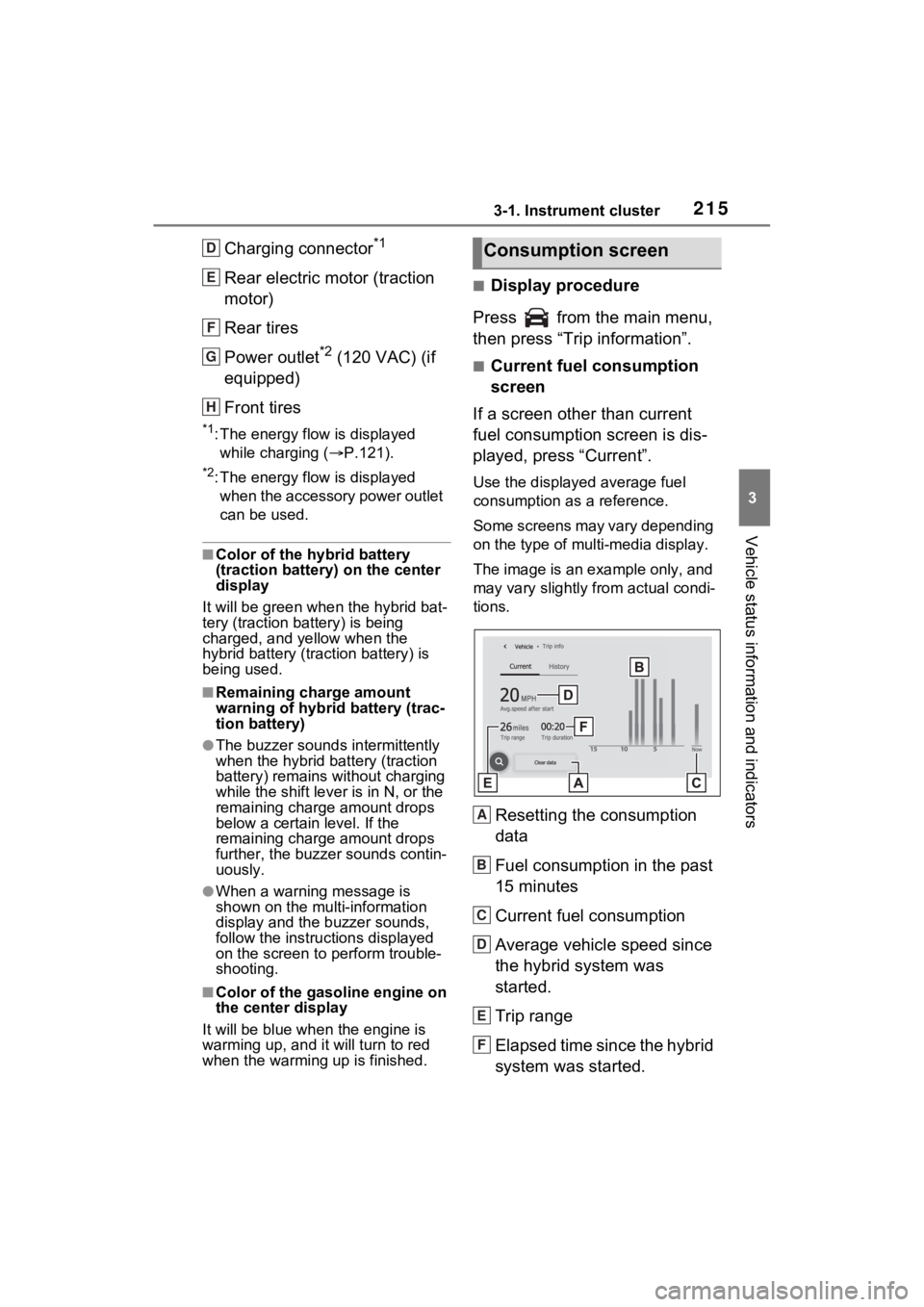
■Display procedure
Press from the main menu,
then press “Trip information”.
■Current fuel consumption
screen
If a screen other than current
fuel consumption screen is dis-
played, press “Current”.
Use the displayed average fuel
consumption as a reference.
Some screens may vary depending
on the type of multi-media display.
The image is an example only, and
may vary slightly from actual condi-
tions.
Resetting the consumption
data
Fuel consumption in the past
15 minutes
Current fuel consumption
Average vehicle speed since
the hybrid system was
started.
Trip range
Elapsed time since the hybrid
system was started.
D
E
F
G
H
Consumption screen
A
B
C
D
E
F