lock TOYOTA RAV4 PRIME 2023 Owner's Manual
[x] Cancel search | Manufacturer: TOYOTA, Model Year: 2023, Model line: RAV4 PRIME, Model: TOYOTA RAV4 PRIME 2023Pages: 662, PDF Size: 25.4 MB
Page 73 of 662
73
2
2
Plug-in hybrid system
Plug-in hybrid system
2-1. Plug-in hybrid systemPlug-in hybrid system fea-tures ............................. 74
Plug-in hybrid system pre- cautions ........................ 85
Plug-in Hybrid Electric Vehi- cle driving tips .............. 90
EV driving range ............ 93
2-2. Charging Charging equipment....... 97
AC charging cable....... 100
Locking and unlocking the
charging port lid and
charging connector.... 105
Power sources that can be used .......................... 110
Charging methods....... 113
Charging tips ............... 115
Things to know before charging .................... 117
How to charge ............. 121
Using the charging sched- ule function ................ 128
Using the “My Room Mode” .................................. 148
When charging cannot be carried out ................. 152
Page 89 of 662
892-1. Plug-in hybrid system
2
Plug-in hybrid system
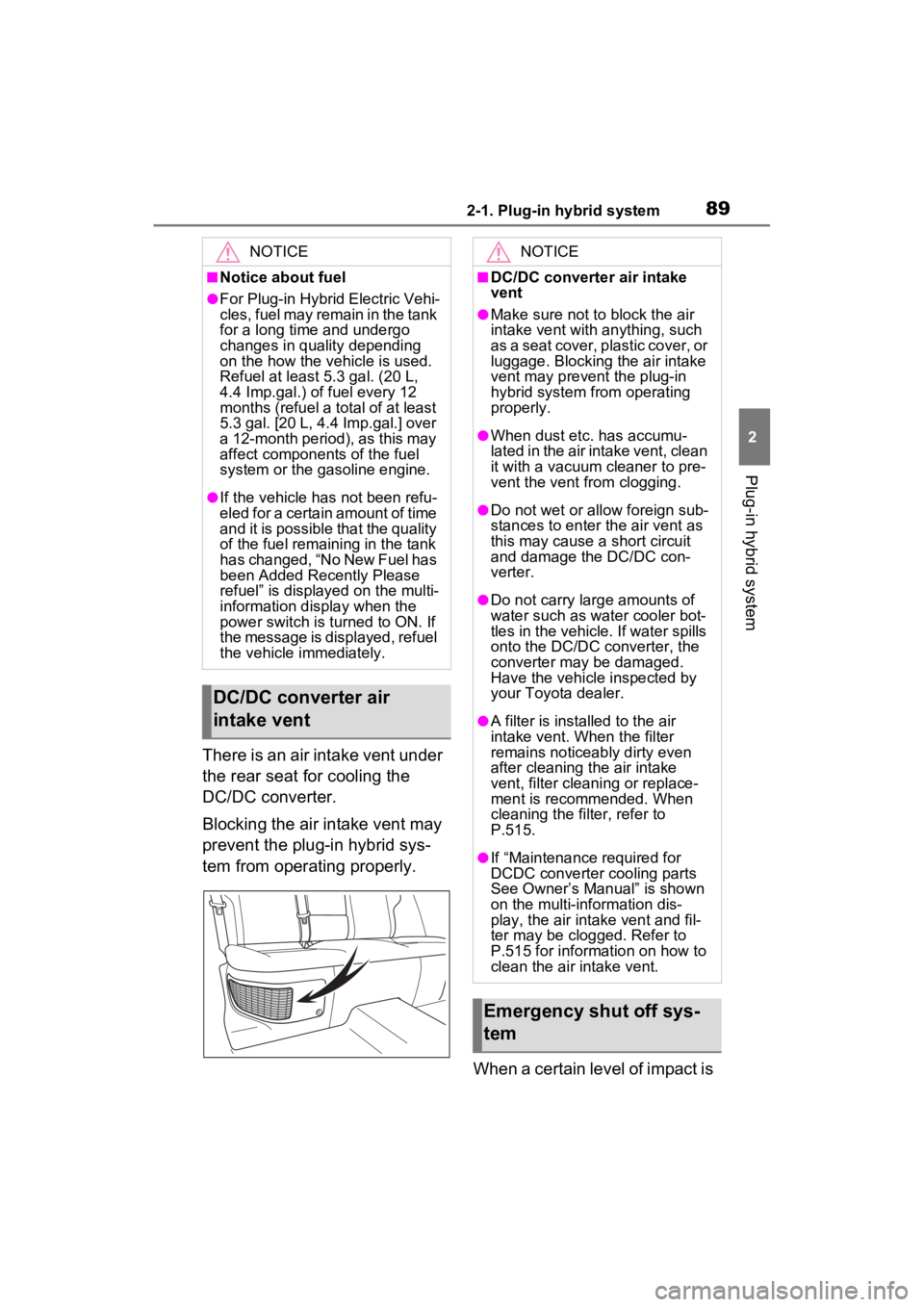
There is an air intake vent under
the rear seat for cooling the
DC/DC converter.
Blocking the air intake vent may
prevent the plug-in hybrid sys-
tem from operating properly.When a certain level of impact is
NOTICE
■Notice about fuel
●For Plug-in Hybrid Electric Vehi-
cles, fuel may remain in the tank
for a long time and undergo
changes in quality depending
on the how the vehicle is used.
Refuel at least 5.3 gal. (20 L,
4.4 Imp.gal.) of fuel every 12
months (refuel a total of at least
5.3 gal. [20 L, 4.4 Imp.gal.] over
a 12-month period), as this may
affect components of the fuel
system or the gasoline engine.
●If the vehicle has not been refu-
eled for a certain amount of time
and it is possible that the quality
of the fuel remaining in the tank
has changed, “No New Fuel has
been Added Recently Please
refuel” is displayed on the multi-
information display when the
power switch is turned to ON. If
the message is displayed, refuel
the vehicle immediately.
DC/DC converter air
intake vent
NOTICE
■DC/DC converter air intake
vent
●Make sure not to block the air
intake vent with anything, such
as a seat cover, plastic cover, or
luggage. Blocking the air intake
vent may prevent the plug-in
hybrid system from operating
properly.
●When dust etc. has accumu-
lated in the air intake vent, clean
it with a vacuum cleaner to pre-
vent the vent from clogging.
●Do not wet or allow foreign sub-
stances to enter the air vent as
this may cause a short circuit
and damage the DC/DC con-
verter.
●Do not carry large amounts of
water such as water cooler bot-
tles in the vehicle. If water spills
onto the DC/DC converter, the
converter may be damaged.
Have the vehicle inspected by
your Toyota dealer.
●A filter is installed to the air
intake vent. When the filter
remains noticeably dirty even
after cleaning the air intake
vent, filter cleaning or replace-
ment is recommended. When
cleaning the filter, refer to
P.515.
●If “Maintenance required for
DCDC converter cooling parts
See Owner’s Manual” is shown
on the multi-information dis-
play, the air intake vent and fil-
ter may be clogged. Refer to
P.515 for information on how to
clean the air intake vent.
Emergency shut off sys-
tem
Page 90 of 662
902-1. Plug-in hybrid system
detected by the impact sensor,
the emergency shut off system
blocks off the high voltage cur-
rent and stops the fuel pump to
minimize the risk of electrocu-
tion and fuel leakage.
If the emergency shut off system
activates, your vehicle will not
restart. To restart the hybrid sys-
tem, contact your Toyota dealer.
A message is automatically dis-
played when a malfunction
occurs in the hybrid system or
an improper operation is
attempted.
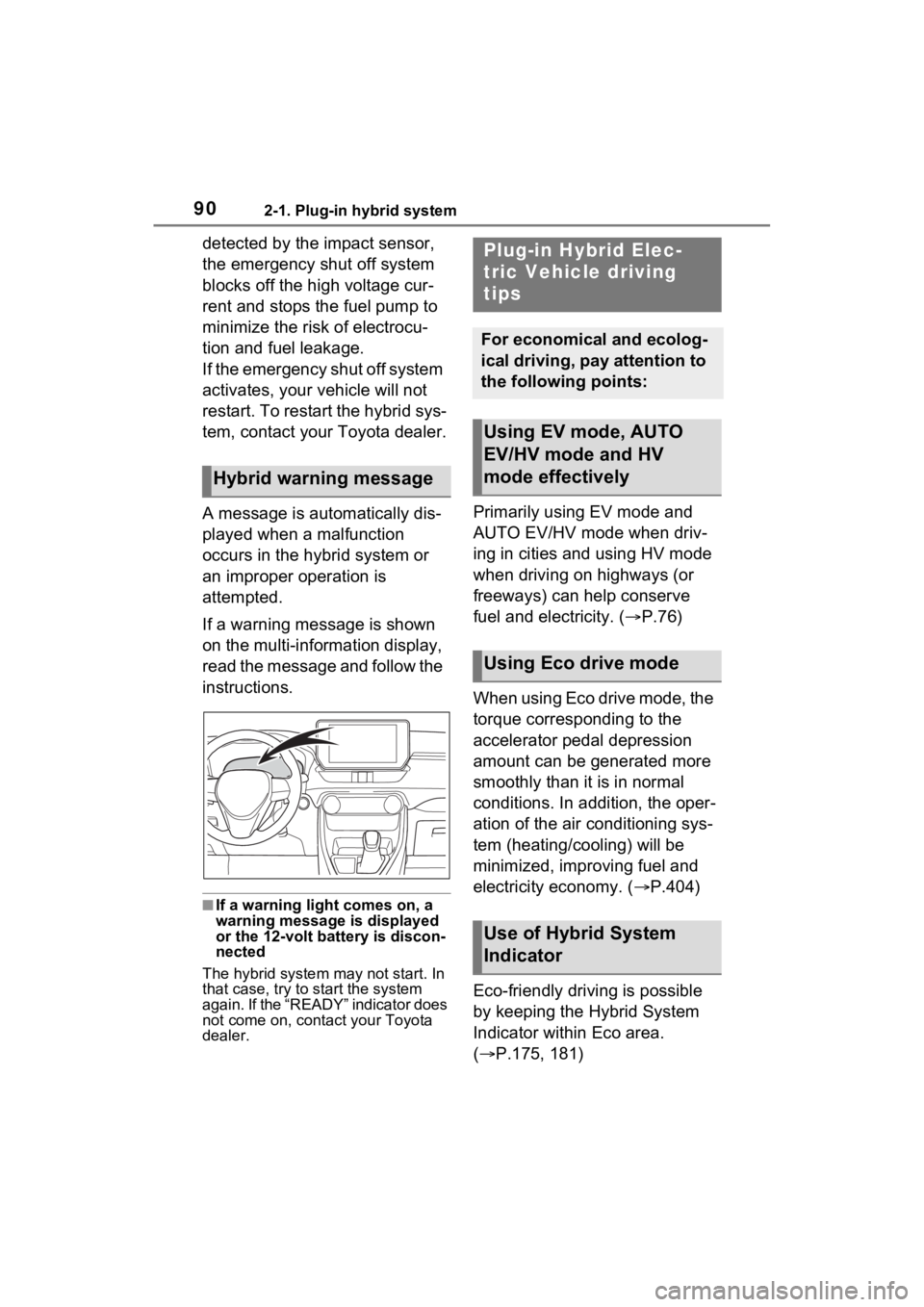
If a warning message is shown
on the multi-information display,
read the message and follow the
instructions.
■If a warning light comes on, a
warning message is displayed
or the 12-volt battery is discon-
nected
The hybrid system may not start. In
that case, try to start the system
again. If the “READY” indicator does
not come on, contact your Toyota
dealer.
Primarily using EV mode and
AUTO EV/HV mode when driv-
ing in cities and using HV mode
when driving on highways (or
freeways) can help conserve
fuel and electricity. ( P.76)
When using Eco drive mode, the
torque corresponding to the
accelerator pedal depression
amount can be generated more
smoothly than it is in normal
conditions. In addition, the oper-
ation of the air conditioning sys-
tem (heating/cooling) will be
minimized, improving fuel and
electricity economy. ( P.404)
Eco-friendly driving is possible
by keeping the Hybrid System
Indicator within Eco area.
( P.175, 181)
Hybrid warning message
Plug-in Hybrid Elec-
tric Vehicle driving
tips
For economical and ecolog-
ical driving, pay attention to
the following points:
Using EV mode, AUTO
EV/HV mode and HV
mode effectively
Using Eco drive mode
Use of Hybrid System
Indicator
Page 98 of 662
982-2. Charging
■Opening the charging port
lid
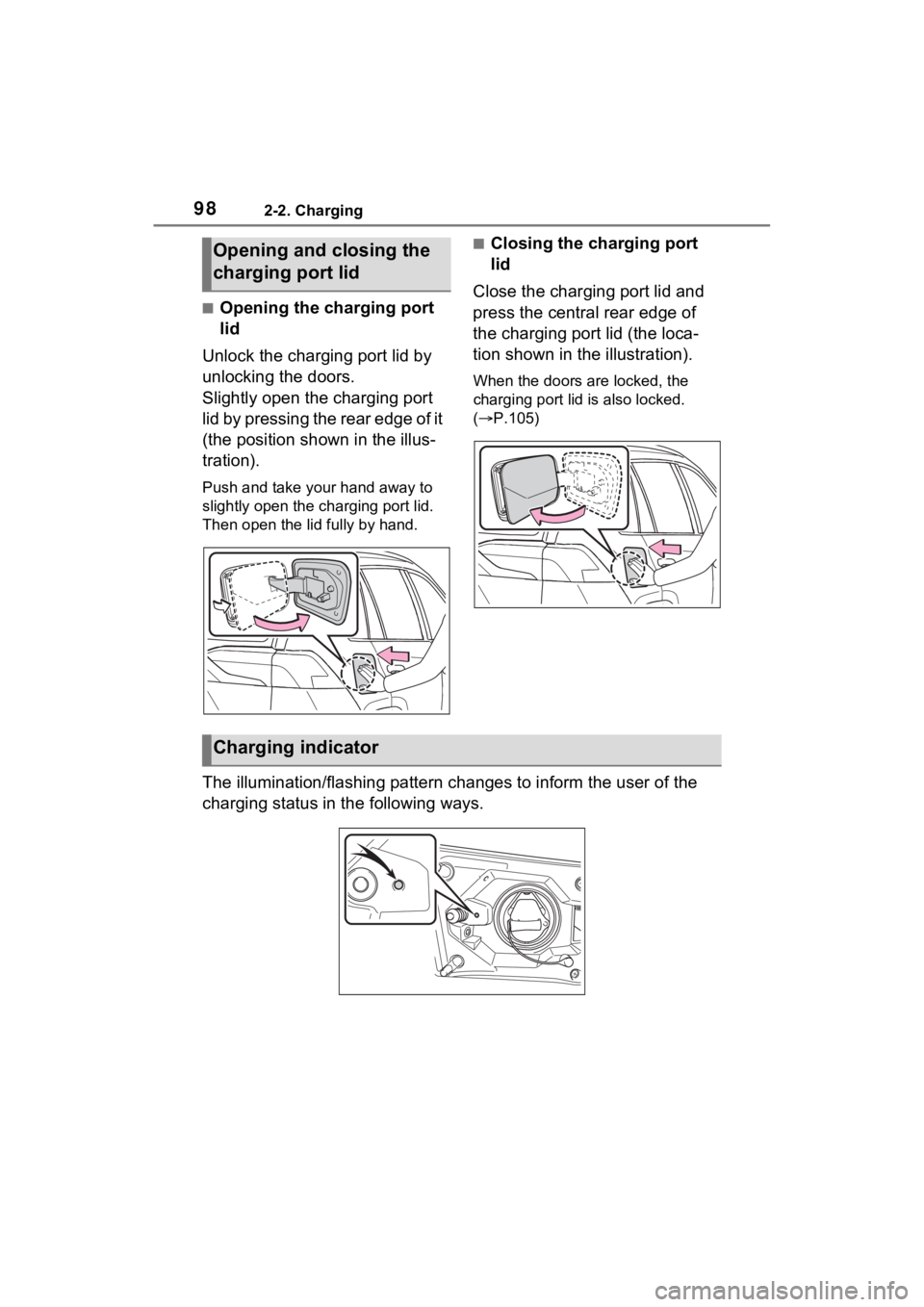
Unlock the charging port lid by
unlocking the doors.
Slightly open the charging port
lid by pressing the rear edge of it
(the position shown in the illus-
tration).
Push and take your hand away to
slightly open the c harging port lid.
Then open the lid fully by hand.
■Closing the charging port
lid
Close the charging port lid and
press the central rear edge of
the charging port lid (the loca-
tion shown in the illustration).
When the doors are locked, the
charging port lid is also locked.
( P.105)
The illumination/flashing pattern changes to inform the user of the
charging status in the following ways.
Opening and closing the
charging port lid
Charging indicator
Page 100 of 662
1002-2. Charging
AC charging cable
The function, correct oper-
ating procedure, etc. of the
AC charging cable are
explained.
WARNING
■When using the AC charging
cable and CCID (Charging
Circuit Interrupting Device)
Observe the following precau-
tions.
Failure to do so may cause an
unexpected accident, resulting in
death or serious injury.
●Do not attempt to disassemble
or repair the AC charging cable,
charging connector, plug or
CCID (Charging Circuit Inter-
rupting Device).
If a problem arises with the AC
charging cable or the CCID
(Charging Circuit Interrupting
Device), stop charging immedi-
ately and contact your Toyota
dealer.
●Do not subject the AC charging
cable, charging connector, plug
or CCID (Charging Circuit Inter-
rupting Device) to strong force
or impact.
●Do not apply excessive force to
the AC charging cable by force-
fully folding, twisting, pulling or
dragging the AC charging cable.
●Do not damage the AC charging
cable with sharp objects.
●Do not fold the charging con-
nector or plug or insert foreign
objects into them.
●Do not put the charging connec-
tor and plug into water.
●Do not bring the AC charging
cable to a high-temperature
item such as a heating device.
●Do not apply a load to the AC
charging cable and plug-cord
(such as wrapping the AC
charging cable around the CCID
(Charging Circuit Interrupting
Device) and the charging con-
nector).
●Do not use or leave the AC
charging cable in situations
where a load is applied to the
outlet and the plug (such as
when the CCID (Charging Cir-
cuit Interrupting Device) is
hanging in the air without con-
tacting the ground).
NOTICE
■Precautions when handling
AC charging cable
Make sure to observe the follow-
ing precautions. Failure to
observe these precautions may
result in damage to the AC
charging cable and AC charging
inlet.
●Insert the charging connector
straight into the AC charging
inlet.
●After inserting the charging con-
nector, do not apply excessive
force to or twist the connector.
Also, do not lean on the connec-
tor or hang any objects from it.
●Do not step on or trip over the
AC charging cable.
●Before removing the charging
connector, make sure that it is
unlocked. (P.105)
●After removing the AC charging
cable, promptly re turn it to its
proper location.
Page 105 of 662
1052-2. Charging
2
Plug-in hybrid system
■Unlocking the charging port
lid
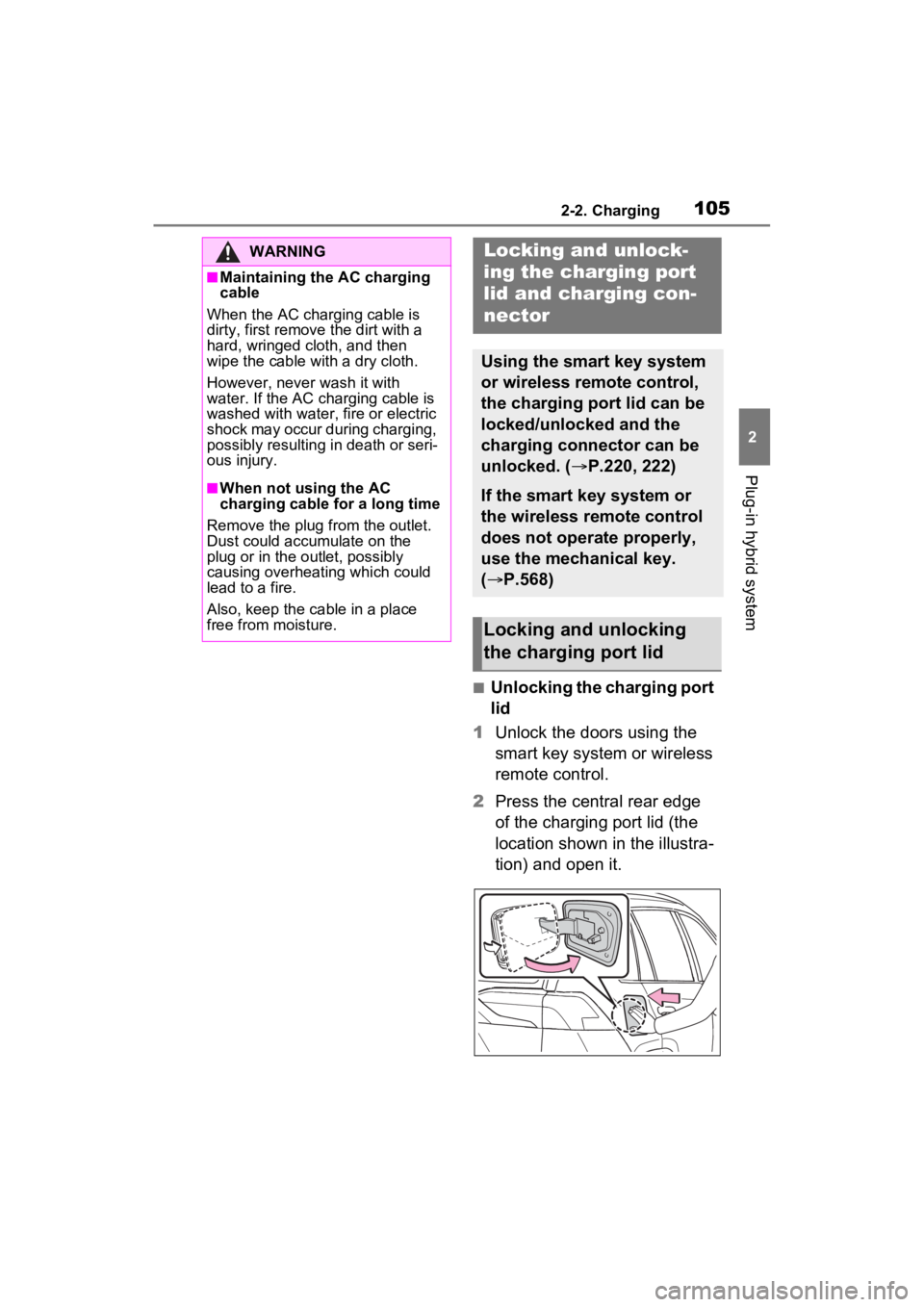
1 Unlock the doors using the
smart key system or wireless
remote control.
2 Press the central rear edge
of the charging port lid (the
location shown in the illustra-
tion) and open it.
WARNING
■Maintaining the AC charging
cable
When the AC charging cable is
dirty, first remove the dirt with a
hard, wringed cloth, and then
wipe the cable with a dry cloth.
However, never wash it with
water. If the AC charging cable is
washed with water, fire or electric
shock may occur during charging,
possibly resulting in death or seri-
ous injury.
■When not using the AC
charging cable for a long time
Remove the plug from the outlet.
Dust could accumulate on the
plug or in the outlet, possibly
causing overheating which could
lead to a fire.
Also, keep the ca ble in a place
free from moisture.
Locking an d unlock-
ing the charging port
lid and cha rging con-
nector
Using the smart key system
or wireless remote control,
the charging port lid can be
locked/unlocked and the
charging connector can be
unlocked. ( P.220, 222)
If the smart key system or
the wireless remote control
does not operate properly,
use the mechanical key.
(P.568)
Locking and unlocking
the charging port lid
Page 106 of 662
1062-2. Charging
■Locking the charging port
lid
The charging port lid will be
locked when the lid is closed
and the doors are locked using
the smart key system or wire-
less remote control.
■Security feature
If the doors are l ocked by the secu-
rity function when the charing port
lid is closed, the cha rging port lid will
also be locked. ( P.223)
■Locking the char ging port lid
If the charging port lid is closed after
the doors are lock ed, the lid will not
be locked. In this case, close the lid
and then lock the doors again.
■If the charging port lid does not
open
If the charging port lid does not
open when using the normal proce-
dure, it can be ope ned in an emer-
gency by performing the following
steps.
1 Open the back door. ( P.229,
231)
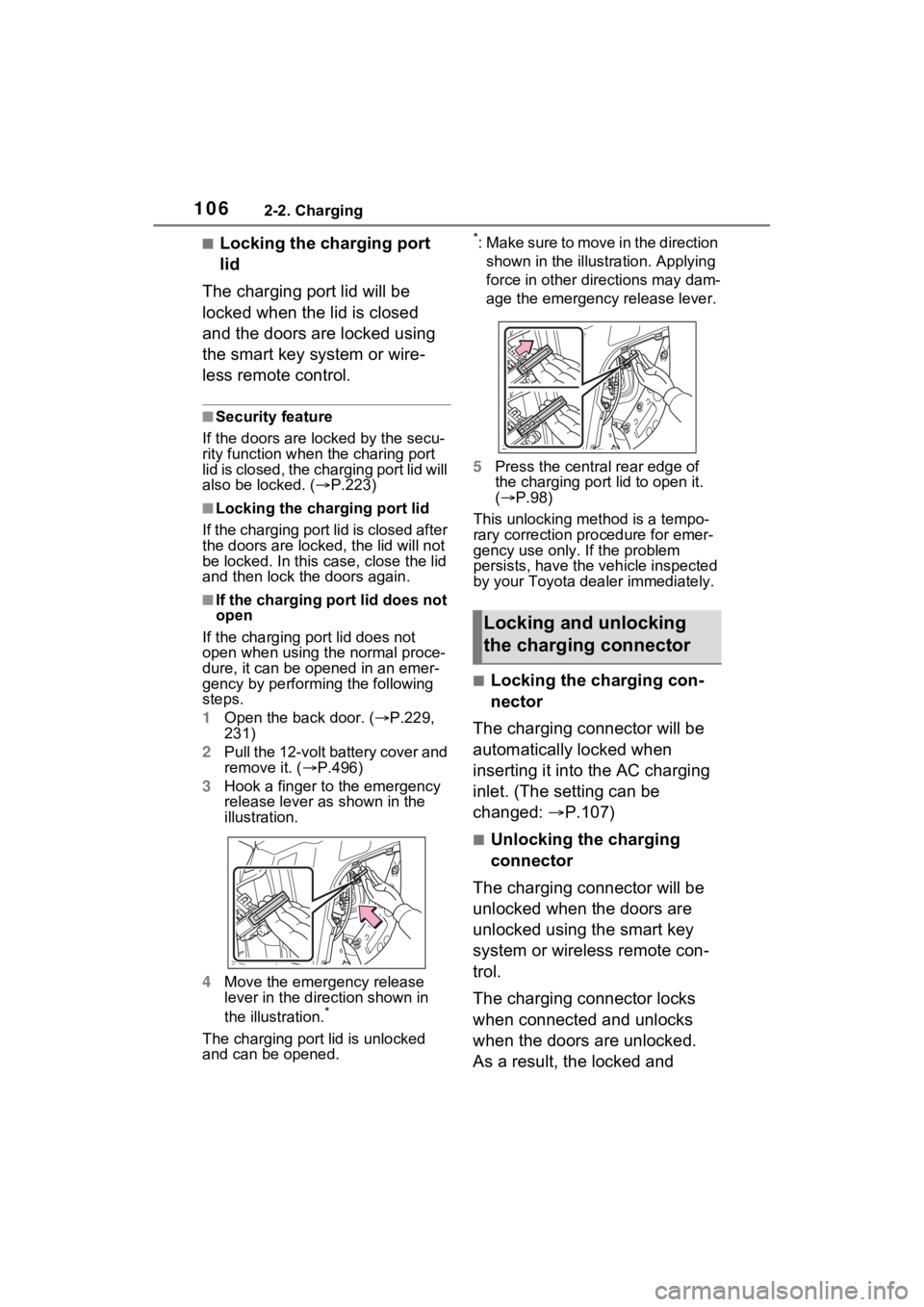
2 Pull the 12-volt battery cover and
remove it. ( P.496)
3 Hook a finger to the emergency
release lever as shown in the
illustration.
4 Move the emergency release
lever in the direction shown in
the illustration.
*
The charging port lid is unlocked
and can be opened.
*: Make sure to move in the direction
shown in the illust ration. Applying
force in other directions may dam-
age the emergency release lever.
5 Press the central rear edge of
the charging port lid to open it.
( P.98)
This unlocking method is a tempo-
rary correction procedure for emer-
gency use only. If the problem
persists, have the vehicle inspected
by your Toyota dea ler immediately.
■Locking the charging con-
nector
The charging connector will be
automatically locked when
inserting it into the AC charging
inlet. (The setting can be
changed: P.107)
■Unlocking the charging
connector
The charging connector will be
unlocked when the doors are
unlocked using the smart key
system or wireless remote con-
trol.
The charging connector locks
when connected and unlocks
when the doors are unlocked.
As a result, the locked and
Locking and unlocking
the charging connector
Page 107 of 662
1072-2. Charging
2
Plug-in hybrid system
unlocked condition of the
charging connector may not
match the locked or unlocked
condition of the doors.
If the charging connector is
locked while the doors are
unlocked, it can be unlocked
using the following operations.
When using the smart key
system, unlock the doors
again after performing a lock-
ing operation once. ( P.222)
When using the wireless
remote control, perform an
unlock operation by pressing
the unlock button. ( P.222)
■Changing the charging con-
nector lock settings
The method for locking and
unlocking the charging connec-
tor can be changed as follows
on the screen on the multi-
information display.
Refer to P.191, 203 for details on
how to change the settings.
The charging connector lock
settings cannot be changed
when the AC charging cable is
connected to the vehicle.
*1: The charging connector will be unlocked if power supply is inter-
rupted due to a power outage
etc. after the charging connector
is automatically locked.
*2: The charging connector can be unlocked by similar operations to
that of “Auto Loc k” (Default set-
ting).
■Charging connector lock func-
tion
The charging connector lock func-
tion does not guarantee that theft of
the AC charging cable will be pre-
vented, and is not necessarily effec-
tive for all mischiefs.
■Unlocking the charging connec-
tor using the smart key system
If the charging connector is locked
while the doors are unlocked, lock
and then unlock the doors to unlock
the charging connector.
■Security function for unlocking
If the charging connector is not
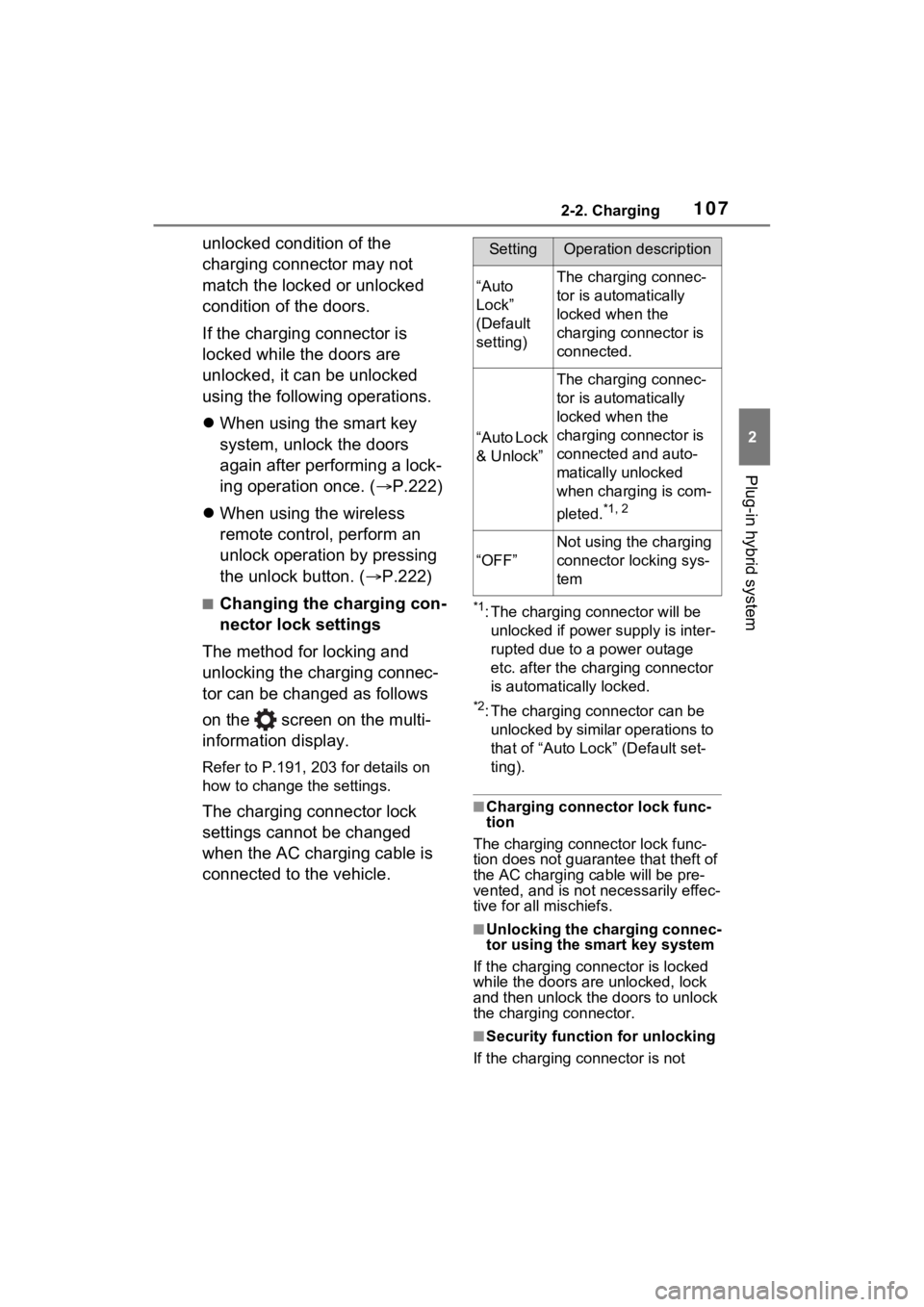
SettingOperation description
“Auto
Lock”
(Default
setting)The charging connec-
tor is automatically
locked when the
charging connector is
connected.
“Auto Lock
& Unlock”
The charging connec-
tor is automatically
locked when the
charging connector is
connected and auto-
matically unlocked
when charging is com-
pleted.
*1, 2
“OFF”
Not using the charging
connector locking sys-
tem
Page 108 of 662
1082-2. Charging
removed within approximately 30
seconds after the vehicle is
unlocked, the security function auto-
matically locks the connector again.
■When the charging connector
cannot be inserted into the AC
charging inlet
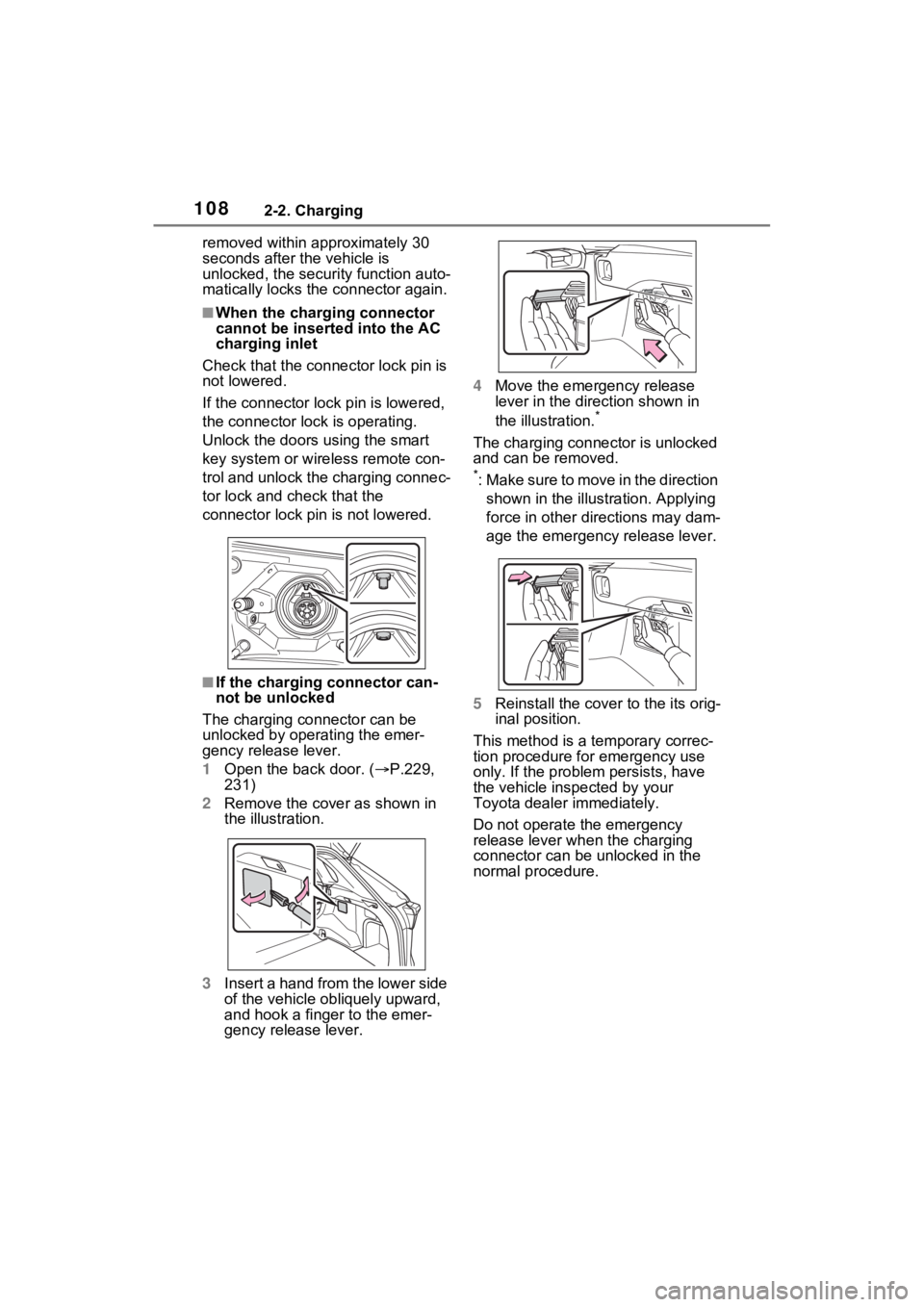
Check that the connector lock pin is
not lowered.
If the connector lock pin is lowered,
the connector lock is operating.
Unlock the doors using the smart
key system or wireless remote con-
trol and unlock the charging connec-
tor lock and check that the
connector lock pin is not lowered.
■If the charging connector can-
not be unlocked
The charging connector can be
unlocked by operating the emer-
gency release lever.
1 Open the back door. ( P.229,
231)
2 Remove the cover as shown in
the illustration.
3 Insert a hand from the lower side
of the vehicle obliquely upward,
and hook a finger to the emer-
gency release lever. 4
Move the emergency release
lever in the direction shown in
the illustration.
*
The charging connector is unlocked
and can be removed.
*: Make sure to move in the direction
shown in the illust ration. Applying
force in other directions may dam-
age the emergency release lever.
5 Reinstall the cove r to the its orig-
inal position.
This method is a temporary correc-
tion procedure for emergency use
only. If the problem persists, have
the vehicle inspected by your
Toyota dealer immediately.
Do not operate the emergency
release lever when the charging
connector can be unlocked in the
normal procedure.
Page 109 of 662
1092-2. Charging
2
Plug-in hybrid system
WARNING
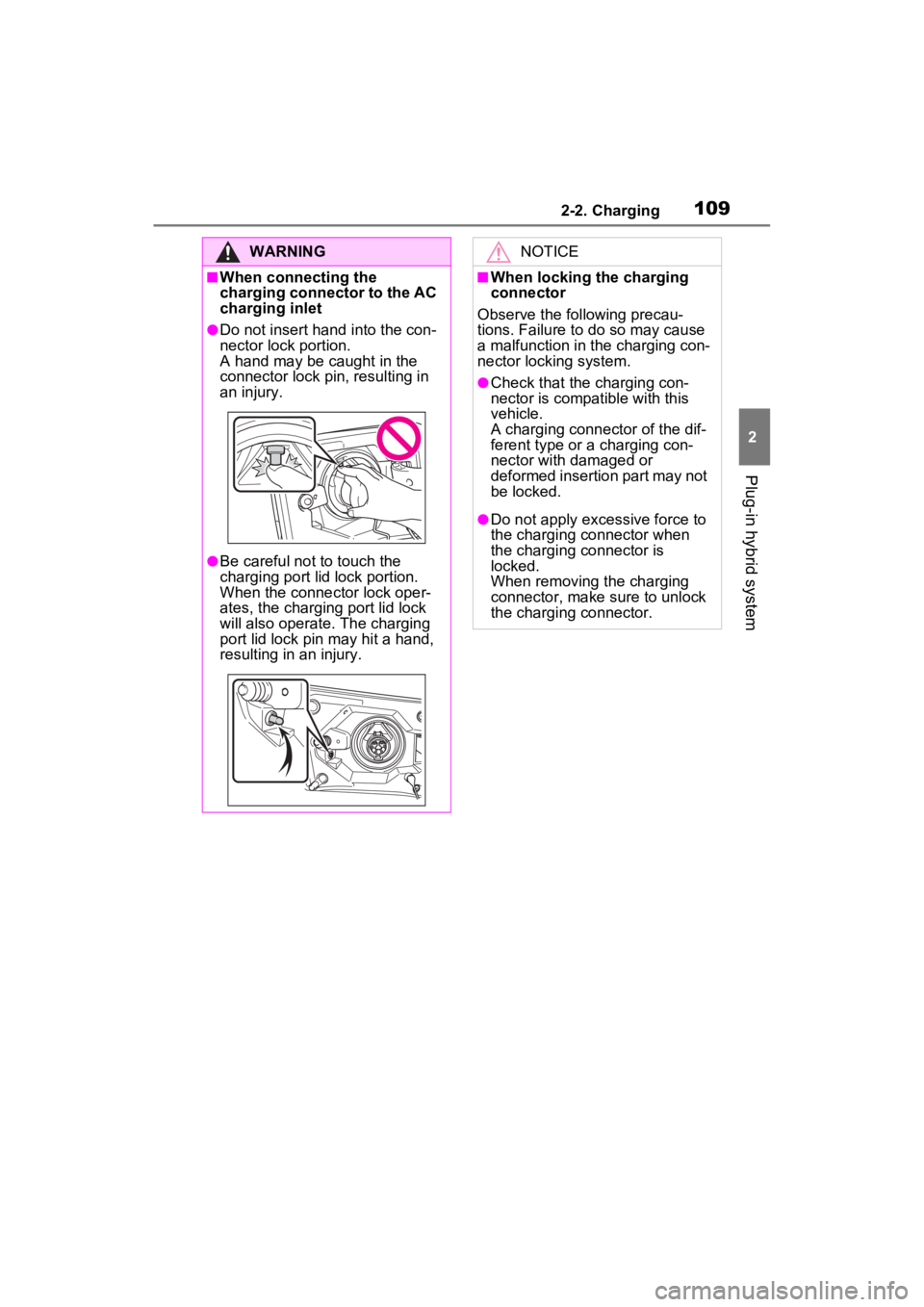
■When connecting the
charging connector to the AC
charging inlet
●Do not insert hand into the con-
nector lock portion.
A hand may be caught in the
connector lock pin, resulting in
an injury.
●Be careful not to touch the
charging port lid lock portion.
When the connector lock oper-
ates, the charging port lid lock
will also operate. The charging
port lid lock pin may hit a hand,
resulting in an injury.
NOTICE
■When locking the charging
connector
Observe the following precau-
tions. Failure to do so may cause
a malfunction in the charging con-
nector locking system.
●Check that the charging con-
nector is compatible with this
vehicle.
A charging connector of the dif-
ferent type or a charging con-
nector with damaged or
deformed insertion part may not
be locked.
●Do not apply excessive force to
the charging connector when
the charging connector is
locked.
When removing the charging
connector, make sure to unlock
the charging connector.