warning TOYOTA RAV4 PRIME 2023 Manual Online
[x] Cancel search | Manufacturer: TOYOTA, Model Year: 2023, Model line: RAV4 PRIME, Model: TOYOTA RAV4 PRIME 2023Pages: 662, PDF Size: 25.4 MB
Page 195 of 662
1953-1. Instrument cluster
3
Vehicle status information and indicators
power back door system operates.
*: Vehicles with Hands Free Power Back Door
“TPWS” (Tire Pressure Warn-
ing System) (if equipped)
( P.500)
• “Setting Pressure”
Select to initialize the tire pressure
warning system.
• “Identify Wheel”
Select to register the ID codes of
the tire pressure s ensors to the tire
pressure warning system.
• “Setting Unit”
Select to change t he units of mea-
sure displayed.
“Scheduled Maintenance”
( P.479)
Select to reset the scheduled main-
tenance information (message indi-
cating maintenance is required and
distance until the next mainte-
nance) after all maintenance is per-
formed.
“Rear Seat Reminder”
( P.224)
Select to enable/disable the rear
seat reminder.
■ Settings
“Language”
Select to change the language on
the multi-inform ation display.
“Units”
Select to change t he units of mea-
sure displayed.
“Meter Type”
Select to change the speedometer display.
(EV indicator) ( P.80)
Select to enable/disable the EV
indicator.
(Driving information dis-
play settings)
Select to set up t he following items.
• “Hybrid System”
Select to enable/disable the ECO
Accelerator Guidance (P.187).
• “Fuel Economy”
Select to change the display on
Fuel Economy ( P.186).
• “Power Consumption”
Select to change the display on
Power Consumption ( P.186).
(Audio settings) (if
equipped)
Select to enable/disable
screen.
(Vehicle information dis-
play settings)
• “Display Contents”
Select to set up t he following items.
“Energy monitor”:
Select to enable/disable the Energy
monitor ( P.212)
“AWD”:
Select to enable /disable the AWD
system display ( P.191).
• “Drive Info Type”
Select to change the drive informa-
tion type display between trip and
total. ( P.190).
• “Drive Info Items”
Page 196 of 662
1963-1. Instrument cluster
Select to set the items on the upper
and lower side of the drive informa-
tion screen from three items, aver-
age speed, distance and total time.
“Closing Display”
Select to set the i tems displayed
when the power switch is turned off.
“Pop-Up Display” (if
equipped)
Select to enable/d isable the follow-
ing pop-up displays, which may
appear in some situations.
• Intersection guidance display of the navigation system-linked sys-
tem (if equipped)
• Incoming call display of the hands-free phone system (if
equipped)
• Audio operation (if equipped)
• Volume operation (if equipped)
• Voice control (if equipped)
“Calender”
Select to set up the calender.
This can only be set if GPS calibra-
tion of clock is tur ned off in the mul-
timedia system settings.
“MID OFF”
A blank screen is displayed.
“Default Settings”
Select to reset the meter display
settings.
■Suspension of the settings dis-
play
●In the following si tuations, opera-
tion of the setting s display will be
temporarily suspended.
• When a warning message appears on the multi-information
display • When the vehicle begins to move
●Settings for functions not
equipped to the vehicle are not
displayed.
●When a function is turned off, the
related settings for that function
are not selectable.
Select to display warning mes-
sages and measures to be
taken if a malfunction is
detected. (
P.552)
Displays suggestions to the
driver in the following situations.
To select a response to a dis-
played suggestion, use the
meter control switches.
WARNING
■Cautions during setting up
the display
As the hybrid system needs to be
operating during setting up the
display, ensure that the vehicle is
parked in a place with adequate
ventilation. In a closed area such
as a garage, exhaust gases
including harmful carbon monox-
ide (CO) may collect and enter
the vehicle. This may lead to
death or a serious health hazard.
NOTICE
■During setting up the display
To prevent 12-vo lt battery dis-
charge, ensure that the hybrid
system is operating while setting
up the display features.
Warning message display
Convenience Services
(Suggestion function)
Page 198 of 662
1983-1. Instrument cluster
mation is displayed on the content
display area, the system operating
state will not be displayed in this
area.
RSA (Road Sign Assist) dis-
play area (if equipped)
( P.363)
■Content display area (cen-
ter)
Driving support system infor-
mation display ( P.202)
Settings display ( P.203)
Warning message display
■Content display area
(left/right)
Power Consumption/Fuel
Economy ( P.199)
ECO Accelerator Guid-
ance/“Eco Score” ( P.200)
EV Ratio/EV Driving Ratio
( P.201)
Driving support system infor-
mation display ( P.202)
Audio system-linked display
( P.202)
Drive information ( P.202)
Energy monitor ( P.212)
AWD system display
( P.203)
■The multi-information display is
displayed when
The power swit ch is in ON.
■Liquid crystal display
Small spots or light spots may
appear on the display. This phe-
nomenon is character istic of liquid crystal displays, and there is no
problem continuing to use the dis-
play.
■When changing driving mode
Background color of the multi-infor-
mation display is changed following
the selected driving mode.
( P.404)
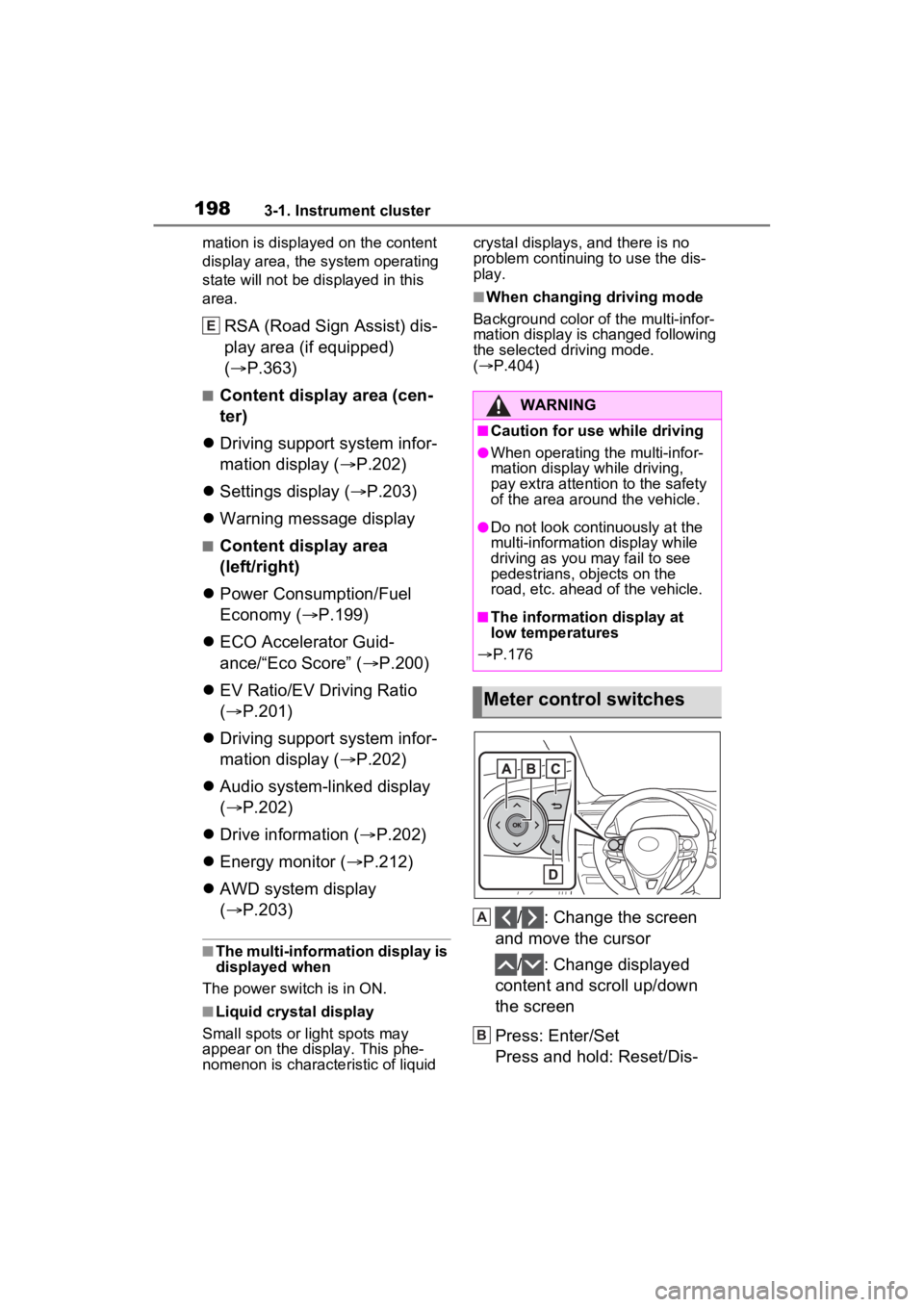
/ : Change the screen
and move the cursor
/ : Change displayed
content and scroll up/down
the screen
Press: Enter/Set
Press and hold: Reset/Dis-
E
WARNING
■Caution for use while driving
●When operating the multi-infor-
mation display while driving,
pay extra attention to the safety
of the area around the vehicle.
●Do not look continuously at the
multi-informatio n display while
driving as you may fail to see
pedestrians, objects on the
road, etc. ahead of the vehicle.
■The information display at
low temperatures
P.176
Meter control switches
A
B
Page 200 of 662
2003-1. Instrument cluster
3Contents display area (left):
Press to display contents
list.
Contents display area (right):
Press to display contents
list.
4 Press or to select the
items.
5 Press to select/deselect
items.
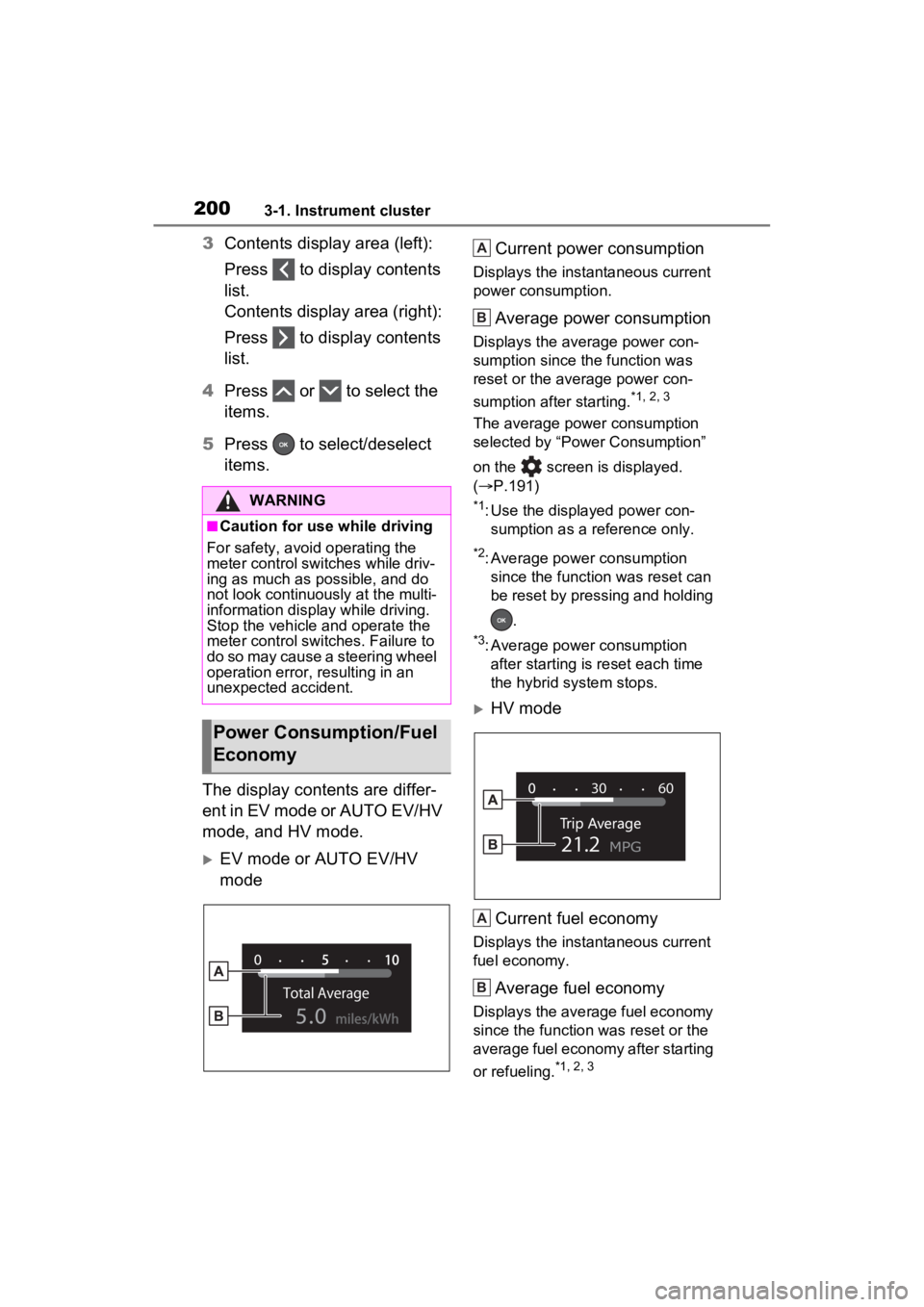
The display contents are differ-
ent in EV mode or AUTO EV/HV
mode, and HV mode.
EV mode or AUTO EV/HV
mode Current power consumption
Displays the instantaneous current
power consumption.
Average power consumption
Displays the average power con-
sumption since the function was
reset or the average power con-
sumption after starting.
*1, 2, 3
The average power consumption
selected by “Power Consumption”
on the screen is displayed.
(
P.191)
*1: Use the displayed power con-
sumption as a reference only.
*2: Average power consumption since the function was reset can
be reset by pressing and holding
.
*3: Average power consumption after starting is reset each time
the hybrid system stops.
HV mode
Current fuel economy
Displays the instantaneous current
fuel economy.
Average fuel economy
Displays the average fuel economy
since the function was reset or the
average fuel economy after starting
or refueling.
*1, 2, 3
WARNING
■Caution for use while driving
For safety, avoid operating the
meter control swit ches while driv-
ing as much as possible, and do
not look continuously at the multi-
information display while driving.
Stop the vehicle and operate the
meter control swit ches. Failure to
do so may cause a steering wheel
operation error, resulting in an
unexpected accident.
Power Consumption/Fuel
Economy
A
B
A
B
Page 205 of 662
2053-1. Instrument cluster
3
Vehicle status information and indicators
“Sway Warning”
Select to enable/disable the vehicle
sway warning.
“Sway Sensitivity”
Select to set the vehicle sway
warning sensitivity.
■ BSM (Blind Spot Moni-
tor) ( P.378)
Select to set up the following
items.
BSM (Blind Spot Monitor)
on/off
Select to enable/disable the
BSM system.
“Sensitivity”
Select to change the alert tim-
ing for an approaching vehi-
cle.
“Brightness”
Select to switch the bright-
ness of the outside rear view
mirror indicators. ( P.379)
■ PCS (Pre-Collision Sys-
tem)
Select to set up the following
items.
PCS on/off
Select to enable/disable the
pre-collision system.
“Sensitivity”
Select to change the pre-colli-
sion warning timing.
■ Intuitive parking
assist ( P.387)
Select to set up the following
items.
Intuitive parking assist on/off
Select to enable/disable the
intuitive parking assist.
“Volume”
Select to set the volume of the
buzzer which sounds when
the intuitive parking assist is
operated.
■ RCTA (Rear Cross Traf-
fic Alert) ( P.383)
Select to set up the following
items.
RCTA (Rear Cross Traffic
Alert) on/off
Select to enable/disable the
RCTA system.
“Volume”
Select to set the volume of the
buzzer which sounds when
the RCTA is operated.
■ PKSB (Parking Sup-
port Brake System)
( P.395)
Select to enable/disable the
Parking Support Brake function.
■ RSA (Road Sign
Assist) (if equipped)
( P.363)
Select to set up the following
items.
Road Sign Assist on/off
Select to enable /disable the RSA
system.
“Notification Method”
Select to change each notification
method used to notify the driver
Page 206 of 662
2063-1. Instrument cluster
when the system recognizes
excess speed and Do Not Enter
sign.
“Notification Level”
Select to change e ach notification
level used to notify the driver when
the system recognizes a speed limit
sign.
■ Vehicle Settings
“Charging Settings”
Select to set up the following items.
• “Charging Schedule”
Select to register or change the
charging schedule. ( P.128)
• “Charging Current”
Select to change the charging cur-
rent. ( P.111)
• “Battery Cooler”
Select to enable/disable the bat-
tery cooler. ( P.114)
• “Battery Heater”
Select to enable/disable the bat-
tery heater. ( P.113)
DRCC
Select to change the curve speed
reduction function setting.
PBD (Power Back Door)
( P.229)
Select to set up the following items.
• System settings
Select to enable/disable the power
back door system.
• “Hands Free”
Select to enable/disable the Hands
Free Power Back Door.
• “Opening Adjustment” Select the open position when
power back door is fully open.
•“Volume”
Select to set the volume of the
buzzer which sounds when the
power back door system operates.
“TPWS” (Tire Pressure Warn-
ing System) (if equipped)
( P.500)
• “Setting Pressure”
Select to initialize the tire pres-
sure warning system.
• “Identifying Each Wheel & Posi- tion”
Select to change the tire pressure
warning system sensor ID code
set. To enable this function, a
second set of tire pressure warn-
ing system sensor ID codes must
be registered by a Toyota dealer.
For information regarding chang-
ing the registered ID code set,
contact your Toyota dealer.
• “Pressure unit setting” Select to change the units of
measure displayed.
Rear Seat Reminder
( P.224)
Select to enable/disable the
rear seat reminder function.
■ Settings
“Language”
Select to change the lan-
guage on the multi-informa-
tion display.
“Units”
Select to change the unit of
measure for fuel consump-
tion.
Page 207 of 662
2073-1. Instrument cluster
3
Vehicle status information and indicators
Meter Type
Select to change the meter
type setting.
Meter Style
Select to change the meter
style.
Dial Type
Select to change dial type.
( P.178)
Depending on the selected dial
type, this item will not be displayed.
EV indicator
Select to enable/disable the
EV indicator.
Fuel Economy
Select to change the display
on Fuel Economy. ( P.199)
“Hybrid System”
Select to enable/disable refer-
ence operation range.
“Power Consumption”
Select to change the display on
Power Consumption. ( P.199)
Drive Info
Select to change displayed
items on drive information dis-
play. ( P.202)
“Calendar”
Select to set up the calender. This
can only be set if GPS calibration of
clock is turned off in the multimedia
system settings.
Pop-Up Display
Select to enable/disable the
pop-up displays, which may
appear in some situations.
Default Settings Select to reset the meter dis-
play settings.
■Suspension of the settings dis-
play
●In the following situations, opera-
tion of the settings display will be
temporarily suspended.
• When a warning message appears on the multi-information
display
• When the vehicle begins to move
●Settings for functions not
equipped to the vehicle are not
displayed.
●When a function is turned off, the
related settings for that function
are not selectable.
Select to display warning mes-
sages and measures to be
taken if a malfunction is
detected. ( P.552)
WARNING
■Cautions during setting up
the display
As the hybrid system needs to be
operating during setting up the
display, ensure that the vehicle is
parked in a place with adequate
ventilation. In a closed area such
as a garage, exhaust gases
including harmful carbon monox-
ide (CO) may collect and enter
the vehicle. This may lead to
death or a serious health hazard.
NOTICE
■During setting up the display
To prevent 12-vo lt battery dis-
charge, ensure that the hybrid
system is operating while setting
up the display features.
Warning message display
Page 211 of 662
2113-1. Instrument cluster
3
Vehicle status information and indicators
• Route guidance to destination (if equipped)
• Driving support system informa- tion display
• Compass (if equipped)
• Audio system operation status
Display angle
Select to adjust the angle of the
head-up display.
■Enabling/disabling of the head-
up display
If the head-up display is disabled, it
will remain disabled when the power
switch is turned off then back to ON.
■Display brightness
The brightness of the head-up dis-
play can be adjusted on screen
of the multi-information display.
Also, it is automatically adjusted
according to the ambient brightness.
■Driving support system
information display
Displays the operational status
of the following systems:
LTA (Lane Tracing Assist)
( P.351)
Dynamic radar cruise control
with full-speed range
( P.366)
Displayed content is the same as
that displayed on the multi-informa-
tion display. For details, refer to the
explanations of each system.
■Navigation system-linked
display area (if equipped)
Displays the following items
which are linked to the naviga-
tion system:
Street name
Route guidance to destination
Compass
Pop-up displays for the following
WARNING
■Caution for changing settings
of the head-up display
If the hybrid system is operating
when changing the display set-
tings, ensure that the vehicle is
parked in a place with adequate
ventilation. In a closed area such
as a garage, exhaust gases
including harmful carbon monox-
ide (CO) may collect and enter
the vehicle. This may lead to
death or a seri ous health hazard.
NOTICE
■When changing the settings
of the head-up display
To prevent 12-vo lt battery dis-
charge, ensure that the hybrid
system is operating while chang-
ing the settings of the head-up
display.
Driving support system
information/navigation
system-linked display
area (if equipped)
Pop-up display
Page 212 of 662

2123-1. Instrument cluster
systems will be displayed when
necessary:
■Driving support systems
Displays a warning/sugges-
tion/advice message or the
operating state of a relevant
system.
PCS (Pre-Collision System)
( P.340)
Brake Override System
( P.283)
Drive-Start Control ( P.283)
Parking Support Brake func-
tion (static objects) (if
equipped) ( P.400)
Displayed content is the same as
that displayed on the meter. For
details, refer to the explanations of
each system.
■ / icons
Displays the following multi-
information display linked icons:
: Master warning icon
Displayed when a warning mes-
sage is displayed on the multi-infor-
mation display.
: Information icon
Displayed when a sugges-
tion/advice pop-up display is dis-
played on the multi-information
display.
■Warning message
Some warning messages are
displayed when necessary,
according to certain conditions.
Displayed content is the same as that displayed on
the multi-informa-
tion display. For details, refer to the
explanations of each system.
■Audio system operation
status (if equipped)
Displayed when an audio
remote control switch on the
steering wheel is operated.
■Hands-free system status
(if equipped)
Displayed when the hands-free
system is operated.
■Outside temperature dis-
play
Displayed when the power
switch is turned to ON or when
the low outside temperature
indicator is flashing.
■When a pop-up display is dis-
played
When a pop-up display is displayed,
a current display may no longer be
displayed. In this case, the display
will return afte r the pop-up display
disappears.
■Outside temperature display
●When the ambient temperature is
approximately 37°F (3°C) or
lower, will flash for approxi-
mately 10 second s and the out-
side temperat ure display will turn
off.
●In the following sit uations, the cor-
rect outside temperature may not
be displayed, or the display may
take longer than normal to
change:
• When stopped (including when using “My Room Mode”), or driv-
ing at low speeds (less than 12
mph [20 km/h])
Page 215 of 662
2153-1. Instrument cluster
3
Vehicle status information and indicators
Charging connector*1
Rear electric motor (traction
motor)
Rear tires
Power outlet
*2 (120 VAC) (if
equipped)
Front tires
*1: The energy flow is displayed while charging ( P.121).
*2: The energy flow is displayed
when the accessory power outlet
can be used.
■Color of the hybrid battery
(traction battery) on the center
display
It will be green whe n the hybrid bat-
tery (traction battery) is being
charged, and yellow when the
hybrid battery (traction battery) is
being used.
■Remaining charge amount
warning of hybrid battery (trac-
tion battery)
●The buzzer sounds intermittently
when the hybrid battery (traction
battery) remains without charging
while the shift leve r is in N, or the
remaining charge amount drops
below a certain level. If the
remaining charge amount drops
further, the buzzer sounds contin-
uously.
●When a warning message is
shown on the multi-information
display and the buzzer sounds,
follow the instructions displayed
on the screen to p erform trouble-
shooting.
■Color of the gasoline engine on
the center display
It will be blue wh en the engine is
warming up, and it will turn to red
when the warming up is finished.
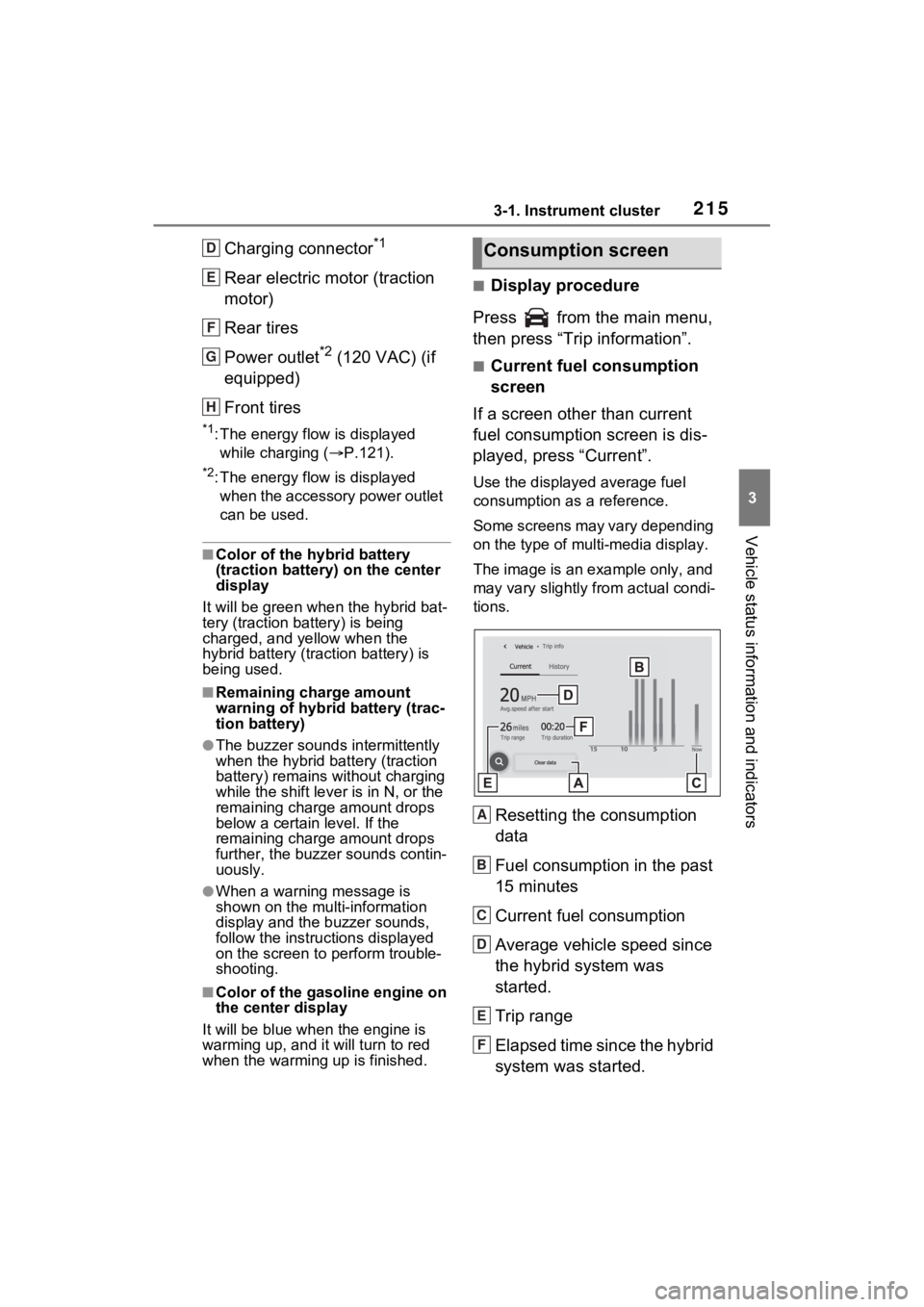
■Display procedure
Press from the main menu,
then press “Trip information”.
■Current fuel consumption
screen
If a screen other than current
fuel consumption screen is dis-
played, press “Current”.
Use the displayed average fuel
consumption as a reference.
Some screens may vary depending
on the type of multi-media display.
The image is an example only, and
may vary slightly from actual condi-
tions.
Resetting the consumption
data
Fuel consumption in the past
15 minutes
Current fuel consumption
Average vehicle speed since
the hybrid system was
started.
Trip range
Elapsed time since the hybrid
system was started.
D
E
F
G
H
Consumption screen
A
B
C
D
E
F