ECU TOYOTA SEQUOIA 2008 2.G Owner's Manual
[x] Cancel search | Manufacturer: TOYOTA, Model Year: 2008, Model line: SEQUOIA, Model: TOYOTA SEQUOIA 2008 2.GPages: 596, PDF Size: 12.93 MB
Page 133 of 596
133
1-7. Safety information
1
Before driving
CAUTION
■
When installing a child restraint system
●After securing the child restraint system, never slide or recline the seat.
■ When installing a child restraint system (vehicles with bench type sec-
ond seat)
Observe the following precautions.
Failure to do so may cause death or serious injury to the child or other pas-
sengers in the event of a sudden stop or accident.
●When installing the child restraint system onto the center second seat,
secure it so as not interfere with the front console box.
● Do not change the posture and position of the outside second seat once
the child restraint system has been secured to the center second seat.
■ Do not use a seat belt extender
If a seat belt extender is used when installing a child restraint system, the
seat belt will not securely hold the child restraint system, which could cause
death or serious injury to the child or other passengers in the event of a colli-
sion.
■ To correctly attach a child restraint system to the anchorages
When using the lower anchorages, be sure that there are no foreign objects
around the anchorages and that the seat belt is not caught behind the child
restraint. Make sure the child restraint system is securely attached, or it may
cause death or serious injury to the child or other passengers in the event of
a sudden stop or accident.
Page 142 of 596
142 2-1. Driving procedures
CAUTION
■When taking a nap in the vehicle
Always turn the engine off. Otherwise, you may accidentally move the shift
lever or depress the accelerator pedal, which could cause an accident or fire
due to engine overheating. Additionally, if the vehicle is parked in a poorly
ventilated area, exhaust gases may collect and enter the vehicle, leadin\
g to
death or a serious health hazard.
■ When braking the vehicle
●When the brakes are wet, drive more cautiously.
Braking distance increases when the brakes are wet, and may cause one
side of the vehicle to brake differently than the other side. Also the parking
brake may not securely hold the vehicle.
● If the power brake assist function does not operate, do not follow other
vehicles closely and avoid downhills or sharp turns that require braking.
In this case, braking is still possible, but it will require more force on the
pedal than usual. Braking distance may also increase.
● Do not pump the brake pedal if the engine stalls.
Each push on the brake pedal uses up the reserve for the power-assisted
brakes.
● The brake system consists of 2 individual hydraulic systems: If one of the
systems fails, the other will still operate. In this case, the brake pedal
should be depressed more firmly than usual and braking distance
becomes longer.
Do not drive your vehicle with only a single brake system. Have your
brakes fixed immediately.
Page 164 of 596
164 2-2. Instrument cluster
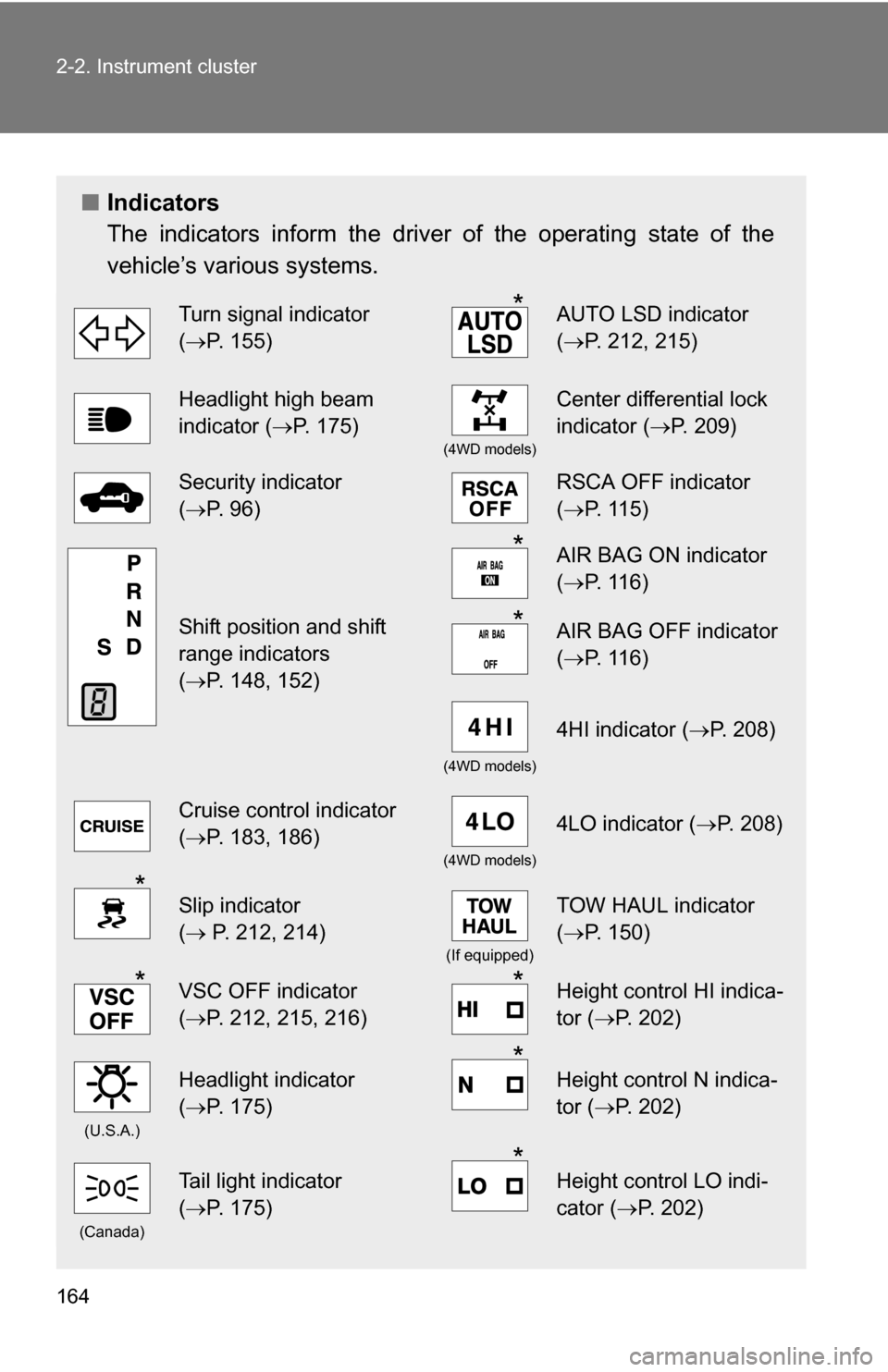
■Indicators
The indicators inform the driver of the operating state of the
vehicle’s various systems.
Turn signal indicator
(P. 155)*AUTO LSD indicator
( P. 212, 215)
Headlight high beam
indicator ( P. 175)
(4WD models)
Center differential lock
indicator ( P. 209)
Security indicator
(P. 96)RSCA OFF indicator
( P. 115)
Shift position and shift
range indicators
(P. 148, 152)
*AIR BAG ON indicator
( P. 116)
*AIR BAG OFF indicator
(P. 116)
(4WD models)
4HI indicator ( P. 208)
Cruise control indicator
(P. 183, 186)
(4WD models)
4LO indicator ( P. 208)
*Slip indicator
( P. 212, 214)
(If equipped)
TOW HAUL indicator
( P. 150)
*VSC OFF indicator
(P. 212, 215, 216)*Height control HI indica-
tor (P. 202)
(U.S.A.)
Headlight indicator
(P. 175)*Height control N indica-
tor (P. 202)
(Canada)
Tail light indicator
(P. 175)*Height control LO indi-
cator (P. 202)
Page 190 of 596
190 2-4. Using other driving systems
Example of follow-up cruising (when following a vehicle driving
slower than the set speed):
When the speed is set to 62 mph (100 km/h) and the vehicle ahead
is driving at 50 mph (80 km/h)
The system continues follow-up cruising while adjusting for changes in the
speed of the vehicle ahead in order to maintain the vehicle-to-vehicle dis-
tance set by the driver.
Example of acceleration (when there are no longer vehicles driving
slower than the set speed in the lane ahead):
When the speed is set to 62 mph (100 km/h) and the vehicle ahead
driving at 50 mph (80 km/h) is out of the lane
When the vehicle ahead of you executes a lane change, the system
slowly accelerates until the set vehicle speed is reached. The system then
returns to fixed speed cruising.
■Fine adjustment of the set speed
Adjustment of the set speed by the following speed can be made by lightly
pressing the lever up or down and releasing it.
In the constant speed control mode: Approximately 1.0 mph (1.6 km/h)
In the vehicle-to-vehicle distance control mode:U.S.A.: Approximately 5 mph (8 km/h)
Canada: Approximately 3 mph (5 km/h)
■ Dynamic laser cruise control warning lights, display and buzzers
Warning lights, display and buzzers are used to indicate a system malfunc-
tion or to alert you to the need for caution while driving. ( P. 514)
■ The dynamic laser cruise can be set when
●The shift lever is in D or the shift range position must be in 4 or 5 in S
mode (5-speed models).
● The shift lever is in D or the shift range position must be in between 4 and
6 in S mode (6-speed models).
● Vehicle speed is between approximately 27 mph (45 km/h) and 85 mph
(135 km/h).
■ Accelerating
The vehicle can be accelerated normally.
Page 224 of 596
224
2-5. Driving information
Cargo and luggage
Capacity and distributionCargo capacity depends on the total weight of the occupants.
(Cargo capacity) = (Total load capacity) (Total weight of occupants)
Steps for Determining Correct Load Limit—
(1) Locate the statement “The co mbined weight of occupants and
cargo should never exceed XXX kg or XXX lbs.” on your vehicle’s
placard.
(2) Determine the combined weight of the driver and passengers that
will be riding in your vehicle.
(3)Subtract the combined weight of the driver and passengers from XXX kg or XXX lbs.
(4) The resulting figure equals the av ailable amount of cargo and lug-
gage load capacity.
For example, if the “XXX” amount equals 1400 lbs. and there will
be five 150 lb passengers in your vehicle, the amount of available
cargo and luggage load capacity is 650 lbs. (1400 750 (5 150)
= 650 lbs.)
(5) Determine the combined weight of luggage and cargo being loaded on the vehicle. That weight may not safely exceed the
available cargo and luggage load capacity calculated in Step 4.
Take notice of the following information about storage precau-
tions, cargo capacity and load.
●Stow cargo and luggage in the luggage compartment whenever
possible.
● Be sure all items are secured in place.
● Be careful to keep the vehicle level. Placing the weight as far for-
ward as possible helps maintain vehicle balance.
● For better fuel economy, do no t carry unnecessary weight.
Page 226 of 596
226 2-5. Driving information
CAUTION
■Things that must not be carried in the luggage compartment
The following things may cause a fire if loaded in the luggage compart-
ment.
●Receptacles containing gasoline
●Aerosol cans
■Storage precautions
●Do not stack anything in the luggage compartment higher than the
seatbacks.
Such items may be thrown about and possibly injure people in the
vehicle during sudden braking or in an accident.
●Do not drive with objects on top of the instrument panel.
They may interfere with the driver’s field of view or move during sharp
acceleration or turning, thus impairing the driver’s control of the vehi-
cle. In an accident they may injure the vehicle occupants.
●Secure all items in the occupant compartment, as they may shift and
injure someone during an accident or sudden braking.
●Never allow anyone to ride in the luggage compartment. It is not
designed for passengers. They should ride in their seats with their seat
belts properly fastened. Otherwise, th ey are much more likely to suffer
death or serious bodily injury, in the event of sudden braking or a colli-
sion.
■Capacity and distribution
●Do not exceed the maximum axle weight rating or the total vehicle
weight rating.
●Even if the total load of occupant’s weight and the cargo load is less
than the total load capacity, do not apply the load unevenly. Improper
loading may cause deterioration of steering or braking control which
may cause death or serious injury.
Page 227 of 596
227
2-5. Driving information
2
When driving
CAUTION
■Roof luggage carrier precautions
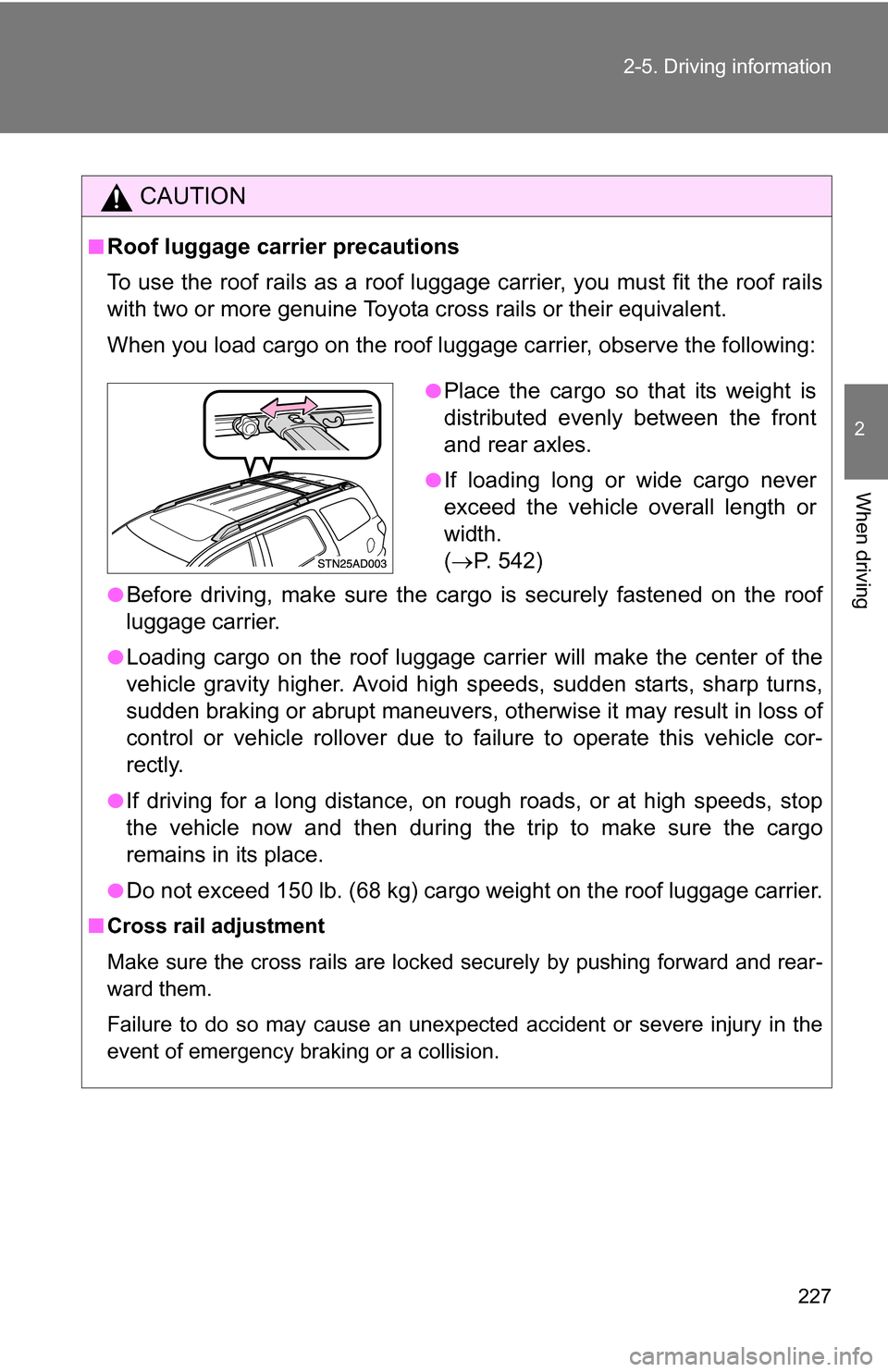
To use the roof rails as a roof luggag
e carrier, you must fit the roof rails
with two or more genuine Toyota cross rails or their equivalent.
When you load cargo on the roof luggage carrier, observe the following:
●Before driving, make sure the cargo is securely fastened on the roof
luggage carrier.
●Loading cargo on the r oof luggage carrier will make the center of the
vehicle gravity higher. Avoid high speeds, sudden starts, sharp turns,
sudden braking or abrupt maneuvers, otherwise it may result in loss of
control or vehicle rollover due to failure to operate this vehicle cor-
rectly.
●If driving for a long distance, on rough roads, or at high speeds, stop
the vehicle now and then during the trip to make sure the cargo
remains in its place.
●Do not exceed 150 lb. (68 kg) cargo weight on the roof luggage carrier.
■ Cross rail adjustment
Make sure the cross rails are locked securely by pushing forward and rear-
ward them.
Failure to do so may cause an unexpected accident or severe injury in the
event of emergency braking or a collision.
●Place the cargo so that its weight is
distributed evenly between the front
and rear axles.
●If loading long or wide cargo never
exceed the vehicle overall length or
width.
( P. 542)
Page 243 of 596
243
2-5. Driving information
2
When driving
■
Before towing
Check that the following conditions are met:
●Ensure that your vehicle’s tires are properly inflated. ( P. 553)
● Trailer tires should be inflated according to the trailer manufacturer’s rec-
ommendation.
● All trailer lights work to be legal.
● All lights work each time you connect them.
● The trailer ball is set up at the proper height for the coupler on the t\
railer.
● The vehicle remains level when a loaded or unloaded trailer is hitched.
Do not drive if the vehicle is not level, and check for improper tongue
load, overloading, worn suspension, or other possible causes.
● The trailer cargo is securely loaded.
● The rear view mirrors conform to all applicable federal, state/provincial or
local regulations. If they do not, instal l rear view mirrors appropriate for
towing purposes.
● Depress TOW/HAUL button (if equipped)
■ When connecting and disconnecting a trailer
Set the electronically modulated air suspension system to MAN., or turn off
the engine, when the system is in N mode. (if equipped)
■ AVS (adaptive variable suspension system) (if equipped)
The suspension can be switched for improvement in driveability. ( P. 207)
■ Break-in schedule
●Toyota recommends that you do not use a new vehicle or a vehicle with
any new power train components (engine, transmission, differential,
wheel bearings, etc.) to tow a trailer for the first 500 miles (800 km) of
driving.
● Drive the vehicle at a speed of less than 50 mph (80 km/h) when towing a
trailer for another 500 miles (800 km/h).
● Avoid full throttle acceleration.
■ Maintenance
●If you tow a trailer, your vehicle will require more frequent maintenance
due to the additional load. (See “Scheduled Maintenance Guide” or
“Owner’s Manual Supplement”.)
Page 245 of 596
245
2-5. Driving information
2
When driving
CAUTION
■
Hitches
●Remove the trailer hitch whenever you are not towing a trailer. After
removing the hitch, seal any mounting hole in the vehicle body to prevent
entry of any substances into the vehicle.
■ When towing a trailer
●If the gross trailer weight exceeds 1000 lb. (453 kg), trailer brakes are
required. Toyota recommends trailers wi th brakes that conform to all appli-
cable federal and state/provincial regulations.
● Never tap into your vehicle’s hydraulic system, as this will lower the vehi-
cle’s braking effectiveness.
● Never tow a trailer without using a safety chain securely attached to both
the trailer and the vehicle. If damage occurs to the coupling unit or hitch
ball, there is danger of the trailer wandering into another lane.
NOTICE
■When installing a trailer hitch
●Use only the position recommended by your Toyota dealer. Do not install
the trailer hitch on the bumper; this may cause body damage.
● Do not use axle-mounted hitches, as they can cause damage to the axle
housing, wheel bearing, wheels or tires.
■ Safety chain
A safety chain must always be used between the towing vehicle and the
trailer. Leave sufficient slack in the chain for turns. The chain should cross
under the trailer tongue to prevent the tongue from dropping to the ground in
the case that it becomes damaged or separated. For the correct safety chain
installation procedure, ask your Toyota dealer.
■ Do not directly splice trailer lights
Directly splicing trailer lights may damage your vehicle’s electrical system
and cause a malfunction.
Page 248 of 596
248
3-1. Using the air conditioning system and defogger... 250
Front air conditioning system ........................... 250
Rear air conditioning system ........................... 258
Rear window and outside rear view mirror
defoggers ....................... 262
Windshield wiper de-icer ............................ 263
Using the steering wheel climate remote control
switches ......................... 264
3-2. Using the audio system .......................... 266
Audio system (without navigation system)
.......... 266
Using the radio ................. 269
Using the CD player ......... 275
Playing back MP3 and WMA discs ..................... 283
Optimal use of the audio system ........................... 292
Using the AUX adapter .... 294
Using the steering wheel audio switches ............... 296 3-3. Using the rear audio/video
system .......................... 298
Rear seat entertainment system ........................... 298
Using the DVD player (DVD video) ................... 305
Using the DVD player (video CD)...................... 314
Using the DVD player (audio CD/CD text) ........ 316
Using the DVD player (MP3 discs) .................... 317
Using the video mode ...... 319
Changing the Setup Menu settings .......................... 321
3-4. Using the hands-free phone system (for
cellular phone) ............. 329
Hands-free phone system (for cellular phone) ......... 329
Using the hands-free phone system ........................... 333
Making a phone call ......... 342
Setting a cellular phone ... 347
Security and system setup .............................. 352
Using the phone book ...... 355
Interior features3