ECU TOYOTA SEQUOIA 2008 2.G Owner's Guide
[x] Cancel search | Manufacturer: TOYOTA, Model Year: 2008, Model line: SEQUOIA, Model: TOYOTA SEQUOIA 2008 2.GPages: 596, PDF Size: 12.93 MB
Page 273 of 596
273
3-2. Using the audio system
3
Interior features
■
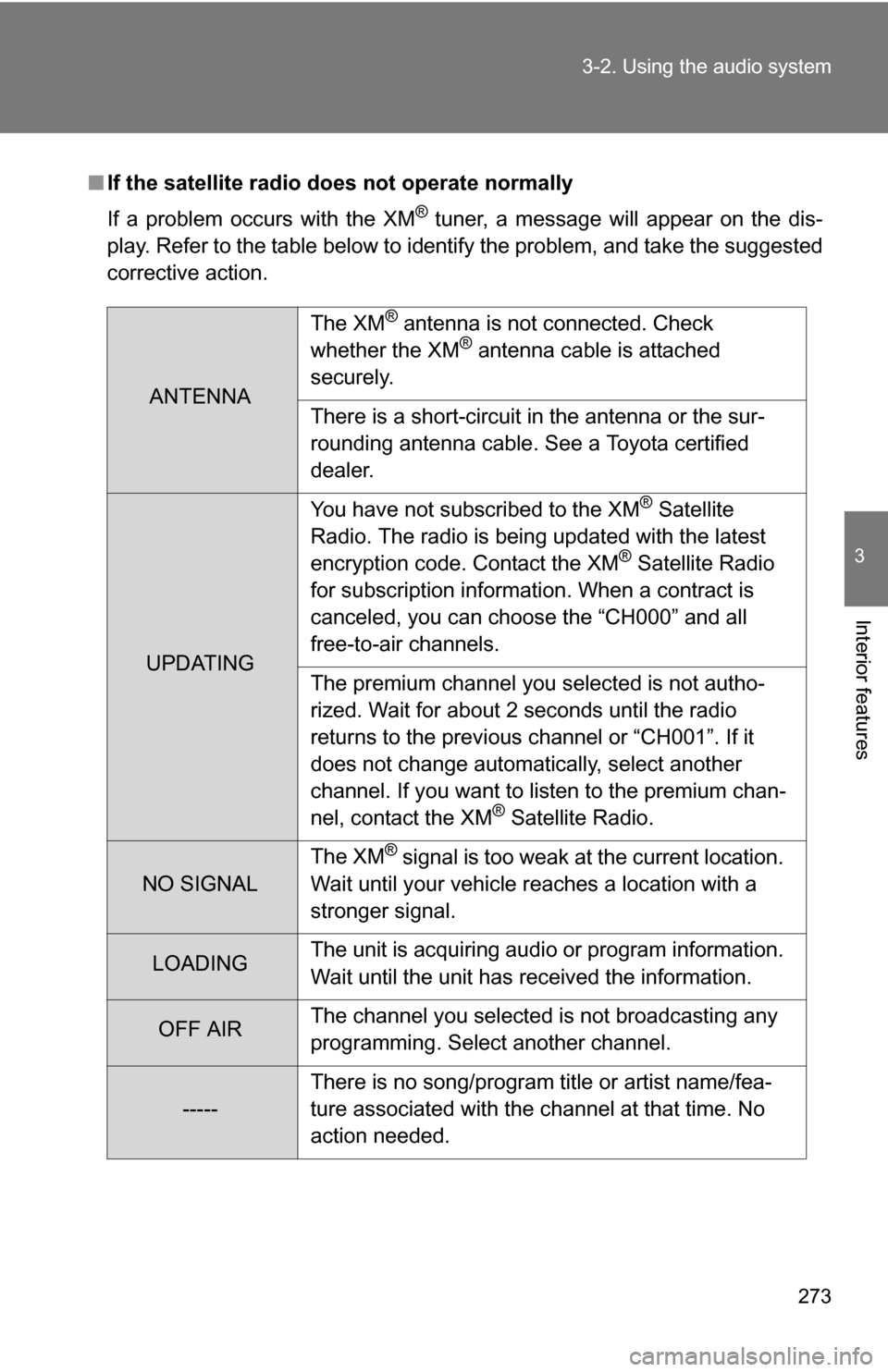
If the satellite radio does not operate normally
If a problem occurs with the XM
® tuner, a message will appear on the dis-
play. Refer to the table below to identify the problem, and take the suggested
corrective action.
ANTENNA The XM
® antenna is not connected. Check
whether the XM® antenna cable is attached
securely.
There is a short-circuit in the antenna or the sur-
rounding antenna cable. See a Toyota certified
dealer.
UPDATING You have not subscribed to the XM
® Satellite
Radio. The radio is being updated with the latest
encryption code. Contact the XM
® Satellite Radio
for subscription information. When a contract is
canceled, you can choose the “CH000” and all
free-to-air channels.
The premium channel you selected is not autho-
rized. Wait for about 2 seconds until the radio
returns to the previous channel or “CH001”. If it
does not change automatically, select another
channel. If you want to listen to the premium chan-
nel, contact the XM
® Satellite Radio.
NO SIGNAL The XM
® signal is too weak at the current location.
Wait until your vehicle reaches a location with a
stronger signal.
LOADING The unit is acquiring audio or program information.
Wait until the unit has received the information.
OFF AIRThe channel you selected is not broadcasting any
programming. Select another channel.
-----There is no song/program title or artist name/fea-
ture associated with the channel at that time. No
action needed.
Page 329 of 596
329
3
Interior features
3-4. Using the hands-free phone system (for cellular phone)
Hands-free phone system (for cellular phone) (if equipped)
■When using the hands-free system
●The audio system and voice guidance are muted when making a call.
● If both parties speak at the same time it may be difficult to hear.
● If the received call volume is overly loud, an echo may be heard.
● Try to face toward the microphone as much as possible when speaking.
● In the following circumstances it may be difficult to hear the other party:
• If driving on unpaved roads
• If driving at high speeds
• If a window is open
• If the air conditioning is blowing directly on the microphone
• If the air conditioning fan speed is set to high
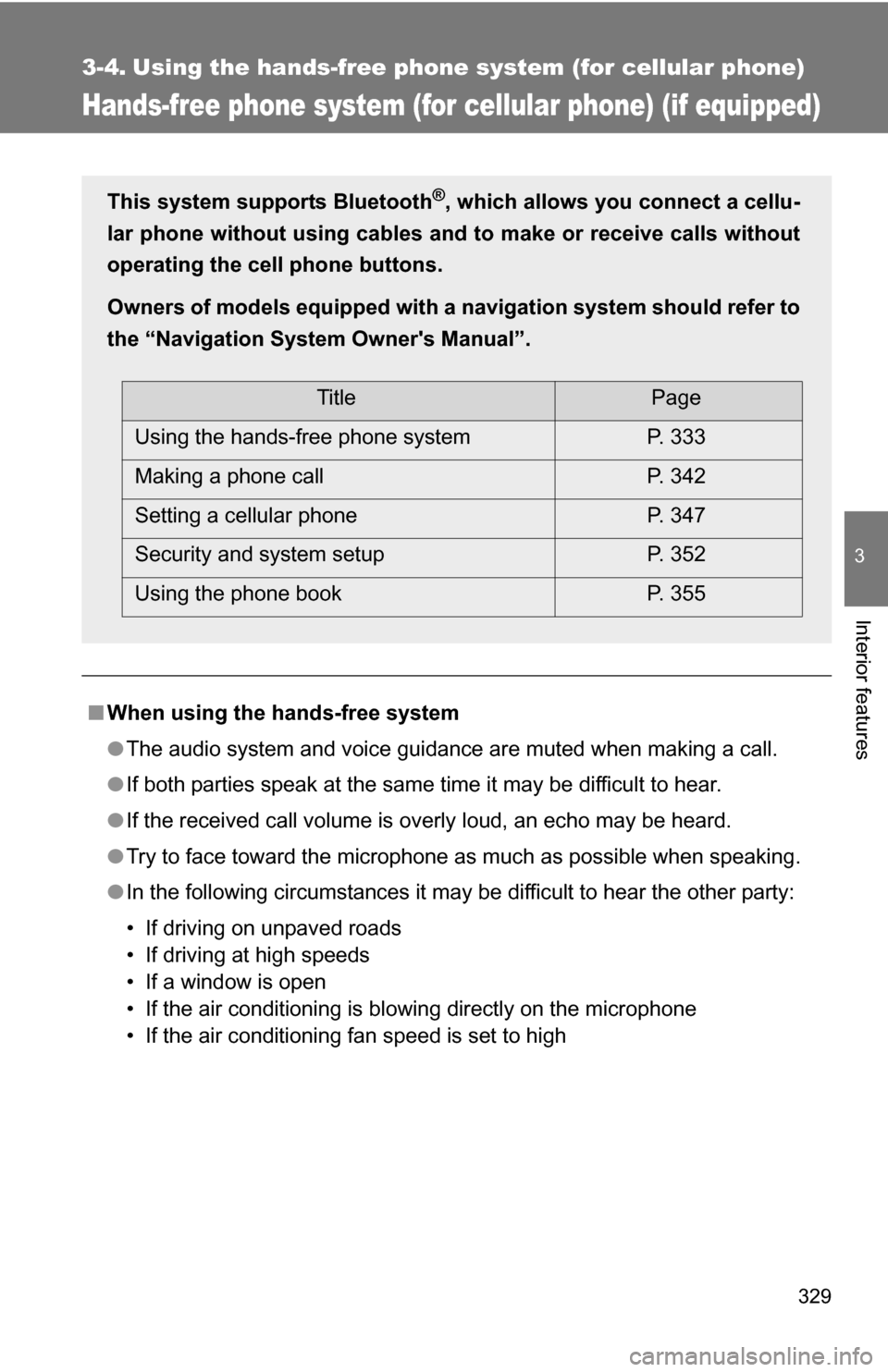
This system supports Bluetooth®, which allows you connect a cellu-
lar phone without using cables a nd to make or receive calls without
operating the cell phone buttons.
Owners of models equipped with a navigation system should refer to
the “Navigation System Owner's Manual”.
TitlePage
Using the hands-free phone system P. 333
Making a phone call P. 342
Setting a cellular phone P. 347
Security and system setup P. 352
Using the phone book P. 355
Page 339 of 596
339
3-4. Using the hand
s-free phone system (for cellular phone)
3
Interior features
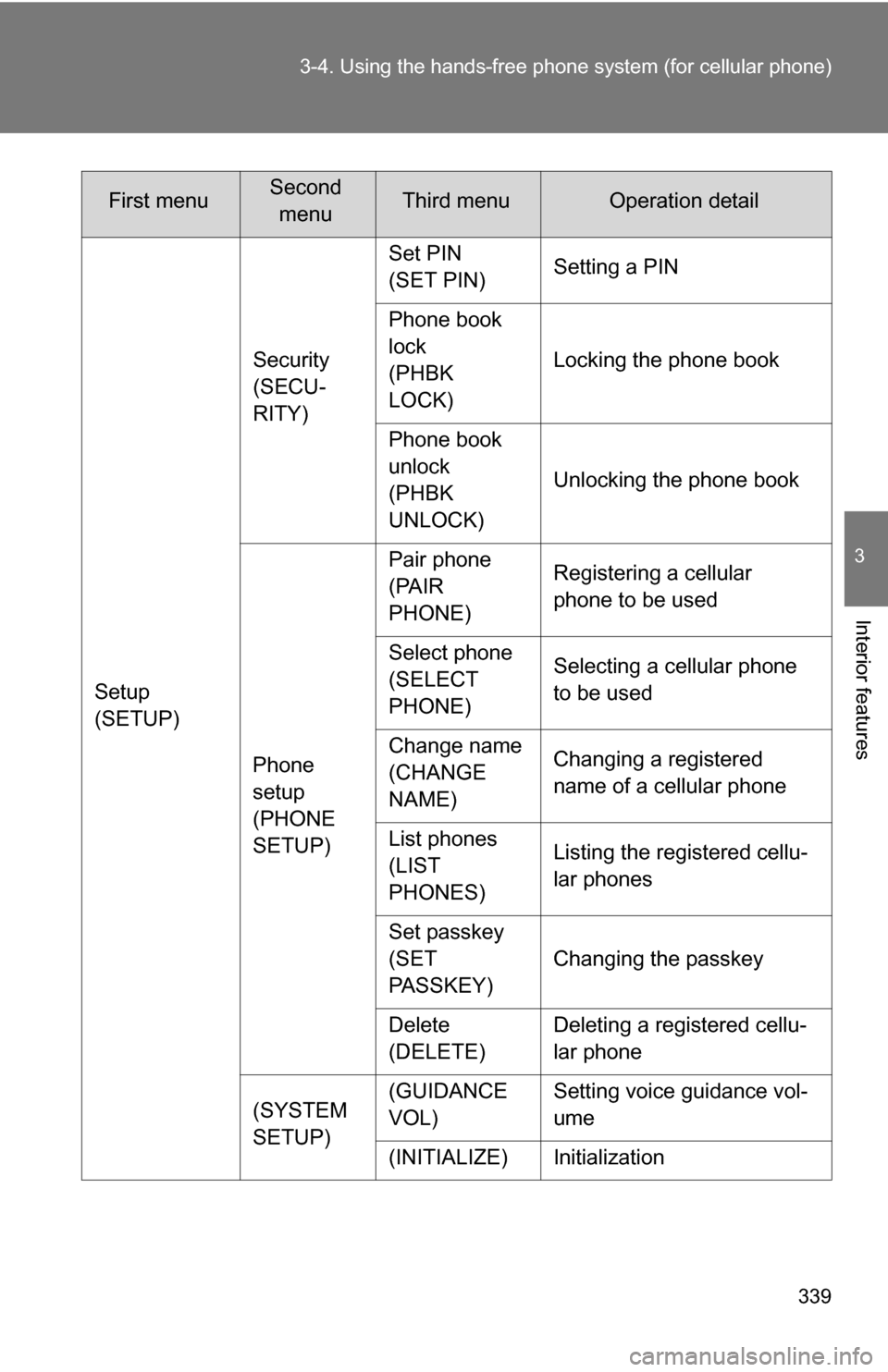
Setup
(SETUP)Security
(SECU-
RITY)
Set PIN
(SET PIN)
Setting a PIN
Phone book
lock
(PHBK
LOCK) Locking the phone book
Phone book
unlock
(PHBK
UNLOCK) Unlocking the phone book
Phone
setup
(PHONE
SETUP) Pair phone
(PAIR
PHONE)
Registering a cellular
phone to be used
Select phone
(SELECT
PHONE) Selecting a cellular phone
to be used
Change name
(CHANGE
NAME) Changing a registered
name of a cellular phone
List phones
(LIST
PHONES) Listing the registered cellu-
lar phones
Set passkey
(SET
PASSKEY) Changing the passkey
Delete
(DELETE) Deleting a registered cellu-
lar phone
(SYSTEM
SETUP) (GUIDANCE
VOL)
Setting voice guidance vol-
ume
(INITIALIZE) Initialization
First menuSecond menuThird menuOperation detail
Page 352 of 596
352
3-4. Using the hands-free phone system (for cellular phone)
Security and system setup
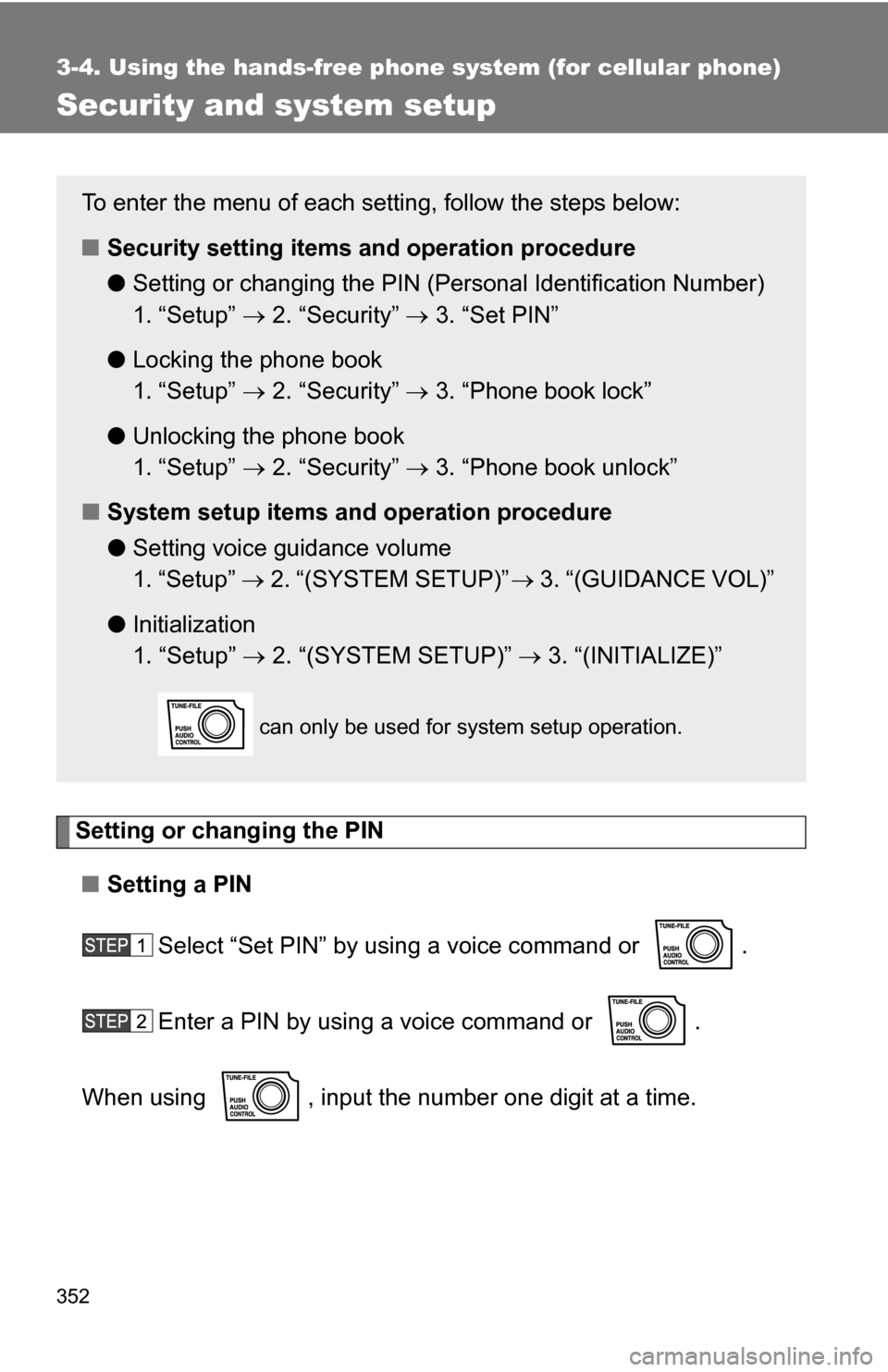
Setting or changing the PIN■ Setting a PIN
Select “Set PIN” by using a voice command or .
Enter a PIN by using a voice command or .
When using , input the number one digit at a time.
To enter the menu of each setting, follow the steps below:
■ Security setting items and operation procedure
● Setting or changing t he PIN (Personal Identification Number)
1. “Setup” 2. “Security” 3. “Set PIN”
● Locking the phone book
1. “Setup” 2. “Security” 3. “Phone book lock”
● Unlocking the phone book
1. “Setup” 2. “Security” 3. “Phone book unlock”
■ System setup items and operation procedure
●Setting voice guidance volume
1. “Setup” 2. “(SYSTEM SETUP)” 3. “(GUIDANCE VOL)”
● Initialization
1. “Setup” 2. “(SYSTEM SETUP)” 3. “(INITIALIZE)”
can only be used for system setup operation.
Page 385 of 596
385
3-6. Using the
storage features
3
Interior features
CAUTION
■After folding a seat
Observe the following precautions. Failure to do so may result in death or
serious injury.
●Make sure that the seat and seatback are securely locked in position by
lightly rocking the seat back and forth.
● Do not sit on the folded seatback.
■ Caution while driving
Do not fold the seatback forward to set up the seatback table while the vehi-
cle is moving.
Seatback table
Page 405 of 596
405
3-7. Other interior features
3
Interior features
Floor mat
CAUTION
■When inserting the floor mat
Observe the following precautions.
Failure to do so may result in the floor mat slipping and interfering wi\
th the
movement of the pedals during driving, resulting in an accident.
●Make sure the floor mat is properly placed on the vehicle carpet and the
correct side faces upward.
● Do not place floor mats on top of existing mats.
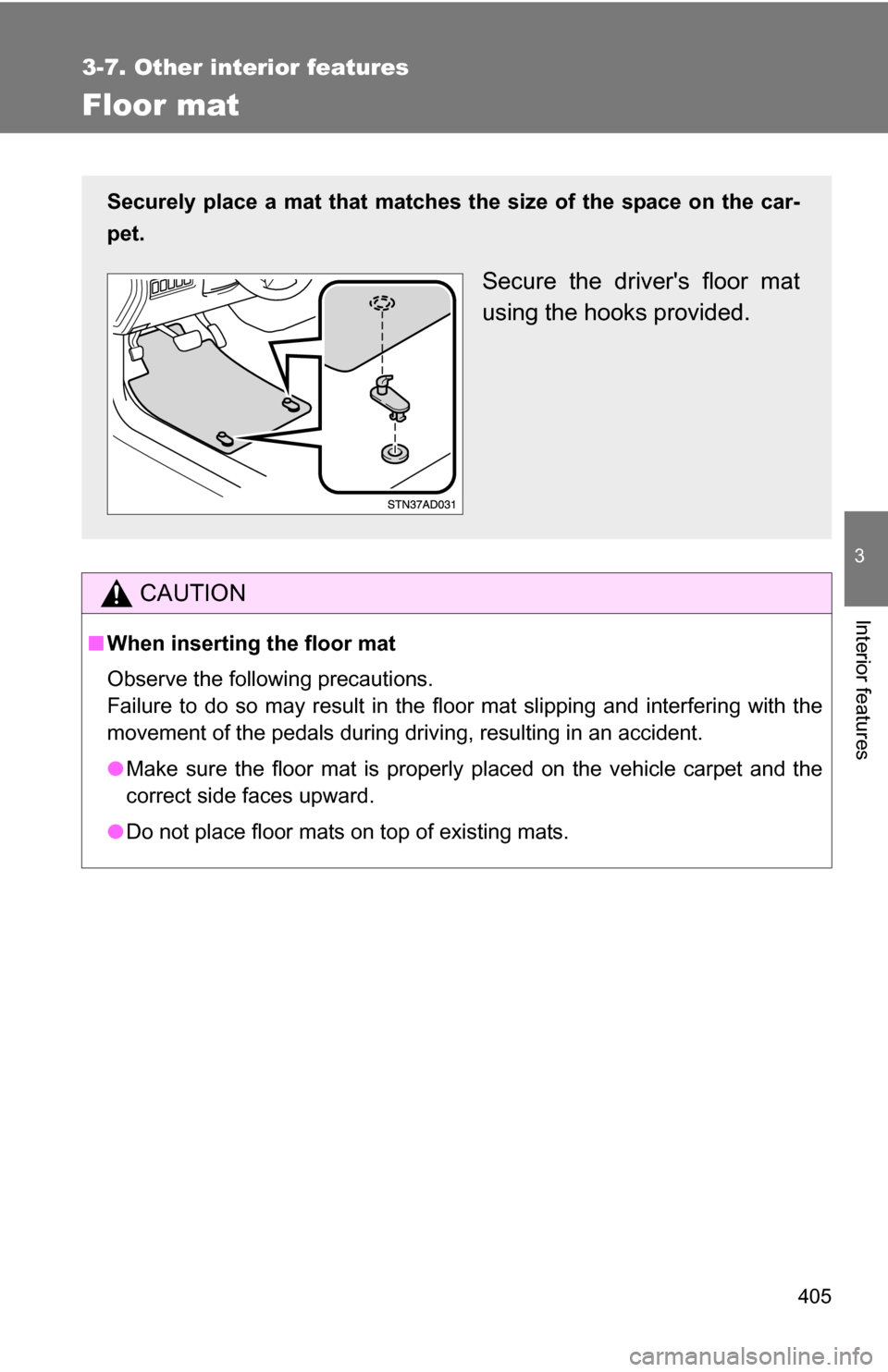
Securely place a mat that matches the size of the space on the car-
pet.
Secure the driver's floor mat
using the hooks provided.
Page 406 of 596
406
3-7. Other interior features
Luggage compartment features
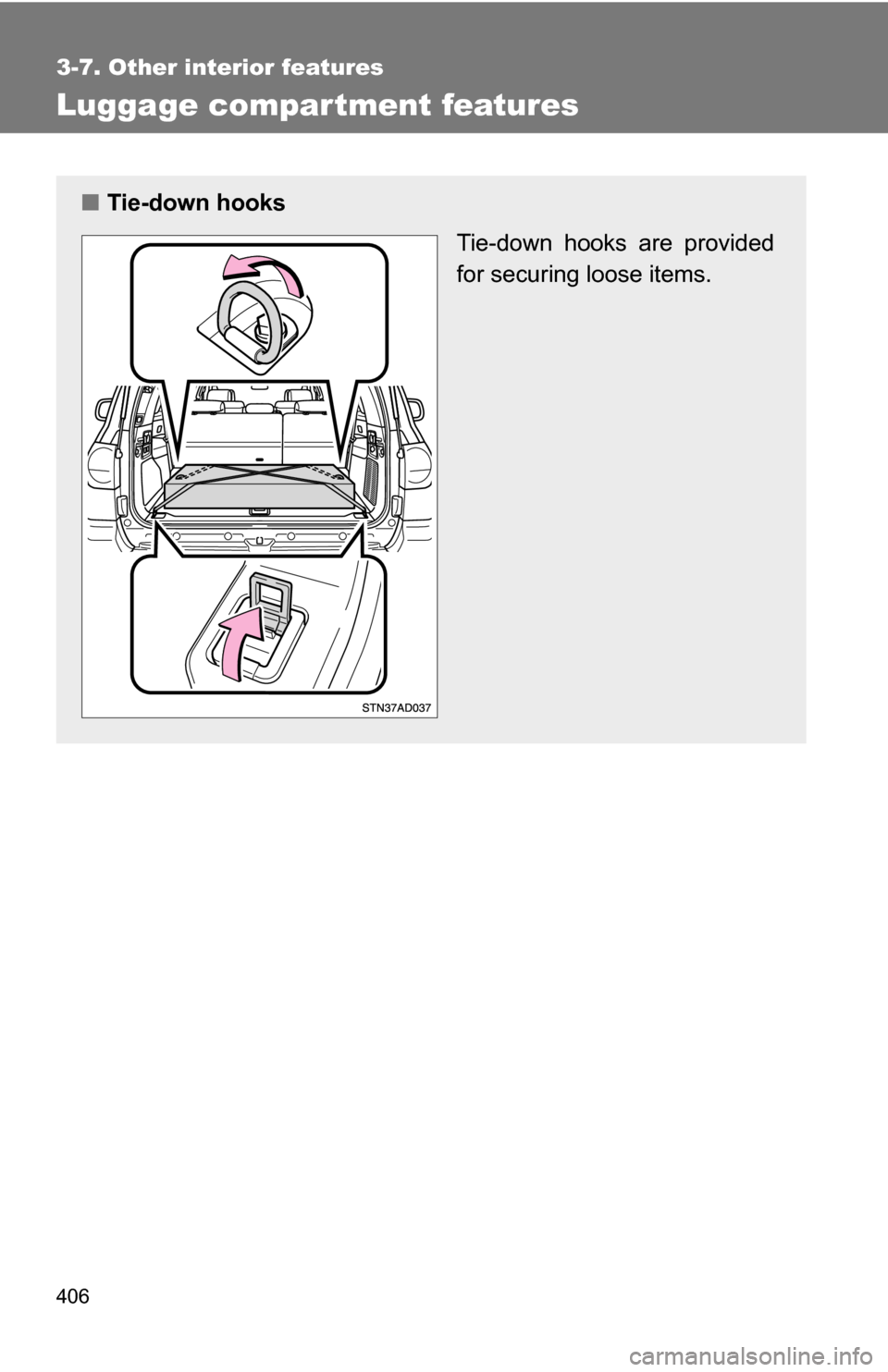
■Tie-down hooks
Tie-down hooks are provided
for securing loose items.
Page 411 of 596
411
3-7. Other interior features
3
Interior features
Garage door opener (if equipped)
The garage door opener (HomeLink® Universal Transceiver) is manufac-
tured under license from HomeLink®.
Programming the HomeLink® (for U.S.A. owners)
The HomeLink
® compatible transceiver in your vehicle has 3 buttons
which can be programmed to operate 3 different devices. Refer to the
programming method below appropriate for the device.
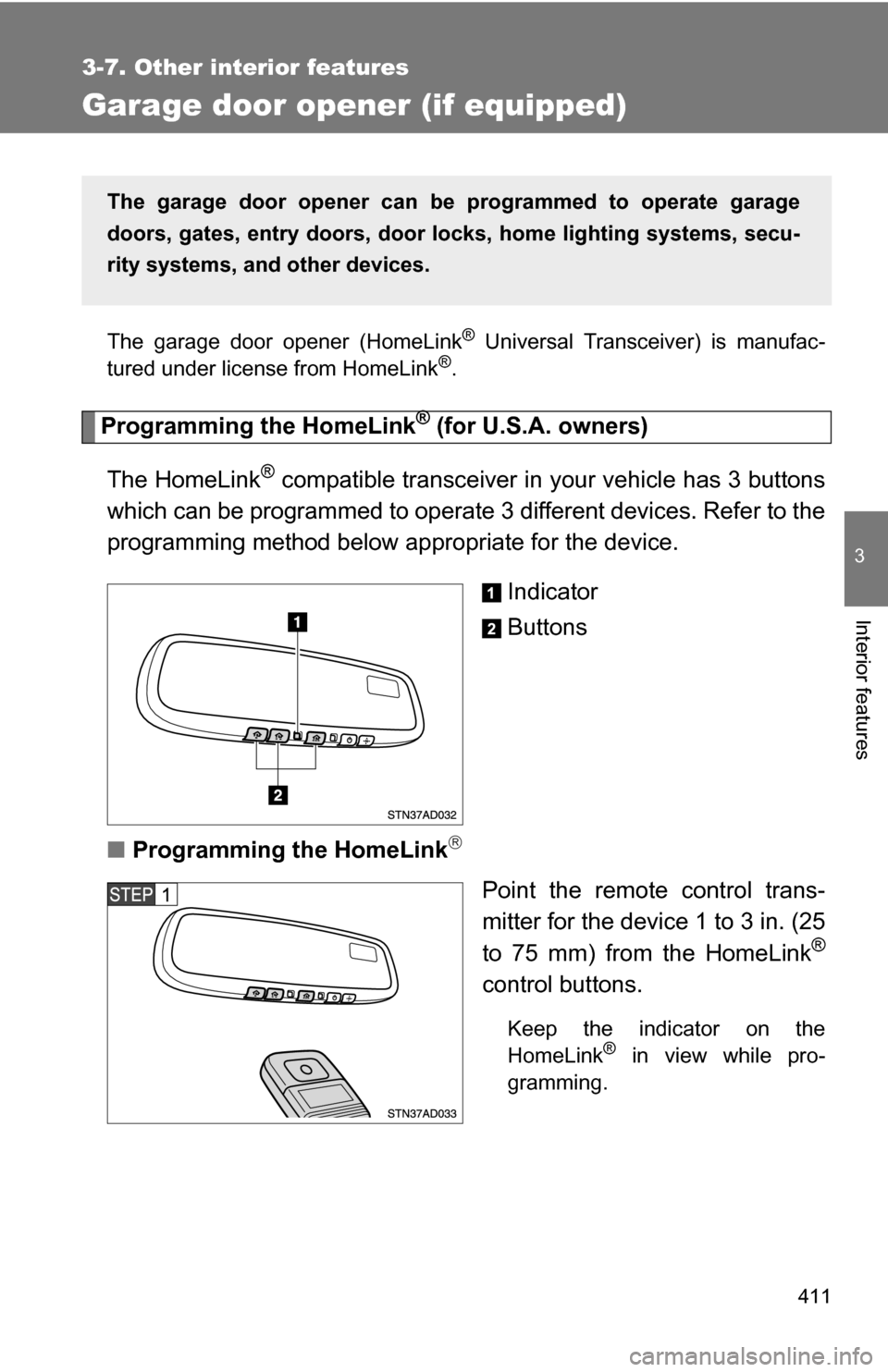
Indicator
Buttons
■ Programming the HomeLink
Point the remote control trans-
mitter for the device 1 to 3 in. (25
to 75 mm) from the HomeLink
®
control buttons.
Keep the indicator on the
HomeLink® in view while pro-
gramming.
The garage door opener can be programmed to operate garage
doors, gates, entry do ors, door locks, home lighting systems, secu-
rity systems, and other devices.
Page 414 of 596
414 3-7. Other interior features
Test the operation of the HomeLink® by pressing the newly
programmed button. Check to se e if the gate/device operates
correctly.
Repeat the steps above to program another device for each of
the remaining HomeLink
® buttons.
■ Programming other devices
To program other devices such as home security systems, home
door locks or lighting, contact your authorized Toyota dealer for
assistance.
■ Reprogramming a button
The individual HomeLink
® buttons cannot be erased but can be
reprogrammed. To reprogram a button, follow the programming
instructions.
Operating the HomeLink®
Press the appropriate HomeLink® button. The HomeLink® indicator
on the HomeLink® transceiver should turn on.
The HomeLink® continues to send a signal for a maximum of 20 seconds
if the button is held in.
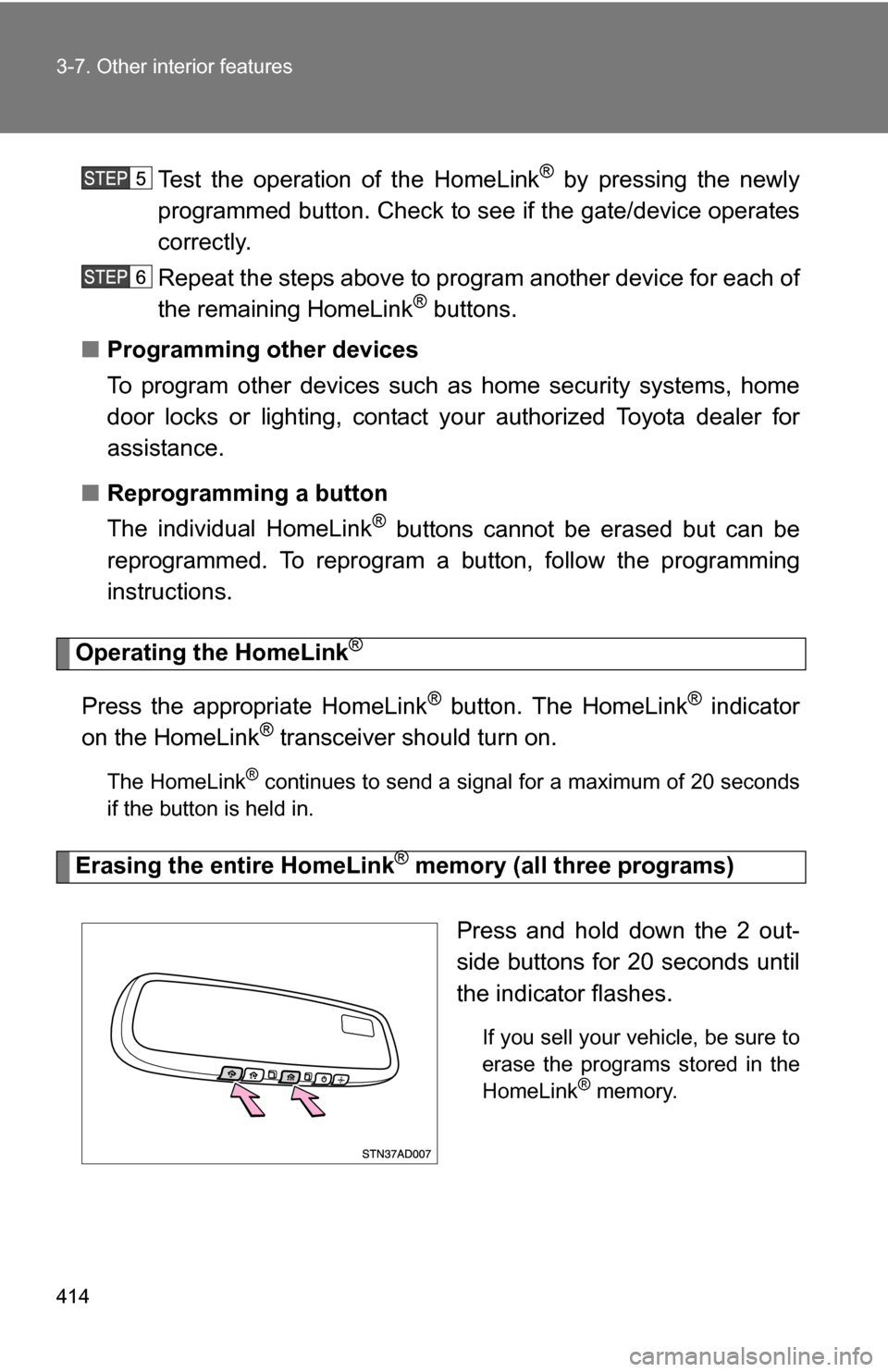
Erasing the entire HomeLink® memory (all three programs)
Press and hold down the 2 out-
side buttons for 20 seconds until
the indicator flashes.
If you sell your vehicle, be sure to
erase the programs stored in the
HomeLink
® memory.
Page 418 of 596
418 3-7. Other interior features
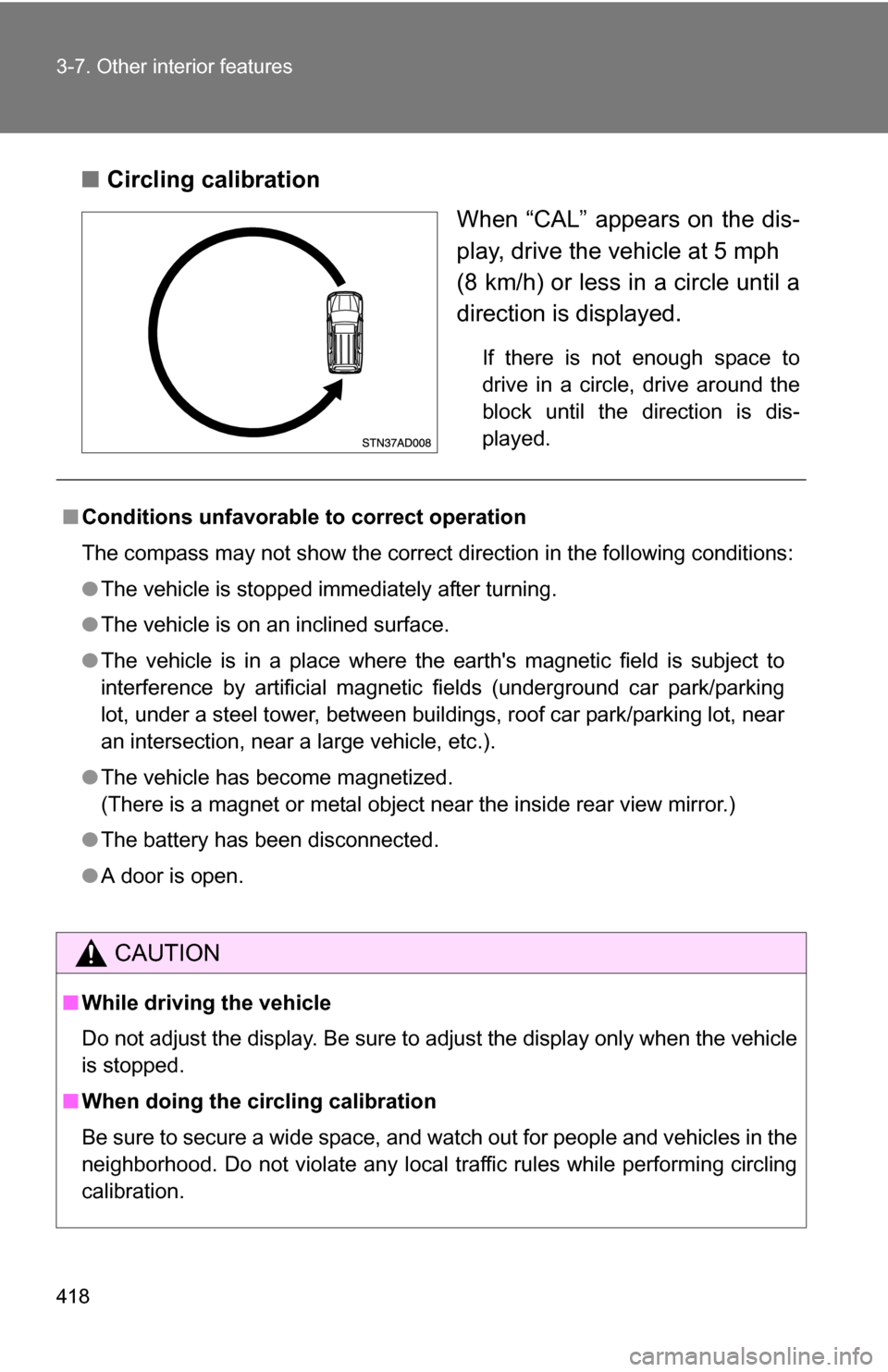
■Circling calibration
When “CAL” appears on the dis-
play, drive the vehicle at 5 mph
(8 km/h) or less in a circle until a
direction is displayed.
If there is not enough space to
drive in a circle, drive around the
block until the direction is dis-
played.
■Conditions unfavorable to correct operation
The compass may not show the correct direction in the following conditions:
●The vehicle is stopped immediately after turning.
● The vehicle is on an inclined surface.
● The vehicle is in a place where the earth's magnetic field is subject to
interference by artificial magnetic fields (underground car park/parking
lot, under a steel tower, between buildings, roof car park/parking lot, near
an intersection, near a large vehicle, etc.).
● The vehicle has become magnetized.
(There is a magnet or metal object near the inside rear view mirror.)
● The battery has been disconnected.
● A door is open.
CAUTION
■While driving the vehicle
Do not adjust the display. Be sure to adjust the display only when the vehicle
is stopped.
■ When doing the circling calibration
Be sure to secure a wide space, and watch out for people and vehicles in the
neighborhood. Do not violate any local traffic rules while performing circling
calibration.