brake TOYOTA SEQUOIA 2008 2.G Owner's Manual
[x] Cancel search | Manufacturer: TOYOTA, Model Year: 2008, Model line: SEQUOIA, Model: TOYOTA SEQUOIA 2008 2.GPages: 596, PDF Size: 12.93 MB
Page 184 of 596
184 2-4. Using other driving systems
■Cruise control can be set when
●The shift lever is in D or the shift range position must be in 4 or 5 in S
mode (5-speed models).
● The shift lever is in D or the shift range position must be in between 4 and
6 in S mode (6-speed models).
● Vehicle speed is more than approximately 25 mph (40 km/h).
■ Accelerating
The vehicle can be accelerated normally.
■ Automatic cruise control cancelation
The set speed is automatically cancelled in any of the following situations.
●Actual vehicle speed falls more than 10 mph (16 km/h) below the preset
vehicle speed.
At this time, the memorized set speed is not retained.
● Actual vehicle speed is below 25 mph (40 km/h).
● VSC is activated.
● The operation cannot be switched for 5 seconds or more after operating
the front wheel drive control switch or the center differential lock switch.
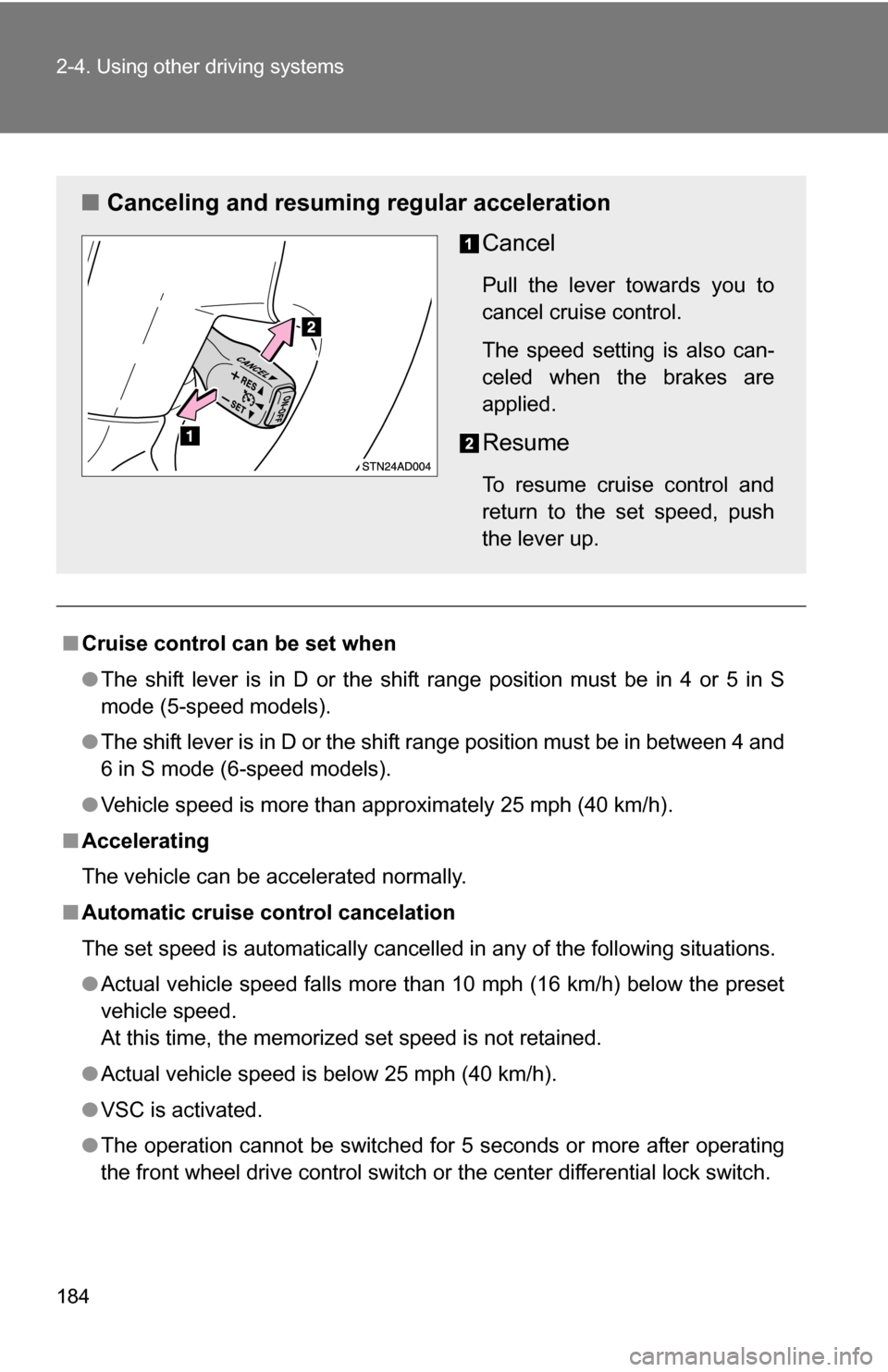
■ Canceling and resuming regular acceleration
Cancel
Pull the lever towards you to
cancel cruise control.
The speed setting is also can-
celed when the brakes are
applied.
Resume
To resume cruise control and
return to the set speed, push
the lever up.
Page 187 of 596
187
2-4. Using other
driving systems
2
When driving
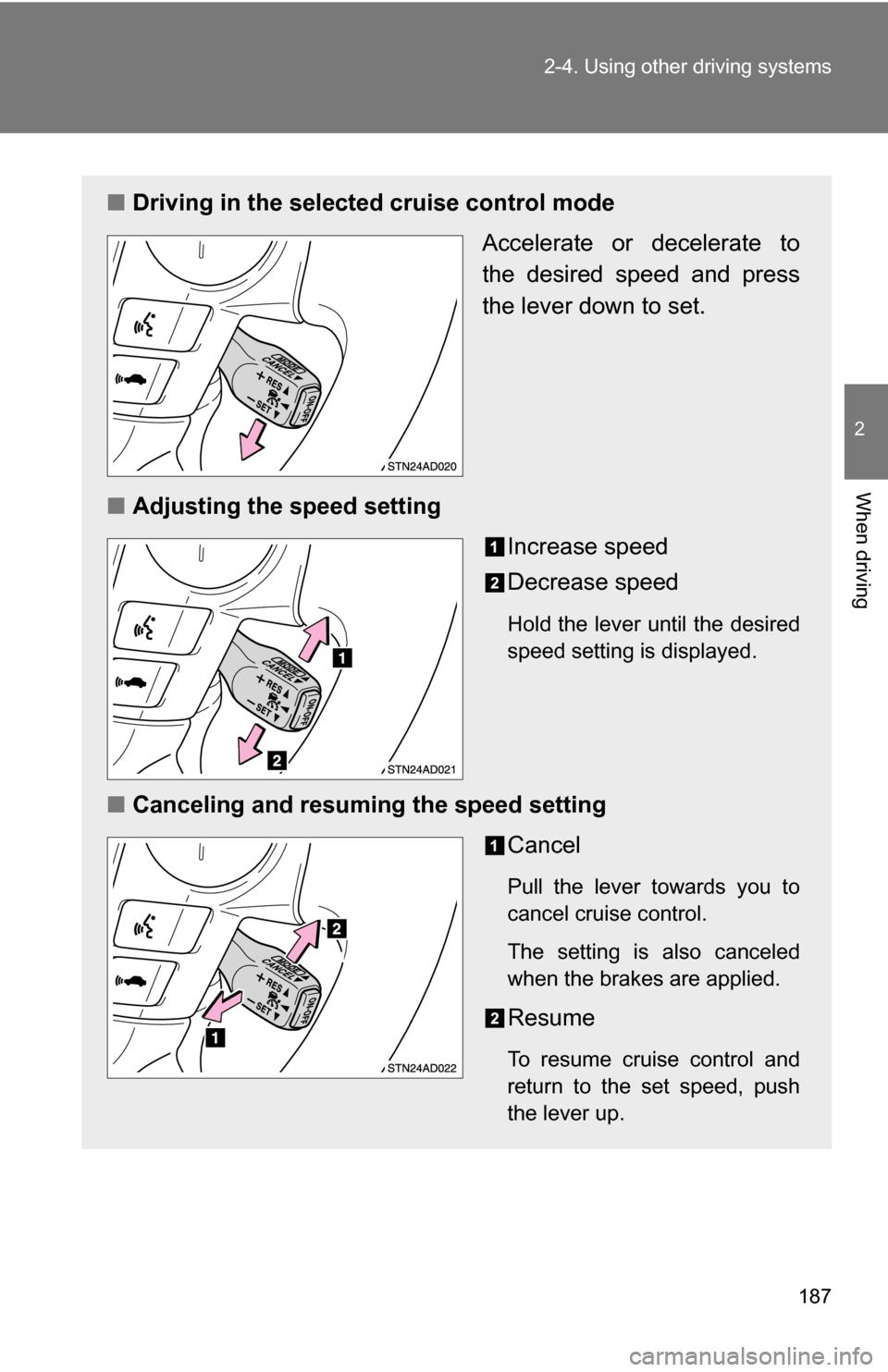
■Driving in the selected cruise control mode
Accelerate or decelerate to
the desired speed and press
the lever down to set.
■ Adjusting the speed setting
Increase speed
Decrease speed
Hold the lever until the desired
speed setting is displayed.
■Canceling and resuming the speed setting
Cancel
Pull the lever towards you to
cancel cruise control.
The setting is also canceled
when the brakes are applied.
Resume
To resume cruise control and
return to the set speed, push
the lever up.
Page 189 of 596
189
2-4. Using other
driving systems
2
When driving
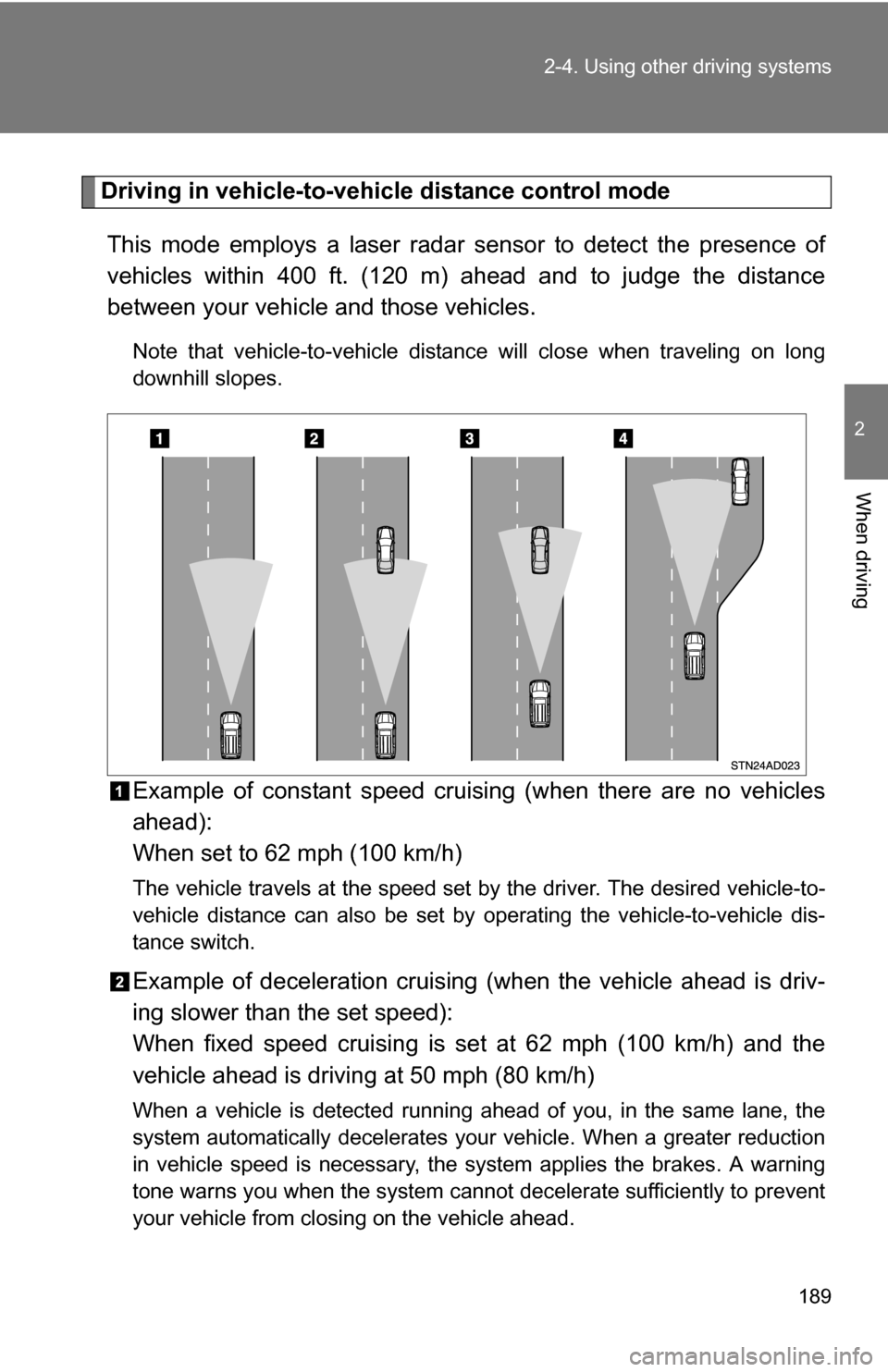
Driving in vehicle-to-vehicle distance control mode
This mode employs a laser radar sensor to detect the presence of
vehicles within 400 ft. (120 m) ahead and to judge the distance
between your vehicle and those vehicles.
Note that vehicle-to-vehicle distanc e will close when traveling on long
downhill slopes.
Example of constant speed cruising (when there are no vehicles
ahead):
When set to 62 mph (100 km/h)
The vehicle travels at the speed set by the driver. The desired vehicle-to-
vehicle distance can also be set by operating the vehicle-to-vehicle dis-
tance switch.
Example of deceleration cruising (when the vehicle ahead is driv-
ing slower than the set speed):
When fixed speed cruising is set at 62 mph (100 km/h) and the
vehicle ahead is driving at 50 mph (80 km/h)
When a vehicle is detected running ahead of you, in the same lane, the
system automatically decelerates your vehicle. When a greater reduction
in vehicle speed is necessary, the system applies the brakes. A warning
tone warns you when the system cannot decelerate sufficiently to prevent
your vehicle from closing on the vehicle ahead.
Page 193 of 596
193
2-4. Using other
driving systems
2
When driving
CAUTION
■To avoid bodily injury
●Do not look into the aperture window.
● Use of controls or adjustment or performance of procedures other than
those specified herein may result in hazardous radiation exposure.
■ Before using dynamic laser cruise control
Do not overly rely on vehicle-to-vehicle distance control.
Be aware of the set vehicle speed. If automatic deceleration/acceleration is
not appropriate, adjust the vehicle speed, as well as the distance between
your vehicle and vehicles ahead by applying the brakes, etc.
■ To avoid inadvertent cruise control activation
Turn off the system when not in use.
■ Situations unsuitable for dynamic laser cruise control
Do not use dynamic laser cruise control in any of the following situations.
Doing so may result in inappropriate control of speed and could cause seri-
ous or fatal accident.
●In heavy traffic
● On roads with sharp bends
● On winding roads
● On slippery roads, such as those covered with rain, ice or snow
● Where there are sudden changes between sharp up and down gradients
● At entrances to expressways
● When weather conditions are bad enough that they may prevent the sen-
sors from functioning correctly (fog, snow, sandstorm, etc.)
● Where buzzer can be heard often
■ When the laser radar sensor may not be correctly detecting the vehicle
ahead
Apply the brakes as necessary when any of the following types of vehicles
are in front of you.
As the sensor may not be able to correctly detect these types of vehicles,
the proximity alarm ( P. 514) will not be activated, and an accident may
result.
Page 194 of 596
194 2-4. Using other driving systems
CAUTION
■When the laser radar sensor may not be correctly detecting the vehicle
ahead
● Vehicles that cut in suddenly
● Vehicles traveling at low speeds
● Vehicles that are not moving
● Vehicles with small rear ends (trailers with no load on board etc.)
● Motorcycles traveling in the same lane
■ Conditions under which the vehicle -to-vehicle distance control may
not function correctly
Apply the brakes as necessary in the following conditions as the laser radar
sensor may not be able to correctly detect vehicles ahead, and an accident
may result.
● When water or snow thrown up by the surrounding vehicles hinders the
functioning of the sensor
● When your vehicle is pointing upwards (caused by a heavy load in the lug-
gage compartment, etc.)
● When the road curves or when the lanes are narrow
● When steering wheel operation or your position in the lane is unstable
● When towing a trailer
■ To ensure the laser rada r sensor functions correctly
Do not do the following to the sensor as doing so may cause the sensor not
to function correctly and could result in an accident.
● Stick or attach anything to them
● Leave them dirty
● Disassemble, subject them to strong shocks
● Modify or paint them
● Replace them with non-genuine parts
Page 200 of 596
200 2-4. Using other driving systems
■Sensor detection information
●Certain vehicle conditions and the surrounding environment may affect
the ability of a sensor to correctly detect an obstacle. Particular instances
where this may occur are listed below.
• There is dirt, snow or ice on a sensor.
• A sensor is frozen.
• A sensor is covered in any way.
• The vehicle is leaning considerably to one side.
• On an extremely bumpy road, on an incline, on gravel, or on grass.
• The vicinity of the vehicle is noisy due to vehicle horns, motorcycle
engines, air brakes of large vehicles, or other loud noises producing
ultrasonic waves.
• There is another vehicle equipped with parking assist sensors in the vicinity.
• A sensor is coated with a sheet of spray or heavy rain.
• The vehicle is equipped with a fender pole or radio antenna.
• A bumper or sensor receives a strong impact.
• The vehicle is approaching a tall or right-angled curb.
• In harsh sunlight or intense cold weather.
• The area directly under the bumpers is not detected. Objects lower than the sensors or thin stakes etc. may be detected ini-
tially, but as they draw closer, they may cease to be detected.
• A towing hitch is mounted to the vehicle.
• A non-genuine Toyota suspension (lowered suspension etc.) is installed.
• When attaching a two-way radio antenna.
• When a towing eyelet is mounted on your vehicle.
• When the bumper is damaged.
In addition to the examples above, there are instances in which, because of
their shapes, signs and other objects may be judged by a sensor to be closer
than they are.
● The shape of the obstacle may prevent a sensor from detecting it. Pay
particular attention to the following obstacles:
• Wires, fences, ropes, etc.
• Cotton, snow and other materials that absorb radio waves
• Sharply-angled objects
Page 211 of 596
211
2-4. Using other
driving systems
2
When driving
●If the engine coolant temperature is too low, transfer mode may not be
able to shift. When the engine is warmer turn the switch again.
If the 4LO indicator, 4HI indicator or the center differential lock indicator con-
tinues to blink even after attempting the above, there may be a malfunction
in the engine, the brake system or the four-wheel drive system. In this case,
you may not be able to shift between 2WD and 4H, 4H and 4L, and the cen-
ter differential lock may not be operable. Have the vehicle inspected by your
Toyota dealer immediately.
CAUTION
■ Shift from 2WD to 4H while driving
Never move the front wheel drive control switch if wheels are slipping.
Stop the slipping or spinning before shifting.
NOTICE
■To prevent damage to the center differential
●For normal driving on dry and hard surface roads, unlock the center differ-
ential.
● Unlock the center differential after the wheels are out of the ditch or off the
loose or bumpy surface.
● Do not push the center differential lock switch when the vehicle is corner-
ing or when its wheels are spinning freely off the ground.
Page 213 of 596
213
2-4. Using other
driving systems
2
When driving
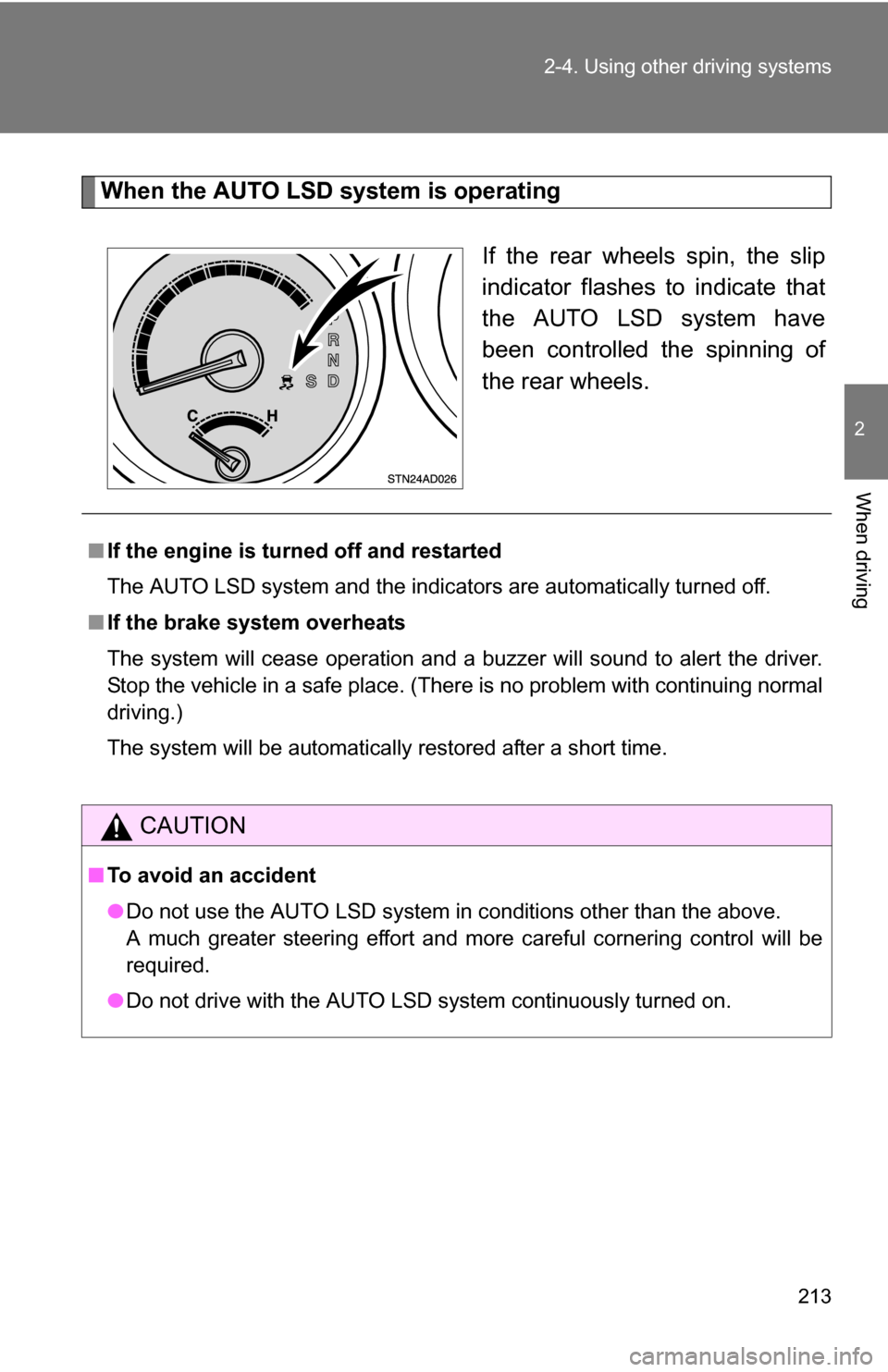
When the AUTO LSD system is operating
If the rear wheels spin, the slip
indicator flashes to indicate that
the AUTO LSD system have
been controlled the spinning of
the rear wheels.
■If the engine is turned off and restarted
The AUTO LSD system and the indicators are automatically turned off.
■ If the brake system overheats
The system will cease operation and a buzzer will sound to alert the driver.
Stop the vehicle in a safe place. (Ther e is no problem with continuing normal
driving.)
The system will be automatically restored after a short time.
CAUTION
■ To avoid an accident
●Do not use the AUTO LSD system in conditions other than the above.
A much greater steering effort and more careful cornering control will be
required.
● Do not drive with the AUTO LSD system continuously turned on.
Page 214 of 596
214
2-4. Using other driving systems
Driving assist systems
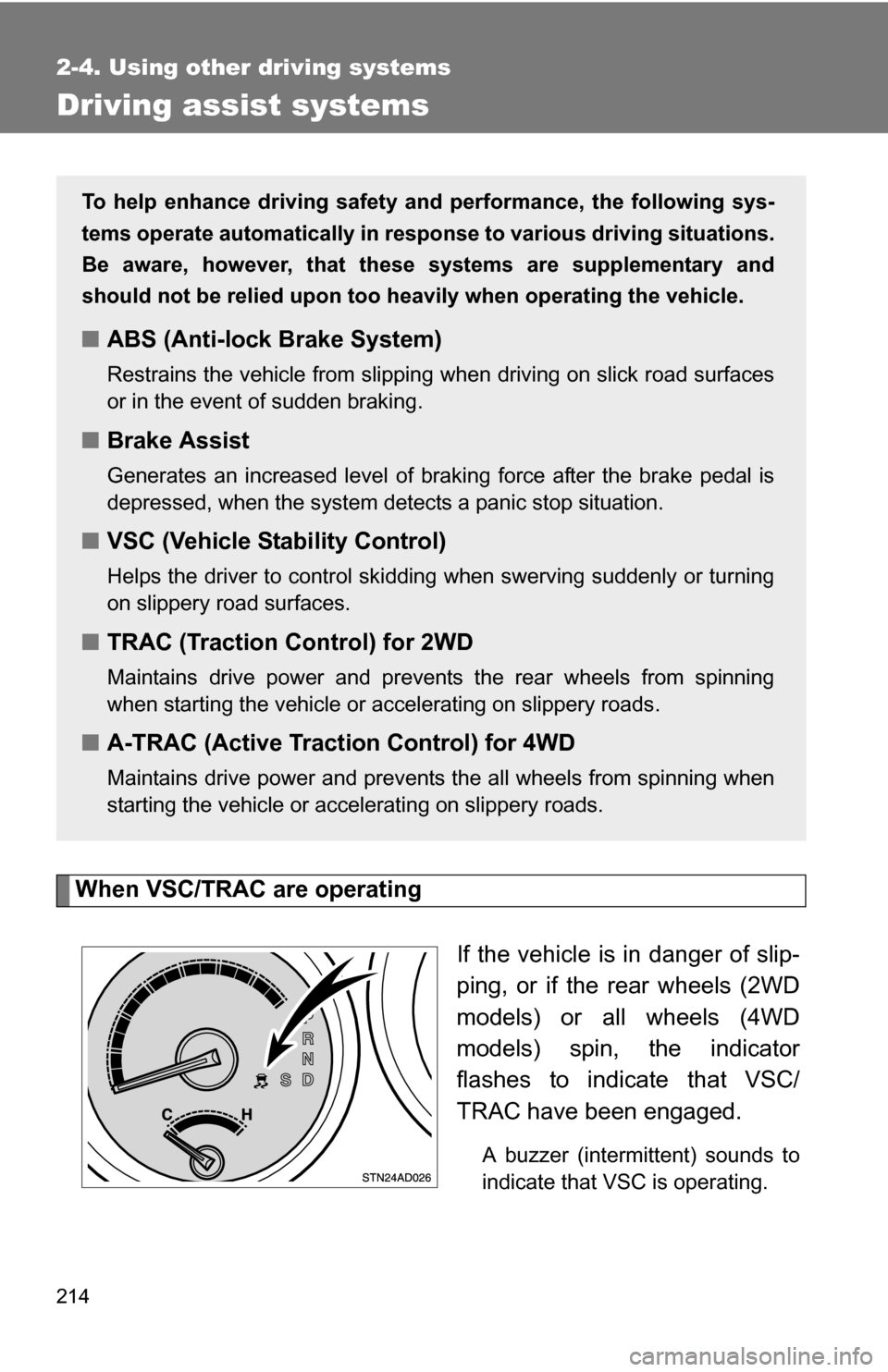
When VSC/TRAC are operatingIf the vehicle is in danger of slip-
ping, or if the rear wheels (2WD
models) or all wheels (4WD
models) spin, the indicator
flashes to indicate that VSC/
TRAC have been engaged.
A buzzer (intermittent) sounds to
indicate that VSC is operating.
To help enhance driving safety and performance, the following sys-
tems operate automatically in res ponse to various driving situations.
Be aware, however, that these systems are supplementary and
should not be relied upon too h eavily when operating the vehicle.
■ABS (Anti-lock Brake System)
Restrains the vehicle from slipping when driving on slick road surfaces
or in the event of sudden braking.
■Brake Assist
Generates an increased level of braking force after the brake pedal is
depressed, when the system detects a panic stop situation.
■VSC (Vehicle Stability Control)
Helps the driver to control skidding when swerving suddenly or turning
on slippery road surfaces.
■TRAC (Traction Control) for 2WD
Maintains drive power and prevents the rear wheels from spinning
when starting the vehicle or accelerating on slippery roads.
■A-TRAC (Active Traction Control) for 4WD
Maintains drive power and prevents the all wheels from spinning when
starting the vehicle or accelerating on slippery roads.
Page 217 of 596
217
2-4. Using other
driving systems
2
When driving
■Sounds and vibrations caused by the ABS, TRAC, VSC and brake
assist system
●A sound may be heard from the engine compartment when the engine is
started and just after the vehicle begins to move. This sound does not
indicate that a malfunction has occurred in any of these systems.
● Any of the following conditions may occur when the above systems are
operating. None of these indicates that a malfunction has occurred.
• Vibrations may be felt through the vehicle body and steering.
• A motor sound may be heard after the vehicle comes to a stop.
• The brake pedal may pulsate slightly after the ABS is activated.
• The brake pedal may move down slightly after the ABS is activated.
■ If the brake system overheats
TRAC will cease operation and a buzzer will sound to alert the driver. Stop
the vehicle in a safe place. (There is no problem with continuing normal driv-
ing.)
■ Power steering system operation sound
When you turn the engine switch to ON after the battery has been discon-
nected and reconnected, a sound may be heard from the engine compart-
ment.
This does not indicate a malfunction.
CAUTION
Any of the following conditions may result in an accident which could cause
death or serious injury.
■ The ABS does not opera te effectively when
● The limits of the gripping performance have been exceeded.
● The vehicle hydroplanes while driving at high speed on the wet or slick
road.