jack TOYOTA SEQUOIA 2008 2.G Owners Manual
[x] Cancel search | Manufacturer: TOYOTA, Model Year: 2008, Model line: SEQUOIA, Model: TOYOTA SEQUOIA 2008 2.GPages: 596, PDF Size: 12.93 MB
Page 16 of 596
16
Pictorial indexInterior
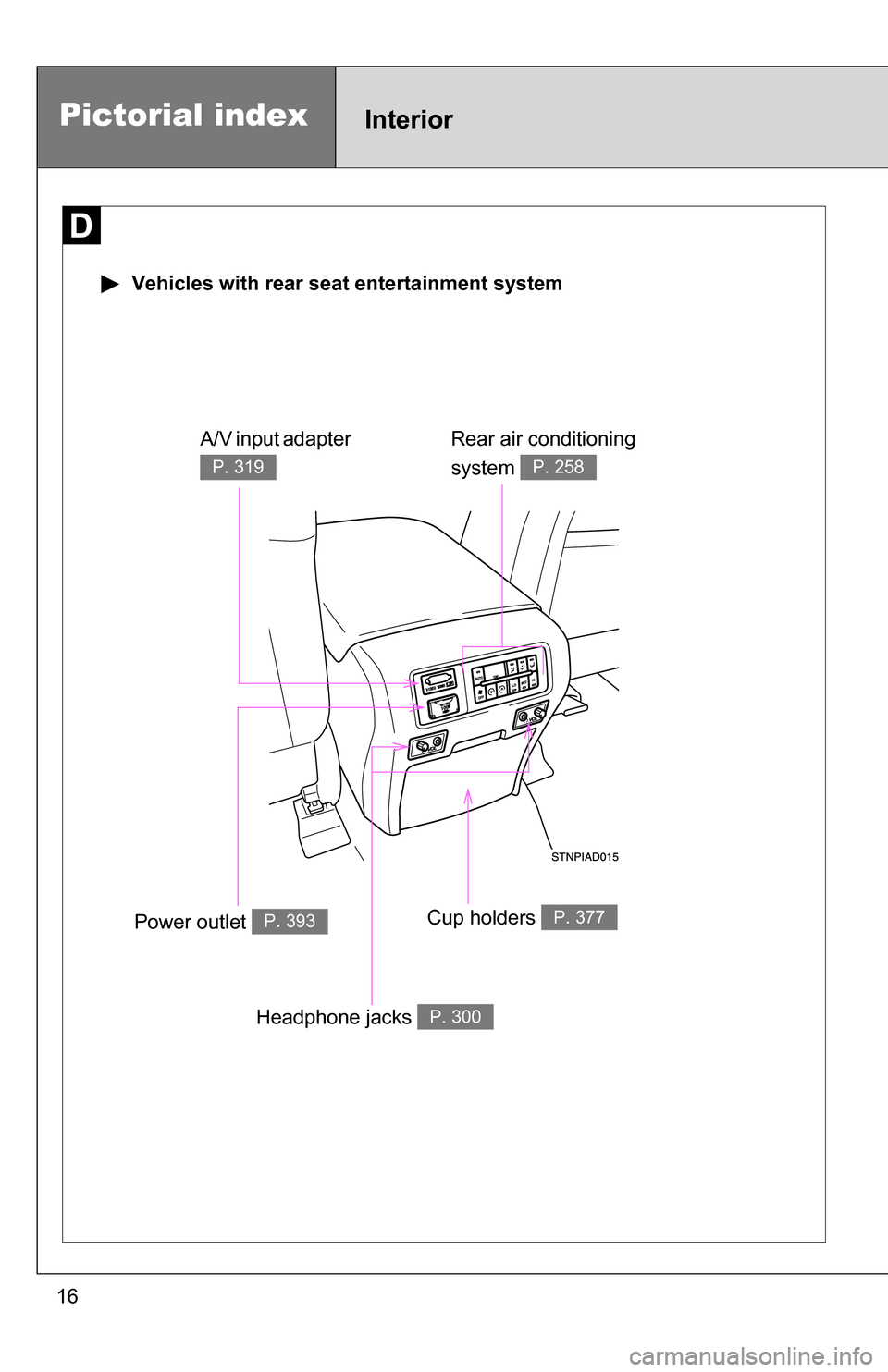
Vehicles with rear seat entertainment system
Rear air conditioning
system
P. 258
Power outlet P. 393Cup holders P. 377
A/V input adapter
P. 319
Headphone jacks P. 300
Page 205 of 596
205
2-4. Using other
driving systems
2
When driving
CAUTION
■The electronically modulated air susp ension must be turned off in the
following circumstances:
Otherwise, the automatic leveling function may cause the vehicle’s height to
change, resulting in an unexpected accident.
● When driving through water such as shallow streams (Put the vehicle
height in HI mode and turn off the electronically modulated air suspension.
Drive at 18 mph [30 km/h] or slower.)
● When jacking up the vehicle, installing tire chains or tying the vehicle with
chains/wires for transportation via flat bed truck (Turn the system to the
manual mode and stop the engine.)
● When the vehicle must be towed (Put the vehicle height in N mode and
turn the system to the manual mode.)
● When the vehicle gets stuck (Turn the system to the manual mode.)
● When disconnecting a trailer (Put the vehicle height in LO mode and turn
the system to the manual mode.)
■ Selecting the correct height mode
Observe the following precautions to prevent accidents.
Failure to do so may cause damage to parts of the vehicle, as well as dan-
gerous handling characteristics, which may lead to fatal or injury accidents.
●Before you lower the vehicle’s height, check under the vehicle to make
sure that no one is there.
● The HI mode should be used for off-road driving conditions.
As the vehicle’s center of gravity is higher in this setting, the vehicle may
become unstable when turning abruptly.
● Do not select HI mode when you load cargo on the roof luggage carrier.
This may result in a loss of control or vehicle rollover.
Page 241 of 596
241
2-5. Driving information
2
When driving
●
Avoid sudden braking as you may skid, resulting in jackknifing and
loss of control. This is especiall y true on wet or slippery surfaces.
● Avoid jerky starts or sudden acceleration.
● Avoid jerky steering and sharp turns, and slow down before mak-
ing a turn.
● Note that when making a turn, th e trailer wheels will be closer than
the vehicle wheels to the inside of the turn. Compensate by making
a larger than normal turning radius.
● Crosswinds and rough roads will adversely affect handling of your
vehicle and trailer, causing sway . Periodically check the rear to
prepare for being passed by large trucks or buses, which may
cause your vehicle and trailer to sway. If swaying occurs, firmly grip
the steering wheel, reduce speed immediately but gradually, and
steer straight ahead. Never increase speed. If you make no
extreme correction with the stee ring or brakes, your vehicle and
trailer will stabilize.
● Take care when passing other vehicles. Passing requires consider-
able distance. After passing a vehicle, do not forget the length of
your trailer, and be sure you hav e plenty of room before changing
lanes.
● In order to maintain engine braking efficiency when driving on a
long steep downgrade, do not use the transmission in D.
Transmission shift range position must be in 5 in the S mode (6-
speed models) or in 4 in the S mode (5-speed models).
● Due to the added load of the trailer, your vehicle’s engine may
overheat on hot days (at temperatures over 85°F [30°C]) when
driving up a long or steep grade. If the engine coolant temperature
gauge indicates overheating, immedi ately turn off the air condition-
ing (if in use), pull your vehicle off the road and stop in a safe spot.
( P. 536)
Page 298 of 596
298
3-3. Using the rear audio/video system
Rear seat enter tainment system (if equipped)
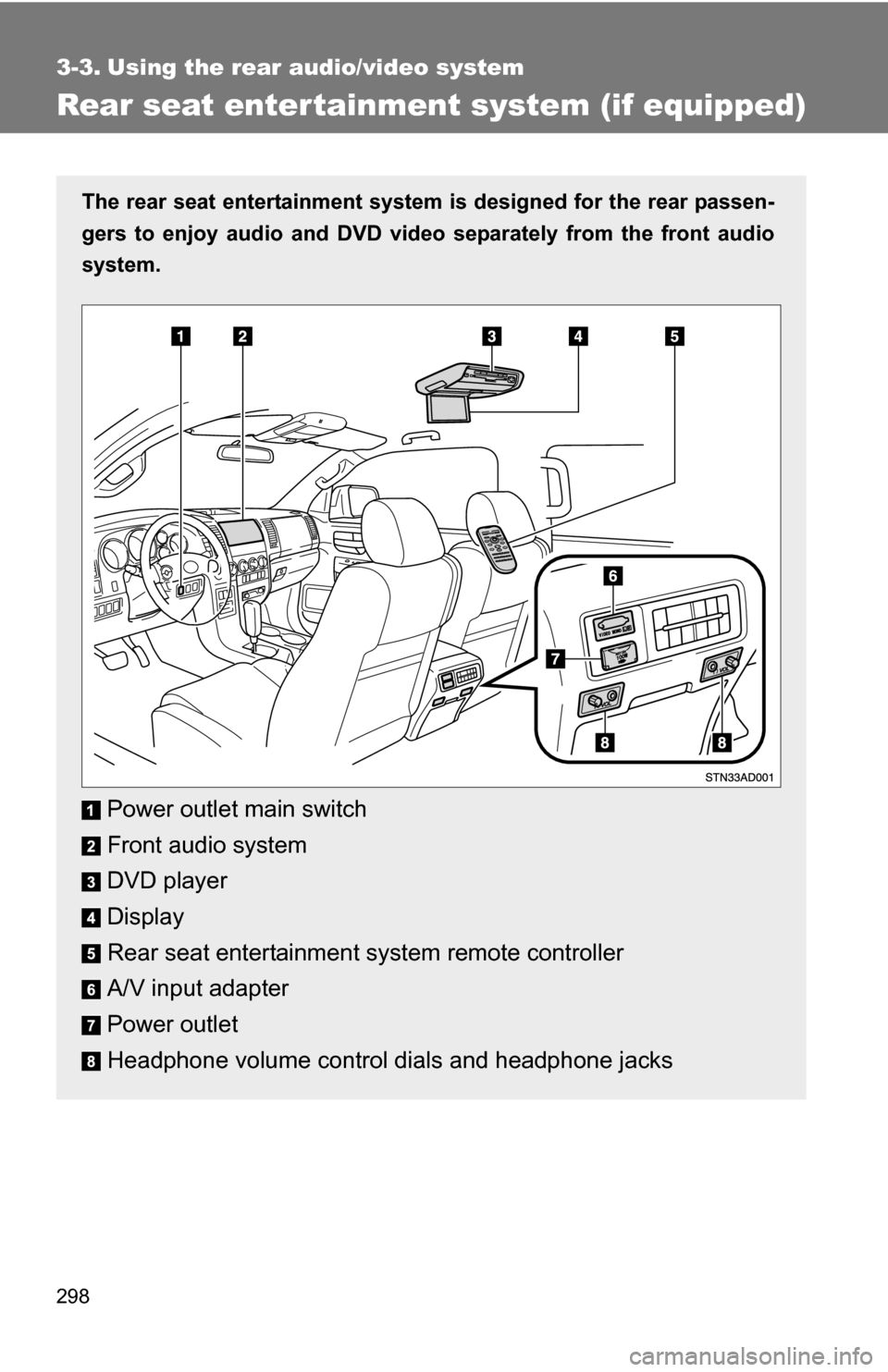
The rear seat entertainment system is designed for the rear passen-
gers to enjoy audio and DVD vide o separately from the front audio
system.
Power outlet main switch
Front audio system
DVD player
Display
Rear seat entertainment system remote controller
A/V input adapter
Power outlet
Headphone volume control dials and headphone jacks
Page 300 of 596
300 3-3. Using the rear audio/video system
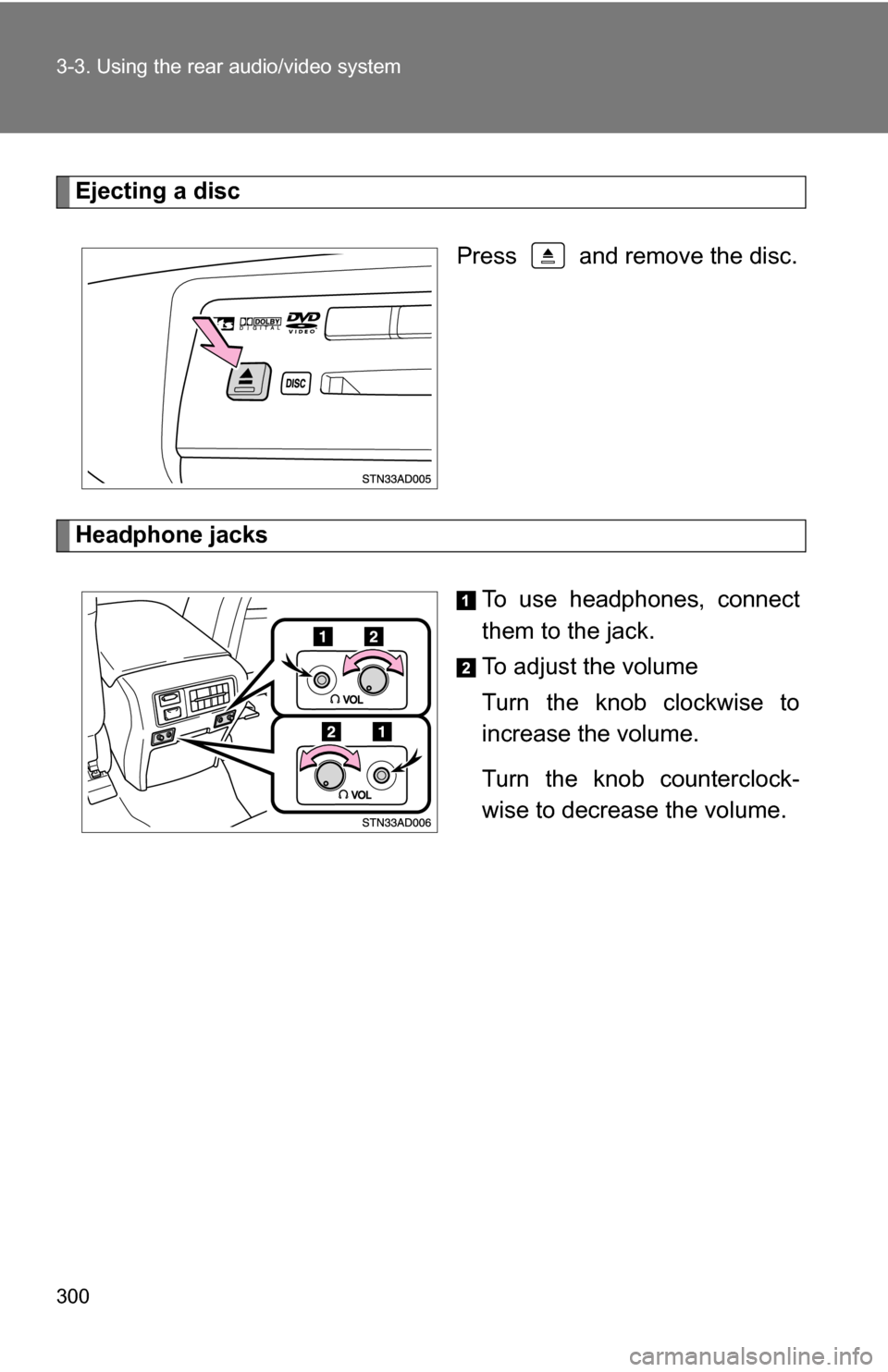
Ejecting a discPress and remove the disc.
Headphone jacks To use headphones, connect
them to the jack.
To adjust the volume
Turn the knob clockwise to
increase the volume.
Turn the knob counterclock-
wise to decrease the volume.
Page 303 of 596
303
3-3. Using the rear audio/video system
3
Interior features
■
Headphones
With some headphones generally available in the market, sound quality may
be poor. Toyota recommends the use of Toyota genuine wireless head-
phones.
Please contact your Toyota dealer for further details.
■ Vo l u m e
●Adjust the volume when you connect the headphones to the jack. Loud
sounds may have a significant impact on the human body.
● Conversational speech on some DVDs is recorded at a low volume to
emphasize the impact of sound effects. If you adjust the volume assum-
ing that the conversations represent the maximum volume level that the
DVD will play, you may be startled by louder sound effects or when you
change to a different audio source. Be sure to adjust the volume with this
in mind.
CAUTION
■While driving
Do not use headphones.
Doing so may cause an accident, resulting in death or serious injury.
■ When the rear seat entert ainment system is not used
Keep the display closed.
In the event of an accident or sudden braking, the opened display may hit an
occupant's body, resulting in injury.
■ To prevent accidents and electric shock
Do not disassemble or modify the remote controller.
■ When the remote controller is not used
Stow the remote controller.
Injuries may result in the event of an accident or sudden braking.
■ Removed batteries and other parts
Keep away from children.
These parts are small and if swallowed by a child they can cause choking.
Page 519 of 596
5
When trouble arises
519
5-2. Steps to take in an emergency
If you have a flat tire
Remove the flat tire and replace it with the spare provided.
■Before jacking up the vehicle
●Stop the vehicle on a hard, flat surface.
● Press the height control mode select switch to set the height
control system to manual mode (if equipped)
● Set the parking brake.
● Shift the shift lever to P.
● Stop the engine.
● Turn on the emergency flashers.
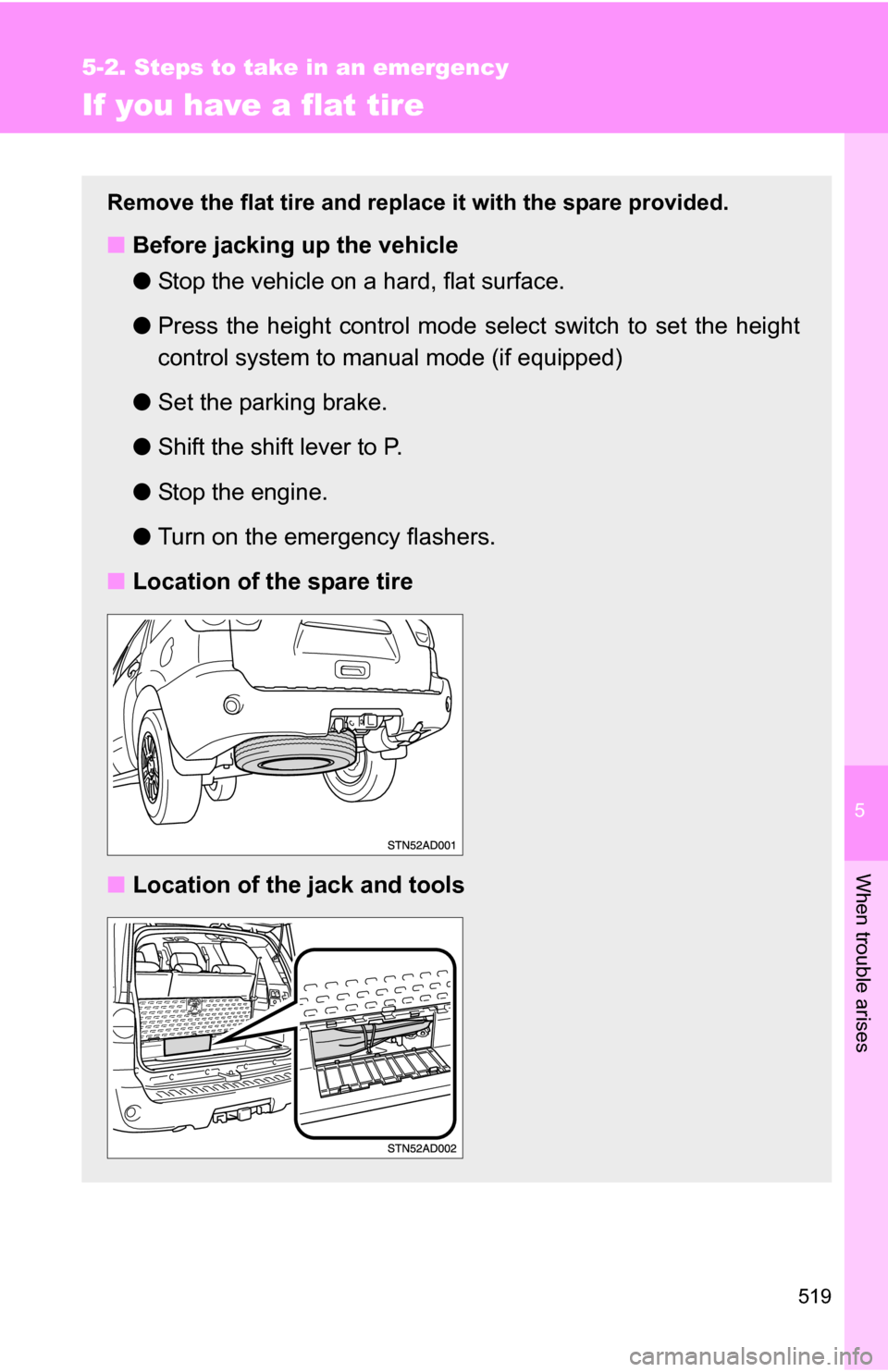
■ Location of the spare tire
■ Location of the jack and tools
Page 520 of 596
520 5-2. Steps to take in an emergency
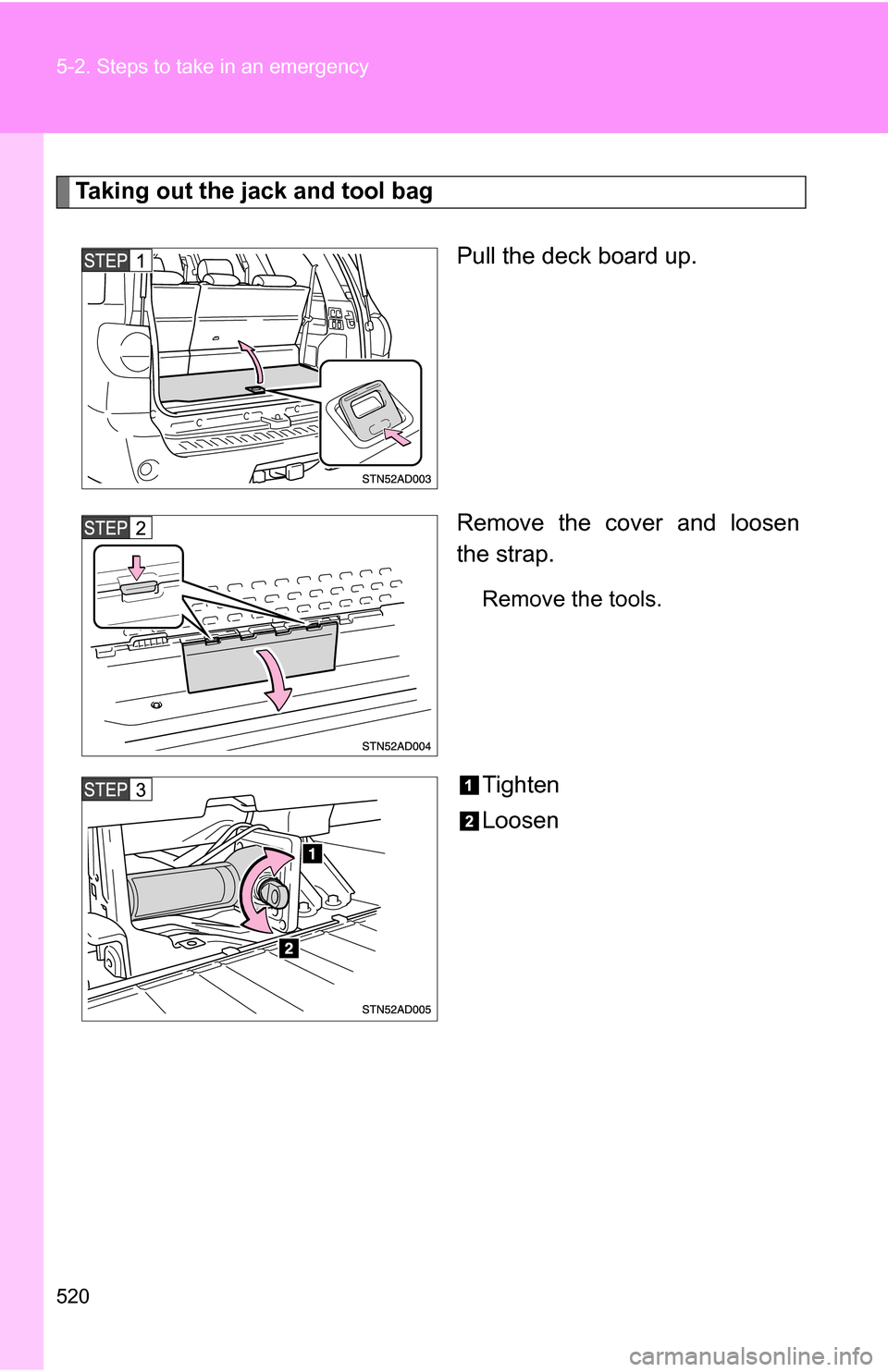
Taking out the jack and tool bagPull the deck board up.
Remove the cover and loosen
the strap.
Remove the tools.
Tighten
Loosen
Page 521 of 596
5
When trouble arises
521
5-2. Steps to take in an emergency
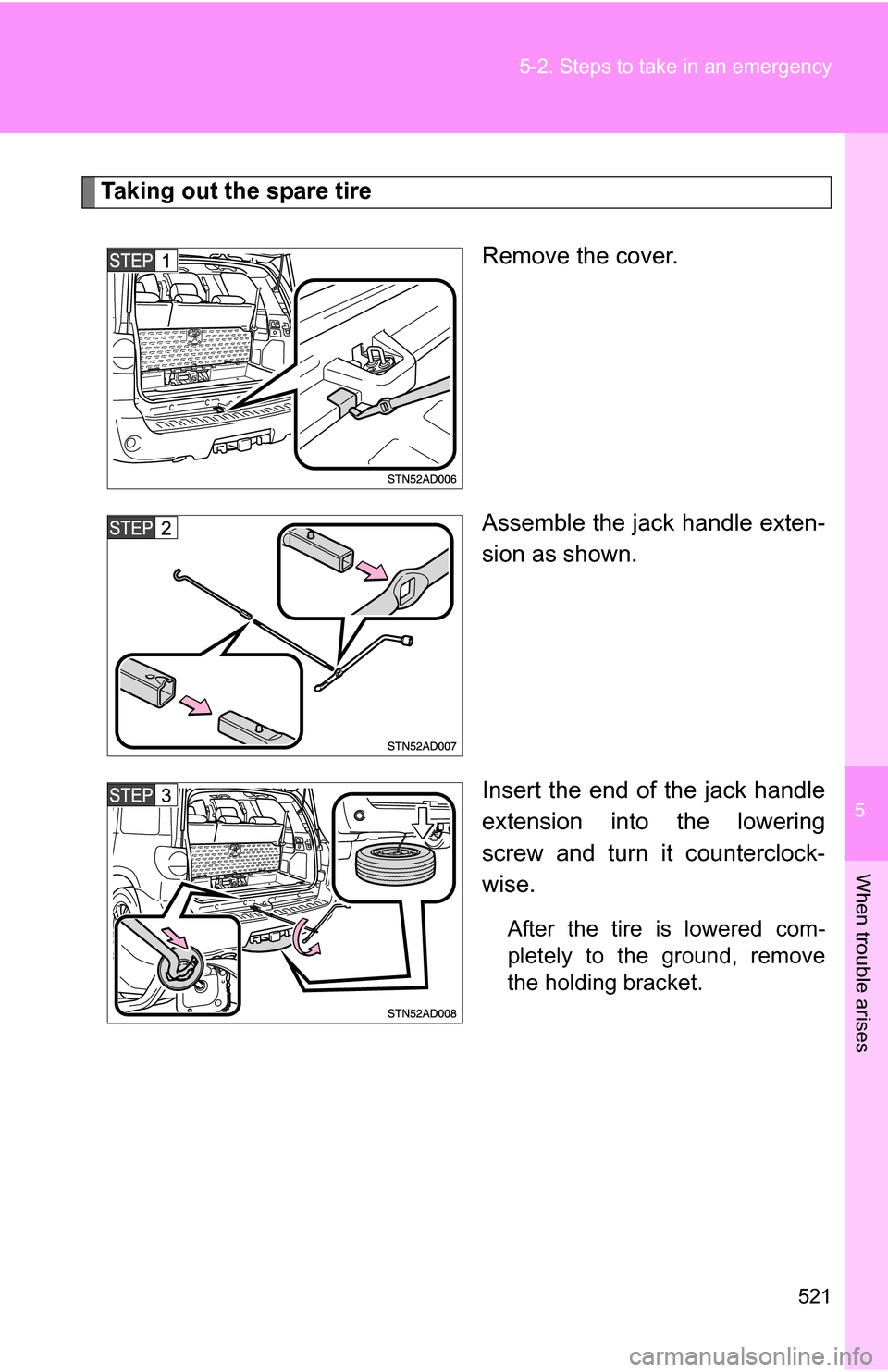
Taking out the spare tire
Remove the cover.
Assemble the jack handle exten-
sion as shown.
Insert the end of the jack handle
extension into the lowering
screw and turn it counterclock-
wise.
After the tire is lowered com-
pletely to the ground, remove
the holding bracket.
Page 523 of 596
5
When trouble arises
523
5-2. Steps to take in an emergency
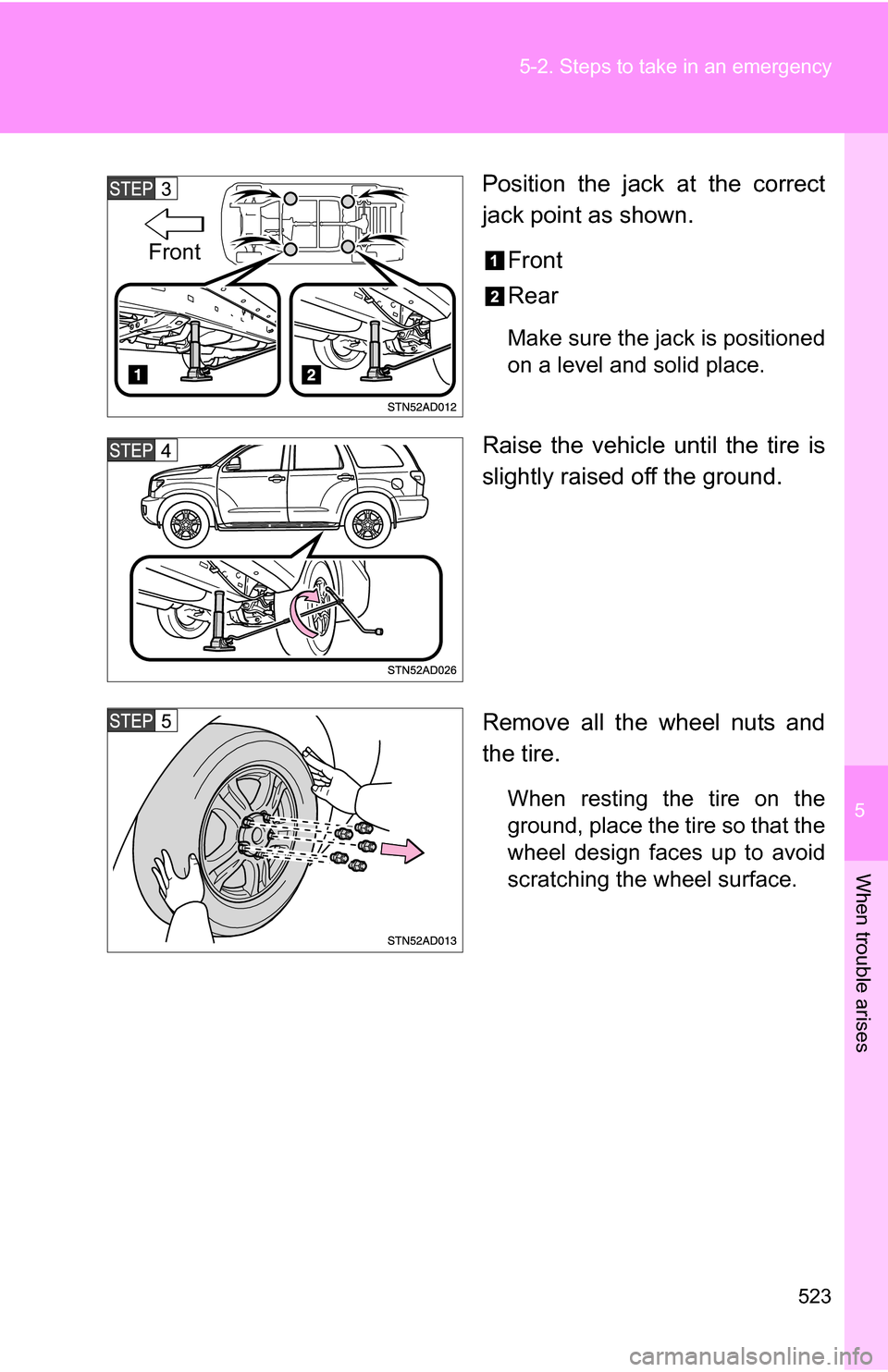
Position the jack at the correct
jack point as shown.
Front
Rear
Make sure the jack is positioned
on a level and solid place.
Raise the vehicle until the tire is
slightly raised off the ground.
Remove all the wheel nuts and
the tire.
When resting the tire on the
ground, place the tire so that the
wheel design faces up to avoid
scratching the wheel surface.
Front