reset TOYOTA SEQUOIA 2008 2.G Owners Manual
[x] Cancel search | Manufacturer: TOYOTA, Model Year: 2008, Model line: SEQUOIA, Model: TOYOTA SEQUOIA 2008 2.GPages: 596, PDF Size: 12.93 MB
Page 18 of 596
18
Pictorial indexInstrument panel
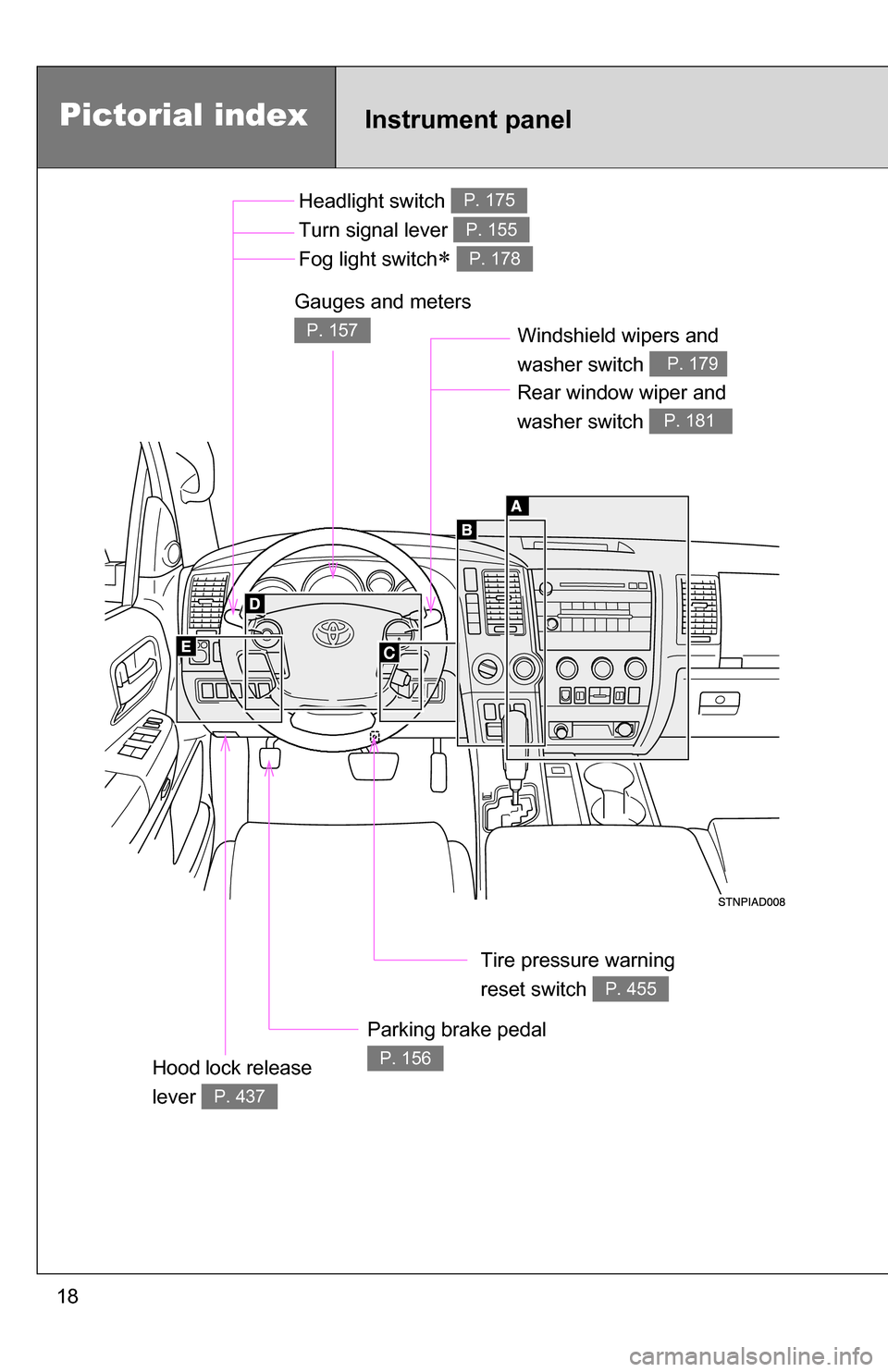
Headlight switch
Turn signal lever
Fog light switch
P. 175
P. 155
P. 178
Windshield wipers and
washer switch
P. 179
Parking brake pedal
P. 156
Gauges and meters
P. 157
Hood lock release
lever
P. 437
Tire pressure warning
reset switch
P. 455
Rear window wiper and
washer switch
P. 181
Page 59 of 596
59
1
1-3. Adjustable components (seats, mirrors, steering wheel)
Before driving
Driving position memor y system (if equipped)
Your preferred driving position (the position of the driver’s seat,
steering wheel and outside rear view mirrors) can be entered into the
computer’s memory and recalle d with the touch of a button.
Two different driving positions can be entered into memory.
■ Entering a position into memory
Check that the shift lever is set in P.
Turn the engine switch to the ON position.
Adjust the driver’s seat, steering wheel, and outside rear
view mirrors to the desired positions.
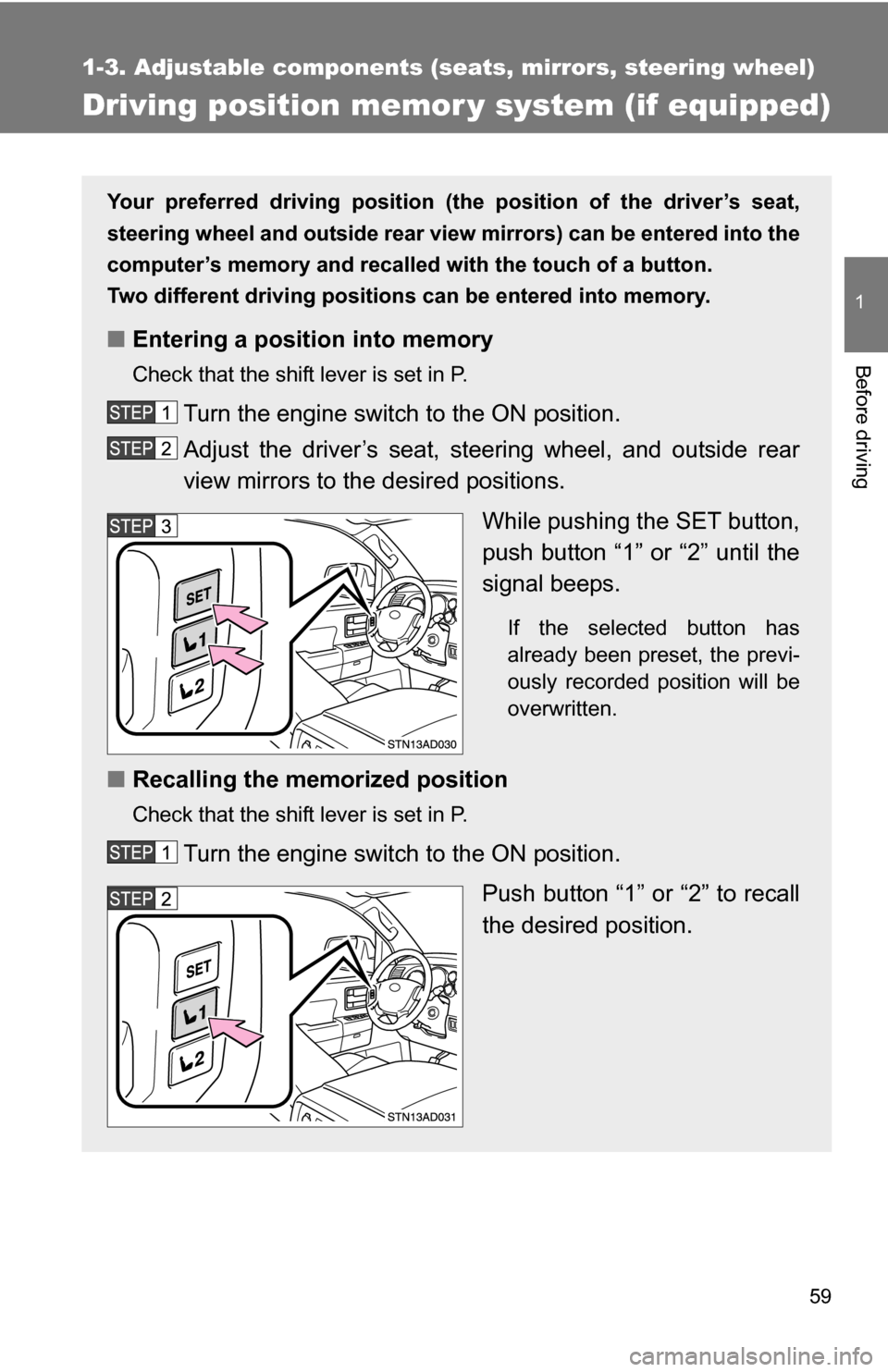
While pushing the SET button,
push button “1” or “2” until the
signal beeps.
If the selected button has
already been preset, the previ-
ously recorded position will be
overwritten.
■Recalling the memorized position
Check that the shift lever is set in P.
Turn the engine switch to the ON position.
Push button “1” or “2” to recall
the desired position.
Page 61 of 596
61
1-3. Adjustable components (s
eats, mirrors, steering wheel)
1
Before driving
■Retained accessory power
Each memorized position (except for the tilt and telescopic steering column)
can be activated within 30 seconds after the driver’s door is opened, even if
the key is not in the engine switch.
■ If any position memory button is pushed while the adjustments are
being made
The operation will stop. To reactivate the system, push the button (“1” or “2”)
again.
■ If the battery is disconnected
The memorized positions must be reset because the computer’s memory is
erased when the battery is disconnected.
CAUTION
■Seat adjustment caution
Take care during seat adjustment that the seat does not strike the rear pas-
senger or squeeze your body against the steering wheel.
If this happens, you can stop the movement by pressing another seat posi-
tion memory button.
Page 157 of 596
157
2
When driving
2-2. Instrument cluster
Gauges and meters
Vehicles with multi-information display
The following gauges, meters and displays illuminate when the
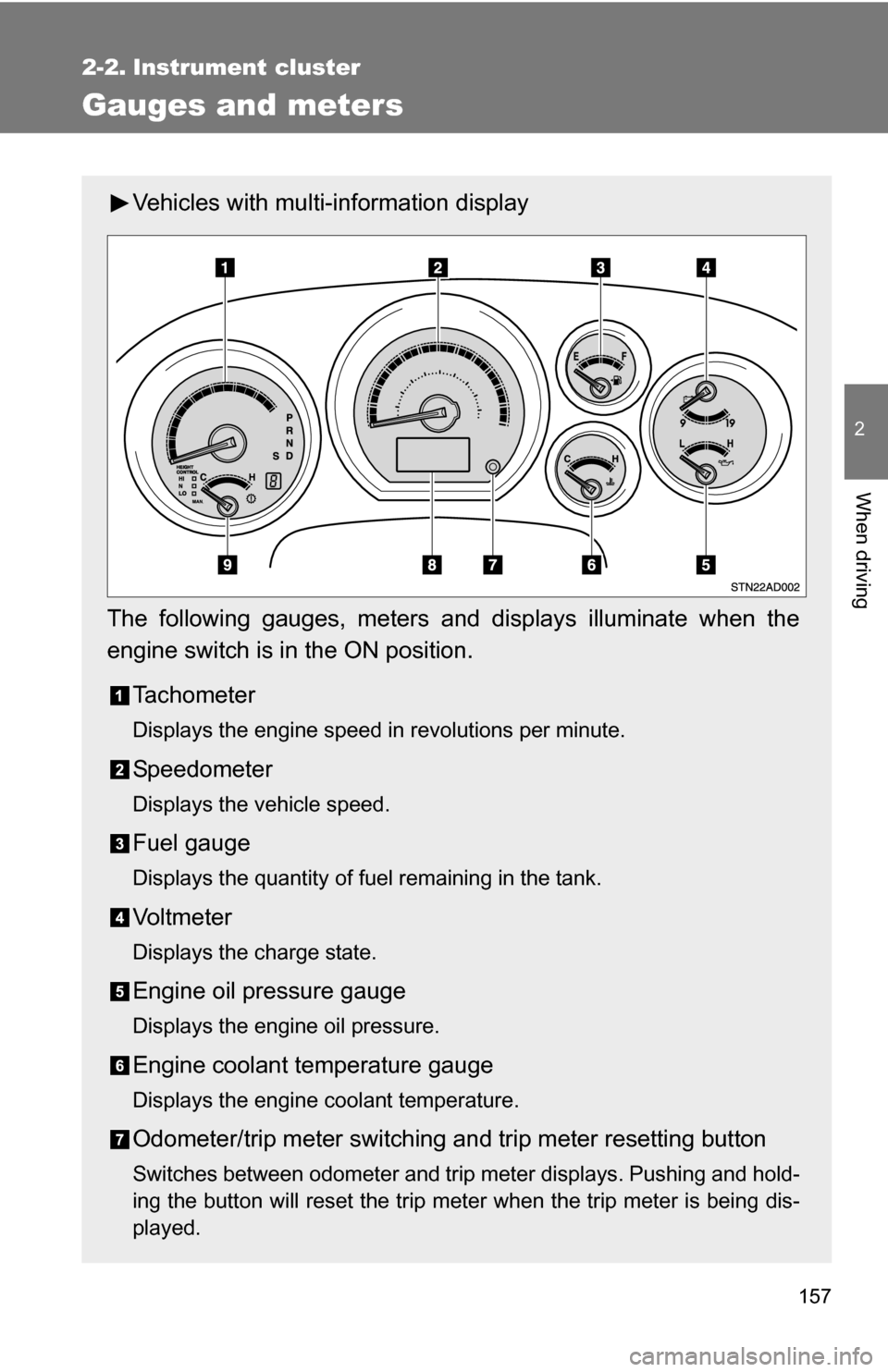
engine switch is in the ON position. Tachometer
Displays the engine speed in revolutions per minute.
Speedometer
Displays the vehicle speed.
Fuel gauge
Displays the quantity of fuel remaining in the tank.
Vo l t m e t e r
Displays the charge state.
Engine oil pressure gauge
Displays the engine oil pressure.
Engine coolant temperature gauge
Displays the engine coolant temperature.
Odometer/trip meter switching and trip meter resetting button
Switches between odometer and trip meter displays. Pushing and hold-
ing the button will reset the trip meter when the trip meter is being dis-
played.
Page 159 of 596
159
2-2. Instrument cluster
2
When driving
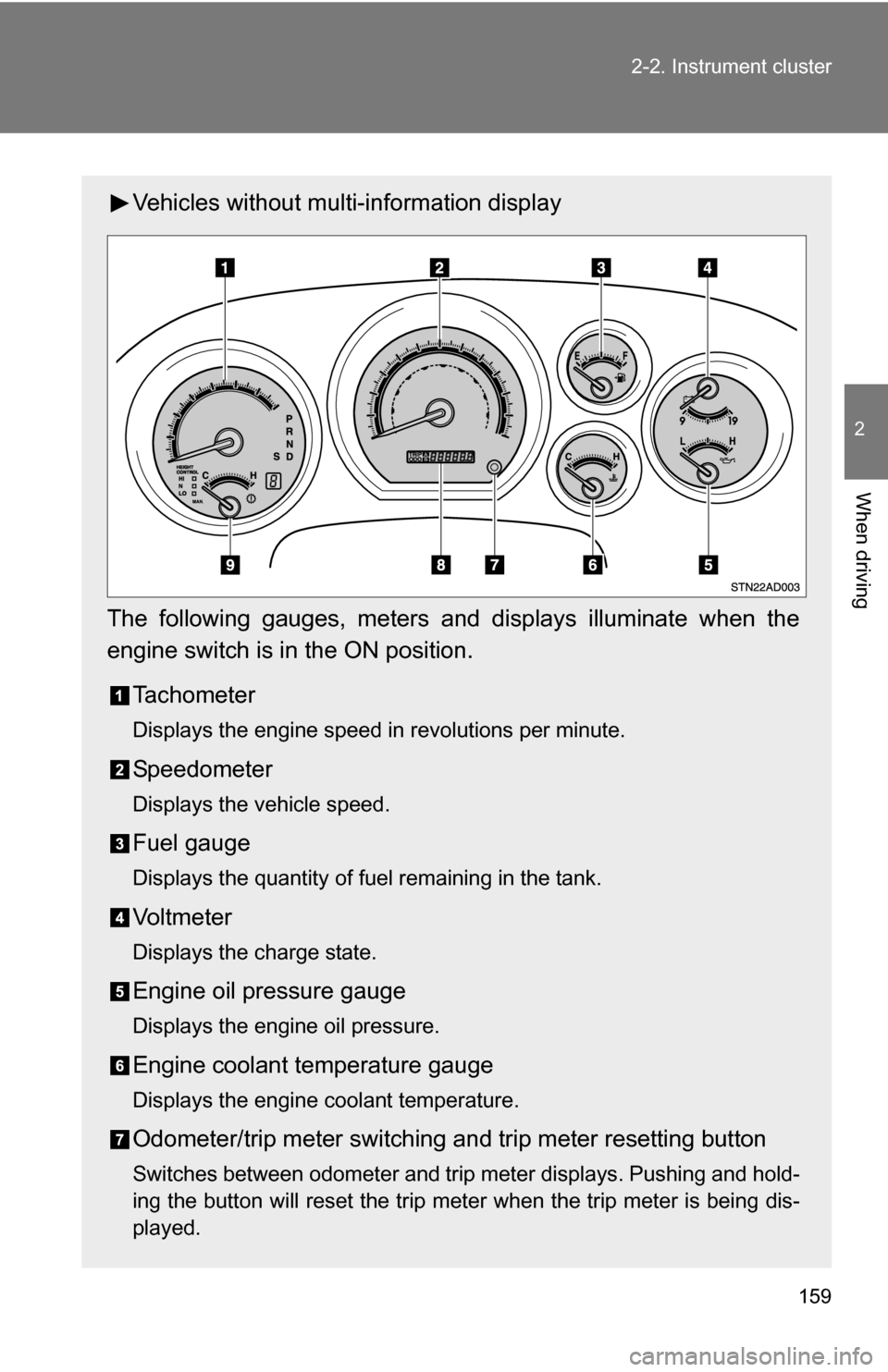
Vehicles without multi-information display
The following gauges, meters and displays illuminate when the
engine switch is in the ON position. Tachometer
Displays the engine speed in revolutions per minute.
Speedometer
Displays the vehicle speed.
Fuel gauge
Displays the quantity of fuel remaining in the tank.
Vo l t m e t e r
Displays the charge state.
Engine oil pressure gauge
Displays the engine oil pressure.
Engine coolant temperature gauge
Displays the engine coolant temperature.
Odometer/trip meter switching and trip meter resetting button
Switches between odometer and trip meter displays. Pushing and hold-
ing the button will reset the trip meter when the trip meter is being dis-
played.
Page 160 of 596
160 2-2. Instrument cluster
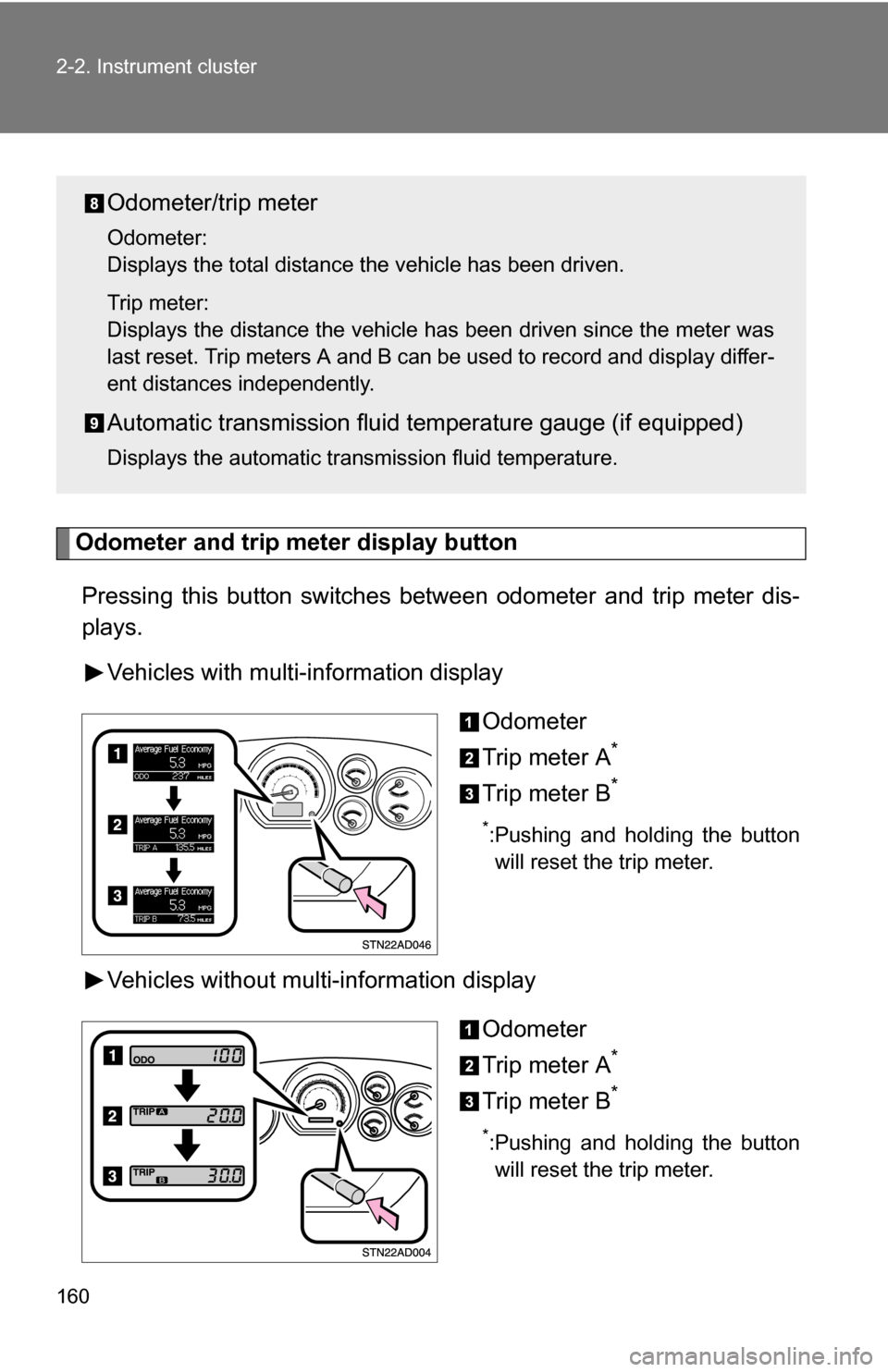
Odometer and trip meter display button
Pressing this button switches between odometer and trip meter dis-
plays.
Vehicles with multi-information display
Odometer
Trip meter A
*
Trip meter B*
*:Pushing and holding the buttonwill reset the trip meter.
Vehicles without multi-information display
Odometer
Trip meter A
*
Trip meter B*
*:Pushing and holding the buttonwill reset the trip meter.
Odometer/trip meter
Odometer:
Displays the total distance the vehicle has been driven.
Trip meter:
Displays the distance the vehicle has been driven since the meter was
last reset. Trip meters A and B can be used to record and display differ-
ent distances independently.
Automatic transmission fluid temperature gauge (if equipped)
Displays the automatic transmission fluid temperature.
Page 168 of 596
168 2-2. Instrument cluster
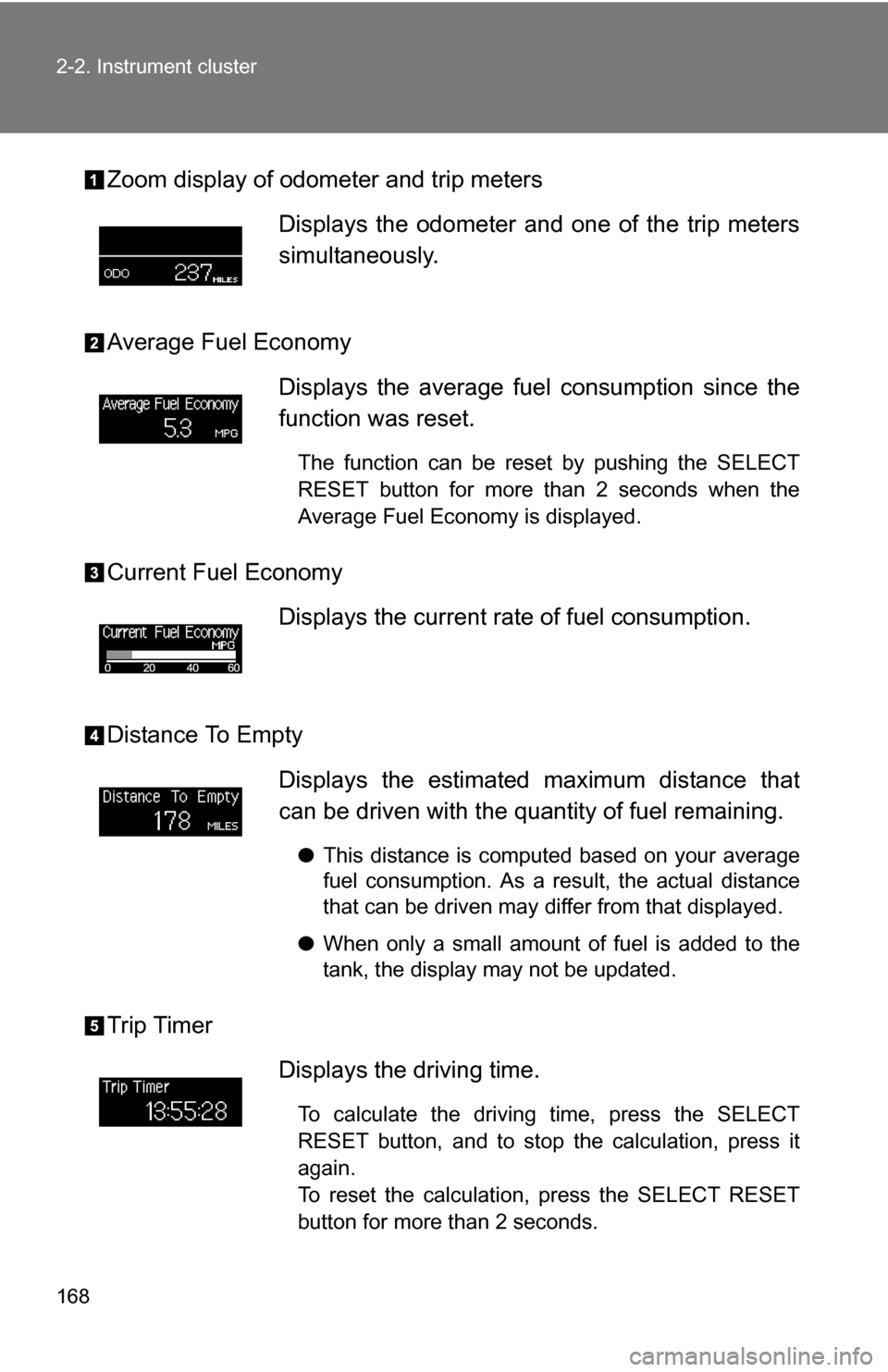
Zoom display of odometer and trip meters
Average Fuel Economy
Current Fuel Economy
Distance To Empty
Trip TimerDisplays the odometer and one of the trip meters
simultaneously.
Displays the average fuel
consumption since the
function was reset.
The function can be reset by pushing the SELECT
RESET button for more than 2 seconds when the
Average Fuel Economy is displayed.
Displays the current rate of fuel consumption.
Displays the estimated maximum distance that
can be driven with the quantity of fuel remaining.
● This distance is computed based on your average
fuel consumption. As a result, the actual distance
that can be driven may differ from that displayed.
● When only a small amount of fuel is added to the
tank, the display may not be updated.
Displays the driving time.
To calculate the driving time, press the SELECT
RESET button, and to stop the calculation, press it
again.
To reset the calculation, press the SELECT RESET
button for more than 2 seconds.
Page 169 of 596
169
2-2. Instrument cluster
2
When driving
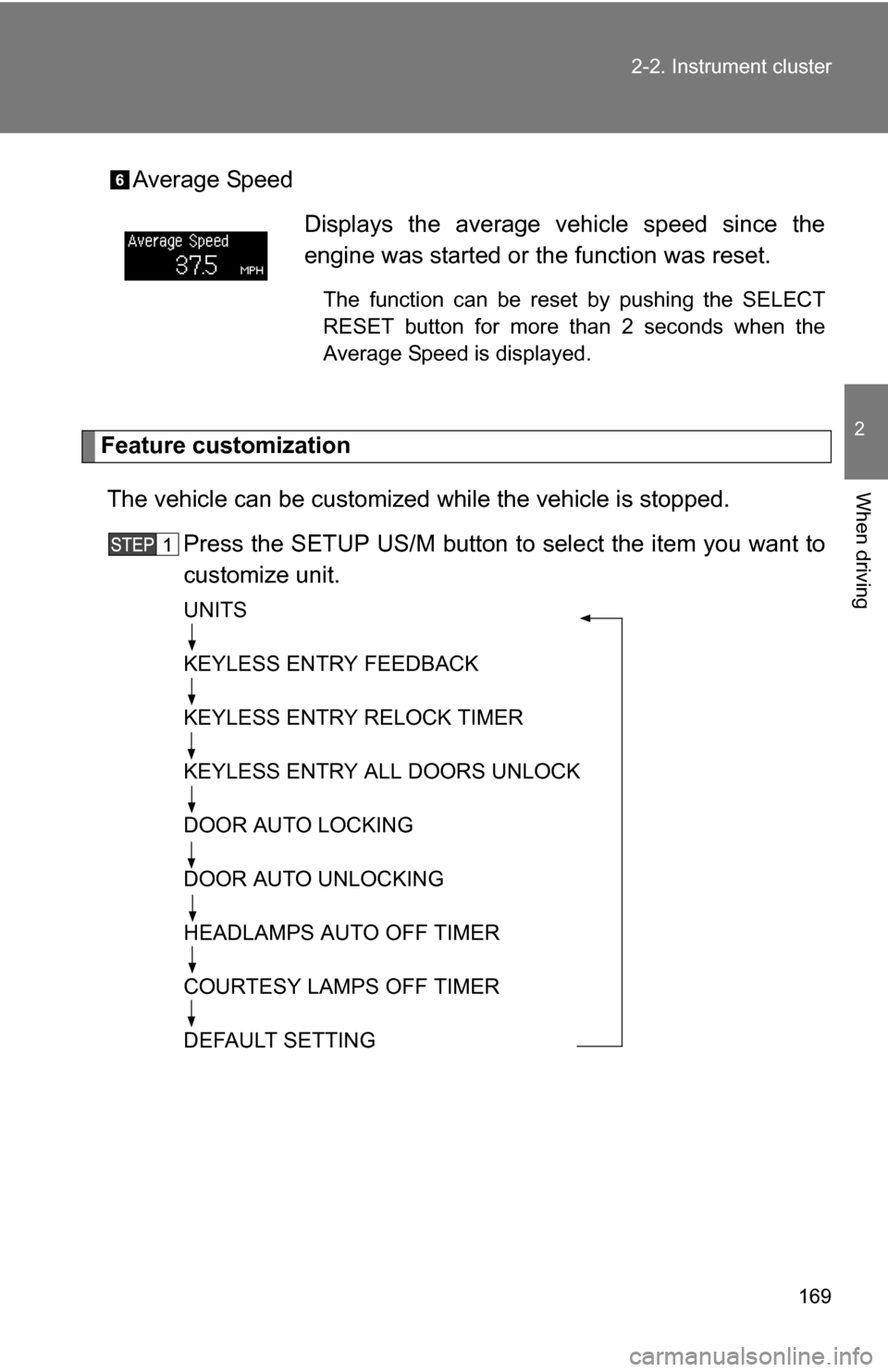
Average Speed
Feature customization
The vehicle can be customized while the vehicle is stopped.
Press the SETUP US/M button to select the item you want to
customize unit.
UNITS
KEYLESS ENTRY FEEDBACK
KEYLESS ENTRY RELOCK TIMER
KEYLESS ENTRY ALL DOORS UNLOCK
DOOR AUTO LOCKING
DOOR AUTO UNLOCKING
HEADLAMPS AUTO OFF TIMER
COURTESY LAMPS OFF TIMER
DEFAULT SETTING
Displays the average vehicle speed since the
engine was started or the function was reset.
The function can be reset by pushing the SELECT
RESET button for more than 2 seconds when the
Average Speed is displayed.
Page 170 of 596
170 2-2. Instrument cluster
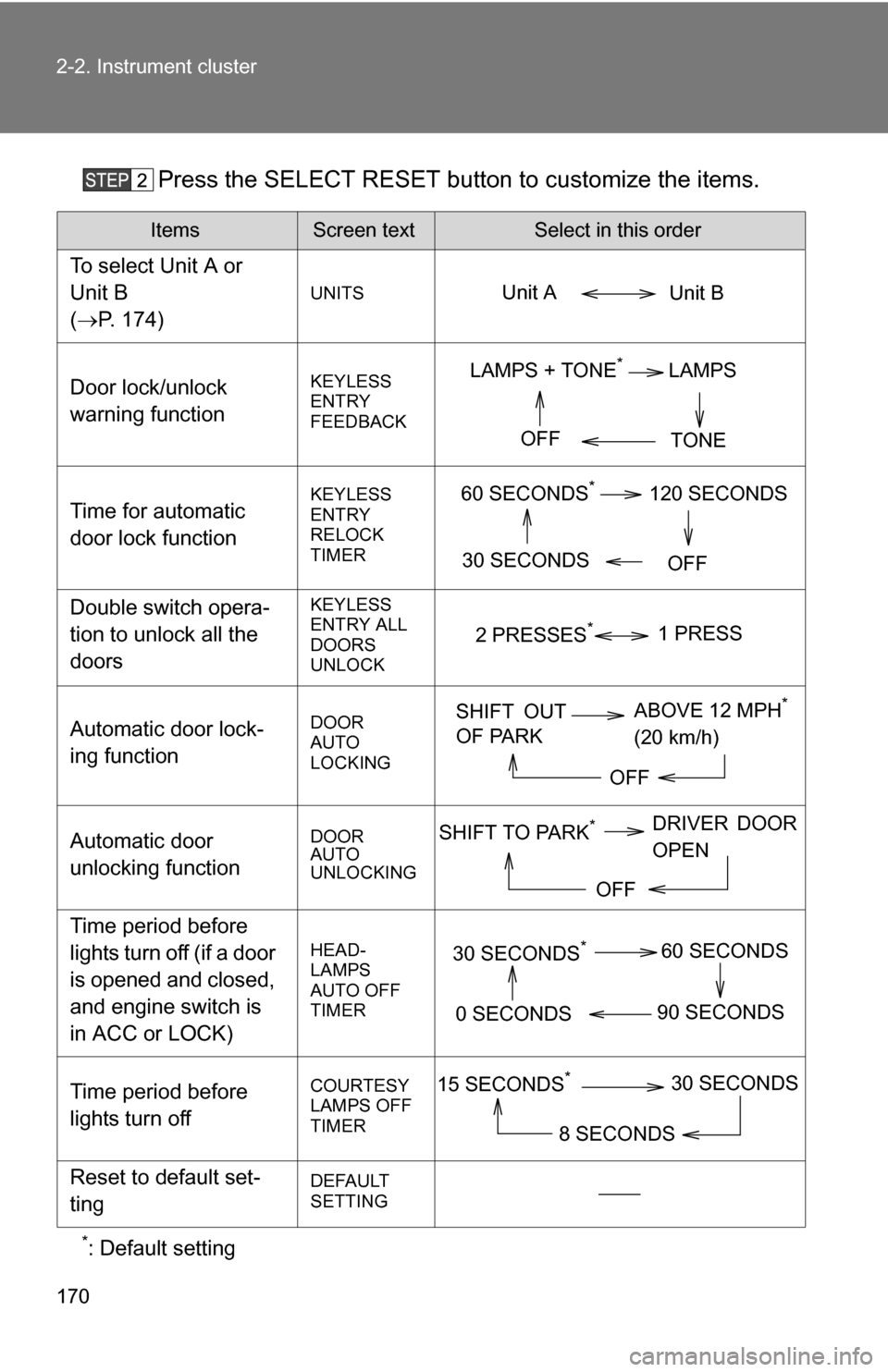
Press the SELECT RESET button to customize the items.
*: Default setting
ItemsScreen textSelect in this order
To select Unit A or
Unit B
(P. 174)
UNITS
Door lock/unlock
warning functionKEYLESS
ENTRY
FEEDBACK
Time for automatic
door lock functionKEYLESS
ENTRY
RELOCK
TIMER
Double switch opera-
tion to unlock all the
doorsKEYLESS
ENTRY ALL
DOORS
UNLOCK
Automatic door lock-
ing functionDOOR
AUTO
LOCKING
Automatic door
unlocking functionDOOR
AUTO
UNLOCKING
Time period before
lights turn off (if a door
is opened and closed,
and engine switch is
in ACC or LOCK)
HEAD-
LAMPS
AUTO OFF
TIMER
Time period before
lights turn offCOURTESY
LAMPS OFF
TIMER
Reset to default set-
tingDEFAULT
SETTING
Unit B
Unit A
LAMPS + TONE*LAMPS
TONE
OFF
60 SECONDS*120 SECONDS
30 SECONDS OFF
2 PRESSES*1 PRESS
SHIFT OUT
OF PARKABOVE 12 MPH*
(20 km/h)
OFF
SHIFT TO PARK*DRIVER DOOR
OPEN
OFF
30 SECONDS*60 SECONDS
90 SECONDS
0 SECONDS
15 SECONDS*30 SECONDS
8 SECONDS
Page 172 of 596
172
2-2. Instrument cluster
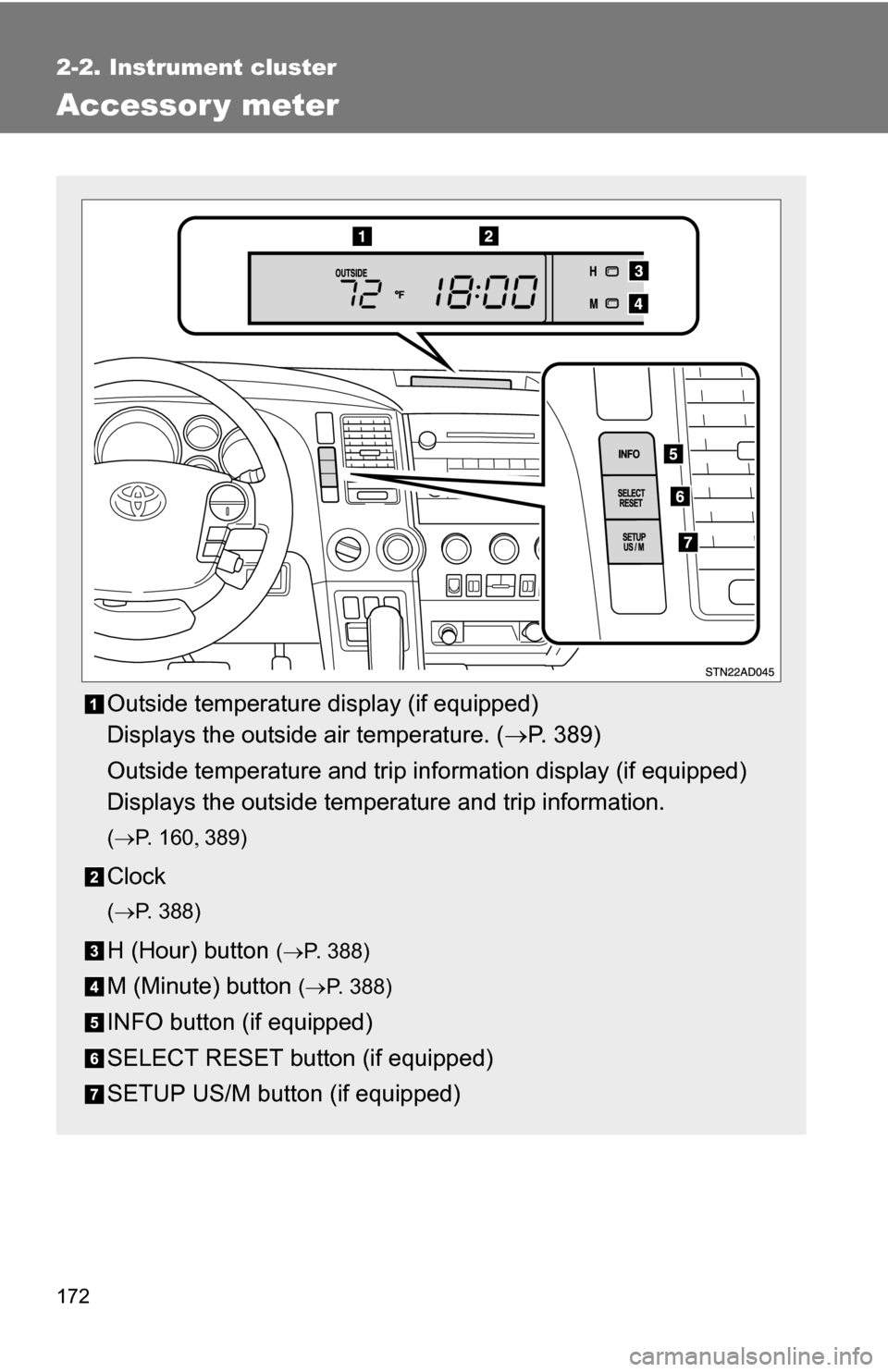
Accessor y meter
Outside temperature display (if equipped)
Displays the outside air temperature. (P. 389)
Outside temperature and trip information display (if equipped)
Displays the outside temperature and trip information.
( P. 1 6 0 389)
Clock
(P. 388)
H (Hour) button (P. 388)
M (Minute) button ( P. 388)
INFO button (if equipped)
SELECT RESET button (if equipped)
SETUP US/M button (if equipped)