reset TOYOTA SEQUOIA 2009 2.G Owner's Manual
[x] Cancel search | Manufacturer: TOYOTA, Model Year: 2009, Model line: SEQUOIA, Model: TOYOTA SEQUOIA 2009 2.GPages: 612
Page 353 of 612
353
3-4. Using the hand
s-free phone system (for cellular phone)
3
Interior features
Speed dialing
Press .
Press the preset button in which the desired phone number is
registered.
Press .
When receiving a phone call■ Answering the phone
Press .
■ Refusing the call
Press .
Transferring a call
A call can be transferred between the cellular phone and system
while dialing, receiving a call, or conversing a call. Use one of the fol-
lowing methods: a. Operate the cellular phone.
Refer to the manual that comes with the cellular phone for the oper-
ation of the phone.
b. Press *1.
c. Press or and say “Call Transfer”
*2.
*1: This operation can be performed only when transferring a call from the cellular phone to the system during a call.
*2: While the vehicle is in motion , a call cannot be transferred from
the system to the cellular phone.
Page 368 of 612
368 3-4. Using the hands-free phone system (for cellular phone)
b. Press or , and say “List names”. While the
desired name is being re ad aloud, press or ,
and select “Confirm” by using a voice command or
.
c. Select the desired data by using .
Select the desired preset butt on, and register the data into
speed dial by either of the following methods:
a. Press the desired preset button, and select “Confirm” by
using a voice command or .
b. Press and hold the desired preset button.
Changing a registered name
Select “Change name” by using a voice command or .
Select a name to be changed by either of the following meth-
ods.
a. Press or , say the desired name, and select
“Confirm” by using a voice command or .
b. Press or , and say “List names”. While the desired name is read aloud, press or .
Page 370 of 612
370 3-4. Using the hands-free phone system (for cellular phone)
Deleting speed dial
Select “Delete speed dial (DEL SPD DIAL)” by using a voice
command or .
Press the preset button for wh ich the desired speed dial is
registered, and select “Confirm” by using a voice command or
.
Listing the registered dataSelect “List names” by using a voice command and the system
begins reading aloud the list of the registered data.
When listing is complete, the system returns to “Phone book”.
Pressing or while an entry is being read aloud selects
the entry, and the following fu nctions will be available.
• Dialing: “Dial”
• Changing a registered name: “Change name”
• Deleting an entry: “Delete entry”
• Setting speed dial: “Set speed dial (SPEED DIAL)”
■Limitation of number of digits
A phone number that exceeds 24 digits cannot be registered.
Page 455 of 612
455
4-3. Do-it-yourself maintenance
4
Maintenance and care
■
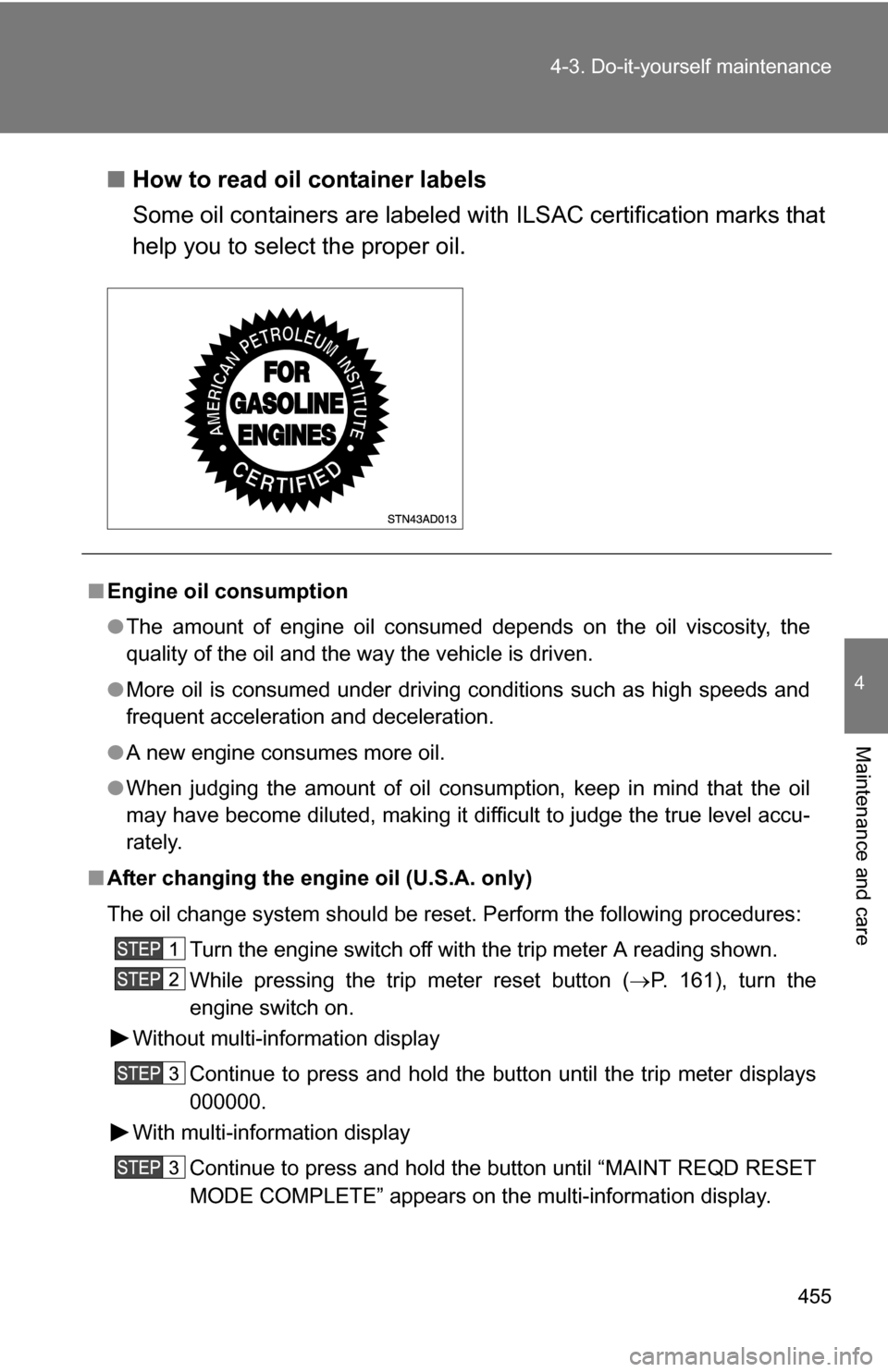
How to read oil container labels
Some oil containers are labeled with ILSAC certification marks that
help you to select the proper oil.
■Engine oil consumption
●The amount of engine oil consumed depends on the oil viscosity, the
quality of the oil and the way the vehicle is driven.
● More oil is consumed under driving conditions such as high speeds and
frequent acceleration and deceleration.
● A new engine consumes more oil.
● When judging the amount of oil consumption, keep in mind that the oil
may have become diluted, making it difficult to judge the true level accu-
rately.
■ After changing the engine oil (U.S.A. only)
The oil change system should be reset. Perform the following procedures:
Turn the engine switch off with the trip meter A reading shown.
While pressing the trip meter reset button ( P. 161), turn the
engine switch on.
Without multi-information display
Continue to press and hold the button until the trip meter displays
000000.
With multi-information display
Continue to press and hold the button until “MAINT REQD RESET
MODE COMPLETE” appears on the multi-information display.
Page 468 of 612
468 4-3. Do-it-yourself maintenance
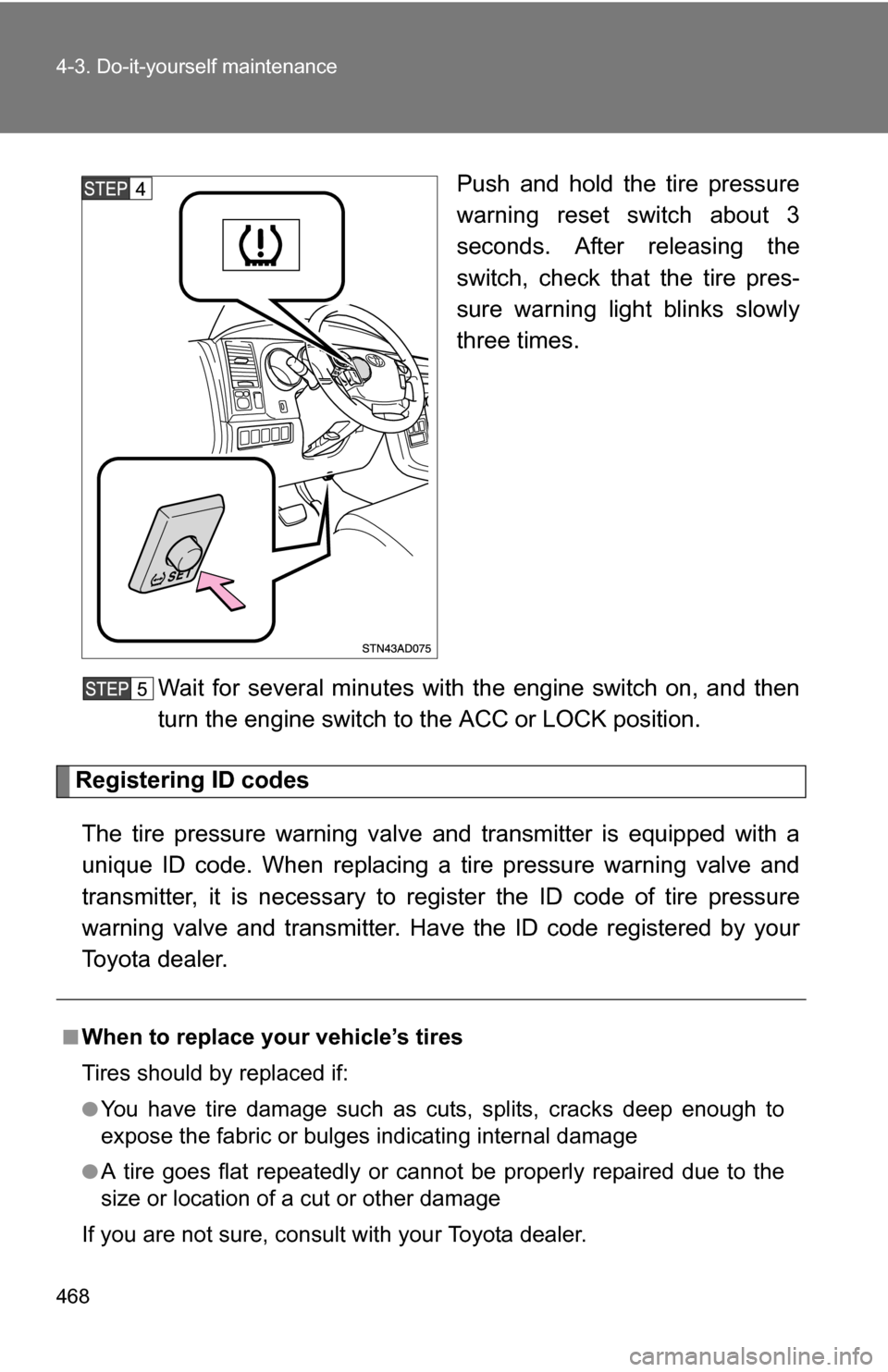
Push and hold the tire pressure
warning reset switch about 3
seconds. After releasing the
switch, check that the tire pres-
sure warning light blinks slowly
three times.
Wait for several minutes with the engine switch on, and then
turn the engine switch to the ACC or LOCK position.
Registering ID codes
The tire pressure warning valve and transmitter is equipped with a
unique ID code. When replacing a tire pressure warning valve and
transmitter, it is necessary to regi ster the ID code of tire pressure
warning valve and transmitter. Have the ID code registered by your
Toyota dealer.
■When to replace your vehicle’s tires
Tires should by replaced if:
●You have tire damage such as cuts, splits, cracks deep enough to
expose the fabric or bulges indicating internal damage
●A tire goes flat repeatedly or c annot be properly repaired due to the
size or location of a cut or other damage
If you are not sure, consult with your Toyota dealer.
Page 470 of 612
470 4-3. Do-it-yourself maintenance
3Snow tiresFor driving on snow-covered roads or icy roads, we recommend using
snow tires. If you need snow tires, select tires of the same size, con-
struction and load capacity as the or iginally installed tires. Since your
vehicle has radial tires as original equipment, make sure your snow
tires also have radial construction. Do not install studded tires without
first checking local regulations for possible restriction. Snow tires
should be installed on all wheels. ( P. 237)
■Initializing the tire pr essure warning system
Initialize the tires with the tire inflati on pressure adjusted to the specified
level.
■If you push the tire pressure warning reset switch accidentally
If initialization is performed, adjust the tire in flation pressure to the speci-
fied level and initialize the tire pressure warning system again.
■When the initialization of the tire pressure warning system has
failed
Initialization can be completed in se veral minutes. However, in the fol-
lowing cases, the settings have not been recorded and the system will
not operate properly. If repeated attempts to record tire inflation pressure
settings are unsuccessful, have the vehicle inspected by your Toyota
dealer.
●When operating the tire pressure warning reset switch, the tire pres-
sure warning light does not flash 3 times.
●After carrying out the initialization procedure, the tire pressure warn-
ing light blinks for 1 minute and then stays on after driving for about
20 minutes.
■Routine tire inflation pressure checks
The tire pressure warning system doe s not replace routine tire inflation
pressure checks. Make sure to check tire inflation pressure as part of
your routine of daily vehicle checks.
Page 472 of 612
472 4-3. Do-it-yourself maintenance
CAUTION
■When initializing the tire pressure warning system
Do not push the tire pressure warnin g reset switch without first adjusting
the tire inflation pressure to the spec ified level. Otherwise, the tire pres-
sure warning light may not come on ev en if the tire inflation pressure is
low, or it may come on when the tire inflation pressure is actually normal.
NOTICE
■Repairing or replacing tires, wheels and tire pressure warning
valves and transmitters
When removing or fitting the wheels, tires or the tire pressure warning
valve and transmitter, contact your Toyota dealer as the tire pressure
warning valve and transmitter may be damaged if not handled correctly.
■To avoid damaging the tire pressure warning valves and transmit-
ters
Do not use liquid sealants on flat tires.
■Driving on rough roads
Take particular care when driving on roads with loose surfaces or pot-
holes.
These conditions may cause losses in tire inflation pressure, reducing
the cushioning ability of the tires. In addition driving on rough roads may
cause damage to the tires themselves, as well as the vehicle’ s wheels
and body.
■If tire inflation pressures become low while driving
Do not continue driving, or your tires and/or wheels may be ruined.
Page 523 of 612
5
When trouble arises
523
5-2. Steps to take in an emergency
The light will go off after taking several driving trips.
If the light does not go off even after several trips, contact your Toyota dealer
as soon as possible.
■ Front passenger detection sensor and passenger seat belt reminder
If luggage or other load is placed on the front passenger seat, depending on
its weight, the reminder light to flash and buzzer to sound.
■
When the tire pressure warning light comes on
Check the tire inflation pressure and adjust to the appropriate level.
Pushing the tire pressure warning reset switch does not turn off the tire
pressure warning light.
■The tire pressure warning light may turn on due to natural causes
The tire pressure warning light may turn on due to natural causes such
as natural air leaks or tire inflation pressure changes caused by temper-
ature. In this case, adjusting the ti re inflation pressure will turn off the
warning light (after several minutes).
■When a tire is replaced with a spare tire
The temporary spare tire is not equipped with the tire pressure warning
valve and transmitter. If a tire goes flat, the tire pressure warning light will
not turn off even though the flat tire is replaced with the temporary spare
tire. Replace the temporary spare tire with the repaired tire and adjust
the proper tire inflatio n pressure. The tire pres sure warning light will turn
off after several minutes.
■If the tire pressure warning system is inoperative
The tire pressure warning system will be disabled in the following condi-
tions:
(When the condition be comes normal, the system will work properly.)
●If tires not equipped with tire pressure warning valves and transmit-
ters are used.
●If the ID code on the tire pressure warning valves and transmitters is
not registered in the tire pressure warning computer.
The tire pressure warning system may be disabled in the following condi-
tions:
(When the condition be comes normal, the system will work properly.)
●If electronic devices or facilities using similar radio wave frequencies
are nearby.
Page 524 of 612
524 5-2. Steps to take in an emergency
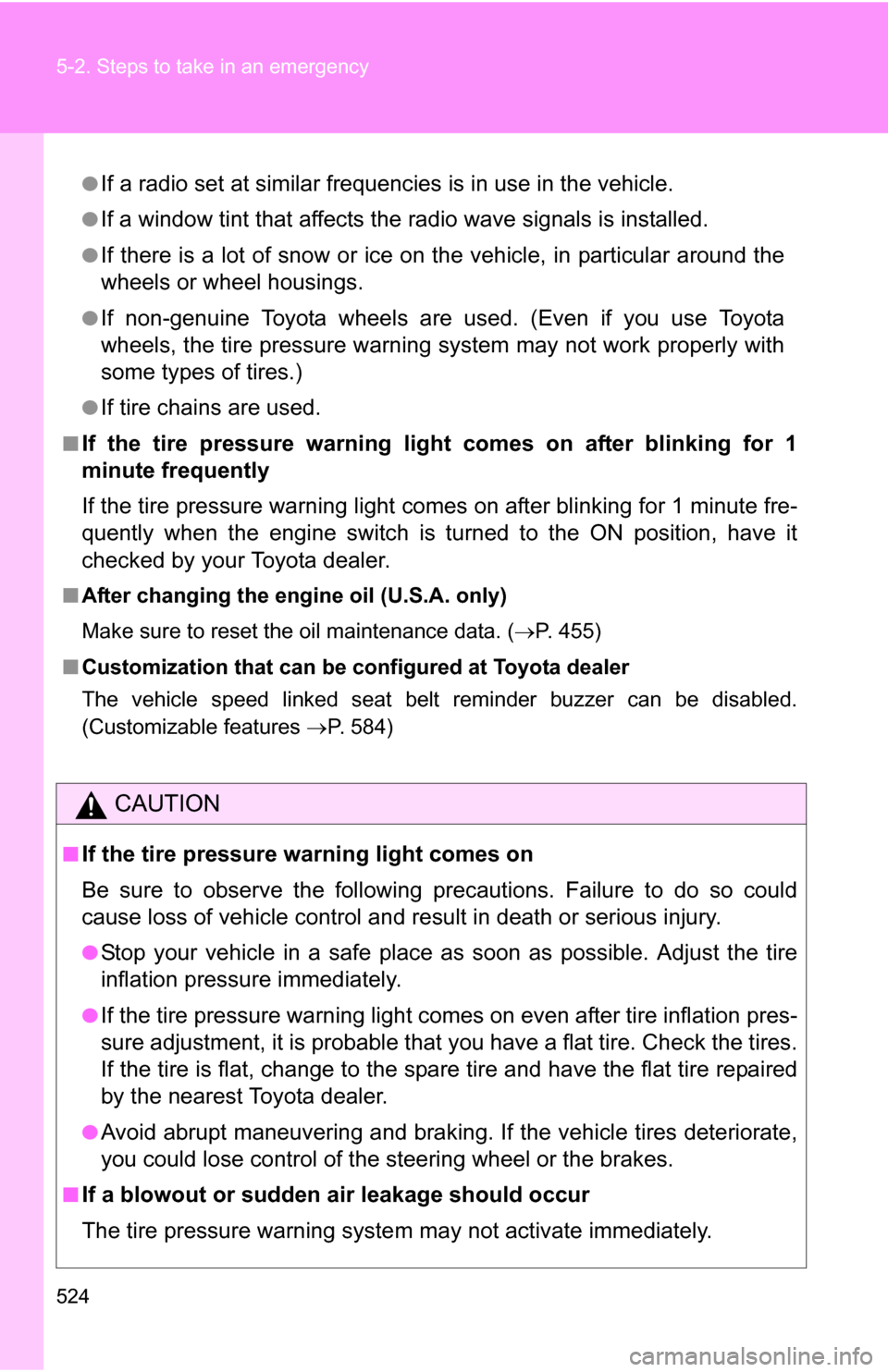
●If a radio set at similar frequencies is in use in the vehicle.
●If a window tint that affects the radio wave signals is installed.
●If there is a lot of snow or ice on the vehicle, in particular around the
wheels or wheel housings.
●If non-genuine Toyota wheels are used. (Even if you use Toyota
wheels, the tire pressu re warning system may not work properly with
some types of tires.)
●If tire chains are used.
■If the tire pressure warning light comes on after blinking for 1
minute frequently
If the tire pressure warning light comes on after blinking for 1 minute fre-
quently when the engine switch is turned to the ON position, have it
checked by your Toyota dealer.
■ After changing the engine oil (U.S.A. only)
Make sure to reset the oil maintenance data. ( P. 455)
■ Customization that can be co nfigured at Toyota dealer
The vehicle speed linked seat belt reminder buzzer can be disabled.
(Customizable features P. 584)
CAUTION
■If the tire pressure warning light comes on
Be sure to observe the following precautions. Failure to do so could
cause loss of vehicle control and re sult in death or serious injury.
●Stop your vehicle in a safe place as soon as possible. Adjust the tire
inflation pressure immediately.
●If the tire pressure warning light comes on even after tire inflation pres-
sure adjustment, it is pr obable that you have a flat tire. Check the tires.
If the tire is flat, change to the spare tire and have the flat tire repaired
by the nearest Toyota dealer.
●Avoid abrupt maneuvering and braking. If the vehicle tires deteriorate,
you could lose control of the steering wheel or the brakes.
■If a blowout or sudden air leakage should occur
The tire pressure warning syste m may not activate immediately.
Page 529 of 612
5
When trouble arises
529
5-2. Steps to take in an emergency
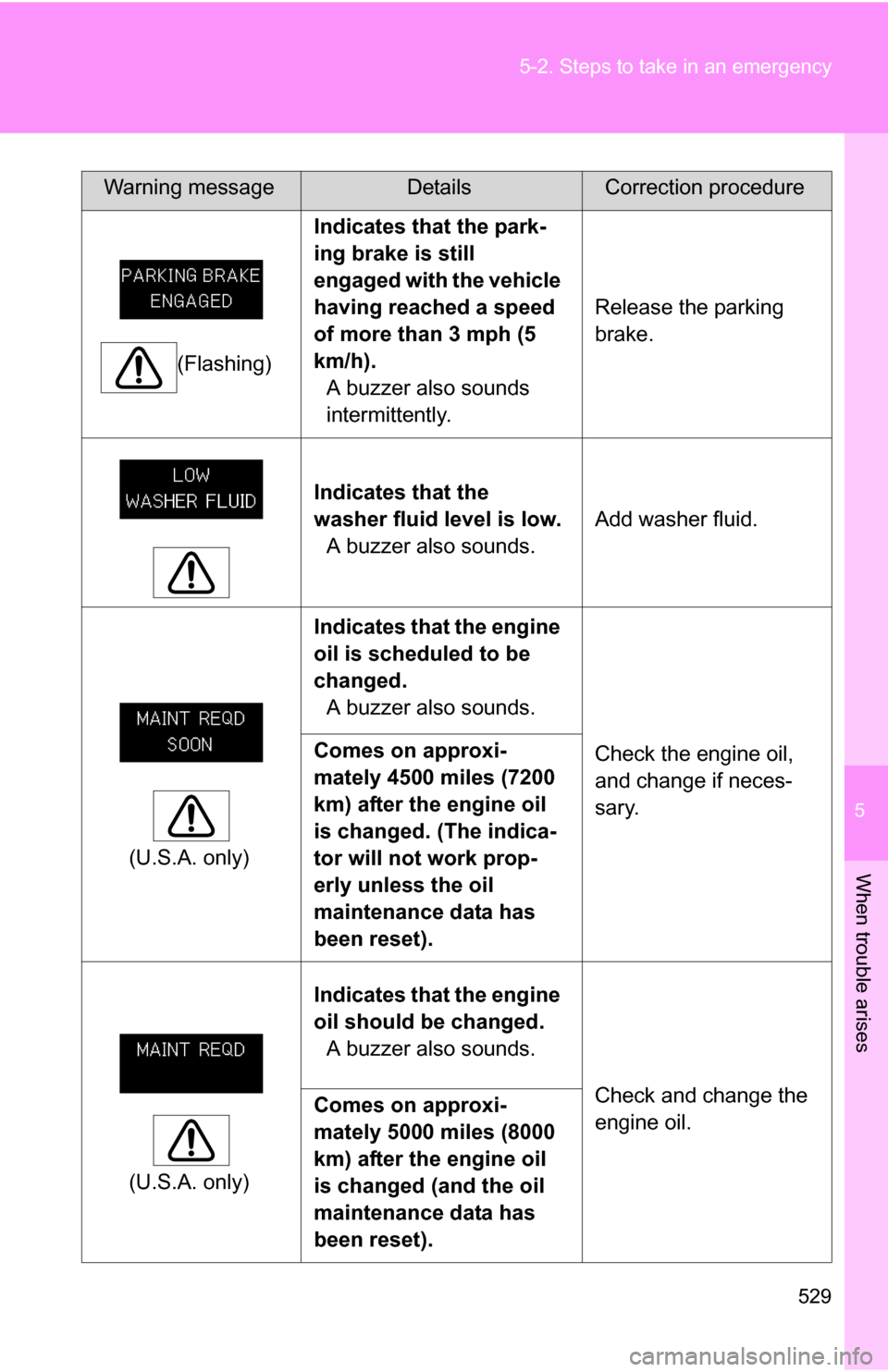
(Flashing)
Indicates that the park-
ing brake is still
engaged with the vehicle
having reached a speed
of more than 3 mph (5
km/h).
A buzzer also sounds
intermittently. Release the parking
brake.
Indicates that the
washer fluid level is low. A buzzer also sounds. Add washer fluid.
(U.S.A. only) Indicates that the engine
oil is scheduled to be
changed.
A buzzer also sounds.
Check the engine oil,
and change if neces-
sary.
Comes on approxi-
mately 4500 miles (7200
km) after the engine oil
is changed. (The indica-
tor will not work prop-
erly unless the oil
maintenance data has
been reset).
(U.S.A. only) Indicates that the engine
oil should be changed.
A buzzer also sounds.
Check and change the
engine oil.
Comes on approxi-
mately 5000 miles (8000
km) after the engine oil
is changed (and the oil
maintenance data has
been reset).
Warning messageDetailsCorrection procedure