tow TOYOTA SEQUOIA 2009 2.G Owner's Manual
[x] Cancel search | Manufacturer: TOYOTA, Model Year: 2009, Model line: SEQUOIA, Model: TOYOTA SEQUOIA 2009 2.GPages: 612
Page 185 of 612
185
2-3. Operating the lights and wipers
2
When driving
■
The windshield wiper and washer can be operated when
The engine switch must be in the ON position.
■ If no windshield washer fluid sprays
Check that the washer nozzles are not blocked and if there is washer fluid in
the windshield washer fluid reservoir.
NOTICE
■When the windshield is dry
Do not use the wipers, as they may damage the windshield.
■ When there is no washer fluid spray from the nozzle
Damage to the washer fluid pump may be caused if the lever is pulled
toward you and held continually.
■ When a nozzle becomes block
Do not try to clear it with a pin or other object. The nozzle will be damaged.
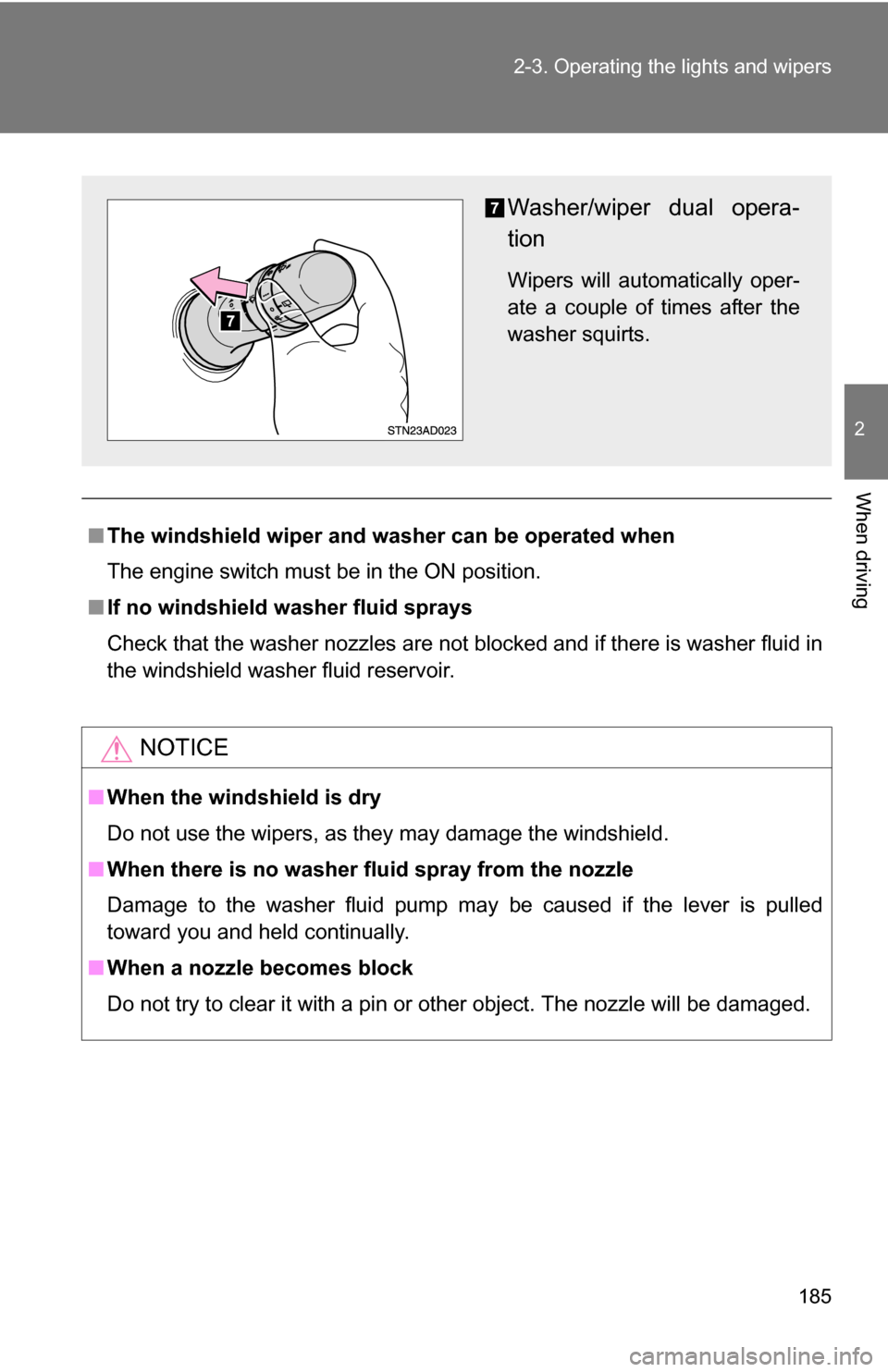
Washer/wiper dual opera-
tion
Wipers will automatically oper-
ate a couple of times after the
washer squirts.
Page 189 of 612
189
2-4. Using other
driving systems
2
When driving
■Cruise control can be set when
●The shift lever is in D or the shift range position must be in 4 or 5 in S
mode (5-speed models).
● The shift lever is in D or the shift range position must be in between 4 and
6 in S mode (6-speed models).
● Vehicle speed is more than approximately 25 mph (40 km/h).
■ Accelerating
The vehicle can be accelerated normally.
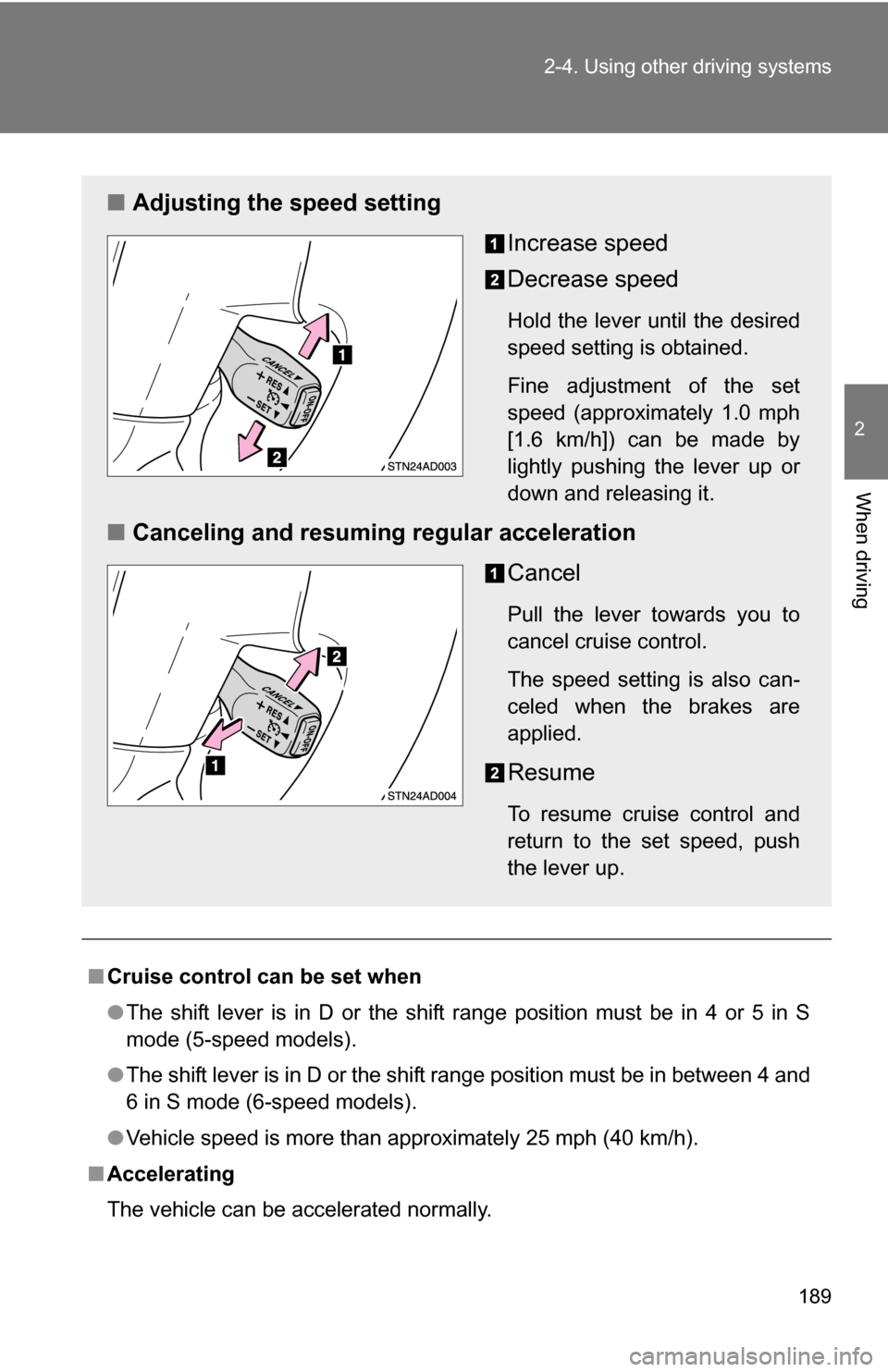
■ Adjusting the speed setting
Increase speed
Decrease speed
Hold the lever until the desired
speed setting is obtained.
Fine adjustment of the set
speed (approximately 1.0 mph
[1.6 km/h]) can be made by
lightly pushing the lever up or
down and releasing it.
■Canceling and resuming regular acceleration
Cancel
Pull the lever towards you to
cancel cruise control.
The speed setting is also can-
celed when the brakes are
applied.
Resume
To resume cruise control and
return to the set speed, push
the lever up.
Page 193 of 612
193
2-4. Using other
driving systems
2
When driving
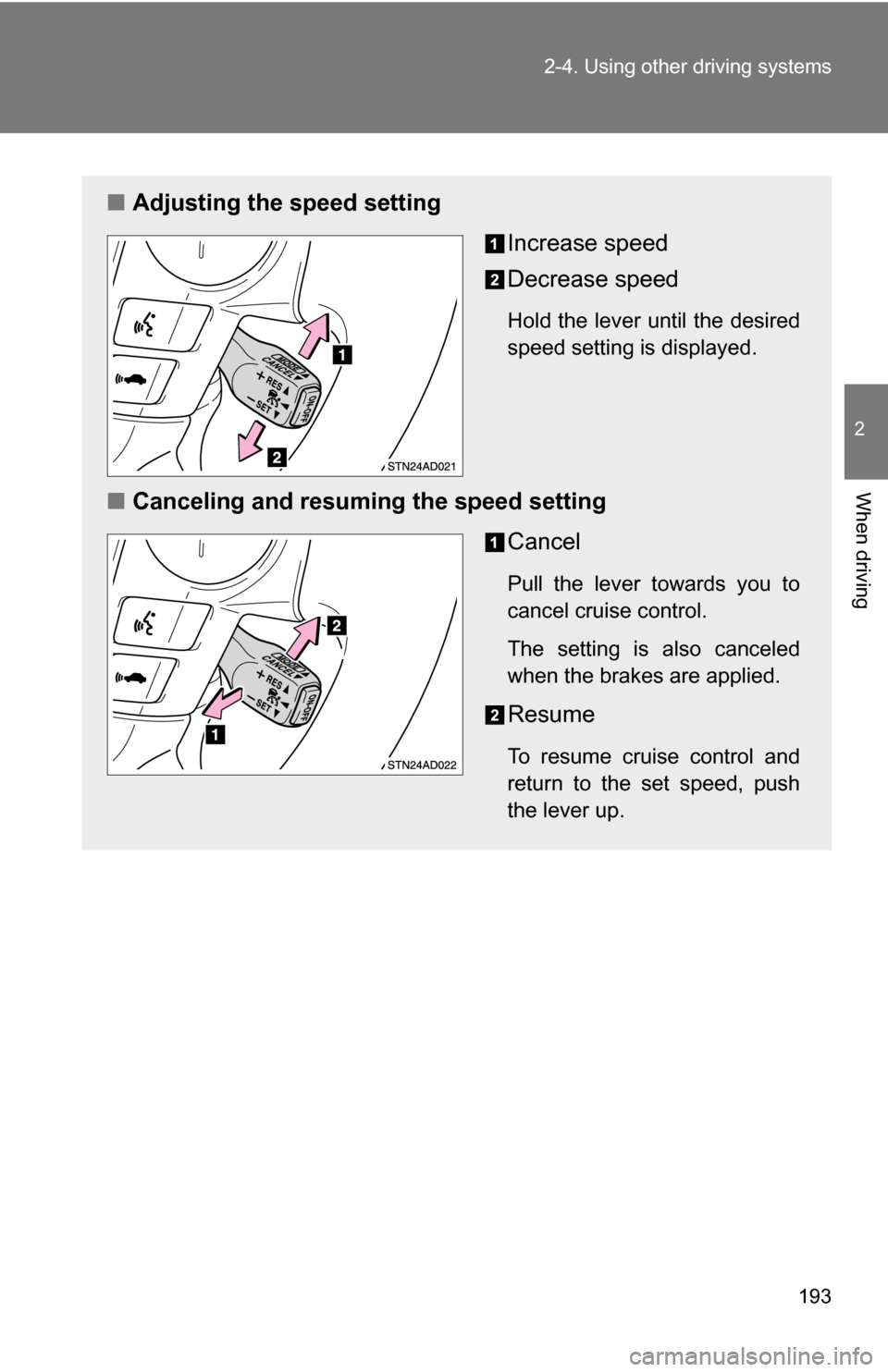
■Adjusting the speed setting
Increase speed
Decrease speed
Hold the lever until the desired
speed setting is displayed.
■Canceling and resuming the speed setting
Cancel
Pull the lever towards you to
cancel cruise control.
The setting is also canceled
when the brakes are applied.
Resume
To resume cruise control and
return to the set speed, push
the lever up.
Page 200 of 612
200 2-4. Using other driving systems
CAUTION
■When the laser radar sensor may not be correctly detecting the vehicle
ahead
● The vehicle ahead has higher ground clearance, which means that the
placement of the reflectors is in a higher position.
● The rear section of the vehicle ahead is extremely dirty.
● The vehicle ahead or other vehicles around you are flinging up water or
snow.
● Excessive exhaust gas (black smoke) is coming from the vehicle ahead or
other vehicles around you, obscuring your front view.
● There is an obstruction (protective film, sticker, etc.) on the reflectors on
the vehicle ahead, or reflectors are not installed on the vehicle ahead or
are damaged.
● Heavy luggage in the luggage compartment or rear seats is causing the
nose of your vehicle to tilt up.
● Vehicles that cut in suddenly
● Vehicles traveling at low speeds
● Vehicles that are not moving
● Vehicles with small rear ends (trailers with no load on board etc.)
● Motorcycles traveling in the same lane
■ Conditions under which the vehicle -to-vehicle distance control may
not function correctly
Apply the brakes as necessary in the following conditions as the laser radar
sensor may not be able to correctly detect vehicles ahead, and an accident
may result.
● When water or snow thrown up by the surrounding vehicles hinders the
functioning of the sensor
● When your vehicle is pointing upwards (caused by a heavy load in the lug-
gage compartment, etc.)
● When the road curves or when the lanes are narrow
● When steering wheel operation or your position in the lane is unstable
● When towing a trailer
Page 206 of 612
206 2-4. Using other driving systems
■Sensor detection information
●Certain vehicle conditions and the surrounding environment may affect
the ability of a sensor to correctly detect an obstacle. Particular instances
where this may occur are listed below.
• There is dirt, snow or ice on a sensor.
• A sensor is frozen.
• A sensor is covered in any way.
• The vehicle is leaning considerably to one side.
• On an extremely bumpy road, on an incline, on gravel, or on grass.
• The vicinity of the vehicle is noisy due to vehicle horns, motorcycle
engines, air brakes of large vehicles, or other loud noises producing
ultrasonic waves.
• There is another vehicle equipped with parking assist sensors in the vicinity.
• A sensor is coated with a sheet of spray or heavy rain.
• The vehicle is equipped with a fender pole or radio antenna.
• A bumper or sensor receives a strong impact.
• The vehicle is approaching a tall or right-angled curb.
• In harsh sunlight or intense cold weather.
• The area directly under the bumpers is not detected. Objects lower than the sensors or thin stakes etc. may be detected ini-
tially, but as they draw closer, they may cease to be detected.
• A towing hitch is mounted to the vehicle.
• A non-genuine Toyota suspension (lowered suspension etc.) is installed.
• When attaching a two-way radio antenna.
• When a towing eyelet is mounted on your vehicle.
• When the bumper is damaged.
In addition to the examples above, there are instances in which, because of
their shapes, signs and other objects may be judged by a sensor to be closer
than they are.
● The shape of the obstacle may prevent a sensor from detecting it. Pay
particular attention to the following obstacles:
• Wires, fences, ropes, etc.
• Cotton, snow and other materials that absorb radio waves
• Sharply-angled objects
Page 211 of 612
211
2-4. Using other
driving systems
2
When driving
CAUTION
■The electronically modulated air susp ension must be turned off in the
following circumstances:
Otherwise, the automatic leveling function may cause the vehicle’s height to
change, resulting in an unexpected accident.
● When driving through water such as shallow streams (Put the vehicle
height in HI mode and turn off the electronically modulated air suspension.
Drive at 18 mph [30 km/h] or slower.)
● When jacking up the vehicle, installing tire chains or tying the vehicle with
chains/wires for transportation via flat bed truck (Turn the system to the
manual mode and stop the engine.)
● When the vehicle must be towed (Put the vehicle height in N mode and
turn the system to the manual mode.)
● When the vehicle gets stuck (Turn the system to the manual mode.)
● When disconnecting a trailer (Put the vehicle height in LO mode and turn
the system to the manual mode.)
■ Selecting the correct height mode
Observe the following precautions to prevent accidents.
Failure to do so may cause damage to parts of the vehicle, as well as dan-
gerous handling characteristics, which may lead to fatal or injury accidents.
●Before you lower the vehicle’s height, check under the vehicle to make
sure that no one is there.
● The HI mode should be used for off-road driving conditions.
As the vehicle’s center of gravity is higher in this setting, the vehicle may
become unstable when turning abruptly.
● Do not select HI mode when you load cargo on the roof luggage carrier.
This may result in a loss of control or vehicle rollover.
Page 213 of 612
213
2-4. Using other driving systems
2
When driving
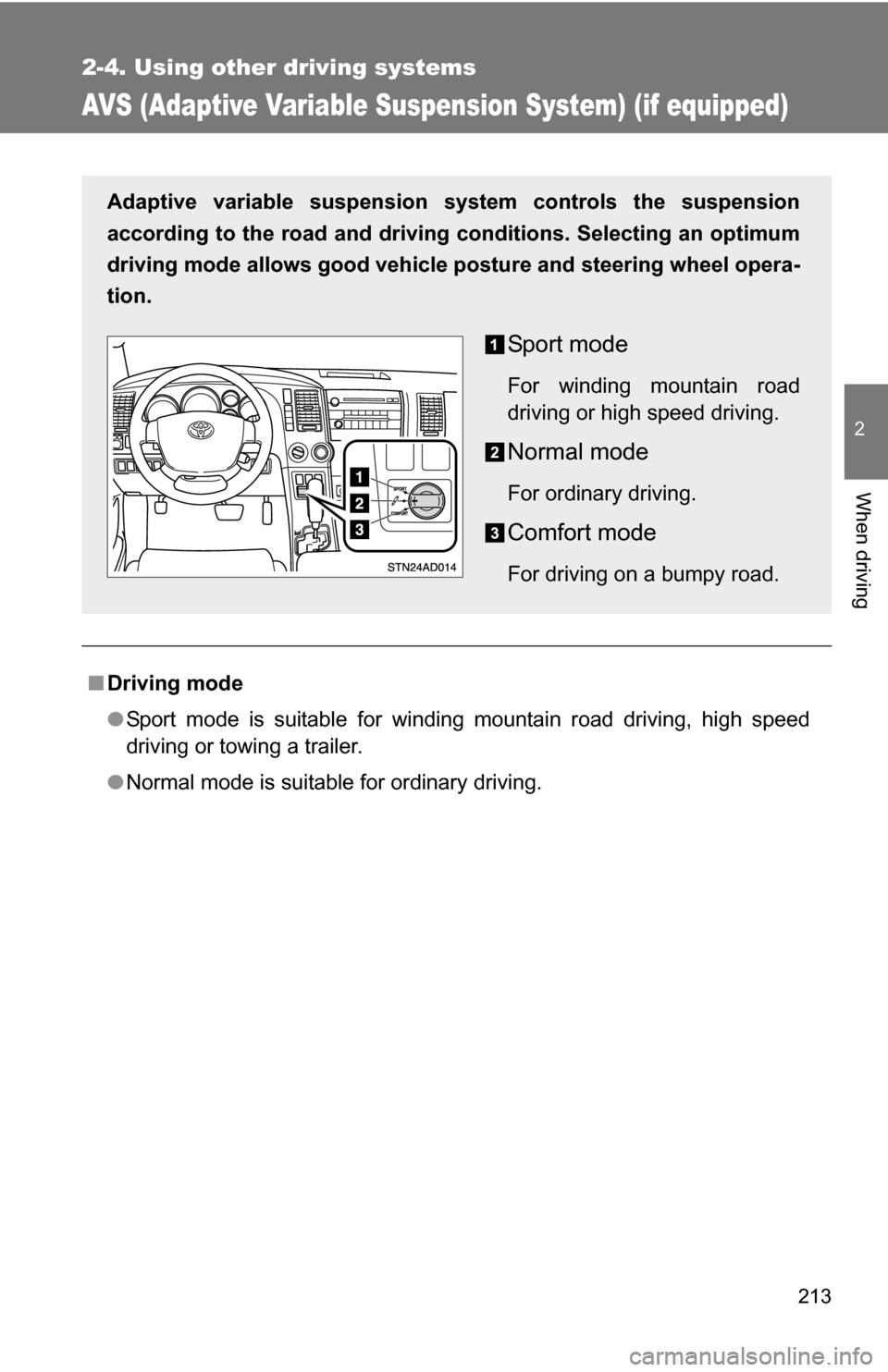
AVS (Adaptive Variable Suspension System) (if equipped)
■Driving mode
●Sport mode is suitable for winding mountain road driving, high speed
driving or towing a trailer.
● Normal mode is suitable for ordinary driving.
Adaptive variable suspension system controls the suspension
according to the road and driving conditions. Selecting an optimum
driving mode allows good vehicle posture and steering wheel opera-
tion.
Sport mode
For winding mountain road
driving or high speed driving.
Normal mode
For ordinary driving.
Comfort mode
For driving on a bumpy road.
Page 232 of 612
232
2-5. Driving information
Cargo and luggage
Capacity and distributionCargo capacity depends on the total weight of the occupants.
(Cargo capacity) = (Total load capacity) (Total weight of occupants)
Steps for Determining Correct Load Limit—
(1) Locate the statement “The co mbined weight of occupants and
cargo should never exceed XXX kg or XXX lbs.” on your vehicle’s
placard.
(2) Determine the combined weight of the driver and passengers that
will be riding in your vehicle.
(3)Subtract the combined weight of the driver and passengers from XXX kg or XXX lbs.
(4) The resulting figure equals the av ailable amount of cargo and lug-
gage load capacity.
For example, if the “XXX” amount equals 1400 lbs. and there will
be five 150 lb passengers in your vehicle, the amount of available
cargo and luggage load capacity is 650 lbs. (1400 750 (5 150)
= 650 lbs.)
(5) Determine the combined weight of luggage and cargo being loaded on the vehicle. That weight may not safely exceed the
available cargo and luggage load capacity calculated in Step 4.
Take notice of the following information about storage precau-
tions, cargo capacity and load.
●Stow cargo and luggage in the luggage compartment whenever
possible.
● Be sure all items are secured in place.
● Be careful to keep the vehicle level. Placing the weight as far for-
ward as possible helps maintain vehicle balance.
● For better fuel economy, do no t carry unnecessary weight.
Page 233 of 612
233
2-5. Driving information
2
When driving
(6) If your vehicle will be towing a tr
ailer, load from your trailer will be
transferred to your vehicle. Consult this manual to determine how
this reduces the available cargo and luggage load capacity of your
vehicle.
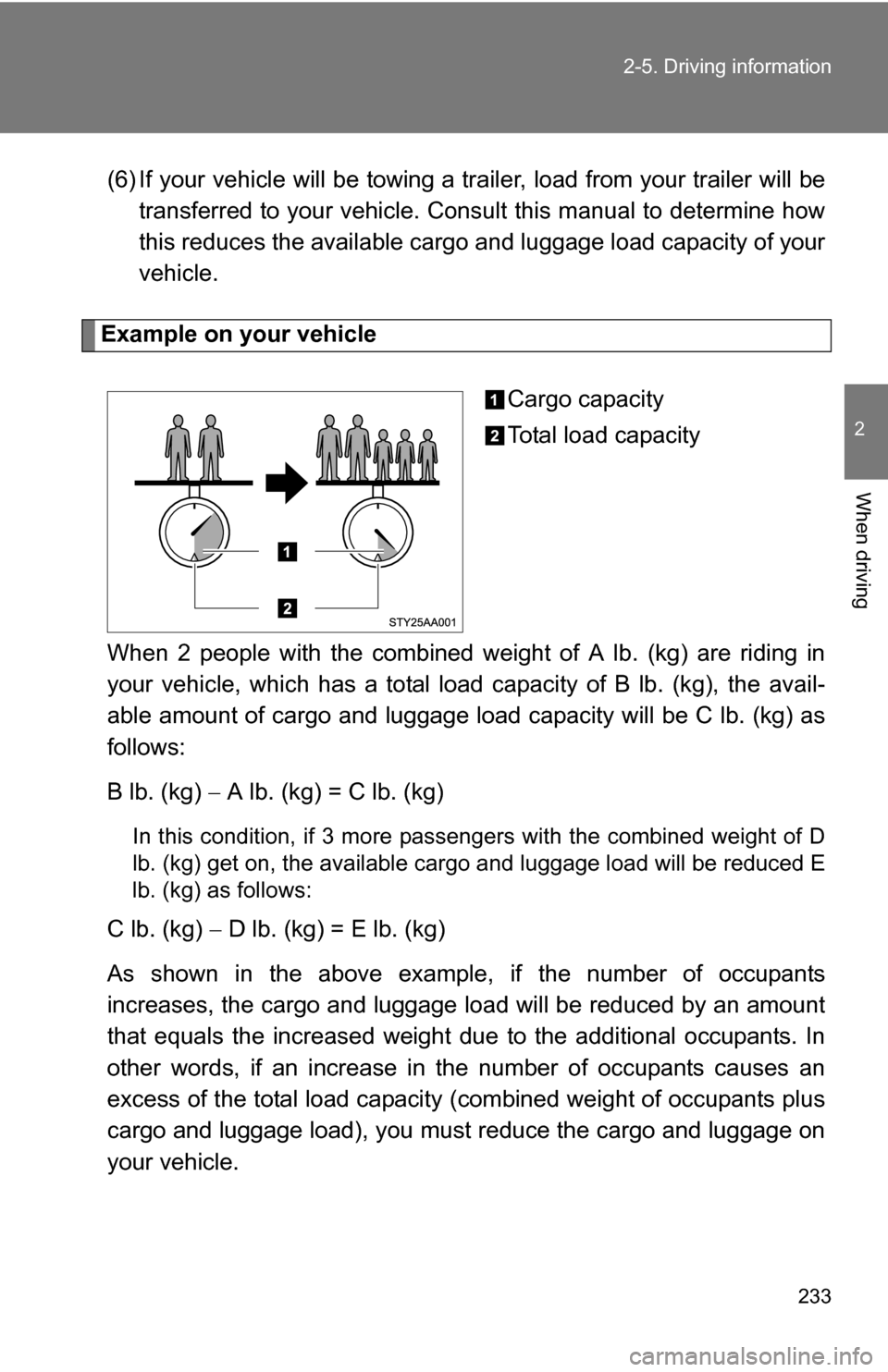
Example on your vehicle
Cargo capacity
Total load capacity
When 2 people with the combined weight of A lb. (kg) are riding in
your vehicle, which has a total load capacity of B lb. (kg), the avail-
able amount of cargo and luggage load capacity will be C lb. (kg) as
follows:
B lb. (kg) A lb. (kg) = C lb. (kg)
In this condition, if 3 more passengers with the combined weight of D
lb. (kg) get on, the available carg o and luggage load will be reduced E
lb. (kg) as follows:
C lb. (kg) D lb. (kg) = E lb. (kg)
As shown in the above example, if the number of occupants
increases, the cargo and luggage load will be reduced by an amount
that equals the increased weight du e to the additional occupants. In
other words, if an increase in th e number of occupants causes an
excess of the total load capacity (combined weight of occupants plus
cargo and luggage load), you must reduce the cargo and luggage on
your vehicle.
Page 236 of 612
236
2-5. Driving information
Vehicle load limits
■Total load capacity and seating capacity
These details are also described on the tire and loading information
label. (P. 473)
CAUTION
■Overloading the vehicle
Do not overload the vehicle.
It may not only cause damage to the ti res, but also degrade steering and
braking ability, resulting in an accident.
Vehicle load limits include total load capacity, seating capacity,
towing capacity and cargo capacity.
■ Total load capacity: ( P. 557)
Total load capacity means the combined weight of occupants,
cargo and luggage.
■ Seating capacity:
With separated type second seat—
7 occupants (Front 2, Rear 5)
With bench type second seat—
8 occupants (Front 2, Rear 6)
Seating capacity means the ma ximum number of occupants
whose estimated average weight is 150 lb. (68 kg) per person.
Even if the number of occupants are within the seating capacity,
do not exceed the total load capacity.
■ Towing capacity: ( P. 242, 557)
Towing capacity means the maximum gross trailer weight (trailer
weight plus its cargo weight) that your vehicle is able to tow.
■ Cargo capacity
Cargo capacity may increase or decrease depending on the
weight and the number of occupants.