remote control TOYOTA SEQUOIA 2011 2.G User Guide
[x] Cancel search | Manufacturer: TOYOTA, Model Year: 2011, Model line: SEQUOIA, Model: TOYOTA SEQUOIA 2011 2.GPages: 688, PDF Size: 14.76 MB
Page 37 of 688
37
1
1-2. Opening, closing and locking the doors
Before driving
Side doors
The vehicle can be locked and unlocked using the wireless remote
control, key or door lock switch.
■Wireless remote control
P. 3 3
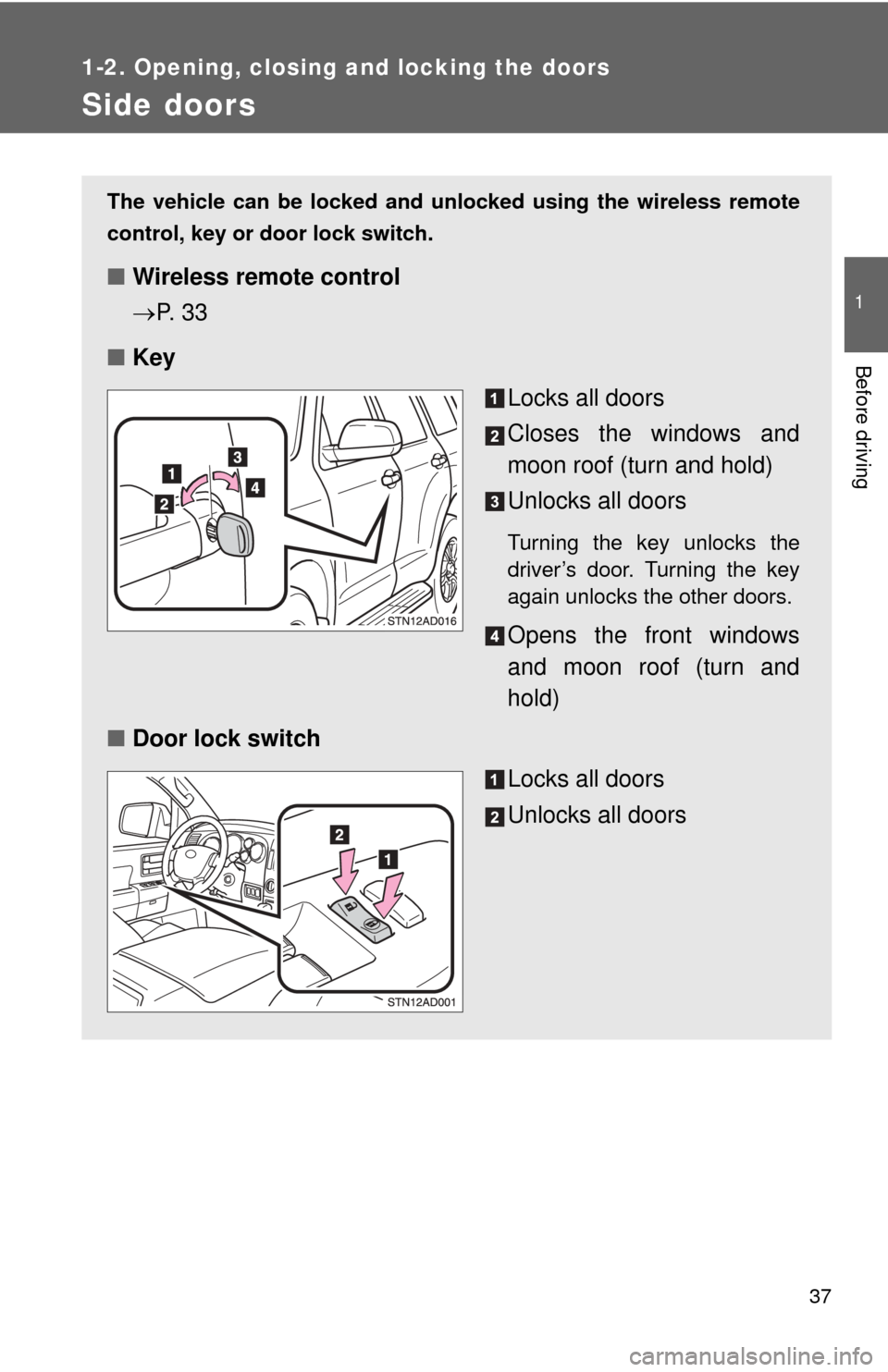
■ Key
Locks all doors
Closes the windows and
moon roof (turn and hold)
Unlocks all doors
Turning the key unlocks the
driver’s door. Turning the key
again unlocks the other doors.
Opens the front windows
and moon roof (turn and
hold)
■ Door lock switch
Locks all doors
Unlocks all doors
Page 42 of 688
42
1-2. Opening, closing and locking the doors
Back door
The back door can be locked/unlocked and opened by the following
procedures.
■Locking and unlocking the back door
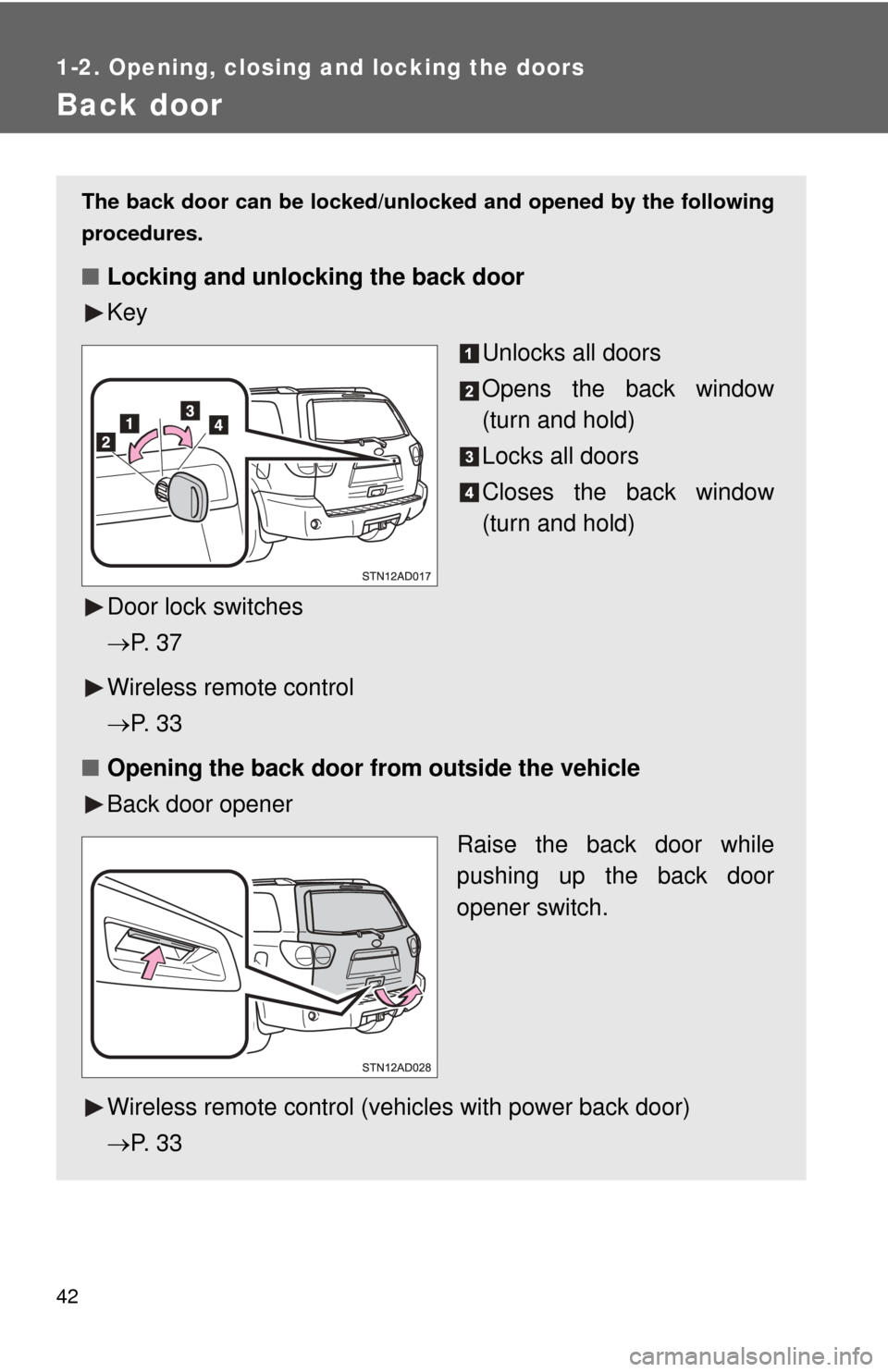
Key
Unlocks all doors
Opens the back window
(turn and hold)
Locks all doors
Closes the back window
(turn and hold)
Door lock switches
P. 3 7
Wireless remote control
P. 3 3
■ Opening the back door from outside the vehicle
Back door opener
Raise the back door while
pushing up the back door
opener switch.
Wireless remote control (vehicles with power back door)
P. 3 3
Page 65 of 688
65
1-3. Adjustable components (s
eats, mirrors, steering wheel)
1
Before driving
Linking driving position memory with door unlock operation
Memorized driving positions can be recalled when you unlock the
driver’s door using the wireless remote control and open the driver’s
door.
■ Setting the linked door unlock operation
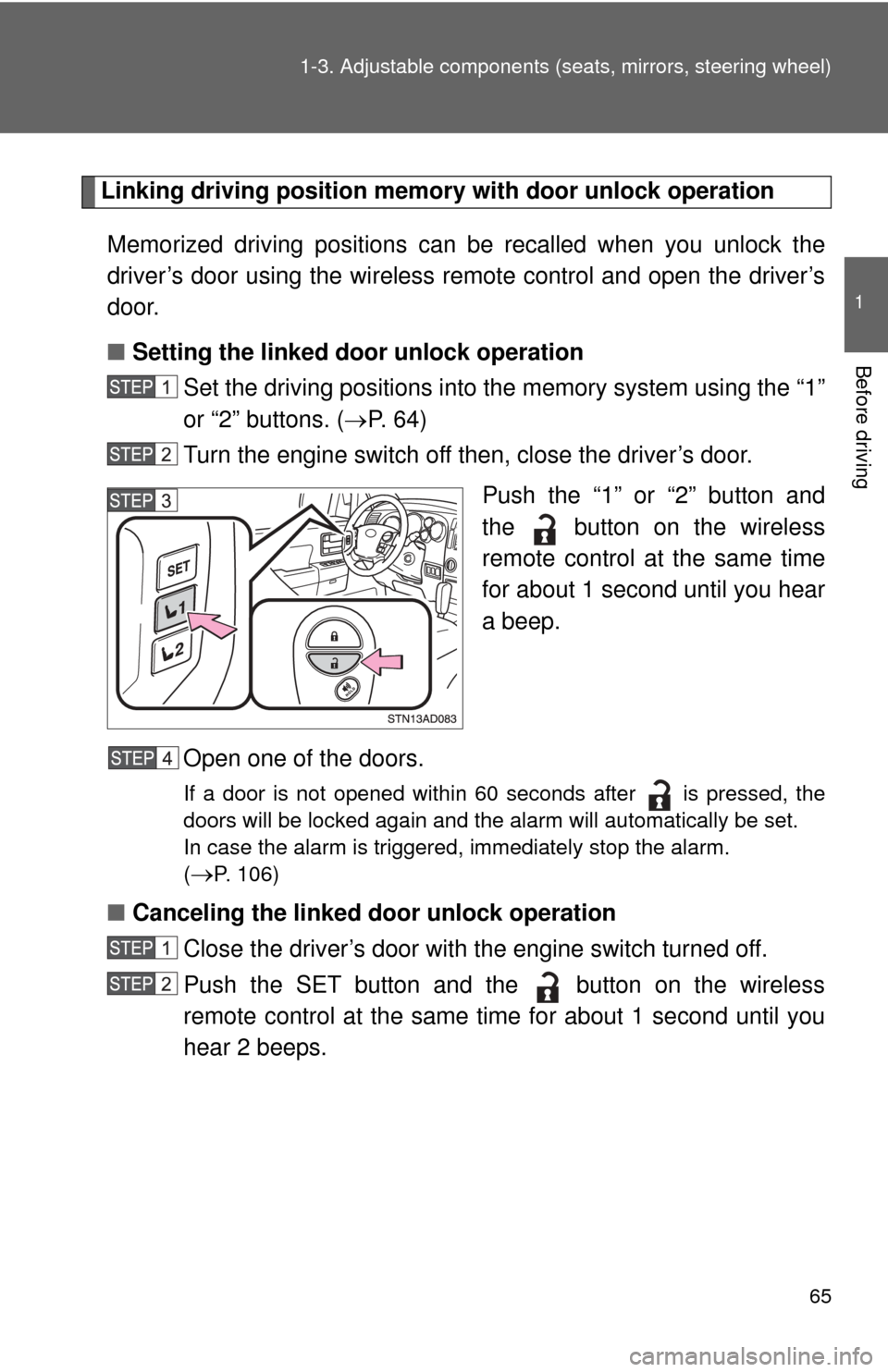
Set the driving positions into the memory system using the “1”
or “2” buttons. ( P. 6 4 )
Turn the engine switch off then, close the driver’s door.
Push the “1” or “2” button and
the button on the wireless
remote control at the same time
for about 1 second until you hear
a beep.
Open one of the doors.
If a door is not opened within 60 seconds after is pressed, the
doors will be locked again and the alarm will automatically be set.
In case the alarm is triggered, immediately stop the alarm.
(
P. 106)
■ Canceling the linked door unlock operation
Close the driver’s door with the engine switch turned off.
Push the SET button and the button on the wireless
remote control at the same time for about 1 second until you
hear 2 beeps.
Page 106 of 688
106
1-6. Theft deterrent system
Alarm
The system sounds the alarm and flashes lights when forcible entry
is detected.
■ Triggering of the alarm
The alarm is triggered in the fo llowing situations when the alarm
is set.
● A locked door is unlocked or opened in any way other than
using the wireless remote control door lock function or key.
The doors will lock again automatically.
● The hood is opened.
● Vehicles with the glass breakage sensor (if equipped): The
side windows are tapped or broken.
● The battery is reconnected.
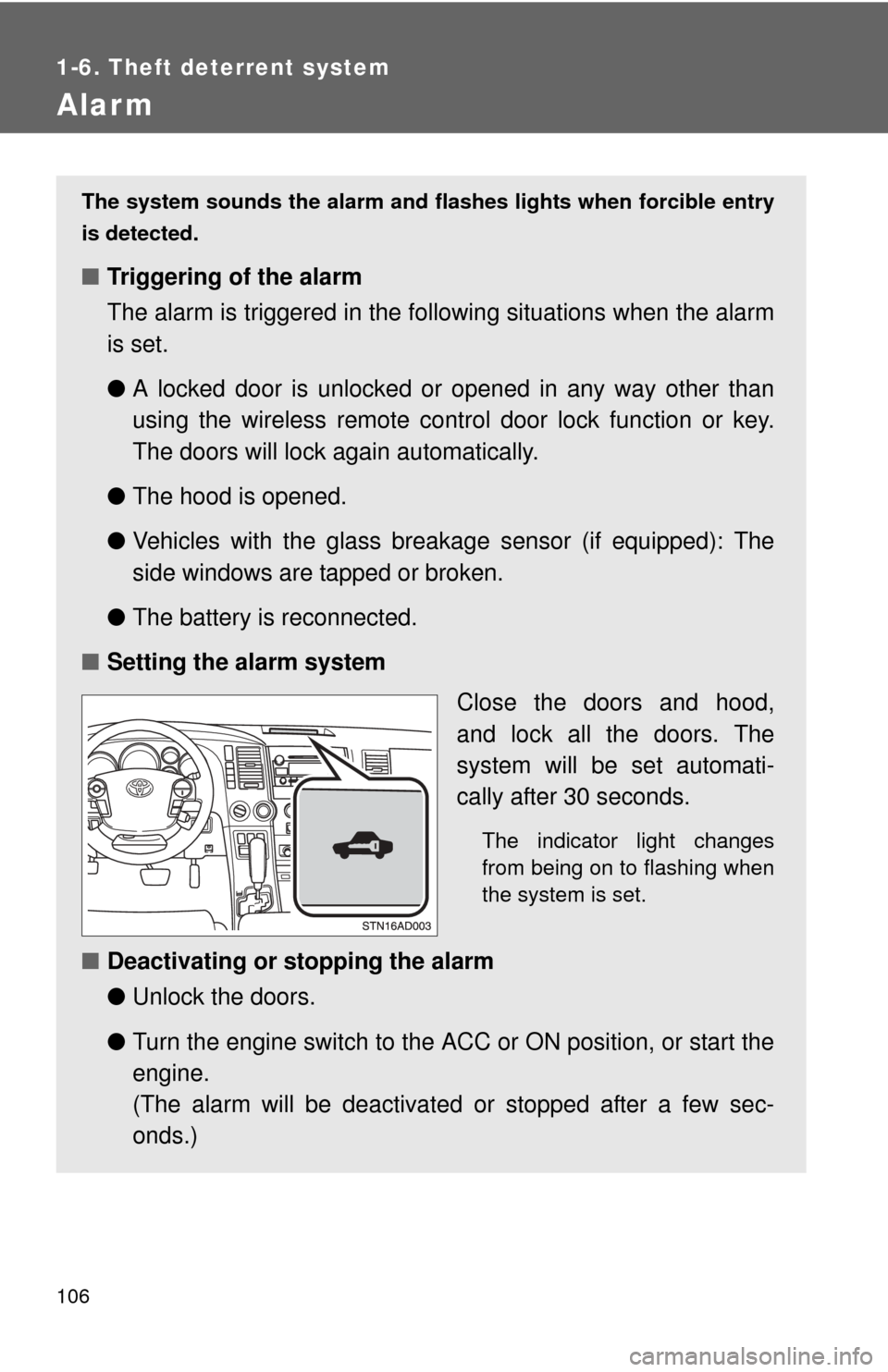
■ Setting the alarm system
Close the doors and hood,
and lock all the doors. The
system will be set automati-
cally after 30 seconds.
The indicator light changes
from being on to flashing when
the system is set.
■Deactivating or stopping the alarm
●Unlock the doors.
● Turn the engine switch to the ACC or ON position, or start the
engine.
(The alarm will be deactivated or stopped after a few sec-
onds.)
Page 189 of 688
189
2-3. Operating the lights and wipers
2
When driving
■
Automatic light off system
●When the headlights come on: The headlights and tail lights automati-
cally turn off after 30 seconds when all doors are closed with the engine
switch turned to the ACC or LOCK position. (The lights turn off immedi-
ately if the button on the wireless remote control is pressed after all
doors are locked.)
● When only the tail lights come on: The tail lights turn off automatically
with the engine switch turned to the ACC or LOCK position and the
driver’s door is opened.
To turn the lights on again, turn the engine switch to the ON position, or turn
the headlight switch off once and then back to the or position.
■ Customization
●That can be configured at Toyota dealer (vehicles without multi-informa-
tion display)
Settings (automatic light off system) can be changed. (Customizable
features P. 650)
● It is possible to change the settings (vehicles with multi-information dis-
play) (Feature customization P. 179)
NOTICE
■To prevent battery discharge
Do not leave the lights on longer than necessary when the engine is not run-
ning.
Page 278 of 688
278
3-1. Using the air conditioning system and defogger
Front air conditioning system ........................... 280
Rear air conditioning system ........................... 288
Rear window and outside rear view mirror
defoggers ....................... 292
Windshield wiper de-icer ............................ 294
Using the steering wheel climate remote control
switches ......................... 295
3-2. Using the audio system Audio system ................... 297
Using the radio ................. 301
Using the CD player ......... 309
Playing MP3 and WMA discs............................... 318
Operating an iPod ............ 326
Operating a USB memory ................. 332
Optimal use of the audio system ........................... 339
Using the AUX port .......... 343
Using the steering wheel audio switches ............... 345 3-3. Using the Bluetooth® audio
system
Bluetooth
® audio
system ........................... 348
Using the Bluetooth
®
audio system.................. 351
Operating a Bluetooth
®
enabled portable
player ............................. 356
Setting up a Bluetooth
®
enabled portable
player ............................. 358
Bluetooth
® audio system
setup .............................. 363
3-4. Using the rear audio/video system
Rear seat entertainment system ........................... 364
Using the DVD player (DVD video) ................... 372
Using the DVD player (video CD)...................... 381
Using the DVD player (audio CD/CD text) ........ 384
Using the DVD player (MP3 discs) .................... 386
Using the video mode ...... 389
Changing the Setup Menu settings .......................... 391
Interior features3
Page 295 of 688
295
3-1. Using the air conditioning system and defogger
3
Interior features
Using the steering wheel climate remote control switches
Using the automatic modePress .
The air conditioning system will operate, and air outlets and
fan speed will be set automatically.
Press “ ” on to increase the temperature and “ ” to
decrease the temperature.
Adjusting the temperature setting
Press “ ” on to increase the temperature and “ ” to decrease
the temperature.
: If equipped
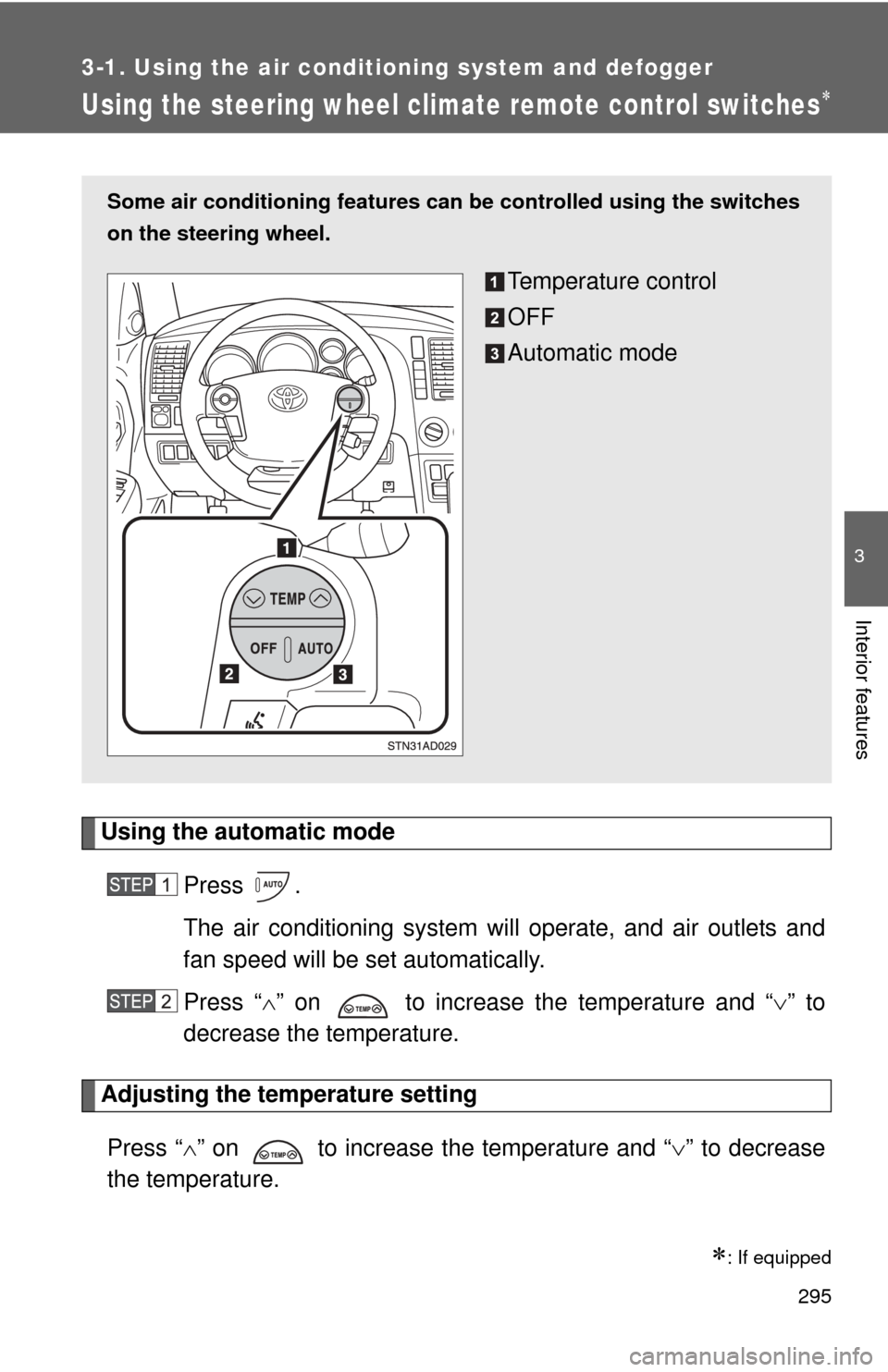
Some air conditioning features can be controlled using the switches
on the steering wheel.
Temperature control
OFF
Automatic mode
Page 349 of 688
349
3-3. Using the Bluetooth
® audio system
3
Interior features
■
About Bluetooth®
■Compatible models
●Bluetooth
® specifications:
Ve r. 1 . 2
● Following Profiles:
• A2DP (Advanced Audio Distribution Profile) Ver. 1.0
• AVRCP (Audio/Video Remote Control Profile) Ver. 1.0 or higher (Ver.
1.3 or higher recommended)
Portable players must correspond to the above specifications in order to be
connected to the Bluetooth
® audio system. However, please note that some
functions may be limited depending on the type of portable player.
■ Certification for the Bluetooth
® audio system
FCC ID: ACJ932C5ZZZ035
IC ID: 216J-C5ZZZ035
MADE IN JAPAN
This device complies with Part 15 of the FCC Rules and RSS-210 Rules.
Operation is subject to the following two conditions; (1) This device may not
cause harmful interference, and (2) This device must accept any interfer-
ence received, including interference that may cause undesired operation.
Bluetooth is a registered trademark of
Bluetooth SIG. Inc.
Page 364 of 688
364
3-4. Using the rear audio/video system
Rear seat entertainment system
: If equipped
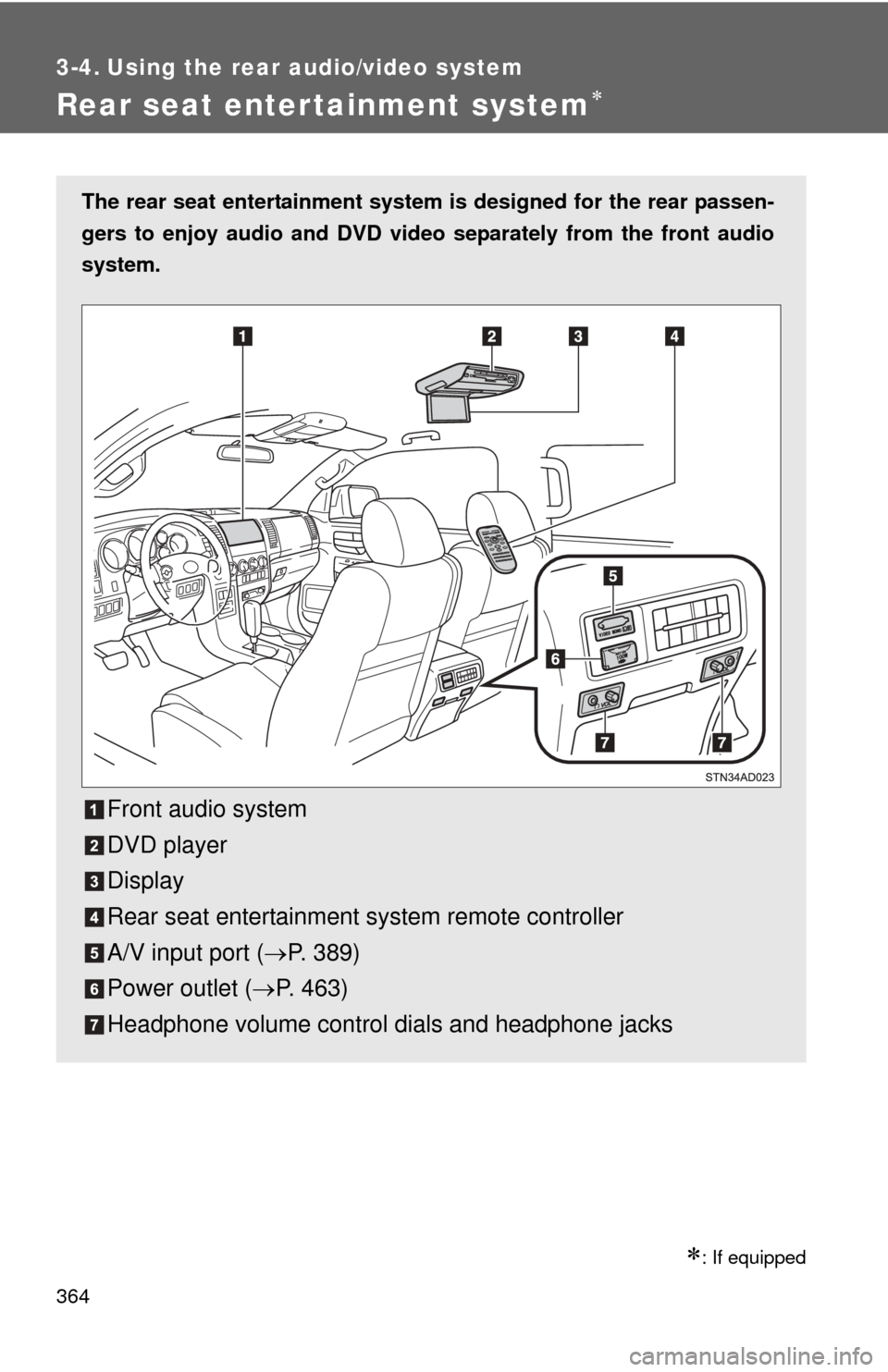
The rear seat entertainment system is designed for the rear passen-
gers to enjoy audio and DVD vide o separately from the front audio
system.
Front audio system
DVD player
Display
Rear seat entertainment system remote controller
A/V input port ( P. 389)
Power outlet ( P. 463)
Headphone volume control dials and headphone jacks
Page 369 of 688
369
3-4. Using the rear audio/video system
3
Interior features
■
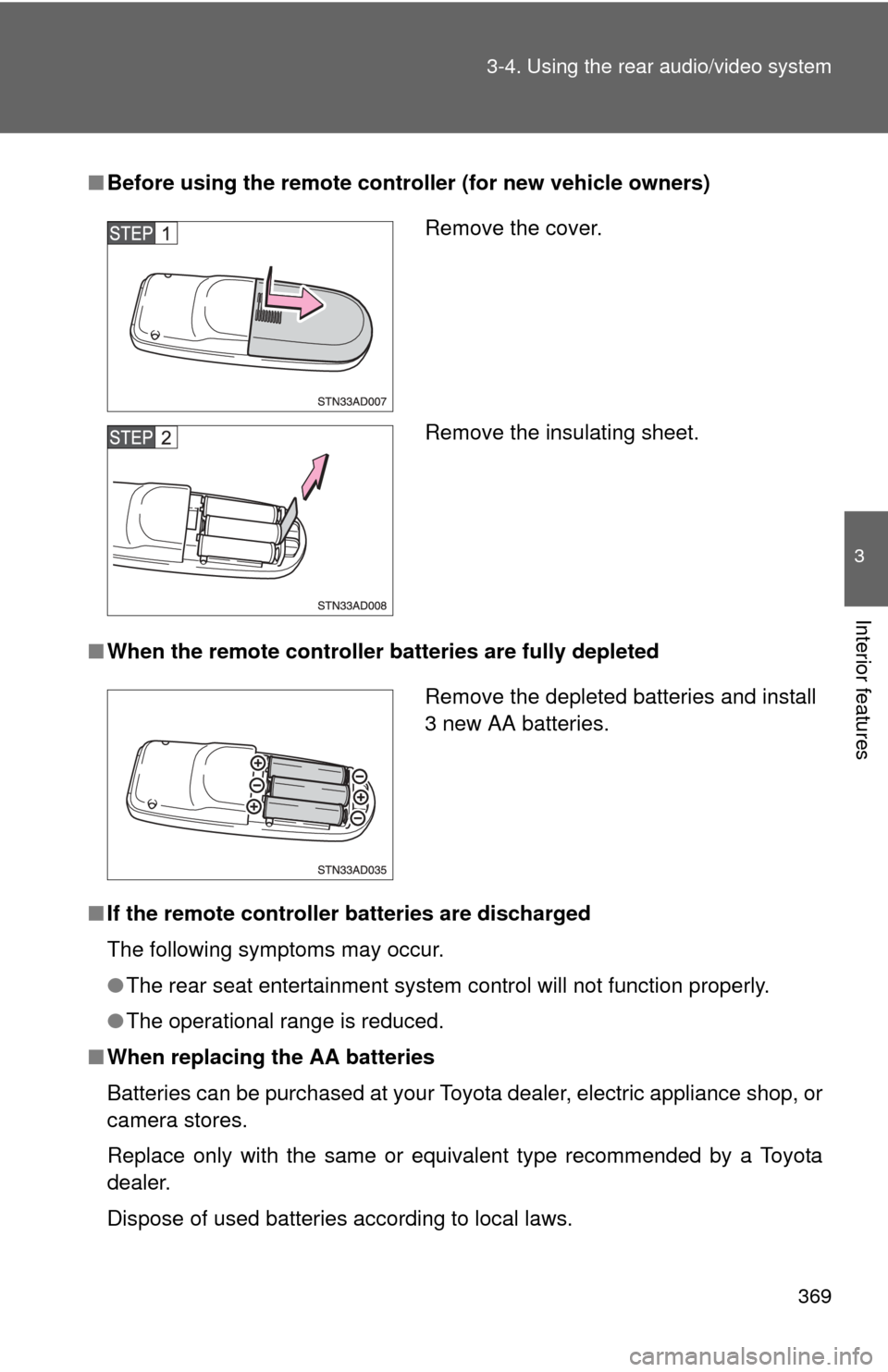
Before using the remote controller (for new vehicle owners)
■ When the remote controller batteries are fully depleted
■ If the remote controller batteries are discharged
The following symptoms may occur.
●The rear seat entertainment system control will not function properly.
● The operational range is reduced.
■ When replacing the AA batteries
Batteries can be purchased at your Toyota dealer, electric appliance shop, or
camera stores.
Replace only with the same or equivalent type recommended by a Toyota
dealer.
Dispose of used batteries according to local laws.
Remove the cover.
Remove the insulating sheet.
Remove the depleted batteries and install
3 new AA batteries.