remote control TOYOTA SEQUOIA 2011 2.G Owners Manual
[x] Cancel search | Manufacturer: TOYOTA, Model Year: 2011, Model line: SEQUOIA, Model: TOYOTA SEQUOIA 2011 2.GPages: 688, PDF Size: 14.76 MB
Page 2 of 688

TABLE OF CONTENTSIndex
2
1-1. Key informationKeys ..................................... 32
1-2. Opening, closing and locking the doors
Wireless remote control ....... 33
Side doors ............................ 37
Back door ............................. 42
1-3. Adjustable components (seats, mirrors, steering
wheel)
Front seats ........................... 50
Rear seats ............................ 54
Driving position memory (driver’s seat) ..................... 64
Head restraints ..................... 67
Seat belts ............................. 71
Steering wheel (manually adjustable type) .................. 81
Steering wheel (power-adjustable type)...... 82
Anti-glare inside rear view mirror .................................. 83
Outside rear view mirrors ..... 86
Roof luggage carrier............. 90
1-4. Opening and closing the windows and moon roof
Power windows .................... 92
Power back window ............. 94
Moon roof ............................. 96 1-5. Refueling
Opening the fuel tank cap..... 99
1-6. Theft deterrent system Engine immobilizer system .............................. 104
Alarm .................................. 106
1-7. Safety information Correct driving posture ....... 109
SRS airbags ....................... 111
Front passenger occupant classification system ......... 124
Child restraint systems ....... 129
Installing child restraints ..... 133
2-1. Driving procedures Driving the vehicle .............. 148
Engine (ignition) switch....... 157
Automatic transmission ...... 160
Turn signal lever ................. 164
Parking brake ..................... 165
Horn .................................... 166
2-2. Instrument cluster Gauges and meters ............ 167
Indicators and warning lights ................................. 172
Multi-information display ..... 177
Accessory meter ................. 183
1Before driving
2When driving
Page 3 of 688

1
2
3
4
5
6
7
3
2-3. Operating the lights and wipers
Headlight switch .................. 186
Fog light switch ................... 190
Windshield wipers and washer .............................. 191
Rear window wiper and washer .............................. 193
Headlight cleaner switch ..... 194
2-4. Using other driving systems Cruise control ...................... 195
Dynamic laser cruise control ............................... 198
Intuitive parking assist......... 209
Rear view monitor system... 216
Electronically modulated air suspension................... 223
AVS (Adaptive Variable Suspension System) ......... 228
Four-wheel drive system ..... 229
AUTO LSD system.............. 234
Driving assist systems ........ 236
2-5. Driving information Off-road precautions ........... 242
Cargo and luggage ............. 247
Vehicle load limits ............... 251
Winter driving tips ............... 253
Trailer towing ...................... 257
Dinghy towing ..................... 277 3-1. Using the air conditioning
system and defogger
Front air conditioning system .............................. 280
Rear air conditioning system .............................. 288
Rear window and outside rear view mirror
defoggers ......................... 292
Windshield wiper de-icer .... 294
Using the steering wheel climate remote control
switches ........................... 295
3-2. Using the audio system Audio system ...................... 297
Using the radio ................... 301
Using the CD player ........... 309
Playing MP3 and WMA discs ....................... 318
Operating an iPod .............. 326
Operating a USB memory .. 332
Optimal use of the audio system .............................. 339
Using the AUX port............. 343
Using the steering wheel audio switches.................. 345
3Interior features
Page 5 of 688

1
2
3
4
5
6
7
5
Luggage compartment features ............................. 480
Garage door opener............ 485
Compass ............................. 491
4-1. Maintenance and care Cleaning and protecting the vehicle exterior............ 498
Cleaning and protecting the vehicle interior............. 500
4-2. Maintenance Maintenance requirements ..................... 503
General maintenance.......... 505
Emission inspection and maintenance (I/M)
programs........................... 508
4-3. Do-it-yourself maintenance Do-it-yourself service precautions ....................... 509
Hood ................................... 513
Engine compartment ........... 514
Tires .................................... 529
Tire inflation pressure ......... 536
Wheels ................................ 540
Air conditioning filter............ 542
Wireless remote control battery ............................... 545
Checking and replacing fuses ................................. 547
Light bulbs........................... 558 5-1. Essential information
Emergency flashers............ 572
If your vehicle needs to be towed....................... 573
If you think something is wrong ............................... 579
Fuel pump shut off system .............................. 580
Event data recorder ............ 581
5-2. Steps to take in an emergency If a warning light turns on or a warning buzzer
sounds.............................. 583
If a warning message is displayed (vehicles with
multi-information
display) ............................. 592
If you have a flat tire ........... 597
If the engine will not start.... 608
If the shift lever cannot be shifted from P ................... 610
If you lose your keys........... 611
If the vehicle battery is discharged........................ 612
If your vehicle overheats .... 615
If the vehicle becomes stuck ................................. 618
If your vehicle has to be stopped in
an emergency .................. 619
4Maintenance and care
5When trouble arises
Page 22 of 688
22
Instrument panelPictorial index
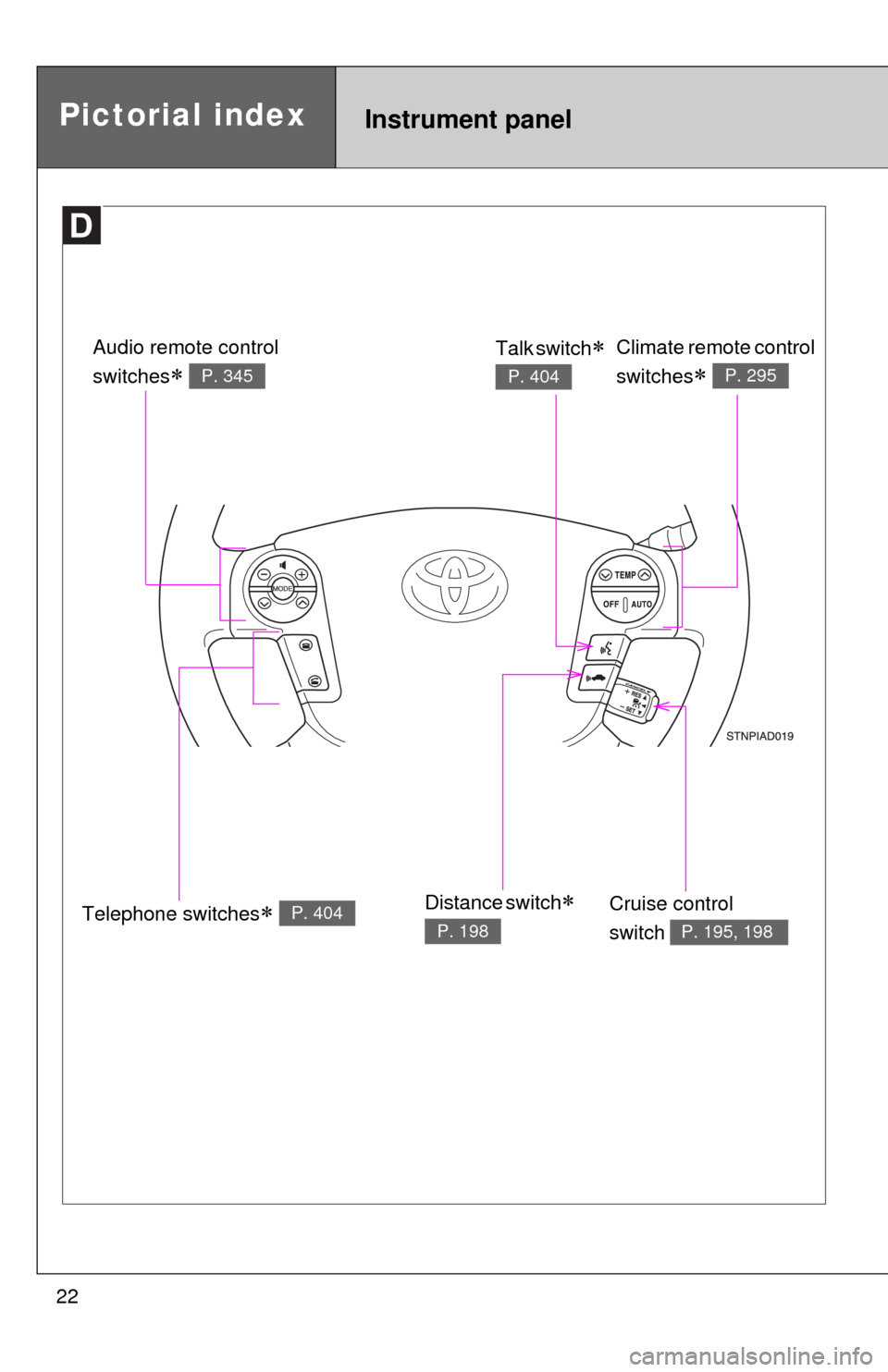
Telephone switches P. 404
Audio remote control
switches
P. 345
Climate remote control
switches
P. 295
Cruise control
switch
P. 195, 198
Talk switch
P. 404
Distance switch
P. 198
Page 27 of 688

27
Installation of a mobile two-way radio system
As the installation of a mobile two-way radio system in your vehicle could
affect electronic systems such as the multiport fuel injection system/sequen-
tial multiport fuel injection system, cruise control system, anti-lock brake sys-
tem, SRS airbag system and seat belt pretensioner system, be sure to check
with your Toyota dealer for precautionary measures or special instructions
regarding installation.
Scrapping your Toyota
The SRS airbag and seat belt pretensioner devices in your Toyota contain
explosive chemicals. If the vehicle is scrapped with the airbags and seat belt
pretensioners left as they are, this may cause an accident such as fire. Be
sure to have the systems of the SRS airbag and seat belt pretensioner
removed and disposed of by a qualified service shop or by your Toyota
dealer before you scrap your vehicle.
Perchlorate Material
Special handling may apply,
See www.dtsc.ca.gov/hazardouswaste/perchlorate.
Your vehicle has components that may contain perchlorate. These compo-
nents may include airbag, seat belt pretensioners, and wireless remote con-
trol batteries.
Page 31 of 688
Before driving1
31
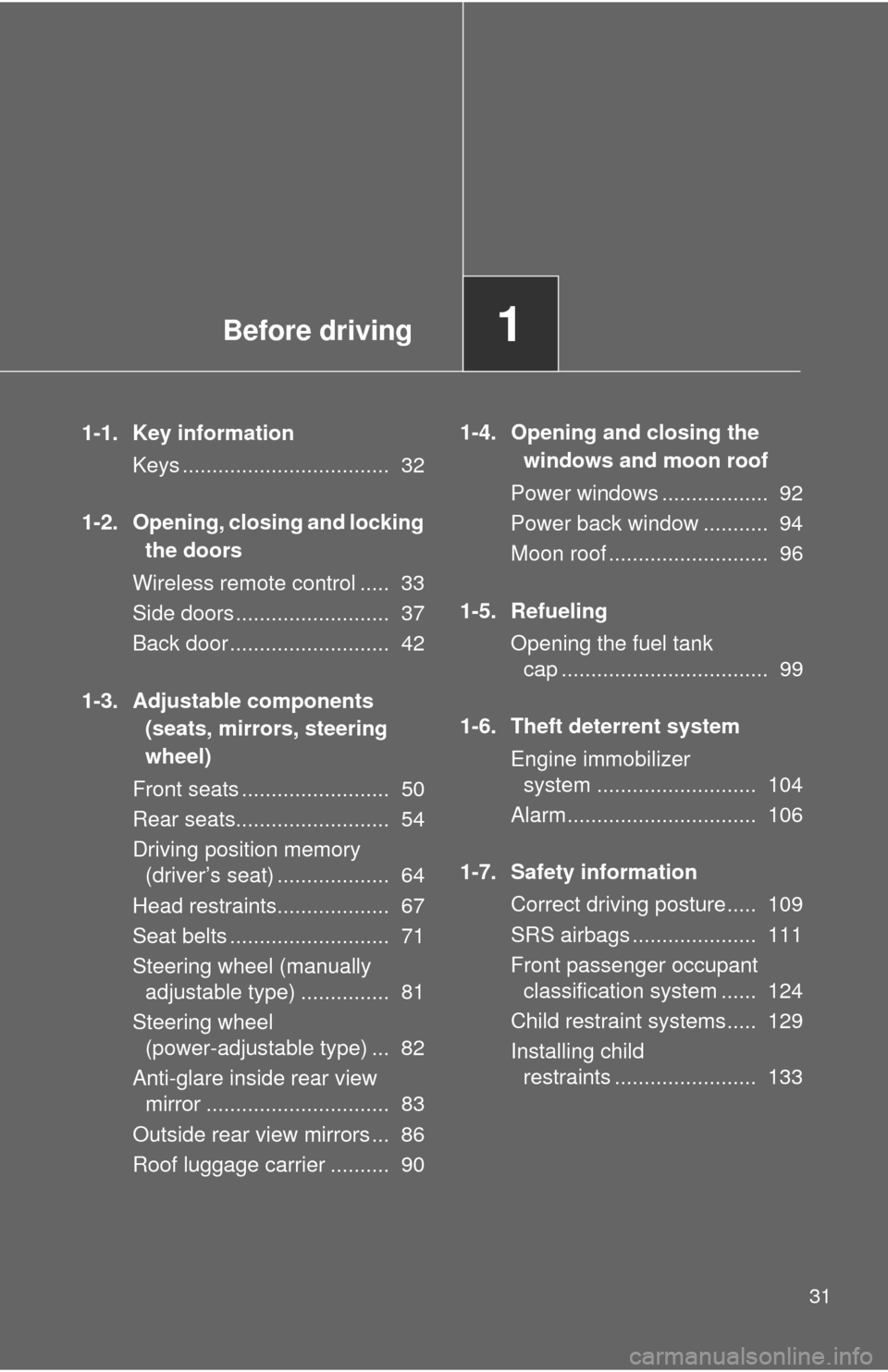
1-1. Key informationKeys ................................... 32
1-2. Opening, closing and locking the doors
Wireless remote control ..... 33
Side doors .......................... 37
Back door ........................... 42
1-3. Adjustable components (seats, mirrors, steering
wheel)
Front seats ......................... 50
Rear seats.......................... 54
Driving position memory (driver’s seat) ................... 64
Head restraints................... 67
Seat belts ........................... 71
Steering wheel (manually adjustable type) ............... 81
Steering wheel (power-adjustable type) ... 82
Anti-glare inside rear view mirror ............................... 83
Outside rear view mirrors ... 86
Roof luggage carrier .......... 90 1-4. Opening and closing the
windows and moon roof
Power windows .................. 92
Power back window ........... 94
Moon roof ........................... 96
1-5. Refueling Opening the fuel tank cap ................................... 99
1-6. Theft deterrent system Engine immobilizer system ........................... 104
Alarm................................ 106
1-7. Safety information Correct driving posture..... 109
SRS airbags ..................... 111
Front passenger occupant classification system ...... 124
Child restraint systems..... 129
Installing child restraints ........................ 133
Page 33 of 688
33
1
Before driving
1-2. Opening, closing and locking the doors
Wireless remote control
■Operation signals
Doors: A buzzer sounds and the emergency flashers flash to indicate that
the doors have been locked/unlocked. (Locked: Once; Unlocked:
Twice)
Back door: A buzzer sounds and the emergency flashers flash twice to indicate that the back door has been opened/closed.
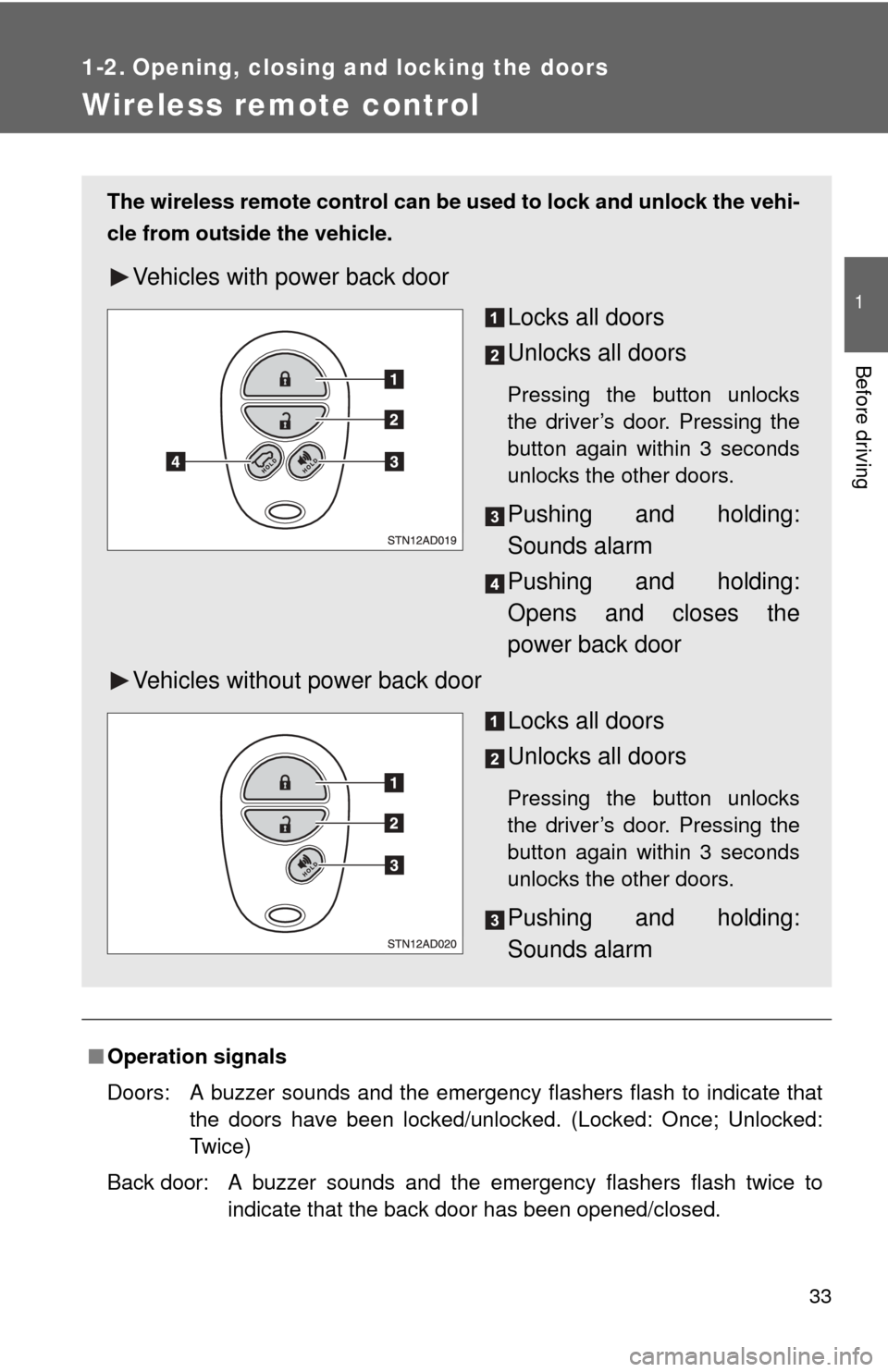
The wireless remote control can be used to lock and unlock the vehi-
cle from outside the vehicle.
Vehicles with power back door
Locks all doors
Unlocks all doors
Pressing the button unlocks
the driver’s door. Pressing the
button again within 3 seconds
unlocks the other doors.
Pushing and holding:
Sounds alarm
Pushing and holding:
Opens and closes the
power back door
Vehicles without power back door
Locks all doors
Unlocks all doors
Pressing the button unlocks
the driver’s door. Pressing the
button again within 3 seconds
unlocks the other doors.
Pushing and holding:
Sounds alarm
Page 34 of 688
34 1-2. Opening, closing and locking the doors
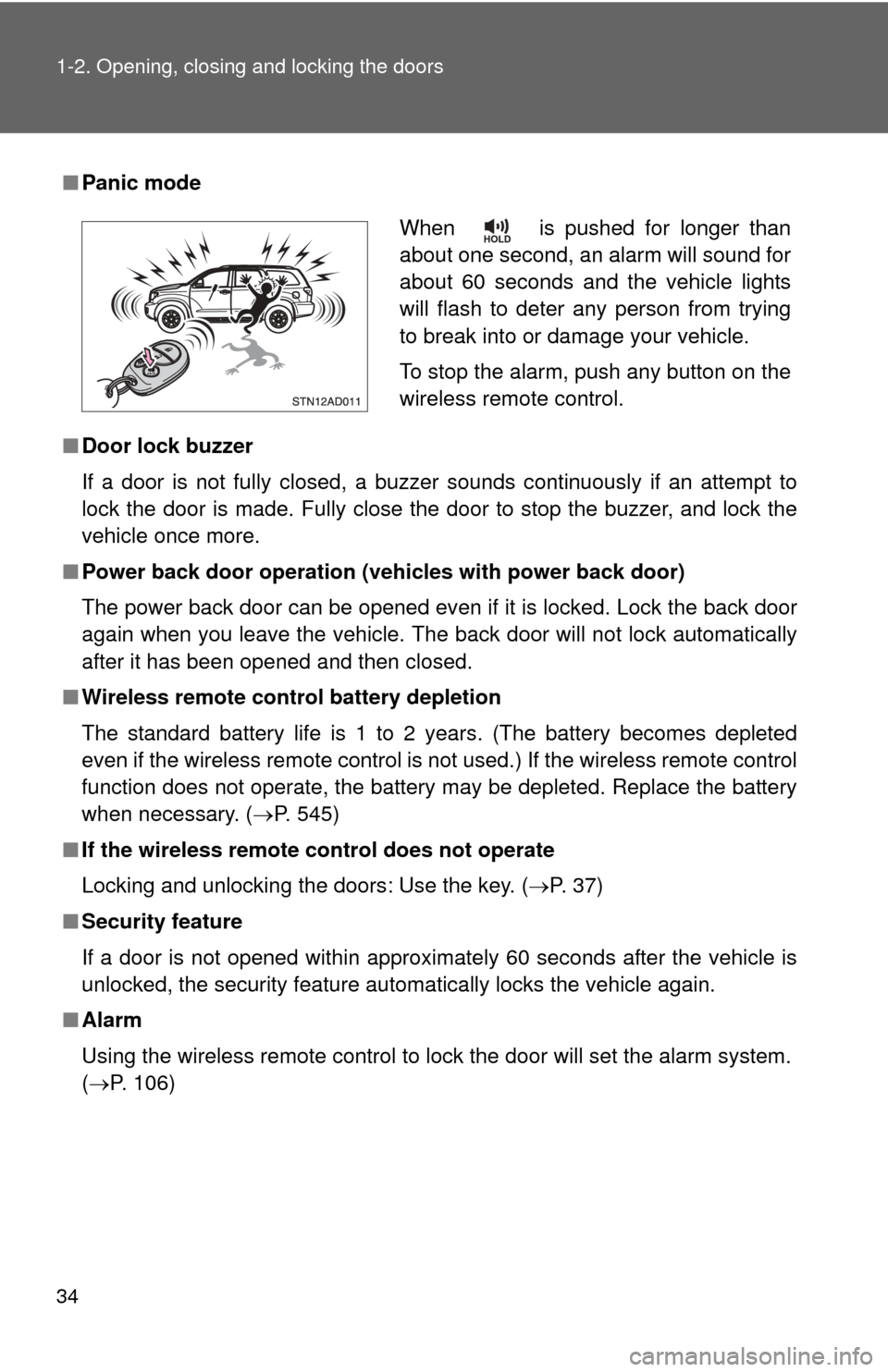
■Panic mode
■ Door lock buzzer
If a door is not fully closed, a buzzer sounds continuously if an attempt to
lock the door is made. Fully close the door to stop the buzzer, and lock the
vehicle once more.
■ Power back door operation (veh icles with power back door)
The power back door can be opened even if it is locked. Lock the back door
again when you leave the vehicle. The back door will not lock automatically
after it has been opened and then closed.
■ Wireless remote control battery depletion
The standard battery life is 1 to 2 years. (The battery becomes depleted
even if the wireless remote control is not used.) If the wireless remot\
e control
function does not operate, the battery may be depleted. Replace the battery
when necessary. ( P. 545)
■ If the wireless remote control does not operate
Locking and unlocking the doors: Use the key. ( P. 37)
■ Security feature
If a door is not opened within approximately 60 seconds after the vehicle is
unlocked, the security feature automatically locks the vehicle again.
■ Alarm
Using the wireless remote control to lock the door will set the alarm sy\
stem.
(P. 106)
When is pushed for longer than
about one second, an alarm will sound for
about 60 seconds and the vehicle lights
will flash to deter any person from trying
to break into or damage your vehicle.
To stop the alarm, push any button on the
wireless remote control.
Page 35 of 688

35
1-2. Opening, closing and locking the doors
1
Before driving
■
Conditions affecting operation
The wireless remote control function may not operate normally in the follow-
ing situations.
●Near a TV tower, radio station, electr ic power plant, airport or other facil-
ity that generates strong radio waves
● When carrying a portable radio, cell ular phone or other wireless commu-
nication device
● When multiple wireless keys are in the vicinity
● When the wireless key has come into contact with, or is covered by a
metallic object
● When a wireless key (that emits radio waves) is being used nearby
● When the wireless key has been left near an electrical appliance such as
a personal computer
■ When riding in an aircraft
When bringing a wireless remote control onto an aircraft, make sure you do
not press any buttons on the wireless remote control while inside the aircraft
cabin. If you are carrying a wireless remote control in your bag etc, ensure
that the buttons are not likely to be pressed accidentally. Pressing a button
may cause the wireless remote control to emit radio waves that could inter-
fere with the operation of the aircraft.
■ Customization
●That can be configured at Toyota dealer (vehicles without multi-informa-
tion display)
Settings (e.g. wireless remote control) can be changed.
(Customizable features P. 650)
● It is possible to change the settings (vehicles with multi-information dis-
play) (Feature customization P. 179)
Page 36 of 688

36 1-2. Opening, closing and locking the doors
■Certification for wireless remote control
MODEL/FCC IDs:
Transmitter: GQ43VT20T
Receiver: GQ4-34R
IC (Canada) IDs:
Transmitter: 1470A-1T
Receiver: 1470A-6R
MADE IN U.S.A.
This device complies with Part 15 of the FCC Rules and with RSS-210 of
Industry Canada.
Operation is subject to the following two conditions: (1) This device may not
cause harmful interference, and (2) This device must accept any interfer-
ence received, including interference that may cause undesired operation\
.
WARNING: Changes or modifications not expressively approved by the
party responsible for compliance could void the user’s authority to operate
the equipment.