mirror TOYOTA SEQUOIA 2011 2.G Workshop Manual
[x] Cancel search | Manufacturer: TOYOTA, Model Year: 2011, Model line: SEQUOIA, Model: TOYOTA SEQUOIA 2011 2.GPages: 688, PDF Size: 14.76 MB
Page 90 of 688
90
1-3. Adjustable components (seats, mirrors, steering wheel)
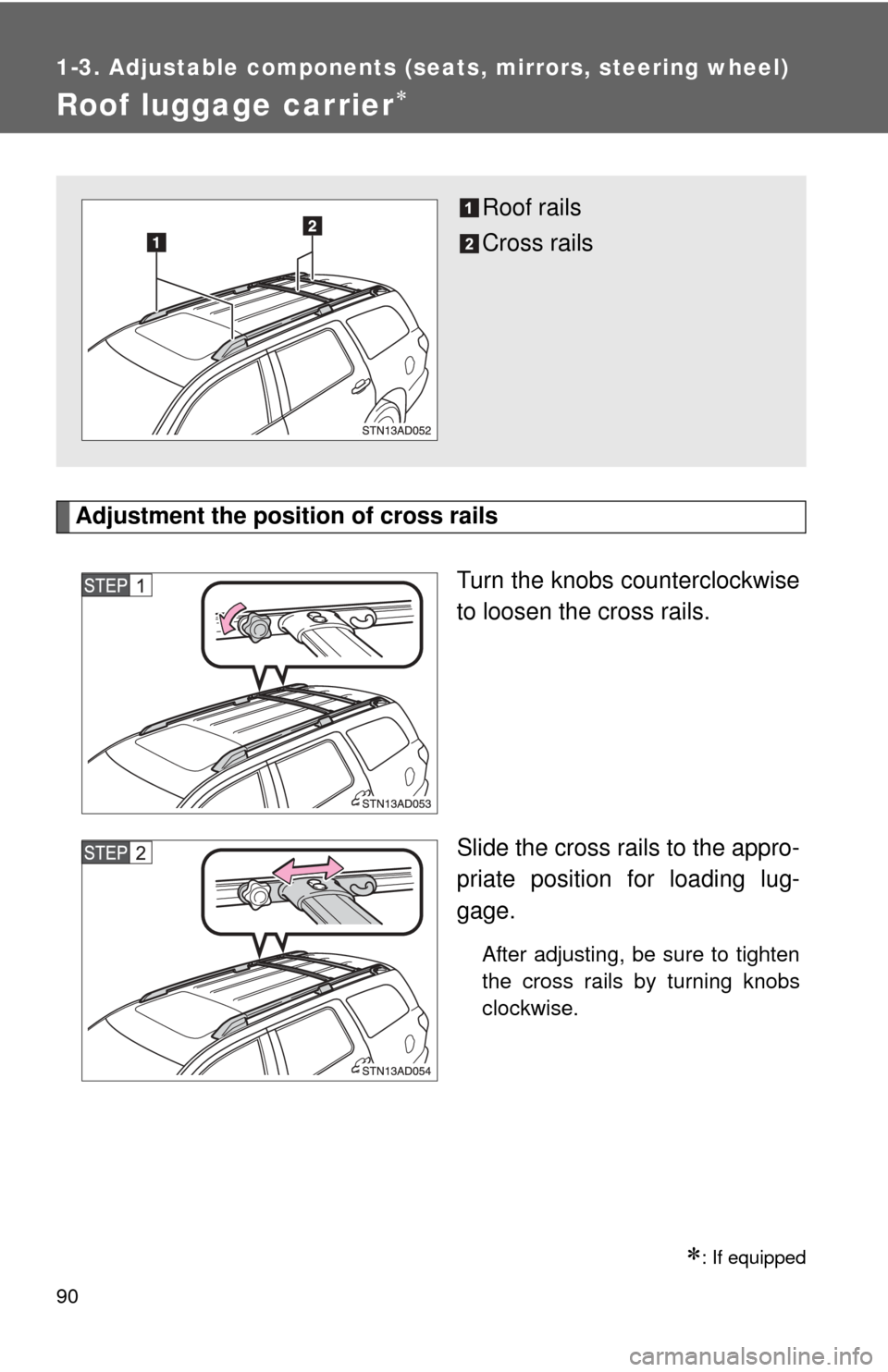
Roof luggage carrier
Adjustment the position of cross railsTurn the knobs counterclockwise
to loosen the cross rails.
Slide the cross rails to the appro-
priate position for loading lug-
gage.
After adjusting, be sure to tighten
the cross rails by turning knobs
clockwise.
: If equipped
Roof rails
Cross rails
Page 91 of 688

91
1-3. Adjustable components (s
eats, mirrors, steering wheel)
1
Before driving
CAUTION
■Cross rail adjustment
Make sure the cross rails are locked securely by applying pressure forward
and rearward.
Failure to do so may cause an accident, death or serious injury in the event
of emergency braking or a collision.
■ When loading cargo
Observe the following precautions:
●Place the cargo so that its weight is distributed evenly between the front
and rear axles.
● If loading long or wide cargo, never exceed the vehicle overall length or
width. ( P. 622)
● Before driving, make sure the cargo is securely fastened to the roof lug-
gage carrier.
● Loading cargo on the roof luggage carrier will raise the vehicle’s center of
gravity. Avoid high speeds, sudden starts, sharp turns, sudden braking or
abrupt maneuvers, otherwise unexpected loss of control or vehicle rollover
may occur.
● If driving for a long distance, on rough roads, or at high speeds, stop the
vehicle occasionally during the trip to make sure the cargo remains
securely fastened.
● Do not exceed 150 lb. (68 kg) cargo weight on the roof luggage carrier.
NOTICE
■When loading the luggage
Be careful not to scratch the surface of the moon roof.
Page 151 of 688

151
2-1. Driving procedures
2
When driving
CAUTION
■
When driving the vehicle
●Do not shift the shift lever to N while the vehicle is moving.
Doing so may cause the engine brake to not operate properly and lead to
an accident.
● Do not turn the engine off while driving.
The power steering and brake booster systems will not operate properly if
the engine is not running.
● Use engine braking (downshift) to maintain a safe speed when driving
down a steep hill.
Using the brakes continuously may cause the brakes to overheat and lose
effectiveness. ( P. 160)
● When stopped on an inclined surface, use the brake pedal and parking
brake to prevent the vehicle from rolling backward or forward and causing
an accident.
● Do not adjust the position of the steering wheel, the seat, or the inside or
outside rear view mirrors while driving.
Doing so may result in a loss of vehicle control that can cause accidents
that may result in death or serious injury.
● Always check that all passengers’ arms, heads or other parts of their bod-
ies are not outside the vehicle, as this may result in death or serious injury.
● Do not drive in excess of the speed limit. Even if the legal speed limit per-
mits it, do not drive over 85 mph (140 km/h) unless your vehicle has high-
speed capability tires. Driving over 85 mph (140 km/h) may result in tire
failure, loss of control and possible injury. Be sure to consult a tire dealer
to determine whether the tires on your vehicle are high-speed capability
tires or not before driving at such speeds.
● If you drive through deep water over about 20 in. (500 mm) in depth, put
the vehicle height in the HI mode using the height control switch and then
change to manual mode by pushing the height control mode select switch.
Drive your vehicle at 18 mph (30 km/h) or less. Do not drive through water
deeper than about 28 in. (700 mm) even if the vehicle height is in “HI”
mode.
Page 216 of 688
216
2-4. Using other driving systems
Rear view monitor system
: If equipped
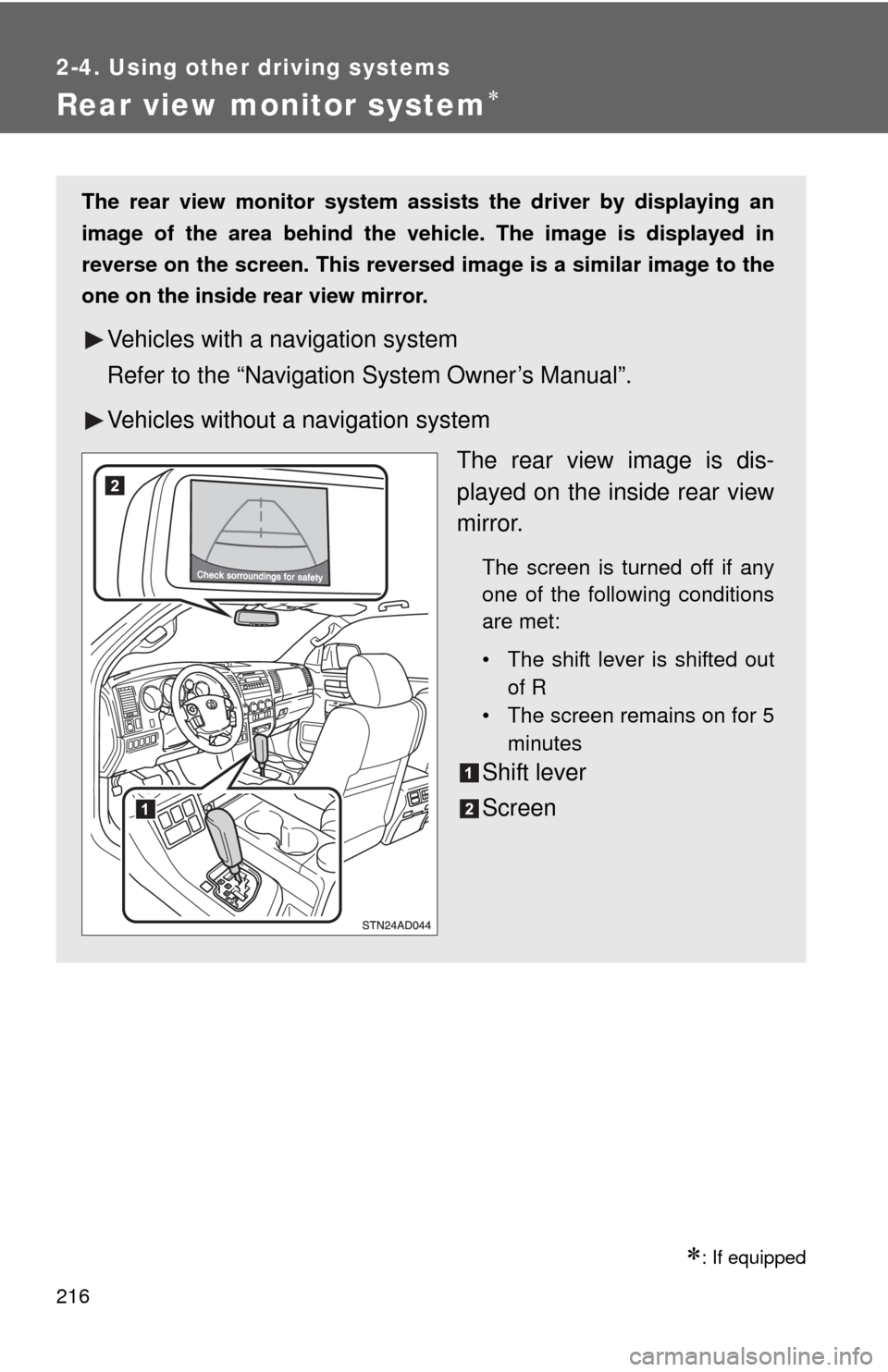
The rear view monitor system assists the driver by displaying an
image of the area behind the vehicle. The image is displayed in
reverse on the screen. This reversed im age is a similar image to the
one on the inside rear view mirror.
Vehicles with a navigation system
Refer to the “Navigation System Owner’s Manual”.
Vehicles without a navigation system
The rear view image is dis-
played on the inside rear view
mirror.
The screen is turned off if any
one of the following conditions
are met:
• The shift lever is shifted outof R
• The screen remains on for 5
minutes
Shift lever
Screen
Page 220 of 688
220 2-4. Using other driving systems
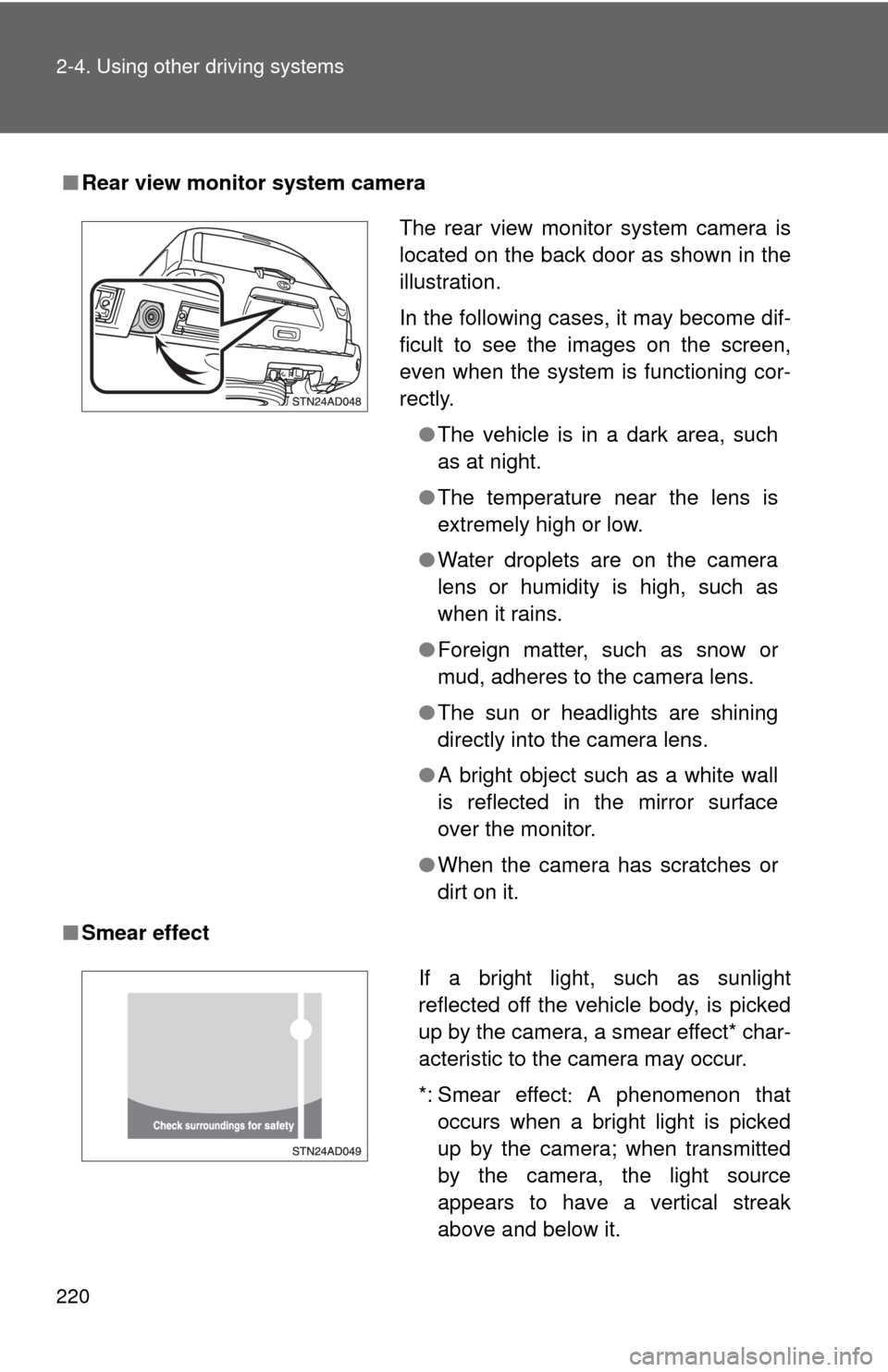
■Rear view monitor system camera
■ Smear effect
The rear view monitor system camera is
located on the back door as shown in the
illustration.
In the following cases, it may become dif-
ficult to see the images on the screen,
even when the system is functioning cor-
rectly.
●The vehicle is in a dark area, such
as at night.
● The temperature near the lens is
extremely high or low.
● Water droplets are on the camera
lens or humidity is high, such as
when it rains.
● Foreign matter, such as snow or
mud, adheres to the camera lens.
● The sun or headlights are shining
directly into the camera lens.
● A bright object such as a white wall
is reflected in the mirror surface
over the monitor.
● When the camera has scratches or
dirt on it.
If a bright light, such as sunlight
reflected off the vehicle body, is picked
up by the camera, a smear effect* char-
acteristic to the camera may occur.
*: Smear effect A phenomenon that
occurs when a bright light is picked
up by the camera; when transmitted
by the camera, the light source
appears to have a vertical streak
above and below it.
Page 221 of 688

221
2-4. Using other
driving systems
2
When driving
■Flicker effect
When the camera is used under fluorescent lights, sodium lights, mercury
lights, etc., the lights and the illuminated areas may appear to flicker.
CAUTION
■When using the rear view monitor system
Observe the following precautions to avoid an accident that could result in
death or serious injuries.
●Never depend solely on the rear view monitor system when reversing.
● Always check visually and with the mirrors to confirm your intended path is
clear.
● Always check the vehicle surroundi ng area, because the guide lines are
estimates of distance and location.
● The guide lines are assistant lines and do not change even if the steering
wheel is turned.
● Depicted distances between objects and flat surfaces differ from actual
distances.
● Do not use the system if back door is open.
■ Conditions which may affect the rear view monitor system
● If the back of the vehicle has been hit, the camera’s position and mounting
angle may have changed. Have the vehicle inspected by your Toyota
dealer.
● Rapid temperature changes, such as when hot water is poured on the
vehicle in cold weather, may cause the system to function abnormally.
● If the camera lens is dirty, it cannot transmit a clear image. Rinse with
water and wipe with a soft cloth. If extremely dirty, wash with a mild
cleanser and rinse.
● The displayed image may be darker and moving images may be slightly
distorted when the system is cold.
■ Caution while dr iving in reverse
Do not change modes while the vehicle is moving.
Page 253 of 688
253
2-5. Driving information
2
When driving
Winter driving tips
Carry out the necessary preparations and inspections before driving
the vehicle in winter. Always drive the vehicle in a manner appropri-
ate to the prevailing weather conditions.
■ Pre-winter preparations
●Use fluids that are appropriate to the prevailing outside tem-
peratures.
• Engine oil
• Engine coolant
• Washer fluid
● Have a service technician inspect the level and specific grav-
ity of battery electrolyte.
● Have the vehicle fitted with four snow tires or purchase a set
of tire chains for the rear tires.
Ensure that all tires are the same size and brand, and that chains
match the size of the tires.
■Before driving the vehicle
Perform the following according to the driving conditions.
●Do not try to forcibly open a window, scrape an outside rear
view mirror surface or move a wiper or outside rear view mir-
ror that is frozen. Pour warm water over the frozen area to
melt the ice. Wipe away the water immediately to prevent it
from freezing.
● To ensure proper operation of th e climate control system fan,
remove any snow that has accumulated on the air inlet vents
in front of the windshield.
● Remove any ice that has accumu lated on the vehicle chassis.
● Periodically check for and remove any excess ice or snow
that may have accumulated in the wheel well or on the
brakes.
Page 272 of 688
272 2-5. Driving information
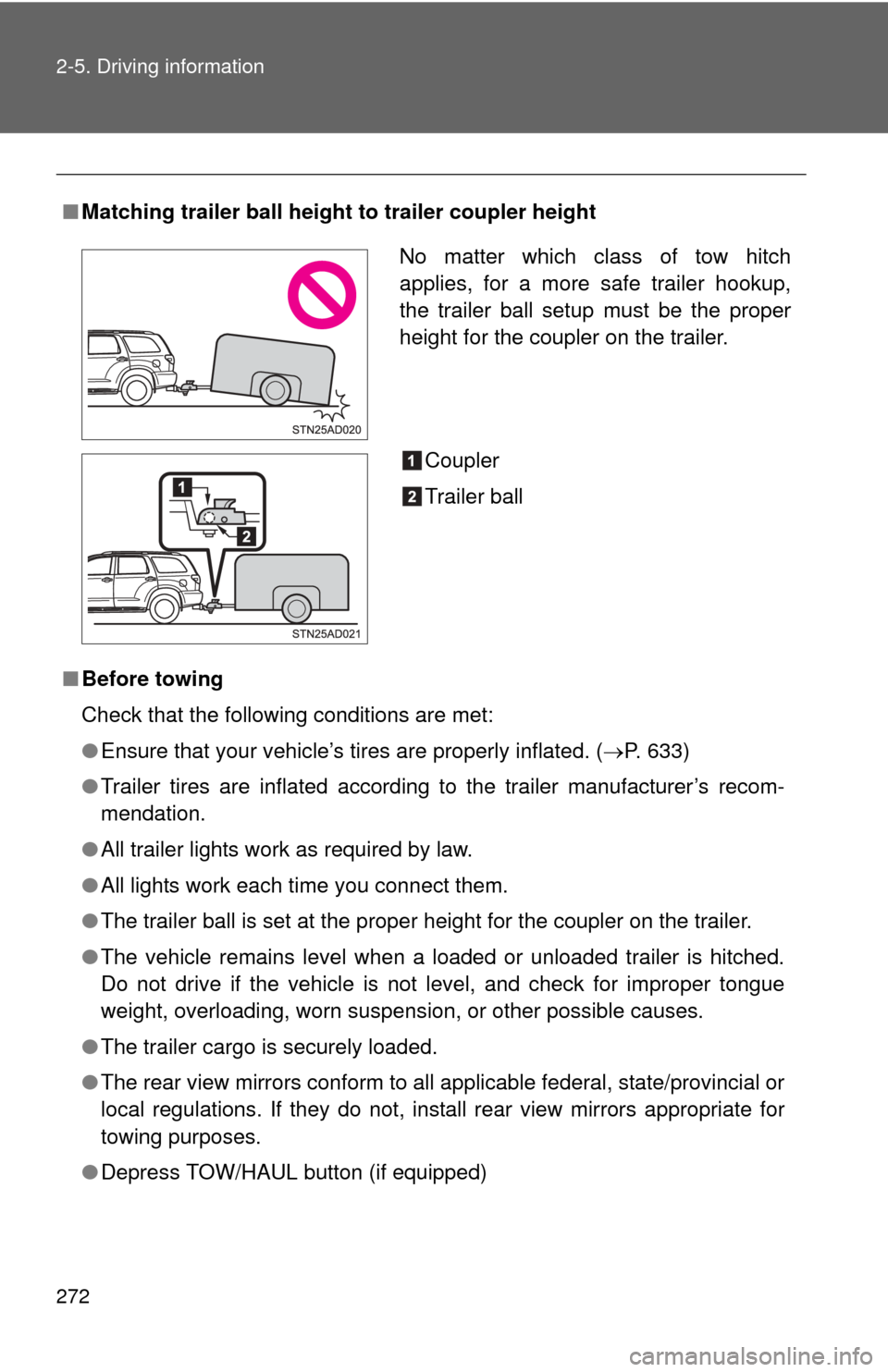
■Matching trailer ball height to trailer coupler height
■ Before towing
Check that the following conditions are met:
●Ensure that your vehicle’s tires are properly inflated. ( P. 633)
● Trailer tires are inflated according to the trailer manufacturer’s recom-
mendation.
● All trailer lights work as required by law.
● All lights work each time you connect them.
● The trailer ball is set at the proper height for the coupler on the trai\
ler.
● The vehicle remains level when a loaded or unloaded trailer is hitched.
Do not drive if the vehicle is not level, and check for improper tongue
weight, overloading, worn suspension, or other possible causes.
● The trailer cargo is securely loaded.
● The rear view mirrors conform to all applicable federal, state/provincial or
local regulations. If they do not, install rear view mirrors appropriate for
towing purposes.
● Depress TOW/HAUL button (if equipped)
No matter which class of tow hitch
applies, for a more safe trailer hookup,
the trailer ball setup must be the proper
height for the coupler on the trailer.
Coupler
Trailer ball
Page 278 of 688
278
3-1. Using the air conditioning system and defogger
Front air conditioning system ........................... 280
Rear air conditioning system ........................... 288
Rear window and outside rear view mirror
defoggers ....................... 292
Windshield wiper de-icer ............................ 294
Using the steering wheel climate remote control
switches ......................... 295
3-2. Using the audio system Audio system ................... 297
Using the radio ................. 301
Using the CD player ......... 309
Playing MP3 and WMA discs............................... 318
Operating an iPod ............ 326
Operating a USB memory ................. 332
Optimal use of the audio system ........................... 339
Using the AUX port .......... 343
Using the steering wheel audio switches ............... 345 3-3. Using the Bluetooth® audio
system
Bluetooth
® audio
system ........................... 348
Using the Bluetooth
®
audio system.................. 351
Operating a Bluetooth
®
enabled portable
player ............................. 356
Setting up a Bluetooth
®
enabled portable
player ............................. 358
Bluetooth
® audio system
setup .............................. 363
3-4. Using the rear audio/video system
Rear seat entertainment system ........................... 364
Using the DVD player (DVD video) ................... 372
Using the DVD player (video CD)...................... 381
Using the DVD player (audio CD/CD text) ........ 384
Using the DVD player (MP3 discs) .................... 386
Using the video mode ...... 389
Changing the Setup Menu settings .......................... 391
Interior features3
Page 279 of 688
Interior features3
279
3-5. Using the hands-free phone system (for cellular phone)
Hands-free phone system features .......................... 399
Using the hands-free phone system ................ 403
Making a phone call ......... 412
Setting a cellular phone ... 416
Security and system setup .............................. 420
Using the phone book ...... 423
3-6. Using the interior lights Interior lights list ............... 429
• Personal/interior light main switch .................... 430
• Personal/interior lights ... 431
• Interior light .................... 432
3-7. Using the storage features List of storage features .... 433
• Glove boxes ................... 434
• Coin holder .................... 435
• Front console box .......... 436
• Card holder .................... 438
• Map holder ..................... 439
• Pen holder ..................... 441
• Tissue pocket................. 442
• Rear console box ........... 443
• Overhead console.......... 446
• Cup holders ................... 448
• Bottle holders ................. 452 • Auxiliary boxes ............... 453
3-8. Other interior features Sun visors ........................ 455
Vanity mirrors ................... 456
Clock ................................ 457
Outside temperature display............................ 458
Portable ashtray ............... 460
Cigarette lighter................ 461
Conversation mirror ......... 462
Power outlets ................... 463
Seat heaters..................... 469
Seat heaters and ventilators ...................... 472
Armrests........................... 474
Rear side sunshades ....... 475
Seatback table ................. 477
Floor mat .......................... 478
Luggage compartment features .......................... 480
Garage door opener......... 485
Compass .......................... 491