steering TOYOTA SEQUOIA 2011 2.G Repair Manual
[x] Cancel search | Manufacturer: TOYOTA, Model Year: 2011, Model line: SEQUOIA, Model: TOYOTA SEQUOIA 2011 2.GPages: 688, PDF Size: 14.76 MB
Page 158 of 688
158 2-1. Driving procedures
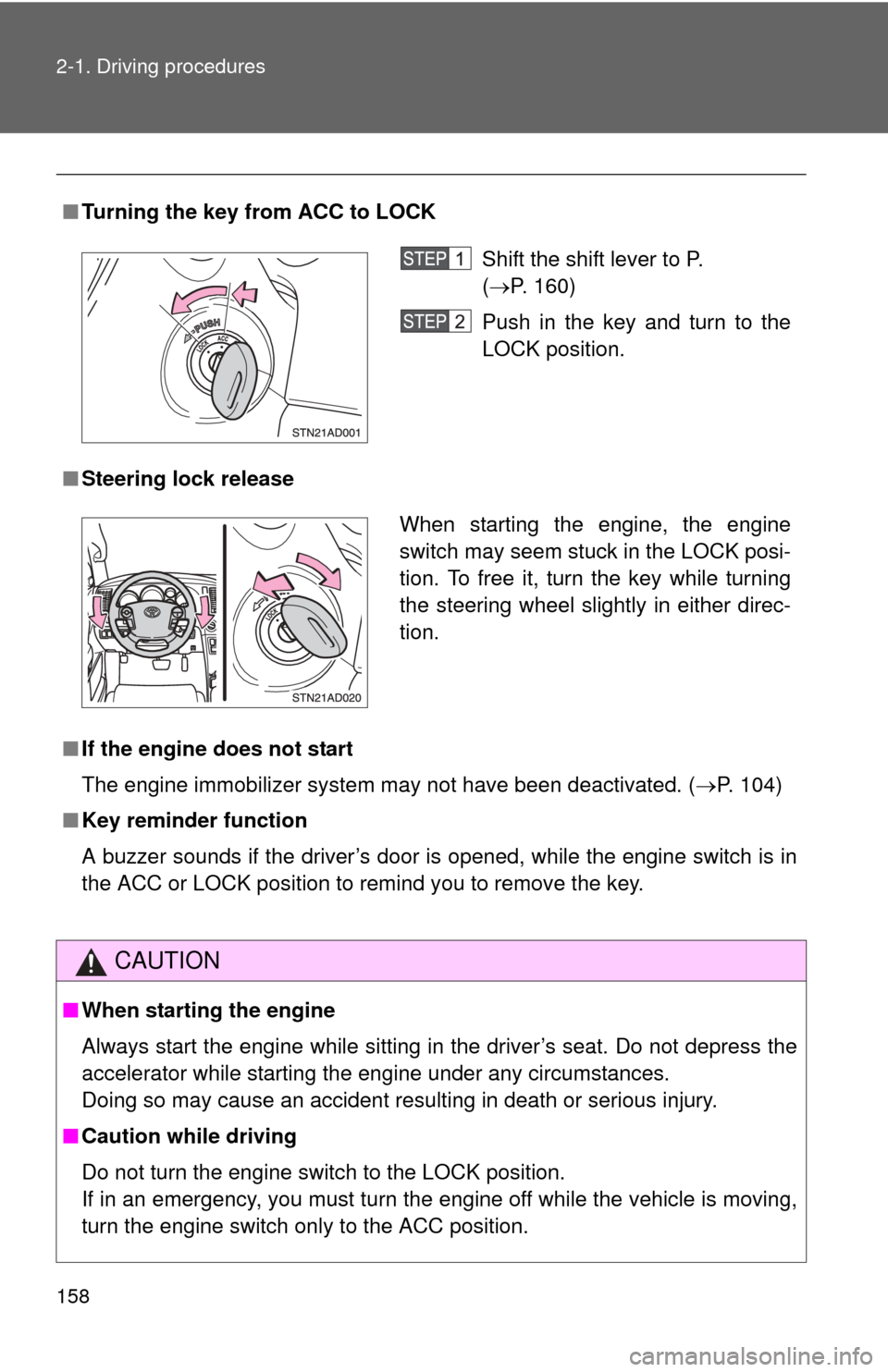
■Turning the key from ACC to LOCK
■ Steering lock release
■ If the engine does not start
The engine immobilizer system may not have been deactivated. ( P. 104)
■ Key reminder function
A buzzer sounds if the driver’s door is opened, while the engine switch is in
the ACC or LOCK position to remind you to remove the key.
CAUTION
■When starting the engine
Always start the engine while sitting in the driver’s seat. Do not depress the
accelerator while starting the engine under any circumstances.
Doing so may cause an accident resulting in death or serious injury.
■ Caution while driving
Do not turn the engine switch to the LOCK position.
If in an emergency, you must turn the engine off while the vehicle is moving,
turn the engine switch only to the ACC position.
Shift the shift lever to P.
(P. 160)
Push in the key and turn to the
LOCK position.
When starting the engine, the engine
switch may seem stuck in the LOCK posi-
tion. To free it, turn the key while turning
the steering wheel slightly in either direc-
tion.
Page 166 of 688
166
2-1. Driving procedures
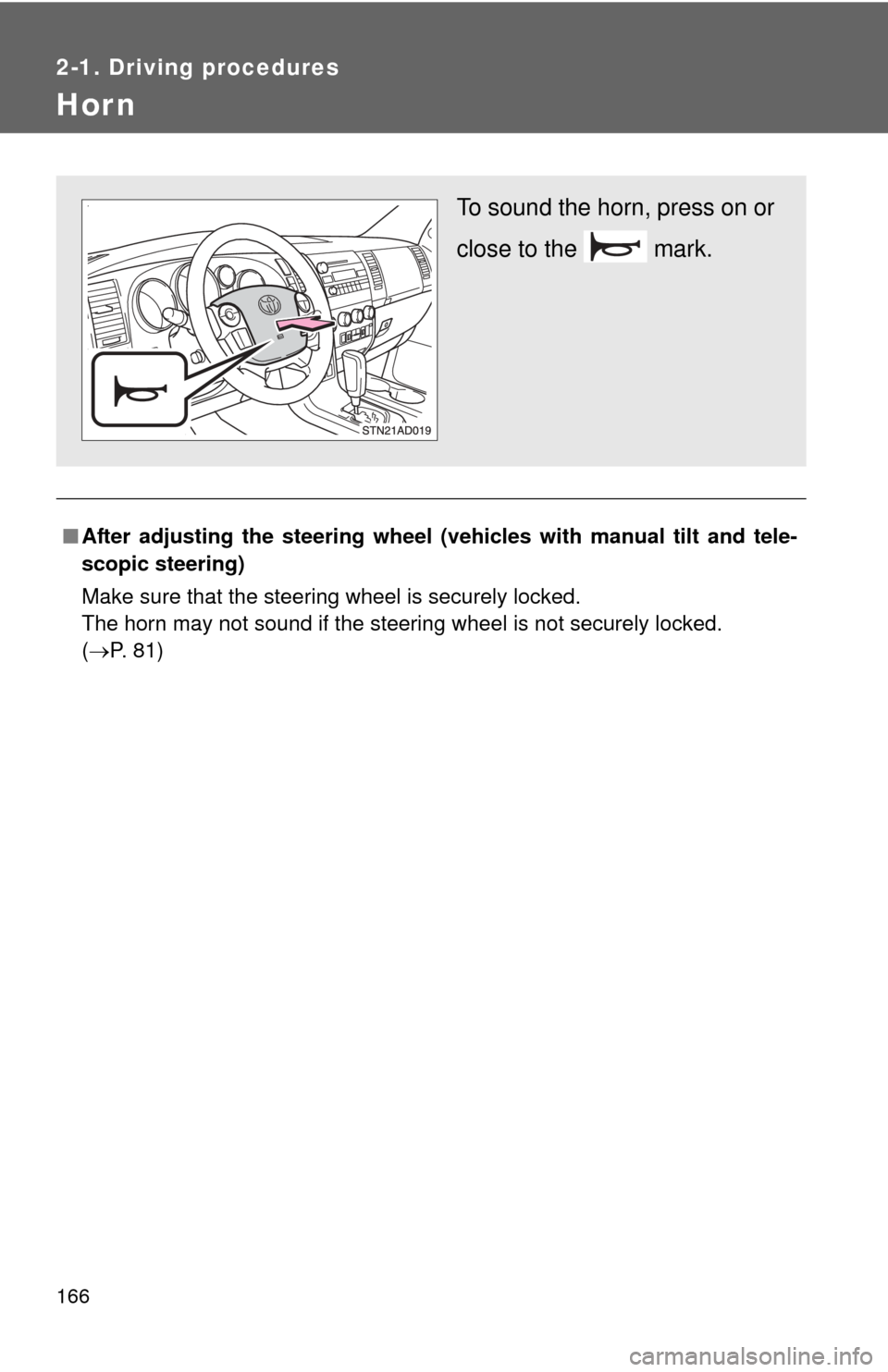
Hor n
■After adjusting the steering wheel (veh icles with manual tilt and tele-
scopic steering)
Make sure that the steering wheel is securely locked.
The horn may not sound if the steering wheel is not securely locked.
( P. 81)
To sound the horn, press on or
close to the mark.
Page 207 of 688

207
2-4. Using other
driving systems
2
When driving
CAUTION
■When the laser radar sensor may not be correctly detecting the vehicle
ahead
●There is an obstruction (protective film, sticker, etc.) on the reflectors on
the vehicle ahead, or reflectors are not installed on the vehicle ahead or
are damaged.
● Heavy luggage in the luggage compartment or rear seats is causing the
nose of your vehicle to tilt up.
● Vehicles that cut in suddenly
● Vehicles traveling at low speeds
● Vehicles that are not moving
● Vehicles with small rear ends (trailers with no load on board etc.)
● Motorcycles traveling in the same lane
■ Conditions under which the vehicle -to-vehicle distance control may
not function correctly
Apply the brakes as necessary in the following conditions as the laser radar
sensor may not be able to correctly detect vehicles ahead, and an accident
may result.
● When water or snow thrown up by the surrounding vehicles hinders the
functioning of the sensor
● When your vehicle is pointing upwards (caused by a heavy load in the lug-
gage compartment, etc.)
● When the road curves or when the lanes are narrow
● When steering wheel operation or your position in the lane is unstable
● When the vehicle ahead of you decelerates suddenly
● When towing a trailer
Page 221 of 688

221
2-4. Using other
driving systems
2
When driving
■Flicker effect
When the camera is used under fluorescent lights, sodium lights, mercury
lights, etc., the lights and the illuminated areas may appear to flicker.
CAUTION
■When using the rear view monitor system
Observe the following precautions to avoid an accident that could result in
death or serious injuries.
●Never depend solely on the rear view monitor system when reversing.
● Always check visually and with the mirrors to confirm your intended path is
clear.
● Always check the vehicle surroundi ng area, because the guide lines are
estimates of distance and location.
● The guide lines are assistant lines and do not change even if the steering
wheel is turned.
● Depicted distances between objects and flat surfaces differ from actual
distances.
● Do not use the system if back door is open.
■ Conditions which may affect the rear view monitor system
● If the back of the vehicle has been hit, the camera’s position and mounting
angle may have changed. Have the vehicle inspected by your Toyota
dealer.
● Rapid temperature changes, such as when hot water is poured on the
vehicle in cold weather, may cause the system to function abnormally.
● If the camera lens is dirty, it cannot transmit a clear image. Rinse with
water and wipe with a soft cloth. If extremely dirty, wash with a mild
cleanser and rinse.
● The displayed image may be darker and moving images may be slightly
distorted when the system is cold.
■ Caution while dr iving in reverse
Do not change modes while the vehicle is moving.
Page 228 of 688
228
2-4. Using other driving systems
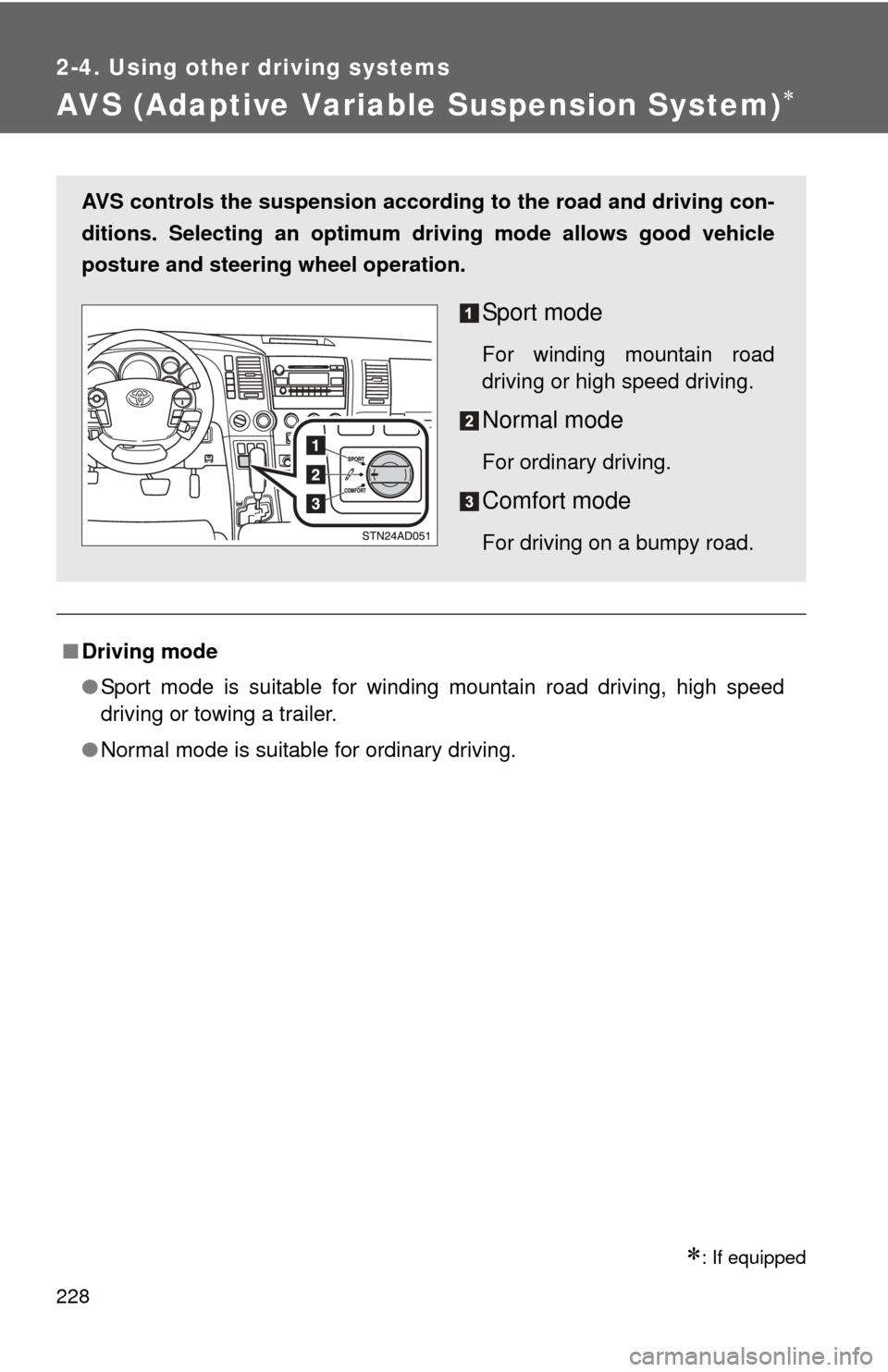
AVS (Adaptive Variable Suspension System)
: If equipped
■Driving mode
●Sport mode is suitable for winding mountain road driving, high speed
driving or towing a trailer.
● Normal mode is suitable for ordinary driving.
AVS controls the suspension accord ing to the road and driving con-
ditions. Selecting an optimum driving mode allows good vehicle
posture and steering wheel operation.
Sport mode
For winding mountain road
driving or high speed driving.
Normal mode
For ordinary driving.
Comfort mode
For driving on a bumpy road.
Page 235 of 688
235
2-4. Using other
driving systems
2
When driving
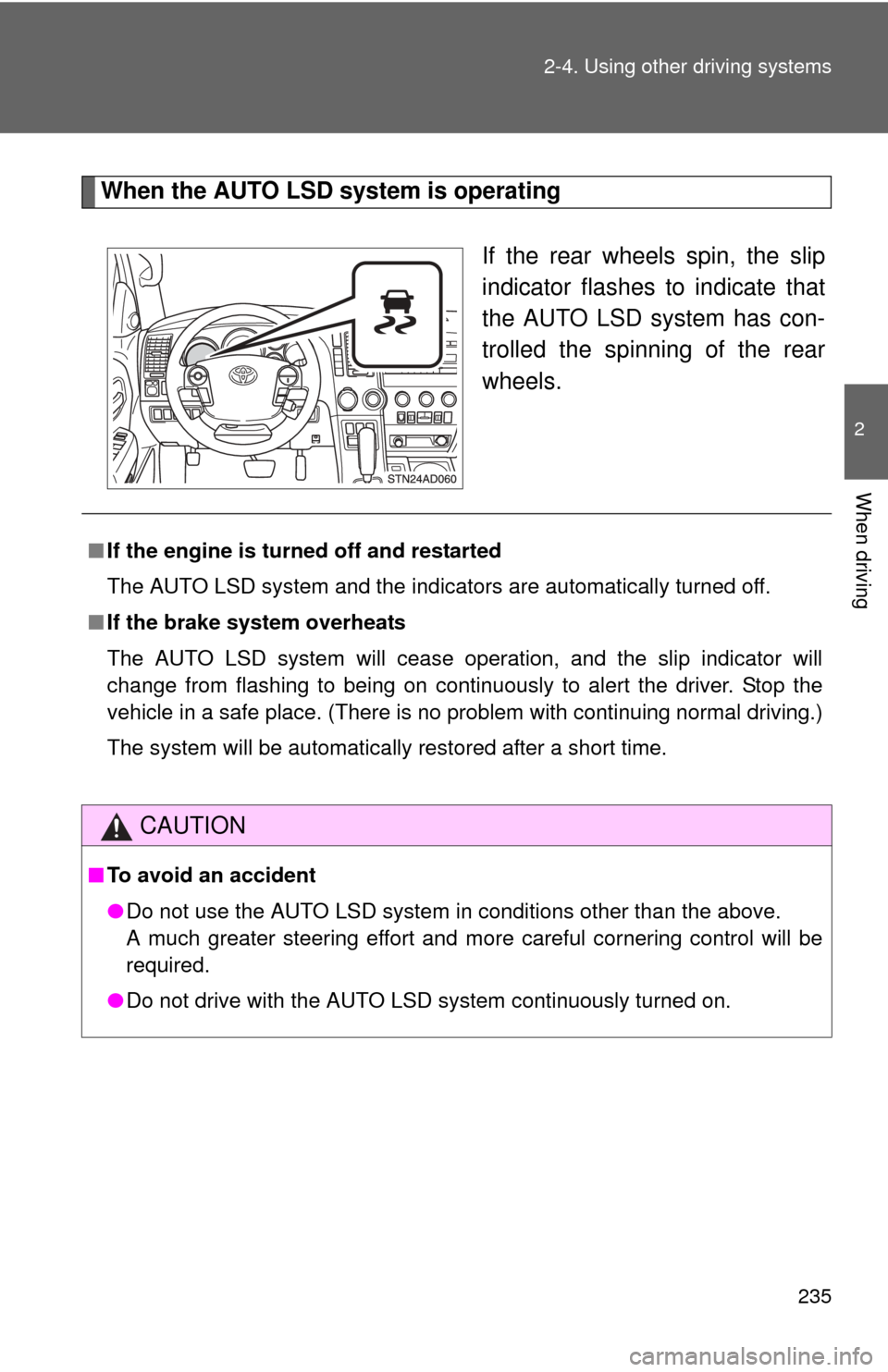
When the AUTO LSD system is operating
If the rear wheels spin, the slip
indicator flashes to indicate that
the AUTO LSD system has con-
trolled the spinning of the rear
wheels.
■If the engine is turned off and restarted
The AUTO LSD system and the indicators are automatically turned off.
■ If the brake system overheats
The AUTO LSD system will cease operation, and the slip indicator will
change from flashing to being on continuously to alert the driver. Stop the
vehicle in a safe place. (There is no problem with continuing normal driving.)
The system will be automatically restored after a short time.
CAUTION
■To avoid an accident
●Do not use the AUTO LSD system in conditions other than the above.
A much greater steering effort and more careful cornering control will be
required.
● Do not drive with the AUTO LSD system continuously turned on.
Page 239 of 688
239
2-4. Using other
driving systems
2
When driving
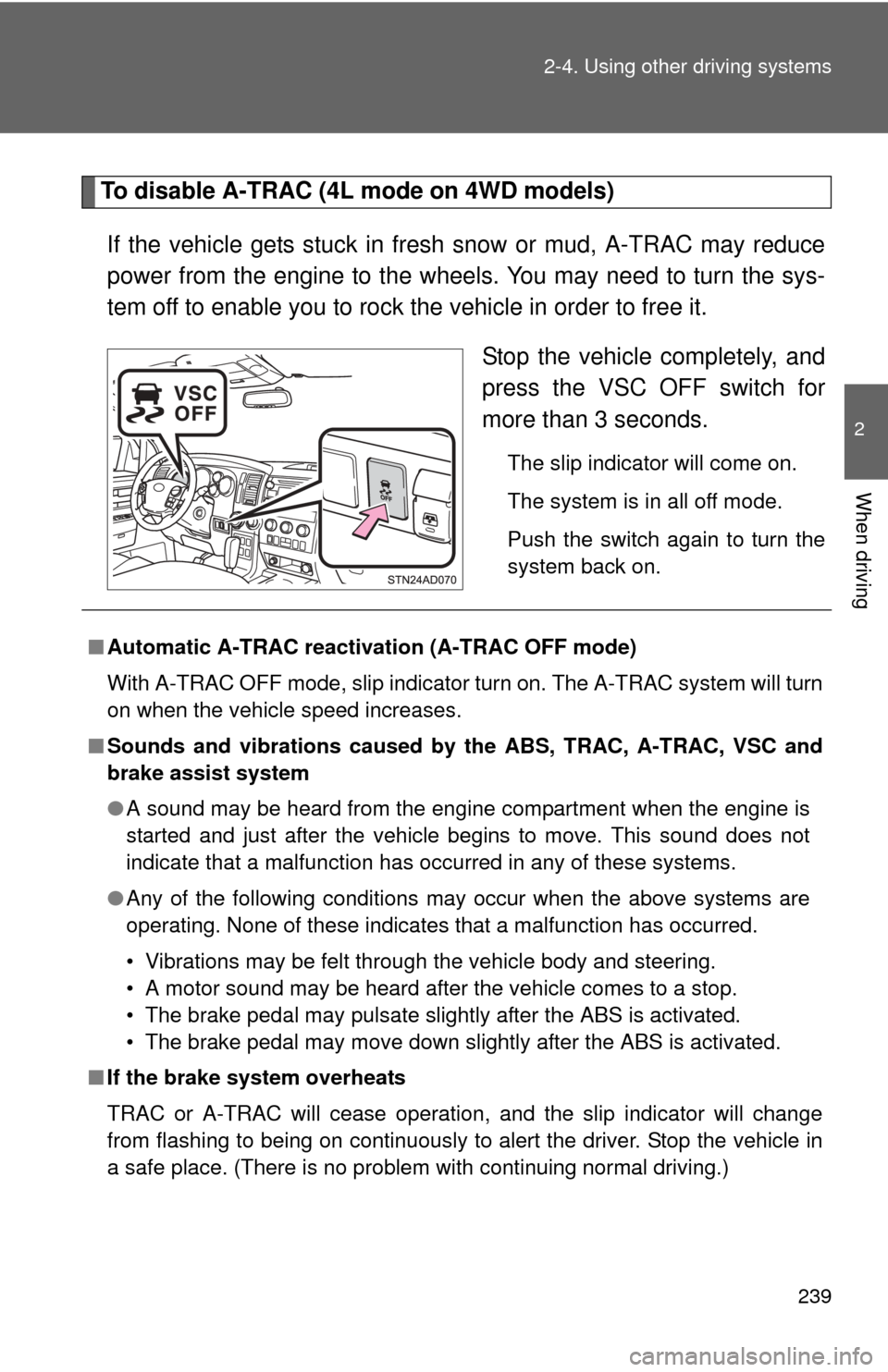
To disable A-TRAC (4L mode on 4WD models)
If the vehicle gets stuck in fresh snow or mud, A-TRAC may reduce
power from the engine to the wheels. You may need to turn the sys-
tem off to enable you to rock the vehicle in order to free it. Stop the vehicle completely, and
press the VSC OFF switch for
more than 3 seconds.
The slip indicator will come on.
The system is in all off mode.
Push the switch again to turn the
system back on.
■Automatic A-TRAC reactivat ion (A-TRAC OFF mode)
With A-TRAC OFF mode, slip indicator turn on. The A-TRAC system will turn
on when the vehicle speed increases.
■ Sounds and vibrations caused by the ABS, TRAC, A-TRAC, VSC and
brake assist system
●A sound may be heard from the engine compartment when the engine is
started and just after the vehicle begins to move. This sound does not
indicate that a malfunction has occurred in any of these systems.
● Any of the following conditions may occur when the above systems are
operating. None of these indicates that a malfunction has occurred.
• Vibrations may be felt through the vehicle body and steering.
• A motor sound may be heard after the vehicle comes to a stop.
• The brake pedal may pulsate slightly after the ABS is activated.
• The brake pedal may move down slightly after the ABS is activated.
■ If the brake system overheats
TRAC or A-TRAC will cease operation, and the slip indicator will change
from flashing to being on continuously to alert the driver. Stop the vehicle in
a safe place. (There is no problem with continuing normal driving.)
Page 240 of 688

240 2-4. Using other driving systems
■Shifting to 4L position
The VSC OFF indicator will come on.
If the center differential is locked, VSC is automatically turned off.
■ Power steering system operation sound
When you turn the engine switch to ON after the battery has been discon-
nected and reconnected, a sound may be heard from the engine compart-
ment.
This does not indicate a malfunction.
CAUTION
Any of the following conditions may result in an accident which could cause
death or serious injury.
■The ABS does not operate effectively when
●The limits of the gripping performance have been exceeded.
● The vehicle hydroplanes while driving at high speed on the wet or slick
road.
■ Stopping distance when the ABS is operating will exceed that of nor-
mal conditions
The ABS is not designed to shorten the vehicle’s stopping distance. Always
maintain a safe distance from the vehicle in front of you in the following situ-
ations.
●When driving on dirt, gravel or snow-covered roads
● When driving with tire chains
● When driving over bumps in the road
● When driving over roads with pothol es or roads with uneven roads
■ When VSC is activated
The slip indicator flashes. Always drive carefully. Reckless driving may
cause an accident. Exercise particular care when the indicator flashes.
■ TRAC or A-TRAC may not operate effectively when
Directional control and power may not be achievable while driving on slip-
pery road surfaces, even if TRAC or A-TRAC is operating.
Do not drive the vehicle in conditions where stability and power may be lost.
Page 245 of 688

245
2-5. Driving information
2
When driving
CAUTION
■
Off-road driving precautions
Always observe the following precautions to minimize the risk of serious per-
sonal injury or damage to your vehicle:
●Drive carefully when off the road. Do not take unnecessary risks by driving
in dangerous places.
● Do not grip the steering wheel spokes when driving off-road. A bad bump
could jerk the wheel and injure your hands. Keep both hands and espe-
cially your thumbs on the outside of the rim.
● Always check your brakes for effectiveness immediately after driving in
sand, mud, water or snow.
● After driving through tall grass, mud, rock, sand, rivers, etc., check that
there is no grass, bush, paper, rags, stone, sand, etc. adhering or trapped
on the underbody. Clear off any such matter from the underbody. If the
vehicle is used with these materials trapped or adhering to the underbody,
a breakdown or fire could occur.
● In a rollover crash, an unbelted person is significantly more likely to die
than a person wearing a seat belt. Therefore, the driver and all passengers
should fasten their seat belts whenever the vehicle is moving.
● When driving off-road or in rugged terrain, do not drive at excessive
speeds, jump, make sharp turns, strike objects, etc. This may cause loss
of control or vehicle rollover causing death or serious injury. You are also
risking expensive damage to your vehicle’s suspension and chassis.
Page 250 of 688
250 2-5. Driving information
CAUTION
■Capacity and distribution
●Even if the total load of occupant’s weight and the cargo load is less
than the total load capacity, do not apply the load unevenly. Improper
loading may cause deterioration of steering or braking control which
may cause death or serious injury.
■Roof luggage carrier precautions
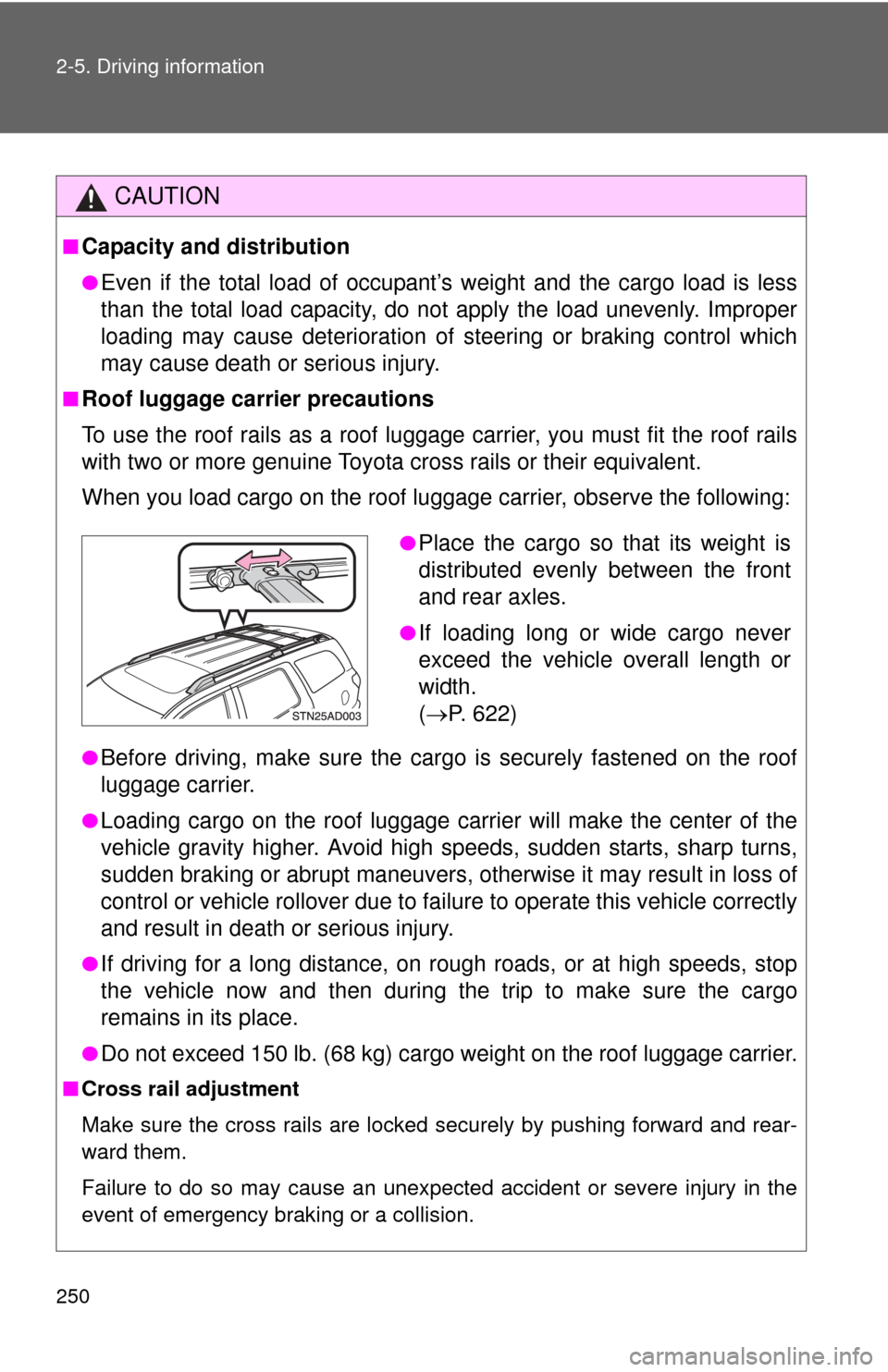
To use the roof rails as a roof luggag e carrier, you must fit the roof rails
with two or more genuine Toyota cross rails or their equivalent.
When you load cargo on the roof luggage carrier, observe the following:
●Before driving, make sure the cargo is securely fastened on the roof
luggage carrier.
●Loading cargo on the r oof luggage carrier will make the center of the
vehicle gravity higher. Avoid high speeds, sudden starts, sharp turns,
sudden braking or abrupt maneuvers, otherwise it may result in loss of
control or vehicle rollover due to failure to operate this vehicle correctly
and result in death or serious injury.
●If driving for a long distance, on rough roads, or at high speeds, stop
the vehicle now and then during the trip to make sure the cargo
remains in its place.
●Do not exceed 150 lb. (68 kg) cargo weight on the roof luggage carrier.
■ Cross rail adjustment
Make sure the cross rails are locked securely by pushing forward and rear-
ward them.
Failure to do so may cause an unexpected accident or severe injury in the
event of emergency braking or a collision.
●Place the cargo so that its weight is
distributed evenly between the front
and rear axles.
●If loading long or wide cargo never
exceed the vehicle overall length or
width.
( P. 622)