display TOYOTA SEQUOIA 2011 2.G Manual Online
[x] Cancel search | Manufacturer: TOYOTA, Model Year: 2011, Model line: SEQUOIA, Model: TOYOTA SEQUOIA 2011 2.GPages: 688, PDF Size: 14.76 MB
Page 395 of 688
395
3-4. Using the rear audio/video system
3
Interior features
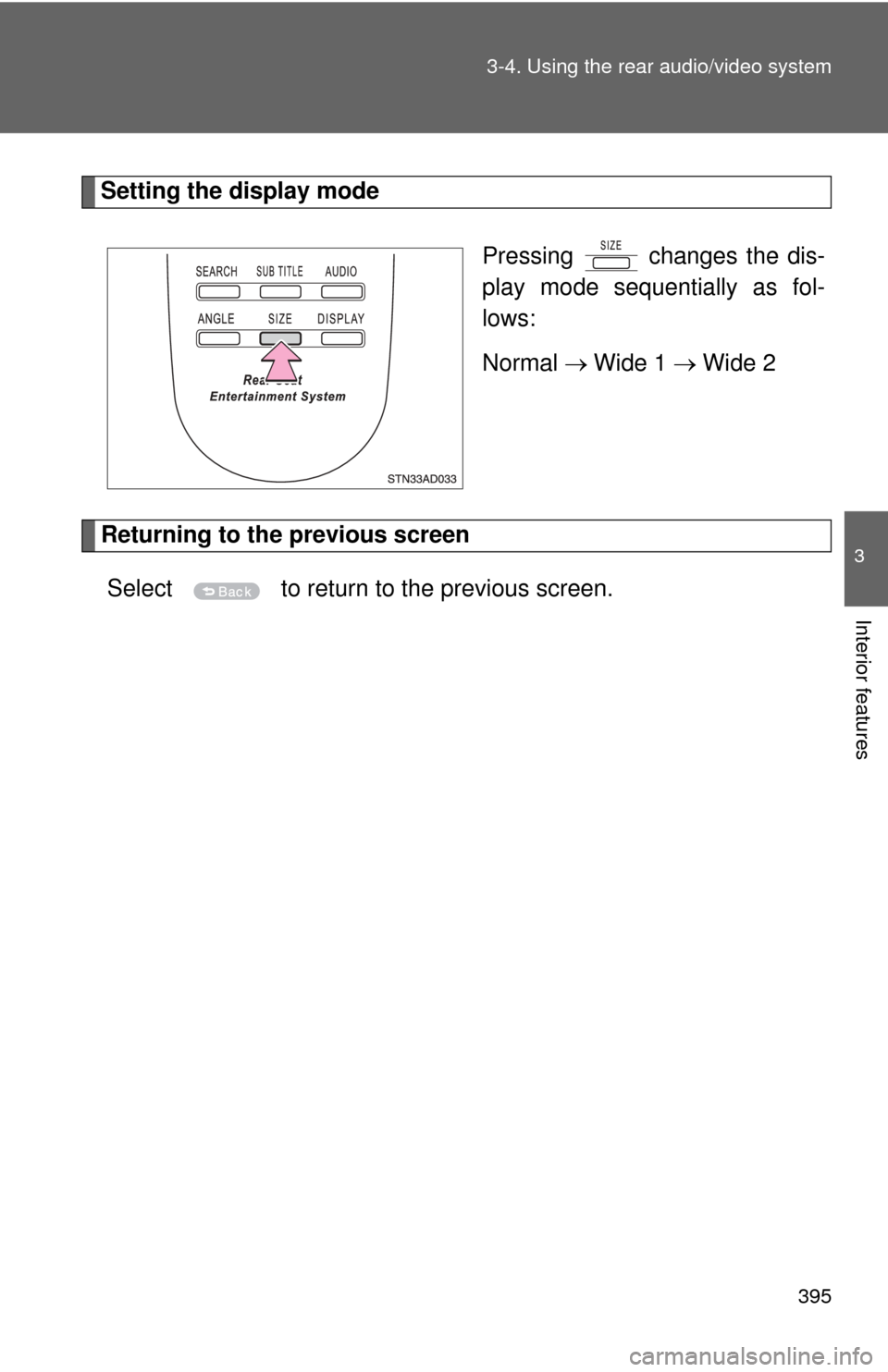
Setting the display mode
Pressing changes the dis-
play mode sequentially as fol-
lows:
Normal Wide 1 Wide 2
Returning to the previous screen
Select to return to the previous screen.
Page 396 of 688
396 3-4. Using the rear audio/video system
■To initialize the password
Press on the remote controller or unit ten times when the Enter Personal
Code screen is displayed.
■ Language code list
CodeLanguage
0514 English
0618 French
0405 German
0920 Italian
0519 Spanish
2608 Chinese
1412 Dutch
1620 Portuguese
1922 Swedish
1821 Russian 1115 Korean
0512 Greek
0101 Afar
0102 Abkhazian
0106 Afrikaans 0113 Amharic
0118 Arabic
0119 Assamese
0125 Aymara
0126 Azerbaijani
0201 Bashkir
0205 Byelorussian
0207 Bulgarian
0208 Bihari
0209 Bislama
0214 Bengali
0215 Tibetan
0218 Breton
0301 Catalan
0315 Corsican
0319 Czech
0325 Welsh
0401 Danish
0426 Bhutani
0515 Esperanto
0520 Estonian
0521 Basque
0601 Persian
0609 Finnish
0610 Fiji
0615 Faroese
0625 Frisian
0701 Irish
0704 Scots-Gaelic
0712 Galician
0714 Guarani
CodeLanguage
Page 403 of 688
403
3-5. Using the hands-free phone system (for cellular phone)
3
Interior features
Using the hands-free phone system
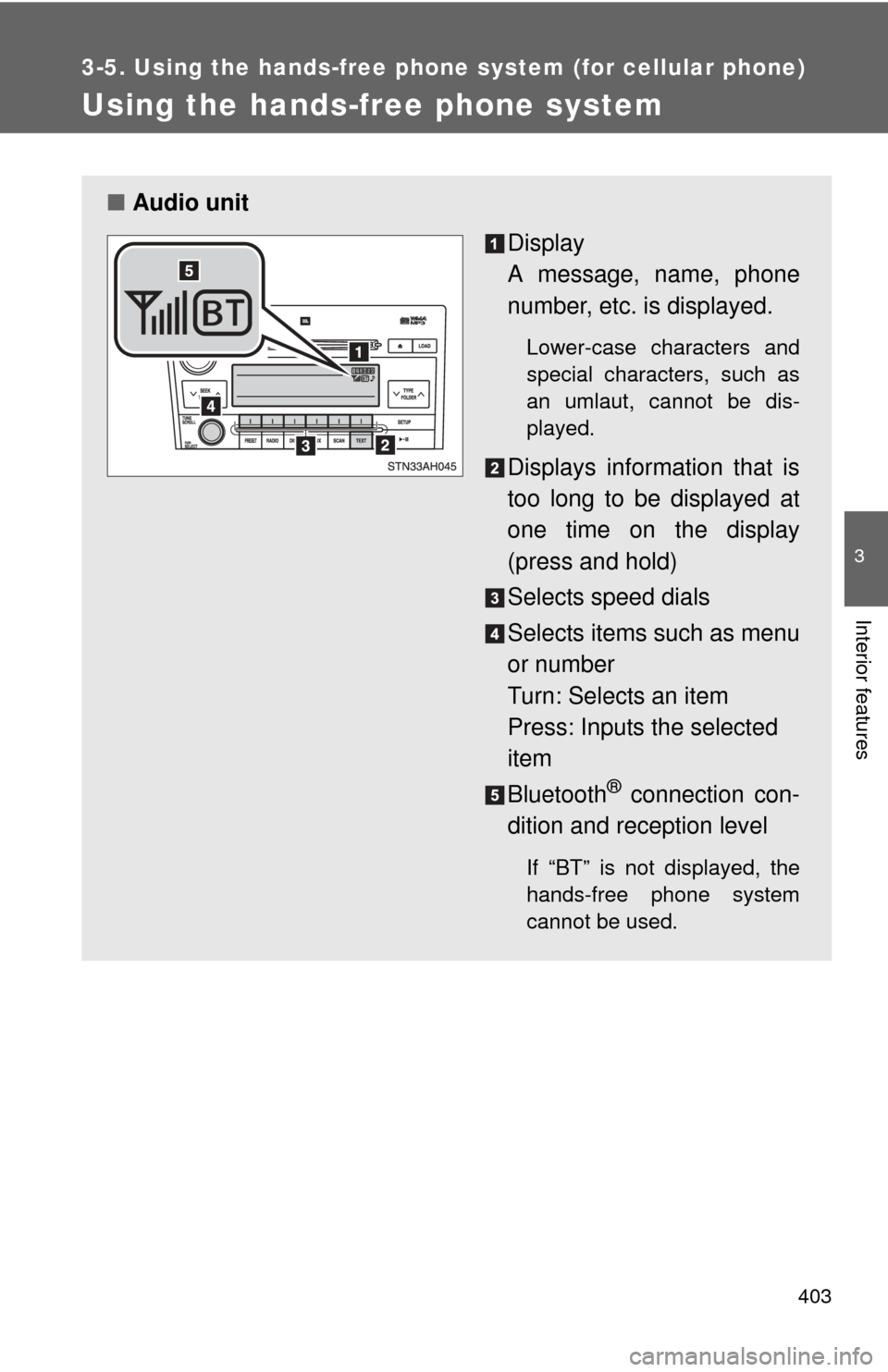
■Audio unit
Display
A message, name, phone
number, etc. is displayed.
Lower-case characters and
special characters, such as
an umlaut, cannot be dis-
played.
Displays information that is
too long to be displayed at
one time on the display
(press and hold)
Selects speed dials
Selects items such as menu
or number
Turn: Selects an item
Press: Inputs the selected
item
Bluetooth
® connection con-
dition and reception level
If “BT” is not displayed, the
hands-free phone system
cannot be used.
Page 406 of 688
406 3-5. Using the hands-free phone system (for cellular phone)
Operating the system by using a voice command
By following the voice guidance inst ructions output from the speaker,
voice commands enable the operation of the hands-free phone sys-
tem without the need to check the display or operate .
■ Operation procedure when using a voice command
Press the talk switch and follow the voice guidance instructions.
■ Auxiliary commands when using a voice command
The following auxiliary commands can be used when operating the
system using a voice command:
“Cancel”: Exits the hands-free phone system
“Repeat”: Repeats the previous voice guidance instruction
“Go back”: Returns to the previous procedure
“Help”: Reads aloud the function summary if a help comment is
registered for the selected function
Using the hands-free phone system for the first time
Before using the hands-free phone system, it is necessary to register
a cellular phone in the system. Th e phone registration mode will be
entered automatically when starting the system with no cellular
phone registered. Follow the procedure below to register a cellular
phone:
Press the off-hook switch or the talk switch.
The introductory guidance and phone name registration instructions
are heard.
Select “Pair Phone” using a voice command or .
Page 407 of 688
407
3-5. Using the hand
s-free phone system (for cellular phone)
3
Interior features
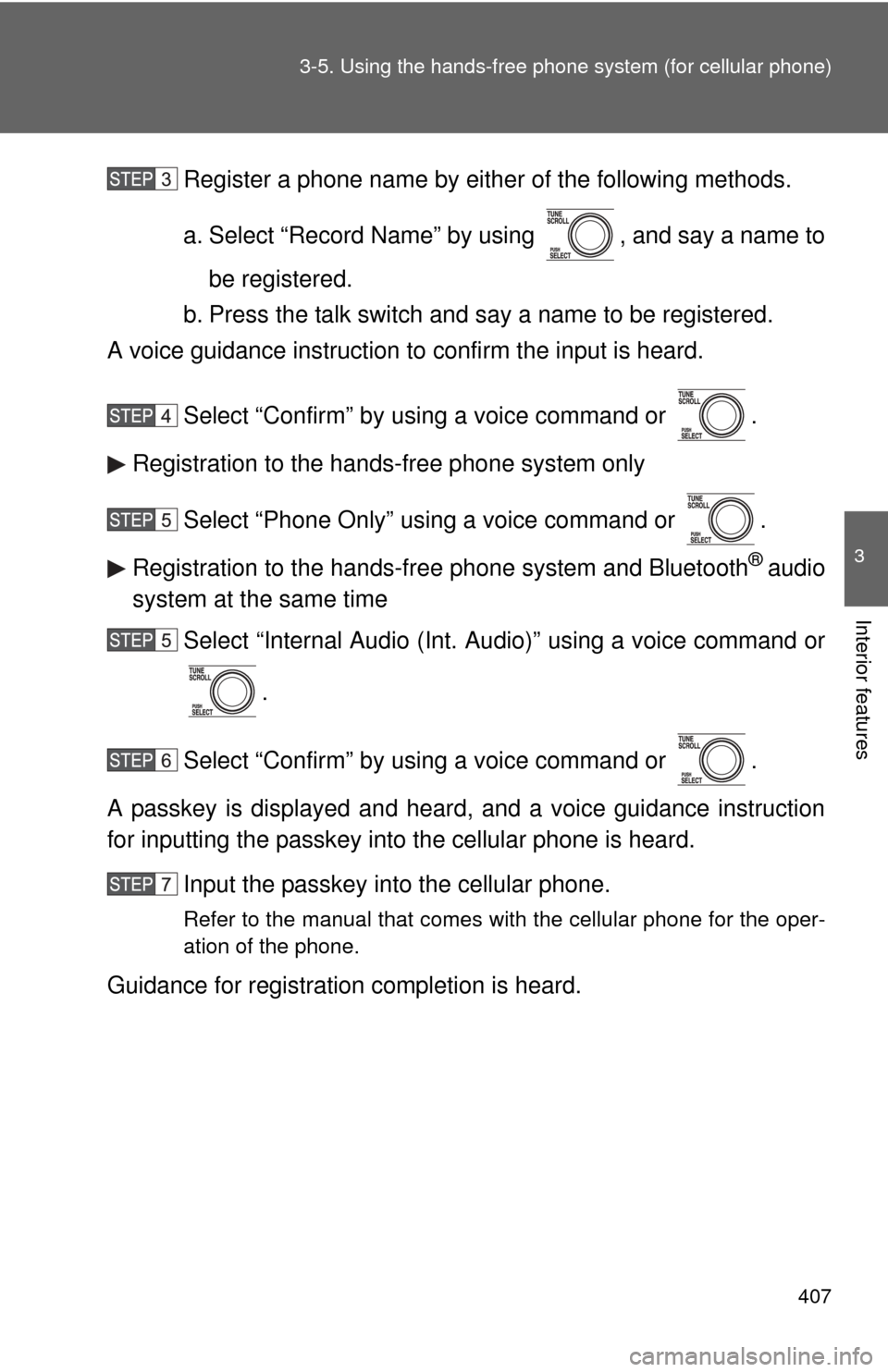
Register a phone name by either of the following methods.
a. Select “Record Name” by using , and say a name to
be registered.
b. Press the talk switch and say a name to be registered.
A voice guidance instruction to confirm the input is heard.
Select “Confirm” by using a voice command or .
Registration to the hands-free phone system only
Select “Phone Only” using a voice command or .
Registration to the hands-free phone system and Bluetooth
® audio
system at the same time
Select “Internal Audio (Int. Audio)” using a voice command or
.
Select “Confirm” by using a voice command or .
A passkey is displayed and heard, and a voice guidance instruction
for inputting the passkey into the cellular phone is heard. Input the passkey into the cellular phone.
Refer to the manual that comes with the cellular phone for the oper-
ation of the phone.
Guidance for registration completion is heard.
Page 409 of 688
409
3-5. Using the hand
s-free phone system (for cellular phone)
3
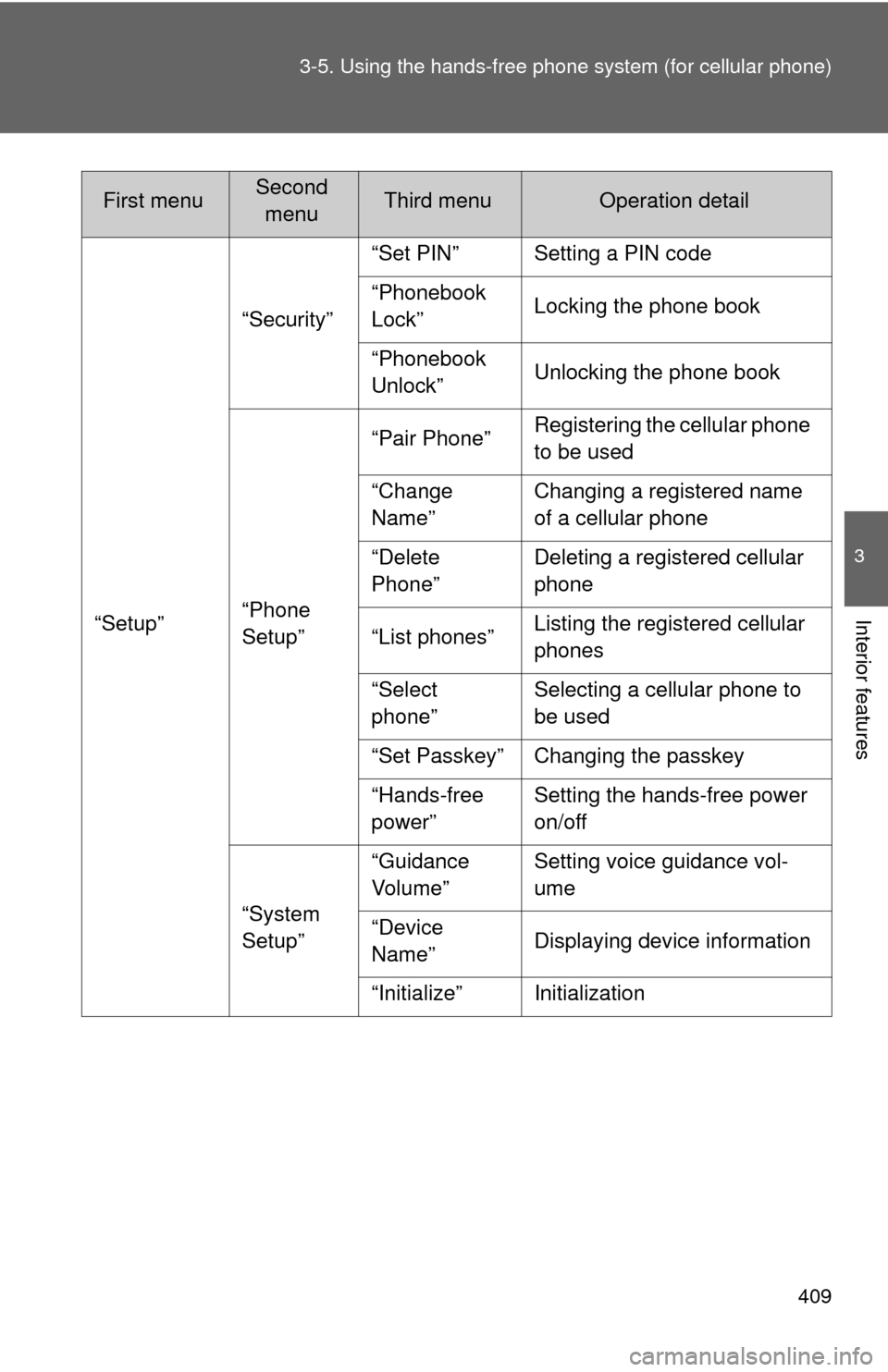
Interior features“Setup”“Security”
“Set PIN” Setting a PIN code
“Phonebook
Lock”
Locking the phone book
“Phonebook
Unlock” Unlocking the phone book
“Phone
Setup” “Pair Phone”
Registering the cellular phone
to be used
“Change
Name” Changing a registered name
of a cellular phone
“Delete
Phone” Deleting a registered cellular
phone
“List phones” Listing the registered cellular
phones
“Select
phone” Selecting a cellular phone to
be used
“Set Passkey” Changing the passkey
“Hands-free
power” Setting the hands-free power
on/off
“System
Setup” “Guidance
Vol u me ”
Setting voice guidance vol-
ume
“Device
Name” Displaying device information
“Initialize” Initialization
First menuSecond menuThird menuOperation detail
Page 420 of 688
420
3-5. Using the hands-free phone system (for cellular phone)
Security and system setup
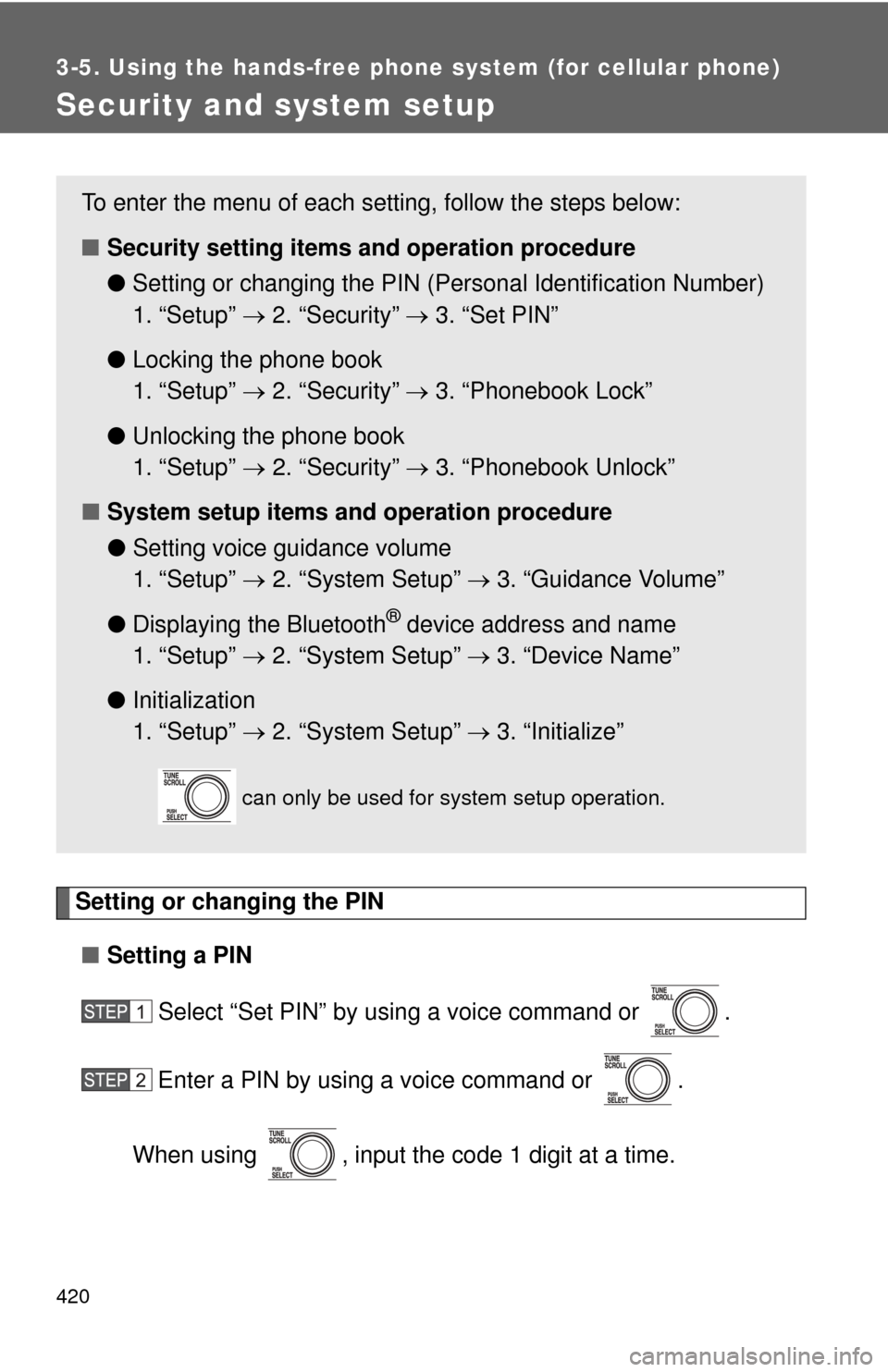
Setting or changing the PIN■ Setting a PIN
Select “Set PIN” by using a voice command or .
Enter a PIN by using a voice command or .
When using , input the code 1 digit at a time.
To enter the menu of each setting, follow the steps below:
■ Security setting items and operation procedure
● Setting or changing t he PIN (Personal Identification Number)
1. “Setup” 2. “Security” 3. “Set PIN”
● Locking the phone book
1. “Setup” 2. “Security” 3. “Phonebook Lock”
● Unlocking the phone book
1. “Setup” 2. “Security” 3. “Phonebook Unlock”
■ System setup items and operation procedure
●Setting voice guidance volume
1. “Setup” 2. “System Setup” 3. “Guidance Volume”
● Displaying the Bluetooth
® device address and name
1. “Setup” 2. “System Setup” 3. “Device Name”
● Initialization
1. “Setup” 2. “System Setup” 3. “Initialize”
can only be used for system setup operation.
Page 422 of 688
422 3-5. Using the hands-free phone system (for cellular phone)
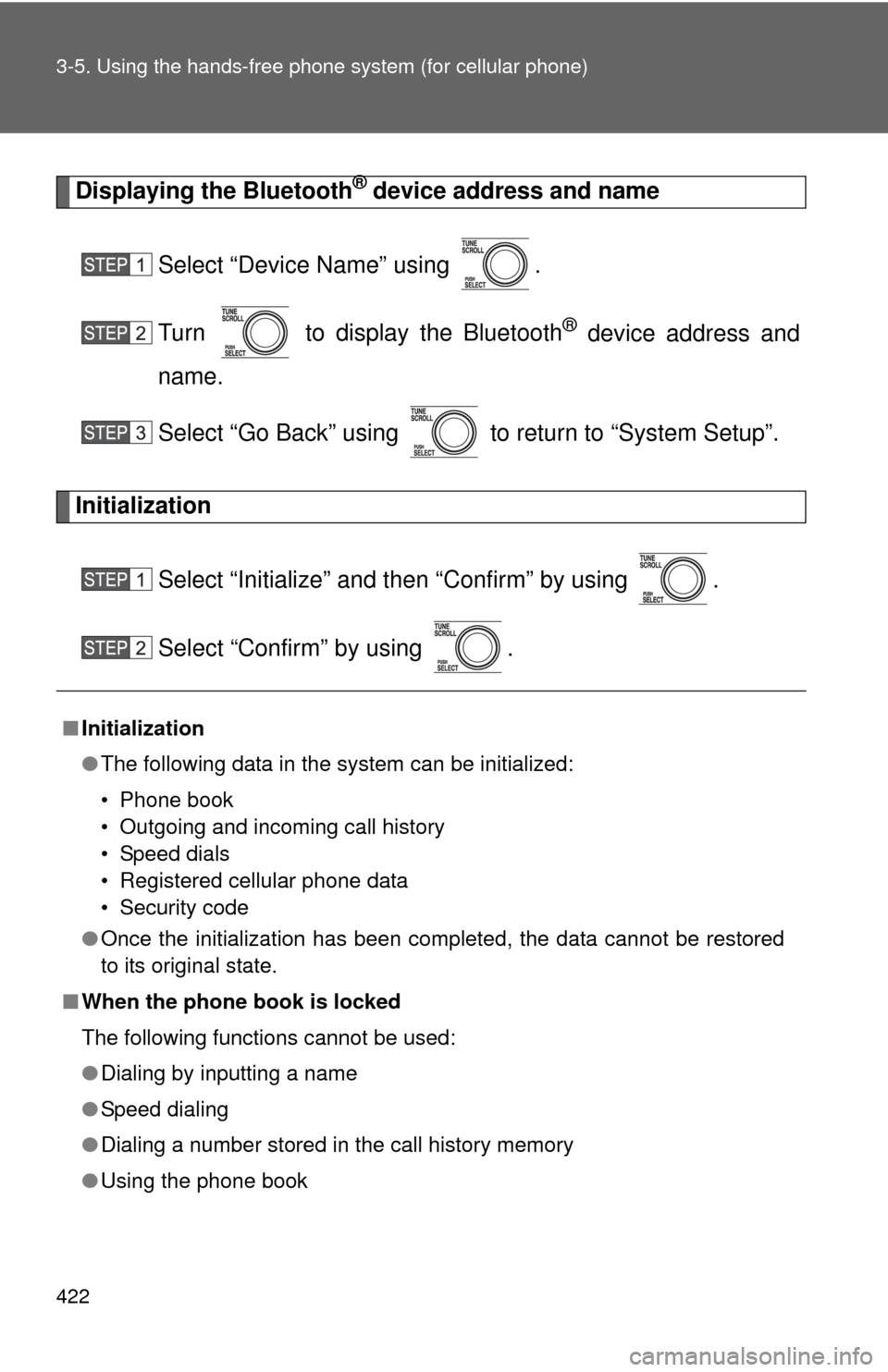
Displaying the Bluetooth® device address and name
Select “Device Name” using .
Turn to display the Bluetooth
® device address and
name.
Select “Go Back” using to return to “System Setup”.
Initialization
Select “Initialize” and then “Confirm” by using .
Select “Confirm” by using .
■Initialization
●The following data in the system can be initialized:
• Phone book
• Outgoing and incoming call history
• Speed dials
• Registered cellular phone data
• Security code
● Once the initialization has been completed, the data cannot be restored
to its original state.
■ When the phone book is locked
The following functions cannot be used:
●Dialing by inputting a name
● Speed dialing
● Dialing a number stored in the call history memory
● Using the phone book
Page 424 of 688
424 3-5. Using the hands-free phone system (for cellular phone)
■Adding procedure
Select “Add Entry” by using a voice command or .
Use one of the following methods to input a telephone num-
ber:
Inputting a telephone number by using a voice command
STEP2-1 Select “By Voice” by using a voice command or
.
STEP2-2 Press the talk switch, say the desired number, and select “Confirm” by using a voice command.
Transferring data from the cellular phone
STEP2-1 Select “By Phone” and then “Confirm” by using a
voice command or .
STEP2-2 Transfer the data from the cellular phone.
Refer to the manual that comes with the cellular phone for
the details of transferring data.
STEP2-3 Select the data to be re gistered by either of the fol-
lowing methods:
a. Say “Previous” or “Next” until the desired data is displayed, and select “Confirm” by using a voice
command.
b. Select the desired data by using .
Inputting a phone number by using
STEP2-1 Select “Manual Input” by using .
STEP2-2 Input a phone number by using , and press once again.
Input the phone number 1 digit at a time.
Page 425 of 688
425
3-5. Using the hand
s-free phone system (for cellular phone)
3
Interior features
Selecting a phone number from outgoing or incoming call history
STEP2-1 Select “Call History” by using a voice command or
.
STEP2-2 Select “Outgoing” or “Incoming” by using a voice
command or .
STEP2-3 Select the data to be registered by either of the fol- lowing methods:
a. Say “Previous” or “Go back” until the desireddata is displayed, and select “Confirm” by using
a voice command.
b. Select the desired data by using .
Select the name to be registered by either of the following
methods, and select “Confirm” by using a voice command or :
a. Press the talk switch and say the desired name.
b. Select “Record Name” by using , and say the desired name.
Select “Confirm” by using a voice command or .
In , selecting “Set Speed Dial (Speed Dial)” instead of
“Confirm” registers the newly added phone number as a speed dial.