engine TOYOTA SEQUOIA 2012 2.G User Guide
[x] Cancel search | Manufacturer: TOYOTA, Model Year: 2012, Model line: SEQUOIA, Model: TOYOTA SEQUOIA 2012 2.GPages: 708, PDF Size: 15.12 MB
Page 48 of 708
48 1-2. Opening, closing and locking the doors
CAUTION
■Power back door (if equipped)
●On an incline, the back door may fall after it opens. Make sure the back
door is fully open and secure.
● In the following situations, the power back door may detect an abnormali\
ty
and automatic operation may be stopped. In this case, the back door has
to be operated manually. Take extra care when on an incline, as the back
door may open or close abruptly.
• When the back door contacts an obstacle
• When the battery voltage suddenly drops, such as when the engine
switch is turned to the ON position or the engine is started during auto-
matic operation
● If a bicycle carrier or similar heavy object is attached to the back door, the
power back door may not operate, causing itself to malfunction, or the
back door may fall closed again after being opened, causing someone’s
hands, head or neck to be caught and injured. When installing an acces-
sory part to the back door, using a genuine Toyota part is recommended.
■ Jam protection function (vehicles with a power back door)
Observe the following precautions.
Failure to do so may cause death or serious injury.
●Never use any part of your body to intentionally activate the jam protection
function.
● The jam protection function may not work if something gets caught just
before the back door fully closes. Be careful not to catch fingers or any-
thing else.
● The jam protection function may not work depending on the shape of the
object that is caught. Be careful not to catch fingers or anything else.
Page 63 of 708
63
1-3. Adjustable components (s
eats, mirrors, steering wheel)
1
Before driving
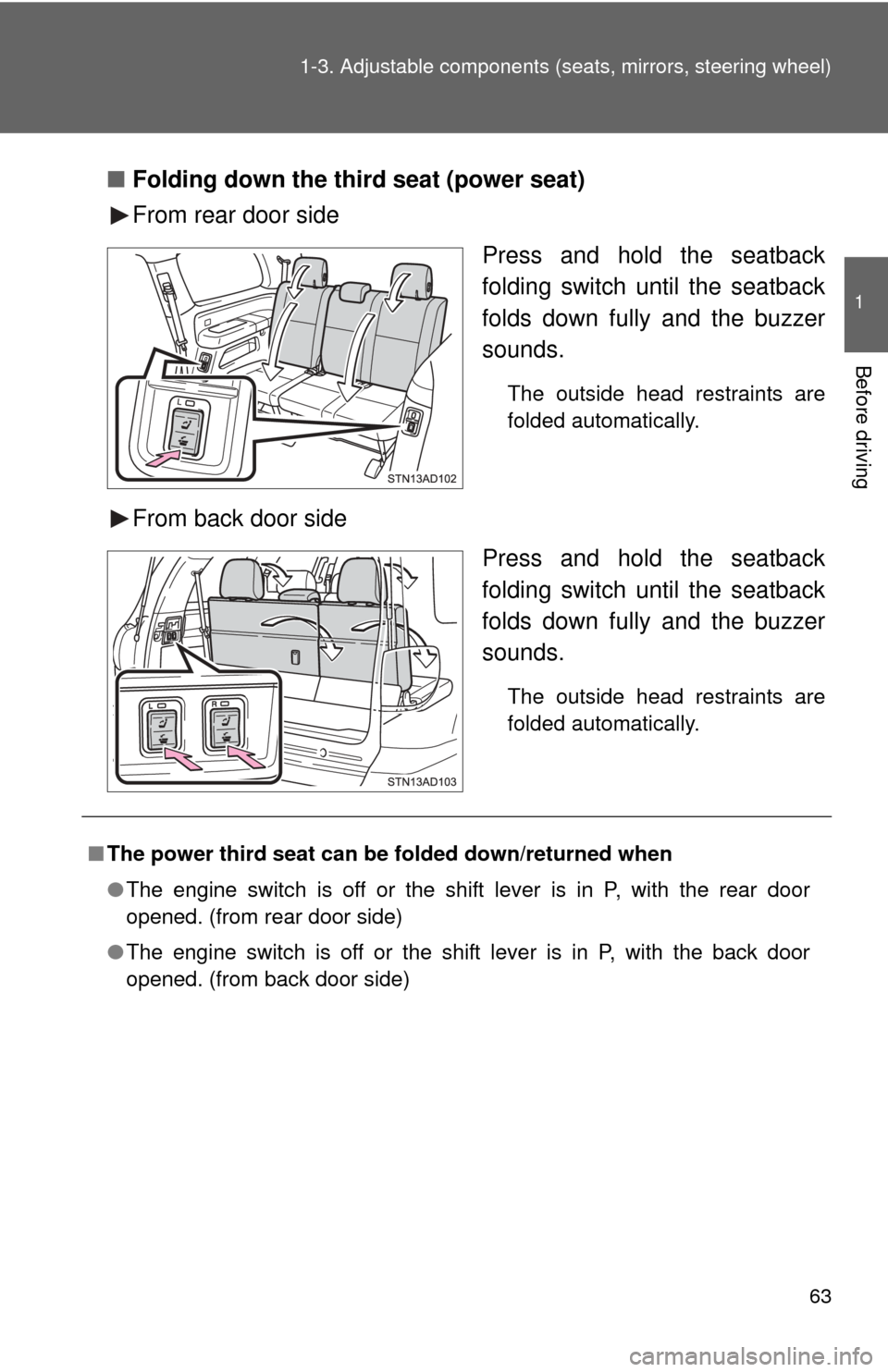
■Folding down the third seat (power seat)
From rear door side
Press and hold the seatback
folding switch until the seatback
folds down fully and the buzzer
sounds.
The outside head restraints are
folded automatically.
From back door sidePress and hold the seatback
folding switch until the seatback
folds down fully and the buzzer
sounds.
The outside head restraints are
folded automatically.
■The power third seat can be folded down/returned when
● The engine switch is off or the shift lever is in P, with the rear door
opened. (from rear door side)
● The engine switch is off or the shift lever is in P, with the back door
opened. (from back door side)
Page 65 of 708
65
1
1-3. Adjustable components (seats, mirrors, steering wheel)
Before driving
Driving position memor y (driver’s seat)
: If equipped
Your preferred driving position (the position of the driver’s seat,
steering wheel and outside rear view mirrors) can be entered into the
computer’s memory and recalle d with the touch of a button.
Two different driving positions can be entered into memory.
■ Entering a position into memory
Check that the shift lever is set in P.
Turn the engine switch to the ON position.
Adjust the driver’s seat, steering wheel, and outside rear
view mirrors to the desired positions.
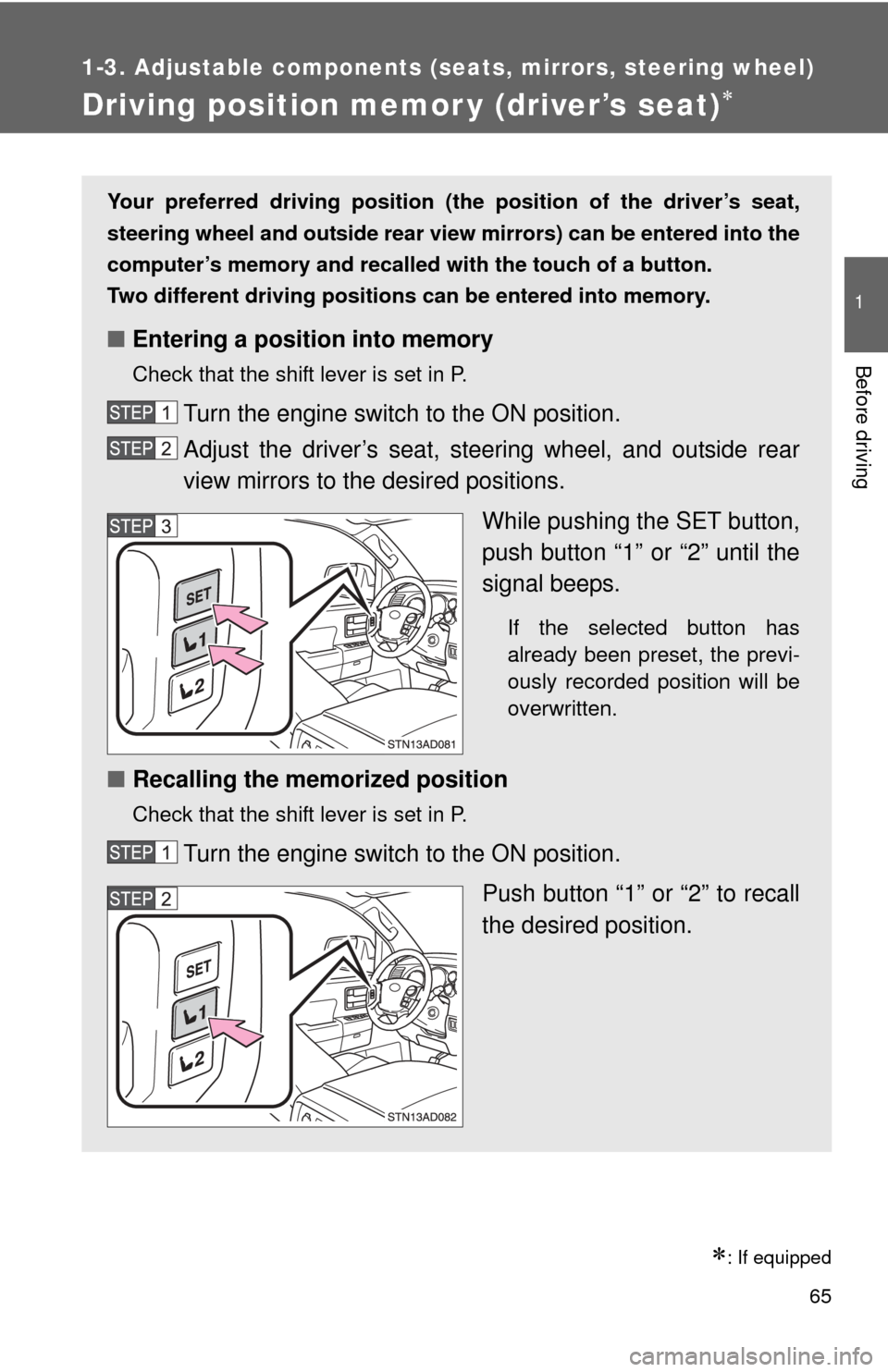
While pushing the SET button,
push button “1” or “2” until the
signal beeps.
If the selected button has
already been preset, the previ-
ously recorded position will be
overwritten.
■Recalling the memorized position
Check that the shift lever is set in P.
Turn the engine switch to the ON position.
Push button “1” or “2” to recall
the desired position.
Page 66 of 708
66 1-3. Adjustable components (seats, mirrors, steering wheel)
Linking driving position memory with door unlock operation
Memorized driving positions can be recalled when you unlock the
driver’s door using the wireless remote control and open the driver’s
door.
■ Setting the linked door unlock operation
Set the driving positions into the memory system using the “1”
or “2” buttons. ( P. 6 5 )
Turn the engine switch off then, close the driver’s door.
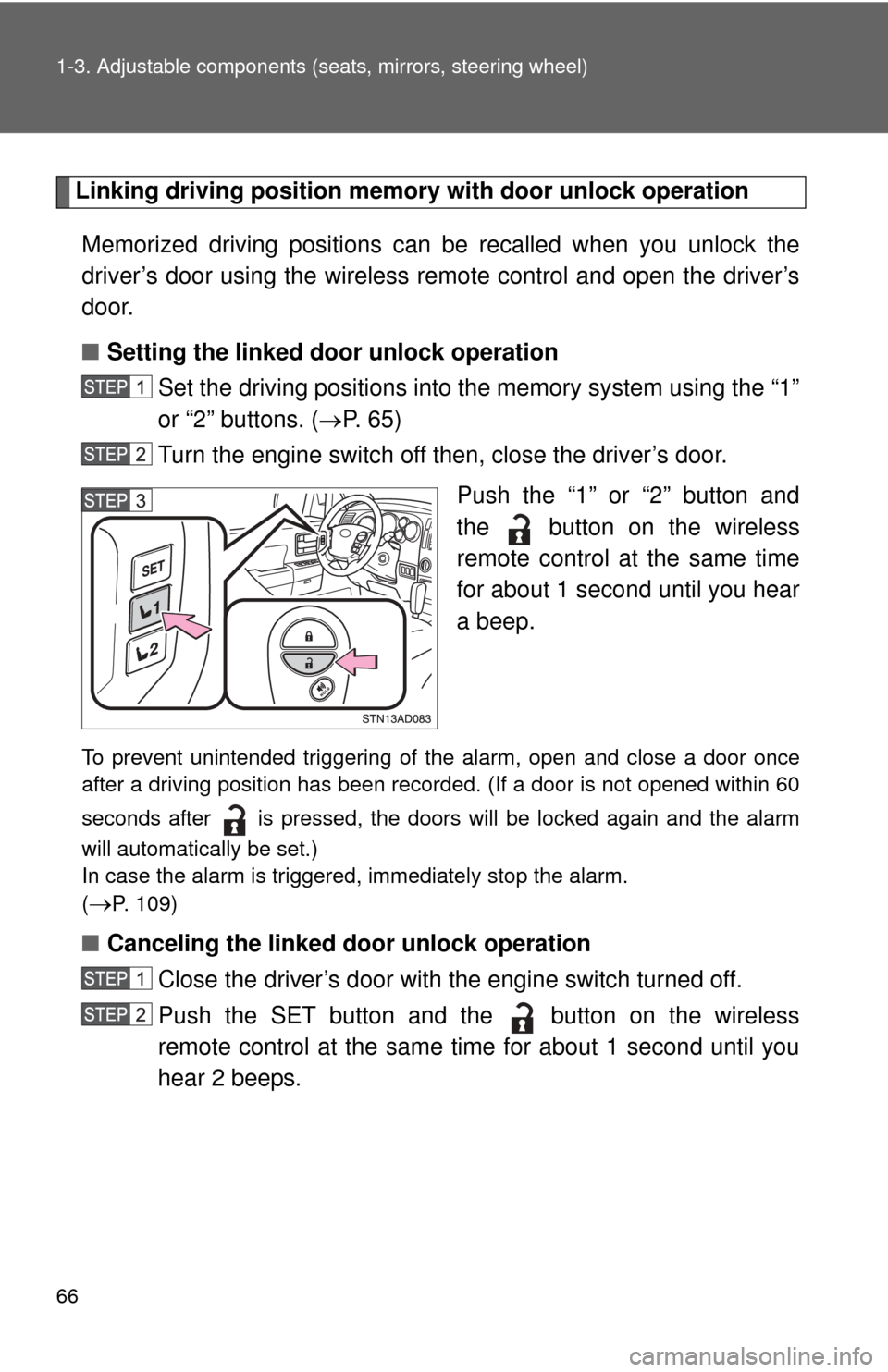
Push the “1” or “2” button and
the button on the wireless
remote control at the same time
for about 1 second until you hear
a beep.
To prevent unintended triggering of the alarm, open and close a door once
after a driving position has been recorded. (If a door is not opened within 60
seconds after is pressed, the doors will be locked again and the alarm
will automatically be set.)
In case the alarm is triggered, immediately stop the alarm.
(
P. 109)
■Canceling the linked door unlock operation
Close the driver’s door with the engine switch turned off.
Push the SET button and the button on the wireless
remote control at the same time for about 1 second until you
hear 2 beeps.
Page 67 of 708

67
1-3. Adjustable components (s
eats, mirrors, steering wheel)
1
Before driving
■Retained accessory power
Each memorized position (except for the tilt and telescopic steering column)
can be activated within 30 seconds after the driver’s door is opened, even if
the key is not in the engine switch.
■ If any position memory button is pushed while the adjustments are
being made
The operation will stop. To reactivate the system, push the button (“1” or “2”)
again.
■ If the battery is disconnected
The memorized positions must be reset because the computer’s memory is
erased when the battery is disconnected.
CAUTION
■Seat adjustment caution
Take care during seat adjustment that the seat does not strike the rear pas-
senger or squeeze your body against the steering wheel.
If this happens, you can stop the movement by pressing another seat posi-
tion memory button.
Page 83 of 708
83
1
1-3. Adjustable components (seats, mirrors, steering wheel)
Before driving
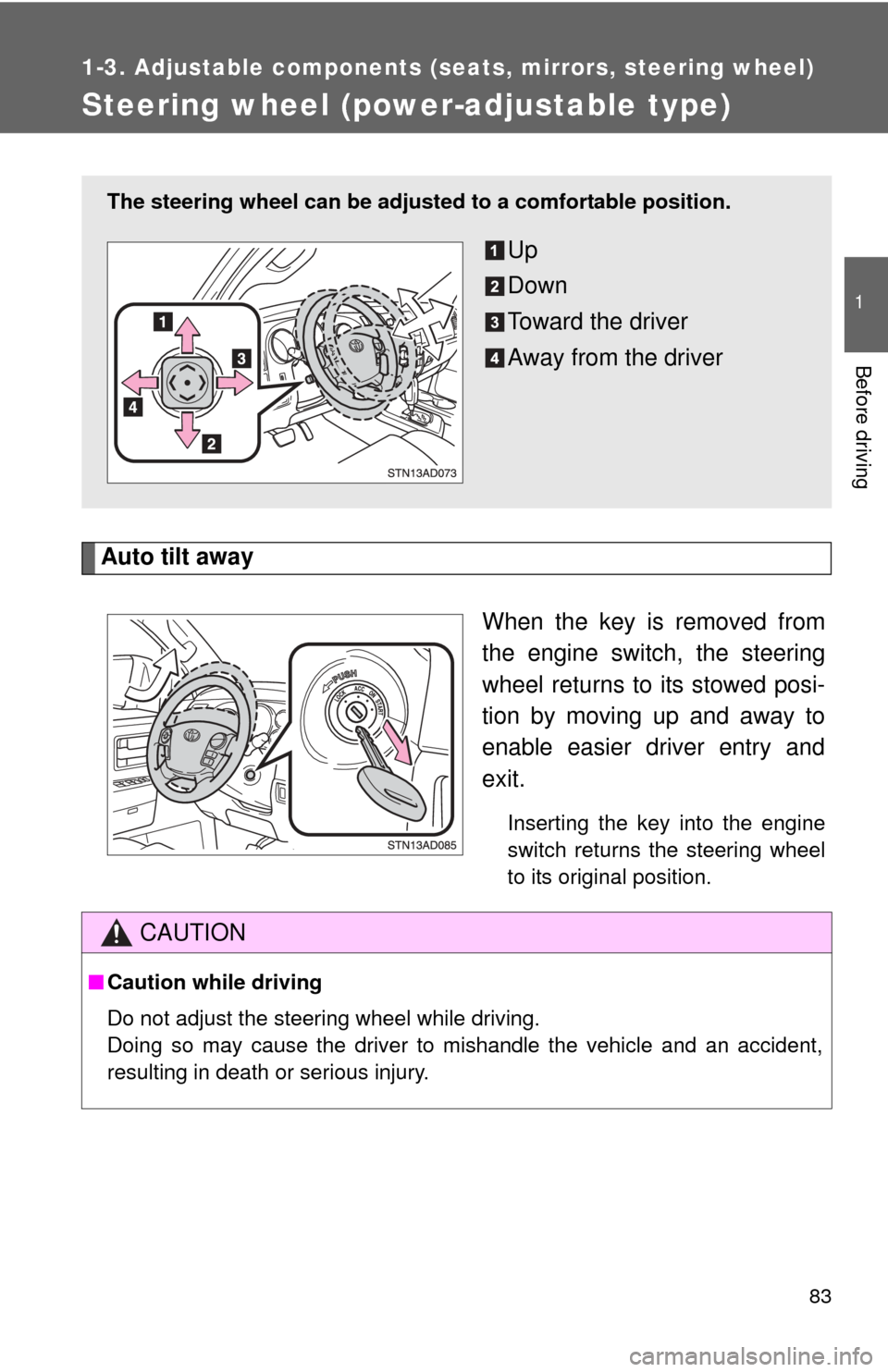
Steering wheel (power-adjustable type)
Auto tilt awayWhen the key is removed from
the engine switch, the steering
wheel returns to its stowed posi-
tion by moving up and away to
enable easier driver entry and
exit.
Inserting the key into the engine
switch returns the steering wheel
to its original position.
The steering wheel can be adjusted to a comfortable position.
Up
Down
Toward the driver
Away from the driver
CAUTION
■Caution while driving
Do not adjust the steering wheel while driving.
Doing so may cause the driver to mishandle the vehicle and an accident,
resulting in death or serious injury.
Page 85 of 708
85
1-3. Adjustable components (s
eats, mirrors, steering wheel)
1
Before driving
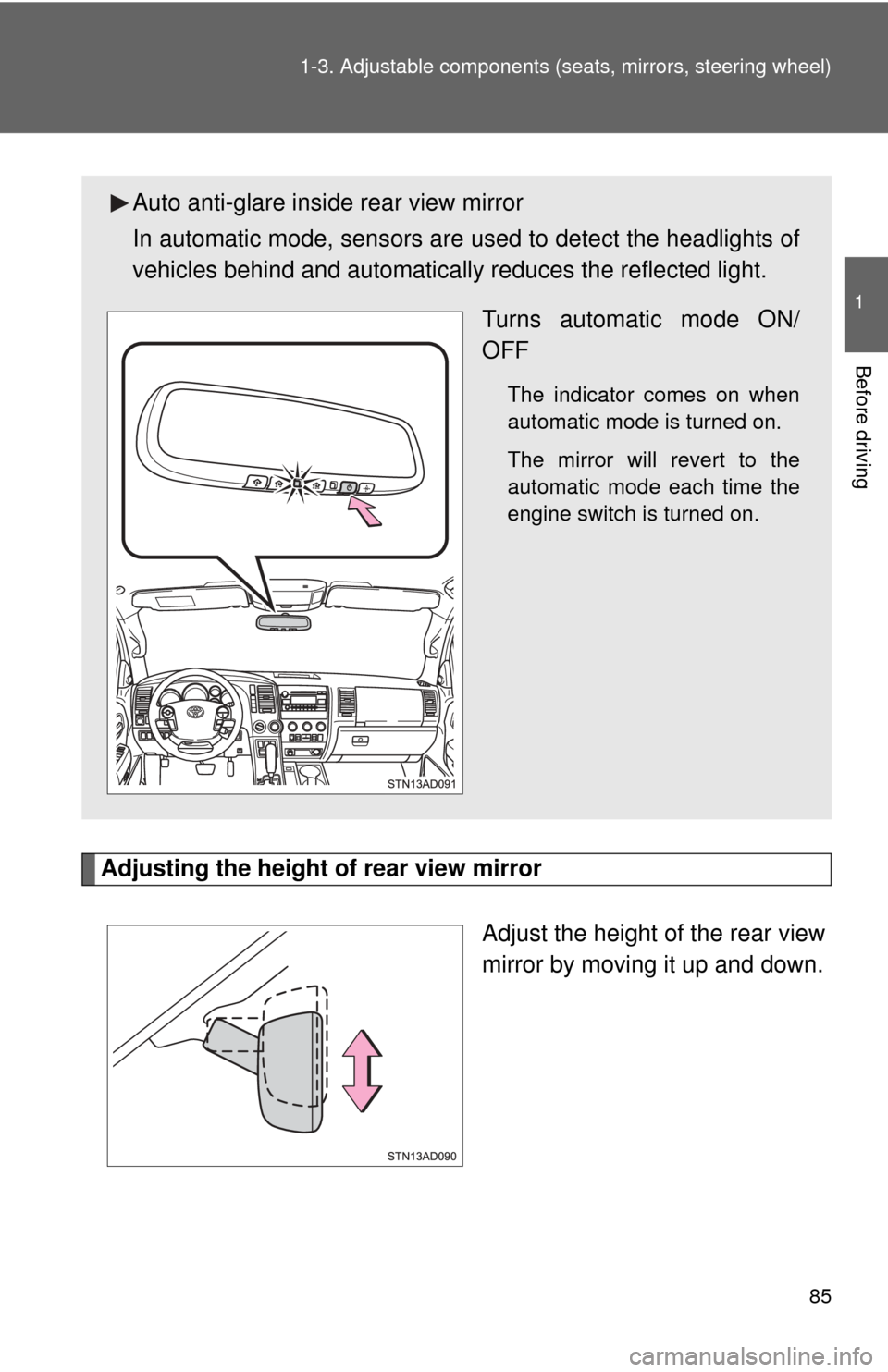
Adjusting the height of rear view mirror
Adjust the height of the rear view
mirror by moving it up and down.
Auto anti-glare inside rear view mirror
In automatic mode, sensors are used to detect the headlights of
vehicles behind and automatical ly reduces the reflected light.
Turns automatic mode ON/
OFF
The indicator comes on when
automatic mode is turned on.
The mirror will revert to the
automatic mode each time the
engine switch is turned on.
Page 87 of 708
87
1
1-3. Adjustable components (seats, mirrors, steering wheel)
Before driving
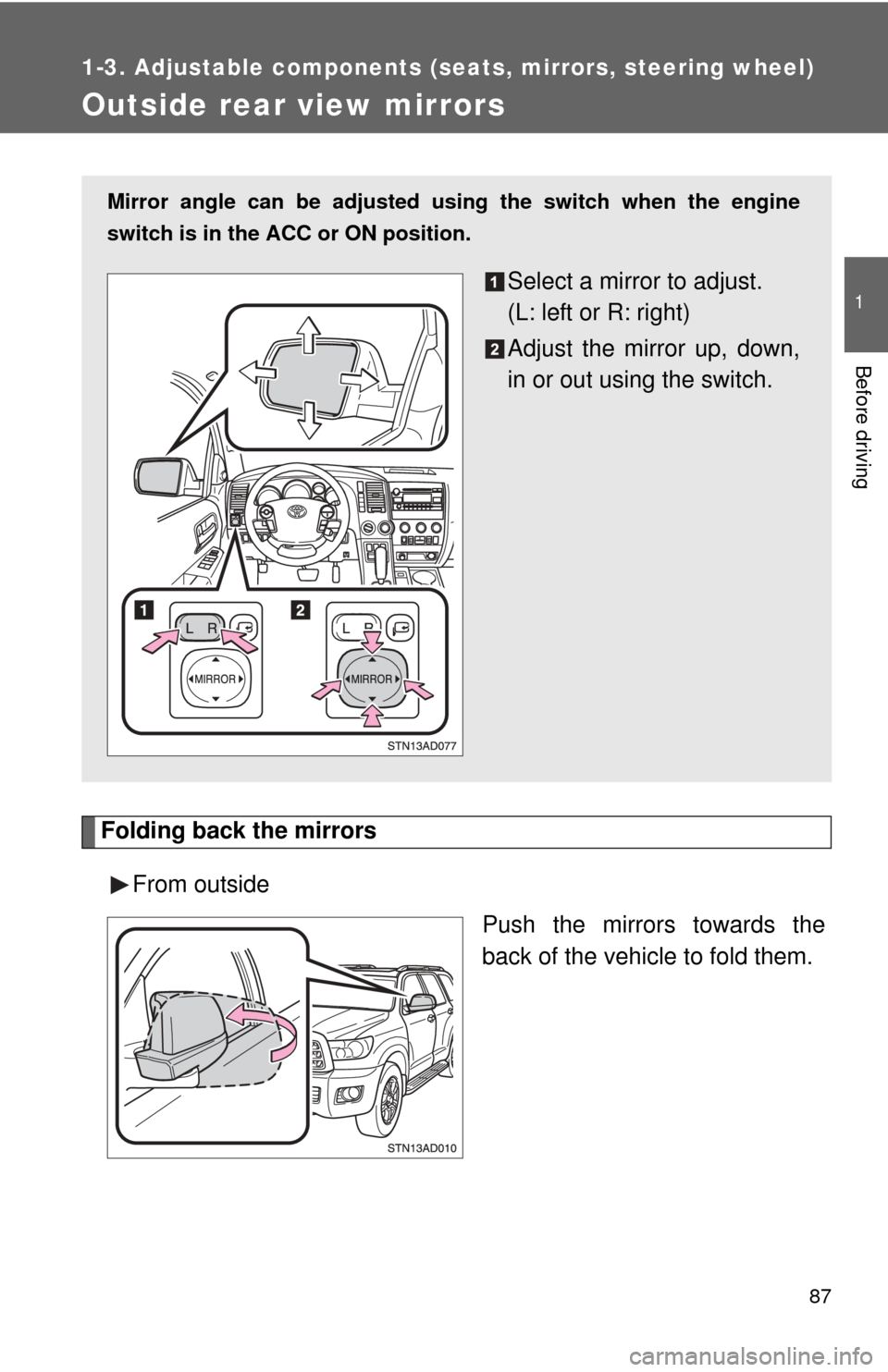
Outside rear view mirrors
Folding back the mirrorsFrom outside Push the mirrors towards the
back of the vehicle to fold them.
Mirror angle can be adjusted using the switch when the engine
switch is in the ACC or ON position.
Select a mirror to adjust.
(L: left or R: right)
Adjust the mirror up, down,
in or out using the switch.
Page 94 of 708
94 1-4. Opening and closing the windows and moon roof
■The power windows can be operated when
The engine switch is in the ON position.
■ Door lock linked power windows operation
The power windows can be opened and closed using the key. ( P. 37)
■ Operating the power windows after turning the engine switch off
The power windows can be operated for approximately 43 seconds even
after the engine switch is turned to the ACC position or turned off. They can-
not, however, be operated once either front door is opened.
■ Jam protection function (Front windows only)
If an object becomes caught between the window and the window frame,
window travel is stopped and the window is opened slightly.
■ When the power window does not close normally
If the jam protection function is operating abnormally and a window cannot
be closed, perform the following operations using the power window switch
on the front door.
●After stopping the vehicle, the window can be closed by holding the
power window switch in the one-touch closing position while the engine
switch is turned to the ON position.
● If the window still cannot be closed even by carrying out the operation
explained above, initialize the function by performing the following proce-
dure.
Hold the power window switch in the one-touch closing position.
Continue holding the switch for a further 6 seconds after the win-
dow has closed.
Hold the power window switch in the one-touch opening position.
Continue holding the switch for a further 2 seconds after the win-
dow has opened completely.
Hold the power window switch in the one-touch closing position
once again. Continue holding the switch for a further 2 seconds
after the window has closed.
If you release the switch while the window is moving, start again from the
beginning. If the window continues to close but then re-open slightly even
after performing the above procedure correctly, have the vehicle inspected
by your Toyota dealer.
Page 97 of 708
97
1-4. Opening and closing the windows and moon roof
1
Before driving
■
The power back window can be operated when
● The engine switch is in the ON position.
● The power back window can be opened when the rear window wiper is
working. At that time, the wiper stops working until the window is closed
again.
If the rear window is not fully closed, the rear window wiper, washer, and
defogger will not work.
■ Operating the power back window after turning the engine switch off
The power back window can be operated for approximately 43 seconds
even after the engine switch is turned to the ACC position or turned off. It
cannot, however, be operated once either front door is opened.
■ Jam protection function
If an object becomes caught between the window and the window frame,
window travel is stopped and the window is opened slightly.
■ When the power back window does not close normally
If the jam protection function is operating abnormally and a window cannot
be closed, perform the following operations using the power back window
switch.
●After stopping the vehicle, the window can be closed by holding the
power back window switch in the one-touch closing position while the
engine switch is turned to the ON position.
● If the window still cannot be closed even by carrying out the operation
explained above, initialize the function by performing the following proce-
dure.
Hold the power back window switch in the one-touch closing posi-
tion. Continue holding the switch for a further 6 seconds after the
window has closed.
Hold the power back window switch in the one-touch opening posi-
tion. Continue holding the switch for a further 2 seconds after the
window has opened completely.