engine TOYOTA SEQUOIA 2012 2.G Workshop Manual
[x] Cancel search | Manufacturer: TOYOTA, Model Year: 2012, Model line: SEQUOIA, Model: TOYOTA SEQUOIA 2012 2.GPages: 708, PDF Size: 15.12 MB
Page 178 of 708

178 2-2. Instrument cluster
CAUTION
■If a safety system warning light does not come on
Should a safety system light such as ABS and the SRS airbag warning light
not come on when you start the engine, this could mean that these systems
are not available to help protect you in an accident, which could result in
death or serious injury. Have the vehicle inspected by your Toyota dealer
immediately if this occurs.
Page 181 of 708
181
2-2. Instrument cluster
2
When driving
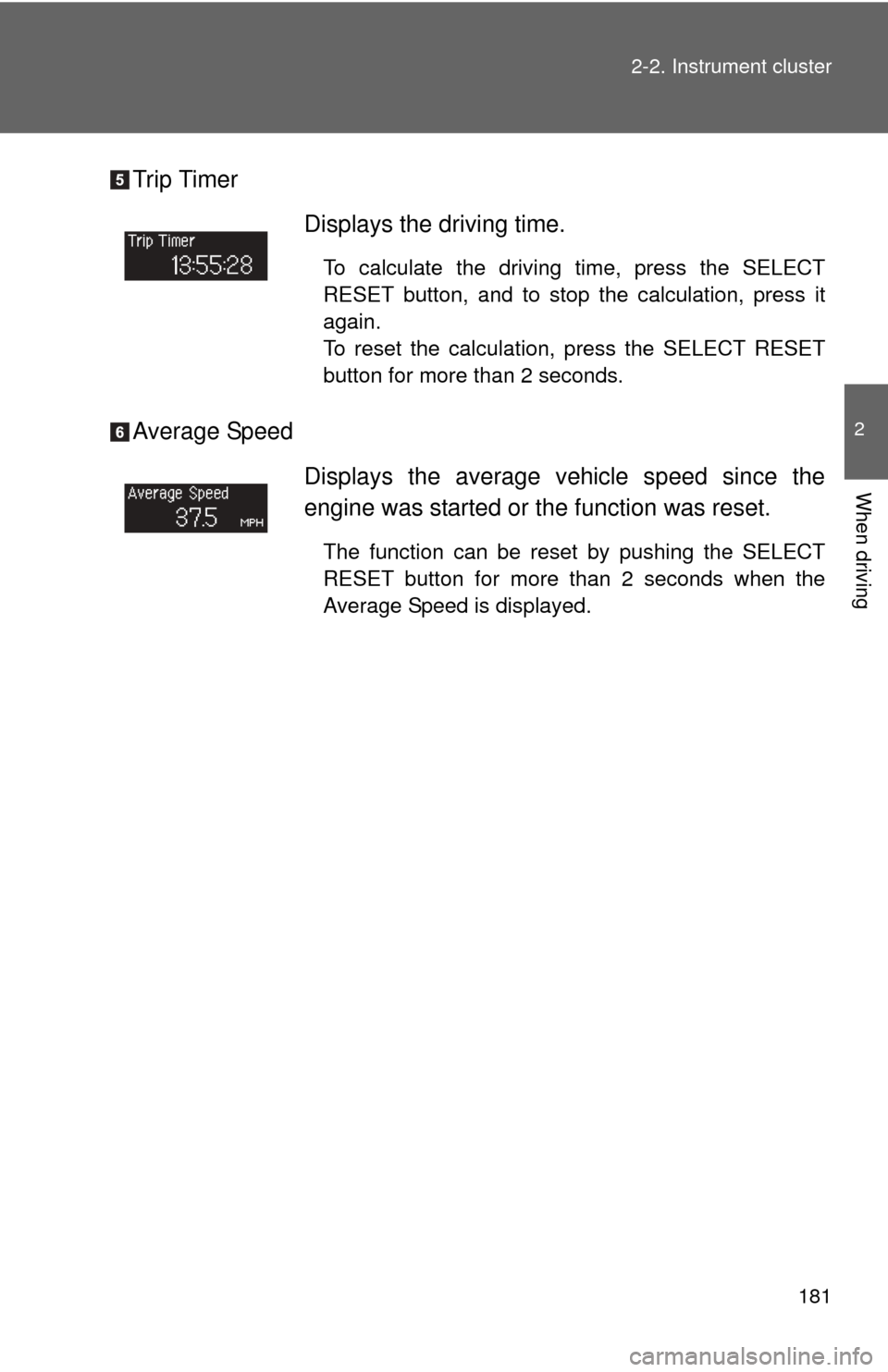
Trip Timer
Average Speed
Displays the driving time.
To calculate the driving time, press the SELECT
RESET button, and to stop the calculation, press it
again.
To reset the calculation, press the SELECT RESET
button for more than 2 seconds.
Displays the average vehicle speed since the
engine was started or the function was reset.
The function can be reset by pushing the SELECT
RESET button for more than 2 seconds when the
Average Speed is displayed.
Page 183 of 708
183
2-2. Instrument cluster
2
When driving
*: Default setting
After customize is complete, press the SETUP button to set
the selected item.
If the customization fails, the previously setting will be displayed.
If no button is pressed for 10 seconds, the display change to normal
display.
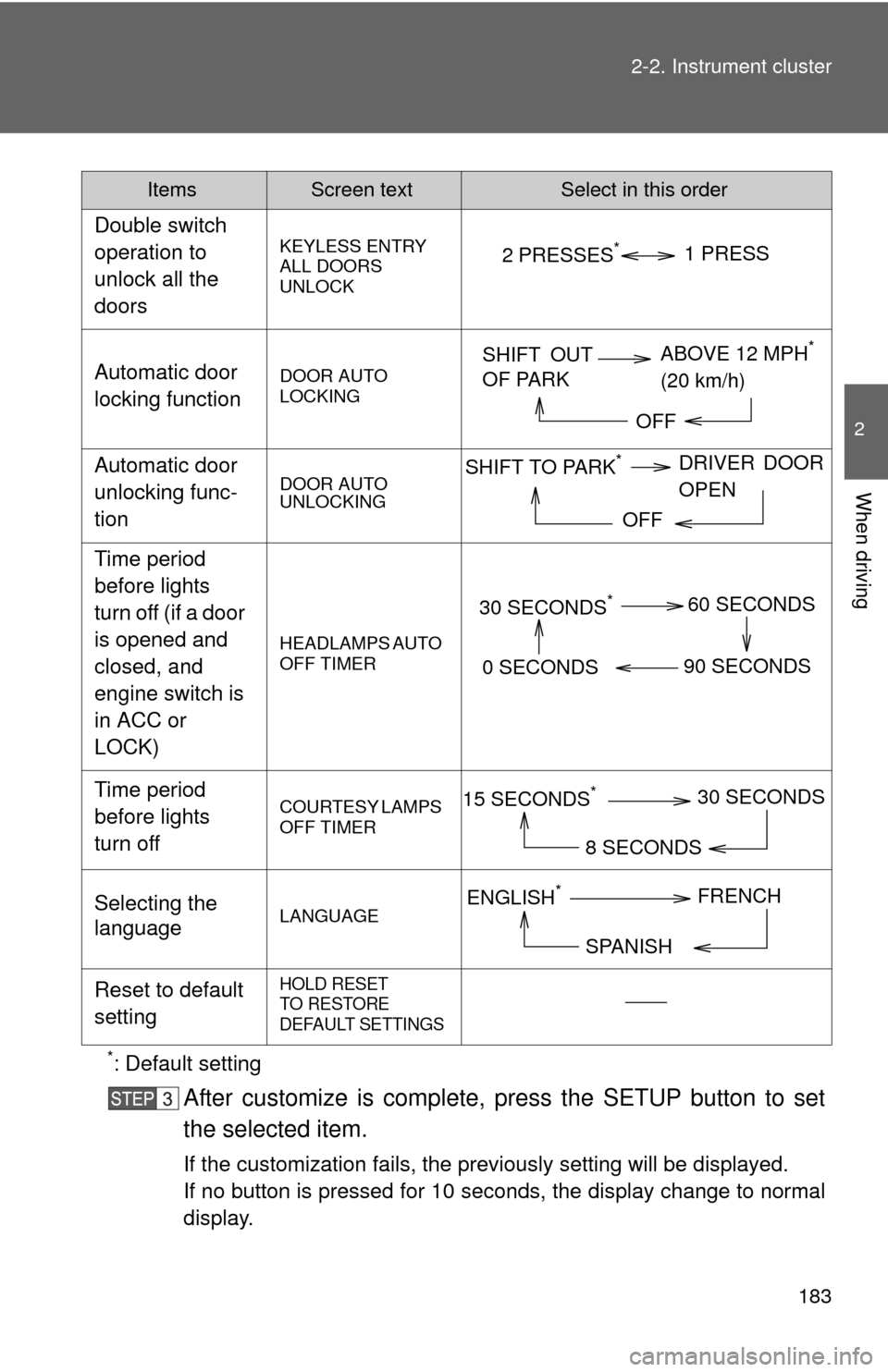
Double switch
operation to
unlock all the
doors
KEYLESS ENTRY
ALL DOORS
UNLOCK
Automatic door
locking functionDOOR AUTO
LOCKING
Automatic door
unlocking func-
tionDOOR AUTO
UNLOCKING
Time period
before lights
turn off (if a door
is opened and
closed, and
engine switch is
in ACC or
LOCK)
HEADLAMPS AUTO
OFF TIMER
Time period
before lights
turn offCOURTESY LAMPS
OFF TIMER
Selecting the
languageLANGUAGE
Reset to default
settingHOLD RESET
TO RESTORE
DEFAULT SETTINGS
ItemsScreen textSelect in this order
2 PRESSES*1 PRESS
SHIFT OUT
OF PARK
ABOVE 12 MPH*
(20 km/h)
OFF
SHIFT TO PARK*DRIVER DOOR
OPEN
OFF
30 SECONDS*60 SECONDS
90 SECONDS
0 SECONDS
15 SECONDS*30 SECONDS
8 SECONDS
ENGLISH*FRENCH
SPANISH
Page 184 of 708
184 2-2. Instrument cluster
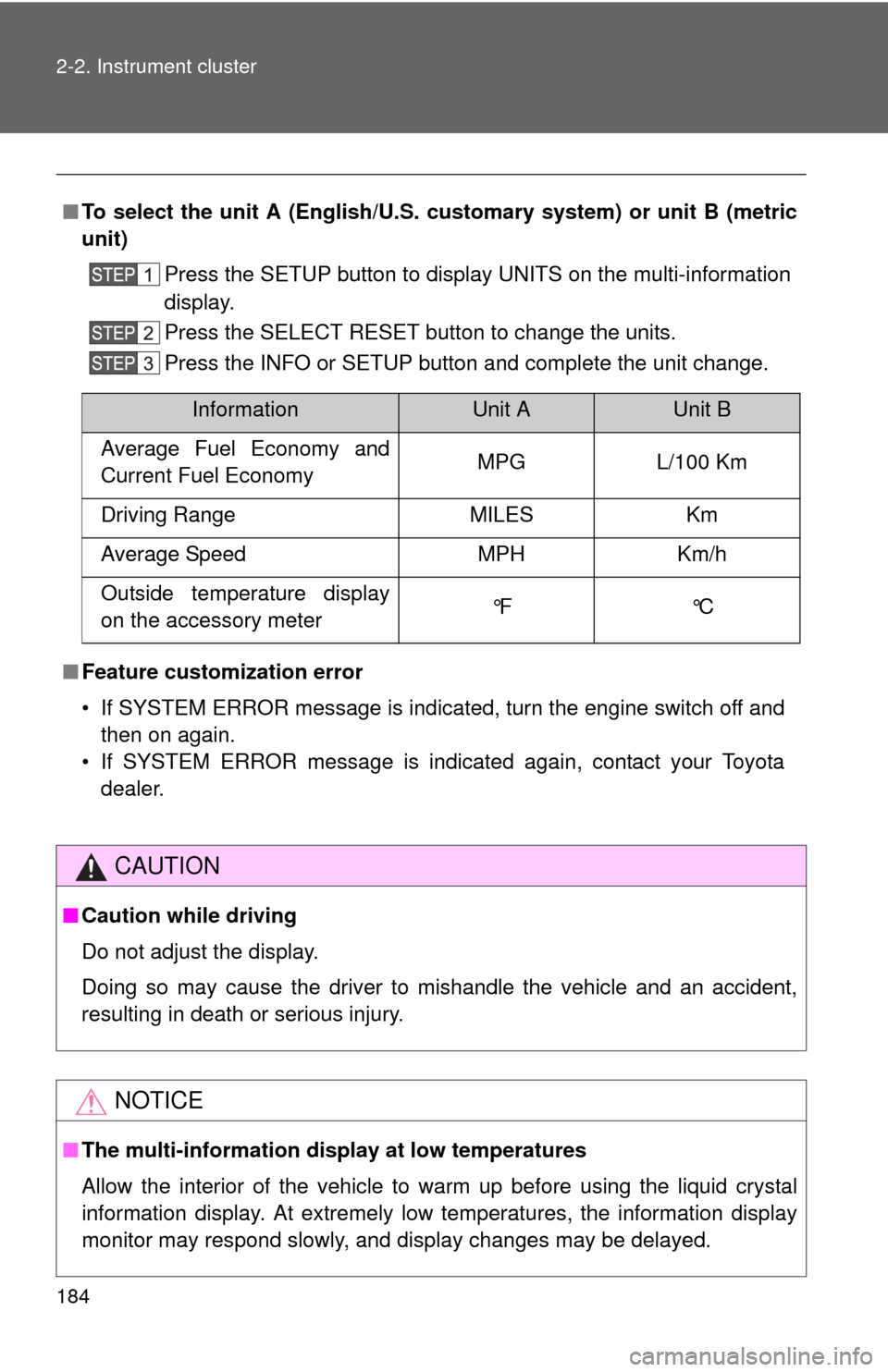
■To select the unit A (English/U.S. customary system) or unit B (metric
unit)
Press the SETUP button to display UNITS on the multi-information
display.
Press the SELECT RESET button to change the units.
Press the INFO or SETUP button and complete the unit change.
■ Feature custom ization error
• If SYSTEM ERROR message is indicated, turn the engine switch off and then on again.
• If SYSTEM ERROR message is indicated again, contact your Toyota dealer.
CAUTION
■Caution while driving
Do not adjust the display.
Doing so may cause the driver to mishandle the vehicle and an accident,
resulting in death or serious injury.
NOTICE
■The multi-information disp lay at low temperatures
Allow the interior of the vehicle to warm up before using the liquid crystal
information display. At extremely low temperatures, the information display
monitor may respond slowly, and display changes may be delayed.
InformationUnit AUnit B
Average Fuel Economy and
Current Fuel Economy MPG L/100 Km
Driving Range MILES Km
Average Speed MPH Km/h
Outside temperature display
on the accessory meter °F °C
Page 187 of 708
187
2-2. Instrument cluster
2
When driving
●
Display off
■The accessory meter can be operated when
The engine switch must be in the ON position.
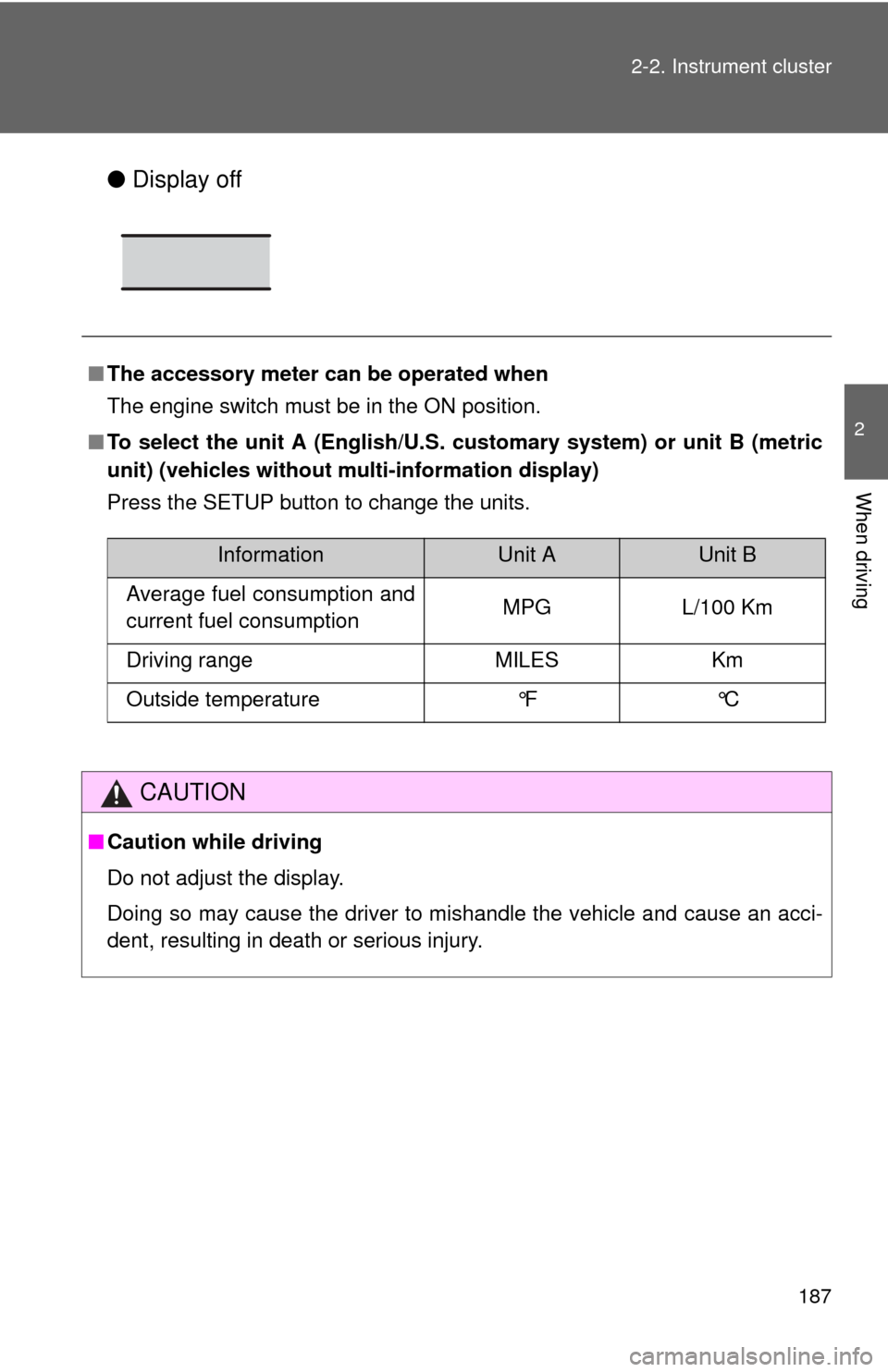
■ To select the unit A (English/U.S. customary system) or unit B (metric
unit) (vehicles without mu lti-information display)
Press the SETUP button to change the units.
CAUTION
■ Caution while driving
Do not adjust the display.
Doing so may cause the driver to mishandle the vehicle and cause an acci-
dent, resulting in death or serious injury.
InformationUnit AUnit B
Average fuel consumption and
current fuel consumption MPG L/100 Km
Driving range MILES Km
Outside temperature °F °C
Page 188 of 708
188
2-3. Operating the lights and wipers
Headlight switch
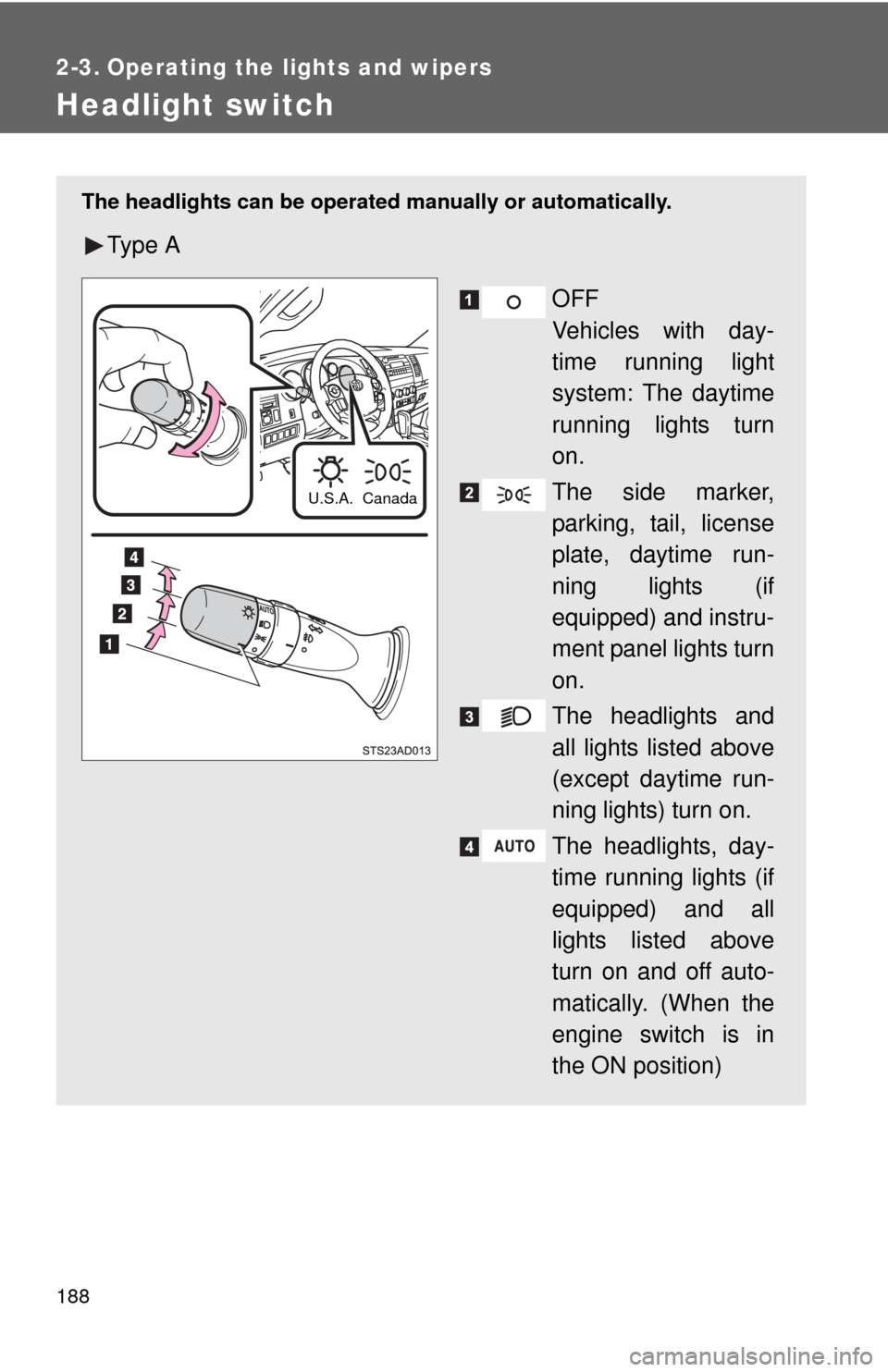
The headlights can be operated manually or automatically.
Ty p e A
OFF
Vehicles with day-
time running light
system: The daytime
running lights turn
on.
The side marker,
parking, tail, license
plate, daytime run-
ning lights (if
equipped) and instru-
ment panel lights turn
on.
The headlights and
all lights listed above
(except daytime run-
ning lights) turn on.
The headlights, day-
time running lights (if
equipped) and all
lights listed above
turn on and off auto-
matically. (When the
engine switch is in
the ON position)
Canada
U.S.A.
Page 189 of 708
189
2-3. Operating the lights and wipers
2
When driving
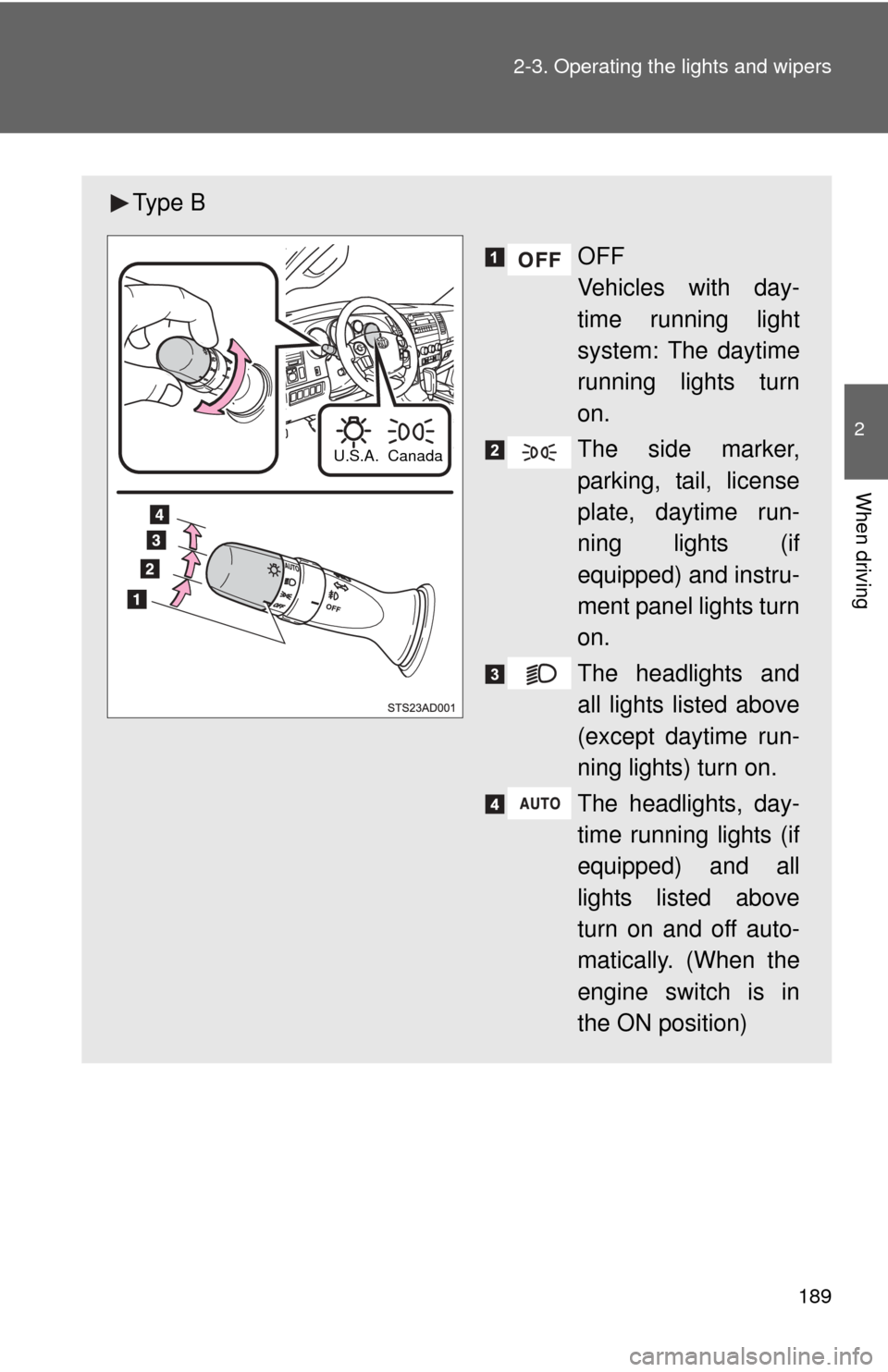
Ty p e B
OFF
Vehicles with day-
time running light
system: The daytime
running lights turn
on.
The side marker,
parking, tail, license
plate, daytime run-
ning lights (if
equipped) and instru-
ment panel lights turn
on.
The headlights and
all lights listed above
(except daytime run-
ning lights) turn on.
The headlights, day-
time running lights (if
equipped) and all
lights listed above
turn on and off auto-
matically. (When the
engine switch is in
the ON position)
Canada
U.S.A.
Page 190 of 708
190 2-3. Operating the lights and wipers
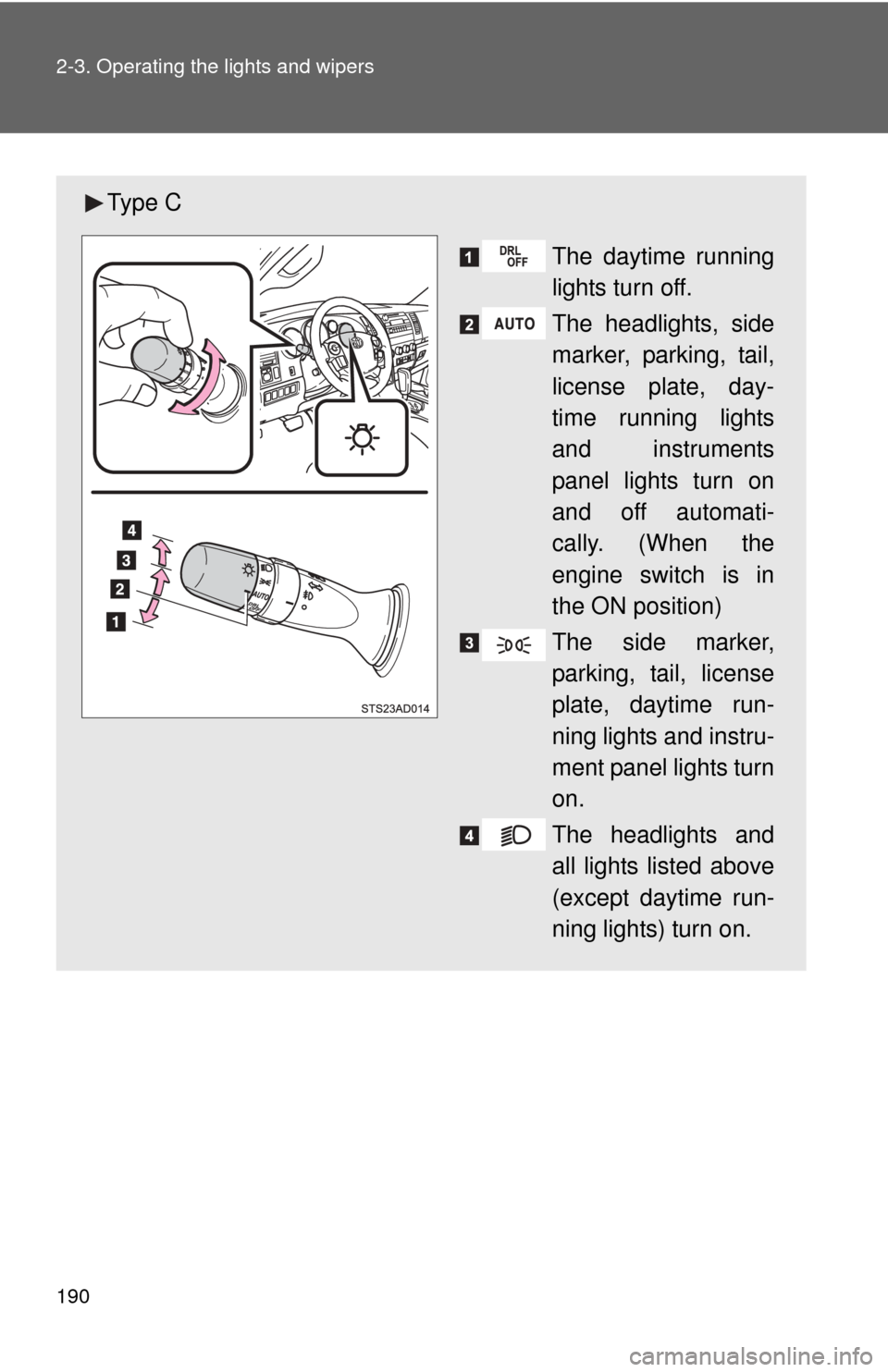
Ty p e CThe daytime running
lights turn off.
The headlights, side
marker, parking, tail,
license plate, day-
time running lights
and instruments
panel lights turn on
and off automati-
cally. (When the
engine switch is in
the ON position)
The side marker,
parking, tail, license
plate, daytime run-
ning lights and instru-
ment panel lights turn
on.
The headlights and
all lights listed above
(except daytime run-
ning lights) turn on.
Page 191 of 708
191
2-3. Operating the lights and wipers
2
When driving
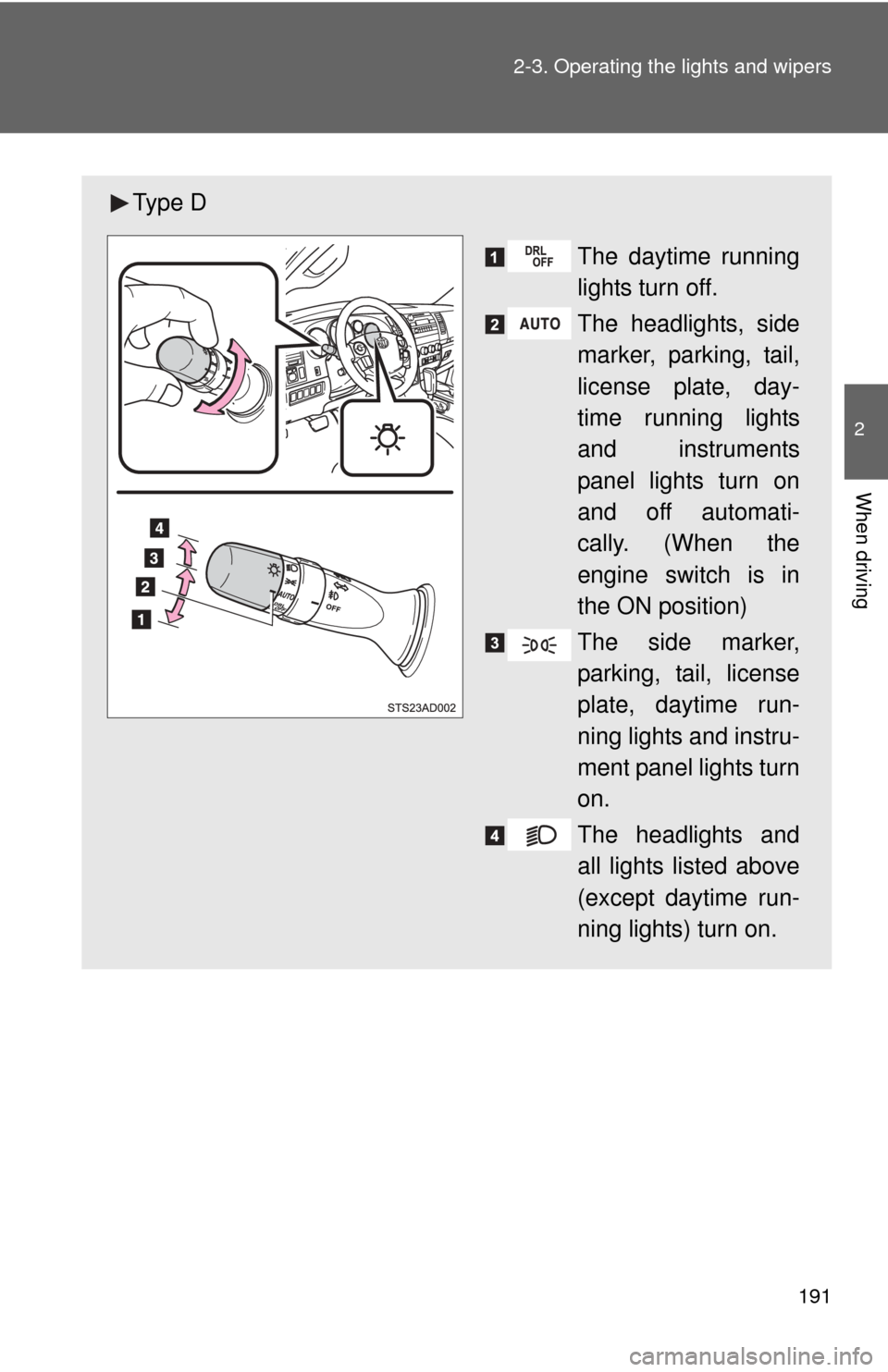
Ty p e D
The daytime running
lights turn off.
The headlights, side
marker, parking, tail,
license plate, day-
time running lights
and instruments
panel lights turn on
and off automati-
cally. (When the
engine switch is in
the ON position)
The side marker,
parking, tail, license
plate, daytime run-
ning lights and instru-
ment panel lights turn
on.
The headlights and
all lights listed above
(except daytime run-
ning lights) turn on.
Page 192 of 708
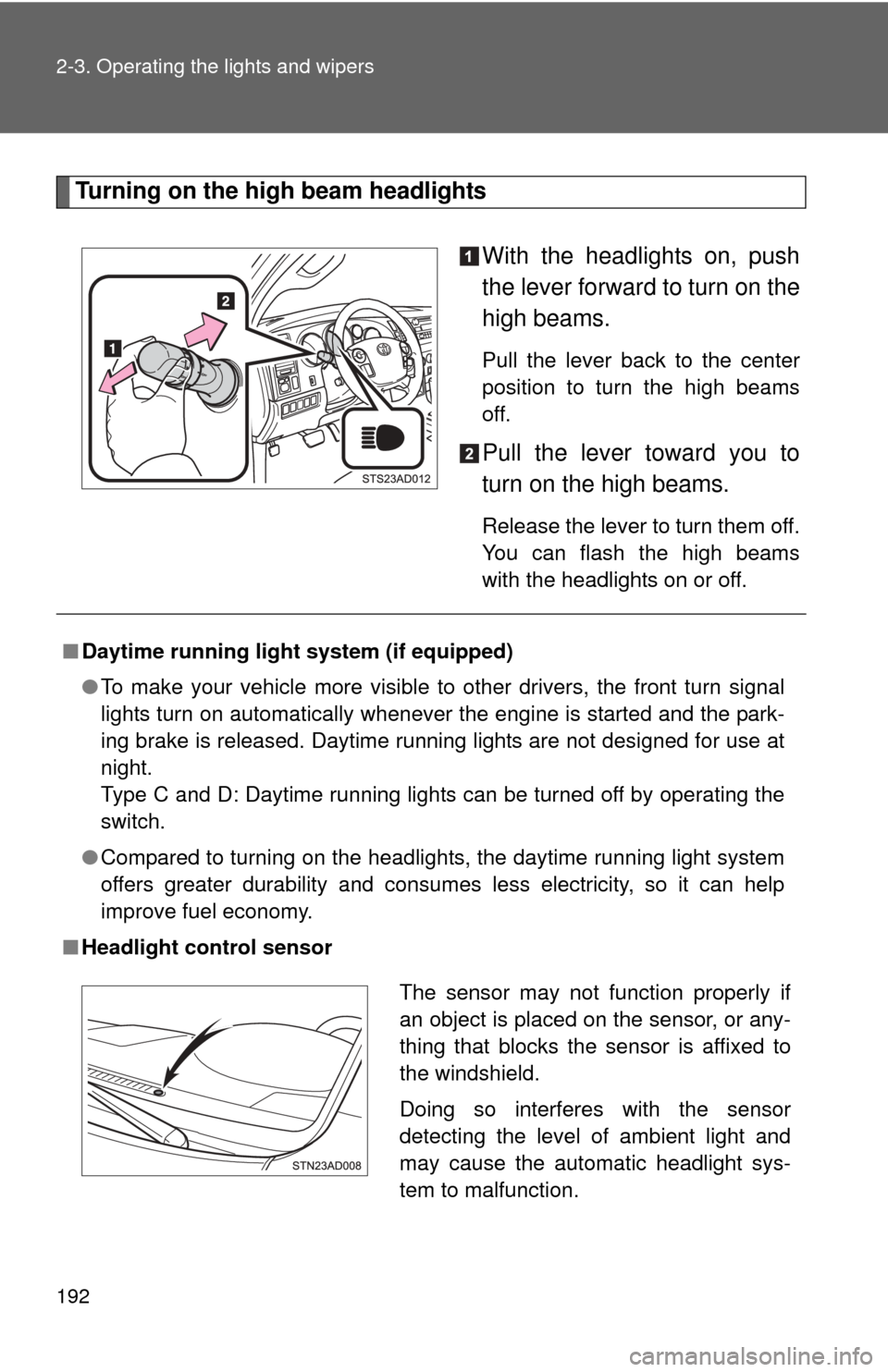
192 2-3. Operating the lights and wipers
Turning on the high beam headlightsWith the headlights on, push
the lever forward to turn on the
high beams.
Pull the lever back to the center
position to turn the high beams
off.
Pull the lever toward you to
turn on the high beams.
Release the lever to turn them off.
You can flash the high beams
with the headlights on or off.
■Daytime running light system (if equipped)
●To make your vehicle more visible to other drivers, the front turn signal
lights turn on automatically whenever the engine is started and the park-
ing brake is released. Daytime running lights are not designed for use at
night.
Type C and D: Daytime running lights can be turned off by operating the
switch.
● Compared to turning on the headlights, the daytime running light system
offers greater durability and consumes less electricity, so it can help
improve fuel economy.
■ Headlight control sensor
The sensor may not function properly if
an object is placed on the sensor, or any-
thing that blocks the sensor is affixed to
the windshield.
Doing so interferes with the sensor
detecting the level of ambient light and
may cause the automatic headlight sys-
tem to malfunction.