CD player TOYOTA SEQUOIA 2013 2.G Navigation Manual
[x] Cancel search | Manufacturer: TOYOTA, Model Year: 2013, Model line: SEQUOIA, Model: TOYOTA SEQUOIA 2013 2.GPages: 328, PDF Size: 8.3 MB
Page 171 of 328
171
1. AUDIO/VIDEO SYSTEM OPERATION
5
AUDIO/VIDEO SYSTEM
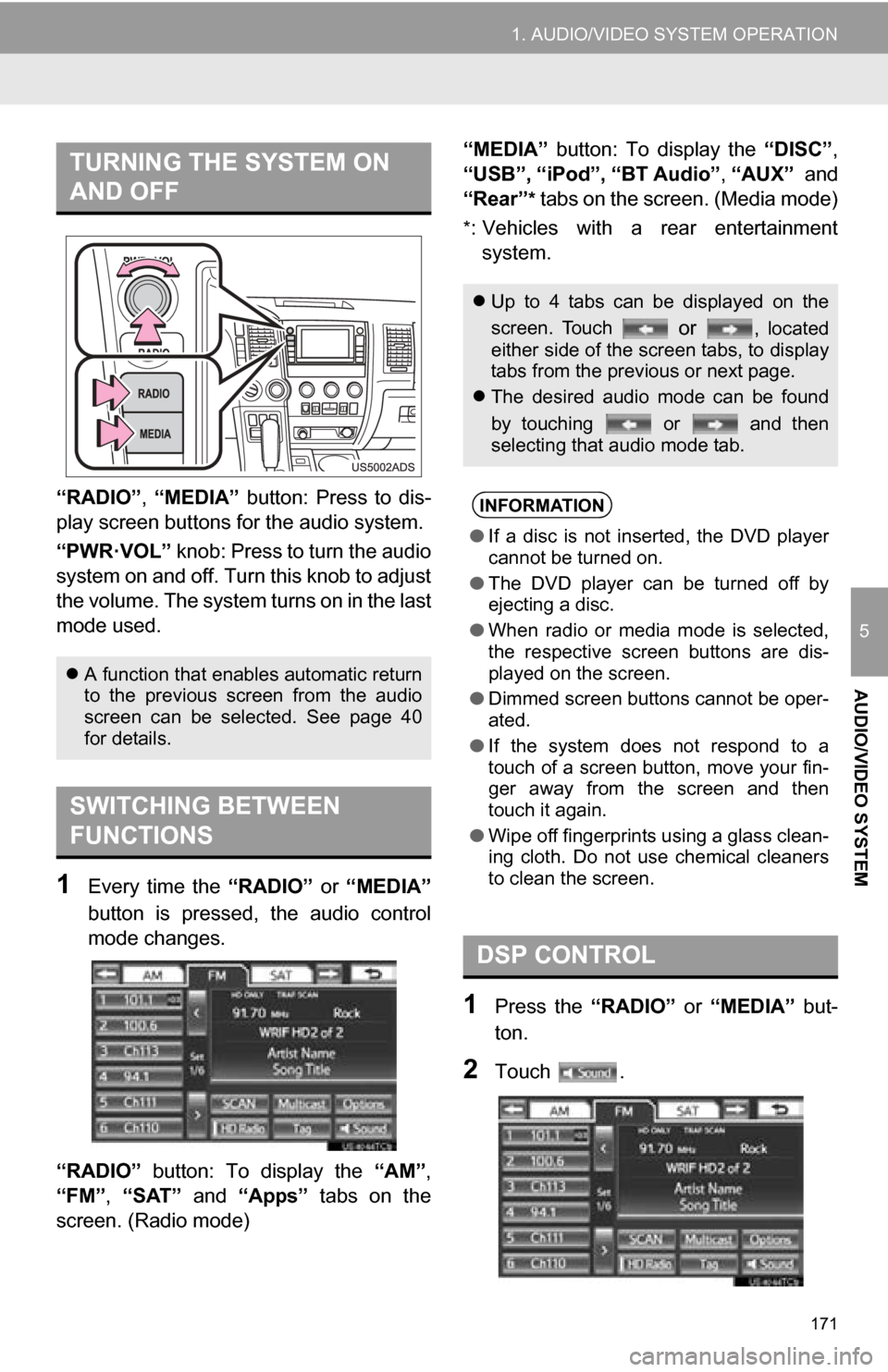
“RADIO”, “MEDIA” button: Press to dis-
play screen but tons for the audio system.
“PWR·VOL” knob: Press to turn the audio
system on and off. Turn this knob to adjust
the volume. The system turns on in the last
mode used.
1Every time the “RADIO” or “MEDIA”
button is pressed, the audio control
mode changes.
“RADIO” button: To display the “AM”,
“FM”, “SAT” and “Apps” tabs on the
screen. (Radio mode) “MEDIA” button: To display the
“DISC”,
“USB”, “iPod”, “BT Audio” , “AUX” and
“Rear”
* tabs on the screen. (Media mode)
*: Vehicles with a rear entertainment system.
1Press the “RADIO” or “MEDIA” but-
ton.
2Touch .
TURNING THE SYSTEM ON
AND OFF
A function that enables automatic return
to the previous screen from the audio
screen can be selected. See page 40
for details.
SWITCHING BETWEEN
FUNCTIONS
Up to 4 tabs can be displayed on the
screen. Touch
or , located
either side of the screen tabs, to display
tabs from the previous or next page.
The desired audio mode can be found
by touching or and then
selecting that audio mode tab.
INFORMATION
●If a disc is not inserted, the DVD player
cannot be turned on.
● The DVD player can be turned off by
ejecting a disc.
● When radio or media mode is selected,
the respective screen buttons are dis-
played on the screen.
● Dimmed screen buttons cannot be oper-
ated.
● If the system does not respond to a
touch of a screen button, move your fin-
ger away from the screen and then
touch it again.
● Wipe off fingerprints using a glass clean-
ing cloth. Do not use chemical cleaners
to clean the screen.
DSP CONTROL
Page 173 of 328
173
1. AUDIO/VIDEO SYSTEM OPERATION
5
AUDIO/VIDEO SYSTEM
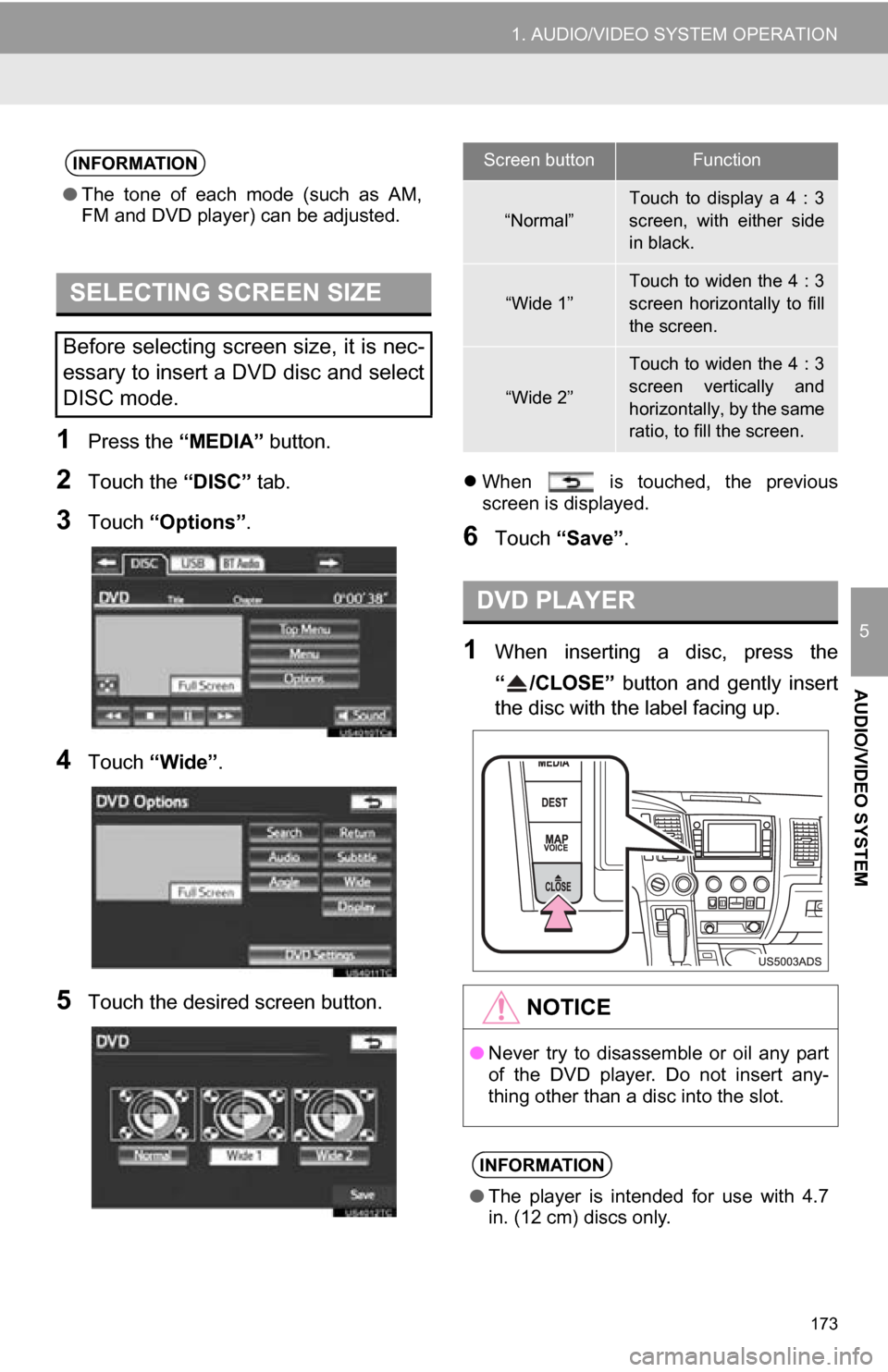
1Press the “MEDIA” button.
2Touch the “DISC” tab.
3Touch “Options”.
4Touch “Wide” .
5Touch the desired screen button.
When is touched, the previous
screen is displayed.
6Touch “Save” .
1When inserting a disc, press the
“ /CLOSE” button and gently insert
the disc with the label facing up.
INFORMATION
●The tone of each mode (such as AM,
FM and DVD player) can be adjusted.
SELECTING SCREEN SIZE
Before selecting screen size, it is nec-
essary to insert a DVD disc and select
DISC mode.
Screen buttonFunction
“Normal”
Touch to display a 4 : 3
screen, with either side
in black.
“Wide 1”Touch to widen the 4 : 3
screen horizontally to fill
the screen.
“Wide 2”
Touch to widen the 4 : 3
screen vertically and
horizontally, by the same
ratio, to fill the screen.
DVD PLAYER
NOTICE
●Never try to disassemble or oil any part
of the DVD player. Do not insert any-
thing other than a disc into the slot.
INFORMATION
●The player is intended for use with 4.7
in. (12 cm) discs only.
Page 174 of 328
174
1. AUDIO/VIDEO SYSTEM OPERATION
1Press the “MEDIA” button
2Touch the “AUX” tab or press the
“MEDIA” button repeatedly to change
to AUX mode.1Press the “MEDIA” button
2Touch the “USB” or “iPod” tab or
press the “MEDIA” button repeatedly
to change to USB memory/iPod mode.
AUX PORT
The sound of portable audio players
connected to the AUX port can be en-
joyed. For details, refer to “Owner’s
Manual” .
CAUTION
●Do not connect portable audio device or
operate the controls while driving.
NOTICE
●Do not leave portable audio device in
the vehicle. The temperature inside the
vehicle may become high, resulting in
damage to the player.
● Do not push down on or apply unneces-
sary pressure to the portable audio
device while it is connected as this may
damage the portable audio device or its
terminal.
● Do not insert foreign objects into the port
as this may damage the portable audio
device or its terminal.
INFORMATION
●When the portable audio player is not
connected to the AUX port, the tab will
be dimmed.
USB PORT
A USB memory/iPod can be connect-
ed to the USB port. For details, see
“CONNECTING A USB MEMORY” on
page 206 and “CONNECTING iPod”
on page 210.
INFORMATION
●When a USB memory/iPod is not con-
nected with the USB port, the tab will be
dimmed.
Page 188 of 328
188
1. AUDIO/VIDEO SYSTEM OPERATION
7. DVD PLAYER OPERATION
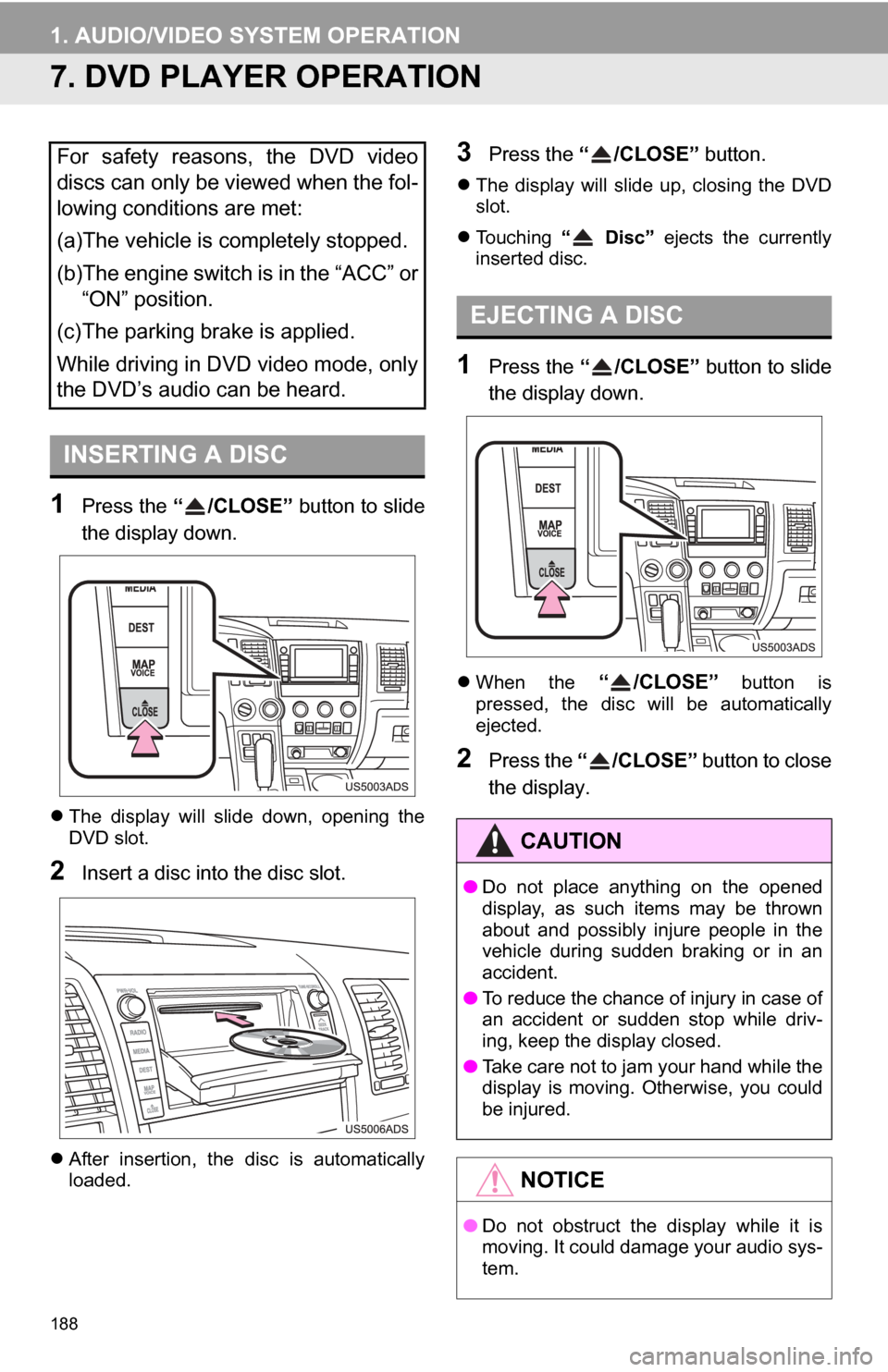
1Press the “ /CLOSE” button to slide
the display down.
The display will slide down, opening the
DVD slot.
2Insert a disc into the disc slot.
After insertion, the disc is automatically
loaded.
3Press the “ /CLOSE” button.
The display will slide up, closing the DVD
slot.
Touching “ Disc” ejects the currently
inserted disc.
1Press the “ /CLOSE” button to slide
the display down.
When the “ /CLOSE” button is
pressed, the disc will be automatically
ejected.
2Press the “ /CLOSE” button to close
the display.
For safety reasons, the DVD video
discs can only be viewed when the fol-
lowing conditions are met:
(a)The vehicle is completely stopped.
(b)The engine switch is in the “ACC” or “ON” position.
(c)The parking brake is applied.
While driving in DVD video mode, only
the DVD’s audio can be heard.
INSERTING A DISC
EJECTING A DISC
CAUTION
● Do not place anything on the opened
display, as such items may be thrown
about and possibly injure people in the
vehicle during sudden braking or in an
accident.
● To reduce the chance of injury in case of
an accident or sudden stop while driv-
ing, keep the display closed.
● Take care not to jam your hand while the
display is moving. Otherwise, you could
be injured.
NOTICE
●Do not obstruct the display while it is
moving. It could damage your audio sys-
tem.
Page 189 of 328
189
1. AUDIO/VIDEO SYSTEM OPERATION
5
AUDIO/VIDEO SYSTEM
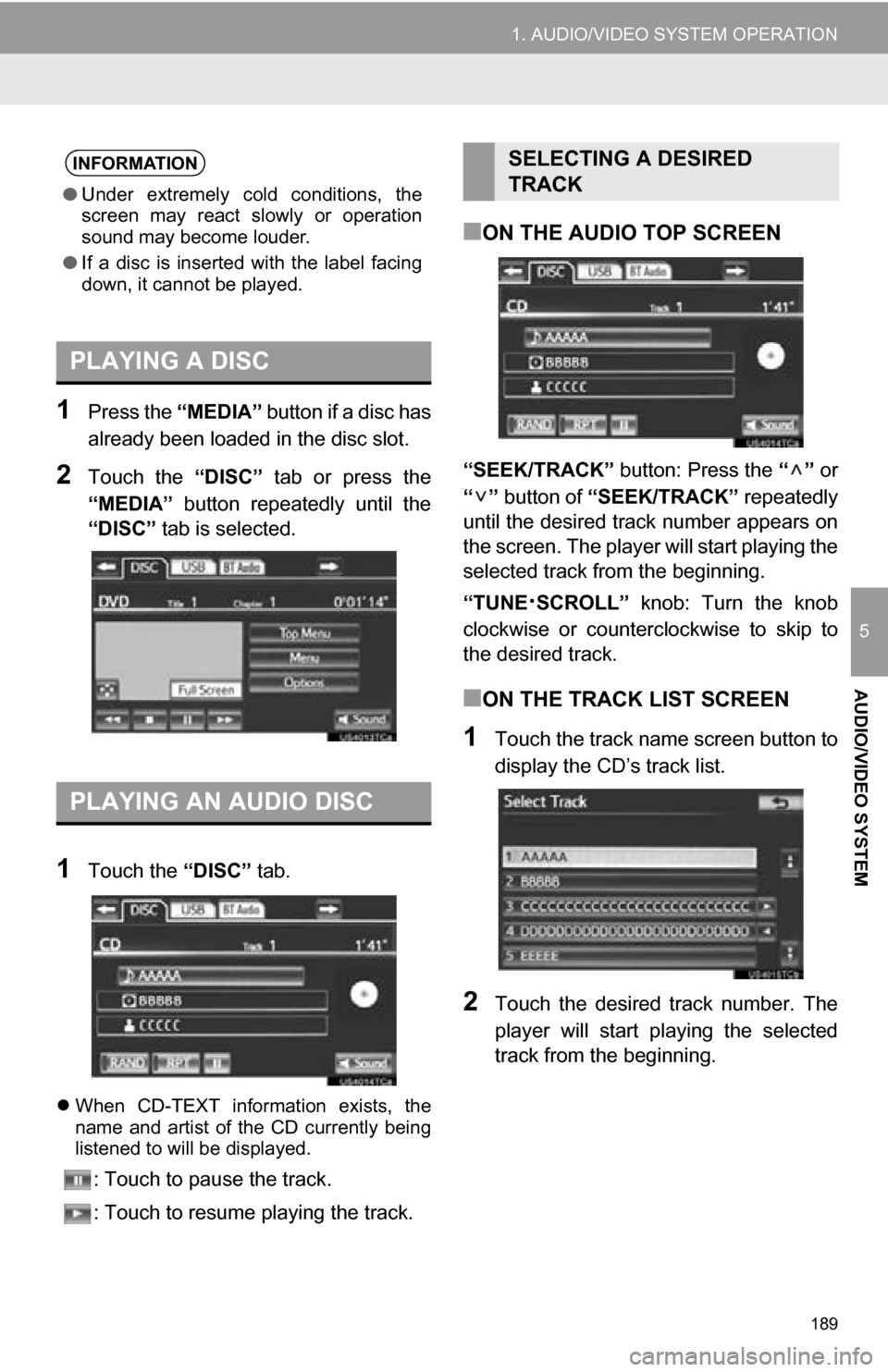
1Press the “MEDIA” button if a disc has
already been loaded in the disc slot.
2Touch the “DISC” tab or press the
“MEDIA” button repeatedly until the
“DISC” tab is selected.
1Touch the “DISC” tab.
When CD-TEXT information exists, the
name and artist of the CD currently being
listened to will be displayed.
: Touch to pause the track.
: Touch to resume playing the track.
■ON THE AUDIO TOP SCREEN
“SEEK/TRACK” button: Press the “” or
“” button of “SEEK/TRACK” repeatedly
until the desired track number appears on
the screen. The player will start playing the
selected track from the beginning.
“TUNE
·SCROLL” knob: Turn the knob
clockwise or counterclockwise to skip to
the desired track.
■ON THE TRACK LIST SCREEN
1Touch the track name screen button to
display the CD’s track list.
2Touch the desired track number. The
player will start playing the selected
track from the beginning.
INFORMATION
● Under extremely cold conditions, the
screen may react slowly or operation
sound may become louder.
● If a disc is inserted with the label facing
down, it cannot be played.
PLAYING A DISC
PLAYING AN AUDIO DISC
SELECTING A DESIRED
TRACK
Page 190 of 328
190
1. AUDIO/VIDEO SYSTEM OPERATION
, : Touch to move the list up or down
by 5 track groups. If either of these screen
buttons is touched when the top/bottom
page of the list is displayed, the last/first
page is displayed.
“SEEK/TRACK” button: Press the “” or
“” button of “SEEK/TRACK” to scroll
through the track list one by one.
“TUNE
·SCROLL” knob: Turn the knob
clockwise or counterclockwise to quickly
scroll up or down the track list. To select
the desired track, press the knob.
, : If appears to the right of an item
name, the complete name is too long for
the screen. Touch to scroll to the end of
the name. Touch to scroll to the begin-
ning of the name.
■FAST FORWARDING OR REWIND-
ING
1Press and hold the “” or “” button
of “SEEK/TRACK” to fast forward or
rewind the disc.
When the button is released, the player
resumes playing from that position.
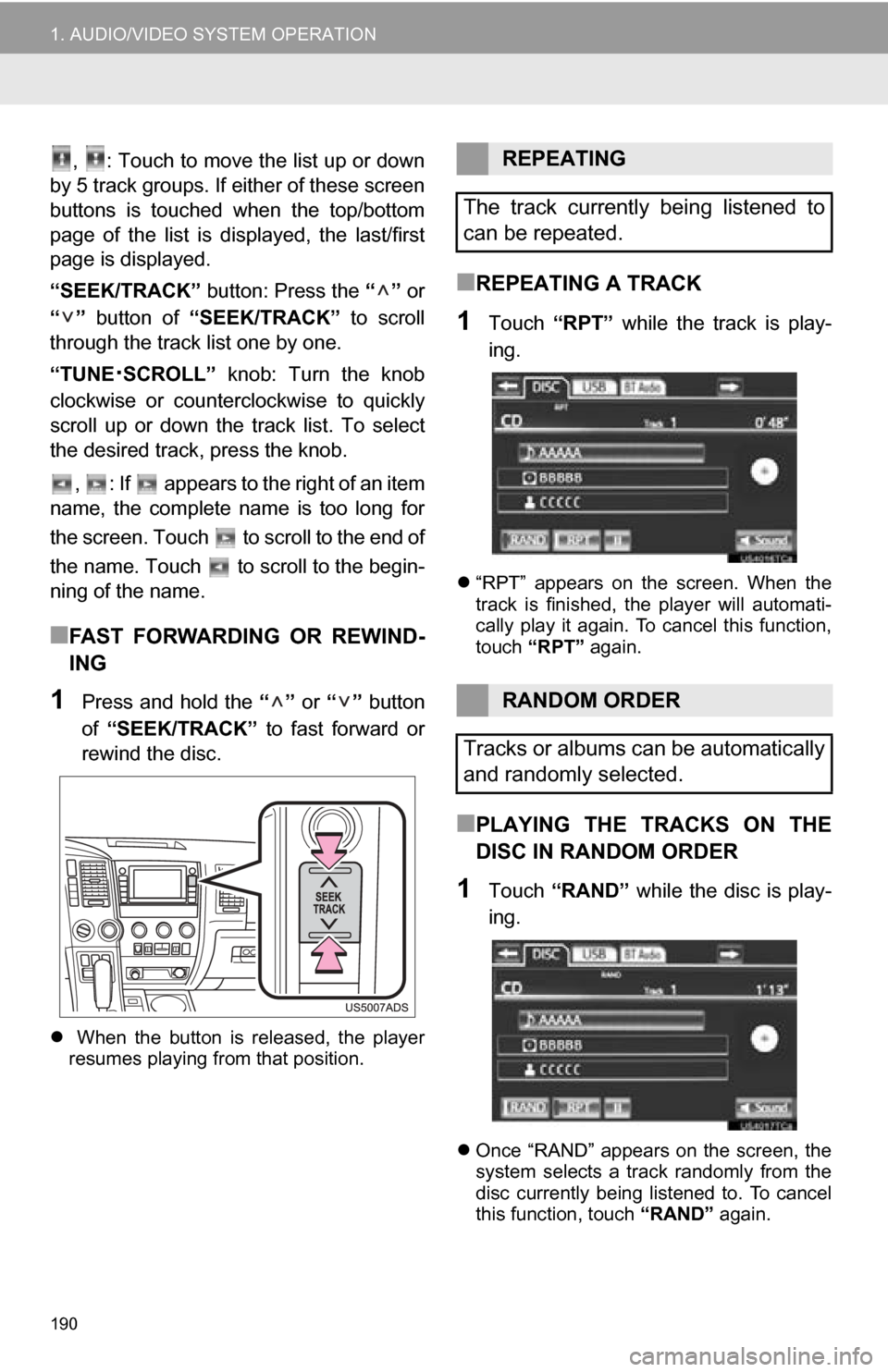
■REPEATING A TRACK
1Touch “RPT” while the track is play-
ing.
“RPT” appears on the screen. When the
track is finished, the player will automati-
cally play it again. To cancel this function,
touch “RPT” again.
■PLAYING THE TRACKS ON THE
DISC IN RANDOM ORDER
1Touch “RAND” while the disc is play-
ing.
Once “RAND” appears on the screen, the
system selects a track randomly from the
disc currently being listened to. To cancel
this function, touch “RAND” again.
REPEATING
The track currently being listened to
can be repeated.
RANDOM ORDER
Tracks or albums can be automatically
and randomly selected.
Page 192 of 328
192
1. AUDIO/VIDEO SYSTEM OPERATION
■FAST FORWARDING OR REWIND-
ING
1Press and hold the “” or “” button
of “SEEK/TRACK” to fast forward or
rewind the file.
When the button is released, the player
resumes playing from that position.
■ON THE AUDIO TOP SCREEN
“SEEK/TRACK” button: Press the “” or
“” button of “SEEK/TRACK” repeatedly
until the desired file number appears on
the screen. The player will start playing the
selected file from the beginning.
“TUNE·SCROLL” knob: Turn the knob
clockwise or counterclockwise to skip to
the desired file.
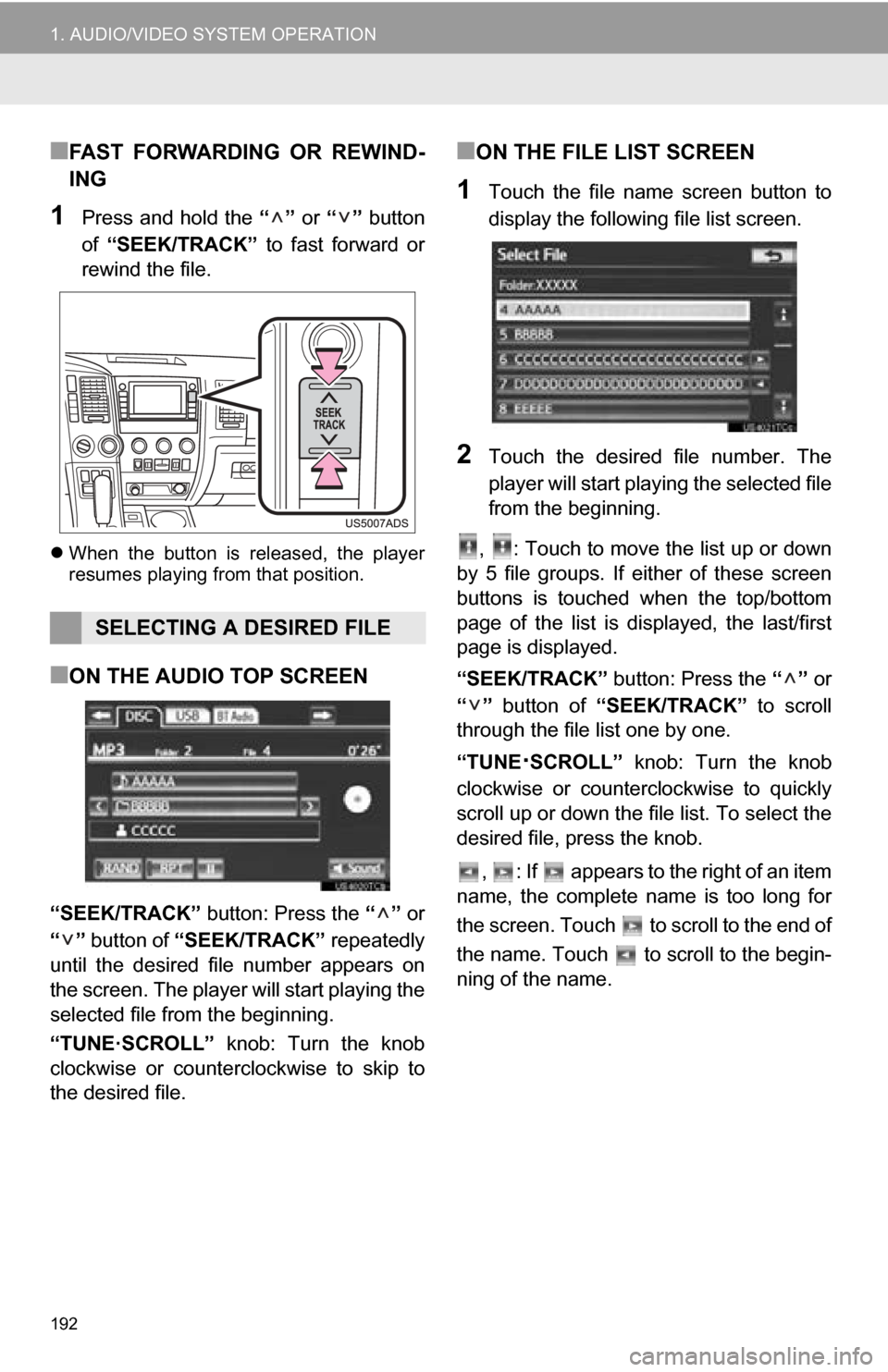
■ON THE FILE LIST SCREEN
1Touch the file name screen button to
display the following file list screen.
2Touch the desired file number. The
player will start playing the selected file
from the beginning.
, : Touch to move the list up or down
by 5 file groups. If either of these screen
buttons is touched when the top/bottom
page of the list is displayed, the last/first
page is displayed.
“SEEK/TRACK” button: Press the “” or
“” button of “SEEK/TRACK” to scroll
through the file list one by one.
“TUNE
·SCROLL” knob: Turn the knob
clockwise or counterclockwise to quickly
scroll up or down the file list. To select the
desired file, press the knob.
, : If appears to the right of an item
name, the complete name is too long for
the screen. Touch to scroll to the end of
the name. Touch to scroll to the begin-
ning of the name.
SELECTING A DESIRED FILE
Page 193 of 328
193
1. AUDIO/VIDEO SYSTEM OPERATION
5
AUDIO/VIDEO SYSTEM
■FAST FORWARDING OR REWIND-
ING
1Press and hold the “” or “” button
of “SEEK/TRACK” to fast forward or
rewind the file.
When the button is released, the player
resumes playing from that position.
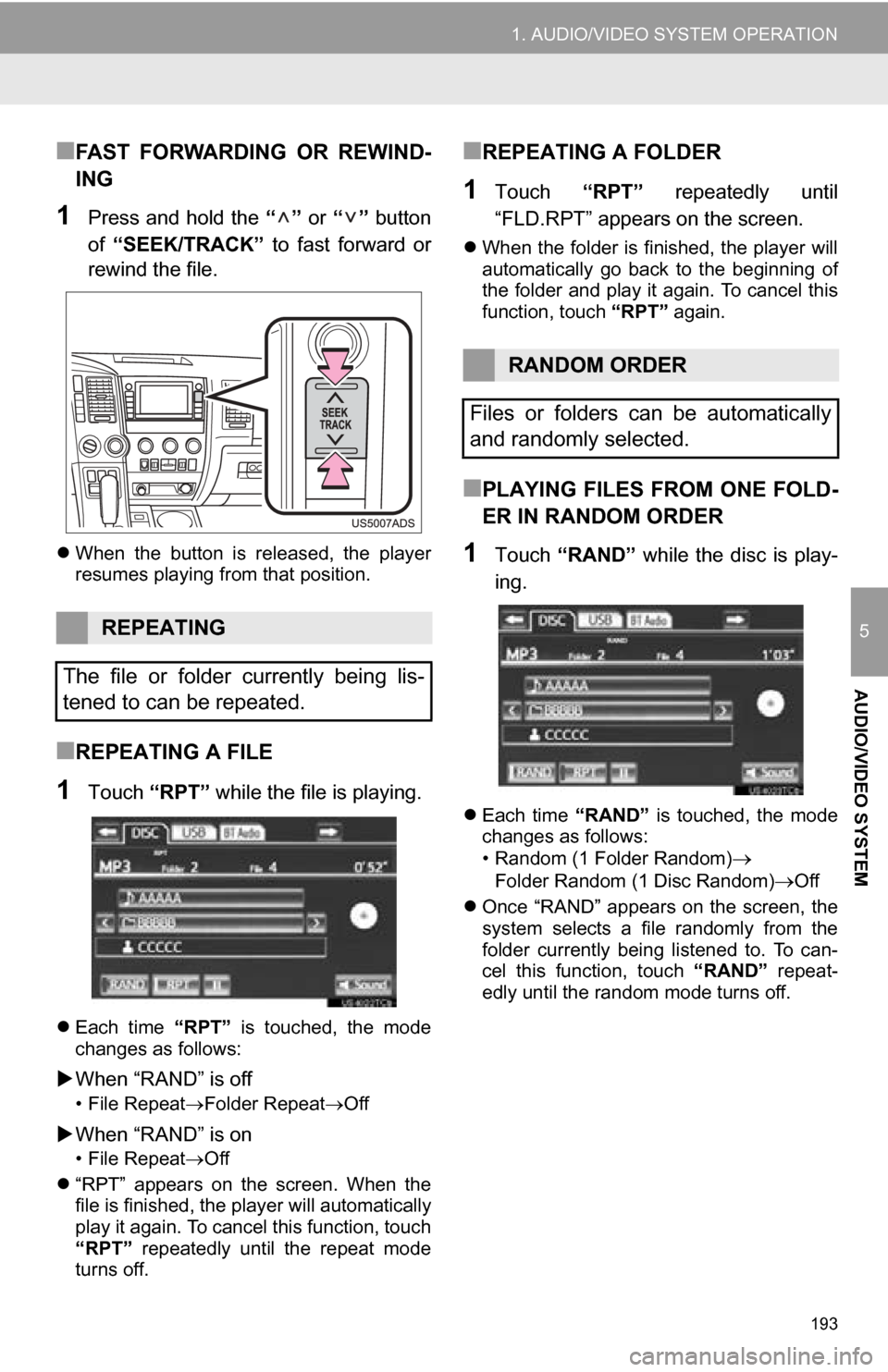
■REPEATING A FILE
1Touch “RPT” while the file is playing.
Each time “RPT” is touched, the mode
changes as follows:
When “RAND” is off
• File Repeat Folder Repeat Off
When “RAND” is on
• File Repeat Off
“RPT” appears on the screen. When the
file is finished, the player will automatically
play it again. To cancel this function, touch
“RPT” repeatedly until the repeat mode
turns off.
■REPEATING A FOLDER
1Touch “RPT” repeatedly until
“FLD.RPT” appears on the screen.
When the folder is finished, the player will
automatically go back to the beginning of
the folder and play it again. To cancel this
function, touch “RPT” again.
■PLAYING FILES FROM ONE FOLD-
ER IN RANDOM ORDER
1Touch “RAND” while the disc is play-
ing.
Each time “RAND” is touched, the mode
changes as follows:
• Random (1 Folder Random)
Folder Random (1 Disc Random)Off
Once “RAND” appears on the screen, the
system selects a file randomly from the
folder currently being listened to. To can-
cel this function, touch “RAND” repeat-
edly until the random mode turns off.
REPEATING
The file or folder currently being lis-
tened to can be repeated.
RANDOM ORDER
Files or folders can be automatically
and randomly selected.
Page 194 of 328
194
1. AUDIO/VIDEO SYSTEM OPERATION
■PLAYING THE FILES IN ALL THE
FOLDERS ON THE DISC IN RAN-
DOM ORDER
1Touch “RAND” repeatedly until
“FLD.RAND” appears on the screen.
Once “FLD.RAND” appears on the
screen, the system selects a file randomly
from all of the existing folders. To cancel
this function, touch “RAND” again.
INFORMATION
●When a file is skipped or the system is
inoperative, touch “RAND” to reset.
OPERATING A DVD DISC
The playback condition of some DVD
discs may be determined by the DVD
software producer. This DVD player
plays a disc as the software producer
intended. As such some functions may
not work properly. Be sure to read the
instruction manual that comes with the
individual DVD disc. For detailed infor-
mation about DVD video discs, see
“DVD PLAYER AND DVD VIDEO
DISC INFORMATION” on page 204.
PRECAUTIONS ON DVD VIDEO
DISC
When recording with a DVD video, au-
dio tracks may not record in some cas-
es while the menu is displayed. As
audio will not play in this case, verify
that the video tracks are playing and
then activate playback.
When playback of a disc is completed:
If an audio CD or MP3/WMA disc is
playing, the first track or file starts.
If a DVD video is playing, playback will
stop or the menu screen will be dis-
played.
The title/chapter number and playback
time display may not appear while
playing back certain DVD video discs.
CAUTION
● Conversational speech on some DVDs
is recorded at a low volume to empha-
size the impact of sound effects. If you
adjust the volume assuming that the
conversations represent the maximum
volume level that the DVD will play, you
may be startled by louder sound effects
or when you change to a different audio
source. The louder sounds may have a
significant impact on the human body or
pose a driving hazard. Keep this in mind
when you adjust the volume.
Page 196 of 328
196
1. AUDIO/VIDEO SYSTEM OPERATION
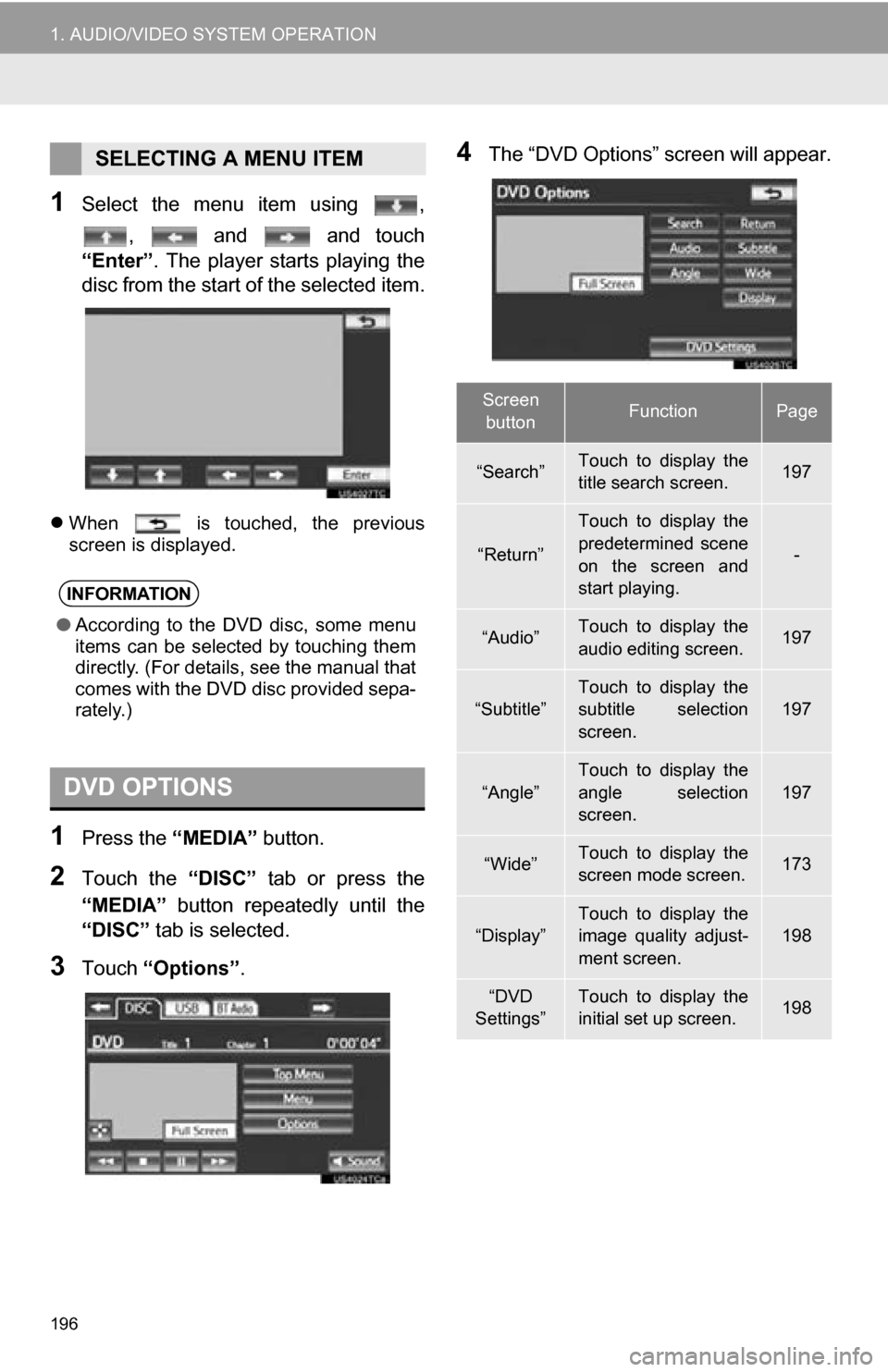
1Select the menu item using ,, and and touch
“Enter”. The player starts playing the
disc from the start of the selected item.
When is touched, the previous
screen is displayed.
1Press the “MEDIA” button.
2Touch the “DISC” tab or press the
“MEDIA” button repeatedly until the
“DISC” tab is selected.
3Touch “Options”.
4The “DVD Options” screen will appear.SELECTING A MENU ITEM
INFORMATION
●According to the DVD disc, some menu
items can be selected by touching them
directly. (For details, see the manual that
comes with the DVD disc provided sepa-
rately.)
DVD OPTIONS
Screen
buttonFunctionPage
“Search”Touch to display the
title search screen.197
“Return”
Touch to display the
predetermined scene
on the screen and
start playing.
-
“Audio”Touch to display the
audio editing screen.197
“Subtitle”
Touch to display the
subtitle selection
screen.
197
“Angle”
Touch to display the
angle selection
screen.
197
“Wide”Touch to display the
screen mode screen.173
“Display”Touch to display the
image quality adjust-
ment screen.198
“DVD
Settings”Touch to display the
initial set up screen.198