bluetooth TOYOTA SEQUOIA 2013 2.G Navigation Manual
[x] Cancel search | Manufacturer: TOYOTA, Model Year: 2013, Model line: SEQUOIA, Model: TOYOTA SEQUOIA 2013 2.GPages: 328, PDF Size: 8.3 MB
Page 215 of 328
215
1. AUDIO/VIDEO SYSTEM OPERATION
5
AUDIO/VIDEO SYSTEM
U.S.A.
Canada
Portable player information is registered
when the portable player is connected
to the Bluetooth
® audio system. When
selling or disposing of the vehicle,
remove the Bluetooth
® audio informa-
tion from the system. (See “DELETING
A Bluetooth
® DEVICE” on page 158.)
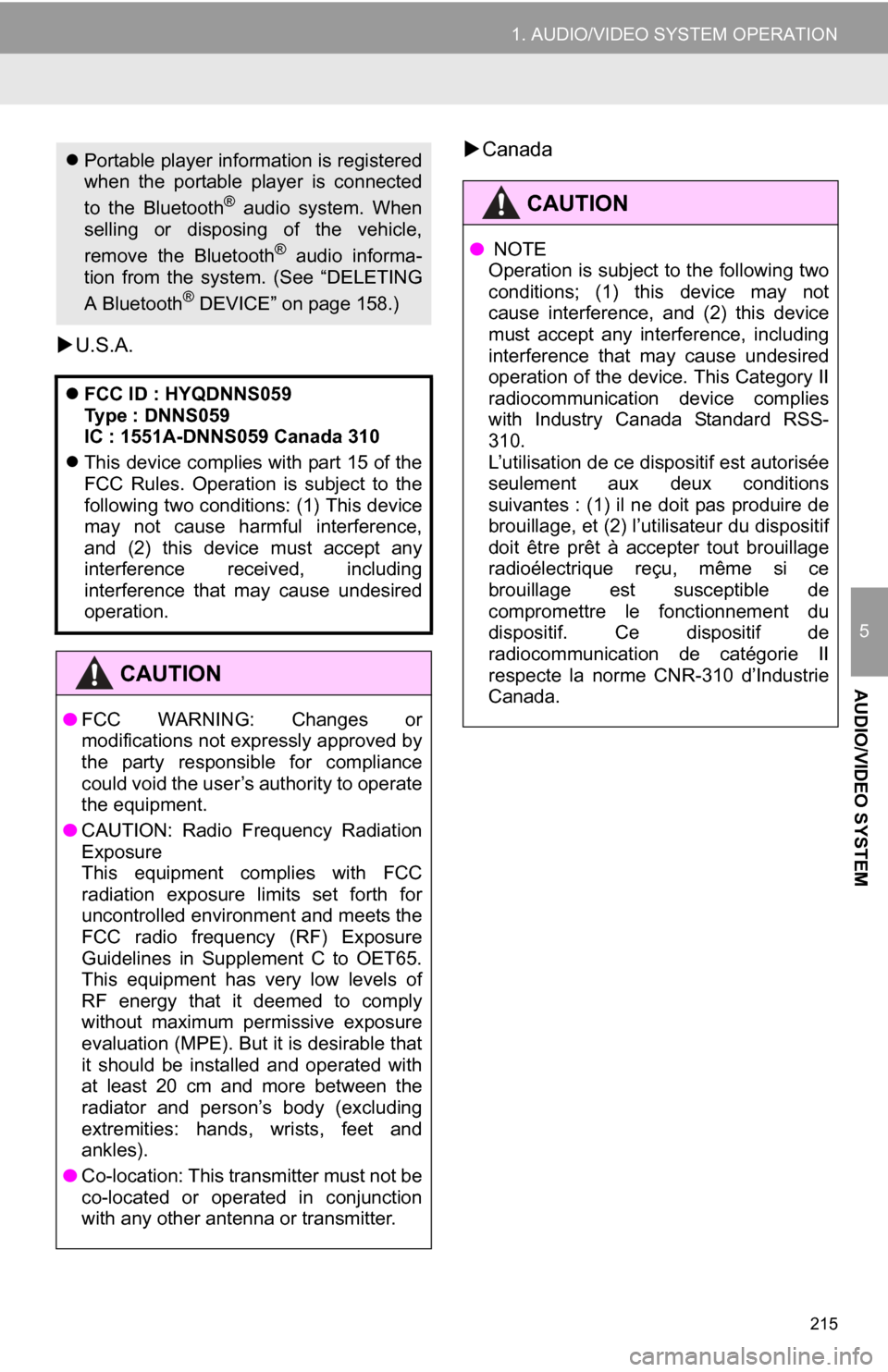
FCC ID : HYQDNNS059
Type : DNNS059
IC : 1551A-DNNS059 Canada 310
This device complies with part 15 of the
FCC Rules. Operation is subject to the
following two conditions: (1) This device
may not cause harmful interference,
and (2) this device must accept any
interference received, including
interference that may cause undesired
operation.
CAUTION
● FCC WARNING: Changes or
modifications not expressly approved by
the party responsible for compliance
could void the user’s authority to operate
the equipment.
● CAUTION: Radio Frequency Radiation
Exposure
This equipment complies with FCC
radiation exposure limits set forth for
uncontrolled environment and meets the
FCC radio frequency (RF) Exposure
Guidelines in Supplement C to OET65.
This equipment has very low levels of
RF energy that it deemed to comply
without maximum permissive exposure
evaluation (MPE). But it is desirable that
it should be installed and operated with
at least 20 cm and more between the
radiator and person’s body (excluding
extremities: hands, wrists, feet and
ankles).
● Co-location: This transmitter must not be
co-located or operated in conjunction
with any other antenna or transmitter.
CAUTION
● NOTE
Operation is subject to the following two
conditions; (1) this device may not
cause interference, and (2) this device
must accept any interference, including
interference that may cause undesired
operation of the device. This Category II
radiocommunication device complies
with Industry Canada Standard RSS-
310.
L’utilisation de ce dispositif est autorisée
seulement aux deux conditions
suivantes : (1) il ne doit pas produire de
brouillage, et (2) l’utilisateur du dispositif
doit être prêt à accepter tout brouillage
radioélectrique reçu, même si ce
brouillage est susceptible de
compromettre le fonctionnement du
dispositif. Ce dispositif de
radiocommunication de catégorie II
respecte la norme CNR-310 d’Industrie
Canada.
Page 216 of 328
216
1. AUDIO/VIDEO SYSTEM OPERATION
The portable player will be automatically
connected under the following conditions:
• The engine switch is in either the “ACC”
or “ON” position.
• When “Bluetooth* Power” is switched
from off to on.
• When the portable player is discon-
nected for some reason.
CAUTION
● This equipment complies with IC
radiation exposure limits set forth for
uncontrolled environment and meets
RSS-102 of the IC radio frequency (RF)
Exposure rules. This equipment has
very low levels of RF energy that it
deemed to comply without maximum
permissive exposure evaluation (MPE).
But it is desirable that it should be
installed and operated with at least 20
cm and more between the radiator and
person’s body (excluding extremities:
hands, wrists, feet and ankles).
Cet équipement se conforme aux limites
d’exposition aux radiations établies par
Industrie Canada pour un
environnement non contrôlé ainsi qu’aux
directives d’exposition aux fréquences
radioélectriques (RF) émises par
Industrie Canada dans la norme
CNR-102. Cet équipement émet un
niveau d’énergie RF faible à un point tel
qu’il se conforme sans devoir effectuer
d’évaluation d’exposition maximum
admissible (MPE). Lorsque l’équipement
est utilisé, il est toutefois souhaitable de
laisser au moins 20 cm entre l’antenne
et le corps (à l’exception des
extrémités : mains, poignets, pieds et
chevilles).
● Co-location: This transmitter must not be
co-located or operated in conjunction
with any other antenna or transmitter.
Co-implantation: cet émetteur ne doit
pas être co-implanté ou actionné en
même temps qu’aucune autre antenne
ou émetteur.
CONNECTING A Bluetooth®
AUDIO PLAYER
To use the Bluetooth® audio system, it
is necessary to register a portable
player with the system. Once the porta-
ble player has been registered, it is
possible to listen to the music.
Once the portable player has been reg-
istered, it is possible to listen to music
through the navigation system. (See
“REGISTERING A Bluetooth
® DE-
VICE” on page 157.)
INFORMATION
● For operating the portable player, see
the instruction manual that comes with
it.
WHEN “Bluetooth * Power” IS
ON
Page 217 of 328
217
1. AUDIO/VIDEO SYSTEM OPERATION
5
AUDIO/VIDEO SYSTEM
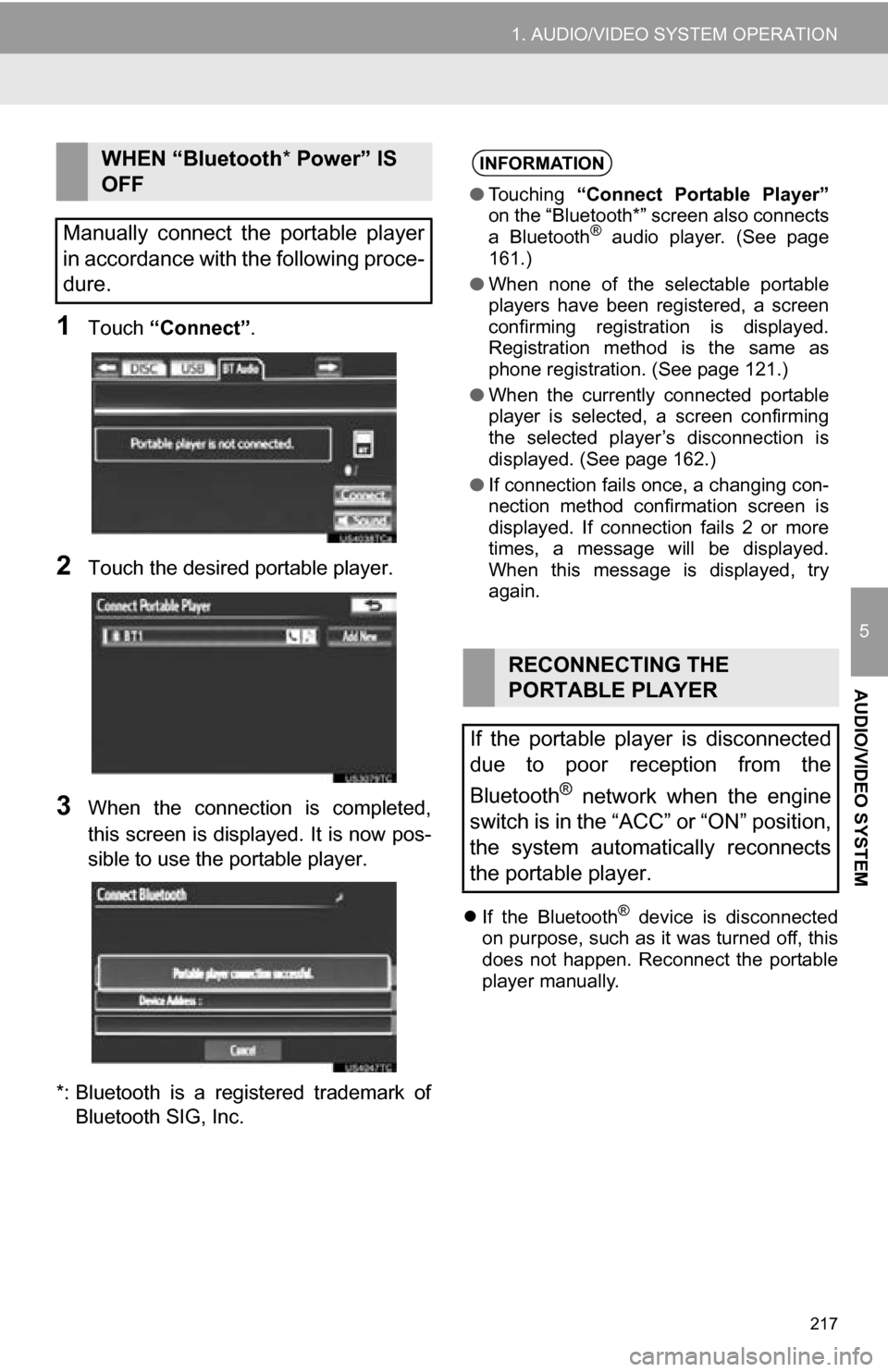
1Touch “Connect” .
2Touch the desired portable player.
3When the connection is completed,
this screen is displayed. It is now pos-
sible to use the portable player.
*: Bluetooth is a registered trademark of Bluetooth SIG, Inc.
If the Bluetooth® device is disconnected
on purpose, such as it was turned off, this
does not happen. Reconnect the portable
player manually.
WHEN “Bluetooth * Power” IS
OFF
Manually connect the portable player
in accordance with the following proce-
dure.INFORMATION
● Touching “Connect Portable Player”
on the “Bluetooth*” screen also connects
a Bluetooth
® audio player. (See page
161.)
● When none of the selectable portable
players have been registered, a screen
confirming registration is displayed.
Registration method is the same as
phone registration. (See page 121.)
● When the currently connected portable
player is selected, a screen confirming
the selected player’s disconnection is
displayed. (See page 162.)
● If connection fails once, a changing con-
nection method confirmation screen is
displayed. If connection fails 2 or more
times, a message will be displayed.
When this message is displayed, try
again.
RECONNECTING THE
PORTABLE PLAYER
If the portable player is disconnected
due to poor reception from the
Bluetooth
® network when the engine
switch is in the “ACC” or “ON” position,
the system automatically reconnects
the portable player.
Page 218 of 328
218
1. AUDIO/VIDEO SYSTEM OPERATION
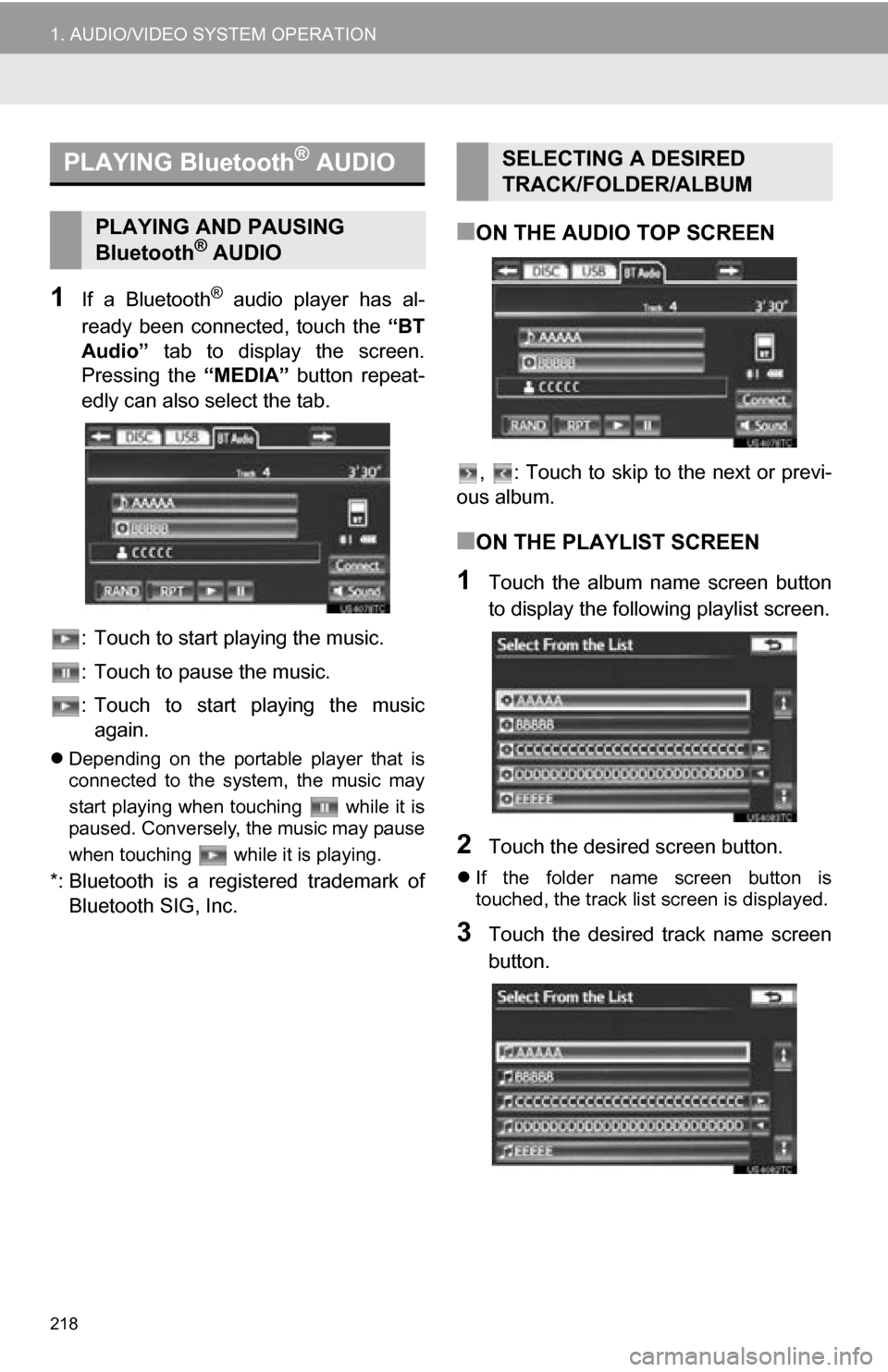
1If a Bluetooth® audio player has al-
ready been connected, touch the “BT
Audio” tab to display the screen.
Pressing the “MEDIA” button repeat-
edly can also select the tab.
: Touch to start playing the music.
: Touch to pause the music.
: Touch to start playing the music again.
Depending on the portable player that is
connected to the system, the music may
start playing when touching while it is
paused. Conversely, the music may pause
when touching while it is playing.
*: Bluetooth is a regi stered trademark of
Bluetooth SIG, Inc.
■ON THE AUDIO TOP SCREEN
, : Touch to skip to the next or previ-
ous album.
■ON THE PLAYLIST SCREEN
1Touch the album name screen button
to display the following playlist screen.
2Touch the desired screen button.
If the folder name screen button is
touched, the track list screen is displayed.
3Touch the desired track name screen
button.
PLAYING Bluetooth® AUDIO
PLAYING AND PAUSING
Bluetooth® AUDIO
SELECTING A DESIRED
TRACK/FOLDER/ALBUM
Page 221 of 328
221
1. AUDIO/VIDEO SYSTEM OPERATION
5
AUDIO/VIDEO SYSTEM
■PLAYING THE TRACKS ON THE
ALBUM IN RANDOM ORDER
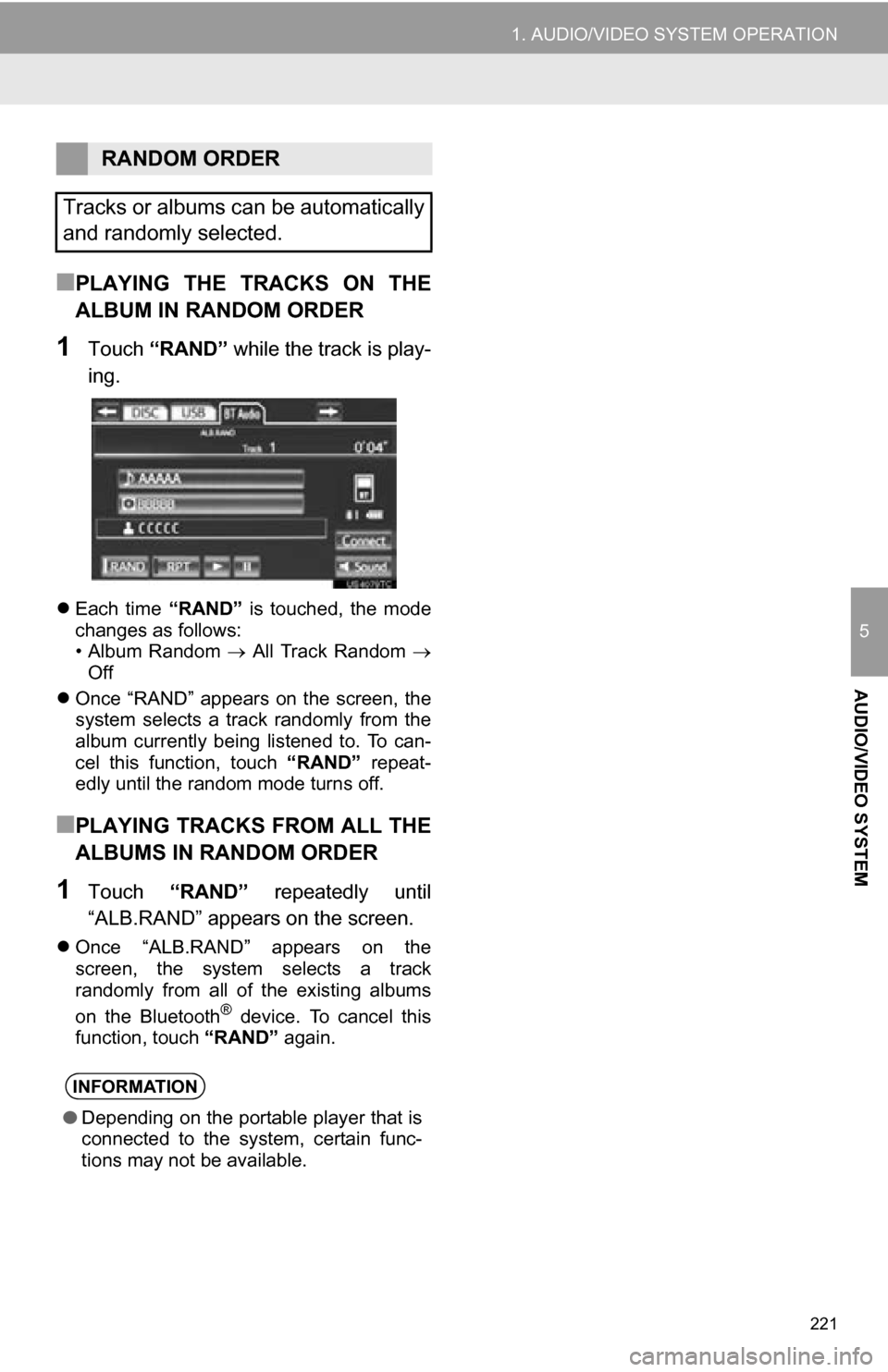
1Touch “RAND” while the track is play-
ing.
Each time “RAND” is touched, the mode
changes as follows:
• Album Random All Track Random
Off
Once “RAND” appears on the screen, the
system selects a track randomly from the
album currently being listened to. To can-
cel this function, touch “RAND” repeat-
edly until the random mode turns off.
■PLAYING TRACKS FROM ALL THE
ALBUMS IN RANDOM ORDER
1Touch “RAND” repeatedly until
“ALB.RAND” appears on the screen.
Once “ALB.RAND” appears on the
screen, the system selects a track
randomly from all of the existing albums
on the Bluetooth
® device. To cancel this
function, touch “RAND” again.
RANDOM ORDER
Tracks or albums can be automatically
and randomly selected.
INFORMATION
● Depending on the portable player that is
connected to the system, certain func-
tions may not be available.
Page 223 of 328
223
1. AUDIO/VIDEO SYSTEM OPERATION
5
AUDIO/VIDEO SYSTEM
12. AUDIO/VIDEO REMOTE CONTROLS (STEERING SWITCHES)
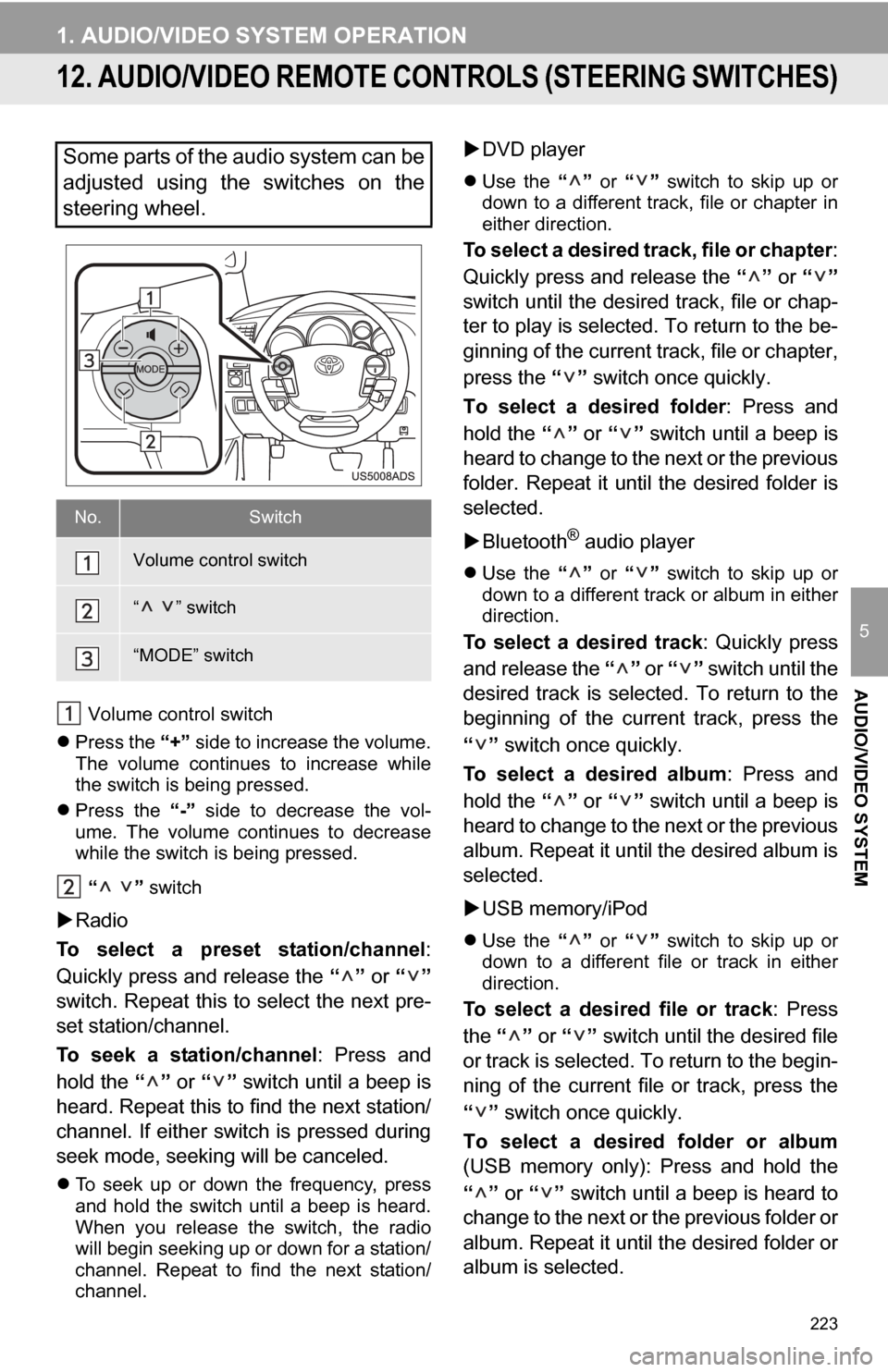
Volume control switch
Press the “+” side to increase the volume.
The volume continues to increase while
the switch is being pressed.
Press the “-” side to decrease the vol-
ume. The volume continues to decrease
while the switch is being pressed.
“ ” switch
Radio
To select a preset station/channel :
Quickly press and release the “” or “”
switch. Repeat this to select the next pre-
set station/channel.
To seek a station/channel : Press and
hold the “” or “” switch until a beep is
heard. Repeat this to find the next station/
channel. If either switch is pressed during
seek mode, seeking will be canceled.
To seek up or down the frequency, press
and hold the switch until a beep is heard.
When you release the switch, the radio
will begin seeking up or down for a station/
channel. Repeat to find the next station/
channel.
DVD player
Use the “” or “” switch to skip up or
down to a different track, file or chapter in
either direction.
To select a desired track, file or chapter :
Quickly press and release the “” or “”
switch until the desir ed track, file or chap-
ter to play is selected. To return to the be-
ginning of the current track, file or chapter,
press the “” switch once quickly.
To select a desired folder : Press and
hold the “” or “” switch until a beep is
heard to change to the next or the previous
folder. Repeat it until the desired folder is
selected.
Bluetooth
® audio player
Use the “” or “” switch to skip up or
down to a different track or album in either
direction.
To select a desired track : Quickly press
and release the “” or “” switch until the
desired track is selected. To return to the
beginning of the current track, press the
“” switch once quickly.
To select a desired album : Press and
hold the “” or “” switch until a beep is
heard to change to the next or the previous
album. Repeat it until the desired album is
selected.
USB memory/iPod
Use the “” or “” switch to skip up or
down to a different file or track in either
direction.
To select a desired file or track : Press
the “” or “” switch until the desired file
or track is selected. To return to the begin-
ning of the current file or track, press the
“” switch once quickly.
To select a desired folder or album
(USB memory only): Press and hold the
“” or “” switch until a beep is heard to
change to the next or the previous folder or
album. Repeat it until the desired folder or
album is selected.
Some parts of the audio system can be
adjusted using the switches on the
steering wheel.
No.Switch
Volume control switch
“ ” switch
“MODE” switch
Page 248 of 328
248
1. VOICE COMMAND SYSTEM OPERATION
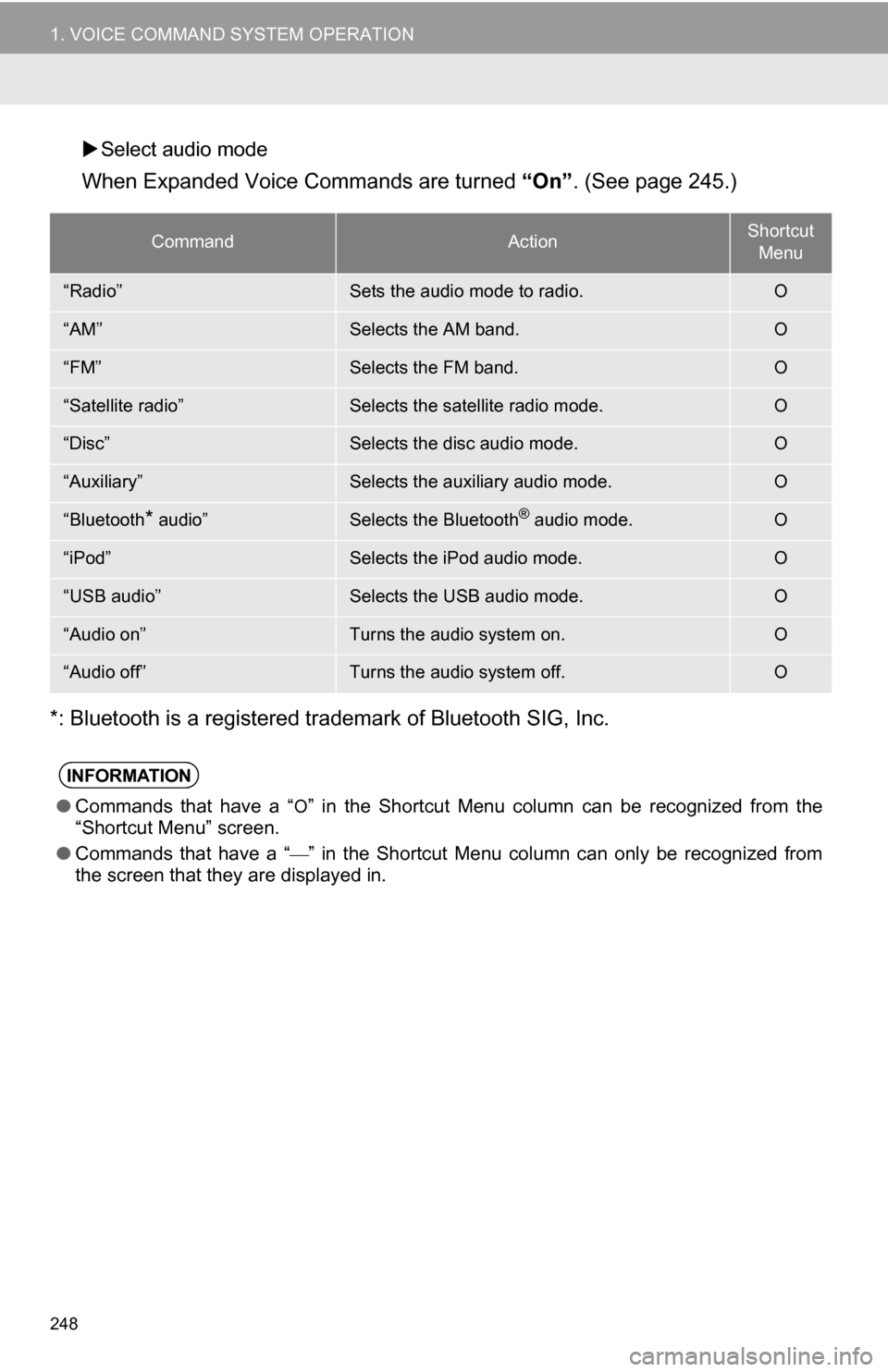
Select audio mode
When Expanded Voice Commands are turned “On”. (See page 245.)
*: Bluetooth is a registered trademark of Bluetooth SIG, Inc.
CommandActionShortcut Menu
“Radio”Sets the audio mode to radio.O
“AM”Selects the AM band.O
“FM”Selects the FM band.O
“Satellite radio”Selects the satellite radio mode.O
“Disc”Selects the disc audio mode.O
“Auxiliary”Selects the auxiliary audio mode.O
“Bluetooth* audio”Selects the Bluetooth® audio mode.O
“iPod”Selects the iPod audio mode.O
“USB audio”Selects the USB audio mode.O
“Audio on”Turns the audio system on.O
“Audio off”Turns the audio system off.O
INFORMATION
● Commands that have a “O” in the Shortcut Menu column can be recognized from the
“Shortcut Menu” screen.
● Commands that have a “
” in the Shortcut Menu column can only be recognized from
the screen that they are displayed in.
Page 272 of 328
272
1. ENTUNE-OVERVIEW
2. BEFORE USING ENTUNE
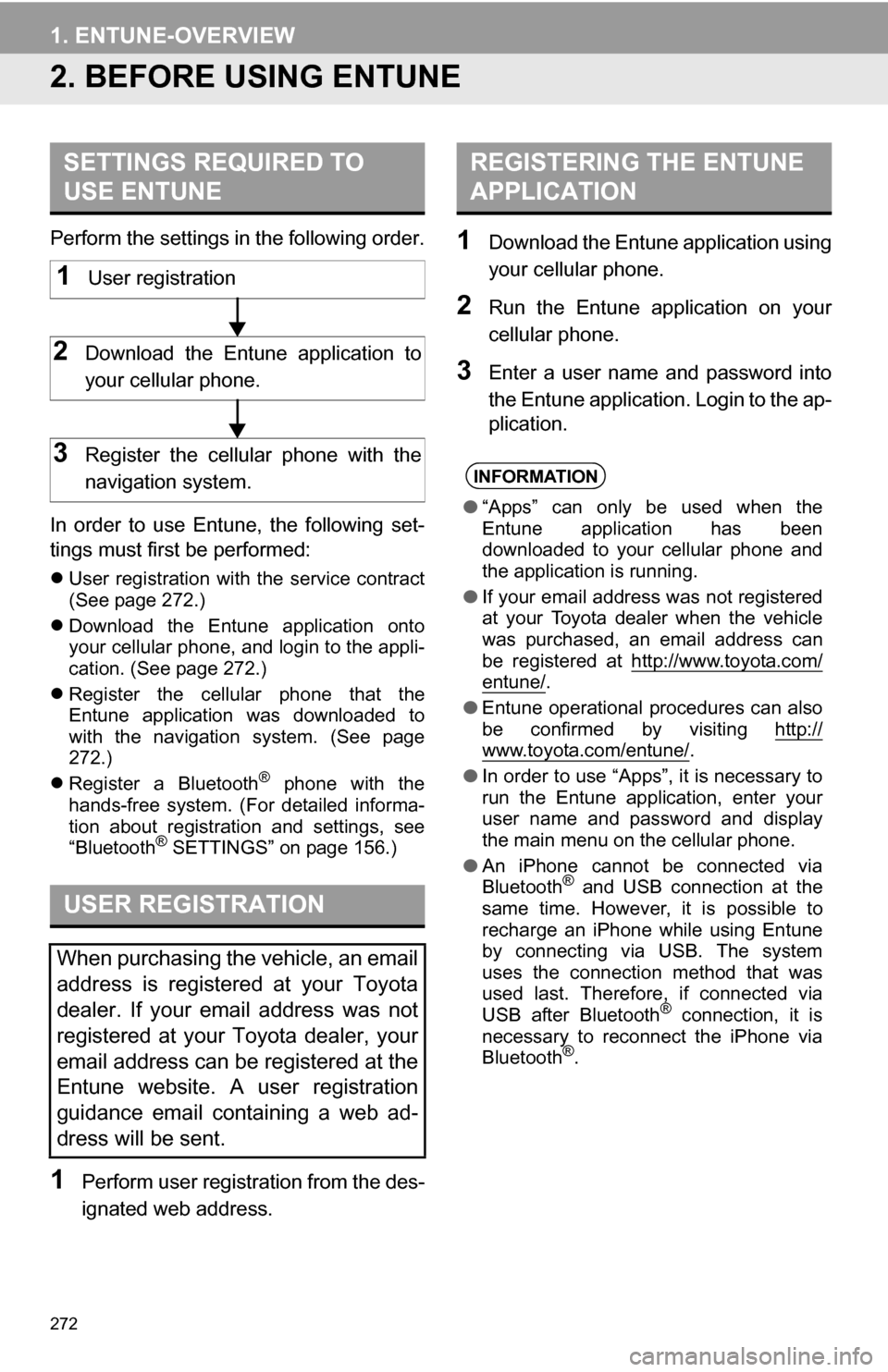
Perform the settings in the following order.
In order to use Entune, the following set-
tings must first be performed:
User registration with the service contract
(See page 272.)
Download the Entune application onto
your cellular phone, and login to the appli-
cation. (See page 272.)
Register the cellular phone that the
Entune application was downloaded to
with the navigation system. (See page
272.)
Register a Bluetooth
® phone with the
hands-free system. (For detailed informa-
tion about registration and settings, see
“Bluetooth
® SETTINGS” on page 156.)
1Perform user registration from the des-
ignated web address.
1Download the Entune application using
your cellular phone.
2Run the Entune application on your
cellular phone.
3Enter a user name and password into
the Entune application. Login to the ap-
plication.
SETTINGS REQUIRED TO
USE ENTUNE
USER REGISTRATION
When purchasing the vehicle, an email
address is registered at your Toyota
dealer. If your email address was not
registered at your Toyota dealer, your
email address can be registered at the
Entune website. A user registration
guidance email containing a web ad-
dress will be sent.
1User registration
2Download the Entune application to
your cellular phone.
3Register the cellular phone with the
navigation system.
REGISTERING THE ENTUNE
APPLICATION
INFORMATION
● “Apps” can only be used when the
Entune application has been
downloaded to your cellular phone and
the application is running.
● If your email address was not registered
at your Toyota dealer when the vehicle
was purchased, an email address can
be registered at http://www.toyota.com/
entune/.
● Entune operational procedures can also
be confirmed by visiting http://
www.toyota.com/entune/.
● In order to use “Apps”, it is necessary to
run the Entune application, enter your
user name and password and display
the main menu on the cellular phone.
● An iPhone cannot be connected via
Bluetooth
® and USB connection at the
same time. However, it is possible to
recharge an iPhone while using Entune
by connecting via USB. The system
uses the connection method that was
used last. Therefore, if connected via
USB after Bluetooth
® connection, it is
necessary to reconnect the iPhone via
Bluetooth
®.
Page 275 of 328
275
2. ENTUNE OPERATION
8
APPS
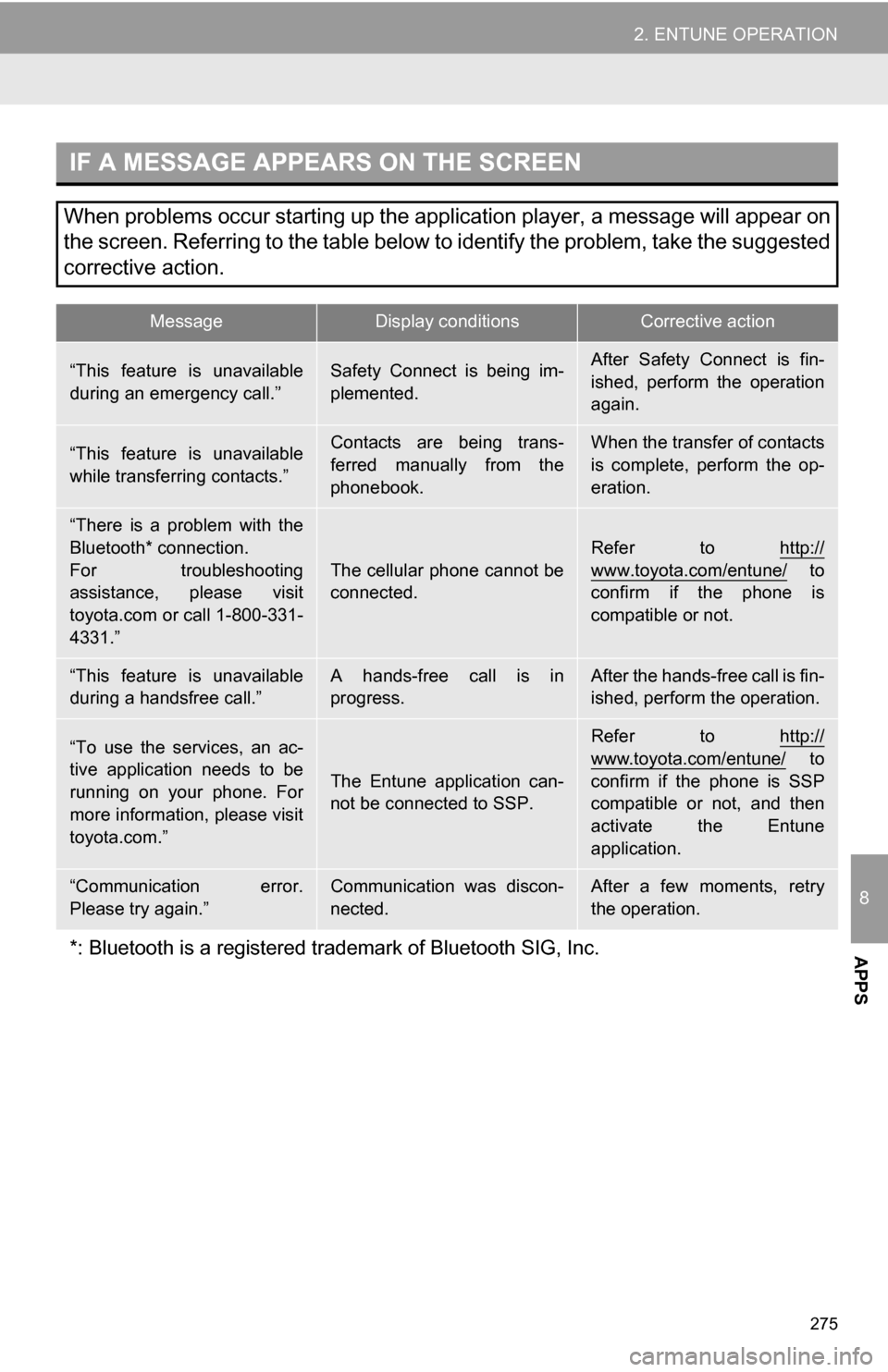
IF A MESSAGE APPEARS ON THE SCREEN
When problems occur starting up the application player, a message will appear on
the screen. Referring to the table below to identify the problem, take the suggested
corrective action.
MessageDisplay conditionsCorrective action
“This feature is unavailable
during an emergency call.”Safety Connect is being im-
plemented.After Safety Connect is fin-
ished, perform the operation
again.
“This feature is unavailable
while transferring contacts.”Contacts are being trans-
ferred manually from the
phonebook.When the transfer of contacts
is complete, perform the op-
eration.
“There is a problem with the
Bluetooth* connection.
For troubleshooting
assistance, please visit
toyota.com or call 1-800-331-
4331.”
The cellular phone cannot be
connected.
Refer to http://
www.toyota.com/entune/ to
confirm if the phone is
compatible or not.
“This feature is unavailable
during a handsfree call.”A hands-free call is in
progress.After the hands-free call is fin-
ished, perform the operation.
“To use the services, an ac-
tive application needs to be
running on your phone. For
more information, please visit
toyota.com.”
The Entune application can-
not be connected to SSP.
Refer to http://
www.toyota.com/entune/ to
confirm if the phone is SSP
compatible or not, and then
activate the Entune
application.
“Communication error.
Please try again.”Communication was discon-
nected.After a few moments, retry
the operation.
*: Bluetooth is a registered tr ademark of Bluetooth SIG, Inc.
Page 277 of 328
277
2. ENTUNE OPERATION
8
APPS
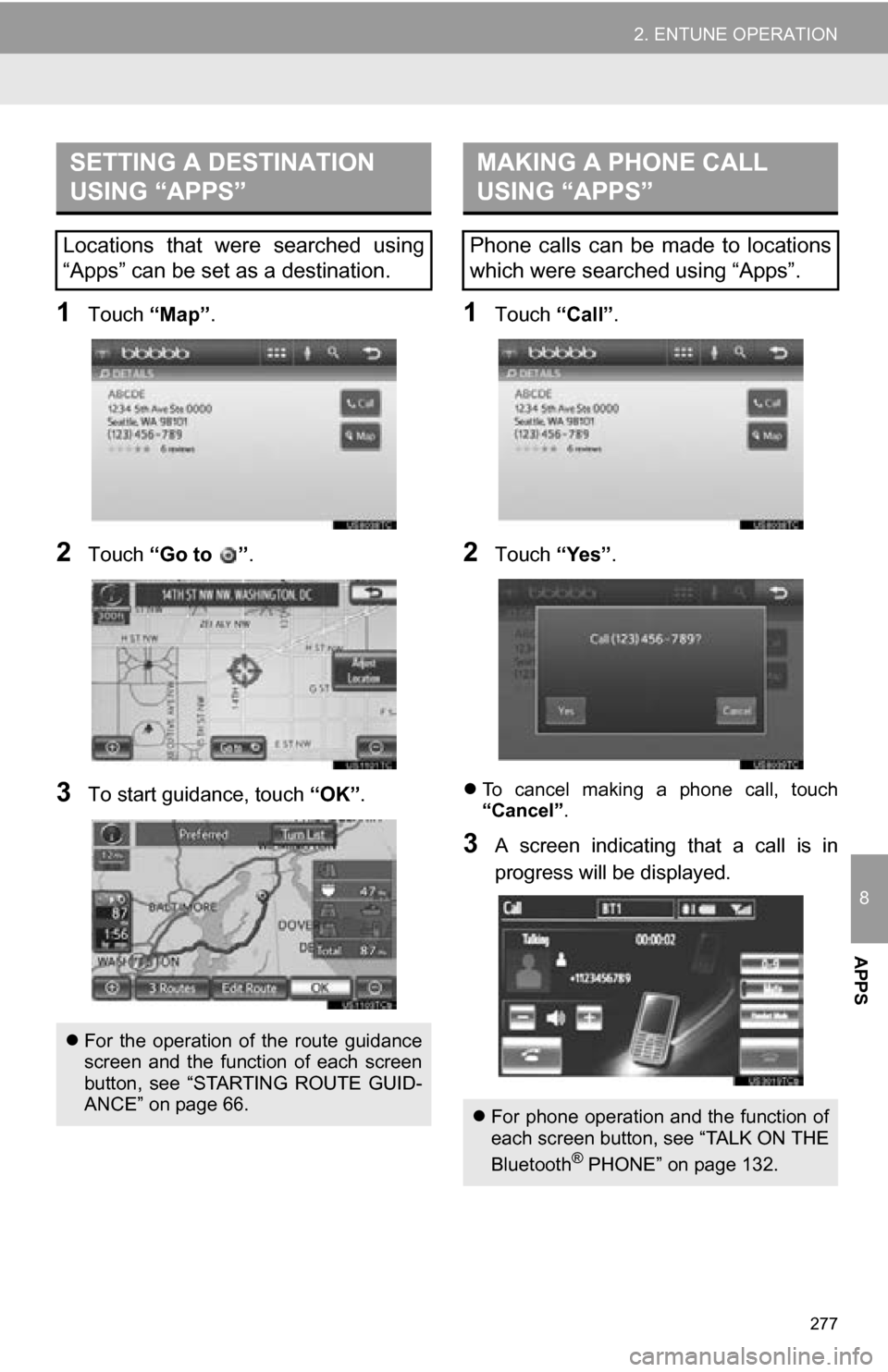
1Touch “Map”.
2Touch “Go to ” .
3To start guidance, touch “OK”.
1Touch “Call”.
2Touch “Yes”.
To cancel making a phone call, touch
“Cancel” .
3A screen indicating that a call is in
progress will be displayed.
SETTING A DESTINATION
USING “APPS”
Locations that were searched using
“Apps” can be set as a destination.
For the operation of the route guidance
screen and the function of each screen
button, see “STARTING ROUTE GUID-
ANCE” on page 66.
MAKING A PHONE CALL
USING “APPS”
Phone calls can be made to locations
which were searched using “Apps”.
For phone operation and the function of
each screen button, see “TALK ON THE
Bluetooth
® PHONE” on page 132.