wipers TOYOTA SEQUOIA 2013 2.G Owners Manual
[x] Cancel search | Manufacturer: TOYOTA, Model Year: 2013, Model line: SEQUOIA, Model: TOYOTA SEQUOIA 2013 2.GPages: 740, PDF Size: 15.34 MB
Page 3 of 740

1
2
3
4
5
6
7
3
2-3. Operating the lights and wipers
Headlight switch .................. 188
Fog light switch ................... 194
Windshield wipers and washer .............................. 196
Rear window wiper and washer .............................. 200
Headlight cleaner switch ..... 202
2-4. Using other driving systems Cruise control ...................... 203
Dynamic laser cruise control ............................... 207
Intuitive parking assist......... 221
Rear view monitor system .............................. 228
BSM (Blind Spot Monitor) ... 236
Electronically modulated air suspension................... 242
AVS (Adaptive Variable Suspension System) ......... 247
Four-wheel drive system ..... 248
AUTO LSD system.............. 253
Driving assist systems ........ 255
2-5. Driving information Off-road precautions ........... 263
Cargo and luggage ............. 268
Vehicle load limits ............... 273
Winter driving tips ............... 275
Trailer towing ...................... 279
Dinghy towing ..................... 299 3-1. Using the air conditioning
system and defogger
Front air conditioning
system ................................ 302
Rear air conditioning system .............................. 310
Rear window and outside rear view mirror
defoggers ......................... 314
Windshield wiper de-icer .............................. 316
Using the steering wheel climate remote control
switches ........................... 317
3-2. Using the audio system Audio system ...................... 319
Using the radio ................... 323
Using the CD player ........... 331
Playing MP3 and WMA discs ................................. 340
Operating an iPod .............. 348
Operating a USB memory ............................ 355
Optimal use of the audio system .............................. 362
Using the AUX port............. 366
Using the steering wheel audio switches.................. 368
3Interior features
Page 8 of 740
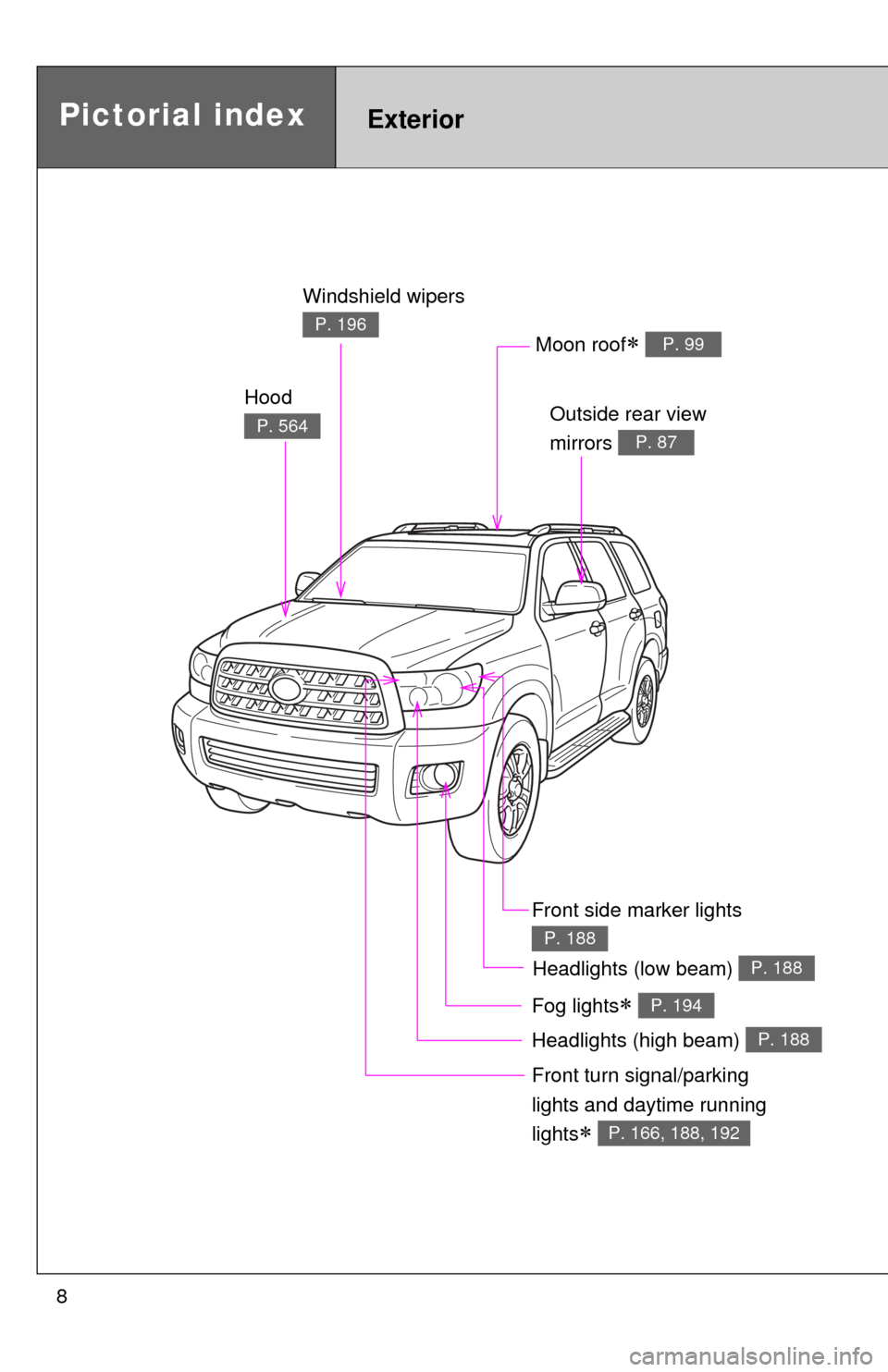
8
Headlights (high beam) P. 188
Pictorial indexExterior
Hood
P. 564
Windshield wipers
P. 196
Outside rear view
mirrors
P. 87
Front turn signal/parking
lights and daytime running
lights
P. 166, 188, 192
Moon roof P. 99
Fog lights P. 194
Headlights (low beam) P. 188
Front side marker lights
P. 188
Page 18 of 740
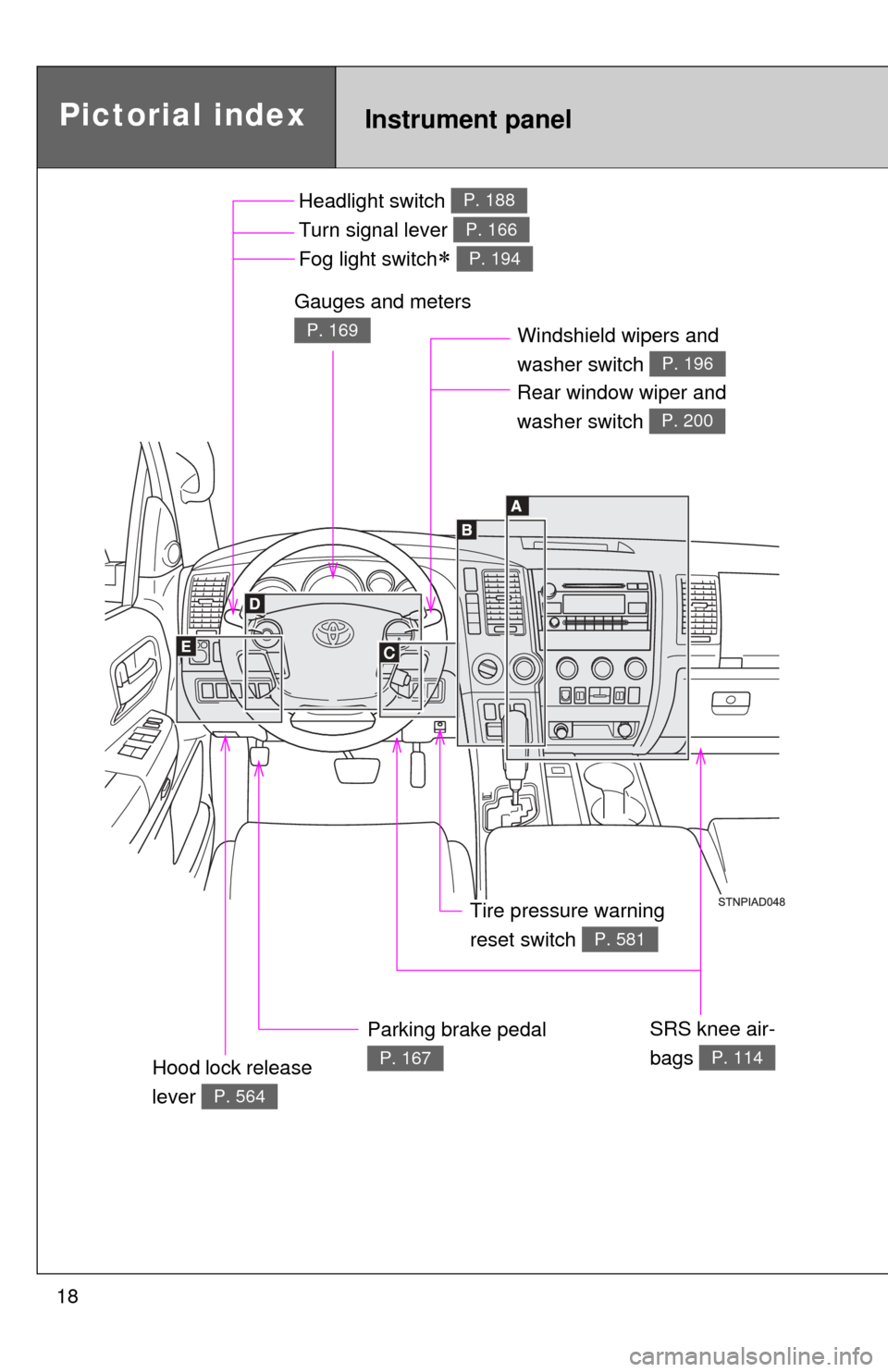
18
Pictorial indexInstrument panel
Headlight switch
Turn signal lever
Fog light switch
P. 188
P. 166
P. 194
Windshield wipers and
washer switch
P. 196
Parking brake pedal
P. 167
Gauges and meters
P. 169
Hood lock release
lever
P. 564
Tire pressure warning
reset switch
P. 581
Rear window wiper and
washer switch
P. 200
SRS knee air-
bags
P. 114
Page 149 of 740
When driving2
149
2-1. Driving proceduresDriving the vehicle............ 150
Engine (ignition) switch .... 159
Automatic transmission .... 162
Turn signal lever .............. 166
Parking brake ................... 167
Horn ................................. 168
2-2. Instrument cluster Gauges and meters ......... 169
Indicators and warning lights .............................. 174
Multi-information display............................ 179
Accessory meter .............. 185
2-3. Operating the lights and wipers
Headlight switch ............... 188
Fog light switch ................ 194
Windshield wipers and washer ........................... 196
Rear window wiper and washer ........................... 200
Headlight cleaner switch ............................. 202 2-4. Using other driving systems
Cruise control ................... 203
Dynamic laser cruise control ............................ 207
Intuitive parking assist.............................. 221
Rear view monitor system ........................... 228
BSM (Blind Spot Monitor) ....... 236
Electronically modulated air suspension ................ 242
AVS (Adaptive Variable Suspension System) ...... 247
Four-wheel drive system ........................... 248
AUTO LSD system........... 253
Driving assist systems ..... 255
2-5. Driving information Off-road precautions ........ 263
Cargo and luggage .......... 268
Vehicle load limits ............ 273
Winter driving tips ............ 275
Trailer towing ................... 279
Dinghy towing .................. 299
Page 188 of 740
188
2-3. Operating the lights and wipers
Headlight switch
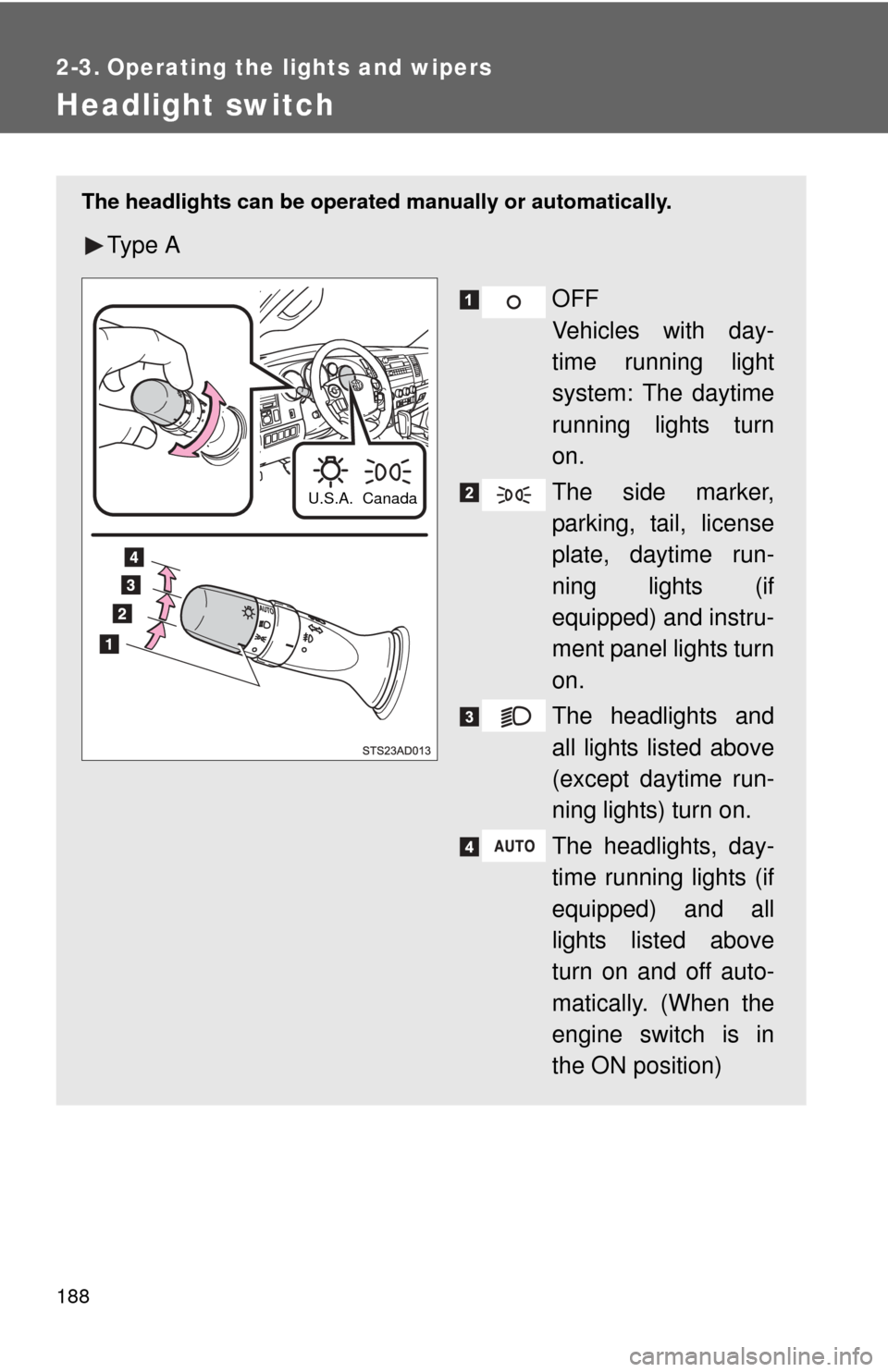
The headlights can be operated manually or automatically.
Ty p e A
OFF
Vehicles with day-
time running light
system: The daytime
running lights turn
on.
The side marker,
parking, tail, license
plate, daytime run-
ning lights (if
equipped) and instru-
ment panel lights turn
on.
The headlights and
all lights listed above
(except daytime run-
ning lights) turn on.
The headlights, day-
time running lights (if
equipped) and all
lights listed above
turn on and off auto-
matically. (When the
engine switch is in
the ON position)
Canada
U.S.A.
Page 189 of 740
189
2-3. Operating the lights and wipers
2
When driving
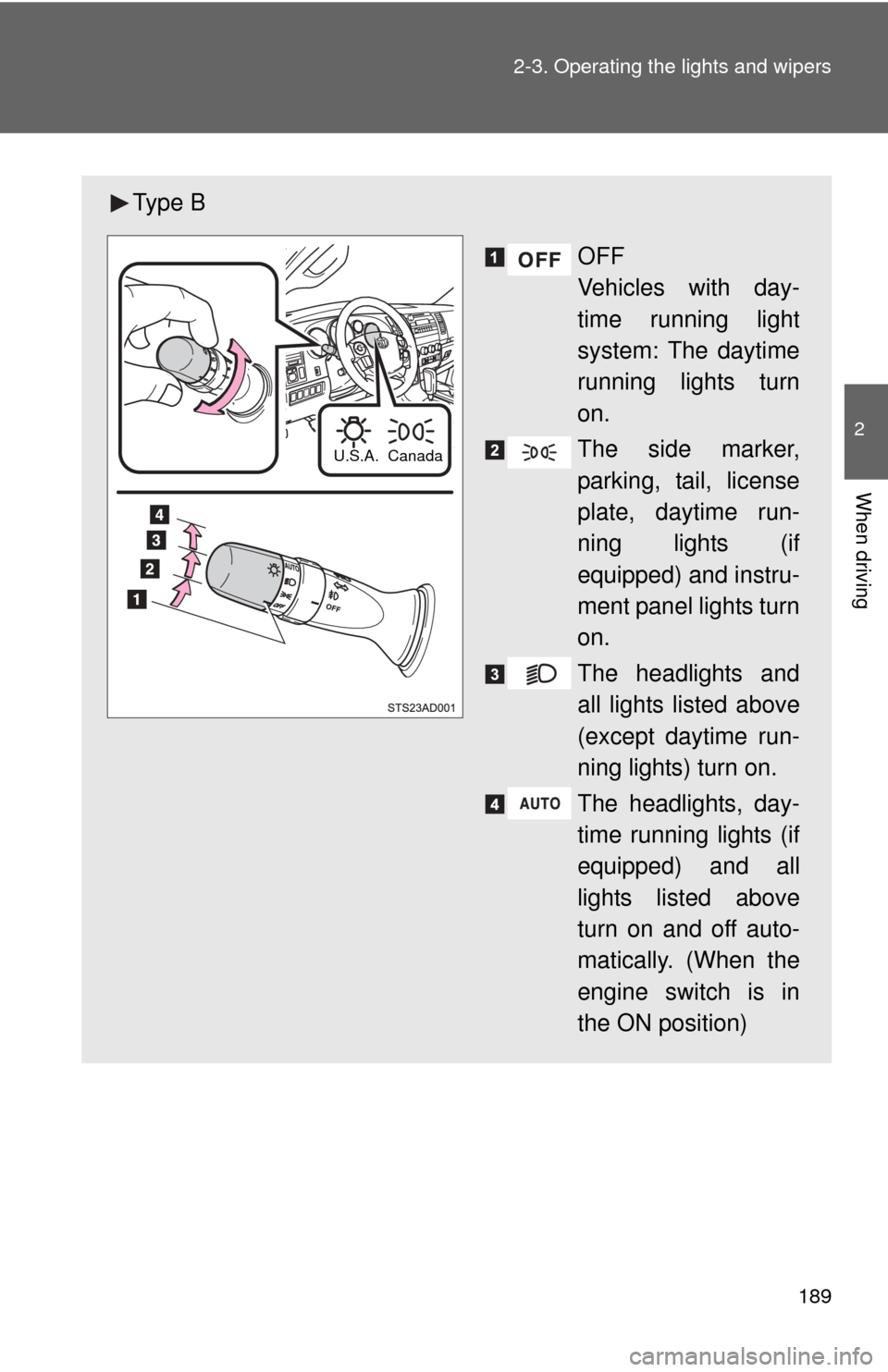
Ty p e B
OFF
Vehicles with day-
time running light
system: The daytime
running lights turn
on.
The side marker,
parking, tail, license
plate, daytime run-
ning lights (if
equipped) and instru-
ment panel lights turn
on.
The headlights and
all lights listed above
(except daytime run-
ning lights) turn on.
The headlights, day-
time running lights (if
equipped) and all
lights listed above
turn on and off auto-
matically. (When the
engine switch is in
the ON position)
Canada
U.S.A.
Page 190 of 740
190 2-3. Operating the lights and wipers
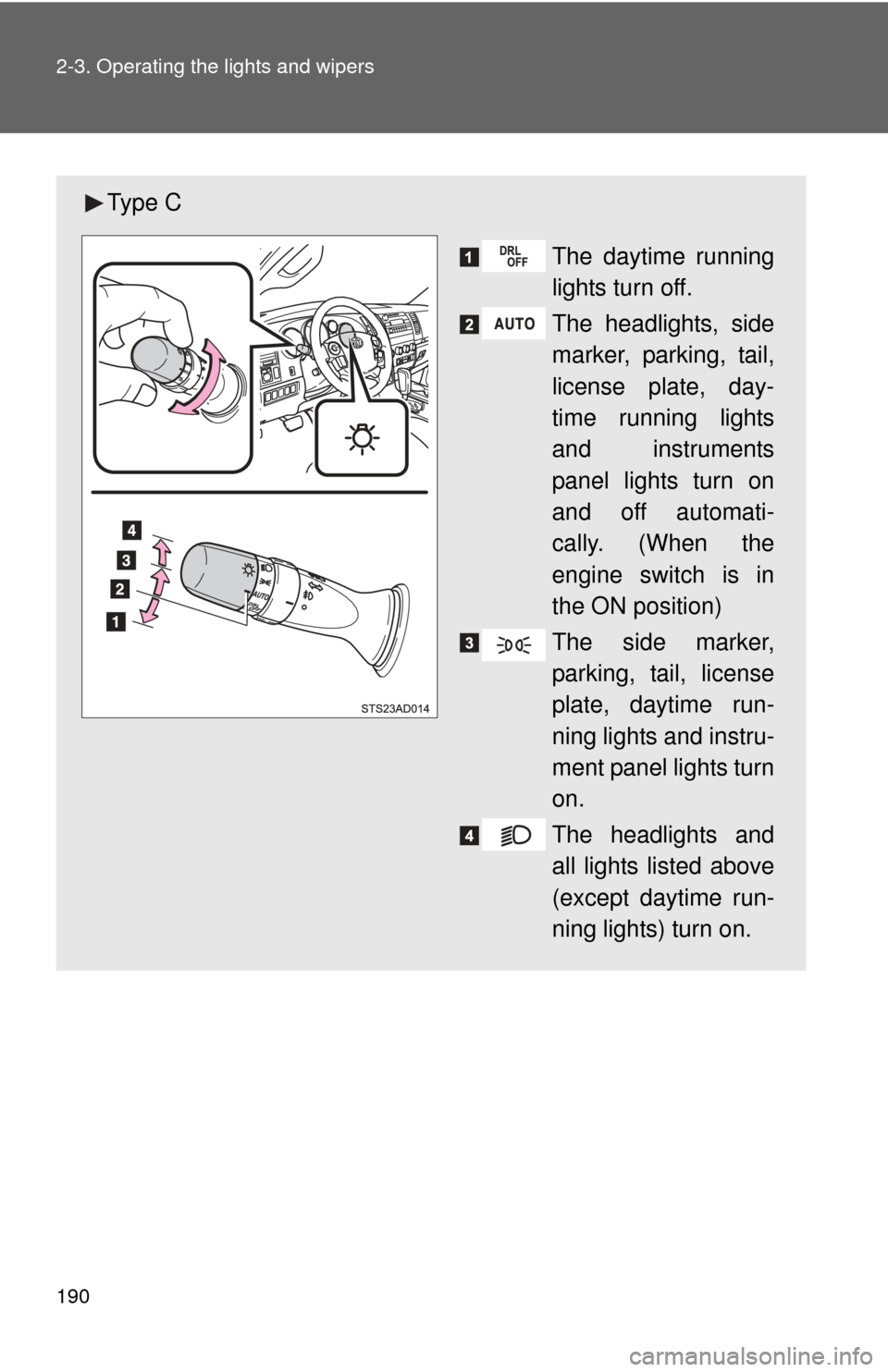
Ty p e CThe daytime running
lights turn off.
The headlights, side
marker, parking, tail,
license plate, day-
time running lights
and instruments
panel lights turn on
and off automati-
cally. (When the
engine switch is in
the ON position)
The side marker,
parking, tail, license
plate, daytime run-
ning lights and instru-
ment panel lights turn
on.
The headlights and
all lights listed above
(except daytime run-
ning lights) turn on.
Page 191 of 740
191
2-3. Operating the lights and wipers
2
When driving
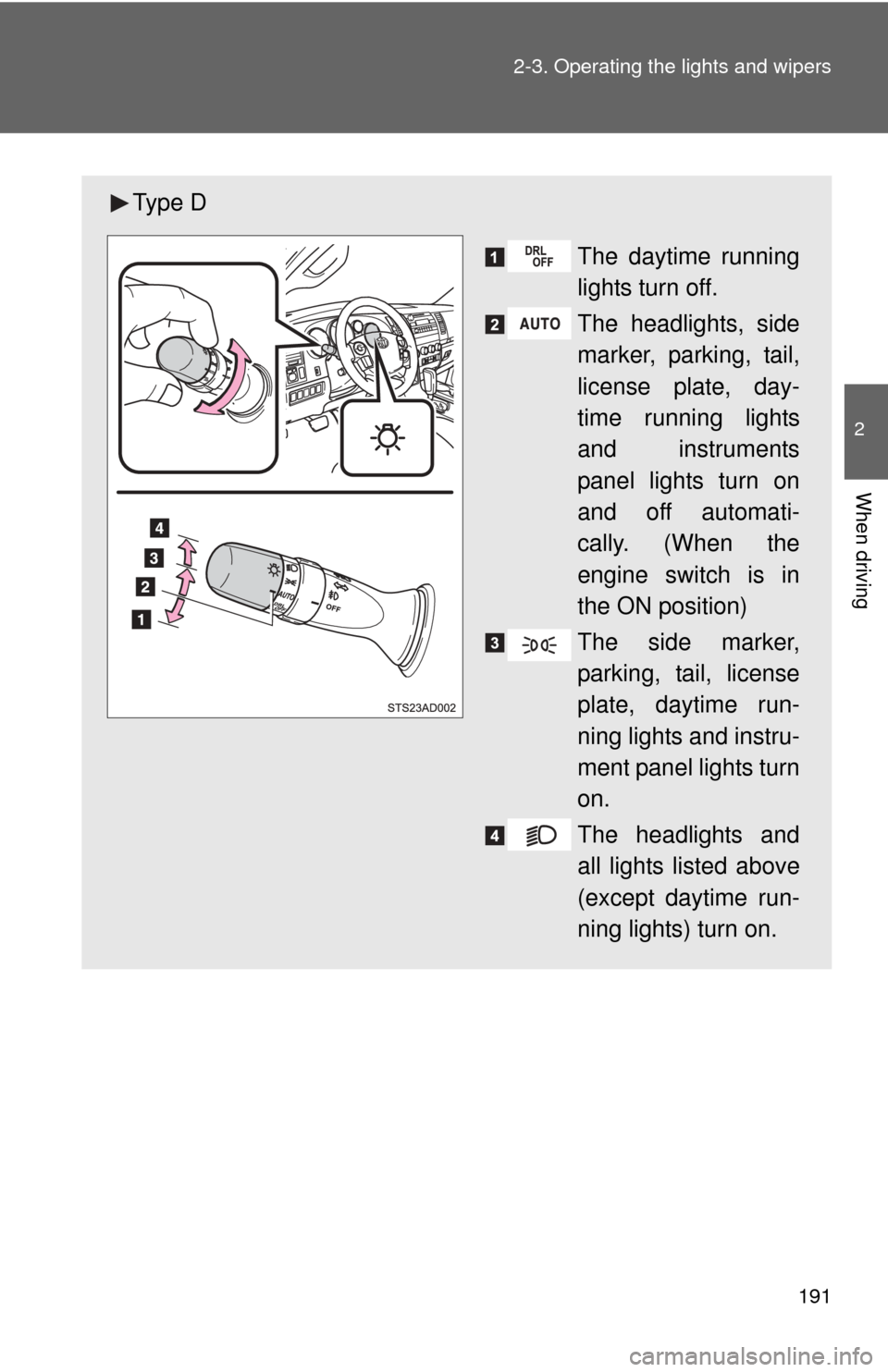
Ty p e D
The daytime running
lights turn off.
The headlights, side
marker, parking, tail,
license plate, day-
time running lights
and instruments
panel lights turn on
and off automati-
cally. (When the
engine switch is in
the ON position)
The side marker,
parking, tail, license
plate, daytime run-
ning lights and instru-
ment panel lights turn
on.
The headlights and
all lights listed above
(except daytime run-
ning lights) turn on.
Page 192 of 740
192 2-3. Operating the lights and wipers
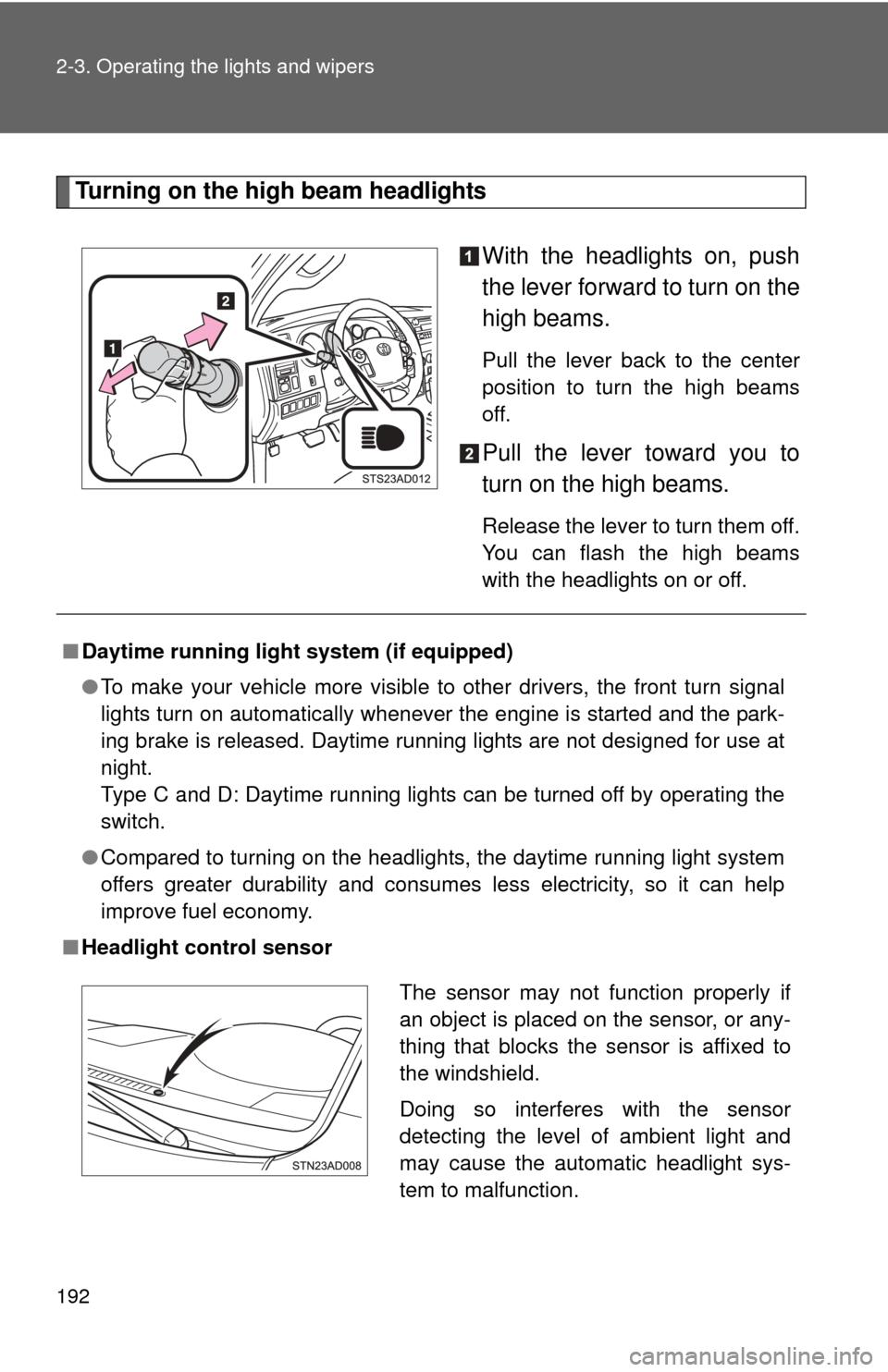
Turning on the high beam headlightsWith the headlights on, push
the lever forward to turn on the
high beams.
Pull the lever back to the center
position to turn the high beams
off.
Pull the lever toward you to
turn on the high beams.
Release the lever to turn them off.
You can flash the high beams
with the headlights on or off.
■Daytime running light system (if equipped)
●To make your vehicle more visible to other drivers, the front turn signal
lights turn on automatically whenever the engine is started and the park-
ing brake is released. Daytime running lights are not designed for use at
night.
Type C and D: Daytime running lights can be turned off by operating the
switch.
● Compared to turning on the headlights, the daytime running light system
offers greater durability and consumes less electricity, so it can help
improve fuel economy.
■ Headlight control sensor
The sensor may not function properly if
an object is placed on the sensor, or any-
thing that blocks the sensor is affixed to
the windshield.
Doing so interferes with the sensor
detecting the level of ambient light and
may cause the automatic headlight sys-
tem to malfunction.
Page 193 of 740
193
2-3. Operating the lights and wipers
2
When driving
■
Automatic light off system
●When the headlights come on: The headlights and tail lights automati-
cally turn off after 30 seconds when all doors are closed with the engine
switch turned to the ACC or LOCK position. (The lights turn off immedi-
ately if the button on the wireless remote control is pressed after all
doors are locked.)
● When only the tail lights come on: The tail lights turn off automatically
with the engine switch turned to the ACC or LOCK position and the
driver’s door is opened.
To turn the lights on again, turn the engine switch to the ON position, or turn
the headlight switch off once and then back to the or position.
■ Customization
●That can be configured at Toyota dealer. (vehicles without multi-informa-
tion display)
Settings (automatic light off system) can be changed. (Customizable
features P. 703)
● It is possible to change the settings. (vehicles with multi-information dis-
play) (Feature customization P. 182)
NOTICE
■To prevent battery discharge
Do not leave the lights on longer than necessary when the engine is not run-
ning.