TOYOTA SEQUOIA 2014 2.G Navigation Manual
Manufacturer: TOYOTA, Model Year: 2014, Model line: SEQUOIA, Model: TOYOTA SEQUOIA 2014 2.GPages: 316, PDF Size: 26.31 MB
Page 31 of 316
31
1. BASIC INFORMATION BEFORE OPERATION
2
BASIC FUNCTION
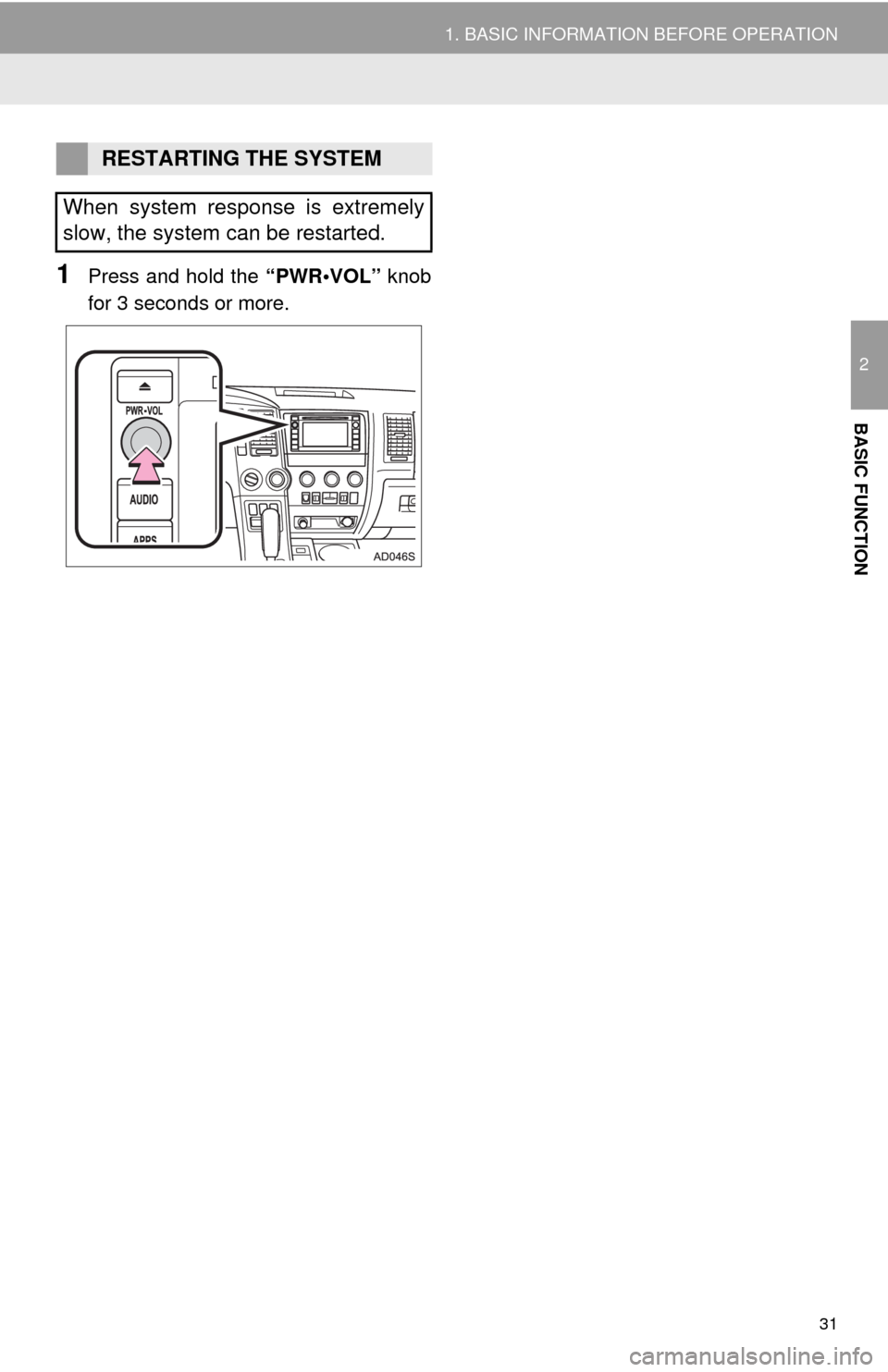
1Press and hold the “PWR•VOL” knob
for 3 seconds or more.
RESTARTING THE SYSTEM
When system response is extremely
slow, the system can be restarted.
Page 32 of 316
32
1. BASIC INFORMATION BEFORE OPERATION
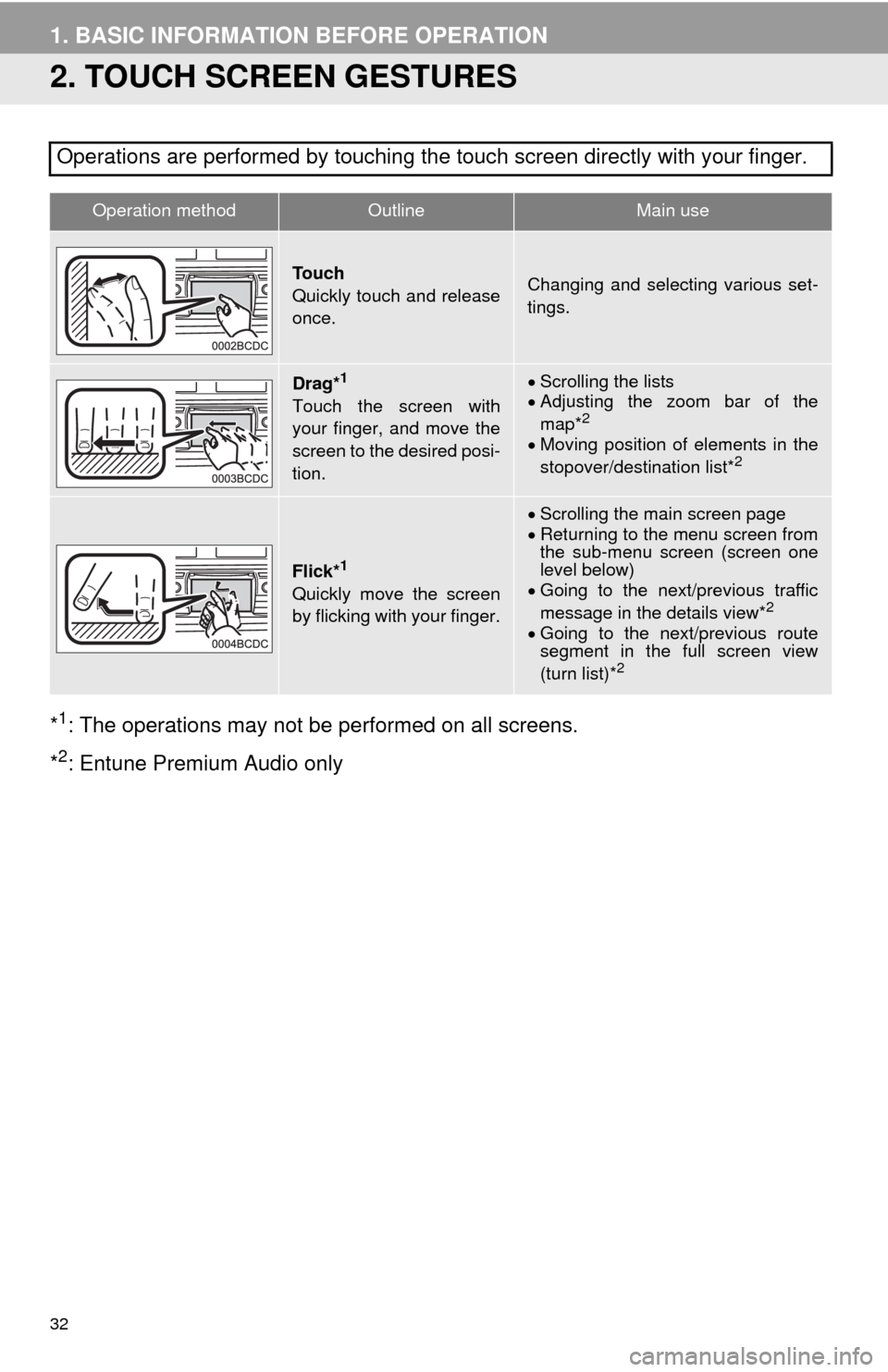
2. TOUCH SCREEN GESTURES
*1: The operations may not be performed on all screens.
*
2: Entune Premium Audio only Operations are performed by touching the touch screen directly with your finger.
Operation methodOutline Main use
To u c h
Quickly touch and release
once.Changing and selecting various set-
tings.
Drag*1
Touch the screen with
your finger, and move the
screen to the desired posi-
tion.
Scrolling the lists
Adjusting the zoom bar of the
map*
2
Moving position of elements in the
stopover/destination list*2
Flick*1
Quickly move the screen
by flicking with your finger.
Scrolling the main screen page
Returning to the menu screen from
the sub-menu screen (screen one
level below)
Going to the next/previous traffic
message in the details view*
2
Going to the next/previous route
segment in the full screen view
(turn list)*
2
Page 33 of 316
33
1. BASIC INFORMATION BEFORE OPERATION
2
BASIC FUNCTION
3. TOUCH SCREEN OPERATION
This system is operated mainly by the
buttons on the screen. (Referred to as
screen buttons in this manual.)
When a screen button is touched, a
beep sounds. (To set the beep sound,
see page 53.)
NOTICE
●To prevent damaging the screen, lightly
touch the screen buttons with your fin-
ger.
●Do not use objects other than your finger
to touch the screen.
●Wipe off fingerprints using a glass clean-
ing cloth. Do not use chemical cleaners
to clean the screen, as they may dam-
age the touch screen.
INFORMATION
●If the system does not respond to touch-
ing a screen button, move your finger
away from the screen and then touch it
again.
●Dimmed screen buttons cannot be oper-
ated.
●The displayed image may become
darker and moving images may be
slightly distorted when the screen is
cold.
●In extremely cold conditions, the screen
may not be displayed and the data input
by a user may be deleted. Also, the
screen buttons may be harder than
usual to depress.
●When you look at the screen through
polarized material such as polarized
sunglasses, the screen may be dark and
hard to see. If so, look at the screen
from different angles, adjust the screen
settings on the “Display Settings” screen
or take off your sunglasses.
Page 34 of 316
34
1. BASIC INFORMATION BEFORE OPERATION
4. “Home” SCREEN OPERATION
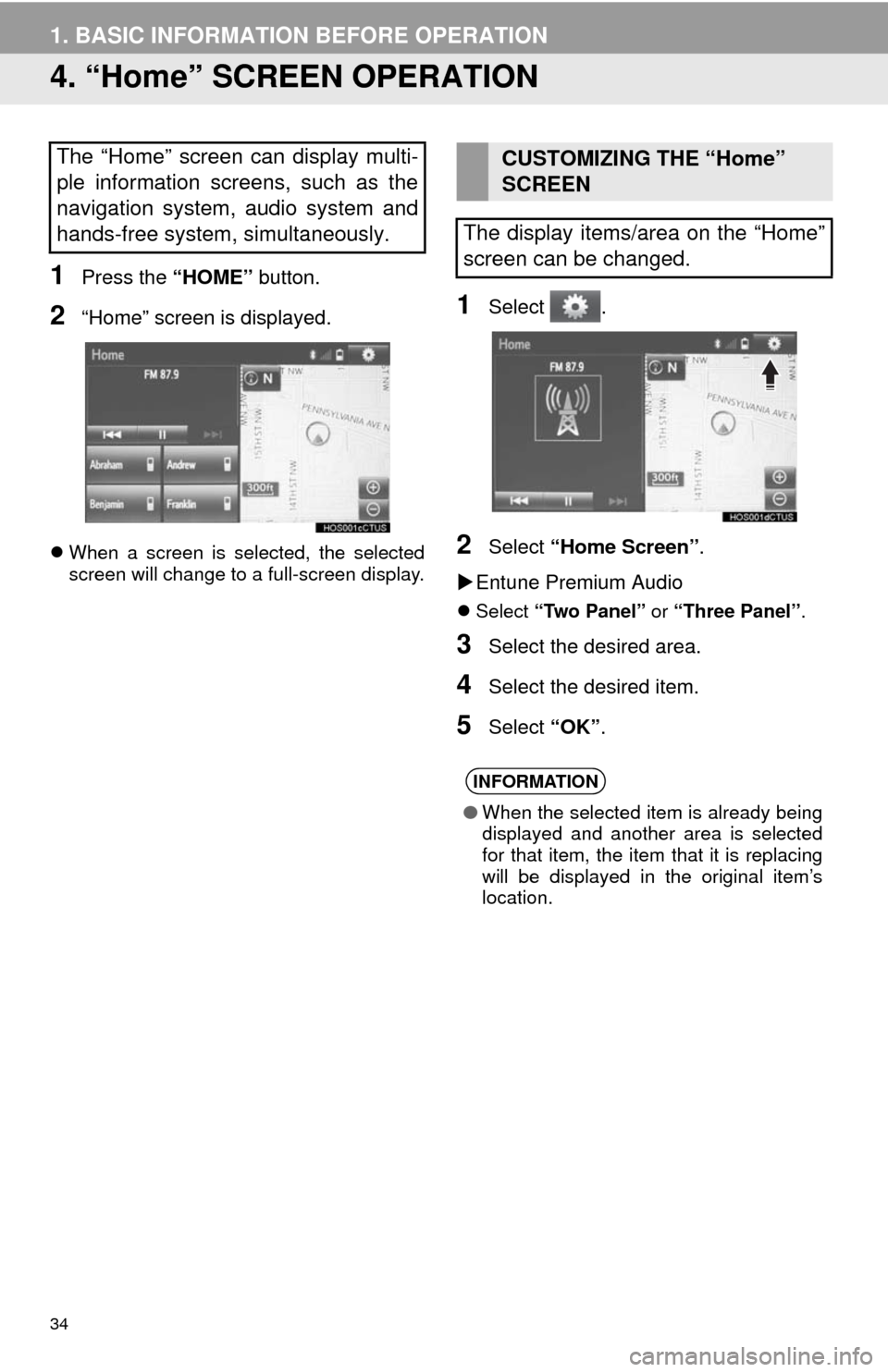
1Press the “HOME” button.
2“Home” screen is displayed.
When a screen is selected, the selected
screen will change to a full-screen display.
1Select .
2Select “Home Screen”.
Entune Premium Audio
Select “Two Panel” or “Three Panel”.
3Select the desired area.
4Select the desired item.
5Select “OK”.
The “Home” screen can display multi-
ple information screens, such as the
navigation system, audio system and
hands-free system, simultaneously. CUSTOMIZING THE “Home”
SCREEN
The display items/area on the “Home”
screen can be changed.
INFORMATION
●When the selected item is already being
displayed and another area is selected
for that item, the item that it is replacing
will be displayed in the original item’s
location.
Page 35 of 316
35
1. BASIC INFORMATION BEFORE OPERATION
2
BASIC FUNCTION
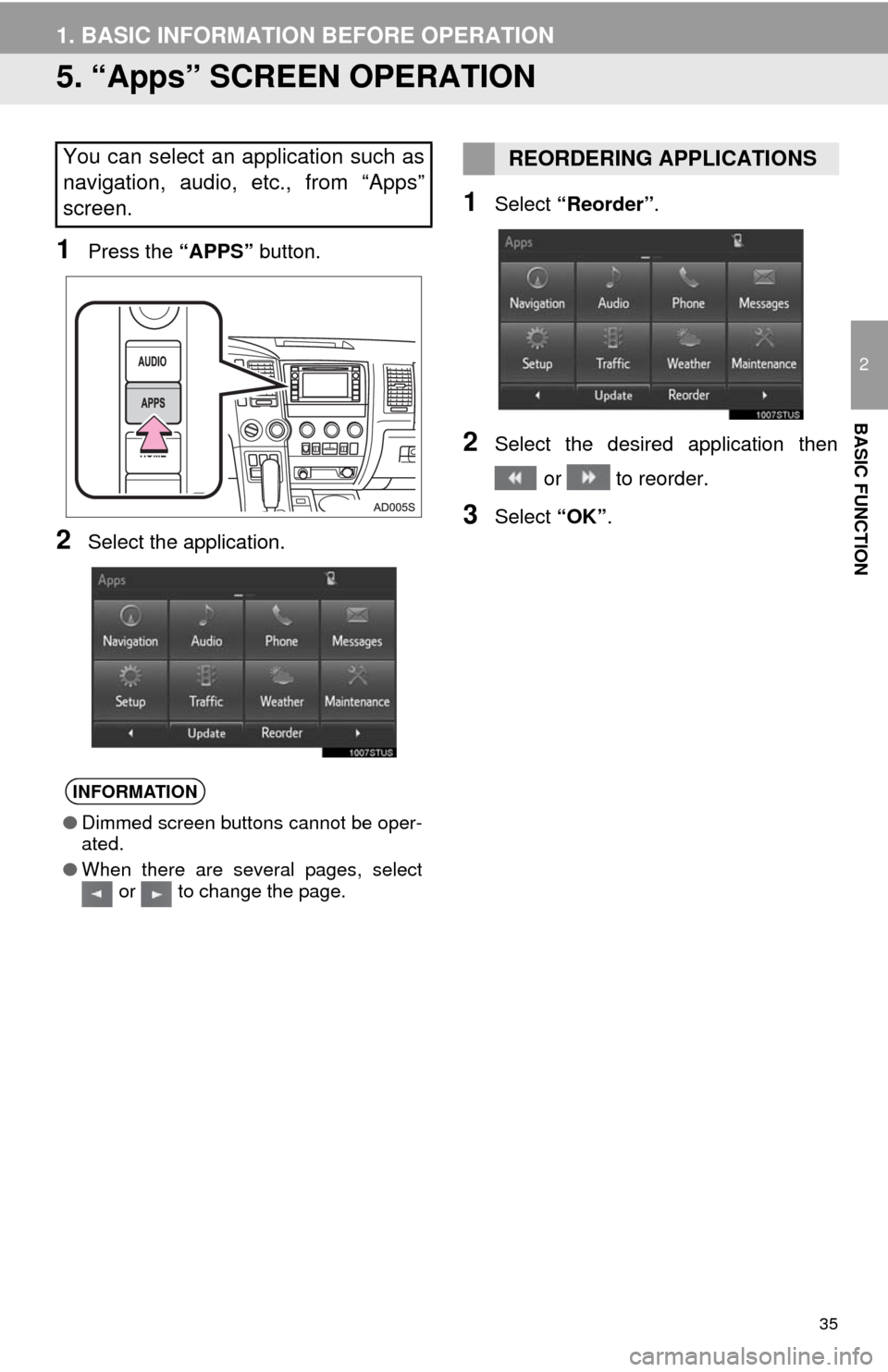
5. “Apps” SCREEN OPERATION
1Press the “APPS” button.
2Select the application.
1Select “Reorder”.
2Select the desired application then
or to reorder.
3Select “OK”.
You can select an application such as
navigation, audio, etc., from “Apps”
screen.
INFORMATION
●Dimmed screen buttons cannot be oper-
ated.
●When there are several pages, select
or to change the page.
REORDERING APPLICATIONS
Page 36 of 316
36
1. BASIC INFORMATION BEFORE OPERATION
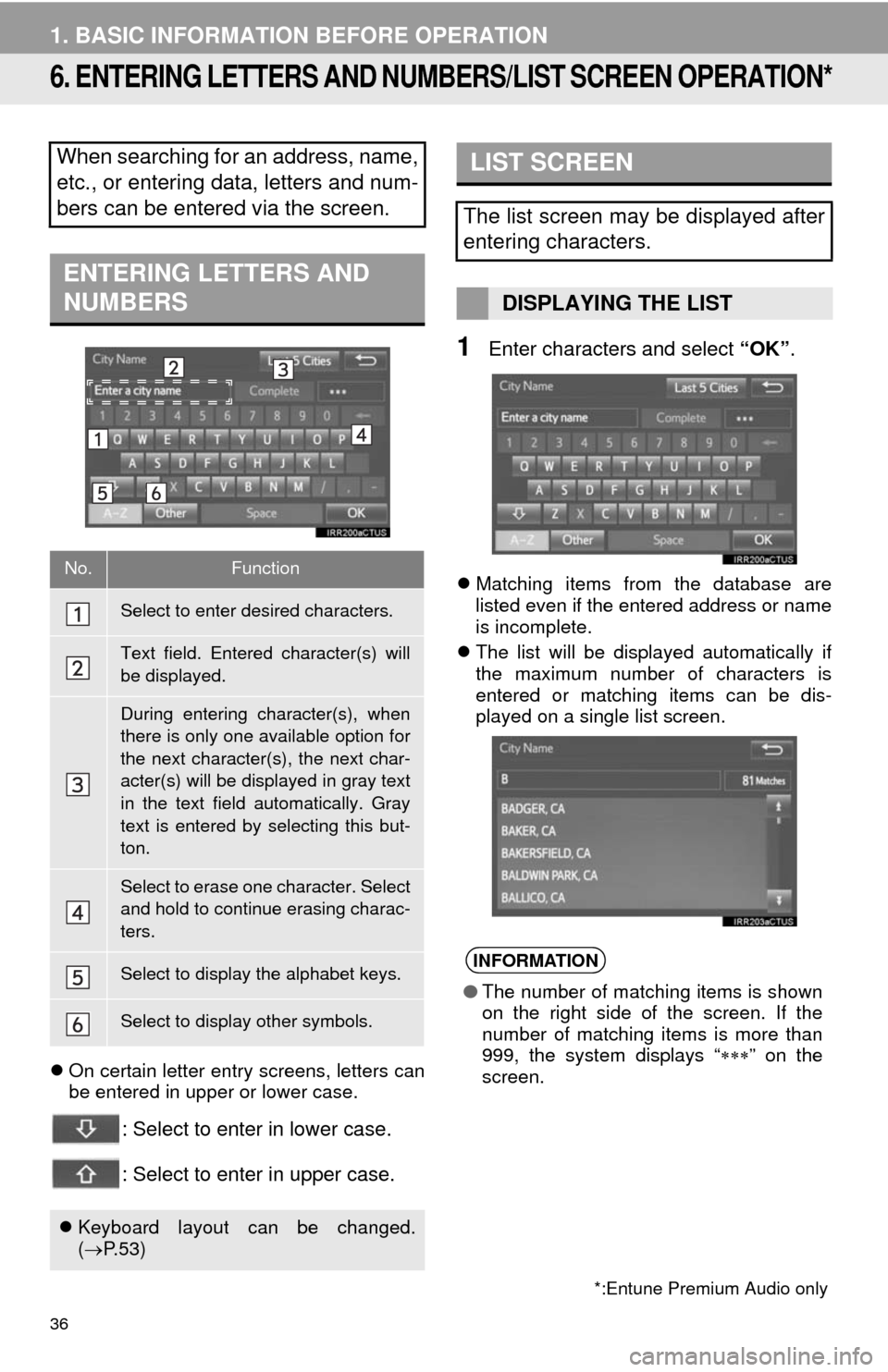
6. ENTERING LETTERS AND NUMBERS/LIST SCREEN OPERATION*
On certain letter entry screens, letters can
be entered in upper or lower case.
: Select to enter in lower case.
: Select to enter in upper case.
1Enter characters and select “OK”.
Matching items from the database are
listed even if the entered address or name
is incomplete.
The list will be displayed automatically if
the maximum number of characters is
entered or matching items can be dis-
played on a single list screen.
When searching for an address, name,
etc., or entering data, letters and num-
bers can be entered via the screen.
ENTERING LETTERS AND
NUMBERS
No.Function
Select to enter desired characters.
Text field. Entered character(s) will
be displayed.
During entering character(s), when
there is only one available option for
the next character(s), the next char-
acter(s) will be displayed in gray text
in the text field automatically. Gray
text is entered by selecting this but-
ton.
Select to erase one character. Select
and hold to continue erasing charac-
ters.
Select to display the alphabet keys.
Select to display other symbols.
Keyboard layout can be changed.
(P. 5 3 )
*:Entune Premium Audio only
LIST SCREEN
The list screen may be displayed after
entering characters.
DISPLAYING THE LIST
INFORMATION
●The number of matching items is shown
on the right side of the screen. If the
number of matching items is more than
999, the system displays “” on the
screen.
Page 37 of 316
37
1. BASIC INFORMATION BEFORE OPERATION
2
BASIC FUNCTION
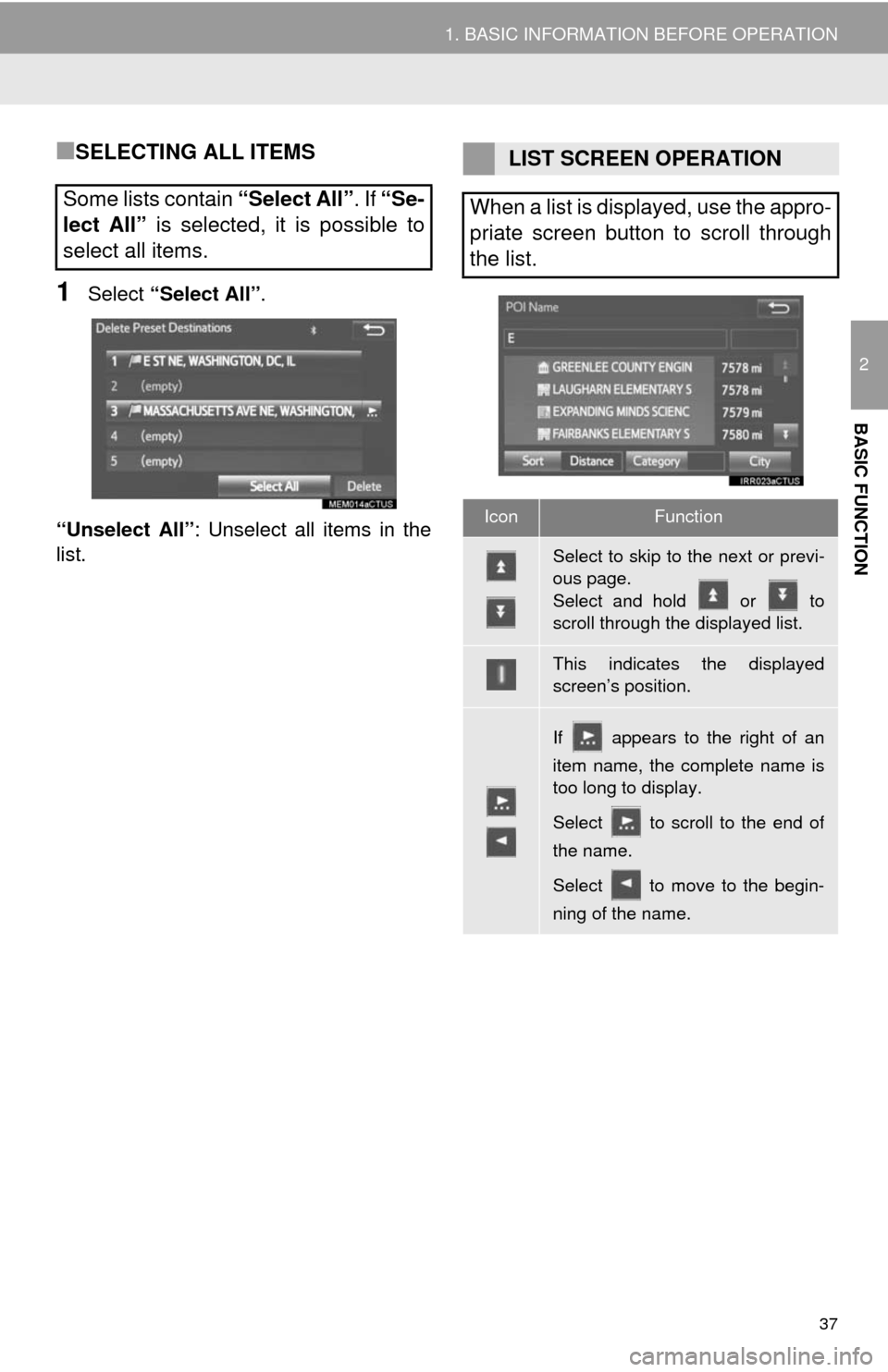
■SELECTING ALL ITEMS
1Select “Select All”.
“Unselect All”: Unselect all items in the
list.
Some lists contain “Select All”. If “Se-
lect All” is selected, it is possible to
select all items.
LIST SCREEN OPERATION
When a list is displayed, use the appro-
priate screen button to scroll through
the list.
IconFunction
Select to skip to the next or previ-
ous page.
Select and hold or to
scroll through the displayed list.
This indicates the displayed
screen’s position.
If appears to the right of an
item name, the complete name is
too long to display.
Select to scroll to the end of
the name.
Select to move to the begin-
ning of the name.
Page 38 of 316
38
1. BASIC INFORMATION BEFORE OPERATION
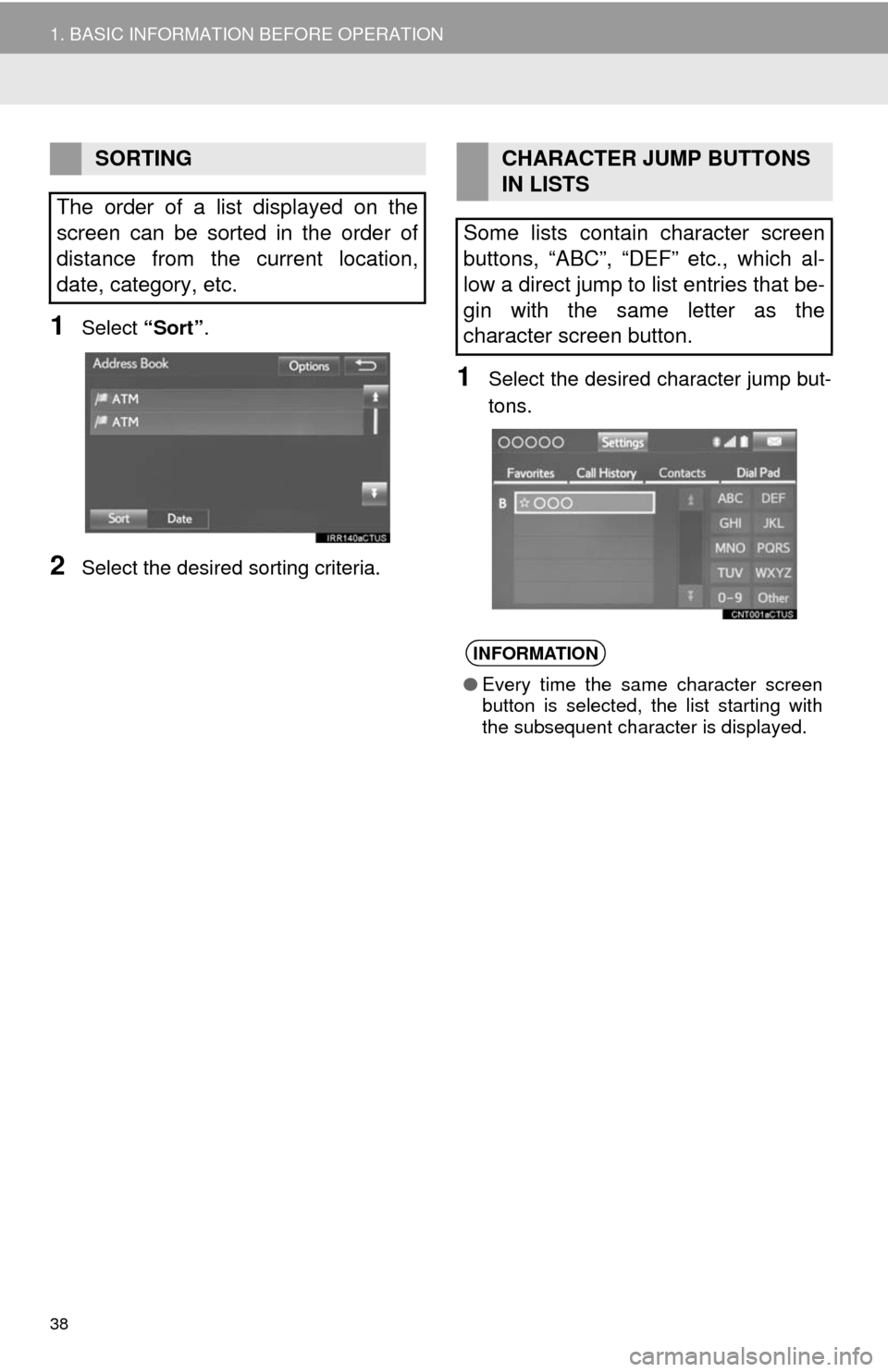
1Select “Sort”.
2Select the desired sorting criteria.
1Select the desired character jump but-
tons.
SORTING
The order of a list displayed on the
screen can be sorted in the order of
distance from the current location,
date, category, etc.CHARACTER JUMP BUTTONS
IN LISTS
Some lists contain character screen
buttons, “ABC”, “DEF” etc., which al-
low a direct jump to list entries that be-
gin with the same letter as the
character screen button.
INFORMATION
●Every time the same character screen
button is selected, the list starting with
the subsequent character is displayed.
Page 39 of 316
39
1. BASIC INFORMATION BEFORE OPERATION
2
BASIC FUNCTION
7. SCREEN ADJUSTMENT
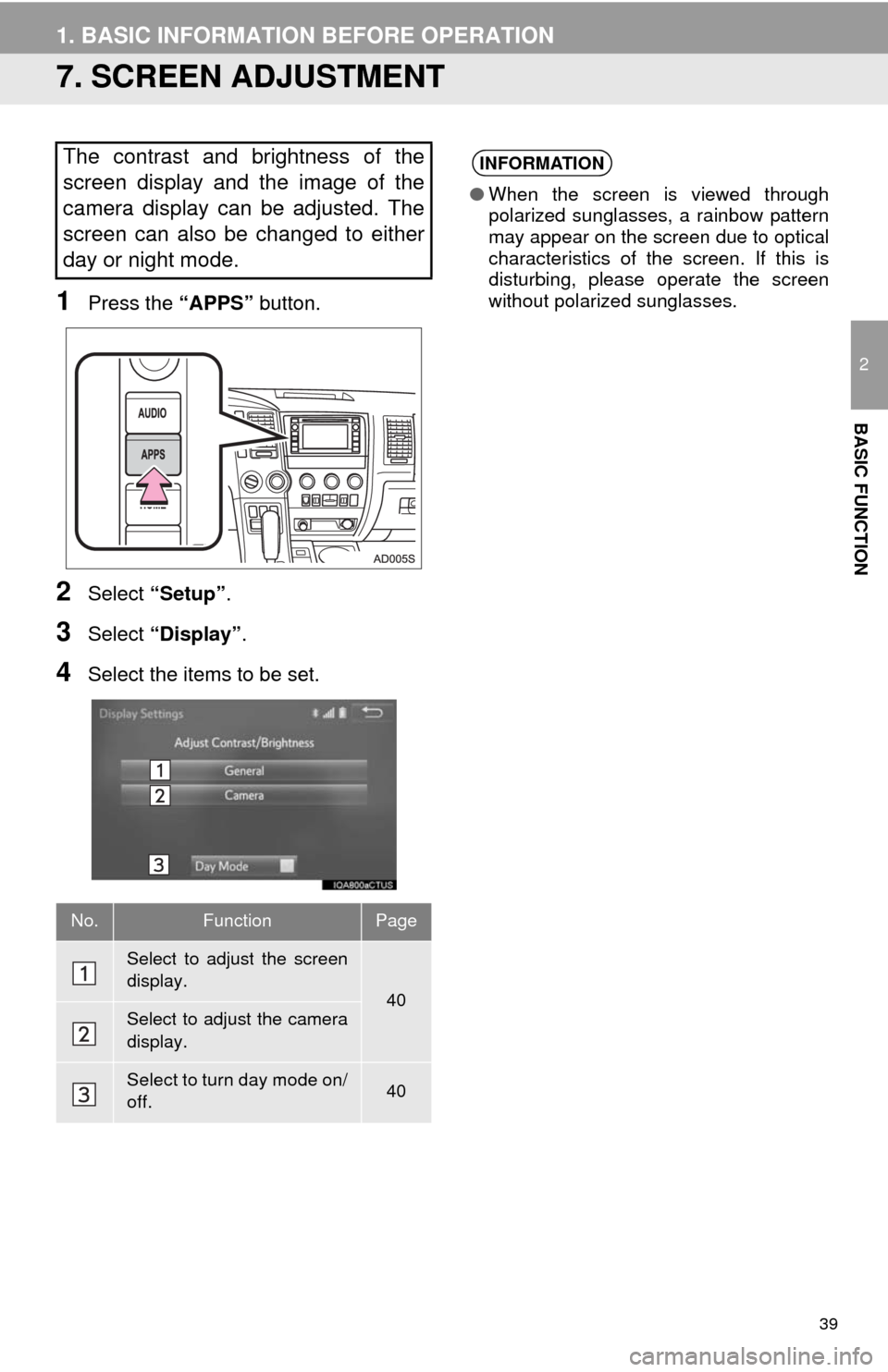
1Press the “APPS” button.
2Select “Setup”.
3Select “Display”.
4Select the items to be set.
The contrast and brightness of the
screen display and the image of the
camera display can be adjusted. The
screen can also be changed to either
day or night mode.
No.FunctionPage
Select to adjust the screen
display.
40Select to adjust the camera
display.
Select to turn day mode on/
off.40
INFORMATION
●When the screen is viewed through
polarized sunglasses, a rainbow pattern
may appear on the screen due to optical
characteristics of the screen. If this is
disturbing, please operate the screen
without polarized sunglasses.
Page 40 of 316
40
1. BASIC INFORMATION BEFORE OPERATION
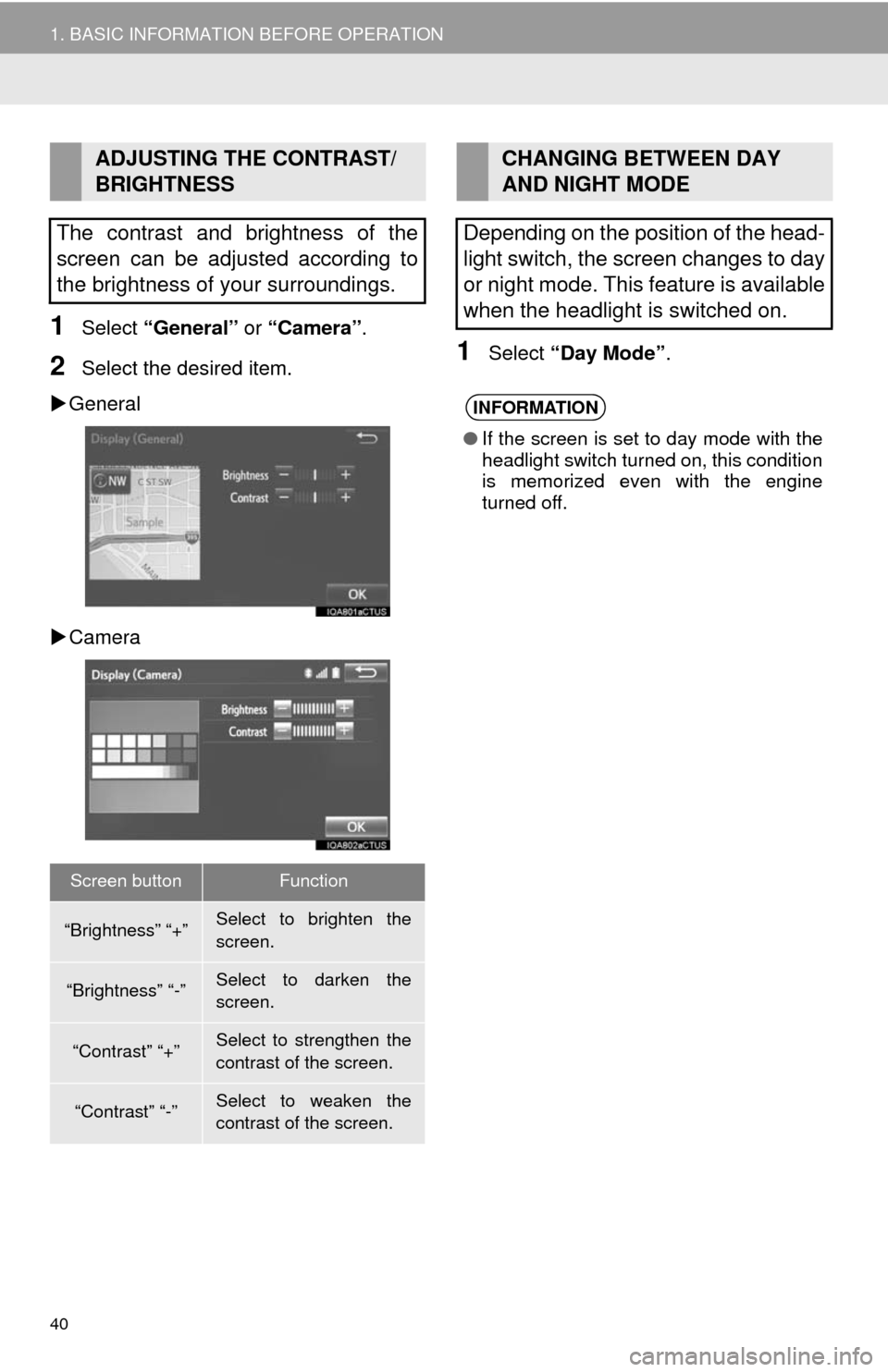
1Select “General” or “Camera”.
2Select the desired item.
General
Camera1Select “Day Mode”.
ADJUSTING THE CONTRAST/
BRIGHTNESS
The contrast and brightness of the
screen can be adjusted according to
the brightness of your surroundings.
Screen buttonFunction
“Brightness” “+”Select to brighten the
screen.
“Brightness” “-”Select to darken the
screen.
“Contrast” “+”Select to strengthen the
contrast of the screen.
“Contrast” “-”Select to weaken the
contrast of the screen.
CHANGING BETWEEN DAY
AND NIGHT MODE
Depending on the position of the head-
light switch, the screen changes to day
or night mode. This feature is available
when the headlight is switched on.
INFORMATION
●If the screen is set to day mode with the
headlight switch turned on, this condition
is memorized even with the engine
turned off.