audio TOYOTA SEQUOIA 2014 2.G Owner's Manual
[x] Cancel search | Manufacturer: TOYOTA, Model Year: 2014, Model line: SEQUOIA, Model: TOYOTA SEQUOIA 2014 2.GPages: 668, PDF Size: 13.86 MB
Page 345 of 668
345
3-2. Using the multimedia system
3
Interior features
Listening to an iPod
Connecting an iPod P. 3 2 6
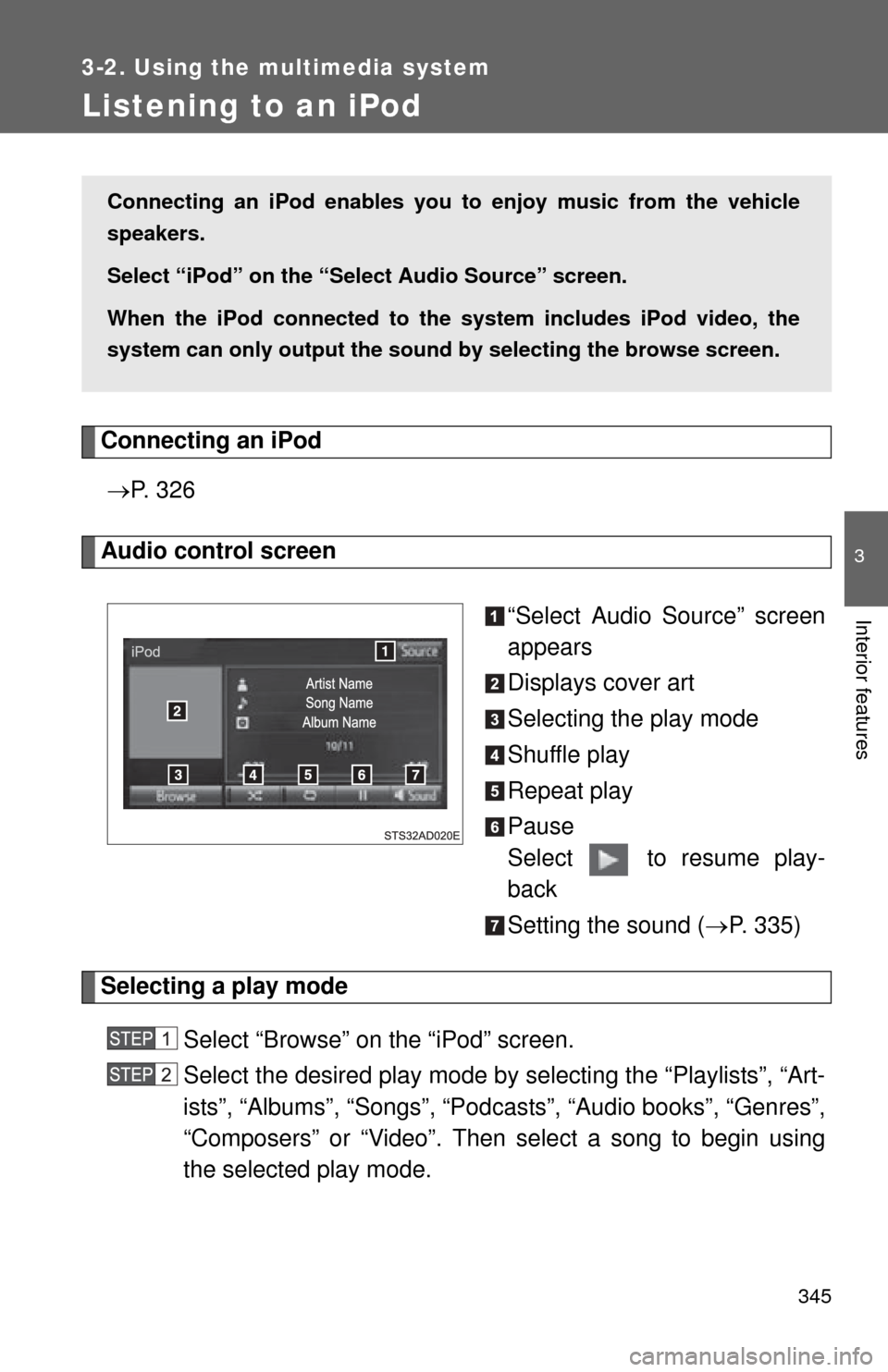
Audio control screen
“Select Audio Source” screen
appears
Displays cover art
Selecting the play mode
Shuffle play
Repeat play
Pause
Select to resume play-
back
Setting the sound (P. 335)
Selecting a play mode
Select “Browse” on the “iPod” screen.
Select the desired play mode by se lecting the “Playlists”, “Art-
ists”, “Albums”, “Songs”, “Podcas ts”, “Audio books”, “Genres”,
“Composers” or “Video”. Then select a song to begin using
the selected play mode.
Connecting an iPod enables you to enjoy music from the vehicle
speakers.
Select “iPod” on the “Select Audio Source” screen.
When the iPod connected to th e system includes iPod video, the
system can only output the sound by selecting the browse screen.
Page 347 of 668

347
3-2. Using the multimedia system
3
Interior features
■
iPod functions
●When an iPod is connected and the audio source is changed to iPod
mode, the iPod will resume play from the same point in which it was last
used.
● Depending on the iPod that is connected to the system, certain functions
may not be available. If a function is unavailable due to a malfunction (as
opposed to a system specification), disconnecting the device and recon-
necting it may resolve the problem.
● While connected to the system, the iPod cannot be operated with its own
controls. It is necessary to use the controls of the vehicle’s multimedia
system instead.
● When the battery level of an iPod is very low, the iPod may not operate. If
so, charge the iPod before use.
● Compatible models ( P. 349)
■ iPod problems
To resolve most problems encountered when using your iPod, disconnect
your iPod from the vehicle iPod connection and reset it. For instructions on
how to reset your iPod, refer to your iPod Owner’s Manual.
Page 351 of 668
351
3-2. Using the multimedia system
3
Interior features
Listening to a USB memor y device
Connecting a USB memory device P. 3 2 6
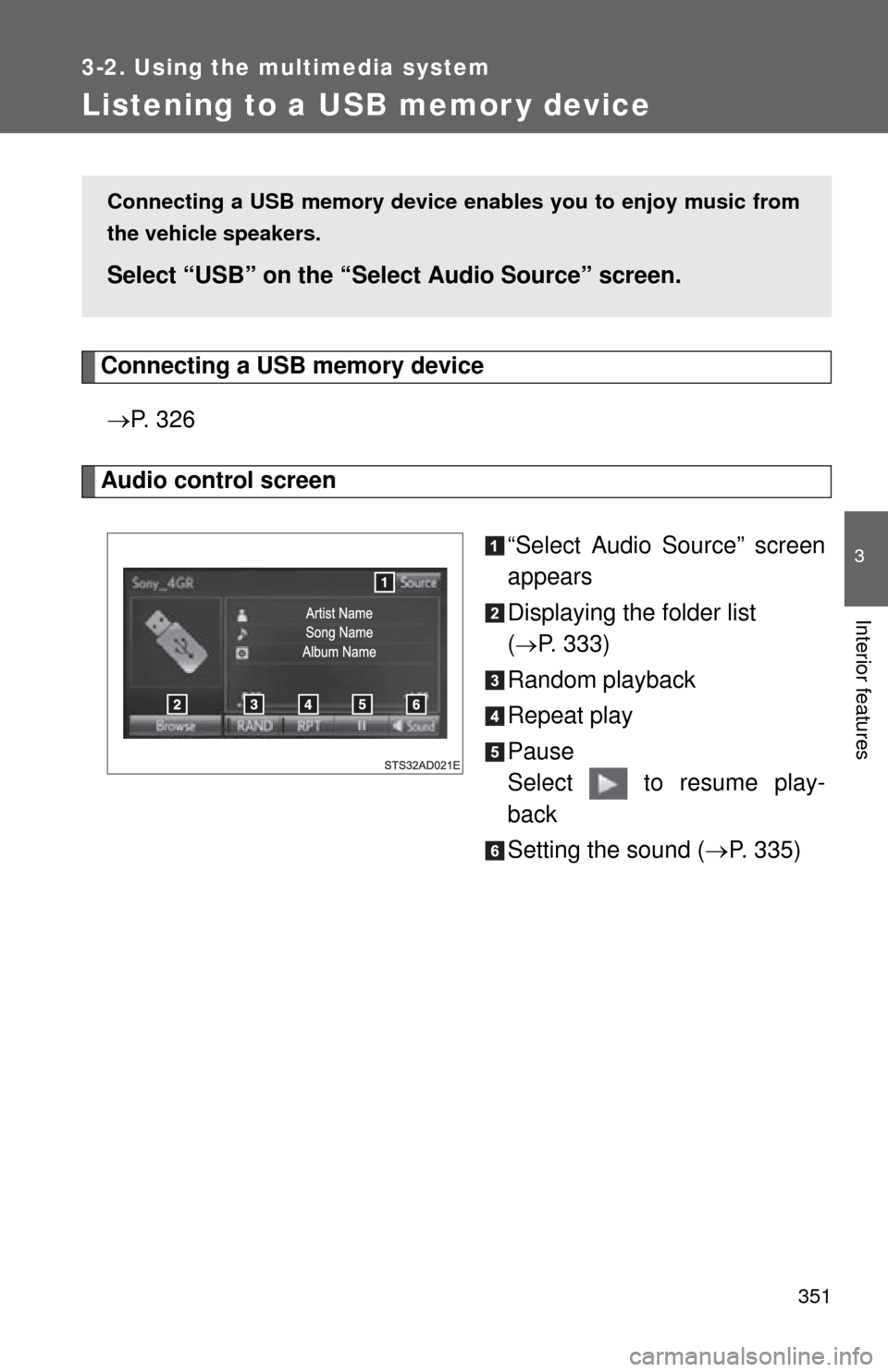
Audio control screen
“Select Audio Source” screen
appears
Displaying the folder list
(
P. 333)
Random playback
Repeat play
Pause
Select to resume play-
back
Setting the sound ( P. 335)
Connecting a USB memory device en ables you to enjoy music from
the vehicle speakers.
Select “USB” on the “Sel ect Audio Source” screen.
Page 353 of 668
353
3-2. Using the multimedia system
3
Interior features
Items related to standards and limitations are as follows:
• Maximum directory hierarchy: 8 levels
• Maximum number of folders in a device: 3000 (including the root)
• Maximum number of files in a device: 9999
• Maximum number of files per folder: 255
● MP3, WMA and AAC files
MP3 (MPEG Audio LAYER 3) is a standard audio compression format.
Files can be compressed to approximately 1/10 of their original size using
MP3 compression.
WMA (Windows Media Audio) is a Microsoft audio compression format. This
format compresses audio data to a size smaller than that of the MP3 format.
AAC is short for Advanced Audio Coding and refers to an audio compression
technology standard used with MPEG2 and MPEG4.
MP3, WMA and AAC file and media/formats compatibility are limited.
● MP3 file compatibility
• Compatible standards
MP3 (MPEG1 AUDIO LAYER3, MPEG2 AUDIO LAYER3)
• Compatible sampling frequencies MPEG1 AUDIO LAYER3: 32, 44.1, 48 (kHz)
MPEG2 AUDIO LAYER3: 16, 22.05, 24 (kHz)
• Compatible bit rates (compatible with VBR) MPEG1 AUDIO LAYER3: 32-320 (kbps)
MPEG2 AUDIO LAYER3: 8-160 (kbps)
• Compatible channel modes: stereo, joint stereo, dual channel and monaural
● WMA file compatibility
• Compatible standards
WMA Ver. 7, 8, 9
• Compatible sampling frequencies HIGH PROFILE 32, 44.1, 48 (kHz)
• Compatible bit rates HIGH PROFILE 48-320 (kbps, VBR)
Page 354 of 668

354 3-2. Using the multimedia system
●AAC file compatibility
• Compatible standards
MPEG4/AAC-LC
• Compatible sampling frequencies 11.025/12/16/22.05/24/32/44.1/48 (kHz)
• Compatible bit rates 16-320 (kbps)
• Compatible channel modes: 1 ch and 2 ch
● File names
The only files that can be recognized as MP3/WMA/AAC and played are
those with the extension .mp3 or .wma.
● ID3, WMA and AAC tags
ID3 tags can be added to MP3 files, making it possible to record the track
title, artist name, etc.
The system is compatible with ID3 Ver. 1.0, 1.1, and Ver. 2.2, 2.3 ID3 tags.
(The number of characters is based on ID3 Ver. 1.0 and 1.1.)
WMA tags can be added to WMA files, making it possible to record the
track title and artist name in the same way as with ID3 tags.
AAC tags can be added to AAC files, making it possible to record the track
title and artist name in the same way as with ID3 tags.
● MP3, WMA and AAC playback
• When a device containing MP3, WMA and AAC files is connected, all
files in the USB memory device are checked. Once the file check is fin-
ished, the first MP3, WMA and AAC file is played. To make the file
check finish more quickly, we recommend that you do not include any
files other than MP3, WMA and AAC files or create any unnecessary
folders.
• When a USB memory device is connected and the audio source is changed to USB memory mode, the USB memory device will start
playing the first file in the first folder. If the same device is removed and
reconnected (and the contents have not been changed), the USB
memory device will resume play from the same point in which it was
last used.
● Extensions
If the file extensions .mp3, .wma and .m4a are used for files other than
MP3, WMA and AAC files, they will be skipped (not played).
Page 356 of 668
356
3-2. Using the multimedia system
Using the AUX por t
Connecting a portable audio player P. 3 2 6
■Operating portable audio players c onnected to the multimedia system
The volume can be adjusted using the vehicle’s audio controls. All other
adjustments must be made on the portable audio player itself.
■ When using a portable audio player connected to the power outlet
Noise may occur during playback. Use the power source of the portable
audio player.
CAUTION
■ While driving
Do not connect a portable audio player or operate the device controls.
To use the AUX port, connect a po rtable player, then select “AUX” on
the “Select Audio Source” screen.
Page 357 of 668
357
3-2. Using the multimedia system
3
Interior features
Connecting Bluetooth®
The following can be performed using Bluetooth® wireless commu-
nication:
■ A portable audio player can be operated and listened to via
multimedia system
■ Hands-free phone calls can be made via a cellular phone
In order to use wireless communicat ion, register and connect a
Bluetooth
® device by performing the following procedures.
Page 358 of 668

358 3-2. Using the multimedia system
Device registration/connection flow
1. Register the Bluetooth® device to be used with Multimedia
system ( P. 360, 361)
2. Connect the Bluetooth® device to be used
( P. 363)
To be used for audio To be used for hands-free
phone
3. Start Bluetooth® connec-
tion ( P. 363)3. Start Bluetooth® connec-
tion ( P. 363)
4. Check connection status
( P. 379)4. Check connection status
( P. 381)
5. Use Bluetooth® audio
( P. 379)5. Use Bluetooth® phone
( P. 380)
Page 360 of 668
360 3-2. Using the multimedia system
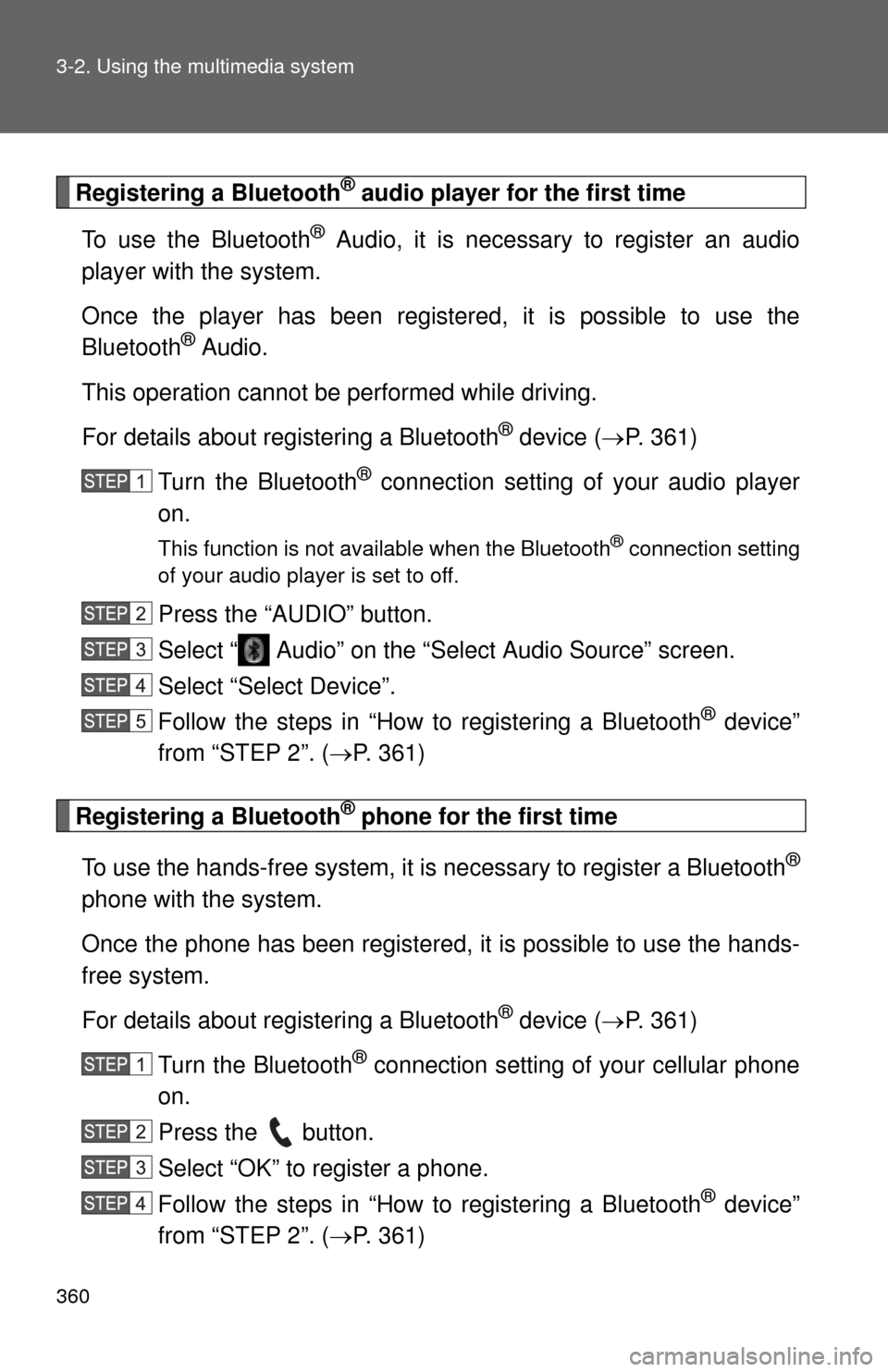
Registering a Bluetooth® audio player for the first time
To use the Bluetooth
® Audio, it is necessary to register an audio
player with the system.
Once the player has been register ed, it is possible to use the
Bluetooth
® Audio.
This operation cannot be performed while driving.
For details about registering a Bluetooth
® device ( P. 361)
Turn the Bluetooth
® connection setting of your audio player
on.
This function is not available when the Bluetooth® connection setting
of your audio player is set to off.
Press the “AUDIO” button.
Select “ Audio” on the “Select Audio Source” screen.
Select “Select Device”.
Follow the steps in “How to registering a Bluetooth
® device”
from “STEP 2”. ( P. 361)
Registering a Bluetooth® phone for the first time
To use the hands-free system, it is necessary to register a Bluetooth
®
phone with the system.
Once the phone has been registered, it is possible to use the hands-
free system.
For details about registering a Bluetooth
® device ( P. 361)
Turn the Bluetooth
® connection setting of your cellular phone
on.
Press the button.
Select “OK” to register a phone.
Follow the steps in “How to registering a Bluetooth
® device”
from “STEP 2”. ( P. 361)
Page 361 of 668
361
3-2. Using the multimedia system
3
Interior features
Registering a Bluetooth® device
Bluetooth
® compatible phones (HFP) and portable audio players
(AVP) can be registered simultaneously. You can register up to 5
Bluetooth
® devices.
■ How to register a Bluetooth
® device
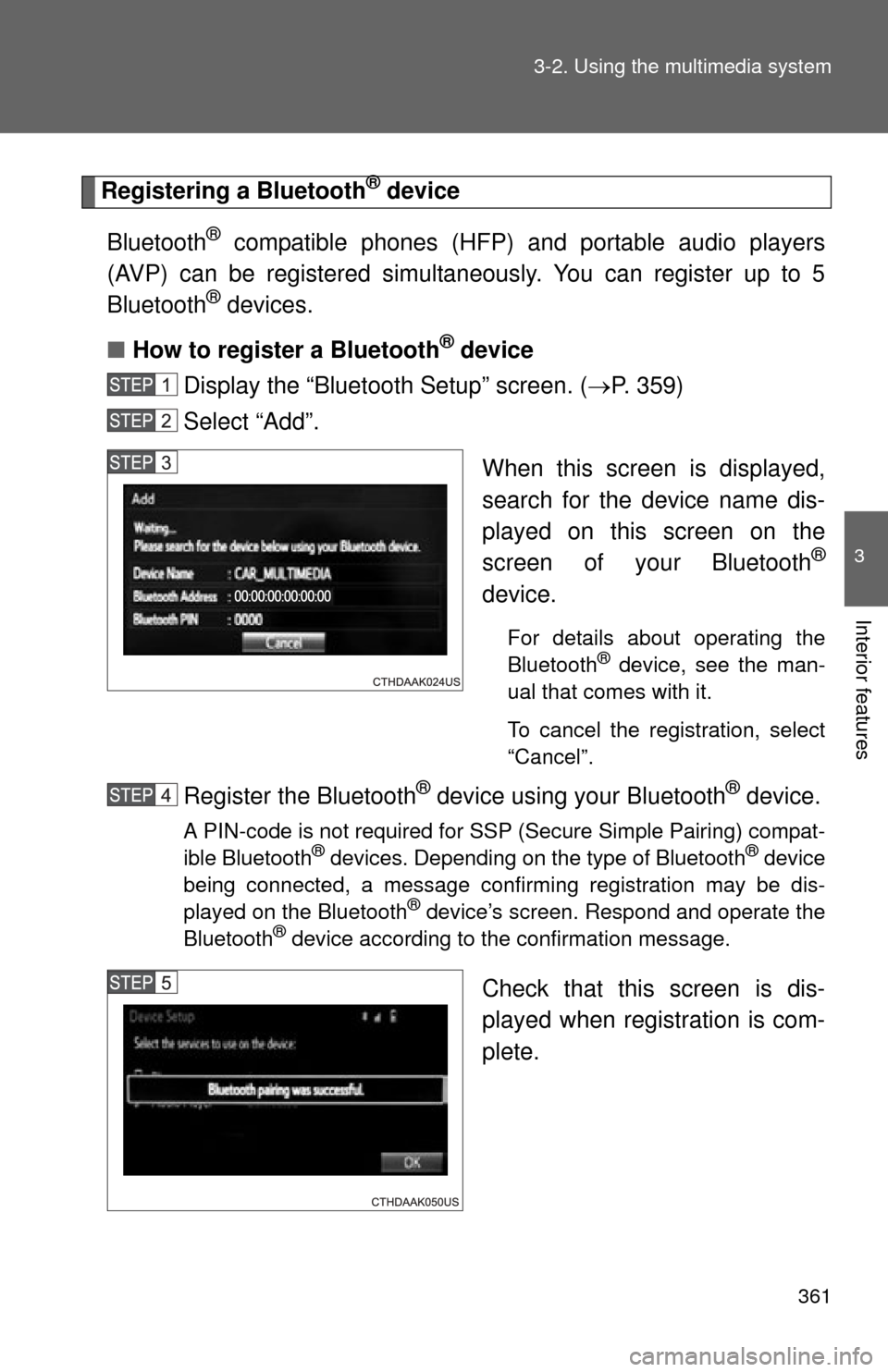
Display the “Bluetooth Setup” screen. ( P. 359)
Select “Add”.
When this screen is displayed,
search for the device name dis-
played on this screen on the
screen of your Bluetooth
®
device.
For details about operating the
Bluetooth® device, see the man-
ual that comes with it.
To cancel the registration, select
“Cancel”.
Register the Bluetooth® device using your Bluetooth® device.
A PIN-code is not required for SSP (Secure Simple Pairing) compat-
ible Bluetooth® devices. Depending on the type of Bluetooth® device
being connected, a message confirming registration may be dis-
played on the Bluetooth
® device’s screen. Respond and operate the
Bluetooth® device according to the confirmation message.
Check that this screen is dis-
played when registration is com-
plete.