wheel TOYOTA SEQUOIA 2014 2.G Repair Manual
[x] Cancel search | Manufacturer: TOYOTA, Model Year: 2014, Model line: SEQUOIA, Model: TOYOTA SEQUOIA 2014 2.GPages: 668, PDF Size: 13.86 MB
Page 167 of 668
167
2-1. Driving procedures
2
When driving
Hor n
■After adjusting the steerin g wheel (vehicles with manual tilt and tele-
scopic steering)
Make sure that the steering wheel is securely locked.
The horn may not sound if the steering wheel is not securely locked.
( P. 80)
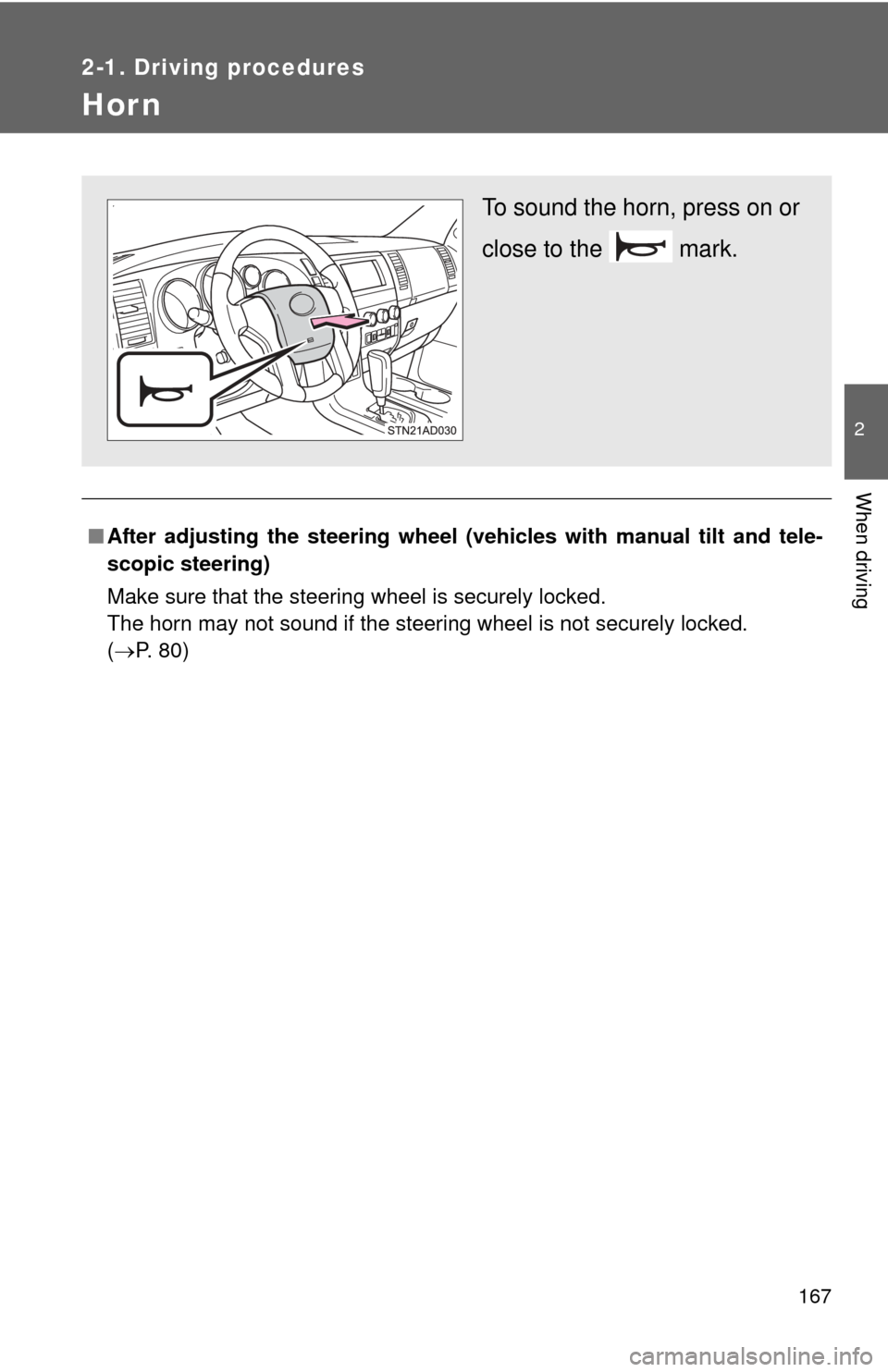
To sound the horn, press on or
close to the mark.
Page 204 of 668

204 2-4. Using other driving systems
■Cruise control can be set when
●The shift lever is in the D or range 4 or higher of S has been selected.
● Vehicle speed is above approximately 25 mph (40 km/h).
■ Accelerating after setting the vehicle speed
●The vehicle can be accelerated normally. After acceleration, the set
speed resumes.
● Even without canceling the cruise control, the set speed can be
increased by first accelerating the vehicle to the desired speed and then
pushing the lever down to set the new speed.
■ Automatic cruise control cancelation
Cruise control will stop maintaining the vehicle speed in any of the following
situations.
●Actual vehicle speed falls more than approximately 10 mph (16 km/h)
below the preset vehicle speed.
At this time, the memorized set speed is not retained.
● Actual vehicle speed is below approximately 25 mph (40 km/h).
● VSC is activated.
● The operation cannot be switched for 5 seconds or more after operating
the front wheel drive control switch or the center differential lock switch.
(4WD models)
■ If the cruise control indicator flashes
Press the ON-OFF button once to deactivate the system, and then press the
button again to reactivate the system.
If the cruise control speed cannot be set or if the cruise control cancels
immediately after being activated, there may be a malfunction in the cruise
control system. Have the vehicle inspected by your Toyota dealer.
Page 214 of 668

214 2-4. Using other driving systems
■Dynamic laser cruise control can be set when
●The shift lever is in the D or range 4 or higher of S has been selected.
● Vehicle speed is above approximately 30 mph (50 km/h).
■ Switching modes
The mode cannot be switched to constant speed control mode if vehicle-to-
vehicle distance control mode has been used. The mode also cannot be
switched from constant speed control to vehicle-to-vehicle distance control
mode. Turn the system off by pressing the ON-OFF button, and turn it on
again.
■ Accelerating after setting the vehicle speed
The vehicle can accelerate normally. After acceleration, the set speed
resumes. However, during vehicle-to-vehicle distance control mode, the
vehicle speed may decrease below the set speed in order to maintain the
distance to the vehicle ahead.
■ Automatic cancelation of vehicle -to-vehicle distance control
Vehicle-to-vehicle distance control driving is automatically canceled in the
following situations:
● Actual vehicle speed falls below approximately 25 mph (40 km/h)
● VSC is activated
● The sensor cannot operate correctly because it is covered in some way.
*
●The windshield wipers are operating at high or low speed.*
●The operation cannot be switched for 5 seconds or more after operating
the front wheel drive control switch or the center differential lock switch.
(4WD models)
*: Vehicle-to-vehicle distance control driving must be reset by pressing the
ON-OFF button again.
If vehicle-to-vehicle distance control dr iving is automatically canceled for any
other reason, there may be a malfunction in the system. Contact your Toyota
dealer.
Page 215 of 668
215
2-4. Using other
driving systems
2
When driving
■Automatic cancelation of constant speed control
The cruise control will stop maintaining the vehicle speed in the following sit-
uations:
●Actual vehicle speed is more than approximately 10 mph (16 km/h)
below the set vehicle speed
At this time, the memorized set speed is not retained.
● Vehicle speed falls below approximately 25 mph (40 km/h)
● VSC is activated
● The operation cannot be switched for 5 seconds or more after operating
the front wheel drive control switch or the center differential lock switch.
(4WD models)
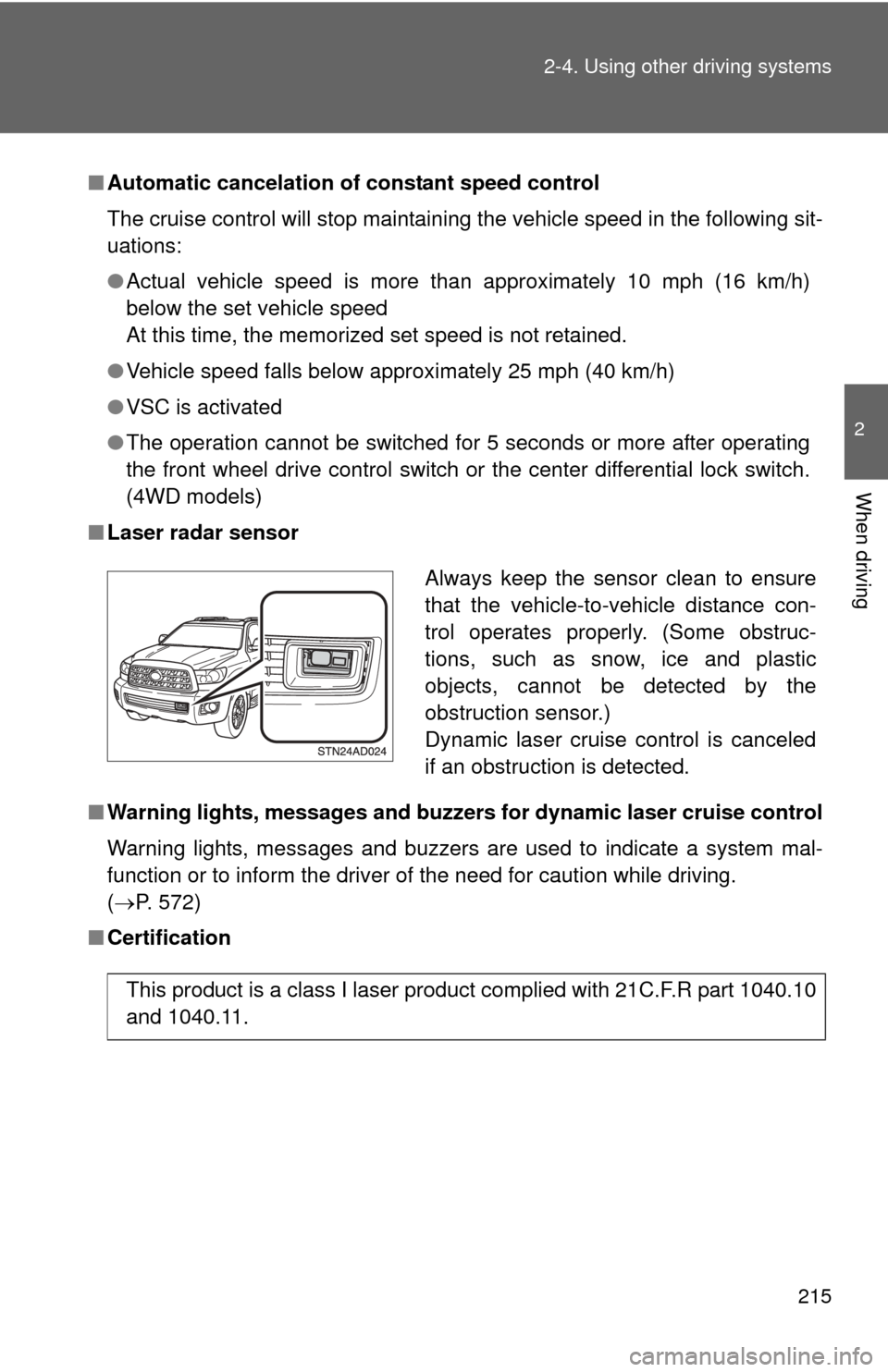
■ Laser radar sensor
■ Warning lights, messages and buzzers for dynamic laser cruise control
Warning lights, messages and buzzers are used to indicate a system mal-
function or to inform the driver of the need for caution while driving.
(P. 572)
■ Certification
Always keep the sensor clean to ensure
that the vehicle-to-vehicle distance con-
trol operates properly. (Some obstruc-
tions, such as snow, ice and plastic
objects, cannot be detected by the
obstruction sensor.)
Dynamic laser cruise control is canceled
if an obstruction is detected.
This product is a class I laser product complied with 21C.F.R part 1040.10
and 1040.11.
Page 219 of 668

219
2-4. Using other
driving systems
2
When driving
CAUTION
■Conditions under which the vehicle -to-vehicle distance control may
not function correctly
Apply the brakes as necessary in the following conditions as the laser radar
sensor may not be able to correctly detect vehicles ahead, and a fatal or
serious accident may result.
● When water or snow thrown up by the surrounding vehicles hinders the
functioning of the sensor
● When your vehicle is pointing upwards (caused by a heavy load in the lug-
gage compartment etc.)
● When the road curves or when the lanes are narrow
● When steering wheel operation or your position in the lane is unstable
● When the vehicle ahead of you decelerates suddenly
● When your vehicle is towing a trailer or during emergency towing
■ Handling the laser radar sensor
Observe the following to ensure the cruise control system can function effec-
tively.
Otherwise, the system may not function correctly and could result in an acci-
dent.
●Keep the sensor clean at all times.
Clean the sensor with a soft cloth so you do not mark or damage them.
● Do not subject the sensor or surrounding area to a strong impact.
If the sensor moves even slightly off position, the system may malfunction.
If the sensor or surrounding area is subject to a strong impact, always
have the area inspected and adjusted by a Toyota dealer.
● Do not disassemble the sensor.
● Do not attach accessories or stickers to the sensor, surrounding area.
● Do not modify or paint the sensor.
● Do not replace them with non-genuine parts.
Page 236 of 668
236 2-4. Using other driving systems
CAUTION
■When using the rear view monitor system
The rear view monitor system is a supplemental device intended to assist
the driver when backing up. When backing up, be sure to check visually
behind and all around the vehicle before proceeding.
Observe the following precautions to avoid an accident that could result in
death or serious injuries.
● Never depend on the rear view monitor system entirely when backing up.
The image and the position of the guide lines displayed on the screen may
differ from the actual state.
Use caution, just as you would when backing up any vehicle.
● Be sure to back up slowly, depressing the brake pedal to control vehicle
speed.
● The instructions given are only guidelines.
When and how much to turn the steering wheel will vary according to traf-
fic conditions, road surface conditions, vehicle condition, etc., when park-
ing. It is necessary to be fully aware of this before using the rear view
monitor system.
● When parking, be sure to check that the parking space will accommodate
your vehicle before maneuvering into it.
● Do not use the rear view monitor system in the following cases:
• On icy or slick road surfaces, or in snow
• When using tire chains or the compact spare tire
• When the back door is not closed completely
• On roads that are not flat or straight, such as curves or slopes.
● In low temperatures, the screen may darken or the image may become
faint. The image could distort when the vehicle is moving, or you may
become unable to see the image on the screen. Be sure to directly check
visually and with the mirrors all around the vehicle before proceeding.
● If the tire sizes are changed, the position of the fixed guide lines displayed
on the screen may change.
● The camera uses a special lens. The distances between objects and
pedestrians that appear in the image displayed on the screen will differ
from the actual distances. ( P. 231)
Page 249 of 668
249
2-4. Using other driving systems
2
When driving
AVS (Adaptive Variable Suspension System)
: If equipped
■Driving mode
●Sport mode is suitable for winding mountain road driving, high speed
driving or towing a trailer.
● Normal mode is suitable for ordinary driving.
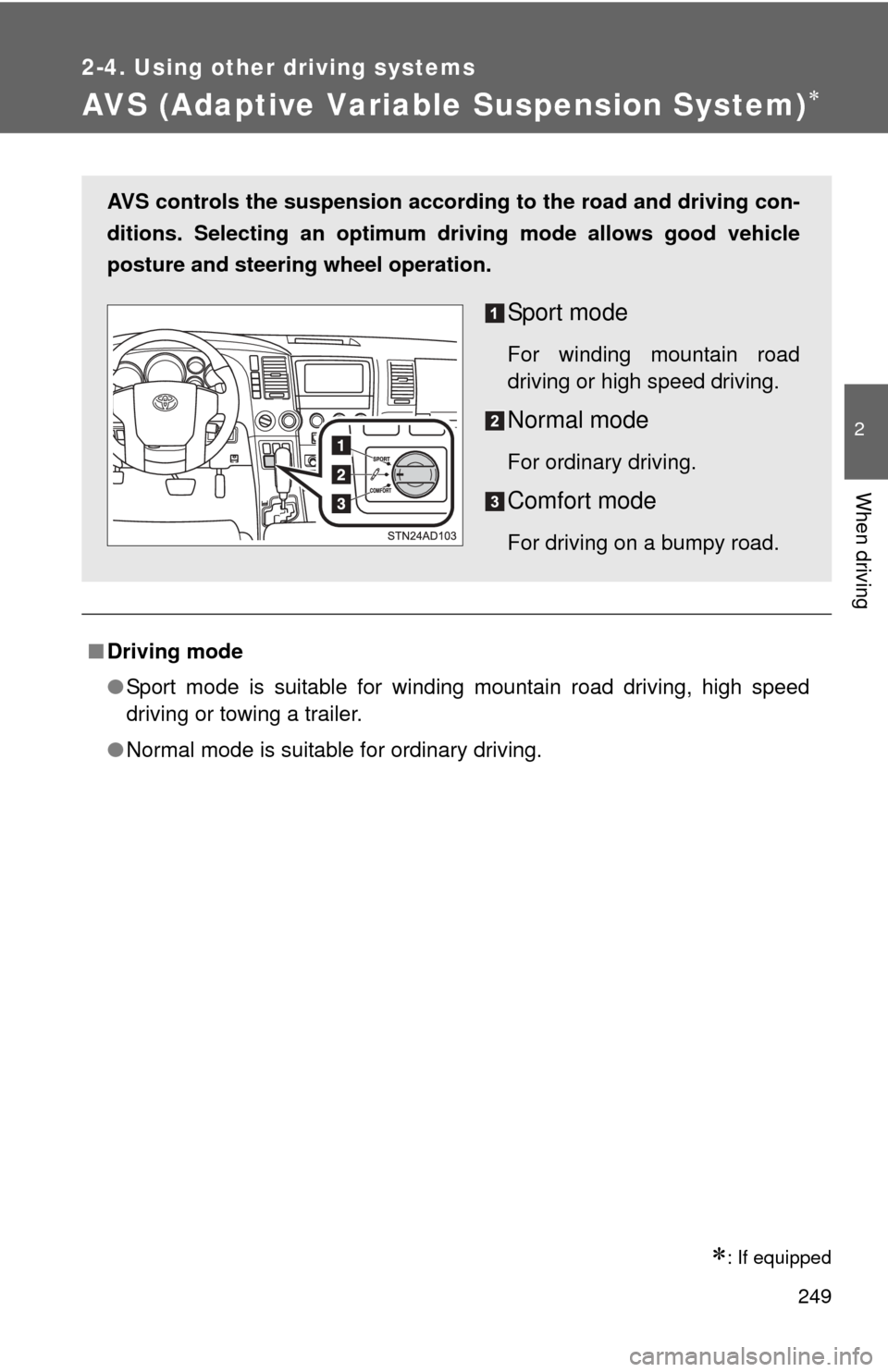
AVS controls the suspension accord ing to the road and driving con-
ditions. Selecting an optimum driving mode allows good vehicle
posture and steering wheel operation.
Sport mode
For winding mountain road
driving or high speed driving.
Normal mode
For ordinary driving.
Comfort mode
For driving on a bumpy road.
Page 250 of 668
250
2-4. Using other driving systems
Four-wheel drive system
: If equipped
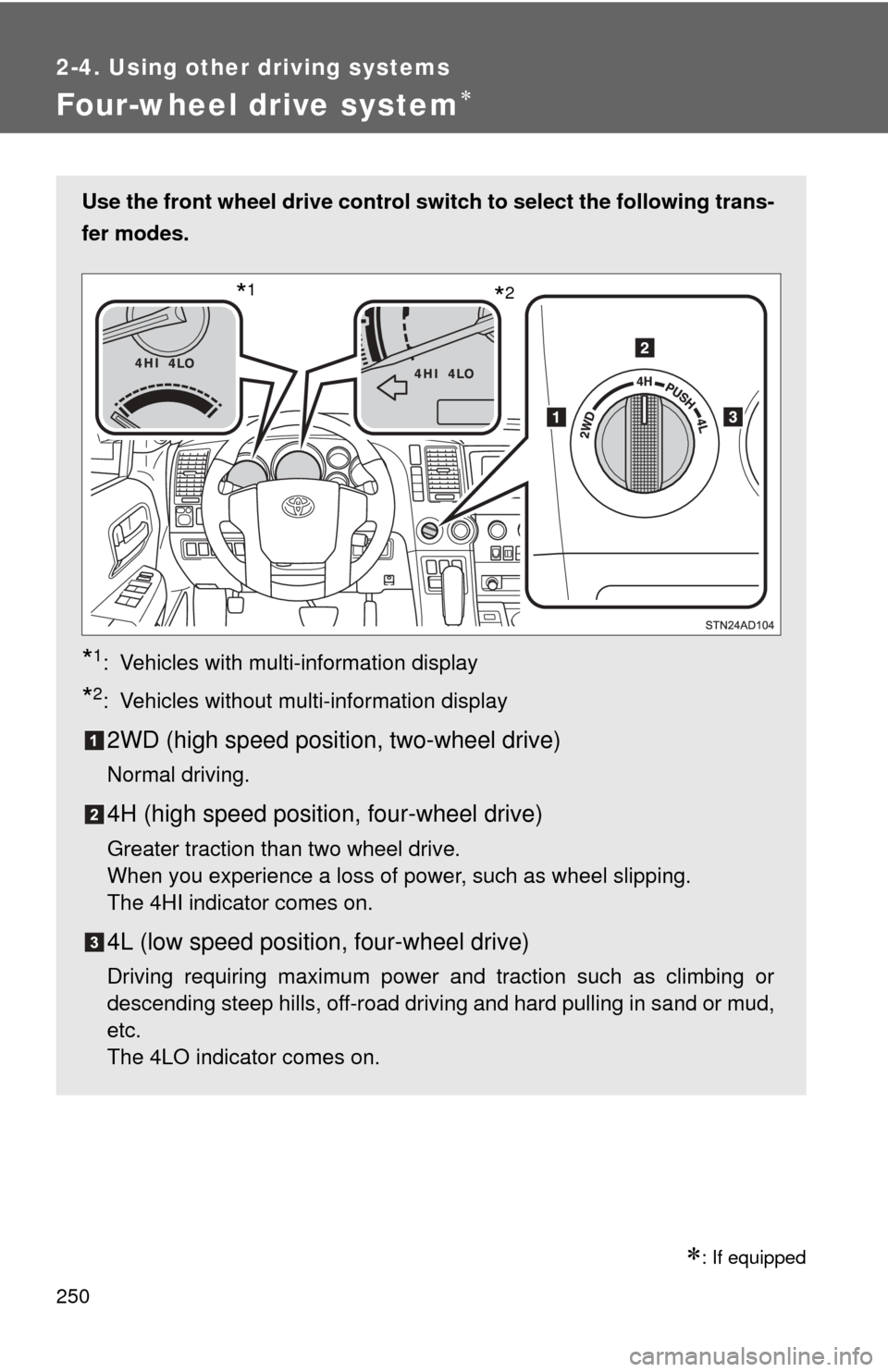
Use the front wheel drive control switch to select the following trans-
fer modes.
*1: Vehicles with multi-information display
*2: Vehicles without multi-information display
2WD (high speed position, two-wheel drive)
Normal driving.
4H (high speed position, four-wheel drive)
Greater traction than two wheel drive.
When you experience a loss of power, such as wheel slipping.
The 4HI indicator comes on.
4L (low speed position, four-wheel drive)
Driving requiring maximum power and traction such as climbing or
descending steep hills, off-road driving and hard pulling in sand or mud,
etc.
The 4LO indicator comes on.
*2*1
Page 251 of 668
251
2-4. Using other
driving systems
2
When driving
Shifting between 4H and 4L
■ Shifting from 4H to 4L
Stop the vehicle completely.
Shift the shift lever to N.
Push and turn the front wheel dr ive control switch fully clock-
wise.
Maintain this condition until the 4LO indicator turns on.
■ Shifting from 4L to 4H
Stop the vehicle completely.
Shift the shift lever to N.
Turn the front wheel drive cont rol switch fully counterclock-
wise.
Maintain this condition until the 4LO indicator turns off.
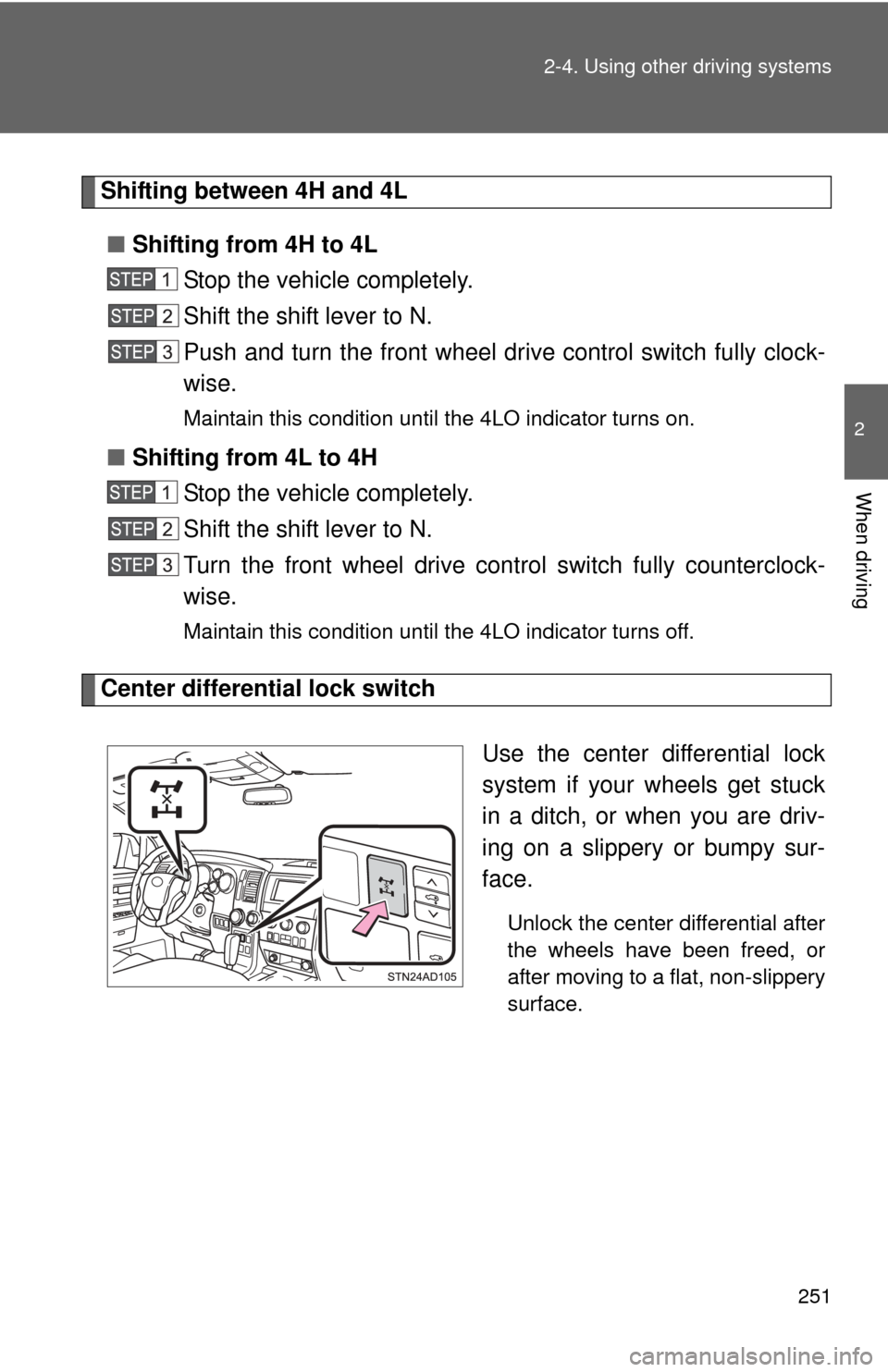
Center differential lock switch
Use the center differential lock
system if your wheels get stuck
in a ditch, or when you are driv-
ing on a slippery or bumpy sur-
face.
Unlock the center differential after
the wheels have been freed, or
after moving to a flat, non-slippery
surface.
Page 252 of 668

252 2-4. Using other driving systems
■Shifting between 2WD and 4H
●Reduce your speed to less than 62 mph (100 km/h) and set the front
wheel drive control switch between 2WD and 4H.
When the ambient temperature is 5.0° F (-15°C) or lower, shifting from
2WD to 4H cannot be performed with the vehicle speed above 43 mph (70
km/h).
● If the 4HI indicator does not go off when you shift from 4H to 2WD, drive
straight ahead while accelerating or decelerating, or drive in reverse.
■ Four-wheel drive usage frequency
You should drive in four-wheel drive for at least 10 miles (16 km) each
month.
This will assure that the front drive components are lubricated.
■ The center differential lock switch can be operated when
●The front wheel drive control switch is in the 4H or 4L position.
● The vehicle speed is less than 62 mph (100 km/h)
■ Center differential lock system
●When the front wheel drive control switch is in the 4L position and the
center differential is locked, the VSC is automatically turned off.
● When the front wheel drive control switch is turned to the 2WD position,
the center differential is automatically unlocked.
● If the operation is not completed, the center differential lock indicator
blinks. If the indicator does not go off when unlocking the center differen-
tial, drive straight ahead while accelerating or decelerating, or drive \
in
reverse.