audio TOYOTA SEQUOIA 2015 2.G Owner's Guide
[x] Cancel search | Manufacturer: TOYOTA, Model Year: 2015, Model line: SEQUOIA, Model: TOYOTA SEQUOIA 2015 2.GPages: 664, PDF Size: 13.16 MB
Page 360 of 664
360 3-2. Using the multimedia system
Select “OK” when the connection status changes from “Con-
necting...” to “Connected”.
If an error message is displayed, follow the guidance on the screen
to try again.
Registration can be performed from screens other than the
“Bluetooth Setup” screen.
■When registering from th e “Bluetooth Audio” screen
Display the “Bluetooth Audio” screen. ( P. 330)
Select “Select Device”.
Follow the steps in “How to registering a Bluetooth
® device”
from “STEP 2”. ( P. 359)
■ Deleting a Bluetooth
® device
Display the “Bluetooth Setup” screen. ( P. 357)
Select “Remove”.
Select the desired device.
A confirmation message will be displayed, select “Yes” to
delete the device.
Check that a confirmation screen is displayed when the oper-
ation is complete.
Page 361 of 664
361
3-2. Using the multimedia system
3
Interior features
Connecting a Bluetooth® device
Up to 5 Bluetooth
® devices (Phones (HFP) and audio players (AVP))
can be registered.
If more than 1 Bluetooth
® device has been registered, select which
device to connect to.
Press the “SETUP” button.
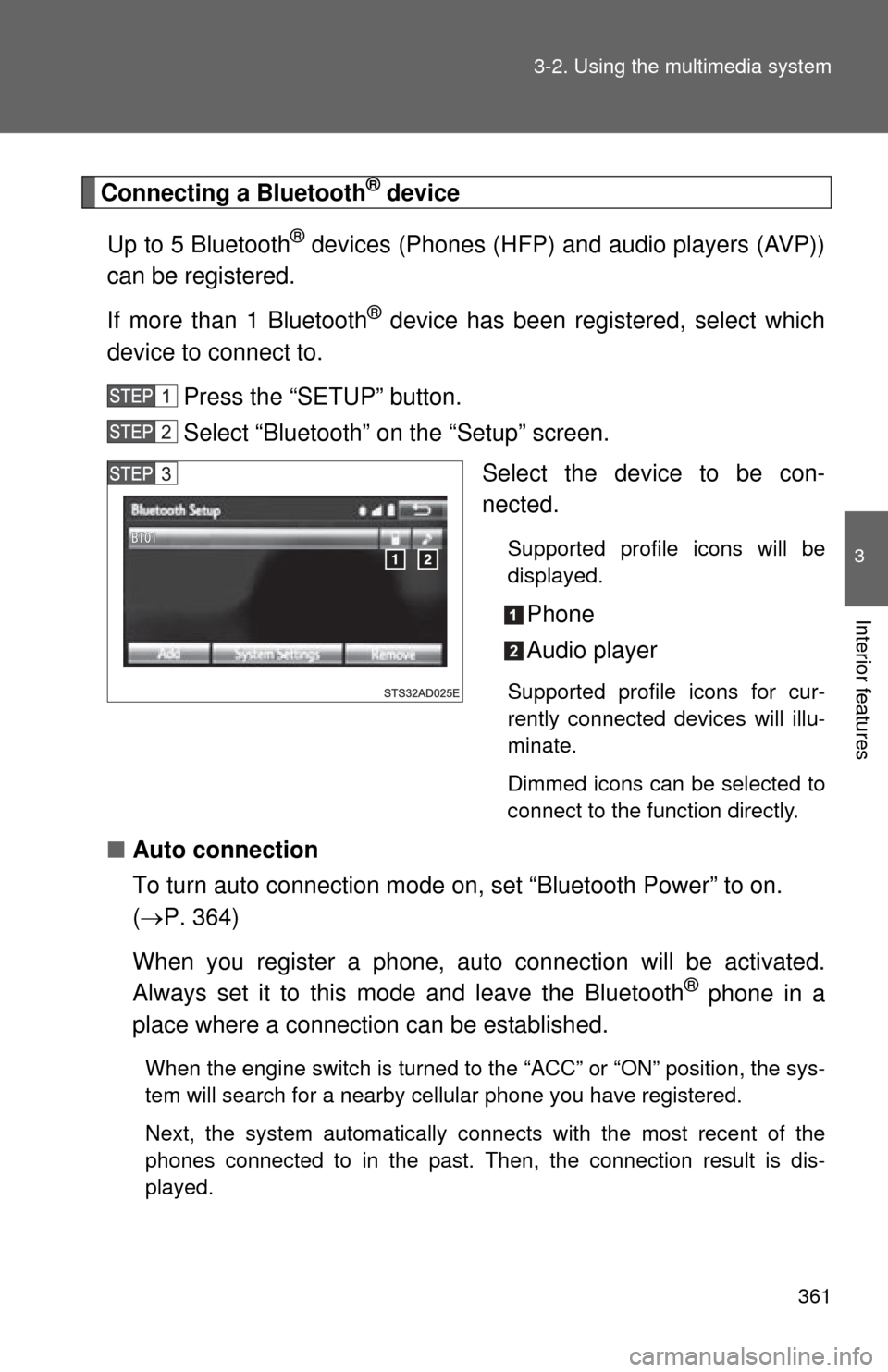
Select “Bluetooth” on the “Setup” screen. Select the device to be con-
nected.
Supported profile icons will be
displayed.
Phone
Audio player
Supported profile icons for cur-
rently connected devices will illu-
minate.
Dimmed icons can be selected to
connect to the function directly.
■Auto connection
To turn auto connection mode on, set “Bluetooth Power” to on.
( P. 364)
When you register a phone, au to connection will be activated.
Always set it to this mode and leave the Bluetooth
® phone in a
place where a connection can be established.
When the engine switch is turned to the “ACC” or “ON” position, the sys-
tem will search for a nearby cellular phone you have registered.
Next, the system automatically connects with the most recent of the
phones connected to in the past. Then, the connection result is dis-
played.
Page 362 of 664
362 3-2. Using the multimedia system
■Manual connection
When auto connection has failed or “Bluetooth Power” is turned
off, you must connect the Bluetooth
® device manually.
Follow the steps in “Connecting a Bluetooth
® device” from
“STEP 1”. ( P. 361)
■ Connecting a Bluetooth
® audio player
Registering an additional device
Select “Select Device” on the “Bluetooth Audio” screen.
For more information: P. 3 5 9
Selecting a registered device Select “Select Device” on the “Bluetooth Audio” screen.
For more information: P. 3 6 1
■Reconnecting a Bluetooth® phone
If the system cannot connect due to poor signal strength with the engine
switch in the “ACC” or “ON” position, the system will automatically attempt to
reconnect.
If the phone is turned off, the system will not attempt to reconnect. In this
case, the connection must be made manually, or the phone must be rese-
lected.
Page 363 of 664
363
3-2. Using the multimedia system
3
Interior features
Displaying a Bluetooth® device details
You can confirm and change the registered device details.
■ Bluetooth
® device registration status
Display the “Bluetooth Setup” screen. ( P. 357)
Select the device.
Select “Device Info”.
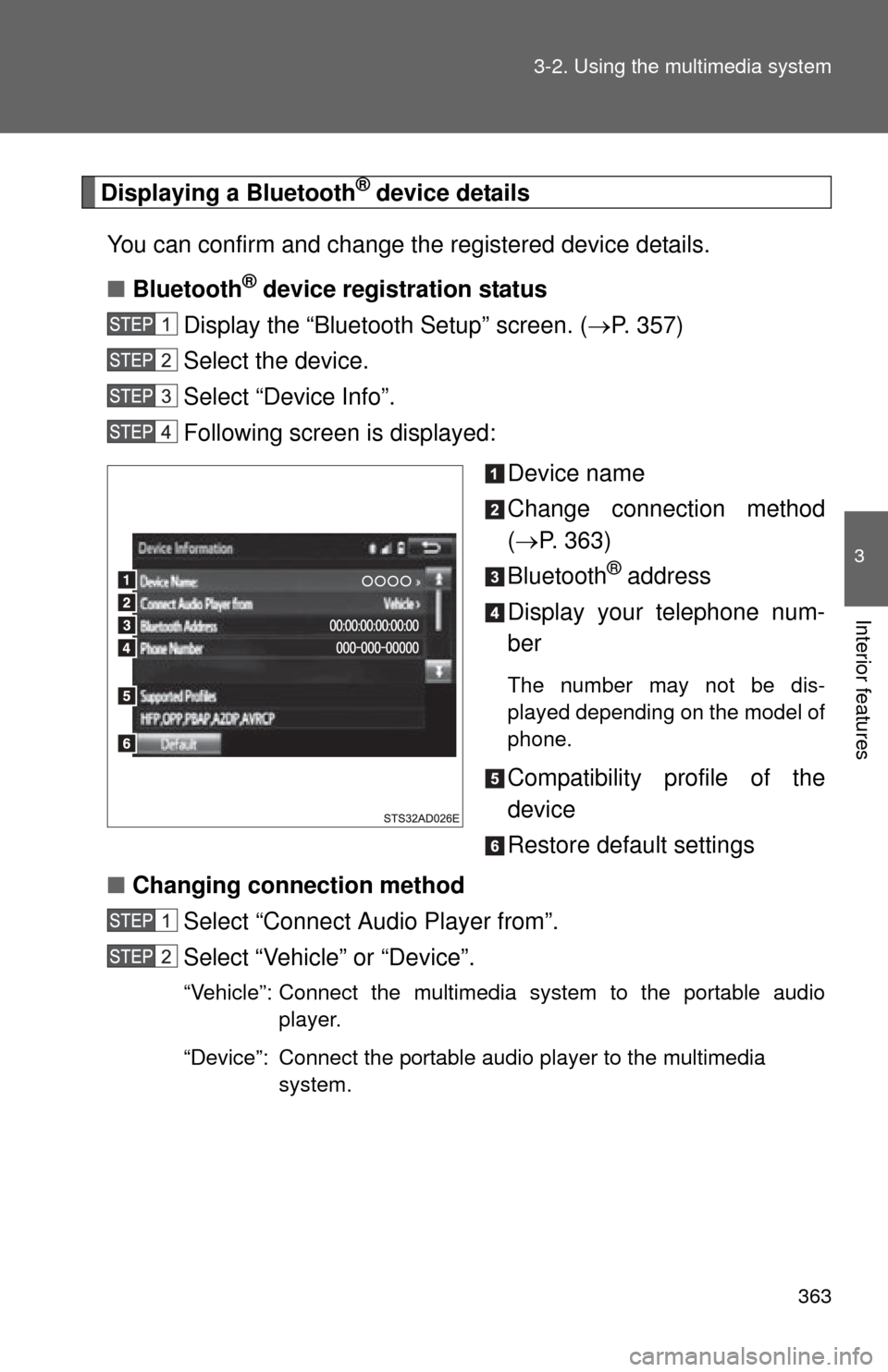
Following screen is displayed:
Device name
Change connection method
( P. 363)
Bluetooth
® address
Display your telephone num-
ber
The number may not be dis-
played depending on the model of
phone.
Compatibility profile of the
device
Restore default settings
■ Changing connection method
Select “Connect Audio Player from”.
Select “Vehicle” or “Device”.
“Vehicle”: Connect the multimedia system to the portable audio player.
“Device”: Connect the portable audio player to the multimedia system.
Page 364 of 664
364 3-2. Using the multimedia system
Detailed Bluetooth® system settings
You can confirm and change the detailed Bluetooth
® settings.
■ How to check and change detailed Bluetooth
® settings
Display the “Bluetooth Setup” screen. ( P. 357)
Select “System Settings”.
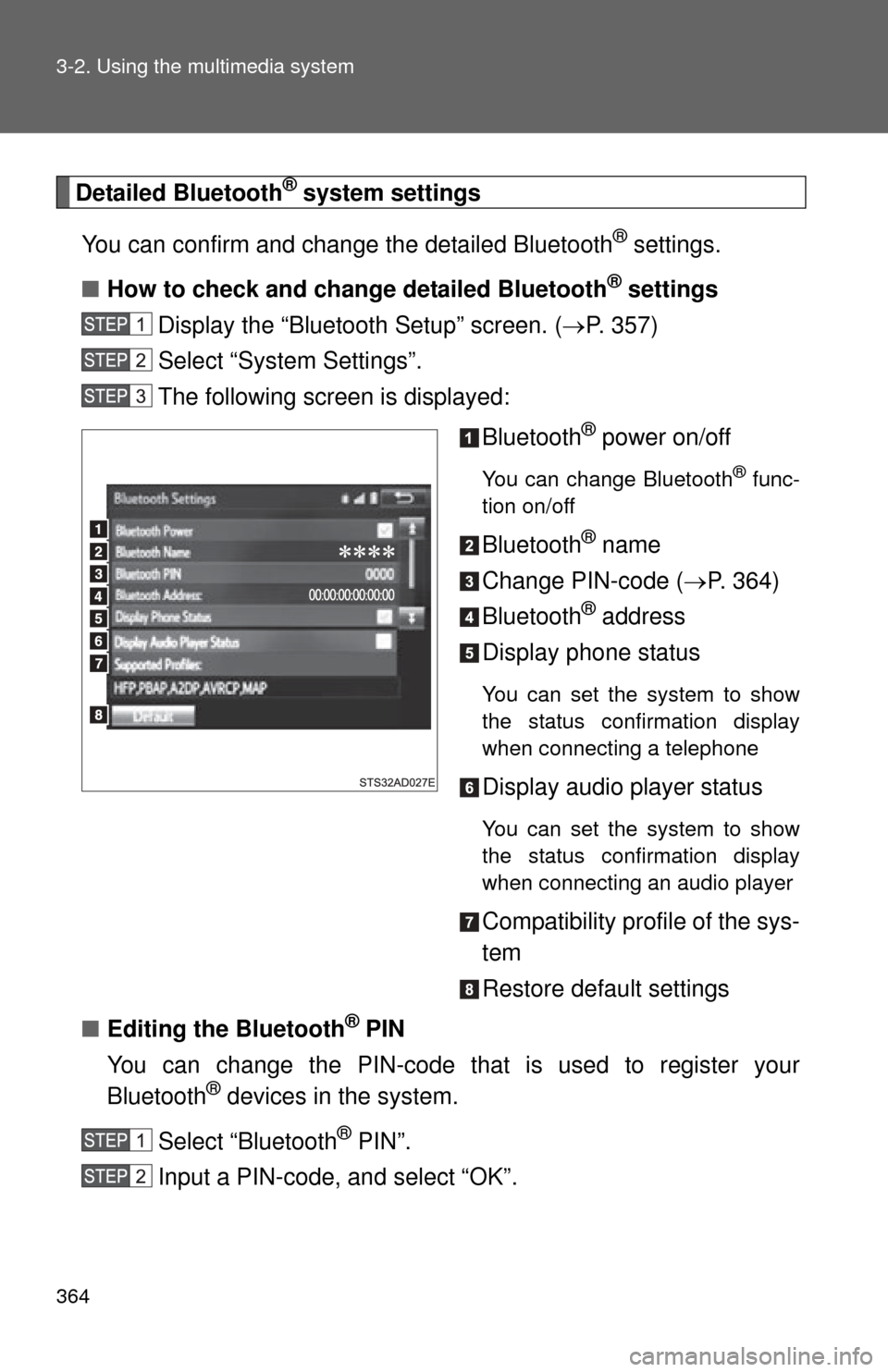
The following screen is displayed:
Bluetooth
® power on/off
You can change Bluetooth® func-
tion on/off
Bluetooth® name
Change PIN-code ( P. 364)
Bluetooth
® address
Display phone status
You can set the system to show
the status confirmation display
when connecting a telephone
Display audio player status
You can set the system to show
the status confirmation display
when connecting an audio player
Compatibility profile of the sys-
tem
Restore default settings
■ Editing the Bluetooth
® PIN
You can change the PIN-code that is used to register your
Bluetooth
® devices in the system.
Select “Bluetooth
® PIN”.
Input a PIN-code, and select “OK”.
Page 370 of 664
370 3-2. Using the multimedia system
Bluetooth®
■About Bluetooth®
■When using the Bluetooth® audio system
● In the following conditions, the system may not function.
• If the portable audio player is turned off
• If the portable audio player is not connected
• If the portable audio player’s battery is low
● There may be a delay if a cellular phone connection is made during
Bluetooth
® audio play.
● Depending on the type of portable audio player that is connected to the
system, operation may differ slightly and certain functions may not be
available.
■ When using the hands-free system
●The multimedia system is muted when making a call.
● If both parties speak at the same time, it may be difficult to hear.
● If the received call volume is overly loud, an echo may be heard.
If the Bluetooth
® phone is too close to the system, quality of the sound
may deteriorate and connection status may deteriorate.
● In the following circumstances, it may be difficult to hear the other party:
• When driving on unpaved roads
• When driving at high speeds
• If a window is open
• If the air conditioning is blowing directly on the microphone
• If there is interference from the network of the cellular phone
The Bluetooth® word mark and logos are
registered trademarks owned Bluetooth
SIG, Inc. and any use of such marks by
Panasonic Corporation is under license.
Other trademarks and trade names are
those of their respective owners.
Page 371 of 664
371
3-2. Using the multimedia system
3
Interior features
■
Conditions under which th e system will not operate
● If using a cellular phone that does not support Bluetooth
®
●If the cellular phone is turned off
● If you are outside of cellular phone service coverage
● If the cellular phone is not connected
● If the cellular phone’s battery is low
● When outgoing calls are controlled, due to heavy traffic on telephone
lines, etc.
● When the cellular phone itself cannot be used
● When transferring contact data from the cellular phone
■ Bluetooth
® antenna
The antenna is built into the display.
If the portable audio player is behind the seat or in the glove box or console
box, or is touching or covered by metal objects, the connection status may
deteriorate.
If the cellular phone is behind the seat or in the console box, or touching or
covered by metal objects, the connection status may deteriorate.
■ Battery charge/signal status
●This display may not correspond exactly with the portable audio player or
cellular phone itself.
● This system does not have a charging function.
● The portable audio player or cellular phone battery will be depleted
quickly when the device is connected to Bluetooth
®.
■ When using the Bluetooth
® audio and hands-free system at the same
time
The following problems may occur.
● The Bluetooth
® audio connection may be interrupted.
● Noise may be heard during Bluetooth
® audio playback.
Page 372 of 664

372 3-2. Using the multimedia system
■About the contact in this system
The following data is stored for every registered cellular phone. When
another phone is connecting, you cannot read the registered data.
●Contact data
● Call history
● Favorite
● Message
When removing a Bluetooth
® phone from the system, the above-mentioned
data is also deleted.
■ Compatible models
The Bluetooth
® audio system supports portable audio players with the fol-
lowing specifications
● Bluetooth
® specifications:
Ver. 2.0, or higher (Recommended: Ver. 3.0+EDR or higher)
● Profiles:
• A2DP (Advanced Audio Distribution Profile) Ver. 1.0, or higher
(Recommended: Ver. 1.2 or higher)
This is a profile to transmit stereo audio or high quality sound to the
multimedia system.
• AVRCP (Audio/Video Remote Control Profile) Ver. 1.0 or higher (Recommended: Ver. 1.4 or higher)
This is a profile to allow remote control the A/V equipment.
However, please note that some functions may be limited depending on the
type of portable audio player connected.
The hands-free system supports cellular phones with the following specifica-
tions.
• Bluetooth
® specification:
Ver. 2.0 or higher (Recommended: Ver. 3.0+EDR or higher)
Page 375 of 664
375
3-2. Using the multimedia system
3
Interior features
■
Reconnecting the portable audio player
If the portable audio player is disconnected due to poor reception when the
engine switch is in the “ACC” or “ON” position, the system automatically
reconnects the portable audio player.
If you have switched off the portable audio player yourself, follow the instruc-
tions below to reconnect:
●Select the portable audio player again
● Enter the portable audio player
■ When you sell your car
Be sure to delete your personal data. ( P. 327)
CAUTION
■FCC WARNING
Changes or modifications not expressly approved by the party responsible
for compliance could void the user’s authority to operate the equipment.
Radio frequency radiation exposure information:
This equipment complies with FCC radiation exposure limits set forth for an
uncontrolled environment.
This equipment should be installed and operated with minimum distance of
7.9 in. (20 cm) between the radiator and your body.
This transmitter must not be co-located operating in conjuction with any
other antenna or transmitter.
■ While driving
Do not use the portable audio player, cellular phone or connect a device to
the Bluetooth
® system.
Page 376 of 664
376 3-2. Using the multimedia system
CAUTION
■Caution regarding interfer ence with electronic devices
● Your audio unit is fitted with Bluetooth
® antennas. People with implantable
cardiac pacemakers, cardiac resynchronization therapy-pacemakers or
implantable cardioverter defibrillators should maintain a reasonable dis-
tance between themselves and the Bluetooth
® antennas. The radio waves
may affect the operation of such devices.
● Before using Bluetooth
® devices, users of any electrical medical device
other than implantable cardiac pacemakers, cardiac resynchronization
therapy-pacemakers or implantable cardioverter defibrillators should con-
sult the manufacturer of the device for information about its operation
under the influence of radio waves. Radio waves could have unexpected
effects on the operation of such medical devices.
NOTICE
■ When leaving the vehicle
Do not leave your portable audio player or cellular phone in the vehicle. The
inside of the vehicle may become hot, causing damage to the portable audio
player or cellular phone.