TOYOTA SEQUOIA 2016 2.G Navigation Manual
Manufacturer: TOYOTA, Model Year: 2016, Model line: SEQUOIA, Model: TOYOTA SEQUOIA 2016 2.GPages: 324, PDF Size: 5.72 MB
Page 181 of 324
181
1. REAR VIEW MONITOR SYSTEM
PERIPHERAL MONITORING SYSTEM
6
3. THINGS YOU SHOULD KNOW
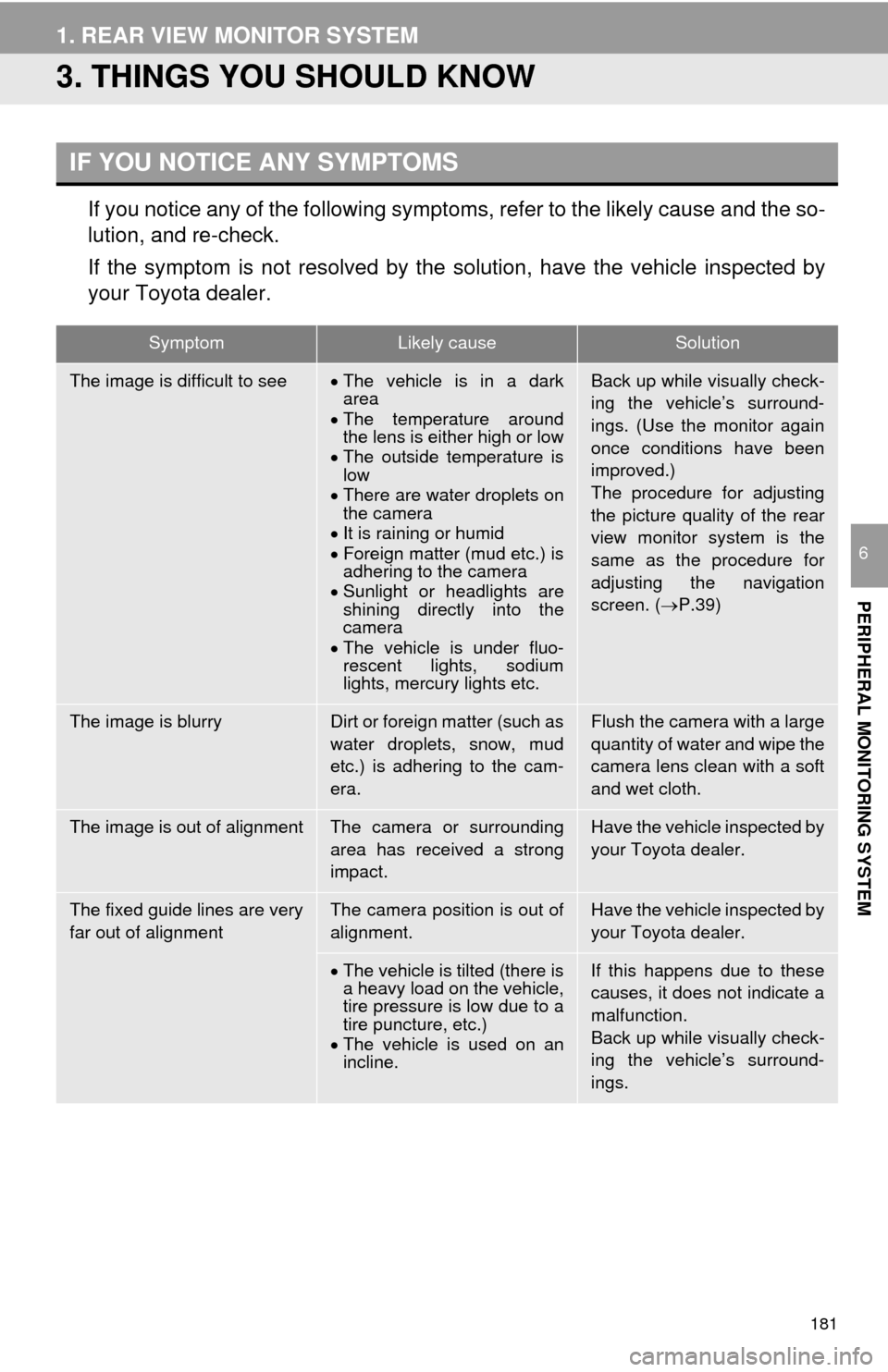
If you notice any of the following symptoms, refer to the likely cause and the so-
lution, and re-check.
If the symptom is not resolved by the solution, have the vehicle inspected by
your Toyota dealer.
IF YOU NOTICE ANY SYMPTOMS
SymptomLikely causeSolution
The image is difficult to seeThe vehicle is in a dark
area
The temperature around
the lens is either high or low
The outside temperature is
low
There are water droplets on
the camera
It is raining or humid
Foreign matter (mud etc.) is
adhering to the camera
Sunlight or headlights are
shining directly into the
camera
The vehicle is under fluo-
rescent lights, sodium
lights, mercury lights etc.Back up while visually check-
ing the vehicle’s surround-
ings. (Use the monitor again
once conditions have been
improved.)
The procedure for adjusting
the picture quality of the rear
view monitor system is the
same as the procedure for
adjusting the navigation
screen. ( P.39)
The image is blurryDirt or foreign matter (such as
water droplets, snow, mud
etc.) is adhering to the cam-
era.Flush the camera with a large
quantity of water and wipe the
camera lens clean with a soft
and wet cloth.
The image is out of alignmentThe camera or surrounding
area has received a strong
impact.Have the vehicle inspected by
your Toyota dealer.
The fixed guide lines are very
far out of alignmentThe camera position is out of
alignment.Have the vehicle inspected by
your Toyota dealer.
The vehicle is tilted (there is
a heavy load on the vehicle,
tire pressure is low due to a
tire puncture, etc.)
The vehicle is used on an
incline.If this happens due to these
causes, it does not indicate a
malfunction.
Back up while visually check-
ing the vehicle’s surround-
ings.
Page 182 of 324

182
1. REAR VIEW MONITOR SYSTEM
Page 183 of 324
7
183
1
2
3
4
5
6
7
8
9
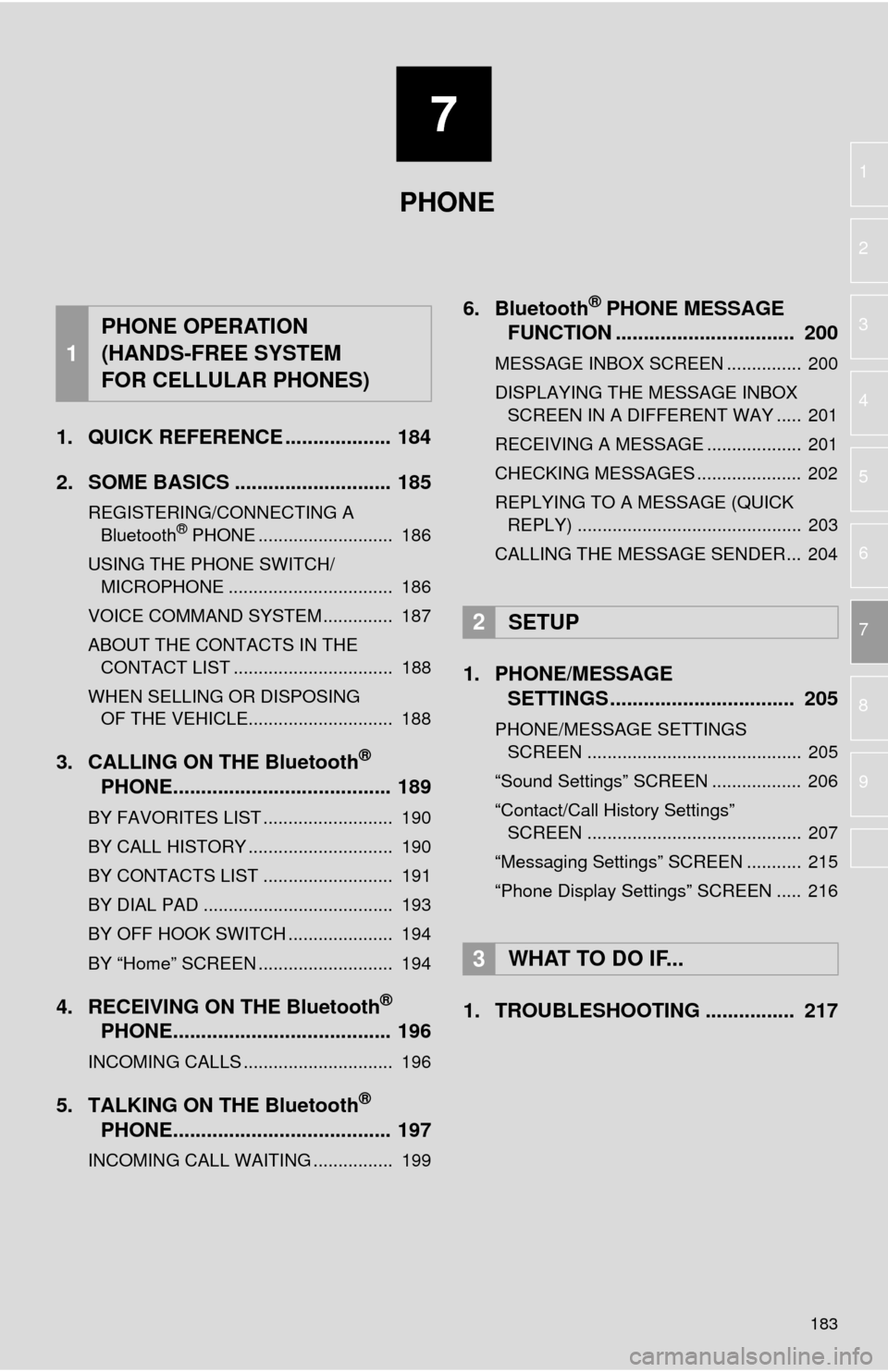
1. QUICK REFERENCE ................... 184
2. SOME BASICS ............................ 185
REGISTERING/CONNECTING A Bluetooth® PHONE ........................... 186
USING THE PHONE SWITCH/ MICROPHONE ................................. 186
VOICE COMMAND SYSTEM .............. 187
ABOUT THE CONTACTS IN THE CONTACT LIST ................................ 188
WHEN SELLING OR DISPOSING OF THE VEHICLE............................. 188
3. CALLING ON THE Bluetooth®
PHONE....................................... 189
BY FAVORITES LIST .......................... 190
BY CALL HISTORY ............................. 190
BY CONTACTS LIST .......................... 191
BY DIAL PAD ...................................... 193
BY OFF HOOK SWITCH ..................... 194
BY “Home” SCREEN ........................... 194
4. RECEIVING ON THE Bluetooth®
PHONE....................................... 196
INCOMING CALLS .............................. 196
5. TALKING ON THE Bluetooth®
PHONE....................................... 197
INCOMING CALL WAITING ................ 199
6. Bluetooth® PHONE MESSAGE
FUNCTION ...... ....................... ... 200
MESSAGE INBOX SCREEN ............... 200
DISPLAYING THE MESSAGE INBOX
SCREEN IN A DIFFERENT WAY ..... 201
RECEIVING A MESSAGE ................... 201
CHECKING MESSAGES ..................... 202
REPLYING TO A MESSAGE (QUICK REPLY) ............................................. 203
CALLING THE MESSAGE SENDER... 204
1. PHONE/MESSAGE SETTINGS ................................. 205
PHONE/MESSAGE SETTINGS
SCREEN ........................................... 205
“Sound Settings” SCREEN .................. 206
“Contact/Call History Settings” SCREEN ........................................... 207
“Messaging Settings” SCREEN ........... 215
“Phone Display Settings” SCREEN ..... 216
1. TROUBLESHOOTING ................ 217
1
PHONE OPERATION
(HANDS-FREE SYSTEM
FOR CELLULAR PHONES)
2SETUP
3WHAT TO DO IF...
PHONE
Page 184 of 324
184
1. PHONE OPERATION (HANDS-FREE SYSTEM FOR CELLULAR PHONES)
1. QUICK REFERENCE
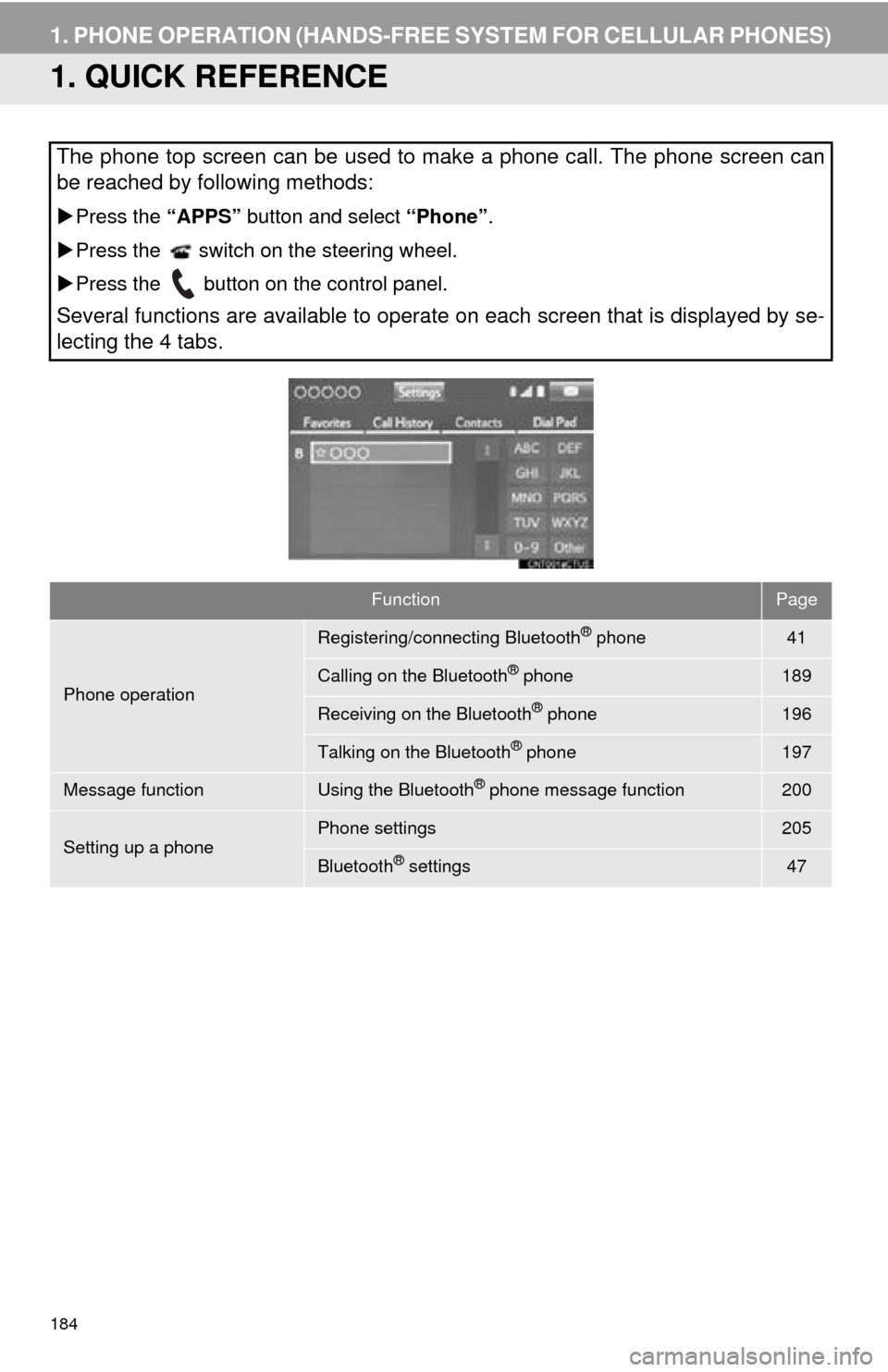
The phone top screen can be used to make a phone call. The phone screen can
be reached by following methods:
Press the “APPS” button and select “Phone”.
Press the switch on the steering wheel.
Press the button on the control panel.
Several functions are available to operate on each screen that is displayed by se-
lecting the 4 tabs.
FunctionPage
Phone operation
Registering/connecting Bluetooth® phone41
Calling on the Bluetooth® phone189
Receiving on the Bluetooth® phone196
Talking on the Bluetooth® phone197
Message functionUsing the Bluetooth® phone message function200
Setting up a phonePhone settings205
Bluetooth® settings47
Page 185 of 324
185
1. PHONE OPERATION (HANDS-FREE SYSTEM FOR CELLULAR PHONES)
PHONE
7
2. SOME BASICS
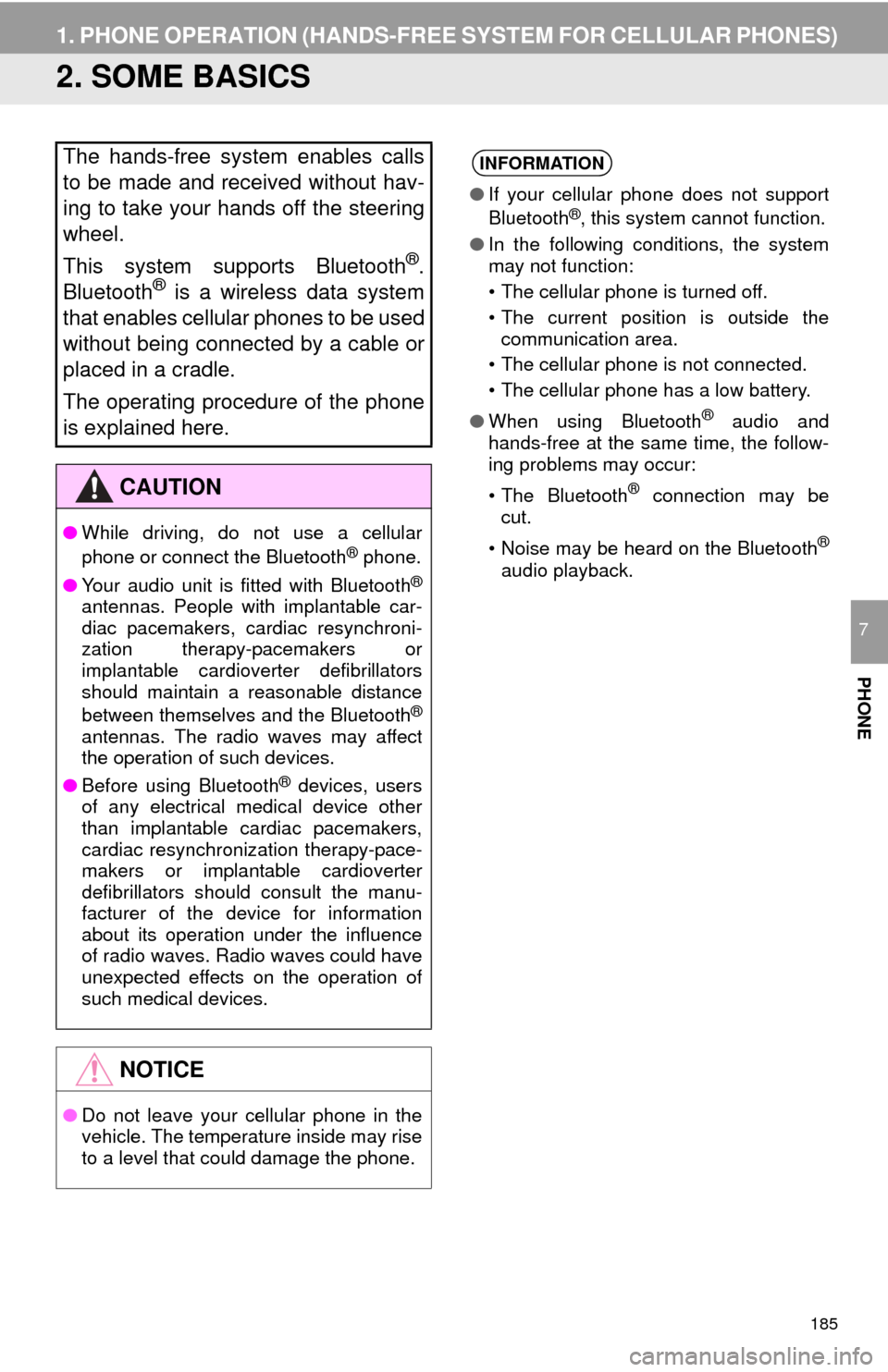
The hands-free system enables calls
to be made and received without hav-
ing to take your hands off the steering
wheel.
This system supports Bluetooth
®.
Bluetooth® is a wireless data system
that enables cellular phones to be used
without being connected by a cable or
placed in a cradle.
The operating procedure of the phone
is explained here.
CAUTION
● While driving, do not use a cellular
phone or connect the Bluetooth® phone.
● Your audio unit is fitted with Bluetooth
®
antennas. People with implantable car-
diac pacemakers, cardiac resynchroni-
zation therapy-pacemakers or
implantable cardioverter defibrillators
should maintain a reasonable distance
between themselves and the Bluetooth
®
antennas. The radio waves may affect
the operation of such devices.
● Before using Bluetooth
® devices, users
of any electrical medical device other
than implantable cardiac pacemakers,
cardiac resynchronization therapy-pace-
makers or implantable cardioverter
defibrillators should consult the manu-
facturer of the device for information
about its operation under the influence
of radio waves. Radio waves could have
unexpected effects on the operation of
such medical devices.
NOTICE
● Do not leave your cellular phone in the
vehicle. The temperature inside may rise
to a level that could damage the phone.
INFORMATION
●If your cellular phone does not support
Bluetooth®, this system cannot function.
● In the following conditions, the system
may not function:
• The cellular phone is turned off.
• The current position is outside the
communication area.
• The cellular phone is not connected.
• The cellular phone has a low battery.
● When using Bluetooth
® audio and
hands-free at the same time, the follow-
ing problems may occur:
• The Bluetooth
® connection may be
cut.
• Noise may be heard on the Bluetooth
®
audio playback.
Page 186 of 324
186
1. PHONE OPERATION (HANDS-FREE SYSTEM FOR CELLULAR PHONES)
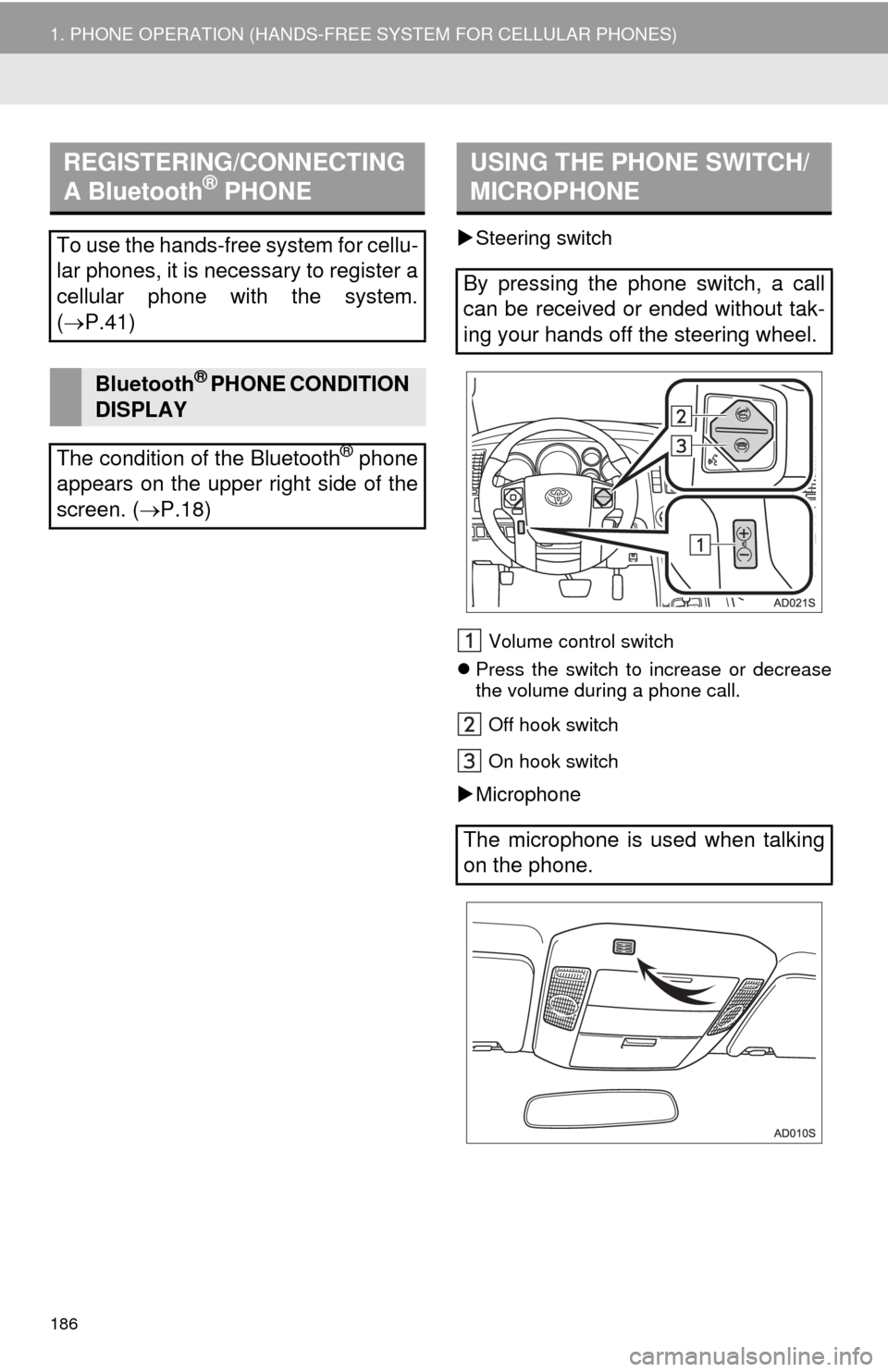
Steering switch
Volume control switch
Press the switch to increase or decrease
the volume during a phone call.
Off hook switch
On hook switch
Microphone
REGISTERING/CONNECTING
A Bluetooth® PHONE
To use the hands-free system for cellu-
lar phones, it is necessary to register a
cellular phone with the system.
( P.41)
Bluetooth® PHONE CONDITION
DISPLAY
The condition of the Bluetooth
® phone
appears on the upper right side of the
screen. ( P.18)
USING THE PHONE SWITCH/
MICROPHONE
By pressing the phone switch, a call
can be received or ended without tak-
ing your hands off the steering wheel.
The microphone is used when talking
on the phone.
Page 187 of 324
187
1. PHONE OPERATION (HANDS-FREE SYSTEM FOR CELLULAR PHONES)
PHONE
7
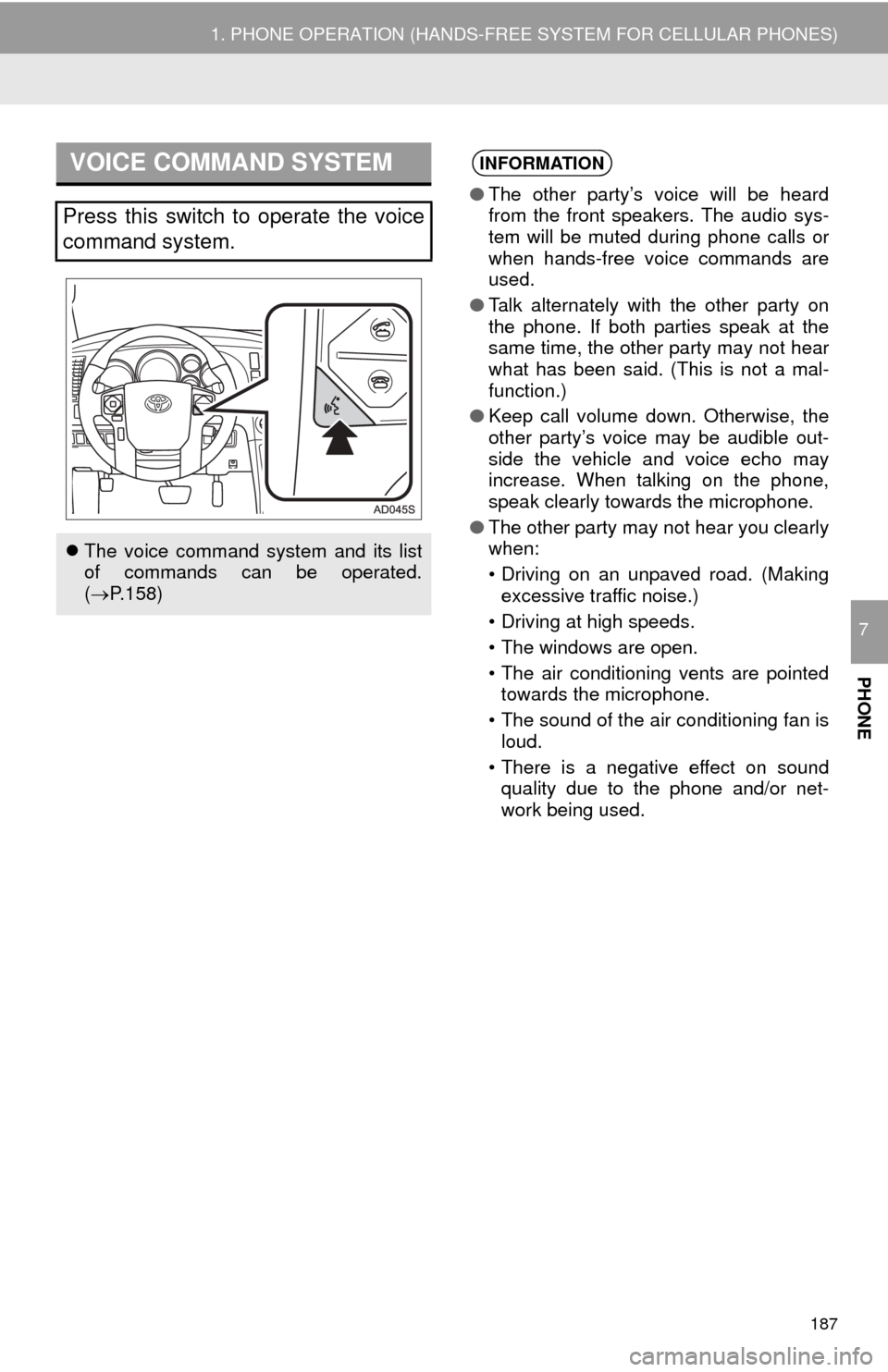
VOICE COMMAND SYSTEM
Press this switch to operate the voice
command system.
The voice command system and its list
of commands can be operated.
( P.158)
INFORMATION
● The other party’s voice will be heard
from the front speakers. The audio sys-
tem will be muted during phone calls or
when hands-free voice commands are
used.
● Talk alternately with the other party on
the phone. If both parties speak at the
same time, the other party may not hear
what has been said. (This is not a mal-
function.)
● Keep call volume down. Otherwise, the
other party’s voice may be audible out-
side the vehicle and voice echo may
increase. When talking on the phone,
speak clearly towards the microphone.
● The other party may not hear you clearly
when:
• Driving on an unpaved road. (Making
excessive traffic noise.)
• Driving at high speeds.
• The windows are open.
• The air conditioning vents are pointed towards the microphone.
• The sound of the air conditioning fan is loud.
• There is a negative effect on sound quality due to the phone and/or net-
work being used.
Page 188 of 324
188
1. PHONE OPERATION (HANDS-FREE SYSTEM FOR CELLULAR PHONES)
The following data is stored for every reg-
istered phone. When another phone is
connected, the following registered data of
the previously connected phone cannot be
read:
• Contact data
• Call history data
• Favorites data
• Image data
• All phone settings
• Message settings
The following data in the system can be
initialized:
• Contact data
• Call history data
• Favorites data
• Image data
• All phone settings
• Message settings
ABOUT THE CONTACTS IN
THE CONTACT LIST
INFORMATION
● When a phone’s registration is deleted,
the above-mentioned data is also
deleted.
WHEN SELLING OR
DISPOSING OF THE VEHICLE
A lot of personal data is registered
when the hands-free system is used.
When selling or disposing of the vehi-
cle, initialize the data.
(P. 5 8)
INFORMATION
●Once initialized, the data and settings
will be erased. Pay careful attention
when initializing the data.
Page 189 of 324
189
1. PHONE OPERATION (HANDS-FREE SYSTEM FOR CELLULAR PHONES)
PHONE
7
3. CALLING ON THE Bluetooth® PHONE
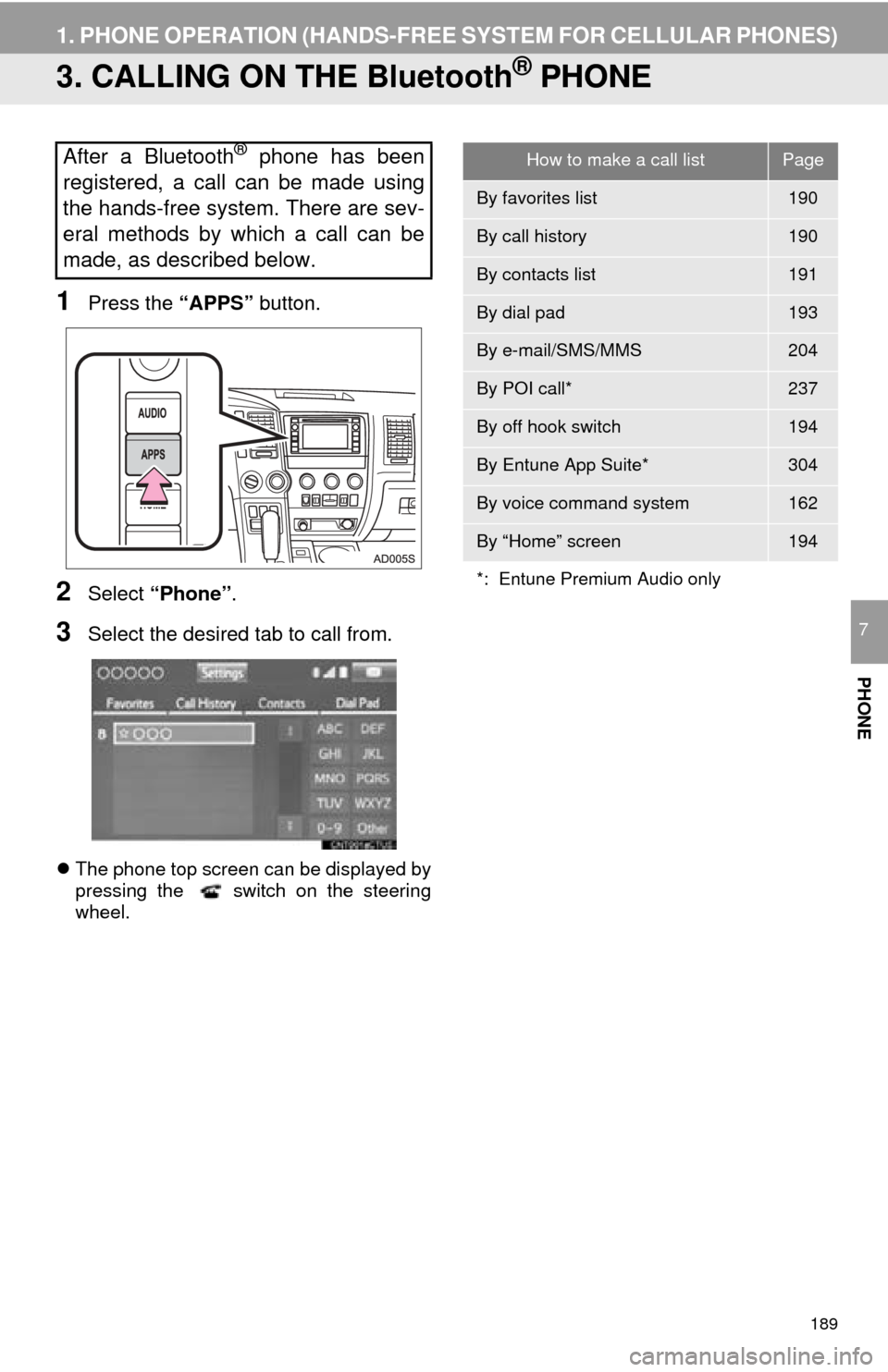
1Press the “APPS” button.
2Select “Phone” .
3Select the desired tab to call from.
The phone top screen can be displayed by
pressing the switch on the steering
wheel.
After a Bluetooth® phone has been
registered, a call can be made using
the hands-free system. There are sev-
eral methods by which a call can be
made, as described below.How to make a call listPage
By favorites list190
By call history190
By contacts list191
By dial pad193
By e-mail/SMS/MMS204
By POI call*237
By off hook switch194
By Entune App Suite*304
By voice command system162
By “Home” screen194
*: Entune Premium Audio only
Page 190 of 324
190
1. PHONE OPERATION (HANDS-FREE SYSTEM FOR CELLULAR PHONES)
1Display the phone top screen.
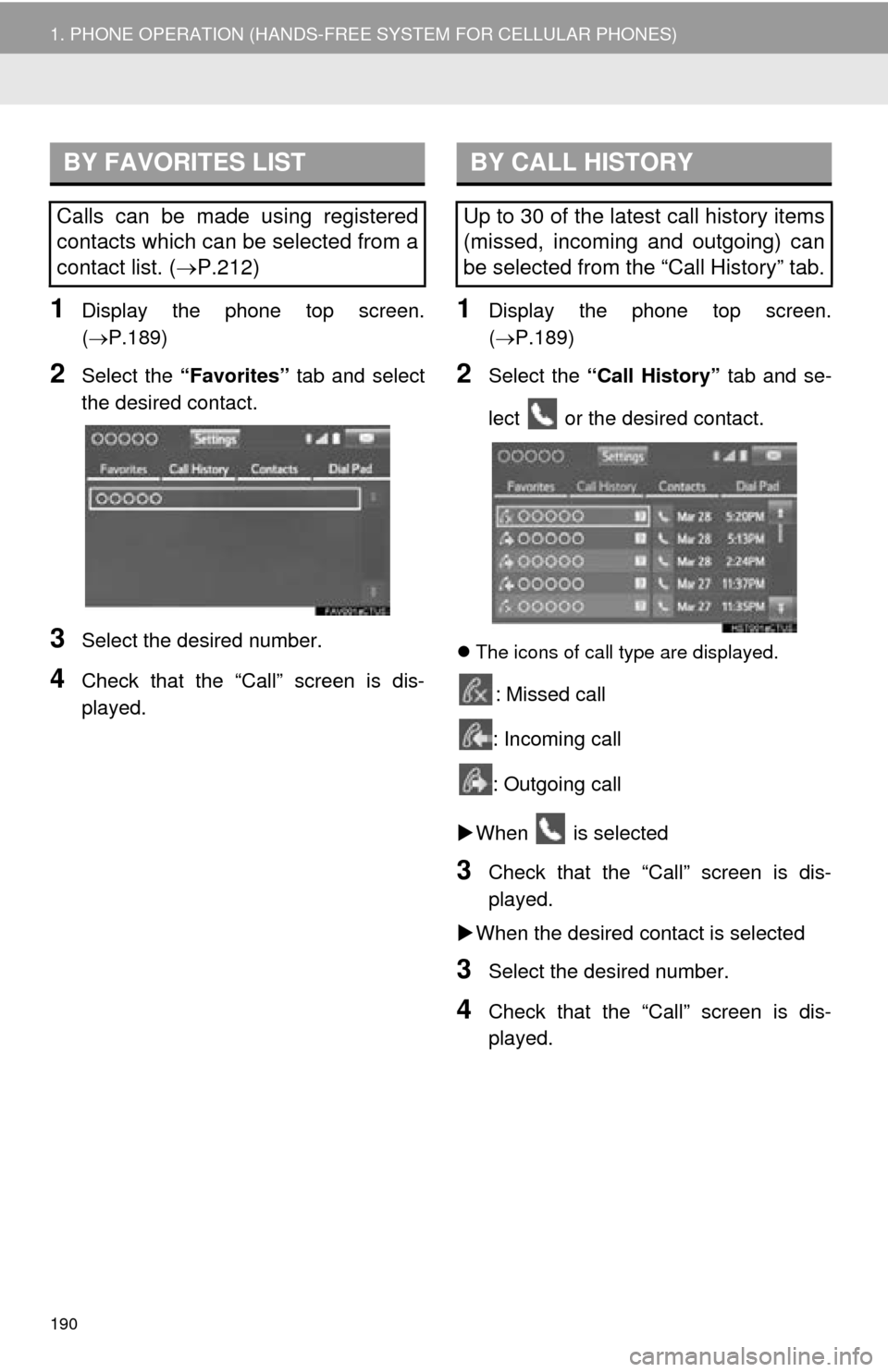
(P.189)
2Select the “Favorites” tab and select
the desired contact.
3Select the desired number.
4Check that the “Call” screen is dis-
played.
1Display the phone top screen.
( P.189)
2Select the “Call History” tab and se-
lect or the desired contact.
The icons of call type are displayed.
: Missed call
: Incoming call
: Outgoing call
When is selected
3Check that the “Call” screen is dis-
played.
When the desired contact is selected
3Select the desired number.
4Check that the “Call” screen is dis-
played.
BY FAVORITES LIST
Calls can be made using registered
contacts which can be selected from a
contact list. ( P.212)
BY CALL HISTORY
Up to 30 of the latest call history items
(missed, incoming and outgoing) can
be selected from the “Call History” tab.