lock TOYOTA SEQUOIA 2017 2.G Repair Manual
[x] Cancel search | Manufacturer: TOYOTA, Model Year: 2017, Model line: SEQUOIA, Model: TOYOTA SEQUOIA 2017 2.GPages: 576, PDF Size: 12.76 MB
Page 143 of 576
143
1-7. Safety information
1
Before driving
■
Laws and regulations pertaining to anchorages
The LATCH system conforms to FMVSS225 or CMVSS210.2.
Child restraint systems conforming to FMVSS213 or CMVSS213 specifica-
tions can be used.
This vehicle is designed to conform to the SAE J1819.
CAUTION
■When installing a booster seat
Do not fully extend the shoulder belt to prevent the belt from going to ALR
lock mode. ( →P. 74)
ALR mode causes the belt to tighten only which could cause injury or dis-
comfort to the child.
■ When installing a child restraint system
Follow the directions given in the child restraint system installation manual
and fix the child restraint system securely in place.
If the child restraint system is not correctly fixed in place, the child or other
passengers may be seriously injured or even killed in the event of sudden
braking, sudden swerving or an accident.
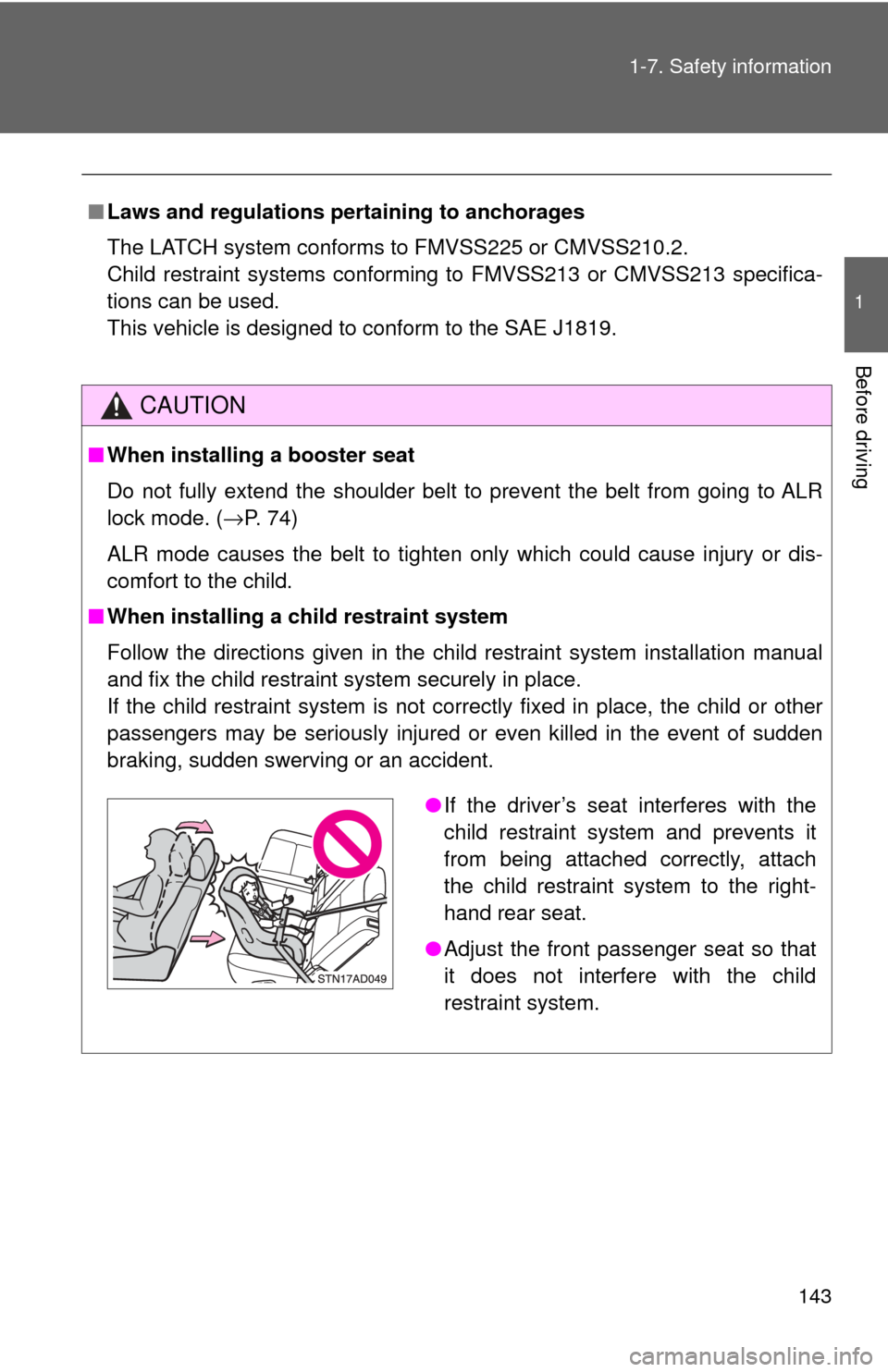
●If the driver’s seat interferes with the
child restraint system and prevents it
from being attached correctly, attach
the child restraint system to the right-
hand rear seat.
● Adjust the front passenger seat so that
it does not interfere with the child
restraint system.
Page 144 of 576
144 1-7. Safety information
CAUTION
■When installing a ch ild restraint system
● When installing a child restraint system in the center third seat, adjust both
seatbacks at the same angle. The seatbacks must be adjusted to the
same angle. Otherwise, the child restraint system cannot be securely
restrained and this may cause death or serious injuries in the event of sud-
den braking, sudden swerving or an accident.
● When a booster seat is installed, always ensure that the shoulder belt is
positioned across the center of the child’s shoulder. The belt should be
kept away from the child’s neck, but not so that it could fall off the child’s
shoulder. Failing to do so may result in death or serious injury in the event
of sudden braking, sudden swerving or an accident.
● Ensure that the belt and tab are securely locked and the seat belt is not
twisted.
● Push and pull the child restraint system from side to side and forward to be
sure it is secure.
● After securing a child restraint system, never adjust the seat.
● Follow all installation instructions provided by the child restraint system
manufacturer.
● When securing some types of child restraint systems in second or third
row seats, it may not be possible to properly use the seat belts in positions
next to the child restraint without interfering with it or affecting seat belt
effectiveness. Be sure your seat belt fits snugly across your shoulder and
low on your hips. If it does not, or if it interferes with the child restraint,
move to a different position. Failure to do so may result in death or serious
injury.
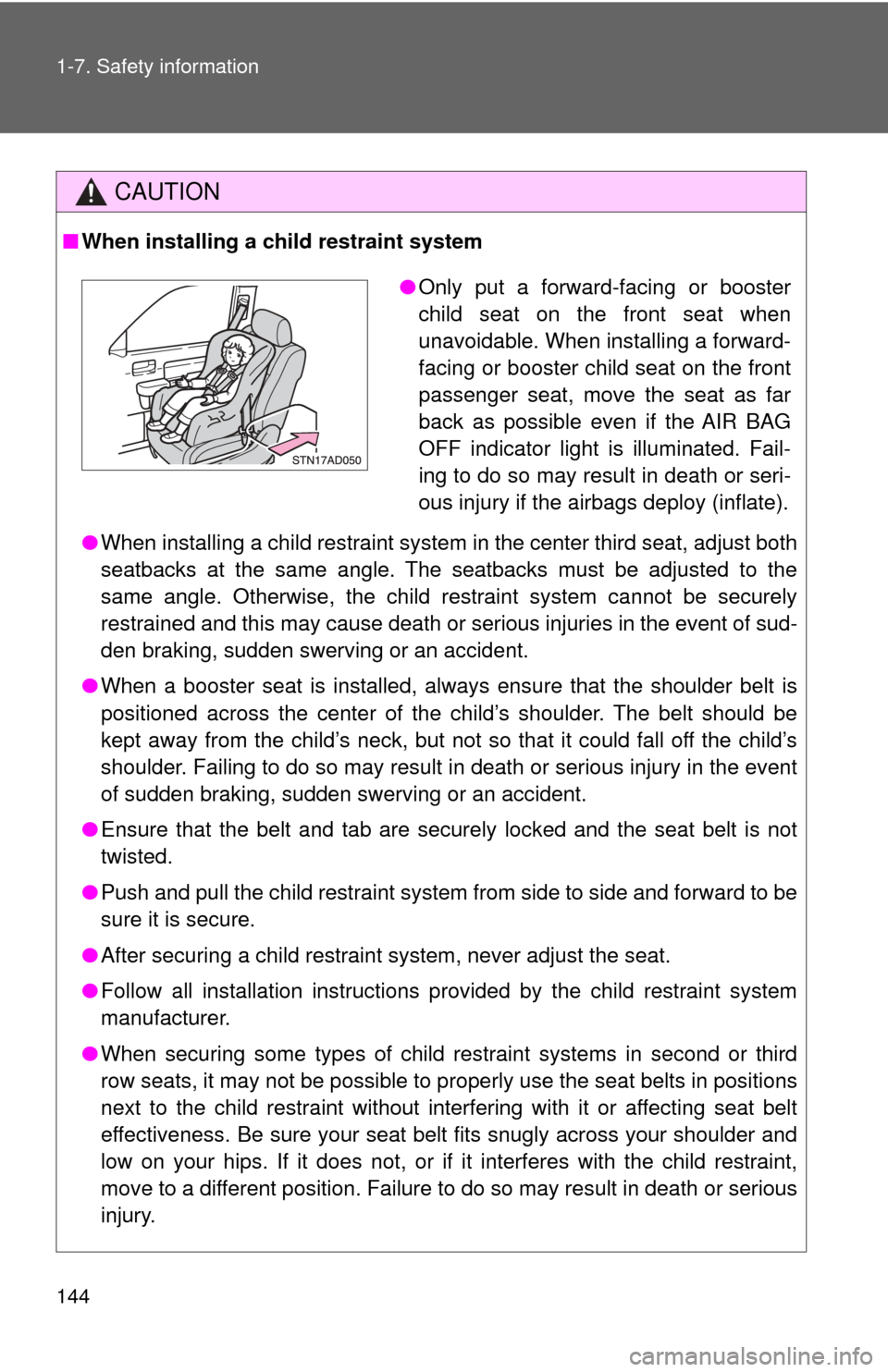
●Only put a forward-facing or booster
child seat on the front seat when
unavoidable. When installing a forward-
facing or booster child seat on the front
passenger seat, move the seat as far
back as possible even if the AIR BAG
OFF indicator light is illuminated. Fail-
ing to do so may result in death or seri-
ous injury if the airbags deploy (inflate).
Page 148 of 576
148
2-1. Driving procedures
Driving the vehicle
Starting on a steep uphillWith the brake pedal depressed, firmly set the parking brake
and shift the shift lever to D.
Gently depress the accelerator pedal.
Release the parking brake.
The following procedures should be observed to ensure safe driv-
ing.
■ Starting the engine ( →P. 158)
■ Driving
With the brake pedal depressed, shift the shift lever to D. (→ P. 161)
Release the parking brake. ( →P. 166)
Gradually release the brake pedal and gently depress the
accelerator pedal to accelerate the vehicle.
■ Stopping
With the shift lever in D, depress the brake pedal.
If necessary, set the parking brake.
When the vehicle is stopped for an extended period of time, shift
the shift lever to P or N. ( →P. 161)
■Parking the vehicle
With the shift lever in D, depress the brake pedal.
Set the parking brake. ( →P. 166)
Shift the shift lever to P. ( →P. 161)
When parking on a hill, if necessary, block the wheels.
Turn the engine switch off to stop the engine.
Lock the door, making sure that you have the key on your
person.
Page 153 of 576

153
2-1. Driving procedures
2
When driving
CAUTION
■
When the vehicle is stopped
●Do not race the engine.
If the vehicle is in any gear other than P or N, the vehicle may accelerate
suddenly and unexpectedly, and may cause an accident.
● Do not leave the vehicle with the engine running for a long time.
If such a situation cannot be avoided, park the vehicle in an open space
and check that exhaust fumes do not enter the vehicle interior.
● In order to prevent accidents due to the vehicle rolling away, always keep
depressing the brake pedal while the engine is running, and apply the
parking brake as necessary.
● If the vehicle is stopped on an incline, in order to prevent accidents caused
by the vehicle rolling forward or ba ckward, always depress the brake pedal
and securely apply the parking brake as needed.
● Avoid revving or racing the engine.
Running the engine at high speed while the vehicle is stopped may cause
the exhaust system to overheat, which could result in a fire if combustible
material is nearby.
■ When the vehicle is parked
●Do not leave glasses, cigarette lighters, spray cans, or soft drink cans in
the vehicle when it is in the sun.
Doing so may result in the following.
• Gas may leak from a cigarette lighter or spray can, and may lead to a
fire.
• The temperature inside the vehicle may cause the plastic lenses and plastic material of eye glasses to deform or crack.
• Soft drink cans may rupture, causing the contents to spray over the interior of the vehicle, and may also cause a short circuit in the vehi-
cle’s electrical components.
● Always apply the parking brake, shift the shift lever to P, stop the engine
and lock the vehicle.
Do not leave the vehicle unattended while the engine is running.
Page 158 of 576
158
2-1. Driving procedures
Engine (ignition) switch
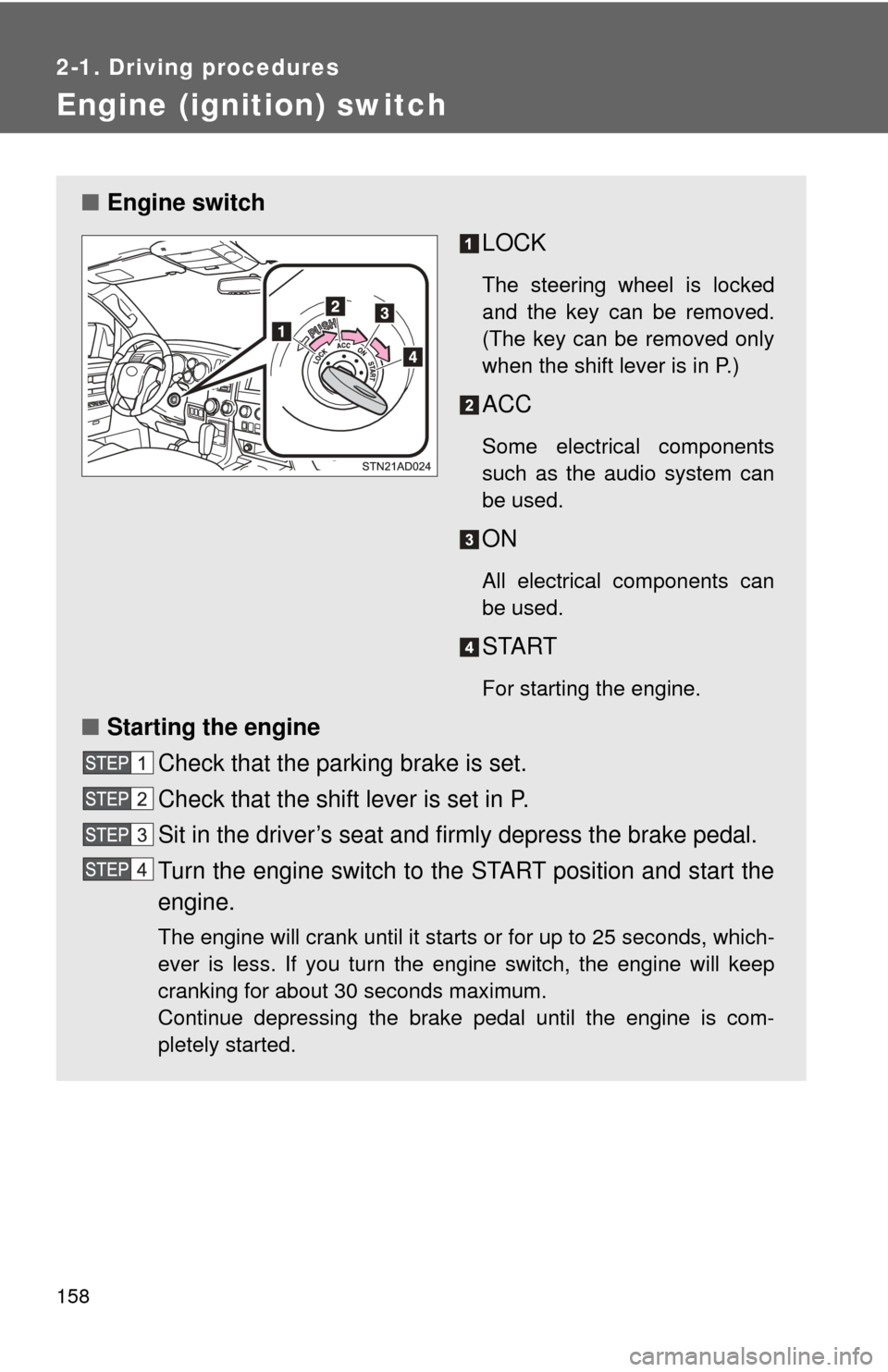
■Engine switch
LOCK
The steering wheel is locked
and the key can be removed.
(The key can be removed only
when the shift lever is in P.)
ACC
Some electrical components
such as the audio system can
be used.
ON
All electrical components can
be used.
START
For starting the engine.
■Starting the engine
Check that the parking brake is set.
Check that the shift lever is set in P.
Sit in the driver’s seat and firmly depress the brake pedal.
Turn the engine switch to the START position and start the
engine.
The engine will crank until it starts or for up to 25 seconds, which-
ever is less. If you turn the engine switch, the engine will keep
cranking for about 30 seconds maximum.
Continue depressing the brake pedal until the engine is com-
pletely started.
Page 159 of 576
159
2-1. Driving procedures
2
When driving
■
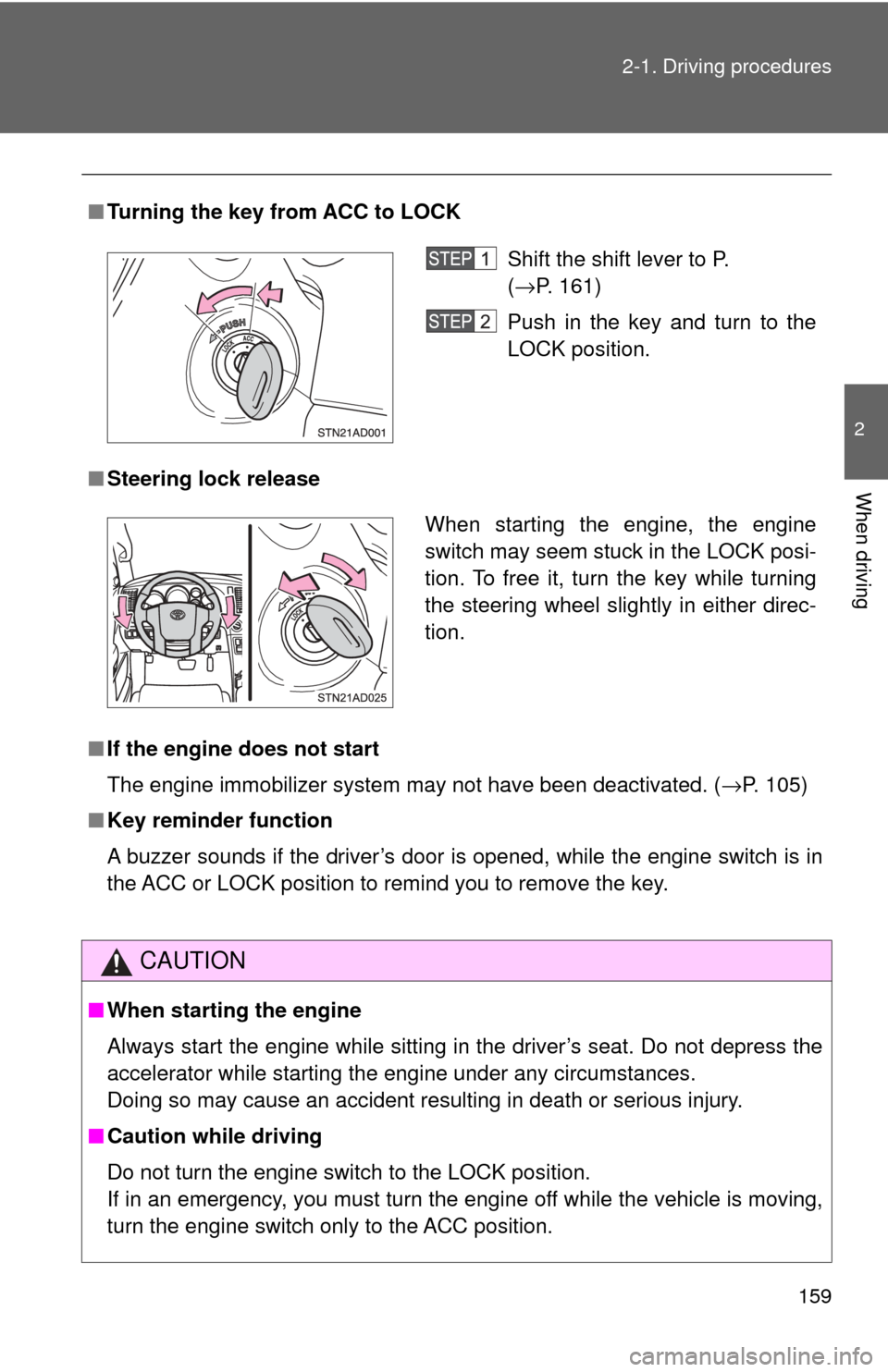
Turning the key from ACC to LOCK
■ Steering lock release
■ If the engine does not start
The engine immobilizer system may not have been deactivated. ( →P. 105)
■ Key reminder function
A buzzer sounds if the driver’s door is opened, while the engine switch is in
the ACC or LOCK position to remind you to remove the key.
CAUTION
■When starting the engine
Always start the engine while sitting in the driver’s seat. Do not depress the
accelerator while starting the engine under any circumstances.
Doing so may cause an accident resulting in death or serious injury.
■ Caution while driving
Do not turn the engine switch to the LOCK position.
If in an emergency, you must turn the engine off while the vehicle is moving,
turn the engine switch only to the ACC position.
Shift the shift lever to P.
(→P. 161)
Push in the key and turn to the
LOCK position.
When starting the engine, the engine
switch may seem stuck in the LOCK posi-
tion. To free it, turn the key while turning
the steering wheel slightly in either direc-
tion.
Page 164 of 576

164 2-1. Driving procedures
■Downshifting restrictions warning buzzer (in the S mode)
To help ensure safety and driving per formance, downshifting operation may
sometimes be restricted. In some circumstances, downshifting may not be
possible even when the shift lever is operated. (The warning buzzer will
sound twice.)
■ Transmission protection function
If the tires spin continually when the vehicle becomes stuck in mud, dirt or
snow, the automatic transmission temperature may become too high and
cause damage.
To avoid the damaging the automatic transmission, the system may tempo-
rarily lock the gear in 1st.
If the automatic transmission temperature falls, the gear locking is canceled
and returns the automatic transmission to the normal operation.
Page 167 of 576
167
2-1. Driving procedures
2
When driving
Horn
■After adjusting the steering wheel (veh icles with manual tilt and tele-
scopic steering)
Make sure that the steering wheel is securely locked.
The horn may not sound if the steering wheel is not securely locked.
( →P. 79)
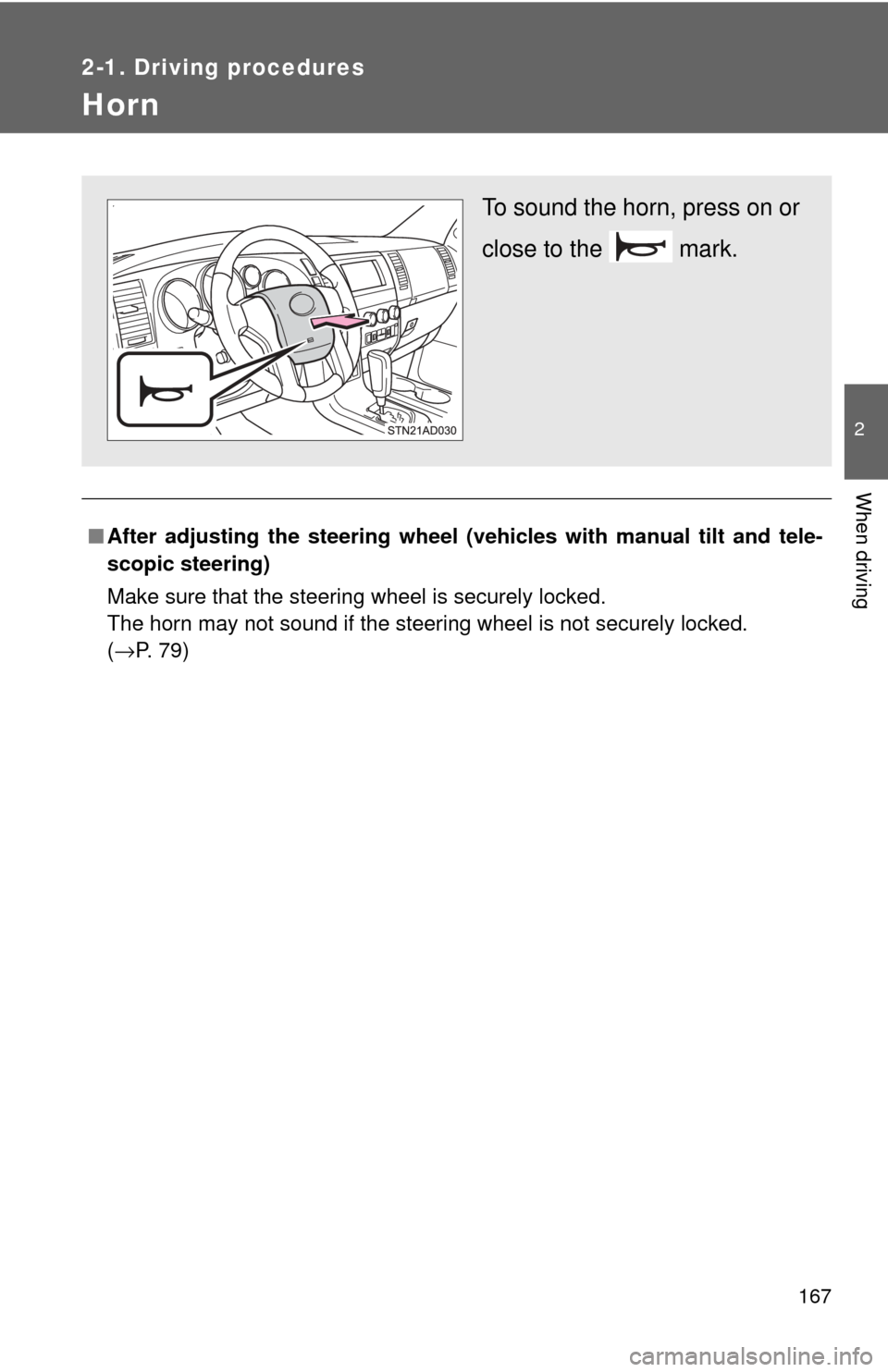
To sound the horn, press on or
close to the mark.
Page 175 of 576
175
2-2. Instrument cluster
2
When driving
■
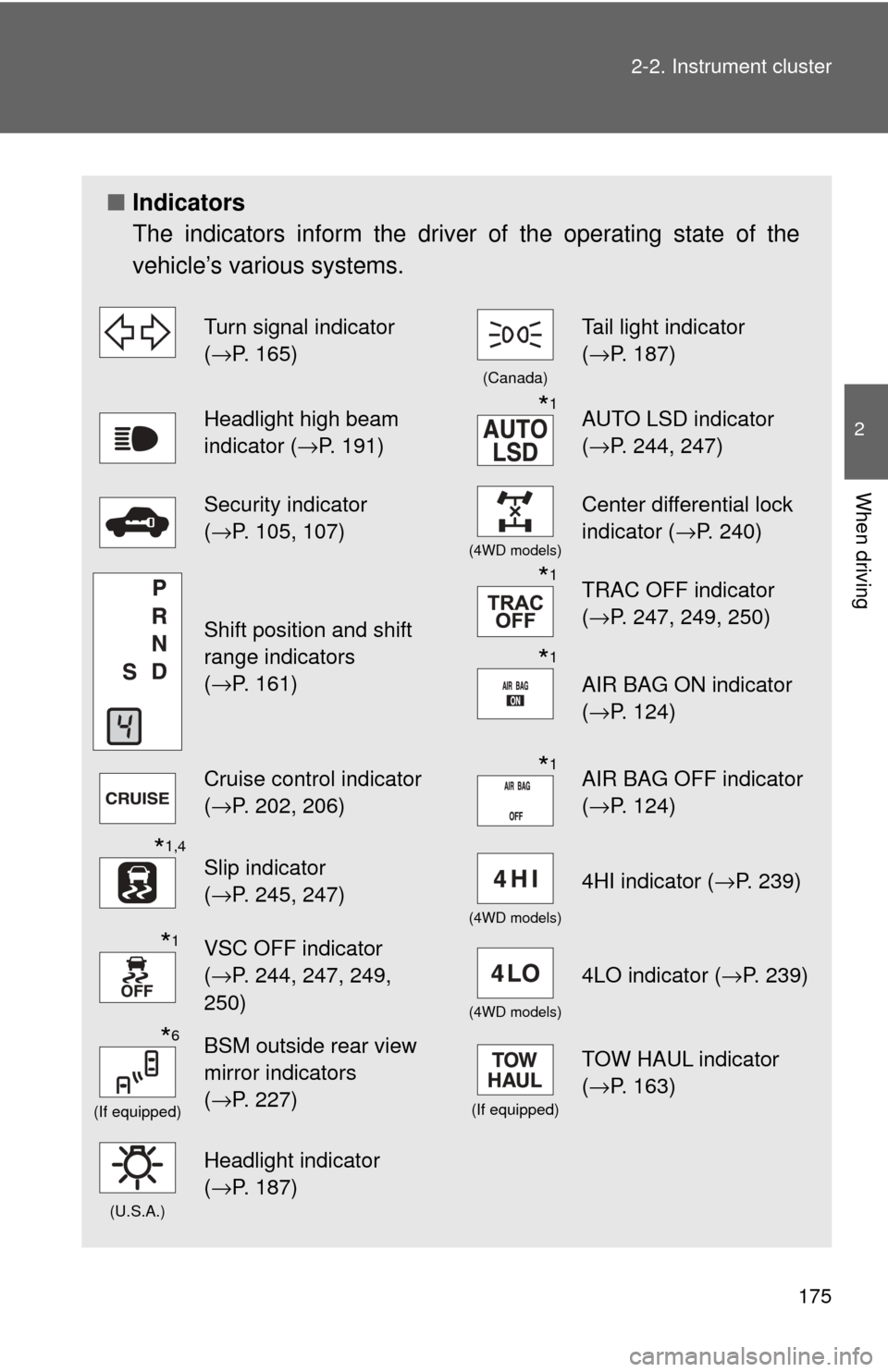
Indicators
The indicators inform the driver of the operating state of the
vehicle’s various systems.
Turn signal indicator
( →P. 165)
(Canada)
Tail light indicator
( →P. 187)
Headlight high beam
indicator ( →P. 191)*1AUTO LSD indicator
(→P. 244, 247)
Security indicator
(→P. 105, 107)
(4WD models)
Center differential lock
indicator ( →P. 240)
Shift position and shift
range indicators
(→P. 161)
*1TRAC OFF indicator
( →P. 247, 249, 250)
*1
AIR BAG ON indicator
(→P. 124)
Cruise control indicator
(→P. 202, 206)*1AIR BAG OFF indicator
( →P. 124)
*1,4
Slip indicator
(→P. 245, 247)
(4WD models)
4HI indicator ( →P. 239)
*1VSC OFF indicator
(→P. 244, 247, 249,
250)
(4WD models)
4LO indicator ( →P. 239)
*6
(If equipped)
BSM outside rear view
mirror indicators
(→P. 227)
(If equipped)
TOW HAUL indicator
( →P. 163)
(U.S.A.)
Headlight indicator
(→P. 187)
Page 181 of 576
181
2-2. Instrument cluster
2
When driving
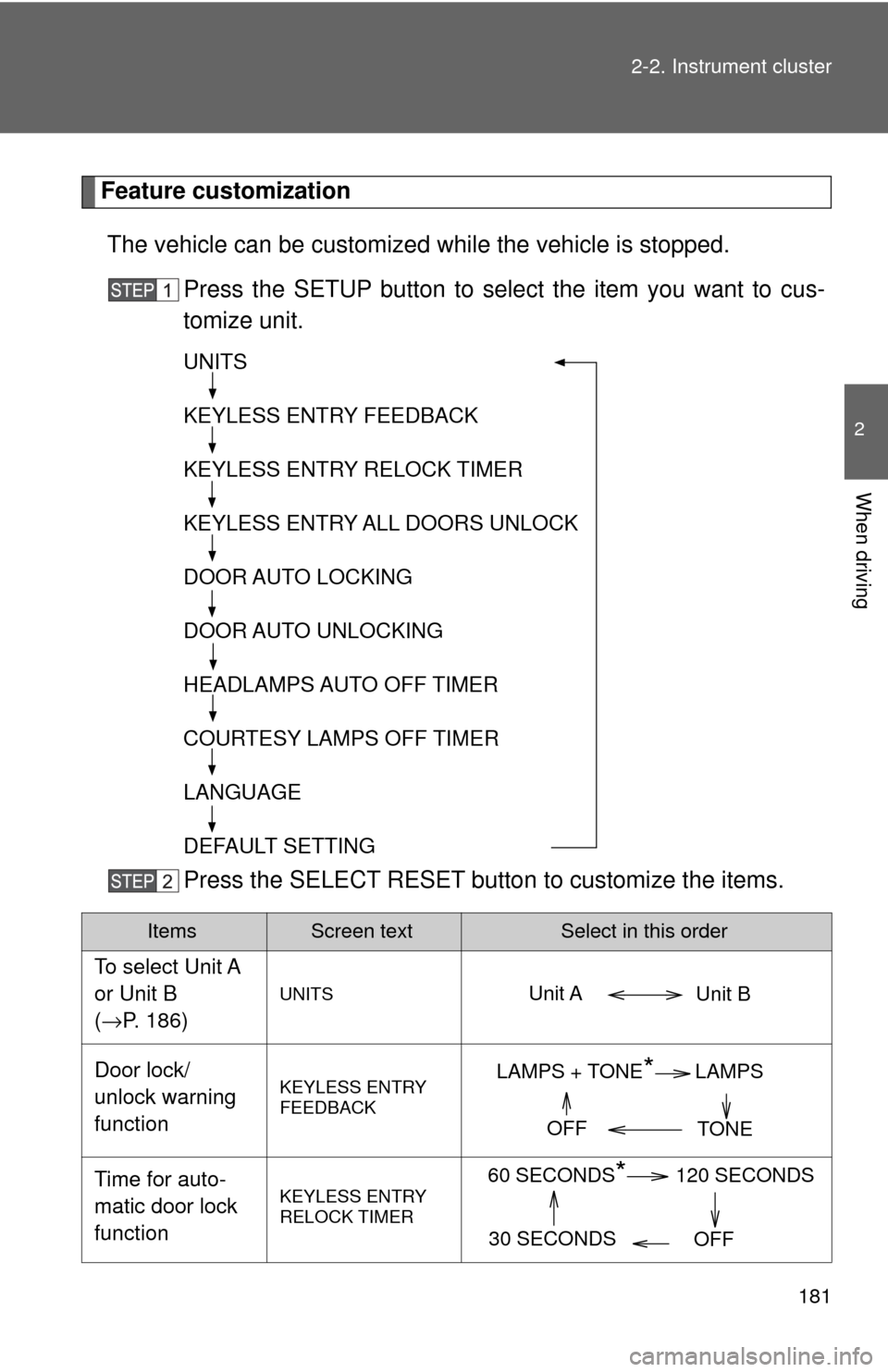
Feature customization
The vehicle can be customized while the vehicle is stopped.
Press the SETUP button to select the item you want to cus-
tomize unit.
Press the SELECT RESET butto n to customize the items.
ItemsScreen textSelect in this order
To select Unit A
or Unit B
(→P. 186)
UNITS
Door lock/
unlock warning
functionKEYLESS ENTRY
FEEDBACK
Time for auto-
matic door lock
functionKEYLESS ENTRY
RELOCK TIMER
UNITS
KEYLESS ENTRY FEEDBACK
KEYLESS ENTRY RELOCK TIMER
KEYLESS ENTRY ALL DOORS UNLOCK
DOOR AUTO LOCKING
DOOR AUTO UNLOCKING
HEADLAMPS AUTO OFF TIMER
COURTESY LAMPS OFF TIMER
LANGUAGE
DEFAULT SETTING
Unit B
Unit A
LAMPS + TONE*LAMPS
TONE
OFF
60 SECONDS*120 SECONDS
30 SECONDS OFF