warning lights TOYOTA SEQUOIA 2020 (in English) User Guide
[x] Cancel search | Manufacturer: TOYOTA, Model Year: 2020, Model line: SEQUOIA, Model: TOYOTA SEQUOIA 2020Pages: 588, PDF Size: 12.33 MB
Page 88 of 588
882. Instrument cluster
SEQUOIA_OM_USA_OM0C021U_20MY
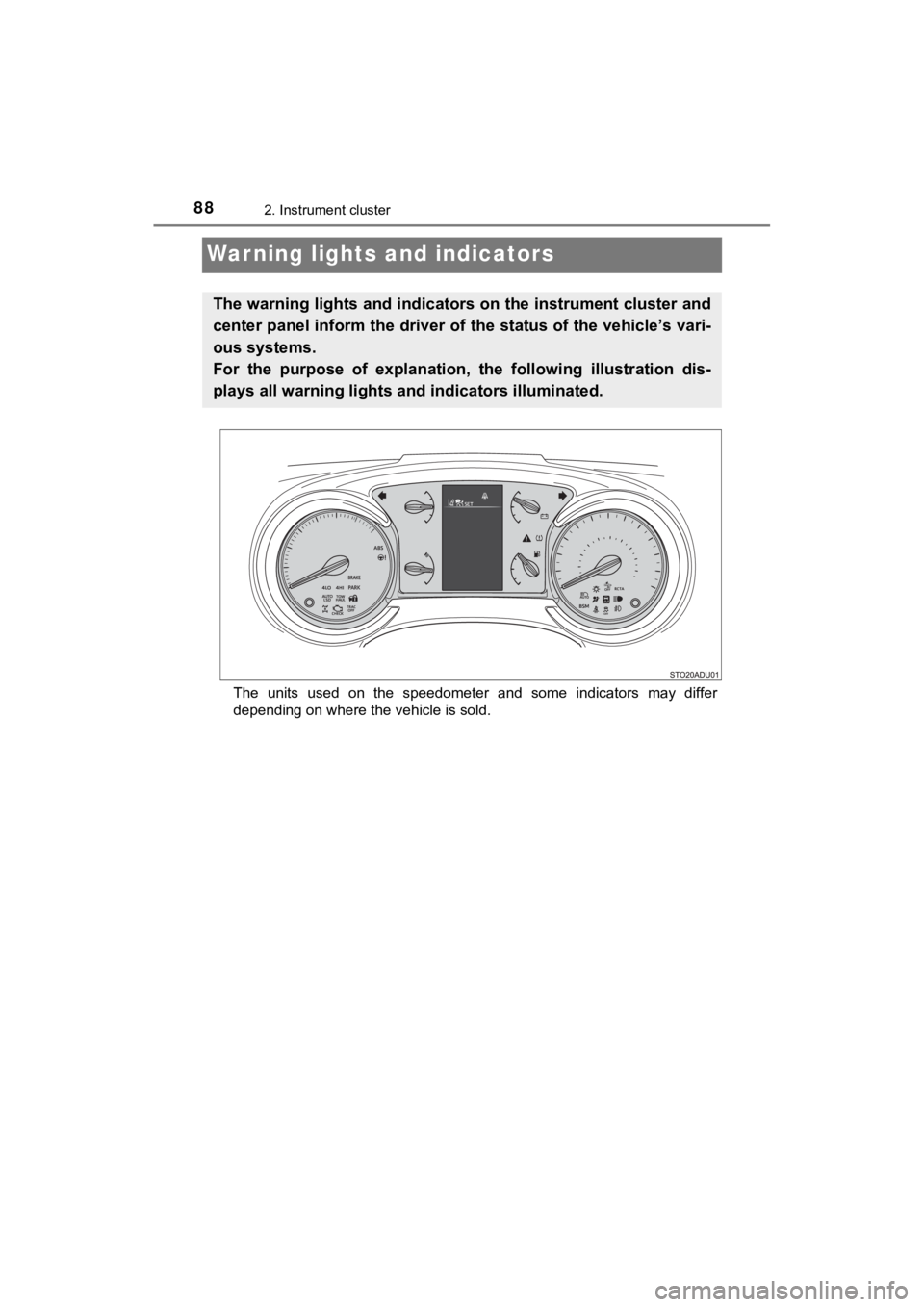
Warning lights and indicators
The units used on the speedometer and some indicators may differ
depending on where the vehicle is sold.
The warning lights and indicators on the instrument cluster and
center panel inform the driver of the status of the vehicle’s vari-
ous systems.
For the purpose of explanation, t he following illustration dis-
plays all warning lights a nd indicators illuminated.
Page 89 of 588
892. Instrument cluster
2
Instrument cluster
SEQUOIA_OM_USA_OM0C021U_20MY
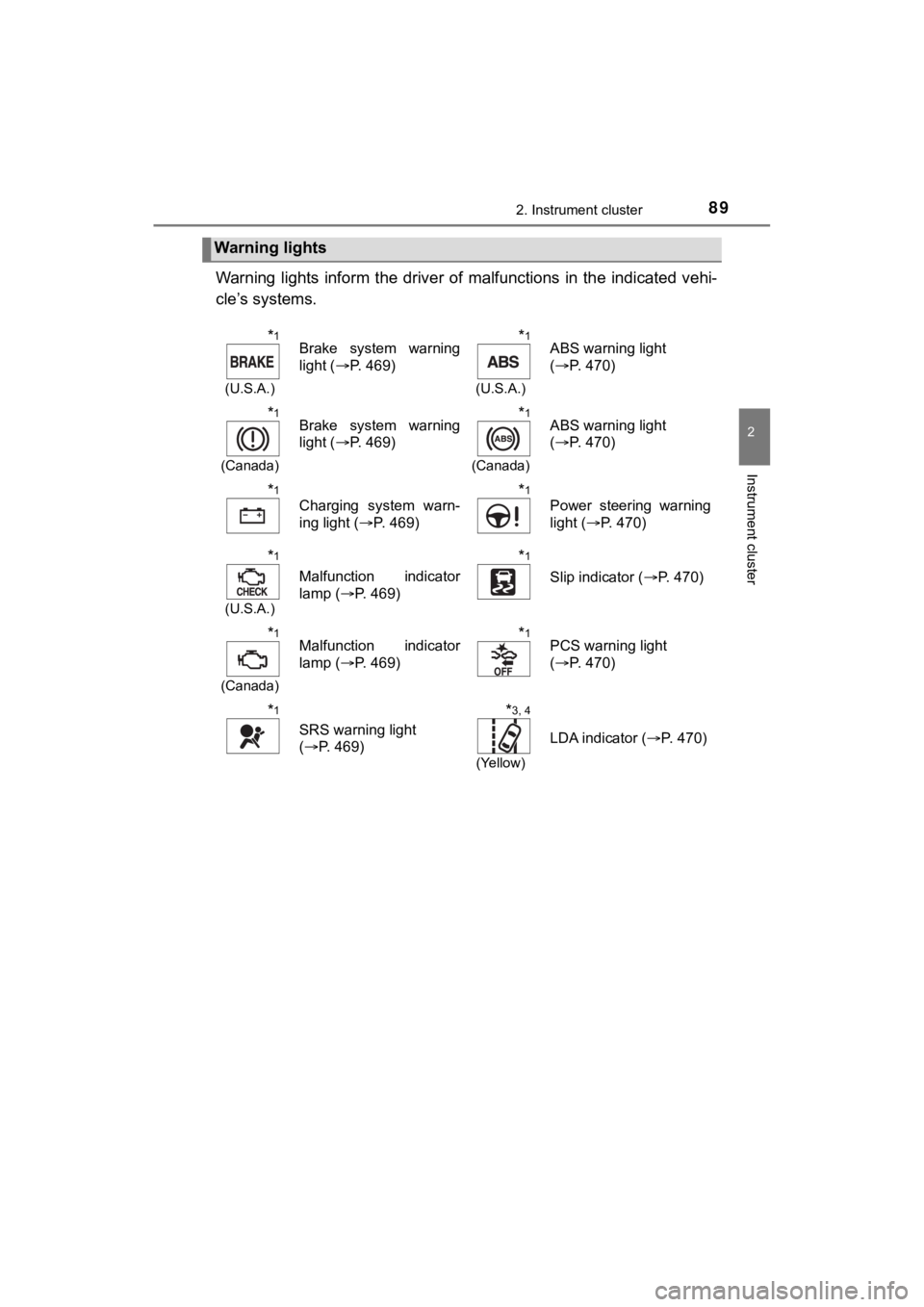
Warning lights inform the driver of malfunctions in the indicated vehi-
cle’s systems.
Warning lights
*1
(U.S.A.)
Brake system warning
light ( P. 469)*1
(U.S.A.)
ABS warning light
(P. 470)
*1
(Canada)
Brake system warning
light ( P. 469)*1
(Canada)
ABS warning light
(P. 470)
*1
Charging system warn-
ing light ( P. 469)*1
Power steering warning
light (P. 470)
*1
(U.S.A.)
Malfunction indicator
lamp ( P. 469)
*1
Slip indicator ( P. 470)
*1
(Canada)
Malfunction indicator
lamp (P. 469)*1PCS warning light
(P. 470)
*1
SRS warning light
(P. 469)
*3, 4
(Yellow)
LDA indicator ( P. 470)
Page 90 of 588
902. Instrument cluster
SEQUOIA_OM_USA_OM0C021U_20MY
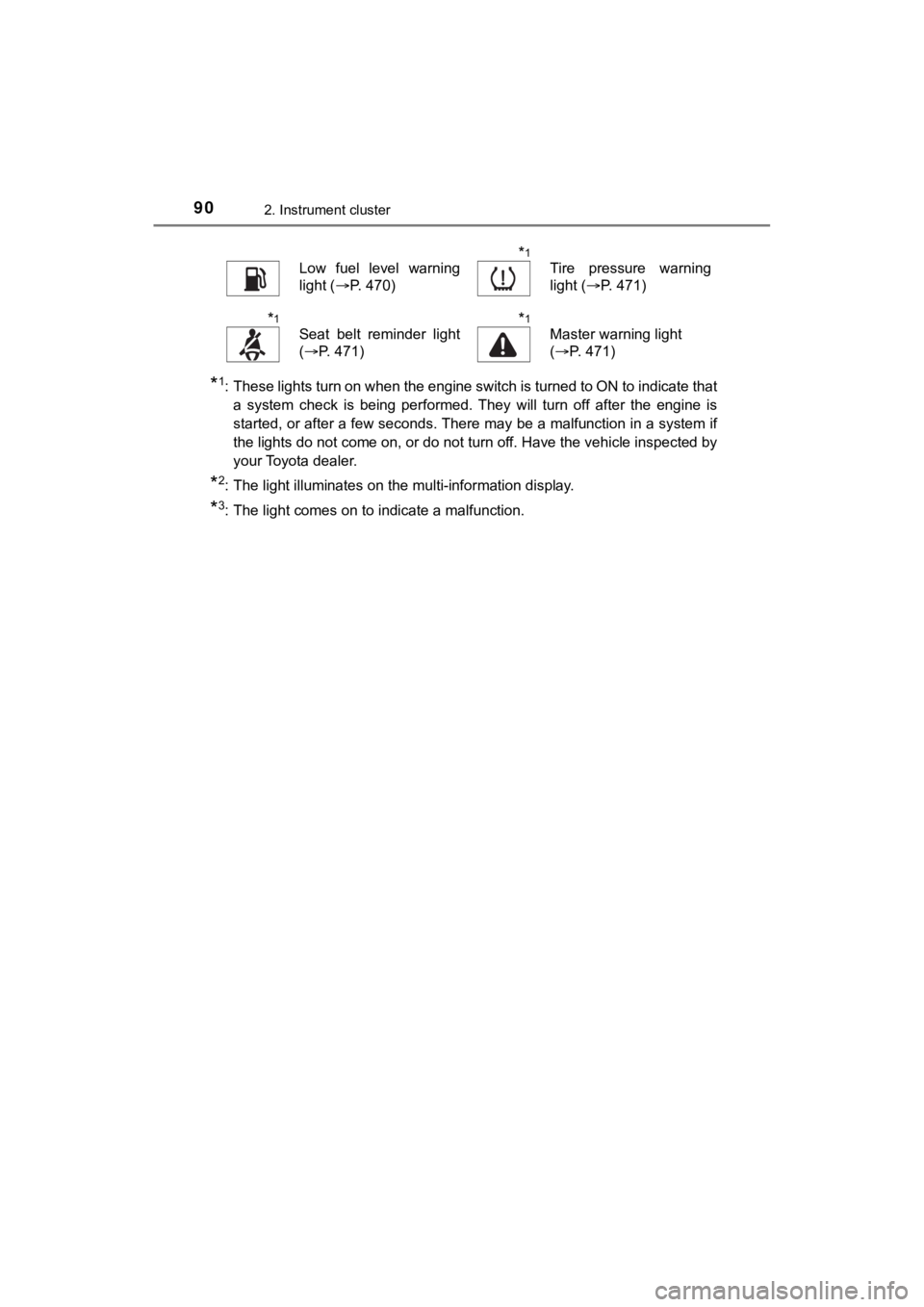
*1: These lights turn on when the engine switch is turned to ON to indicate thata system check is being performed. They will turn off after the engine is
started, or after a few seconds. There may be a malfunction in a system if
the lights do not come on, or do not turn off. Have the vehicle inspected by
your Toyota dealer.
*2: The light illuminates on the multi-information display.
*3: The light comes on to indicate a malfunction.
Low fuel level warning
light ( P. 470)*1
Tire pressure warning
light (P. 471)
*1
Seat belt reminder light
(P. 471)*1
Master warning light
(P. 471)
Page 212 of 588
2124-1. Before driving
SEQUOIA_OM_USA_OM0C021U_20MY
WARNING
■When towing a trailer
Toyota recommends trailers with brakes that conform to any appl icable fed-
eral and state/provincial regulations.
● If the gross trailer weight exceeds unbraked TWR, trailer brake s are
required. Toyota recommends trailers with brakes that conform t o all appli-
cable federal and state/provincial regulations.
● Never tap into your vehicle’s hydraulic system, as this will lo wer the vehi-
cle’s braking effectiveness.
● Never tow a trailer without using a safety chain securely attac hed to both
the trailer and the vehicle. If damage occurs to the coupling u nit or hitch
ball, there is danger of the trailer wandering into another lan e.
NOTICE
■When installing a trailer hitch
Use only the position recommended by your Toyota dealer. Do not install
the trailer hitch on the bumper; this may cause body damage.
■ Do not directly splice trailer lights
Do not directly splice trailer lights. Directly splicing traile r lights may damage
your vehicle’s electrical system and cause a malfunction.
Page 231 of 588
2314-3. Operating the lights and wipers
4
Driving
SEQUOIA_OM_USA_OM0C021U_20MY
Automatic High Beam
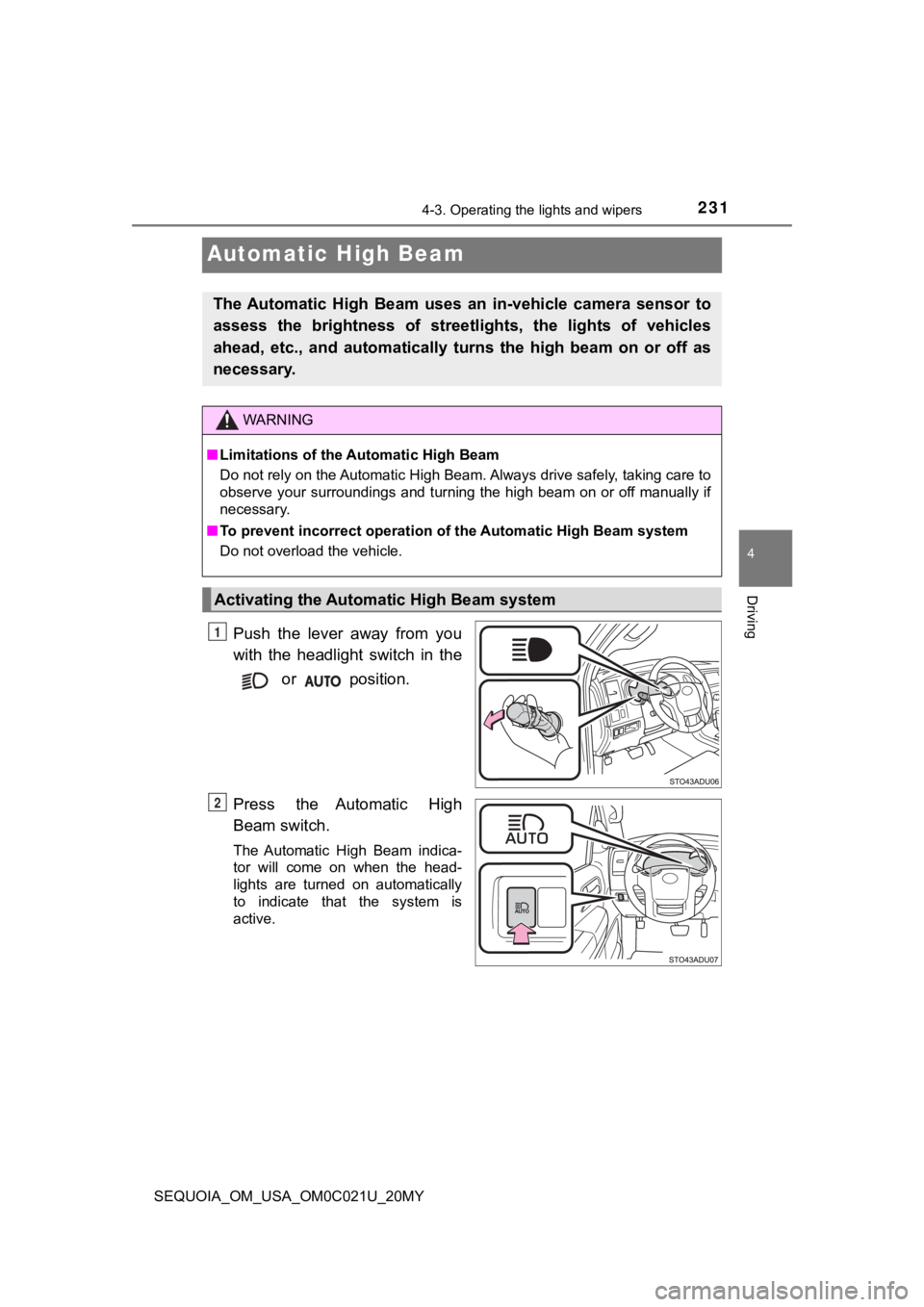
Push the lever away from you
with the headlight switch in the
or position.
Press the Automatic High
Beam switch.
The Automatic High Beam indica-
tor will come on when the head-
lights are turned on automatically
to indicate that the system is
active.
The Automatic High Beam uses an in-vehicle camera sensor to
assess the brightness of streetl ights, the lights of vehicles
ahead, etc., and automatically t urns the high beam on or off as
necessary.
WARNING
■ Limitations of the Automatic High Beam
Do not rely on the Automatic High Beam. Always drive safely, ta king care to
observe your surroundings and turning the high beam on or off m anually if
necessary.
■ To prevent incorrect operation o f the Automatic High Beam syste m
Do not overload the vehicle.
Activating the Automatic High Beam system
1
2
Page 240 of 588
2404-3. Operating the lights and wipers
SEQUOIA_OM_USA_OM0C021U_20MY
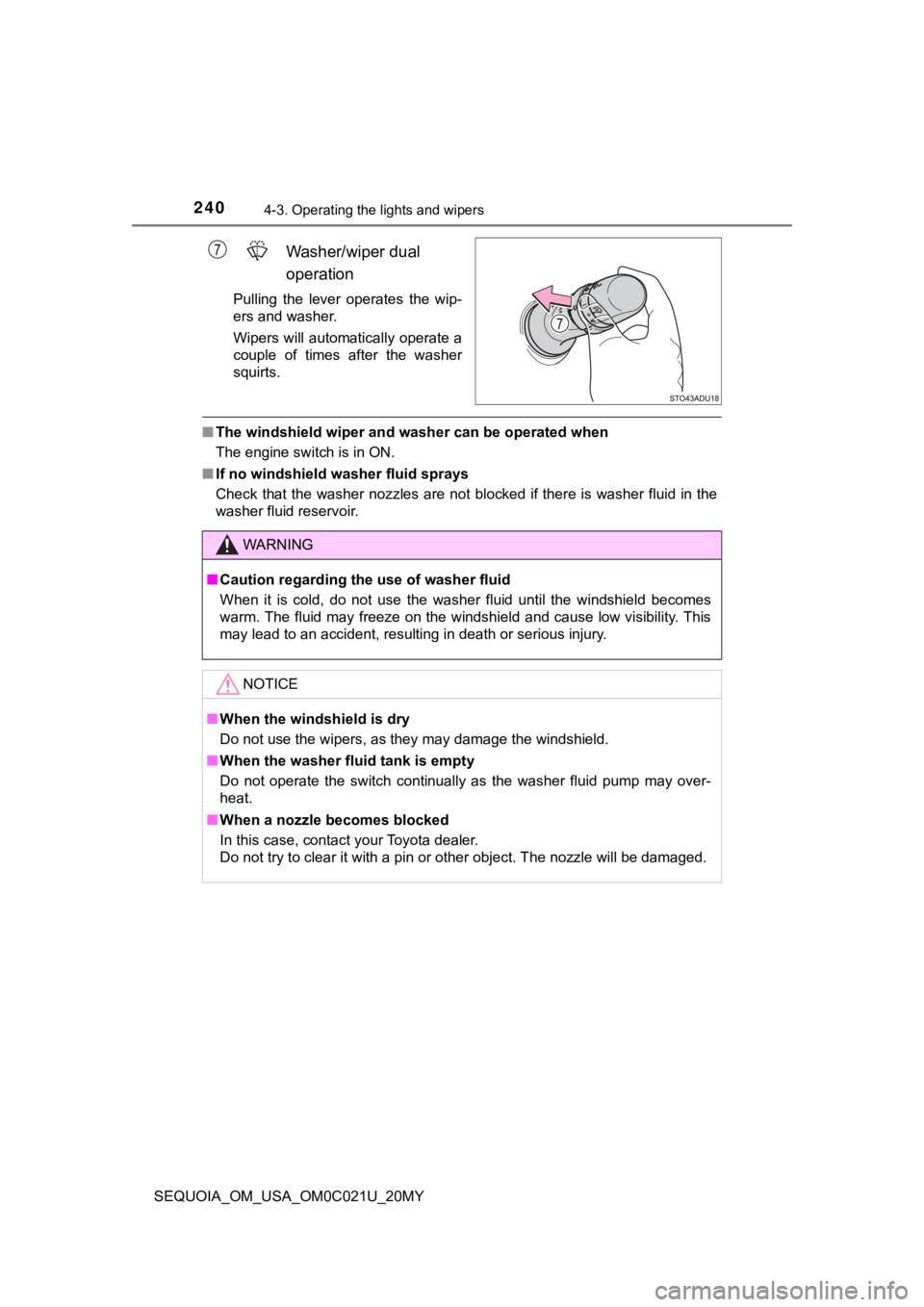
Washer/wiper dual
operation
Pulling the lever operates the wip-
ers and washer.
Wipers will automatically operate a
couple of times after the washer
squirts.
■The windshield wiper and washer can be operated when
The engine switch is in ON.
■ If no windshield washer fluid sprays
Check that the washer nozzles are not blocked if there is washe r fluid in the
washer fluid reservoir.
WARNING
■ Caution regarding the use of washer fluid
When it is cold, do not use the washer fluid until the windshie ld becomes
warm. The fluid may freeze on the windshield and cause low visi bility. This
may lead to an accident, resulting in death or serious injury.
NOTICE
■ When the windshield is dry
Do not use the wipers, as they may damage the windshield.
■ When the washer fluid tank is empty
Do not operate the switch continually as the washer fluid pump may over-
heat.
■ When a nozzle becomes blocked
In this case, contact your Toyota dealer.
Do not try to clear it with a pin or other object. The nozzle w ill be damaged.
Page 251 of 588
2514-5. Using the driving support systems
4
Driving
SEQUOIA_OM_USA_OM0C021U_20MY
WARNING
●If the part of the windshield in front of the camera sensor is fogged up or
covered with condensation or ice, use the windshield defogger t o remove
the fog, condensation or ice. ( P. 343)
● If water droplets cannot be properly removed from the area of t he wind-
shield in front of the camera sensor by the windshield wipers, replace the
wiper insert or wiper blade.
If the wiper inserts or wiper blades need to be replaced, contact your
Toyota dealer.
● Do not attach window tinting to the windshield.
● Replace the windshield if it is damaged or cracked.
If the windshield needs to be replaced, contact your Toyota dea ler.
● Do not get the camera sensor wet.
● Do not allow bright lights to shine into the camera sensor.
● Do not dirty or damage the camera sensor.
When cleaning the inside of the windshield, do not allow glass cleaner to
contact the lens. Also, do not touch the lens.
If the lens is dirty or damaged, contact your Toyota dealer.
● Do not subject the camera sensor to a strong impact.
● Do not change the installation position or direction of the cam era sensor or
remove it.
● Do not disassemble the camera sensor.
● Do not modify any components of the vehicle around the camera s ensor
(inside rear view mirror, etc.) or ceiling.
● Do not attach any accessories that may obstruct the camera sens or to the
hood, front grille or front bumper. Contact your Toyota dealer for details.
● If a surfboard or other long object is to be mounted on the roo f, make sure
that it will not obstruct the camera sensor.
● Do not modify the headlights or other lights.
Page 271 of 588
2714-5. Using the driving support systems
4
Driving
SEQUOIA_OM_USA_OM0C021U_20MY
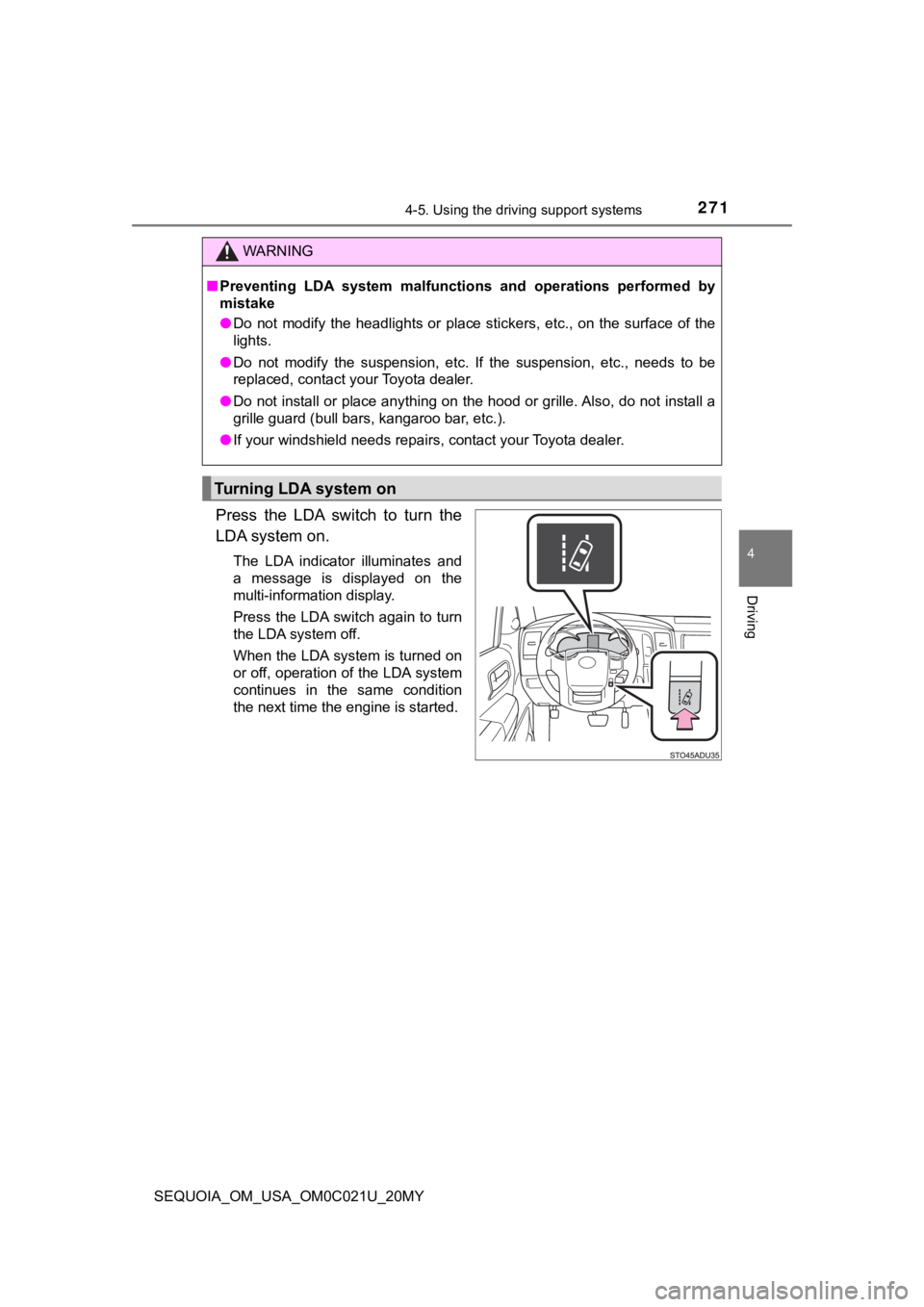
Press the LDA switch to turn the
LDA system on.
The LDA indicator illuminates and
a message is displayed on the
multi-information display.
Press the LDA switch again to turn
the LDA system off.
When the LDA system is turned on
or off, operation of the LDA system
continues in the same condition
the next time the engine is started.
WARNING
■Preventing LDA system malfunctio ns and operations performed by
mistake
● Do not modify the headlights or place stickers, etc., on the su rface of the
lights.
● Do not modify the suspension, etc. If the suspension, etc., needs to be
replaced, contact your Toyota dealer.
● Do not install or place anything on the hood or grille. Also, d o not install a
grille guard (bull bars, kangaroo bar, etc.).
● If your windshield needs repairs, contact your Toyota dealer.
Turning LDA system on
Page 280 of 588

2804-5. Using the driving support systems
SEQUOIA_OM_USA_OM0C021U_20MY
Example of constant speed cruising
When there are no vehicles ahead
The vehicle travels at the speed set by the driver. The desired vehicle-to-
vehicle distance can also be set by operating the vehicle-to-ve hicle dis-
tance switch.
Example of deceleration crui sing and follow-up cruising
When a preceding vehicle driving slower than the set speed
appears
When a vehicle is detected running ahead of you, the system automatically
decelerates your vehicle. When a greater reduction in vehicle s peed is
necessary, the system applies the brakes (the stop lights will come on at
this time). The system will respond to changes in the speed of the vehicle
ahead in order to maintain the vehicle-to-vehicle distance set by the driver.
Approach warning warns you when the system cannot decelerate su ffi-
ciently to prevent your vehicle fr om closing in on the vehicle ahead.
Example of acceleration
When there are no longer any preceding vehicles driving slower
than the set speed
The system accelerates until the set speed is reached. The syst em then
returns to constant speed cruising.
Page 428 of 588
4286-3. Do-it-yourself maintenance
SEQUOIA_OM_USA_OM0C021U_20MY
Drive straight (with occasional left and right turns) at approxi-
mately 25 mph (40 km/h) or more for approximately 10 to 30 min-
utes.
Initialization is complete when the position of each tire is determined
and the inflation pressure of ea ch tire is displayed on the multi-infor-
mation display.
Initialization may take longer than approximately 30 minutes in cer-
tain situations, such as when the vehicle is stopped for a long time at
traffic lights, etc. ( P. 432)
◆Registering ID codes
Every tire pressure warning valve and transmitter has a unique ID
code. When replacing a tire pressure warning valve and transmit ter,
it is necessary to register the ID codes.
To register the ID codes, perf orm the following procedure:
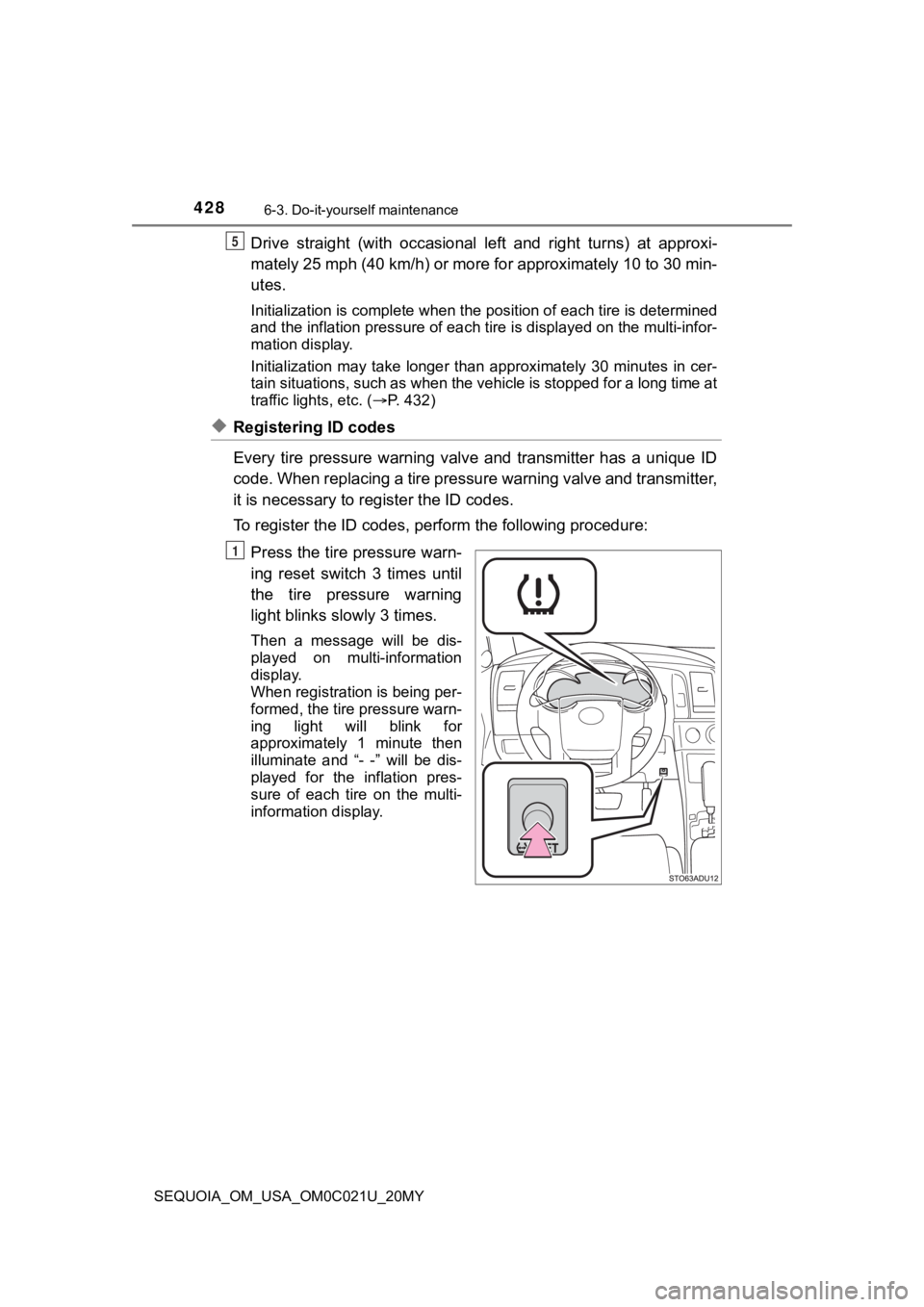
Press the tire pressure warn-
ing reset switch 3 times until
the tire pressure warning
light blinks slowly 3 times.
Then a message will be dis-
played on multi-information
display.
When registration is being per-
formed, the tire pressure warn-
ing light will blink for
approximately 1 minute then
illuminate and “- -” will be dis-
played for the inflation pres-
sure of each tire on the multi-
information display.
5
1