air conditioning TOYOTA SEQUOIA 2020 Owners Manual (in English)
[x] Cancel search | Manufacturer: TOYOTA, Model Year: 2020, Model line: SEQUOIA, Model: TOYOTA SEQUOIA 2020Pages: 588, PDF Size: 12.33 MB
Page 4 of 588

TABLE OF CONTENTS4
SEQUOIA_OM_USA_OM0C021U_20MY5-1. Using the air conditioning
system and defogger
Front air conditioning system............................. 340
Rear air conditioning system............................. 348
Seat heaters/ seat ventilators ................ 352
5-2. Using the interior lights Interior lights list ................ 355
• Personal/interior light main switch ................... 356
• Personal/interior lights ............................. 357
• Interior light ................... 358
5-3. Using the storage features
List of storage features...... 359
• Glove boxes .................. 360
• Front console box ......... 361
• Card holder ................... 362
• Map holder (center console) ............ 363
• Rear console box .......... 363
• Overhead console ......... 365
• Cup holders .................. 366
• Bottle holders ................ 369
• Auxiliary boxes .............. 370
Luggage compartment features ........................... 371 5-4. Other interior features
Other interior features........ 375
• Sun visors ..................... 375
• Vanity mirrors ................ 376
• Power outlets ................ 377
• USB charging ports ....... 380
• Armrest (second seats)............... 382
• Rear side sunshades .... 383
• Assist grips .................... 384
Garage door opener .......... 385
Compass ........................... 393
5Interior features
Page 5 of 588
5
1
8 7
6
5
4
3
2
9
SEQUOIA_OM_USA_OM0C021U_20MY6-1. Maintenance and care
Cleaning and protecting the vehicle exterior .......... 398
Cleaning and protecting the vehicle interior ........... 401
6-2. Maintenance Maintenance requirements ................... 404
General maintenance ........ 406
Emission inspection and maintenance (I/M)
programs ......................... 409
6-3. Do-it-yourself maintenance
Do-it-yourself service precautions ..................... 410
Hood.................................. 413
Engine compartment ......... 414
Tires .................................. 425
Tire inflation pressure........ 436
Wheels .............................. 439
Air conditioning filter .......... 442
Electronic key battery ........ 444
Checking and replacing fuses ............................... 446
Light bulbs ......................... 449 7-1. Essential information
Emergency flashers ........... 458
If your vehicle has to be stopped in an
emergency....................... 459
If the vehicle is trapped in rising water .................. 461
7-2. Steps to take in an emergency
If your vehicle needs to be towed .......................... 462
If you think something is wrong............................... 467
Fuel pump shut off system ............................. 468
If a warning light turns on or a warning buzzer
sounds ............................. 469
If a warning message is displayed ......................... 477
If you have a flat tire .......... 489
If the engine will not start ................................. 503
If the electronic key does not operate properly ........ 505
If the vehicle battery is discharged ....................... 507
If your vehicle overheats.... 511
If the vehicle becomes stuck ................................ 514
6Maintenance and care7When trouble arises
Page 19 of 588
19Pictorial index
SEQUOIA_OM_USA_OM0C021U_20MYMulti-information display . . . . . . . . . . . . . . . . . . . . . . . . . . . . P. 98
Display . . . . . . . . . . . . . . . . . . . . . . . . . . . . . . . . . . . . . . . . . . . . P. 98
When the warning messages are displayed . . . . . . . . . . . . . . P. 477
Parking brake pedal. . . . . . . . . . . . . . . . . . . . . .
. . . . . . . . . . P. 226
Applying/releasing . . . . . . . . . . . . . . . . . . . . . . . . . . . . . . . . . . P. 226
Precautions against winter season . . . . . . . . . . . . . . . . . . . . . P. 335
Warning buzzer/message . . . . . . . . . . . . . . . . . . . . . . . . . . . . P. 480
Turn signal lever . . . . . . . . . . . . . . . . . . . . . . . . . . . . . . . . . . P. 225
Headlight switch . . . . . . . . . . . . . . . . . . . . . . . . . . . . . . . . . . P. 227
Headlights/parking lights/side marker lights/tail lights/
daytime running lights . . . . . . . . . . . . . . . . . . . . . . . . . . . . . . . P. 227
Fog lights . . . . . . . . . . . . . . . . . . . . . . . . . . . . . . . . . . . . . . . . . P. 236
Windshield wipers and washer switch . . . . . . . . . . . . . . . . P. 238
Rear window wiper and washer switch . . . . . . . . . . . . . . . . P. 241
Usage . . . . . . . . . . . . . . . . . . . . . . . . . . . . . . . . . . . . . . . P. 238, 241
Adding washer fluid . . . . . . . . . . . . . . . . . . . . . . . . . . . . . . . . . P. 424
Warning message . . . . . . . . . . . . . . . . . . . . . . . . . . . . . . . . . . P. 481
Emergency flasher switch . . . . . . . . . . . . . . . . . . . . . . . . . . P. 458
Hood lock release lever. . . . . . . . . . . . . . . . . . . . . . . . . . . . . P. 413
Tilt and telescopic steering lock release lever
*1 . . . . . . . . P. 156
Tilt and telescopic steering control switch
*1 . . . . . . . . . . . P. 156
Adjustment . . . . . . . . . . . . . . . . . . . . . . . . . . . . . . . . . . . . . . . . P. 156
Driving position memory . . . . . . . . . . . . . . . . . . . . . . . . . . . . . P. 149
Front air conditioning system . . . . . . . . . . . . . . . . . . . . . . . P. 340
Usage . . . . . . . . . . . . . . . . . . . . . . . . . . . . . . . . . . . . . . . . . . . P. 340
Rear window defogger . . . . . . . . . . . . . . . . . . . . . . . . . . . . . . . P. 343
Multimedia system
*2
*1: If equipped
*2: Refer to “NAVIGATION AND MULT IMEDIA SYSTEM OWNER’S MANUAL”.
Page 294 of 588

2944-5. Using the driving support systems
SEQUOIA_OM_USA_OM0C021U_20MY●
The shape of an object may prevent the sensor from detecting it. Pay partic-
ular attention to the following:
• Wires, fences, ropes, etc.
• Cotton, snow and other materials that absorb sound waves
• Sharply-angled objects
• Low objects
• Tall objects with upper sections projecting outwards in the direction of
your vehicle
• People, animals and other moving objects
• People wearing certain types of clothing
● The following situations may occur when using the intuitive parking assist.
• Depending on the shape of the object and other factors, the de tection dis-
tance may be shortened, or detection may not be possible.
• Objects may not be detected if they are too close to a sensor.
• There will be a short delay between the detection of an object and display
of the detection. Even at slow speeds, there is a possibility t hat the object
will come within a sensor’s detection area before the display i s shown
and a warning beep sounds.
• Thin posts or objects lower than a sensor may not be detected when
approached, even if they have been detected once.
• It might be difficult to hear beeps due to the volume of the a udio system
or air flow noise of the air conditioning system.
■ If a message is displayed on th e multi-information display
P. 477
■ Customization that can be configured at Toyota dealer
Settings (e.g. buzzer volume) can be changed.
(Customizable features P. 544)
■ Certification (Canada only)
This ISM device complies with Canadian ICES-001.
Page 339 of 588

339
Interior features5
SEQUOIA_OM_USA_OM0C021U_20MY5-1. Using the
air conditioning system
and defogger
Front air conditioning system............................. 340
Rear air conditioning system............................. 348
Seat heaters/ seat ventilators ................ 352
5-2. Using the interior lights Interior lights list ................ 355
• Personal/interior light main switch ................... 356
• Personal/interior lights ............................. 357
• Interior light ................... 358
5-3. Using the storage features
List of storage features ..... 359
• Glove boxes .................. 360
• Front console box ......... 361
• Card holder ................... 362
• Map holder (center console) ............ 363
• Rear console box .......... 363
• Overhead console......... 365
• Cup holders .................. 366
• Bottle holders ................ 369
• Auxiliary boxes.............. 370
Luggage compartment features ........................... 371 5-4. Other interior features
Other interior features ....... 375
• Sun visors ..................... 375
• Vanity mirrors................ 376
• Power outlets ................ 377
• USB charging ports....... 380
• Armrest (second seats) .............. 382
• Rear side sunshades .... 383
• Assist grips ................... 384
Garage door opener.......... 385
Compass ........................... 393
Page 340 of 588

3405-1. Using the air conditioning system and defogger
SEQUOIA_OM_USA_OM0C021U_20MY
Front air conditioning system
■Adjusting the temperature setting
Turn the temperature control
dial. (“SYNC” mode: P. 342)
Increases the temperature
Decreases the temperature
Air outlets and fan speed are automatically adjusted according
to the temperature setting.
Air conditioning controls
Page 341 of 588
3415-1. Using the air conditioning system and defogger
5
Interior features
SEQUOIA_OM_USA_OM0C021U_20MY■
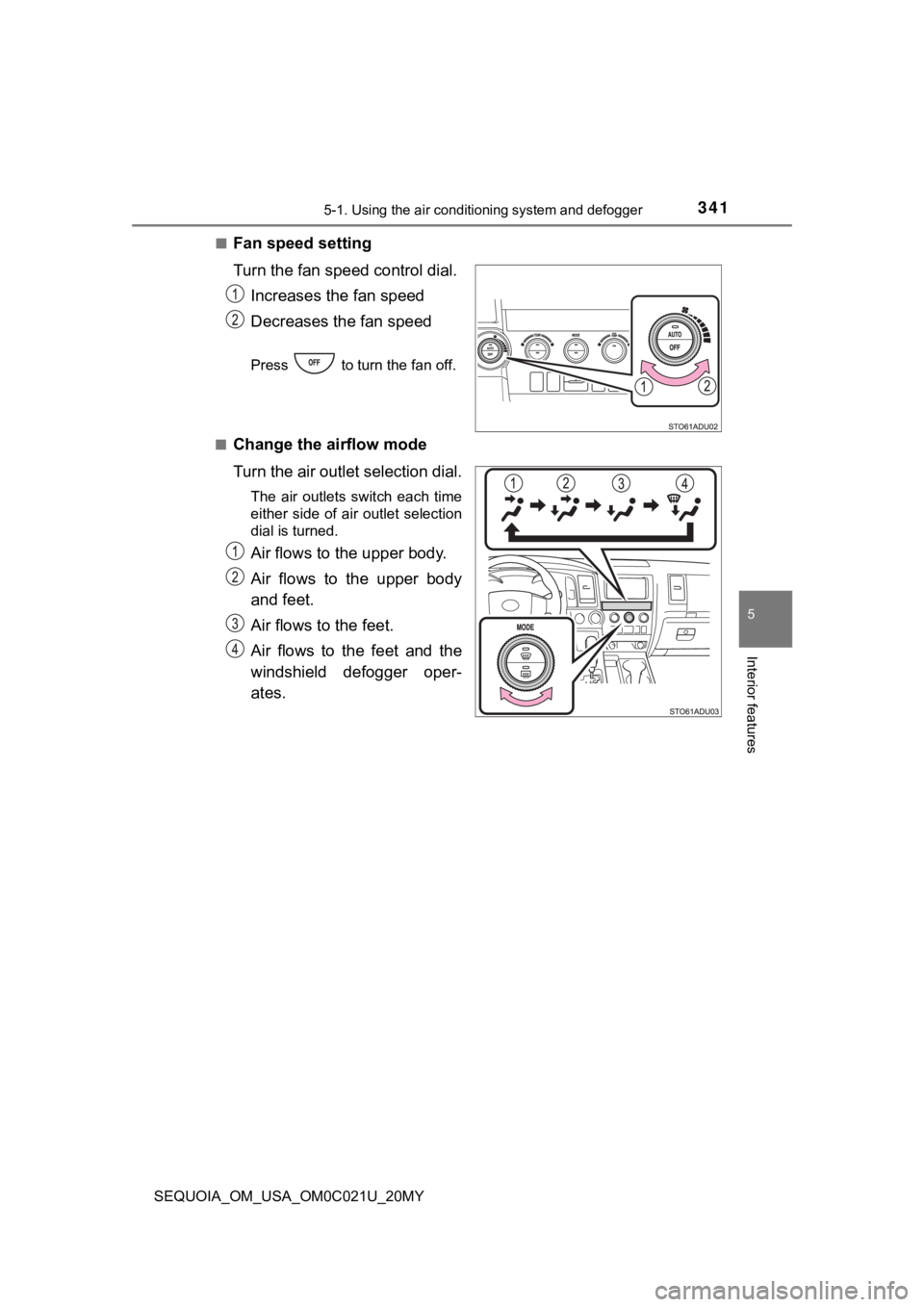
Fan speed setting
Turn the fan speed
control dial.
Increases the fan speed
Decreases the fan speed
Press to turn the fan off.
■
Change the airflow mode
Turn the air outlet selection dial.
The air outlets switch each time
either side of air outlet selection
dial is turned.
Air flows to the upper body.
Air flows to the upper body
and feet.
Air flows to the feet.
Air flows to the feet and the
windshield defogger oper-
ates.
Page 342 of 588
3425-1. Using the air conditioning system and defogger
SEQUOIA_OM_USA_OM0C021U_20MY
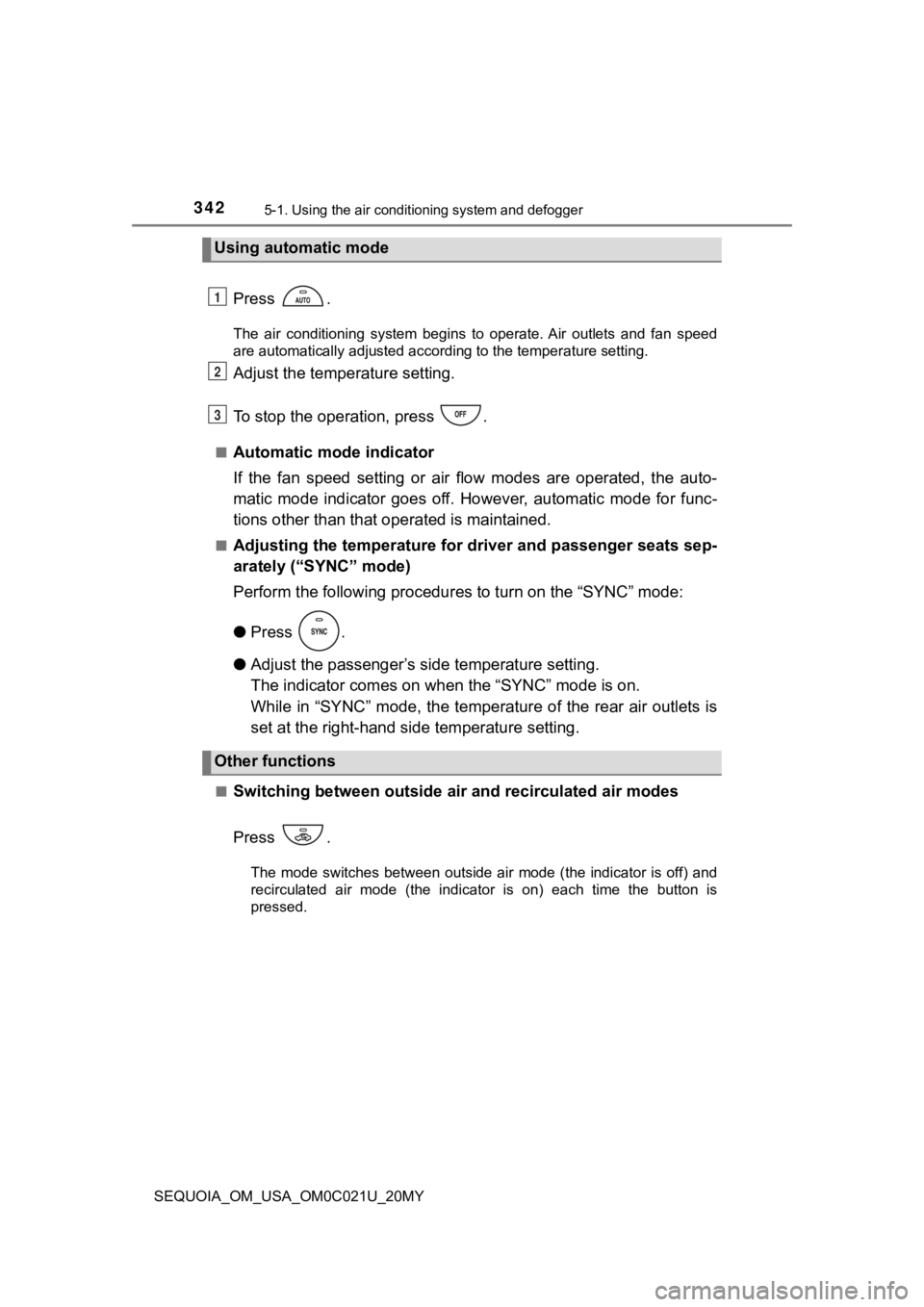
Press .
The air conditioning system begins to operate. Air outlets and fan speed
are automatically adjusted according to the temperature setting .
Adjust the temperature setting.
To stop the operation, press .
■Automatic mode indicator
If the fan speed setting or air flow modes are operated, the au to-
matic mode indicator goes off. However, automatic mode for func -
tions other than that o perated is maintained.
■Adjusting the temperature for driver and passenger seats sep-
arately (“SYNC” mode)
Perform the following procedures to turn on the “SYNC” mode:
●Press .
● Adjust the passenger’s side temperature setting.
The indicator comes on w hen the “SYNC” mode is on.
While in “SYNC” mode, the temperature of the rear air outlets i s
set at the right-hand side temperature setting.
■Switching between outside air and recirculated air modes
Press .
The mode switches between outside air mode (the indicator is of f) and
recirculated air mode (the indicator is on) each time the butto n is
pressed.
Using automatic mode
Other functions
1
2
3
Page 343 of 588
3435-1. Using the air conditioning system and defogger
5
Interior features
SEQUOIA_OM_USA_OM0C021U_20MY■
Defogging the windshield
Defoggers are used to defog the windshield and front side win-
dows.
Press .
The dehumidification function operates and fan speed increases.
Set the outside/recirculated air mode button to the outside air mode if
the recirculated air mode is used. (It may switch automatically .)
To defog the windshield and the side windows early, turn the ai r flow and
temperature up.
To return to the previous mode, press again when the windshiel d
is defogged.
■
Defogging the rear window and outside rear view mirrors (if
equipped)
Defoggers are used to defog the rear window, and to remove rain -
drops, dew and frost from the outside rear view mirrors.
Before operating the defoggers, make sure the back window is
completely closed. ( P. 168)
Press
.
The defoggers will automatically turn off after their operation time. The
operation time varies depending on the ambient temperature and vehi-
cle speed.
■
Windshield wiper de -icer (if equipped)
This feature is used to prevent ice from building up on the win d-
shield and wiper blades.
Press .
The windshield wiper de-icer will automatically turn off after their opera-
tion time. The operation time varies depending on the ambient t empera-
ture and vehicle speed.
Page 344 of 588
3445-1. Using the air conditioning system and defogger
SEQUOIA_OM_USA_OM0C021U_20MY■
Adjusting the temperature setting
Press .
Press to increase the temperature and to decrease
it.
The air conditioning system switches between individual and simultane-
ous modes each time is pressed.
■
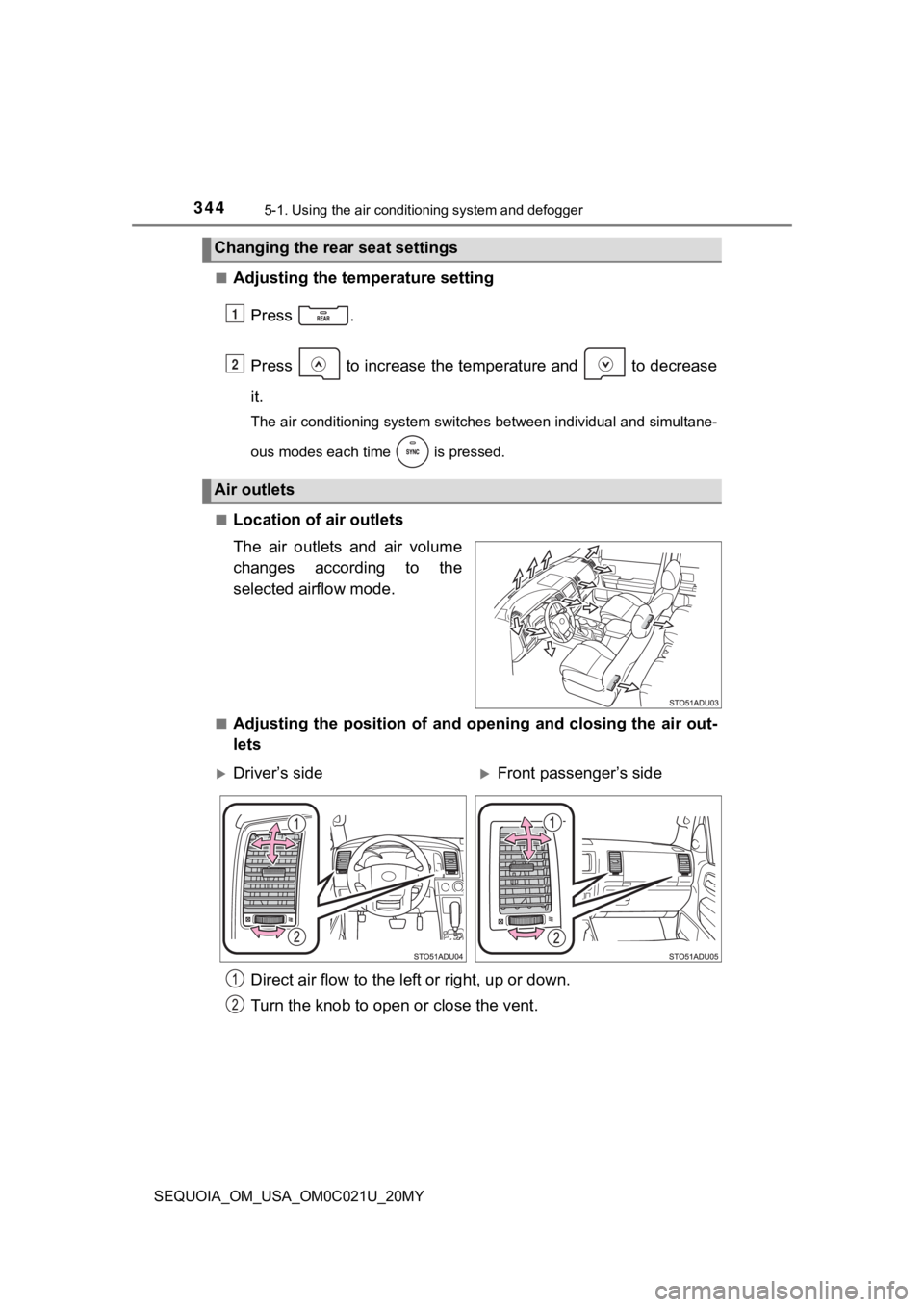
Location of a ir outlets
The air outlets and air volume
changes according to the
selected airflow mode.
■Adjusting the position of and opening and closing the air out-
lets
Changing the rear seat settings
Air outlets
1
2
Driver’s sideFront passenger’s side
Direct air flow to the le ft or right, up or down.
Turn the knob to open o r close the vent.